Add a configurable image recognition model to DSH's text-only main model: automatically convert images sent in chat to text, while keeping the original multimodal model unchanged.

- Language
- JavaScript
- License
- MIT
- Branch
- main
Install
$ dsh plugin --profile web add github:poiuyjie/dsh-vision-opencodeRun the command above in your terminal to install this plugin via the dsh CLI. You can switch Profile in the top-right corner. New to dsh? Read the beginner tutorial
Install via your agent
Install the DeepSeek Harness plugin poiuyjie/dsh-vision-opencode for me: review the repository at https://github.com/poiuyjie/dsh-vision-opencode first, then run the install command and verify the plugin loads successfully.
Paste this instruction to the DSH Web GUI assistant — it will install and verify for you.
One-Line Description
Equip DSH's pure text main model with a separate vision recognition model: images sent in chat are first "translated" by the vision model into text descriptions, then passed to the main model, so the main model can "see" images without switching; native multimodal main models follow the DSH native pipeline completely and won't be interfered with by the plugin.
Core Capabilities
- Automatic chat image-to-text conversion: Pure text main models can also "see" images—images are analyzed by the vision model into "image content analysis" text and injected into context, while the original image remains in the conversation history (visible in UI)
- Native multimodal model auto-pass-through: Plugin uses
resolveModelInfoto real-time identify image input capability of the routed model; main models with built-in image capability fully retain DSH's native image pipeline vision_read_imagetool: Models can explicitly call it to directly read, analyze, and return text from PNG/JPEG/WebP/GIF paths (OCR, charts, screenshots scenarios)- "Vision Model" dropdown on right side of input box + Settings → Vision: Automatically lists all image-input-capable models from all providers; can set "disable thinking/force disable" and other reasoning strategies
- Built-in fallback: Vision failure → 60s timeout → 1 retry attempt → degrade to placeholder text on retry exhaustion; main model turns won't be dragged down by vision failures
- Old version modelOverrides auto-restore: For llm-pi-ai image gates written before upgrade, plugin precisely restores them on first startup based on built-in
gateStateownership records
Technical Implementation
- Language: JavaScript (ESM, type: module)
- Key Dependencies:
@deepseek-ai/dsh-llm(BlockAssembler / createUserMessage / freezeMessage),@deepseek-ai/dsh-tools(defineTool),@deepseek-ai/dsh-settings(settingsNamespace),@deepseek-ai/schemastery(runtime validation) - Architecture Pattern: Cordis plugin; backend
index.jsintercepts image-containing requests viactx.on('llm/stream'), usesSymbol('vision-bypass')to short-circuit self-recursion, usestools.guardto reject built-inread_imagefrom injecting real images onto pure text main models; frontendclient.jsinjects React component intoconversation.input.rightslot viawindow.__ModuleLoader__.load;core.jsexposes pure functions for host/client reuse - Entry Files:
index.js(backend, injects llm/stream / tools / settings / webServer),client.js(frontend, model selector recognition + settings page),core.js(image counting, replacement, model info compatibility layer)
Use Cases
When you're using DSH with a pure text main model (e.g., early DeepSeek series, open-source Qwen2.5, etc.) but want to directly send screenshots, menu screenshots, and charts in chat for the AI to see—this plugin lets you keep the main model as pure text while still "seeing" images. Any model from any provider that supports image input can be designated as an auxiliary vision recognition model; combined with "force disable thinking," you can also save first token latency. If your main model is already native multimodal (e.g., Vision series), this plugin does nothing—the native pipeline takes effect directly.
Prerequisites and Compatibility
| Dependency | Min Version | Description |
|---|---|---|
| DSH (includes dsh-llm / dsh-tools / dsh-settings) | >=0.1.0-rc.6 <0.2.0 | peerDependencies range, 4 DSH core packages in same range |
| @deepseek-ai/dsh-skill | Same as above | Optional; missing only skips skill registration, tools and auto-conversion still usable |
| @deepseek-ai/schemastery | Any | Runtime config validation |
| Node.js | >=20.3 | Only relies on partial await / AbortSignal.any and other ES2022 features |
| Platform | DSH Web Client | dsh.client.platform: "web", CLI / desktop has no HTTP endpoints and SSE progress |
| Native Modules | None | Pure JS implementation, no node-pty / sqlite / native addons |
Installation
dsh plugin --profile web add github:poiuyjie/dsh-vision-opencode
Alternatively, you can use scripts/install.sh (Ubuntu one-click script, supports --vision-provider / --vision-model / --proxy and other parameters) or scripts/install.ps1 (Windows script). After installation, restart dsh and hard refresh the browser (Ctrl+Shift+R); a "Vision Model" dropdown will appear on the right side of the input box.
Configuration Options
| Config | Type | Description | Default |
|---|---|---|---|
vision-opencode.provider | String | Vision model provider routing id (e.g., opencode-go, my-custom) | Empty |
vision-opencode.model | String | Vision model id | Empty |
vision-opencode.visionModels | Array | Plugin-managed vision model list (includes id / provider / model / name / description / baseUrl / requestFormat / reasoning), decoupled from host provider directory | [] |
vision-opencode.autoConvert | Boolean | Chat image auto-conversion toggle; after turning off, only tool and selector remain | true |
vision-opencode.visionReasoning | Boolean | Whether to enable thinking during image recognition (true=follow provider default; false=thinking off by default) | false |
vision-opencode.apiKey | String (hidden) | API Key used when directly connecting to gateway (opencode-go) in force-disable mode; if empty, reads OPENCODE_GO_API_KEY environment variable | Empty |
vision-opencode.mainProvider | String | Old version/manual compatible main model provider; current version usually auto-identified via adapter capability | Empty |
vision-opencode.mainModels | Array | Compatible main model list for above | [] |
vision-opencode.ignoredModels | Array | List of "unimported system models" actively dismissed by user in settings page, persisted to avoid re-prompting on next restart | [] |
vision-opencode.gateState | String (hidden) | Old version modelOverrides ownership record (base64url), used for precise restoration during uninstall | Empty |
Settings page (Settings → Vision) automatically generates form based on above schema; also supports direct editing of ~/.dsh/settings.yaml.
FAQ
Q: Do I have to pick a vision model after installing?
A: Strongly recommended. Pick one in Settings → Vision or the dropdown on the right side of the input box; when nothing is picked, the plugin uses placeholder text to prompt "Vision model not configured," and the main model can still answer normally but can't see the image—this is like "half-installed."
Q: Can I just turn off auto-conversion and keep the tool and selector?
A: Yes. In ~/.dsh/settings.yaml, change vision-opencode.autoConvert to false and restart dsh; the vision_read_image tool and the vision model dropdown on the right side of input box will still be there; only the chat image auto-conversion pipeline is disabled.
Q: Image conversion fails / selector doesn't appear—what to do?
A: 90% likely the vision model isn't selected, or the selected id isn't recognized as a multimodal model by the plugin. First check that both provider and model fields are filled in settings, then open browser developer tools to check Console for errors, finally go to plugin repo issue section to paste logs and ask.
Q: Will switching to a native multimodal main model (e.g., one with image input) be affected?
A: No. The plugin hooks resolveModelInfo; when it detects the current route natively supports images (inputModalities includes image), it directly passes through, following DSH's native image pipeline—it won't be intercepted for reconversion.
Q: Does "disable thinking" really save anything?
A: It depends on whether the provider really has a disable slot declared for that model. Very few models have a true "disable" slot (like hy3 off:"none"); most models can only try three wire parameters in "force disable" slot order: thinking:{type:disabled} / reasoning_effort:"none" / enable_thinking:false. The plugin tries them one by one and remembers which one marks that provider as 0 reasoning_tokens for reuse, but can't guarantee every provider can actually disable it.
Q: What should I note before uninstalling?
A: First back up conversations containing images. After uninstall, image assistant analysis in old conversations will be cleared—the pure text main model won't be able to get those analysis results after restart; if you don't resend the images, the model won't know what those images originally were.
Q: What image formats are supported?
A: PNG / JPEG / WebP / GIF four formats. Both vision_read_image tool and chat image sending use this same whitelist; other formats are rejected at the attachments service layer.
Q: Can I use it on DSH CLI / desktop?
A: No. The repo explicitly declares dsh.client.platform as "web" in package.json; HTTP endpoints (/vision-opencode/config, etc.), SSE progress push (/vision-opencode/events), settings panel, and React components are all bound to the DSH Web client.
Difficulty Level
Beginner — One command to install, restart DSH, refresh browser, then just pick a vision model from the dropdown on the right side of the input box; when you want full customization, go to Settings → Vision to adjust the schema form.
Known Issues and Limitations
- "Disable thinking" relies on provider directory / adapter metadata: The plugin tries to distinguish "truly declared off" from "undeclared (only returns thinking slot)", but when pi-ai forms change (JSON file vs module export), it may trigger warn logs and fall back to adapter face value (
index.js:594); force disable tries three parameters via direct gateway connection, can't guarantee every provider can really disable - If main model is not
dsh-llm-pi-aiadapter (typical likedsh-llm-deepseek): Plugin warns and skips image submission gate compatibility layer installation (index.js:229); image submission on such main models may still be directly rejected by DSH - 60s forced timeout + 1 retry (
index.js:508-512): Very long OCR or large chart recognition may be interrupted; current built-inattachments.imageLimitsdetermines image pixel upper limit (index.js:1746-1764); large images are first cropped at service layer - Built-in
read_imagetool is forcibly intercepted on pure text main models (index.js:251-265): Returned "tool results" guide the model to usevision_read_image, but if the model insists on calling it, it keeps receiving "blocked" prompts instead of real images - Old version (≤0.3.2) wrote
llm-pi-ai.modelOverrides: On upgrade, plugin precisely restores usinggateStateownership records; if restore fails, keepsgateStatewaiting for next restart retry (index.js:458-462) - Uninstall goes through
POST /vision-opencode/uninstall(needsX-Vision-Opencode-Action: uninstallcustom header): Only cleans up this plugin's settings and old modelOverrides; DSH's own dependencies, profile directory, andinsertentries in cordis.patch.yml need manual uninstall (index.js:1671-1674) - Only supports DSH Web client:
dsh.client.platform: "web"explicitly declared inpackage.json:49; CLI / desktop / mobile and other hosts have no corresponding bundle - Cross-version compatibility: When DSH upgrades and changes hash prefix, frontend components can automatically adapt by scanning
document.styleSheets(client.js:63-105), but if official React slot names change, components may need to relocate injection position
DeepSeek 不认图?OpenCode 多模态平替方案:给纯文本主模型加一个可配置的识图模型。
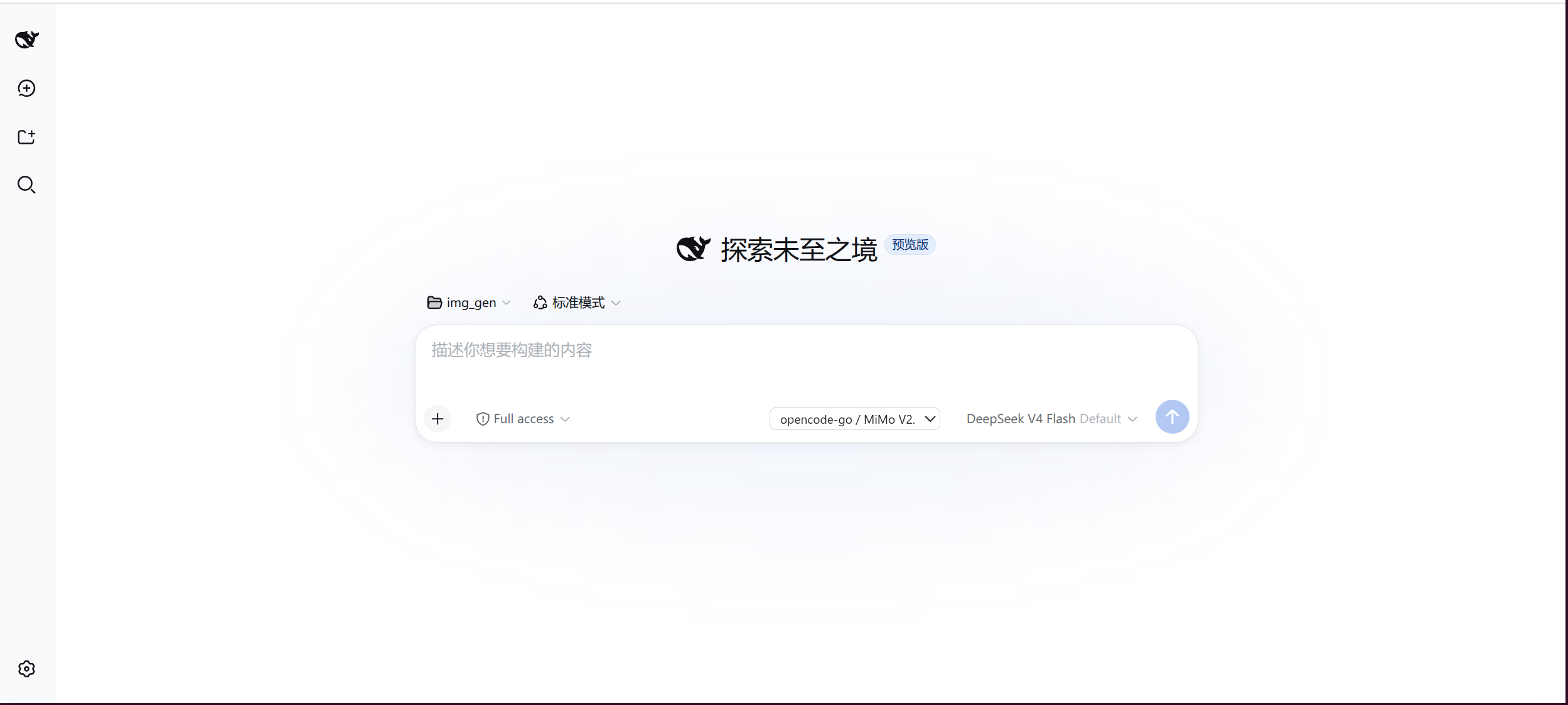
它能做什么
- 聊天里发图 → 先交给视觉模型(如 MiMo-V2.5)转成文字,主模型照常回复,不用换模型
- 输入框右侧「识图模型」下拉,自动列出所有供应商中支持图片的模型
- 设置 → Vision 独立管理模型;
vision_read_image工具 /vision-image-analysisskill 支持 OCR、图表、截图理解 - 异常兜底:单次 60s 超时、失败重试 1 次、重试耗尽降级为占位文本,不拖垮回合
安装
方式一(DSH 原生,推荐):
dsh plugin --profile web add -w github:poiuyjie/dsh-vision-opencode
方式二:一键脚本(Ubuntu install.sh / Windows install.ps1):
curl -fsSL https://raw.githubusercontent.com/poiuyjie/dsh-vision-opencode/main/scripts/install.sh | bash
装完重启 dsh,在输入框右侧选择识图模型。
卸载:dsh plugin --profile web remove -w dsh-vision-opencode(或 uninstall.sh)。
卸载前先备份包含图片的会话——卸载后这些旧会话可能无法再发给纯文本主模型。
配置
编辑 ~/.dsh/settings.yaml(也可用设置 → Vision 图形化管理):
vision-opencode:
  provider: ''       # 识图模型供应商;空 = 未选择
  model: ''          # 识图模型 id;空 = 未选择
  autoConvert: true  # 发图自动转换开关;出问题可改 false 关掉
插件自动识别纯文本主模型并接管图片;原生多模态模型保留 DSH 原生链路,无需改模型目录。
识图模型的推理关闭
设置 → Vision 里每个模型有一行「推理」策略:
| 选项 | 含义 |
|---|---|
| 默认 | 跟随供应商默认档位,正常思考 |
| 关闭 | 不思考,更快更省;仅当供应商真实声明 off 时提供(如 hy3 off:"none") |
| 强制关闭 | 尽力关掉思考(如 reasoning_effort:"none"),不保证成功;MiMo 这类未声明 off 的只能选这个 |
有「关闭」档的模型很少,没有时界面显示「默认 / 强制关闭」并标注「不保证成功」。关掉思考一般能明显降低首 token 延迟和花费(MiMo 实测 reasoning_effort:"none" 可真正关掉)。
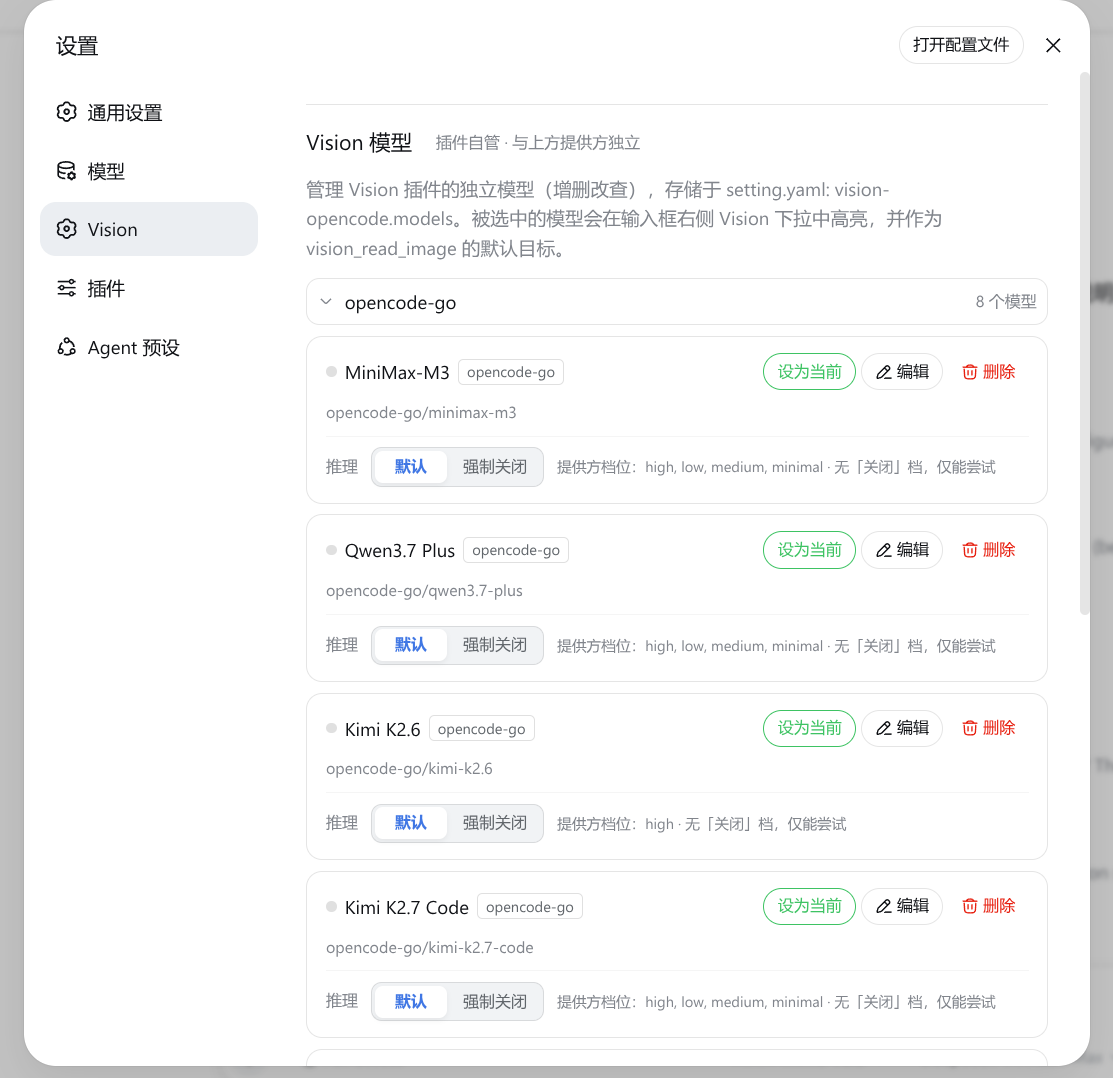
⚠️ 各供应商对「关闭思考」的声明很混乱(
off:"none"/off:null/ 无字段各不相同),插件只能尽力按厂商目录区分「关闭」与「强制关闭」并试参数,不保证每个供应商都能真正关掉。
常见问题
- 只想关掉自动转换(保留工具和选择器):
vision-opencode.autoConvert: false后重启 - 图片转换异常/选择器不出现:多半是识图模型未选或版本差异,看浏览器控制台报错发 issue
- 纯文本与多模态主模型自动区分,切换供应商无需再改配置
License
MIT
Read the usage guide →
Install steps, key points, FAQ and compatibility for this plugin — auto-derived from indexed fields.
Listing badge

[](https://deepseek-plugin.org/plugins/poiuyjie/dsh-vision-opencode)Paste this markdown into your GitHub README to link back to this listing. The badge only states the listing — not a security endorsement.