Financial risk control rule mining plugin for DSH: automatically performs data quality inspection, single rule mining, parallel OR rule combination optimization search, and outputs self-contained HTML reports.

- Language
- JavaScript
- License
- MIT
- Branch
- main
Install
$ dsh plugin --profile web add dsh-plugin-risk-rule-designRun the command above in your terminal to install this plugin via the dsh CLI. You can switch Profile in the top-right corner. New to dsh? Read the beginner tutorial
Install via your agent
Install the DeepSeek Harness plugin pypcfx-glitch/risk-rule-design for me: review the repository at https://github.com/pypcfx-glitch/risk-rule-design first, then run the install command and verify the plugin loads successfully.
Paste this instruction to the DSH Web GUI assistant — it will install and verify for you.
One-Line Description
Provides financial risk control rule mining capability for DSH: Given a CSV dataset with binary classification labels (features X and good/bad label y), automatically completes data quality inspection, single-rule mining, parallel OR rule combination optimal search, and outputs a self-contained HTML analysis report.
Core Capabilities
- Automatic Data Quality Inspection: Identifies and removes useless features such as ID/serial numbers/constants/near-unique/high-missing values, calculates y distribution and duplicate rows, provides recommended X list
- Single-Rule Mining: For continuous variables, traverses thresholds by quantiles (default 1/3/5/95/97/99%) and attempts two directions "select larger x>=q / select smaller x<=q" to generate candidates; for categorical variables, takes high bad-concentration single values and unions; missing values are also used as a candidate rule type
- Parallel OR Rule Combination Optimal Search: Uses layer-by-layer tree traversal strategy, first uses top 5% single-rule Lift as first rule seeds in rotation, then expands layer by layer by gain until recall cannot be improved further
- Five Evaluation Objectives: Default f1 (most balanced precision × recall), also supports top_lift / composite / max_lift / min_hit
- Self-Contained HTML Analysis Report: Inline CSS and SVG charts, including dataset overview, univariate bar charts, combination accumulation curves, hit rate-Lift scatter plots, precision-recall curves, can be opened directly in browser
- **Simultaneously registers 1 expert skill "risk-rule-design" and 3 tools (rrd_profiling / rrd_mining / rrd_report), which can be invoked by models or users in DSH sessions
Technical Implementation
- Language: JavaScript (ESM, type: module)
- Key Dependencies: None (only uses Node built-in
node:fs/promises,node:pathand relative imports) - Architecture Pattern: Inserts plugin into DSH host via
cordis.patch.yml(npm package form), callstools.registerandskills.registerinapply(ctx)to register tools and skills; combination search uses compact bitsets (Bits/Uint32Array + popcount table) to accelerate hit calculation - Entry File:
src/index.js(registration entry); Core enginesrc/engine.js(CSV parsing, type inference, single-rule mining, combination search); Report generationsrc/report.js(self-contained HTML)
Use Cases
Used by risk control strategy personnel and data analysts when they need to perform rejection rule mining on historical samples with good/bad labels. Typical usage: you only need to provide the CSV dataset path to the plugin and tell it which column is y (e.g., default_flag), and the plugin will automatically run the entire flow of "data inspection → single rules → combination → report" and tell you what the best combination looks like "reject if any rule is triggered".
Prerequisites & Compatibility
| Dependency | Minimum Version | Description |
|---|---|---|
| DSH Host | Not declared | Injected via cordis.patch.yml, requires DSH to support cordis patch mechanism |
| Node | >= 18 | From package.json#engines.node; plugin has zero dependencies, only uses Node built-in modules |
| Platform | Cross-platform | Pure JavaScript, no native modules, no os/cpu restrictions |
| Native Modules | None | Zero external dependencies, no node-gyp / native extensions |
Installation
dsh plugin --profile web add dsh-plugin-risk-rule-design
Configuration Options
This plugin does not require a configuration file itself. The core parameters for the three tools (adjustable options for rrd_mining) are as follows:
| Parameter | Type | Description | Default |
|---|---|---|---|
| dataset | String (required) | Absolute path to the dataset CSV file (must include header row) | — |
| target | String (required) | Column name of target variable y (binary: bad=1 / good=0) | — |
| objective | Enum | Combination evaluation objective: f1 / top_lift / composite / max_lift / min_hit | f1 |
| hitRateBudget | 0~1 | Upper limit of combination hit rate (pass rate reduction) budget | 0.5 |
| cutQuantiles | Integer array | Quantiles (%) for continuous variable splitting, traverses "select larger/select smaller" two directions | [1, 3, 5, 95, 97, 99] |
| minSupport | 0~1 | Minimum support (hit ratio) for single rules | 0.01 |
| minLift | 1~100 | Minimum Lift for single rules | 1.05 |
| maxRules | 1~12 | Maximum number of combination rules | 8 |
| maxCandidates | 1~40 | Maximum size of candidate rule pool | 14 |
| reportDir | String | Output directory for HTML report and mining snapshots | Dataset directory |
| title | String | Report title | Risk Control Rule Mining Analysis Report |
rrd_profiling and rrd_report have fewer parameters: profiling only requires
dataset+target(plus optionalfeatures/exclude); report requiressnapshot(required) + optionalreportDir/title/note.
FAQ
Q: What format does the target variable y need to be in?
A: Must be binary classification labels. The engine accepts equivalent notations such as 0/1, true/false, good/bad, 正常/违约, 违约/未逾期, 是/否, yes/no, etc., and automatically maps them to bad=1/good=0. Single value (all 0 or all 1) will directly throw an error "Target column has single value, cannot mine".
Q: What format must the dataset be in?
A: Only CSV (with header row) is supported. The engine has a built-in CSV parser, supporting quoted values, escaped quotes, commas/newlines within quotes, CRLF, BOM, etc. Note that .xlsx appearing in README examples is for guidance, the engine actually only reads CSV text; xlsx needs to be converted to CSV first.
Q: Will it run slowly when the data volume is large?
A: In the combination search phase, if rows exceed 50000, it will automatically sample with equal step size for acceleration, but all final metrics (F1, recall, hit rate, Lift, etc.) will be precisely recalculated on the full dataset, and the report will note whether sampling was used. Duplicate row check is skipped when data exceeds 200k to save memory.
Q: Does the output HTML report need internet connection?
A: No. The report is self-contained HTML with CSS and all charts (scatter plots, PR curves, bar charts) inline in the file, with no external resource references; it can be opened directly in any browser.
Q: What's the difference between the five evaluation objectives (objective)?
A: f1 (default) = most balanced precision and recall with both large (max F1); top_lift = smallest hit rate within top 5% combination Lift; composite = max lift×(1−hit_rate); max_lift = maximize lift within hit rate budget; min_hit = minimize hit rate when Lift meets threshold. Among these, f1/top_lift are not constrained by minBadCoverage.
Q: How to uninstall?
A: Run dsh plugin --profile web remove dsh-plugin-risk-rule-design, then restart dsh web.
Q: Too many ID/serial number fields are automatically removed, can they be kept?
A: The engine automatically removes ID/serial number columns using three rules: column name regex (e.g., _id, serialno, 编号, 手机号) + cardinality check (≈ sample size considered near-unique) + constant detection. If you really need to keep them, you can explicitly specify the columns to keep using features when calling rrd_profiling.
Learning Curve
Beginner — Prepare a CSV (with binary labels) + run rrd_mining once to get the optimal combination and HTML report; only when you want fine-tuning parameters (objective, cutQuantiles, branchMin, etc.) do you need to further understand the layer-by-layer tree traversal search logic.
Known Issues & Limitations
- Only accepts CSV text, does not directly read xlsx/excel; paths with
.xlsxin README examples will trigger "Dataset file not found" error - Target column must be binary: single value (all 0 or all 1), non-binary (multiple values like 0/1/2) will both throw errors and prompt legal value range
- When data volume > 200000 rows, duplicate row check is skipped (only hinted at info level in README/tool description, does not block process)
- Categorical variable union rules only greedily select top 12 high bad-concentration values (
engine.js:390), may not cover long-tail for categorical columns with many values - README self-states "still improving, welcome comments and corrections" at the beginning, still in early iteration stage
- Duplicate row check maintains a
Setin memory (containing concatenated strings of all columns), memory usage is notable when sample size reaches hundreds of thousands
⚠️这个插件是东哥的第一个dsh插件,还在完善中;如使用中有不妥之处,欢迎各位留言指正。
一、插件介绍
一个面向 DeepSeek Harness 的第三方插件:蒸馏《100天风控专家》的思想和方法论,对指定数据集(X/y)进行 数据质检 → 单规则挖掘 → 并行规则集最优组合 → HTML分析报告 的完整流程,解决风控策略人员手动调策略的过程,提高工作效率。
插件注册 3 个工具 + 1 个专家技能:
| 能力 | 名称 | 说明 |
|---|---|---|
| 工具 | rrd_profiling | 第 1 步:X/y 确认与数据质量检查(自动剔除 ID/serialno/常量/近似唯一/高缺失列) |
| 工具 | rrd_mining | 第 2 步:单规则评估 + 并行规则集最优组合(遍历规则先后顺序)+ 默认生成 HTML 报告 |
| 工具 | rrd_report | 第 3 步:基于挖掘快照重新生成/调整 HTML 报告 |
| 技能 | risk-rule-design | 专家方法论(角色、流程、评判标准、报告结构),可被模型/用户加载 |
二、目录结构
risk_rule_design/
├── cordis.yml            # 插件补丁覆盖层(绝对路径版,源码直挂用 --patch 或合并进 profile)
├── cordis.patch.yml      # 插件补丁(npm 包形态,发布后由 dsh plugin 安装)
├── package.json          # npm 发布清单(零依赖)
├── LICENSE               # MIT
├── src/
│   ├── index.js          # 插件入口:注册工具与技能(零外部依赖)
│   ├── engine.js         # 挖掘引擎:CSV 解析、质检、单规则、组合规则搜索(纯逻辑)
│   └── report.js         # 自包含 HTML 报告生成(内联 CSS/SVG,无外部资源)
├── demo/
│   ├── make_demo_data.mjs    # 演示数据集生成器(含已知潜在规则结构)
│   └── report/smoke_report.html  # 演示输出样例(生成物,不入库)
└── test/
    ├── smoke.mjs         # 引擎 + 报告冒烟测试
    ├── load_plugin.mjs   # 插件模块加载测试(桩 ctx)
    └── run_tools.mjs     # 3 个工具端到端执行 + schema 一致性校验
三、安装
插件是纯 JavaScript(ESM),零构建、零外部依赖。
方式一:从npm安装(推荐)
dsh plugin --profile web install dsh-plugin-risk-rule-design
安装后重启 dsh web 生效;卸载:
dsh plugin --profile web remove dsh-plugin-risk-rule-design
✅ npm 包自带
dsh.bundle.patch,安装命令会自动把包注册进 profile 的dsh.profile.bundles,重启后工具与技能即可用,无需手动配置。
方式二:从Github安装(备选)
dsh plugin --profile web add "github:pypcfx-glitch/risk-rule-design"
⚠️ GitHub 直装只把包加入依赖,不会自动注册 bundle,需手动把包名追加到 profile 的
C:\Users\yaodyu\.dsh\profiles\web\package.json中:
"dsh": {
  "profile": {
    "bundles": [
      "@deepseek-ai/dsh-base",
      "@deepseek-ai/dsh-web-app",
      "risk-rule-design"
    ]
  }
}
然后重启 dsh web 生效。
提示:两种方式任选其一即可,无需重复安装;推荐方式一(npm 安装一键生效)。
四、使用流程
如何使用这个插件?
为了解决风控策略/数据分析人员的双手,你只需要准备分析样本即可(样本中需包括特征X和目标变量y)。
下面提供一个简单的对话命令模版。
敲入/调用插件risk-rule-design(安装成功后敲入risk应该会自动显示出来),然后将分析样本的绝对文件路径copy过来,并说明y的字段名。
最后执行就可以了。
/risk-rule-design
D:\...\model_data_v1.0.xlsx
分析这个数据集,剔除y_label_30和y_label_7,其中y_label_15是y,X请自行判断。
插件risk-rule-design会按照规则挖掘的分析流程自动执行,并生成报告,执行流转步骤如下:
rrd_profiling(dataset, target) ↓ 确认 X 清单 rrd_mining(dataset, target, features, [objective, hitRateBudget, minBadCoverage, ...]) ↓ 输出最优组合 + HTML 报告 + 快照 rrd_report(snapshot, [title, note]) # 可选
五、HTML报告结构及展示
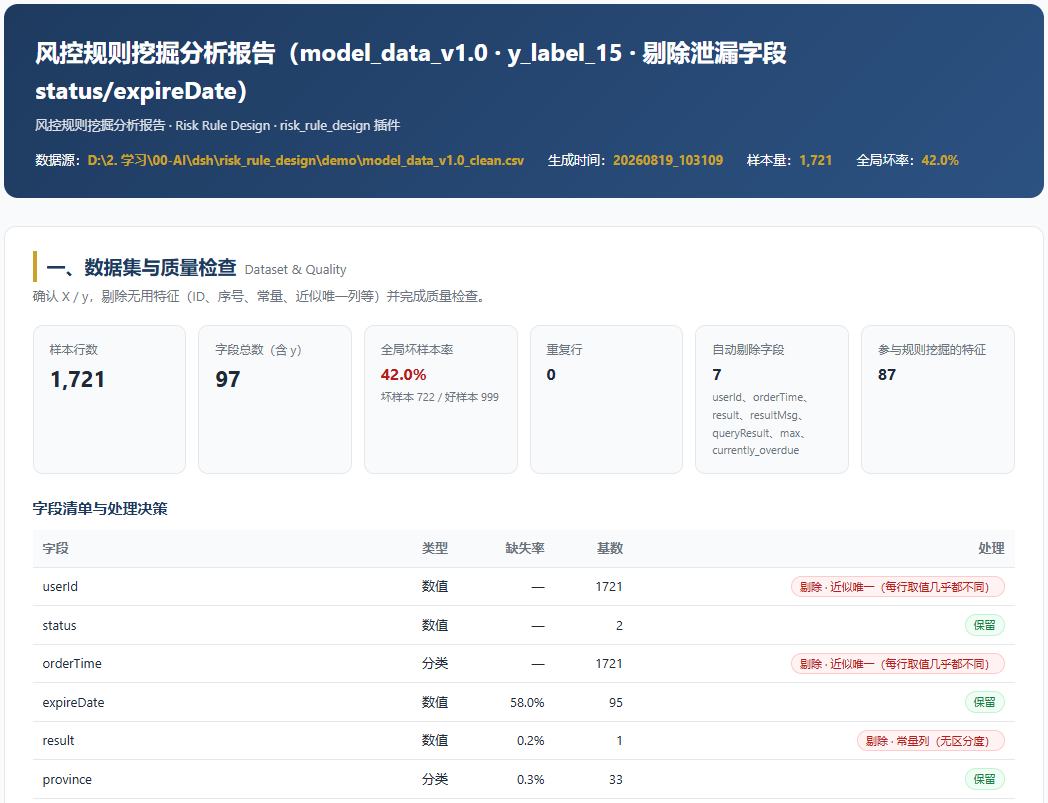
- 数据集与质量检查:样本/字段/坏率概览、字段清单与剔除决策、质量检查问题、y 分布;
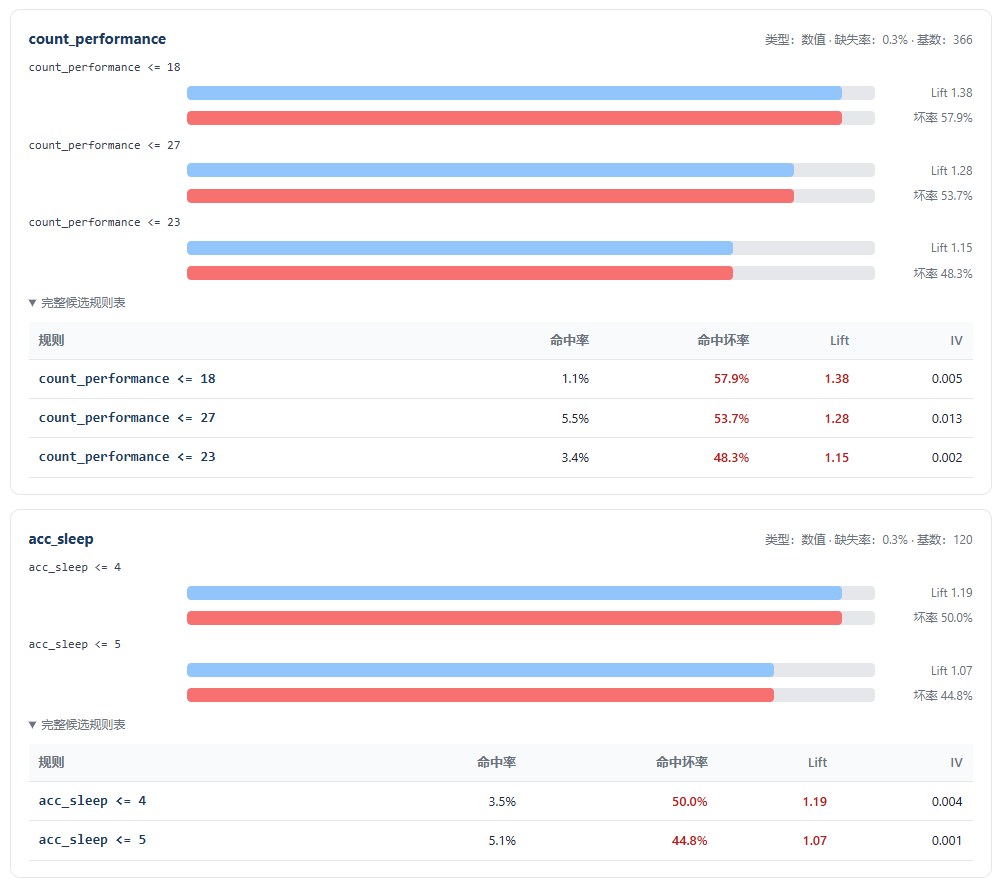
- 单变量效果分析:每个特征的候选规则(命中率、命中坏率、Lift、IV)与可视化条形图;
-
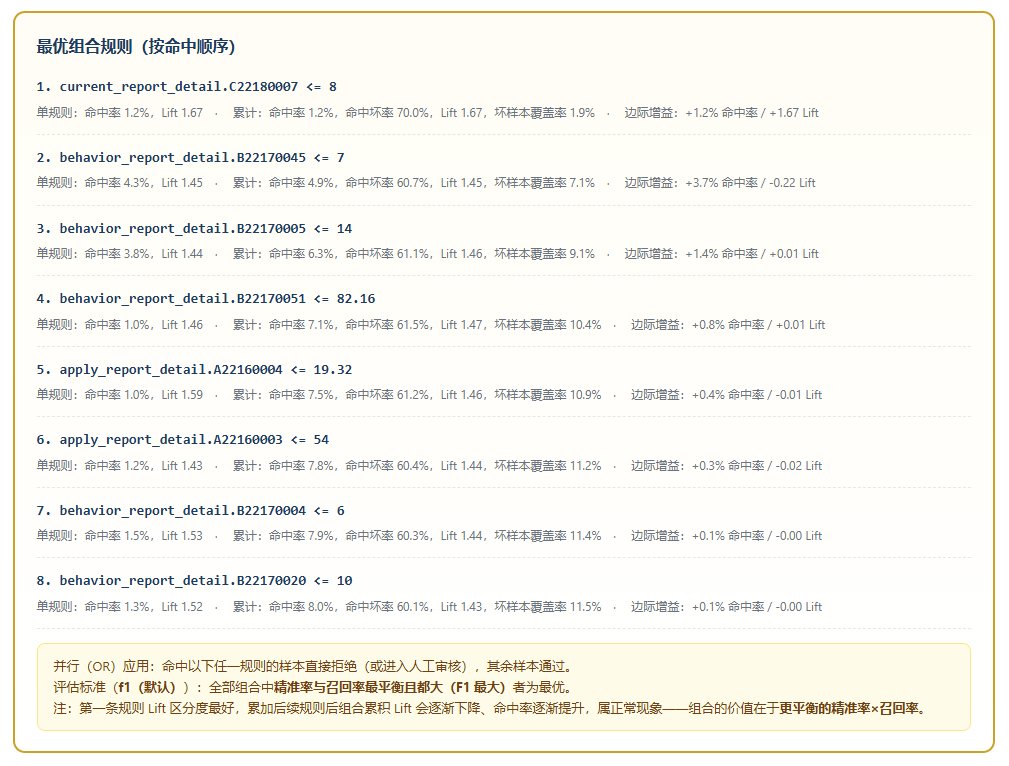
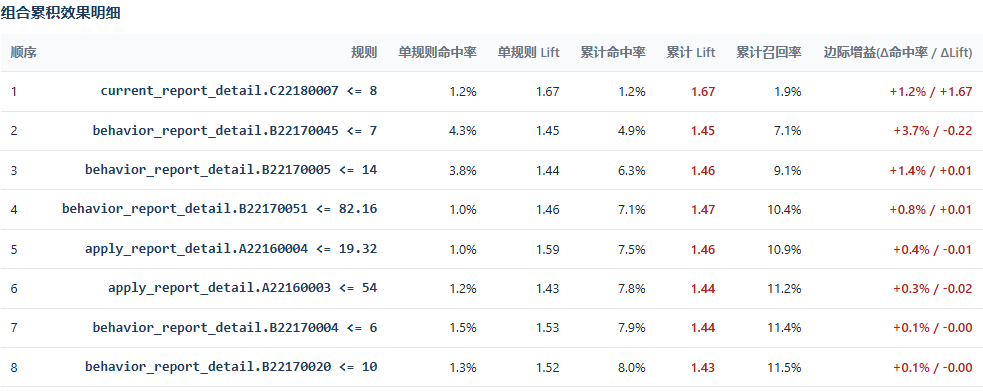
组合规则效果分析:
- 最优组合总览卡片(精准率、召回率、F1、命中率、Lift、拒绝样本数);
- 最优组合内所有规则 + 累积命中率 / Lift / 召回率 / 边际增益明细;
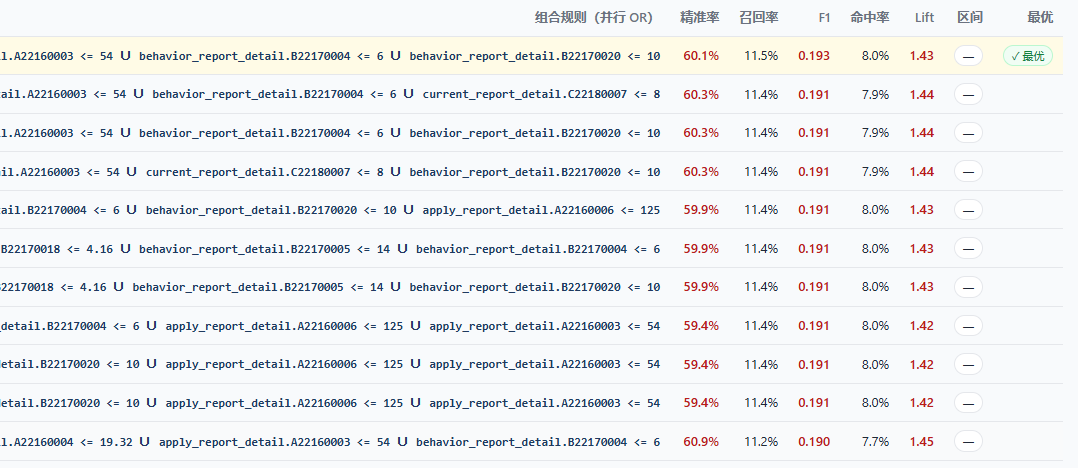
- 全部组合评估表(按 F1 降序):排名、组合规则、精准率、召回率、F1、命中率、Lift, 最优高亮(top_lift 目标时 ⭐ 标注 top5%);
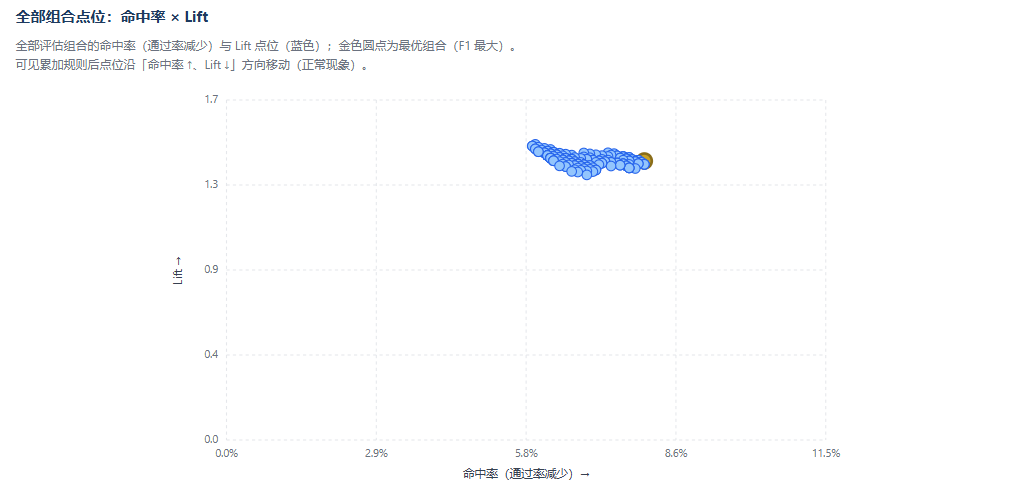
- 命中率 × Lift 点位图:全部组合散点,最优高亮(可见累加规则后沿「命中率↑、Lift↓」移动);
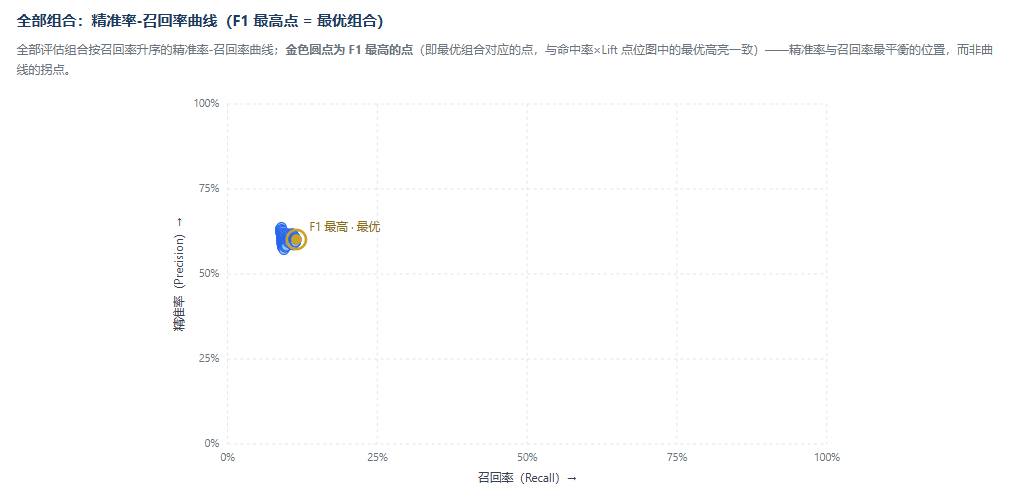
- 精准率-召回率曲线:全部组合曲线,标注 F1 最高点(即最优组合对应的点),而非拐点;
- 候选规则池与入选情况;
-
附录:分析配置与约束说明。
报告为自包含 HTML(内联 CSS/SVG,无外部资源),可直接用浏览器打开。
Read the usage guide →
Install steps, key points, FAQ and compatibility for this plugin — auto-derived from indexed fields.
Listing badge

[](https://deepseek-plugin.org/plugins/pypcfx-glitch/risk-rule-design)Paste this markdown into your GitHub README to link back to this listing. The badge only states the listing — not a security endorsement.