Integrates a local-first AI Agent runtime into DSH, exposing agent, session, and artifact management capabilities via stdio MCP.

- Language
- TypeScript
- License
- Apache-2.0
- Branch
- main
Install
$ dsh plugin --profile web add --allow-build=managed-agents github:sandbaseai/sandbase-harnessRun the command above in your terminal to install this plugin via the dsh CLI. You can switch Profile in the top-right corner. New to dsh? Read the beginner tutorial
Install via your agent
Install the DeepSeek Harness plugin sandbaseai/sandbase-harness for me: review the repository at https://github.com/sandbaseai/sandbase-harness first, then run the install command and verify the plugin loads successfully.
Paste this instruction to the DSH Web GUI assistant — it will install and verify for you.
One-sentence Positioning
This plugin bridges the SandBase Harness local AI Agent runtime to DSH: through the stdio MCP protocol, enabling DSH to list Agents, create persistent sessions, stream messages, read artifacts, and stop running tasks just like using regular MCP tools.
Core Capabilities
- Registers a stdio MCP client named
sandbasein DSH, automatically launching themanaged-agents-mcpbridging process - Exposes 6 native MCP tools:
list_agents,create_session,run_session,get_session,list_artifacts,stop_session run_sessionwaits for the streaming round to complete, returning assembled text and end event metadata in one go—no need to handle streams yourself- Supports OpenAI, Anthropic, and any OpenAI-compatible endpoints (including DeepSeek V4), with the runtime uniformly managing model vendor boundaries
- Supports 4 sandbox backends: Local process, Docker container, Kubernetes Pod, self-hosted Worker queue—DSH is agnostic to the differences
- Sessions, artifacts, Memory, skill packages, and API keys are all stored in local SQLite—no remote control plane dependency
Technical Implementation
- Language: TypeScript (Node.js ESM)
- Key Dependencies: @modelcontextprotocol/sdk (MCP server), hono + @hono/node-server (HTTP API), ai + @ai-sdk/openai + @ai-sdk/anthropic (model calls), commander (CLI), zod (input validation)
- Architecture Pattern: The
/v1API exposed by the local CLI/HTTP runtime (managed-agents start) is encapsulated by a stdio MCP bridging process. DSH registers this bridge as anmcp-sandbase-harnessnode through a Cordis bundle. Communication between runtime and DSH uses HTTP + Bearer Token - Entry Points:
src/index.ts(HTTP runtime entry),src/mcp/index.ts(stdio MCP bridge entry), packaged to npm binsmanaged-agentsandmanaged-agents-mcp
Use Cases
When you want DSH to have a local Agent backend that "can run long-running tasks, preserve context, and invoke tools"—not just temporary one-off model conversations—this plugin integrates the existing SandBase Harness runtime. It's especially suited for scenarios requiring sandbox-isolated tool calls, post-hoc auditing and replay, or preserving artifacts and Memory across sessions.
Prerequisites and Compatibility
| Dependency | Minimum Version | Description |
|---|---|---|
| DSH | Not declared | Injected via dsh.bundle.patch, minimum DSH version not declared in package.json |
| Node.js | >=22 | package.json#engines.node; bridge process uses stdio MCP, runtime based on Node 22+ built-in HTTP |
| Platform | Cross-platform | Node process itself is cross-platform; runtime additionally depends on host's docker / kubectl CLI as optional (only needed when enabling corresponding sandbox) |
| node:sqlite | Node 22 experimental / Node 25+ stable | Database layer depends on node:sqlite; note this module is experimental on older Node versions |
| Docker | Optional | Host needs docker CLI when sandbox backend is set to docker |
| kubectl | Optional | Host needs kubectl and cluster access when sandbox backend is set to kubernetes |
Installation
dsh plugin --profile web add github:sandbaseai/sandbase-harness
Configuration
This plugin itself has no user-facing configurable parameters; it hardcodes registration of a stdio MCP client named sandbase in DSH through a Cordis patch. The bridge process managed-agents-mcp communicates with the underlying HTTP Runtime via environment variables at runtime:
| Environment Variable | Description | Default |
|---|---|---|
MANAGED_AGENTS_URL | Runtime HTTP address for the bridge process to connect to | http://127.0.0.1:3000 |
MANAGED_AGENTS_API_KEY | Bearer Token passed when runtime has access authentication enabled; multiple Keys separated by commas | None (runtime runs in open mode if not configured) |
MANAGED_AGENTS_CORS_ORIGINS | Comma-separated list of allowed CORS origins | None |
MANAGED_AGENTS_LOG_LEVEL | Runtime log level (debug / info / warn / error) | info |
MANAGED_AGENTS_LOG_FORMAT | Set to pretty for readable development format | Normal format |
MANAGED_AGENTS_HOME | Override root path for runtime state directory | .managed-agents/ under workspace |
MANAGED_AGENTS_SECRET_KEY | Master key for encrypting local credential store | Unencrypted when not set |
FAQ
Q: Do I need to start any additional services after installing this plugin?
A: Yes. The plugin only registers the managed-agents-mcp bridge process in the DSH Web Profile. You must first start the underlying runtime in another terminal with managed-agents start (default listening at http://127.0.0.1:3000) so DSH can access Agents and sessions through MCP tools.
Q: What's the relationship between this plugin and DSH's built-in AI capabilities?
A: It's an independent local Agent runtime (based on SQLite + multiple sandbox backends), not a replacement for DSH's built-in models. DSH treats it as an external MCP service via the mcp__sandbase__* namespace, and it dispatches to OpenAI, Anthropic, or any OpenAI-compatible endpoint.
Q: Where are sessions, artifacts, and credentials stored?
A: All stored in the .managed-agents/ directory under your workspace created during managed-agents init (SQLite file data.db, file bytes files/, skill packages skills/, sandbox snapshots snapshots/). The bridge process doesn't persist any credentials.
Q: Which model vendors are supported?
A: Configure an active model vendor boundary in Settings V2, covering OpenAI, Anthropic, and any OpenAI-compatible endpoints (README uses DeepSeek V4 as example). Agent YAML specifies concrete model IDs (e.g., gpt-4o, claude-sonnet-4-20250514, openai/gpt-5.5).
Q: Is Docker required?
A: No. The default Local sandbox executes commands as the current OS user without Docker dependency. You only need docker CLI or kubectl available when you switch the Environment's sandbox backend to docker or kubernetes in the Dashboard.
Q: How to uninstall?
A: First stop DSH, then execute dsh plugin --profile web remove managed-agents to remove both profile dependencies and bundle injection layers. Runtime workspace data won't be automatically deleted—you need to manually clean up the .managed-agents/ directory.
Q: What to do if "MCP startup failed" appears at startup?
A: This means managed-agents-mcp is not in PATH. Rebuild from source (npm ci && npm run build:runtime) and run npm link, or check if the mcp-sandbase-harness node appears in DSH startup logs.
Difficulty Level
Advanced — requires independently maintaining a Node runtime in another terminal and having at least one model API Key ready; also requires understanding multiple concept groups like Settings V2, Environment, and Sandbox Provider. DSH itself is just the calling entry point.
Known Issues and Limitations
- Local sandbox has no kernel-level isolation: Local backend only does path constraints and environment variable whitelist; commands still execute as the current OS user—unsuitable for running untrusted code (BACKLOG.md:27-30)
- apps/console has unconsolidated module split: Currently has two mutually non-rendering component inheritance lines;
npm run typecheckdoesn't cover Console, causing ~90 errors in Dashboard; test coverage is for unreleased branch (BACKLOG.md:46-59) - Kubernetes sandbox live cluster tests skipped in CI: Tests skip directly when no accessible cluster is available; there's currently no mechanism to force execution (BACKLOG.md:32-34)
- Streaming command output (streamingExec) declared but unimplemented: Capability is declared and reported as "unsupported"; tool results still return as single values (BACKLOG.md:39-41)
managed-agents deployis a v1 placeholder: Only prints deployment suggestions, doesn't actually push (src/cli/program.ts:85-99)- Pod eviction only exposed as command failure: Provision phase fails quickly on image/config errors, but runtime Pod eviction has no dedicated handling path (BACKLOG.md:35-37)
- Workspace state directory changed from 0.2.0: Migrated from
~/.managed-agents/<name>-<hash>/to<workspace>/.managed-agents/; old workspaces need manual state migration (CHANGELOG.md:39-47)




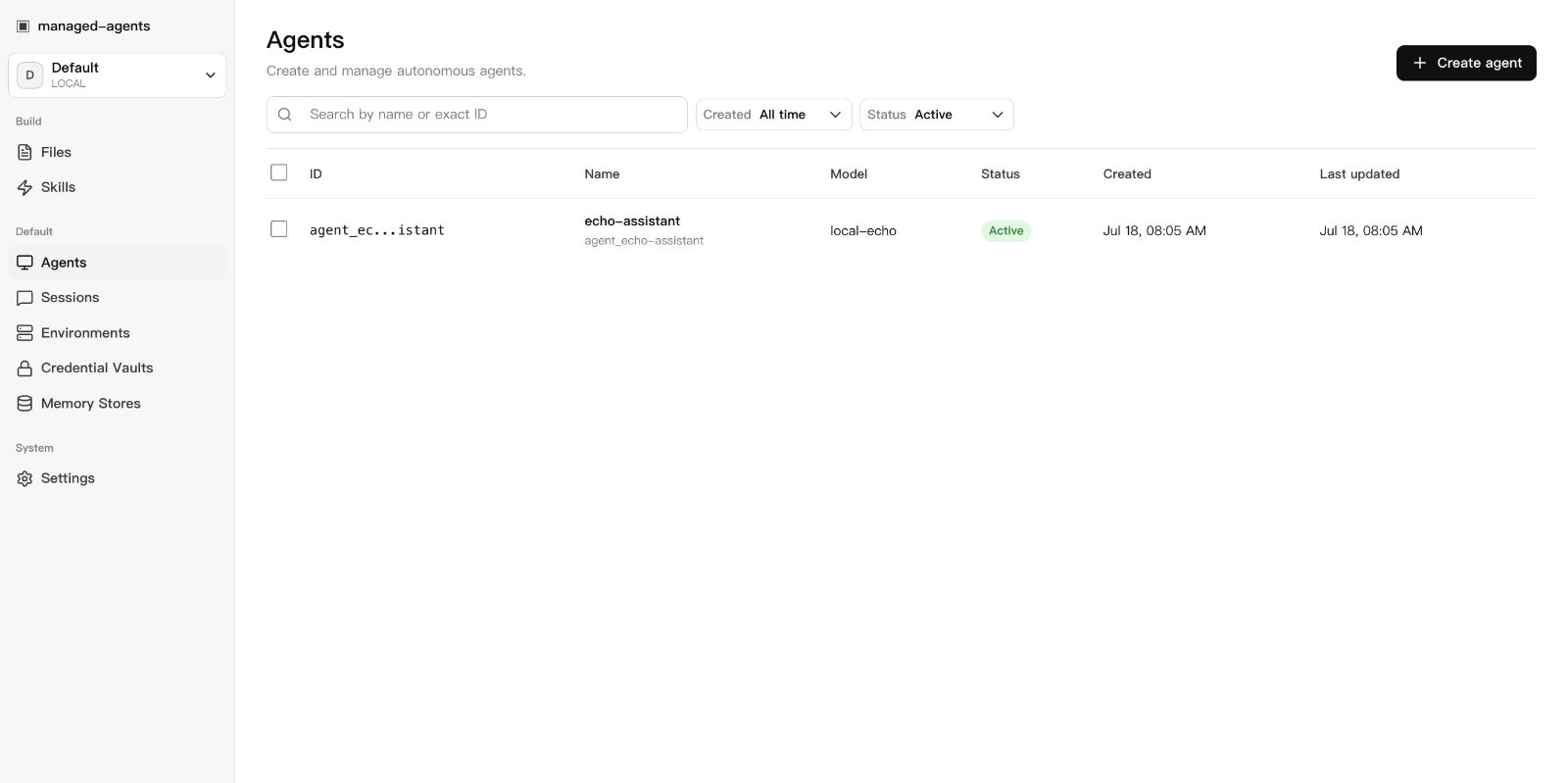
A local-first runtime for AI agents. Sessions, sandboxed tools, memory, credentials, audit trails, and a built-in Console — all running on your machine or in your own infrastructure.
git clone --branch v0.3.2 --depth 1 https://github.com/sandbaseai/sandbase-harness.git
cd sandbase-harness
npm ci
npm run build
mkdir ../my-agents && cd ../my-agents
node ../sandbase-harness/dist/index.js init
node ../sandbase-harness/dist/index.js start
# open http://127.0.0.1:3000/dashboard
Choose SandBase Harness when you need more than a model loop:
| Need | What Harness provides |
|---|---|
| Run generated code safely | Local, Docker, Kubernetes, and self-hosted worker sandboxes |
| Inspect long-running agents | Persistent sessions, resumable event streams, audit, and replay |
| Control tool access | MCP toolsets, credential vaults, permission policies, and approvals |
| Operate any model | OpenAI, Anthropic, and OpenAI-compatible providers, including DeepSeek V4 |
| Keep infrastructure yours | Local-first SQLite and file storage with no required hosted control plane |
Why
Agent SDKs handle the model loop. Production agents need more: persistent
sessions, tool governance, sandbox boundaries, credential handling, memory,
auditability, and a UI for humans to inspect what happened. managed-agents
is that runtime layer — not a visual workflow builder and not another model SDK.
Features
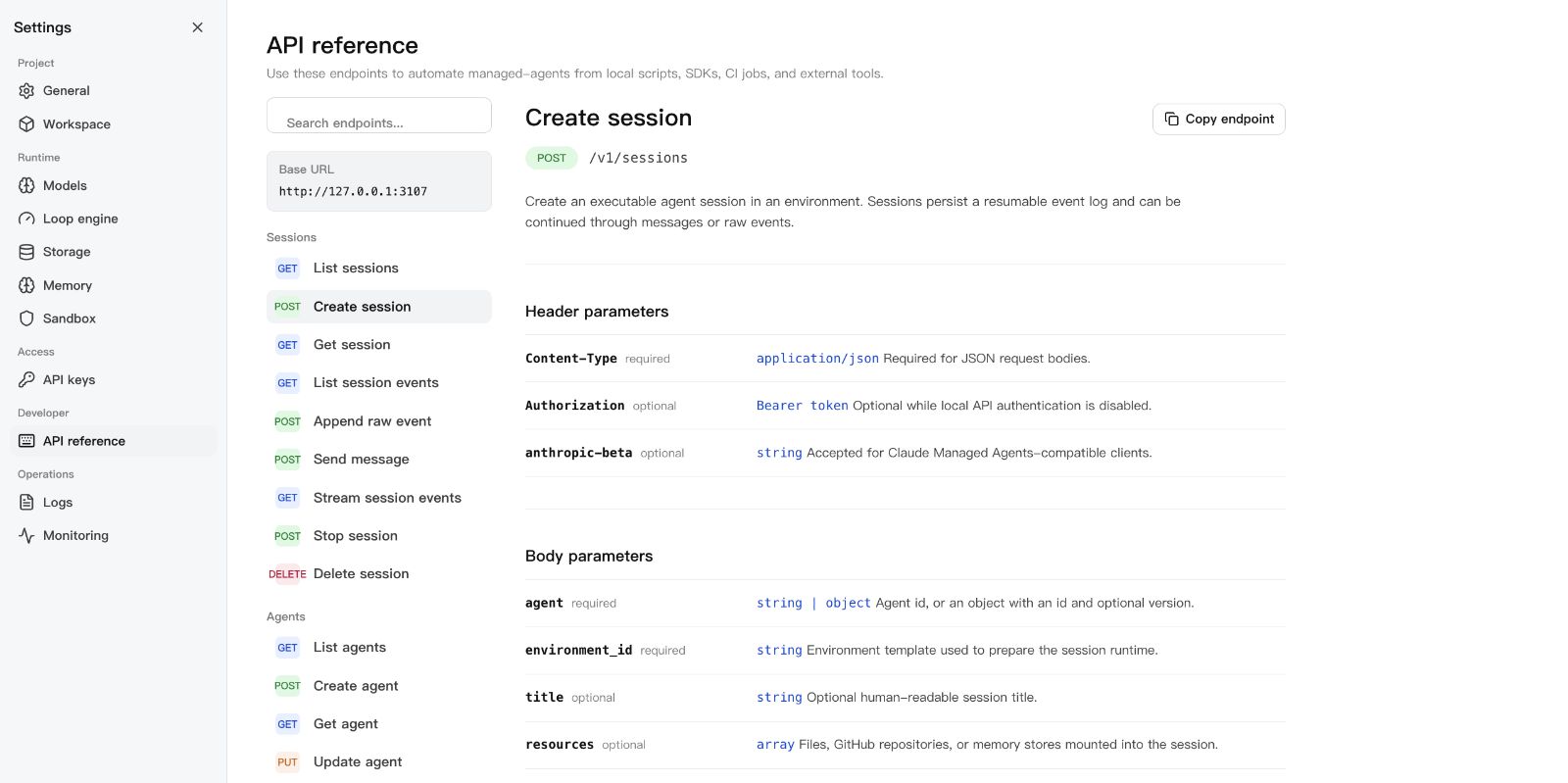
- Claude Managed Agents-style
/v1API and local Console - SQLite-backed agents, sessions, environments, credential vaults, memory stores, files, skills, and API keys — SQLite metadata by default
- local file/skill bytes stored in the workspace state directory
- Resumable Server-Sent Events for session replay and debugging
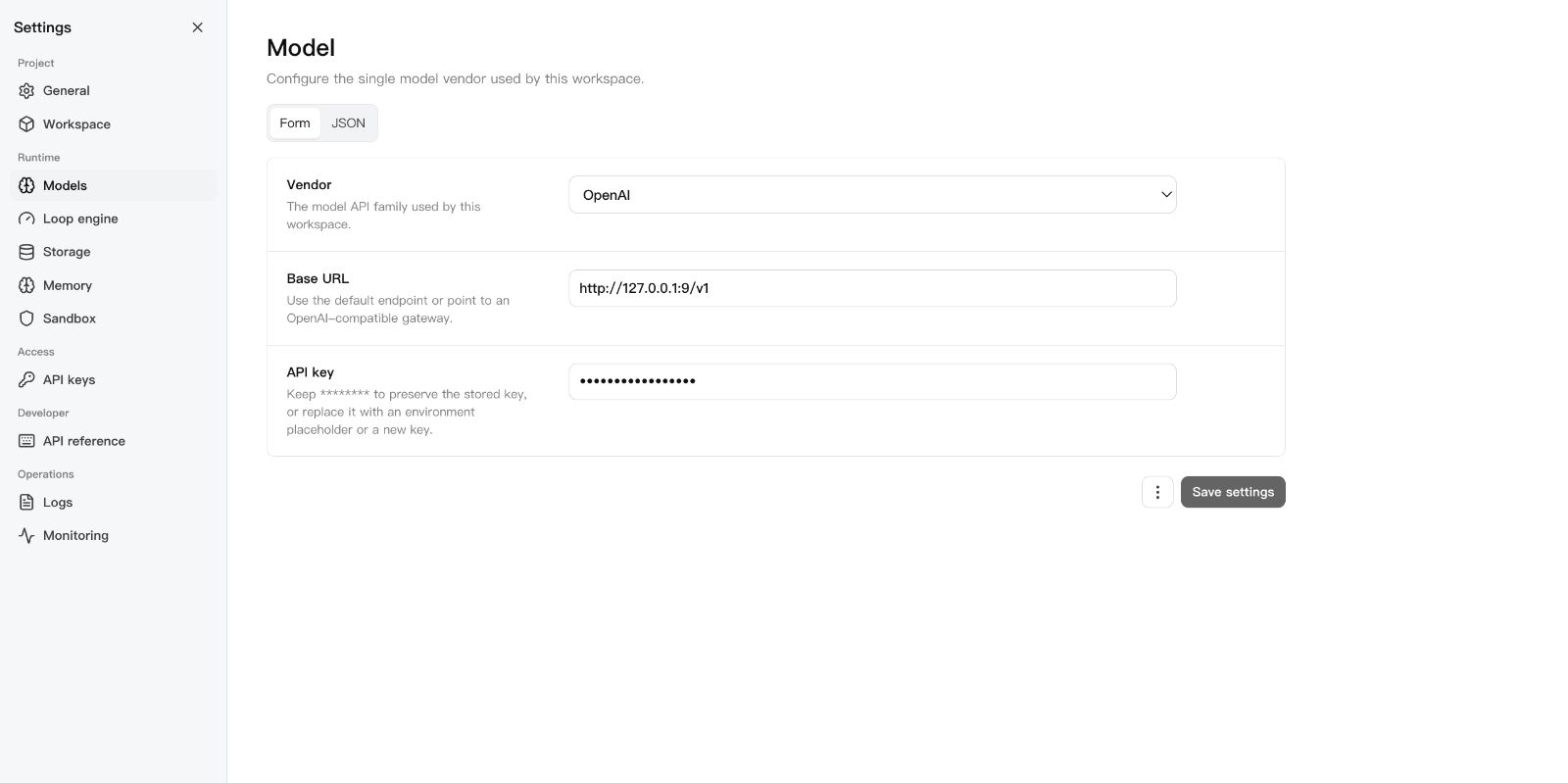
- One active model provider boundary configured through Settings V2
- Sandbox backends: local process, Docker (per-session containers), Kubernetes (kubectl exec/cp), self-hosted worker queue
- Settings V2: one workspace model vendor, loop engine, storage, memory, sandbox — with validation, form/JSON modes, and restart flow
- MCP toolsets, permission policies, built-in tools, and skill packages
- DeepSeek Harness bridge over MCP stdio for agents, sessions, streamed turns, artifacts, and cancellation
- TypeScript SDK at
managed-agents/sdk - Release gate:
npm run release:check
Screenshots
| Console overview | Settings | API reference |
|---|---|---|
 |  |  |
Requirements
- Node.js 22+
- npm 10+
- A model provider API key (OpenAI, Anthropic, or OpenAI-compatible endpoint)
- Docker (optional, for Docker-backed sandboxes)
DeepSeek Harness
Run this project as a DSH plugin instead of treating dsh-plugin as discovery
metadata only. Install the bundle into a DSH profile, start managed-agents,
then boot that profile:
export MANAGED_AGENTS_URL=http://127.0.0.1:3000
dsh plugin --profile web add managed-agents
dsh web
The patch starts managed-agents-mcp over stdio. DSH can then list agents,
create and run sessions, inspect results and artifacts, and stop work through
native mcp__sandbase__* tools. See
examples/deepseek-harness for the full
tool list and authenticated-runtime configuration.
Pair the plugin with SandBase Skills to give the same DSH project a portable, source-verifiable research workflow:
npx --yes github:sandbaseai/sandbase-skills add multi-source-search
dsh web
This installs the complete Skill into .dsh/skills/multi-source-search, DSH's
project-scoped discovery directory. It runs from GitHub source and needs no
SandBase account when DSH already provides web/search tools.
New to DSH profiles, plugin composition, tool policy, or session semantics? The independent DeepSeek Harness Handbook provides source-backed quickstarts, architecture maps, and troubleshooting for the runtime layers used by this integration.
Quick Start
git clone --branch v0.3.2 --depth 1 https://github.com/sandbaseai/sandbase-harness.git
cd sandbase-harness
npm ci
npm run build
mkdir ../my-agents && cd ../my-agents
node ../sandbase-harness/dist/index.js init
node ../sandbase-harness/dist/index.js start
Open http://127.0.0.1:3000/dashboard, go to Settings > Models, paste your
API key, and you're running.
The unscoped managed-agents name on npm is not this project. Until an
official scoped package is announced in this repository, install only from the
tagged GitHub source release shown above. Do not run npx managed-agents or
npm install managed-agents.
The six-tool MCP bridge also has a minimal container definition. Start the Harness API, build the image from the tagged source checkout, then add this stdio command to an MCP client:
docker build -f Dockerfile.mcp -t sandbase-harness-mcp:0.3.2 .
docker run --rm -i \
  -e MANAGED_AGENTS_URL=http://host.docker.internal:3000 \
  sandbase-harness-mcp:0.3.2
For an authenticated remote runtime, also pass MANAGED_AGENTS_API_KEY. The
container image contains only the MCP bridge; agent sessions and sandbox work
remain in the connected Harness runtime.
For development from the latest main branch:
git clone https://github.com/sandbaseai/sandbase-harness.git
cd sandbase-harness && npm ci && npm run build
cd .. && mkdir my-agents-dev && cd my-agents-dev
node ../sandbase-harness/dist/index.js init
node ../sandbase-harness/dist/index.js start
Workspace Layout
my-agents/
├── agents/                  # Seed agent definitions (YAML)
│   └── assistant.yaml
├── skills/                  # Seed skill packages
│   └── example-skill/
│       └── SKILL.md
└── .managed-agents/         # Runtime state (gitignored)
    ├── config.yaml          # Workspace configuration
    ├── data.db              # SQLite metadata
    ├── logs/runtime.log
    ├── files/               # Uploaded file bytes
    ├── skills/              # Uploaded skill packages
    ├── snapshots/           # Session workspace snapshots
    └── sandbox/             # Local session sandboxes
Configuration
.managed-agents/config.yaml:
model:
  provider: openai
  api_key: ${OPENAI_API_KEY}

storage:
  metadata: { provider: sqlite, options: {} }
  artifacts: { provider: local, options: { base_path: files } }
Agents pick concrete model IDs (gpt-4o, claude-sonnet-4-20250514,
openai/gpt-5.5). The workspace config only says how to reach the model
service.
For DeepSeek V4 Pro/Flash configuration, including maximum reasoning effort, see DeepSeek V4.
CLI
managed-agents init
managed-agents start [--host 127.0.0.1] [--port 3000]
managed-agents list
managed-agents reload
managed-agents chat <agent-id> --message "hello"
managed-agents template list | install <name> | create <name>
API Examples
Create an agent:
curl -X POST http://127.0.0.1:3000/v1/agents \
  -H "Content-Type: application/json" \
  -d '{
    "name": "Incident commander",
    "model": "gpt-4o",
    "system": "You are an on-call incident commander.",
    "tools": [{ "type": "agent_toolset_20260401" }]
  }'
Create an environment (local sandbox):
curl -X POST http://127.0.0.1:3000/v1/environments \
  -H "Content-Type: application/json" \
  -d '{
    "name": "Default local",
    "config": { "hosting_type": "local", "sandbox_provider": "local" }
  }'
Create a Docker-isolated environment:
curl -X POST http://127.0.0.1:3000/v1/environments \
  -H "Content-Type: application/json" \
  -d '{
    "name": "Docker sandbox",
    "config": {
      "sandbox_provider": "docker",
      "image": "node:22-slim",
      "resources": { "memory": "1g", "cpu": 1 }
    }
  }'
Start a session:
curl -X POST http://127.0.0.1:3000/v1/sessions \
  -H "Content-Type: application/json" \
  -d '{
    "agent": "agent_...",
    "environment_id": "env_...",
    "title": "Triage SENTRY-123"
  }'
Send a message:
curl -X POST http://127.0.0.1:3000/v1/sessions/SESSION_ID/messages \
  -H "Content-Type: application/json" \
  -d '{ "content": "Investigate the alert." }'
Resume the event stream:
curl -N http://127.0.0.1:3000/v1/sessions/SESSION_ID/events/stream \
  -H "Last-Event-ID: 42"
SDK
import { ManagedAgentsClient } from 'managed-agents/sdk';

const client = new ManagedAgentsClient({
  baseUrl: 'http://127.0.0.1:3000',
});

const session = await client.sessions.create({
  agent: 'agent_...',
  environment_id: 'env_...',
});

for await (const event of client.sessions.chat(session.id, 'Hello')) {
  if (event.type === 'agent.message_chunk') {
    process.stdout.write(event.delta ?? '');
  }
}
The /v1 API follows Claude Managed Agents resource shapes, so you can also
point the Anthropic SDK at the local runtime:
import Anthropic from '@anthropic-ai/sdk';

const client = new Anthropic({
  apiKey: process.env.MANAGED_AGENTS_API_KEY ?? 'local-dev-key',
  baseURL: 'http://127.0.0.1:3000',
});

const session = await client.beta.sessions.create({
  agent: 'agent_...',
  environment_id: 'env_...',
});
Authentication
Open by default. Authentication activates when at least one API key exists:
# Static key via environment
export MANAGED_AGENTS_API_KEY=sk-local-example

# Or create a managed key
curl -X POST http://127.0.0.1:3000/v1/api-keys \
  -H "Content-Type: application/json" \
  -d '{ "name": "Local Console" }'
Clients send Authorization: Bearer <key>.
Agent Definition
Agents are YAML files in agents/:
name: Incident commander
description: Triages alerts and coordinates response.
model: gpt-4o
system: |-
  You are an on-call incident commander.
mcp_servers:
  - name: sentry
    type: url
    url: https://mcp.sentry.dev/mcp
tools:
  - type: agent_toolset_20260401
    default_config:
      permission_policy: { type: always_ask }
    configs:
      - name: bash
        permission_policy: { type: always_ask }
  - type: mcp_toolset
    mcp_server_name: sentry
skills:
  - type: custom
    skill_id: skill_...
metadata:
  template: incident-commander
Development
npm ci
npm run typecheck    # src + tests
npm test             # vitest
npm run build        # runtime + console + SDK
npm run release:check  # full local release gate
release:check runs typecheck, tests, both builds, npm pack --dry-run, CLI
init smoke, and examples/basic startup smoke.
SandBase Ecosystem
- SandBase Skills — 88 installable Agent Skills for research, social intelligence, marketing, and business workflows across Codex, Claude Code, Cursor, Gemini CLI, and other clients.
- SandBase CLI — connect Cursor, Claude Code, Codex, Windsurf, Gemini CLI, OpenCode, and other MCP clients to 2,000+ tools and 200+ AI models with one onboarding command.
- SandBase — hosted agent infrastructure, model access, tools, and managed sandboxes.
Documentation
License
Read the usage guide →
Install steps, key points, FAQ and compatibility for this plugin — auto-derived from indexed fields.
Listing badge

[](https://deepseek-plugin.org/plugins/sandbaseai/sandbase-harness)Paste this markdown into your GitHub README to link back to this listing. The badge only states the listing — not a security endorsement.