Adds in-conversation image generation to DeepSeek Harness web client, supporting Google Gemini, OpenAI, and ByteDance Seedream, with a built-in local image gallery.

- Language
- TypeScript
- License
- MIT
- Branch
- main
Install
$ dsh plugin --profile web add dsh-image-genRun the command above in your terminal to install this plugin via the dsh CLI. You can switch Profile in the top-right corner. New to dsh? Read the beginner tutorial
Install via your agent
Install the DeepSeek Harness plugin shanliuling/dsh-image-gen for me: review the repository at https://github.com/shanliuling/dsh-image-gen first, then run the install command and verify the plugin loads successfully.
Paste this instruction to the DSH Web GUI assistant — it will install and verify for you.
One-Line Description
Adds native in-chat image generation capability to DeepSeek Harness (DSH) Web, supporting Google Gemini, OpenAI (including compatible proxies), and ByteDance Seedream (Volcano Ark), with built-in local image gallery, fullscreen preview, copy and download interactions.
Core Features
- Trigger image generation through natural language in conversation, with the Agent automatically invoking the
generate_imagetool and rendering images directly into the current session flow - Simultaneously supports Google Gemini, OpenAI / OpenAI compatible proxies, and ByteDance Seedream (Volcano Ark) three providers, switchable anytime in Web settings
- Top bar comes with a "Gallery" Tab, aggregating all historically generated images in reverse chronological order, supporting Prompt keyword search and provider filtering
- Image results integrate with DSH's own Attachment and Conversation system; reopening historical conversations still shows previously generated images
- Hovering over images or entering the gallery supports fullscreen preview, one-click copy to clipboard, local download, and open in new tab
- API Keys are securely managed through DSH's built-in credential service; frontend only writes, never reads plaintext
Technical Implementation
- Language: TypeScript (with React client)
- Key Dependencies:
@deepseek-ai/cordis,@deepseek-ai/dsh-tools,@deepseek-ai/dsh-attachment,@deepseek-ai/dsh-credentials,react - Architecture Pattern: DSH Bundle dual injection — Host face registers
generate_imagetool + same-origin image HTTP route via Cordisapply(ctx, config)insrc/index.ts, Client face injects settings card intosettings.plugin.item, conversation result card intotool.call.toolview, and gallery Tab intoconversation.viewfromsrc/client/index.tsx; gallery metadata persisted locally via browser IndexedDB - Entry Files:
src/index.ts(Host face,lib/index.js) /src/client/index.tsx(Client face,lib/client.js)
Use Cases
For users who want DSH Agent to directly generate illustrations, concept images, or blog post images in chat. After installation, simply fill in the API Key once, then have the Agent describe the desired image; it will appear in the current conversation and automatically be added to the "Gallery" for later lookup, copying, and downloading.
Prerequisites and Compatibility
| Dependency | Min Version | Description |
|---|---|---|
| DeepSeek Harness | >=0.1.0-rc.5 | Declared via peerDependencies; web profile required |
| Node | >=22.19.0 (also supports >=24.0.0) | Declared via engines.node |
| Cordis | >=4.0.0 <5 | Plugin Host face injection framework |
| React | >=18.2.0 <19 | Client face rendering dependency |
| Schemastery | >=3.18.0 <4 | Configuration Schema definition |
| Platform | Web only | dsh.client.platform explicitly declared as web, not applicable for headless / desktop profile |
| Native Modules | None | Pure JS + standard browser APIs |
Installation
dsh plugin --profile web add github:shanliuling/dsh-image-gen
Configuration Options
| Config | Type | Description | Default |
|---|---|---|---|
| provider | string | Select image generation provider: google (Google Gemini), openai (OpenAI or compatible proxy), seedream (ByteDance Volcano Ark) | google |
| googleModel | string | Model name used for Google endpoint | gemini-3.1-flash-image |
| googleEndpoint | string | Complete Google Interactions interface address (including proxy scenarios) | https://generativelanguage.googleapis.com/v1beta/interactions |
| openaiModel | string | Model name used for OpenAI / compatible proxy endpoint | gpt-image-2 |
| openaiBaseURL | string | OpenAI compatible /v1 interface address (for proxy/relay) | https://api.openai.com/v1 |
| seedreamModel | string | Volcano Ark Seedream model name | doubao-seedream-5-0-260128 |
| seedreamBaseURL | string | Volcano Ark /api/v3 interface address | https://ark.cn-beijing.volces.com/api/v3 |
API Keys are not in the Config schema; they are saved separately via the DSH credentials service. The frontend writes but does not read plaintext. Credential names are GEMINI_API_KEY / OPENAI_API_KEY / ARK_API_KEY.
FAQ
Q: Where do I fill in the API Key after installation?
A: Open DSH Web (default http://localhost:3080), go to Settings → Plugins → Image generation, expand the card, select the Provider and fill in the corresponding API Key to save. The key is encrypted via DSH credentials service; the frontend will not display plaintext.
Q: Do I need to prepare keys for all three providers?
A: No, you only need to prepare the key for the currently selected Provider; switch Provider and then add the corresponding key.
Q: What services can be used with OpenAI Compatible mode?
A: Any service that provides an OpenAI /v1/images/generations compatible interface, including various relay stations, self-deployed gateways, or Volcano Ark endpoints with the same protocol. Simply change the Base URL to the service's /v1 address.
Q: Where are generated images stored?
A: Image binaries are persisted by DSH's own Attachment service and can be viewed when reopening historical conversations. Gallery metadata (Prompt, Provider, model, etc.) is stored in browser IndexedDB; uninstalling the plugin or switching browsers will not automatically sync.
Q: What if I can't see the "Gallery" Tab in the top bar?
A: The Gallery Tab is injected into the conversation.view slot and should appear automatically after plugin installation. If it doesn't appear, confirm you are on the web profile, refresh the page, or check if the plugin is disabled.
Q: What does the error "generate_image requires the XXX credential" mean?
A: The API Key for the currently selected Provider has not been configured. Go back to Settings → Plugins → Image generation to fill in and save it. The error message will include the corresponding environment variable name (GEMINI_API_KEY / OPENAI_API_KEY / ARK_API_KEY).
Q: Can multiple images be generated in one go?
A: The generate_image tool returns one image per call, but the Agent can automatically make multiple consecutive calls as needed; all results will be uniformly managed in the gallery.
Q: Can generated images be downloaded locally?
A: Yes. Hover over images in the conversation or gallery cards to reveal a toolbar; click the download icon to save as PNG/JPEG locally.
Difficulty Level
Beginner — After installation, simply fill in one API Key in settings, keep other parameters at default, and start generating images in conversation; switching providers and adjusting models are all done in the same settings card.
Known Issues and Limitations
- Web profile only:
dsh.client.platformexplicitly declared asweb, cannot load under headless / desktop profile - Subject to DSH's own
attachments.imageLimits.maxImageByteslimit; images exceeding the limit will be actively rejected by the plugin with an error - Only accepts four MIME types for storage:
image/png,image/jpeg,image/webp,image/gif - Google endpoint supports
aspect_ratioandimage_size(1K/2K/4K) control; OpenAI and Seedream only use thesizefield - Google Gemini official interface may have connectivity issues in some network environments; can be resolved by configuring
googleEndpointwith a proxy or relay address
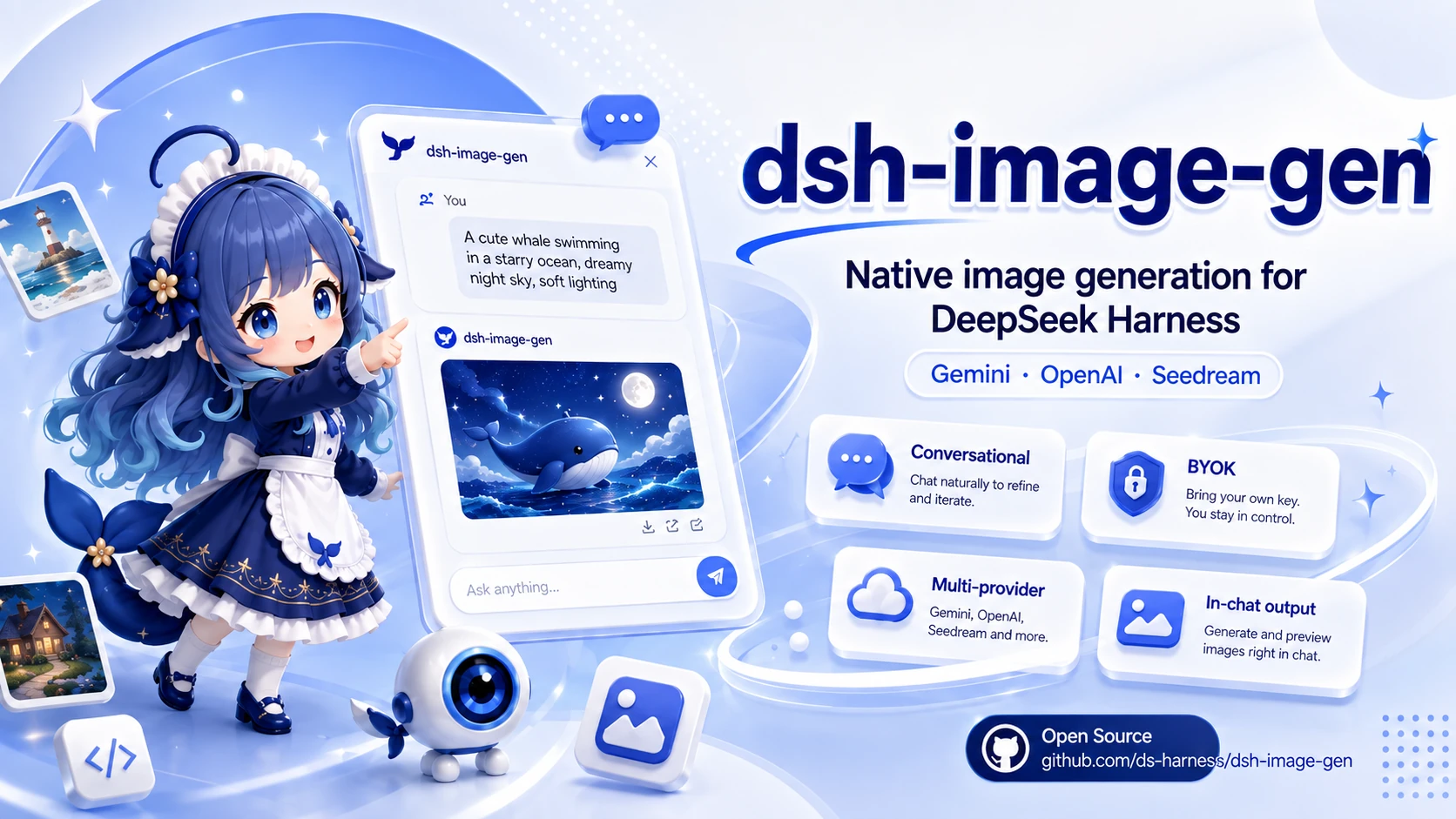
🎨 dsh-image-gen
让 DeepSeek Harness 像 ChatGPT 一样在对话中直接生成图片,支持画廊汇总,全屏预览、快捷复制与一键下载。




English | 简体中文
💬 直接对你的 DeepSeek Harness Agent 发送以下提示词:
帮我安装生图插件,执行命令:pnpm dsh plugin --profile web add dsh-image-gen@latest
(也可以手动在终端执行:pnpm dsh plugin --profile web add dsh-image-gen@latest)
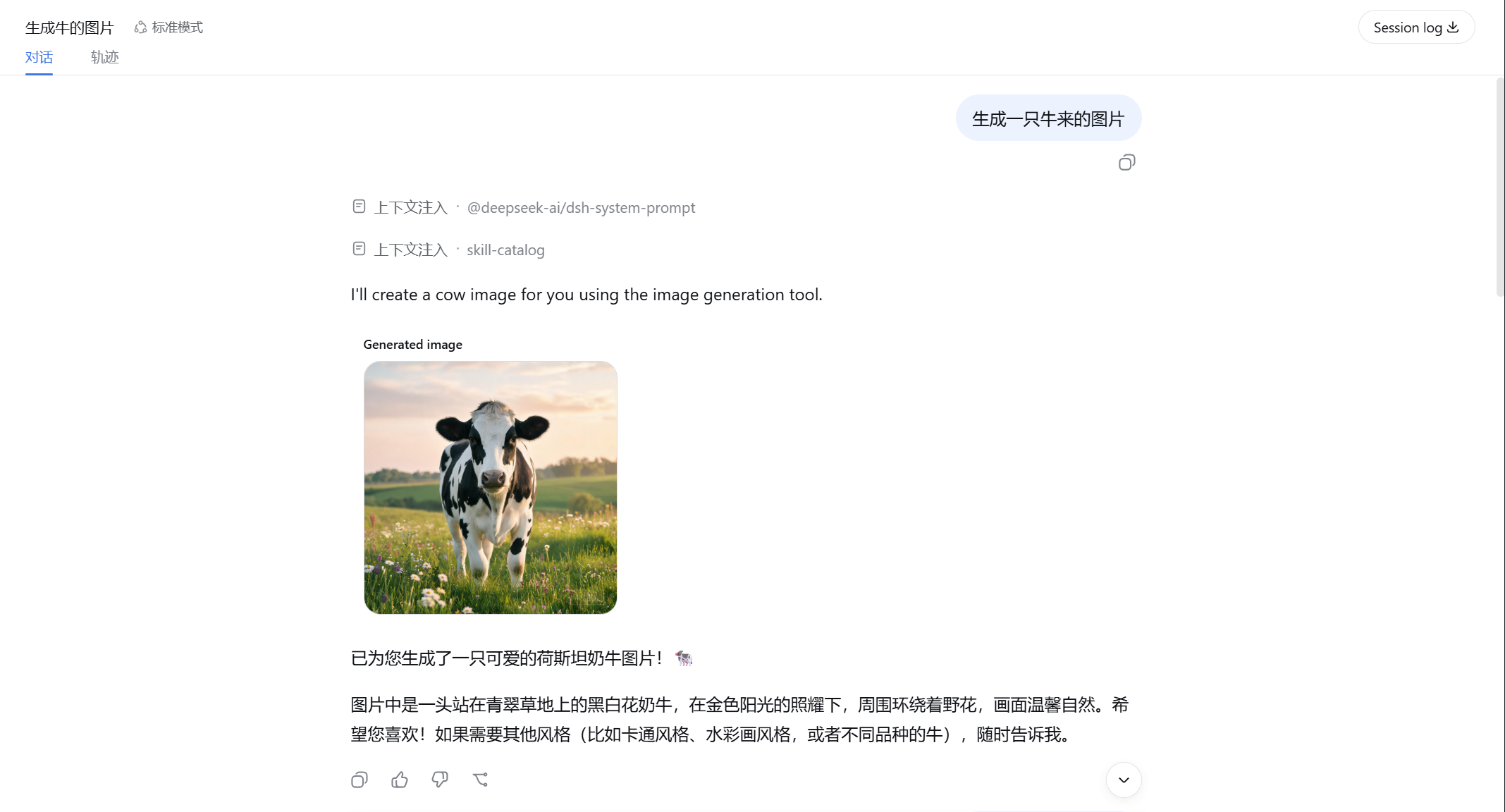
安装完成后,在 DSH 设置中填入自己的 API Key,就可以直接对 Agent 说:
帮我画一张雨夜霓虹街头的赛博朋克猫咪。
Agent 会自动调用 generate_image,生成图片并直接显示在当前对话中。
💡 它解决什么问题?
dsh-image-gen 是专为 DeepSeek Harness (DSH) 打造的开源图像生成插件。
DeepSeek Harness 已经可以让 Agent 调用不同工具完成任务,本项目为它补上了原生的多模态生图能力:
graph LR
    A[用户 Prompt] --> B[DeepSeek Harness Agent]
    B --> C[generate_image 工具]
    C --> D[Gemini / OpenAI / Seedream]
    D --> E[图片数据]
    E --> F[当前 Conversation 对话流]
🚀 快速安装与使用
1. 安装插件
在你的 DeepSeek Harness 项目根目录下运行:
# 推荐方式:安装或升级到最新版本
pnpm dsh plugin --profile web add dsh-image-gen@latest

# 若已将 dsh 安装为系统全局命令:
dsh plugin --profile web add dsh-image-gen@latest
🛠️ 其他安装方式(Git 仓库直装 / 本地调试)
# 方式 B:从 GitHub 仓库直接安装最新代码
pnpm dsh plugin --profile web add git+https://github.com/shanliuling/dsh-image-gen.git

# 方式 C:本地克隆源码开发安装
git clone https://github.com/shanliuling/dsh-image-gen.git
pnpm dsh plugin --profile web add ./dsh-image-gen
2. 配置 API Key
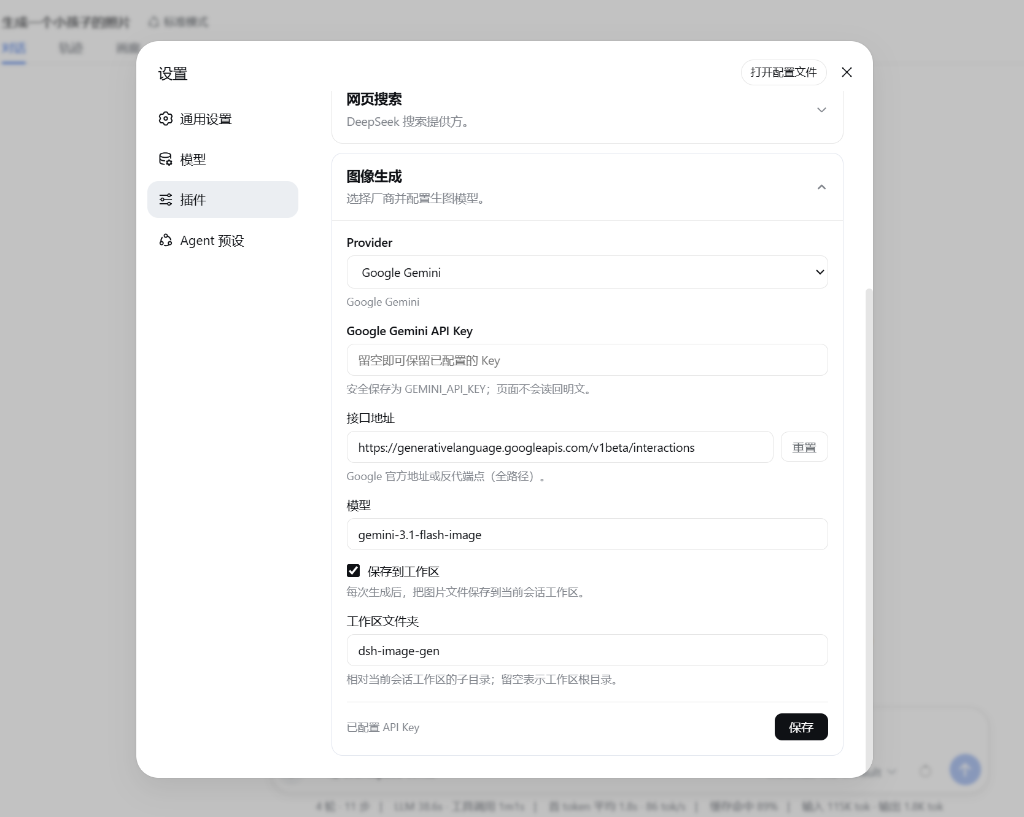
打开 DSH Web 页面(默认 http://localhost:3080):
- 进入 Settings → Plugins → Image generation。
- 选择 Provider,填写 API Key,点击 保存 即可。
3. 开始对话生图
现在直接在聊天框输入:
生成一张极简主义的现代建筑客厅插画。
当前 Agent 就会自动调用 generate_image 工具并在对话流中返回图片。
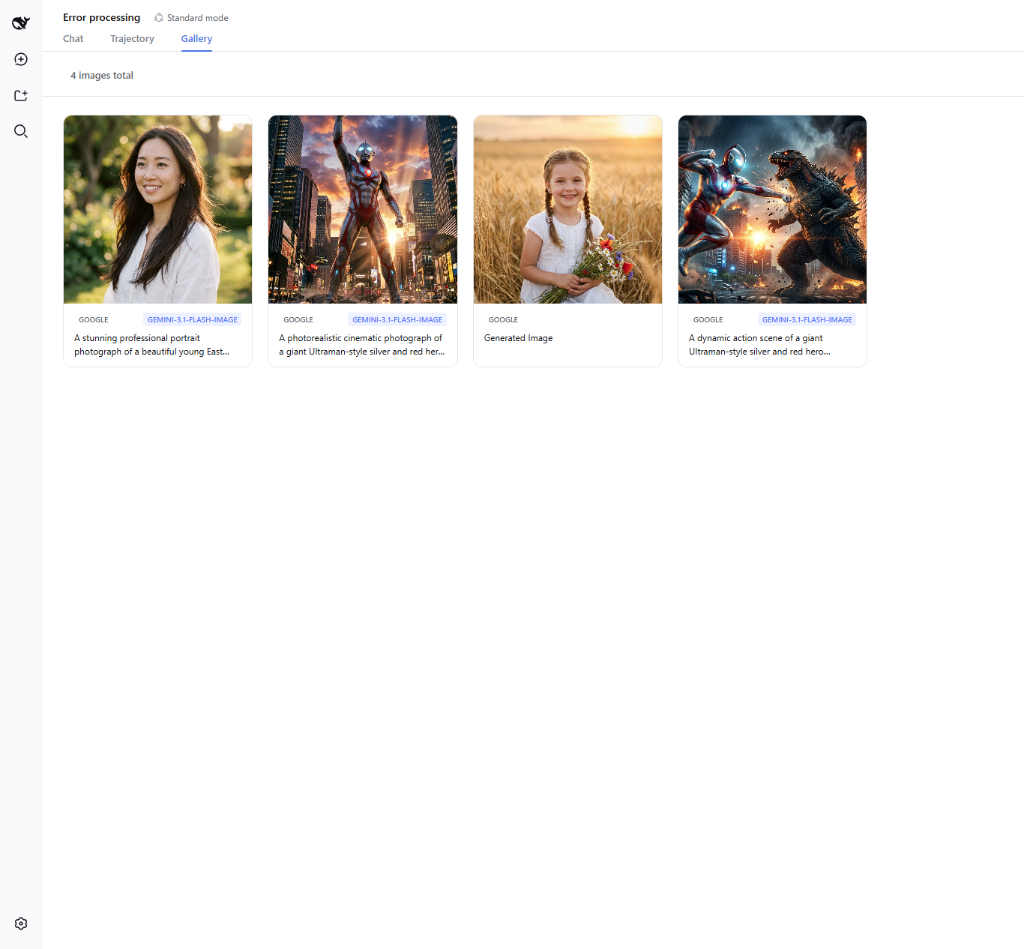
4. 查看原生生图画廊
点击会话顶栏的 [画廊] Tab,即可集中查看和搜索所有对话生成的历史图片:
✨ 主要能力
- 💬 对话中直接生图:不需要切换到其他网站,也不需要手动复制 Prompt,直接告诉 Agent 你想画什么即可。
- 🖼️ 历史生图画廊:顶栏自带「画廊」Tab,自动汇总所有历史生成的图片,支持关键词搜索、厂商筛选与一键复制/下载。
- 🔍 交互式图片工具:支持点击全屏大图预览、一键复制图片到剪贴板、本地下载与新标签页打开。
- 🎨 多 Provider 支持:目前支持 Google Gemini、OpenAI Images、OpenAI Compatible API 以及 ByteDance Seedream / Volcengine Ark。Provider、模型和 Endpoint 都可以在设置界面中自由修改。
- 🔑 BYOK (自带 Key):插件使用你自己的 API Key。API Key 通过 DeepSeek Harness 的
credentials服务管理,采用写保护隔离,不需要写进项目源码或配置文件,前端不存明文。 - 🖼️ 图片跟随会话保存:生成结果会接入 DeepSeek Harness 的 Attachment / Conversation 体系,重新打开历史会话后,仍然可以看到之前生成的图片。
- ⚙️ 原生设置界面:Provider、API Key、模型和 Endpoint 都可以直接在 DSH Web 设置中修改,不需要手动编辑配置文件。
📦 支持的 Provider
| Provider | 默认模型 | 默认 Endpoint / Base URL |
|---|---|---|
| Google Gemini | gemini-3.1-flash-image | https://generativelanguage.googleapis.com/v1beta/interactions |
| OpenAI Images | gpt-image-2 | https://api.openai.com/v1 |
| OpenAI Compatible | 自定义 | 自定义 Base URL |
| ByteDance Seedream / 火山方舟 | doubao-seedream-5-0-260128 | https://ark.cn-beijing.volces.com/api/v3 |
🛠️ 本地开发 (Development)
# 克隆仓库
git clone https://github.com/shanliuling/dsh-image-gen.git
cd dsh-image-gen

# 安装依赖与构建
pnpm install
pnpm run typecheck
pnpm run test
pnpm run build

# 检查 npm 打包内容
pnpm run pack:check
📄 开源协议 (License)
本项目基于 MIT License 开源。
如果这个插件对你有用,欢迎点一个 ⭐️ Star 支持!
Read the usage guide →
Install steps, key points, FAQ and compatibility for this plugin — auto-derived from indexed fields.
Listing badge

[](https://deepseek-plugin.org/plugins/shanliuling/dsh-image-gen)Paste this markdown into your GitHub README to link back to this listing. The badge only states the listing — not a security endorsement.