Adds a native local task board to DeepSeek Harness with SQLite storage for projects, tasks, claims, and automation. Requires manual sign-off for done status. Web profile only.

- Language
- TypeScript
- License
- Apache-2.0
- Branch
- main
Install
$ dsh plugin --profile web add @shengsheng/dsh-taskboardRun the command above in your terminal to install this plugin via the dsh CLI. You can switch Profile in the top-right corner. New to dsh? Read the beginner tutorial
Install via your agent
Install the DeepSeek Harness plugin shengsheng90/DSH-taskboard for me: review the repository at https://github.com/shengsheng90/DSH-taskboard first, then run the install command and verify the plugin loads successfully.
Paste this instruction to the DSH Web GUI assistant — it will install and verify for you.
At a Glance
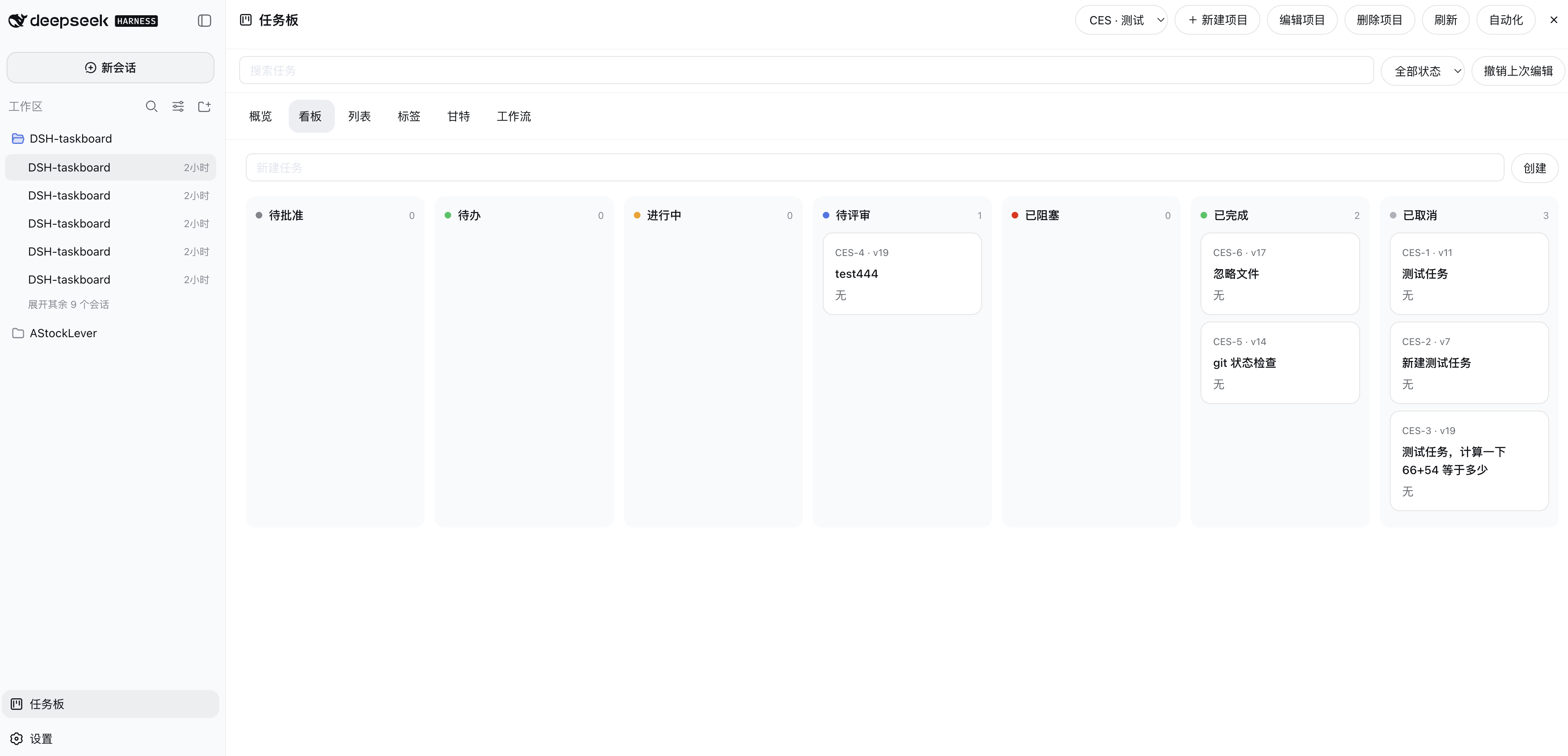
DSH-taskboard is the native local task board plugin for DeepSeek Harness: managing "projects / tasks / comments / claims / automation" in local SQLite, providing a native overlay page at the bottom of the Harness Web Client sidebar, and registering a set of "up to in_review only" work tools for Agents—sensitive actions like acceptance and status changes can only be performed by humans.
Core Capabilities
- 7-stage status lifecycle:
backlog→todo→in_progress→in_review→done, plusblocked,canceled(src/domain/types.ts:6) - Sidebar bottom adds "Task Board" entry + native overlay page, covering 6 views: Dashboard, Kanban, List, Labels, Gantt, Workflow (src/client/index.tsx:527-545)
- 8 Agent in-process tools (
taskboard_list/_get/_claim/_comment/_submit_review/_block/_release_claim/_relate), excluding acceptance and general status changes (src/tool/index.ts:32-150) - Human-only actions: approve, accept, return, archive, restore, cancel, reopen, force takeover, permanent delete—these can only be triggered via UI or CLI (src/sqlite/provider.ts:344/556/658/729/753/758/792/797/811)
- Project-level automation: intervals, Agent presets, model routing, concurrent worker limits, quota policies. Host scheduler claims eligible
todoand stops atin_review(src/automation/index.ts, README.zh.md:315-317) - Optimistic concurrency control: all non-create writes require exact
--versionmatch, conflicts throwTASK_STALE_VERSION(src/sqlite/provider.ts:695)
Technical Implementation
- Language: TypeScript (ESM; React 18 for native overlay)
- Key Dependencies:
node:sqlite(built-in, holds task/claim/activity/attachment metadata) +@deepseek-ai/cordis(host plugin host and config schema validation) +@deepseek-ai/dsh-tools(registers 8 Agent tools) +react ^18.2.0(native overlay rendering) - Architecture Pattern: Dual-half native plugin. Host half injects a plugin row named
taskboardviacordis.patch.yml,apply()bootstrapsTaskboardService, registers Agent tools, and takes over Harness native Agent scheduling viactx.inject(['agents','goals','workspaceRegistry','agentPresets','agentDefaultModel'], ...), mounts automation coordinator ineffect(), stops everything uniformly on process exit. Client half injects client-runtime / client-locale / client-ui-conversation into web client viapackage.json#dsh.client.inject, connected to host service via Typert RPC throughgenerated/typert.remote-client.js; orphan claim reconciliation at startup is best-effort and doesn't block scheduler startup (src/index.ts:65-90, package.json:80-94, cordis.patch.yml:1-17) - Entry Points:
src/index.ts(host plugin entry + config schema),src/cli.ts(JSON CLI),src/client/index.tsx(native overlay entry),src/service/index.ts(business orchestration + RPC routing),src/sqlite/provider.ts(task/claim/activity SQLite persistence)
Use Cases
Scenarios where you need to separate "development tasks" from "conversations" in DSH, let Agents automatically advance tasks, but require human sign-off for completion. For example, in an iteration with N todos, let Agents claim in specified Workspace/branch/worktree one by one, write code, submit for review, and finally have humans decide done or return—this closed loop is handled by this plugin, while Harness itself handles Agent execution, Goals, Sessions, permissions, and conversation history.
Prerequisites and Compatibility
| Dependency | Minimum Version | Description |
|---|---|---|
| DeepSeek Harness | >=0.1.0-rc.5 | peerDependencies locks @deepseek-ai/cordis ^4.0.1 and all @deepseek-ai/dsh-* ^0.1.0-rc.5 (including cordis / agent / agent-presets / goal / workspace / tools / typert-protocol, etc.), README states "Compatible Host: 0.1.0-rc.5" (package.json:95-117, README.md:12, README.zh.md:12/40) |
| Host profile | web | cordis.patch.yml writes to web profile, package.json#dsh.client.platform = "web", headless / other profiles not in declared scope (cordis.patch.yml:1-17, package.json:84-94) |
| Node.js | ^22.19.0 or >=24.0.0 | engines.node explicitly declares; uses built-in node:sqlite (available in Node 22.5+, works with 22.19 / 24), README recommends 24 (package.json:8-10, README.zh.md:34-49) |
| Platform | macOS / Windows / Linux | No os / cpu fields declared, only depends on Node built-in node:sqlite and Node fs/path, cross-platform (entire package.json) |
| Native module | node:sqlite | Database layer directly uses Node built-in node:sqlite (DatabaseSync), no third-party native modules needed (src/sqlite/schema.ts:3, src/sqlite/provider.ts:6) |
| Browser half injection | @deepseek-ai/dsh-{api-remotes, client-connection, client-locale, client-runtime, client-ui-conversation} ^0.1.0-rc.5 | package.json#dsh.client.inject lists 5 client packages needed for native overlay (package.json:84-92) |
| Other runtime dependencies | zod ^4.4.3 | Domain layer type validation; no third-party packages outside official SDKs (package.json:125-127) |
Installation
dsh plugin --profile web add github:shengsheng90/DSH-taskboard
Note: lib/ is not in git, git installation won't include compiled artifacts. Source installation requires pnpm install && pnpm build && pnpm pack in the repo first, then dsh plugin --profile web add -w /absolute/path/to/shengsheng-dsh-taskboard-<version>.tgz. After installation, Harness process must be restarted; polling GET / includes @shengsheng/dsh-taskboard and GET /plugins/@shengsheng/dsh-taskboard/client.js returns 200 to be considered activated (README.zh.md:51-202, README.zh.md:16).
Configuration Options
Configuration is parsed by Host, browser cannot directly select paths. Can be overridden at profile composition layer or specified via environment variables.
| Config | Type | Description | Default |
|---|---|---|---|
| databasePath | string | SQLite database file path | .dsh/taskboard.sqlite (overridable with DSH_TASKBOARD_DATABASE) |
| attachmentRoot | string | Root directory for attachment files | .dsh/taskboard-attachments (overridable with DSH_TASKBOARD_ATTACHMENTS) |
| pageSize | number | Page size for taskboard_list, results include match total | 100 |
| snapshotTaskLimit | number | Max tasks carried in a single native page snapshot, page prompts when truncated | 1000 |
| maxAttachmentBytes | number | Single attachment byte limit | 26214400 (25 MiB) |
| maxTaskAttachmentBytes | number | All attachments combined byte limit per task | 104857600 (100 MiB) |
| allowedAttachmentTypes | string[] | Allowed MIME type whitelist for uploads | json / octet-stream / pdf / zip / gif / jpeg / png / webp / markdown / text |
| minAutomationIntervalMs | number | Minimum interval allowed for project-level automation | 30000 (30 seconds) |
| maxProjectWorkers | number | Concurrent claim Agents per project | 2 |
| maxGlobalWorkers | number | Global concurrent claim Agents | 4 |
| allowSharedWorktrees | boolean | Whether multiple Agents can share the same worktree | false |
| clientRefreshIntervalMs | number | Browser overlay snapshot fallback polling interval | 15000 (15 seconds) |
| maxChangeWaiters | number | Long polling waiter limit | 128 |
| maxChangeWatchMs | number | Single long polling timeout | 30000 (30 seconds) |
| defaultAgentPreset | string | Default Agent preset name for automation | standard |
| defaultModelRoute | string | Default model route for automation (schema required, no default) | None (must be supplied at profile layer) |
Source: src/index.ts:42-62, cordis.patch.yml:4-17.
FAQ
Q: Can Agents directly change a task to done?
A: No. Agents can only submit their held in_progress to in_review; done can only be written by humans via UI or CLI task accept action (requireHuman is enforced on multiple write paths in the provider layer). Goal completion also doesn't automatically accept tasks.
Q: What if Agent doesn't finish after claiming? Will the claim get stuck?
A: Claims won't be silently taken away. Agents can taskboard_release_claim before submitting; humans can use "force takeover" to release the claim and push the task back to todo, avoiding orphans occupying the entire worker. Returning to todo releases the claim; directly going back to in_progress requires establishing a new explicit claim atomically (README.zh.md:252-259, src/sqlite/provider.ts:790-794).
Q: How to stop tasks running in automation?
A: Simply turn off the automation rules for the corresponding project on the native task board page. Host scheduler will no longer dispatch new claims; already running Agent Sessions are managed normally by Harness, rule disabling won't force-kill them. When quota is exhausted, scheduler only pauses new claims, won't cancel running work (README.zh.md:315-317).
Q: How to back up data?
A: Take both the SQLite (online also needs WAL) and the entire .dsh/taskboard-attachments/ directory; to do offline consistent backup, stop Harness first. Storage panel and dsh-taskboard storage status output SQLite integrity, revision, activity, attachment cleanup queue, and orphan claim diagnostics (README.zh.md:340-344).
Q: Changed status on native page but sidebar didn't refresh immediately?
A: Browser overlay mainly relies on Typert long polling for the next committed global revision; when there's no commit on host side, it falls back to snapshot polling at clientRefreshIntervalMs (default 15 seconds). This fallback doesn't require modifying Harness's Host event whitelist (README.zh.md:341-342).
Q: Installation reports declines no dsh.bundle?
A: Indicates the package's cordis.patch.yml wasn't bundled. Run pnpm build && pnpm pack in the repo first, then dsh plugin --profile web add -w <tarball>, don't manually modify installed copies (README.zh.md:130/217).
Q: Can Agents use tools to create tasks and directly enter todo status?
A: No. Create project, update project, delete project, and creating tasks with status='todo' all trigger requireHuman errors in the SQLite provider. Tasks created by Agent/automation can only land in backlog, require human "approve to start" in UI to enter todo (src/sqlite/provider.ts:344/375/394/416).
Q: Does activity log auto-cleanup? Can I see it in task details?
A: No auto-cleanup—source comments explicitly state "logs grow unbounded per task"; native task detail overlay also doesn't render activity streams, only shows SQLite integrity, revision count, attachment cleanup queue, and orphan claim diagnostics in storage health panel (src/service/index.ts:306, README.zh.md:340-344).
Learning Curve
Advanced — installation requires a chain of steps: pnpm build && pnpm pack + tarball install + host restart + browser polling activation (README lists all 8 steps complete); after installation, sidebar entry and native overlay are visual operations, but letting Agents automatically claim tasks requires configuring workspace/branch/automation rules, rule tuning requires understanding state machines and optimistic locking.
Known Issues and Limitations
- Only supports web profile: bundle patch and
dsh.client.platformare hardcoded toweb; under headless / other profiles, browser half doesn't load, and host half's service loses overlay path due to unreachable client (package.json:84-94, cordis.patch.yml:1-17). - Must restart Harness process after install/uninstall: plugin bundle registration and client-modules scanning only execute at startup; page refresh won't activate new mounts. Restart terminates the process hosting current sessions, in-progress Agent rounds will be interrupted (README.zh.md:153-179).
- Database schema version hard constraint: current version is 4. If disk's
user_version> 4 or negative, initialization throwsSTORAGE_SCHEMA_UNSUPPORTEDand closes database; lower versions auto-migrate V1→V4. Manually swapping higher version database refuses to start (src/sqlite/schema.ts:36-47). - Agents cannot directly create projects or set tasks to
todo:create project/update project/delete project/ creating task withstatus='todo'all triggerrequireHuman, CLI and human operations can bypass, Agent tool paths don't work (src/sqlite/provider.ts:344/375/394/416). - Activity log grows unbounded: source comments explicitly state "native page doesn't render activity streams, logs grow infinitely per task";
taskboard_*tools also don't proactively trim (src/service/index.ts:306). - Browser-side snapshot fallback + long polling has limits:
maxChangeWaiters=128/maxChangeWatchMs=30 seconds, falls back toclientRefreshIntervalMs(15 seconds) polling when limits reached; state delays may be noticeable during peak times (src/index.ts:57-59, cordis.patch.yml:14-16). - Default model route has no value:
defaultModelRoutein schema isz.string()with no default, must be explicitly supplied at profile composition layer, otherwise startup config validation fails (src/index.ts:61). - Default database path and attachment root are resolved by Host at startup, browser overlay cannot temporarily change; to isolate multiple profiles, need to start host under different
DSH_TASKBOARD_DATABASE/DSH_TASKBOARD_ATTACHMENTSenvironment variables (README.zh.md:319-321). - Offline build depends on
lib/typert.*artifacts: build script copies official Typert artifacts bundled with the repo fromscripts/copy-typert-artifacts.mjs; tree-out build doesn't depend on adjacent Harness checkout, but generated Remote files go togenerated/, after cleanup must re-runpnpm build(README.zh.md:355-358).
English | 简体中文
Native, local project task management for DeepSeek Harness. SQLite is the sole task authority. Harness Agent Sessions, Goals, Workspaces, tools, permissions, and the Web Client remain the execution and conversation owners.
This README is written so a human or another coding agent can install the plugin into a live Harness profile, verify it, and start using it without guessing.
Package: @shengsheng/dsh-taskboard
Repository: https://github.com/shengsheng90/DSH-taskboard
License: Apache-2.0
Compatible Host: DeepSeek Harness 0.1.0-rc.5
If you are an installing agent, jump to Install into DeepSeek Harness and follow every step in order. Do not add this Git repository as a raw plugin source: lib/ is gitignored, so a git install has no compiled Host/Client bundle.
What you get
After a successful install, Harness gains:
- A Taskboard sidebar button and a native overlay page (not an iframe, not a second chat runtime)
- Local SQLite projects, tasks, comments, relations, attachments, workflows, and automation
- Stable readable keys such as
DSH-42plus opaque ids and optimistic versions - Seven statuses:
backlog→todo→in_progress→in_review→done, plusblockedandcanceled - In-process Agent tools
taskboard_*(no accept / no generic status mutation) - Headless JSON CLI
dsh-taskboard - Packaged Skill
manage-taskboard
Agents can submit verified work to in_review. Only an authenticated human UI or CLI operation can accept it as done.
Further design docs: Architecture, Security and recovery, CLI reference, Acceptance audit. Attribution shipped to package consumers is in THIRD_PARTY_NOTICES.md.
Requirements
| Requirement | Value |
|---|---|
| Node.js | ^22.19.0 or >=24.0.0 (24 recommended; built-in node:sqlite) |
| pnpm | 11 (packageManager is [email protected]) |
| DeepSeek Harness | 0.1.0-rc.5 checkout or installation, web profile |
| Network | only needed to clone this repo and install Node dependencies |
| Permissions | write access to $DSH_HOME (default ~/.dsh) and the ability to restart the Harness process |
Confirm the toolchain before installing:
node -v    # v22.19+ or v24+
pnpm -v    # 11.x
Install into DeepSeek Harness
Use these constants. Read live values from disk; do not invent a different package name.
| Name | Value |
|---|---|
| Package name | @shengsheng/dsh-taskboard |
| Default profile | web |
| Default Web port | 3080 (detect; do not assume) |
| Profile directory | $DSH_HOME/profiles/<profile> , usually ~/.dsh/profiles/web |
| Packed tarball name | shengsheng-dsh-taskboard-<version>.tgz |
<version> is whatever this repo's package.json currently declares — read it there rather than copying a number out of this document. After pnpm pack, use the tarball that was actually written.
A longer copy-paste prompt for a Harness-side agent is in docs/install-plugin-prompt.zh.md. The steps below are the normative English procedure.
1. Detect the running Harness
Find the Web listener and its working directory:
PORT=3080
lsof -iTCP:"$PORT" -sTCP:LISTEN
# then, with the listener PID:
lsof -p <PID> -a -d cwd
If nothing is listening on 3080, search other common ports or ask the operator for the URL they use (http://127.0.0.1:<port>).
Decide how to invoke the dsh CLI:
- If the Harness cwd is a source checkout (repo root has
pnpm-workspace.yamlandpackage.jsoncontains a"dsh"script), run every later command from that checkout root aspnpm dsh .... - Else if
command -v dshsucceeds, usedsh ...directly.
In the commands below, dsh means whichever of those two forms you just chose. First use of a profile may initialize it and install @deepseek-ai/dsh-base.
2. Build a packed plugin (required)
lib/ is not in git. Always build, then pack. Installing the raw git tree or an unbuilt working copy will produce a package without Host/Client output.
git clone https://github.com/shengsheng90/DSH-taskboard.git
cd DSH-taskboard
pnpm install
pnpm build
pnpm pack
Expected artifacts:
lib/index.js,lib/cli.js,lib/client.js(and sibling declarations)shengsheng-dsh-taskboard-<version>.tgzin the repo root
Record the absolute tarball path. Example:
/absolute/path/to/DSH-taskboard/shengsheng-dsh-taskboard-<version>.tgz
If this repository is already cloned and dependencies are installed, pnpm build && pnpm pack is enough. Optional local checks: pnpm typecheck, pnpm test, pnpm example.
3. Add the plugin to the profile
The profile directory is a pnpm workspace root (packages: [.]). The -w / workspace-root flag is mandatory. Without it, pnpm fails with ERR_PNPM_ADDING_TO_ROOT.
dsh plugin --profile web add -w /absolute/path/to/shengsheng-dsh-taskboard-<version>.tgz
Prefer the packed tarball over the source directory. A source-directory add can miss lib/ if the tree was not built.
This command may rewrite the profile package.json, lockfile, and node_modules. That is expected.
Install succeeded only when all of the following are true:
$DSH_HOME/profiles/web/package.jsondependenciescontains@shengsheng/dsh-taskboard.- The same file's
dsh.profile.bundleslists@shengsheng/dsh-taskboardafter@deepseek-ai/dsh-base. $DSH_HOME/profiles/web/node_modules/@shengsheng/dsh-taskboard/exists and containslib/pluscordis.patch.yml.
If the CLI warns declares no dsh.bundle, the package is missing "dsh": { "bundle": { "patch": "./cordis.patch.yml" } } in package.json. This repository already declares that; rebuild and reinstall rather than editing the installed copy by hand.
4. Verify composition (does not start the server)
dsh --profile web --dump-config
Pass when the dump ends with a # == @shengsheng/dsh-taskboard layer and the taskboard plugin config (databasePath, attachmentRoot, worker limits, and the other keys listed in Configuration).
--dump-config idempotently rewrites the profile-root cordis.yml. If a sandbox returns EPERM while writing ~/.dsh, ask the operator for full filesystem permission and retry. That rewrite is expected, not a failure.
5. Smoke-test module resolution
cd ~/.dsh/profiles/web && node --input-type=module -e \
  "import('@shengsheng/dsh-taskboard').then(m=>console.log('OK', m.name, typeof m.apply)).catch(e=>{console.error(e.message);process.exit(1)})"
Pass: OK taskboard function.
Fail is usually a missing peer (@deepseek-ai/* or react). Those resolve through the install-fallback links under ~/.dsh/profiles/node_modules, which Harness heals on boot. Re-run step 4, then retry this import.
6. See whether the running process already loaded the plugin
Plugin composition and client-module scanning happen only at boot. Installing into the profile does not hot-load the UI.
curl -s http://127.0.0.1:3080/ | grep -c '@shengsheng/dsh-taskboard'
curl -s -o /dev/null -w '%{http_code}\n' http://127.0.0.1:3080/plugins/@shengsheng/dsh-taskboard/client.js
- Manifest count
> 0and bundle HTTP200→ already active; skip the restart and go to Confirm activation. - Otherwise restart Harness.
7. Restart Harness
Restart stops the process that hosts the current session. Session data lives in $DSH_HOME/sessions and is not deleted; in-flight Agent turns are interrupted. Tell the operator before restarting.
From a Harness source checkout, a typical restart is:
# stop the current listener
OLD_PID=$(lsof -tiTCP:3080 -sTCP:LISTEN | head -1)
if [ -n "$OLD_PID" ]; then kill -TERM "$OLD_PID"; fi

# wait until the port is free, then start again from the checkout root
cd /absolute/path/to/deepseek-harness
nohup pnpm dsh --profile web >> /tmp/dsh-harness-restart.log 2>&1 &
Do not treat the first successful GET / as “plugin ready”. The Web server can accept connections before the boot manifest injects the plugin. Poll until the package name appears:
for _ in $(seq 1 30); do
  if curl -s http://127.0.0.1:3080/ | grep -q '@shengsheng/dsh-taskboard'; then echo ready; break; fi
  sleep 2
done
curl -s -o /dev/null -w '%{http_code}\n' http://127.0.0.1:3080/plugins/@shengsheng/dsh-taskboard/client.js
A detached restart script used in a real install is documented in docs/install-plugin-prompt.zh.md (step 6). Prefer that script when the installing agent would be killed with the old Harness process group.
8. Confirm activation
All of these must pass:
| Check | Expected |
|---|---|
GET / contains @shengsheng/dsh-taskboard | count ≥ 1 |
GET /plugins/@shengsheng/dsh-taskboard/client.js | HTTP 200 |
| Harness boot log | no plugin import / apply error |
| Browser | refresh http://127.0.0.1:<port>; a Taskboard control appears in the sidebar footer |
Default data files (created on first use, Host-resolved paths):
.dsh/taskboard.sqlite
.dsh/taskboard-attachments
Install troubleshooting
| Symptom | Cause | Fix |
|---|---|---|
dsh: command not found | CLI not on PATH | From a Harness checkout root, use pnpm dsh ... |
ERR_PNPM_ADDING_TO_ROOT | profile is a pnpm workspace root | Add -w |
git / directory install has no lib/ | lib/ is gitignored | pnpm build && pnpm pack, then add the .tgz |
EPERM writing ~/.dsh | sandbox | Ask the operator for full permissions; the write is idempotent |
Manifest / client.js still 404 | no restart, or checked too early | Restart, then poll (step 7) |
| Import / apply error | missing peers or missing bundle entry | Heal fallbacks with --dump-config; confirm dsh.profile.bundles |
declares no dsh.bundle | package missing bundle patch | Rebuild this repo; do not hand-edit the installed tree |
| GUI down after restart | Harness failed to boot | Read /tmp/dsh-harness-restart.log or the process log; confirm checkout path and pnpm dsh |
Install only packages you trust. pnpm runs package lifecycle scripts, and Harness then loads the plugin.
Use the Taskboard
Human UI
- Open the Harness Web Client and click the Taskboard control in the sidebar footer.
- Create a project: name, short key (used for readable ids such as
DSH-1), optional Harness Workspace id. Leave Workspace blank for a global project. - Create a task. New work starts in
backlogunless you create it already astodo. - Write the description in Markdown. Attach files by paste, drop, or file picker.
- Approve for work moves
backlog→todo. Agents and automation may claim only eligibletodoitems. - Use Board, List, Gantt, Workflows, and the Dashboard as needed. The page follows the Harness locale (Chinese or English).
- When an Agent submits review, open the task, read the result comment and verification, then Accept (
done) or Return for rework. - Map a Workspace before using Open in new session. That action opens a native blank Session with an unsent draft that carries the exact task id and revision.
Human-only actions (UI or CLI, never model tools): approve, accept, return, archive, restore, cancel, reopen, force takeover, permanent delete.
Task lifecycle
human creates backlog
  -> human approves to todo
  -> Agent or automation claims (dependency recheck + exclusive claim + Session)
  -> Agent works in the bound Workspace / branch / worktree
  -> Agent verifies and submits in_review
  -> human accepts done, or returns to todo / in_progress
Rules every caller must keep:
- Every mutation except create carries the exact current
version. TASK_STALE_VERSIONmeans reread and reconcile; do not retry the stale version.- Never derive an opaque task id from a display key such as
DSH-42. Use the id the API returned. - Goal completion never accepts a task. Agent success ends at
in_review. - Returning or resuming to
todoreleases the claim. Directin_progressrework must create a fresh explicit claim. - Orphaned claims stay visible. They are not silently stolen.
Agent tools
Models must use the in-process tools. Do not shell out to dsh-taskboard from a model turn when a tool exists.
| Tool | Purpose |
|---|---|
taskboard_list | Bounded list for one exact project_id |
taskboard_get | Full detail, version, comments, relations, claim |
taskboard_claim | Claim one eligible todo with expected_version |
taskboard_comment | Append a Markdown comment |
taskboard_submit_review | Move owned in_progress work to in_review |
taskboard_block | Block the owned in_progress task with a concrete reason |
taskboard_release_claim | Release only the current Agent's claim |
taskboard_relate | Add parent, blocks, or related in the same project |
There is no accept tool and no generic status tool. Follow the packaged Skill at skills/manage-taskboard/SKILL.md:
taskboard_list→ pick an eligibletodo.taskboard_getimmediately before the write.taskboard_claimwith the exact version.- Do the work in the task's declared development context.
- Verify, then
taskboard_submit_reviewwith evidence. Never edit the task description to record the result.
JSON CLI
The CLI emits schema-versioned JSON. Use it for human scripts and interoperability, not as the model's primary API.
dsh-taskboard --database .dsh/taskboard.sqlite project list
dsh-taskboard --database .dsh/taskboard.sqlite project create --key DSH --name "My project"
dsh-taskboard --database .dsh/taskboard.sqlite task create --project <project-id> --title "Ship the plugin"
dsh-taskboard --database .dsh/taskboard.sqlite task get --task DSH-1
dsh-taskboard --database .dsh/taskboard.sqlite task approve --task <opaque-id> --version 1
dsh-taskboard --database .dsh/taskboard.sqlite task accept --task <opaque-id> --version 7
Structured writes accept JSON:
dsh-taskboard task create --request-json '{"projectId":"project-...","title":"Ship","creator":"human:cli","priority":"high"}'
dsh-taskboard task update --task task-... --version 3 --request-json '{"labels":["release"]}'
dsh-taskboard task return --task task-... --version 4 --comment "Fix the failing test"
Groups: project, task, relation, attachment, workflow, automation, storage. Full command list: docs/cli.md.
Exit codes: 0 success, 2 usage, 3 storage/service unavailable, 4 domain/API error, 5 optimistic conflict (TASK_STALE_VERSION).
If the binary is not on PATH, run the installed file:
node ~/.dsh/profiles/web/node_modules/@shengsheng/dsh-taskboard/lib/cli.js --database .dsh/taskboard.sqlite storage status
Automation
On the Taskboard page, create an automation for a project: interval, Agent preset, model route, worker count, and quota policy. When enabled, the Host scheduler claims eligible todo work, drives a root Agent Session and Goal, and stops at in_review. Quota uncertainty pauses new claims without cancelling running work.
Configuration
cordis.patch.yml mounts one Host plugin id taskboard. Override values in the profile composition or with environment variables. Paths are resolved by the Host. The browser cannot choose the database or attachment root.
| Key | Default | Notes |
|---|---|---|
databasePath | .dsh/taskboard.sqlite | DSH_TASKBOARD_DATABASE |
attachmentRoot | .dsh/taskboard-attachments | DSH_TASKBOARD_ATTACHMENTS |
pageSize | 100 | Bounded taskboard_list page; the result reports the matching total |
snapshotTaskLimit | 1000 | Tasks per web snapshot; the page reports when it was truncated |
maxAttachmentBytes | 26214400 | Per file (25 MiB) |
maxTaskAttachmentBytes | 104857600 | Per task (100 MiB) |
minAutomationIntervalMs | 30000 | Floor for automation interval |
maxProjectWorkers | 2 | Concurrent claims per project |
maxGlobalWorkers | 4 | Concurrent claims globally |
allowSharedWorktrees | false | Exclusive development context |
clientRefreshIntervalMs | 15000 | Snapshot recovery interval |
maxChangeWaiters | 128 | Long-poll waiter cap |
maxChangeWatchMs | 30000 | Long-poll timeout |
defaultAgentPreset | standard | Worker preset |
Attachment content types and sizes are validated before publication. Downloads stream from disk. Dashboard and storage status share the same bounded SQLite integrity, revision, count, attachment-cleanup, and orphaned-claim diagnostics.
The SQLite integrity scan reads every database page, so it never runs on the snapshot path: it runs once when the database opens and on the dashboard's explicit re-check. storageHealth.integrityCheckedAt reports when the reported result was measured.
While the page is open, the plugin waits on the next committed global revision over the existing Typert connection. Timeout polling and periodic snapshots are recovery paths. This does not require changing the Harness Host-event allowlist.
Backup both the SQLite file (and WAL, if live) and the attachment directory. For a consistent offline backup, stop Harness first.
Develop this repository
pnpm install
pnpm typecheck
pnpm test
pnpm build
pnpm example
pnpm build compiles Host declarations and runtime, copies the checked official Typert generator artifacts, and produces the browser bundle. Generated Remote files stay in generated/ so an out-of-tree build does not need an adjacent Harness checkout.
pnpm check runs typecheck, tests, and build.
Further documentation
| Document | Contents |
|---|---|
| docs/architecture.md | Module owners and refresh model |
| docs/security.md | Authority split, attachments, recovery |
| docs/cli.md | JSON CLI groups and exits |
| docs/acceptance-audit.md | Row-by-row acceptance evidence |
| docs/browser-e2e.md | Deterministic browser lifecycle |
| docs/install-plugin-prompt.zh.md | Chinese copy-paste install prompt for a Harness agent |
| skills/manage-taskboard/SKILL.md | Agent operating procedure |
License
Apache-2.0. See LICENSE and THIRD_PARTY_NOTICES.md.
Read the usage guide →
Install steps, key points, FAQ and compatibility for this plugin — auto-derived from indexed fields.
Listing badge

[](https://deepseek-plugin.org/plugins/shengsheng90/DSH-taskboard)Paste this markdown into your GitHub README to link back to this listing. The badge only states the listing — not a security endorsement.