Adds sticker support to text-only DeepSeek: registers a visual routing mechanism where images are first described as text by a VL model, then passed to DeepSeek—no model changes or official modifications required.

- Language
- TypeScript
- License
- MIT
- Branch
- main
Install
$ dsh plugin --profile web add dsh-deepseek-visionRun the command above in your terminal to install this plugin via the dsh CLI. You can switch Profile in the top-right corner. New to dsh? Read the beginner tutorial
Install via your agent
Install the DeepSeek Harness plugin siegfly/dsh-deepseek-vision for me: review the repository at https://github.com/siegfly/dsh-deepseek-vision first, then run the install command and verify the plugin loads successfully.
Paste this instruction to the DSH Web GUI assistant — it will install and verify for you.
One-Sentence Positioning
Give plain-text DeepSeek models "image attachment" capability: register a new model route deepseek-vision, declare image input support in the chat window, but internally first send images to your configured vision model (default qwen3-vl-flash) to describe them word-by-word in text, then pass to the original DeepSeek streaming interface.
Core Capabilities
- Register a new provider route
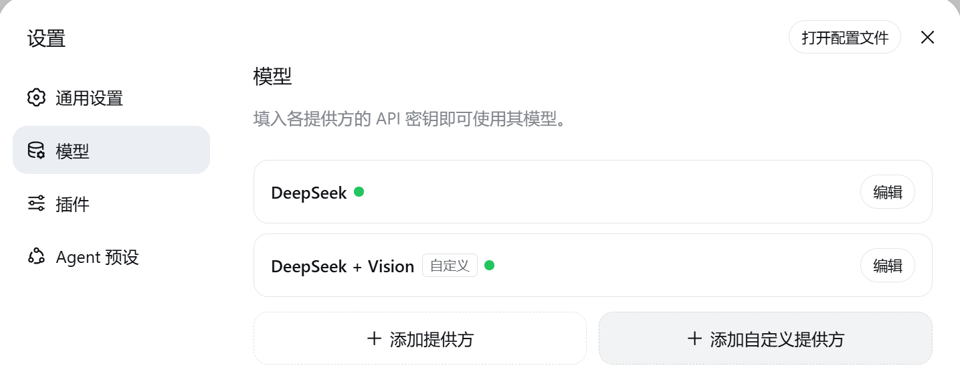
DeepSeek + Vision. After selecting in the Models page, images pasted in the chat window, embedded images in tool results, and images passed from MCP/ACP clients can all pass the official admission threshold - Rewrite image blocks into VL model-generated description text before sending to DeepSeek. The original images are still written as-is to session logs, history and replay remain unaffected
- Do LRU description caching by
attachmentIdin-process. The same image is recognized only once during retries, session compression, and subsequent turns - Any VL gateway compatible with OpenAI
/chat/completionsinterface can be connected (DashScope, vLLM self-hosted, OpenRouter, LM Studio, etc.). Just change the endpoint in the settings card, no code changes needed - Clear failure semantics: default fail-closed and return stable error codes (
AUTH/TIMEOUT/TRANSPORT/RATE_LIMIT/IMAGE_TOO_LARGE, etc.), optionalplaceholderstrategy degrades to text placeholder to continue - Pre-check image size limits: when image bytes or pixels exceed host limits, fail with
IMAGE_TOO_LARGEbefore base64 encoding, don't send large images to the VL endpoint only to fail there
Technical Implementation
- Language: TypeScript (host side + React client side)
- Key Dependencies: @deepseek-ai/dsh-llm-deepseek (inherits DeepSeekAdapter streaming/retry/wire serialization), @deepseek-ai/dsh-llm (error codes and stable states), @deepseek-ai/dsh-credentials (credential parsing)
- Architecture Pattern: Server registers
llm-vl-gatewaysettings section and one provider route at the bundle layer viacordis.patch.yml, inherits official DeepSeekAdapter and overridesstream(): first uses ImageBridge to rewrite image blocks into text descriptions, then callssuper.stream(); client injects a settings card viasettings.plugin.itemslot. Registration/reregistration is atomic, route id and display name take effect immediately in the settings card - Entry Points: Server
src/index.ts(exportsapply,Config,VisionGatewayAdapter,ImageBridge), Clientsrc/client/index.ts(exportsapplyand injects card tosettings.plugin.item)
Use Cases
Developers who use DeepSeek daily for programming and writing code, often needing to paste error screenshots, UI screenshots, ASCII之外的草图 (sketches beyond ASCII), terminal output images into conversations for model understanding. The official DeepSeek API rejects images for plain-text models. This plugin fills this capability without you changing official configuration or switching models. When you want to switch between different VL vendors, or don't want to introduce extra local models and third-party relays, this "thinnest bridge" is the most direct solution.
Prerequisites & Compatibility
| Dependency | Min Version | Description |
|---|---|---|
| DSH | >=0.1.0-rc.6 (compatible with both rc.6 and rc.7) | Same release artifact can load on both slot forms; build anchor declared at dshCompat.anchorVersion = 0.1.0-rc.8 (source declaration, not install gate) |
| Node.js | >=22.19.0 (or 24+) | Official CLI installation path doesn't require Node version; CLI-free replica path (pnpm install-profile) needs it |
| Platform | macOS / Windows / Linux | CI validates on ubuntu, windows, macos-latest runners; client is browser bundle, no host system requirement |
| Native Modules | None | Pure fetch/Node standard library, no native deps like node-pty/node:sqlite |
Installation
dsh plugin --profile web add github:siegfly/dsh-deepseek-vision
Configuration Options
| Config | Type | Description | Default |
|---|---|---|---|
provider | string | Registered route id (avoid official deepseek-official) | deepseek-vision |
displayName | string | Name shown in Models selector | DeepSeek + Vision |
deepseek.* | section | Fully isomorphic with official DeepSeek config (apiKeyEnv, baseURL, thinking, reasoningEffort, maxTokens, models, retryPolicy, etc.) | Inherits official defaults |
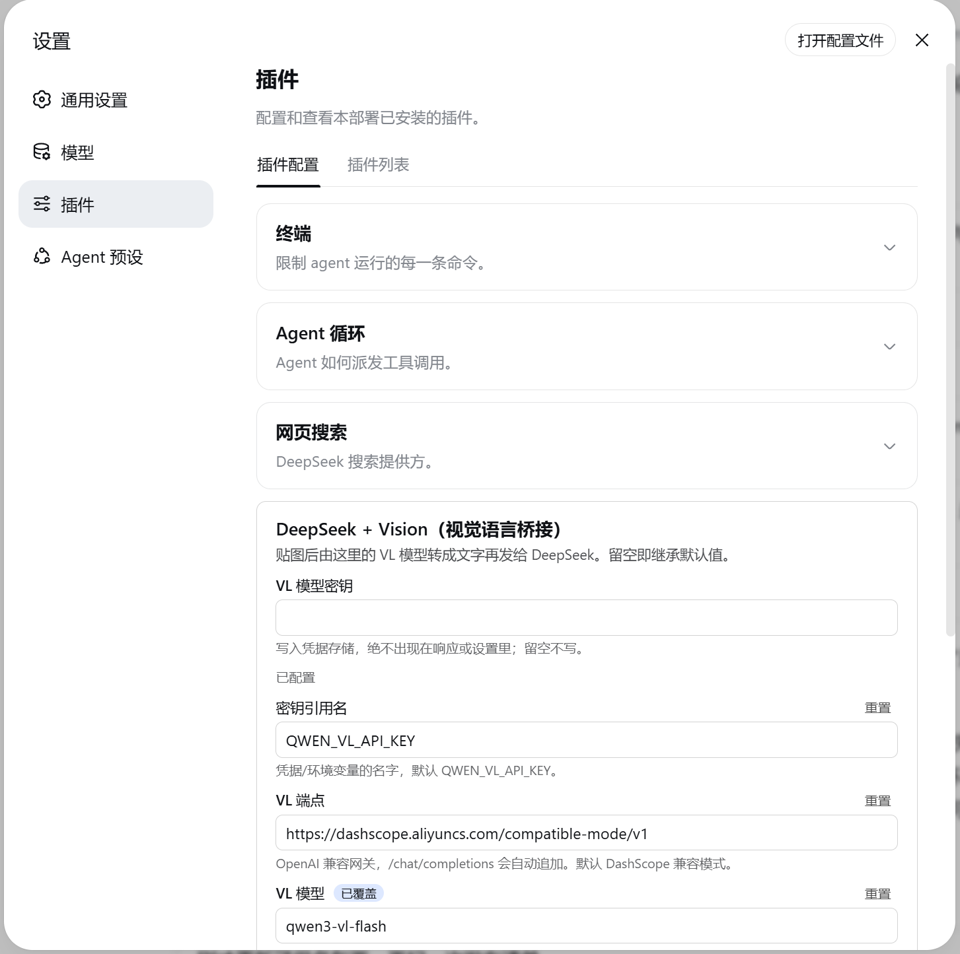
vl.apiKeyEnv | credential ref name | Name of VL model key in credentials/env vars | QWEN_VL_API_KEY |
vl.baseURL | string | VL gateway address, will auto-append /chat/completions; supports any OpenAI compatible interface | https://dashscope.aliyuncs.com/compatible-mode/v1 |
vl.model | string | VL model id, can switch to qwen-vl-max for complex visual reasoning | qwen3-vl-flash |
vl.describePrompt | string | Prompt for describing images, recommend requiring word-by-word extraction of code, errors, logs, UI text | Detailed English word-by-word extraction prompt |
vl.timeoutMs | number (ms) | Hard timeout for single description request | 120000 |
vl.maxCacheEntries | integer | In-process description cache capacity (LRU) | 64 |
vl.onFailure | fail or placeholder | Behavior when description fails: fail immediately, or degrade to text placeholder to continue | fail |
FAQ
Q: What do I need to do after installation to paste images in chat?
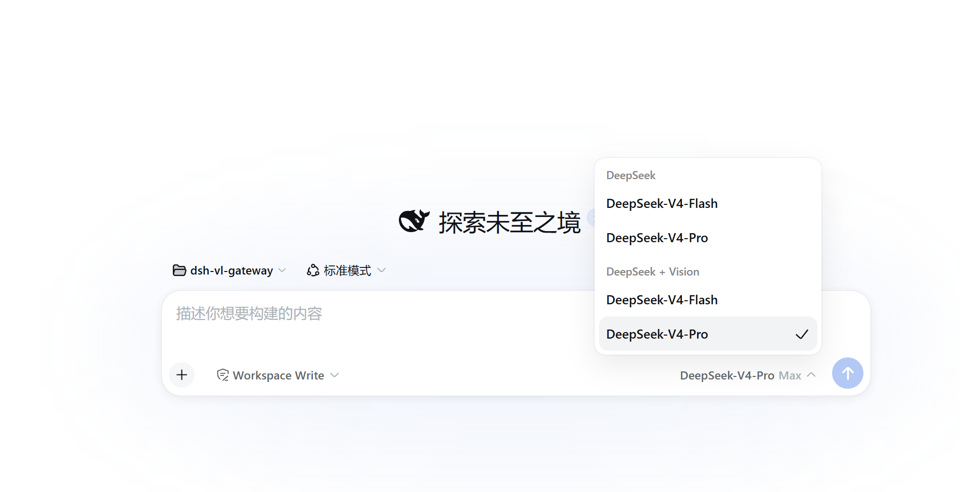
A: Open dsh Settings → Plugins → Plugin Config, find the "DeepSeek + Vision (Vision-Language Bridge)" card, fill in the VL model key (or export QWEN_VL_API_KEY in terminal), then switch the provider to DeepSeek + Vision in the Models page. You can now paste images in the chat. DeepSeek key reuses existing credentials, no additional config needed.
Q: Will image-containing history sessions break after uninstalling this plugin?
A: Data won't be lost, but such sessions can't switch back to plain-text models—official selectModel rejects text models for image-containing sessions based on inputModalities. This is expected behavior, not data corruption. New sessions are unaffected, reinstalling the plugin restores functionality.
Q: If VL model description fails, is the whole request wasted?
A: Default is fail-closed: description failure terminates the entire request with stable error codes (AUTH, TIMEOUT, TRANSPORT, RATE_LIMIT, IMAGE_TOO_LARGE), won't silently drop images. If you want the conversation to continue even on recognition failure, change the failure strategy to placeholder in the card. Images will be replaced with a text placeholder explanation.
Q: The same image appears repeatedly, will I be charged multiple times?
A: No. The plugin does LRU caching by image attachmentId in-process. Retries, session compression, and subsequent turns all reuse the same description text. Cache clears after uninstall or restart, next time will recognize again.
Q: Must I use qwen3-vl-flash?
A: No. The vl.baseURL and vl.model in the settings card are prepared for switching VL. Any gateway providing OpenAI-compatible /chat/completions interface can be used, e.g., vLLM self-hosted, OpenRouter, LM Studio. Complex visual reasoning can switch to qwen-vl-max.
Q: Can I use it in headless mode?
A: Yes. Gateway routing behaves identically in web and headless profiles; the visual settings card only appears in web profile. In headless, edit settings.yaml directly to configure the llm-vl-gateway.vl section.
Q: Will it automatically lock to official DSH version?
A: No. dshCompat.anchorVersion only declares the build source of lib/, not an install gate. Official CLI installation path directly installs the release artifact; CLI-free replica path rebuilds on target machine, successful build itself is compatibility proof.
Q: How do I uninstall?
A: Execute dsh plugin --profile web remove dsh-deepseek-vision (replace web with headless for headless). This only uninstalls the plugin itself. Original images written to session logs are unaffected.
Getting Started Difficulty
Beginner — After installation, just fill in one VL model key and select DeepSeek + Vision in the Models page to use. No programming or extra config needed. Enter settings card again only when you want to switch VL models or adjust cache size.
Known Issues & Limitations
- No image downsampling capability: when images exceed host
attachments.imageLimits, they are rejected withIMAGE_TOO_LARGE. Images within deployment limits may still exceed VL vendor's own size limits. Need to controlvl.timeoutMsand consult vendor docs - Description text consumes DeepSeek's context window, a few hundred tokens per image, charged only on first attempt
- Default fail-closed: VL key invalid, timeout, 429, etc. errors terminate the entire request, won't silently drop images (can change to
placeholderstrategy to degrade) - If session compression strategy is manually pinned to
deepseek-officialand history contains images, compression phase fails due to officialUNSUPPORTED_CONTENT; continuing to use this route's provider (deepseek-vision) doesn't have this issue - After uninstalling, image-containing history sessions can't switch back to text models (official admission rejects based on
inputModalities, expected behavior); new sessions unaffected - Official CLI installation path doesn't rebuild on target machine or run compatibility gates. When target machine's dsh differs from build anchor API, issues surface at startup or invocation; CLI-free replica path (
pnpm install-profile) rebuilds first with tiered gates







安装: dsh plugin --profile web add dsh-deepseek-vision
dsh-deepseek-vision 是给 DeepSeek Harness 的视觉语言网关插件。 纯文本的 DeepSeek 编程模型 通过一个"网关"provider 路由获得贴图能力:图片先由可配置的视觉模型(默认 Qwen-VL) 逐字描述成文字,再交给 DeepSeek 继续写代码。官方仓库零改动、跨机器安装不锁官方版本。 同类方案里它是最薄的桥:不注入 agent 工具、不经过第三方中转、不依赖本地模型。
目录
亮点
- 贴图即用,不用换模型: 注册独立路由
deepseek-vision(显示名 DeepSeek + Vision), 真实声明inputModalities: ['text','image']——聊天窗贴图、tool-fs read_image、浏览器 截图、MCP 工具返回的图片、ACP 客户端内联图片全部放行。 - 每张图只描述一次: 按
attachmentId进程内 LRU 缓存,重试、上下文压缩、后续轮次 复用同一份描述,不重复计费。 - 会话不变量保持: 原始图片仍持久化进 session log,历史 / 回放 / 重构不受影响。
- 官方机制安装: bundle 声明 +
dsh plugin add,四种 spec(npm / git / 目录 / tarball)、 web 与 headless 双 profile,与官方插件完全同一路径。 - 换 VL 模型零改码: 端点 / 模型 / 提示词 / 密钥全在设置卡片,兼容任意
OpenAI 风格
/chat/completions网关(DashScope、vLLM、OpenRouter、LM Studio…)。 - 失败语义明确: 默认 fail-closed,稳定错误码(
AUTH/TIMEOUT/TRANSPORT/IMAGE_TOO_LARGE…),或placeholder降级为文字占位继续。 - 跨版本不锁死: 发布版不锁定官方 dsh 版本。无 CLI 复刻路径(
pnpm install-profile)在目标机用自己的 dsh 重建,构建成功即兼容证明,装前分级 提示、绝不静默失败;官方 CLI 路径(dsh plugin add)直接安装发布产物,不在 目标机重建——运行时依赖经 healed fallback 解析,但兼容性未经目标机验证 (见版本对齐)。
为什么选它
dsh 视觉插件生态在官方 harness 发布后的几十小时内密集涌现,机制与取舍各不相同。本插件的 立场是一句话:最薄的桥——只加一条 provider 路由,其余什么都别加。
- 不注入 agent 工具:不新增
vision_describe/analyze_image之类的工具,agent 的行为面不变,贴图走的就是"贴图"这条原路; - 不经过第三方中转:没有匿名回退端点、没有代理服务器、没有磁盘答案缓存——图片 只经过你自己配置的 VL 端点(你的 key、你的端点、你的数据);
- 不依赖本地模型:无 Python / MLX / llama.cpp / Ollama 要求,装上即用;
- 与官方插件同一发布质量:官方 bundle 机制安装、装前兼容门禁、构建锚点章、 102 个测试 / 97% 覆盖率、双语文档。
| 维度 | 本插件 | 工具型(如 dsh-vision-any、dsh-vision) | 路由型(如 dsh-vision-router) | 代理型(如 dsh-vision-proxy) | 本地管线型(如 DeepSeek-Harness-Vision-Tools) |
|---|---|---|---|---|---|
| 机制 | provider 网关路由 | 注入 agent 工具 | 工具 + 多供应商路由 | 透明代理路由 | Python 本地 VLM 管线 |
| 图片数据流 | 只经你自己的 VL 端点 | 你自己的 API | 含第三方匿名回退 | 自有端点 + 回退链 | 本地模型,不出网 |
| 换 VL 模型 | 设置卡片,零改码 | 配置文件 | 配置文件 | 配置 + 自动探测 Ollama | 换本地模型 |
| 答案/描述缓存 | 进程内 LRU(仅描述) | — | 内容哈希答案缓存 | SHA-256 缓存 | — |
| 失败语义 | fail-closed + 稳定错误码 | — | — | 超时保护 | — |
| 发布链路 | 官方 bundle 机制 + 兼容门禁 + 锚点章 | — | — | — | 非 bundle |
上表只列方向性差异,各项目仍在快速迭代;选型时请以各项目最新 README 为准。
快速开始
前置:dsh CLI 已可用并启动过一次、PATH 里有 pnpm(dsh plugin 命令经 pnpm 安装插件)。
第一步:新机器装 dsh(一次性,二选一)。 dsh 是官方 CLI(npm 包
@deepseek-ai/dsh):
npm install -g @deepseek-ai/dsh        # 推荐:dsh 永久进入 PATH,之后命令直接敲
# 或(官方一行启动方式):
npx @deepseek-ai/dsh web               # 不装全局:CLI 只在 npx 缓存里运行,不会进 PATH
⚠️ 用
npx方式时dsh不会进入 PATH——新开终端直接敲dsh会报 "command not found"。要么全局安装,要么所有命令都带npx @deepseek-ai/dsh前缀。
第二步:安装(git 形式,锁 commit,推荐):
dsh plugin --profile web add github:siegfly/dsh-deepseek-vision#<sha>
# 没装全局、走 npx 时:
npx @deepseek-ai/dsh plugin --profile web add github:siegfly/dsh-deepseek-vision#<sha>
已发布的 npm 版(0.1.5)同样可用:把 spec 换成 dsh-deepseek-vision 即可。
部署使用: 重启一次 dsh web → Models 页选 DeepSeek + Vision → 设置 → 插件 →
插件配置里填 VL 密钥 → 聊天窗贴图,发消息。
卸载:
dsh plugin --profile web remove dsh-deepseek-vision
headless profile、其他 spec 形式(git / 目录 / tarball)、无 CLI 的机器——见安装。
效果
聊天窗里选中 DeepSeek + Vision provider 之后:
 |  |
|---|
- 粘贴 / 拖入图片 → 被配置好的视觉模型先描述成文字(逐字提取代码、报错、日志、 UI 文案,并描述布局);
- 描述文字替代图片发给 DeepSeek → 你继续用 DeepSeek 写代码,同时获得图片理解能力;
- 每张图片只描述一次,重试 / 压缩 / 后续轮次都复用同一份描述,不重复计费;
- session 日志仍然持久化原始图片,历史 / 回放 / 重构不变量不受影响。
工作原理
flowchart LR
    User["聊天窗贴图 / read_image / 截图 / MCP / ACP"] --> Gate["deepseek-vision 路由:inputModalities = text + image"]
    Gate --> Persist["apiproxy prompt RPC → ImageBlock 持久化进 session log"]
    Persist --> Bridge["ImageBridge:改写图片块(含 tool-result 嵌套)"]
    VL["可配置 VL 模型(默认 qwen3-vl-flash,OpenAI 兼容端点)"] --> Bridge
    Cache["attachmentId → 描述 LRU 缓存"] --> Bridge
    Bridge --> Stream["yield* super.stream():原生 DeepSeek wire 继续流式"]
为什么是"网关适配器"而不是中间件:DSH 有两道硬门槛——prompt / selectModel RPC 按
inputModalities 拒绝不含 image 的模型(纯 llm/stream 中间件拦不到),llm-deepseek
序列化器对 image block 抛 UNSUPPORTED_CONTENT。本插件注册新的 provider 路由,继承官方
导出的 DeepSeekAdapter,stream() 里把图片块经 VL 模型改写为文本后再走原汁原味的
DeepSeek wire;reasoning efforts / context 窗口 / 默认 maxTokens / retry policy 全部从
父类继承。
配置
全部可省略(走默认值)。两个 key 都支持 credential-ref(环境变量名)。已挂载 dsh 的
credentials 服务时,其解析结果(即使未配置)具有权威性;只有服务缺席才直接读取启动环境。
官方 credentials-local 的优先级是:进程环境变量(最高、只读)→ GUI 管理的
.credentials.yaml → .env 回退。因此 Web Models 页写入的凭据可用,而本次进程显式
导出的 key 始终优先且不能在 GUI 内修改:
| 路径 | 默认值 | 说明 |
|---|---|---|
provider | deepseek-vision | 注册的路由 id(避开 deepseek-official) |
displayName | DeepSeek + Vision | 模型选择器里的名字 |
deepseek.* | — | 与官方 llm-deepseek 段完全同构(apiKeyEnv / baseURL / thinking / reasoningEffort / maxTokens / models / retryPolicy…) |
deepseek.apiKeyEnv | DEEPSEEK_API_KEY | DeepSeek key |
vl.apiKeyEnv | QWEN_VL_API_KEY | VL 模型 key |
vl.baseURL | https://dashscope.aliyuncs.com/compatible-mode/v1 | 任意 OpenAI 兼容 /chat/completions 网关 |
vl.model | qwen3-vl-flash | VL 模型 id(贴图 OCR 型描述性价比最高;复杂视觉推理可换 qwen-vl-max) |
vl.describePrompt | 详述 + 逐字提取的英文提示词 | 图片描述指令 |
vl.timeoutMs | 120000 | 单次描述请求硬超时 |
vl.maxCacheEntries | 64 | 进程内描述缓存容量(LRU) |
vl.onFailure | fail | fail = 描述失败整个请求失败;placeholder = 降级为文字占位继续 |
llm-vl-gateway 也是一个 settings namespace,三个编辑入口:设置 → 插件 → 插件配置
的"DeepSeek + Vision(视觉语言桥接)"卡片(vl.* 全字段 + VL 密钥)、Web Models 页
(deepseek.* 子段由可配置 provider 目录接管)、settings.yaml(两个子段都可写)。
provider / displayName 是注册期事实,修改即时生效(adapter 路由 + 可配置 provider
目录原子重注册,不需重启);改成已被占用的路由 id 时两个注册表保留旧值并记日志。
patch 行内配置示例(全部可选):
- insert:
    - id: llm-vl-gateway
      name: dsh-deepseek-vision
      config:
        deepseek:
          reasoningEffort: high
        vl:
          apiKeyEnv: DASHSCOPE_API_KEY
          model: qwen3-vl-flash
使用
- 设置两个 key:设置 → 插件 → 插件配置 → "DeepSeek + Vision(视觉语言桥接)" 卡片里填 VL 密钥(写入凭据存储,不出现在任何响应/设置里);DeepSeek key 沿用现有凭据;
- Models 页选择 provider DeepSeek + Vision(会话内切换即持久化为默认);
- 聊天窗贴图,发消息——图片自动被描述,DeepSeek 看到的是文字。
设置卡片是本插件的客户端面(dsh.client):以官方解耦插件的方式注册进
settings.plugin.item 槽位,编辑 llm-vl-gateway.vl 段,与官方内置卡片(终端 /
Agent 循环 / 网页搜索)同机制、同交互(暂存草稿、覆盖状态显示、保存时整体写入)。
安装
安装走官方 bundle 机制:本包在 package.json 声明 dsh.bundle.patch(指向包内
cordis.patch.yml),dsh plugin add 把包链接进 profile 并把包名对账进 profile
manifest 的 dsh.profile.bundles 层栈,loader 启动时按层挂载——不需要手工往
cordis.patch.yml 加任何行(旧版本加过的受管块会在下次安装/卸载时自动迁移移除)。
四种 spec 任选(日常推荐 git 形式,锁 commit):
dsh plugin --profile web add github:siegfly/dsh-deepseek-vision#<sha>       # git(推荐),锁 commit
dsh plugin --profile web add dsh-deepseek-vision                          # npm(已发布 0.1.5)
dsh plugin --profile web add file:<本仓库路径>                        # 本地目录(开发)
dsh plugin --profile web add ./dsh-deepseek-vision-<version>.tgz              # tarball
headless 同理:dsh plugin --profile headless add dsh-deepseek-vision(客户端卡片只在
web 生效)。验证 bundle 层已挂载:dsh --profile web --dump-config | grep llm-vl-gateway。
卸载与安装一一对应:dsh plugin --profile <name> remove dsh-deepseek-vision。
无 CLI 的机器用等价复刻(需 Node 22.19+ 或 24+、PATH 里有 pnpm;init 布局 → 目标机
重建 → 兼容门禁 → pnpm add → bundles 对账):
pnpm install        # 只装 devDeps(typescript/vitest),不会装 @deepseek-ai/*
pnpm install-profile          # 或 node scripts/install-profile.mjs [profile] [dshHome]
这是唯一在目标机重建的安装路径:install-profile 先用目标机自己的 dsh 类型重新构建
插件并通过 check-compat.mjs 门禁,再装入 profile(见版本对齐)。
两条路径都做下面两件事:
- 把
dsh-deepseek-vision链接进 profile 的 node_modules(运行时@deepseek-ai/*依赖经 官方 healed fallback 解析到同一个 dsh 安装,共享同一个 cordis 实例,无双实例问题); - 把
dsh-deepseek-vision对账进dsh.profile.bundles——loader 按层挂载包内cordis.patch.yml的 insert 行(注册路由 + 设置段); - 首次安装时如 profile 布局缺失,按官方
initProfile语义补齐(manifest + 空用户 patch 层 +pnpm-workspace.yaml),已存在的文件从不改动。
装完重启一次 dsh web(bundles 层栈变化 + 客户端模块扫描按包名缓存)。
本仓库是独立 git 仓库,与 deepseek-harness 官方仓库没有任何 git 关系 (无 fork / 子模块 / 远程关联);官方 checkout 零改动。
版本对齐
两条安装路径的兼容性策略不同:
- 官方 CLI 路径(
dsh plugin add,npm / git / tarball):直接安装发布产物—— npm 包在作者发布时构建,git 形式使用提交的lib/,tarball 是作者打包的产物, 都不在目标机重建,也没有兼容门禁。运行时@deepseek-ai/*依赖从目标机自己的 dsh 安装解析(healed fallback);若目标机官方 dsh 的 API 与本插件编译产物不匹配, 安装不会提前失败,问题会在启动或调用时显现。装前请自行确认目标 dsh 与dshCompat.anchorVersion声明的代际大致一致。 - 无 CLI 复刻路径(
pnpm install-profile):安装前先在目标机用目标机自己的 dsh 类型重新构建插件,再跑check-compat.mjs分级门禁。只有这条路径提供 “构建成功即兼容证明”:
无 CLI 复刻路径下,发布版不锁定任何官方版本——目标机器用比锚点更新(或更旧)的 官方 dsh 都可以安装;构建成功本身就是兼容性证明。若新官方版改了本插件用到的 API, 构建会自然失败并给出明确的 tsc 错误,那时才需要发新版适配。作者无需跟随官方每次 升级重新发布。
dshCompat.anchorVersion只声明提交的lib/的构建出处(出处声明,不是安装 许可);pnpm build写入的lib/build-anchor.json让出处无法撒谎。node scripts/check-compat.mjs [dshHome]安装前对目标机分级:完全一致 = exit 0; 任何不一致 = exit 1 提示并放行;残缺发布 / 复刻漂移 = 拒绝(有环境变量强制开关)。 该检查只在install-profile里运行,官方 CLI 路径不会调用它。
完整策略、退出码分级与发版触发条件:docs/VERSIONING.md。
开发
pnpm test      # vitest
pnpm build     # tsc(宿主面 + 客户端面)+ tsdown 浏览器 bundle
scripts/harness-paths.mjs是仓库唯一的解析缝:$DSH_CHECKOUT→ 仓库根harness-paths.json(gitignored)→ 本机已安装 dsh 的 healed fallback。- 纯 npm 机器上 2 个客户端测试套件自行跳过(npm 只发布浏览器闭包里的客户端运行时); 有官方源码 checkout 的机器跑全量。
- 产物里的
@deepseek-ai/*导入保持裸说明符,运行时走 profile fallback。
细节:docs/DEVELOPMENT.md。贡献指南:CONTRIBUTING.md; 安全漏洞报告:SECURITY.md。
边界与注意
- compaction:默认继承会话 provider(即网关路由),图片被改写且命中缓存;若把压缩
策略显式 pin 到
deepseek-official且历史含图,会按原逻辑UNSUPPORTED_CONTENT失败。 - 卸载后的含图会话:卸载插件后,含图历史会话无法切回文本模型(官方
selectModel按inputModalities准入拒绝,属预期行为,不是数据损坏);新会话不受影响,重装即恢复。 - VL 失败语义:默认 fail-closed——描述失败(如 key 失效)整个请求以稳定错误码
(
AUTH/TIMEOUT/TRANSPORT…)终止,不静默丢图;onFailure: placeholder可降级。 - 图片上限 fast-fail:描述前按部署图片准入上限(
ctx.attachments.imageLimits)预检, 超限图片在 base64 编码前就以IMAGE_TOO_LARGE失败(placeholder策略下降级),不把 几 MB 的 data URL 送进 VL 端点再死。插件不做图片降采样(官方 seam 没有公开的降采样 能力);部署上限内的图片仍可能超过 VL 供应商自己的大小上限,建议控制vl.timeoutMs并留意供应商文档。 - 描述文本会占用 DeepSeek 的 context(每图几百 token,仅首次计费)。
FAQ
新机器上 dsh 命令不存在 / 报 command not found? 先装官方 CLI:
npm install -g @deepseek-ai/dsh(一次性,之后 dsh 永久在 PATH)。如果平时用
npx @deepseek-ai/dsh web 启动(官方一行方式),CLI 只在 npx 缓存里运行、不会进
PATH,装插件时要用 npx 前缀:npx @deepseek-ai/dsh plugin --profile web add dsh-deepseek-vision——插件本身装在 profile 里,与 CLI 从哪来无关,装一次永久有效。
安装需要关心 Node 版本吗? 官方 CLI 路径(dsh plugin add)不需要;只有无 CLI 的
复刻脚本需要 Node 22.19+ / 24+ 和 PATH 里的 pnpm。
#<sha> 是什么? git spec 形式的占位符——替换成具体 commit 哈希可锁死精确代码快照;
不加 #<sha> 则安装默认分支最新提交。
支持 CLI(headless)吗? 支持。网关路由在两个 profile 行为一致;设置卡片是 web
专属,headless 用 settings.yaml 配置。
卸载后,含图历史会话选不了模型? 属预期行为:官方 selectModel 按
inputModalities 拒绝文本模型接入含图会话。新会话不受影响,重装即恢复。
为什么图片不直接发给 DeepSeek? 官方 DeepSeek 接口对纯文本模型会拒绝
image_url,所以先由 VL 模型描述成文字再转发——不换模型、不丢信息。
许可
Read the usage guide →
Install steps, key points, FAQ and compatibility for this plugin — auto-derived from indexed fields.
Listing badge

[](https://deepseek-plugin.org/plugins/siegfly/dsh-deepseek-vision)Paste this markdown into your GitHub README to link back to this listing. The badge only states the listing — not a security endorsement.