A minimal Profile Bundle fixture for the dsh-profile-plugin-service test suite; declares a sample theme named Fixture Ocean.
ⓘ This plugin is a sub-package of the vibeinging/deepseek-harness-desktop-app monorepo — stars and activity count the whole repository.

- Language
- JavaScript
- License
- MIT
- Branch
- dev
Install
$ dsh plugin --profile web add github:vibeinging/deepseek-harness-desktop-app#path:eval/fixtures/dsh-profile-bundleRun the command above in your terminal to install this plugin via the dsh CLI. You can switch Profile in the top-right corner. New to dsh? Read the beginner tutorial
Install via your agent
Install the DeepSeek Harness plugin vibeinging/deepseek-harness-desktop-app/eval/fixtures/dsh-profile-bundle for me: review the repository at https://github.com/vibeinging/dsh-desktop first, then run the install command and verify the plugin loads successfully.
Paste this instruction to the DSH Web GUI assistant — it will install and verify for you.
One-Sentence Positioning
This is a minimal Profile Bundle fixture from the eval/fixtures/dsh-profile-bundle directory within the repository, serving as a controllable local input for unit tests of the project's own dsh-profile-plugin-service. When installed to a Web Profile, it adds the sample theme entry profile:dsh-work-profile-fixture:fixture-ocean to the directory, but does not inject any runtime patches.
Core Capabilities
- Provides an empty
dsh.bundle.patchcontainer (withcordis.patch.ymlcontent set to[]), allowing the Bundle assembly skeleton to be parsed - Declares a theme description with
schema_version=1via thedshWork.themesfield (including primary color, 10-level Mantine color palette, background preset, and panel opacity) - Serves as a local installable input for
DshProfilePluginServicepreflight checks, validatingfile:source resolution andstatus=readyresults - Used to verify that theme description paths cannot cross outside the Bundle directory boundary (
DSH_PROFILE_THEME_PATH_OUTSIDE_ROOT) - Used to verify that source Bundle metadata is correctly attached to
catalog.profile_themesafter installation (source_bundle.package_name === "dsh-work-profile-fixture")
Technical Implementation
- Language: JSON / YAML (pure data, no executable code)
- Key Dependencies: None (no
dependencies/peerDependenciesdeclared) - Architecture Pattern: Declares Bundle patch entry via
package.json#dsh.bundle.patch+ declares theme description entry viapackage.json#dshWork.themes; both only carry data, no code execution at runtime - Entry File:
eval/fixtures/dsh-profile-bundle/package.json
Use Cases
Developers who want to manually test the DSH Profile Bundle installation process locally without introducing third-party repositories can install this to observe how themes appear in the directory; or use it as a fixed input when running npm run test:unit for dsh-profile-plugin-service.test.mjs. This plugin is not suitable as a production feature for daily use.
Prerequisites & Compatibility
| Dependency | Minimum Version | Description |
|---|---|---|
| DSH | 0.1.0-rc.6 | Current release line as declared by parent project README |
| Node | Undeclared | This fixture doesn't enforce Node version; platform host decides |
| Platform | Cross-platform | Only reads package.json and themes.json, no native modules, no system calls |
| Native Modules | None | — |
Installation
dsh plugin --profile web add github:vibeinging/deepseek-harness-desktop-app/eval/fixtures/dsh-profile-bundle
Configuration
This plugin requires no additional configuration. It does not expose a runtime configuration surface, serving only as a data fixture read by the system.
FAQ
Q: What changes can I see after installing this plugin?
A: Installation does not change any runtime behavior because cordis.patch.yml content is an empty array []. You can only see a sample theme entry named profile:dsh-work-profile-fixture:fixture-ocean in the Web Profile's theme directory.
Q: Will it affect the app's appearance?
A: It declares bgImage: deep-sea and panelOpacity: 88, but it will only affect appearance when you actively switch to Fixture Ocean in the theme library; the installation itself does not automatically enable it.
Q: What settings are included in the theme?
A: Only one theme: Fixture Ocean with primary color #336699, complete 10-level Mantine color palette, background preset deep-sea, and panel opacity 88. All fields comply with schema_version=1 security constraints and will not trigger validation errors for unsafe rawCss, invalid bgImage, or forbidden appName.
Q: Can I add raw CSS or custom appName to themes.json?
A: No. profile_themeManifest.js throws DSH_PROFILE_THEME_RAW_CSS_FORBIDDEN or DSH_PROFILE_THEME_APP_NAME_FORBIDDEN during validation; similarly, bgImage must use one of the built-in background presets such as deep-sea, aurora, dawn, or forest.
Q: How is this package different from the official theme package dsh-theme-pack?
A: dsh-theme-pack is an app-owned Theme Bundle (managed_by: app, can_uninstall: false), providing professional-blue and anime-blue themes; this package is just a minimal rewritable example fixture that can be normally uninstalled.
Q: Is the repository still there after uninstall?
A: Uninstalling only removes the Bundle entry and dependencies from the current Web Profile; the eval/fixtures/dsh-profile-bundle directory remains as a built-in fixture in the repository.
Learning Curve
Beginner — It has no executable code and no user configuration surface; knowing one dsh plugin ... add github:... command is enough to use it.
Known Issues & Limitations
cordis.patch.ymlcontent is an empty array; after installing to Profile, it won't inject any patches into DSH runtime (eval/fixtures/dsh-profile-bundle/cordis.patch.yml:1)package.jsonis marked as"private": true, cannot be published to public registry vianpm publish; installation can only be done via exact GitHub commit or localfile:path (eval/fixtures/dsh-profile-bundle/package.json:4)- No standalone README; the only reference is the "Plugin Center" chapter in the parent project's
README.md
中文 | English
DeepSeek Harness Desktop App 是建立在 DeepSeek Harness(DSH)之上的本地 AI 工作桌面。它把 DSH 的 Session、Agent、Tool、Skill、MCP 和 Profile Bundle 与项目、文件、网页、Git Worktree、Canvas、Site 和 Office 产物组织在同一个桌面应用中。
| 专业蓝亮色 | 专业蓝暗色 |
|---|---|
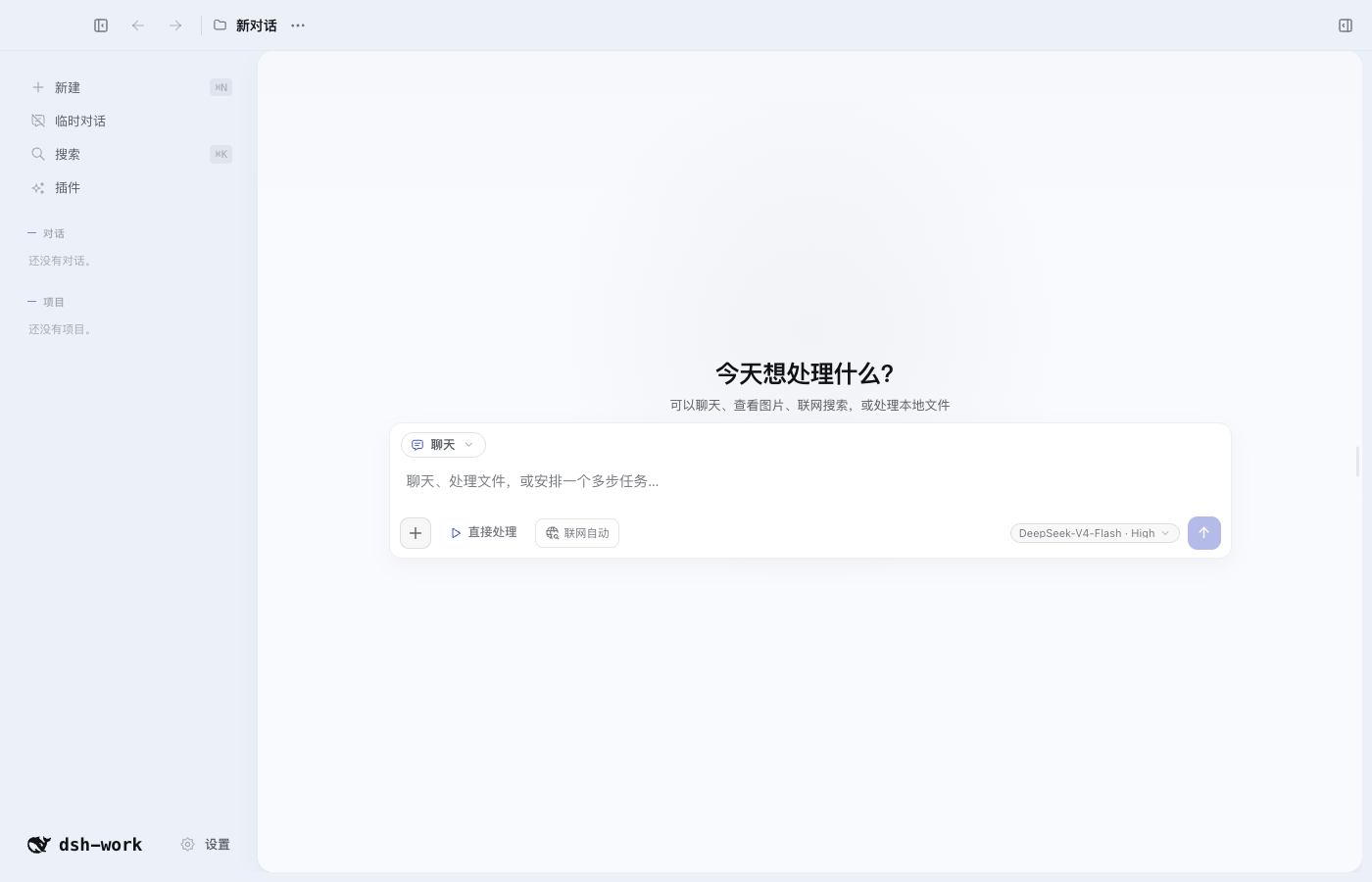 | 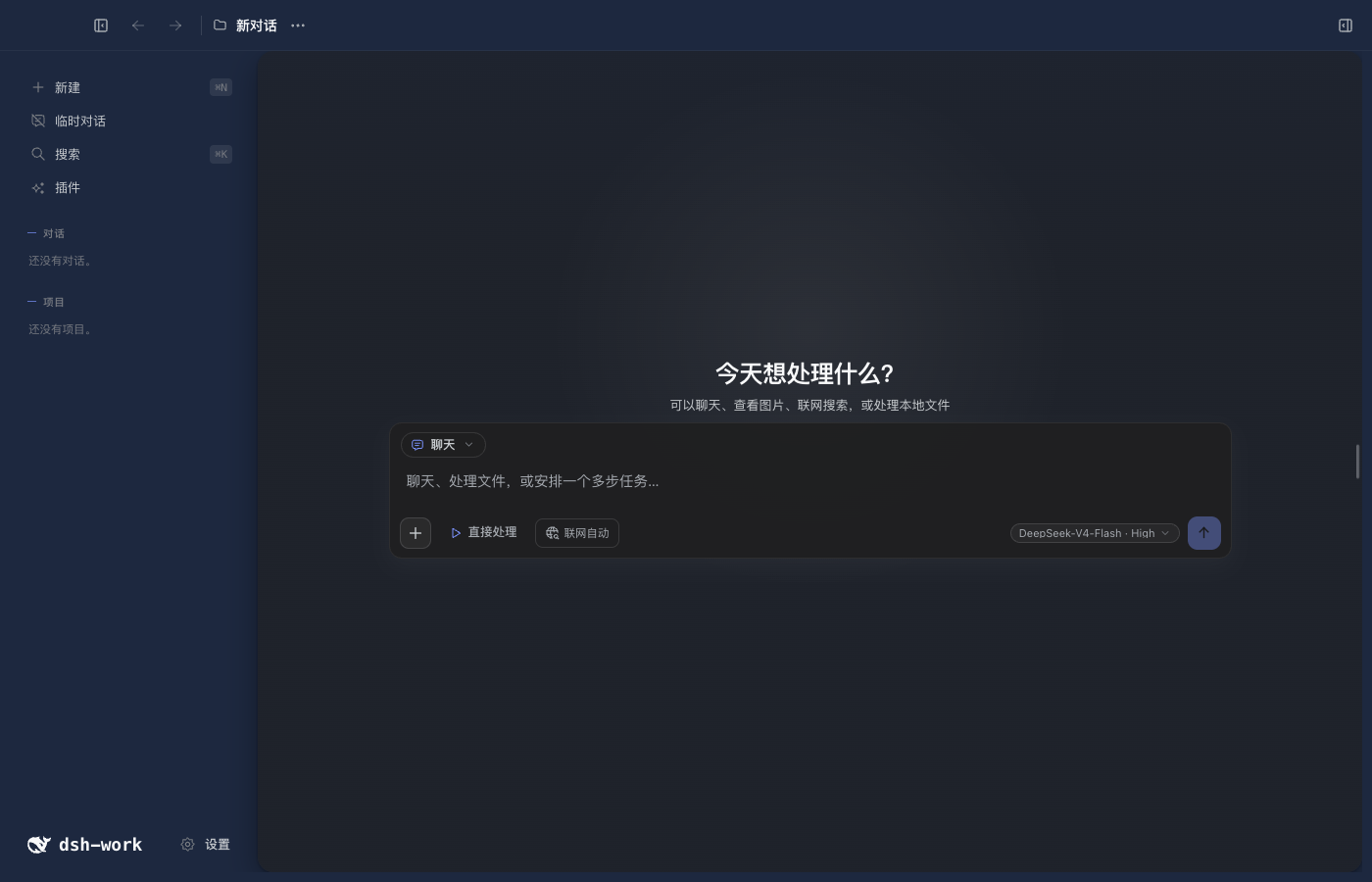 |
快速开始
本地开发要求 Node.js 24 或更高版本。当前项目使用 DSH 0.1.0-rc.6。
npm install
npm run doctor
npm run dev
切换 Node.js 大版本、CPU 架构或操作系统后,运行 npm run setup 重新准备依赖。
主要功能
| 功能 | 用户可以做什么 |
|---|---|
| DSH 对话 | 流式回答、思考过程、工具调用、停止、继续、重试、消息分支和重启恢复 |
| 模型与权限 | 选择 Provider、模型和推理强度,管理凭据引用、Session 权限、工具审批和模型提问 |
| Tool、Skill、MCP 与多 Agent | 使用当前 Profile 中的工具、技能、MCP、Hook、子 Agent 和 Workflow |
| 项目与对话 | 创建项目、全局或临时对话,置顶、排序、重命名、归档、恢复和删除 |
| 桌面外壳与设置 | 使用三列工作台、左右栏折叠、全局搜索、缩放快捷键和更新检查,调整语言、网络、通知、终端与隐私选项 |
| 项目上下文与记忆 | 设置应用指令、项目指令、授权源码目录、写入目标以及全局或项目记忆 |
| 输入与引用 | 使用 @ 引用文件、使用 # 引用对话,粘贴图片和大段文本附件 |
| 编码工作区 | 查看 Diff、逐行评论和编辑、在外部编辑器打开、发起 AI Review,并安全撤销模型产生的文件修改 |
| Git Worktree | 创建、启用、停用和删除隔离工作目录,让新对话在指定 Worktree 中运行 |
| 文件与搜索 | 浏览项目文件、任务和产物,预览文本、代码、图片和 Office 内容,按文件名或正文搜索 |
| Browser Workspace | 多标签浏览、历史、页内查找、缩放、下载、打印、开发者工具、站点权限、网页快照和“使用此页” |
| 结果与证据 | 直接查看当前 DSH Session 的完整轨迹、工具输入输出、耗时、Token 和最终回答 |
| Canvas 与本地 Site | 创建和编辑 Canvas、处理行内建议与版本冲突,生成并响应式预览单文件 Site |
| Office 产物 | 创建、查看和定点编辑 Markdown、DOCX、XLSX、PPTX 和 PDF,并保留版本 |
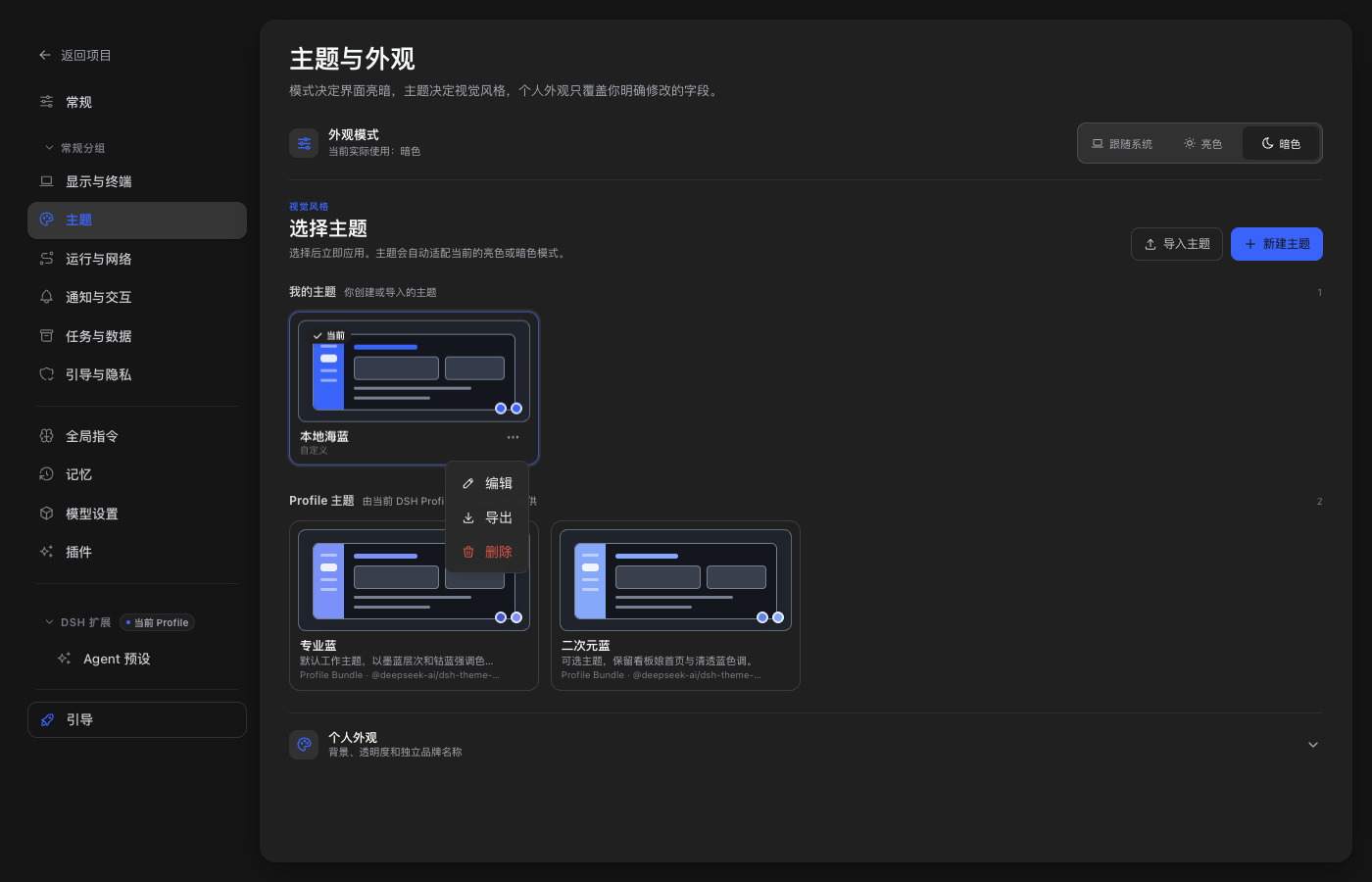
| 主题与外观 | 切换 Profile 主题,新建、导入、预览、编辑、导出和删除本地主题,调整明暗模式、背景和透明度 |
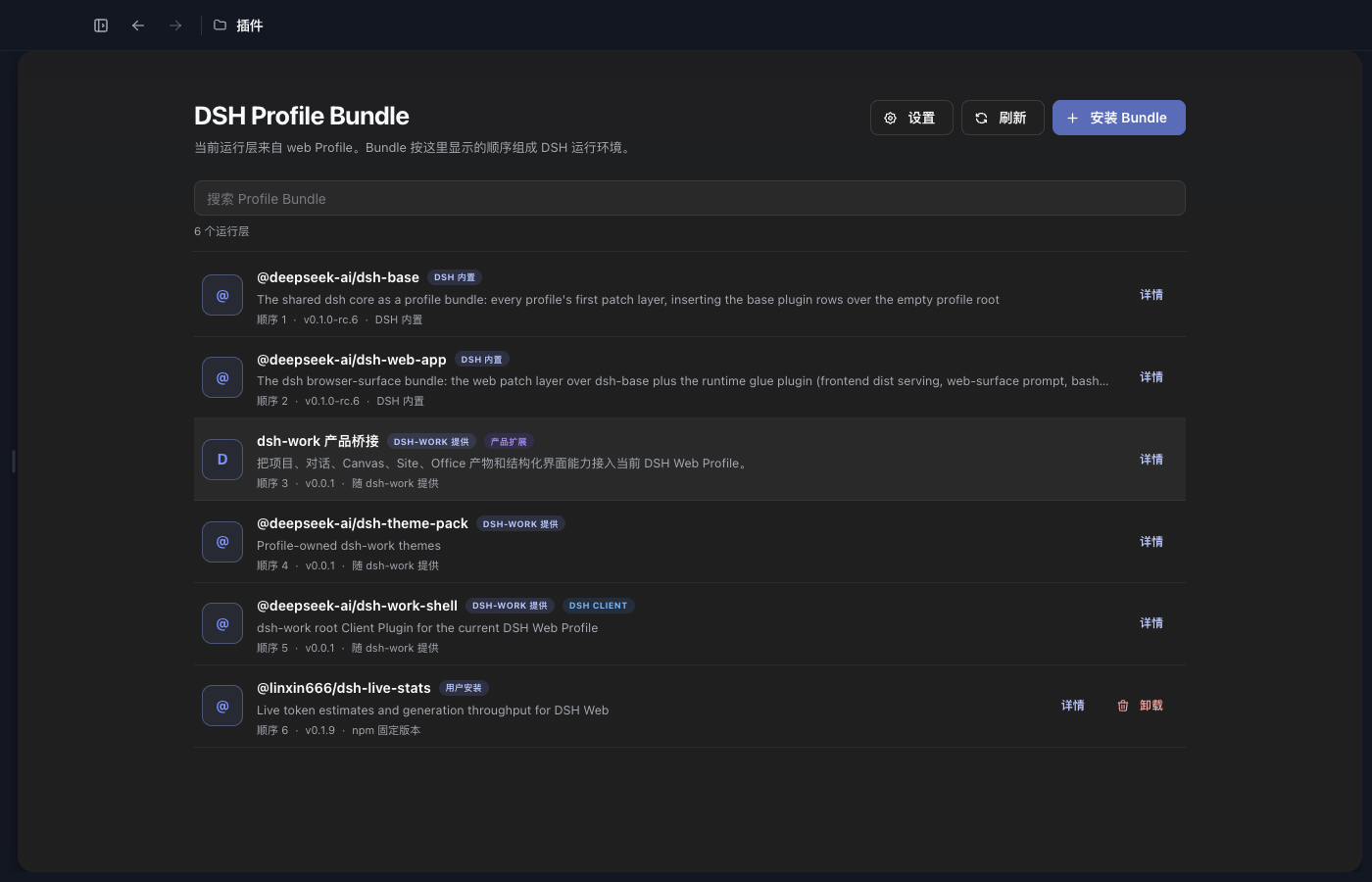
| 插件中心 | 检查兼容性,把 DSH Profile Bundle 安装到当前 Web Profile,并查看来源、版本和加载顺序 |
DSH 轨迹就是结果与证据
右侧“结果与证据”直接读取当前绑定 DSH Session 的 session.history。用户消息、请求上下文、模型输出、工具调用、工具结果、权限变化和最终回答都在同一条可回放轨迹中,不维护第二套运行中心。
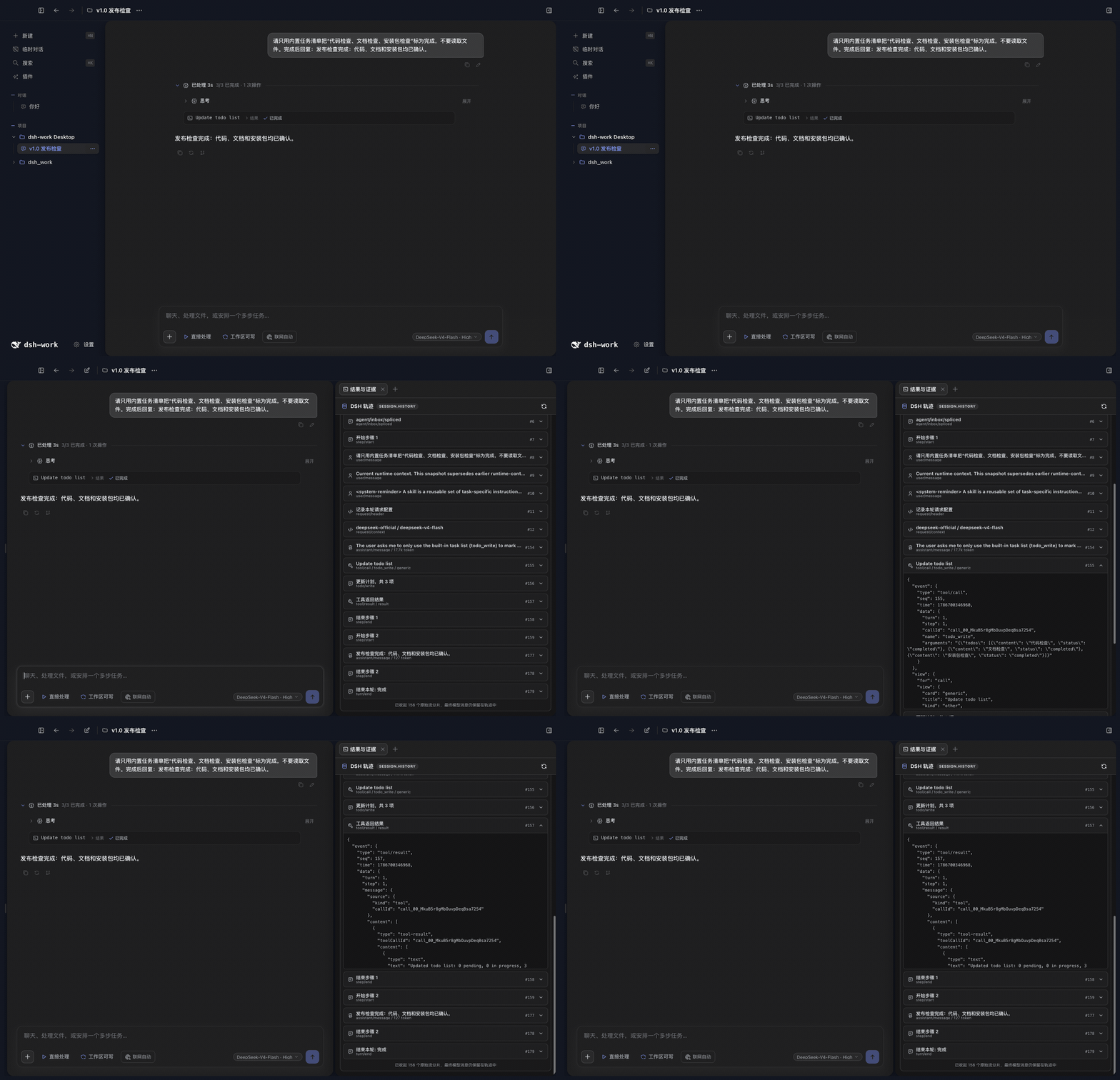
对话和工作台
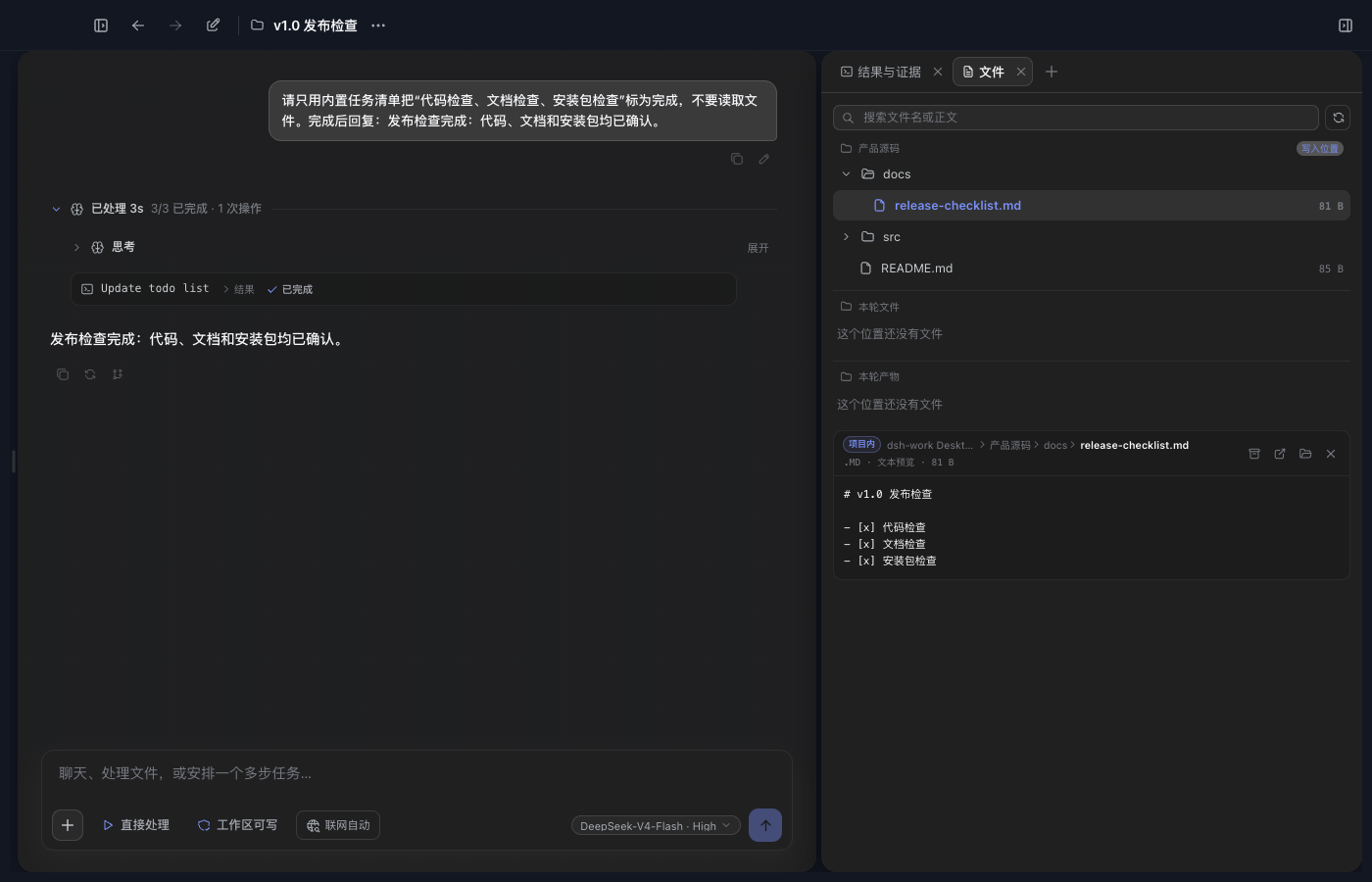
一个项目对话对应一个 DSH Session。右侧工作台可以添加结果与证据、浏览器、文件、产物和 Site 标签;项目文件树、Agent 工作目录、当前 Diff 和行编辑都跟随当前项目权限与活动 Worktree。
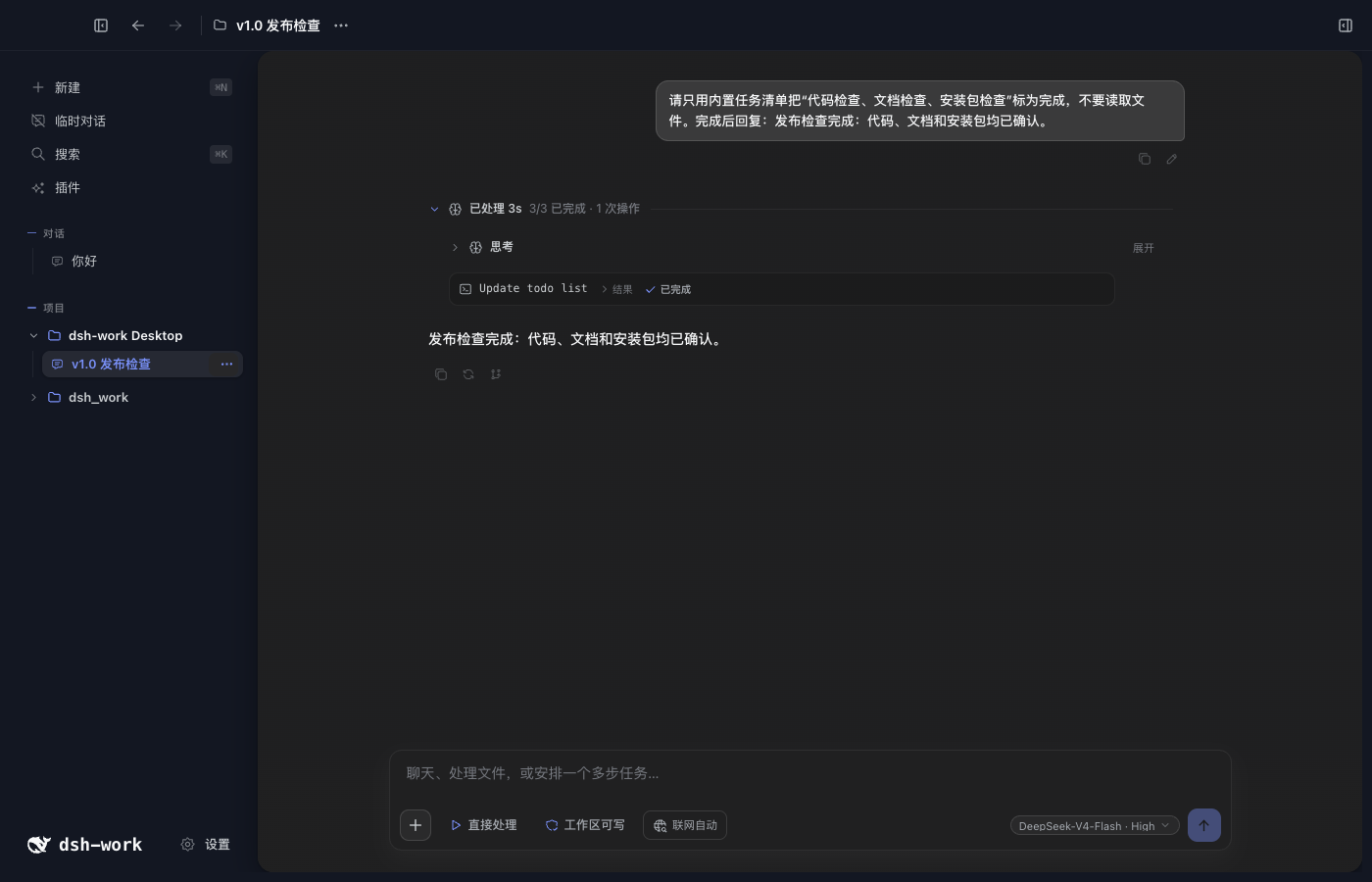
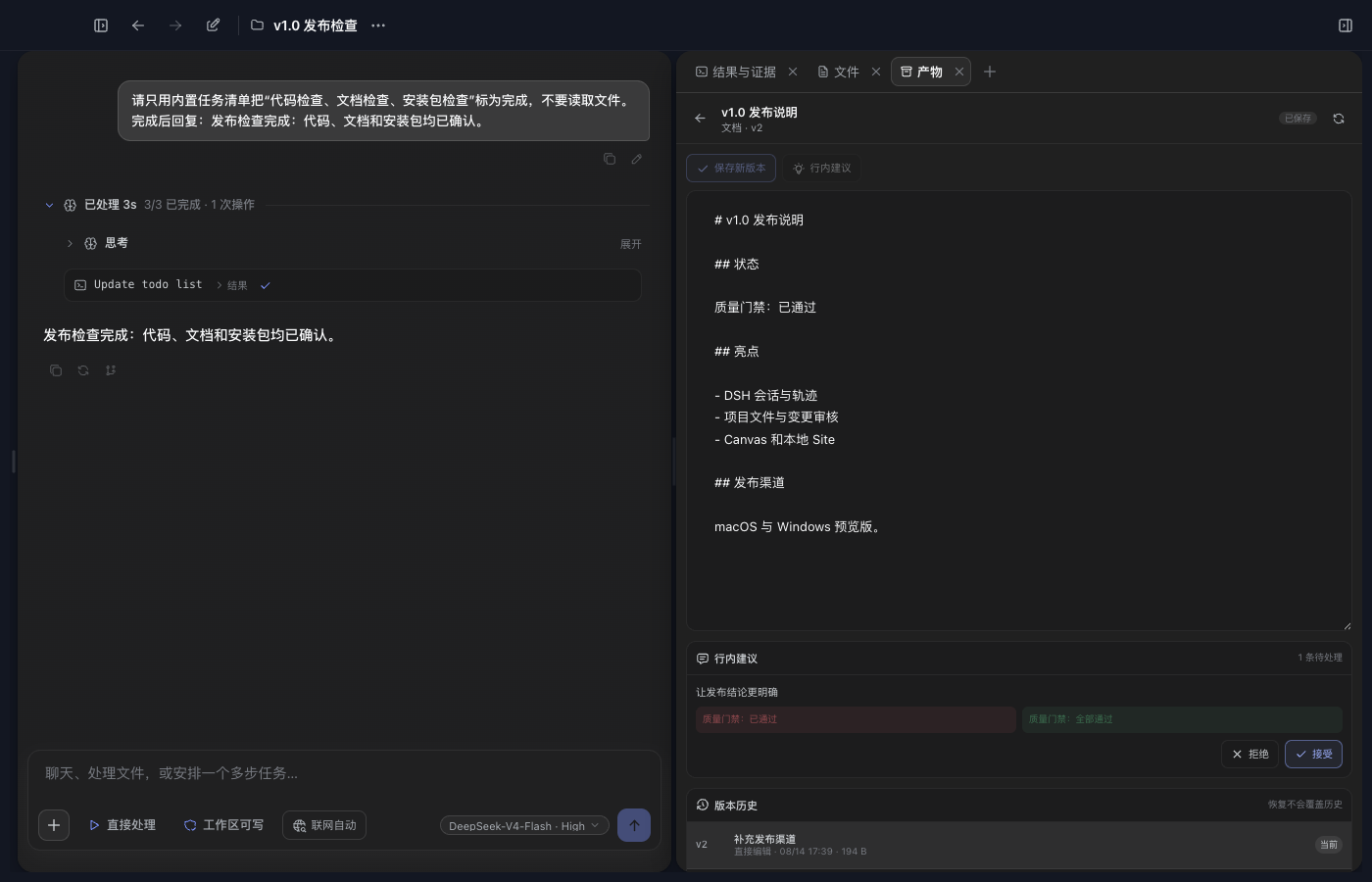
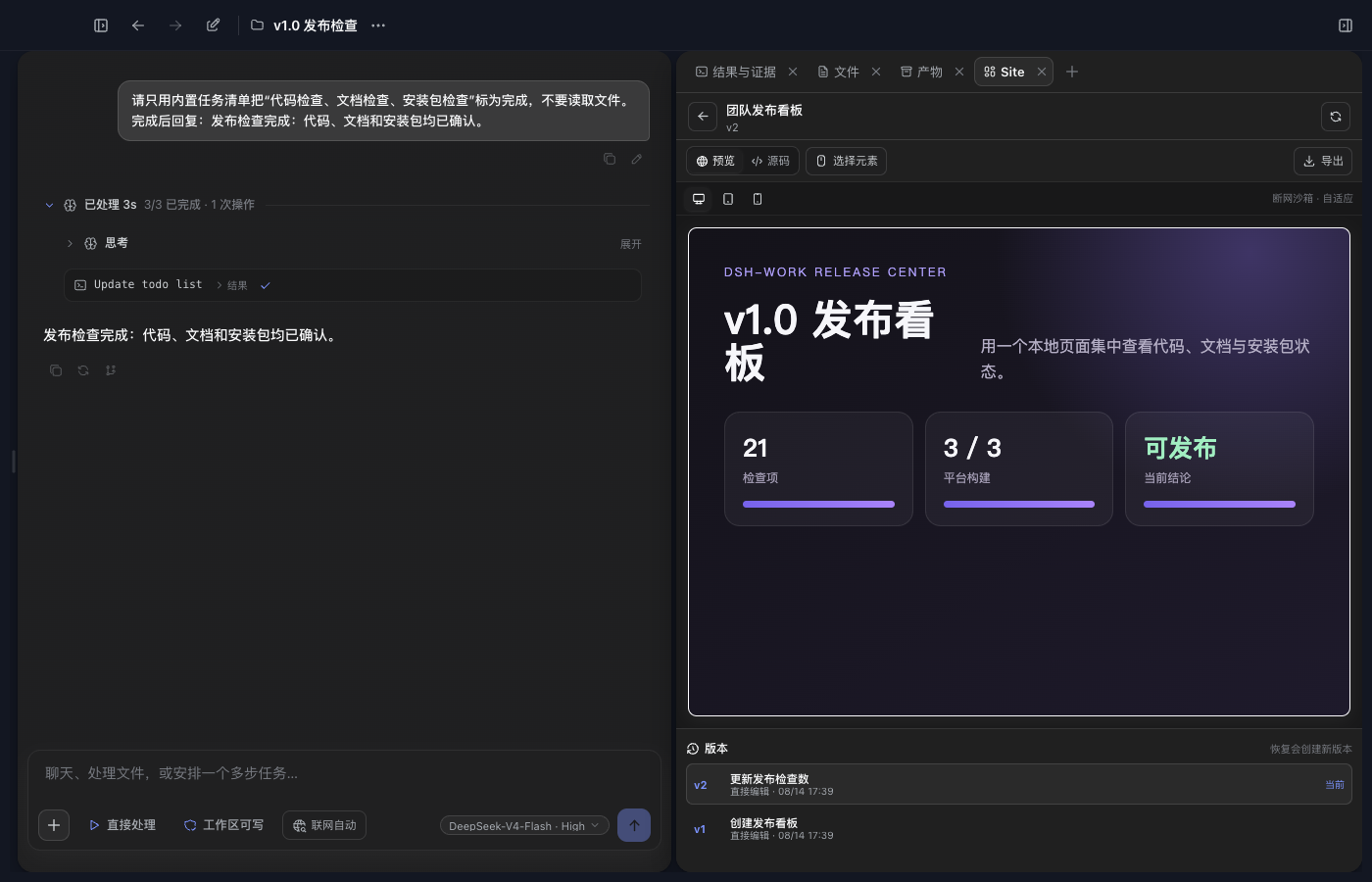
Canvas 保存不可变版本,支持正文编辑、版本比较、精确行内建议和冲突处理。Site 使用同一套版本能力,并在隔离沙箱中提供桌面、平板和手机预览。
Git Worktree 隔离开发
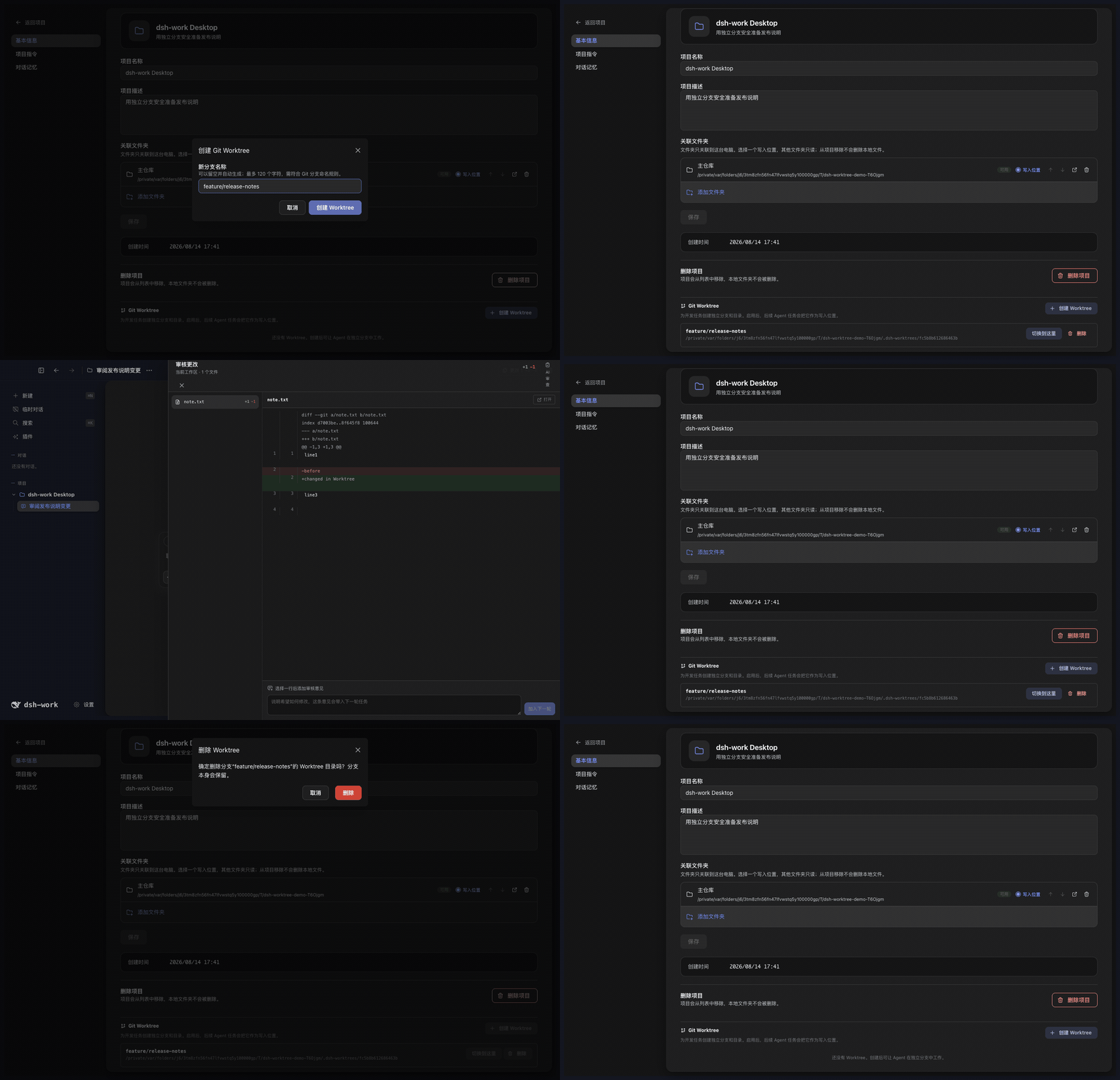
项目设置提供完整的 Worktree 工作流:
- 为项目创建一个或多个独立分支和工作目录,同一时间启用一个。
- 启用后,新建对话的 Agent、DSH Session、Diff 和行编辑使用该 Worktree,主检出保持不变。
- 切换工作目录不会迁移已有对话;应先启用目标 Worktree,再新建对话。
- 删除前必须切回主检出。删除工作目录后保留 Git 分支,避免误删提交。
- 非 Git 目录、重复分支、越界路径和异常符号链接会被拒绝;磁盘上丢失的 Worktree 会标记为不可用。
主题与外观
@deepseek-ai/dsh-theme-pack Profile Bundle 提供默认的 professional-blue 和可选的 anime-blue。正式产品也支持本地自定义主题的新建、导入、预览、编辑、导出和删除。
本地主题只能使用安全的颜色与外观设置,不能注入原始 CSS、远程图片或修改应用名称。个人背景、明暗模式和透明度可以独立调整。
插件中心
普通用户从左侧“插件”页面安装 DSH Profile Bundle:
- 输入带精确版本的 npm 包,或带完整 commit 的
dsh-external仓库地址。 - 先运行兼容性检查;只有结果为“可以安装”时才能写入当前 Profile。
- 安装后查看 Bundle 的来源、版本、加载顺序和能力,用户安装的 Bundle 可以卸载。
Tool、Skill、MCP、Hook 等 Host Bundle 可以进入 DSH 运行时。包含第三方 Client UI 的 Bundle 目前不会进入拥有 Electron 权限的主窗口;随应用提供并经过审核的 Client Bundle 不受此限制。
与 DSH 官方 Web 的关系
DeepSeek Harness Desktop App 不是 DSH Web 的 iframe,也没有复制一套 Agent 运行时。Electron 启动 DSH Web Profile,并继续使用同一套 Session、Agent、Tool、Skill、MCP、Settings、Profile Bundle 和 Client Loader。DeepSeek Harness Desktop App 在同一运行链上提供自己的桌面外壳,并增加项目管理、文件授权、Browser Workspace、Git Worktree、Canvas、Site 和 Office 产物。
需要模型使用的产品能力通过绑定 Session 和 DSH Tool 接入;项目数据、文件权限、网页、Worktree 和产物版本仍由 DeepSeek Harness Desktop App 管理。
当前边界
- 当前没有五列任务看板、独立定时任务页面、Git 图谱、stage/unstage 面板或独立终端页。
- 本地 Site 只提供预览和单文件导出,没有部署服务;公开分享目前只有只读查看。
- 当前没有移动端远程控制、二维码配对、公网隧道、SSH、SFTP 或端口转发。
- 子 Agent 可以执行并出现在对话与轨迹中,但还没有完整的独立管理页。
数据与安全
Profile、Session、项目、运行记录和产物数据默认保存在本机 ~/.dsh。项目源码目录默认只读,Agent 写入需要用户明确授权。
完整规则见 PRIVACY.md、SECURITY.md 和 THIRD_PARTY_NOTICES.md。
平台状态
| 平台 | 当前状态 |
|---|---|
| macOS Apple Silicon | 开发与目录包已验证 |
| macOS Intel | Rosetta 检查通过,仍需 Intel 实机验收 |
| Windows x64 | 已接入构建流程,仍需安装包实机验收 |
| Windows arm64 | 暂不支持 |
| Linux | 暂无桌面打包配置 |
许可证
项目代码使用 MIT License。第三方依赖与二进制文件的来源、许可证和分发限制见 THIRD_PARTY_NOTICES.md。
Read the usage guide →
Install steps, key points, FAQ and compatibility for this plugin — auto-derived from indexed fields.
Listing badge

[](https://deepseek-plugin.org/plugins/vibeinging/deepseek-harness-desktop-app/eval/fixtures/dsh-profile-bundle)Paste this markdown into your GitHub README to link back to this listing. The badge only states the listing — not a security endorsement.