Register 10 items/dialogs/Canvas/Office tools with ui_render into DSH Web Profile via IPC, with identity managed by the parent process.

- Language
- JavaScript
- License
- MIT
- Branch
- dev
Install
$ dsh plugin --profile web add @vibeinging/dsh-product-bridgeRun the command above in your terminal to install this plugin via the dsh CLI. You can switch Profile in the top-right corner. New to dsh? Read the beginner tutorial
Install via your agent
Install the DeepSeek Harness plugin vibeinging/deepseek-harness-desktop-app/packages/dsh-product-bridge for me: review the repository at https://github.com/vibeinging/dsh-desktop first, then run the install command and verify the plugin loads successfully.
Paste this instruction to the DSH Web GUI assistant — it will install and verify for you.
One-Sentence Positioning
The product bridge Profile Bundle for DeepSeek Harness Desktop App. It registers 10 project/conversation/Canvas/Site/Office tools and ui_render to the current DSH Web Profile's Agent tool directory via IPC, and injects key context such as application instructions, project memory, and model targets into model steps in a controlled manner, enabling DSH to access desktop app's local data without modifying official source code.
Core Capabilities
- Exposes 2 project context tools:
project_list(lists projects visible to current user) andconversation_list(lists conversations under current project, supports including archived) - Exposes 4 Canvas/Site tools:
canvas_inspect/canvas_create/canvas_edit/canvas_suggest, all based on immutable base versions; edit and suggest require prior inspect - Exposes 3 Office artifact tools:
artifact_office_inspect/artifact_office_create/artifact_office_edit, covering Markdown / DOCX / XLSX / PPTX / PDF five formats - Exposes 1 structured UI tool
ui_render: renders interactive interfaces within a bounded schema validated by parent process; buttons and forms only emit visible user messages - Contributes 5 workbench pages (Results & Evidence, Browser, Files, Artifacts, Site) to
agent.workbench.toolproduct position viaproduct.json; application shell reads from current Profile directory - Intercepts write tools: 5 write operations all trigger DSH's built-in approval flow; child process holds no identity or permissions, all handled by parent process binding authorized Session, user and project for post-processing
Technical Implementation
- Language: JavaScript (ESM,
"type": "module") - Key Dependencies:
@deepseek-ai/cordis^4.0.1、@deepseek-ai/dsh-agent^0.1.0-rc.6、@deepseek-ai/dsh-invariants^0.1.0-rc.6、@deepseek-ai/dsh-tools^0.1.0-rc.6 - Architecture Pattern: Cordis plugin (
inject: ["agents","tools","webServer"]), declared asproduct-bridgetype viacordis.patch.yml; workbench product position contributions declared viaproduct.json; runtime uses IPC with parent process, child process only carries Session id - Entry File:
packages/dsh-product-bridge/src/index.js(apply(ctx)is Cordis startup hook, contains IPC host, tool registration, memory/instruction injection, model target tracking, lifecycle cleanup)
Use Cases
Use this Bundle when you want DSH in DeepSeek Harness Desktop App to directly read/write local project files, Canvas, Office artifacts, and structured UI. It extends the official DSH Web Profile into a form capable of calling desktop app capabilities, eliminating the need to fork or maintain a local SDK. Regular users don't need to install it separately—it loads with the desktop app as part of Profile.
Prerequisites & Compatibility
| Dependency | Min Version | Description |
|---|---|---|
| DSH Agent | 0.1.0-rc.6 | Explicitly pinned via peerDependencies to ^0.1.0-rc.6, must use next/rc.6 series; latest still points to old version |
| DSH Tools | 0.1.0-rc.6 | Same as above, peerDependencies locked |
| DSH Invariants | 0.1.0-rc.6 | Same as above, peerDependencies locked |
| Cordis | ^4.0.1 | Provides plugin runtime |
| Node | ^22.19.0 or >=24.0.0 | Declared in engines field |
| Platform | Cross-platform | Follows host desktop app (macOS / Windows / Linux) |
Installation
dsh plugin --profile web add github:vibeinging/deepseek-harness-desktop-app/packages/dsh-product-bridge
Configuration
This plugin requires no additional configuration. All capabilities are statically injected via cordis.patch.yml (declares Cordis plugin type product-bridge), product.json (declares workbench 5 pages and display info), and package.json#dshWork/#dsh (declares Bundle metadata); runtime negotiates context with parent process via IPC.
FAQ
Q: After installing this package, what additional capabilities will DSH have?
A: DSH Agent tool directory will gain 10 tools: project_list / conversation_list for reading projects and conversations, 4 Canvas/Site tools (inspect/create/edit/suggest), 3 Office artifact tools (inspect/create/edit), and one ui_render for rendering structured interactive UI.
Q: How are these tools intercepted before the model sees them?
A: Any write tools that would modify desktop app's local data (canvas_create / canvas_edit / canvas_suggest / artifact_office_create / artifact_office_edit) all trigger DSH's built-in approval flow; the model must get user confirmation before proceeding.
Q: Child process only sends one Session id, who manages identity and permissions?
A: All handled by parent process (DeepSeek Harness Desktop App's Electron main process). After child process gets Session id and sends request, parent process binds it to the unique authorized Session, user and project, then processes project/conversation/Canvas/Site/Office requests; requests cannot cross identity or project boundaries.
Q: How are application instructions and project memory from context injected?
A: Before each model step, the bridge reads the parent process snapshot once, packages allowed application instructions, project instructions, global/project memory into immutable user messages attached to agent/pre-step batch, and marks them with dsh-work-context / dsh-work-memory sources; read failure only skips this supplementary step, won't replace user messages.
Q: Will child agents inherit parent agent's model configuration?
A: Yes. The bridge records the parent agent's finally resolved provider/model, and fixes the target when DSH creates a child agent before the first request, preventing child agent from falling back to process startup default model; parent agent's requests still follow its own normal settings.
Q: What's the relationship between this package and dsh-work-shell, dsh-theme-pack in the same repo?
A: All three belong to DeepSeek Harness Desktop App's private Profile Bundle trilogy: dsh-work-shell replaces default shell, dsh-theme-pack provides themes, dsh-product-bridge injects product tools; all three are required for complete desktop app functionality.
Q: If parent process closes, will child process leave unprocessed errors?
A: No. Runtime sends both ready message and product IPC as callback-style; parent process closing will normally win over late-arriving Loader, unsent requests get rejected instead of becoming unhandled channel errors.
Q: Can third-party Bundles bypass this mechanism to inject UI into renderer process?
A: No. Community Bundles containing dsh.client get rejected during pre-check phase; workbench pages only render components in local whitelist; user-installed Bundles cannot run Client code, nor enter Renderer relying only on JSON names.
Difficulty
Advanced — requires understanding DSH Profile Bundle, Cordis injection points, and IPC mechanism to modify; regular users typically don't need manual adjustment.
Known Issues & Limitations
peerDependenciesforced to lock to0.1.0-rc.6because some leaf packages'lateststill points to old version; during development, linking DSH source or mixing different RC series will break compatibility- This package is private (
package.jsonmarksprivate: true), not published to public registry; final product must carry the same reviewed version and matching official NPM SDK version - rc.6 SDK no longer ships original ProductHost and project tool packages; tools and IPC bridge are held directly by this Bundle; when upgrading DSH SDK, need to sync adjustments
- KV Cache: Bundle version or order changes within same Profile will restart DSH runtime; reusable tool prefixes may change
- Regular request 30 second timeout, write operation approval end-to-end 60 second timeout (
PRODUCT_REQUEST_TIMEOUT_MS/PRODUCT_MCP_TIMEOUT_MS) - Removed "project Plugin mount, Skill, MCP data" directory method returns empty directory, continued management by DSH native registry
中文 | English
DeepSeek Harness Desktop App 是建立在 DeepSeek Harness(DSH)之上的本地 AI 工作桌面。它把 DSH 的 Session、Agent、Tool、Skill、MCP 和 Profile Bundle 与项目、文件、网页、Git Worktree、Canvas、Site 和 Office 产物组织在同一个桌面应用中。
| 专业蓝亮色 | 专业蓝暗色 |
|---|---|
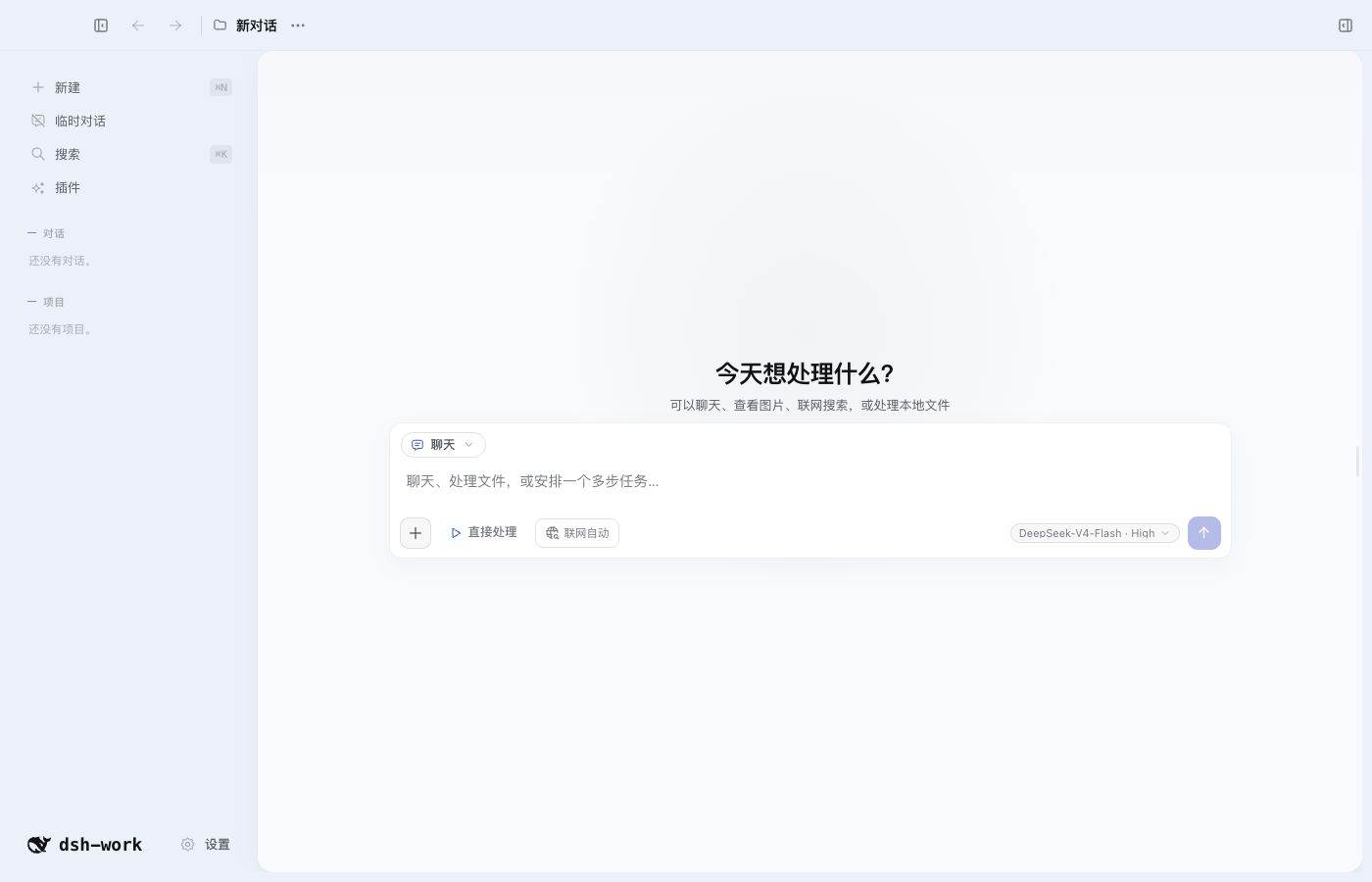 | 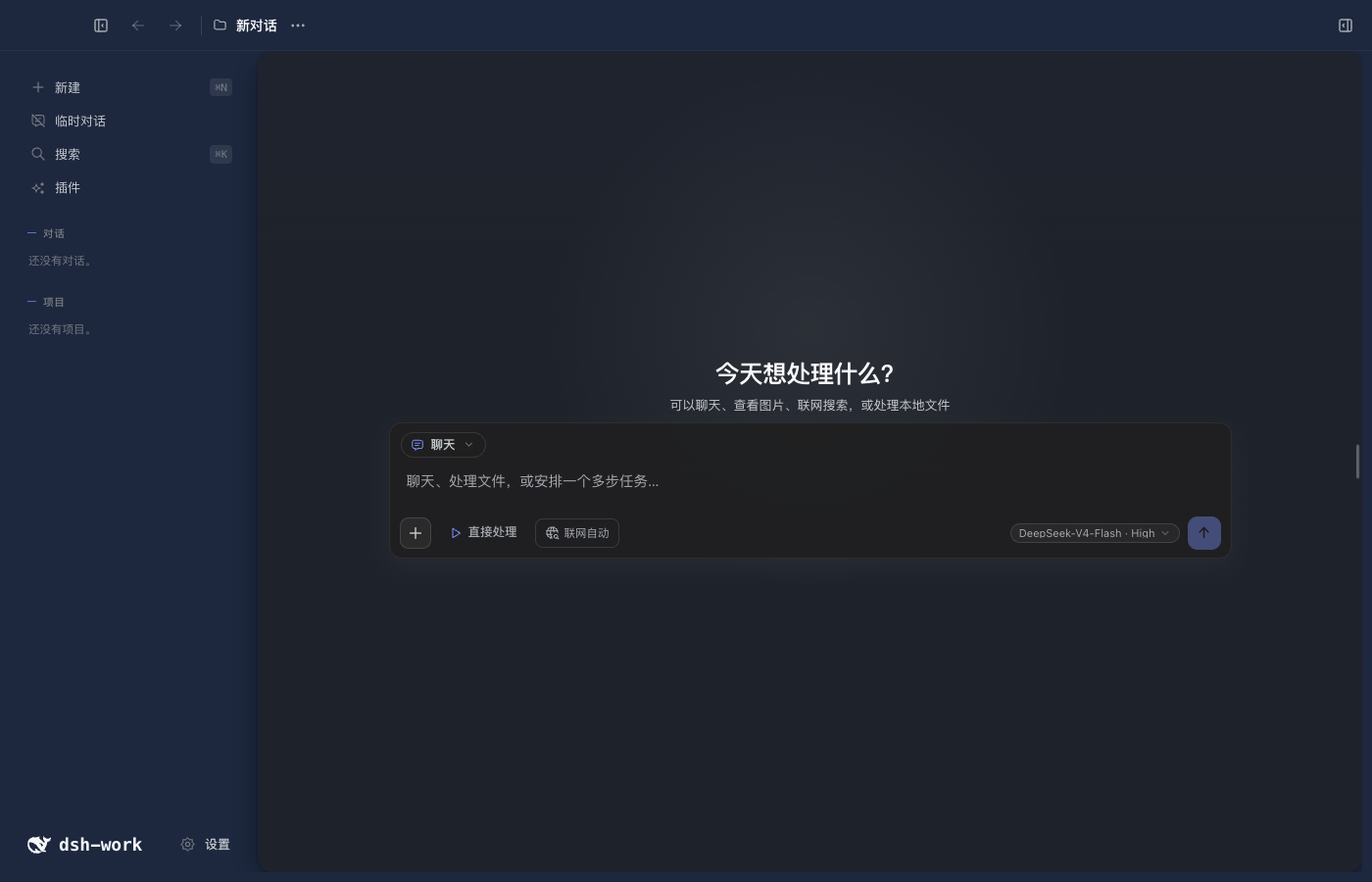 |
快速开始
本地开发要求 Node.js 24 或更高版本。当前项目使用 DSH 0.1.0-rc.6。
npm install
npm run doctor
npm run dev
切换 Node.js 大版本、CPU 架构或操作系统后,运行 npm run setup 重新准备依赖。
主要功能
| 功能 | 用户可以做什么 |
|---|---|
| DSH 对话 | 流式回答、思考过程、工具调用、停止、继续、重试、消息分支和重启恢复 |
| 模型与权限 | 选择 Provider、模型和推理强度,管理凭据引用、Session 权限、工具审批和模型提问 |
| Tool、Skill、MCP 与多 Agent | 使用当前 Profile 中的工具、技能、MCP、Hook、子 Agent 和 Workflow |
| 项目与对话 | 创建项目、全局或临时对话,置顶、排序、重命名、归档、恢复和删除 |
| 桌面外壳与设置 | 使用三列工作台、左右栏折叠、全局搜索、缩放快捷键和更新检查,调整语言、网络、通知、终端与隐私选项 |
| 项目上下文与记忆 | 设置应用指令、项目指令、授权源码目录、写入目标以及全局或项目记忆 |
| 输入与引用 | 使用 @ 引用文件、使用 # 引用对话,粘贴图片和大段文本附件 |
| 编码工作区 | 查看 Diff、逐行评论和编辑、在外部编辑器打开、发起 AI Review,并安全撤销模型产生的文件修改 |
| Git Worktree | 创建、启用、停用和删除隔离工作目录,让新对话在指定 Worktree 中运行 |
| 文件与搜索 | 浏览项目文件、任务和产物,预览文本、代码、图片和 Office 内容,按文件名或正文搜索 |
| Browser Workspace | 多标签浏览、历史、页内查找、缩放、下载、打印、开发者工具、站点权限、网页快照和“使用此页” |
| 结果与证据 | 直接查看当前 DSH Session 的完整轨迹、工具输入输出、耗时、Token 和最终回答 |
| Canvas 与本地 Site | 创建和编辑 Canvas、处理行内建议与版本冲突,生成并响应式预览单文件 Site |
| Office 产物 | 创建、查看和定点编辑 Markdown、DOCX、XLSX、PPTX 和 PDF,并保留版本 |
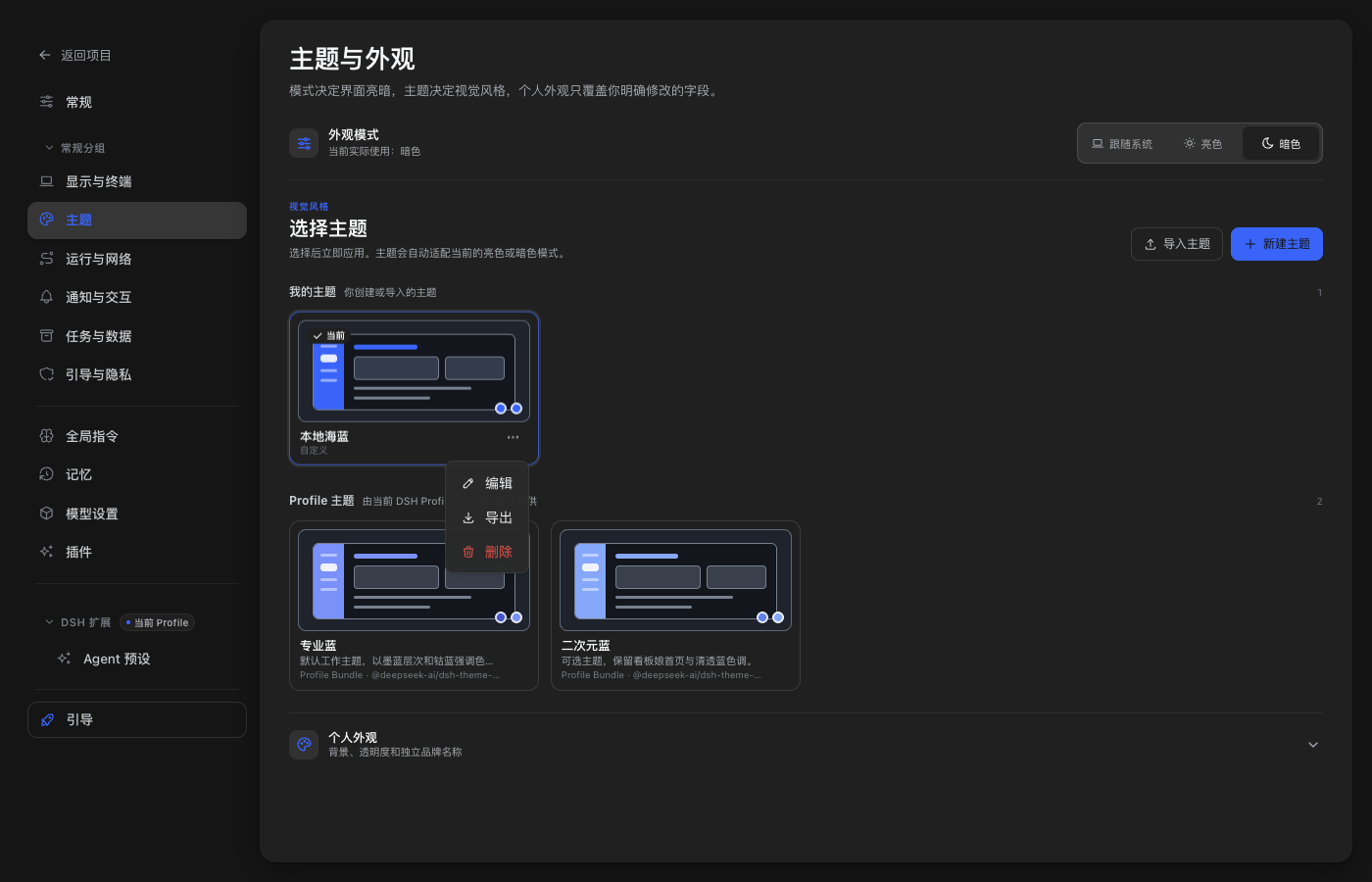
| 主题与外观 | 切换 Profile 主题,新建、导入、预览、编辑、导出和删除本地主题,调整明暗模式、背景和透明度 |
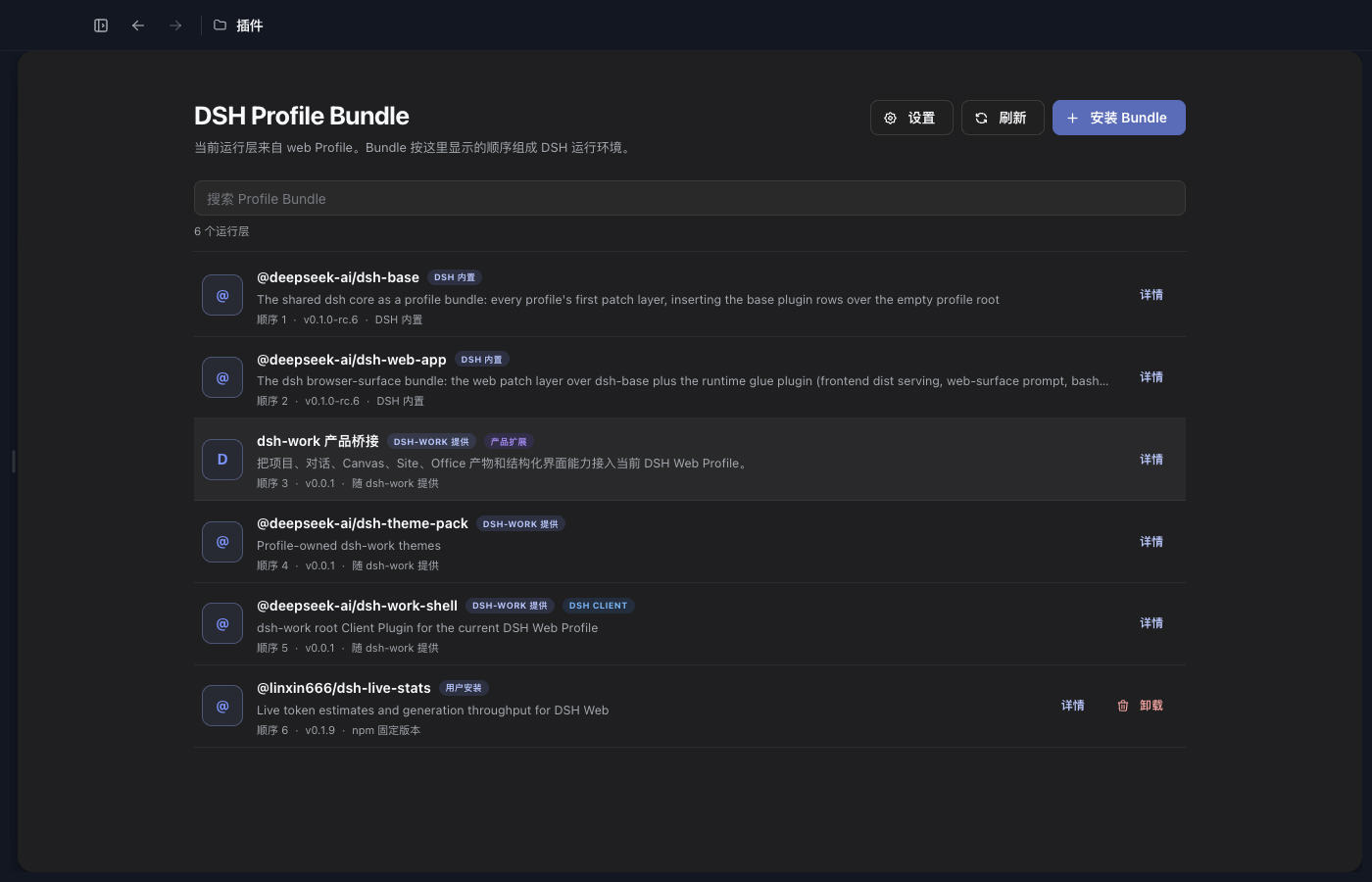
| 插件中心 | 检查兼容性,把 DSH Profile Bundle 安装到当前 Web Profile,并查看来源、版本和加载顺序 |
DSH 轨迹就是结果与证据
右侧“结果与证据”直接读取当前绑定 DSH Session 的 session.history。用户消息、请求上下文、模型输出、工具调用、工具结果、权限变化和最终回答都在同一条可回放轨迹中,不维护第二套运行中心。
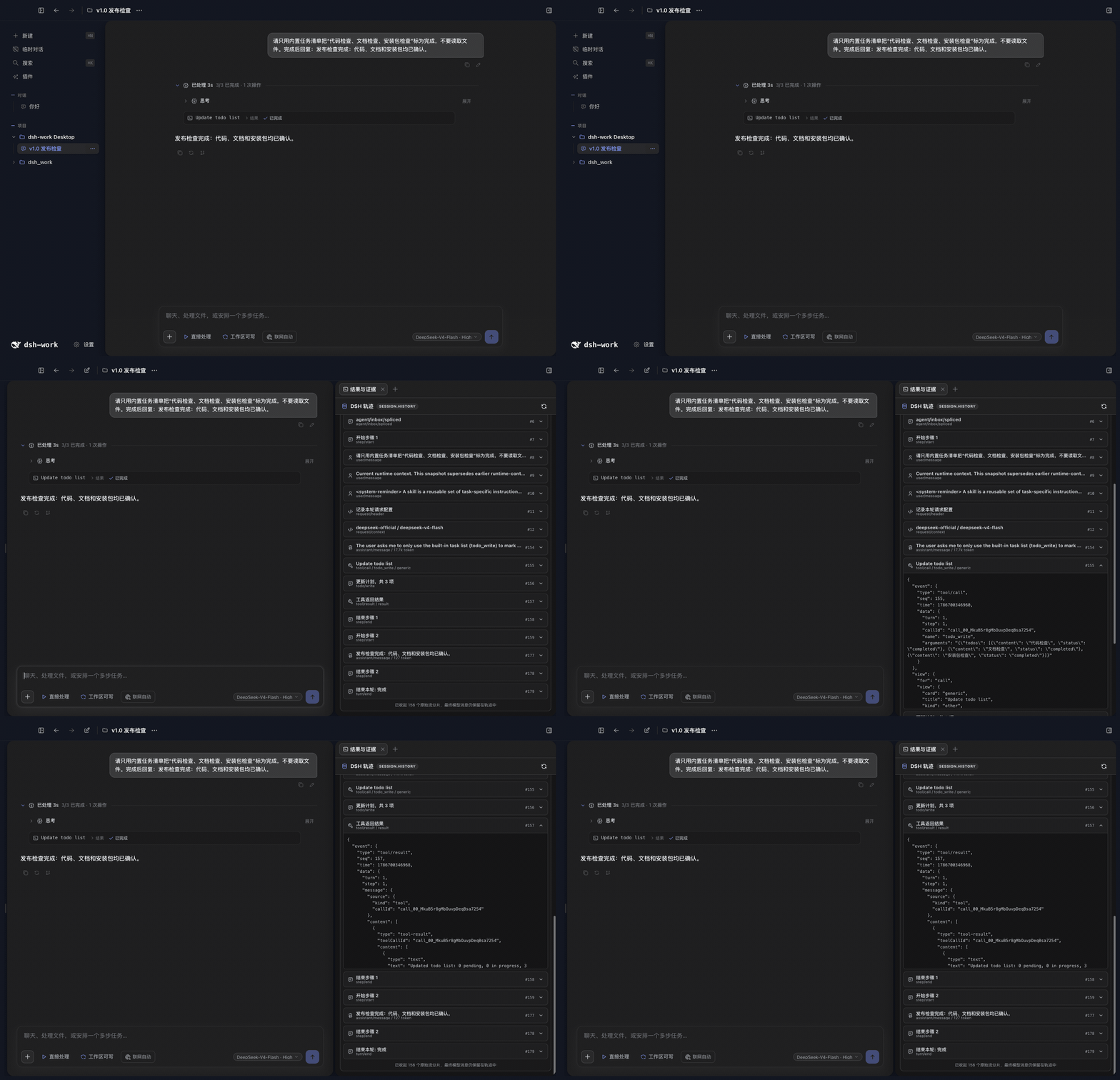
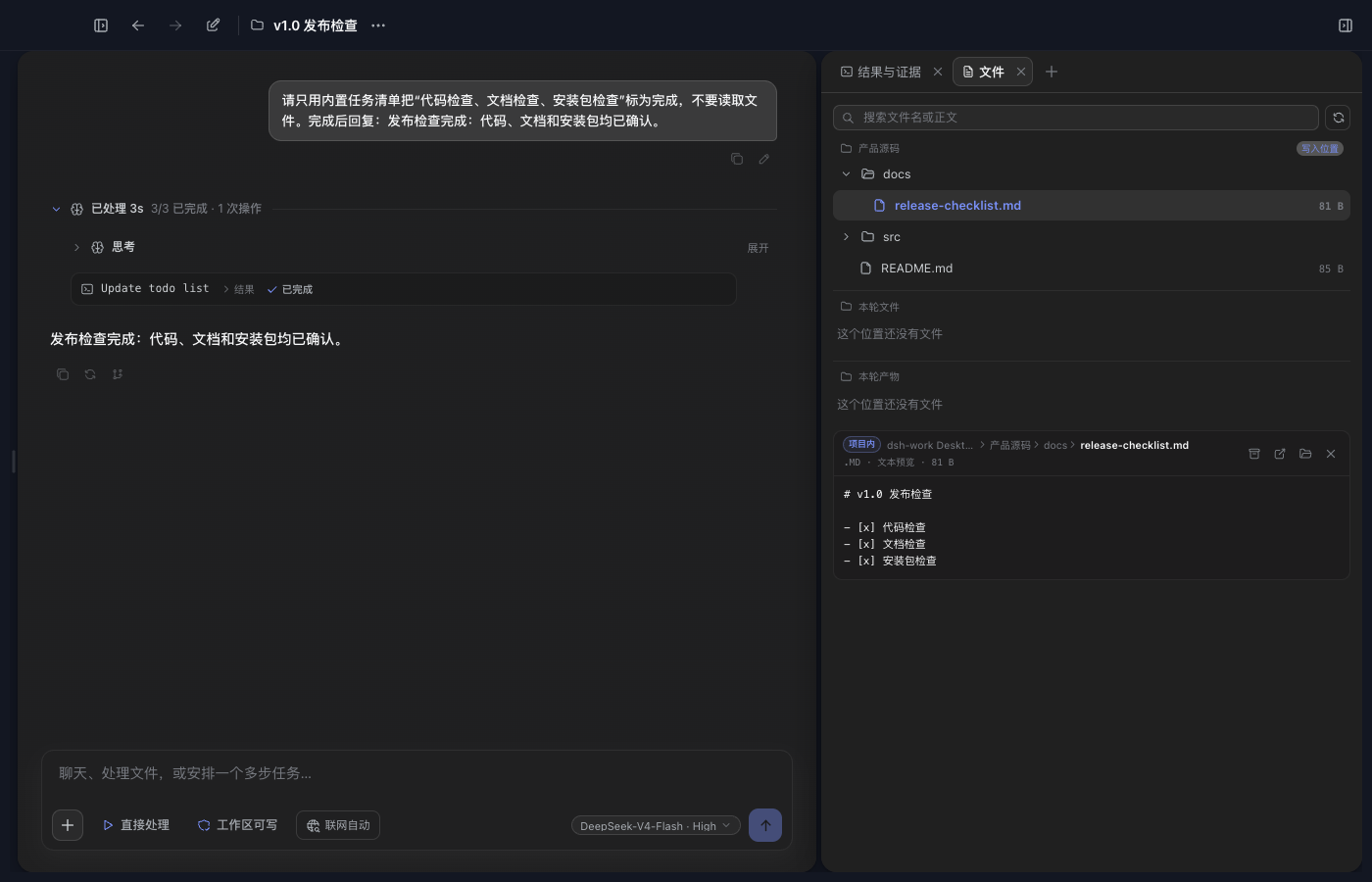
对话和工作台
一个项目对话对应一个 DSH Session。右侧工作台可以添加结果与证据、浏览器、文件、产物和 Site 标签;项目文件树、Agent 工作目录、当前 Diff 和行编辑都跟随当前项目权限与活动 Worktree。
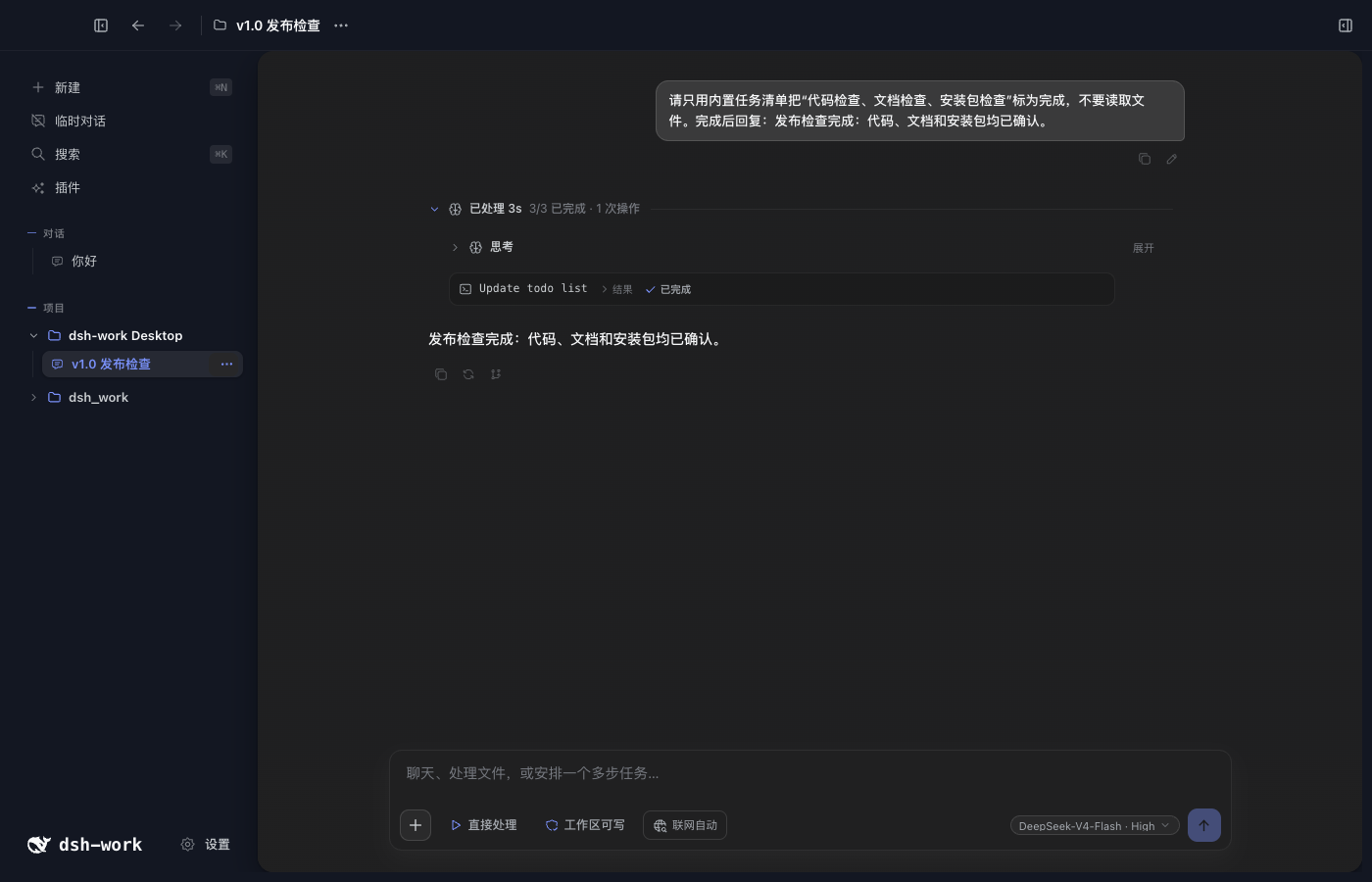
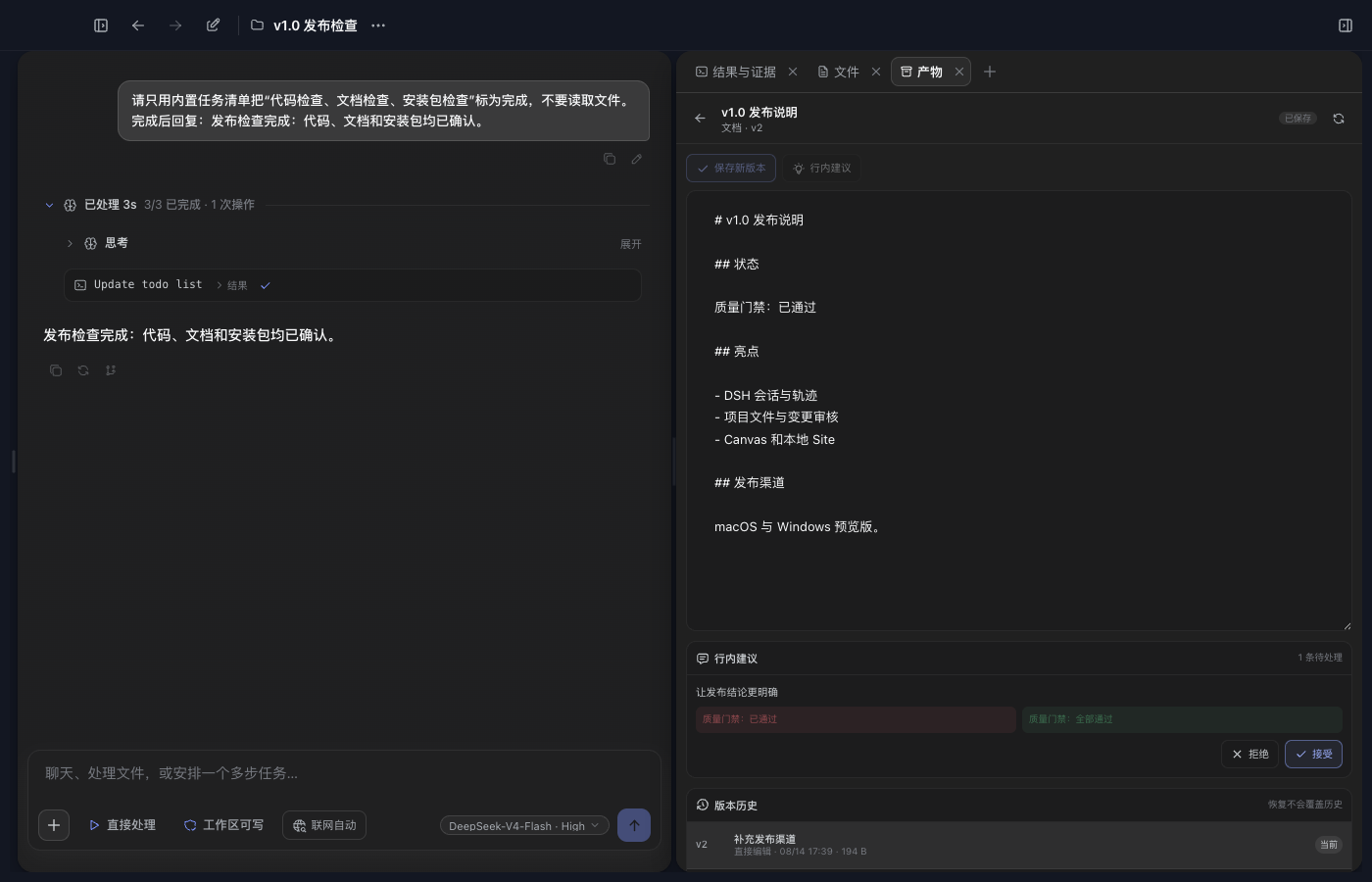
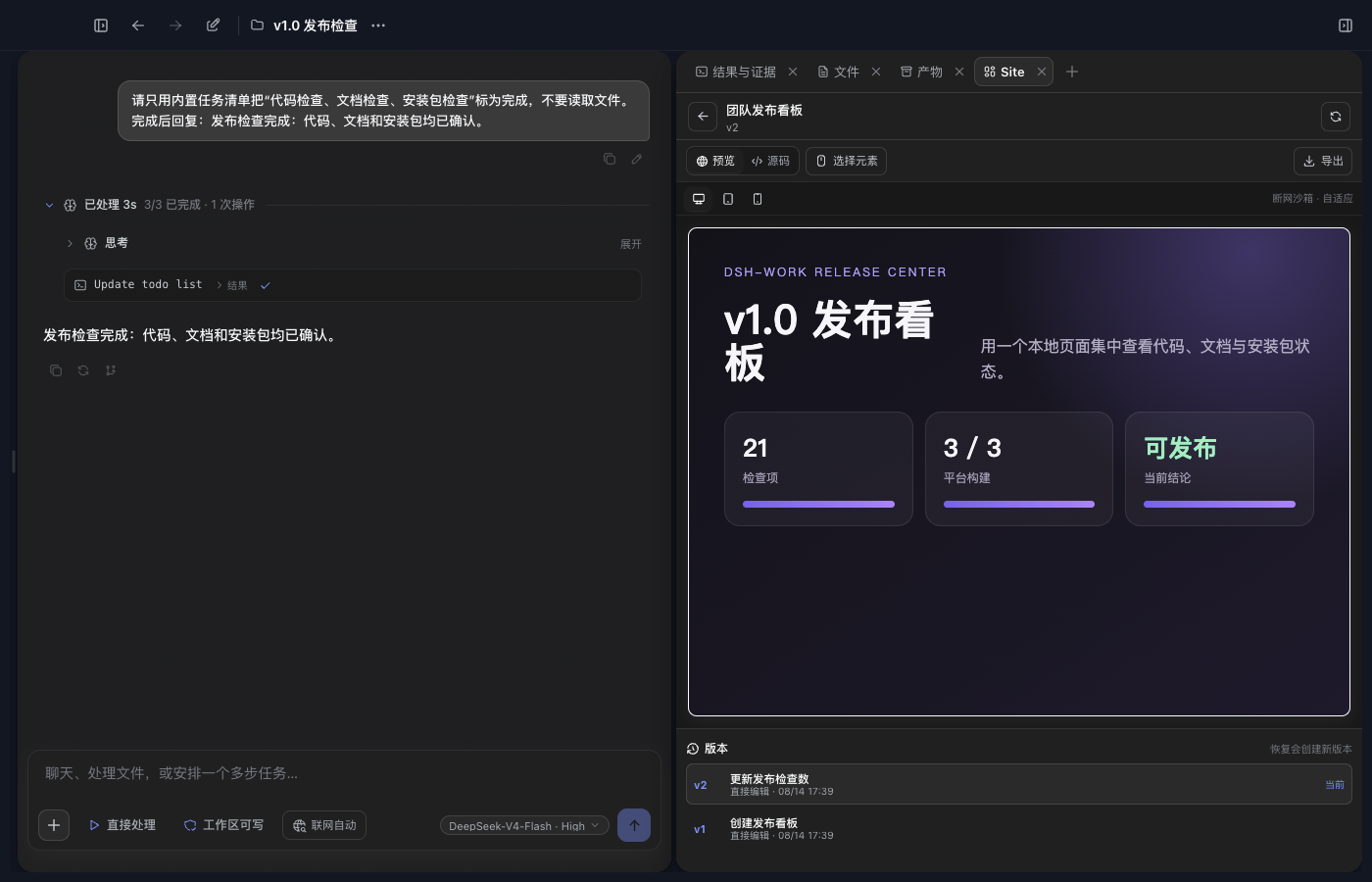
Canvas 保存不可变版本,支持正文编辑、版本比较、精确行内建议和冲突处理。Site 使用同一套版本能力,并在隔离沙箱中提供桌面、平板和手机预览。
Git Worktree 隔离开发
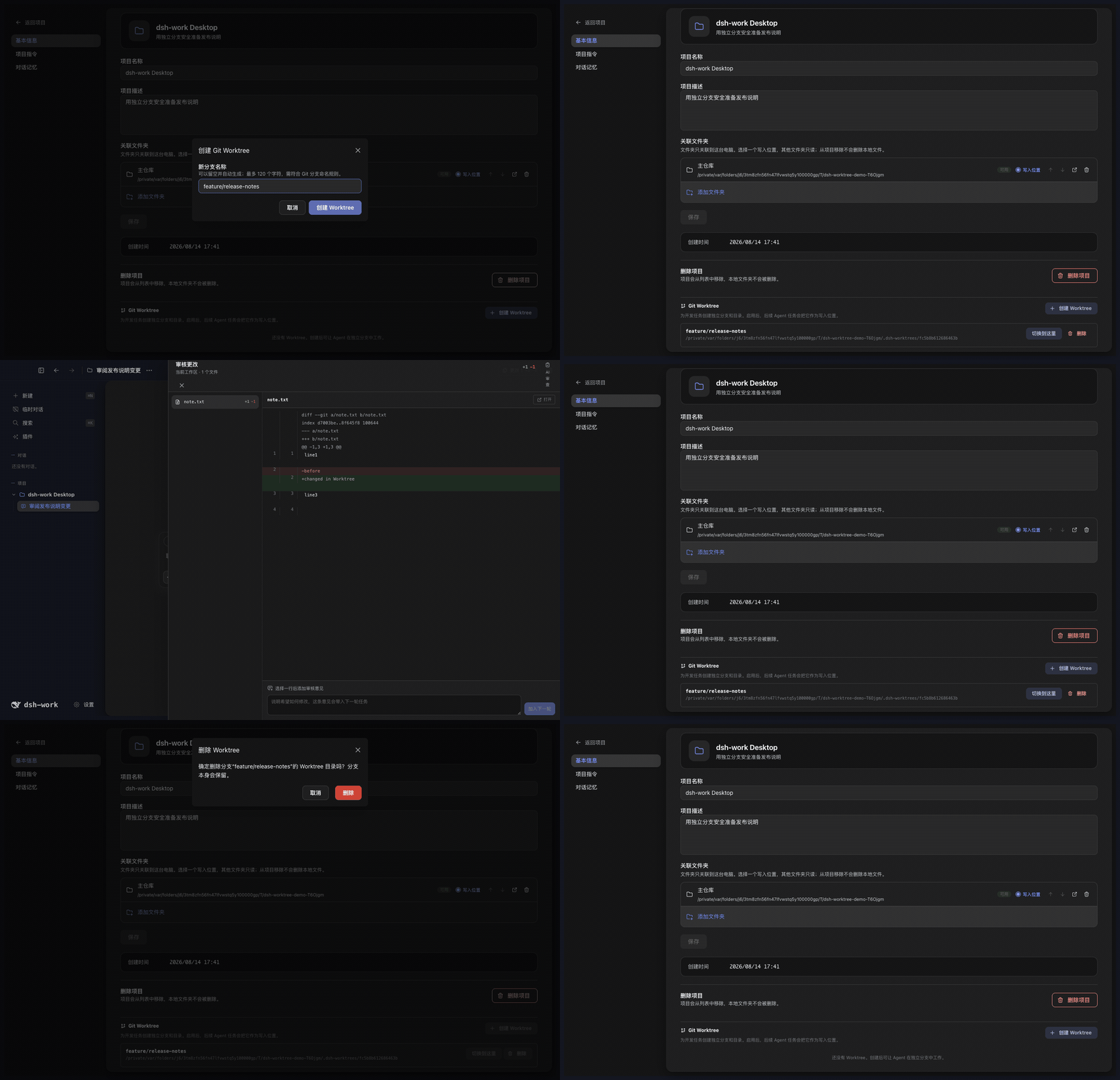
项目设置提供完整的 Worktree 工作流:
- 为项目创建一个或多个独立分支和工作目录,同一时间启用一个。
- 启用后,新建对话的 Agent、DSH Session、Diff 和行编辑使用该 Worktree,主检出保持不变。
- 切换工作目录不会迁移已有对话;应先启用目标 Worktree,再新建对话。
- 删除前必须切回主检出。删除工作目录后保留 Git 分支,避免误删提交。
- 非 Git 目录、重复分支、越界路径和异常符号链接会被拒绝;磁盘上丢失的 Worktree 会标记为不可用。
主题与外观
@deepseek-ai/dsh-theme-pack Profile Bundle 提供默认的 professional-blue 和可选的 anime-blue。正式产品也支持本地自定义主题的新建、导入、预览、编辑、导出和删除。
本地主题只能使用安全的颜色与外观设置,不能注入原始 CSS、远程图片或修改应用名称。个人背景、明暗模式和透明度可以独立调整。
插件中心
普通用户从左侧“插件”页面安装 DSH Profile Bundle:
- 输入带精确版本的 npm 包,或带完整 commit 的
dsh-external仓库地址。 - 先运行兼容性检查;只有结果为“可以安装”时才能写入当前 Profile。
- 安装后查看 Bundle 的来源、版本、加载顺序和能力,用户安装的 Bundle 可以卸载。
Tool、Skill、MCP、Hook 等 Host Bundle 可以进入 DSH 运行时。包含第三方 Client UI 的 Bundle 目前不会进入拥有 Electron 权限的主窗口;随应用提供并经过审核的 Client Bundle 不受此限制。
与 DSH 官方 Web 的关系
DeepSeek Harness Desktop App 不是 DSH Web 的 iframe,也没有复制一套 Agent 运行时。Electron 启动 DSH Web Profile,并继续使用同一套 Session、Agent、Tool、Skill、MCP、Settings、Profile Bundle 和 Client Loader。DeepSeek Harness Desktop App 在同一运行链上提供自己的桌面外壳,并增加项目管理、文件授权、Browser Workspace、Git Worktree、Canvas、Site 和 Office 产物。
需要模型使用的产品能力通过绑定 Session 和 DSH Tool 接入;项目数据、文件权限、网页、Worktree 和产物版本仍由 DeepSeek Harness Desktop App 管理。
当前边界
- 当前没有五列任务看板、独立定时任务页面、Git 图谱、stage/unstage 面板或独立终端页。
- 本地 Site 只提供预览和单文件导出,没有部署服务;公开分享目前只有只读查看。
- 当前没有移动端远程控制、二维码配对、公网隧道、SSH、SFTP 或端口转发。
- 子 Agent 可以执行并出现在对话与轨迹中,但还没有完整的独立管理页。
数据与安全
Profile、Session、项目、运行记录和产物数据默认保存在本机 ~/.dsh。项目源码目录默认只读,Agent 写入需要用户明确授权。
完整规则见 PRIVACY.md、SECURITY.md 和 THIRD_PARTY_NOTICES.md。
平台状态
| 平台 | 当前状态 |
|---|---|
| macOS Apple Silicon | 开发与目录包已验证 |
| macOS Intel | Rosetta 检查通过,仍需 Intel 实机验收 |
| Windows x64 | 已接入构建流程,仍需安装包实机验收 |
| Windows arm64 | 暂不支持 |
| Linux | 暂无桌面打包配置 |
许可证
项目代码使用 MIT License。第三方依赖与二进制文件的来源、许可证和分发限制见 THIRD_PARTY_NOTICES.md。
Read the usage guide →
Install steps, key points, FAQ and compatibility for this plugin — auto-derived from indexed fields.
Listing badge

[](https://deepseek-plugin.org/plugins/vibeinging/deepseek-harness-desktop-app/packages/dsh-product-bridge)Paste this markdown into your GitHub README to link back to this listing. The badge only states the listing — not a security endorsement.