Adds a node navigation bar to the right edge of the DSH chat page. Hover to preview messages, click to navigate. Supports scrolling to switch, loading earlier history, and filtering messages by conversation.

- Language
- TypeScript
- License
- MIT
- Branch
- main
Install
$ dsh plugin --profile web add @vlln/dsh-navbarRun the command above in your terminal to install this plugin via the dsh CLI. You can switch Profile in the top-right corner. New to dsh? Read the beginner tutorial
Install via your agent
Install the DeepSeek Harness plugin vlln/dsh-navbar for me: review the repository at https://github.com/vlln/dsh-navbar first, then run the install command and verify the plugin loads successfully.
Paste this instruction to the DSH Web GUI assistant — it will install and verify for you.
One-sentence Positioning
Adds a node navigation bar to the right edge of the DSH chat page: each user message corresponds to a dot, hover to preview the message, click or scroll the mouse wheel to quickly jump to the corresponding message, and supports pinning an assistant reply as "Featured" for easy revisit.
Core Capabilities
- Render a vertical node chain on the right edge of the chat area, with each user message corresponding to a dot; the active dot (22px brand blue capsule) moves automatically with the current reading position
- Hovering over a node immediately displays a message preview card, showing the first 6 lines of the corresponding message bubble text (following the official HoverCard visual, the entire navigation bar with gaps responds continuously)
- Clicking a node, clicking any position on the navigation bar, or scrolling the mouse wheel on the navigation bar (preventing chat area scrolling) will smoothly scroll to the corresponding message
- When there are more than 11 nodes, automatically switch to a sliding window (active ±5); smaller dots at both ends indicate there are more; currently selected or featured nodes are always forced to be visible
- The top ↑ button appears when the session has unloaded earlier history: click to forward to the official "Load More" control, automatically maintaining the current reading position; the button automatically hides after all messages are loaded
- The assistant message action bar adds a 📌 button (located between copy and Good response), click to pin that reply as featured; the corresponding node becomes a golden thin oval disc, the state is stored in the browser localStorage by session, click to jump directly to the featured reply
Technical Implementation
- Language: TypeScript (client bundle produced as CJS by tsdown, loaded in browser via
window.__ModuleLoader__) - Key Dependencies:
@deepseek-ai/cordis(peerDependency),@deepseek-ai/dsh-client-ui-primitives,react(only used by PinAction button component) - Architecture Pattern: Official bundle plugin form (
dsh.bundle+ dshClient channel). Node half (src/index.mjs) is emptyapply, only serving as bundle mount carrier; all behavior is on browser sidesrc/client/index.ts(self-rendering DOM + official anchor contract). Zero data channel dependency, read-only official anchor properties (data-time-hover-root,data-chat-flow,data-turn-tail,data-pending-steering) drive, no requests, no tool registration, no route changes - Entry Files:
src/client/index.ts(browser side),src/index.mjs(Node half empty apply)
Applicable Scenarios
When the conversation is very long and it's too slow to flip back and forth to find a specific user message, use the right-edge node bar to locate at a glance and jump directly; when you want to mark a key reply for later revisit, use 📌 to pin it as a featured node; when the history window hasn't finished loading, use the top ↑ button to load while positioning, no need to scroll back to the top.
Prerequisites and Compatibility
| Dependency | Minimum Version | Description |
|---|---|---|
| DSH | >= 0.1.0-rc.5 | Declared via package.json#engines.dsh; depends on official 0806+ data-time-hover-root anchor attribute added to user rows |
| Node.js | >= 22.19.0 | Only required at build time (tsdown packaging script), runtime loads lib/client.js in browser |
| Platform | Cross-platform | Works as a DSH Web-side browser UI plugin, no OS restrictions; not supported on DSH desktop (Node half is empty) |
| Native Modules | None | No native dependencies introduced |
| React | 18.x | PinAction button component on client side injected by host React |
Installation
dsh plugin --profile web add github:vlln/dsh-navbar
Configuration
This plugin requires no additional configuration. No command-line arguments, no cordis.yml configuration, no settings panel switches needed; automatically takes effect after installation and restarting the web profile.
FAQ
Q: Do I need to manually enable it after installation?
A: No. The plugin automatically takes effect on the chat page after being loaded by the web profile; just restart the web profile after installation. You can disable or re-enable it in the "Plugins" panel on the settings page.
Q: On which pages will the node bar be displayed?
A: Only displayed on Chat view (also compatible with mounted focused chat view dsh-focus-chat) chat pages; automatically hidden on settings page and other pages, as well as when there are fewer than 2 user messages.
Q: Will featured messages sync across devices?
A: No. Featured status is stored in browser localStorage by session (key name dsh-navbar:pins:<sessionId>), persists after refresh, but does not sync across devices or browsers.
Q: What happens when there are more than 11 nodes?
A: Automatically switches to a sliding window: only displays 11 nodes near the current active one (±5), smaller dots at both ends indicate there are more; currently selected or featured nodes are always forced to be visible in the window, won't be hidden due to window sliding.
Q: When does the top ↑ load earlier history button appear?
A: Only appears when the current session has unloaded earlier messages (determined by the existence of the official "Load More" control), button automatically hides after all messages are loaded; during loading, the button is disabled and shows "Loading...".
Q: Will uninstalling the plugin clear featured data?
A: No. Data is stored in browser localStorage, uninstalling the plugin or restarting DSH won't automatically clean it up; to clean up, delete keys starting with dsh-navbar:pins:* in the browser developer tools.
Q: Why does the position sometimes jump after jumping to a message?
A: The plugin uses the official post-0811 "reader input ledger" for direct one-step positioning. Baseline versions before 0811 (0808/0810) use wheel event as a compatibility fallback, which may cause slight jitter with official streaming rendering.
Ease of Use
Beginner — plug and play, no commands, no tools, no configuration items; the only optional interactions are hovering/clicking nodes, or clicking 📌 to pin a message.
Known Issues and Limitations
- Only supports DSH Web side, Node half is empty (
src/index.mjsonlyexport default function apply() {}), does not provide any host-side capabilities - Depends on official
data-time-hover-rootrow attribute anchor; if official DOM structure changes, adaptation is needed (README mentions this attribute was added to user rows starting from official version 0806) - Jump adaptation uses official follow's reader input determination 0811 ledger mechanism; older versions (0808/0810) retain wheel dispatch fallback
- Node bar position is tightly attached to right edge of chat flow column + 12px, clamped within viewport; when sidebar collapse animation or window width changes cause chat flow column position to change dramatically, occasional one-frame position jitter may occur (already handled with ResizeObserver + rAF throttle merging)
- "Load More History" button forwards to official
ChatView'sloadOlderAnchoredcontrol; if official button structure or position changes, this plugin's positioning logic needs corresponding adaptation
中文 | English
navbar
Conversation node navigation rail: jump between user messages from the node strip on the right edge of the conversation — hover to preview, click to jump
An evenly spaced node strip along the right edge of the conversation area (one node per user message): the active pill follows your reading position, hovering shows a preview card (truncated at 6 lines), clicking smooth-scrolls with a brand-blue highlight ring, more than 11 nodes automatically switch to a sliding window, it stays invisible until hovered, and it auto-hides when there are fewer than 2 user messages. Implements the dsh-external/issues#144 spec. Form: an official bundle plugin (dsh.bundle + dshClient channel, browser-only, empty Node half), 0 patches.
Preview
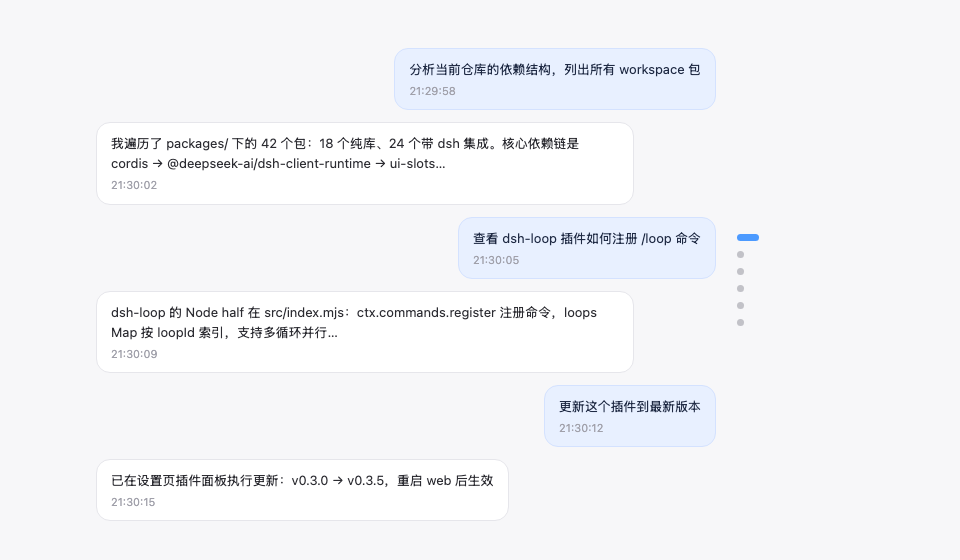
Features
| Feature | Description |
|---|---|
| Node navigation rail | Vertical node strip on the right edge of the conversation area, one dot node per user message |
| Follows reading position | The active pill (22px brand-blue capsule) moves with your current reading position |
| Hover preview | Hovering a node shows a message preview card (6-line truncation, matching the official HoverCard look) |
| Continuous hover | The entire rail (including the gaps between nodes) responds to hover continuously: the preview switches to the nearest node and the corresponding pill elongates (gray) to indicate the click target — no dead zones |
| Scroll-wheel switching | With the cursor over the rail, scrolling the wheel moves up/down one message (blocking conversation-area scrolling) |
| Click to jump | The whole rail is clickable (including gaps, jumping to the nearest node) plus an enlarged pill hit area — no need to precisely aim at tiny dots |
| Sliding window | When there are more than 11 nodes, only the nodes inside the window are shown (avoids overflow) |
| Load earlier history | An ↑ button pinned at the top of the rail (visible only while the conversation has older history): click to load earlier messages — it forwards to the official load-older control, so your reading position is preserved. Hovering it instantly shows a hint card in the same style as the node previews (the official HoverCard look) |
| Auto-hide | Not shown with fewer than 2 user messages or on non-conversation pages |
| Message pin | 📌 button on the assistant action bar (between copy and Good response); pinned turns render as a golden slim elliptical disc in the rail (always visible, the preview card carries a 📌 badge, clicking jumps straight to the pinned reply), persisted per session |
Zero data-channel dependencies: driven only by official anchor attributes (data-time-hover-root, on user rows since 0806) — no polling, no routing, no tools.
Installation
Recommended: one-line install from git source (build artifacts are committed, so git source does not trigger a build):
dsh plugin --profile web add "github:vlln/dsh-navbar#main"   # one-line git-source install (build artifacts committed)
# or npm source: dsh plugin --profile web add @vlln/[email protected]
Or from a local directory (when you have the source): git clone, then cd dsh-navbar && dsh plugin --profile web add ..
Restart web after installing for it to take effect; you can disable/enable it in the Plugins panel on the Settings page.
Usage
Works out of the box — no commands, no tools. The node rail appears on the right edge of the conversation page (Chat view); hover for a preview, click to jump. Animations are disabled under prefers-reduced-motion.
Pin: hover an assistant message's action bar and click 📌 to pin that reply — the corresponding turn's navigation node becomes a golden slim elliptical disc (click to jump straight to that reply; the preview card shows a 📌 badge and the reply text). Pin state is saved per session in browser localStorage and survives refreshes; click again to unpin.
Load earlier history: when the open conversation still has older messages (its history window is not fully loaded), an ↑ button sits at the very top of the node rail. Click it to load the earlier messages — the rail then grows new nodes at the top. The button hides automatically once all history is loaded, and is disabled while a load is in flight. Hovering it instantly shows a hint card in the same style as the node previews (the official HoverCard look), and it reads "Loading…" while a load is in flight. The click is forwarded to the official load-older control, so your current reading position is preserved (no content jump).
Development
pnpm install
pnpm run build      # tsdown: client bundle (lib/client.js)
- client:
src/client/index.ts(self-rendered DOM + official anchor contract; the pin button uses the officialconversation.chat.assistant-actionsslot, with React provided by the client runtime; ctx services accessed must be declared in the plugin object'sinject) - Node half:
src/index.mjs(empty apply, the bundle mount carrier)
License
MIT License (an example plugin in the DSH ecosystem).
Read the usage guide →
Install steps, key points, FAQ and compatibility for this plugin — auto-derived from indexed fields.
Listing badge

[](https://deepseek-plugin.org/plugins/vlln/dsh-navbar)Paste this markdown into your GitHub README to link back to this listing. The badge only states the listing — not a security endorsement.