A status bar for background tasks displayed above the conversation input, showing the count of running tasks in the current session, with an expandable option to view real-time output tail.

- Language
- JavaScript
- License
- MIT
- Branch
- main
Install
$ dsh plugin --profile web add @vlln/dsh-task-statusRun the command above in your terminal to install this plugin via the dsh CLI. You can switch Profile in the top-right corner. New to dsh? Read the beginner tutorial
Install via your agent
Install the DeepSeek Harness plugin vlln/dsh-task-status for me: review the repository at https://github.com/vlln/dsh-task-status first, then run the install command and verify the plugin loads successfully.
Paste this instruction to the DSH Web GUI assistant — it will install and verify for you.
One-Sentence Positioning
Adds a background task status bar above the input box on DSH conversation pages, automatically displaying the number of currently running tasks in the conversation. Click on a task row to expand and view status, time spent, and real-time output tail. No modification to official baseline required—the plugin creates its own data channel to bypass the missing official API.
Core Capabilities
- Displays a dock card above the conversation input box with the title "⚙ N background tasks running", automatically summarizing all active tasks from agents in the current conversation
- Click on a task row to expand, showing task name, start/end time, status tag, and details (detail field)
- When expanded, automatically polls task output every 1 second, with the output area scrolling in real-time to show the latest tail content
- Output area caps at 10 lines (160px), scrolling appears automatically when exceeded, allowing review of historical content
- Only displays in Chat view, automatically hides in trajectory view, task board, and other non-conversation pages
- Mirrored patch ensures zero competition with official
task_outputtool and consistent view—both parties see identical incremental bytes
Technical Implementation
- Language: TypeScript (Node half ESM + client half CJS with tsdown dual build output)
- Key Dependencies:
@deepseek-ai/cordis(peerDependency),react ^18.2(peerDependency),@deepseek-ai/dsh-client-runtime,@deepseek-ai/dsh-client-ui-slots - Architecture Pattern: Official bundle plugin dual half — Node half registers services via
cordis.patch.ymland applies mirror patch toctx.jobs.read; client half registers to officialconversation.input.dockslot viactx.slots.inject; both halves connect through two HTTP read-only routes + 1-second polling - Entry Files:
src/index.mjs(Node half) /src/client/task-status.tsx(client half)
Use Cases
After triggering background-running tools in DSH conversations (like bash with run_in_background: true), users can view all active tasks and their latest output directly above the conversation input box without switching to the task board. This suits users frequently running long-running background commands who need to observe progress in real-time. The mirror patch also avoids output cursor conflicts with the official task_output tool.
Prerequisites and Compatibility
| Dependency | Min Version | Description |
|---|---|---|
| DSH | >=0.1.0-rc.5 | Minimum version required by official dock slot contract and cordis 4.x service interface |
| Node | >=22.19.0 | Node half runs in host Node process (ESM + es2024 target) |
| Platform | Cross-platform | Only active under DSH web profile, no native module dependencies |
| Native Modules | None | Does not introduce node-pty, node:sqlite, or other native modules |
Installation
dsh plugin --profile web add github:vlln/dsh-task-status
Configuration
This plugin requires no additional configuration.
FAQ
Q: Does it require manual activation after installation?
A: No. The plugin automatically activates on conversation pages once loaded by the web profile; simply restart the web profile after installation. It can be temporarily disabled or re-enabled in the Settings page under the "Plugins" panel.
Q: Which pages display the status bar?
A: Only the Chat view shows it. The Trajectory view, task board, and other pages hide it automatically—the plugin uses MutationObserver to detect the presence of the conversation flow column [data-chat-flow=""] and toggles visibility accordingly.
Q: The output area only shows 10 lines—what if I need to see earlier content?
A: A scrollbar appears once you exceed 10 lines (160px), allowing you to scroll up and view earlier output. The tail always keeps the latest content visible so you can track progress. The Node side buffers up to 64 KB; older output from very long-running tasks gets dropped to preserve the tail.
Q: Will the status bar compete with the official task_output tool for output?
A: No. This plugin applies a mirror patch to ctx.jobs.read—the official tool still consumes output according to its original semantics, while the plugin reads directly through rawRead (bypassing the patch). Both parties see identical incremental bytes with no duplicates or loss. The patch branch doesn't write reported status; the task's final state notification still comes from official onJobDone/wait.
Q: Where do the tasks shown in the status bar come from?
A: They come from the host task union—iterating through all agents to call ctx.jobs.list(agent) for their owned tasks, then ctx.jobs.list() for unowned tasks (deduplicated by id), and finally filtering on the frontend for active tasks (running/stopping) belonging to the current session (ownerSession === sessionId).
Q: Why isn't the status bar showing when I run background commands?
A: Check three things: whether the tool actually has run_in_background: true set, whether you're in Chat view (it won't show in trajectory/taskboard), and whether you've restarted the web profile to activate the plugin.
Q: What happens when multiple tasks run simultaneously?
A: The status bar displays the total task count with an expand/collapse button. When expanded, it renders task rows individually, and clicking a specific row shows that task's real-time output tail. When there are more than 5 tasks, the task list has its own scrollbar (maxHeight: 180px).
Difficulty Level
Beginner — single command installation, works immediately after restart with no configuration needed, no native dependencies, relies on existing official dock slot contract.
Known Issues and Limitations
No known issues at this time.
中文 | English
task-status
Background task status bar: task-progress UI above the chat input area — running count + expandable details + live output tail
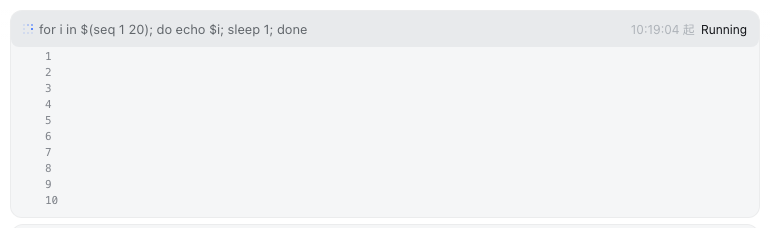
A background-task status bar above the chat input box: running-task count + click-to-expand per-task details + live output tail (auto-polling, 10-line scrolling area). Registered through the official conversation.input.dock slot (same family as queue/todo/goal). Ships as an official bundle plugin (dsh.bundle + dshClient channel), 0 patches.
Preview
Features
UI (chat-page dock slot):
| Feature | Description |
|---|---|
| Status bar | Dock card above the chat input box: ⚙ N background tasks running |
| Expandable details | Click a task row to expand: status / duration / details + output tail |
| Live tail | Polls the output route every 1s while expanded, re-rendering the whole block (the mirror patch guarantees zero contention with the official task_output tool and a consistent view) |
| Scrolling area | Output area capped at 10 lines (160px); overflow becomes a scrollbar (tail keeps the end, scrollable to review) |
| Chat page only | Automatically hidden on non-Chat views (trajectory / taskboard, etc.) |
Routes (Node half):
| Route | Description |
|---|---|
/plugins/dsh-task-status/tasks | Task list (read-only, filtered by session; owned + unowned union) |
/plugins/dsh-task-status/output | Task output tail (full:true accumulates the full text; unknown id → 404) |
Output tail contention semantics (official 0809 API constraint): tasks.read is a consumptive, incremental read (one shared cursor per task). This plugin applies a mirror patch to ctx.tasks.read — the official read becomes buffered mirror (increments already read by others, not re-consumed) + direct read of the latest (normal consumption); the plugin's own reads go straight to the underlying rawRead. The official tool and the plugin see the same increment sequence (no duplicates, no loss); only the proactively self-read part can no longer be replayed by the official side alone (official semantics is inherently incremental, so model perception is unaffected).
Installation
Recommended: one-line install from a git source (build artifacts are committed; a git source doesn't trigger a build):
dsh plugin --profile web add "github:vlln/dsh-task-status#main"   # one-line git source (build artifacts committed)
# or npm source: dsh plugin --profile web add @vlln/[email protected]
Or from a local directory (when you have the source): git clone, then cd dsh-task-status && dsh plugin --profile web add ..
After installing, restart web for it to take effect; you can disable/enable it in the "Plugins" panel on the settings page.
Usage
Run a background task and the status bar appears (e.g. the model-side bash tool with run_in_background: true):
⚙ 1 background task running
  ● bash-1  for i in $(seq 1 20)…   started 21:30:15   running
Click a task row to expand → the output tail scrolls live (a scrollbar appears once it exceeds 10 lines). The status bar disappears automatically when the task finishes.
Development
pnpm install
pnpm run build      # tsdown: Node half (lib/index.mjs) + client bundle (lib/client.js)
- Node half:
src/index.mjs(mirror patch +/tasks/outputroutes) - client:
src/client/task-status.tsx(dock-slot status bar)
License
MIT License (example plugin in the DSH ecosystem).
Read the usage guide →
Install steps, key points, FAQ and compatibility for this plugin — auto-derived from indexed fields.
Listing badge

[](https://deepseek-plugin.org/plugins/vlln/dsh-task-status)Paste this markdown into your GitHub README to link back to this listing. The badge only states the listing — not a security endorsement.