Embed a "Plugin Management" panel and 4 agent tools into the DSH Web settings page, providing unified management of profile plugin installation states via the official mechanism, including bundle layer stack, insert row enable/disable, version check, and CRUD operations.

- Language
- TypeScript
- License
- MIT
- Branch
- main
Install
$ dsh plugin --profile web add github:vlln/plugin-registryRun the command above in your terminal to install this plugin via the dsh CLI. You can switch Profile in the top-right corner. New to dsh? Read the beginner tutorial
Install via your agent
Install the DeepSeek Harness plugin vlln/plugin-registry for me: review the repository at https://github.com/vlln/plugin-registry first, then run the install command and verify the plugin loads successfully.
Paste this instruction to the DSH Web GUI assistant — it will install and verify for you.
One-line Description
Embeds a "Plugin Management" panel + 4 agent tools into the DSH Web settings page. With 0 patch, it provides unified management of profile plugin installation states: bundle layer stack, insert lines, enable/disable, and version checks all go through official mechanisms without directly modifying source code.
Core Capabilities
- Adds a "Plugin Management" tab to the DSH settings page, listing all loaded plugins with version status, displayed in three states: "Running / Preset Mounted / Disabled", and distinguishing between user-installed, built-in, and management tool itself.
- One-line installation entry: input npm package name or GitHub URL (with automatic normalization for
https://github.com/o/r,github.com/o/r, andgithub:o/rformats). Auto-routes based on whether the package declaresdsh.bundle: bundles go to layer stack (effective after restart), non-bundles write insert lines (configured with HMR for real-time mounting, no restart required). - Runtime enable/disable for loaded plugins: disable/enable takes effect immediately and persists to profile patch; bundle形态 supports updates (
pnpm update) and uninstallation (pnpm remove+ reconcile). - Registers 4 agent tools (
plugin_search/plugin_install/plugin_uninstall/plugin_status). Agent and panel write to the same installation state, supporting command-line batch operations. - npm registry version check: native fetch for latest version (no subprocess, works in restricted hosts), 6h cache + 30 second debounce, git/link sources automatically identified as "Local" with no latest.
Technical Implementation
- Language: TypeScript (Node half) + TypeScript + React 18 (Browser half)
- Key Dependencies:
cordis^4.0.0-rc.7 (host half plugin runtime) /react^18.2.0 (browser half panel) /@deepseek-ai/dsh-tools^0.1.0-rc.5 (agent tool registrationdefineTool) /yaml^2.4.0 (profile patch parsing and writing) - Architecture Pattern: Official bundle dual-half plugin—Node half registers
plugin-consolecordis plugin viadsh.bundle.patch, mounting to web profile'swebServer(/api/plugin-consoleroute) +loader(reads loader tree entries) +tools(registers 4 agent tools) +agentPresets(preset mount annotation) four inject services; Browser half mounts React panel tosettings.sectionslot viadsh.client.inject - Entry Files:
packages/plugin/console/src/index.ts(Node half) /packages/plugin/console/src/client/index.ts(Browser half) /packages/plugin/console/cordis.patch.yml(bundle injection declaration)
Use Cases
DSH users who have installed multiple third-party bundles or non-bundle plugins and need centralized viewing/enabling/disabling/updating in the Web UI, without manually modifying profile configuration or restarting services one by one.
Agent developers who need to automatically install/uninstall plugins within controlled DSH workflows (e.g., setup flows, CI in-plugin validation) and prefer using official mechanisms over bypassing pnpm.
Users who want to try different plugin combinations in a clean environment without manually writing YAML in cordis.patch.yml every time—the panel + tools directly manage installation state read/write.
Prerequisites & Compatibility
| Dependency | Min Version | Description |
|---|---|---|
| DSH | ^0.1.0-rc.5 | peerDependencies declares @deepseek-ai/dsh-tools ^0.1.0-rc.5; depends on web profile's webServer / loader / tools / agentPresets four inject services, corresponding to versions after 0811 when official repository-plugins mechanism was removed |
| Node | Not declared | package.json does not declare engines.node; devDependencies @types/node ^22.0.0, recommend Node ≥ 22 (aligned with DSH 0811 host baseline) |
| Platform | Web | dsh.client.platform: "web"; Node half is cross-platform but only registers routes under web profile composition |
| Native modules | None | Only uses node:fs / node:child_process / node:os / node:path built-in modules and browser fetch, no native bindings introduced |
Installation
dsh plugin --profile web add github:vlln/plugin-registry
Configuration
| Config | Type | Description | Default |
|---|---|---|---|
| None | - | This plugin does not expose Cordis schema configuration options; behavioral parameters (DSH_HOME resolution, profile directory, registry timeout, 30 second startup delay pre-scan, etc.) are all source code constants | - |
FAQ
Q: After installation, where can I find the management panel in DSH Web?
A: After installation, refresh the Web page. The settings page will have a new tab called "Plugin Management" (located next to the official "Plugins" tab). Click it to load the panel.
Q: Why don't non-bundle plugins require a DSH restart after installation?
A: The panel writes to profile cordis.patch.yml insert lines; starting from DSH 0811, profile-boot mounts a watch-only HMR instance, so line additions/deletions take effect in real-time.
Q: Why do bundle plugins still require a web restart after installation?
A: Bundle plugins are installed in profile package.json dependencies + dsh.profile.bundles layer stack. The layer stack is synthesized at startup and cannot be hot-swapped at runtime.
Q: How do agents use this installation mechanism? Do I need to switch to the panel?
A: Not necessary. The Node half simultaneously registers 4 defineTool tools (plugin_search / plugin_install / plugin_uninstall / plugin_status), writing to the same installation state as the panel.
Q: How do I distinguish the three states shown in the panel: "Running / Preset Mounted / Disabled"?
A: Running = host enabled; Preset Mounted = host disabled but agent preset still mounted (0811 model tools go through preset channel, disabling host doesn't mean tools disappear); Disabled = completely disabled.
Q: Can I disable or uninstall this management tool itself from the panel?
A: No. The Node half hard-blocks operations on @dsh-external/plugin-console in toggle/remove routes, returning 409—preventing self-destruction of the management entry point.
Q: What does "pnpm add succeeded but X is not in the profile dependencies" mean when installation fails?
A: This usually means the git source or path source didn't actually land on disk (pnpm exits 0 but dependency wasn't written to package.json). Installation state won't continue to be written to avoid false success; try again with an explicit package name or after confirming git/path is reachable.
Q: How do I update when a plugin has a new version?
A: Click "Check for Updates" in the panel to trigger Node half to check npm registry via native fetch with 6h cache (minimum 30 second interval for debounce). Bundles show an "Update" button, which runs pnpm update (effective after restart); git/link packages are marked as "Local" with no latest.
Learning Curve
Beginner — ready to use after installation, no configuration; advanced users can integrate with automation flows through agent tools, no need to read source code.
Known Issues & Limitations
- Bundle plugin install/update/uninstall requires web restart (layer stack synthesized at startup), runtime only supports enable/disable; non-bundle plugins (insert lines) are mounted in real-time (packages/plugin/console/README.md:73-75).
- Node half changes require web restart (ESM cache), Browser half changes only require reinstall + page refresh (packages/plugin/console/README.md:75).
- When profile
cordis.patch.ymlis deleted to empty, HMR fails due to YAML parsing tonull— Node half write logic keeps comment +[]template as fallback structure (src/index.ts:206-211). - For installation source strings with npm scoped packages (e.g.,
@scope/name), the profile patchnamefield must be quoted —@is a reserved indicator in YAML, bare writing causes HMR to not take effect (src/index.ts:140-145). - On Windows,
pnpm/npmcommands called via.cmdbatch file shims trigger libuv EINVAL. Node half changed to directly spawn<node>\node_modules\npm\bin\npm-cli.jsor%APPDATA%\npm\node_modules\pnpm\bin\pnpm.mjsJS entry, falling back to.cmdwhen entry not found (src/index.ts:382-403). - Browser panel custom tab icon uses
MutationObserverto listen for DOM replacements, only matching text "插件管理" (Plugin Management) tab (won't mistakenly change official "插件" (Plugins) tab gear icon). Icon was accidentally changed before due to name collision (src/client/index.ts:18-42). - "Preset Mounted" annotation for loaded plugins depends on host
agentPresetsservice being readable. When service is unavailable, falls back to ordinary disabled (src/index.ts:484-498).
plugin-registry
中文 | English
DSH plugin ecosystem infrastructure: thin console + official plugin development guide
Browser panel managing a profile's plugin install state (bundle layer stack + insert rows + enable/disable), zero patches;
the `make-dsh-plugin` skill guides developers in writing official-format plugins.
Pivot (2026-08): Official 0809 added a repository plugin mechanism (
.dsh-plugin) covering ~95% of the old mechanism; this repo is now a thin console + plugin development spec and guidance (old patches/CLI/panel removed). Since 0811 the repository-plugins mechanism is gone (vendor/loader/src/repository.ts); external plugins install via the web profile only: bundles (dsh.bundle) joindsh.profile.bundles; non-bundles (plain cordis packages) mount via insert rows incordis.patch.yml(live via HMR). Full assessment: official 0809 coverage.
Positioning
DeepSeek Harness's official mechanisms define "what a plugin is and how it runs"; this repository adds two things (panel structure: console README; guidance: below):
- Thin console (
packages/plugin/console) — browser panel managing a profile's plugin install state + 4 agent tools - Development spec and guidance —
make-dsh-pluginskill + cookbook for creating official bundle/cordis plugins
Ecosystem relationships (who can do what)
Official DSH (DeepSeek Harness)      plugin runtime + profile bundle mechanism (no repo mechanism since 0811)
   │
   ├── Official plugins (bundle)     loop / task-status / navbar etc. — `dsh plugin --profile web add` install into profile layer stack
   ├── Third-party plugins (bundle/plain)  standalone GitHub repos or npm packages — bundles enter the layer stack; plain plugins use insert rows (live)
   │
   └── This repository (plugin-registry)  ① thin console: browser panel + agent tools for install-state management
                                         ② make-dsh-plugin skill + cookbook: guides third-party plugin development
Plugin forms and install paths: plugin type comparison; install examples: examples.
Thin console
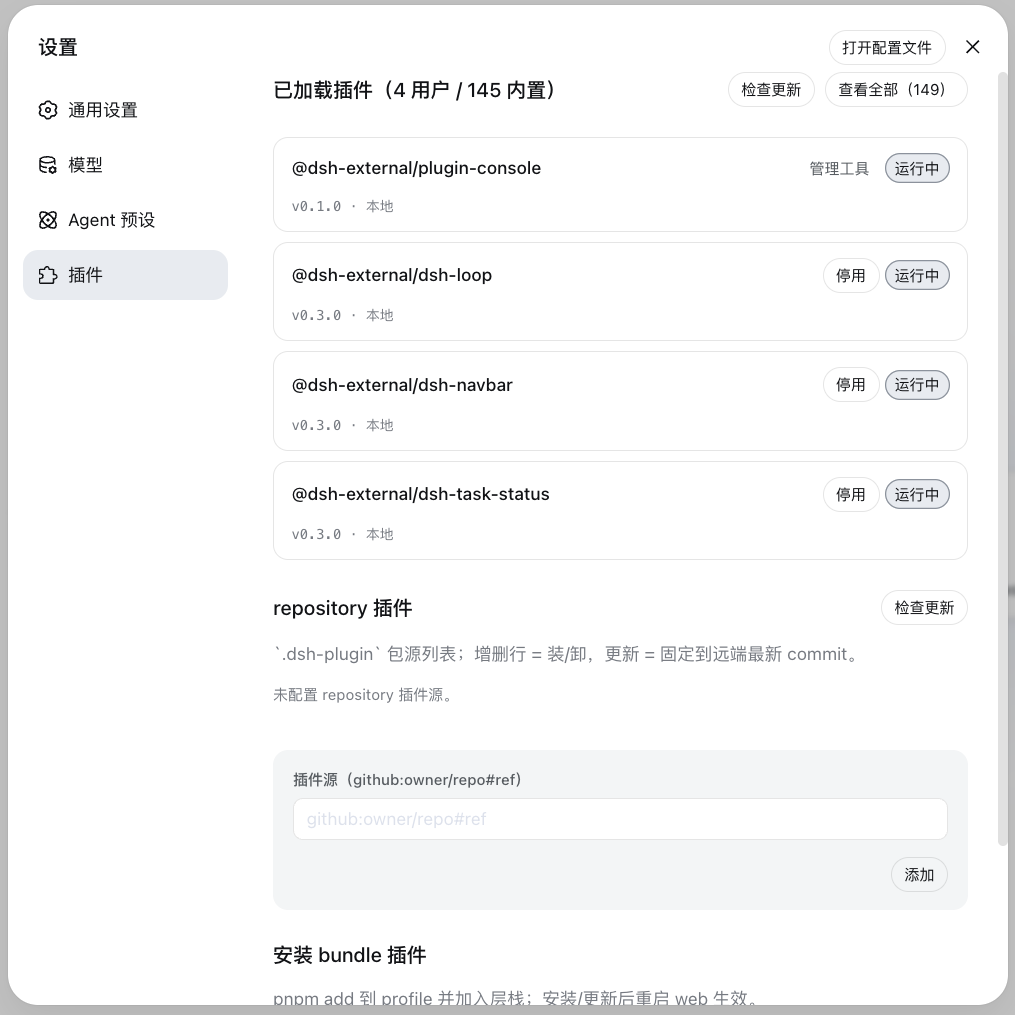
The settings page's "Plugin Management" panel manages a profile's plugin install state: install area (single entry — npm package name or GitHub project (https://github.com/o/r / github.com/o/r / github:o/r, URL auto-normalized) — automatic pnpm add; bundles enter the layer stack, non-bundles get insert rows) + loaded area (version check/update, disabled toggle, bundle uninstall).
Installation
Option 1: git source, direct install (recommended, one line)
dsh plugin --profile web add "github:vlln/plugin-registry#main&path:/packages/plugin/console"
Build artifacts are committed (git source skips the build); one command installs directly (~15 s).
Option 2: npm source
dsh plugin --profile web add @vlln/[email protected]
Option 3: local directory (source available)
git clone https://github.com/vlln/plugin-registry
cd plugin-registry/packages/plugin/console
dsh plugin --profile web add .   # artifacts are committed, no build needed; the current dir is the bundle package dir (dsh anchors . to an absolute path)
Refresh the web page after mounting — the "Plugin Management" panel appears on the settings page.
Agent Skills
| Skill | Purpose |
|---|---|
| make-dsh-plugin | Create official bundle / cordis plugins: pick a form (skill package / MCP / Node tool / with UI) → declare dsh.bundle or plain apply → install-and-verify discipline. Details in references/; reference implementation: packages/plugin/console |
Before you start developing (pitfalls we've hit)
Key pitfalls (official packages not yet published, Node-half changes need a restart, host CSS overrides, etc.) and the full list: skill references/gotchas — read before developing.
Documentation
- Plugin type comparison — bundle vs plain cordis plugins: development/distribution/installation/management dimensions + how to choose
- Official 0809 coverage assessment — official mechanism coverage, pivot decision (0811 repository removal: CHANGELOG)
- Thin console design — design of unified installation-state management
- Historical mechanism docs (archived after the pivot): architecture (old), creating a plugin (old), manifest format (old), creating a repository-plugin (old), etc.
- Changelog / Roadmap
License
MIT License. See LICENSE.
Read the usage guide →
Install steps, key points, FAQ and compatibility for this plugin — auto-derived from indexed fields.
Listing badge

[](https://deepseek-plugin.org/plugins/vlln/plugin-registry)Paste this markdown into your GitHub README to link back to this listing. The badge only states the listing — not a security endorsement.