薄控制台为 DSH Web 设置页提供「插件管理」面板 + 4 个 agent 工具,统一管理 profile 插件安装态(bundle 层栈与 insert 行),零官方源码改动。
ⓘ 此插件是大仓库 vlln/plugin-registry 的子包,星数与活跃度统计的是整个仓库。

- 语言
- TypeScript
- License
- MIT
- 分支
- main
安装
$ dsh plugin --profile web add @vlln/plugin-console在终端中运行以上命令,通过 dsh CLI 安装此插件。可在右上角切换 Profile。 第一次用 dsh?看这篇新手教程
对话式安装
帮我安装 DeepSeek Harness 插件 vlln/plugin-registry/packages/plugin/console:先查看仓库 https://github.com/vlln/plugin-registry 确认安全性,然后执行安装命令并验证插件加载成功。
把这段指令粘贴给 DSH Web GUI 里的助手,由它代你完成安装与验证。
一句话定位
薄控制台把插件管理搬进 DSH Web 设置页:面板统一处理 bundle 与非 bundle 两种插件安装态,外加 4 个 agent 工具走同一份存储,全程不修改官方源码。
核心能力
- 在 DSH Web 设置页新增「插件管理」tab,列出所有已加载插件并按用户/官方内置分组,支持运行时启停、版本检查、bundle 更新与卸载
- 一行安装入口:输入 npm 包名或 GitHub 项目(
https://github.com/o/r/github.com/o/r/github:o/r三种写法自动规范化),按包是否声明dsh.bundle自动分流:bundle 进层栈(重启生效),非 bundle 写 insert 行(配置 HMR 实时挂载) - 4 个 agent 工具(
plugin_search/plugin_install/plugin_uninstall/plugin_status)通过defineTool注册,与面板写同一份安装态,支持命令行化批量运维 - npm registry 版本检查:原生 fetch 查最新版(不走子进程,受限宿主也能用),30 秒最小间隔防抖,git/link 源自动识别为「本地」无 latest
- TOFU 锁记录安装源引用(
$DSH_HOME/plugin-sources/lock.yml)+ 索引源集合(sources.yml,支持 hub catalog 与本地/URL 自定义源懒加载) - 写入位置透明:非 bundle 插件写 profile
cordis.patch.yml的 insert 行;bundle 插件写 profilepackage.json的 dependencies 与dsh.profile.bundles层栈
技术实现
- 语言: TypeScript(Node half)+ TypeScript + React 18(Browser half)
- 关键依赖:
cordis^4.0.0-rc.7(host 半插件运行时)/@deepseek-ai/dsh-tools^0.1.0-rc.5(agent 工具注册defineTool)/react^18.2.0(browser 半面板 UI)/yaml^2.4.0(profile patch 与 sources.yml 解析写入) - 架构模式: 官方 bundle 双半插件——Node half 通过
dsh.bundle.patch注册plugin-consolecordis 插件,挂载到 web profile 的webServer(/api/plugin-console路由)+loader(读 loader 树条目)+tools(注册 4 个 agent 工具)+agentPresets(preset 挂载标注)四个 inject 服务;Browser half 通过dsh.client.inject把 React 面板挂到settings.section插槽 - 入口文件:
packages/plugin/console/src/index.ts(Node half,导出name = 'plugin-console'与inject = ['webServer', 'loader', 'tools', 'agentPresets'])/packages/plugin/console/src/client/index.ts(Browser half,导出name = 'plugin-console-client'与inject = ['slots'])/packages/plugin/console/cordis.patch.yml(bundle 注入声明)
适用场景
DSH 用户装了多个第三方 bundle 或非 bundle 插件,需要在 Web UI 集中查看、启停、更新,不想逐个手动改 profile 配置或重启服务。
agent 开发者需要在受控的 DSH 流程里自动安装/卸载插件(例如 setup 流程、CI 内验证插件),希望走官方机制而非绕过 pnpm。
试装不同插件组合时不想每次都进 cordis.patch.yml 手写 YAML——面板与工具直接接管安装态读写。
前置依赖与兼容性
| 依赖 | 最低版本 | 说明 |
|---|---|---|
| DSH | ^0.1.0-rc.5 | peerDependencies 声明 @deepseek-ai/dsh-tools ^0.1.0-rc.5;依赖 web profile 的 webServer / loader / tools / agentPresets 四个 inject 服务,对应 0811 之后官方移除 repository-plugins 机制的版本 |
| Node | 未声明 | package.json 未声明 engines.node;devDependencies @types/node ^22.0.0,建议 Node ≥ 22(对齐 DSH 0811 host 基线) |
| 平台 | Web | dsh.client.platform: "web";Node half 跨平台但仅在 web profile 组合下注册路由 |
| 原生模块 | 无 | 仅使用 node:fs / node:child_process / node:os / node:path 内建模块与浏览器 fetch,未引入 native binding |
安装方式
dsh plugin --profile web add github:vlln/plugin-registry/packages/plugin/console
配置项
| 配置 | 类型 | 说明 | 默认值 |
|---|---|---|---|
| 无 | - | 本插件未暴露 Cordis schema 配置项;行为参数(DSH_HOME 解析、profile 目录、registry 超时 15s、30 秒启动延迟预扫描、npm_config_registry 镜像兼容等)均为源码常量 | - |
常见问题
Q: 装好之后在 DSH Web 的哪里能看到管理面板?
A: 装好后刷新 Web 页面,进入设置页会多出一个名为「插件管理」的 tab(位于官方「插件」tab 旁),点击即加载面板。
Q: 非 bundle 插件为什么安装完不需要重启 DSH?
A: 面板走的是 profile cordis.patch.yml 的 insert 行写入;DSH 0811 起 profile-boot 挂载 watch-only HMR 实例,写行/删行实时生效。
Q: bundle 插件为什么装完还要重启 web?
A: bundle 插件装在 profile package.json 的 dependencies + dsh.profile.bundles 层栈里,层栈在启动时合成,运行时不能热插拔。
Q: agent 怎么用这套安装机制?需要切到面板吗?
A: 不必。Node half 同时注册 4 个 defineTool 工具(plugin_search / plugin_install / plugin_uninstall / plugin_status),与面板写同一份安装态。
Q: 面板的「运行中/预设挂载/已停用」三态怎么区分?
A: 运行中 = host 启用;预设挂载 = host 停用但 agent preset 仍挂载(0811 模型面工具走 preset 通道,停用 host 不等于工具消失);已停用 = 完全停用。
Q: 能不能在面板里把这个管理工具自身停用或卸载?
A: 不能。Node half 在 toggle/remove 路由里硬性禁止对 @vlln/plugin-console 操作,返回 409——避免管理入口自毁。
Q: 安装失败时提示「pnpm add succeeded but X is not in the profile dependencies」是什么意思?
A: 通常是 git 源或路径源未真正落盘(pnpm 退出 0 但依赖未写入 package.json),不会继续写安装态以免假成功;改用明确包名或确认 git/路径可达后重试。
Q: 插件有新版本时怎么更新?
A: 面板点「检查更新」按钮触发 Node half 用原生 fetch 查 npm registry(30 秒最小间隔防抖),bundle 露出「更新」按钮,点后走 pnpm update;git/link 包标记为「本地」无 latest。
上手难度
入门 — 装完即用,无配置项;高级用户通过 agent 工具接入自动化流程,无需读源码。
已知问题与限制
- bundle 插件的安装/更新/卸载需要重启 web(层栈启动时合成),运行时仅支持启停;非 bundle 插件(insert 行)才实时挂载(packages/plugin/console/README.zh.md:74-78)。
- Node half 改动需要重启 web(ESM 缓存),Browser half 改动只需重装 + 刷新页面(packages/plugin/console/README.zh.md:74-78)。
- profile
cordis.patch.yml被删除为空时,HMR 会因 YAML 解析为null而 reload 失败——Node half 写入逻辑保留注释+[]模板的兜底结构(packages/plugin/console/src/index.ts:206-211)。 - 安装源字符串若是 npm scoped 包(如
@scope/name),profile patchname字段必须加引号——YAML 中@是保留指示符,裸写会导致 HMR 不生效(packages/plugin/console/src/index.ts:140-145)。 - Windows 下
pnpm/npm命令通过.cmd批处理垫片调用会触发 libuv EINVAL,Node half 改为直接 spawn<node>\node_modules\npm\bin\npm-cli.js或%APPDATA%\npm\node_modules\pnpm\bin\pnpm.mjsJS 入口,入口找不到时回退.cmd(packages/plugin/console/src/index.ts:382-403)。 - 浏览器面板自定义 tab 图标走
MutationObserver监听 DOM 替换,仅匹配文本为「插件管理」的 tab(不会误改官方「插件」tab 的齿轮图标),曾因重名误换过图标(packages/plugin/console/src/client/index.ts:18-42)。 - 已加载插件的「预设挂载」标注依赖宿主
agentPresets服务可读,服务不可用时退化为普通已停用(packages/plugin/console/src/index.ts:484-498)。 - 版本检查有 30 秒最小间隔防抖(
/api/plugin-console/versions/refresh同一进程内不会重复打 registry),首次访问面板用启动 30 秒后的延迟预扫描填充缓存(packages/plugin/console/src/index.ts:538-570)。
plugin-registry
中文 | English
DSH plugin ecosystem infrastructure: thin console + official plugin development guide
Browser panel managing a profile's plugin install state (bundle layer stack + insert rows + enable/disable), zero patches;
the `make-dsh-plugin` skill guides developers in writing official-format plugins.
Pivot (2026-08): Official 0809 added a repository plugin mechanism (
.dsh-plugin) covering ~95% of the old mechanism; this repo is now a thin console + plugin development spec and guidance (old patches/CLI/panel removed). Since 0811 the repository-plugins mechanism is gone (vendor/loader/src/repository.ts); external plugins install via the web profile only: bundles (dsh.bundle) joindsh.profile.bundles; non-bundles (plain cordis packages) mount via insert rows incordis.patch.yml(live via HMR). Full assessment: official 0809 coverage.
Positioning
DeepSeek Harness's official mechanisms define "what a plugin is and how it runs"; this repository adds two things (panel structure: console README; guidance: below):
- Thin console (
packages/plugin/console) — browser panel managing a profile's plugin install state + 4 agent tools - Development spec and guidance —
make-dsh-pluginskill + cookbook for creating official bundle/cordis plugins
Ecosystem relationships (who can do what)
Official DSH (DeepSeek Harness)      plugin runtime + profile bundle mechanism (no repo mechanism since 0811)
   │
   ├── Official plugins (bundle)     loop / task-status / navbar etc. — `dsh plugin --profile web add` install into profile layer stack
   ├── Third-party plugins (bundle/plain)  standalone GitHub repos or npm packages — bundles enter the layer stack; plain plugins use insert rows (live)
   │
   └── This repository (plugin-registry)  ① thin console: browser panel + agent tools for install-state management
                                         ② make-dsh-plugin skill + cookbook: guides third-party plugin development
Plugin forms and install paths: plugin type comparison; install examples: examples.
Thin console
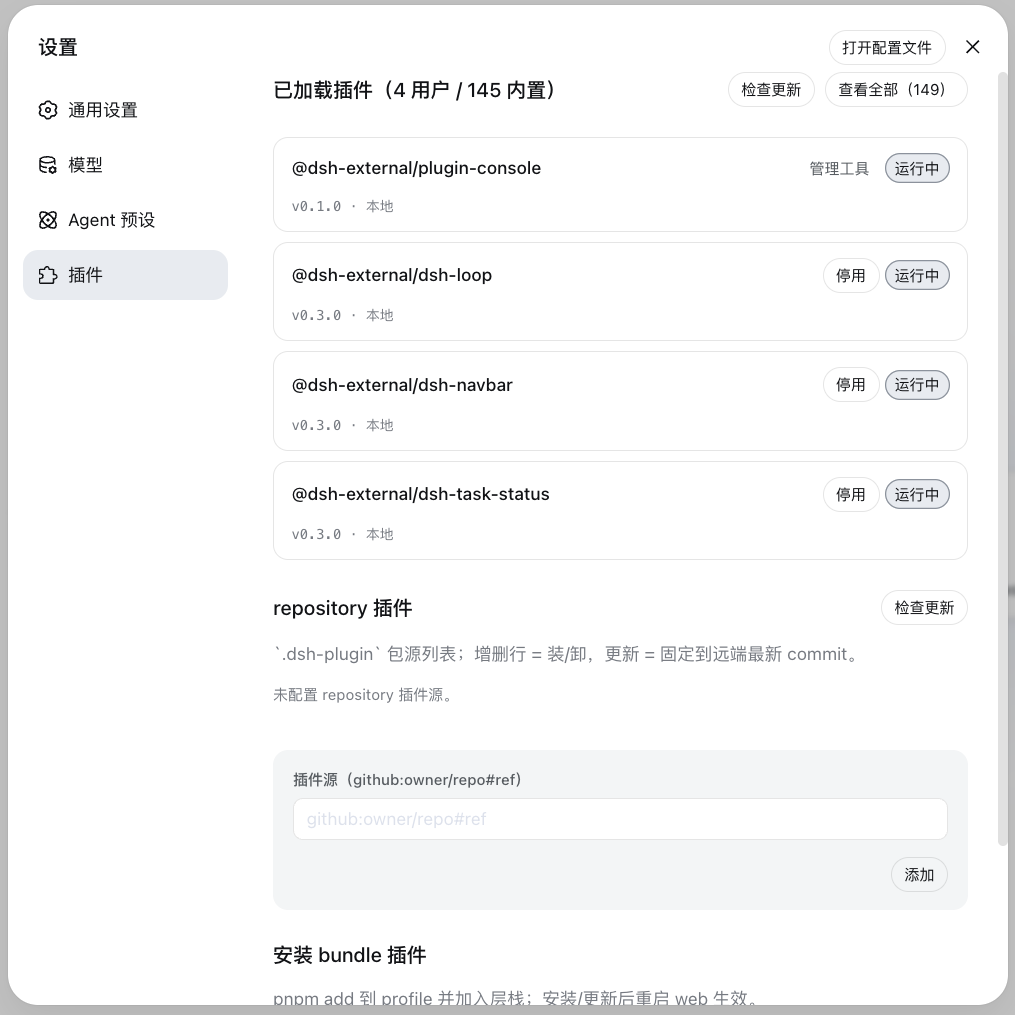
The settings page's "Plugin Management" panel manages a profile's plugin install state: install area (single entry — npm package name or GitHub project (https://github.com/o/r / github.com/o/r / github:o/r, URL auto-normalized) — automatic pnpm add; bundles enter the layer stack, non-bundles get insert rows) + loaded area (version check/update, disabled toggle, bundle uninstall).
Installation
Option 1: git source, direct install (recommended, one line)
dsh plugin --profile web add "github:vlln/plugin-registry#main&path:/packages/plugin/console"
Build artifacts are committed (git source skips the build); one command installs directly (~15 s).
Option 2: npm source
dsh plugin --profile web add @vlln/[email protected]
Option 3: local directory (source available)
git clone https://github.com/vlln/plugin-registry
cd plugin-registry/packages/plugin/console
dsh plugin --profile web add .   # artifacts are committed, no build needed; the current dir is the bundle package dir (dsh anchors . to an absolute path)
Refresh the web page after mounting — the "Plugin Management" panel appears on the settings page.
Agent Skills
| Skill | Purpose |
|---|---|
| make-dsh-plugin | Create official bundle / cordis plugins: pick a form (skill package / MCP / Node tool / with UI) → declare dsh.bundle or plain apply → install-and-verify discipline. Details in references/; reference implementation: packages/plugin/console |
Before you start developing (pitfalls we've hit)
Key pitfalls (official packages not yet published, Node-half changes need a restart, host CSS overrides, etc.) and the full list: skill references/gotchas — read before developing.
Documentation
- Plugin type comparison — bundle vs plain cordis plugins: development/distribution/installation/management dimensions + how to choose
- Official 0809 coverage assessment — official mechanism coverage, pivot decision (0811 repository removal: CHANGELOG)
- Thin console design — design of unified installation-state management
- Historical mechanism docs (archived after the pivot): architecture (old), creating a plugin (old), manifest format (old), creating a repository-plugin (old), etc.
- Changelog / Roadmap
License
MIT License. See LICENSE.
查看使用指南 →
该插件的安装步骤、关键要点、FAQ 与兼容性说明(基于已收录字段派生)。
收录徽章

[](https://deepseek-plugin.org/plugins/vlln/plugin-registry/packages/plugin/console)把这段 markdown 粘贴到你的 GitHub README,链接回本插件详情页。徽章只声明已被本站收录,不代表安全认证。