Adds a one-shot task profile to dsh: runs the Agent with a given task text, prints the final response, then exits. Designed for scripts and CI pipelines.
ⓘ This plugin is a sub-package of the whitelonng/dshcode monorepo — stars and activity count the whole repository.

- Language
- TypeScript
- License
- MIT
- Branch
- master
Install
$ dsh plugin --profile web add @deepseek-ai/dsh-headlessRun the command above in your terminal to install this plugin via the dsh CLI. You can switch Profile in the top-right corner. New to dsh? Read the beginner tutorial
Install via your agent
Install the DeepSeek Harness plugin whitelonng/dshcode/packages/bundle/headless for me: review the repository at https://github.com/whitelonng/dshcode first, then run the install command and verify the plugin loads successfully.
Paste this instruction to the DSH Web GUI assistant — it will install and verify for you.
Entry package name:
@deepseek-ai/dsh-headless, landing page ID:whitelonng/dshcode/packages/bundle/headless. Referred to as "headless bundle" below.
One-Line Positioning
Built on top of the dsh-base bundle, it adds a "one-shot task" driver, allowing users to hand a task to the Agent via dsh --profile headless "<task text>". The Agent completes the task (or errors out), prints the final response, and exits directly. It does not start Host, HTTP server, Web runtime, or browser, making it the thinnest form for invoking dsh in CI and scripts.
Core Capabilities
- Stacks directly on dsh-base, providing the coding persona and tools mode (
cordis.patch.yml:7-20) - Disables HMR,挂载 Code Mode's worker as the core execution capability (
cordis.patch.yml:14-20、:23-26) - One process accepts only one task: parses positional argument
taskvia commander (multiple words merged with space), prints usage error and exits 1 when missing or pure whitespace (src/startup.ts:31-57) - Creates a brand new persistent Agent, submits the task as a regular user message, and flushes the session after Agent returns to idle (
src/index.ts:96-127) - Extracts the last non-empty assistant text within this task interval and writes to stdout; exits 0 when final
turn/endreason iscompleted, exits 1 for other cases; on error, appendscode: messageto stderr (src/index.ts:60-134)
Technical Implementation
- Language: TypeScript (ESM modules)
- Key Dependencies:
@deepseek-ai/dsh-cmdline(CLI host),@deepseek-ai/dsh-code-runtime-worker-thread(Code Mode worker),@deepseek-ai/schemastery(Config schema),commander(CLI parsing) (package.json:46-51) - Architecture Pattern: Cordis bundle patch — declares
cordis.patch.ymlviapackage.json#dsh.bundle.patch, inserts override lines for system-prompt/hmr/tools and three insert lines (code-runtime / headless-startup / headless-runner) on top of base; headless-runner is a regular function plugin, headless-startup providesheadlessStartupservice for lazy config reading by the former (cordis.patch.yml:1-35、src/startup.ts:19) - Entry Files:
src/index.ts(runner,name = 'headless-runner'),src/startup.ts(CLI provider,name = 'headless-startup'),cordis.patch.yml(bundle injection)
Use Cases
Use dsh as a command-line tool — for example, let Agent run a code review in CI, temporarily ask about file writing in a shell script, or hang daily report generation on dsh in cron, rather than opening Web UI interaction. It fits the "one task - one response - process ends" scenario, not multi-turn conversations requiring follow-up questions.
Prerequisites & Compatibility
| Dependency | Minimum Version | Description |
|---|---|---|
| DSH | Not declared separately; released with dsh 1.0.5 | Only activates when installed to a profile already using dsh launcher; runner forcibly depends on launcher-provided ctx.appExit |
| Node | ^22.19.0 || >=24.0.0 | From engines field in repository root package.json:8-10 |
| Platform | macOS / Linux / Windows | Cross-platform; this package has no native modules |
| Native Modules | None | This package introduces no native modules; base's sandbox and similar lines may introduce some |
This package depends on workspace packages
@deepseek-ai/dsh-agent/@deepseek-ai/dsh-llm/@deepseek-ai/dsh-sessionand other base packages (package.json:52-59), which are indirectly installed via dsh-base.
Installation
dsh plugin --profile web add github:whitelonng/dshcode/packages/bundle/headless
Configuration
This plugin does not expose a separate configuration surface to users; the only adjustable field is the "task text" it reads from the launcher:
| Config | Type | Description | Default |
|---|---|---|---|
headless-runner.task | string | The prompt text this runner should execute; automatically populated from the positional argument of launcher --profile headless "..."; blank tasks are rejected at startup | Provided by command line dsh --profile headless "<task>" |
system-prompt.persona | string | Template string, injects {{model}} and {{cwd}} into system prompt. Normal users don't need to change it; overridden by their own profile | "You are a coding agent powered by the {{model}} model. Your working directory is {{cwd}}." |
hmr.disabled | boolean | headless profile forcibly disables HMR (cordis.patch.yml:14-15) | true |
tools.mode (env DSH_TOOLS_MODE) | string | Code Mode process-level switch, same origin as Web profile | From process.env.DSH_TOOLS_MODE |
FAQ
Q: What's the difference between this bundle and dsh-base?
A: base injects 60+ capabilities including basic tools, models, persistence, etc. as a "factory default set"; headless only stacks a minimal driver layer on top of base — no Host, HTTP server, Web runtime, or browser plugins; each process accepts only one task, prints final assistant text after running, then exits 0/1.
Q: What do the process exit codes mean?
A: Exit 0 when the final turn's reason is completed; exit 1 when aborted or error. In error cases, stderr additionally outputs a line dsh: <code>: <message>; on success, stderr is empty (see src/index.ts:130-133).
Q: What happens if I run it without task text?
A: The launcher first prints usage error a task is required, for example: dsh --profile headless "run the tests" and exits 1; the runner is rejected before receiving the service and won't start an Agent (see src/startup.ts:53-55、tests/startup.spec.ts:91-97).
Q: Can I use this profile outside dsh launcher?
A: No. The runner must obtain the exit request service from the host before mounting; starting outside the launcher throws directly during activation: headless-runner: the launcher must provide ctx.appExit before the tree mounts (see src/index.ts:144-147、tests/headless.spec.ts:243-246).
Q: Can I run multiple tasks in one process?
A: No. Each dsh --profile headless call only submits one task and waits for it to return to idle; to run again you must restart a new process. The profile is nominally an interactive backend, but actually a single-shot task runner (see README.md:19).
Q: What are the default HMR and Code Mode states?
A: HMR is explicitly disabled under headless profile; Code Mode is controlled by the DSH_TOOLS_MODE environment variable — the value determines whether to enable worker thread code execution, same origin as Web profile (see cordis.patch.yml:14-20).
Q: Where is session data stored?
A: Handled by dsh-base's session-persistence-jsonl layer, stored in $DSH_HOME/sessions; headless does not have its own storage layer.
Q: Which model does the Agent use?
A: Follows dsh-base's agent-default-model default (deepseek-official / deepseek-v4-flash). To change models, override this line by ID in your profile's cordis.patch.yml.
Learning Curve
Beginner — the command itself is a positional argument; if running only once, you don't even need to look at configuration; to customize default model or persona, just override in your profile's patch file.
Known Issues & Limitations
- One task per process: The runner has no interactive follow-up input; after submitting the task, it waits for Agent to return to idle, then prints the last non-empty assistant text within the interval (
README.md:19) ctx.appExitis held by launcher: Starting headless profile outsidedshlauncher throws an error directly at activation until the host provides that exit request (README.md:20、src/index.ts:144-147)- Blank tasks rejected at startup: Purely blank or missing
taskdoesn't start Agent; process exits with 1 (src/startup.ts:53、tests/startup.spec.ts:91-97) - HMR not enabled in headless profile: Single-shot processes don't need hot updates; patch explicitly sets
disabled: true(cordis.patch.yml:14-15)
English | 中文
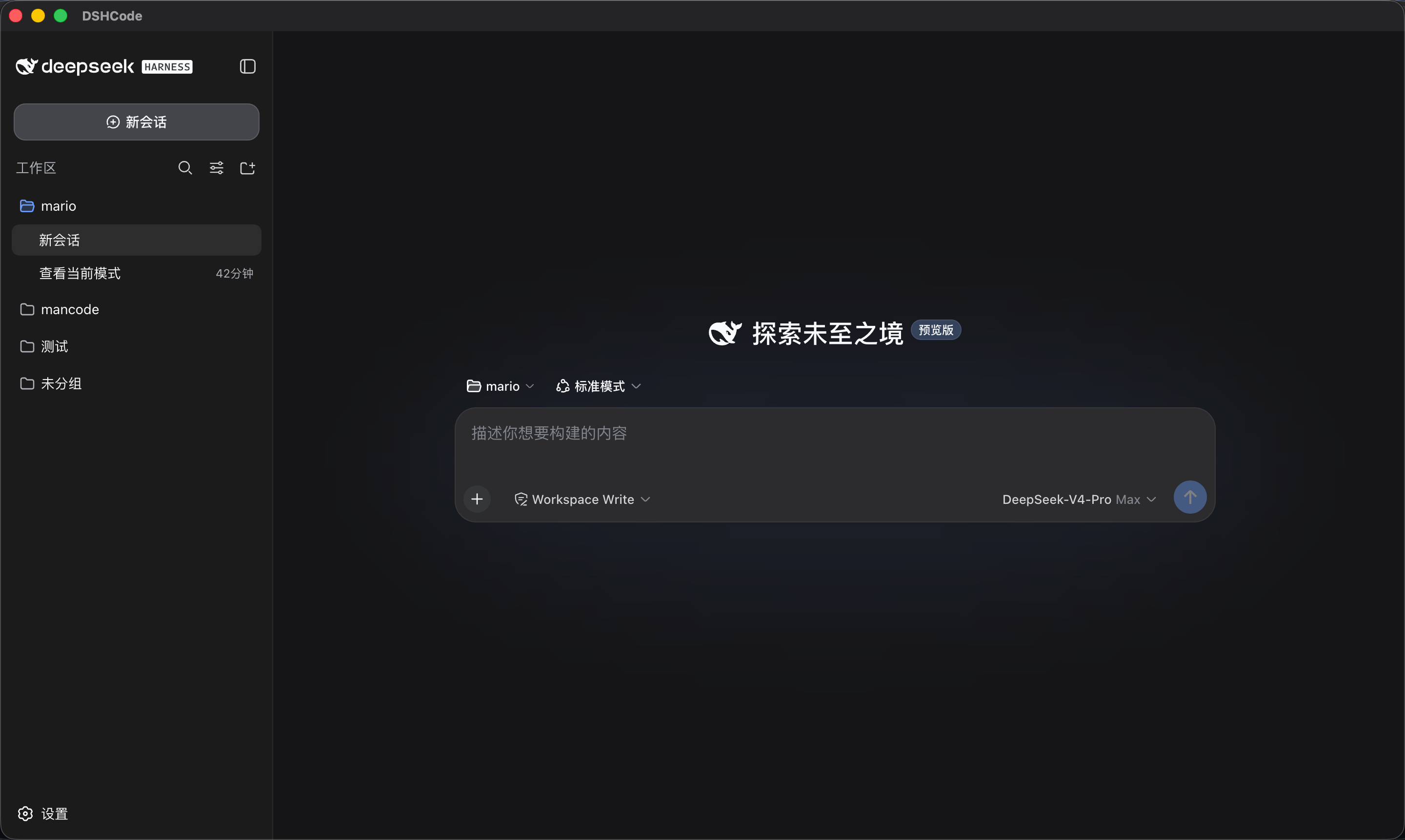
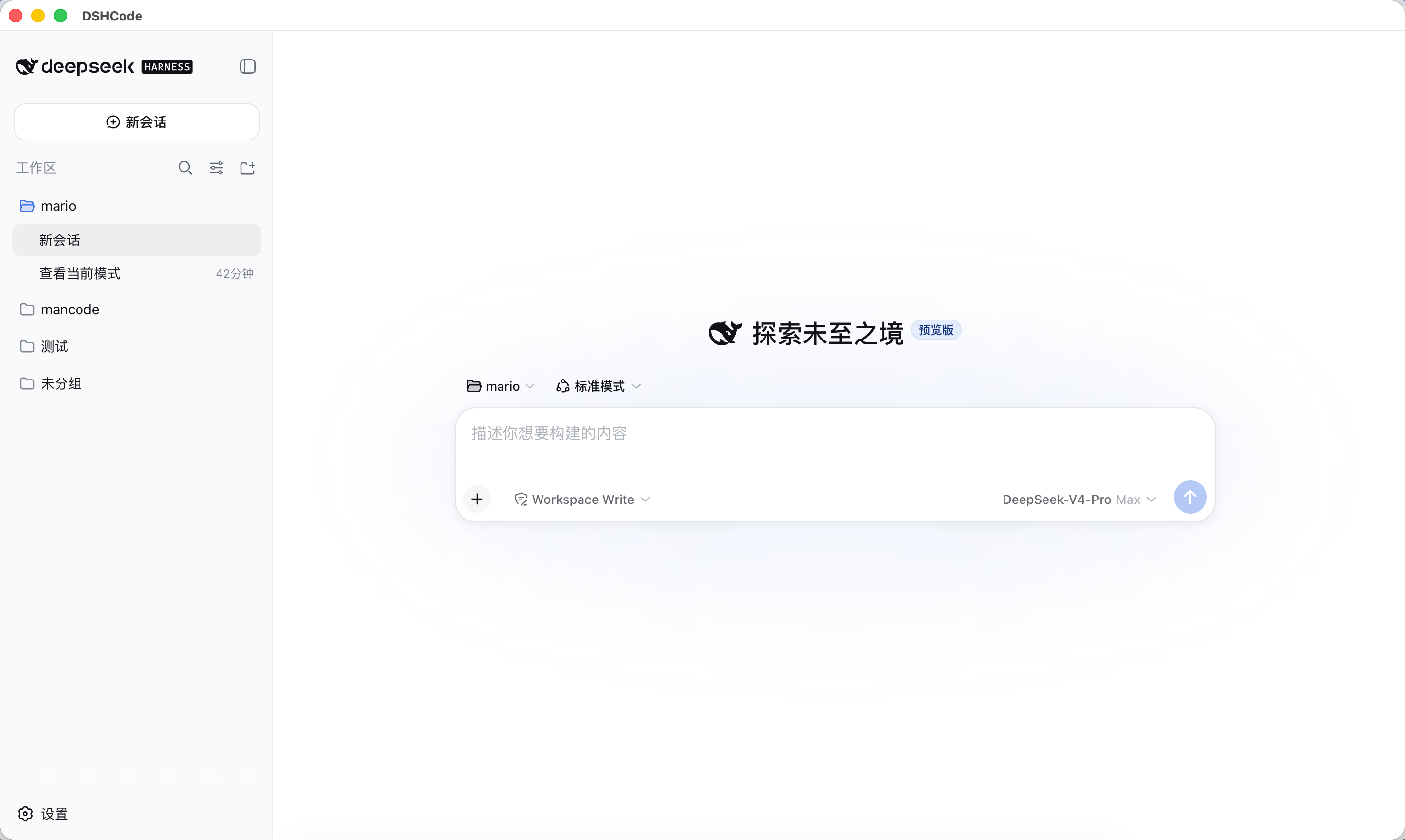
DSHCode 是一款面向 macOS 和 Windows 的免费开源桌面 AI Agent 应用。它将 DeepSeek 官方开源项目 DeepSeek Harness 的 Web UI 与插件运行时打包成一个可直接安装的 Electron 应用——无需 Node.js、无需终端、无需命令行。





功能特性
DSHCode 继承了 DeepSeek Harness 的完整能力,并加上了开箱即用的桌面体验。
Agent 核心 — 插件化框架,内置 bash、文件系统、网页搜索/抓取、终端、LSP 与子进程工具;支持沙箱隔离与逐操作审批提示。
交互式 UI — 内联渲染的 GenUI 卡片:图表、表格、测验、3D 场景、示意图、表单与进度视图。
Skills 技能 — 可安装的技能目录,为 Agent 提供专项工作流——研究、文档写作、视觉工具等。
编排能力 — Subagent 并行委派,以及可跨多个 Agent 分阶段并行展开的 Workflow。
长任务 — 执行前先审查再批准的 Plan 模式、跨轮次持续进行的 Goal 目标、可恢复的会话。
模型体验 — 通过官方 API 使用 DeepSeek 模型;会话日志完整记录模型所见内容,任何一次运行都可被重建。
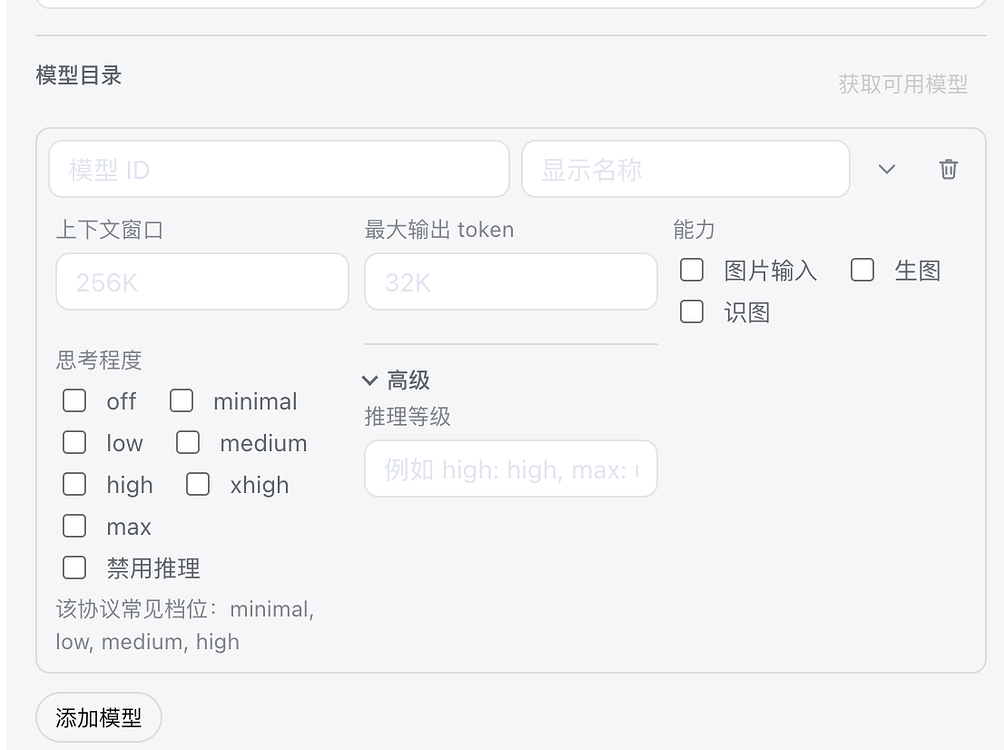
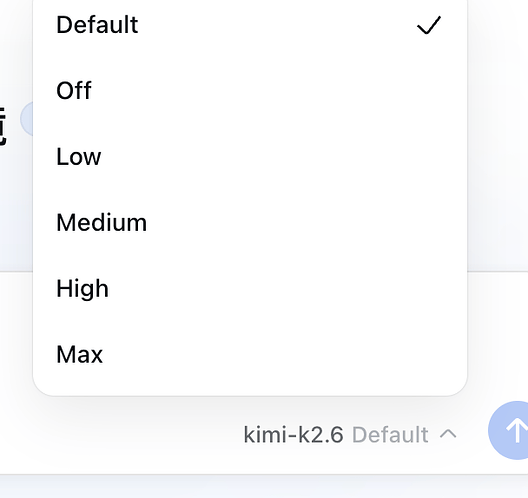
模型控制 — 按供应商调节推理强度(关闭到最高)、最大输出 token 数,以及图像输入、图像生成与图像识别等多模态能力开关。
个性化 — 主题与皮肤合集、选区批注工作流、命令快捷键、中英双语界面。
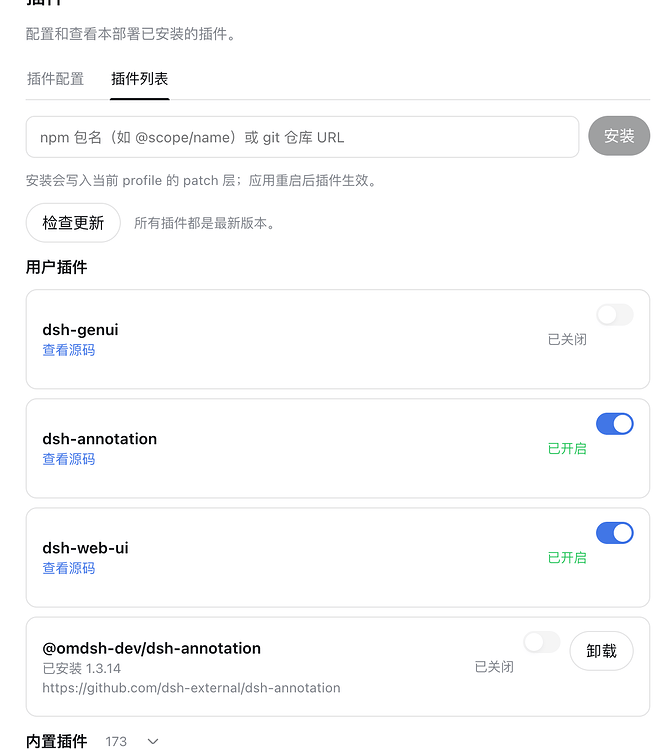
插件管理 — 从 npm 或 Git 仓库安装插件、检查更新,并可逐个启用或禁用。
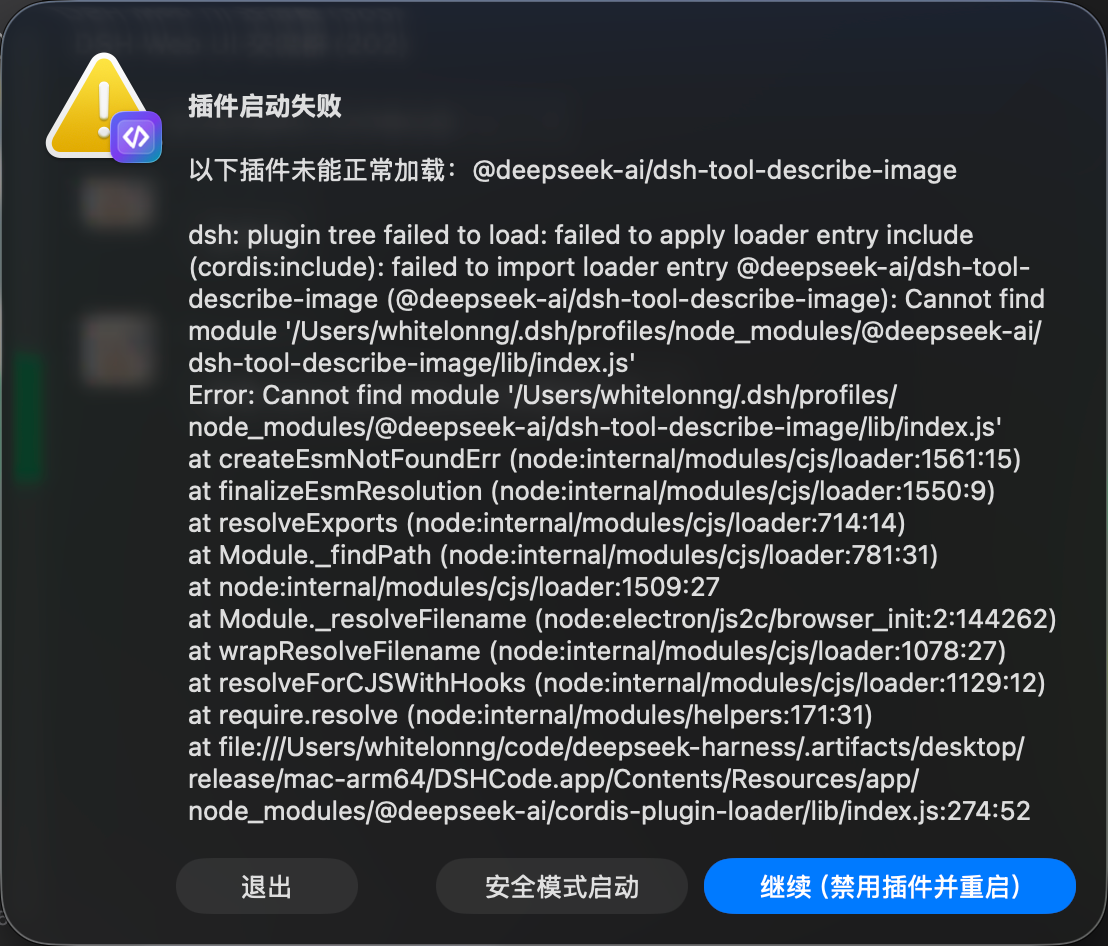
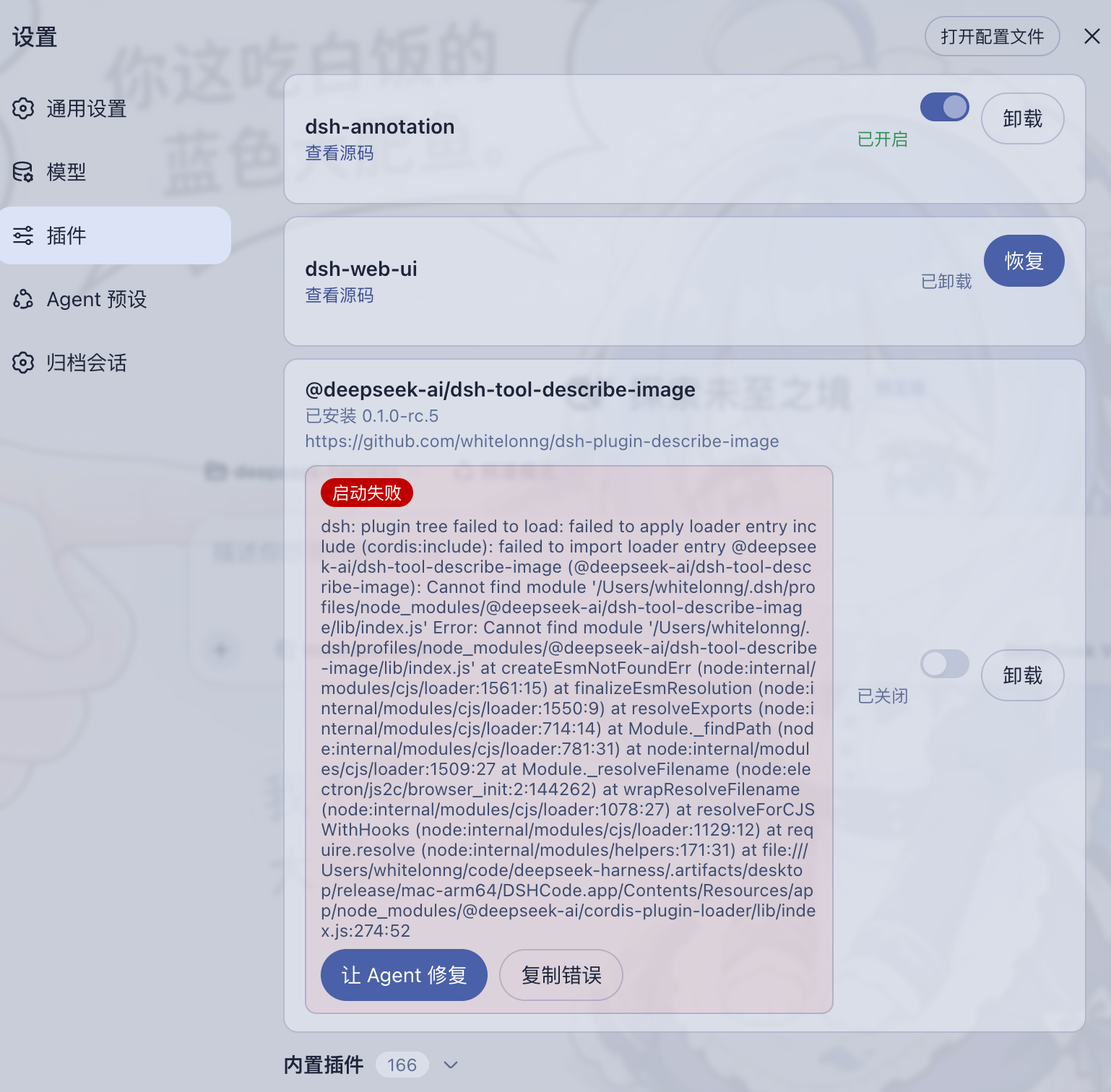
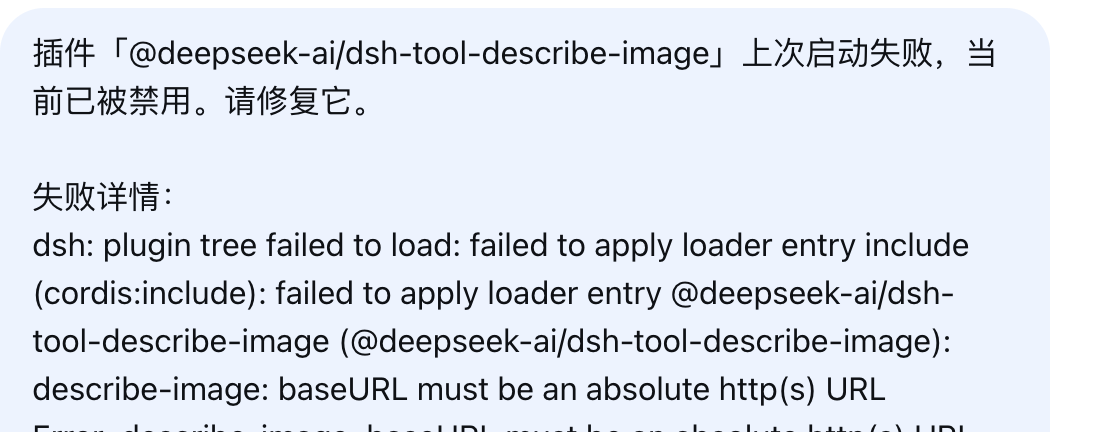
故障恢复 — 加载失败的插件会连同诊断信息一起报告:可禁用该插件、以安全模式启动,或让 Agent 携带失败上下文自动修复。
归档管理 — 搜索已归档会话,可恢复或彻底删除。
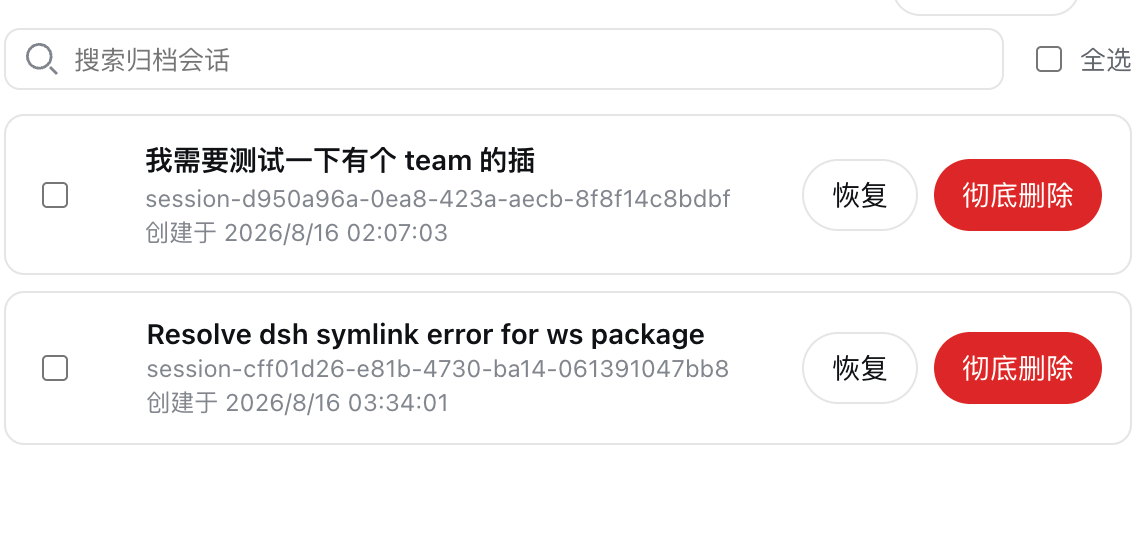
可扩展 — 安装新能力无需改动应用本体。
桌面集成 — 托盘图标、系统通知、单实例运行、加固的 Electron 窗口。
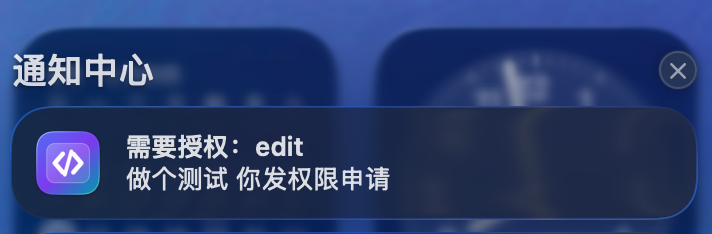
详见 Web UI 指南 的操作讲解,以及桌面应用指南中的架构、平台目标与当前限制。
下载
| 平台 | 安装包 |
|---|---|
| macOS Apple Silicon | DSHCode-*-macos-arm64.dmg |
| macOS Intel | DSHCode-*-macos-x64.dmg |
| Windows x64 | DSHCode-*-win-x64.exe |
每个版本都会随安装包发布 SHA-256 校验和(SHA256SUMS.txt)。
预览版安装包尚未进行代码签名或公证,因此 macOS Gatekeeper 与 Windows SmartScreen 可能在首次启动前发出警告。软件本身是安全的;警告只是因为二进制文件缺少付费签名证书:
- macOS:在访达中右键点击应用并选择打开,然后在弹窗中确认。或者在终端执行一次
xattr -cr /Applications/DSHCode.app。 - Windows:在 SmartScreen 弹窗中点击更多信息,然后选择仍要运行。
快速开始
安装 DSHCode 安装包后,从 macOS“应用程序”文件夹或 Windows“开始”菜单打开 DSHCode。应用会自行启动和停止内置 Web profile;安装版用户无需运行终端命令。
从源码运行
开发者仍可从仓库源码运行上游 Web 入口:
git clone https://github.com/whitelonng/dshcode.git
cd dshcode
pnpm install
pnpm run build
pnpm dsh web
命令会打印本地 Web UI 地址。详见 Web UI 指南。
桌面应用
打开 DSHCode 时,应用会启动内置的 Harness Web profile,并在经过安全加固的 Electron 窗口中显示。桌面外壳刻意保持精简;产品行为和 Web UI 仍由上游包提供,因此后续可以继续集成上游更新,而不必维护第二套界面。
本地服务与端口
应用每次启动时都会在 Electron 主进程内启动一个 HTTP 服务。该服务只绑定 127.0.0.1,并让操作系统分配一个可用的临时端口,因此不会占用固定端口,通常也不会与其他本地服务冲突。DSHCode 只允许一个应用实例,只加载其自身的精确回环地址;进程退出前会先释放 Harness 树,所以关闭应用也会停止服务并释放端口。
构建桌面安装包
git clone https://github.com/whitelonng/dshcode.git
cd dshcode
pnpm install
pnpm run desktop:dist
构建产物写入 .artifacts/desktop/release/。名为 Desktop 的 GitHub Actions 工作流会构建 macOS Apple Silicon、macOS Intel 和 Windows x64 安装包;desktop-v* tag 会把完整构建矩阵及 SHA-256 校验和发布到 GitHub Releases。
常见问题
DSHCode 是什么?
DSHCode 是一款免费、开源的桌面应用,把 DeepSeek 的插件化 AI Agent 框架 DeepSeek Harness 变成可直接安装的 macOS 与 Windows 应用,并提供图形化的对话与工作区界面。
DSHCode 是 DeepSeek 官方软件吗?
不是。DSHCode 是独立的社区项目。它保留上游包名、版权、架构、文档和 upstream Git 远程地址,以便正确归属来源并继续合并上游变更;但除非 DeepSeek 明确授权,它不代表 DeepSeek 官方发行、背书或认证。
需要 Node.js 或终端吗?
不需要。安装版用户得到的是普通应用;Node.js、CLI 与终端只在从源码运行或自行构建安装包时才需要。
为什么 macOS/Windows 会弹出安全警告?
预览版安装包尚未进行代码签名或公证。这是签名证书的成本问题,不是安全问题;一次性打开步骤见下载一节。
需要 API Key 吗?
需要。DSHCode 通过官方 API 运行 DeepSeek 模型;在应用设置中配置一次即可。
DSHCode 可以扩展吗?
可以。内置插件安装器可在不改动应用本体的前提下添加新能力;安全模式可以禁用导致崩溃的插件,保证应用仍能正常启动。
项目定位
DeepSeek Harness(dsh)是由 DeepSeek AI 开发的官方开源插件式 agent harness(智能体框架)。DSHCode 作为桌面端配套发行版参与其插件生态,并使用 dsh-plugin 和 deepseekharness-plugin 仓库标签便于检索。
DSHCode 是独立的社区项目。除非 DeepSeek 明确授权,否则它不代表 DeepSeek 官方发行、背书或认证。
开发
请先阅读开发指南、架构文档和桌面应用指南。面向 agent:请遵循 AGENTS.md。
致谢
- LINUX DO — 本项目也在 LINUX DO 社区持续分享与交流。
- dsh-genui — 为内置生成式 UI 能力提供插件实现。
- dsh-annotation — 为内置文本批注流程提供插件实现。
- dsh-web-ui — 为内置 Web UI 功能与皮肤集合提供插件实现。
许可证与品牌
源码继续使用上游 MIT 许可证。再次分发时必须保留 DeepSeek 的版权与许可声明;内置第三方软件及其许可证见 THIRD_PARTY_NOTICES.md,桌面安装包会同时附带这两个文件。
MIT 软件许可证本身不等于获得 DeepSeek 商标或 Logo 的 DSHCode 品牌使用许可。DeepSeek 的用户协议(中文版)保留了这些品牌标识的相关权利。DSHCode 发行版使用独立应用图标;内嵌 Harness 界面保留的上游身份标识及官方 powered by dsh 署名只用于说明兼容关系,不代表官方背书。
Read the usage guide →
Install steps, key points, FAQ and compatibility for this plugin — auto-derived from indexed fields.
Listing badge

[](https://deepseek-plugin.org/plugins/whitelonng/dshcode/packages/bundle/headless)Paste this markdown into your GitHub README to link back to this listing. The badge only states the listing — not a security endorsement.