Event/lifecycle template examples in the create-dsh-plugin scaffolding: zero runtime dependencies, demonstrating listening to session/event, tools/change, tools/pre-execute and ctx.effect resource cleanup.
ⓘ This plugin is a sub-package of the whyihaveyou/dsh-suite monorepo — stars and activity count the whole repository.

- Language
- HTML
- License
- MIT
- Branch
- main
Install
$ dsh plugin --profile web add github:whyihaveyou/dsh-suite#path:packages/create-dsh-plugin/templates/eventsRun the command above in your terminal to install this plugin via the dsh CLI. You can switch Profile in the top-right corner. New to dsh? Read the beginner tutorial
Install via your agent
Install the DeepSeek Harness plugin whyihaveyou/dsh-suite/packages/create-dsh-plugin/templates/events for me: review the repository at https://github.com/whyihaveyou/dsh-suite first, then run the install command and verify the plugin loads successfully.
Paste this instruction to the DSH Web GUI assistant — it will install and verify for you.
One-Line Description
Embedded event/lifecycle example template within the create-dsh-plugin scaffolding: zero runtime dependencies, pure type imports, demonstrating how to subscribe to session/event, tools/change, tools/pre-execute three events, and wrap a timer with ctx.effect() to prove resource cleanup is reversible. Can serve as a minimal runnable "event plugin" reference, or directly dsh plugin add into a profile to run and observe logs.
Core Capabilities
- Subscribe to session event bus: When session logs are added (turn/step boundaries, user/assistant messages, tool results, etc.), print the first 5 and throttle logs every 25 by type + count.
- Subscribe to tool registry changes: Immediately print counts when any tool is registered or unregistered (including registrations from other sibling plugins in the same group).
- Hook into tool execution pipeline: Print tool name before each tool call, and explicitly pass through with
next(); not callingnext()will short-circuit and block the tool call. - Wrap a 30-second heartbeat timer with
ctx.effect(), the returned disposer printsDISPOSEDand clears the timer when the plugin unloads, demonstrating how to properly recycle external resources. - Declare itself to be injected into the host loader via
cordis.patch.yml+dsh.bundle.patch, the template directory itself is a valid bundle, can be directlydsh plugin addinstalled into a profile.
Technical Implementation
- Language: TypeScript (ESM,
"type": "module"+tscoutputs pure ESMdist/index.js,verbatimModuleSyntax: trueensuresimport typeis erased at compile time) - Key dependencies:
@deepseek-ai/cordis(peerDependency, injected by host at runtime),@deepseek-ai/dsh-tools(devDependency, only for typesToolExecution/PreToolDecision),@deepseek-ai/dsh-session(devDependency, only for typesSession/SessionEvent); the template's owndependenciesis empty - Architecture pattern: cordis bundle event/lifecycle plugin — host exposes
ctx, pluginapply(ctx)subscribes to three event types usingctx.on()+ wraps timer withctx.effect(); package-level declarationdsh.bundle.patch: ./cordis.patch.ymllets host loader insertid: {{PLUGIN_ID}}, name: {{PKG_NAME}}at load time - Entry file:
templates/events/src/index.ts(compiled by tsc totemplates/events/dist/index.js, pointed to by package.json'smain/exports)
Use Cases
For those who want to understand how DSH plugins "listen" to events rather than "add" tools—for example, doing telemetry, audit logging, tool call rate limiting, or bridging external webhooks to the session flow. The template code itself is already the minimal runnable event subscription example; you can directly copy it and swap out the listener logic to make it your own event plugin; or when you don't want to start from scratch, you can use the create-dsh-plugin scaffolding with -t events as a starting point.
Prerequisites & Compatibility
| Dependency | Min Version | Description |
|---|---|---|
| Node.js | ^22.19.0 || >=24.0.0 | From create-dsh-plugin root package.json engines; older Node will only get EBADENGINE warning but may hit runtime pitfalls (scaffolding PITFALLS #1) |
| DSH | >=0.1.0-rc.6 | Implicitly locked by next-tag versions of @deepseek-ai/dsh-tools / @deepseek-ai/dsh-session devDependencies; defaults to 0.1.0-rc.6 for offline generation |
@deepseek-ai/cordis | ^{{CORDIS_VERSION}} (peerDependency, default 4.0.1) | Injected by host at runtime, template only import type doesn't require at runtime |
| Platform | Cross-platform | No native modules, pure ESM |
| Native modules | None | Template dependencies is empty |
Installation
dsh plugin --profile web add github:whyihaveyou/dsh-suite/packages/create-dsh-plugin/templates/events
Configuration
This plugin requires no additional configuration. The template doesn't read process.env / options / Schema; all tunable points are in the source code (which events to listen to, timer interval 30_000 ms, throttle thresholds 5/25). To modify behavior, directly edit src/index.ts and rerun pnpm run build.
FAQ
Q: What's the difference between import type and regular import in the template?
A: import type { Context } from '@deepseek-ai/cordis' tells tsc "only take the type, erase at compile time", so the final dist/index.js won't have require('@deepseek-ai/cordis'). This allows the template to keep cordis / dsh-tools / dsh-session as devDependencies without stuffing them into runtime dependencies; when the host loads, it directly feeds ctx to apply(ctx).
Q: What happens if I forget to call next() in tools/pre-execute?
A: The tool call will be short-circuited and never executed. The template source code comments clearly state this is a common pitfall (templates/events/src/index.ts:38), next() is the pass for the pipeline to proceed. To "veto" a call, you should return a PreToolDecision instead of just returning.
Q: Is the 30-second heartbeat in the template mandatory to keep?
A: No. Its sole purpose is to work with ctx.effect() to demonstrate "how resources not managed by the host are cleaned up on unload"—on unload, logs will print DISPOSED — listeners removed, timer cleared. In actual plugins, if you don't need a heartbeat, just delete that ctx.effect() block.
Q: What's the process to add new environment variable configuration items to this template?
A: Not recommended to add them in the template. The event template is designed for "zero runtime dependencies, minimal and readable"; if you really need configuration, you should use the tool template (with defineTool + Schema), or copy the events template and add your own ctx.effect(() => applyConfig(process.env.MY_FLAG)).
Q: What if name: {{PKG_NAME}} in cordis.patch.yml isn't replaced?
A: That means you bypassed the scaffolding and directly copied the template directory. {{PKG_NAME}} / {{PLUGIN_ID}} / {{CORDIS_VERSION}} are all tokens that must be replaced through create-dsh-plugin's render process (packages/create-dsh-plugin/src/generate.js:64-65); the smoke test asserts "no {{残留" (packages/create-dsh-plugin/test/smoke.test.mjs:47-50).
Difficulty
Beginner — only one file src/index.ts (62 lines), three subscription types + one effect example, no runtime dependencies, just copy-paste and rename to make it your own event plugin.
Known Issues & Limitations
- Must run
tscfirst to havedist/: Template root only hassrc/, package.json'smainpoints todist/index.js; after directlydsh plugin add, the host won't find the entry, need to runpnpm install && pnpm run buildin template directory first. {{token}}must be replaced via scaffolding: The{{PKG_NAME}}/{{PLUGIN_ID}}/{{CORDIS_VERSION}}in the bare template are placeholders and won't be parsed by the host; bypassing the scaffolding is like installing a "hole".@deepseek-ai/dsh-toolslatest dist-tag is stale0.0.1-rc.1: The scaffolding forces generated projects to lock dsh-tools / dsh-session to next-tag (default 0.1.0-rc.6), don't manuallynpm i @deepseek-ai/dsh-toolsto override (scaffolding PITFALLS #2).- All dsh packages must lock to same version line: All
@deepseek-ai/dsh-*packages need unified0.1.0-rc.x, otherwise pnpm will install two copies of modules causing type inconsistency (scaffolding PITFALLS #3). dsh plugin add <dir>relative path anchors to calling directory: When template is installed as bundle, path resolution goes by package name not relative path, but for local debugging if using./<dir>, must run from parent directory not inside template (scaffolding PITFALLS #6).cordis.patch.ymlname must use package name: Using relative path will make host loader fail to find entry, template top comment specifically documents this pitfall for safety (templates/events/cordis.patch.yml:4-7).




🌐 中文 · English
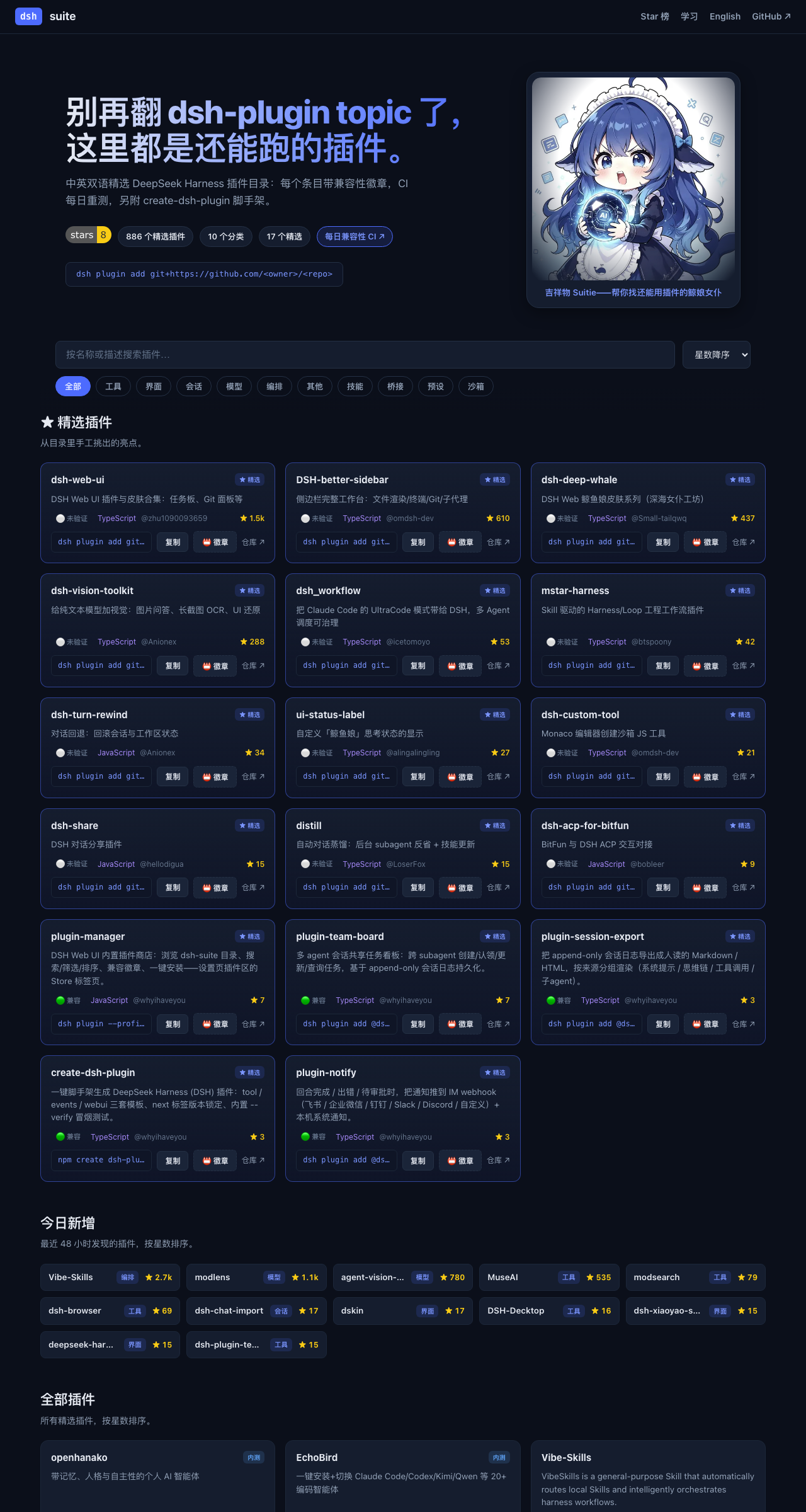
别再翻 dsh-plugin topic 了,这里都是还能跑的插件。
dsh-suite 是 DeepSeek Harness(DSH)插件的活目录——每小时自动刷新、每日兼容实测——外加 DSH 内置插件商店、create-dsh-plugin 脚手架、几个自研插件,以及一个**一体化工作台**(🚧 开发中)。

🧭 生态 / Ecosystem
- 🌐 目录网站 — 在线逛全部插件
- 📖 DSH 中文文档 · dsh-docs.com — 中文教程与文档,开箱即用无需翻墙
- 📕 DSH 插件开发指南 — 中英双语成书
- 🎨 皮肤画廊 — 151 款皮肤昼夜双预览
为什么做 dsh-suite
DSH 发布时没有官方插件 registry。现在找插件只能翻 GitHub 的 dsh-plugin topic(50+ 个零散小插件)和当天冒出来的几个静态 awesome-list——而 DSH 自己还在发破坏性变更(breaking changes)。
所以我们做了四件事:
- 一个「活」目录——880+ 精选插件,CI 每小时刷新数据、每天把收录的包真实装进临时 profile 重测兼容性。
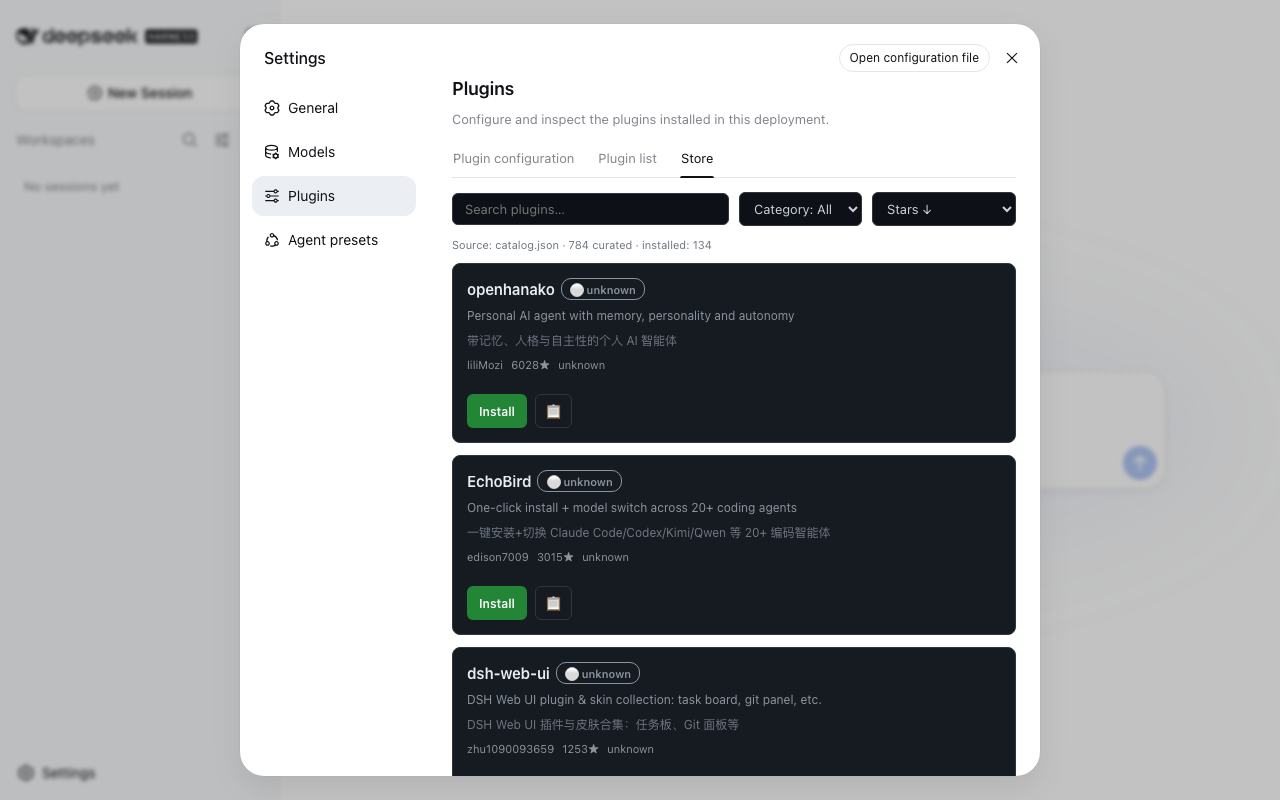
- 一个内置插件商店——
@dsh-suite/plugin-manager在 DSH Web UI 的设置页里加一个 Store 标签:逛目录、搜索、看徽章、一键安装,全程不用离开 DSH。 - 一个脚手架——
npm create dsh-plugin一条命令生成可跑的dsh.bundle+ Cordis 骨架。官方没给脚手架,而「怎么迁移我的插件」是社区呼声最高的需求之一。 - 几个自研插件——不是纯搬运,有第一方产出。
- 一个一体化工作台——dsh-workstation,开箱即用版(🚧 开发中)。
快速开始
# 1. 逛目录网站
open https://whyihaveyou.github.io/dsh-suite/zh.html

# 2. 把插件商店装进你的 DSH Web UI
npx @deepseek-ai/dsh plugin --profile web add @dsh-suite/plugin-manager
#    → 重启 Web UI,然后 设置 → Plugins → Store

# 3.(开发者)造一个自己的插件
npm create dsh-plugin@latest my-plugin
📚 插件目录
⭐ 精选
| 插件 | ⭐ | 兼容 | 描述 |
|---|---|---|---|
| dsh-web-ui | 5277 | 🟢 ok | DSH Web UI 插件与皮肤合集:任务板、Git 面板等 |
| DSH-better-sidebar | 2518 | 🟢 ok | 侧边栏完整工作台:文件渲染/终端/Git/子代理 |
| dsh-deep-whale | 1532 | ⚪ unknown | DSH Web 鲸鱼娘皮肤系列(深海女仆工坊) |
| dsh-vision-toolkit | 799 | 🟢 ok | 给纯文本模型加视觉:图片问答、长截图 OCR、UI 还原 |
| dsh-turn-rewind | 93 | 🟢 ok | 对话回退:回滚会话与工作区状态 |
| dsh_workflow | 91 | 🟢 ok | 把 Claude Code 的 UltraCode 模式带给 DSH,多 Agent 调度可治理 |
| mstar-harness | 52 | ⚪ unknown | Skill 驱动的 Harness/Loop 工程工作流插件 |
| ui-status-label | 39 | 🔴 broken (failed once, retried — install blocked by pnpm build-script policy (allowBuilds) — plugin likely OK, CI policy blocks git prepare scripts) | 自定义「鲸鱼娘」思考状态的显示 |
| dsh-share | 29 | 🟢 ok | DSH 对话分享插件 |
| dsh-custom-tool | 24 | 🟢 ok | Monaco 编辑器创建沙箱 JS 工具 |
| distill | 20 | ⚪ unknown | 自动对话蒸馏:后台 subagent 反省 + 技能更新 |
| all (全家桶) | 15 | 🟢 ok | 全家桶聚合包:一次安装带入第一方全家桶——插件商店、IM 通知、会话导出、多 agent 任务板。 |
| dsh-acp-for-bitfun | 10 | 🟢 ok | BitFun 与 DSH ACP 交互对接 |
| plugin-manager | 7 | 🟢 ok | DSH Web UI 内置插件商店:浏览 dsh-suite 目录、搜索/筛选/排序、兼容徽章、一键安装——设置页插件区的 Store 标签页。 |
| plugin-team-board | 7 | 🟢 ok | 多 agent 会话共享任务看板:跨 subagent 创建/认领/更新/查询任务,基于 append-only 会话日志持久化。 |
| themes (皮肤中心) | 6 | 🟢 ok | 皮肤中心:151 款昼夜成对皮肤一包打尽——网格预览、搜索、一键试穿,支持收藏、最近试穿与随机换肤。 |
| plugin-session-export | 3 | 🟢 ok | 把 append-only 会话日志导出成人读的 Markdown / HTML,按来源分组渲染(系统提示 / 思维链 / 工具调用 / 子agent)。 |
| create-dsh-plugin | 3 | 🟢 ok | 一键脚手架生成 DeepSeek Harness (DSH) 插件:tool / events / webui 三套模板、next 标签版本锁定、内置 --verify 冒烟测试。 |
| plugin-notify | 3 | 🟢 ok | 回合完成 / 出错 / 待审批时,把通知推到 IM webhook(飞书 / 企业微信 / 钉钉 / Slack / Discord / 自定义)+ 本机系统通知。 |
| preset-center (场景预设) | 1 | 🟢 ok | 中文开箱即用预设全家桶:小红书笔记助手 / 中文文案润色 / 日报周报生成器,一键应用到官方 Agent presets,无需重启、选择器立即可见。 |
| plugin-deus (神模扳机) | 1 | 🟢 ok | 神模扳机:一键触发实测验证过的 Minimal 行为,起手指纹自动识别回复模式,本地触发率统计(Wilson CI)。提示词实验台,不承诺任何隐藏能力。 |
🧰 工具
| 插件 | ⭐ | 兼容 | 描述 |
|---|---|---|---|
| open-managed-agents | 243 | ⚪ unknown | Claude Managed Agents API 的开源自托管平台(Cloudflare Workers) |
| role-model | 107 | ⚪ unknown | 按任务把请求路由到「正确的模型」(本地/云) |
| irmia_devkit_open | 39 | ⚪ unknown | Python 开发工具包(无描述) |
| HoloGram | 24 | ⚪ unknown | 3D 代码依赖拓扑图生成器(14 语言) |
| dsh-custom-tool | 24 | 🟢 ok | Monaco 编辑器创建沙箱 JS 工具 |
| dsh-acp-for-bitfun | 10 | 🟢 ok | BitFun 与 DSH ACP 交互对接 |
| fabric | 15 | ⚪ unknown | 类似 MC Fabric 的 hook 处理器 |
| dsh-git-identity | 7 | ⚪ unknown | git 提交固定使用环境作者身份 |
| Hypr-Agent-Protal | 4 | ⚪ unknown | Hyprland 的 Computer Use MCP |
| telegram | 7 | ⚪ unknown | Telegram Bot API 桥接(长轮询) |
| agent-knock-knock | 4 | ⚪ unknown | OpenClaw 插件:共享 tmux 控制本地 Codex/Claude Code |
| dsh-bash-encoding | 7 | ⚪ unknown | bash 输出编码自动识别(UTF-16LE/UTF-8/GBK) |
| dsh-data-agent | 103 | 🟢 ok | 连数据库、写 SQL 的插件 |
| dsh-doctor | 5 | 🟢 ok | flutter-doctor 风格诊断与安全自动修复 |
| dsh-interconnect | 34 | 🟢 ok | 跨实例消息/事件交接插件 |
| dsh-openbiliclaw | 48 | ⚪ unknown | OpenBiliClaw 内容推荐 Agent 接入 DSH |
| dsh-plugin-check | 25 | 🟢 ok | 扫描插件仓库清单协议/patch 格式/构建陷阱 |
| dsh-security-audit | 13 | ⚪ unknown | 本机安全审计:配置/插件来源/会话/网络暴露面 |
| dsh-tool-csv | 4 | ⚪ unknown | CSV 解析/查询/统计/转换工具 |
| dsh-toolkit | 24 | ⚪ unknown | 零依赖工具包合集(time/encoding/json/csv/regex) |
| atomstudio | 0 | ⚪ unknown | 可执行文档工程环境 |
| dsh-cc-connect | 3 | ⚪ unknown | 通过 cc-connect 远程使用 DSH |
| dsh-mnemon | 146 | 🟢 ok | Mnemon 三层记忆体深度集成 |
| dsh-paseo | 2 | ⚪ unknown | DSH 的 paseo 插件扩展支持 |
| dsh-plugin-dev | 13 | ⚪ unknown | DSH 插件开发踩坑档案(skill+文档) |
| dsh-tool-calculator | 7 | ⚪ unknown | 安全数学表达式求值器 |
| dsh-tool-diff | 4 | ⚪ unknown | 文本/JSON/CSV/Markdown 结构化 diff |
| dsh-tool-encoding | 3 | ⚪ unknown | base64/hex/url 编解码 + 哈希工具 |
| dsh-tool-json | 3 | ⚪ unknown | JMESPath JSON 查询工具 |
| dsh-tool-markdown | 4 | ⚪ unknown | HTML↔Markdown 转换、GFM 表格规范化 |
| dsh-tool-regex | 3 | ⚪ unknown | 正则测试/捕获/安全替换工具 |
| dsh-tool-schema | 3 | ⚪ unknown | JSON Schema 验证工具 |
| dsh-tool-stat | 6 | ⚪ unknown | 描述统计/百分位/相关性工具 |
| dsh-tool-time | 4 | ⚪ unknown | ISO 8601/时区/日历运算时间工具 |
| dsh-trace | 2 | ⚪ unknown | DSH 遥测后端:导出轮次/步骤/工具 |
| sandbox-micro | 3 | ⚪ unknown | microsandbox 支持 |
| zotero-harvest | 5 | ⚪ unknown | Zotero 文献采集入库插件(OpenAlex/arXiv/Crossref) |
| dsh-harness-ops | 11 | ⚪ unknown | DSH 运维工具箱:每日快照 A/B 双槽轮换、一键回滚 |
| dsh-inspect | 6 | ⚪ unknown | 检查→修复→复查的对抗式闭环插件 |
| dsh-openmaic | 20 | ⚪ unknown | OpenMAIC:课堂/幻灯片/交互式组件 |
| dsh-plugin-mineru | 38 | ⚪ unknown | MineRU 文档解析工具 |
| dsh-prompt-studio | 3 | ⚪ unknown | 编辑用户与内置系统提示段(实时预览) |
| dsh-scholar | 24 | 🟢 ok | dsh-scholar(文献相关) |
| dsh-ssh | 7 | 🟢 ok | SSH 远程执行:ProxyJump 链、SFTP |
| dsh-tool-search | 3 | 🟢 ok | 按 agent 按需工具发现与渐进 schema 披露 |
| dsh-webbridge | 3 | ⚪ unknown | DSH 结合 Kimi WebBridge |
| ego-browser | 28 | ⚪ unknown | 把 ego-lite 浏览器接入 DSH(给 Agent 用的 Chromium) |
| math-lean | 1 | ⚪ unknown | Lean 内核验证的数学推理插件 |
| plugin-template | 12 | ⚪ unknown | 官方 turtle ui 仓库派生的插件模板 |
| Qwen-MM-Plugins | 5 | ⚪ unknown | Qwen-MM-Plugins 支持 |
| sandbox-mxc | 2 | ⚪ unknown | 微软跨平台沙盒支持 |
| sandbox-nono | 3 | ⚪ unknown | nono 沙盒支持 |
| web-components | 2 | ⚪ unknown | web-components 支持 |
| zotero-wave-rag | 3 | ⚪ unknown | 面向 Zotero 论文库的浪潮式 RAG 检索 |
| modsearch | 202 | ⚪ unknown | DeepSeek Harness 的联网搜索插件。 |
| dsh-browser | 357 | 🟢 ok | Chrome 侧边栏扩展,让 DSH 操控浏览器。 |
| dsh-openapi | 4 | ⚪ unknown | 安全 OpenAPI 3.x 发现与 API 调用工具。 |
| dsh-better-browser | 10 | ⚪ unknown | 通过 Kimi WebBridge 让 agent 操作用户已登录浏览器。 |
| dsh-worktree | 6 | ⚪ unknown | Codex 风格永久 git worktree 插件。 |
| graycode-for-dsh | 5 | ⚪ unknown | graycode 编码工具。 |
| dsh-expression | 34 | 🟢 ok | 找得到、发得出 —— DSH 表情包插件:语义搜图,只发真实文件,走 companion QQ 通道 |
| dsh-director-toolkit | 7 | ⚪ unknown | dsh-director-toolkit — DSH 插件(工具) |
| codex-plugin-dsh | 8 | ⚪ unknown | codex-plugin-dsh — DSH 插件(工具) |
| dsh-prompt-persona | 11 | ⚪ unknown | dsh-prompt-persona — DSH 插件(工具) |
| dsh-tool-policy | 3 | ⚪ unknown | dsh-tool-policy — DSH 插件(工具) |
| dsh-plugin-graph | 2 | 🟢 ok | 一个Deepseek Harness的插件关系图谱可视化插件 |
| dsh-research-notes | 3 | ⚪ unknown | dsh-research-notes — DSH 插件(工具) |
| nowledge-mem-deepseek-harness | 5 | ⚪ unknown | nowledge-mem-deepseek-harness — DSH 插件(工具) |
| dsh-vsc-integration | 8 | ⚪ unknown | dsh-vsc-integration — DSH 插件(工具) |
| dsh-safe-delete | 3 | 🟢 ok | dsh-safe-delete — DSH 插件(工具) |
| dsh-plugins | 5 | ⚪ unknown | dsh-plugins — DSH 插件(工具) |
| dsh-report-html | 3 | ⚪ unknown | dsh-report-html — DSH 插件(工具) |
| dsh-openai-codex-auth | 9 | 🟢 ok | dsh-openai-codex-auth — DSH 插件(工具) |
| dsh-github-connector | 7 | 🟢 ok | dsh-github-connector — DSH 插件(工具) |
| deepseek-pet | 34 | ⚪ unknown | 在你的deepseek-harness上养一只吃白饭的大蓝鲸 |
| dsh-index | 3 | ⚪ unknown | dsh-index — DSH 插件(工具) |
| dsh-web-search-firecrawl | 2 | ⚪ unknown | dsh-web-search-firecrawl — DSH 插件(工具) |
| dsh-plugin-template | 12 | ⚪ unknown | dsh-plugin-template — DSH 插件(工具) |
| dsh-composer-history | 6 | 🟢 ok | dsh-composer-history — DSH 插件(工具) |
| dsh-fun-ticker | 5 | ⚪ unknown | DSH 行情跑马灯插件:可自选标的的加密/汇率/A股/指数/港美股跑马灯,免 key 数据源,宿主代理+缓存 |
| jumpserver-dsh | 2 | ⚪ unknown | jumpserver-dsh — DSH 插件(工具) |
| dsh-browser | 3 | 🟢 ok | dsh-browser — DSH 插件(工具) |
| dsh-dev-actions | 1 | ⚪ unknown | dsh-dev-actions — DSH 插件(工具) |
| dsh-plugin-doctor | 1 | ⚪ unknown | DSH 插件体检:安装前检查 peer 版本兼容性,防止 rc 不匹配崩溃 🩺 |
| deepseek-harness-background | 2 | 🟢 ok | deepseek-harness-background — DSH 插件(工具) |
| task-passport | 9 | 🟢 ok | task-passport — DSH 插件(工具) |
| dsh-prompt-presets | 1 | ⚪ unknown | dsh-prompt-presets — DSH 插件(工具) |
| dsh-hub | 3 | ⚪ unknown | dsh-hub — DSH 插件(工具) |
| dsh-plugin-colorscheme | 2 | ⚪ unknown | dsh-plugin-colorscheme — DSH 插件(工具) |
| dsh-scout | 2 | 🟢 ok | 面向 DeepSeek Harness 的只读环境探测插件,为智能体提供运行环境、软件版本、系统资源、端口、服务、硬件及工作区信息。 |
| dsh-screenshot-diff | 1 | 🟢 ok | dsh-screenshot-diff — DSH 插件(工具) |
| dsh-turn-index | 1 | ⚪ unknown | deepseek harness的侧边栏对话轮次索引插件 |
| dsh-mobile-control | 3 | 🟢 ok | dsh-mobile-control — DSH 插件(工具) |
| dsh-hub | 3 | ⚪ unknown | dsh-hub — DSH 插件(工具) |
| dsh-tool-monitor | 1 | ⚪ unknown | dsh-tool-monitor — DSH 插件(工具) |
| dsh-suggest-prompt | 2 | ⚪ unknown | dsh-suggest-prompt — DSH 插件(工具) |
| dsh-cloudflare-browser-run | 1 | 🟢 ok | dsh-cloudflare-browser-run — DSH 插件(工具) |
| safe-find-dsh-plugins | 3 | ⚪ unknown | safe-find-dsh-plugins — DSH 插件(工具) |
| dsh-all-search | 1 | 🟢 ok | dsh-all-search — DSH 插件(工具) |
| dsh-plugin-pixluna | 3 | ⚪ unknown | dsh-plugin-pixluna — DSH 插件(工具) |
| dsh-plugins-hub | 2 | ⚪ unknown | dsh-plugins-hub — DSH 插件(工具) |
| dsh-huadongbianzuqi | 7 | ⚪ unknown | DeepSeek Harness的滑动变祖器插件 |
| dsh-soul-md | 3 | 🟢 ok | dsh-soul-md — DSH 插件(工具) |
| dsh-daily-fortune | 3 | ⚪ unknown | dsh-daily-fortune — DSH 插件(工具) |
| dsh-plugin-rag | 1 | ⚪ unknown | dsh-plugin-rag — DSH 插件(工具) |
| dsh-model-selector | 1 | ⚪ unknown | dsh-model-selector — DSH 插件(工具) |
| dsh-github | 3 | 🟢 ok | dsh-github — DSH 插件(工具) |
| dsh-plugin-review | 1 | ⚪ unknown | dsh-plugin-review — DSH 插件(工具) |
| dsh-turn-budget | 1 | 🟢 ok | dsh-turn-budget — DSH 插件(工具) |
| DIzzy-DSH | 7 | ⚪ unknown | DIzzy-DSH — DSH 插件(工具) |
| dsh-file-explorer | 2 | ⚪ unknown | dsh-file-explorer — DSH 插件(工具) |
| dsh-tool-reqpipe | 1 | 🟢 ok | dsh-tool-reqpipe — DSH 插件(工具) |
| dsh-ajw | 1 | ⚪ unknown | DS安甲网 (ds.ajw.cn) · 为你的 DeepSeek Harness 机器人 安装上所需功能的装甲吧 — 每日聚合 DeepSeek Harness / DSH 插件生态开源项目 |
| dsh-fun-typewriter | 3 | ⚪ unknown | dsh-fun-typewriter — DSH 插件(工具) |
| dsh-port-guard | 1 | ⚪ unknown | dsh-port-guard — DSH 插件(工具) |
| qiushi-dsh-evidence-audit | 5 | 🟢 ok | qiushi-dsh-evidence-audit — DSH 插件(工具) |
| dsh-plugin.github.io | 3 | ⚪ unknown | dsh-plugin.github.io — DSH 插件(工具) |
| dsh-weixin | 4 | 🟢 ok | dsh-weixin — DSH 插件(工具) |
| dsh-lens-lite | 1 | 🟢 ok | dsh-lens-lite — DSH 插件(工具) |
| dsh-tavily-search | 4 | 🟢 ok | dsh-tavily-search — DSH 插件(工具) |
| dsh-sticky-disclosure | 3 | ⚪ unknown | dsh-sticky-disclosure — DSH 插件(工具) |
| dsh-openai-codex-oauth | 2 | ⚪ unknown | dsh-openai-codex-oauth — DSH 插件(工具) |
| dshx | 5 | ⚪ unknown | dshx — DSH 插件(工具) |
| dsh-reloader | 2 | ⚪ unknown | DSH 一键重启:装完插件说一句 reload 就自动重启生效,不用手动 Ctrl+C 🔄 |
| dsh-bisect-debug | 1 | ⚪ unknown | dsh-bisect-debug — DSH 插件(工具) |
| dsh-auto-chess | 3 | ⚪ unknown | DSH Web里的自走棋插件:人机对战或双AI对弈 |
| dsh-turn-meta | 1 | ⚪ unknown | dsh-turn-meta — DSH 插件(工具) |
| dsh-tool-browser | 1 | 🟢 ok | dsh-tool-browser — DSH 插件(工具) |
| dsh-music-plugin | 3 | ⚪ unknown | dsh-music-plugin — DSH 插件(工具) |
| dsh-batch-regression | 1 | 🟢 ok | dsh-batch-regression — DSH 插件(工具) |
| dsh-browser-control | 1 | 🟢 ok | dsh-browser-control — DSH 插件(工具) |
| dsh-code-ide | 11 | ⚪ unknown | dsh-code-ide — DSH 插件(工具) |
| matlab-modelsim-vivado-plugin | 2 | ⚪ unknown | matlab-modelsim-vivado-plugin — DSH 插件(工具) |
| dsh-codex | 38 | 🟢 ok | dsh-codex — DSH 插件(工具) |
| dsh-plugins | 1 | ⚪ unknown | dsh-plugins — DSH 插件(工具) |
| dsh-2origin | 3 | ⚪ unknown | dsh-2origin — DSH 插件(工具) |
| dsh-terminal | 3 | 🟢 ok | dsh-terminal — DSH 插件(工具) |
| dsh-survey | 3 | ⚪ unknown | 问卷式批量提问插件 for DeepSeek Harness:一次性问 10+ 题(单选/多选/是否 toggle/对比题/开放题),可跳过、全屏浮层、提交后对半 recap |
| deepseek-harness-plugin-manager | 3 | ⚪ unknown | deepseek-harness-plugin-manager — DSH 插件(工具) |
| dsh-co-authored-by | 2 | ⚪ unknown | dsh-co-authored-by — DSH 插件(工具) |
| DSH-Plugs | 6 | ⚪ unknown | DSH-Plugs — DSH 插件(工具) |
| dsh-host-web-compat | 2 | ⚪ unknown | dsh 宿主插件——经 webserver 钩子向页面注入旧内核浏览器 polyfill。 |
| dsh-doctor | 1 | 🟢 ok | dsh-doctor — DSH 插件(工具) |
| dsh-code-intel | 0 | ⚪ unknown | dsh-code-intel — DSH 插件(工具) |
| dsh-doctor | 1 | 🟢 ok | dsh-doctor — DSH 插件(工具) |
| dsh-backup-sync | 1 | ⚪ unknown | dsh-backup-sync — DSH 插件(工具) |
| dsh-auto | 4 | ⚪ unknown | dsh-auto — DSH 插件(工具) |
| dsh-annotate | 7 | ⚪ unknown | dsh-annotate — DSH 插件(工具) |
| dsh-codex-connect | 34 | ⚪ unknown | dsh-codex-connect — DSH 插件(工具) |
| DSH-Decktop | 21 | ⚪ unknown | DSH-Decktop — DSH 插件(工具) |
| dsh-cad-review | 4 | ⚪ unknown | dsh-cad-review — DSH 插件(工具) |
| dsh-xai | 2 | ⚪ unknown | dsh-xai — DSH 插件(工具) |
| dsh-academic-research | 0 | ⚪ unknown | dsh-academic-research — DSH 插件(工具) |
| dsh-plugin-hello | 0 | 🟢 ok | dsh-plugin-hello — DSH 插件(工具) |
| deepseek-harness-rs | 1 | ⚪ unknown | deepseek-harness-rs — DSH 插件(工具) |
| dsh-prompt-enhancer | 35 | ⚪ unknown | DeepSeek Harness DSH 提示词增强插件:✨ 一键优化草稿 |
| dsh-specflow | 3 | ⚪ unknown | dsh-specflow — DSH 插件(工具) |
| dsh-plugins | 0 | ⚪ unknown | dsh-plugins — DSH 插件(工具) |
| dsh-tool-chaos | 4 | ⚪ unknown | dsh-tool-chaos — DSH 插件(工具) |
| dsh-robotic-harness | 17 | ⚪ unknown | dsh-robotic-harness — DSH 插件(工具) |
| dsh-codex-subscription | 17 | 🟢 ok | dsh-codex-subscription — DSH 插件(工具) |
| dsh-sticky-note | 11 | ⚪ unknown | DSH 便签插件:随手记点子/感想/TODO,Markdown 预览 + 快捷键 + 历史归档,存储路径可配置 |
| dsh-gen3d | 1 | 🟢 ok | dsh-gen3d — DSH 插件(工具) |
| dsh-mdbox | 0 | ⚪ unknown | dsh-mdbox — DSH 插件(工具) |
| dsh-kanban | 5 | ⚪ unknown | 一个Hermes风格的看板插件,在deepseek harness上使用 |
| dsh-tool-git | 4 | 🟢 ok | dsh-tool-git — DSH 插件(工具) |
| dsh-header-status | 0 | ⚪ unknown | dsh-header-status — DSH 插件(工具) |
| dsh-mcp-manager | 2 | ⚪ unknown | dsh-mcp-manager — DSH 插件(工具) |
| dsh-tray | 0 | ⚪ unknown | dsh-tray — DSH 插件(工具) |
| dsh-oauth-mcp-client | 9 | ⚪ unknown | OAuth 2.1 MCP 客户端:给 DSH 接支持 Streamable HTTP 的 MCP 服务器。 |
| dsh-playwright-browser | 9 | 🟢 ok | Playwright browser automation for DeepSeek Harness|面向 DeepSeek Harness 的 Playwright 浏览器自动化插件 |
| deepseek-harness-action | 11 | ⚪ unknown | GitHub Action 集成:AI 代码评审、CI 诊断、自动修复、Issue 转 PR 全流程自动化。 |
| Oh-My-DSH | 11 | ⚪ unknown | DeepSeek Harness 插件精选集 · 300+ dsh-plugin 收录 · 22 大分类 |
| dsh-win-terminal-inspector | 7 | ⚪ unknown | Windows 终端检查:查看 DSH 持久/PTY shell 的运行状态。 |
| dsh-tool-hashline | 2 | ⚪ unknown | 哈希锚定读写工具:read/edit/grep 每一行都带内容指纹,改没改一目了然。 |
| dsh-view-modes | 2 | ⚪ unknown | 视图模式:Verbose / Normal / Summary 三档切换。 |
| dsh-codex-oauth | 2 | 🟢 ok | 用 ChatGPT(Codex Pro/Plus)订阅跑 DSH。 |
| dsh-figma-to-lottie | 1 | ⚪ unknown | Figma/SVG 转 Lottie 动画:SVG 路径直接编成动画。 |
| opencode-usage | 1 | ⚪ unknown | OpenCode Go 订阅额度徽章插件(dsh bundle) |
| dsh-plugin-git-inspect | 1 | ⚪ unknown | 只读 Git 检查工具:安全地查看仓库状态。 |
| dsh-html-canvas | 2 | ⚪ unknown | 把 AI 生成的 HTML 变成可点击编辑的画布。 |
| dsh-turn-approval | 2 | ⚪ unknown | 回合级「本次任务允许」审批:只放行当前这一轮。 |
| dsh-plugins | 1 | ⚪ unknown | 社区插件集合(独立包组织)。 |
| dsh-plugin-knowledge-graph | 4 | ⚪ unknown | 代码知识图谱:read_graph 工具基于代码库知识图谱回答结构性问题。 |
| dsh-document-parser | 1 | ⚪ unknown | LiteParse 驱动的文档解析工具:parse_document。 |
| long-draft-input | 2 | ⚪ unknown | Deepseek Harness 插件:用于聚合发送框长文本 |
| dsh-playwright-native | 1 | ⚪ unknown | 把原生 Playwright CLI 注册为 DeepSeek Harness 透传工具(dsh-plugin) |
| dsh-composer-polish | 6 | ⚪ unknown | 输入框草稿一键润色:把随手打的草稿重写得更顺,自动回填回输入框。 |
| dsh-code-impact | 2 | ⚪ unknown | 面向 DeepSeek Harness 的只读 TypeScript/JavaScript 代码变更影响分析插件 Read-only TypeScript/JavaScript change impact analysis plugin for DeepSe… |
| dsh-oauth-api | 1 | ⚪ unknown | 树外 OAuth 插件:Grok/xAI、Codex、Claude 订阅接入。 |
| dsh-plugin | 2 | 🟢 ok | 社区插件集合包。 |
| dsh-zh-output | 3 | ⚪ unknown | DeepSeek Harness 中文输出插件:强制中文思考与输出的中文预设 |
| dsh-excel-chat | 5 | 🟢 ok | 跟 Excel 对话:用自然语言创建、编辑、修复、校验表格(单元格、公式、样式)。 |
| dsh-eyecare | 3 | ⚪ unknown | dsh护眼插件 |
| dsh-plugin-healthcheck | 14 | ⚪ unknown | 害怕插件装了就崩溃?用这个插件帮你检测插件是否正常/是否含木马! |
| deepseek-harness-openai-oauth | 5 | 🟢 ok | GPT 模型接入:通过 Codex app-server 的 ChatGPT OAuth 把 GPT 模型当 provider 用。 |
| dsh-plugin-browser | 1 | 🟢 ok | 无头 Playwright 浏览器驱动:agent 自动操作网页。 |
| deepseek-plugin-store | 24 | ⚪ unknown | DeepSeek Harness 独立社区插件商店:发现、安装并提交经过验证的插件、工具与扩展。 |
| dsh-plugin-store | 4 | 🟢 ok | DSH 社区插件目录主页。 |
| dsh-aura-scheduler | 1 | ⚪ unknown | 主动调度:Aura 心跳 + 价值网络(官方协议实现)。 |
| harness-pet | 5 | ⚪ unknown | 社区小宠物:一只住在 DeepSeek Harness 里的小鲸鱼。 |
| dsh-egress-guard | 0 | 🟢 ok | 零网络、fail-closed 的密钥预检:模型请求前先本地拦一道。 |
| dsh-geo | 0 | ⚪ unknown | 生成式引擎优化(GEO)DeepSeek Harness 插件:面向本地 Markdown 知识库的 SEO、GEO 与 AEO 审计工具。 |
| dsh-video-downloader | 2 | ⚪ unknown | 媒体下载:检测并下载 Bilibili/YouTube/抖音/小红书视频音频。 |
| dsh-mermaid-preview | 0 | ⚪ unknown | Mermaid 代码块渲染成图表(Web 端)。 |
| dsh-web-search-provider | 1 | 🟢 ok | 原生网页搜索 provider(ctx.web seam):OpenAI Responses 后端。 |
| dsh-action-parity | 3 | ⚪ unknown | 跨界面动作绑定与回放一致性证据:验证不同界面下同一操作行为一致。 |
| dsh-input-history | 3 | ⚪ unknown | DSH Web 输入历史插件:Ctrl+Up / Ctrl+Down 像终端一样召回与切换已发送消息,零核心改动 |
| dsh-tool-backtest | 0 | 🟢 ok | DSH 插件:策略回测引擎 — 定义买卖信号,跑历史数据,输出绩效指标。 |
| dsh-plugins | 2 | ⚪ unknown | 可组合的 DSH 插件 monorepo。 |
| dsh-plugin-quote-reply | 1 | 🟢 ok | DSH plugin: select text in a conversation, then quote it into the composer or reply in a new window. / DeepSeek Harness 划词引用插件:选中… |
| dsh-sound | 0 | ⚪ unknown | Distinct alert sounds for DeepSeek Harness: network error, approval request, question asked, and turn-completion notifications. |
| dsh-tool-playwright | 0 | ⚪ unknown | 一个给 DeepSeek Harness 用的插件:让 AI 能真的打开浏览器上网——打开网页、点按钮、填表单、翻页、看页面内容,就像人一样操作浏览器。 |
| knowlp-rag | 3 | ⚪ unknown | 双知识图谱 RAG:Markdown 笔记建成会「用进废退」的知识图谱,DSH/Claude Code 都能用。 |
| omdp | 2 | ⚪ unknown | 作者自己的 DSH 插件 monorepo 合集。 |
| dsh-ProjectModel | 0 | ⚪ unknown | deepseek项目组功能 |
| dsh-pain-point-check | 1 | ⚪ unknown | 强制痛点检查守卫:连续两次非结论性回合后主动找用户确认。 |
| dsh-entity-dd | 1 | ⚪ unknown | 出海交易对手尽调 · DeepSeek Harness 插件:先确认你在跟哪个法人签约,再判断这份登记资料能不能作为决策依据。免费官方数据源,无需密钥。 |
| dsh-wash-calendar | 0 | ⚪ unknown | 周期性习惯打卡日历:记录上次清洗日期并提醒。 |
| dsh-codex-auth | 11 | 🟢 ok | 复用本机 Codex CLI 的 ChatGPT 登录态,给 DSH 加 Codex 模型 provider。 |
| dsh-code-lens | 0 | ⚪ unknown | code 模式子派发可观测性:工具调用链路可见。 |
| dsh-subprocess-inherit-environment | 2 | ⚪ unknown | 把完整 Harness 环境变量透传给子进程(可拆卸的调试向插件)。 |
| dsh-doctor-windows | 0 | ⚪ unknown | Windows 环境诊断:DSH 在 Windows 上的问题排查。 |
| MuseAI | 594 | ⚪ unknown | 创建你的 AI 角色,进入你的故事世界。和角色聊天、冒险、穿书,让每一次互动都留下羁绊(支持 DeepSeek Harness 插件,欢迎使用) |
| dsh-user-experience | 19 | 🟢 ok | UX 体检插件:扫描 React + TypeScript 源码里的交互问题,定位到具体位置并给出修复建议。 |
| dsh-plugin-automations | 2 | ⚪ unknown | 定时任务插件:Web profile 里安排计划任务。 |
| dsh-web-search-tavily | 2 | ⚪ unknown | Tavily 搜索源 bundle:热切换、免配置接入。 |
| trio | 15 | ⚪ unknown | DSH 全家桶:浏览器自动化 + MCP Server + GitHub 集成 |
| dsh-policy-drift-proof | 3 | ⚪ unknown | 策略漂移证据:内容寻址、脱敏保存策略变化记录。 |
| dsh-audit-bundle | 3 | ⚪ unknown | 跨独立证据源的审计索引:内容寻址汇总各证据源。 |
| dsh-recovery-proof | 3 | ⚪ unknown | 只读恢复演练证据:记录恢复演练过程供审计。 |
| dsh-mediacrawler | 3 | ⚪ unknown | MediaCrawler 采集的有界隔离 MCP 适配器:安全地做社交媒体数据采集。 |
| dsh-credentials-system | 0 | ⚪ unknown | 系统绑定加密凭证 provider:凭据跟系统用户绑定。 |
| dsh-plugins | 8 | ⚪ unknown | 插件集合(独立包,一个仓库管理)。 |
| deepseek-harness-cli | 3 | ⚪ unknown | 交互式终端 agent(DeepSeek Harness 分支):一切皆插件。 |
| dsh-chat-outline | 6 | 🟢 ok | 对话栏左侧常驻大纲:快速定位每次 user 提问与最后 assistant 回复(DeepSeek Harness 插件) |
| dsh-passwords | 16 | ⚪ unknown | 让 DeepSeek Harness 变成服务器级多租户平台:远程访问 + 自动 HTTPS、子用户权限与配额、沙盒强制、加密认证与审计日志。 |
| mindspace-dsh-local-rag | 3 | ⚪ unknown | 本地混合 RAG:ARPM 派生,检索增强全在本机完成。 |
| dsh-mcp-pack | 1 | ⚪ unknown | 常用 MCP server 一键接入 DeepSeek Harness (dsh) 的 .cordis.yml 清单合集,开箱即用,零代码。 |
| upstream-radar | 6 | ⚪ unknown | 上游雷达:持续监控 DSH 插件的漏洞与破坏性变更影响。 |
| dsh-plugin-anydoc | 6 | ⚪ unknown | DSH 插件:基于 @firecrawl/anydoc 将 Word、PPT、Excel、PDF、EPUB、CSV 等文档转换为 GitHub-Flavored Markdown |
| deepseek-harness-lite | 2 | ⚪ unknown | 轻量本地优先的 DSH 发行版 + 验证过插件包(社区非官方)。 |
| dsh-bash-encoding | 2 | ⚪ unknown | DSH bash 输出编码自动识别插件:替换 ctx.bash,自管 spawn 收集原始字节,自动检测 UTF-16LE/UTF-8/GBK 等编码并正确解码,修复 WSL/Windows 下 bash 工具的中文乱码。 |
| dsh-oai-oauth | 1 | 🟢 ok | 不用 API key、用 OpenAI 订阅直接跑 ChatGPT。 |
| surfing-plugin | 12 | ⚪ unknown | 自建搜索接入:用 SearXNG 搜索 + Crawl4AI 抓取网页,替换 DSH 默认的联网方案。 |
| deepseek-harness-vsc-extension | 24 | ⚪ unknown | DSH 的 VS Code 扩展:在编辑器里直接使用 DeepSeek Harness。 |
| dsh-ci-doctor | 3 | ⚪ unknown | CI 故障诊断:盯着 GitHub Actions 新失败,把原始日志翻译成可操作的诊断。 |
| dsh-read-history | 2 | ⚪ unknown | 迁移claude/codex的对话历史到dsh |
| dsh-yuzuha-prompts-manager | 2 | ⚪ unknown | 提示词管理插件:宿主+浏览器双面,集中管理 dsh web profile 的提示词。 |
| dsh-pet | 3 | 🟢 ok | 社区版 DeepSeek 桌宠客户端插件。 |
| dsh-win-launchscript | 1 | ⚪ unknown | 适用于 Windows 的 DeepSeek Harness(DSH)一键启动脚本,自动启动 Web 服务、打开浏览器,并在关闭窗口后停止服务。 |
| dsh-model-provider-label | 1 | ⚪ unknown | 模型选择器同时显示 provider 显示名与模型名,同名模型不再混淆。 |
| dsh-pub | 2 | ⚪ unknown | dsh.pub 双语、源码背书的 DSH 插件注册表与安装器。 |
| anysearch-dsh | 174 | 🟢 ok | AnySearch 联网搜索接入:给 DSH 配上 AnySearch 的搜索 provider 和进阶搜索工具。 |
| dsh-toy | 58 | 🟢 ok | 玩具控制协议(TCP):用 DSH 控制可编程玩具,给 agent 加一点实体交互的玩法。 |
| dsh-conv-search | 3 | ⚪ unknown | dsh-conv-search(对话内文本搜索)— in-conversation text search plugin for DeepSeek Harness (Ctrl+F, match case, whole word, streaming-awar… |
| dsh-web-search-exa | 6 | 🟢 ok | 零配置 Exa 网页搜索源:无 key 匿名模式接入。 |
| dsh-plugins | 8 | ⚪ unknown | deepseek harness 插件工作区:一包放多个 DSH 插件(树外维护)。 |
| dsh-mindmap | 5 | ⚪ unknown | DSH 思维导图模式插件:课件(PPT/PDF/Word)+电子书 → 打印级复习思维导图 HTML(A3 横向、每主干一页、大括号式横向、宋体、右栏笔记区、封面总览 + 交互式测试题) |
| dsh-testgen | 3 | ⚪ unknown | 自动生成单元测试:/testgen 命令 + generate_tests 工具,生成、运行、修复直到全绿。 |
| dsh-bottom-bar | 8 | ⚪ unknown | 用于提供更丰富的DeepSeek Harness底栏信息显示插件 |
| dsh-stock-watch | 57 | 🟢 ok | A股自选股实时行情盯盘插件 - DeepSeek Harness Web 右上角可折叠弹窗 |
| dsh-tool-search | 4 | 🟢 ok | 工具搜索与瘦身:Hermes 式渐进披露——按需搜索、描述、调用长尾工具。 |
| dsh-spec-loop | 5 | ⚪ unknown | Spec-driven 开发闭环(OpenSpec 兼容):/spec 命令族驱动 生成规格 → 批准 → 实现 → 逐条验收 → 归档 |
| dsh-cmd-starter | 3 | ⚪ unknown | 为deepseek-harness提供一个命令行启动工具,让它 --append-prompt --resume 等类claude命令 |
| dsh-mcp-manager | 1 | 🔴 broken (failed once, retried — install failed (exit 1): at runPlugin (file:///home/runner/.npm/_npx/1e7f6d9597241db0/node_modules/@deepseek-ai/dsh/lib/plugin-9h8shc) | 一个 DeepSeek Harness MCP 配置页 |
| dsh-nebulagraph-v5 | 3 | ⚪ unknown | 连接 Nebula v5 图数据库的插件。 |
| dsh-plugin-text-translation | 3 | ⚪ unknown | 文本与文档翻译插件:标签防爆遮罩保护代码/占位符,批量翻译 i18n 文案不破坏结构。 |
| dsh-overleaf | 7 | ⚪ unknown | Overleaf 写作接入:通过 OverleafMCP 让 DSH 直接读写你的 LaTeX 项目和文档。 |
| dsh-pet | 264 | 🟢 ok | DeepSeek Harness 桌面宠物插件 + 完整素材生成链:AI 提示词 → 绿幕视频 → 透明动画 → 可安装插件,从零到宠物全流程可复现 |
| dsh-humanizer | 4 | 🟢 ok | DeepSeek Harness原生中文文本人工智能痕迹消除与多重审核对抗工作流 |
| dsh-pixluna | 3 | 🟢 ok | dsh-plugin-pixluna |
| dsh-deepseek-billing | 3 | ⚪ unknown | 在 DSH 中查看 DeepSeek API 账户余额及计费信息 |
| dsh-suggested-replies | 3 | ⚪ unknown | DSH Web 预测回复插件:AI 回复后在输入框上方生成可点击填入草稿的下一步消息候选 |
| dsh-agy | 19 | 🟢 ok | Google Antigravity (agy) 接入:OAuth 授权 + 多账号池 + 429 自动轮换 + 设备指纹。 |
| dsh-plugin-mermaid | 4 | ⚪ unknown | Mermaid 代码块渲染:图表/源码双视图。 |
| dsh-todo-freshness-guard | 1 | ⚪ unknown | 防止 stale todo_write 状态的守卫插件。 |
| dsh-windows-readiness-proof | 2 | ⚪ unknown | Windows 平台就绪证明(内容寻址,脱敏观测)。 |
| dsh-article-publish | 4 | ⚪ unknown | 文章发布插件:agent 在会话里写完文章直接发布到 CSDN/掘金/博客园,还能拉科技资讯当素材。 |
| dsh-survival | 1 | ⚪ unknown | DeepSeek Harness 生存模式 |
| dsh-cache-stabilizer | 2 | ⚪ unknown | 缓存前缀稳定化 + 基于证据的缓存指标。 |
| dsh-tool-somark | 2 | ⚪ unknown | SoMark 文档解析工具(somark_parse)。 |
| dsh-mcp-settings | 2 | ⚪ unknown | dsh mcp服务器配置管理 |
| dsh-terminal | 2 | 🟢 ok | 持久交互式终端模式。 |
| dsh-anchored-standard | 3696 | ⚪ unknown | 两段式 Agent 预设:先用精简配置快速启动,再切换到完整 Standard 工具集,兼顾启动速度与全功能。 |
| dsh-whalito-desk | 3 | ⚪ unknown | 鲸仔 Whalito,DeepSeek Harness 桌面助手。这是由DSH + DS-V4-Pro-0813开发的tauri桌面程序。 |
| dsh-browser | 8 | 🟢 ok | 浏览器能力:有头 Edge/Playwright 驱动、SSRF 安全导航、无障碍树点击、权限门。 |
| dsh-qqbot | 71 | 🟢 ok | 让 QQ 机器人接入 DeepSeek Harness(dsh)的官方插件 |
| dsh-plugin-store | 5 | 🟢 ok | DeepSeek Harness 插件商店:浏览、搜索、筛选并一键安装 dsh-plugin 生态插件 |
| dsh-office | 15 | 🟢 ok | 办公三件套!Office document tools for DeepSeek Harness (dsh): generate, read, and edit spreadsheets (.xlsx), PDFs, and presentations (.… |
| dsh-plugins | 2 | ⚪ unknown | 社区插件 monorepo(独立发布的多个 DSH 插件)。 |
| promptwall | 3 | ⚪ unknown | 本地提示注入与密钥外泄防火墙:给 DSH 加一道安全闸。 |
| dsh-tailscale-sync | 4 | ⚪ unknown | Zero-config Tailscale sync for DeepSeek Harness (dsh-plugin). 零配置:在手机上继续电脑端 DeepSeek Harness 的工作。 |
| dsh-mcp-center | 1 | 🟢 ok | 可视化连接任意 MCP 服务器:点点点就接入。 |
| dsh-side-chat | 12 | 🟢 ok | Codex 风格侧边聊天:选中文本后在独立侧栏追问,不打断主对话。 |
| dsh-ocg-billing | 1 | ⚪ unknown | OpenCode Go 计费层:缓存官方定价 + 花费计算。 |
| dsh-quote-reply | 3 | ⚪ unknown | 选中即引用:把选中的文字或整条回复以 Markdown 引用块填入输入框。 |
| dsh-browser | 1 | 🟢 ok | 给 DeepSeek Harness 的浏览器插件:AI 直接开真实的 Edge 浏览器逛网页、点击、填表、截图,无需 CDP 或 MCP。 |
| SapBuddy-dsh | 3 | ⚪ unknown | SapBuddy 的 DSH 版:41 个 SAP 工具、技能集、写门禁。 |
| dsh-blackjack | 2 | ⚪ unknown | 谁不想coding的时候急头白脸的和大肥鱼来一场紧张刺激的21点呢 |
| dsh-keepalive | 3 | ⚪ unknown | 可选分离式看门狗:快照检查修复 DSH Web 进程。 |
| dsh-scrape-webpage | 7 | ⚪ unknown | 用于DeepSeek Harness的网页读取插件 |
| dsh-museai-tavern | 10 | ⚪ unknown | MuseAI的DeepSeek Harness插件,可以将你的MuseAI角色放进DSH使用啦! |
| citeguard | 3 | ⚪ unknown | 引用提取与证据核验:帮 agent 的回答带可验证出处。 |
| dsh-commandcode-go-provider | 3 | ⚪ unknown | Command Code Go API provider for dsh. Command Code 订阅 + DeekSeek Harness 兼容层 |
| dsh-openai-oauth | 5 | 🟢 ok | GPT 模型接入:通过 Codex app-server 的 ChatGPT OAuth 把 GPT 模型当 provider 用。 |
| dsh-web-search-Tavily | 4 | 🟢 ok | 把 Tavily Search API 接成 DSH 的联网搜索源。 |
| dsh-satori | 2 | 🟢 ok | 连接 DSH 与 Satori 服务器,获得 IM 能力。 |
| dsh-pi | 3 | ⚪ unknown | 在 DSH 里跑可信的 Pi 扩展:兼容宿主直接运行未经修改的 Pi extensions。 |
| dsh-hotplug-engine | 2 | 🟢 ok | 插件安装/回滚/审计服务化:热插拔引擎。 |
| dsh-claude-provider | 25 | ⚪ unknown | 自定义 Claude provider:DSH 里用 Claude 模型。 |
| dsh-plugin-working-status | 8 | ⚪ unknown | 把思考状态里那句 "Deep diving..." 改成你喜欢的任何话。超轻量级。 |
| dsh-mcp-admin | 5 | ⚪ unknown | MCP 管理:设置页查看 /mcp 状态,按 profile 管理 MCP 服务器。 |
| dsh-plugin-manager | 5 | 🟢 ok | DSH 插件管理, 一键启用/禁用插件 |
| dsh-beacons | 2 | ⚪ unknown | 右侧提示词导航栏(Codex/OpenChamber 风格滚动定位条)。 |
| dsh-plugin | 90 | 🟢 ok | 让 DSH 通过插件控制 Tabbit 浏览器:安装后 agent 可以驱动 Tabbit 做浏览器操作。 |
| adb_dsh_plugin | 3 | ⚪ unknown | 把本机 ADB 注册为 DSH 工具:通过 ADB 控制 Android 设备。 |
| dsh-livis-connector | 3 | ⚪ unknown | 把 Livis 接进 DSH:应用内授权 + 中继管理。 |
| dsh-utility-tools | 3 | 🟢 ok | DSH(DeepSeek Harness)对话工具插件:拖拽任意文件进入对话 + 选中文本引用。 |
| dsh-usage-dashboard | 8 | ⚪ unknown | DeepSeek 额度与用量仪表盘 — DSH (DeepSeek Harness) 动态 Cordis 插件 |
| dsh-sci | 3 | ⚪ unknown | 零依赖科学计算工具:物理单位换算、科学计算开箱即用。 |
| dsh-docling | 10 | ⚪ unknown | 本地文档智能:离线 OCR 解析 PDF、Office、图片和扫描件,全程不出本机。 |
| dsh-git-guard | 1 | ⚪ unknown | Git-aware write guard plugin for DeepSeek Harness: blocks whole-file writes that would overwrite the user's uncommitted changes,… |
| dsh-cyber-particle | 11 | ⚪ unknown | 动态粒子网络背景:赛博氛围感界面。 |
| dsh-browseruse | 4 | ⚪ unknown | browser-use 风格浏览器自动化:驱动专属浏览器执行网页任务。 |
| dsh-rewind | 2 | 🟢 ok | DSH回退插件 |
| dsh-plugin-auditor | 2 | ⚪ unknown | DSH plugin auditor: pre-flight compatibility check for profile plugin combinations. DSH 插件审核器:安装新插件前扫描组合兼容性,预防启动崩溃。 |
| dsh-plugin-diff-review | 7 | ⚪ unknown | 工作区改动审查:浏览 diff、暂存/丢弃文件、提交推送、行内评论,内置文件页签查看编辑。 |
| plugin-deus (神模扳机) | 1 | 🟢 ok | 神模扳机:一键触发实测验证过的 Minimal 行为,起手指纹自动识别回复模式,本地触发率统计(Wilson CI)。提示词实验台,不承诺任何隐藏能力。 |
| dsh-tavern | 8 | 🟢 ok | 让 DSH 兼容 SillyTavern 的卡牌/世界书等产物并支持运行时加载。 |
| dsh-webchatlike | 6 | ⚪ unknown | 网页版聊天体验:编辑提问、重新生成、消息上直接翻版本,像在 deepseek.com 上聊天。 |
| dsh-us-stocks | 7 | 🟢 ok | 美股数据工具:基于 yahoo-finance2 提供行情数据,让 agent 能查美股。 |
| dsh-zh-hant-hk | 3 | ⚪ unknown | DeepSeek Harness plugin: Hong Kong Traditional Chinese wording (對話, 設定, 儲存) |
| dsh-chat-timeline | 19 | 🟢 ok | DeepSeek 官方网页右侧聊天导航栏(ScrollNav)的 1:1 移植。 |
| dsh-doctor | 3 | 🟢 ok | 确定性诊断与恢复:DSH 出问题按图索骥排查修复。 |
| douyin-plugin-dsh-plugin | 4 | ⚪ unknown | 在使用dsh等待的过程中刷抖音 |
| dsh-go-rotator | 4 | ⚪ unknown | OpenCode Go 订阅 key 轮换器:多 key 自动切换防限流。 |
| dsh-voice-mic | 3 | ⚪ unknown | DeepSeek Harness (dsh) 语音输入插件:麦克风按钮/快捷键录音,实时转写回填输入框。三种识别引擎:浏览器 Web Speech、本地 SenseVoice/Paraformer 离线后端(一键部署)、OpenAI 兼容云端 ASR API。 |
| deepseek-harness-for-vscode | 40 | ⚪ unknown | deepseek-harness 的 VS Code 社区扩展。 |
| DSH-EvoResearch | 10 | ⚪ unknown | 自进化科研工作流 |
| dsh-queue-plus | 16 | 🟢 ok | 排队消息增强面板:编辑、删除、插话、排序,批量删除带确认。 |
| dsh-auto-mode | 116 | 🟢 ok | 安全的自动授权:在「每次都要点批准」和「无脑全放开」之间加一档,按规则自动放行常规操作。 |
| dsh-document-review | 2 | 🟢 ok | 本地浏览器里审阅 Markdown 文档:批注 + 修订。 |
| dsh-audio-alert | 2 | ⚪ unknown | dsh中断声音提示喵(可配置音频喵)Browser audio alerts for dsh attention edges: approval requests, ask-user questions, and finished turns. |
| dsh-envoy | 6 | ⚪ unknown | Hana 插件:把 coding 任务外包给本机 DeepSeek Harness,审批同步回 Hana 内决策,结果以原生卡片带回 |
| dsh-drop-file-to-path | 7 | ⚪ unknown | DSH 拖拽文件转路径插件:Codex 式拖拽,路径自动插入输入框(Drop File to Path for DeepSeek Harness) |
| dsh-onebot | 3 | 🟢 ok | OneBot v11 适配器:HTTP、正向/反向 WebSocket 都支持。 |
| dsh-obsidian-assistant | 6 | 🟢 ok | DeepSeek Harness 插件(Cordis toolset):操作本地 Obsidian 知识库(vault),提供搜索、读写笔记、双向链接 / 关系图谱、批量整理,并通过 Obsidian 的 "Local REST API" 社区插件调用高级能… |
| dsh-side-chat | 4 | 🟢 ok | 并行侧边对话:主对话外开一条真实并行 agent 会话(独立上下文、共享工作区),结论摘要带回。 |
| dsh-plugin-manager | 6 | 🟢 ok | DeepSeek Harness 的图形化插件管理插件:在 设置 → 插件 里新增「插件管家」标签页,用中文名和说明展示每个插件是做什么的,并提供一键启停开关与内置备注编辑——启停写入全局层补丁并实时热生效,备注保存到本地覆盖文件长期生效。 |
| dsh-simplify | 3 | ⚪ unknown | DeepSeek Harness 插件:审查最近改动的代码,就清晰度、一致性与可维护性提出改进(移植自 pi-simplify) |
| dsh-github-login | 6 | ⚪ unknown | DeepSeek Harness 生态的 GitHub 可视化登录工具(零终端):设备码流程,令牌同步 gh CLI |
| dsh-docs | 10 | ⚪ unknown | 本地文档智能:离线 OCR 解析 PDF、Office、图片和扫描件,全程不出本机。 |
| dsh-hanako | 33 | ⚪ unknown | 把 DSH 接进 Hana:作为进程外 subagent 使用,任务走 dsh web host 执行。 |
| octie-dsh-plugin | 3 | ⚪ unknown | Octie 重构为 DSH bundle:持久 DAG 任务图状态机 + octie_* 工具。 |
| dsh-codex-provider-plugin | 3 | ⚪ unknown | OpenAI Codex provider:ChatGPT OAuth、原生设置页。 |
| DSH-shutdown | 3 | 🟢 ok | 一键结束 DeepSeek Harness 服务:Settings 关机页 + 二次确认 + 优雅退出,关掉浏览器不再留下后台进程 |
| dsh-guardian | 2 | 🟢 ok | 任务防护:预检扫描(抓缺失 inject 声明)、循环检测、防递归崩溃。 |
| dsh-plugin-open-editor | 2 | ⚪ unknown | 一键用你喜欢的编辑器打开当前项目。 |
| dsh-web-mobile-fix | 5 | ⚪ unknown | DSH Web 移动端修复增强插件。 |
| dsh-timeline | 4 | 🟢 ok | DSH 插件:极简提问时间线——每条提问一个圆点,点击跳转,悬停预览。Minimal question timeline for DeepSeek Harness. |
| dsh-crw | 3 | 🟢 ok | fastCRW 支撑的 web_search/web_fetch provider。 |
| adhdgofly-dsh-ext | 5 | 🟢 ok | 词性高亮:名词绿、动词红,让 AI 文本一眼看清结构。 |
| dsh-solo-thinking | 19 | ⚪ unknown | 独立头脑风暴分支:每个方向一个独立会话,分支间只交换 agent 主动写的 Handoff。 |
| dsh-subscription-auth | 5 | 🟢 ok | dsh对接openai、grok、anthropic、kimi订阅渠道 |
| dsh-knowledge-graph | 2 | ⚪ unknown | 把任意资料文本用 AI 拆解成知识图(事实/推论),供检索与推理。 |
| dsh-update-checker | 2 | ⚪ unknown | DSH web plugin: check DeepSeek Harness updates from Settings (dsh --version vs npm latest/next) | DSH Web 插件:在设置页自检 DeepSeek Harn… |
| dsh-change-center | 2 | ⚪ unknown | 文件变更的捕获 → 审查 → 拒绝 / 应用 → 回滚中心 |
| dsh-attention-notifier | 2 | ⚪ unknown | 微信式任务栏提醒:DeepSeek Harness 持久化 Cordis 插件(判定端),配合 dsh-shell 呈现 |
| dsh-credential-handoff | 2 | ⚪ unknown | 会话级凭证交接:通过 credential 服务安全传递。 |
| dsh-smooth-stream | 9 | 🟢 ok | Better streaming text animation for DeepSeek Harness 给DSH加入更好文字动画 |
| dsh-smooth-stream | 9 | 🟢 ok | Better streaming text animation for DeepSeek Harness 给DSH加入更好文字动画 |
| dsh-forge | 5 | ⚪ unknown | 可复现的 DSH 插件开发环境。 |
| oh-my-dsh | 10 | ⚪ unknown | Oh My DSH (DSH Autopilot): durable, bounded autonomous development for DeepSeek Harness |
| LaoA-dshGF | 2 | ⚪ unknown | DeepSeek Harness 赛博女友插件 |
| dsh-free-search | 34 | ⚪ unknown | Free web search provider for DeepSeek Harness - DuckDuckGo backend, no API key needed |
| dsh-better-edit | 11 | 🟢 ok | Hash-anchored read/edit/batch_edit/undo_last_edit tools for DeepSeek Harness (dsh) — dsh port of pi-hashline-edit-lsz |
| dsh-prompt-manager | 5 | 🟢 ok | DeepSeekHarness的提示词管理器插件 |
| snapgrep | 8 | 🟢 ok | An in-process trigram index that makes code search in Pi&DSH 20-70x faster than ripgrep, with identical results and no sidecar pr… |
| pi-deepseek-anchor | 16 | ⚪ unknown | pi extension: DeepSeek V4 Pro Minimal-anchored bootstrap, then full Standard tools (port of dsh-anchored-standard) |
| deepseek-harness-zh_pro | 14 | ⚪ unknown | untranslated |
| dsh-surfing-plugin | 12 | ⚪ unknown | untranslated |
| DSH-changeproof | 5 | ⚪ unknown | untranslated |
| dsh-save-money | 33 | ⚪ unknown | untranslated |
| oh-my-dsh | 11 | 🟢 ok | untranslated |
| dsh-smooth-stream | 45 | 🟢 ok | untranslated |
| Deepseek-Harness-for-VS-Code | 7 | ⚪ unknown | untranslated |
| dsh-file-upload | 7 | 🟢 ok | untranslated |
| dsh-minimal-anchored | 7 | ⚪ unknown | untranslated |
| dsh-search-boost | 10 | ⚪ unknown | untranslated |
| dsh-win32 | 14 | 🟢 ok | untranslated |
| dsh-plugin-store | 5 | 🟢 ok | untranslated |
| dsh-backup | 6 | 🟢 ok | untranslated |
| dockyard-dsh | 73 | 🟢 ok | untranslated |
| deepseek-harness-workbench-plugin | 26 | ⚪ unknown | untranslated |
| dsh-permgate | 4 | ⚪ unknown | untranslated |
| anime-find | 157 | 🟢 ok | untranslated |
| DSH-Think-zh | 10 | ⚪ unknown | untranslated |
| dsh-anchored-standard | 22 | ⚪ unknown | untranslated |
| dsh-pentest | 163 | 🟢 ok | untranslated |
| dsh-md-notes | 13 | 🟢 ok | untranslated |
| dsh-claude-ux | 60 | 🟢 ok | untranslated |
| dsh-pref-kit | 4 | ⚪ unknown | untranslated |
| dsh-explorer | 8 | ⚪ unknown | untranslated |
| amadeus-for-dsh | 16 | ⚪ unknown | untranslated |
| dsh-coding-companion | 3 | ⚪ unknown | untranslated |
| lx_music-for-dsh | 3 | ⚪ unknown | untranslated |
| DSH-arena | 3 | ⚪ unknown | untranslated |
| deepseek-peak | 17 | ⚪ unknown | untranslated |
| dsh-voice-input-plugin | 6 | ⚪ unknown | untranslated |
| dsh-better-markdown | 16 | 🟢 ok | untranslated |
| deepseek-harness-android-app | 11 | ⚪ unknown | untranslated |
| deepseek-harness-auth | 14 | 🟢 ok | untranslated |
| dsh-composer-expand | 5 | 🟢 ok | untranslated |
| deepseek-harness-Install | 5 | ⚪ unknown | untranslated |
| dsh-plugin-subhub | 4 | ⚪ unknown | untranslated |
| dsh-ikun-pet | 8 | 🟢 ok | untranslated |
| dsh-plugin-smooth-stream | 9 | 🟢 ok | untranslated |
| dsh-plugin-integration | 10 | ⚪ unknown | untranslated |
| helm-d | 12 | ⚪ unknown | untranslated |
| dsh-mcp-manager | 9 | 🔴 broken (failed once, retried — install failed (exit 1): at runPlugin (file:///home/runner/.npm/_npx/1e7f6d9597241db0/node_modules/@deepseek-ai/dsh/lib/plugin-9h8shc) | untranslated |
| dsh-vault | 3 | 🟢 ok | untranslated |
| dsh-plugin-codex | 4 | 🟢 ok | untranslated |
| dsh-voice-ai-girlfriend | 25 | ⚪ unknown | untranslated |
| dsh-tool-autoexpand | 8 | ⚪ unknown | untranslated |
| dsh-conversation-outline | 7 | 🟢 ok | untranslated |
| deepseek-aix | 5 | ⚪ unknown | untranslated |
| dsh-filescope | 5 | ⚪ unknown | untranslated |
| dsh-page-preview | 5 | ⚪ unknown | untranslated |
| dsh-tavily | 4 | 🟢 ok | untranslated |
| dsh-plugin-vetting | 4 | ⚪ unknown | untranslated |
| dsh-animation-optimization | 6 | 🟢 ok | untranslated |
| dsh-codex-shim | 4 | ⚪ unknown | untranslated |
| dsh-btw | 5 | 🟢 ok | untranslated |
| my_better-dsh | 9 | ⚪ unknown | untranslated |
| dsh-deliberation-presets | 6 | ⚪ unknown | untranslated |
| dsh-oomol | 11 | 🟢 ok | untranslated |
| dsh-plugin-directory | 21 | ⚪ unknown | untranslated |
| dsh-trading | 12 | ⚪ unknown | untranslated |
| dsh-rust-sdk | 4 | ⚪ unknown | untranslated |
| dsh-hub-DSH | 4 | ⚪ unknown | untranslated |
| deepseek-harness-provider | 4 | ⚪ unknown | untranslated |
| dsh-ai4scholar | 11 | 🟢 ok | untranslated |
| webdsh | 18 | ⚪ unknown | untranslated |
| dsh-wallpaper-engine | 123 | 🔴 broken (failed once, retried — install blocked by pnpm build-script policy (allowBuilds) — plugin likely OK, CI policy blocks git prepare scripts) | untranslated |
| deepseek-harness-sdr-plugin | 24 | ⚪ unknown | untranslated |
| dsh-plugin-gather | 9 | ⚪ unknown | untranslated |
| dsh-meme | 34 | ⚪ unknown | untranslated |
| oss-prompt-optimizer | 5 | 🟢 ok | untranslated |
| DSH-Encrypt | 7 | ⚪ unknown | untranslated |
| dsh-grafana | 7 | ⚪ unknown | untranslated |
| Caushell | 4 | ⚪ unknown | untranslated |
| dsh-univer-office | 59 | 🟢 ok | untranslated |
| dsh-wallpaper-rotator | 6 | ⚪ unknown | untranslated |
| DSH-money-view | 5 | ⚪ unknown | untranslated |
| dsh-selection-ask | 6 | ⚪ unknown | untranslated |
| dsh-trail | 6 | ⚪ unknown | untranslated |
| dsh-plugins | 44 | ⚪ unknown | untranslated |
| rapid-mlx-dsh-provider | 20 | ⚪ unknown | untranslated |
| dsh-taskboard | 13 | ⚪ unknown | untranslated |
| dsh-omi-voice | 34 | ⚪ unknown | untranslated |
| forgeax-dsh-game-plugin | 6 | ⚪ unknown | untranslated |
| dsh-redteam-model | 5 | ⚪ unknown | untranslated |
| dsh-effort-slider | 7 | ⚪ unknown | untranslated |
| dsh-xiaotangyuan-game | 7 | ⚪ unknown | untranslated |
| deepseek-harness-quota-monitor | 5 | ⚪ unknown | untranslated |
| dsh-ears | 7 | 🟢 ok | untranslated |
| dsh-oil-creator | 102 | ⚪ unknown | untranslated |
| dsh-serial-console | 6 | ⚪ unknown | untranslated |
| ramify-dsh | 11 | ⚪ unknown | untranslated |
| custom-first-control-prompt | 10 | ⚪ unknown | untranslated |
| dsh-firecrawl | 6 | 🟢 ok | untranslated |
| dsh-trapstreet | 1 | 🟢 ok | 告诉你装的插件里哪些真的在跑:进程内直读 loader 树,并把当前配置拿去公开评测板跑分(带无插件对照) |
| garmin-connect-plugin-for-dsh | 9 | ⚪ unknown | untranslated |
| wallpaper-plugin | 5 | ⚪ unknown | untranslated |
| dsh-tether | 13 | ⚪ unknown | untranslated |
| dsh-personal-center | 21 | ⚪ unknown | untranslated |
| dsh-server-login | 6 | ⚪ unknown | untranslated |
| dsh-plugin-pack-web | 6 | ⚪ unknown | untranslated |
| dsh-network-settings | 6 | ⚪ unknown | untranslated |
🧩 技能
| 插件 | ⭐ | 兼容 | 描述 |
|---|---|---|---|
| dsh-plugin-skills | 11 | ⚪ unknown | 构建与测试 DeepSeek Harness 插件的 Agent skills。 |
| dsh-plugin-codex-bridge | 2 | 🟢 ok | dsh-plugin-codex-bridge — DSH 插件(技能) |
| dsh-plugin-opencode-bridge | 4 | ⚪ unknown | dsh-plugin-opencode-bridge — DSH 插件(技能) |
| dsh-plugin-pi-bridge | 2 | 🟢 ok | dsh-plugin-pi-bridge — DSH 插件(技能) |
| dsh-plugins-raincode | 3 | 🟢 ok | dsh-plugins-raincode — DSH 插件(技能) |
| dsh-skill-manager | 1 | 🟢 ok | dsh-skill-manager — DSH 插件(技能) |
| dsh-plugin-auto-docs | 1 | 🟢 ok | dsh-plugin-auto-docs — DSH 插件(技能) |
| dsh-plugin-code-review | 1 | ⚪ unknown | dsh-plugin-code-review — DSH 插件(技能) |
| dsh-find-skill | 3 | 🟢 ok | dsh-find-skill — DSH 插件(技能) |
| spike-faye-lei-dsh-skills | 1 | ⚪ unknown | spike-faye-lei-dsh-skills — DSH 插件(技能) |
| dsh-academic-skill | 2 | ⚪ unknown | academic-paper-completion 旨在补全你将要发表的文章中除了理论计算数值分析的其余部分,减少或消除ai引用幻觉 |
| dsh-seismicx | 2 | ⚪ unknown | dsh-seismicx — DSH 插件(技能) |
| rpg-maker-mac-skill | 0 | ⚪ unknown | rpg-maker-mac-skill — DSH 插件(技能) |
| dsh-skill-manager | 0 | 🟢 ok | 在设置界面管理你已有的技能! |
| dsh-plugin-longgraph | 5 | ⚪ unknown | 长图/循环图/循环收敛自动生成(社区插件)。 |
| superpowers-dsh | 76 | 🟢 ok | Superpowers 技能包移植版:TDD、调试、规划、协作等经典工作流技能,装进 DSH 直接用。 |
| dsh-skill-viewer | 88 | 🔴 broken (dump-config exit=0 but plugin not found in composed tree) | 技能管理面板:在设置页直接启用/停用、删除、添加 Skills,不用改配置文件。 |
| dsh-PaddleOCR-Skills | 4 | ⚪ unknown | PaddleOCR 技能包:原生工具 + GUI 配置界面。 |
| dsh-capability-receipt | 4 | ⚪ unknown | 技能加载收据:内容寻址记录 DSH 实际加载了哪些技能。 |
| dsh-Unlimited-OCR-Skill | 1 | ⚪ unknown | Unlimited-OCR 技能:原生工具 + GUI 配置。 |
| DeepSeek-Harness-Skill | 6 | ⚪ unknown | 这是一个Codex/Claude来进行任务发布给DeepSeek Harness干活的工作流的Skill,能实现并发,多个工作区一起执行 |
| dsh-plugin-rdk | 1 | ⚪ unknown | D-Robotics RDK (地瓜机器人) integration for DeepSeek Harness — native RDK skill catalog, rdk_skills browser tool, and rdk_board_detect… |
| dsh-reverse-skill | 57 | ⚪ unknown | 逆向技能全家桶(85 个 SKILL.md):逆向工程、授权渗透和安全研究的工作流,打包成插件。 |
| dsh-skill-manager | 3 | 🟢 ok | Deepseek Harness 的Skill管理插件 |
| dsh-skills-manager | 4 | 🟢 ok | DSH Skills 管理器:设置页系统/用户技能分类,用户技能开关/编辑/删除/新建。Skills manager for DeepSeek Harness: system/user skill management (toggle/edit/delete… |
| dsh-skill-remote | 1 | ⚪ unknown | 远程技能源:从 skills.sh/GitHub 安装技能。 |
| dsh-youmind-plugin | 4 | ⚪ unknown | YouMind OpenAPI 工具 + 技能包:把 YouMind 的开放接口接进 DSH。 |
| dsh-mattpocock-skills | 4 | ⚪ unknown | mattpocock/skills 的非官方移植:工程(18)+生产力(7)技能包。 |
| dsh-skills-mcp-manager | 14 | ⚪ unknown | 面向 DeepSeek Harness Web GUI 的正式插件包:在设置页的「Web UI 插件」分组中新增一张「技能与 MCP」卡片,用于在浏览器里管理技能(skills)与 MCP 服务器。 |
| iterate-plugin | 2 | 🟢 ok | DeepSeek Harness (dsh) 插件:把 iterate 技能落成自治闭环代码迭代 — 多轮并行审查、确定性去重收敛、原子修复+验证自停、meta-review 一致性审计、dry-run 只读审查。由 iterate-skill 主仓库统一维… |
| dsh-design-skills | 14 | ⚪ unknown | 设计审美技能包:6 套风格(暗色 SaaS、苹果极简等),让 vibe-coding 出来的网站告别 AI 味。 |
| dsh-plugin-cas-kb | 2 | ⚪ unknown | 中国会计准则/税法条款级查询 bundle + 引用锚定技能。 |
| dsh-hyperframes | 3 | ⚪ unknown | DSH 视频创作技能插件:注册 HyperFrames by HeyGen 官方移植技能五件套(HTML 写视频/CLI/注册表/网址转视频/GSAP),安装即用。· HyperFrames skill plugin for DeepSeek Harness. |
| dsh-hud | 9 | 🟢 ok | HUD 状态面板:git 状态、MCP 服务器、技能、模型与 token 用量悬浮窗。 |
| dsh-SkillsManagePlugins | 3 | ⚪ unknown | DSH Skills 可视化管理器:在 DSH Web 界面可视化查看、编辑、创建、删除 Skills(用户级 ~/.dsh/skills 与项目级 .dsh/skills) |
| dsh-plugin-manager | 11 | 🟢 ok | DSH 插件管理器:在 DeepSeek Harness 设置面板内嵌 GUI,管理 MCP 服务 / Skills / 内置插件包,改动热生效无需重启 |
| dsh-skills-manager | 14 | 🟢 ok | untranslated |
| riffkit-dsh-plugin | 1 | 🟢 ok | 复刻已跑赢的短视频:给一个源(TikTok 链接 / 上传视频 / 已分析模板),后端把它的情绪公式 riff 成你自己的 AI 视频(可发布的短视频 / UGC 广告素材)。 |
| dsh-movein | 7 | ⚪ unknown | untranslated |
| dsh_plugin_swift_cycle | 14 | ⚪ unknown | untranslated |
| cleverer-dsh | 9 | ⚪ unknown | untranslated |
| dsh-skill-picker | 21 | 🟢 ok | untranslated |
| weshop-dsh-plugin | 12 | 🟢 ok | untranslated |
| dsh-remotion | 4 | ⚪ unknown | untranslated |
| SpecFusion | 54 | ⚪ unknown | untranslated |
| Jnpz | 11 | ⚪ unknown | untranslated |
| dsh-skill-manager | 4 | ⚪ unknown | untranslated |
| dsh-skill-mcp-panel | 88 | 🟢 ok | untranslated |
| minecraft-dev | 7 | 🟢 ok | untranslated |
| dsh-skills-market | 6 | ⚪ unknown | untranslated |
| dsh-skills | 4 | 🟢 ok | untranslated |
| dsh-withskillhub | 5 | ⚪ unknown | untranslated |
| dshscan | 8 | ⚪ unknown | untranslated |
| new-litigation-visualization | 39 | ⚪ unknown | untranslated |
| oh-story-dsh | 61 | ⚪ unknown | untranslated |
🎨 界面
| 插件 | ⭐ | 兼容 | 描述 |
|---|---|---|---|
| dsh-web-ui | 5277 | 🟢 ok | DSH Web UI 插件与皮肤合集:任务板、Git 面板等 |
| DSH-better-sidebar | 2518 | 🟢 ok | 侧边栏完整工作台:文件渲染/终端/Git/子代理 |
| ui-status-label | 39 | 🔴 broken (failed once, retried — install blocked by pnpm build-script policy (allowBuilds) — plugin likely OK, CI policy blocks git prepare scripts) | 自定义「鲸鱼娘」思考状态的显示 |
| dsh-deep-whale | 1532 | ⚪ unknown | DSH Web 鲸鱼娘皮肤系列(深海女仆工坊) |
| dsh-focus-chat | 21 | 🟢 ok | 「聚焦会话」精简会话视图 |
| dsh-side-panel | 16 | 🟢 ok | DSH 侧边栏:文件浏览器、终端、Git 审查 |
| dsh-ui-progress | 8 | ⚪ unknown | 会话进度条:todos 进度/实时 token 速率 |
| dsh-ui-whale | 29 | ⚪ unknown | 全手绘像素鲸鱼伙伴插件 |
| dsh-annotation | 86 | 🟢 ok | 选中批注:选文字→批注→随消息发送 |
| dsh-chat-width | 5 | ⚪ unknown | 调整 DSH 回复宽度 |
| dsh-companion | 5 | ⚪ unknown | 常驻桌面助手:全局唤起/定时自动化/插件市场 |
| dsh-genui | 275 | 🟢 ok | 会话内联渲染交互式 UI 组件 |
| dsh-input-history | 4 | ⚪ unknown | Ctrl+Up/Down 召回已发送消息 |
| dsh-navbar | 52 | ⚪ unknown | 对话节点导航条(右缘节点串跳转) |
| dsh-paste-input | 9 | ⚪ unknown | Ctrl+V 粘贴/拖拽/选文件增强 |
| dsh-plugin-background | 11 | ⚪ unknown | DSH 壁纸插件 |
| tonghuashun-webui | 15 | ⚪ unknown | 仿同花顺的webui插件 |
| dsh-deepcel | 12 | ⚪ unknown | 模仿 Excel 的 DSH 皮肤 |
| dsh-deeplink | 4 | ⚪ unknown | 深链插件:?session=/?workspace= 直接打开 |
| dsh-diff-viewer | 24 | ⚪ unknown | PiUI 风格 diff 查看器,替换原生 DiffBlock |
| dsh-drag-and-drop | 20 | ⚪ unknown | 跨平台文件拖拽与原始路径插入 |
| dsh-qq2006 | 20 | ⚪ unknown | QQ2006 皮肤插件 |
| dsh-session-notification | 15 | ⚪ unknown | 会话完成等四状态通知 |
| dsh-spotlight | 10 | ⚪ unknown | 键盘优先的命令面板 |
| dsh-ths-skin | 3 | ⚪ unknown | 同花顺行情终端风格皮肤 + K 线面板 |
| dsh-tps | 1 | ⚪ unknown | TPS 皮肤插件 |
| dsh-ultra-ui | 3 | ⚪ unknown | (无描述) |
| dsh-web-ui-notify | 21 | ⚪ unknown | DSH 桌面通知提醒 |
| ex-setting | 2 | ⚪ unknown | DSH 设置扩展 |
| whale-girl | 258 | 🟢 ok | QQ 宠物形态的桌面宠物插件 |
| dsh-status-rotator | 42 | 🟢 ok | 替换 DSH 状态显示的 web 插件。 |
| dsh-ramify | 11 | ⚪ unknown | 创意分支画布插件:树状工作区生成、对比。 |
| dsh-xiaohei | 5 | ⚪ unknown | dsh 的罗小黑皮肤插件。 |
| dsh-xiaoyao-skins | 24 | ⚪ unknown | 夕小瑶 × DSH Web 皮肤合集、安装器与创作工具链。 |
| dsh-wikilink | 3 | ⚪ unknown | dsh-wikilink — DSH 插件(界面) |
| deepseek-harness-skin | 49 | ⚪ unknown | DeepSeek Harness 换肤系统:21 套内置皮肤 + 一张图生成整套配色的自定义皮肤。数据源驱动,保对比度推导,构建期校验可读性。 |
| dsh-search-mcp | 11 | ⚪ unknown | dsh-search-mcp — DSH 插件(界面) |
| dsh-kanban | 3 | ⚪ unknown | dsh-kanban — DSH 插件(界面) |
| dsh-event-auditor | 1 | ⚪ unknown | DeepSeek Harness 事件流审计面板插件:观察事件类型/分发模式/计数/最近事件,帮助插件作者理解 harness 内部 |
| dsh-web-search-tavily | 3 | 🟢 ok | dsh-web-search-tavily — DSH 插件(界面) |
| dsh-pet | 13 | 🟢 ok | DSH 有声桌宠:悬浮桌面的 DeepSeek 小鲸鱼,不打开 DSH 也能实时感知会话状态(需要确认/工作中/完成/空闲/离线),支持音效提醒与零代码定制素材 |
| dsh-miku-skin | 2 | ⚪ unknown | 初音未来主题皮肤,用于 DeepSeek Harness (DSH) Web GUI —— 蓝紫洋红渐变、毛玻璃面板、可自定义背景图、亮暗双主题 |
| dsh-ui-workbench | 2 | ⚪ unknown | DeepSeek Harness WebUI 的右侧边文件管理以及变更审查界面插件。 |
| dsh-fun-weather | 3 | ⚪ unknown | dsh-fun-weather — DSH 插件(界面) |
| dsh-test-runner | 2 | ⚪ unknown | dsh-test-runner — DSH 插件(界面) |
| dsh-web-search-firecrawl | 2 | ⚪ unknown | dsh-web-search-firecrawl — DSH 插件(界面) |
| dsh-web-background | 2 | ⚪ unknown | dsh-web-background — DSH 插件(界面) |
| dsh-skins | 3 | 🟢 ok | dsh-skins — DSH 插件(界面) |
| dsh-portable-tavern | 19 | 🟢 ok | DeepSeek Harness 的「便携酒馆」插件:RPG 式 SillyTavern V2/V3 角色卡生成器 + 酒馆角色扮演聊天。支持世界书、角色卡 JSON/PNG 导入导出、面板主题与本地音乐。独立插件,仅依赖官方 @deepseek-ai SD… |
| dsh-builtin-toggles | 7 | 🟢 ok | dsh-builtin-toggles — DSH 插件(界面) |
| dsh-science | 5 | ⚪ unknown | dsh-science — DSH 插件(界面) |
| dsh-skin | 19 | 🟢 ok | dsh-skin — DSH 插件(界面) |
| dsh-pomodoro | 3 | 🟢 ok | DeepSeek Harness Web 番茄钟插件:可配置专注与休息时长,提供侧栏入口和可拖动浮动面板 |
| dsh-theme-neko | 4 | 🟢 ok | dsh-theme-neko — DSH 插件(界面) |
| dsh-k12-lesson-builder | 2 | ⚪ unknown | dsh-k12-lesson-builder — DSH 插件(界面) |
| dsh-web-attention-badge | 5 | 🟢 ok | dsh-web-attention-badge — DSH 插件(界面) |
| harness-whale | 5 | ⚪ unknown | harness-whale — DSH 插件(界面) |
| dsh-conversation-indicator | 3 | ⚪ unknown | dsh-conversation-indicator — DSH 插件(界面) |
| dsh-black-whale | 4 | ⚪ unknown | DeepSeek Harness 黑鲸实验室主题:官网黑鲸 × 夕小瑶 IP,真实 profile 可安装的 Web UI 插件 |
| dsh-plugins | 1 | ⚪ unknown | dsh-plugins — DSH 插件(界面) |
| dsh-client-ui-responsive | 4 | ⚪ unknown | dsh Web UI 的移动响应式 AppFrame——派生自 dsh-client-ui-layout,新增 <640px 抽屉侧栏、底部 sheet 与安全区。 |
| dsh-ui-skins | 2 | ⚪ unknown | dsh-ui-skins — DSH 插件(界面) |
| nightwhale | 1 | ⚪ unknown | The community power-layer for DeepSeek Harness (dsh). 夜鲲 — 吞并生态好能力,评测集筛选,只喂真正有效的增强。 |
| dsh-auto-continue | 34 | ⚪ unknown | DSH Web UI plugin: automatically sends "继续" (continue) when a request is interrupted by network errors or other non-human causes |
| dskin | 7 | ⚪ unknown | DSKIN · DeepSeek Harness(DSH)卡通像素皮肤插件 / Cartoon pixel skin plugin for DSH Web GUI — 原始界面不动,像素宠物会散步、眨眼、跳跃 / living pixel pets that… |
| dsh-webui-auth | 7 | 🟢 ok | WebUI 登录认证:HTTP/传输层强制登录,资源、插件 bundle、/api、WebSocket 四层防护,服务端会话 + HttpOnly Cookie。 |
| DSH-for-VSC | 5 | ⚪ unknown | 把 DeepSeek Harness(DSH)的 WebUI 搬进 VS Code:编辑器内嵌面板 + 侧边栏控制台,服务离线自动拉起,日志随时可查。 |
| deepseek-harness-themes | 7 | ⚪ unknown | deepseek-harness 主题合集:一套皮肤打包装。 |
| dsh-pixel-whale | 1 | ⚪ unknown | 像素鲸鱼运行伴侣:带点云动画的小鲸鱼陪跑。 |
| dsh-plugin | 1 | 🟢 ok | DeepSeek Harness 插件集合|齐天大圣双主题皮肤,支持亮暗模式、响应式布局与热插拔 |
| dsh-refined | 1 | ⚪ unknown | DeepSeek-Refined 的 DeepSeek Harness 移植版 为 DeepSeek Harness(DSH)前端注入 Obsidian Border 风格的 Markdown 美化与多主题配色。 |
| dsh-plugin-workshop | 25 | ⚪ unknown | Steam 工坊式的插件浏览页:应用内搜索、看趋势、中文搜索,零服务端依赖直接逛 GitHub 插件。 |
| dsh-funpack | 6 | ⚪ unknown | 趣味功能合集:夸夸、运势、战报、番茄钟、摸鱼提醒、沉浸氛围、成就赛季、桌宠语音、Live2D、Boss 隐身和代码花园一包集齐。 |
| dsh-ui-quote-selection | 4 | ⚪ unknown | 选中即引用:聊天里选中文字一键「引用到输入框」,针对这段话继续提问,省去复制粘贴。 |
| dsh-whale-subagent | 2 | ⚪ unknown | 鲸娘主题子代理巢:每个派出去的 subagent 变成一张可见卡片(像素动画)。 |
| dsh-doublecheck | 4 | 🟢 ok | 发布前双重检查:拷问需求、测试实现、防翻车。 |
| dsh-plugin-manager | 3 | 🟢 ok | DSH 插件管理器:桌面 GUI + CLI,管理 dsh 的 profile、插件与一键启动 dsh web (Tauri 2 + Node CLI) |
| dsh-client-shortcuts | 2 | ⚪ unknown | 全局键盘快捷键插件:快捷键直达常用操作。 |
| dsh-dashboard | 1 | 🟢 ok | DSH 插件看板 · DeepSeek Harness 插件生态可视化(shadcn/ui,每日自动构建部署) |
| dsh-web-text-drop | 1 | ⚪ unknown | DSH Web GUI 文本文件拖拽导入插件:把 md / txt / log / 代码等文本文件拖进页面, 按内容长度自动处理 —— 短内容直接进输入框,长内容复制到工作区并粘贴可读路径。 |
| freestyle-dsh-theme | 12 | ⚪ unknown | DeepSeek Harness 主题体验插件:OKLCH 主题提案 + 主题设计器(跨重启持久化) |
| dsh-wordbox | 4 | 🟢 ok | DSH Web GUI常用词箱子,方便项目常用词的存储和粘贴 |
| dsh-vault | 3 | 🟢 ok | 加密凭据保险库:AES-256-GCM + TOTP,模型工具加密存取密钥。 |
| dsh-voice | 3 | 🟢 ok | 语音支持:语音转文字输入 + 文字朗读 TTS。 |
| dsh-turn-watchdog | 1 | ⚪ unknown | 回合看门狗:检测卡住的会话并悄悄提醒。 |
| dsh-growth | 0 | ⚪ unknown | 增长分析:AARRR、留存、用户增长分析工具。 |
| dsh-theme-taffy | 6 | ⚪ unknown | 我不是雏草姬 |
| dsh-waterball-pet | 3 | ⚪ unknown | 漂浮水球宠物:纯 SVG 绘制,住在 DSH Web 界面里陪你干活。 |
| dsh-ui-background | 1 | ⚪ unknown | deepseek harness 的背景插件,会涉及一些其他组件css覆盖 |
| dsh-ux | 8 | ⚪ unknown | DSH web UI 增强插件 + 无边框 Electron 桌面壳 |
| dsh-narrative-ledger | 3 | ⚪ unknown | 叙事台账:可验证的叙事状态、连续性和角色知识账本。 |
| Dsh-UI-Enhance | 0 | 🟢 ok | Deepseek Harness 增强工具 |
| dsh-meme-hub | 30 | ⚪ unknown | The meme side of DeepSeek Harness — 贪玩蓝鲸/QQ2006/whale girls/mini-games · A curated tour of the wildest dsh plugins |
| dsh-terminal-panel | 3 | ⚪ unknown | 手动终端标签页:在 Web 界面直接跑宿主命令,持久 cwd、sudo 密码提示、命令行补全。 |
| dsh-whale-pet | 3 | 🟢 ok | 蓝色小鲸鱼桌宠:会游来游去、会晕、会喷水,还会盯着你的鼠标看。 |
| dsh-opencode-go-usage | 7 | ⚪ unknown | OpenCode Go 订阅用量显示(Web 界面角落)。 |
| dsh-git-graph | 13 | ⚪ unknown | Embedded git repository graph visualizer for the DeepSeek Harness Web GUI |
| dsh-update-radar | 1 | ⚪ unknown | 更新雷达:检查已装 link: 插件有没有上游更新。 |
| dsh-ui-topbar-compact | 1 | ⚪ unknown | 缩窄DeepSeek Harness原生webUI顶栏 |
| dsh-claude-theme | 2 | ⚪ unknown | dsh的claude风格界面 |
| dsh-home-ui | 3 | ⚪ unknown | PiUI 风格首页信息流视觉优化。 |
| dsh-eva-theme-plugin | 2 | ⚪ unknown | EVA 主题插件:初号机/二号机等配色。 |
| dsh-plugin-gouden-leeuw-theme | 1 | ⚪ unknown | Gouden Leeuw 月夜庇护所主题(非官方)。 |
| dsh-undo-plugin | 105 | 🔴 broken (dump-config exit=0 but plugin not found in composed tree) | 配置后悔药:插件/皮肤/设置改动自动快照,可撤销、可回滚,带快照管理面板和快捷键。 |
| plugin-manager | 7 | 🟢 ok | DSH Web UI 内置插件商店:浏览 dsh-suite 目录、搜索/筛选/排序、兼容徽章、一键安装——设置页插件区的 Store 标签页。 |
| dsh-drag-and-drop | 5 | ⚪ unknown | 为 DSH Web UI 增加跨平台文件拖拽与原始路径插入能力,无需复制文件 |
| dsh-voice-input | 3 | ⚪ unknown | 语音输入:在 DSH Web 里用语音转文字发消息。 |
| dsh-soundscape | 2 | ⚪ unknown | 会话音效:回合完成播放合成铃声 + 环境音。 |
| dsh-mcp-manager | 3 | ⚪ unknown | 在 DeepSeek Harness 设置页管理 MCP 服务器:运行时添加/编辑/启停/重连/删除,实时状态、自动重连,中英双语界面。MCP server manager for DeepSeek Harness — add, edit, enable/d… |
| dsh-system-control | 0 | ⚪ unknown | 侧栏底部系统菜单:重启/关机按钮。 |
| sebastian-kitchen-board | 0 | ⚪ unknown | 家庭厨房与生活助手:食材、菜谱、家务安排。 |
| dsh-workshop | 4 | ⚪ unknown | Steam 工坊式插件商店:浏览 850+ 社区插件、一键安装,GitHub 镜像加速 + 安全校验。 |
| dsh-material-you | 1 | ⚪ unknown | Material You (M3) 皮肤:HCT 色调 + Maple Mono NF 字体。 |
| WhaleKit | 2 | ⚪ unknown | WhaleKit 技能框架:Superpowers 为 DSH 定制版。 |
| dsh-plugin-peak-pricing | 3 | ⚪ unknown | DeepSeek 峰谷定价时段徽章(DSH 双面插件,纯 UI、无状态、无网络请求) |
| dsh-deck-builder | 2 | ⚪ unknown | 把 Markdown 转成自包含 HTML 演示文稿。 |
| dsh-file-explorer | 15 | ⚪ unknown | 文件浏览器:右侧可拖拽的文件树,支持 Markdown 渲染、语法高亮、面板内编辑和 VS Code 集成。 |
| dsh-thinking-status-customizer | 4 | ⚪ unknown | 用生命周期安全的 CSS 自定义 DSH Web 的思考状态显示。 |
| dsh-whale-pet | 4 | 🟢 ok | 鲸娘桌宠(非官方)。 |
| dsh-outline | 14 | 🟢 ok | DeepSeek Harness(DSH)Web GUI 的实时大纲插件 |
| dsh-zen | 1 | ⚪ unknown | 禅模式:一键沉浸专注,把复杂隔离在系统内部。 |
| dsh-plugins | 2 | ⚪ unknown | 客户端 UI 插件合集(作者个人集)。 |
| dhs-theme-plugin | 1 | ⚪ unknown | dsh 主题管理插件 |
| DPwhale-plugin | 1 | ⚪ unknown | 用 deepseek-harness 的创造模式做的小桌宠插件,每次对话随机出现名字,听说抽到梁神有特殊效果哦/The small table pet plugin made with the deepseek-harness creation mode r… |
| dsh-whale-report | 24 | 🟢 ok | 鲸鱼记事本 — 你的 Agent 年度报告:从会话事件日志生成日报/周报/月报/年报,任意区间、只读不改写 |
| dsh-password-prompt | 2 | ⚪ unknown | Web GUI 掩码密码面板:password_prompt 工具,安全输入敏感信息。 |
| Better_Deepseek_Harkness | 4 | ⚪ unknown | 更好的deepseek harness,为webui进行了一些拓展 |
| claude-parchment-theme | 1 | ⚪ unknown | 一款 Claude 风格的 dsh插件:为 DSH WebUI 打造,暖羊皮纸 Parchment 色板、Terracotta 品牌色与衬线字体 |
| dsh-plugin-suite | 3 | ⚪ unknown | DeepSeek Harness 社区插件套件:插件中心与自动更新器 |
| dsh-file-explorer | 2 | ⚪ unknown | 左侧栏文件目录卡:树状浏览 + 快速预览。 |
| dsh-mic-input | 3 | ⚪ unknown | 麦克风语音输入:浏览器内 Web Speech API 识别。 |
| dsh-skin-amis | 2 | ⚪ unknown | 鸣潮爱弥斯主题皮肤: 粉白配色+赛博霓虹装饰的 DeepSeek Harness Web GUI 皮肤 / Amis-inspired pink-white skin for DSH Web UI |
| touhou-hakurei | 17 | ⚪ unknown | 灵梦(Reimu)·博丽神社(东方Project)美化版皮肤:神社昼夜实景背景、灵梦立绘、画框侧边栏与输入框、纸白透明界面 — DeepSeek Harness Web GUI skin |
| dsh-media-preview | 3 | ⚪ unknown | 音视频预览器(配合 dsh-better-sidebar):原生播放 + Range 请求支持。 |
| dsh-moyan | 4 | 🟢 ok | 简洁、克制、安静,旨在为您的Vibe Coding增加些许文艺感。每次打开WebUI,左下角都会出现一句话,从古诗词到文采句,再到脍炙人口的游戏台词,应有尽有。语料库可高度自定义,插件风格完全适配原生Harness界面,功能简洁明确,绝不喧宾夺主。 |
| Catppuccin-dsh-theme | 11 | ⚪ unknown | Catppuccin 柔和粉彩主题:给 DSH Web 换上一套治愈系配色。 |
| dsh-naiwa-theme | 4 | ⚪ unknown | 为deepseek harness构建的奶蛙主题,可是我觉得很神圣呀。(素材来自互联网) |
| dsh-theme-pack | 1 | ⚪ unknown | 16 套第三方主题皮肤:Catppuccin/Gruvbox/Everforest 等。 |
| dsh-ui-whale | 2 | ⚪ unknown | 【求⭐】🐋DSH Web UI 全手绘像素鲸鱼伙伴插件:会话标题栏常驻,平时眨眼/偶尔摆尾/动胸鳍,思考运行时持续动起来,回合完成头顶喷水,点击还会冒爱心,不工作时还会偷懒睡觉,零核心改动。 【喜欢的话就点点star⭐吧~】 |
| dsh-width-tiers | 3 | ⚪ unknown | 聊天内容宽度分级:不同场景不同版心宽度。 |
| dsh-layout-tools | 1 | ⚪ unknown | DSH Web 三栏工作台:对话流净化(工具调用/思考移入右侧面板)+ 左侧工作区文件树(git 状态徽标) |
| dsh-skin-claude-code | 3 | 🟢 ok | Claude Code 风格皮肤:完美复刻 Claude Code 字体 + Codex 暖色调。 |
| dsh-web-search-tavily | 3 | 🟢 ok | Tavily 搜索 provider(ctx.web):免 key 模式。 |
| dsh-turn-navigator | 1 | ⚪ unknown | 对话回合间快速跳转。 |
| dsh-eye-care | 2 | ⚪ unknown | 护眼主题:暖光、暖暗、跟随系统。 |
| dsh-web-search-responses | 1 | ⚪ unknown | 复用对话模型 OpenAI Responses API 的搜索源。 |
| dsh-aemeath-pet | 7 | ⚪ unknown | 爱弥斯 · DeepSeek Harness 桌宠 — DeepSeek Harness Web GUI 的像素风宠物插件。 |
| dsh-workbench | 6 | 🟢 ok | VS Code 风格三栏文件浏览 + Monaco 编辑器,网页版 DSH 直接变身 IDE。 |
| dsh-web-theme-packs | 3 | ⚪ unknown | 主题切换插件:自己换 DSH 界面主题。 |
| dsh-gadgets | 4 | ⚪ unknown | 轻量小工具合集:外观调整(dsh-skin)+ 会话整理(dsh-tidy)等。 |
| dsh-plugin-devecocli | 1 | ⚪ unknown | HarmonyOS 开发工具:设备/模拟器管理、UI 操作。 |
| dsh-tavily-search-provider | 2 | ⚪ unknown | Tavily 搜索 provider:完整搜索控制映射、免 key。 |
| dsh-computer-use | 21 | 🟢 ok | 文本优先的浏览器与 macOS 后台控制:用文字指挥浏览器和电脑。 |
| dsh-commit-review | 4 | ⚪ unknown | 一个 DSH 插件:为 Web GUI 增加 /commit 与 /review 两个斜杠命令 |
| dsh-catppuccin | 15 | 🟢 ok | DeepSeek Harness Web GUI 的 Catppuccin 主题插件:Latte / Frappé / Macchiato / Mocha 四种风味一键切换 |
| dsh-sidebar-qa | 30 | ⚪ unknown | 一个基于DSH-better-sidebar的侧边栏提问tab,实现类codex的侧边提问或claude code的/btw功能 |
| dsh-boot-guard | 4 | 🟢 ok | 启动救援控制台:插件坏了导致 Web UI 起不来时,用不依赖 loader 的控制台救场。 |
| dsh-plugin-qr-connect | 3 | 🟢 ok | 二维码侧栏按钮:扫码把移动设备连到 DSH。 |
| dsh-blue-whale | 6 | ⚪ unknown | DeepSeek Chat 官方蓝鲸配色皮肤,亮/暗色跟随系统。 |
| dsh-hotreload-plugin-manager | 3 | ⚪ unknown | 插件热管理:装/卸/更新/启停插件不用重启,面板里直接操作。 |
| dsh-plugin-visual-composer | 3 | ⚪ unknown | 可视化 Cordis 插件树编辑器:拖拽式组装 DSH 插件配置。 |
| dsh-client-ui-skin-claude | 7 | ⚪ unknown | Claude 风格皮肤:暖黑画布 + Anthropic 配色。 |
| deepseek-skin-studio | 0 | ⚪ unknown (原生插件通道 beta;书签/CDP 注入为主) | DSH 换肤工作室:一张图一套皮肤;书签/CDP/原生三通道注入 + 可视化工坊 + 13 套内置主题 + DSH-SKIN-SPEC 导出。 |
| dsh-whale-font | 3 | ⚪ unknown | 把 DeepSeek Harness 对话里的主语人称「我/你/I/me」渲染成 DeepSeek 蓝鲸图标(DSH 插件) |
| dsh-scroll-timeline | 5 | ⚪ unknown | ChatGPT 风格侧栏滚动时间轴:磁性吸附的时间刻度条。 |
| dafy-whale-theme | 7 | ⚪ unknown | DeepSeek Harness 蓝色大肥鱼主题插件:海洋配色、鱼群、气泡、吉祥物与品牌替换 |
| dsh-skin-appearance | 5 | ⚪ unknown | DeepSeek Harness 外观定制插件:八套内置主题 + 自定义壁纸(透明度/模糊),Host 设置持久化 |
| deepseek-harness-GUI | 5 | 🟢 ok | DeepSeek Harness 超级轻量启动器,基于 Tauri 封装桌面版 APP,支持升级 DSH 内核、提供免安装便携版 |
| dsh-any-background | 15 | 🟢 ok | 一个自定义主题插件,包括背景图(大小和位置),主界面和设置界面(透明度,色轮全色主题色)插件 |
| dsh-meow-cat | 2 | ⚪ unknown | 回合结束一只小猫跑过界面底部并喵一声。 |
| maid-atelier-ui-bundle | 3 | ⚪ unknown | Maid Atelier 主题 + 实用文件/预览/Git/终端侧面板。 |
| dsh-plugin-terminal | 6 | ⚪ unknown | 底部终端面板:交互式多标签终端。 |
| dsh-message-preview | 6 | ⚪ unknown | 右侧用户消息导航:长对话快速定位。 |
| dsh-whale-arcade | 3 | 🟢 ok | 等待模型回复时的鲸鱼小游戏厅(社区维护)。 |
| dsh-skin-blue-whale | 3 | ⚪ unknown | 「蓝鲸跃海」皮肤:官方渐变 + 跃起的鲸鱼,极简安静。 |
| dsh-precise-cache | 3 | ⚪ unknown | 聊天统计行旁五位小数缓存命中率读数。 |
| dsh-rules-manager | 2 | 🟢 ok | 规则与命令管理:/rules 命令 + 设置面板可视化编辑。 |
| dsh-ui-preset-enhance | 6 | ⚪ unknown | WebUI 增强:自定义背景、主题色、提示词等,附小白安装手册。 |
| dsh-snapshot | 3 | 🟢 ok | 文件自动快照 + 一键回滚:侧栏时间轴查看历史版本。 |
| deepseek-harness-pets | 2 | 🟢 ok | 这是一个专为 DeepSeek-Harness 定制的桌宠皮肤包, DeepSeek 的标志性“大鲸鱼”等宠物养成。 |
| plugin-switch | 3 | ⚪ unknown | GUI 直接启停插件:不用重启服务器,面板点一下开关。 |
| dsh-liang-skin | 123 | 🔴 broken (dump-config exit=0 but plugin not found in composed tree (client-inject skin may need web restart)) | 滑动变祖器皮肤:滑块控制『梁圣等级』(自适应推理强度),梗图风 DSH 皮肤 |
| dsh-skin-switcher | 4 | 🟢 ok | DeepSeek Harness Web GUI 皮肤切换插件:设置界面一键切换已安装皮肤 |
| dsh-font | 9 | ⚪ unknown | Font switcher for DeepSeek Harness Web GUI: 99 UI fonts + 31 code fonts with CJK-Latin pairing, instant apply, localStorage persi… |
| dsh-maid-whale-webUI | 19 | ⚪ unknown | DeepSeek Harness Web UI 鲸鱼女仆主题插件 |
| dsh-model-failover | 3 | 🟢 ok | Two-level model circuit breaker with failover for DeepSeek Harness: trip a model or a whole provider after repeated request failu… |
| dsh-plugin-terminal | 3 | ⚪ unknown | DeepSeek Harness Web plugin: a real PTY terminal in a VS Code-style collapsible footer panel |
| QAQ | 4 | ⚪ unknown | QAQ: a launch resilience guard for DeepSeek Harness (DSH). Supervises dsh web, reads the real DOM via headless Chrome + CDP to ca… |
| dsh-opencodego-usage | 7 | ⚪ unknown | DSH Web GUI plugin: OpenCodeGo quota breathing light + liquid-glass panel with rolling/weekly/monthly progress bars (作者 Xu Yuansh… |
| dsh-dream-skin | 71 | 🟢 ok | DeepSeek Harness 换肤 / 壁纸 / 主题包插件 (dsh-plugin) — 8 套 Mirage 主题、每用户强调色、壁纸2.0、主题包导入导出/分享链接、收藏与随机,纯原生 token 系统实现。 |
| dsh-file-mention | 2 | ⚪ unknown | DSH (DeepSeek Harness) Web GUI 插件:输入 @ 引用工作区文件,体验类似 Claude Code 的 @file。 |
| dsh-theme-cyberpunk2077 | 18 | ⚪ unknown | untranslated |
| dsh-update-checker | 7 | 🟢 ok | untranslated |
| dsh-liquid-glass | 11 | 🟢 ok | untranslated |
| whale-notify | 4 | ⚪ unknown | untranslated |
| dsh-pluginmanager | 10 | ⚪ unknown | untranslated |
| dsh-oh-my-theme | 6 | 🟢 ok | untranslated |
| reef | 15 | ⚪ unknown | untranslated |
| deepseek-harness-genui | 62 | ⚪ unknown | untranslated |
| dsh-smooth-stream | 45 | 🟢 ok | DSH Web 界面丝滑流式渲染:打字机跟随 token 到达、Markdown 边流边渲染、换行滑入、不闪烁,尊重 prefers-reduced-motion。 |
| voyager | 19747 | ⚪ unknown | untranslated |
| dsh-im | 282 | 🟢 ok | untranslated |
| dsh-gui | 3 | ⚪ unknown | untranslated |
| dsh-unread-dot | 3 | ⚪ unknown | untranslated |
| dsh-plugin-vscode-sidebar | 8 | ⚪ unknown | untranslated |
| dsh-routing-suite | 15 | 🟢 ok | untranslated |
| Better_Deepseek_Harness | 4 | ⚪ unknown | untranslated |
| MistyMoon-DSH | 3 | ⚪ unknown | untranslated |
| dsh-plugin-tts | 8 | ⚪ unknown | untranslated |
| dsh-download-progress | 3 | ⚪ unknown | untranslated |
| dsh-vscode | 14 | ⚪ unknown | untranslated |
| dsh-jupyter | 5 | ⚪ unknown | untranslated |
| dsh-client-ui-writing | 3 | 🟢 ok | untranslated |
| dsh-catppuccin-theme | 15 | ⚪ unknown | untranslated |
| Dsh-FileExplorer | 5 | ⚪ unknown | untranslated |
| dsh-devquest | 3 | 🟢 ok | untranslated |
| dsh-mobile | 5 | 🟢 ok | untranslated |
| dsh-codex-pet | 5 | 🟢 ok | untranslated |
| dsh-plugin-uisfx | 3 | ⚪ unknown | untranslated |
| dsh-live2d-companion | 5 | ⚪ unknown | untranslated |
| dsh-web-restart | 4 | ⚪ unknown | untranslated |
| dsh-whale-musume | 29 | ⚪ unknown | untranslated |
| dsh-ui-font | 5 | ⚪ unknown | untranslated |
| dsh-thinking-notifier | 4 | ⚪ unknown | untranslated |
| dsh-joi-channel-theme | 10 | 🟢 ok | untranslated |
| dsh-openai-oauth | 6 | 🟢 ok | untranslated |
| dsh-client-ui-skin-denia | 23 | ⚪ unknown | untranslated |
| dsh-whale-animation | 7 | ⚪ unknown | untranslated |
| dsh-client-ui-custom | 8 | ⚪ unknown | untranslated |
| dsh-gui | 7 | ⚪ unknown | untranslated |
| dsh-skin-manager | 6 | 🟢 ok | untranslated |
| dsh-endfield-ui | 27 | ⚪ unknown | untranslated |
| dsh-remote | 6 | 🟢 ok | untranslated |
| dsh-web-tools | 8 | ⚪ unknown | untranslated |
| dsh-whale-galgame | 8 | ⚪ unknown | untranslated |
| dsh-better-sidebar-lite | 5 | 🟢 ok | untranslated |
| DeepSeek-Balance-Whale-Widget | 258 | ⚪ unknown | untranslated |
| dsh-opencode-palette | 9 | ⚪ unknown | untranslated |
| dsh-whale-meter | 8 | ⚪ unknown | untranslated |
| dsh-kimino-theme | 17 | ⚪ unknown | untranslated |
| dsh-beauty-skins | 47 | ⚪ unknown | untranslated |
| open-sea-skin | 185 | 🟢 ok | untranslated |
| dsh-mobile-hanui | 10 | ⚪ unknown | untranslated |
| dsh-md-quiz | 5 | ⚪ unknown | untranslated |
| ikun-theme-skin | 6 | ⚪ unknown | untranslated |
| dsh-vscode | 12 | ⚪ unknown | untranslated |
| dsh-prompt-optimize | 6 | ⚪ unknown | untranslated |
| dsh-undo-savepoint | 105 | ⚪ unknown | untranslated |
| dsh-code-review | 5 | ⚪ unknown | untranslated |
| dsh-knowledge | 8 | ⚪ unknown | untranslated |
| dsh-aemeath | 5 | ⚪ unknown | untranslated |
| dsh-tavily | 6 | 🟢 ok | untranslated |
| dsh-codex-ui | 18 | ⚪ unknown | untranslated |
| dsh-theme-endfield | 10 | ⚪ unknown | untranslated |
| dsh-plugin-tavily | 6 | ⚪ unknown | untranslated |
| dsh-skin-alphacoders | 2 | 🟢 ok | 用 Alphacoders 热门壁纸当 DSH Web 背景:图库、搜索、本地上传、按主题换壁纸、收藏与自动更换 |
| dsh-input-traffic | 2 | 🟢 ok | DSH Web GUI 忙时输入队列:三档交通管制(现在/稍后/排队),拖拽重排、插话打断、批量清空、会话冻结 |
| dsh-xueqiu | 7 | 🟢 ok | untranslated |
| DSH-Mobile | 6 | 🟢 ok | untranslated |
| dsh-coding-subscription-oauth | 6 | ⚪ unknown | untranslated |
🐋 皮肤
| 插件 | ⭐ | 兼容 | 描述 |
|---|---|---|---|
| themes (皮肤中心) | 6 | 🟢 ok | 皮肤中心:151 款昼夜成对皮肤一包打尽——网格预览、搜索、一键试穿,支持收藏、最近试穿与随机换肤。 |
💬 会话
| 插件 | ⭐ | 兼容 | 描述 |
|---|---|---|---|
| pi-discuss-mode | 11 | ⚪ unknown | Pi Coding Agent 的只读讨论模式 |
| dsh-turn-rewind | 93 | 🟢 ok | 对话回退:回滚会话与工作区状态 |
| dsh-share | 29 | 🟢 ok | DSH 对话分享插件 |
| dsh-message-edit | 35 | 🟢 ok | 分支式消息编辑、reroll、版本时间线 |
| dsh-context-doctor | 16 | ⚪ unknown | 上下文注入审计:AGENTS.md/技能/tool schema token 成本 |
| dsh-session-health | 8 | 🟢 ok | 多帧 zstd 会话文件帧级扫描诊断 |
| dsh-evolve | 10 | ⚪ unknown | 自进化:agent 在会话内给自己长出/剪掉能力 |
| dsh-memory-evolve | 207 | 🟢 ok | 跨会话长期记忆 + 后台自我进化(纯插件) |
| dsh-web-archive | 7 | ⚪ unknown | 折叠对话中无用消息(Think/Bash 等) |
| deepseek-manners | 15 | ⚪ unknown | 给每条消息后注入感谢语 |
| dsh-agent-budget | 2 | ⚪ unknown | 原生 agent 树 token 预算插件 |
| dsh-conversation-share | 3 | ⚪ unknown | 分享任意段落对话 |
| dsh-kb-sieve | 2 | ⚪ unknown | 可审计知识库打包(references + SQLite) |
| dsh-postmortem | 2 | ⚪ unknown | 本地优先的会话故障复盘 |
| dsh-session-search | 2 | ⚪ unknown | 无索引跨 agent 会话搜索 |
| dsh-sidechain | 10 | ⚪ unknown | 侧会话插件:/side 持续性 + /btw 一次性 |
| dsh-tool-approval | 1 | 🟢 ok | 手动审批(Manual/Ask 模式) |
| dsh-turn-navigator | 2 | ⚪ unknown | DSH Web 轮次导航插件 |
| plugin-session-export | 3 | 🟢 ok | 把 append-only 会话日志导出成人读的 Markdown / HTML,按来源分组渲染(系统提示 / 思维链 / 工具调用 / 子agent)。 |
| dsh-chat-import | 87 | 🟢 ok | 从 Claude Code/Codex/Reasonix 导入历史消息到 DSH。 |
| dsh-stream-rules | 4 | ⚪ unknown | 按需注入规则,不浪费上下文。 |
| dsh-compaction-instant | 8 | 🟢 ok | 无 LLM 的无损压缩引擎。 |
| dsh-recall | 3 | 🟢 ok | DSH Web UI 消息撤回插件。 |
| dsh-plugin-claude-bridge | 9 | 🟢 ok | dsh-plugin-claude-bridge — DSH 插件(会话) |
| dsh-goal-mode-enhance | 2 | ⚪ unknown | 为 DeepSeek Harness 提供可视化 goal 模式:Goal 栏 / 头部入口 / 设置页(历史+多会话总览)/ goal_overview 模型工具 |
| context-vista | 10 | 🟢 ok | 为 DeepSeek Harness 提供右侧悬浮栏以及 /context 命令,用环形图实时展示当前上下文 token 用量与分配,compact指令效果,同时支持估算费用消耗,对标 Claude Code 的 /context。 |
| dsh-claude-move | 6 | 🟢 ok | dsh-claude-move — DSH 插件(会话) |
| dsh-ergonomics | 2 | 🟢 ok | DSH 会话人体工学:/new 一键新会话 + 输入历史 ↑↓ 回溯 |
| dsh-model-config-sync | 11 | ⚪ unknown | DSH 高级模型配置器:为 DeepSeek Harness 提供将 pi-ai 预设模型的上下文、输出上限、推理挡位一键应用到自定义提供商的能力。 |
| dsh-undo | 4 | ⚪ unknown | dsh-undo — DSH 插件(会话) |
| dsh-session-timeline | 4 | ⚪ unknown | DeepSeek Harness 会话时间轴插件:横短横线波浪、当前消息定位、点击跳转、圆角预览 tooltip、可收起/展开 |
| dsh-plugins | 3 | ⚪ unknown | dsh-plugins — DSH 插件(会话) |
| dsh-superpowers | 3 | 🟢 ok | dsh-superpowers — DSH 插件(会话) |
| billion-context-dsh | 32 | 🟢 ok | billion-context-dsh — DSH 插件(会话) |
| dsh-session-pins | 3 | ⚪ unknown | dsh-session-pins — DSH 插件(会话) |
| dsh-cue-plugin | 6 | ⚪ unknown | DeepSeek Harness 的跨会话引用(cue)插件 |
| dsh-memento | 59 | 🟢 ok | dsh-memento — DSH 插件(会话) |
| dsh-archive-viewer | 3 | ⚪ unknown | DeepSeek Harness 归档会话管理插件:查看/恢复已归档会话(回到原工作区分组)+ 右上角一键关闭 dsh。MIT 许可,欢迎收录到任何插件合集,注明出处即可。 |
| dsh-memory | 1 | 🟢 ok | dsh-memory — DSH 插件(会话) |
| dsh-plugins | 3 | ⚪ unknown | dsh-plugins — DSH 插件(会话) |
| dsh-opencode-usage | 2 | 🟢 ok | dsh-opencode-usage — DSH 插件(会话) |
| dsh-session-hub | 4 | 🟢 ok | dsh-session-hub — DSH 插件(会话) |
| dsh-memento | 59 | 🟢 ok | dsh-memento — DSH 插件(会话) |
| dsh-archive-viewer | 3 | ⚪ unknown | DeepSeek Harness 归档会话管理插件:查看/恢复已归档会话(回到原工作区分组)+ 右上角一键关闭 dsh。MIT 许可,欢迎收录到任何插件合集,注明出处即可。 |
| dsh-codex-provider | 8 | 🟢 ok | dsh-codex-provider — DSH 插件(会话) |
| dsh-memory | 2 | 🟢 ok | dsh-memory — DSH 插件(会话) |
| dsh-workbench | 1 | 🟢 ok | 这是一个用于展示和分享为开发的各类插件(Plugins)与技能(Skills)的集合。您可以在这里浏览并发现能增强您 DSH 体验的扩展! |
| dsh-codex-import | 1 | ⚪ unknown | dsh-codex-import — DSH 插件(会话) |
| dsh-session-pin | 2 | 🟢 ok | dsh-session-pin — DSH 插件(会话) |
| dsh-prompt-stash | 3 | 🟢 ok | Local, per-session prompt stash for DeepSeek Harness Web |
| dsh-open-in-finder | 2 | ⚪ unknown | dsh-open-in-finder — DSH 插件(会话) |
| dsh-mcp-proxy | 1 | 🟢 ok | dsh-mcp-proxy — DSH 插件(会话) |
| dsh-nocturne-memory | 2 | 🟢 ok | dsh-nocturne-memory — DSH 插件(会话) |
| dsh-balance | 9 | 🟢 ok | dsh-balance — DSH 插件(会话) |
| dsh-mneme | 30 | ⚪ unknown | Mneme——把记忆主权还给人的记忆插件:SQLite + 可人工编辑的 Markdown 双写,autoDream 在梦境中巩固记忆,106 个测试护航。 |
| dsh-cost-meter | 137 | 🟢 ok | DeepSeek Harness 会话费用统计插件:本会话费用、当日费用、历史记录与官方价格同步 |
| dsh-claude-mem | 2 | ⚪ unknown | dsh-claude-mem — DSH 插件(会话) |
| dsh-revive | 4 | ⚪ unknown | DSH 一键复活:重启后给所有被打断的会话自动发送「继续」指令(/revive 命令 + revive_sessions 工具 + 浏览器一键按钮) |
| dsh-plugin-wepre | 1 | ⚪ unknown | dsh-plugin-wepre — DSH 插件(会话) |
| dsh-plugin-meta-memory | 3 | 🟢 ok | dsh-plugin-meta-memory — DSH 插件(会话) |
| dsh-auto-review | 64 | 🟢 ok | dsh-auto-review — DSH 插件(会话) |
| DeepSeek-Harness-for-VS-Code | 6 | ⚪ unknown | DeepSeek-Harness-for-VS-Code — DSH 插件(会话) |
| dsh-plugin-context-compressor | 1 | 🟢 ok | dsh-plugin-context-compressor — DSH 插件(会话) |
| dsh-context-taxonomy | 1 | ⚪ unknown | dsh-context-taxonomy — DSH 插件(会话) |
| dsh-tdai-memory | 6 | ⚪ unknown | dsh-tdai-memory — DSH 插件(会话) |
| dsh-context-lens | 1 | 🟢 ok | dsh-context-lens — DSH 插件(会话) |
| dsh-plugin-session-import | 5 | 🟢 ok | dsh-plugin-session-import — DSH 插件(会话) |
| dsh-resume-plugin | 1 | ⚪ unknown | 让 DeepSeek Harness 安全读取并继续 Codex 与 Claude Code 的历史会话。 |
| dsh-cost-ledger | 2 | ⚪ unknown | dsh-cost-ledger — DSH 插件(会话) |
| dsh-plugin-codex-import | 1 | ⚪ unknown | dsh-plugin-codex-import — DSH 插件(会话) |
| dsh-continual-evolve | 15 | 🟢 ok | dsh-continual-evolve — DSH 插件(会话) |
| dsh-command-opt | 2 | ⚪ unknown | DeepSeek Harness(DSH)命令优化插件:Tab/Enter 补全命令名、参数格式引导与提示弹框、tool 开启会话(subagent)补丁、空对话命令输出修复。Command optimization plugin for DeepSeek… |
| dsh-telemetry-redactor | 3 | 🟢 ok | dsh-telemetry-redactor — DSH 插件(会话) |
| dsh-revdiff | 2 | ⚪ unknown | dsh-revdiff — DSH 插件(会话) |
| dsh-usage-widget | 2 | ⚪ unknown | DSH (DeepSeek Harness) 持久化 Web 插件:Token 用量统计悬浮窗 —— 可拖动窗口/圆点、曲线/热力图、总 tokens 大数字;宿主半聚合会话日志并提供 /usage/api/snapshot |
| dsh-balance-meter | 19 | 🟢 ok | dsh-balance-meter — DSH 插件(会话) |
| dsh-cost-chip | 4 | ⚪ unknown | DeepSeek Harness (dsh) 插件:/cost 查看每个会话花费 + 可拖拽的悬浮费用胶囊 |
| dsh-latex-tools | 7 | 🟢 ok | dsh-latex-tools — DSH 插件(会话) |
| dsh-memory | 3 | 🟢 ok | dsh-memory — DSH 插件(会话) |
| mindspace-dsh-session-memory | 3 | ⚪ unknown | mindspace-dsh-session-memory — DSH 插件(会话) |
| dsh-verification-receipt | 5 | 🟢 ok | 将每轮工具结果计数与启发式验证信号写入本地 JSONL,不保存提示词/参数/正文(隐私最小化) |
| dsh-auto-compact | 0 | ⚪ unknown | dsh-auto-compact — DSH 插件(会话) |
| dsh-hotkeys | 1 | ⚪ unknown | DeepSeek Harness(DSH)全局快捷键插件:会话切换、发送/清空草稿、停止生成、复制与归档,键位可在设置中自定义。Global keyboard shortcuts plugin for DeepSeek Harness. |
| dsh-plugin-jinji | 2 | ⚪ unknown | 把「记忆」带进 DeepSeek Harness:极简文本记忆系统(Markdown 日志 + 画像档案),以大模型为核心驱动。无需安装其他软件,无需编译,无第三方依赖。 |
| dsh-memory | 0 | 🟢 ok | dsh-memory — DSH 插件(会话) |
| dsh-supervisor | 1 | 🟢 ok | dsh-supervisor — DSH 插件(会话) |
| dsh-archive-viewer | 0 | ⚪ unknown | dsh-archive-viewer — DSH 插件(会话) |
| dsh-plugin-asmemory | 0 | ⚪ unknown | dsh-plugin-asmemory — DSH 插件(会话) |
| powercontext-dsh | 11 | ⚪ unknown | 接 PowerContext 服务器:通过 HTTP 提供回忆、记忆、交接、经验和技能。 |
| dsh-balance-stats | 3 | ⚪ unknown | 余额、会话成本、token 用量与发票汇总,都在 Web 端看。 |
| dsh-session-import | 4 | 🟢 ok | DSH 会话日志导入插件:解析 /export 的 zip/jsonl,结构真实性验证 + SHA-256 指纹校验,同步模型/预设/权限等状态,导入/删除实时推送免刷新 |
| dsh-usage-plugin | 3 | ⚪ unknown | 会话级 token 用量与费用估算:/usage 命令 + usage_report 工具,按官方定价计算。 |
| DeepSeek-Harness-billing-plugin | 9 | ⚪ unknown | 计费插件:会话头部直接显示账户余额和「按当前模型大概还能跑多少任务」。 |
| dsh4vscode | 5 | ⚪ unknown | VS Code 里的 DSH 聊天:面板背后是完整 agent——读写文件、跑命令、搜网页、并行派子任务。 |
| deepseek-billing-plugin | 3 | ⚪ unknown | DeepSeek Harness (DSH) 插件:DeepSeek 官方 API 余额与当前会话费用估算 |
| dsh-history | 3 | 🟢 ok | 命令历史:在 DSH Web 输入框用 ↑/↓ 召回并重跑当前会话的历史命令。 |
| dsh-pin-recall | 2 | ⚪ unknown | 把助手回复钉住,随时召回进模型上下文:重要内容不丢。 |
| dsh-deepseek-billing | 4 | ⚪ unknown | DSH WebUI 插件:DeepSeek 余额显示与按会话费用估算 |
| dsh-checkpoint | 2 | ⚪ unknown | 在会话里标记探索起点,配合 rewind 把探索过程折叠成报告。 |
| dsh-plugin-sysmon | 2 | ⚪ unknown | 本机资源监控:CPU/内存/磁盘/负载/运行时长,底部状态栏常驻。 |
| dsh-worktrees | 1 | 🟢 ok | Git worktree isolation for parallel DeepSeek Harness sessions |
| dsh-token-panel | 7 | 🟢 ok | Token 角落仪表盘:实时看会话的 token 压力、分模型成本、日/月用量和趋势曲线。 |
| dsh-plugin-usage-dashboard | 2 | ⚪ unknown | 用量与费用看板:底部状态栏显示会话级 token 与花费。 |
| dsh-token-monitor | 6 | ⚪ unknown | Token 用量设置页:今日/7 天/30 天统计 + GitHub 风格 90 天贡献图。 |
| dsh-system-proxy | 4 | ⚪ unknown | 出站网络路由:按目标主机和上下文在直连/HTTP(S)/SOCKS4/5 代理间选路,支持分主机/provider/插件规则。 |
| dsh-background-agents | 5 | 🟢 ok | 后台长任务 agent:启动可续跑的子 agent,Web 界面实时看进度。 |
| dsh-rewind | 2 | 🟢 ok | 把 checkpoint 之后的探索折叠成自动报告,重新开始。 |
| dsh-side-chat | 1 | 🟢 ok | 主会话感知的并行侧边聊天:右侧开独立子会话,按需理解主对话。 |
| dsh-slice-agent-loop | 2 | ⚪ unknown | 可替换的 agent 主循环:上下文引擎用有界切片。 |
| dsh-model-router | 6 | ⚪ unknown | 模型路由与成本优化:简单问题 flash 直答、故障自动降级,会话级 token/缓存/成本实时可见。 |
| dsh-everything-oauth | 2 | ⚪ unknown | 导入本机 Codex/Grok/Claude/OpenCode/CC Switch 的登录态进 DSH。 |
| dsh-agent-replay | 1 | ⚪ unknown | DeepSeek Harness 会话回放与脱敏分享插件:将真实 Agent 轨迹导出为独立交互 HTML,用于文档、演示和问题反馈。 |
| dsh-memory-director | 0 | ⚪ unknown | MemoryDirector:LLM 驱动的记住/忘记(官方协议实现)。 |
| dsh-bottom-stats | 0 | ⚪ unknown | 底部统计栏增强:全宽不截断 + 上下文占用显示。 |
| tmcra-deepseek-harness-memory | 1 | ⚪ unknown | TMCRA Agent 长期记忆系统的 DeepSeek Harness 接入插件:自动延续跨对话项目记忆,并沉淀项目知识与工作经验。 |
| dsh-skillradar | 3 | ⚪ unknown | 技能雷达:扫描当前会话可见的技能,按与近期对话的相关性打分并推荐。 |
| dsh-plugin | 3 | 🟢 ok | DSH 会话切换面板插件(Ctrl+K / Ctrl+[ ],npm 可装)+ 插件开发模板 |
| dsh-ui-progress | 2 | ⚪ unknown | DSH Web UI 会话进度插件:输入框停靠区常驻会话进度条(todos 真实进度 / 实时 token 生成速率 / 中断橘红态 / 待办提醒),零核心改动 |
| dsh-git-branch-switcher | 0 | ⚪ unknown | 会话头部 git 分支胶囊:UI 一键切换分支。 |
| dsh-plugins | 1 | ⚪ unknown | 社区插件集合(会话健康、知识图谱等)。 |
| dsh-skill-evolve | 0 | 🟢 ok | DSH 插件:Agent 自我进化引擎 — 从成功会话中自动提炼可复用 skill,越用越聪明。 |
| dsh-mcp-adapter | 0 | 🟢 ok | MCP 适配器:一个代理工具代替堆一堆 MCP schema。 |
| dsh-session-analyst | 1 | 🟢 ok | DSH 插件:Agent 会话质量分析 —— 工具成功率、token 效率、冗余调用检测、跨会话回归对比。PS:上传文件有点问题,等我重新整理下 |
| dsh-tmcra-memory | 1 | ⚪ unknown | TMCRA Agent 长期记忆系统的 DeepSeek Harness 接入插件:跨对话延续项目记忆,自动沉淀项目知识与工作经验。 |
| dsh-plugin-cc | 27 | ⚪ unknown | 把 DSH 桥进 Claude Code:让 Claude Code 做代码评审、提意见、派任务,还能导入会话。 |
| dsh-plugin-langfuse | 10 | 🟢 ok | Langfuse 可观测性:把 agent 会话导出为 OpenTelemetry 链路树送到 Langfuse。 |
| dsh-git-credentials | 2 | ⚪ unknown | GitLab/GitHub API token 不进入模型上下文:凭证安全隔离。 |
| dsh-usage-footer | 4 | ⚪ unknown | DSH web 用量/费用悬浮按钮插件:账户余额、峰谷时段、今日/本会话消费估算与 token 统计(含设置开关) |
| dsh-usage-cost | 1 | ⚪ unknown | 轻量费用统计:会话级 + 全局 API 花费(峰谷时段)。 |
| dsh-daily-brief | 1 | ⚪ unknown | 日常活动简报:按会话统计回合/消息/工具调用,供日报类问题。 |
| dsh-netcafe | 0 | ⚪ unknown | AI 网吧托管成果工具集成:声明提取等(bundle)。 |
| dsh-codex-sync | 0 | 🟢 ok | Import DeepSeek-on-Codex chat history into DeepSeek Harness (dsh) |
| dsh-fusion | 2 | ⚪ unknown | 将多个 DeepSeek Harness 对话融合为一个可继续的会话,支持 Agent 智能剪枝、话题分组、内容排序和界面操作 |
| dsh-better-chat-history | 2 | ⚪ unknown | 优化会话加载速度、减少磁盘读写:聊天记录秒开。 |
| dsh-subagent-status | 0 | ⚪ unknown | DeepSeek Harness 常驻插件:在会话标题栏显示主代理与每个子代理实际使用的模型和思考档位 |
| dsh-llmwiki | 2 | 🟢 ok | 本地 Markdown wiki 当长期记忆:RRF 融合检索,上下文窗口=内存、本地 wiki=硬盘。 |
| dsh-cookie-bridge | 1 | ⚪ unknown | Chrome 扩展:把明文 cookie 导出给 dsh-computer-use(本机回环)。 |
| dsh-memory | 2 | 🟢 ok | 记忆检索插件:wiki 双链记忆图谱。 |
| dsh-token-usage | 1 | 🟢 ok | 对话 Token 用量分析标签页。 |
| dsh-agentmemory | 3 | ⚪ unknown | agentmemory 集成:完整 memory_* 工具、自动捕获钩子、本地 REST 服务的上下文注入。 |
| dsh-agent-compact | 2 | ⚪ unknown | agent 驱动的会话压缩:agent 自己总结自己的对话历史。 |
| dsh-multi-tenant | 6 | 🟢 ok | 多租户 SaaS 扩展:租户身份、会话隔离、授权、租户感知 MCP 和审计。 |
| dsh-auto-memory | 23 | ⚪ unknown | DSH 自动记忆插件:三层记忆(用户级/项目笔记/每日日志)自动注入与检索、每日反思、可视化面板与设置页,支持继承其他 AI 工具的历史记忆。 |
| dsh-sidebar-mode | 3 | ⚪ unknown | 把默认的四种模式切换塞进「新会话」按钮里,新会话创建更方便(标准/PTC/创造/极简,与设置双向同步) |
| dsh-context | 635 | 🟢 ok | 上下文洞察面板:Web 界面加一个 Context 标签页,直观看到模型上下文窗口里装了什么、怎么变化的。 |
| dsh-sidechain | 10 | ⚪ unknown | DSH 侧会话插件:/side 持续性侧会话(Codex 风格)与 /btw 一次性侧问(Claude 风格)——在临时 fork 中运行、不写入主会话历史;Web UI 右侧链面板内嵌对话,主会话保持不变 |
| dsh-provider-model-configurator | 11 | ⚪ unknown | DSH 高级模型配置器:为 DeepSeek Harness 提供将 pi-ai 预设模型的上下文、输出上限、推理挡位一键应用到自定义提供商的能力。 |
| dsh-plugin-deepseek-pricing | 4 | ⚪ unknown | DSH Price Monitor(价格监控)· DeepSeek 实时定价、峰谷自动切换与会话费用监控的 dsh 插件 |
| dsh-client-ui-monitor | 3 | ⚪ unknown | 用于监控当前会话额度消耗、预估费用及当前API余额/Used to monitor the current session's quota consumption, estimated costs, and current API balance. |
| dsh-plugin-consult | 3 | ⚪ unknown | 同行咨询:和另一个会话的分叉对话,不污染原会话。 |
| dsh-better-archive | 7 | ⚪ unknown | 已归档会话面板:列出归档会话,支持取消归档、单个/批量永久删除。 |
| dsh-session-cost | 1 | 🟢 ok | 会话花费与余额读数:官方定价实时计算。 |
| dsh-archived-sessions | 17 | 🟢 ok | 会话管理器:集中管理本机所有对话——归档、恢复、安全删除、打开记录目录。 |
| dsh-session-cost | 3 | 🟢 ok | 会话费用估算:Web 底部统计条显示当前会话的 DeepSeek API 花费。 |
| dsh-polling | 1 | 🟢 ok | dsh-polling — 轮询任务/定时任务 plugin for DeepSeek Harness: cron scheduled tasks as real sessions, natural-language creation, model tool… |
| dsh-session-export | 4 | ⚪ unknown | 会话导出复盘:把 agent 会话自动导出为 Markdown,供复盘、写博客、审计。 |
| dsh-tool-user-memory | 3 | 🟢 ok | DeepSeek Harness 用户记忆插件 |
| dsh-session-export | 3 | ⚪ unknown | 会话导出:把 DSH 会话导出为可移植的 Markdown 和 JSON。 |
| dsh-achievements | 3 | ⚪ unknown | 成就与游戏化:跨会话徽章,回合数、里程碑都变成成就。 |
| dsh-plugin-balance | 1 | ⚪ unknown | 余额显示插件(DeepSeek Harness 网页端):会话头部实时账户余额 |
| dsh-billing | 7 | 🟢 ok | DeepSeek Harness plugin: 账户余额 + 会话费用(/balance /cost 命令、deepseek_billing 工具、Web UI 双胶囊),官方价格每 12 小时自动同步 |
| dsh-archived-conversations | 6 | ⚪ unknown | 归档对话查看 (archived-conversation-viewer):在 DSH 设置页查看、恢复与删除归档会话的 Cordis 插件 |
| dsh-browser-playwright | 3 | 🟢 ok | Playwright 浏览器自动化:无障碍树交互、稳定 ref、按会话隔离浏览器。 |
| dsh-session-deeplink | 6 | ⚪ unknown | 会话深链分享:生成可分享的链接直达某个 DSH 会话。 |
| dsh-personalize | 5 | ⚪ unknown | 按主机个性化:全局自定义指令、本地长期记忆、回复语气预设,每个会话都生效。 |
| dsh-stats-dashboard | 4 | ⚪ unknown | Provider/模型用量看板:响应速度、调用日志、token 总量、缓存率、成本估算,支持 CSV 导出。 |
| dsh-client-pricing | 16 | ⚪ unknown | 会话顶栏实时显示 DeepSeek API 价格(峰谷定价 / 现行一口价,flash / pro 自动切换) |
| dsh-session-audit | 4 | ⚪ unknown | 会话执行分析:看看 agent 这次到底怎么干的活,附审计报告。 |
| dsh-gpu | 3 | 🟢 ok | GPU 感知执行层:gpu_status/gpu_exec 等工具,调度显存任务。 |
| dsh-im-gateway | 2 | 🟢 ok | IM 网关:把各种聊天软件桥接进 DSH agent 会话。 |
| dsh-quote-annotate | 3 | 🟢 ok | DSH 会话选区引用与锚点批注插件:选中文字 → 批注 → 引用锚点 chip(点击跳回原文、悬停显示原文)。Contextual selection & anchored annotation plugin for DeepSeek Harness. |
| Liltloom | 4 | ⚪ unknown | 语织:中文优先、用户可控的 AI 写作风格记忆层,让 AI 学会你的表达,需要时再调用。Chinese-first style memory for AI; DeepSeek Harness adapter included. |
| dsh-ops-kit | 3 | ⚪ unknown | 可复用的运维组合包:证据驱动的记忆、编排、行为规范等能力一包配齐。 |
| dsh-session-tree | 3 | 🟢 ok | Git 式不可变会话分支:像 commit 一样给会话打分支,安全回溯不用怕改坏。 |
| blender | 18 | ⚪ unknown | Blender 3D 全流程:建模、重建、渲染、校验、导出一站式,聊天里指挥 Blender 干活。 |
| dsh-usage-stats | 10 | 🟢 ok | DeepSeek Harness 精美 Token 数据面板:趋势图、活跃热力图、模型用量分析与 CSV/JSON 导出。 |
| dsh-balance-tide | 7 | ⚪ unknown | DeepSeek Harness (DSH) Web 插件: 余额 + 峰谷计价潮汐提示。显示 DeepSeek 账户余额与本会话花费, 并在余额前提示当前峰/谷价格档位、距切换倒计时与使用建议。 |
| dsh-plugin-window-stats | 2 | ⚪ unknown | 跨会话进度与 token 看板:每个会话的进展一目了然。 |
| dsh-wanghong-handwritten-ppt | 3 | ⚪ unknown | 王虹学术手写风 PPT Skill for DeepSeek Harness · Notability-style HTML slides and PNG export |
| dsh-task-planner | 4 | ⚪ unknown | 带经验记忆的任务规划:条件反射式召回 + LLM 能力匹配 + 自动沉淀教训。 |
| dsh-np-ppt | 3 | ⚪ unknown | 原生 DSH (DeepSeek Harness) 插件:PPT 演示文稿专家,内置 PPTD DSL 引擎、55173 所见即所得可视化编辑器、Python-PPTX 高保真离线编译内核与一键导出 PPTX。 |
| deepseek-harness-external-migration | 4 | ⚪ unknown | DeepSeek-Harness Migration Plugin 是一款专为 DeepSeek-Harness 设计的插件,旨在帮助开发者无缝迁移… |
| dsh-side-chat | 9 | ⚪ unknown | 一个 DSH 网页插件:在对话中选中部分内容后,即可在 侧边聊天里提问 —— 侧边聊天是位于右侧面板、按发起它的主会话隔离的独立聊天。 |
| dsh-client-ui-voice-input | 2 | ⚪ unknown | DeepSeek Harness (dsh) Web UI plugin: voice input + prompt optimization for the composer. 语音输入 + 提示词优化(Web Speech API,宿主端 LLM 优化,… |
| dsh-gzip | 2 | ⚪ unknown | dsh-gzip插件:压缩API响应,降低带宽占用,解决低速网络下历史加载失败问题 |
| pa-dsh | 1 | ⚪ unknown | ProactiveAgent × DeepSeek Harness 插件组:把主动记忆 + 主动建议接入 DSH(6 个 cordis 插件,引擎零重写) |
| deepseek-harness-wallet | 59 | 🟢 ok | Balance monitoring, per-session spend & token tracking, low-balance alerts, and an official recharge shortcut for DeepSeek Harnes… |
| dsh-import-agents | 10 | 🟢 ok | 一键导入 pi / opencode / codex / claude-code 的会话、历史与 agent 进 DSH。 |
| dsh-requirements-alignment | 8 | 🟢 ok | 轻量需求对齐:重要决策前先跟用户对齐确认,避免跑偏。 |
| prompt-optimizer | 2 | ⚪ unknown | 输入框 ✨ 按钮:用大模型把草稿提示词改写得更清晰。 |
| dsh-btw | 7 | 🟢 ok | 个人很喜欢 Claude Code 的 /btw,于是为 DSH 做了复刻:共享当前上下文快速旁路提问,不中断主任务,也不写入主会话历史。 |
| dsh-balance | 6 | 🟢 ok | 一个适用于deepseek-harness的插件,功能是显示当前账户余额以及当前会话预估的费用消耗 |
| dsh-teacher | 3 | ⚪ unknown | 苏格拉底式助教:从 Markdown 题库引导你自己得出答案,而不是直接给答案。 |
| dsh-bookmarks | 12 | 🟢 ok | 消息收藏夹:逐条收藏助手回复(带笔记/标签)、跨会话中心、一键导出 Markdown。 |
| dsh-usage-plugin | 33 | ⚪ unknown | DeepSeek Harness 用量与消耗插件(dsh-usage)—— 每次调用的 token 用量/缓存命中统计、峰谷计费、余额查询、CSV/JSON/PNG 导出,可经桌面端一键安装或命令行 dsh plugin add 安装。 |
| dsh-billing-glass | 3 | ⚪ unknown | 液态玻璃计费浮层:provider 余额、花费实时可见。 |
| dsh-memory | 25 | 🟢 ok | 多 agent 时空记忆图谱:跨会话持久记忆。 |
| dsh-noema | 120 | 🟢 ok | Noema 长期记忆:持久、可检查的 agent 记忆,带召回工具和设置页。 |
| dsh-memoir | 17 | ⚪ unknown | DSH 项目持久化记忆插件(TypeScript):会话归纳 + 经验教训沉淀,写入 PROJECT_MEMORY.md 与全局索引;每轮工作结束自动提醒蒸馏、自动注入未来 AGENTS;附 Web GUI 记忆面板(项目/全局 tab、检索、手动记录/删除… |
| dsh-LorebookMD | 16 | 🟢 ok | 跑团/小说创作:导入酒馆角色卡与世界书为本地 Markdown,按设定驱动创作。 |
| DSH-recall-plugin | 24 | 🟢 ok | DSH 消息撤回插件:回到发送该消息时的状态 |
| dsh-balance | 3 | 🟢 ok | /balance 命令 + 输入框余额显示:带充值链接与用量读数。 |
| dsh-of-your-own | 2 | ⚪ unknown | /fuck 命令:把 Claude Code 和 Codex 的使用习惯迁移进 DSH。 |
| dsh-mcp-bridge | 4 | 🟢 ok | 精选并验证过的 MCP 服务器包:一次安装带来一批好用的 MCP。 |
| dsh-client-ui-side-tasks | 2 | ⚪ unknown | DSH 侧边任务插件:主对话右侧临时任务面板(fork 子会话,删除零残留)。by MyDSH 社区 (mydsh.dev) |
| dsh-headroom | 4 | ⚪ unknown | Headroom 上下文压缩代理集成:一键检测、安装、启动。 |
| dsh-mcp-lens | 5 | 🟢 ok | 缩减 DeepSeek Harness 的 MCP 上下文:将 1,000 个远程工具收进 2 个精确 Schema 接口,并附 V4 Flash 小规模成本实测。 |
| dsh-subagent-admission | 3 | ⚪ unknown | 共享生命周期准入协议与参考策略内核(面向子代理)。 |
| dsh-browser | 11 | 🟢 ok | 共享真实浏览器插件:多个 agent 共用一个浏览器。 |
| dsh-chatgpt-bridge | 9 | 🟢 ok | MCP 桥:让 ChatGPT Web 创建、查看、继续并控制 DSH 会话。 |
| dsh-cloak-browser | 5 | ⚪ unknown | 原生 CloakBrowser 工具:隔离浏览器会话、快照、交互、安全路由。 |
| dsh-files | 18 | ⚪ unknown | 双面插件:会话隔离的文件上传(彩色卡片)+ 文档读取工具(text/PDF/DOCX/XLSX)。 |
| session-archive-manager | 2 | ⚪ unknown | DeepSeek Harness 插件:在设置中查看并管理归档会话,支持取消归档、删除、批量删除与全量删除。Manage archived sessions from DeepSeek Harness Settings: view, unarchive, d… |
| dsh-memoryhub | 3 | ⚪ unknown | MemoryHub 记忆插件:会话启动自动加载 checkpoint 记忆,mh_* 工具 + 技能 + 设置页。 |
| dsh-mermaid | 9 | ⚪ unknown | 在 DSH Web 会话中把 Mermaid 代码围栏渲染为 SVG 图表 |
| dsh-voice | 6 | ⚪ unknown | DeepSeek Harness 的语音输入插件:网页里点 🎤(或按Ctrl+空格)说话,识别文本作为普通消息提交进会话。纯输入,与 agent preset/人设完全解耦,任何模式下都只是"另一种输入法"。 |
| dsh-data-ledger | 2 | ⚪ unknown | 数据台账:DeepSeek Harness 本地数据统一看板——对话/账本/技能/记忆/日志的来源、位置与内容摘要,回收站删除、浏览器存储清理(dsh-plugin) |
| dsh-hermes-memory-bridge | 2 | ⚪ unknown | Bridge DeepSeek Harness (DSH) session compaction summaries into Hermes Agent persistent memory. 把 DSH 会话压缩总结自动桥接进 Hermes 永久记忆。 |
| dsh-cost-balance | 3 | 🟢 ok | DeepSeek Harness 插件:输入框下方 iOS 风格统计条——会话花费、账户余额、缓存命中、Token 用量一键展开 |
| dsh-token-pricing | 3 | 🟢 ok | DeepSeek Harness模型定价插件 · 配置token价格并显示会话费用 |
| dsh-delete-session | 41 | ⚪ unknown | Delete DSH conversation sessions from a Settings panel/在设置面板中增加删除会话管理以便删除无用会话 |
| dsh-md-preview | 2 | 🟢 ok | 把 Markdown 渲染成自包含 HTML。 |
| dsh-Friend | 2 | ⚪ unknown | 人格化伴侣插件 for DeepSeek Harness:角色卡、语音、Live2D、本地记忆与工作陪伴。 |
| dsh-web-mobile | 38 | ⚪ unknown | DeepSeek Harness Web UI 移动端适配插件:窄屏下侧边栏变为 overlay 抽屉,会话独占全宽。 |
| dsh-habits | 2 | ⚪ unknown | 习惯编辑器:从 Web 设置页编辑用户全局 AGENTS.md。 |
| dsh-failure-capsule | 4 | 🟢 ok | 本地优先故障证据包:失败时自动记录当时发生了什么、项目状态与环境。 |
| dsh-recall-plugin | 24 | 🟢 ok | DSH 消息撤回插件:回到发送该消息时的状态 |
| DSHBox | 23 | ⚪ unknown | Manage DeepSeek Harness locally: run multiple DSH versions in isolated containers, open the UI in an embedded WebView, import plu… |
| dsh-memory-manager | 2 | ⚪ unknown | dsh的记忆管理 |
| dsh-chat-tools | 3 | ⚪ unknown | DeepSeek Harness headless 终端伴侣工具链:chat.sh 连续对话 REPL(决策点拍板/工作流实时透传/思考档位切换)+ 会话日志自动总结,零依赖纯 bash+Python |
| dsh-memory-system | 8 | ⚪ unknown | Local-first persistent memory infrastructure for DeepSeek Harness: hot bootstrap, Chinese-BM25 cold recall, lease-lock transactio… |
| dsh-sysmon | 3 | ⚪ unknown | untranslated |
| dsh-archived-sessions | 7 | 🟢 ok | untranslated |
| dsh-roleplay-preset | 14 | ⚪ unknown | untranslated |
| dsh-plugin | 14 | 🟢 ok | untranslated |
| dsh-Remote | 18 | 🟢 ok | untranslated |
| dsh-agentsoul | 3 | ⚪ unknown | untranslated |
| dsh-prompt-rail | 6 | ⚪ unknown | untranslated |
| dsh-ocgo-lite | 10 | ⚪ unknown | untranslated |
| dsh-openviking | 8 | ⚪ unknown | untranslated |
| dsh-all-warmup | 3 | ⚪ unknown | untranslated |
| dsh-session-link | 5 | 🟢 ok | untranslated |
| dsh-agent-compact | 4 | ⚪ unknown | untranslated |
| dsh-apex-standard | 10 | ⚪ unknown | untranslated |
| dsh-self-improved | 5 | 🟢 ok | untranslated |
| dsh-bottom-info-bar | 12 | ⚪ unknown | untranslated |
| dsh-board | 7 | ⚪ unknown | untranslated |
| dsh-web-remote | 6 | ⚪ unknown | untranslated |
| dsh-agent-memory | 5 | 🟢 ok | untranslated |
| deepseek-harness-control-center | 59 | ⚪ unknown | untranslated |
| dsh-engram-relay | 4 | ⚪ unknown | untranslated |
| deepddw | 7 | ⚪ unknown | untranslated |
| dsh-session-context-menu | 12 | ⚪ unknown | untranslated |
| dsh-client-ui-obsidian-memory | 9 | 🟢 ok | untranslated |
| dsh-change-review | 8 | ⚪ unknown | untranslated |
| dsh-agent-team-room | 6 | ⚪ unknown | untranslated |
| dsh-model-meta-autofill | 4 | 🟢 ok | untranslated |
| dsh-JujutsuKaisen-rainlove | 4 | ⚪ unknown | untranslated |
| memtrace-public | 459 | ⚪ unknown | untranslated |
| dsh-session-pause | 4 | ⚪ unknown | untranslated |
| dsh-island | 6 | ⚪ unknown | untranslated |
| dsh-status-bar | 5 | ⚪ unknown | untranslated |
| dsh-remote | 41 | 🟢 ok | untranslated |
| dsh-chinese-mode | 7 | ⚪ unknown | untranslated |
| dsh-miraculous-standard | 10 | ⚪ unknown | untranslated |
| dsh-acp | 6 | ⚪ unknown | untranslated |
| dsh-token-viewer | 6 | ⚪ unknown | untranslated |
| tencentcloud-agentobs-sdk-dsh | 5 | ⚪ unknown | untranslated |
| dsh-quota-meter | 10 | ⚪ unknown | untranslated |
| dsh-plugin-merge-tool-calls | 7 | ⚪ unknown | untranslated |
| MemOS | 10864 | ⚪ unknown | untranslated |
| dsh-plugin-bridge | 53 | ⚪ unknown | untranslated |
| dsh-eli-mode | 5 | 🟢 ok | untranslated |
| dsh-trace-compare | 41 | 🟢 ok | untranslated |
| dsh-sandbox-escalation-fix | 12 | ⚪ unknown | untranslated |
| dsh-nested-followups | 13 | 🟢 ok | untranslated |
| dsh-turn-delete | 25 | 🟢 ok | untranslated |
| dsh-tavern | 14 | ⚪ unknown | untranslated |
| dsh-qq-bridge | 5 | 🟢 ok | untranslated |
| dsh-replay | 7 | ⚪ unknown | untranslated |
| dsh-plugin-uw | 9 | ⚪ unknown | untranslated |
| dsh-honcho-sync | 6 | ⚪ unknown | untranslated |
| dsh-task-memory | 6 | ⚪ unknown | untranslated |
| dsh-recall-unread | 23 | ⚪ unknown | untranslated |
| dsh-config-manager | 7 | ⚪ unknown | untranslated |
🧠 模型
| 插件 | ⭐ | 兼容 | 描述 |
|---|---|---|---|
| dsh-vision-toolkit | 799 | 🟢 ok | 给纯文本模型加视觉:图片问答、长截图 OCR、UI 还原 |
| Deepseek-omnimodal | 5 | ⚪ unknown | 面向纯文本 Agent 的开源多模态 MCP |
| dsh-computer-use | 26 | 🟢 ok | 电脑控制插件(Accessibility 观测 + 作用域权限) |
| dsh-vision | 36 | 🟢 ok | view_image 工具桥接任意 OpenAI 兼容 VLM |
| modlens | 3470 | 🟢 ok | DeepSeek Harness 首个视觉插件,纯文本模型看图。 |
| agent-vision-toolkit | 1089 | ⚪ unknown | 为纯文本模型看图设计的视觉工具箱与技能:多图理解、图片问答、UI 还原、GUI 自动化。 |
| dsh-tool-turbo | 6 | ⚪ unknown | 每轮 reasoning_effort 优化器。 |
| dsh-plugin-cost-tracker | 3 | ⚪ unknown | DeepSeek Harness token 成本追踪器。 |
| dsh-cost | 3 | 🟢 ok | DSH token 成本统计插件。 |
| dsh-vision-proxy | 12 | 🟢 ok | DeepSeek 大脑 + 自动识图:图片经 VLM 识别。 |
| dsh-her-eyes | 4 | ⚪ unknown | 让 AI 自动调用 VLM 做视觉分析的 dsh 插件。 |
| dsh-recommend | 18 | 🟢 ok | DSH 插件生态透明排行与推荐:每日自动抓取 dsh-plugin 话题 + 公开评分模型 + 排行/推荐插件与静态站 |
| dsh-hdc-bridge | 11 | 🟢 ok | DSH 原生鸿蒙设备桥:hdc 工具让 Agent 完成截图-看图-装包-验证的闭环调试 / DSH-native HarmonyOS device bridge |
| dsh-plugin-deepeye | 4 | 🟢 ok | dsh-plugin-deepeye — DSH 插件(模型) |
| dsh-tiered-approval | 2 | 🟢 ok | dsh-tiered-approval — DSH 插件(模型) |
| dsh-mcp-manager | 10 | ⚪ unknown | dsh-mcp-manager — DSH 插件(模型) |
| dsh-llm-codex-oauth | 8 | 🟢 ok | 在 dsh(DeepSeek Harness)里使用你的 ChatGPT / Codex 订阅。插件通过 OpenAI Codex 的 OAuth 流程登录 ChatGPT 账号,把订阅额度暴露成 dsh 的 codex-oauth 模型提供方。 |
| dsh-payload-capture | 1 | ⚪ unknown | DSH 插件:捕捉每次上行模型 API payload,JSON 落盘 |
| doubao-vision-dsh | 1 | ⚪ unknown | 让纯文本模型通过桌面豆包看见聊天图片的 DeepSeek Harness 宿主插件(CDP 桥接,全预设生效,识别可取消) |
| dsh-vision-LMstudio | 1 | ⚪ unknown | 让你能通过deepseek harness调用LM studio加载的本地视觉模型 |
| dsh-tool-vision | 6 | ⚪ unknown | dsh-tool-vision — DSH 插件(模型) |
| dsh-effort-tweak | 3 | ⚪ unknown | dsh-effort-tweak — DSH 插件(模型) |
| dsh-toolbelt | 1 | ⚪ unknown | dsh-toolbelt — DSH 插件(模型) |
| multimodal-bridge | 3 | ⚪ unknown | multimodal-bridge 是一个多模态能力桥:把 Qwen 的视觉理解(Qwen-VL)与图像生成(Qwen-Image)带给没有原生多模态能力的纯文本模型(如 DeepSeek)。它有两种形态、同一套后端: MCP Server(qwen_vis… |
| dsh-live-stats | 1 | ⚪ unknown | dsh-live-stats — DSH 插件(模型) |
| dsh-ui-spec | 3 | 🟢 ok | dsh-ui-spec — DSH 插件(模型) |
| dsh-plugin-vision-toolkit | 1 | 🟢 ok | dsh-plugin-vision-toolkit — DSH 插件(模型) |
| dsh-usage-cost | 2 | ⚪ unknown | dsh-usage-cost — DSH 插件(模型) |
| dsh-mimo-vision-hint | 2 | ⚪ unknown | dsh-mimo-vision-hint — DSH 插件(模型) |
| dsh-multimodal | 5 | ⚪ unknown | 给 DeepSeek 安装一双眼睛和一支画笔:会话里直接贴截图/图片,GLM 视觉模型先精确转写图片内容(报错信息、代码、界面逐字保留),然后 DeepSeek 继续处理你的问题——同一轮完成,全程无感;需要配图时,DeepSeek 自动调用文生图后端出图并… |
| dsh-vision-helper | 2 | 🟢 ok | dsh-vision-helper — DSH 插件(模型) |
| dsh-model-modes | 3 | ⚪ unknown | dsh-model-modes — DSH 插件(模型) |
| dsh-pet-corner | 3 | ⚪ unknown | dsh-pet-corner — DSH 插件(模型) |
| dsh-eco-router | 1 | ⚪ unknown | dsh-eco-router — DSH 插件(模型) |
| dsh-effort-config | 1 | ⚪ unknown | dsh-effort-config — DSH 插件(模型) |
| dsh-image-to-path | 2 | ⚪ unknown | DSH 插件:让纯文本模型对话也能拖图/贴图——图片自动保存到会话工作区,以文件路径交给模型(多模态模型不受影响) |
| dsh-vision | 3 | 🟢 ok | dsh-vision — DSH 插件(模型) |
| dsh-usage-meter | 4 | ⚪ unknown | dsh-usage-meter — DSH 插件(模型) |
| dsh-plugin-clawrouters | 1 | ⚪ unknown | dsh-plugin-clawrouters — DSH 插件(模型) |
| dsh-mac-vision | 1 | 🟢 ok | dsh-mac-vision — DSH 插件(模型) |
| dsh-plugin-llm-codex | 0 | ⚪ unknown | dsh-plugin-llm-codex — DSH 插件(模型) |
| dsh-think-flow-flow | 2 | ⚪ unknown | dsh-think-flow-flow — DSH 插件(模型) |
| dsh-prompt-profile | 1 | ⚪ unknown | dsh-prompt-profile — DSH 插件(模型) |
| dsh-polyglot | 3 | ⚪ unknown | dsh-polyglot — DSH 插件(模型) |
| dsh-token-stats | 6 | 🟢 ok | dsh-token-stats — DSH 插件(模型) |
| dsh-cost | 3 | 🟢 ok | dsh-cost — DSH 插件(模型) |
| dsh-plugin-usage-report | 0 | ⚪ unknown | dsh-plugin-usage-report — DSH 插件(模型) |
| dsh-model-thinking | 3 | ⚪ unknown | dsh-model-thinking — DSH 插件(模型) |
| dsh-vision-sidecar | 5 | ⚪ unknown | dsh-vision-sidecar — DSH 插件(模型) |
| owlx-mcp | 0 | ⚪ unknown | owlx-mcp — DSH 插件(模型) |
| dsh-qwen-mm | 2 | ⚪ unknown | dsh-qwen-mm — DSH 插件(模型) |
| noatmark-dsh-plugin | 1 | ⚪ unknown | noatmark-dsh-plugin — DSH 插件(模型) |
| dsh-cost-display | 2 | ⚪ unknown | DeepSeek Harness 成本显示插件 |
| dsh-plugin-provider-quota | 0 | ⚪ unknown | DeepSeek Harness(DSH) 的 Web 插件:在对话输入框底部展示模型 Provider 的订阅额度与限流窗口,点击徽标即可查看详情。 |
| dsh-codebuddy | 1 | ⚪ unknown | dsh-codebuddy — DSH 插件(模型) |
| DeepSeek-harness-qqbot | 7 | ⚪ unknown | QQ 机器人文字+图片双通道:QQ 直接当 DSH 的聊天入口。 |
| dsh-advisor | 15 | 🟢 ok | Advisor - Pair a second model that passively reviews each turn and injects notes. 搭配一个会在每轮对话被动注入见解和审查的副模型。 |
| DeepSeek-harness-wecom | 5 | ⚪ unknown | 企业微信机器人桥接:文本+图片双通道,企业微信直接当 DSH 聊天入口。 |
| dsh-codex-subscription | 14 | 🟢 ok | DSH 插件:直接复用 Codex CLI 本地登录订阅凭证,在 DeepSeek Harness 中使用 ChatGPT 订阅模型,无需 API Key |
| dsh-vision | 82 | 🟢 ok | 给纯文本模型接近原生的识图能力:图片消息自动走视觉模型转成文字描述再进上下文。 |
| dsh-approval-ai | 3 | ⚪ unknown | AI 审批应答:用统一 LLM 路由替人回答审批请求,带 fail-closed 策略检查。 |
| dsh-plugin | 4 | 🟢 ok | 图片/文件直传图床:基于 PicGo,在 DSH 里直接上传到自己的图床。 |
| dsh-ui-appearance | 9 | 🟢 ok | 外观自定义:主题色板、壁纸背景、透明度/模糊、毛玻璃效果,实时预览自动保存。 |
| dsh-vision-bridge | 2 | ⚪ unknown | 给纯文本模型装眼睛:粘贴图片自动识别成文字再交给模型。 |
| dsh-mimo-agent-tools | 5 | ⚪ unknown | 小米 MiMo 搜索 + 多模态工具:把 MiMo API 变成 DSH 的搜索/识图能力。 |
| dsh-background | 3 | 🟢 ok | DeepSeek Harness Web 背景图片插件:本地图片路径替换网页背景,外观设置行 + 实时预览 |
| dsh-llm-fallbacks | 13 | 🟢 ok | An dsh plugin for role-based LLM retry&fallback strategy. 基于角色的模型重试备用策略插件 |
| dsh-qrcode | 3 | ⚪ unknown | 离线二维码生成器:DeepSeek Harness 插件,纯本地、零网络、零 shell,给模型一个 qrcode 工具 |
| DeepSeek-harness-weixin | 2 | ⚪ unknown | 微信 ClawBot 通道插件:扫码登录,文本/图片消息驱动 DSH。 |
| dsh-api-usage-bar | 0 | ⚪ unknown | 缓存感知的 API token 用量条。 |
| dsh-image-reader | 3 | ⚪ unknown | 原生图片读取:read_image 工具 + 视觉模型后端,让纯文本 agent 看图。 |
| dsh-media-skills | 16 | ⚪ unknown | 给 DeepSeek Harness 装上「眼睛」和「画笔」——免费读图 + 免费生图 Skill。Eyes & brush for DeepSeek Harness: free image reading & generation. 👁️🎨 |
| dsh-qwen-multimodal | 0 | ⚪ unknown | Qwen 多模态桥:视觉(qwen3-vl) + 语音转文字(qwen3-asr) + 更多。 |
| vision_kit | 0 | ⚪ unknown | 数学家教:结构化提取向量、矩阵与几何,让 agent 会教数学。 |
| dsh-plugin-file-manager | 0 | ⚪ unknown | 面向 DeepSeek Harness(DSH) Web 界面的会话文件管理器插件。它在会话标题栏增加“文件”入口,打开后展示该会话工作区的文件树、Git 状态,并支持直接预览文本、图片和视频。 |
| ds-vision-plugin | 4 | ⚪ unknown | 粘贴图片四模型视觉竞速 + OCR + 自动描述。 |
| dsh-minigames | 6 | ⚪ unknown | DSH Web UI 右侧小游戏面板:18 款离线小游戏(恐龙跳一跳 / 俄罗斯方块 / 坦克大战 / 扫雷 / 2048 / 数独 / 吃豆人 / 跟枪练习等),可扩展游戏注册表,等待模型回复或修 bug 时的摸鱼神器 |
| dsh-vision | 3 | 🟢 ok | 纯文本模型看图:图片消息自动桥接视觉模型转文字描述,原图保留在人类转录里,零新增凭据。 |
| dsh-vision-provider | 4 | ⚪ unknown | 纯配置包:给 DSH 接入任意 OpenAI 兼容的视觉模型。 |
| dsh-ccswitch-import-lite | 2 | ⚪ unknown | DeepSeek Harness 插件(精简版):从 CCSWITCH 批量导入模型供应商,不含视觉描述 |
| dsh-llm-codebuddy | 17 | 🟢 ok | 在deepseek harness中使用workbuddy api,因为公司只提供workbuddy积分 |
| dsh-container | 1 | ⚪ unknown | DSH 容器镜像:通用 dev-container 基础 + dsh 自动更新。 |
| dsh-cost-tracker | 3 | ⚪ unknown | token 费用追踪插件。 |
| dsh-vision-plugin | 1 | ⚪ unknown | DeepSeek Harness 视觉插件:让纯文本模型拥有视觉能力 / Vision plugin for DSH: vision_analyze tool + automatic image transcription for text-only mod… |
| dsh-ccswitch-import | 0 | ⚪ unknown | DeepSeek Harness 插件:从 CCSWITCH 批量导入模型供应商 + visual_describe 视觉描述工具 |
| dsh-vision-tools | 3 | 🟢 ok | DeepSeek Harness 视觉能力全家桶:vision_understand 工具 + 粘贴/拖拽/按钮三入口识图 |
| dsh-vision-android | 2 | ⚪ unknown | 多模态视觉 + Android UI 自动化(ADB)。 |
| dsh-dardar | 2 | ⚪ unknown | DSH 插件:在模型选择框左侧显示当前 DeepSeek V4 Pro / V4 Flash 的 codexradar IQ,每 5 分钟刷新(CC BY 4.0) |
| dsh-computer-use | 1 | ⚪ unknown | 模型无关的 Computer Use:隔离浏览器 + Windows 原生控制。 |
| deepseek-eyes | 1 | ⚪ unknown | 给纯文本模型装上眼睛:粘贴图片即可识图。 |
| dsh-gui-customization | 15 | 🟢 ok | Nous Blue theme, ambient glow and background image customization for DeepSeek Harness Web UI. DSH 界面设定插件:Nous 蓝配色 / 氛围光 / 背景图(中英双… |
| dsh-approval-llm | 7 | 🟢 ok | 模型审批(approve-for-me):用独立审查模型代替人工回答审批请求。 |
| dsh-task-models | 1 | ⚪ unknown | 逐任务选模型:给 subagent/subagent_fork 每次调用指定模型和推理强度。 |
| dsh-opencode-go-usage | 13 | 🟢 ok | DeepSeek Harness 插件:OpenCode Go 用量与花费悬浮仪表盘(配额、逐请求成本、模型/来源分布) |
| dsh-calculator | 5 | ⚪ unknown | 实时算账:DSH 每调一次 DeepSeek API 的花费即时计算给你看。 |
| dsh-green-meter | 46 | 🔴 broken (failed once, retried — install failed (exit 1): at runPlugin (file:///home/runner/.npm/_npx/1e7f6d9597241db0/node_modules/@deepseek-ai/dsh/lib/plugin-9h8shc) | 能耗与碳排放计量:看每次对话/请求的能耗、缓存减碳量和电费。 |
| DeepSeek-harness-dingtalk | 3 | ⚪ unknown | 钉钉 Stream 通道插件:文字+图片消息驱动 DSH。 |
| dsh-plugin-describe-image | 6 | ⚪ unknown | describe_image 工具:通过 OpenAI 兼容 VLM 端点给纯文本模型补上识图能力。 |
| dsh-see-image | 2 | ⚪ unknown | see_image 视觉工具:通过视觉模型描述图片。 |
| dsh-plugin-tokenmeter | 1 | ⚪ unknown | 词元消耗显示插件(DeepSeek Harness 网页端):每条回复的实时词元用量 |
| dsh-llm-kiro | 1 | ⚪ unknown | deepseek-harness 的插件,可以使用kiro的模型(claude系列)和账号 |
| dsh-image-theme | 2 | ⚪ unknown | 图片生成主题(Warp 灵感):上传背景图自动提取主色生成整套主题。 |
| deepseek-hsrness-devkit | 2 | ⚪ unknown | DevKit:多模态图库 + 多智能体监督控制台,为大项目开发而生。 |
| dsh-skin | 1 | ⚪ unknown | 可定制换肤:渐变预设、图片背景等。 |
| slcatwujian-dsh-vision-plugin | 1 | ⚪ unknown | 让不支持图片输入的主模型通过已配置的视觉模型理解图片的 DSH 插件:自动桥接、像素坐标描述、vision_ask 追问工具与设置页 |
| ds-image-skin | 2 | ⚪ unknown | 图片换肤:上传任意图片自动提取主色、生成整套明/暗主题并设为壁纸。 |
| dsh-llm-fallback | 5 | ⚪ unknown | DeepSeek Harness 回退链插件:主模型失败自动切换备用 provider,带 Web UI 配置面板 |
| dsh-multimodal-skill | 1 | ⚪ unknown | 给纯文本 LLM 一双慧眼。 一个 DeepSeek Harness(DSH)原生 skill + 零依赖 Python CLI, 为 DeepSeek 等纯文本模型补上图像理解与文档解析(OCR、表格、公式、PDF → Markdown), 使用免费额度优… |
| dsh-plugin-github-market | 2 | ⚪ unknown | 设置面板里浏览 GitHub dsh-plugin topic 仓库:模糊搜索 + 详情。 |
| dsh-xiapan-media | 3 | ⚪ unknown | 霞攀云媒体能力:原生视觉、gpt-image-2、Seedance 视频生成接进 DSH。 |
| TokenLedger | 120 | ⚪ unknown | Token 记账:对账 New API 与 Sub2API 中转站账单。 |
| dsh-conversation-cost | 2 | ⚪ unknown | 在 DSH 对话底部统计行实时显示 DeepSeek 用量费用(人民币/美元双币,含缓存命中与峰谷定价) |
| glm4v-vision-mcp | 2 | ⚪ unknown | GLM-4.6V 图像理解 MCP:识图/OCR/图表解析,原生接入 DeepSeek Harness(dsh-mcp-client),也兼容 Codex/Cline 等 |
| dsh-vision | 12 | 🟢 ok | 为 DeepSeek Harness 增加外挂识图模型:圆形鲸鱼按钮、发送图片识图自动回传、模型自主截图+识图工具、多协议自动适配、小白一键安装(未装 Node.js 自动下载) |
| dsh-vqa-agent | 2 | ⚪ unknown | DSH 插件:vqa_ask 双模型视觉问答 —— 主模型提问 → 视觉模型看图回答,UI 实时展示 QA 过程,支持多模态视觉模型选择 |
| dsh-commandcode-provider | 81 | 🟢 ok | Command Code 的 LLM provider(非官方):实时模型目录、推理强度支持,Models 页有卡片。 |
| dsh-plugin-subscriptions | 213 | 🟢 ok | 把 ChatGPT(Codex)、Claude、Grok(X Premium) 的订阅当 DSH 的模型 provider 用。 |
| dsh-gauge | 5 | 🟢 ok | 为 DeepSeek Harness Web UI 提供精确缓存命中率、token 用量与费用估算 |
| dsh-vision | 4 | 🟢 ok | DeepSeek Harness 识图插件:为不具备原生识图能力的模型提供识图能力(阿里云百炼 qwen3.5-omni-plus,失败自动切换智谱 glm-4.6v-flash)。由 claude-vision-skill 移植适配。 |
| dsh-usage-stats | 22 | 🟢 ok | DeepSeek Harness 插件:GitHub 风格用量热力图 + Token / 缓存命中 / 账户余额看板 + 工作区别名管理。 |
| dsh-project-file-explorer | 3 | ⚪ unknown | DeepSeek Harness 项目文件浏览器插件:右侧停靠文件树 + 一键预览(代码/文本/图片/音视频/PDF),新增工作区自动停靠,窄屏响应式抽屉 |
| dsh-vision-bridge | 3 | ⚪ unknown | 粘贴图片自动走 OpenAI 兼容视觉模型转文字描述,让 DeepSeek V4/V4-Flash 看得见图。 |
| dsh-vision-primitives | 3 | ⚪ unknown | 原生交互式视觉推理:精确像素级定位,让 agent 真正「看图说话」。 |
| deepseek-protocol-doctor | 2 | ⚪ unknown | 检查 DeepSeek 工具循环、reasoning_content、严格 schema 与 SSE 捕获。 |
| dsh-image-tools | 3 | ⚪ unknown | DSH bundle plugin: chat-image bridge + read_image deny + conversational image_recognize for text-only main models |
| dsh-token-usage | 12 | 🟢 ok | Token 可观测性:持久统计模型用量,手动选择已接入模型生成用量与会话轨迹分析。 |
| dsh-token-usage-calendar | 2 | ⚪ unknown | DeepSeek Harness(DSH)动态 Cordis Token 用量日历插件:真实日志聚合、日/周/月视图与深色模式 |
| dsh-conv-export | 3 | ⚪ unknown | dsh-conv-export(对话导出)— export the current DeepSeek Harness conversation as Markdown, PDF, or a long PNG image |
| dsh-deepseek-vision-router | 2 | ⚪ unknown | 透明图片预处理路由:给纯文本模型加视觉通道。 |
| dsh-sight | 3 | 🟢 ok | 给纯文本模型插上视觉:内置免费/廉价视觉模型后端。 |
| dsh-plugin-image-wallpaper | 2 | ⚪ unknown | 自定义Deepseek Harness webUI主题 |
| dsh-token-cost | 5 | 🟢 ok | 在对话页面直接查看消耗费用(嵌入官方底部状态条,点击看明细);在设置中查看 Harness 消耗的总费用、缓存命中和输入输出 |
| dsh-image-bridge | 5 | ⚪ unknown | DSH 插件:让纯文本模型也能看图。Web 端直接粘贴图片即可发送,无需指定图片路径;模型自主调用视觉技能查看,多模态模型原生直通,零skill绑定。 |
| dsh-math-team | 3 | ⚪ unknown | 数学建模小队预设包:建模编码/论文写作 2 个角色预设。 |
| dsh-mineru-parse-plugin | 2 | ⚪ unknown | 全局模型工具注册:MinerU 文档解析(自包含插件)。 |
| dsh-zotero-wiki | 3 | ⚪ unknown | DeepSeekHarness × Zotero 插件:自动同步文献库,MinerU 解析 PDF,DeepSeek 全文阅读生成结构化笔记,编译成可检索的 Obsidian LLM Wiki。 |
| dsh-opencode-go-quota | 7 | ⚪ unknown | DSH 插件:OpenCode Go 额度圆环 —— 输入框模型选择器左侧的进度圆环,点击切换 5小时/每周/每月用量(OpenCode Go quota ring for DeepSeek Harness Web) |
| dsh-sfversion | 3 | ⚪ unknown | SF视觉桥——给纯文本模型的 DeepSeek Harness 装上眼睛。 |
| deepseek-harness-zh-cn | 10 | ⚪ unknown | 中文优先的 DSH 插件:面向中文用户的使用体验增强。 |
| dsh-file-panel | 4 | ⚪ unknown | 右侧文件面板:agent 创建/修改文件时自动弹出,随时查看编辑。 |
| thinking-level-override | 2 | ⚪ unknown | 自主覆盖与调整第三方模型的思考等级,修复工具内置预设缺失或不匹配的问题。 |
| dsh-deepseek-vision | 3 | 🟢 ok | 纯文本模型看图:图像理解、OCR、持久视觉证据。 |
| dsh-tool-ocr | 3 | 🟢 ok | 本地 OCR 插件:让纯文本生成 LLM 也能读懂图片 |
| deepseek-heartflow | 5 | ⚪ unknown | HeartFlow (心虫) as a DSH plugin — AGI 第1层辨别门禁: heartflow_check tool + automatic output supervision |
| dsh-webproxy-router-plugin | 2 | 🟢 ok | 一个deepseek harness webfetch的代理插件,让llm也能科学上网 |
| dsh-image-inline | 3 | ⚪ unknown | 模型主动把图片渲染进对话流:QQ/微信聊天式图片消息。 |
| dsh-motion | 3 | ⚪ unknown | 克制的语义化界面动效。 |
| DSH-update-check | 2 | 🟢 ok | 让 DeepSeek Harness 拥有版本可见性:dsh_check_updates 模型工具 + Settings 更新检查页 + 周期复查,只报告不升级 |
| dsh-token-activity | 2 | ⚪ unknown | 用于展示最近365天的每日Token使用热力图,悬停任意日期查看当天使用过的全部模型及其Token用量。 |
| dsh-vision-bridge | 2 | ⚪ unknown | DSH 视觉桥接插件:让无视觉能力的主模型看图(会话收图 + 自动转文字 + view_image 工具) |
| dsh-think-chinese | 1 | 🟢 ok | DSH 插件:让模型始终用中文进行内部推理与思考(think in Chinese)。 |
| dsh-reasoning-effort | 94 | 🟢 ok | DSH适用的Codex风格的思考强度滑块,以及大肥鱼跑步滑块。Codex-style model and reasoning-effort slider for DeepSeek Harness |
| dsh-vision-complete | 41 | ⚪ unknown | 给 DeepSeek 补上「眼睛和耳朵」的多模态视觉插件:看图 / OCR / 物体检测 / 视频理解 / 语音转写 / 截图直读,一键安装(DSH 插件)。 |
| dsh-wallpaper | 2 | 🟢 ok | Wallpaper skin for the DeepSeek Harness (dsh) web UI: image background with opacity, mask and blur controls. |
| dsh-auxiliary | 4 | 🟢 ok | Auxiliary models for DeepSeek Harness: vision understanding and context compression through dedicated model routes. |
| dsh-minimal-turbo | 43 | ⚪ unknown | Deepseek Harness 极简模式 Windows适配,享用满血Deepseek-V4系列模型 |
| dsh-attachment-formats | 3 | ⚪ unknown | Codex-style attachment formats for the DeepSeek Harness Web GUI: PDF text-layer extraction, Office text extraction, scanned-PDF O… |
| dsh-AuthInOne | 45 | ⚪ unknown | DeepSeek Harness plugin for OpenAI Codex account login, API and custom OpenAI-compatible providers, model switching, token usage… |
| dsh-vision | 3 | 🟢 ok | DSH plugin: text-only models (e.g. DeepSeek-V4) automatically see images via a vision model. Official surface-replace, cache-frie… |
| DeepSeek-harness-lark | 3 | ⚪ unknown | Feishu and Lark text and image channel plugin for DeepSeek Harness |
| dsh-client-masquerade | 5 | ⚪ unknown | DeepSeek Harness dynamic plugin: masquerade a custom llm-pi-ai provider as Claude Code / Codex clients (spoofed identity headers). |
| dsh-reasoning-effort-hdbzq | 5 | ⚪ unknown | 滑动变祖器 |
| dsh-imggenerate | 4 | ⚪ unknown | untranslated |
| dsh-llm-vision-bridge | 4 | 🟢 ok | untranslated |
| dsh-llm-newapi | 5 | 🟢 ok | untranslated |
| deepseek-harness-studio | 420 | ⚪ unknown | untranslated |
| dsh-plugin-writing-guard | 17 | 🟢 ok | untranslated |
| dsh-plugin-multimodal | 3 | ⚪ unknown | untranslated |
| dsh-mcp | 3 | ⚪ unknown | untranslated |
| dsh-read-url | 12 | ⚪ unknown | untranslated |
| dsh-codex-oauth | 13 | 🟢 ok | untranslated |
| dsh-client-ui-skins | 7 | 🟢 ok | untranslated |
| dsh-image-transcription-plugin | 3 | ⚪ unknown | untranslated |
| DSH-AUX | 6 | ⚪ unknown | untranslated |
| dsh-vision | 7 | 🟢 ok | untranslated |
| dsh-heatmap | 4 | ⚪ unknown | untranslated |
| dsh-wechat | 4 | ⚪ unknown | untranslated |
| dsh-deepseek-vision | 7 | 🟢 ok | untranslated |
| dsh-sticky-notes | 6 | ⚪ unknown | untranslated |
| dsh-vision-plugin | 5 | ⚪ unknown | untranslated |
| dsh-weneed | 4 | ⚪ unknown | untranslated |
| dsh-crew | 89 | 🟢 ok | untranslated |
| dsh-media-skills | 16 | ⚪ unknown | untranslated |
| picturereader | 31 | ⚪ unknown | untranslated |
| dsh-imagegen | 8 | ⚪ unknown | untranslated |
| dsh-chat-imagine | 9 | ⚪ unknown | untranslated |
| dsh-deepseek-usage | 9 | 🟢 ok | untranslated |
| dsh-directorx | 10 | ⚪ unknown | untranslated |
| dsh-studio | 7 | ⚪ unknown | untranslated |
| opencues | 34 | ⚪ unknown | untranslated |
| dsh-live2d-mygo | 5 | ⚪ unknown | untranslated |
| dsh-image-gen | 109 | 🟢 ok | untranslated |
| dsh-mmx-bridge | 8 | ⚪ unknown | untranslated |
| dsh-computer-use | 11 | ⚪ unknown | untranslated |
| comm-protocol-hub | 10 | ⚪ unknown | untranslated |
| dsh-usage-plugin | 4 | ⚪ unknown | untranslated |
| dsh-skin | 6 | ⚪ unknown | untranslated |
| dsh-minimal-vision | 6 | ⚪ unknown | untranslated |
| tongflow | 898 | ⚪ unknown | untranslated |
| dsh-plugins | 6 | ⚪ unknown | untranslated |
| dsh-visual-aid | 6 | ⚪ unknown | untranslated |
| dsh-modlens-installer | 5 | ⚪ unknown | untranslated |
| dsh-vision-bridge | 6 | ⚪ unknown | untranslated |
| dsh-plugin-llm-verifier | 9 | ⚪ unknown | untranslated |
| dsh-thinking-levels | 1 | 🟢 ok | DSH 逐轮思考档位控制:Auto 依工具调用历史自动调度 low/high/max,或手动固定 off/low/high/max |
| dsh-free-vision | 6 | ⚪ unknown | untranslated |
🛡️ 沙箱
| 插件 | ⭐ | 兼容 | 描述 |
|---|---|---|---|
| dsh-plugin-miliastra-toolbox | 4 | ⚪ unknown | 将千星沙箱(原神千星奇域)知识库接入 Deepseek Harness 的插件 |
| dsh-same-mode-sandbox-noop | 4 | ⚪ unknown | dsh-same-mode-sandbox-noop — DSH 插件(沙箱) |
| dsh-shell-termux | 1 | ⚪ unknown | dsh 的安卓/Termux bash 能力提供者——显式 Termux 环境注入、探测诊断、诚实的应用域沙箱声明。 |
| dsh-bash-win | 8 | ⚪ unknown | 在 Windows 环境中为 DeepSeek Harness 提供 Git Bash 与 WSL2 bash 工具,含 bwrap 沙箱、审批模式、后台任务 |
| dsh-tensorlake-sandbox | 6 | ⚪ unknown | 把 DSH 的文件、子进程、bash、终端和 LSP 操作搬进 Tensorlake 短期微虚拟机,隔离跑代码。 |
| dsh-auto-approve | 8 | 🟢 ok | 保守自动批准档:介于工作区写与完全放开之间的权限档,危险/不确定操作仍转人工。 |
| dsh-self-checking-profile | 1 | ⚪ unknown | 自带 Self Checking 沙箱模式的 web profile。 |
| dsh-yolo-mode | 3 | 🟢 ok | 大模型自动裁决沙箱升权申请:常规操作自动放行,危险操作仍人工审批。 |
| dsh-approve-for-me | 12 | 🟢 ok | untranslated |
| mirage-dsh | 3545 | 🟢 ok | 把 DSH 的 fs/shell 提供者换成 mirage 虚拟工作区:文件工具与 shell 命令作用于挂载的资源(RAM/磁盘/S3/Redis/Postgres/Slack/Gmail/Notion)而非宿主磁盘。 |
| dsh-plugin-net-access | 6 | ⚪ unknown | untranslated |
🎛️ 编排
| 插件 | ⭐ | 兼容 | 描述 |
|---|---|---|---|
| openhanako | 6242 | ⚪ unknown | 带记忆、人格与自主性的个人 AI 智能体 |
| exo | 830 | ⚪ unknown | 可递归自编辑自身的 agent+harness 架构 |
| synergy | 546 | ⚪ unknown | 面向 Open Agentic Web 的通用智能体 |
| ccteam | 282 | ⚪ unknown | 把 Claude Code/Codex/Grok/Kimi 编成团队,Telegram/飞书指挥 |
| MateBot | 45 | ⚪ unknown | claudeclaw 复刻 |
| mstar-harness | 52 | ⚪ unknown | Skill 驱动的 Harness/Loop 工程工作流插件 |
| dsh_workflow | 91 | 🟢 ok | 把 Claude Code 的 UltraCode 模式带给 DSH,多 Agent 调度可治理 |
| agents-go | 13 | ⚪ unknown | Go 语言多 agent 框架 |
| distill | 20 | ⚪ unknown | 自动对话蒸馏:后台 subagent 反省 + 技能更新 |
| dsh-agent-teams | 724 | 🟢 ok | AgentTeams 插件 |
| dsh-automation | 69 | 🟢 ok | 让任务按计划在全新 Session 中运行定时任务 |
| dsh-loop | 5 | 🟢 ok | 定时循环(/loop 命令 + loop 工具) |
| dsh-plannotator | 7 | 🟢 ok | 计划批注:选中计划原文逐条批注 |
| dsh-task-status | 9 | ⚪ unknown | 后台任务状态条(进度 + 实时 tail) |
| dsh-work | 610 | ⚪ unknown | 本地优先 DSH 插件工作台 |
| dsh-advisor | 15 | 🟢 ok | 第二模型被动审查每轮并注入建议 |
| dsh-artifact | 1 | 🟢 ok | 文件交付协议:send_artifact 工具 |
| dsh-deep-research | 18 | ⚪ unknown | 自适应深度研究编排插件 |
| dsh-explain | 11 | ⚪ unknown | 本地优先学习模式:跨会话全局学习线程 |
| dsh-llm-fallbacks | 13 | 🟢 ok | 基于角色的模型重试备用策略 |
| dsh-sentinel | 11 | ⚪ unknown | 条件驱动唤醒:持久文件/命令/http 触发 |
| dsh-track | 6 | ⚪ unknown | 嵌入式任务管理引擎:决策点协议、Linear 形 issue |
| eragear-code-copilot | 0 | ⚪ unknown | 空壳仓库(无描述) |
| dsh-plugin-product-subagents | 18 | 🟢 ok | 角色化 Codex/Claude Code/ACP 子代理预设。 |
| dsh-milestone | 18 | 🟢 ok | Git 风格里程碑时间线插件。 |
| shopline-ai-toolkit-dsh | 3 | ⚪ unknown | shopline-ai-toolkit-dsh — DSH 插件(编排) |
| dsh-playwright-cli | 2 | ⚪ unknown | dsh-playwright-cli — DSH 插件(编排) |
| dsh-review-loop | 2 | ⚪ unknown | dsh-review-loop — DSH 插件(编排) |
| securstack-dsh-plugin | 3 | ⚪ unknown | securstack-dsh-plugin — DSH 插件(编排) |
| dsh-multi-cot | 2 | ⚪ unknown | dsh-multi-cot — DSH 插件(编排) |
| dsh-git-plugin | 2 | 🟢 ok | dsh-git-plugin — DSH 插件(编排) |
| dsh-enhance | 2 | ⚪ unknown | dsh-enhance — DSH 插件(编排) |
| deepseek-harness-plugin-mcp | 3 | ⚪ unknown | deepseek-harness-plugin-mcp — DSH 插件(编排) |
| dsh-sound-effects-plugin | 2 | ⚪ unknown | dsh-sound-effects-plugin — DSH 插件(编排) |
| deepseek-harness-fnos | 18 | ⚪ unknown | DeepSeek Harness (DeepSeek 官方 agent 浏览器 UI) fnOS 应用 — 本地常驻服务, 官方统一网关接入 |
| dsh-agent-arcade | 1 | ⚪ unknown | dsh-agent-arcade — DSH 插件(编排) |
| dsh-skillport | 2 | ⚪ unknown | dsh-skillport — DSH 插件(编排) |
| dsh-book2skill | 4 | ⚪ unknown | dsh-book2skill — DSH 插件(编排) |
| dsh-prime-agent | 4 | ⚪ unknown | dsh-prime-agent — DSH 插件(编排) |
| dsh-fail-logger | 9 | ⚪ unknown | DeepSeek Harness(DSH)插件:自动记录所有执行模式(原生工具 / PTC run_code / 代码内嵌工具调用)的工具失败错因,去重、计数、确定性排序后沉淀进 skill 的机器维护实录区段——让 Agent 越用越少错。 |
| dsh-routines | 1 | ⚪ unknown | dsh-routines — DSH 插件(编排) |
| falsify-dsh | 2 | ⚪ unknown | falsify-dsh — DSH 插件(编排) |
| dsh-audio-dub | 2 | ⚪ unknown | dsh-audio-dub — DSH 插件(编排) |
| dsh-governance | 1 | ⚪ unknown | dsh-governance — DSH 插件(编排) |
| dsh-clawrouter | 19 | 🟢 ok | dsh-clawrouter — DSH 插件(编排) |
| DSH-Chrome-devtools | 1 | ⚪ unknown | DSH-Chrome-devtools — DSH 插件(编排) |
| dsh-self-control-guard | 5 | ⚪ unknown | dsh-self-control-guard — DSH 插件(编排) |
| dsh-harness-mcp-server | 9 | ⚪ unknown | dsh-harness-mcp-server — DSH 插件(编排) |
| dsh-plugin-verify | 1 | 🟢 ok | 验证 DSH 插件的 CLI:一条命令跑 mock-llm 完整 agent 循环,检查 waterfall 链与零副作用,产出验证报告 |
| dsh-schedule | 2 | 🟢 ok | dsh-schedule — DSH 插件(编排) |
| Pwiki | 2 | ⚪ unknown | Pwiki — DSH 插件(编排) |
| governed-workflow-for-dsh | 3 | ⚪ unknown | governed-workflow-for-dsh — DSH 插件(编排) |
| dsh-agent-eval | 1 | 🟢 ok | dsh-agent-eval — DSH 插件(编排) |
| dsh-plugin-agent-dashboard | 1 | ⚪ unknown | dsh-plugin-agent-dashboard — DSH 插件(编排) |
| amber-protocol | 1 | ⚪ unknown | amber-protocol — DSH 插件(编排) |
| dsh-eval-harness | 5 | 🟢 ok | dsh-eval-harness — DSH 插件(编排) |
| sai | 1 | ⚪ unknown | sai — DSH 插件(编排) |
| vpshub | 1 | ⚪ unknown | vpshub — DSH 插件(编排) |
| deepseek-harness-flow | 1 | ⚪ unknown | deepseek-harness-flow — DSH 插件(编排) |
| dsh-voice | 2 | 🟢 ok | dsh-voice — DSH 插件(编排) |
| dsh-product-delivery-workflow | 2 | ⚪ unknown | dsh-product-delivery-workflow — DSH 插件(编排) |
| dsh-plugin-dev-skill | 3 | ⚪ unknown | DeepSeek Harness Plugin Dev Skill — 让任何 Agent 都能正确、高效、符合规范地开发 DSH 插件(含精简提炼参考文档与论文解读) |
| vscode-deepseek-harness | 3 | ⚪ unknown | vscode-deepseek-harness — DSH 插件(编排) |
| dsh-gitflow | 2 | ⚪ unknown | dsh-gitflow — DSH 插件(编排) |
| dsh-plugin-verified-search | 1 | ⚪ unknown | dsh-plugin-verified-search — DSH 插件(编排) |
| dsh-landscape | 8 | ⚪ unknown | dsh-landscape — DSH 插件(编排) |
| dsh-wecom | 3 | 🟢 ok | dsh-wecom — DSH 插件(编排) |
| dsh-push | 0 | 🟢 ok | dsh-push — DSH 插件(编排) |
| sai-dsh-plugins | 0 | ⚪ unknown | sai-dsh-plugins — DSH 插件(编排) |
| dsh-shift-router | 1 | ⚪ unknown | dsh-shift-router — DSH 插件(编排) |
| dash | 2 | ⚪ unknown | dash — DSH 插件(编排) |
| delivery-review-dsh-plugin | 0 | ⚪ unknown | delivery-review-plugin(Claude Code 双 Agent 交付协作工作流插件)的 DeepSeek Harness 移植版。基于 DSH 的 Cordis 插件系统,以 bundle 方式分发,不改动 DSH 源码,全部能力由插件… |
| dsh-gatedflow | 2 | ⚪ unknown | dsh-gatedflow — DSH 插件(编排) |
| dsh-browser-bridge | 2 | ⚪ unknown | dsh-browser-bridge — DSH 插件(编排) |
| DeepJIT | 2 | ⚪ unknown | DeepJIT — DSH 插件(编排) |
| dsh-orchestrator | 5 | 🟢 ok | 【编排模式】为 DeepSeek Harness 提供多智能体编排模式:主智能体分解分派、worker 全网格互通,支持逐 worker 指定模型与思考强度 |
| deepseek-harness-skillx | 2 | ⚪ unknown | 安全发现、审计、采用外部技能的插件:装别人的技能前先查一遍。 |
| dsh-a2a | 6 | 🟢 ok | Agent 对 Agent 网格:让多个 DSH agent 之间直接互相通信协作。 |
| oh_my_deepseek_harness | 3 | ⚪ unknown | DeepSeek Harness 多智能体编排模式 — 灵感来自 oh-my-opencode-slim |
| dsh-tool-hackernews | 1 | ⚪ unknown | Hacker News 工具组:热门、搜索、单条详情。 |
| dsh-acp-plugin | 6 | ⚪ unknown | Agentic Control Plane:每次工具调用执行前先过策略检查。 |
| dsh-subagent-tools | 2 | ⚪ unknown | 子代理派发增强工具集。 |
| dsh-delegate | 2 | ⚪ unknown | 模型感知的子代理委派:subagent/subagent_fork 按次选模型、自动管理。 |
| dsh-dashboard | 3 | 🟢 ok | Linear 问题编排器 + 运维看板:Symphony 兼容,直接在 DSH 里管 issue。 |
| dsh-preset-minimal-windows | 3 | ⚪ unknown | Windows 极简 Agent 预设 + Git Bash 工具:官方极简模式的 Windows 平替。 |
| dsh-minecraft-dev | 3 | ⚪ unknown | 一个面向 Minecraft 模组开发的 DeepSeek Harness Agent 预设 |
| deepagent | 3 | ⚪ unknown | 基于 DSH 的通用执行 agent:一切皆插件,把活儿干完。 |
| dsh-subagent-cwd | 3 | ⚪ unknown | 子代理派发增强:给 DSH 的子代理委派工具加料。 |
| dsh-self-evolution | 2 | 🟢 ok | Benchmark-driven self-evolution for DeepSeek Harness · 冻结基准上的 Agent Profile 自我进化:评测 → 候选 → 严格接受/回滚 |
| dsh-test-workbench | 2 | ⚪ unknown | 基于 DeepSeek Harness 的测试工作台 Profile —— 开箱即用的 QA Agent。 |
| WorkbuddySkillGroups4DSH | 1 | ⚪ unknown | WorkBuddy 专家团 Skill 开源包 → DeepSeek Harness (dsh) 插件式 skillgroups 包:44 个多角色专家团队 SKILL.md bundle,支持 ~/.dsh/skills 安装与 Cordis 插件注册。W… |
| dsh-advisor | 0 | 🟢 ok | 独立模型顾问审查:每个工具步骤后给一次建议性审查。 |
| dsh-wsl-bridge | 1 | ⚪ unknown | WSL agent 的 Windows 访问工具:win_ls/win_read/win_run 等。 |
| dsh-phone | 13 | ⚪ unknown | 让 DeepSeek Harness 的 agent 跑在手机里,通过 Magisk root 原生操作安卓系统(截图/点击/滑动/开应用)+ 移动端布局 + WebView APK |
| dsh-godot-tool | 2 | ⚪ unknown | AI 驱动 Godot 4.x 编辑器:agent_rpc 插件 + DSH 接入。 |
| dsh-plugin-dated-folders | 0 | 🟢 ok | 本插件由 DeepSeek Harness AI 完全制作,人工仅辅助操作(账号/上传/2FA 发布)。Tidy by date — every file your agent generates is archived into a YYYY-MM-DD_… |
| dsh-kun-like-pet | 77 | 🟢 ok | Kun Like 桌宠 —— DeepSeek Harness 桌面宠物插件:右下角小坤宠随 Agent 工作状态切换 9 种动作,任务完成播放「你干嘛~哎哟」 |
| dsh-file-review | 22 | 🟢 ok | 改完就能审:agent 刚动过的文件直接看 diff,不用离开 DSH Web。 |
| embedded-workbench | 0 | ⚪ unknown | 嵌入式 C/C++ AI 工程插件:固件技能(FreeRTOS、Keil、HardFault 调试)。 |
| dsh-workflow-worktree | 0 | ⚪ unknown | 工作流 git worktree 隔离后端:每个写会话独立工作树。 |
| dsh-plugin-finder | 2 | ⚪ unknown | 会话内找插件:搜索 GitHub 社区 DSH 插件按 star 排序,每条带一键安装命令。 |
| Code2Skill | 7 | ⚪ unknown | 从现有代码生成 Function、MCP、Agent Skill 和离线测试包。 |
| Vibe-Skills | 2937 | ⚪ unknown | 通用技能调度器:自动挑选最合适的本地 Skill 并编排整个 Harness 工作流,不用手动指定用哪个技能。 |
| kph | 2 | ⚪ unknown | 基于dsh的量化研究agent,驱动真实回测与交易。 |
| dsh-skill-lord-serf | 1 | ⚪ unknown | DeepSeek Harness 插件:Lord/Serf 协议 0.5 技能,让 DSH 实现文件式多智能体编排(Lord 派活,Serf 干活)。 DeepSeek Harness plugin: Lord/Serf protocol 0.5 skill… |
| plugin-team-board | 7 | 🟢 ok | 多 agent 会话共享任务看板:跨 subagent 创建/认领/更新/查询任务,基于 append-only 会话日志持久化。 |
| dsh-plugin-greet | 5 | 🟢 ok | 最小插件教学示例:完整展示 Bundle 分发、Profile 装配、工具注册与真实调用的链路。 |
| dsh-plugin-pet | 5 | ⚪ unknown | DeepSeek Harness 桌面电子宠物插件:跟随 agent 状态变换心情的内置/自定义/Codex 精灵图伙伴。 |
| dsh-llm-proxy | 3 | ⚪ unknown | DeepSeek Harness (dsh) 全局 HTTP 代理插件:undici setGlobalDispatcher + EnvHttpProxyAgent,配置化、热切换、可观测 |
| dsh-mobile-gui-agent | 8 | ⚪ unknown | 安卓 GUI Agent:ADB 控制手机、迭代验证、审批机制 + Web 端手机视图。 |
| dsh-smarthome | 5 | 🟢 ok | Home Assistant control for DeepSeek Harness agents — approval-gated lights, switches, climate. 给 DeepSeek Harness agent 的 Home As… |
| dsh-plugin-development | 14 | ⚪ unknown | 教 agent 开发 DSH 插件的可安装包:含开发与审计插件的技能,可装进 profile 直接当 agent 技能用。 |
| dsh-codex-pet | 6 | 🟢 ok | dsh-codex-pet · DSH 桌面宠物插件 — 导入精灵图序列帧宠物,悬浮浮层渲染 + Agent 状态联动 |
| dsh-role-router | 4 | ⚪ unknown | 按角色路由模型:planner/subagent 等角色各配各的模型。 |
| DeepSeekHarnessRemoteGateway | 20 | ⚪ unknown | 一个轻量级 DeepSeek Harness 远程网关,让你通过 Web 或移动设备远程访问和控制本地 AI Agent |
| dsh-story | 2 | ⚪ unknown | DSH 互动小说插件:全量 UI 叙事面板 + 悬浮窗信息层,把选项驱动的沉浸式剧情做成 DeepSeek Harness 原生体验 |
| dsh-codex-agent-bridge | 2 | ⚪ unknown | 直接用 ChatGPT 订阅附带的 Codex 模型跑 DSH。 |
| dsh-dynamic-island | 3 | ⚪ unknown | 玻璃质感小挂件:agent 思考时它会呼吸,任务完成弹提醒,像 iPhone 灵动岛一样陪在旁边。 |
| dsh-plugin-audiolib | 3 | 🟢 ok | 环境音轨:agent 状态驱动的氛围配乐,10 万+ 曲目。 |
| dsh-file-explorer | 4 | ⚪ unknown | 可以像其他agent一样查看当前工作区的文件夹,并且可以预览文件 |
| dsh-skill-panel | 2 | ⚪ unknown | DSH plugin: manage agent skills in settings |
| dsh-agent-board | 2 | ⚪ unknown | 跨 Agent 工作台:dsh persistent plugin that watches Claude Code / Codex / Kimi Code / Pi / Hermes and continues their work with one cl… |
| dsh-science-workbench | 7 | 🟢 ok | 可复现科学工作台:agent 驱动的计算、实验记录与复现流程,科研党友好。 |
| dsh-vscode | 5 | ⚪ unknown | VS Code 右侧聊天 agent:能读、改、跑代码的 DSH 集成。 |
| sandbase-skills | 29 | ⚪ unknown | 88 个可直接安装的 Agent 技能:覆盖研究与增长工作流,带 npm CLI 分发。 |
| dsh-plugin-acn | 2 | ⚪ unknown | 加入 ACN:agent 之间互相发现、发消息、协作。 |
| dsh-fleet-audit | 1 | ⚪ unknown | agent 集群卫生审计:凭据文件权限、内嵌 git 泄漏等。 |
| dsh-agent-hub | 2 | ⚪ unknown | dsh-agent-hub是一个统一指挥本机 Agent的 DSH 插件,目前支持(Codex / Reasonix / Pi / DSH) |
| dsh-plugin-call-me | 5 | ⚪ unknown | 让 agent 打电话给你:问题通过真实电话语音提问,你语音回答。 |
| dsh-plugin-kit | 3 | ⚪ unknown | 独立 DSH 插件开发的技能与可运行模板。 |
| git-worktree | 2 | ⚪ unknown | 每个会话绑定独立 git 工作树:多会话同一项目并行互不干扰。 |
| godot-bridge | 12 | ⚪ unknown | Godot 4.x 游戏桥:启动并通过游戏内 TCP 服务器驱动运行中的游戏,替代手动操作。 |
| dsh-billing | 3 | 🟢 ok | 实时计费监控:token/花费计量、V4 峰谷价格。 |
| dsh-task-dag | 6 | ⚪ unknown | 持久实时 DAG 拓扑:子代理与工作流的关系可视化。 |
| preset-center (场景预设) | 1 | 🟢 ok | 中文开箱即用预设全家桶:小红书笔记助手 / 中文文案润色 / 日报周报生成器,一键应用到官方 Agent presets,无需重启、选择器立即可见。 |
| dsh-s1 | 3 | 🟢 ok | s1 搜索全家桶工具:s1_search/s1_news/s1_crawl 等原生接入。 |
| dsh-stall-guard | 3 | ⚪ unknown | 任务看门狗:检测真正卡死的回合,用「排查→修复→换方向」阶梯引导恢复,绝不误杀。 |
| hermes-dsh-collab | 6 | ⚪ unknown | 多 agent 协作实战手册:把 DSH 接进 Hermes 管线,自动派发、执行、回报。 |
| dsh-trajectory-governance | 4 | ⚪ unknown | agent 轨迹治理与异常诊断:盯住 agent 每一步干了什么。 |
| ha-orchestrator | 9 | ⚪ unknown | DeepSeek Harness(dsh)动态 Cordis 插件:模型高可用回退 + 子智能体编排(HA failover + orchestrate subagents) |
| dsh-advisor | 1 | 🟢 ok | 给 DeepSeek Harness 的 Agent 增加一位"顾问":日常任务使用较弱模型(默认模型),遇到真正困难的决策时,Agent 会自动向一个更强的模型咨询。 |
| dsh-plugin-subagent-director | 5 | 🟢 ok | 子代理导演:逐个 subagent 指定 LLM 供应商与模型,用角色模板规划主从分工。 |
| pptfast | 7 | ⚪ unknown | Stable, editable PPTX generation for AI agents — semantic IR in, native DrawingML out. DSH plugin + Claude Code plugin + CLI. |
| dsh-subagent-max | 4 | ⚪ unknown | subagent_with_model 工具 + 实时多面板子代理监控。 |
| dsh-browser-companion | 4 | ⚪ unknown | 个人浏览器插件:持久 profile、可见窗口、人在回路登录、安全 agent 浏览器工具。 |
| dsh-gitbash-preset | 136 | 🟢 ok | DeepSeek Harness 插件:一键安装「极简模式 (Git Bash)」agent preset —— 把 DSH 自带极简模式中的 bash 调用映射到 Git for Windows 的 bash(MSYS),让 Windows 上的极简模式真… |
| oh-my-deepseek-harness | 3 | ⚪ unknown | DSH 多 agent 编排。 |
| dsh | 13 | ⚪ unknown | 源码级拆解 DeepSeek Harness · 面向 Agent 开发者的中文学习资料 |
| dsh-opencode-usage | 4 | ⚪ unknown | DSH plugin: OpenCode Go 套餐用量显示(滚动/每周/每月用量百分比与重置倒计时 + Agent 工具 opencode_go_usage)。官方 bundle 插件,安装: dsh plugin --profile web add gi… |
| dsh-finance | 5 | ⚪ unknown | 财务与会计工作流(改编自 Anthropic Finance):记账对账自动化。 |
| dsh-grok-geo | 3 | ⚪ unknown | GEO 品牌审计技能包(grok-geo)。 |
| dsh-cluster | 2 | ⚪ unknown | 画布式多智能体协作插件 |
| dsh-live2d-pets | 10 | 🟢 ok | Live2D 桌宠插件 for DeepSeek Harness:Agent 状态镜像 + 互动陪伴,内置宽松许可预设模型 / Live2D pet plugin: agent state mirror + interactive companion wit… |
| dsh-awiki | 7 | 🟢 ok | AWiki identity and messaging plugin for DeepSeek Harness |
| dsh-tool-writing | 6 | 🟢 ok | Writing engine for DeepSeek Harness: long-form web-novel orchestration with a separate DeepSeek key, lore management, semantic re… |
| oh-my-dsh | 18 | 🟢 ok | untranslated |
| oh-my-dsh | 4 | ⚪ unknown | untranslated |
| clawock | 10 | ⚪ unknown | untranslated |
| mcp-sentinel | 5 | ⚪ unknown | untranslated |
| ds-spec-loop | 33 | ⚪ unknown | untranslated |
| dsh-agent-team-gui | 112 | 🔴 broken (failed once, retried — install blocked by pnpm build-script policy (allowBuilds) — plugin likely OK, CI policy blocks git prepare scripts) | untranslated |
| dsh-global-rules | 10 | ⚪ unknown | untranslated |
| dsh-zotero | 7 | 🟢 ok | untranslated |
| dsh-ankh-guard | 6 | ⚪ unknown | untranslated |
| caliper | 39 | ⚪ unknown | untranslated |
| dsh_workflow | 91 | 🔴 broken (dump-config exit=0 but plugin not found in composed tree) | untranslated |
| dsh-expert-mode | 6 | ⚪ unknown | untranslated |
| dsh-router-flash | 13 | ⚪ unknown | untranslated |
| dsh-anchored-flash | 5 | ⚪ unknown | untranslated |
| dsh-loop-dock | 6 | ⚪ unknown | untranslated |
| dsh-chinese-traditional-wisdom-skill | 17 | ⚪ unknown | untranslated |
| dsh-deepread | 24 | 🟢 ok | untranslated |
| kimi-tide | 4 | ⚪ unknown | untranslated |
| dsh-plugin-guard | 28 | ⚪ unknown | untranslated |
| dsh-file-upload | 13 | 🟢 ok | untranslated |
| dsh-browser4 | 5 | 🟢 ok | untranslated |
| dsh-fate-spectrum | 8 | 🟢 ok | untranslated |
| dsh-agent-skills | 6 | 🟢 ok | untranslated |
| dsh-plugin-mcp-manager | 4 | ⚪ unknown | untranslated |
| dsh-quant | 17 | 🟢 ok | untranslated |
| dsh-ha-orchestrator | 9 | 🟢 ok | untranslated |
| dsh-plugin-codegraph | 10 | ⚪ unknown | untranslated |
| toolshrink | 10 | ⚪ unknown | untranslated |
| dsh-ffmpeg | 4 | 🟢 ok | untranslated |
| Flowboard | 12 | ⚪ unknown | untranslated |
| dsh-plugin-doctor | 4 | ⚪ unknown | untranslated |
| dsh-tavern | 17 | ⚪ unknown | untranslated |
| dshelm | 5 | ⚪ unknown | untranslated |
| dsh-community-plugins | 5 | ⚪ unknown | untranslated |
| dsh-octo | 8 | ⚪ unknown | untranslated |
| dshw | 5 | ⚪ unknown | untranslated |
| querit-plugins | 7 | ⚪ unknown | untranslated |
| dsh-Kingdom | 10 | ⚪ unknown | untranslated |
| dsh-evolve-modes | 38 | ⚪ unknown | untranslated |
| hard-flash | 6 | ⚪ unknown | untranslated |
| dsh-virtual-product-team | 5 | ⚪ unknown | untranslated |
| dsh-ego-browser | 28 | ⚪ unknown | untranslated |
| dsh-ux | 14 | ⚪ unknown | untranslated |
| dsh-agency-agents | 12 | ⚪ unknown | untranslated |
| dsh-skill-7d-code-reviewer | 6 | ⚪ unknown | untranslated |
| deep-read-summarize | 20 | ⚪ unknown | untranslated |
| holdem | 6 | ⚪ unknown | untranslated |
| hedgehog | 28 | ⚪ unknown | untranslated |
🔌 桥接
| 插件 | ⭐ | 兼容 | 描述 |
|---|---|---|---|
| dsh-agent-messaging | 4 | 🟢 ok | 跨会话 agent 间消息传递。 |
| widget-dock | 4 | ⚪ unknown | widget-dock — DSH 插件(桥接) |
| dsh-ark-quota | 3 | ⚪ unknown | 火山方舟订阅套餐剩余额度 DSH 侧边栏小组件(宿主代理 GetCodingPlanUsage + 浏览器 widget + 免重启 cookie 刷新工具) |
| dsh-codex-bridge | 1 | 🟢 ok | dsh-codex-bridge — DSH 插件(桥接) |
| dsh-reasoning-translator | 2 | ⚪ unknown | dsh-reasoning-translator — DSH 插件(桥接) |
| dsh-credentials-keychain | 1 | ⚪ unknown | dsh-credentials-keychain — DSH 插件(桥接) |
| dsh-deepseek-balance | 1 | 🟢 ok | DeepSeek API 余额监视器:DSH 右下角悬浮徽章 + 7天/30天用量费用图表 |
| dsh-deepseek-usage | 1 | 🟢 ok | dsh-deepseek-usage — DSH 插件(桥接) |
| dsh-balance-display | 1 | ⚪ unknown | dsh-balance-display — DSH 插件(桥接) |
| ds-balance-card | 3 | ⚪ unknown | DeepSeek Harness 常驻额度卡片插件:自动识别已配置的平台 API Key,显示余额与 Coding Plan 额度 |
| dsh-balance-monitor | 10 | 🟢 ok | dsh-balance-monitor — DSH 插件(桥接) |
| dsh-kimi-bridge | 1 | ⚪ unknown | dsh-kimi-bridge — DSH 插件(桥接) |
| deepseek-harness-lan | 5 | ⚪ unknown | deepseek-harness-lan — DSH 插件(桥接) |
| jina-dsh-plugin | 1 | ⚪ unknown | jina-dsh-plugin — DSH 插件(桥接) |
| dsh-lsp-actions | 6 | 🟢 ok | dsh-lsp-actions — DSH 插件(桥接) |
| dsh-chrome | 1 | ⚪ unknown | dsh-chrome — DSH 插件(桥接) |
| dsh-exa-mcp | 3 | ⚪ unknown | dsh-exa-mcp — DSH 插件(桥接) |
| dsh-switch | 3 | ⚪ unknown | dsh-switch — DSH 插件(桥接) |
| dsh-deepseek-balance | 0 | 🟢 ok | dsh-deepseek-balance — DSH 插件(桥接) |
| dsh-usage-stats | 97 | 🟢 ok | Token 用量热力图 + 分模型明细 + DeepSeek 账户余额,全部在一个 Web 面板里看。 |
| deepseek-harness-acp | 12 | ⚪ unknown | ACP 服务器实现:让外部工具通过 Agent Client Protocol 驱动 DSH。 |
| dsh-quota-panel | 4 | 🟢 ok | Provider 配额/余额角落面板:服务端凭证代理 + 配置驱动的显示。 |
| pi2dsh | 154 | 🟢 ok | Bridge the Pi and DeepSeek Harness ecosystems: one Pi Host ABI runs unmodified Pi extensions as native DSH plugins. 打通 Pi 与 DSH 生… |
| dsh-plugin-deepseek-balance | 5 | ⚪ unknown | 在 DeepSeek Harness (dsh) 底部状态栏实时显示 DeepSeek 账户余额。 |
| dsh-weather | 7 | ⚪ unknown | 天气工具:Open-Meteo 免费接口,实时天气 + 多日预报,无需 API key。 |
| dsh-pdf | 7 | ⚪ unknown | PDF 工具箱:本地用 pdfjs-dist 提取文本、元数据和指定页,不联网不用 key。 |
| dsh-plugin-template | 6 | ⚪ unknown | 开箱即发的插件骨架:bundle 格式、工具 DSL、配置、测试和脚手架脚本齐全。 |
| dsh-plugins | 5 | ⚪ unknown | sunshine-lang 的 DSH 插件总入口:dsh-weather、dsh-pdf 等一包集齐。 |
| Dcode | 1 | ⚪ unknown | Deepseek-harness 桌面端 |
| deepseek-harness-codex-bridge | 3 | ⚪ unknown | Codex 主导、DSH 辅助的本地双向 MCP 协作桥。 |
| dsh-easyssh | 25 | ⚪ unknown | 用于远程ssh快速相应,同时可以直接在前端操作/查看远程服务器上的信息与代码。 |
| dsh-plugin-deepseek-balance | 0 | ⚪ unknown | Web 客户端实时显示 DeepSeek API 余额。 |
| dsh-remote | 31 | 🟢 ok | 远程接入助手:/remote 命令 + 设置页直接打印 SSH 隧道/反向隧道命令,远程工作区一键连。 |
| dsh-web-billing | 10 | ⚪ unknown | 人民币/美元 token 计费:按官方政策自动计价,支持峰谷时段、逐消息台账和账户概览。 |
| dsh-spend | 7 | 🟢 ok | 悬浮费用监控:多维统计、时序图、自动识别计费方案,实时盯着 token 和花费。 |
| dsh-Kimi-WebBridge | 3 | 🟢 ok | Kimi WebBridge:把用户真实浏览器(含登录态)交给 DSH agent 使用。 |
| dsh-randomuuid-polyfill | 1 | ⚪ unknown | 在不安全源(纯 HTTP)补 crypto.randomUUID。 |
| dsh-deepseek-quota | 4 | 🟢 ok | 右下角悬浮 DeepSeek API 余额组件。 |
| dsh-deepseek-balance | 0 | 🟢 ok | 面向deepseek harness的余额查看插件 |
| api-cost-meter | 0 | ⚪ unknown | DeepSeek Harness API cost meter plugin: peak/off-peak spend badge, current unit prices, official account balance |
| dsh-remote-acces | 2 | ⚪ unknown | 一条命令给 DSH 配好带密码的远程访问。 |
| dsh-llm-oauth | 6 | ⚪ unknown | OAuth/订阅制 LLM provider 全家桶:Grok、GitHub Copilot、OpenAI Codex、Anthropic、OpenRouter。 |
| dsh-lan-uuid-fix | 0 | ⚪ unknown | 不安全源补 crypto.randomUUID polyfill(bundle)。 |
| dsh-plugin-finder | 3 | ⚪ unknown | 自然语言找插件:说需求,给你匹配 dsh.so 仓库的插件和安装命令。 |
| dsh-multi-user-gateway | 14 | ⚪ unknown | 服务器端部署:DeepSeek Harness Web 多用户网关(登录门户 / 每用户实例隔离 / 交付文件抽屉)。部署于远程服务器,用户通过浏览器访问,非本机工具。 |
| deepseek-harness-mobile | 26 | ⚪ unknown | 安卓伴侣应用:聊天、目标、审批与通知,手机随时遥控 DSH。 |
| dsh-tailscale-console | 1 | ⚪ unknown | 为 DeepSeek Harness 提供基于 Tailscale 的安全远程访问运营面板:一键健康检查、HTTPS 入口开关、macOS 代理绕过、中继服务器运维、ACL 生成。Tailscale remote-access control panel f… |
| dsh-server-deployment | 14 | ⚪ unknown | 服务器端部署:DeepSeek Harness Web 多用户网关(登录门户 / 每用户实例隔离 / 交付文件抽屉)。部署于远程服务器,用户通过浏览器访问,非本机工具。 |
| dsh-balance-eta | 2 | ⚪ unknown | DeepSeek Harness 极简余额插件:余额 + 今日消耗 + 可用时长预测 + 低余额告警(仅 CNY,价格无关免维护) |
| dsh-think-any-lang | 3 | ⚪ unknown | DeepSeek Harness 插件:在「设置 → 通用」中选择模型推理思考(chain of thought)使用的语言。基于系统提示词实现,零额外调用、零延迟,支持 12 种语言。 |
| dsh-balance | 22 | 🟢 ok | 余额插件:设置页直接看 DeepSeek 账户余额。 |
| dsh-LAN | 5 | ⚪ unknown | 为DeepSeek harness开启局域网访问及移动端页面的插件 |
| dsh-provider-billing | 1 | 🟢 ok | Models 设置行内显示 provider 账户余额。 |
| dsh-IDE | 25 | ⚪ unknown | 这是一个ssh前端程序,可以让UI体现类似lab的功能!用于远程ssh快速相应,同时可以直接在前端操作/查看远程服务器上的信息与代码。 |
| dsh-usage-chart | 10 | 🟢 ok | DeepSeek 用量/成本/余额仪表盘:实时 token、费用估算、每轮图表、API 余额。 |
| dsh-remote-ide | 3 | ⚪ unknown | SSH 远程 IDE:连上 SSH 整个 IDE 跟着走,远程开发像本地一样。 |
| dsh-balance | 5 | 🟢 ok | DeepSeek API 账户余额实时显示插件(DSH Web GUI):可拖拽左下角余额徽章 + 设置页 |
| dsh-galgame | 14 | ⚪ unknown | 我要成为Galgame高手!!将你的Vibe coding界面修改成为Galgame的样子,在不影响工作的情况下和赏心悦目的DeepSeek娘进行友好互动 |
| dsh-plugin-deepseek-balance | 2 | ⚪ unknown | Deepseek余额显示 |
| dsh-lan-gate | 12 | 🟢 ok | 一个DSH内网访问插件 局域网设备安全访问本机 DSH 的即插即用网关:本机审批、设备令牌、限流、手机适配,单文件零依赖。 |
| dsh-balance-float | 4 | 🟢 ok | DSH 悬浮余额/一键退出插件 |
| dsh-balance-monitor | 2 | 🟢 ok | 一个好看、简单、实用的余额监视器|DeepSeek Harness 插件:官方余额快照 + ds_balance 工具 + Matrix 侧边栏徽章 |
| dsh-api-balance | 6 | ⚪ unknown | 宿主侧余额小组件:Web 界面直接查看 DeepSeek API 余额。 |
| dsh-balance-plugin | 52 | 🟢 ok | deepSeek 余额监控与用量统计(DSH 动态 Cordis 插件):余额监控 · 官方充值入口 · 用量统计 · 三方插件管理 |
| dsh-web-lan-access | 25 | ⚪ unknown | 局域网访问 Web 插件。 |
| hesi-dsh-plugins | 3 | ⚪ unknown | DeepSeek Harness (DSH) 插件 —— 圆桌讨论(Roundtable)与 一键执行流(Plan) Hesi 出品 · 同源实现 |
| dsh-api-balance | 2 | 🟢 ok | DSH Web 的 DeepSeek 账户余额读取。 |
| dsh-prompt-polish | 4 | ⚪ unknown | 一个 DeepSeek Harness(DSH)插件: 在 Web 输入框的工具行中添加一个 ✨ 图标按钮。点击后选择打磨风格,已接入的大模型 会把你草稿中的提示词改写得更专业、更易被 AI 理解 。A DeepSeek Harness plugin: ic… |
| DSH-Plan-Graph | 11 | ⚪ unknown | another version of deepseek herness trajectory (DIY) |
| dsh-writing-remote | 3 | 🟢 ok | untranslated |
| dsh-deepseek-quota | 3 | 🟢 ok | untranslated |
| dsh-better-deepseek | 12 | 🟢 ok | untranslated |
| dsh-mobile-gate | 5 | ⚪ unknown | untranslated |
| dsh-pocket | 297 | 🟢 ok | untranslated |
| dsh-plugins-finder | 3 | 🟢 ok | untranslated |
| dsh-remote-tunnel | 4 | 🟢 ok | untranslated |
| model-usage-plugin | 7 | ⚪ unknown | untranslated |
| dsh-trajectory-governor | 9 | ⚪ unknown | untranslated |
| dsh-usage | 20 | 🟢 ok | untranslated |
| dsh-qq-bridge | 10 | 🟢 ok | untranslated |
| dsh-proxy | 6 | ⚪ unknown | untranslated |
| dsh-damage-pulse | 75 | ⚪ unknown | untranslated |
| dsh-reminder | 12 | 🟢 ok | untranslated |
| dsh-mobile | 72 | 🟢 ok | untranslated |
| harness-ui-enhancer | 8 | 🟢 ok | untranslated |
| dsh-liquid-glass-balance-card | 5 | ⚪ unknown | untranslated |
| dsh-api-balance | 5 | ⚪ unknown | untranslated |
| dsh-speak | 5 | ⚪ unknown | untranslated |
| sprites-deepseek-plugin | 7 | ⚪ unknown | untranslated |
| dsh-remote-web-gateway | 22 | 🟢 ok | untranslated |
| dsh-web-startup-auth | 7 | 🟢 ok | untranslated |
| dsh-zen-remote | 6 | ⚪ unknown | untranslated |
📦 预设
| 插件 | ⭐ | 兼容 | 描述 |
|---|---|---|---|
| dsh-companion | 3 | ⚪ unknown | DeepSeek 陪伴模式插件:人设、记忆、聊得下去。 |
| all (全家桶) | 15 | 🟢 ok | 全家桶聚合包:一次安装带入第一方全家桶——插件商店、IM 通知、会话导出、多 agent 任务板。 |
🧷 其他
| 插件 | ⭐ | 兼容 | 描述 |
|---|---|---|---|
| EchoBird | 3102 | ⚪ unknown | 一键安装+切换 Claude Code/Codex/Kimi/Qwen 等 20+ 编码智能体 |
| awesome-dsh-plugins | 1295 | ⚪ unknown | DSH 插件目录,带每日兼容性跟踪 |
| deepseek-harness-applicants | 54 | ⚪ unknown | DSH 内测申请者名单 |
| awesome-deepseek-harness | 780 | ⚪ unknown | DSH 生态精选:插件、工具与基建 |
| dsh-tianshu-tui | 225 | 🟢 ok | DSH 终端 UI(TUI) |
| agent-skills | 20 | ⚪ unknown | 面向 AI 编码智能体的可复用 skills 合集 |
| dsh-at-file | 444 | 🟢 ok | Codex 风格的 @ 文件引用:在输入框打 @ 就能搜索工作区文件并把内容直接带进对话。 |
| dsh-open-in-vscode | 53 | 🟢 ok | 一键用 VS Code 打开 DSH 的工作区目录,不用自己复制路径。 |
| dsh-notification | 70 | 🟢 ok | DSH 桌面通知:任务回合结束弹系统通知,可按结果类型和关键词自定义哪些才提醒。 |
| dsh-ads | 523 | ⚪ unknown | 2005 年中文站点风格侧栏广告插件(恶搞) |
| dsh-group-photo | 17 | ⚪ unknown | DSH 内测收官合影墙:GitHub OAuth 零权限登录 + 冻结白名单校验的拍立得合影站(含 DSH Skill 包装) |
| dsh-openpencil | 134 | 🟢 ok | 把 DSH 接进 OpenPencil 设计工具:Agent 可以在设计稿上做预览和编辑,边聊边改设计。 |
| oh-dsh-desktop | 255 | 🔴 broken (dump-config exit=1 but plugin not found in composed tree) | 可扩展的 macOS DSH 工作台(原生 PTY) |
| dsh-visualize | 195 | 🟢 ok | 对话内生成式 UI:把交互式 HTML 卡片画进会话 |
| awesome-DSH-plugin | 76 | ⚪ unknown | 精选 DSH 插件/扩展/工具列表 |
| oh-my-dsh | 51 | 🟢 ok | 面向 DSH 的插件生态(700+ 插件) |
| dsh-gomoku | 14 | ⚪ unknown | 在 DSH 里与 AI 下五子棋 |
| dsh-web-review | 15 | ⚪ unknown | DeepSeek Harness Web GUI 的网页预览与元素批注插件,让 AI 根据可视化反馈直接修改前端源码。 |
| dsh-emoji | 32 | 🟢 ok | 为 AI 回复自动添加表情 |
| dsh-grok-tui | 11 | 🟢 ok | 用 grok-build 的 TUI 跑 DSH |
| dsh-stock-market | 16 | ⚪ unknown | 写代码时账户同时亏钱的恶搞插件 |
| Top | 4 | ⚪ unknown | dsh-external 插件生态每日榜单 |
| awesome-dsh-plugin | 259 | ⚪ unknown | 双语 DSH 插件生态完整列表 |
| dsh-launcher | 162 | 🟢 ok | 基于 WebView2 的 DSH 启动器 |
| dsh-minigames | 25 | ⚪ unknown | 右侧小游戏面板(18 款离线小游戏) |
| dsh-stickers | 21 | ⚪ unknown | 双向表情贴纸插件 |
| oh-my-dsh | 4 | 🟢 ok | DeepSeek harness 插件集 |
| orbis | 9 | ⚪ unknown | DSH 远程控制的移动客户端 |
| plugin-registry | 57 | ⚪ unknown | DSH 插件生态基建:浏览器面板管理官方 repository 插件 |
| create-dsh-plugin | 3 | 🟢 ok | 一键脚手架生成 DeepSeek Harness (DSH) 插件:tool / events / webui 三套模板、next 标签版本锁定、内置 --verify 冒烟测试。 |
| dsh-101 | 5 | ⚪ unknown | DSH 文档阅读模式 |
| dsh-desktop-electron | 5 | ⚪ unknown | 跨平台 Electron 桌面壳(托盘常驻) |
| dsh-douyin | 6 | ⚪ unknown | 侧栏短视频插件(原生播放器) |
| dsh-launcher | 2 | 🟢 ok | DSH 一键启动器(Windows 便携免安装) |
| dsh-notebooks | 4 | ⚪ unknown | (无描述) |
| dsh-plugin-d399 | 8 | ⚪ unknown | 模型生成时弹出小游戏菜单 |
| plugin-notify | 3 | 🟢 ok | 回合完成 / 出错 / 待审批时,把通知推到 IM webhook(飞书 / 企业微信 / 钉钉 / Slack / Discord / 自定义)+ 本机系统通知。 |
| dsh-lark-bot | 27 | 🟢 ok | 把 DeepSeek Harness 桥接进飞书/Lark。 |
| dsh-win-notify | 4 | ⚪ unknown | 带声音的 Windows 通知插件。 |
| dsh-wechat-notify | 7 | ⚪ unknown | 为 agent 新增 wechat_notify 工具的插件。 |
| dsh-lan | 6 | ⚪ unknown | 一条 overlay 把 dsh web 暴露到局域网。 |
| DSH-Telegram-Relay | 6 | ⚪ unknown | 通过 Telegram 远程与 DeepSeek Harness 对话。 |
| dsh-onlyne | 2 | 🟢 ok | dsh-onlyne — DSH 插件(其他) |
| dsh-lark | 2 | ⚪ unknown | dsh-lark — DSH 插件(其他) |
| dsh-chatnode-wechat | 6 | ⚪ unknown | dsh-chatnode-wechat — DSH 插件(其他) |
| dsh-im-bridge | 7 | ⚪ unknown | DSH 插件:把 DeepSeek Harness 桥接到 IM(v0.1 微信/iLink;钉钉/飞书/Telegram 预留)。turn/approval 推送 + 远程批准/注入,持久去重/收敛分段/合并窗口。 |
| dsh-lark-bridge | 7 | 🟢 ok | dsh-lark-bridge — DSH 插件(其他) |
| dsh-openclaw-acp | 1 | ⚪ unknown | dsh-openclaw-acp — DSH 插件(其他) |
| dsh-tool-notify | 0 | ⚪ unknown | dsh-tool-notify — DSH 插件(其他) |
| dsh2wechat | 2 | ⚪ unknown | dsh2wechat — DSH 插件(其他) |
| dsh-lark | 40 | ⚪ unknown | Lark/Feishu IM bot channel for DeepSeek Harness: chats drive agents, replies and approvals return as messages and cards |
| dsh-plugins | 1 | ⚪ unknown | 插件 monorepo:含 dsh-im(Telegram & WeChat 通道)等。 |
| dsh-notify | 0 | 🟢 ok | 面向deepseek harness的消息通知插件 |
| dsh-messager | 4 | 🟢 ok | 基于Deepseek Harness+DeepSeek开发的适用于Deepseek Harness的消息提醒信使,可使用第三方通道(暂时飞书webhook)进行推送 |
| DSH-telegram | 5 | 🟢 ok | 通过 Telegram 私聊远程使用和查看 DeepSeek Harness |
| dsh-task-notify | 7 | ⚪ unknown | 任务完成提醒:完成、待审核、失败都会弹提醒,不用一直盯着界面。 |
| dsh-notify | 2 | 🟢 ok | 任务完成通知:turn 结束把结果摘要推送到 Server酱/钉钉/飞书/通用 Webhook。 |
| dsh-telegram-channel | 8 | ⚪ unknown | Telegram 移动端远程:在手机上绑定并操作 DSH 的实时 Web 会话(Codex 风格)。 |
| dsh-plugin-notify | 4 | 🟢 ok | DeepSeek Harness 消息提醒插件:回合结束或等待确认时向浏览器、系统、飞书/钉钉/企业微信/通用 Webhook 发送通知 |
| dsh-lark-link | 23 | 🟢 ok | 高可靠飞书桥接:扫码一键授权、多模式 agent、卡片式命令、零丢失发件箱。 |
| dsh-notification-center | 9 | ⚪ unknown | DSH 通知中心插件:对话/任务完成、报错、等待批准等事件触发浏览器通知 + 21 种匹配音效 |
| dsh-feishu-bridge | 5 | ⚪ unknown | 飞书桥接:给飞书机器人发消息就跑一轮 DSH agent,回复原路返回。 |
| dsh-llm-wechat | 6 | ⚪ unknown | DeepSeek Harness 微信网关适配插件:复用 DeepSeekAdapter + 流式 think 标签转译 |
| dsh-feishu | 7 | ⚪ unknown | 通过扫码把飞书机器人接入DeepSeek Harness |
| dsh-task-notify | 3 | ⚪ unknown | 系统级任务通知:需审批/需回复/任务结束三类状态推送到系统。 |
| dsh-feishu-bot | 2 | 🟢 ok | 飞书私聊前端:驱动、监控、审批 DSH agent。 |
| dsh-plugin-notify | 4 | 🟢 ok | DeepSeek Harness 插件:通知出口——agent 通过桌面通知 / 中文语音播报 / 提示音主动联系用户(长任务完成、出错、呼叫用户回来)。Windows 本机零依赖。 |
| dsh-plugin-approval-alert | 1 | ⚪ unknown | DeepSeek Harness 审批/选择方案系统级通知提醒,显示工作区名、点击跳转、多语言。Approval & decision alerts with native notifications for DeepSeek Harness. |
| dsh-notify-sound | 4 | 🟢 ok | 回复完成提示音:agent 答完自动播放声音提醒你。 |
| dsh-WeCom-notify | 2 | ⚪ unknown | DeepSeek Harness (dsh) 插件:事件驱动的企业微信(WeCom)群机器人通知 — goal 完成/阻塞与每轮对话自动推送,另含 wechat_notify 工具;走官方 webhook,零封号风险。 |
| dsh-wechat-maid | 3 | ⚪ unknown | 一个适用于DSH的插件,提供微信远程控制、主动对话、未来任务、桌宠等功能,可通过桌宠面板实时检查未来任务的状态,并提供“自动编码”模式,使模型在对话完后发微信提醒你,以便你认真的刷手机。 |
| dsh-schedule-tasks | 2 | ⚪ unknown | DSH 定时任务插件:标准 cron 5 段式调度 + shell/通知触发动作 + Web 侧边栏管理面板。by MyDSH 社区 (mydsh.dev) |
| dsh-feishu-gateway | 2 | ⚪ unknown | 飞书网关:从飞书跟 DSH agent 聊天(持久会话、/new、Markdown、主动推送)。 |
| dsh-fschannel | 2 | ⚪ unknown | 飞书通道:新建会话选「连接飞书」,飞书消息直接进 DSH 会话。 |
| dsh-notifier | 55 | 🟢 ok | untranslated |
| dsh-lark | 23 | ⚪ unknown | untranslated |
| ax-feishu-bridge | 34 | 🟢 ok | untranslated |
| dsh-lark-bridge | 4 | 🟢 ok | untranslated |
| dsh-feishu | 23 | ⚪ unknown | untranslated |
| dsh-minecraft | 1 | 🟢 ok | 从 DSH 里玩真实 Minecraft:agent 驱动 Mineflayer bot 观察、行走、挖掘、合成、战斗,浏览器可实时观战 |
| dsh-lark-bridge | 35 | ⚪ unknown | untranslated |
徽章含义:🟢 兼容 · 🔴 不兼容 · ⚪ 未实测 · ⚫ 弃坑。 共 1676 个条目,按分类分表、类内按 ⭐ 降序。收录 / 字段词典见 docs/catalog-schema.md。
兼容性
每个条目带一枚徽章,CI 每天对照最新 DSH 版本重测(静态 peer 比对 → 安装检查 → 配置组装,三层均无需 key):
| 徽章 | 含义 |
|---|---|
| 🟢 ok | 已实测与最新 DSH 版本兼容 |
| 🔴 broken | 与最新 DSH 版本不兼容 |
| ⚪ unknown | 尚未实测(首次收录) |
| ⚫ unmaintained | 上游已弃坑 |
机器可读的每日结果见 data/compat-report.json,工作流见 .github/workflows/compat.yml。
🧩 自研插件(第一方)
版本号由 npm 徽章实时拉取
latest,永不过时;目录表格则由 hourly bot 每小时刷新。
| 插件 | 版本 | 说明 |
|---|---|---|
@dsh-suite/plugin-manager |  | DSH Web UI 内置插件商店:逛目录、搜索、徽章、一键安装 |
@dsh-suite/plugin-deus |  | 神模扳机:一键触发实测验证过的 Minimal 行为 |
@dsh-suite/themes |  | 皮肤中心:151 款昼夜成对皮肤一包打尽 |
@dsh-suite/preset-center |  | 中文开箱即用预设全家桶 |
@dsh-suite/plugin-session-export |  | 人读 Markdown / HTML 会话导出 |
@dsh-suite/plugin-notify |  | IM webhook 通知 + 本机弹窗 |
@dsh-suite/plugin-team-board |  | 多 agent 会话共享任务看板 |
🛠 create-dsh-plugin 
npm create dsh-plugin@latest
交互式脚手架,多套模板 + Claude Code / MCP 迁移指南,见 docs/migration-guide.zh-CN.md。
贡献
收录目录条目、提交插件,或阅读 15 条插件设计准则。收录标准与提交流程见 CONTRIBUTING.md;想提名新条目,用收录申请模板开 issue。
路线图
- 现在(MVP)——目录 + 兼容性 CI(第一层)+ 脚手架 + 2 个自研插件。
- 接下来——安装 / 配置组装两层兼容验证、star 自动刷新、迁移指南、
plugin-team-board。
License
MIT © 2026 whyihaveyou
📚 文档
Read the usage guide →
Install steps, key points, FAQ and compatibility for this plugin — auto-derived from indexed fields.
Listing badge

[](https://deepseek-plugin.org/plugins/whyihaveyou/dsh-suite/packages/create-dsh-plugin/templates/events)Paste this markdown into your GitHub README to link back to this listing. The badge only states the listing — not a security endorsement.