DSH Chinese Agent Preset Package: Adds a "Preset Package" entry in Settings for one-click installation of 6 Chinese writing/learning/translation presets. They immediately appear in the Agent presets selector without requiring a restart.
ⓘ This plugin is a sub-package of the whyihaveyou/dsh-suite monorepo — stars and activity count the whole repository.

- Language
- HTML
- License
- MIT
- Branch
- main
Install
$ dsh plugin --profile web add @dsh-suite/preset-centerRun the command above in your terminal to install this plugin via the dsh CLI. You can switch Profile in the top-right corner. New to dsh? Read the beginner tutorial
Install via your agent
Install the DeepSeek Harness plugin whyihaveyou/dsh-suite/packages/preset-center for me: review the repository at https://github.com/whyihaveyou/dsh-suite first, then run the install command and verify the plugin loads successfully.
Paste this instruction to the DSH Web GUI assistant — it will install and verify for you.
One-Line Positioning
Mount a "Preset Packs" section in the DSH Web Settings page, displaying 6 Chinese writing/learning agent presets as cards, supporting one-click application to the official Agent presets selector; does not contain business logic, only handles preset file搬运 (moving) and UI injection.
Core Capabilities
- Add a "Preset Packs" section in Settings, listing all 6 preset cards with three buttons: "Preview / One-Click Apply / Remove" (packages/preset-center/lib/client.js:82-122, 131-137).
- "One-Click Apply" writes the corresponding preset's
agent.cordis.ymlandpreset.ymlto the official user preset root (~/.agent-presets/<id>/), making it immediately detectable by the official agent-presets plugin without restarting DSH (packages/preset-center/lib/index.js:47-56 / README.md:23-29). - Provides 6 Chinese presets: Little Red Book Note Assistant / Chinese Copy Editing / Daily/Weekly Report Generator / Study Reading Notes Assistant / Translation & Bilingual Editing / Brainstorming & Topic Planning. Each disables shell, keeps fs / skill / ask-user / todo, some have web search enabled/disabled per scenario (packages/preset-center/presets/*/preset.yml).
- Provides a "Preview" panel to see which files will be written, persona summary, and tool switches before applying, avoiding blind installation (packages/preset-center/lib/client.js:103-108).
- Client has built-in bilingual Chinese/English text, switching with DSH's locale system (packages/preset-center/lib/client.js:13-30, 129).
- "Remove" calls
/preset-center/removeto delete the corresponding subdirectory under user root, allowing independent removal of each preset without affecting others (packages/preset-center/lib/index.js:58-62, 88-96).
Technical Implementation
- Language: JavaScript (ESM,
"type": "module") - Key Dependencies:
@deepseek-ai/dsh-client-runtime/@deepseek-ai/dsh-client-ui-slots/@deepseek-ai/dsh-client-ui-settings/@deepseek-ai/dsh-client-locale(frontend injection only, seepackages/preset-center/package.json:17-22); host side has no third-party dependencies, only uses Node built-insnode:fs/node:zlib/node:url/node:os/node:path(packages/preset-center/lib/index.js:5-9) - Architecture Pattern: cordis bundle dual-end injection — host side uses
insertdeclaration incordis.patch.ymlto mount thepreset-centermodule into the loader; at runtime, host side registers 3 HTTP routes/preset-center/list|apply|removeviainject: ['webServer']; client side injects into Settings page via__ModuleLoader__.load(packages/preset-center/cordis.patch.yml / packages/preset-center/lib/index.js:11-12, 64-99 / packages/preset-center/lib/client.js:5-7, 126-142) - Entry Files: host
packages/preset-center/lib/index.js(route registration) / clientpackages/preset-center/lib/client.js(rendering Settings section)
Use Cases
Ordinary users who just installed DSH Web and want to get usable Chinese writing assistants (Little Red Book, copy editing, daily/weekly reports, translation, reading notes, brainstorming) without writing persona prompts themselves; especially Chinese writing, operations, self-media and other high-frequency scenarios, wanting a package that provides "select and start chatting" experience.
Prerequisites & Compatibility
| Dependency | Minimum Version | Description |
|---|---|---|
| DSH | Not Declared | package.json only declares dsh.bundle.patch and dsh.client (platform: web), no dsh.engines field; DSH version compatibility is not declared by the plugin (packages/preset-center/package.json:12-25) |
| Node | ^22.19 or >=24 | packages/preset-center/package.json:32-34 engines.node |
| Platform | Cross-platform | No os / cpu restrictions, only depends on Node built-in modules |
| Native Modules | None | Host side only uses node:fs / node:zlib etc. built-in APIs, no native binding |
Installation
dsh plugin --profile web add github:whyihaveyou/dsh-suite/packages/preset-center
Configuration
| Config | Type | Description | Default |
|---|---|---|---|
DSH_HOME | Environment Variable | Determines which root directory preset files are written to; final preset location is ${DSH_HOME}/.agent-presets/<id>/ | ~/.dsh (i.e., $HOME/.dsh) |
This plugin has no DSH Schema / ctx configuration items; the 6 presets work with hardcoded switches in their respective
agent.cordis.yml, cannot be toggled individually in Settings.
FAQ
Q: What needs to be done after installation to make presets take effect?
A: No DSH restart needed. This plugin writes preset files directly to the official user preset root (~/.agent-presets/<id>/), the official agent-presets plugin rescans this directory on every call. After installation, go to Settings → Agent presets and select the corresponding preset to start chatting.
Q: What is the relationship with official standard agent presets? Is it override or add?
A: It's add. After presets are written to the official user preset root, they appear as independent IDs in the Agent presets selector, coexisting with official standards; they will not replace or affect standard presets.
Q: Which presets are installed? Why does README only list 3 but I see 6 in the interface?
A: Actually 6 presets are bundled: Little Red Book Note Assistant / Chinese Copy Editing / Daily/Weekly Report Generator / Study Reading Notes Assistant / Translation & Bilingual Editing / Brainstorming & Topic Planning. The README table only lists the first 3, which is documentation not synced with the directory; the presets/ directory and interface both have 6 presets.
Q: Do these presets execute shell commands? Is it safe?
A: No. All 6 presets explicitly set tool-bash and tool-pwsh to disabled in agent.cordis.yml, disabling shell execution; available tools are fs / fs-search / skill / ask-user / todo, some presets (Little Red Book, Reading Notes, Brainstorming) additionally enable web search.
Q: How to uninstall a preset?
A: Click "Remove" on the card in Settings → Preset Packs. This plugin will call /preset-center/remove to delete the corresponding subdirectory under user root; preset-center itself is not uninstalled, the 6 presets can be removed independently.
Q: Where are presets installed? Do I need to reinstall if I switch computers?
A: Installed in <DSH_HOME>/.agent-presets/<id>/ (DSH_HOME defaults to ~/.dsh, can be overridden via environment variable); this directory follows the user's home, not the plugin, so after switching computers or reinstalling DSH, you need to re-apply with one click.
Q: Where is the "Preset Packs" entry in the UI? How to open it?
A: After restarting dsh web, the browser Settings page will have an additional section named "Preset Packs" (label injected by client, order: 70); expanding shows 6 preset cards, each supporting "Preview / One-Click Apply / Remove".
Difficulty
Beginner — Install + one restart of dsh web to see "Preset Packs" section in Settings, click card to apply with one click; no source code reading or configuration writing needed.
Known Issues & Limitations
- Documentation out of sync with implementation: README table only lists 3 presets (Little Red Book Note Assistant / Chinese Copy Editing / Daily/Weekly Report Generator), but the
presets/directory and Settings UI actually contain 6 presets (additionally including Study Reading Notes Assistant / Translation & Bilingual Editing / Brainstorming & Topic Planning), the three are sorted by theorderfield inpreset.yml(packages/preset-center/README.md:17-22 / packages/preset-center/presets/*/preset.yml / packages/preset-center/lib/index.js:30, 42). - Preset file write location is controlled by environment variable
DSH_HOME, defaulting to~/.dsh; but whether DSH's own home matches what this plugin reads asDSH_HOMEis not validated in the source code, writing to mismatched directories will result in "presets not taking effect" (packages/preset-center/lib/index.js:17-19, 47-56). - Tool switches inside presets (web search toggle, shell disable) are all hardcoded in each preset's
agent.cordis.yml, the plugin does not provide an entry in Settings page to modify these switches; adjustment requires editing~/.agent-presets/<id>/agent.cordis.yml(packages/preset-center/lib/client.js:97-102 / packages/preset-center/presets/*/agent.cordis.yml). - All 6 presets disable shell and subagent-codex / subagent-claude-code two production providers, cannot have agents run commands or delegate to Codex / Claude Code sub-agents within these presets (packages/preset-center/presets/*/agent.cordis.yml).




🌐 中文 · English
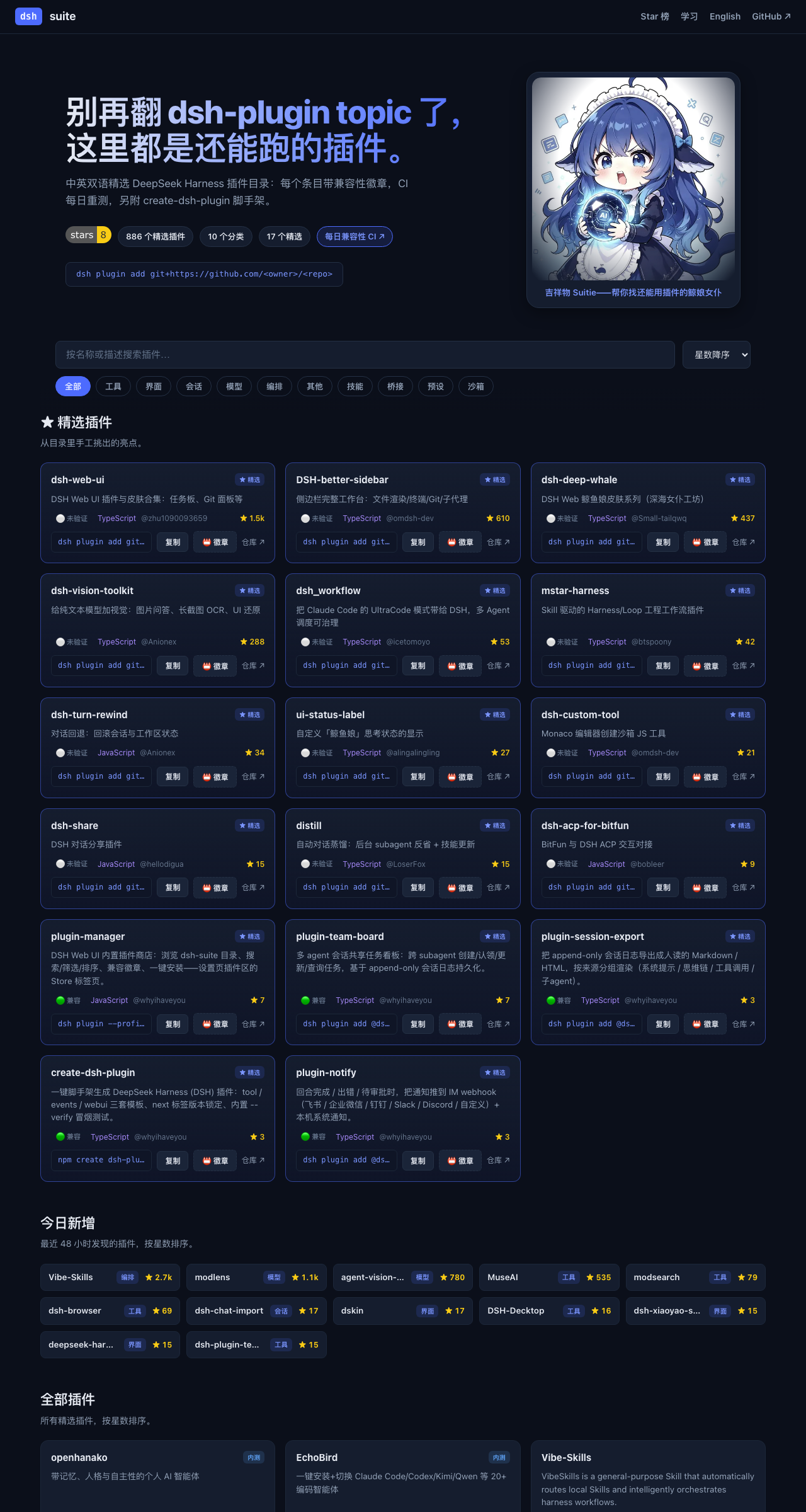
别再翻 dsh-plugin topic 了,这里都是还能跑的插件。
dsh-suite 是 DeepSeek Harness(DSH)插件的活目录——每小时自动刷新、每日兼容实测——外加 DSH 内置插件商店、create-dsh-plugin 脚手架、几个自研插件,以及一个**一体化工作台**(🚧 开发中)。

🧭 生态 / Ecosystem
- 🌐 目录网站 — 在线逛全部插件
- 📖 DSH 中文文档 · dsh-docs.com — 中文教程与文档,开箱即用无需翻墙
- 📕 DSH 插件开发指南 — 中英双语成书
- 🎨 皮肤画廊 — 151 款皮肤昼夜双预览
为什么做 dsh-suite
DSH 发布时没有官方插件 registry。现在找插件只能翻 GitHub 的 dsh-plugin topic(50+ 个零散小插件)和当天冒出来的几个静态 awesome-list——而 DSH 自己还在发破坏性变更(breaking changes)。
所以我们做了四件事:
- 一个「活」目录——880+ 精选插件,CI 每小时刷新数据、每天把收录的包真实装进临时 profile 重测兼容性。
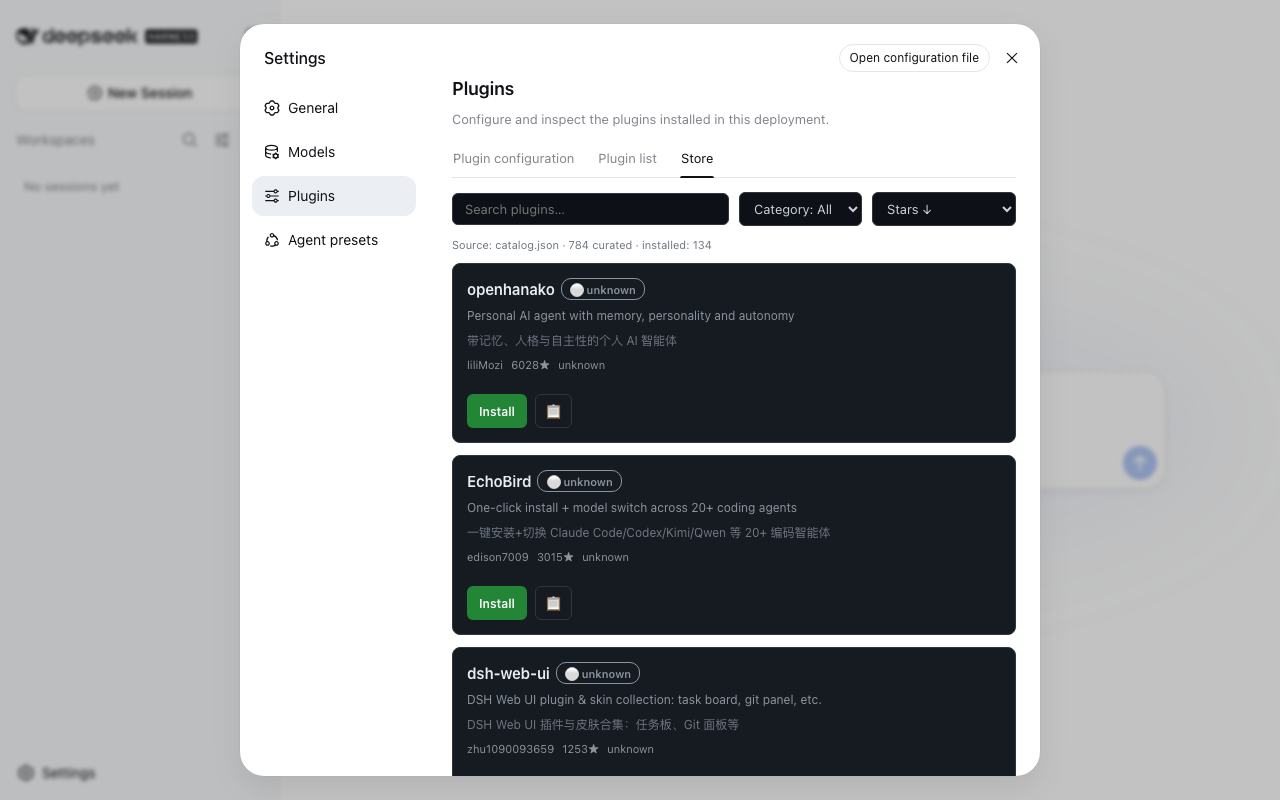
- 一个内置插件商店——
@dsh-suite/plugin-manager在 DSH Web UI 的设置页里加一个 Store 标签:逛目录、搜索、看徽章、一键安装,全程不用离开 DSH。 - 一个脚手架——
npm create dsh-plugin一条命令生成可跑的dsh.bundle+ Cordis 骨架。官方没给脚手架,而「怎么迁移我的插件」是社区呼声最高的需求之一。 - 几个自研插件——不是纯搬运,有第一方产出。
- 一个一体化工作台——dsh-workstation,开箱即用版(🚧 开发中)。
快速开始
# 1. 逛目录网站
open https://whyihaveyou.github.io/dsh-suite/zh.html

# 2. 把插件商店装进你的 DSH Web UI
npx @deepseek-ai/dsh plugin --profile web add @dsh-suite/plugin-manager
#    → 重启 Web UI,然后 设置 → Plugins → Store

# 3.(开发者)造一个自己的插件
npm create dsh-plugin@latest my-plugin
📚 插件目录
⭐ 精选
| 插件 | ⭐ | 兼容 | 描述 |
|---|---|---|---|
| dsh-web-ui | 5277 | 🟢 ok | DSH Web UI 插件与皮肤合集:任务板、Git 面板等 |
| DSH-better-sidebar | 2518 | 🟢 ok | 侧边栏完整工作台:文件渲染/终端/Git/子代理 |
| dsh-deep-whale | 1532 | ⚪ unknown | DSH Web 鲸鱼娘皮肤系列(深海女仆工坊) |
| dsh-vision-toolkit | 799 | 🟢 ok | 给纯文本模型加视觉:图片问答、长截图 OCR、UI 还原 |
| dsh-turn-rewind | 93 | 🟢 ok | 对话回退:回滚会话与工作区状态 |
| dsh_workflow | 91 | 🟢 ok | 把 Claude Code 的 UltraCode 模式带给 DSH,多 Agent 调度可治理 |
| mstar-harness | 52 | ⚪ unknown | Skill 驱动的 Harness/Loop 工程工作流插件 |
| ui-status-label | 39 | 🔴 broken (failed once, retried — install blocked by pnpm build-script policy (allowBuilds) — plugin likely OK, CI policy blocks git prepare scripts) | 自定义「鲸鱼娘」思考状态的显示 |
| dsh-share | 29 | 🟢 ok | DSH 对话分享插件 |
| dsh-custom-tool | 24 | 🟢 ok | Monaco 编辑器创建沙箱 JS 工具 |
| distill | 20 | ⚪ unknown | 自动对话蒸馏:后台 subagent 反省 + 技能更新 |
| all (全家桶) | 15 | 🟢 ok | 全家桶聚合包:一次安装带入第一方全家桶——插件商店、IM 通知、会话导出、多 agent 任务板。 |
| dsh-acp-for-bitfun | 10 | 🟢 ok | BitFun 与 DSH ACP 交互对接 |
| plugin-manager | 7 | 🟢 ok | DSH Web UI 内置插件商店:浏览 dsh-suite 目录、搜索/筛选/排序、兼容徽章、一键安装——设置页插件区的 Store 标签页。 |
| plugin-team-board | 7 | 🟢 ok | 多 agent 会话共享任务看板:跨 subagent 创建/认领/更新/查询任务,基于 append-only 会话日志持久化。 |
| themes (皮肤中心) | 6 | 🟢 ok | 皮肤中心:151 款昼夜成对皮肤一包打尽——网格预览、搜索、一键试穿,支持收藏、最近试穿与随机换肤。 |
| plugin-session-export | 3 | 🟢 ok | 把 append-only 会话日志导出成人读的 Markdown / HTML,按来源分组渲染(系统提示 / 思维链 / 工具调用 / 子agent)。 |
| create-dsh-plugin | 3 | 🟢 ok | 一键脚手架生成 DeepSeek Harness (DSH) 插件:tool / events / webui 三套模板、next 标签版本锁定、内置 --verify 冒烟测试。 |
| plugin-notify | 3 | 🟢 ok | 回合完成 / 出错 / 待审批时,把通知推到 IM webhook(飞书 / 企业微信 / 钉钉 / Slack / Discord / 自定义)+ 本机系统通知。 |
| preset-center (场景预设) | 1 | 🟢 ok | 中文开箱即用预设全家桶:小红书笔记助手 / 中文文案润色 / 日报周报生成器,一键应用到官方 Agent presets,无需重启、选择器立即可见。 |
| plugin-deus (神模扳机) | 1 | 🟢 ok | 神模扳机:一键触发实测验证过的 Minimal 行为,起手指纹自动识别回复模式,本地触发率统计(Wilson CI)。提示词实验台,不承诺任何隐藏能力。 |
🧰 工具
| 插件 | ⭐ | 兼容 | 描述 |
|---|---|---|---|
| open-managed-agents | 243 | ⚪ unknown | Claude Managed Agents API 的开源自托管平台(Cloudflare Workers) |
| role-model | 107 | ⚪ unknown | 按任务把请求路由到「正确的模型」(本地/云) |
| irmia_devkit_open | 39 | ⚪ unknown | Python 开发工具包(无描述) |
| HoloGram | 24 | ⚪ unknown | 3D 代码依赖拓扑图生成器(14 语言) |
| dsh-custom-tool | 24 | 🟢 ok | Monaco 编辑器创建沙箱 JS 工具 |
| dsh-acp-for-bitfun | 10 | 🟢 ok | BitFun 与 DSH ACP 交互对接 |
| fabric | 15 | ⚪ unknown | 类似 MC Fabric 的 hook 处理器 |
| dsh-git-identity | 7 | ⚪ unknown | git 提交固定使用环境作者身份 |
| Hypr-Agent-Protal | 4 | ⚪ unknown | Hyprland 的 Computer Use MCP |
| telegram | 7 | ⚪ unknown | Telegram Bot API 桥接(长轮询) |
| agent-knock-knock | 4 | ⚪ unknown | OpenClaw 插件:共享 tmux 控制本地 Codex/Claude Code |
| dsh-bash-encoding | 7 | ⚪ unknown | bash 输出编码自动识别(UTF-16LE/UTF-8/GBK) |
| dsh-data-agent | 103 | 🟢 ok | 连数据库、写 SQL 的插件 |
| dsh-doctor | 5 | 🟢 ok | flutter-doctor 风格诊断与安全自动修复 |
| dsh-interconnect | 34 | 🟢 ok | 跨实例消息/事件交接插件 |
| dsh-openbiliclaw | 48 | ⚪ unknown | OpenBiliClaw 内容推荐 Agent 接入 DSH |
| dsh-plugin-check | 25 | 🟢 ok | 扫描插件仓库清单协议/patch 格式/构建陷阱 |
| dsh-security-audit | 13 | ⚪ unknown | 本机安全审计:配置/插件来源/会话/网络暴露面 |
| dsh-tool-csv | 4 | ⚪ unknown | CSV 解析/查询/统计/转换工具 |
| dsh-toolkit | 24 | ⚪ unknown | 零依赖工具包合集(time/encoding/json/csv/regex) |
| atomstudio | 0 | ⚪ unknown | 可执行文档工程环境 |
| dsh-cc-connect | 3 | ⚪ unknown | 通过 cc-connect 远程使用 DSH |
| dsh-mnemon | 146 | 🟢 ok | Mnemon 三层记忆体深度集成 |
| dsh-paseo | 2 | ⚪ unknown | DSH 的 paseo 插件扩展支持 |
| dsh-plugin-dev | 13 | ⚪ unknown | DSH 插件开发踩坑档案(skill+文档) |
| dsh-tool-calculator | 7 | ⚪ unknown | 安全数学表达式求值器 |
| dsh-tool-diff | 4 | ⚪ unknown | 文本/JSON/CSV/Markdown 结构化 diff |
| dsh-tool-encoding | 3 | ⚪ unknown | base64/hex/url 编解码 + 哈希工具 |
| dsh-tool-json | 3 | ⚪ unknown | JMESPath JSON 查询工具 |
| dsh-tool-markdown | 4 | ⚪ unknown | HTML↔Markdown 转换、GFM 表格规范化 |
| dsh-tool-regex | 3 | ⚪ unknown | 正则测试/捕获/安全替换工具 |
| dsh-tool-schema | 3 | ⚪ unknown | JSON Schema 验证工具 |
| dsh-tool-stat | 6 | ⚪ unknown | 描述统计/百分位/相关性工具 |
| dsh-tool-time | 4 | ⚪ unknown | ISO 8601/时区/日历运算时间工具 |
| dsh-trace | 2 | ⚪ unknown | DSH 遥测后端:导出轮次/步骤/工具 |
| sandbox-micro | 3 | ⚪ unknown | microsandbox 支持 |
| zotero-harvest | 5 | ⚪ unknown | Zotero 文献采集入库插件(OpenAlex/arXiv/Crossref) |
| dsh-harness-ops | 11 | ⚪ unknown | DSH 运维工具箱:每日快照 A/B 双槽轮换、一键回滚 |
| dsh-inspect | 6 | ⚪ unknown | 检查→修复→复查的对抗式闭环插件 |
| dsh-openmaic | 20 | ⚪ unknown | OpenMAIC:课堂/幻灯片/交互式组件 |
| dsh-plugin-mineru | 38 | ⚪ unknown | MineRU 文档解析工具 |
| dsh-prompt-studio | 3 | ⚪ unknown | 编辑用户与内置系统提示段(实时预览) |
| dsh-scholar | 24 | 🟢 ok | dsh-scholar(文献相关) |
| dsh-ssh | 7 | 🟢 ok | SSH 远程执行:ProxyJump 链、SFTP |
| dsh-tool-search | 3 | 🟢 ok | 按 agent 按需工具发现与渐进 schema 披露 |
| dsh-webbridge | 3 | ⚪ unknown | DSH 结合 Kimi WebBridge |
| ego-browser | 28 | ⚪ unknown | 把 ego-lite 浏览器接入 DSH(给 Agent 用的 Chromium) |
| math-lean | 1 | ⚪ unknown | Lean 内核验证的数学推理插件 |
| plugin-template | 12 | ⚪ unknown | 官方 turtle ui 仓库派生的插件模板 |
| Qwen-MM-Plugins | 5 | ⚪ unknown | Qwen-MM-Plugins 支持 |
| sandbox-mxc | 2 | ⚪ unknown | 微软跨平台沙盒支持 |
| sandbox-nono | 3 | ⚪ unknown | nono 沙盒支持 |
| web-components | 2 | ⚪ unknown | web-components 支持 |
| zotero-wave-rag | 3 | ⚪ unknown | 面向 Zotero 论文库的浪潮式 RAG 检索 |
| modsearch | 202 | ⚪ unknown | DeepSeek Harness 的联网搜索插件。 |
| dsh-browser | 357 | 🟢 ok | Chrome 侧边栏扩展,让 DSH 操控浏览器。 |
| dsh-openapi | 4 | ⚪ unknown | 安全 OpenAPI 3.x 发现与 API 调用工具。 |
| dsh-better-browser | 10 | ⚪ unknown | 通过 Kimi WebBridge 让 agent 操作用户已登录浏览器。 |
| dsh-worktree | 6 | ⚪ unknown | Codex 风格永久 git worktree 插件。 |
| graycode-for-dsh | 5 | ⚪ unknown | graycode 编码工具。 |
| dsh-expression | 34 | 🟢 ok | 找得到、发得出 —— DSH 表情包插件:语义搜图,只发真实文件,走 companion QQ 通道 |
| dsh-director-toolkit | 7 | ⚪ unknown | dsh-director-toolkit — DSH 插件(工具) |
| codex-plugin-dsh | 8 | ⚪ unknown | codex-plugin-dsh — DSH 插件(工具) |
| dsh-prompt-persona | 11 | ⚪ unknown | dsh-prompt-persona — DSH 插件(工具) |
| dsh-tool-policy | 3 | ⚪ unknown | dsh-tool-policy — DSH 插件(工具) |
| dsh-plugin-graph | 2 | 🟢 ok | 一个Deepseek Harness的插件关系图谱可视化插件 |
| dsh-research-notes | 3 | ⚪ unknown | dsh-research-notes — DSH 插件(工具) |
| nowledge-mem-deepseek-harness | 5 | ⚪ unknown | nowledge-mem-deepseek-harness — DSH 插件(工具) |
| dsh-vsc-integration | 8 | ⚪ unknown | dsh-vsc-integration — DSH 插件(工具) |
| dsh-safe-delete | 3 | 🟢 ok | dsh-safe-delete — DSH 插件(工具) |
| dsh-plugins | 5 | ⚪ unknown | dsh-plugins — DSH 插件(工具) |
| dsh-report-html | 3 | ⚪ unknown | dsh-report-html — DSH 插件(工具) |
| dsh-openai-codex-auth | 9 | 🟢 ok | dsh-openai-codex-auth — DSH 插件(工具) |
| dsh-github-connector | 7 | 🟢 ok | dsh-github-connector — DSH 插件(工具) |
| deepseek-pet | 34 | ⚪ unknown | 在你的deepseek-harness上养一只吃白饭的大蓝鲸 |
| dsh-index | 3 | ⚪ unknown | dsh-index — DSH 插件(工具) |
| dsh-web-search-firecrawl | 2 | ⚪ unknown | dsh-web-search-firecrawl — DSH 插件(工具) |
| dsh-plugin-template | 12 | ⚪ unknown | dsh-plugin-template — DSH 插件(工具) |
| dsh-composer-history | 6 | 🟢 ok | dsh-composer-history — DSH 插件(工具) |
| dsh-fun-ticker | 5 | ⚪ unknown | DSH 行情跑马灯插件:可自选标的的加密/汇率/A股/指数/港美股跑马灯,免 key 数据源,宿主代理+缓存 |
| jumpserver-dsh | 2 | ⚪ unknown | jumpserver-dsh — DSH 插件(工具) |
| dsh-browser | 3 | 🟢 ok | dsh-browser — DSH 插件(工具) |
| dsh-dev-actions | 1 | ⚪ unknown | dsh-dev-actions — DSH 插件(工具) |
| dsh-plugin-doctor | 1 | ⚪ unknown | DSH 插件体检:安装前检查 peer 版本兼容性,防止 rc 不匹配崩溃 🩺 |
| deepseek-harness-background | 2 | 🟢 ok | deepseek-harness-background — DSH 插件(工具) |
| task-passport | 9 | 🟢 ok | task-passport — DSH 插件(工具) |
| dsh-prompt-presets | 1 | ⚪ unknown | dsh-prompt-presets — DSH 插件(工具) |
| dsh-hub | 3 | ⚪ unknown | dsh-hub — DSH 插件(工具) |
| dsh-plugin-colorscheme | 2 | ⚪ unknown | dsh-plugin-colorscheme — DSH 插件(工具) |
| dsh-scout | 2 | 🟢 ok | 面向 DeepSeek Harness 的只读环境探测插件,为智能体提供运行环境、软件版本、系统资源、端口、服务、硬件及工作区信息。 |
| dsh-screenshot-diff | 1 | 🟢 ok | dsh-screenshot-diff — DSH 插件(工具) |
| dsh-turn-index | 1 | ⚪ unknown | deepseek harness的侧边栏对话轮次索引插件 |
| dsh-mobile-control | 3 | 🟢 ok | dsh-mobile-control — DSH 插件(工具) |
| dsh-hub | 3 | ⚪ unknown | dsh-hub — DSH 插件(工具) |
| dsh-tool-monitor | 1 | ⚪ unknown | dsh-tool-monitor — DSH 插件(工具) |
| dsh-suggest-prompt | 2 | ⚪ unknown | dsh-suggest-prompt — DSH 插件(工具) |
| dsh-cloudflare-browser-run | 1 | 🟢 ok | dsh-cloudflare-browser-run — DSH 插件(工具) |
| safe-find-dsh-plugins | 3 | ⚪ unknown | safe-find-dsh-plugins — DSH 插件(工具) |
| dsh-all-search | 1 | 🟢 ok | dsh-all-search — DSH 插件(工具) |
| dsh-plugin-pixluna | 3 | ⚪ unknown | dsh-plugin-pixluna — DSH 插件(工具) |
| dsh-plugins-hub | 2 | ⚪ unknown | dsh-plugins-hub — DSH 插件(工具) |
| dsh-huadongbianzuqi | 7 | ⚪ unknown | DeepSeek Harness的滑动变祖器插件 |
| dsh-soul-md | 3 | 🟢 ok | dsh-soul-md — DSH 插件(工具) |
| dsh-daily-fortune | 3 | ⚪ unknown | dsh-daily-fortune — DSH 插件(工具) |
| dsh-plugin-rag | 1 | ⚪ unknown | dsh-plugin-rag — DSH 插件(工具) |
| dsh-model-selector | 1 | ⚪ unknown | dsh-model-selector — DSH 插件(工具) |
| dsh-github | 3 | 🟢 ok | dsh-github — DSH 插件(工具) |
| dsh-plugin-review | 1 | ⚪ unknown | dsh-plugin-review — DSH 插件(工具) |
| dsh-turn-budget | 1 | 🟢 ok | dsh-turn-budget — DSH 插件(工具) |
| DIzzy-DSH | 7 | ⚪ unknown | DIzzy-DSH — DSH 插件(工具) |
| dsh-file-explorer | 2 | ⚪ unknown | dsh-file-explorer — DSH 插件(工具) |
| dsh-tool-reqpipe | 1 | 🟢 ok | dsh-tool-reqpipe — DSH 插件(工具) |
| dsh-ajw | 1 | ⚪ unknown | DS安甲网 (ds.ajw.cn) · 为你的 DeepSeek Harness 机器人 安装上所需功能的装甲吧 — 每日聚合 DeepSeek Harness / DSH 插件生态开源项目 |
| dsh-fun-typewriter | 3 | ⚪ unknown | dsh-fun-typewriter — DSH 插件(工具) |
| dsh-port-guard | 1 | ⚪ unknown | dsh-port-guard — DSH 插件(工具) |
| qiushi-dsh-evidence-audit | 5 | 🟢 ok | qiushi-dsh-evidence-audit — DSH 插件(工具) |
| dsh-plugin.github.io | 3 | ⚪ unknown | dsh-plugin.github.io — DSH 插件(工具) |
| dsh-weixin | 4 | 🟢 ok | dsh-weixin — DSH 插件(工具) |
| dsh-lens-lite | 1 | 🟢 ok | dsh-lens-lite — DSH 插件(工具) |
| dsh-tavily-search | 4 | 🟢 ok | dsh-tavily-search — DSH 插件(工具) |
| dsh-sticky-disclosure | 3 | ⚪ unknown | dsh-sticky-disclosure — DSH 插件(工具) |
| dsh-openai-codex-oauth | 2 | ⚪ unknown | dsh-openai-codex-oauth — DSH 插件(工具) |
| dshx | 5 | ⚪ unknown | dshx — DSH 插件(工具) |
| dsh-reloader | 2 | ⚪ unknown | DSH 一键重启:装完插件说一句 reload 就自动重启生效,不用手动 Ctrl+C 🔄 |
| dsh-bisect-debug | 1 | ⚪ unknown | dsh-bisect-debug — DSH 插件(工具) |
| dsh-auto-chess | 3 | ⚪ unknown | DSH Web里的自走棋插件:人机对战或双AI对弈 |
| dsh-turn-meta | 1 | ⚪ unknown | dsh-turn-meta — DSH 插件(工具) |
| dsh-tool-browser | 1 | 🟢 ok | dsh-tool-browser — DSH 插件(工具) |
| dsh-music-plugin | 3 | ⚪ unknown | dsh-music-plugin — DSH 插件(工具) |
| dsh-batch-regression | 1 | 🟢 ok | dsh-batch-regression — DSH 插件(工具) |
| dsh-browser-control | 1 | 🟢 ok | dsh-browser-control — DSH 插件(工具) |
| dsh-code-ide | 11 | ⚪ unknown | dsh-code-ide — DSH 插件(工具) |
| matlab-modelsim-vivado-plugin | 2 | ⚪ unknown | matlab-modelsim-vivado-plugin — DSH 插件(工具) |
| dsh-codex | 38 | 🟢 ok | dsh-codex — DSH 插件(工具) |
| dsh-plugins | 1 | ⚪ unknown | dsh-plugins — DSH 插件(工具) |
| dsh-2origin | 3 | ⚪ unknown | dsh-2origin — DSH 插件(工具) |
| dsh-terminal | 3 | 🟢 ok | dsh-terminal — DSH 插件(工具) |
| dsh-survey | 3 | ⚪ unknown | 问卷式批量提问插件 for DeepSeek Harness:一次性问 10+ 题(单选/多选/是否 toggle/对比题/开放题),可跳过、全屏浮层、提交后对半 recap |
| deepseek-harness-plugin-manager | 3 | ⚪ unknown | deepseek-harness-plugin-manager — DSH 插件(工具) |
| dsh-co-authored-by | 2 | ⚪ unknown | dsh-co-authored-by — DSH 插件(工具) |
| DSH-Plugs | 6 | ⚪ unknown | DSH-Plugs — DSH 插件(工具) |
| dsh-host-web-compat | 2 | ⚪ unknown | dsh 宿主插件——经 webserver 钩子向页面注入旧内核浏览器 polyfill。 |
| dsh-doctor | 1 | 🟢 ok | dsh-doctor — DSH 插件(工具) |
| dsh-code-intel | 0 | ⚪ unknown | dsh-code-intel — DSH 插件(工具) |
| dsh-doctor | 1 | 🟢 ok | dsh-doctor — DSH 插件(工具) |
| dsh-backup-sync | 1 | ⚪ unknown | dsh-backup-sync — DSH 插件(工具) |
| dsh-auto | 4 | ⚪ unknown | dsh-auto — DSH 插件(工具) |
| dsh-annotate | 7 | ⚪ unknown | dsh-annotate — DSH 插件(工具) |
| dsh-codex-connect | 34 | ⚪ unknown | dsh-codex-connect — DSH 插件(工具) |
| DSH-Decktop | 21 | ⚪ unknown | DSH-Decktop — DSH 插件(工具) |
| dsh-cad-review | 4 | ⚪ unknown | dsh-cad-review — DSH 插件(工具) |
| dsh-xai | 2 | ⚪ unknown | dsh-xai — DSH 插件(工具) |
| dsh-academic-research | 0 | ⚪ unknown | dsh-academic-research — DSH 插件(工具) |
| dsh-plugin-hello | 0 | 🟢 ok | dsh-plugin-hello — DSH 插件(工具) |
| deepseek-harness-rs | 1 | ⚪ unknown | deepseek-harness-rs — DSH 插件(工具) |
| dsh-prompt-enhancer | 35 | ⚪ unknown | DeepSeek Harness DSH 提示词增强插件:✨ 一键优化草稿 |
| dsh-specflow | 3 | ⚪ unknown | dsh-specflow — DSH 插件(工具) |
| dsh-plugins | 0 | ⚪ unknown | dsh-plugins — DSH 插件(工具) |
| dsh-tool-chaos | 4 | ⚪ unknown | dsh-tool-chaos — DSH 插件(工具) |
| dsh-robotic-harness | 17 | ⚪ unknown | dsh-robotic-harness — DSH 插件(工具) |
| dsh-codex-subscription | 17 | 🟢 ok | dsh-codex-subscription — DSH 插件(工具) |
| dsh-sticky-note | 11 | ⚪ unknown | DSH 便签插件:随手记点子/感想/TODO,Markdown 预览 + 快捷键 + 历史归档,存储路径可配置 |
| dsh-gen3d | 1 | 🟢 ok | dsh-gen3d — DSH 插件(工具) |
| dsh-mdbox | 0 | ⚪ unknown | dsh-mdbox — DSH 插件(工具) |
| dsh-kanban | 5 | ⚪ unknown | 一个Hermes风格的看板插件,在deepseek harness上使用 |
| dsh-tool-git | 4 | 🟢 ok | dsh-tool-git — DSH 插件(工具) |
| dsh-header-status | 0 | ⚪ unknown | dsh-header-status — DSH 插件(工具) |
| dsh-mcp-manager | 2 | ⚪ unknown | dsh-mcp-manager — DSH 插件(工具) |
| dsh-tray | 0 | ⚪ unknown | dsh-tray — DSH 插件(工具) |
| dsh-oauth-mcp-client | 9 | ⚪ unknown | OAuth 2.1 MCP 客户端:给 DSH 接支持 Streamable HTTP 的 MCP 服务器。 |
| dsh-playwright-browser | 9 | 🟢 ok | Playwright browser automation for DeepSeek Harness|面向 DeepSeek Harness 的 Playwright 浏览器自动化插件 |
| deepseek-harness-action | 11 | ⚪ unknown | GitHub Action 集成:AI 代码评审、CI 诊断、自动修复、Issue 转 PR 全流程自动化。 |
| Oh-My-DSH | 11 | ⚪ unknown | DeepSeek Harness 插件精选集 · 300+ dsh-plugin 收录 · 22 大分类 |
| dsh-win-terminal-inspector | 7 | ⚪ unknown | Windows 终端检查:查看 DSH 持久/PTY shell 的运行状态。 |
| dsh-tool-hashline | 2 | ⚪ unknown | 哈希锚定读写工具:read/edit/grep 每一行都带内容指纹,改没改一目了然。 |
| dsh-view-modes | 2 | ⚪ unknown | 视图模式:Verbose / Normal / Summary 三档切换。 |
| dsh-codex-oauth | 2 | 🟢 ok | 用 ChatGPT(Codex Pro/Plus)订阅跑 DSH。 |
| dsh-figma-to-lottie | 1 | ⚪ unknown | Figma/SVG 转 Lottie 动画:SVG 路径直接编成动画。 |
| opencode-usage | 1 | ⚪ unknown | OpenCode Go 订阅额度徽章插件(dsh bundle) |
| dsh-plugin-git-inspect | 1 | ⚪ unknown | 只读 Git 检查工具:安全地查看仓库状态。 |
| dsh-html-canvas | 2 | ⚪ unknown | 把 AI 生成的 HTML 变成可点击编辑的画布。 |
| dsh-turn-approval | 2 | ⚪ unknown | 回合级「本次任务允许」审批:只放行当前这一轮。 |
| dsh-plugins | 1 | ⚪ unknown | 社区插件集合(独立包组织)。 |
| dsh-plugin-knowledge-graph | 4 | ⚪ unknown | 代码知识图谱:read_graph 工具基于代码库知识图谱回答结构性问题。 |
| dsh-document-parser | 1 | ⚪ unknown | LiteParse 驱动的文档解析工具:parse_document。 |
| long-draft-input | 2 | ⚪ unknown | Deepseek Harness 插件:用于聚合发送框长文本 |
| dsh-playwright-native | 1 | ⚪ unknown | 把原生 Playwright CLI 注册为 DeepSeek Harness 透传工具(dsh-plugin) |
| dsh-composer-polish | 6 | ⚪ unknown | 输入框草稿一键润色:把随手打的草稿重写得更顺,自动回填回输入框。 |
| dsh-code-impact | 2 | ⚪ unknown | 面向 DeepSeek Harness 的只读 TypeScript/JavaScript 代码变更影响分析插件 Read-only TypeScript/JavaScript change impact analysis plugin for DeepSe… |
| dsh-oauth-api | 1 | ⚪ unknown | 树外 OAuth 插件:Grok/xAI、Codex、Claude 订阅接入。 |
| dsh-plugin | 2 | 🟢 ok | 社区插件集合包。 |
| dsh-zh-output | 3 | ⚪ unknown | DeepSeek Harness 中文输出插件:强制中文思考与输出的中文预设 |
| dsh-excel-chat | 5 | 🟢 ok | 跟 Excel 对话:用自然语言创建、编辑、修复、校验表格(单元格、公式、样式)。 |
| dsh-eyecare | 3 | ⚪ unknown | dsh护眼插件 |
| dsh-plugin-healthcheck | 14 | ⚪ unknown | 害怕插件装了就崩溃?用这个插件帮你检测插件是否正常/是否含木马! |
| deepseek-harness-openai-oauth | 5 | 🟢 ok | GPT 模型接入:通过 Codex app-server 的 ChatGPT OAuth 把 GPT 模型当 provider 用。 |
| dsh-plugin-browser | 1 | 🟢 ok | 无头 Playwright 浏览器驱动:agent 自动操作网页。 |
| deepseek-plugin-store | 24 | ⚪ unknown | DeepSeek Harness 独立社区插件商店:发现、安装并提交经过验证的插件、工具与扩展。 |
| dsh-plugin-store | 4 | 🟢 ok | DSH 社区插件目录主页。 |
| dsh-aura-scheduler | 1 | ⚪ unknown | 主动调度:Aura 心跳 + 价值网络(官方协议实现)。 |
| harness-pet | 5 | ⚪ unknown | 社区小宠物:一只住在 DeepSeek Harness 里的小鲸鱼。 |
| dsh-egress-guard | 0 | 🟢 ok | 零网络、fail-closed 的密钥预检:模型请求前先本地拦一道。 |
| dsh-geo | 0 | ⚪ unknown | 生成式引擎优化(GEO)DeepSeek Harness 插件:面向本地 Markdown 知识库的 SEO、GEO 与 AEO 审计工具。 |
| dsh-video-downloader | 2 | ⚪ unknown | 媒体下载:检测并下载 Bilibili/YouTube/抖音/小红书视频音频。 |
| dsh-mermaid-preview | 0 | ⚪ unknown | Mermaid 代码块渲染成图表(Web 端)。 |
| dsh-web-search-provider | 1 | 🟢 ok | 原生网页搜索 provider(ctx.web seam):OpenAI Responses 后端。 |
| dsh-action-parity | 3 | ⚪ unknown | 跨界面动作绑定与回放一致性证据:验证不同界面下同一操作行为一致。 |
| dsh-input-history | 3 | ⚪ unknown | DSH Web 输入历史插件:Ctrl+Up / Ctrl+Down 像终端一样召回与切换已发送消息,零核心改动 |
| dsh-tool-backtest | 0 | 🟢 ok | DSH 插件:策略回测引擎 — 定义买卖信号,跑历史数据,输出绩效指标。 |
| dsh-plugins | 2 | ⚪ unknown | 可组合的 DSH 插件 monorepo。 |
| dsh-plugin-quote-reply | 1 | 🟢 ok | DSH plugin: select text in a conversation, then quote it into the composer or reply in a new window. / DeepSeek Harness 划词引用插件:选中… |
| dsh-sound | 0 | ⚪ unknown | Distinct alert sounds for DeepSeek Harness: network error, approval request, question asked, and turn-completion notifications. |
| dsh-tool-playwright | 0 | ⚪ unknown | 一个给 DeepSeek Harness 用的插件:让 AI 能真的打开浏览器上网——打开网页、点按钮、填表单、翻页、看页面内容,就像人一样操作浏览器。 |
| knowlp-rag | 3 | ⚪ unknown | 双知识图谱 RAG:Markdown 笔记建成会「用进废退」的知识图谱,DSH/Claude Code 都能用。 |
| omdp | 2 | ⚪ unknown | 作者自己的 DSH 插件 monorepo 合集。 |
| dsh-ProjectModel | 0 | ⚪ unknown | deepseek项目组功能 |
| dsh-pain-point-check | 1 | ⚪ unknown | 强制痛点检查守卫:连续两次非结论性回合后主动找用户确认。 |
| dsh-entity-dd | 1 | ⚪ unknown | 出海交易对手尽调 · DeepSeek Harness 插件:先确认你在跟哪个法人签约,再判断这份登记资料能不能作为决策依据。免费官方数据源,无需密钥。 |
| dsh-wash-calendar | 0 | ⚪ unknown | 周期性习惯打卡日历:记录上次清洗日期并提醒。 |
| dsh-codex-auth | 11 | 🟢 ok | 复用本机 Codex CLI 的 ChatGPT 登录态,给 DSH 加 Codex 模型 provider。 |
| dsh-code-lens | 0 | ⚪ unknown | code 模式子派发可观测性:工具调用链路可见。 |
| dsh-subprocess-inherit-environment | 2 | ⚪ unknown | 把完整 Harness 环境变量透传给子进程(可拆卸的调试向插件)。 |
| dsh-doctor-windows | 0 | ⚪ unknown | Windows 环境诊断:DSH 在 Windows 上的问题排查。 |
| MuseAI | 594 | ⚪ unknown | 创建你的 AI 角色,进入你的故事世界。和角色聊天、冒险、穿书,让每一次互动都留下羁绊(支持 DeepSeek Harness 插件,欢迎使用) |
| dsh-user-experience | 19 | 🟢 ok | UX 体检插件:扫描 React + TypeScript 源码里的交互问题,定位到具体位置并给出修复建议。 |
| dsh-plugin-automations | 2 | ⚪ unknown | 定时任务插件:Web profile 里安排计划任务。 |
| dsh-web-search-tavily | 2 | ⚪ unknown | Tavily 搜索源 bundle:热切换、免配置接入。 |
| trio | 15 | ⚪ unknown | DSH 全家桶:浏览器自动化 + MCP Server + GitHub 集成 |
| dsh-policy-drift-proof | 3 | ⚪ unknown | 策略漂移证据:内容寻址、脱敏保存策略变化记录。 |
| dsh-audit-bundle | 3 | ⚪ unknown | 跨独立证据源的审计索引:内容寻址汇总各证据源。 |
| dsh-recovery-proof | 3 | ⚪ unknown | 只读恢复演练证据:记录恢复演练过程供审计。 |
| dsh-mediacrawler | 3 | ⚪ unknown | MediaCrawler 采集的有界隔离 MCP 适配器:安全地做社交媒体数据采集。 |
| dsh-credentials-system | 0 | ⚪ unknown | 系统绑定加密凭证 provider:凭据跟系统用户绑定。 |
| dsh-plugins | 8 | ⚪ unknown | 插件集合(独立包,一个仓库管理)。 |
| deepseek-harness-cli | 3 | ⚪ unknown | 交互式终端 agent(DeepSeek Harness 分支):一切皆插件。 |
| dsh-chat-outline | 6 | 🟢 ok | 对话栏左侧常驻大纲:快速定位每次 user 提问与最后 assistant 回复(DeepSeek Harness 插件) |
| dsh-passwords | 16 | ⚪ unknown | 让 DeepSeek Harness 变成服务器级多租户平台:远程访问 + 自动 HTTPS、子用户权限与配额、沙盒强制、加密认证与审计日志。 |
| mindspace-dsh-local-rag | 3 | ⚪ unknown | 本地混合 RAG:ARPM 派生,检索增强全在本机完成。 |
| dsh-mcp-pack | 1 | ⚪ unknown | 常用 MCP server 一键接入 DeepSeek Harness (dsh) 的 .cordis.yml 清单合集,开箱即用,零代码。 |
| upstream-radar | 6 | ⚪ unknown | 上游雷达:持续监控 DSH 插件的漏洞与破坏性变更影响。 |
| dsh-plugin-anydoc | 6 | ⚪ unknown | DSH 插件:基于 @firecrawl/anydoc 将 Word、PPT、Excel、PDF、EPUB、CSV 等文档转换为 GitHub-Flavored Markdown |
| deepseek-harness-lite | 2 | ⚪ unknown | 轻量本地优先的 DSH 发行版 + 验证过插件包(社区非官方)。 |
| dsh-bash-encoding | 2 | ⚪ unknown | DSH bash 输出编码自动识别插件:替换 ctx.bash,自管 spawn 收集原始字节,自动检测 UTF-16LE/UTF-8/GBK 等编码并正确解码,修复 WSL/Windows 下 bash 工具的中文乱码。 |
| dsh-oai-oauth | 1 | 🟢 ok | 不用 API key、用 OpenAI 订阅直接跑 ChatGPT。 |
| surfing-plugin | 12 | ⚪ unknown | 自建搜索接入:用 SearXNG 搜索 + Crawl4AI 抓取网页,替换 DSH 默认的联网方案。 |
| deepseek-harness-vsc-extension | 24 | ⚪ unknown | DSH 的 VS Code 扩展:在编辑器里直接使用 DeepSeek Harness。 |
| dsh-ci-doctor | 3 | ⚪ unknown | CI 故障诊断:盯着 GitHub Actions 新失败,把原始日志翻译成可操作的诊断。 |
| dsh-read-history | 2 | ⚪ unknown | 迁移claude/codex的对话历史到dsh |
| dsh-yuzuha-prompts-manager | 2 | ⚪ unknown | 提示词管理插件:宿主+浏览器双面,集中管理 dsh web profile 的提示词。 |
| dsh-pet | 3 | 🟢 ok | 社区版 DeepSeek 桌宠客户端插件。 |
| dsh-win-launchscript | 1 | ⚪ unknown | 适用于 Windows 的 DeepSeek Harness(DSH)一键启动脚本,自动启动 Web 服务、打开浏览器,并在关闭窗口后停止服务。 |
| dsh-model-provider-label | 1 | ⚪ unknown | 模型选择器同时显示 provider 显示名与模型名,同名模型不再混淆。 |
| dsh-pub | 2 | ⚪ unknown | dsh.pub 双语、源码背书的 DSH 插件注册表与安装器。 |
| anysearch-dsh | 174 | 🟢 ok | AnySearch 联网搜索接入:给 DSH 配上 AnySearch 的搜索 provider 和进阶搜索工具。 |
| dsh-toy | 58 | 🟢 ok | 玩具控制协议(TCP):用 DSH 控制可编程玩具,给 agent 加一点实体交互的玩法。 |
| dsh-conv-search | 3 | ⚪ unknown | dsh-conv-search(对话内文本搜索)— in-conversation text search plugin for DeepSeek Harness (Ctrl+F, match case, whole word, streaming-awar… |
| dsh-web-search-exa | 6 | 🟢 ok | 零配置 Exa 网页搜索源:无 key 匿名模式接入。 |
| dsh-plugins | 8 | ⚪ unknown | deepseek harness 插件工作区:一包放多个 DSH 插件(树外维护)。 |
| dsh-mindmap | 5 | ⚪ unknown | DSH 思维导图模式插件:课件(PPT/PDF/Word)+电子书 → 打印级复习思维导图 HTML(A3 横向、每主干一页、大括号式横向、宋体、右栏笔记区、封面总览 + 交互式测试题) |
| dsh-testgen | 3 | ⚪ unknown | 自动生成单元测试:/testgen 命令 + generate_tests 工具,生成、运行、修复直到全绿。 |
| dsh-bottom-bar | 8 | ⚪ unknown | 用于提供更丰富的DeepSeek Harness底栏信息显示插件 |
| dsh-stock-watch | 57 | 🟢 ok | A股自选股实时行情盯盘插件 - DeepSeek Harness Web 右上角可折叠弹窗 |
| dsh-tool-search | 4 | 🟢 ok | 工具搜索与瘦身:Hermes 式渐进披露——按需搜索、描述、调用长尾工具。 |
| dsh-spec-loop | 5 | ⚪ unknown | Spec-driven 开发闭环(OpenSpec 兼容):/spec 命令族驱动 生成规格 → 批准 → 实现 → 逐条验收 → 归档 |
| dsh-cmd-starter | 3 | ⚪ unknown | 为deepseek-harness提供一个命令行启动工具,让它 --append-prompt --resume 等类claude命令 |
| dsh-mcp-manager | 1 | 🔴 broken (failed once, retried — install failed (exit 1): at runPlugin (file:///home/runner/.npm/_npx/1e7f6d9597241db0/node_modules/@deepseek-ai/dsh/lib/plugin-9h8shc) | 一个 DeepSeek Harness MCP 配置页 |
| dsh-nebulagraph-v5 | 3 | ⚪ unknown | 连接 Nebula v5 图数据库的插件。 |
| dsh-plugin-text-translation | 3 | ⚪ unknown | 文本与文档翻译插件:标签防爆遮罩保护代码/占位符,批量翻译 i18n 文案不破坏结构。 |
| dsh-overleaf | 7 | ⚪ unknown | Overleaf 写作接入:通过 OverleafMCP 让 DSH 直接读写你的 LaTeX 项目和文档。 |
| dsh-pet | 264 | 🟢 ok | DeepSeek Harness 桌面宠物插件 + 完整素材生成链:AI 提示词 → 绿幕视频 → 透明动画 → 可安装插件,从零到宠物全流程可复现 |
| dsh-humanizer | 4 | 🟢 ok | DeepSeek Harness原生中文文本人工智能痕迹消除与多重审核对抗工作流 |
| dsh-pixluna | 3 | 🟢 ok | dsh-plugin-pixluna |
| dsh-deepseek-billing | 3 | ⚪ unknown | 在 DSH 中查看 DeepSeek API 账户余额及计费信息 |
| dsh-suggested-replies | 3 | ⚪ unknown | DSH Web 预测回复插件:AI 回复后在输入框上方生成可点击填入草稿的下一步消息候选 |
| dsh-agy | 19 | 🟢 ok | Google Antigravity (agy) 接入:OAuth 授权 + 多账号池 + 429 自动轮换 + 设备指纹。 |
| dsh-plugin-mermaid | 4 | ⚪ unknown | Mermaid 代码块渲染:图表/源码双视图。 |
| dsh-todo-freshness-guard | 1 | ⚪ unknown | 防止 stale todo_write 状态的守卫插件。 |
| dsh-windows-readiness-proof | 2 | ⚪ unknown | Windows 平台就绪证明(内容寻址,脱敏观测)。 |
| dsh-article-publish | 4 | ⚪ unknown | 文章发布插件:agent 在会话里写完文章直接发布到 CSDN/掘金/博客园,还能拉科技资讯当素材。 |
| dsh-survival | 1 | ⚪ unknown | DeepSeek Harness 生存模式 |
| dsh-cache-stabilizer | 2 | ⚪ unknown | 缓存前缀稳定化 + 基于证据的缓存指标。 |
| dsh-tool-somark | 2 | ⚪ unknown | SoMark 文档解析工具(somark_parse)。 |
| dsh-mcp-settings | 2 | ⚪ unknown | dsh mcp服务器配置管理 |
| dsh-terminal | 2 | 🟢 ok | 持久交互式终端模式。 |
| dsh-anchored-standard | 3696 | ⚪ unknown | 两段式 Agent 预设:先用精简配置快速启动,再切换到完整 Standard 工具集,兼顾启动速度与全功能。 |
| dsh-whalito-desk | 3 | ⚪ unknown | 鲸仔 Whalito,DeepSeek Harness 桌面助手。这是由DSH + DS-V4-Pro-0813开发的tauri桌面程序。 |
| dsh-browser | 8 | 🟢 ok | 浏览器能力:有头 Edge/Playwright 驱动、SSRF 安全导航、无障碍树点击、权限门。 |
| dsh-qqbot | 71 | 🟢 ok | 让 QQ 机器人接入 DeepSeek Harness(dsh)的官方插件 |
| dsh-plugin-store | 5 | 🟢 ok | DeepSeek Harness 插件商店:浏览、搜索、筛选并一键安装 dsh-plugin 生态插件 |
| dsh-office | 15 | 🟢 ok | 办公三件套!Office document tools for DeepSeek Harness (dsh): generate, read, and edit spreadsheets (.xlsx), PDFs, and presentations (.… |
| dsh-plugins | 2 | ⚪ unknown | 社区插件 monorepo(独立发布的多个 DSH 插件)。 |
| promptwall | 3 | ⚪ unknown | 本地提示注入与密钥外泄防火墙:给 DSH 加一道安全闸。 |
| dsh-tailscale-sync | 4 | ⚪ unknown | Zero-config Tailscale sync for DeepSeek Harness (dsh-plugin). 零配置:在手机上继续电脑端 DeepSeek Harness 的工作。 |
| dsh-mcp-center | 1 | 🟢 ok | 可视化连接任意 MCP 服务器:点点点就接入。 |
| dsh-side-chat | 12 | 🟢 ok | Codex 风格侧边聊天:选中文本后在独立侧栏追问,不打断主对话。 |
| dsh-ocg-billing | 1 | ⚪ unknown | OpenCode Go 计费层:缓存官方定价 + 花费计算。 |
| dsh-quote-reply | 3 | ⚪ unknown | 选中即引用:把选中的文字或整条回复以 Markdown 引用块填入输入框。 |
| dsh-browser | 1 | 🟢 ok | 给 DeepSeek Harness 的浏览器插件:AI 直接开真实的 Edge 浏览器逛网页、点击、填表、截图,无需 CDP 或 MCP。 |
| SapBuddy-dsh | 3 | ⚪ unknown | SapBuddy 的 DSH 版:41 个 SAP 工具、技能集、写门禁。 |
| dsh-blackjack | 2 | ⚪ unknown | 谁不想coding的时候急头白脸的和大肥鱼来一场紧张刺激的21点呢 |
| dsh-keepalive | 3 | ⚪ unknown | 可选分离式看门狗:快照检查修复 DSH Web 进程。 |
| dsh-scrape-webpage | 7 | ⚪ unknown | 用于DeepSeek Harness的网页读取插件 |
| dsh-museai-tavern | 10 | ⚪ unknown | MuseAI的DeepSeek Harness插件,可以将你的MuseAI角色放进DSH使用啦! |
| citeguard | 3 | ⚪ unknown | 引用提取与证据核验:帮 agent 的回答带可验证出处。 |
| dsh-commandcode-go-provider | 3 | ⚪ unknown | Command Code Go API provider for dsh. Command Code 订阅 + DeekSeek Harness 兼容层 |
| dsh-openai-oauth | 5 | 🟢 ok | GPT 模型接入:通过 Codex app-server 的 ChatGPT OAuth 把 GPT 模型当 provider 用。 |
| dsh-web-search-Tavily | 4 | 🟢 ok | 把 Tavily Search API 接成 DSH 的联网搜索源。 |
| dsh-satori | 2 | 🟢 ok | 连接 DSH 与 Satori 服务器,获得 IM 能力。 |
| dsh-pi | 3 | ⚪ unknown | 在 DSH 里跑可信的 Pi 扩展:兼容宿主直接运行未经修改的 Pi extensions。 |
| dsh-hotplug-engine | 2 | 🟢 ok | 插件安装/回滚/审计服务化:热插拔引擎。 |
| dsh-claude-provider | 25 | ⚪ unknown | 自定义 Claude provider:DSH 里用 Claude 模型。 |
| dsh-plugin-working-status | 8 | ⚪ unknown | 把思考状态里那句 "Deep diving..." 改成你喜欢的任何话。超轻量级。 |
| dsh-mcp-admin | 5 | ⚪ unknown | MCP 管理:设置页查看 /mcp 状态,按 profile 管理 MCP 服务器。 |
| dsh-plugin-manager | 5 | 🟢 ok | DSH 插件管理, 一键启用/禁用插件 |
| dsh-beacons | 2 | ⚪ unknown | 右侧提示词导航栏(Codex/OpenChamber 风格滚动定位条)。 |
| dsh-plugin | 90 | 🟢 ok | 让 DSH 通过插件控制 Tabbit 浏览器:安装后 agent 可以驱动 Tabbit 做浏览器操作。 |
| adb_dsh_plugin | 3 | ⚪ unknown | 把本机 ADB 注册为 DSH 工具:通过 ADB 控制 Android 设备。 |
| dsh-livis-connector | 3 | ⚪ unknown | 把 Livis 接进 DSH:应用内授权 + 中继管理。 |
| dsh-utility-tools | 3 | 🟢 ok | DSH(DeepSeek Harness)对话工具插件:拖拽任意文件进入对话 + 选中文本引用。 |
| dsh-usage-dashboard | 8 | ⚪ unknown | DeepSeek 额度与用量仪表盘 — DSH (DeepSeek Harness) 动态 Cordis 插件 |
| dsh-sci | 3 | ⚪ unknown | 零依赖科学计算工具:物理单位换算、科学计算开箱即用。 |
| dsh-docling | 10 | ⚪ unknown | 本地文档智能:离线 OCR 解析 PDF、Office、图片和扫描件,全程不出本机。 |
| dsh-git-guard | 1 | ⚪ unknown | Git-aware write guard plugin for DeepSeek Harness: blocks whole-file writes that would overwrite the user's uncommitted changes,… |
| dsh-cyber-particle | 11 | ⚪ unknown | 动态粒子网络背景:赛博氛围感界面。 |
| dsh-browseruse | 4 | ⚪ unknown | browser-use 风格浏览器自动化:驱动专属浏览器执行网页任务。 |
| dsh-rewind | 2 | 🟢 ok | DSH回退插件 |
| dsh-plugin-auditor | 2 | ⚪ unknown | DSH plugin auditor: pre-flight compatibility check for profile plugin combinations. DSH 插件审核器:安装新插件前扫描组合兼容性,预防启动崩溃。 |
| dsh-plugin-diff-review | 7 | ⚪ unknown | 工作区改动审查:浏览 diff、暂存/丢弃文件、提交推送、行内评论,内置文件页签查看编辑。 |
| plugin-deus (神模扳机) | 1 | 🟢 ok | 神模扳机:一键触发实测验证过的 Minimal 行为,起手指纹自动识别回复模式,本地触发率统计(Wilson CI)。提示词实验台,不承诺任何隐藏能力。 |
| dsh-tavern | 8 | 🟢 ok | 让 DSH 兼容 SillyTavern 的卡牌/世界书等产物并支持运行时加载。 |
| dsh-webchatlike | 6 | ⚪ unknown | 网页版聊天体验:编辑提问、重新生成、消息上直接翻版本,像在 deepseek.com 上聊天。 |
| dsh-us-stocks | 7 | 🟢 ok | 美股数据工具:基于 yahoo-finance2 提供行情数据,让 agent 能查美股。 |
| dsh-zh-hant-hk | 3 | ⚪ unknown | DeepSeek Harness plugin: Hong Kong Traditional Chinese wording (對話, 設定, 儲存) |
| dsh-chat-timeline | 19 | 🟢 ok | DeepSeek 官方网页右侧聊天导航栏(ScrollNav)的 1:1 移植。 |
| dsh-doctor | 3 | 🟢 ok | 确定性诊断与恢复:DSH 出问题按图索骥排查修复。 |
| douyin-plugin-dsh-plugin | 4 | ⚪ unknown | 在使用dsh等待的过程中刷抖音 |
| dsh-go-rotator | 4 | ⚪ unknown | OpenCode Go 订阅 key 轮换器:多 key 自动切换防限流。 |
| dsh-voice-mic | 3 | ⚪ unknown | DeepSeek Harness (dsh) 语音输入插件:麦克风按钮/快捷键录音,实时转写回填输入框。三种识别引擎:浏览器 Web Speech、本地 SenseVoice/Paraformer 离线后端(一键部署)、OpenAI 兼容云端 ASR API。 |
| deepseek-harness-for-vscode | 40 | ⚪ unknown | deepseek-harness 的 VS Code 社区扩展。 |
| DSH-EvoResearch | 10 | ⚪ unknown | 自进化科研工作流 |
| dsh-queue-plus | 16 | 🟢 ok | 排队消息增强面板:编辑、删除、插话、排序,批量删除带确认。 |
| dsh-auto-mode | 116 | 🟢 ok | 安全的自动授权:在「每次都要点批准」和「无脑全放开」之间加一档,按规则自动放行常规操作。 |
| dsh-document-review | 2 | 🟢 ok | 本地浏览器里审阅 Markdown 文档:批注 + 修订。 |
| dsh-audio-alert | 2 | ⚪ unknown | dsh中断声音提示喵(可配置音频喵)Browser audio alerts for dsh attention edges: approval requests, ask-user questions, and finished turns. |
| dsh-envoy | 6 | ⚪ unknown | Hana 插件:把 coding 任务外包给本机 DeepSeek Harness,审批同步回 Hana 内决策,结果以原生卡片带回 |
| dsh-drop-file-to-path | 7 | ⚪ unknown | DSH 拖拽文件转路径插件:Codex 式拖拽,路径自动插入输入框(Drop File to Path for DeepSeek Harness) |
| dsh-onebot | 3 | 🟢 ok | OneBot v11 适配器:HTTP、正向/反向 WebSocket 都支持。 |
| dsh-obsidian-assistant | 6 | 🟢 ok | DeepSeek Harness 插件(Cordis toolset):操作本地 Obsidian 知识库(vault),提供搜索、读写笔记、双向链接 / 关系图谱、批量整理,并通过 Obsidian 的 "Local REST API" 社区插件调用高级能… |
| dsh-side-chat | 4 | 🟢 ok | 并行侧边对话:主对话外开一条真实并行 agent 会话(独立上下文、共享工作区),结论摘要带回。 |
| dsh-plugin-manager | 6 | 🟢 ok | DeepSeek Harness 的图形化插件管理插件:在 设置 → 插件 里新增「插件管家」标签页,用中文名和说明展示每个插件是做什么的,并提供一键启停开关与内置备注编辑——启停写入全局层补丁并实时热生效,备注保存到本地覆盖文件长期生效。 |
| dsh-simplify | 3 | ⚪ unknown | DeepSeek Harness 插件:审查最近改动的代码,就清晰度、一致性与可维护性提出改进(移植自 pi-simplify) |
| dsh-github-login | 6 | ⚪ unknown | DeepSeek Harness 生态的 GitHub 可视化登录工具(零终端):设备码流程,令牌同步 gh CLI |
| dsh-docs | 10 | ⚪ unknown | 本地文档智能:离线 OCR 解析 PDF、Office、图片和扫描件,全程不出本机。 |
| dsh-hanako | 33 | ⚪ unknown | 把 DSH 接进 Hana:作为进程外 subagent 使用,任务走 dsh web host 执行。 |
| octie-dsh-plugin | 3 | ⚪ unknown | Octie 重构为 DSH bundle:持久 DAG 任务图状态机 + octie_* 工具。 |
| dsh-codex-provider-plugin | 3 | ⚪ unknown | OpenAI Codex provider:ChatGPT OAuth、原生设置页。 |
| DSH-shutdown | 3 | 🟢 ok | 一键结束 DeepSeek Harness 服务:Settings 关机页 + 二次确认 + 优雅退出,关掉浏览器不再留下后台进程 |
| dsh-guardian | 2 | 🟢 ok | 任务防护:预检扫描(抓缺失 inject 声明)、循环检测、防递归崩溃。 |
| dsh-plugin-open-editor | 2 | ⚪ unknown | 一键用你喜欢的编辑器打开当前项目。 |
| dsh-web-mobile-fix | 5 | ⚪ unknown | DSH Web 移动端修复增强插件。 |
| dsh-timeline | 4 | 🟢 ok | DSH 插件:极简提问时间线——每条提问一个圆点,点击跳转,悬停预览。Minimal question timeline for DeepSeek Harness. |
| dsh-crw | 3 | 🟢 ok | fastCRW 支撑的 web_search/web_fetch provider。 |
| adhdgofly-dsh-ext | 5 | 🟢 ok | 词性高亮:名词绿、动词红,让 AI 文本一眼看清结构。 |
| dsh-solo-thinking | 19 | ⚪ unknown | 独立头脑风暴分支:每个方向一个独立会话,分支间只交换 agent 主动写的 Handoff。 |
| dsh-subscription-auth | 5 | 🟢 ok | dsh对接openai、grok、anthropic、kimi订阅渠道 |
| dsh-knowledge-graph | 2 | ⚪ unknown | 把任意资料文本用 AI 拆解成知识图(事实/推论),供检索与推理。 |
| dsh-update-checker | 2 | ⚪ unknown | DSH web plugin: check DeepSeek Harness updates from Settings (dsh --version vs npm latest/next) | DSH Web 插件:在设置页自检 DeepSeek Harn… |
| dsh-change-center | 2 | ⚪ unknown | 文件变更的捕获 → 审查 → 拒绝 / 应用 → 回滚中心 |
| dsh-attention-notifier | 2 | ⚪ unknown | 微信式任务栏提醒:DeepSeek Harness 持久化 Cordis 插件(判定端),配合 dsh-shell 呈现 |
| dsh-credential-handoff | 2 | ⚪ unknown | 会话级凭证交接:通过 credential 服务安全传递。 |
| dsh-smooth-stream | 9 | 🟢 ok | Better streaming text animation for DeepSeek Harness 给DSH加入更好文字动画 |
| dsh-smooth-stream | 9 | 🟢 ok | Better streaming text animation for DeepSeek Harness 给DSH加入更好文字动画 |
| dsh-forge | 5 | ⚪ unknown | 可复现的 DSH 插件开发环境。 |
| oh-my-dsh | 10 | ⚪ unknown | Oh My DSH (DSH Autopilot): durable, bounded autonomous development for DeepSeek Harness |
| LaoA-dshGF | 2 | ⚪ unknown | DeepSeek Harness 赛博女友插件 |
| dsh-free-search | 34 | ⚪ unknown | Free web search provider for DeepSeek Harness - DuckDuckGo backend, no API key needed |
| dsh-better-edit | 11 | 🟢 ok | Hash-anchored read/edit/batch_edit/undo_last_edit tools for DeepSeek Harness (dsh) — dsh port of pi-hashline-edit-lsz |
| dsh-prompt-manager | 5 | 🟢 ok | DeepSeekHarness的提示词管理器插件 |
| snapgrep | 8 | 🟢 ok | An in-process trigram index that makes code search in Pi&DSH 20-70x faster than ripgrep, with identical results and no sidecar pr… |
| pi-deepseek-anchor | 16 | ⚪ unknown | pi extension: DeepSeek V4 Pro Minimal-anchored bootstrap, then full Standard tools (port of dsh-anchored-standard) |
| deepseek-harness-zh_pro | 14 | ⚪ unknown | untranslated |
| dsh-surfing-plugin | 12 | ⚪ unknown | untranslated |
| DSH-changeproof | 5 | ⚪ unknown | untranslated |
| dsh-save-money | 33 | ⚪ unknown | untranslated |
| oh-my-dsh | 11 | 🟢 ok | untranslated |
| dsh-smooth-stream | 45 | 🟢 ok | untranslated |
| Deepseek-Harness-for-VS-Code | 7 | ⚪ unknown | untranslated |
| dsh-file-upload | 7 | 🟢 ok | untranslated |
| dsh-minimal-anchored | 7 | ⚪ unknown | untranslated |
| dsh-search-boost | 10 | ⚪ unknown | untranslated |
| dsh-win32 | 14 | 🟢 ok | untranslated |
| dsh-plugin-store | 5 | 🟢 ok | untranslated |
| dsh-backup | 6 | 🟢 ok | untranslated |
| dockyard-dsh | 73 | 🟢 ok | untranslated |
| deepseek-harness-workbench-plugin | 26 | ⚪ unknown | untranslated |
| dsh-permgate | 4 | ⚪ unknown | untranslated |
| anime-find | 157 | 🟢 ok | untranslated |
| DSH-Think-zh | 10 | ⚪ unknown | untranslated |
| dsh-anchored-standard | 22 | ⚪ unknown | untranslated |
| dsh-pentest | 163 | 🟢 ok | untranslated |
| dsh-md-notes | 13 | 🟢 ok | untranslated |
| dsh-claude-ux | 60 | 🟢 ok | untranslated |
| dsh-pref-kit | 4 | ⚪ unknown | untranslated |
| dsh-explorer | 8 | ⚪ unknown | untranslated |
| amadeus-for-dsh | 16 | ⚪ unknown | untranslated |
| dsh-coding-companion | 3 | ⚪ unknown | untranslated |
| lx_music-for-dsh | 3 | ⚪ unknown | untranslated |
| DSH-arena | 3 | ⚪ unknown | untranslated |
| deepseek-peak | 17 | ⚪ unknown | untranslated |
| dsh-voice-input-plugin | 6 | ⚪ unknown | untranslated |
| dsh-better-markdown | 16 | 🟢 ok | untranslated |
| deepseek-harness-android-app | 11 | ⚪ unknown | untranslated |
| deepseek-harness-auth | 14 | 🟢 ok | untranslated |
| dsh-composer-expand | 5 | 🟢 ok | untranslated |
| deepseek-harness-Install | 5 | ⚪ unknown | untranslated |
| dsh-plugin-subhub | 4 | ⚪ unknown | untranslated |
| dsh-ikun-pet | 8 | 🟢 ok | untranslated |
| dsh-plugin-smooth-stream | 9 | 🟢 ok | untranslated |
| dsh-plugin-integration | 10 | ⚪ unknown | untranslated |
| helm-d | 12 | ⚪ unknown | untranslated |
| dsh-mcp-manager | 9 | 🔴 broken (failed once, retried — install failed (exit 1): at runPlugin (file:///home/runner/.npm/_npx/1e7f6d9597241db0/node_modules/@deepseek-ai/dsh/lib/plugin-9h8shc) | untranslated |
| dsh-vault | 3 | 🟢 ok | untranslated |
| dsh-plugin-codex | 4 | 🟢 ok | untranslated |
| dsh-voice-ai-girlfriend | 25 | ⚪ unknown | untranslated |
| dsh-tool-autoexpand | 8 | ⚪ unknown | untranslated |
| dsh-conversation-outline | 7 | 🟢 ok | untranslated |
| deepseek-aix | 5 | ⚪ unknown | untranslated |
| dsh-filescope | 5 | ⚪ unknown | untranslated |
| dsh-page-preview | 5 | ⚪ unknown | untranslated |
| dsh-tavily | 4 | 🟢 ok | untranslated |
| dsh-plugin-vetting | 4 | ⚪ unknown | untranslated |
| dsh-animation-optimization | 6 | 🟢 ok | untranslated |
| dsh-codex-shim | 4 | ⚪ unknown | untranslated |
| dsh-btw | 5 | 🟢 ok | untranslated |
| my_better-dsh | 9 | ⚪ unknown | untranslated |
| dsh-deliberation-presets | 6 | ⚪ unknown | untranslated |
| dsh-oomol | 11 | 🟢 ok | untranslated |
| dsh-plugin-directory | 21 | ⚪ unknown | untranslated |
| dsh-trading | 12 | ⚪ unknown | untranslated |
| dsh-rust-sdk | 4 | ⚪ unknown | untranslated |
| dsh-hub-DSH | 4 | ⚪ unknown | untranslated |
| deepseek-harness-provider | 4 | ⚪ unknown | untranslated |
| dsh-ai4scholar | 11 | 🟢 ok | untranslated |
| webdsh | 18 | ⚪ unknown | untranslated |
| dsh-wallpaper-engine | 123 | 🔴 broken (failed once, retried — install blocked by pnpm build-script policy (allowBuilds) — plugin likely OK, CI policy blocks git prepare scripts) | untranslated |
| deepseek-harness-sdr-plugin | 24 | ⚪ unknown | untranslated |
| dsh-plugin-gather | 9 | ⚪ unknown | untranslated |
| dsh-meme | 34 | ⚪ unknown | untranslated |
| oss-prompt-optimizer | 5 | 🟢 ok | untranslated |
| DSH-Encrypt | 7 | ⚪ unknown | untranslated |
| dsh-grafana | 7 | ⚪ unknown | untranslated |
| Caushell | 4 | ⚪ unknown | untranslated |
| dsh-univer-office | 59 | 🟢 ok | untranslated |
| dsh-wallpaper-rotator | 6 | ⚪ unknown | untranslated |
| DSH-money-view | 5 | ⚪ unknown | untranslated |
| dsh-selection-ask | 6 | ⚪ unknown | untranslated |
| dsh-trail | 6 | ⚪ unknown | untranslated |
| dsh-plugins | 44 | ⚪ unknown | untranslated |
| rapid-mlx-dsh-provider | 20 | ⚪ unknown | untranslated |
| dsh-taskboard | 13 | ⚪ unknown | untranslated |
| dsh-omi-voice | 34 | ⚪ unknown | untranslated |
| forgeax-dsh-game-plugin | 6 | ⚪ unknown | untranslated |
| dsh-redteam-model | 5 | ⚪ unknown | untranslated |
| dsh-effort-slider | 7 | ⚪ unknown | untranslated |
| dsh-xiaotangyuan-game | 7 | ⚪ unknown | untranslated |
| deepseek-harness-quota-monitor | 5 | ⚪ unknown | untranslated |
| dsh-ears | 7 | 🟢 ok | untranslated |
| dsh-oil-creator | 102 | ⚪ unknown | untranslated |
| dsh-serial-console | 6 | ⚪ unknown | untranslated |
| ramify-dsh | 11 | ⚪ unknown | untranslated |
| custom-first-control-prompt | 10 | ⚪ unknown | untranslated |
| dsh-firecrawl | 6 | 🟢 ok | untranslated |
| dsh-trapstreet | 1 | 🟢 ok | 告诉你装的插件里哪些真的在跑:进程内直读 loader 树,并把当前配置拿去公开评测板跑分(带无插件对照) |
| garmin-connect-plugin-for-dsh | 9 | ⚪ unknown | untranslated |
| wallpaper-plugin | 5 | ⚪ unknown | untranslated |
| dsh-tether | 13 | ⚪ unknown | untranslated |
| dsh-personal-center | 21 | ⚪ unknown | untranslated |
| dsh-server-login | 6 | ⚪ unknown | untranslated |
| dsh-plugin-pack-web | 6 | ⚪ unknown | untranslated |
| dsh-network-settings | 6 | ⚪ unknown | untranslated |
🧩 技能
| 插件 | ⭐ | 兼容 | 描述 |
|---|---|---|---|
| dsh-plugin-skills | 11 | ⚪ unknown | 构建与测试 DeepSeek Harness 插件的 Agent skills。 |
| dsh-plugin-codex-bridge | 2 | 🟢 ok | dsh-plugin-codex-bridge — DSH 插件(技能) |
| dsh-plugin-opencode-bridge | 4 | ⚪ unknown | dsh-plugin-opencode-bridge — DSH 插件(技能) |
| dsh-plugin-pi-bridge | 2 | 🟢 ok | dsh-plugin-pi-bridge — DSH 插件(技能) |
| dsh-plugins-raincode | 3 | 🟢 ok | dsh-plugins-raincode — DSH 插件(技能) |
| dsh-skill-manager | 1 | 🟢 ok | dsh-skill-manager — DSH 插件(技能) |
| dsh-plugin-auto-docs | 1 | 🟢 ok | dsh-plugin-auto-docs — DSH 插件(技能) |
| dsh-plugin-code-review | 1 | ⚪ unknown | dsh-plugin-code-review — DSH 插件(技能) |
| dsh-find-skill | 3 | 🟢 ok | dsh-find-skill — DSH 插件(技能) |
| spike-faye-lei-dsh-skills | 1 | ⚪ unknown | spike-faye-lei-dsh-skills — DSH 插件(技能) |
| dsh-academic-skill | 2 | ⚪ unknown | academic-paper-completion 旨在补全你将要发表的文章中除了理论计算数值分析的其余部分,减少或消除ai引用幻觉 |
| dsh-seismicx | 2 | ⚪ unknown | dsh-seismicx — DSH 插件(技能) |
| rpg-maker-mac-skill | 0 | ⚪ unknown | rpg-maker-mac-skill — DSH 插件(技能) |
| dsh-skill-manager | 0 | 🟢 ok | 在设置界面管理你已有的技能! |
| dsh-plugin-longgraph | 5 | ⚪ unknown | 长图/循环图/循环收敛自动生成(社区插件)。 |
| superpowers-dsh | 76 | 🟢 ok | Superpowers 技能包移植版:TDD、调试、规划、协作等经典工作流技能,装进 DSH 直接用。 |
| dsh-skill-viewer | 88 | 🔴 broken (dump-config exit=0 but plugin not found in composed tree) | 技能管理面板:在设置页直接启用/停用、删除、添加 Skills,不用改配置文件。 |
| dsh-PaddleOCR-Skills | 4 | ⚪ unknown | PaddleOCR 技能包:原生工具 + GUI 配置界面。 |
| dsh-capability-receipt | 4 | ⚪ unknown | 技能加载收据:内容寻址记录 DSH 实际加载了哪些技能。 |
| dsh-Unlimited-OCR-Skill | 1 | ⚪ unknown | Unlimited-OCR 技能:原生工具 + GUI 配置。 |
| DeepSeek-Harness-Skill | 6 | ⚪ unknown | 这是一个Codex/Claude来进行任务发布给DeepSeek Harness干活的工作流的Skill,能实现并发,多个工作区一起执行 |
| dsh-plugin-rdk | 1 | ⚪ unknown | D-Robotics RDK (地瓜机器人) integration for DeepSeek Harness — native RDK skill catalog, rdk_skills browser tool, and rdk_board_detect… |
| dsh-reverse-skill | 57 | ⚪ unknown | 逆向技能全家桶(85 个 SKILL.md):逆向工程、授权渗透和安全研究的工作流,打包成插件。 |
| dsh-skill-manager | 3 | 🟢 ok | Deepseek Harness 的Skill管理插件 |
| dsh-skills-manager | 4 | 🟢 ok | DSH Skills 管理器:设置页系统/用户技能分类,用户技能开关/编辑/删除/新建。Skills manager for DeepSeek Harness: system/user skill management (toggle/edit/delete… |
| dsh-skill-remote | 1 | ⚪ unknown | 远程技能源:从 skills.sh/GitHub 安装技能。 |
| dsh-youmind-plugin | 4 | ⚪ unknown | YouMind OpenAPI 工具 + 技能包:把 YouMind 的开放接口接进 DSH。 |
| dsh-mattpocock-skills | 4 | ⚪ unknown | mattpocock/skills 的非官方移植:工程(18)+生产力(7)技能包。 |
| dsh-skills-mcp-manager | 14 | ⚪ unknown | 面向 DeepSeek Harness Web GUI 的正式插件包:在设置页的「Web UI 插件」分组中新增一张「技能与 MCP」卡片,用于在浏览器里管理技能(skills)与 MCP 服务器。 |
| iterate-plugin | 2 | 🟢 ok | DeepSeek Harness (dsh) 插件:把 iterate 技能落成自治闭环代码迭代 — 多轮并行审查、确定性去重收敛、原子修复+验证自停、meta-review 一致性审计、dry-run 只读审查。由 iterate-skill 主仓库统一维… |
| dsh-design-skills | 14 | ⚪ unknown | 设计审美技能包:6 套风格(暗色 SaaS、苹果极简等),让 vibe-coding 出来的网站告别 AI 味。 |
| dsh-plugin-cas-kb | 2 | ⚪ unknown | 中国会计准则/税法条款级查询 bundle + 引用锚定技能。 |
| dsh-hyperframes | 3 | ⚪ unknown | DSH 视频创作技能插件:注册 HyperFrames by HeyGen 官方移植技能五件套(HTML 写视频/CLI/注册表/网址转视频/GSAP),安装即用。· HyperFrames skill plugin for DeepSeek Harness. |
| dsh-hud | 9 | 🟢 ok | HUD 状态面板:git 状态、MCP 服务器、技能、模型与 token 用量悬浮窗。 |
| dsh-SkillsManagePlugins | 3 | ⚪ unknown | DSH Skills 可视化管理器:在 DSH Web 界面可视化查看、编辑、创建、删除 Skills(用户级 ~/.dsh/skills 与项目级 .dsh/skills) |
| dsh-plugin-manager | 11 | 🟢 ok | DSH 插件管理器:在 DeepSeek Harness 设置面板内嵌 GUI,管理 MCP 服务 / Skills / 内置插件包,改动热生效无需重启 |
| dsh-skills-manager | 14 | 🟢 ok | untranslated |
| riffkit-dsh-plugin | 1 | 🟢 ok | 复刻已跑赢的短视频:给一个源(TikTok 链接 / 上传视频 / 已分析模板),后端把它的情绪公式 riff 成你自己的 AI 视频(可发布的短视频 / UGC 广告素材)。 |
| dsh-movein | 7 | ⚪ unknown | untranslated |
| dsh_plugin_swift_cycle | 14 | ⚪ unknown | untranslated |
| cleverer-dsh | 9 | ⚪ unknown | untranslated |
| dsh-skill-picker | 21 | 🟢 ok | untranslated |
| weshop-dsh-plugin | 12 | 🟢 ok | untranslated |
| dsh-remotion | 4 | ⚪ unknown | untranslated |
| SpecFusion | 54 | ⚪ unknown | untranslated |
| Jnpz | 11 | ⚪ unknown | untranslated |
| dsh-skill-manager | 4 | ⚪ unknown | untranslated |
| dsh-skill-mcp-panel | 88 | 🟢 ok | untranslated |
| minecraft-dev | 7 | 🟢 ok | untranslated |
| dsh-skills-market | 6 | ⚪ unknown | untranslated |
| dsh-skills | 4 | 🟢 ok | untranslated |
| dsh-withskillhub | 5 | ⚪ unknown | untranslated |
| dshscan | 8 | ⚪ unknown | untranslated |
| new-litigation-visualization | 39 | ⚪ unknown | untranslated |
| oh-story-dsh | 61 | ⚪ unknown | untranslated |
🎨 界面
| 插件 | ⭐ | 兼容 | 描述 |
|---|---|---|---|
| dsh-web-ui | 5277 | 🟢 ok | DSH Web UI 插件与皮肤合集:任务板、Git 面板等 |
| DSH-better-sidebar | 2518 | 🟢 ok | 侧边栏完整工作台:文件渲染/终端/Git/子代理 |
| ui-status-label | 39 | 🔴 broken (failed once, retried — install blocked by pnpm build-script policy (allowBuilds) — plugin likely OK, CI policy blocks git prepare scripts) | 自定义「鲸鱼娘」思考状态的显示 |
| dsh-deep-whale | 1532 | ⚪ unknown | DSH Web 鲸鱼娘皮肤系列(深海女仆工坊) |
| dsh-focus-chat | 21 | 🟢 ok | 「聚焦会话」精简会话视图 |
| dsh-side-panel | 16 | 🟢 ok | DSH 侧边栏:文件浏览器、终端、Git 审查 |
| dsh-ui-progress | 8 | ⚪ unknown | 会话进度条:todos 进度/实时 token 速率 |
| dsh-ui-whale | 29 | ⚪ unknown | 全手绘像素鲸鱼伙伴插件 |
| dsh-annotation | 86 | 🟢 ok | 选中批注:选文字→批注→随消息发送 |
| dsh-chat-width | 5 | ⚪ unknown | 调整 DSH 回复宽度 |
| dsh-companion | 5 | ⚪ unknown | 常驻桌面助手:全局唤起/定时自动化/插件市场 |
| dsh-genui | 275 | 🟢 ok | 会话内联渲染交互式 UI 组件 |
| dsh-input-history | 4 | ⚪ unknown | Ctrl+Up/Down 召回已发送消息 |
| dsh-navbar | 52 | ⚪ unknown | 对话节点导航条(右缘节点串跳转) |
| dsh-paste-input | 9 | ⚪ unknown | Ctrl+V 粘贴/拖拽/选文件增强 |
| dsh-plugin-background | 11 | ⚪ unknown | DSH 壁纸插件 |
| tonghuashun-webui | 15 | ⚪ unknown | 仿同花顺的webui插件 |
| dsh-deepcel | 12 | ⚪ unknown | 模仿 Excel 的 DSH 皮肤 |
| dsh-deeplink | 4 | ⚪ unknown | 深链插件:?session=/?workspace= 直接打开 |
| dsh-diff-viewer | 24 | ⚪ unknown | PiUI 风格 diff 查看器,替换原生 DiffBlock |
| dsh-drag-and-drop | 20 | ⚪ unknown | 跨平台文件拖拽与原始路径插入 |
| dsh-qq2006 | 20 | ⚪ unknown | QQ2006 皮肤插件 |
| dsh-session-notification | 15 | ⚪ unknown | 会话完成等四状态通知 |
| dsh-spotlight | 10 | ⚪ unknown | 键盘优先的命令面板 |
| dsh-ths-skin | 3 | ⚪ unknown | 同花顺行情终端风格皮肤 + K 线面板 |
| dsh-tps | 1 | ⚪ unknown | TPS 皮肤插件 |
| dsh-ultra-ui | 3 | ⚪ unknown | (无描述) |
| dsh-web-ui-notify | 21 | ⚪ unknown | DSH 桌面通知提醒 |
| ex-setting | 2 | ⚪ unknown | DSH 设置扩展 |
| whale-girl | 258 | 🟢 ok | QQ 宠物形态的桌面宠物插件 |
| dsh-status-rotator | 42 | 🟢 ok | 替换 DSH 状态显示的 web 插件。 |
| dsh-ramify | 11 | ⚪ unknown | 创意分支画布插件:树状工作区生成、对比。 |
| dsh-xiaohei | 5 | ⚪ unknown | dsh 的罗小黑皮肤插件。 |
| dsh-xiaoyao-skins | 24 | ⚪ unknown | 夕小瑶 × DSH Web 皮肤合集、安装器与创作工具链。 |
| dsh-wikilink | 3 | ⚪ unknown | dsh-wikilink — DSH 插件(界面) |
| deepseek-harness-skin | 49 | ⚪ unknown | DeepSeek Harness 换肤系统:21 套内置皮肤 + 一张图生成整套配色的自定义皮肤。数据源驱动,保对比度推导,构建期校验可读性。 |
| dsh-search-mcp | 11 | ⚪ unknown | dsh-search-mcp — DSH 插件(界面) |
| dsh-kanban | 3 | ⚪ unknown | dsh-kanban — DSH 插件(界面) |
| dsh-event-auditor | 1 | ⚪ unknown | DeepSeek Harness 事件流审计面板插件:观察事件类型/分发模式/计数/最近事件,帮助插件作者理解 harness 内部 |
| dsh-web-search-tavily | 3 | 🟢 ok | dsh-web-search-tavily — DSH 插件(界面) |
| dsh-pet | 13 | 🟢 ok | DSH 有声桌宠:悬浮桌面的 DeepSeek 小鲸鱼,不打开 DSH 也能实时感知会话状态(需要确认/工作中/完成/空闲/离线),支持音效提醒与零代码定制素材 |
| dsh-miku-skin | 2 | ⚪ unknown | 初音未来主题皮肤,用于 DeepSeek Harness (DSH) Web GUI —— 蓝紫洋红渐变、毛玻璃面板、可自定义背景图、亮暗双主题 |
| dsh-ui-workbench | 2 | ⚪ unknown | DeepSeek Harness WebUI 的右侧边文件管理以及变更审查界面插件。 |
| dsh-fun-weather | 3 | ⚪ unknown | dsh-fun-weather — DSH 插件(界面) |
| dsh-test-runner | 2 | ⚪ unknown | dsh-test-runner — DSH 插件(界面) |
| dsh-web-search-firecrawl | 2 | ⚪ unknown | dsh-web-search-firecrawl — DSH 插件(界面) |
| dsh-web-background | 2 | ⚪ unknown | dsh-web-background — DSH 插件(界面) |
| dsh-skins | 3 | 🟢 ok | dsh-skins — DSH 插件(界面) |
| dsh-portable-tavern | 19 | 🟢 ok | DeepSeek Harness 的「便携酒馆」插件:RPG 式 SillyTavern V2/V3 角色卡生成器 + 酒馆角色扮演聊天。支持世界书、角色卡 JSON/PNG 导入导出、面板主题与本地音乐。独立插件,仅依赖官方 @deepseek-ai SD… |
| dsh-builtin-toggles | 7 | 🟢 ok | dsh-builtin-toggles — DSH 插件(界面) |
| dsh-science | 5 | ⚪ unknown | dsh-science — DSH 插件(界面) |
| dsh-skin | 19 | 🟢 ok | dsh-skin — DSH 插件(界面) |
| dsh-pomodoro | 3 | 🟢 ok | DeepSeek Harness Web 番茄钟插件:可配置专注与休息时长,提供侧栏入口和可拖动浮动面板 |
| dsh-theme-neko | 4 | 🟢 ok | dsh-theme-neko — DSH 插件(界面) |
| dsh-k12-lesson-builder | 2 | ⚪ unknown | dsh-k12-lesson-builder — DSH 插件(界面) |
| dsh-web-attention-badge | 5 | 🟢 ok | dsh-web-attention-badge — DSH 插件(界面) |
| harness-whale | 5 | ⚪ unknown | harness-whale — DSH 插件(界面) |
| dsh-conversation-indicator | 3 | ⚪ unknown | dsh-conversation-indicator — DSH 插件(界面) |
| dsh-black-whale | 4 | ⚪ unknown | DeepSeek Harness 黑鲸实验室主题:官网黑鲸 × 夕小瑶 IP,真实 profile 可安装的 Web UI 插件 |
| dsh-plugins | 1 | ⚪ unknown | dsh-plugins — DSH 插件(界面) |
| dsh-client-ui-responsive | 4 | ⚪ unknown | dsh Web UI 的移动响应式 AppFrame——派生自 dsh-client-ui-layout,新增 <640px 抽屉侧栏、底部 sheet 与安全区。 |
| dsh-ui-skins | 2 | ⚪ unknown | dsh-ui-skins — DSH 插件(界面) |
| nightwhale | 1 | ⚪ unknown | The community power-layer for DeepSeek Harness (dsh). 夜鲲 — 吞并生态好能力,评测集筛选,只喂真正有效的增强。 |
| dsh-auto-continue | 34 | ⚪ unknown | DSH Web UI plugin: automatically sends "继续" (continue) when a request is interrupted by network errors or other non-human causes |
| dskin | 7 | ⚪ unknown | DSKIN · DeepSeek Harness(DSH)卡通像素皮肤插件 / Cartoon pixel skin plugin for DSH Web GUI — 原始界面不动,像素宠物会散步、眨眼、跳跃 / living pixel pets that… |
| dsh-webui-auth | 7 | 🟢 ok | WebUI 登录认证:HTTP/传输层强制登录,资源、插件 bundle、/api、WebSocket 四层防护,服务端会话 + HttpOnly Cookie。 |
| DSH-for-VSC | 5 | ⚪ unknown | 把 DeepSeek Harness(DSH)的 WebUI 搬进 VS Code:编辑器内嵌面板 + 侧边栏控制台,服务离线自动拉起,日志随时可查。 |
| deepseek-harness-themes | 7 | ⚪ unknown | deepseek-harness 主题合集:一套皮肤打包装。 |
| dsh-pixel-whale | 1 | ⚪ unknown | 像素鲸鱼运行伴侣:带点云动画的小鲸鱼陪跑。 |
| dsh-plugin | 1 | 🟢 ok | DeepSeek Harness 插件集合|齐天大圣双主题皮肤,支持亮暗模式、响应式布局与热插拔 |
| dsh-refined | 1 | ⚪ unknown | DeepSeek-Refined 的 DeepSeek Harness 移植版 为 DeepSeek Harness(DSH)前端注入 Obsidian Border 风格的 Markdown 美化与多主题配色。 |
| dsh-plugin-workshop | 25 | ⚪ unknown | Steam 工坊式的插件浏览页:应用内搜索、看趋势、中文搜索,零服务端依赖直接逛 GitHub 插件。 |
| dsh-funpack | 6 | ⚪ unknown | 趣味功能合集:夸夸、运势、战报、番茄钟、摸鱼提醒、沉浸氛围、成就赛季、桌宠语音、Live2D、Boss 隐身和代码花园一包集齐。 |
| dsh-ui-quote-selection | 4 | ⚪ unknown | 选中即引用:聊天里选中文字一键「引用到输入框」,针对这段话继续提问,省去复制粘贴。 |
| dsh-whale-subagent | 2 | ⚪ unknown | 鲸娘主题子代理巢:每个派出去的 subagent 变成一张可见卡片(像素动画)。 |
| dsh-doublecheck | 4 | 🟢 ok | 发布前双重检查:拷问需求、测试实现、防翻车。 |
| dsh-plugin-manager | 3 | 🟢 ok | DSH 插件管理器:桌面 GUI + CLI,管理 dsh 的 profile、插件与一键启动 dsh web (Tauri 2 + Node CLI) |
| dsh-client-shortcuts | 2 | ⚪ unknown | 全局键盘快捷键插件:快捷键直达常用操作。 |
| dsh-dashboard | 1 | 🟢 ok | DSH 插件看板 · DeepSeek Harness 插件生态可视化(shadcn/ui,每日自动构建部署) |
| dsh-web-text-drop | 1 | ⚪ unknown | DSH Web GUI 文本文件拖拽导入插件:把 md / txt / log / 代码等文本文件拖进页面, 按内容长度自动处理 —— 短内容直接进输入框,长内容复制到工作区并粘贴可读路径。 |
| freestyle-dsh-theme | 12 | ⚪ unknown | DeepSeek Harness 主题体验插件:OKLCH 主题提案 + 主题设计器(跨重启持久化) |
| dsh-wordbox | 4 | 🟢 ok | DSH Web GUI常用词箱子,方便项目常用词的存储和粘贴 |
| dsh-vault | 3 | 🟢 ok | 加密凭据保险库:AES-256-GCM + TOTP,模型工具加密存取密钥。 |
| dsh-voice | 3 | 🟢 ok | 语音支持:语音转文字输入 + 文字朗读 TTS。 |
| dsh-turn-watchdog | 1 | ⚪ unknown | 回合看门狗:检测卡住的会话并悄悄提醒。 |
| dsh-growth | 0 | ⚪ unknown | 增长分析:AARRR、留存、用户增长分析工具。 |
| dsh-theme-taffy | 6 | ⚪ unknown | 我不是雏草姬 |
| dsh-waterball-pet | 3 | ⚪ unknown | 漂浮水球宠物:纯 SVG 绘制,住在 DSH Web 界面里陪你干活。 |
| dsh-ui-background | 1 | ⚪ unknown | deepseek harness 的背景插件,会涉及一些其他组件css覆盖 |
| dsh-ux | 8 | ⚪ unknown | DSH web UI 增强插件 + 无边框 Electron 桌面壳 |
| dsh-narrative-ledger | 3 | ⚪ unknown | 叙事台账:可验证的叙事状态、连续性和角色知识账本。 |
| Dsh-UI-Enhance | 0 | 🟢 ok | Deepseek Harness 增强工具 |
| dsh-meme-hub | 30 | ⚪ unknown | The meme side of DeepSeek Harness — 贪玩蓝鲸/QQ2006/whale girls/mini-games · A curated tour of the wildest dsh plugins |
| dsh-terminal-panel | 3 | ⚪ unknown | 手动终端标签页:在 Web 界面直接跑宿主命令,持久 cwd、sudo 密码提示、命令行补全。 |
| dsh-whale-pet | 3 | 🟢 ok | 蓝色小鲸鱼桌宠:会游来游去、会晕、会喷水,还会盯着你的鼠标看。 |
| dsh-opencode-go-usage | 7 | ⚪ unknown | OpenCode Go 订阅用量显示(Web 界面角落)。 |
| dsh-git-graph | 13 | ⚪ unknown | Embedded git repository graph visualizer for the DeepSeek Harness Web GUI |
| dsh-update-radar | 1 | ⚪ unknown | 更新雷达:检查已装 link: 插件有没有上游更新。 |
| dsh-ui-topbar-compact | 1 | ⚪ unknown | 缩窄DeepSeek Harness原生webUI顶栏 |
| dsh-claude-theme | 2 | ⚪ unknown | dsh的claude风格界面 |
| dsh-home-ui | 3 | ⚪ unknown | PiUI 风格首页信息流视觉优化。 |
| dsh-eva-theme-plugin | 2 | ⚪ unknown | EVA 主题插件:初号机/二号机等配色。 |
| dsh-plugin-gouden-leeuw-theme | 1 | ⚪ unknown | Gouden Leeuw 月夜庇护所主题(非官方)。 |
| dsh-undo-plugin | 105 | 🔴 broken (dump-config exit=0 but plugin not found in composed tree) | 配置后悔药:插件/皮肤/设置改动自动快照,可撤销、可回滚,带快照管理面板和快捷键。 |
| plugin-manager | 7 | 🟢 ok | DSH Web UI 内置插件商店:浏览 dsh-suite 目录、搜索/筛选/排序、兼容徽章、一键安装——设置页插件区的 Store 标签页。 |
| dsh-drag-and-drop | 5 | ⚪ unknown | 为 DSH Web UI 增加跨平台文件拖拽与原始路径插入能力,无需复制文件 |
| dsh-voice-input | 3 | ⚪ unknown | 语音输入:在 DSH Web 里用语音转文字发消息。 |
| dsh-soundscape | 2 | ⚪ unknown | 会话音效:回合完成播放合成铃声 + 环境音。 |
| dsh-mcp-manager | 3 | ⚪ unknown | 在 DeepSeek Harness 设置页管理 MCP 服务器:运行时添加/编辑/启停/重连/删除,实时状态、自动重连,中英双语界面。MCP server manager for DeepSeek Harness — add, edit, enable/d… |
| dsh-system-control | 0 | ⚪ unknown | 侧栏底部系统菜单:重启/关机按钮。 |
| sebastian-kitchen-board | 0 | ⚪ unknown | 家庭厨房与生活助手:食材、菜谱、家务安排。 |
| dsh-workshop | 4 | ⚪ unknown | Steam 工坊式插件商店:浏览 850+ 社区插件、一键安装,GitHub 镜像加速 + 安全校验。 |
| dsh-material-you | 1 | ⚪ unknown | Material You (M3) 皮肤:HCT 色调 + Maple Mono NF 字体。 |
| WhaleKit | 2 | ⚪ unknown | WhaleKit 技能框架:Superpowers 为 DSH 定制版。 |
| dsh-plugin-peak-pricing | 3 | ⚪ unknown | DeepSeek 峰谷定价时段徽章(DSH 双面插件,纯 UI、无状态、无网络请求) |
| dsh-deck-builder | 2 | ⚪ unknown | 把 Markdown 转成自包含 HTML 演示文稿。 |
| dsh-file-explorer | 15 | ⚪ unknown | 文件浏览器:右侧可拖拽的文件树,支持 Markdown 渲染、语法高亮、面板内编辑和 VS Code 集成。 |
| dsh-thinking-status-customizer | 4 | ⚪ unknown | 用生命周期安全的 CSS 自定义 DSH Web 的思考状态显示。 |
| dsh-whale-pet | 4 | 🟢 ok | 鲸娘桌宠(非官方)。 |
| dsh-outline | 14 | 🟢 ok | DeepSeek Harness(DSH)Web GUI 的实时大纲插件 |
| dsh-zen | 1 | ⚪ unknown | 禅模式:一键沉浸专注,把复杂隔离在系统内部。 |
| dsh-plugins | 2 | ⚪ unknown | 客户端 UI 插件合集(作者个人集)。 |
| dhs-theme-plugin | 1 | ⚪ unknown | dsh 主题管理插件 |
| DPwhale-plugin | 1 | ⚪ unknown | 用 deepseek-harness 的创造模式做的小桌宠插件,每次对话随机出现名字,听说抽到梁神有特殊效果哦/The small table pet plugin made with the deepseek-harness creation mode r… |
| dsh-whale-report | 24 | 🟢 ok | 鲸鱼记事本 — 你的 Agent 年度报告:从会话事件日志生成日报/周报/月报/年报,任意区间、只读不改写 |
| dsh-password-prompt | 2 | ⚪ unknown | Web GUI 掩码密码面板:password_prompt 工具,安全输入敏感信息。 |
| Better_Deepseek_Harkness | 4 | ⚪ unknown | 更好的deepseek harness,为webui进行了一些拓展 |
| claude-parchment-theme | 1 | ⚪ unknown | 一款 Claude 风格的 dsh插件:为 DSH WebUI 打造,暖羊皮纸 Parchment 色板、Terracotta 品牌色与衬线字体 |
| dsh-plugin-suite | 3 | ⚪ unknown | DeepSeek Harness 社区插件套件:插件中心与自动更新器 |
| dsh-file-explorer | 2 | ⚪ unknown | 左侧栏文件目录卡:树状浏览 + 快速预览。 |
| dsh-mic-input | 3 | ⚪ unknown | 麦克风语音输入:浏览器内 Web Speech API 识别。 |
| dsh-skin-amis | 2 | ⚪ unknown | 鸣潮爱弥斯主题皮肤: 粉白配色+赛博霓虹装饰的 DeepSeek Harness Web GUI 皮肤 / Amis-inspired pink-white skin for DSH Web UI |
| touhou-hakurei | 17 | ⚪ unknown | 灵梦(Reimu)·博丽神社(东方Project)美化版皮肤:神社昼夜实景背景、灵梦立绘、画框侧边栏与输入框、纸白透明界面 — DeepSeek Harness Web GUI skin |
| dsh-media-preview | 3 | ⚪ unknown | 音视频预览器(配合 dsh-better-sidebar):原生播放 + Range 请求支持。 |
| dsh-moyan | 4 | 🟢 ok | 简洁、克制、安静,旨在为您的Vibe Coding增加些许文艺感。每次打开WebUI,左下角都会出现一句话,从古诗词到文采句,再到脍炙人口的游戏台词,应有尽有。语料库可高度自定义,插件风格完全适配原生Harness界面,功能简洁明确,绝不喧宾夺主。 |
| Catppuccin-dsh-theme | 11 | ⚪ unknown | Catppuccin 柔和粉彩主题:给 DSH Web 换上一套治愈系配色。 |
| dsh-naiwa-theme | 4 | ⚪ unknown | 为deepseek harness构建的奶蛙主题,可是我觉得很神圣呀。(素材来自互联网) |
| dsh-theme-pack | 1 | ⚪ unknown | 16 套第三方主题皮肤:Catppuccin/Gruvbox/Everforest 等。 |
| dsh-ui-whale | 2 | ⚪ unknown | 【求⭐】🐋DSH Web UI 全手绘像素鲸鱼伙伴插件:会话标题栏常驻,平时眨眼/偶尔摆尾/动胸鳍,思考运行时持续动起来,回合完成头顶喷水,点击还会冒爱心,不工作时还会偷懒睡觉,零核心改动。 【喜欢的话就点点star⭐吧~】 |
| dsh-width-tiers | 3 | ⚪ unknown | 聊天内容宽度分级:不同场景不同版心宽度。 |
| dsh-layout-tools | 1 | ⚪ unknown | DSH Web 三栏工作台:对话流净化(工具调用/思考移入右侧面板)+ 左侧工作区文件树(git 状态徽标) |
| dsh-skin-claude-code | 3 | 🟢 ok | Claude Code 风格皮肤:完美复刻 Claude Code 字体 + Codex 暖色调。 |
| dsh-web-search-tavily | 3 | 🟢 ok | Tavily 搜索 provider(ctx.web):免 key 模式。 |
| dsh-turn-navigator | 1 | ⚪ unknown | 对话回合间快速跳转。 |
| dsh-eye-care | 2 | ⚪ unknown | 护眼主题:暖光、暖暗、跟随系统。 |
| dsh-web-search-responses | 1 | ⚪ unknown | 复用对话模型 OpenAI Responses API 的搜索源。 |
| dsh-aemeath-pet | 7 | ⚪ unknown | 爱弥斯 · DeepSeek Harness 桌宠 — DeepSeek Harness Web GUI 的像素风宠物插件。 |
| dsh-workbench | 6 | 🟢 ok | VS Code 风格三栏文件浏览 + Monaco 编辑器,网页版 DSH 直接变身 IDE。 |
| dsh-web-theme-packs | 3 | ⚪ unknown | 主题切换插件:自己换 DSH 界面主题。 |
| dsh-gadgets | 4 | ⚪ unknown | 轻量小工具合集:外观调整(dsh-skin)+ 会话整理(dsh-tidy)等。 |
| dsh-plugin-devecocli | 1 | ⚪ unknown | HarmonyOS 开发工具:设备/模拟器管理、UI 操作。 |
| dsh-tavily-search-provider | 2 | ⚪ unknown | Tavily 搜索 provider:完整搜索控制映射、免 key。 |
| dsh-computer-use | 21 | 🟢 ok | 文本优先的浏览器与 macOS 后台控制:用文字指挥浏览器和电脑。 |
| dsh-commit-review | 4 | ⚪ unknown | 一个 DSH 插件:为 Web GUI 增加 /commit 与 /review 两个斜杠命令 |
| dsh-catppuccin | 15 | 🟢 ok | DeepSeek Harness Web GUI 的 Catppuccin 主题插件:Latte / Frappé / Macchiato / Mocha 四种风味一键切换 |
| dsh-sidebar-qa | 30 | ⚪ unknown | 一个基于DSH-better-sidebar的侧边栏提问tab,实现类codex的侧边提问或claude code的/btw功能 |
| dsh-boot-guard | 4 | 🟢 ok | 启动救援控制台:插件坏了导致 Web UI 起不来时,用不依赖 loader 的控制台救场。 |
| dsh-plugin-qr-connect | 3 | 🟢 ok | 二维码侧栏按钮:扫码把移动设备连到 DSH。 |
| dsh-blue-whale | 6 | ⚪ unknown | DeepSeek Chat 官方蓝鲸配色皮肤,亮/暗色跟随系统。 |
| dsh-hotreload-plugin-manager | 3 | ⚪ unknown | 插件热管理:装/卸/更新/启停插件不用重启,面板里直接操作。 |
| dsh-plugin-visual-composer | 3 | ⚪ unknown | 可视化 Cordis 插件树编辑器:拖拽式组装 DSH 插件配置。 |
| dsh-client-ui-skin-claude | 7 | ⚪ unknown | Claude 风格皮肤:暖黑画布 + Anthropic 配色。 |
| deepseek-skin-studio | 0 | ⚪ unknown (原生插件通道 beta;书签/CDP 注入为主) | DSH 换肤工作室:一张图一套皮肤;书签/CDP/原生三通道注入 + 可视化工坊 + 13 套内置主题 + DSH-SKIN-SPEC 导出。 |
| dsh-whale-font | 3 | ⚪ unknown | 把 DeepSeek Harness 对话里的主语人称「我/你/I/me」渲染成 DeepSeek 蓝鲸图标(DSH 插件) |
| dsh-scroll-timeline | 5 | ⚪ unknown | ChatGPT 风格侧栏滚动时间轴:磁性吸附的时间刻度条。 |
| dafy-whale-theme | 7 | ⚪ unknown | DeepSeek Harness 蓝色大肥鱼主题插件:海洋配色、鱼群、气泡、吉祥物与品牌替换 |
| dsh-skin-appearance | 5 | ⚪ unknown | DeepSeek Harness 外观定制插件:八套内置主题 + 自定义壁纸(透明度/模糊),Host 设置持久化 |
| deepseek-harness-GUI | 5 | 🟢 ok | DeepSeek Harness 超级轻量启动器,基于 Tauri 封装桌面版 APP,支持升级 DSH 内核、提供免安装便携版 |
| dsh-any-background | 15 | 🟢 ok | 一个自定义主题插件,包括背景图(大小和位置),主界面和设置界面(透明度,色轮全色主题色)插件 |
| dsh-meow-cat | 2 | ⚪ unknown | 回合结束一只小猫跑过界面底部并喵一声。 |
| maid-atelier-ui-bundle | 3 | ⚪ unknown | Maid Atelier 主题 + 实用文件/预览/Git/终端侧面板。 |
| dsh-plugin-terminal | 6 | ⚪ unknown | 底部终端面板:交互式多标签终端。 |
| dsh-message-preview | 6 | ⚪ unknown | 右侧用户消息导航:长对话快速定位。 |
| dsh-whale-arcade | 3 | 🟢 ok | 等待模型回复时的鲸鱼小游戏厅(社区维护)。 |
| dsh-skin-blue-whale | 3 | ⚪ unknown | 「蓝鲸跃海」皮肤:官方渐变 + 跃起的鲸鱼,极简安静。 |
| dsh-precise-cache | 3 | ⚪ unknown | 聊天统计行旁五位小数缓存命中率读数。 |
| dsh-rules-manager | 2 | 🟢 ok | 规则与命令管理:/rules 命令 + 设置面板可视化编辑。 |
| dsh-ui-preset-enhance | 6 | ⚪ unknown | WebUI 增强:自定义背景、主题色、提示词等,附小白安装手册。 |
| dsh-snapshot | 3 | 🟢 ok | 文件自动快照 + 一键回滚:侧栏时间轴查看历史版本。 |
| deepseek-harness-pets | 2 | 🟢 ok | 这是一个专为 DeepSeek-Harness 定制的桌宠皮肤包, DeepSeek 的标志性“大鲸鱼”等宠物养成。 |
| plugin-switch | 3 | ⚪ unknown | GUI 直接启停插件:不用重启服务器,面板点一下开关。 |
| dsh-liang-skin | 123 | 🔴 broken (dump-config exit=0 but plugin not found in composed tree (client-inject skin may need web restart)) | 滑动变祖器皮肤:滑块控制『梁圣等级』(自适应推理强度),梗图风 DSH 皮肤 |
| dsh-skin-switcher | 4 | 🟢 ok | DeepSeek Harness Web GUI 皮肤切换插件:设置界面一键切换已安装皮肤 |
| dsh-font | 9 | ⚪ unknown | Font switcher for DeepSeek Harness Web GUI: 99 UI fonts + 31 code fonts with CJK-Latin pairing, instant apply, localStorage persi… |
| dsh-maid-whale-webUI | 19 | ⚪ unknown | DeepSeek Harness Web UI 鲸鱼女仆主题插件 |
| dsh-model-failover | 3 | 🟢 ok | Two-level model circuit breaker with failover for DeepSeek Harness: trip a model or a whole provider after repeated request failu… |
| dsh-plugin-terminal | 3 | ⚪ unknown | DeepSeek Harness Web plugin: a real PTY terminal in a VS Code-style collapsible footer panel |
| QAQ | 4 | ⚪ unknown | QAQ: a launch resilience guard for DeepSeek Harness (DSH). Supervises dsh web, reads the real DOM via headless Chrome + CDP to ca… |
| dsh-opencodego-usage | 7 | ⚪ unknown | DSH Web GUI plugin: OpenCodeGo quota breathing light + liquid-glass panel with rolling/weekly/monthly progress bars (作者 Xu Yuansh… |
| dsh-dream-skin | 71 | 🟢 ok | DeepSeek Harness 换肤 / 壁纸 / 主题包插件 (dsh-plugin) — 8 套 Mirage 主题、每用户强调色、壁纸2.0、主题包导入导出/分享链接、收藏与随机,纯原生 token 系统实现。 |
| dsh-file-mention | 2 | ⚪ unknown | DSH (DeepSeek Harness) Web GUI 插件:输入 @ 引用工作区文件,体验类似 Claude Code 的 @file。 |
| dsh-theme-cyberpunk2077 | 18 | ⚪ unknown | untranslated |
| dsh-update-checker | 7 | 🟢 ok | untranslated |
| dsh-liquid-glass | 11 | 🟢 ok | untranslated |
| whale-notify | 4 | ⚪ unknown | untranslated |
| dsh-pluginmanager | 10 | ⚪ unknown | untranslated |
| dsh-oh-my-theme | 6 | 🟢 ok | untranslated |
| reef | 15 | ⚪ unknown | untranslated |
| deepseek-harness-genui | 62 | ⚪ unknown | untranslated |
| dsh-smooth-stream | 45 | 🟢 ok | DSH Web 界面丝滑流式渲染:打字机跟随 token 到达、Markdown 边流边渲染、换行滑入、不闪烁,尊重 prefers-reduced-motion。 |
| voyager | 19747 | ⚪ unknown | untranslated |
| dsh-im | 282 | 🟢 ok | untranslated |
| dsh-gui | 3 | ⚪ unknown | untranslated |
| dsh-unread-dot | 3 | ⚪ unknown | untranslated |
| dsh-plugin-vscode-sidebar | 8 | ⚪ unknown | untranslated |
| dsh-routing-suite | 15 | 🟢 ok | untranslated |
| Better_Deepseek_Harness | 4 | ⚪ unknown | untranslated |
| MistyMoon-DSH | 3 | ⚪ unknown | untranslated |
| dsh-plugin-tts | 8 | ⚪ unknown | untranslated |
| dsh-download-progress | 3 | ⚪ unknown | untranslated |
| dsh-vscode | 14 | ⚪ unknown | untranslated |
| dsh-jupyter | 5 | ⚪ unknown | untranslated |
| dsh-client-ui-writing | 3 | 🟢 ok | untranslated |
| dsh-catppuccin-theme | 15 | ⚪ unknown | untranslated |
| Dsh-FileExplorer | 5 | ⚪ unknown | untranslated |
| dsh-devquest | 3 | 🟢 ok | untranslated |
| dsh-mobile | 5 | 🟢 ok | untranslated |
| dsh-codex-pet | 5 | 🟢 ok | untranslated |
| dsh-plugin-uisfx | 3 | ⚪ unknown | untranslated |
| dsh-live2d-companion | 5 | ⚪ unknown | untranslated |
| dsh-web-restart | 4 | ⚪ unknown | untranslated |
| dsh-whale-musume | 29 | ⚪ unknown | untranslated |
| dsh-ui-font | 5 | ⚪ unknown | untranslated |
| dsh-thinking-notifier | 4 | ⚪ unknown | untranslated |
| dsh-joi-channel-theme | 10 | 🟢 ok | untranslated |
| dsh-openai-oauth | 6 | 🟢 ok | untranslated |
| dsh-client-ui-skin-denia | 23 | ⚪ unknown | untranslated |
| dsh-whale-animation | 7 | ⚪ unknown | untranslated |
| dsh-client-ui-custom | 8 | ⚪ unknown | untranslated |
| dsh-gui | 7 | ⚪ unknown | untranslated |
| dsh-skin-manager | 6 | 🟢 ok | untranslated |
| dsh-endfield-ui | 27 | ⚪ unknown | untranslated |
| dsh-remote | 6 | 🟢 ok | untranslated |
| dsh-web-tools | 8 | ⚪ unknown | untranslated |
| dsh-whale-galgame | 8 | ⚪ unknown | untranslated |
| dsh-better-sidebar-lite | 5 | 🟢 ok | untranslated |
| DeepSeek-Balance-Whale-Widget | 258 | ⚪ unknown | untranslated |
| dsh-opencode-palette | 9 | ⚪ unknown | untranslated |
| dsh-whale-meter | 8 | ⚪ unknown | untranslated |
| dsh-kimino-theme | 17 | ⚪ unknown | untranslated |
| dsh-beauty-skins | 47 | ⚪ unknown | untranslated |
| open-sea-skin | 185 | 🟢 ok | untranslated |
| dsh-mobile-hanui | 10 | ⚪ unknown | untranslated |
| dsh-md-quiz | 5 | ⚪ unknown | untranslated |
| ikun-theme-skin | 6 | ⚪ unknown | untranslated |
| dsh-vscode | 12 | ⚪ unknown | untranslated |
| dsh-prompt-optimize | 6 | ⚪ unknown | untranslated |
| dsh-undo-savepoint | 105 | ⚪ unknown | untranslated |
| dsh-code-review | 5 | ⚪ unknown | untranslated |
| dsh-knowledge | 8 | ⚪ unknown | untranslated |
| dsh-aemeath | 5 | ⚪ unknown | untranslated |
| dsh-tavily | 6 | 🟢 ok | untranslated |
| dsh-codex-ui | 18 | ⚪ unknown | untranslated |
| dsh-theme-endfield | 10 | ⚪ unknown | untranslated |
| dsh-plugin-tavily | 6 | ⚪ unknown | untranslated |
| dsh-skin-alphacoders | 2 | 🟢 ok | 用 Alphacoders 热门壁纸当 DSH Web 背景:图库、搜索、本地上传、按主题换壁纸、收藏与自动更换 |
| dsh-input-traffic | 2 | 🟢 ok | DSH Web GUI 忙时输入队列:三档交通管制(现在/稍后/排队),拖拽重排、插话打断、批量清空、会话冻结 |
| dsh-xueqiu | 7 | 🟢 ok | untranslated |
| DSH-Mobile | 6 | 🟢 ok | untranslated |
| dsh-coding-subscription-oauth | 6 | ⚪ unknown | untranslated |
🐋 皮肤
| 插件 | ⭐ | 兼容 | 描述 |
|---|---|---|---|
| themes (皮肤中心) | 6 | 🟢 ok | 皮肤中心:151 款昼夜成对皮肤一包打尽——网格预览、搜索、一键试穿,支持收藏、最近试穿与随机换肤。 |
💬 会话
| 插件 | ⭐ | 兼容 | 描述 |
|---|---|---|---|
| pi-discuss-mode | 11 | ⚪ unknown | Pi Coding Agent 的只读讨论模式 |
| dsh-turn-rewind | 93 | 🟢 ok | 对话回退:回滚会话与工作区状态 |
| dsh-share | 29 | 🟢 ok | DSH 对话分享插件 |
| dsh-message-edit | 35 | 🟢 ok | 分支式消息编辑、reroll、版本时间线 |
| dsh-context-doctor | 16 | ⚪ unknown | 上下文注入审计:AGENTS.md/技能/tool schema token 成本 |
| dsh-session-health | 8 | 🟢 ok | 多帧 zstd 会话文件帧级扫描诊断 |
| dsh-evolve | 10 | ⚪ unknown | 自进化:agent 在会话内给自己长出/剪掉能力 |
| dsh-memory-evolve | 207 | 🟢 ok | 跨会话长期记忆 + 后台自我进化(纯插件) |
| dsh-web-archive | 7 | ⚪ unknown | 折叠对话中无用消息(Think/Bash 等) |
| deepseek-manners | 15 | ⚪ unknown | 给每条消息后注入感谢语 |
| dsh-agent-budget | 2 | ⚪ unknown | 原生 agent 树 token 预算插件 |
| dsh-conversation-share | 3 | ⚪ unknown | 分享任意段落对话 |
| dsh-kb-sieve | 2 | ⚪ unknown | 可审计知识库打包(references + SQLite) |
| dsh-postmortem | 2 | ⚪ unknown | 本地优先的会话故障复盘 |
| dsh-session-search | 2 | ⚪ unknown | 无索引跨 agent 会话搜索 |
| dsh-sidechain | 10 | ⚪ unknown | 侧会话插件:/side 持续性 + /btw 一次性 |
| dsh-tool-approval | 1 | 🟢 ok | 手动审批(Manual/Ask 模式) |
| dsh-turn-navigator | 2 | ⚪ unknown | DSH Web 轮次导航插件 |
| plugin-session-export | 3 | 🟢 ok | 把 append-only 会话日志导出成人读的 Markdown / HTML,按来源分组渲染(系统提示 / 思维链 / 工具调用 / 子agent)。 |
| dsh-chat-import | 87 | 🟢 ok | 从 Claude Code/Codex/Reasonix 导入历史消息到 DSH。 |
| dsh-stream-rules | 4 | ⚪ unknown | 按需注入规则,不浪费上下文。 |
| dsh-compaction-instant | 8 | 🟢 ok | 无 LLM 的无损压缩引擎。 |
| dsh-recall | 3 | 🟢 ok | DSH Web UI 消息撤回插件。 |
| dsh-plugin-claude-bridge | 9 | 🟢 ok | dsh-plugin-claude-bridge — DSH 插件(会话) |
| dsh-goal-mode-enhance | 2 | ⚪ unknown | 为 DeepSeek Harness 提供可视化 goal 模式:Goal 栏 / 头部入口 / 设置页(历史+多会话总览)/ goal_overview 模型工具 |
| context-vista | 10 | 🟢 ok | 为 DeepSeek Harness 提供右侧悬浮栏以及 /context 命令,用环形图实时展示当前上下文 token 用量与分配,compact指令效果,同时支持估算费用消耗,对标 Claude Code 的 /context。 |
| dsh-claude-move | 6 | 🟢 ok | dsh-claude-move — DSH 插件(会话) |
| dsh-ergonomics | 2 | 🟢 ok | DSH 会话人体工学:/new 一键新会话 + 输入历史 ↑↓ 回溯 |
| dsh-model-config-sync | 11 | ⚪ unknown | DSH 高级模型配置器:为 DeepSeek Harness 提供将 pi-ai 预设模型的上下文、输出上限、推理挡位一键应用到自定义提供商的能力。 |
| dsh-undo | 4 | ⚪ unknown | dsh-undo — DSH 插件(会话) |
| dsh-session-timeline | 4 | ⚪ unknown | DeepSeek Harness 会话时间轴插件:横短横线波浪、当前消息定位、点击跳转、圆角预览 tooltip、可收起/展开 |
| dsh-plugins | 3 | ⚪ unknown | dsh-plugins — DSH 插件(会话) |
| dsh-superpowers | 3 | 🟢 ok | dsh-superpowers — DSH 插件(会话) |
| billion-context-dsh | 32 | 🟢 ok | billion-context-dsh — DSH 插件(会话) |
| dsh-session-pins | 3 | ⚪ unknown | dsh-session-pins — DSH 插件(会话) |
| dsh-cue-plugin | 6 | ⚪ unknown | DeepSeek Harness 的跨会话引用(cue)插件 |
| dsh-memento | 59 | 🟢 ok | dsh-memento — DSH 插件(会话) |
| dsh-archive-viewer | 3 | ⚪ unknown | DeepSeek Harness 归档会话管理插件:查看/恢复已归档会话(回到原工作区分组)+ 右上角一键关闭 dsh。MIT 许可,欢迎收录到任何插件合集,注明出处即可。 |
| dsh-memory | 1 | 🟢 ok | dsh-memory — DSH 插件(会话) |
| dsh-plugins | 3 | ⚪ unknown | dsh-plugins — DSH 插件(会话) |
| dsh-opencode-usage | 2 | 🟢 ok | dsh-opencode-usage — DSH 插件(会话) |
| dsh-session-hub | 4 | 🟢 ok | dsh-session-hub — DSH 插件(会话) |
| dsh-memento | 59 | 🟢 ok | dsh-memento — DSH 插件(会话) |
| dsh-archive-viewer | 3 | ⚪ unknown | DeepSeek Harness 归档会话管理插件:查看/恢复已归档会话(回到原工作区分组)+ 右上角一键关闭 dsh。MIT 许可,欢迎收录到任何插件合集,注明出处即可。 |
| dsh-codex-provider | 8 | 🟢 ok | dsh-codex-provider — DSH 插件(会话) |
| dsh-memory | 2 | 🟢 ok | dsh-memory — DSH 插件(会话) |
| dsh-workbench | 1 | 🟢 ok | 这是一个用于展示和分享为开发的各类插件(Plugins)与技能(Skills)的集合。您可以在这里浏览并发现能增强您 DSH 体验的扩展! |
| dsh-codex-import | 1 | ⚪ unknown | dsh-codex-import — DSH 插件(会话) |
| dsh-session-pin | 2 | 🟢 ok | dsh-session-pin — DSH 插件(会话) |
| dsh-prompt-stash | 3 | 🟢 ok | Local, per-session prompt stash for DeepSeek Harness Web |
| dsh-open-in-finder | 2 | ⚪ unknown | dsh-open-in-finder — DSH 插件(会话) |
| dsh-mcp-proxy | 1 | 🟢 ok | dsh-mcp-proxy — DSH 插件(会话) |
| dsh-nocturne-memory | 2 | 🟢 ok | dsh-nocturne-memory — DSH 插件(会话) |
| dsh-balance | 9 | 🟢 ok | dsh-balance — DSH 插件(会话) |
| dsh-mneme | 30 | ⚪ unknown | Mneme——把记忆主权还给人的记忆插件:SQLite + 可人工编辑的 Markdown 双写,autoDream 在梦境中巩固记忆,106 个测试护航。 |
| dsh-cost-meter | 137 | 🟢 ok | DeepSeek Harness 会话费用统计插件:本会话费用、当日费用、历史记录与官方价格同步 |
| dsh-claude-mem | 2 | ⚪ unknown | dsh-claude-mem — DSH 插件(会话) |
| dsh-revive | 4 | ⚪ unknown | DSH 一键复活:重启后给所有被打断的会话自动发送「继续」指令(/revive 命令 + revive_sessions 工具 + 浏览器一键按钮) |
| dsh-plugin-wepre | 1 | ⚪ unknown | dsh-plugin-wepre — DSH 插件(会话) |
| dsh-plugin-meta-memory | 3 | 🟢 ok | dsh-plugin-meta-memory — DSH 插件(会话) |
| dsh-auto-review | 64 | 🟢 ok | dsh-auto-review — DSH 插件(会话) |
| DeepSeek-Harness-for-VS-Code | 6 | ⚪ unknown | DeepSeek-Harness-for-VS-Code — DSH 插件(会话) |
| dsh-plugin-context-compressor | 1 | 🟢 ok | dsh-plugin-context-compressor — DSH 插件(会话) |
| dsh-context-taxonomy | 1 | ⚪ unknown | dsh-context-taxonomy — DSH 插件(会话) |
| dsh-tdai-memory | 6 | ⚪ unknown | dsh-tdai-memory — DSH 插件(会话) |
| dsh-context-lens | 1 | 🟢 ok | dsh-context-lens — DSH 插件(会话) |
| dsh-plugin-session-import | 5 | 🟢 ok | dsh-plugin-session-import — DSH 插件(会话) |
| dsh-resume-plugin | 1 | ⚪ unknown | 让 DeepSeek Harness 安全读取并继续 Codex 与 Claude Code 的历史会话。 |
| dsh-cost-ledger | 2 | ⚪ unknown | dsh-cost-ledger — DSH 插件(会话) |
| dsh-plugin-codex-import | 1 | ⚪ unknown | dsh-plugin-codex-import — DSH 插件(会话) |
| dsh-continual-evolve | 15 | 🟢 ok | dsh-continual-evolve — DSH 插件(会话) |
| dsh-command-opt | 2 | ⚪ unknown | DeepSeek Harness(DSH)命令优化插件:Tab/Enter 补全命令名、参数格式引导与提示弹框、tool 开启会话(subagent)补丁、空对话命令输出修复。Command optimization plugin for DeepSeek… |
| dsh-telemetry-redactor | 3 | 🟢 ok | dsh-telemetry-redactor — DSH 插件(会话) |
| dsh-revdiff | 2 | ⚪ unknown | dsh-revdiff — DSH 插件(会话) |
| dsh-usage-widget | 2 | ⚪ unknown | DSH (DeepSeek Harness) 持久化 Web 插件:Token 用量统计悬浮窗 —— 可拖动窗口/圆点、曲线/热力图、总 tokens 大数字;宿主半聚合会话日志并提供 /usage/api/snapshot |
| dsh-balance-meter | 19 | 🟢 ok | dsh-balance-meter — DSH 插件(会话) |
| dsh-cost-chip | 4 | ⚪ unknown | DeepSeek Harness (dsh) 插件:/cost 查看每个会话花费 + 可拖拽的悬浮费用胶囊 |
| dsh-latex-tools | 7 | 🟢 ok | dsh-latex-tools — DSH 插件(会话) |
| dsh-memory | 3 | 🟢 ok | dsh-memory — DSH 插件(会话) |
| mindspace-dsh-session-memory | 3 | ⚪ unknown | mindspace-dsh-session-memory — DSH 插件(会话) |
| dsh-verification-receipt | 5 | 🟢 ok | 将每轮工具结果计数与启发式验证信号写入本地 JSONL,不保存提示词/参数/正文(隐私最小化) |
| dsh-auto-compact | 0 | ⚪ unknown | dsh-auto-compact — DSH 插件(会话) |
| dsh-hotkeys | 1 | ⚪ unknown | DeepSeek Harness(DSH)全局快捷键插件:会话切换、发送/清空草稿、停止生成、复制与归档,键位可在设置中自定义。Global keyboard shortcuts plugin for DeepSeek Harness. |
| dsh-plugin-jinji | 2 | ⚪ unknown | 把「记忆」带进 DeepSeek Harness:极简文本记忆系统(Markdown 日志 + 画像档案),以大模型为核心驱动。无需安装其他软件,无需编译,无第三方依赖。 |
| dsh-memory | 0 | 🟢 ok | dsh-memory — DSH 插件(会话) |
| dsh-supervisor | 1 | 🟢 ok | dsh-supervisor — DSH 插件(会话) |
| dsh-archive-viewer | 0 | ⚪ unknown | dsh-archive-viewer — DSH 插件(会话) |
| dsh-plugin-asmemory | 0 | ⚪ unknown | dsh-plugin-asmemory — DSH 插件(会话) |
| powercontext-dsh | 11 | ⚪ unknown | 接 PowerContext 服务器:通过 HTTP 提供回忆、记忆、交接、经验和技能。 |
| dsh-balance-stats | 3 | ⚪ unknown | 余额、会话成本、token 用量与发票汇总,都在 Web 端看。 |
| dsh-session-import | 4 | 🟢 ok | DSH 会话日志导入插件:解析 /export 的 zip/jsonl,结构真实性验证 + SHA-256 指纹校验,同步模型/预设/权限等状态,导入/删除实时推送免刷新 |
| dsh-usage-plugin | 3 | ⚪ unknown | 会话级 token 用量与费用估算:/usage 命令 + usage_report 工具,按官方定价计算。 |
| DeepSeek-Harness-billing-plugin | 9 | ⚪ unknown | 计费插件:会话头部直接显示账户余额和「按当前模型大概还能跑多少任务」。 |
| dsh4vscode | 5 | ⚪ unknown | VS Code 里的 DSH 聊天:面板背后是完整 agent——读写文件、跑命令、搜网页、并行派子任务。 |
| deepseek-billing-plugin | 3 | ⚪ unknown | DeepSeek Harness (DSH) 插件:DeepSeek 官方 API 余额与当前会话费用估算 |
| dsh-history | 3 | 🟢 ok | 命令历史:在 DSH Web 输入框用 ↑/↓ 召回并重跑当前会话的历史命令。 |
| dsh-pin-recall | 2 | ⚪ unknown | 把助手回复钉住,随时召回进模型上下文:重要内容不丢。 |
| dsh-deepseek-billing | 4 | ⚪ unknown | DSH WebUI 插件:DeepSeek 余额显示与按会话费用估算 |
| dsh-checkpoint | 2 | ⚪ unknown | 在会话里标记探索起点,配合 rewind 把探索过程折叠成报告。 |
| dsh-plugin-sysmon | 2 | ⚪ unknown | 本机资源监控:CPU/内存/磁盘/负载/运行时长,底部状态栏常驻。 |
| dsh-worktrees | 1 | 🟢 ok | Git worktree isolation for parallel DeepSeek Harness sessions |
| dsh-token-panel | 7 | 🟢 ok | Token 角落仪表盘:实时看会话的 token 压力、分模型成本、日/月用量和趋势曲线。 |
| dsh-plugin-usage-dashboard | 2 | ⚪ unknown | 用量与费用看板:底部状态栏显示会话级 token 与花费。 |
| dsh-token-monitor | 6 | ⚪ unknown | Token 用量设置页:今日/7 天/30 天统计 + GitHub 风格 90 天贡献图。 |
| dsh-system-proxy | 4 | ⚪ unknown | 出站网络路由:按目标主机和上下文在直连/HTTP(S)/SOCKS4/5 代理间选路,支持分主机/provider/插件规则。 |
| dsh-background-agents | 5 | 🟢 ok | 后台长任务 agent:启动可续跑的子 agent,Web 界面实时看进度。 |
| dsh-rewind | 2 | 🟢 ok | 把 checkpoint 之后的探索折叠成自动报告,重新开始。 |
| dsh-side-chat | 1 | 🟢 ok | 主会话感知的并行侧边聊天:右侧开独立子会话,按需理解主对话。 |
| dsh-slice-agent-loop | 2 | ⚪ unknown | 可替换的 agent 主循环:上下文引擎用有界切片。 |
| dsh-model-router | 6 | ⚪ unknown | 模型路由与成本优化:简单问题 flash 直答、故障自动降级,会话级 token/缓存/成本实时可见。 |
| dsh-everything-oauth | 2 | ⚪ unknown | 导入本机 Codex/Grok/Claude/OpenCode/CC Switch 的登录态进 DSH。 |
| dsh-agent-replay | 1 | ⚪ unknown | DeepSeek Harness 会话回放与脱敏分享插件:将真实 Agent 轨迹导出为独立交互 HTML,用于文档、演示和问题反馈。 |
| dsh-memory-director | 0 | ⚪ unknown | MemoryDirector:LLM 驱动的记住/忘记(官方协议实现)。 |
| dsh-bottom-stats | 0 | ⚪ unknown | 底部统计栏增强:全宽不截断 + 上下文占用显示。 |
| tmcra-deepseek-harness-memory | 1 | ⚪ unknown | TMCRA Agent 长期记忆系统的 DeepSeek Harness 接入插件:自动延续跨对话项目记忆,并沉淀项目知识与工作经验。 |
| dsh-skillradar | 3 | ⚪ unknown | 技能雷达:扫描当前会话可见的技能,按与近期对话的相关性打分并推荐。 |
| dsh-plugin | 3 | 🟢 ok | DSH 会话切换面板插件(Ctrl+K / Ctrl+[ ],npm 可装)+ 插件开发模板 |
| dsh-ui-progress | 2 | ⚪ unknown | DSH Web UI 会话进度插件:输入框停靠区常驻会话进度条(todos 真实进度 / 实时 token 生成速率 / 中断橘红态 / 待办提醒),零核心改动 |
| dsh-git-branch-switcher | 0 | ⚪ unknown | 会话头部 git 分支胶囊:UI 一键切换分支。 |
| dsh-plugins | 1 | ⚪ unknown | 社区插件集合(会话健康、知识图谱等)。 |
| dsh-skill-evolve | 0 | 🟢 ok | DSH 插件:Agent 自我进化引擎 — 从成功会话中自动提炼可复用 skill,越用越聪明。 |
| dsh-mcp-adapter | 0 | 🟢 ok | MCP 适配器:一个代理工具代替堆一堆 MCP schema。 |
| dsh-session-analyst | 1 | 🟢 ok | DSH 插件:Agent 会话质量分析 —— 工具成功率、token 效率、冗余调用检测、跨会话回归对比。PS:上传文件有点问题,等我重新整理下 |
| dsh-tmcra-memory | 1 | ⚪ unknown | TMCRA Agent 长期记忆系统的 DeepSeek Harness 接入插件:跨对话延续项目记忆,自动沉淀项目知识与工作经验。 |
| dsh-plugin-cc | 27 | ⚪ unknown | 把 DSH 桥进 Claude Code:让 Claude Code 做代码评审、提意见、派任务,还能导入会话。 |
| dsh-plugin-langfuse | 10 | 🟢 ok | Langfuse 可观测性:把 agent 会话导出为 OpenTelemetry 链路树送到 Langfuse。 |
| dsh-git-credentials | 2 | ⚪ unknown | GitLab/GitHub API token 不进入模型上下文:凭证安全隔离。 |
| dsh-usage-footer | 4 | ⚪ unknown | DSH web 用量/费用悬浮按钮插件:账户余额、峰谷时段、今日/本会话消费估算与 token 统计(含设置开关) |
| dsh-usage-cost | 1 | ⚪ unknown | 轻量费用统计:会话级 + 全局 API 花费(峰谷时段)。 |
| dsh-daily-brief | 1 | ⚪ unknown | 日常活动简报:按会话统计回合/消息/工具调用,供日报类问题。 |
| dsh-netcafe | 0 | ⚪ unknown | AI 网吧托管成果工具集成:声明提取等(bundle)。 |
| dsh-codex-sync | 0 | 🟢 ok | Import DeepSeek-on-Codex chat history into DeepSeek Harness (dsh) |
| dsh-fusion | 2 | ⚪ unknown | 将多个 DeepSeek Harness 对话融合为一个可继续的会话,支持 Agent 智能剪枝、话题分组、内容排序和界面操作 |
| dsh-better-chat-history | 2 | ⚪ unknown | 优化会话加载速度、减少磁盘读写:聊天记录秒开。 |
| dsh-subagent-status | 0 | ⚪ unknown | DeepSeek Harness 常驻插件:在会话标题栏显示主代理与每个子代理实际使用的模型和思考档位 |
| dsh-llmwiki | 2 | 🟢 ok | 本地 Markdown wiki 当长期记忆:RRF 融合检索,上下文窗口=内存、本地 wiki=硬盘。 |
| dsh-cookie-bridge | 1 | ⚪ unknown | Chrome 扩展:把明文 cookie 导出给 dsh-computer-use(本机回环)。 |
| dsh-memory | 2 | 🟢 ok | 记忆检索插件:wiki 双链记忆图谱。 |
| dsh-token-usage | 1 | 🟢 ok | 对话 Token 用量分析标签页。 |
| dsh-agentmemory | 3 | ⚪ unknown | agentmemory 集成:完整 memory_* 工具、自动捕获钩子、本地 REST 服务的上下文注入。 |
| dsh-agent-compact | 2 | ⚪ unknown | agent 驱动的会话压缩:agent 自己总结自己的对话历史。 |
| dsh-multi-tenant | 6 | 🟢 ok | 多租户 SaaS 扩展:租户身份、会话隔离、授权、租户感知 MCP 和审计。 |
| dsh-auto-memory | 23 | ⚪ unknown | DSH 自动记忆插件:三层记忆(用户级/项目笔记/每日日志)自动注入与检索、每日反思、可视化面板与设置页,支持继承其他 AI 工具的历史记忆。 |
| dsh-sidebar-mode | 3 | ⚪ unknown | 把默认的四种模式切换塞进「新会话」按钮里,新会话创建更方便(标准/PTC/创造/极简,与设置双向同步) |
| dsh-context | 635 | 🟢 ok | 上下文洞察面板:Web 界面加一个 Context 标签页,直观看到模型上下文窗口里装了什么、怎么变化的。 |
| dsh-sidechain | 10 | ⚪ unknown | DSH 侧会话插件:/side 持续性侧会话(Codex 风格)与 /btw 一次性侧问(Claude 风格)——在临时 fork 中运行、不写入主会话历史;Web UI 右侧链面板内嵌对话,主会话保持不变 |
| dsh-provider-model-configurator | 11 | ⚪ unknown | DSH 高级模型配置器:为 DeepSeek Harness 提供将 pi-ai 预设模型的上下文、输出上限、推理挡位一键应用到自定义提供商的能力。 |
| dsh-plugin-deepseek-pricing | 4 | ⚪ unknown | DSH Price Monitor(价格监控)· DeepSeek 实时定价、峰谷自动切换与会话费用监控的 dsh 插件 |
| dsh-client-ui-monitor | 3 | ⚪ unknown | 用于监控当前会话额度消耗、预估费用及当前API余额/Used to monitor the current session's quota consumption, estimated costs, and current API balance. |
| dsh-plugin-consult | 3 | ⚪ unknown | 同行咨询:和另一个会话的分叉对话,不污染原会话。 |
| dsh-better-archive | 7 | ⚪ unknown | 已归档会话面板:列出归档会话,支持取消归档、单个/批量永久删除。 |
| dsh-session-cost | 1 | 🟢 ok | 会话花费与余额读数:官方定价实时计算。 |
| dsh-archived-sessions | 17 | 🟢 ok | 会话管理器:集中管理本机所有对话——归档、恢复、安全删除、打开记录目录。 |
| dsh-session-cost | 3 | 🟢 ok | 会话费用估算:Web 底部统计条显示当前会话的 DeepSeek API 花费。 |
| dsh-polling | 1 | 🟢 ok | dsh-polling — 轮询任务/定时任务 plugin for DeepSeek Harness: cron scheduled tasks as real sessions, natural-language creation, model tool… |
| dsh-session-export | 4 | ⚪ unknown | 会话导出复盘:把 agent 会话自动导出为 Markdown,供复盘、写博客、审计。 |
| dsh-tool-user-memory | 3 | 🟢 ok | DeepSeek Harness 用户记忆插件 |
| dsh-session-export | 3 | ⚪ unknown | 会话导出:把 DSH 会话导出为可移植的 Markdown 和 JSON。 |
| dsh-achievements | 3 | ⚪ unknown | 成就与游戏化:跨会话徽章,回合数、里程碑都变成成就。 |
| dsh-plugin-balance | 1 | ⚪ unknown | 余额显示插件(DeepSeek Harness 网页端):会话头部实时账户余额 |
| dsh-billing | 7 | 🟢 ok | DeepSeek Harness plugin: 账户余额 + 会话费用(/balance /cost 命令、deepseek_billing 工具、Web UI 双胶囊),官方价格每 12 小时自动同步 |
| dsh-archived-conversations | 6 | ⚪ unknown | 归档对话查看 (archived-conversation-viewer):在 DSH 设置页查看、恢复与删除归档会话的 Cordis 插件 |
| dsh-browser-playwright | 3 | 🟢 ok | Playwright 浏览器自动化:无障碍树交互、稳定 ref、按会话隔离浏览器。 |
| dsh-session-deeplink | 6 | ⚪ unknown | 会话深链分享:生成可分享的链接直达某个 DSH 会话。 |
| dsh-personalize | 5 | ⚪ unknown | 按主机个性化:全局自定义指令、本地长期记忆、回复语气预设,每个会话都生效。 |
| dsh-stats-dashboard | 4 | ⚪ unknown | Provider/模型用量看板:响应速度、调用日志、token 总量、缓存率、成本估算,支持 CSV 导出。 |
| dsh-client-pricing | 16 | ⚪ unknown | 会话顶栏实时显示 DeepSeek API 价格(峰谷定价 / 现行一口价,flash / pro 自动切换) |
| dsh-session-audit | 4 | ⚪ unknown | 会话执行分析:看看 agent 这次到底怎么干的活,附审计报告。 |
| dsh-gpu | 3 | 🟢 ok | GPU 感知执行层:gpu_status/gpu_exec 等工具,调度显存任务。 |
| dsh-im-gateway | 2 | 🟢 ok | IM 网关:把各种聊天软件桥接进 DSH agent 会话。 |
| dsh-quote-annotate | 3 | 🟢 ok | DSH 会话选区引用与锚点批注插件:选中文字 → 批注 → 引用锚点 chip(点击跳回原文、悬停显示原文)。Contextual selection & anchored annotation plugin for DeepSeek Harness. |
| Liltloom | 4 | ⚪ unknown | 语织:中文优先、用户可控的 AI 写作风格记忆层,让 AI 学会你的表达,需要时再调用。Chinese-first style memory for AI; DeepSeek Harness adapter included. |
| dsh-ops-kit | 3 | ⚪ unknown | 可复用的运维组合包:证据驱动的记忆、编排、行为规范等能力一包配齐。 |
| dsh-session-tree | 3 | 🟢 ok | Git 式不可变会话分支:像 commit 一样给会话打分支,安全回溯不用怕改坏。 |
| blender | 18 | ⚪ unknown | Blender 3D 全流程:建模、重建、渲染、校验、导出一站式,聊天里指挥 Blender 干活。 |
| dsh-usage-stats | 10 | 🟢 ok | DeepSeek Harness 精美 Token 数据面板:趋势图、活跃热力图、模型用量分析与 CSV/JSON 导出。 |
| dsh-balance-tide | 7 | ⚪ unknown | DeepSeek Harness (DSH) Web 插件: 余额 + 峰谷计价潮汐提示。显示 DeepSeek 账户余额与本会话花费, 并在余额前提示当前峰/谷价格档位、距切换倒计时与使用建议。 |
| dsh-plugin-window-stats | 2 | ⚪ unknown | 跨会话进度与 token 看板:每个会话的进展一目了然。 |
| dsh-wanghong-handwritten-ppt | 3 | ⚪ unknown | 王虹学术手写风 PPT Skill for DeepSeek Harness · Notability-style HTML slides and PNG export |
| dsh-task-planner | 4 | ⚪ unknown | 带经验记忆的任务规划:条件反射式召回 + LLM 能力匹配 + 自动沉淀教训。 |
| dsh-np-ppt | 3 | ⚪ unknown | 原生 DSH (DeepSeek Harness) 插件:PPT 演示文稿专家,内置 PPTD DSL 引擎、55173 所见即所得可视化编辑器、Python-PPTX 高保真离线编译内核与一键导出 PPTX。 |
| deepseek-harness-external-migration | 4 | ⚪ unknown | DeepSeek-Harness Migration Plugin 是一款专为 DeepSeek-Harness 设计的插件,旨在帮助开发者无缝迁移… |
| dsh-side-chat | 9 | ⚪ unknown | 一个 DSH 网页插件:在对话中选中部分内容后,即可在 侧边聊天里提问 —— 侧边聊天是位于右侧面板、按发起它的主会话隔离的独立聊天。 |
| dsh-client-ui-voice-input | 2 | ⚪ unknown | DeepSeek Harness (dsh) Web UI plugin: voice input + prompt optimization for the composer. 语音输入 + 提示词优化(Web Speech API,宿主端 LLM 优化,… |
| dsh-gzip | 2 | ⚪ unknown | dsh-gzip插件:压缩API响应,降低带宽占用,解决低速网络下历史加载失败问题 |
| pa-dsh | 1 | ⚪ unknown | ProactiveAgent × DeepSeek Harness 插件组:把主动记忆 + 主动建议接入 DSH(6 个 cordis 插件,引擎零重写) |
| deepseek-harness-wallet | 59 | 🟢 ok | Balance monitoring, per-session spend & token tracking, low-balance alerts, and an official recharge shortcut for DeepSeek Harnes… |
| dsh-import-agents | 10 | 🟢 ok | 一键导入 pi / opencode / codex / claude-code 的会话、历史与 agent 进 DSH。 |
| dsh-requirements-alignment | 8 | 🟢 ok | 轻量需求对齐:重要决策前先跟用户对齐确认,避免跑偏。 |
| prompt-optimizer | 2 | ⚪ unknown | 输入框 ✨ 按钮:用大模型把草稿提示词改写得更清晰。 |
| dsh-btw | 7 | 🟢 ok | 个人很喜欢 Claude Code 的 /btw,于是为 DSH 做了复刻:共享当前上下文快速旁路提问,不中断主任务,也不写入主会话历史。 |
| dsh-balance | 6 | 🟢 ok | 一个适用于deepseek-harness的插件,功能是显示当前账户余额以及当前会话预估的费用消耗 |
| dsh-teacher | 3 | ⚪ unknown | 苏格拉底式助教:从 Markdown 题库引导你自己得出答案,而不是直接给答案。 |
| dsh-bookmarks | 12 | 🟢 ok | 消息收藏夹:逐条收藏助手回复(带笔记/标签)、跨会话中心、一键导出 Markdown。 |
| dsh-usage-plugin | 33 | ⚪ unknown | DeepSeek Harness 用量与消耗插件(dsh-usage)—— 每次调用的 token 用量/缓存命中统计、峰谷计费、余额查询、CSV/JSON/PNG 导出,可经桌面端一键安装或命令行 dsh plugin add 安装。 |
| dsh-billing-glass | 3 | ⚪ unknown | 液态玻璃计费浮层:provider 余额、花费实时可见。 |
| dsh-memory | 25 | 🟢 ok | 多 agent 时空记忆图谱:跨会话持久记忆。 |
| dsh-noema | 120 | 🟢 ok | Noema 长期记忆:持久、可检查的 agent 记忆,带召回工具和设置页。 |
| dsh-memoir | 17 | ⚪ unknown | DSH 项目持久化记忆插件(TypeScript):会话归纳 + 经验教训沉淀,写入 PROJECT_MEMORY.md 与全局索引;每轮工作结束自动提醒蒸馏、自动注入未来 AGENTS;附 Web GUI 记忆面板(项目/全局 tab、检索、手动记录/删除… |
| dsh-LorebookMD | 16 | 🟢 ok | 跑团/小说创作:导入酒馆角色卡与世界书为本地 Markdown,按设定驱动创作。 |
| DSH-recall-plugin | 24 | 🟢 ok | DSH 消息撤回插件:回到发送该消息时的状态 |
| dsh-balance | 3 | 🟢 ok | /balance 命令 + 输入框余额显示:带充值链接与用量读数。 |
| dsh-of-your-own | 2 | ⚪ unknown | /fuck 命令:把 Claude Code 和 Codex 的使用习惯迁移进 DSH。 |
| dsh-mcp-bridge | 4 | 🟢 ok | 精选并验证过的 MCP 服务器包:一次安装带来一批好用的 MCP。 |
| dsh-client-ui-side-tasks | 2 | ⚪ unknown | DSH 侧边任务插件:主对话右侧临时任务面板(fork 子会话,删除零残留)。by MyDSH 社区 (mydsh.dev) |
| dsh-headroom | 4 | ⚪ unknown | Headroom 上下文压缩代理集成:一键检测、安装、启动。 |
| dsh-mcp-lens | 5 | 🟢 ok | 缩减 DeepSeek Harness 的 MCP 上下文:将 1,000 个远程工具收进 2 个精确 Schema 接口,并附 V4 Flash 小规模成本实测。 |
| dsh-subagent-admission | 3 | ⚪ unknown | 共享生命周期准入协议与参考策略内核(面向子代理)。 |
| dsh-browser | 11 | 🟢 ok | 共享真实浏览器插件:多个 agent 共用一个浏览器。 |
| dsh-chatgpt-bridge | 9 | 🟢 ok | MCP 桥:让 ChatGPT Web 创建、查看、继续并控制 DSH 会话。 |
| dsh-cloak-browser | 5 | ⚪ unknown | 原生 CloakBrowser 工具:隔离浏览器会话、快照、交互、安全路由。 |
| dsh-files | 18 | ⚪ unknown | 双面插件:会话隔离的文件上传(彩色卡片)+ 文档读取工具(text/PDF/DOCX/XLSX)。 |
| session-archive-manager | 2 | ⚪ unknown | DeepSeek Harness 插件:在设置中查看并管理归档会话,支持取消归档、删除、批量删除与全量删除。Manage archived sessions from DeepSeek Harness Settings: view, unarchive, d… |
| dsh-memoryhub | 3 | ⚪ unknown | MemoryHub 记忆插件:会话启动自动加载 checkpoint 记忆,mh_* 工具 + 技能 + 设置页。 |
| dsh-mermaid | 9 | ⚪ unknown | 在 DSH Web 会话中把 Mermaid 代码围栏渲染为 SVG 图表 |
| dsh-voice | 6 | ⚪ unknown | DeepSeek Harness 的语音输入插件:网页里点 🎤(或按Ctrl+空格)说话,识别文本作为普通消息提交进会话。纯输入,与 agent preset/人设完全解耦,任何模式下都只是"另一种输入法"。 |
| dsh-data-ledger | 2 | ⚪ unknown | 数据台账:DeepSeek Harness 本地数据统一看板——对话/账本/技能/记忆/日志的来源、位置与内容摘要,回收站删除、浏览器存储清理(dsh-plugin) |
| dsh-hermes-memory-bridge | 2 | ⚪ unknown | Bridge DeepSeek Harness (DSH) session compaction summaries into Hermes Agent persistent memory. 把 DSH 会话压缩总结自动桥接进 Hermes 永久记忆。 |
| dsh-cost-balance | 3 | 🟢 ok | DeepSeek Harness 插件:输入框下方 iOS 风格统计条——会话花费、账户余额、缓存命中、Token 用量一键展开 |
| dsh-token-pricing | 3 | 🟢 ok | DeepSeek Harness模型定价插件 · 配置token价格并显示会话费用 |
| dsh-delete-session | 41 | ⚪ unknown | Delete DSH conversation sessions from a Settings panel/在设置面板中增加删除会话管理以便删除无用会话 |
| dsh-md-preview | 2 | 🟢 ok | 把 Markdown 渲染成自包含 HTML。 |
| dsh-Friend | 2 | ⚪ unknown | 人格化伴侣插件 for DeepSeek Harness:角色卡、语音、Live2D、本地记忆与工作陪伴。 |
| dsh-web-mobile | 38 | ⚪ unknown | DeepSeek Harness Web UI 移动端适配插件:窄屏下侧边栏变为 overlay 抽屉,会话独占全宽。 |
| dsh-habits | 2 | ⚪ unknown | 习惯编辑器:从 Web 设置页编辑用户全局 AGENTS.md。 |
| dsh-failure-capsule | 4 | 🟢 ok | 本地优先故障证据包:失败时自动记录当时发生了什么、项目状态与环境。 |
| dsh-recall-plugin | 24 | 🟢 ok | DSH 消息撤回插件:回到发送该消息时的状态 |
| DSHBox | 23 | ⚪ unknown | Manage DeepSeek Harness locally: run multiple DSH versions in isolated containers, open the UI in an embedded WebView, import plu… |
| dsh-memory-manager | 2 | ⚪ unknown | dsh的记忆管理 |
| dsh-chat-tools | 3 | ⚪ unknown | DeepSeek Harness headless 终端伴侣工具链:chat.sh 连续对话 REPL(决策点拍板/工作流实时透传/思考档位切换)+ 会话日志自动总结,零依赖纯 bash+Python |
| dsh-memory-system | 8 | ⚪ unknown | Local-first persistent memory infrastructure for DeepSeek Harness: hot bootstrap, Chinese-BM25 cold recall, lease-lock transactio… |
| dsh-sysmon | 3 | ⚪ unknown | untranslated |
| dsh-archived-sessions | 7 | 🟢 ok | untranslated |
| dsh-roleplay-preset | 14 | ⚪ unknown | untranslated |
| dsh-plugin | 14 | 🟢 ok | untranslated |
| dsh-Remote | 18 | 🟢 ok | untranslated |
| dsh-agentsoul | 3 | ⚪ unknown | untranslated |
| dsh-prompt-rail | 6 | ⚪ unknown | untranslated |
| dsh-ocgo-lite | 10 | ⚪ unknown | untranslated |
| dsh-openviking | 8 | ⚪ unknown | untranslated |
| dsh-all-warmup | 3 | ⚪ unknown | untranslated |
| dsh-session-link | 5 | 🟢 ok | untranslated |
| dsh-agent-compact | 4 | ⚪ unknown | untranslated |
| dsh-apex-standard | 10 | ⚪ unknown | untranslated |
| dsh-self-improved | 5 | 🟢 ok | untranslated |
| dsh-bottom-info-bar | 12 | ⚪ unknown | untranslated |
| dsh-board | 7 | ⚪ unknown | untranslated |
| dsh-web-remote | 6 | ⚪ unknown | untranslated |
| dsh-agent-memory | 5 | 🟢 ok | untranslated |
| deepseek-harness-control-center | 59 | ⚪ unknown | untranslated |
| dsh-engram-relay | 4 | ⚪ unknown | untranslated |
| deepddw | 7 | ⚪ unknown | untranslated |
| dsh-session-context-menu | 12 | ⚪ unknown | untranslated |
| dsh-client-ui-obsidian-memory | 9 | 🟢 ok | untranslated |
| dsh-change-review | 8 | ⚪ unknown | untranslated |
| dsh-agent-team-room | 6 | ⚪ unknown | untranslated |
| dsh-model-meta-autofill | 4 | 🟢 ok | untranslated |
| dsh-JujutsuKaisen-rainlove | 4 | ⚪ unknown | untranslated |
| memtrace-public | 459 | ⚪ unknown | untranslated |
| dsh-session-pause | 4 | ⚪ unknown | untranslated |
| dsh-island | 6 | ⚪ unknown | untranslated |
| dsh-status-bar | 5 | ⚪ unknown | untranslated |
| dsh-remote | 41 | 🟢 ok | untranslated |
| dsh-chinese-mode | 7 | ⚪ unknown | untranslated |
| dsh-miraculous-standard | 10 | ⚪ unknown | untranslated |
| dsh-acp | 6 | ⚪ unknown | untranslated |
| dsh-token-viewer | 6 | ⚪ unknown | untranslated |
| tencentcloud-agentobs-sdk-dsh | 5 | ⚪ unknown | untranslated |
| dsh-quota-meter | 10 | ⚪ unknown | untranslated |
| dsh-plugin-merge-tool-calls | 7 | ⚪ unknown | untranslated |
| MemOS | 10864 | ⚪ unknown | untranslated |
| dsh-plugin-bridge | 53 | ⚪ unknown | untranslated |
| dsh-eli-mode | 5 | 🟢 ok | untranslated |
| dsh-trace-compare | 41 | 🟢 ok | untranslated |
| dsh-sandbox-escalation-fix | 12 | ⚪ unknown | untranslated |
| dsh-nested-followups | 13 | 🟢 ok | untranslated |
| dsh-turn-delete | 25 | 🟢 ok | untranslated |
| dsh-tavern | 14 | ⚪ unknown | untranslated |
| dsh-qq-bridge | 5 | 🟢 ok | untranslated |
| dsh-replay | 7 | ⚪ unknown | untranslated |
| dsh-plugin-uw | 9 | ⚪ unknown | untranslated |
| dsh-honcho-sync | 6 | ⚪ unknown | untranslated |
| dsh-task-memory | 6 | ⚪ unknown | untranslated |
| dsh-recall-unread | 23 | ⚪ unknown | untranslated |
| dsh-config-manager | 7 | ⚪ unknown | untranslated |
🧠 模型
| 插件 | ⭐ | 兼容 | 描述 |
|---|---|---|---|
| dsh-vision-toolkit | 799 | 🟢 ok | 给纯文本模型加视觉:图片问答、长截图 OCR、UI 还原 |
| Deepseek-omnimodal | 5 | ⚪ unknown | 面向纯文本 Agent 的开源多模态 MCP |
| dsh-computer-use | 26 | 🟢 ok | 电脑控制插件(Accessibility 观测 + 作用域权限) |
| dsh-vision | 36 | 🟢 ok | view_image 工具桥接任意 OpenAI 兼容 VLM |
| modlens | 3470 | 🟢 ok | DeepSeek Harness 首个视觉插件,纯文本模型看图。 |
| agent-vision-toolkit | 1089 | ⚪ unknown | 为纯文本模型看图设计的视觉工具箱与技能:多图理解、图片问答、UI 还原、GUI 自动化。 |
| dsh-tool-turbo | 6 | ⚪ unknown | 每轮 reasoning_effort 优化器。 |
| dsh-plugin-cost-tracker | 3 | ⚪ unknown | DeepSeek Harness token 成本追踪器。 |
| dsh-cost | 3 | 🟢 ok | DSH token 成本统计插件。 |
| dsh-vision-proxy | 12 | 🟢 ok | DeepSeek 大脑 + 自动识图:图片经 VLM 识别。 |
| dsh-her-eyes | 4 | ⚪ unknown | 让 AI 自动调用 VLM 做视觉分析的 dsh 插件。 |
| dsh-recommend | 18 | 🟢 ok | DSH 插件生态透明排行与推荐:每日自动抓取 dsh-plugin 话题 + 公开评分模型 + 排行/推荐插件与静态站 |
| dsh-hdc-bridge | 11 | 🟢 ok | DSH 原生鸿蒙设备桥:hdc 工具让 Agent 完成截图-看图-装包-验证的闭环调试 / DSH-native HarmonyOS device bridge |
| dsh-plugin-deepeye | 4 | 🟢 ok | dsh-plugin-deepeye — DSH 插件(模型) |
| dsh-tiered-approval | 2 | 🟢 ok | dsh-tiered-approval — DSH 插件(模型) |
| dsh-mcp-manager | 10 | ⚪ unknown | dsh-mcp-manager — DSH 插件(模型) |
| dsh-llm-codex-oauth | 8 | 🟢 ok | 在 dsh(DeepSeek Harness)里使用你的 ChatGPT / Codex 订阅。插件通过 OpenAI Codex 的 OAuth 流程登录 ChatGPT 账号,把订阅额度暴露成 dsh 的 codex-oauth 模型提供方。 |
| dsh-payload-capture | 1 | ⚪ unknown | DSH 插件:捕捉每次上行模型 API payload,JSON 落盘 |
| doubao-vision-dsh | 1 | ⚪ unknown | 让纯文本模型通过桌面豆包看见聊天图片的 DeepSeek Harness 宿主插件(CDP 桥接,全预设生效,识别可取消) |
| dsh-vision-LMstudio | 1 | ⚪ unknown | 让你能通过deepseek harness调用LM studio加载的本地视觉模型 |
| dsh-tool-vision | 6 | ⚪ unknown | dsh-tool-vision — DSH 插件(模型) |
| dsh-effort-tweak | 3 | ⚪ unknown | dsh-effort-tweak — DSH 插件(模型) |
| dsh-toolbelt | 1 | ⚪ unknown | dsh-toolbelt — DSH 插件(模型) |
| multimodal-bridge | 3 | ⚪ unknown | multimodal-bridge 是一个多模态能力桥:把 Qwen 的视觉理解(Qwen-VL)与图像生成(Qwen-Image)带给没有原生多模态能力的纯文本模型(如 DeepSeek)。它有两种形态、同一套后端: MCP Server(qwen_vis… |
| dsh-live-stats | 1 | ⚪ unknown | dsh-live-stats — DSH 插件(模型) |
| dsh-ui-spec | 3 | 🟢 ok | dsh-ui-spec — DSH 插件(模型) |
| dsh-plugin-vision-toolkit | 1 | 🟢 ok | dsh-plugin-vision-toolkit — DSH 插件(模型) |
| dsh-usage-cost | 2 | ⚪ unknown | dsh-usage-cost — DSH 插件(模型) |
| dsh-mimo-vision-hint | 2 | ⚪ unknown | dsh-mimo-vision-hint — DSH 插件(模型) |
| dsh-multimodal | 5 | ⚪ unknown | 给 DeepSeek 安装一双眼睛和一支画笔:会话里直接贴截图/图片,GLM 视觉模型先精确转写图片内容(报错信息、代码、界面逐字保留),然后 DeepSeek 继续处理你的问题——同一轮完成,全程无感;需要配图时,DeepSeek 自动调用文生图后端出图并… |
| dsh-vision-helper | 2 | 🟢 ok | dsh-vision-helper — DSH 插件(模型) |
| dsh-model-modes | 3 | ⚪ unknown | dsh-model-modes — DSH 插件(模型) |
| dsh-pet-corner | 3 | ⚪ unknown | dsh-pet-corner — DSH 插件(模型) |
| dsh-eco-router | 1 | ⚪ unknown | dsh-eco-router — DSH 插件(模型) |
| dsh-effort-config | 1 | ⚪ unknown | dsh-effort-config — DSH 插件(模型) |
| dsh-image-to-path | 2 | ⚪ unknown | DSH 插件:让纯文本模型对话也能拖图/贴图——图片自动保存到会话工作区,以文件路径交给模型(多模态模型不受影响) |
| dsh-vision | 3 | 🟢 ok | dsh-vision — DSH 插件(模型) |
| dsh-usage-meter | 4 | ⚪ unknown | dsh-usage-meter — DSH 插件(模型) |
| dsh-plugin-clawrouters | 1 | ⚪ unknown | dsh-plugin-clawrouters — DSH 插件(模型) |
| dsh-mac-vision | 1 | 🟢 ok | dsh-mac-vision — DSH 插件(模型) |
| dsh-plugin-llm-codex | 0 | ⚪ unknown | dsh-plugin-llm-codex — DSH 插件(模型) |
| dsh-think-flow-flow | 2 | ⚪ unknown | dsh-think-flow-flow — DSH 插件(模型) |
| dsh-prompt-profile | 1 | ⚪ unknown | dsh-prompt-profile — DSH 插件(模型) |
| dsh-polyglot | 3 | ⚪ unknown | dsh-polyglot — DSH 插件(模型) |
| dsh-token-stats | 6 | 🟢 ok | dsh-token-stats — DSH 插件(模型) |
| dsh-cost | 3 | 🟢 ok | dsh-cost — DSH 插件(模型) |
| dsh-plugin-usage-report | 0 | ⚪ unknown | dsh-plugin-usage-report — DSH 插件(模型) |
| dsh-model-thinking | 3 | ⚪ unknown | dsh-model-thinking — DSH 插件(模型) |
| dsh-vision-sidecar | 5 | ⚪ unknown | dsh-vision-sidecar — DSH 插件(模型) |
| owlx-mcp | 0 | ⚪ unknown | owlx-mcp — DSH 插件(模型) |
| dsh-qwen-mm | 2 | ⚪ unknown | dsh-qwen-mm — DSH 插件(模型) |
| noatmark-dsh-plugin | 1 | ⚪ unknown | noatmark-dsh-plugin — DSH 插件(模型) |
| dsh-cost-display | 2 | ⚪ unknown | DeepSeek Harness 成本显示插件 |
| dsh-plugin-provider-quota | 0 | ⚪ unknown | DeepSeek Harness(DSH) 的 Web 插件:在对话输入框底部展示模型 Provider 的订阅额度与限流窗口,点击徽标即可查看详情。 |
| dsh-codebuddy | 1 | ⚪ unknown | dsh-codebuddy — DSH 插件(模型) |
| DeepSeek-harness-qqbot | 7 | ⚪ unknown | QQ 机器人文字+图片双通道:QQ 直接当 DSH 的聊天入口。 |
| dsh-advisor | 15 | 🟢 ok | Advisor - Pair a second model that passively reviews each turn and injects notes. 搭配一个会在每轮对话被动注入见解和审查的副模型。 |
| DeepSeek-harness-wecom | 5 | ⚪ unknown | 企业微信机器人桥接:文本+图片双通道,企业微信直接当 DSH 聊天入口。 |
| dsh-codex-subscription | 14 | 🟢 ok | DSH 插件:直接复用 Codex CLI 本地登录订阅凭证,在 DeepSeek Harness 中使用 ChatGPT 订阅模型,无需 API Key |
| dsh-vision | 82 | 🟢 ok | 给纯文本模型接近原生的识图能力:图片消息自动走视觉模型转成文字描述再进上下文。 |
| dsh-approval-ai | 3 | ⚪ unknown | AI 审批应答:用统一 LLM 路由替人回答审批请求,带 fail-closed 策略检查。 |
| dsh-plugin | 4 | 🟢 ok | 图片/文件直传图床:基于 PicGo,在 DSH 里直接上传到自己的图床。 |
| dsh-ui-appearance | 9 | 🟢 ok | 外观自定义:主题色板、壁纸背景、透明度/模糊、毛玻璃效果,实时预览自动保存。 |
| dsh-vision-bridge | 2 | ⚪ unknown | 给纯文本模型装眼睛:粘贴图片自动识别成文字再交给模型。 |
| dsh-mimo-agent-tools | 5 | ⚪ unknown | 小米 MiMo 搜索 + 多模态工具:把 MiMo API 变成 DSH 的搜索/识图能力。 |
| dsh-background | 3 | 🟢 ok | DeepSeek Harness Web 背景图片插件:本地图片路径替换网页背景,外观设置行 + 实时预览 |
| dsh-llm-fallbacks | 13 | 🟢 ok | An dsh plugin for role-based LLM retry&fallback strategy. 基于角色的模型重试备用策略插件 |
| dsh-qrcode | 3 | ⚪ unknown | 离线二维码生成器:DeepSeek Harness 插件,纯本地、零网络、零 shell,给模型一个 qrcode 工具 |
| DeepSeek-harness-weixin | 2 | ⚪ unknown | 微信 ClawBot 通道插件:扫码登录,文本/图片消息驱动 DSH。 |
| dsh-api-usage-bar | 0 | ⚪ unknown | 缓存感知的 API token 用量条。 |
| dsh-image-reader | 3 | ⚪ unknown | 原生图片读取:read_image 工具 + 视觉模型后端,让纯文本 agent 看图。 |
| dsh-media-skills | 16 | ⚪ unknown | 给 DeepSeek Harness 装上「眼睛」和「画笔」——免费读图 + 免费生图 Skill。Eyes & brush for DeepSeek Harness: free image reading & generation. 👁️🎨 |
| dsh-qwen-multimodal | 0 | ⚪ unknown | Qwen 多模态桥:视觉(qwen3-vl) + 语音转文字(qwen3-asr) + 更多。 |
| vision_kit | 0 | ⚪ unknown | 数学家教:结构化提取向量、矩阵与几何,让 agent 会教数学。 |
| dsh-plugin-file-manager | 0 | ⚪ unknown | 面向 DeepSeek Harness(DSH) Web 界面的会话文件管理器插件。它在会话标题栏增加“文件”入口,打开后展示该会话工作区的文件树、Git 状态,并支持直接预览文本、图片和视频。 |
| ds-vision-plugin | 4 | ⚪ unknown | 粘贴图片四模型视觉竞速 + OCR + 自动描述。 |
| dsh-minigames | 6 | ⚪ unknown | DSH Web UI 右侧小游戏面板:18 款离线小游戏(恐龙跳一跳 / 俄罗斯方块 / 坦克大战 / 扫雷 / 2048 / 数独 / 吃豆人 / 跟枪练习等),可扩展游戏注册表,等待模型回复或修 bug 时的摸鱼神器 |
| dsh-vision | 3 | 🟢 ok | 纯文本模型看图:图片消息自动桥接视觉模型转文字描述,原图保留在人类转录里,零新增凭据。 |
| dsh-vision-provider | 4 | ⚪ unknown | 纯配置包:给 DSH 接入任意 OpenAI 兼容的视觉模型。 |
| dsh-ccswitch-import-lite | 2 | ⚪ unknown | DeepSeek Harness 插件(精简版):从 CCSWITCH 批量导入模型供应商,不含视觉描述 |
| dsh-llm-codebuddy | 17 | 🟢 ok | 在deepseek harness中使用workbuddy api,因为公司只提供workbuddy积分 |
| dsh-container | 1 | ⚪ unknown | DSH 容器镜像:通用 dev-container 基础 + dsh 自动更新。 |
| dsh-cost-tracker | 3 | ⚪ unknown | token 费用追踪插件。 |
| dsh-vision-plugin | 1 | ⚪ unknown | DeepSeek Harness 视觉插件:让纯文本模型拥有视觉能力 / Vision plugin for DSH: vision_analyze tool + automatic image transcription for text-only mod… |
| dsh-ccswitch-import | 0 | ⚪ unknown | DeepSeek Harness 插件:从 CCSWITCH 批量导入模型供应商 + visual_describe 视觉描述工具 |
| dsh-vision-tools | 3 | 🟢 ok | DeepSeek Harness 视觉能力全家桶:vision_understand 工具 + 粘贴/拖拽/按钮三入口识图 |
| dsh-vision-android | 2 | ⚪ unknown | 多模态视觉 + Android UI 自动化(ADB)。 |
| dsh-dardar | 2 | ⚪ unknown | DSH 插件:在模型选择框左侧显示当前 DeepSeek V4 Pro / V4 Flash 的 codexradar IQ,每 5 分钟刷新(CC BY 4.0) |
| dsh-computer-use | 1 | ⚪ unknown | 模型无关的 Computer Use:隔离浏览器 + Windows 原生控制。 |
| deepseek-eyes | 1 | ⚪ unknown | 给纯文本模型装上眼睛:粘贴图片即可识图。 |
| dsh-gui-customization | 15 | 🟢 ok | Nous Blue theme, ambient glow and background image customization for DeepSeek Harness Web UI. DSH 界面设定插件:Nous 蓝配色 / 氛围光 / 背景图(中英双… |
| dsh-approval-llm | 7 | 🟢 ok | 模型审批(approve-for-me):用独立审查模型代替人工回答审批请求。 |
| dsh-task-models | 1 | ⚪ unknown | 逐任务选模型:给 subagent/subagent_fork 每次调用指定模型和推理强度。 |
| dsh-opencode-go-usage | 13 | 🟢 ok | DeepSeek Harness 插件:OpenCode Go 用量与花费悬浮仪表盘(配额、逐请求成本、模型/来源分布) |
| dsh-calculator | 5 | ⚪ unknown | 实时算账:DSH 每调一次 DeepSeek API 的花费即时计算给你看。 |
| dsh-green-meter | 46 | 🔴 broken (failed once, retried — install failed (exit 1): at runPlugin (file:///home/runner/.npm/_npx/1e7f6d9597241db0/node_modules/@deepseek-ai/dsh/lib/plugin-9h8shc) | 能耗与碳排放计量:看每次对话/请求的能耗、缓存减碳量和电费。 |
| DeepSeek-harness-dingtalk | 3 | ⚪ unknown | 钉钉 Stream 通道插件:文字+图片消息驱动 DSH。 |
| dsh-plugin-describe-image | 6 | ⚪ unknown | describe_image 工具:通过 OpenAI 兼容 VLM 端点给纯文本模型补上识图能力。 |
| dsh-see-image | 2 | ⚪ unknown | see_image 视觉工具:通过视觉模型描述图片。 |
| dsh-plugin-tokenmeter | 1 | ⚪ unknown | 词元消耗显示插件(DeepSeek Harness 网页端):每条回复的实时词元用量 |
| dsh-llm-kiro | 1 | ⚪ unknown | deepseek-harness 的插件,可以使用kiro的模型(claude系列)和账号 |
| dsh-image-theme | 2 | ⚪ unknown | 图片生成主题(Warp 灵感):上传背景图自动提取主色生成整套主题。 |
| deepseek-hsrness-devkit | 2 | ⚪ unknown | DevKit:多模态图库 + 多智能体监督控制台,为大项目开发而生。 |
| dsh-skin | 1 | ⚪ unknown | 可定制换肤:渐变预设、图片背景等。 |
| slcatwujian-dsh-vision-plugin | 1 | ⚪ unknown | 让不支持图片输入的主模型通过已配置的视觉模型理解图片的 DSH 插件:自动桥接、像素坐标描述、vision_ask 追问工具与设置页 |
| ds-image-skin | 2 | ⚪ unknown | 图片换肤:上传任意图片自动提取主色、生成整套明/暗主题并设为壁纸。 |
| dsh-llm-fallback | 5 | ⚪ unknown | DeepSeek Harness 回退链插件:主模型失败自动切换备用 provider,带 Web UI 配置面板 |
| dsh-multimodal-skill | 1 | ⚪ unknown | 给纯文本 LLM 一双慧眼。 一个 DeepSeek Harness(DSH)原生 skill + 零依赖 Python CLI, 为 DeepSeek 等纯文本模型补上图像理解与文档解析(OCR、表格、公式、PDF → Markdown), 使用免费额度优… |
| dsh-plugin-github-market | 2 | ⚪ unknown | 设置面板里浏览 GitHub dsh-plugin topic 仓库:模糊搜索 + 详情。 |
| dsh-xiapan-media | 3 | ⚪ unknown | 霞攀云媒体能力:原生视觉、gpt-image-2、Seedance 视频生成接进 DSH。 |
| TokenLedger | 120 | ⚪ unknown | Token 记账:对账 New API 与 Sub2API 中转站账单。 |
| dsh-conversation-cost | 2 | ⚪ unknown | 在 DSH 对话底部统计行实时显示 DeepSeek 用量费用(人民币/美元双币,含缓存命中与峰谷定价) |
| glm4v-vision-mcp | 2 | ⚪ unknown | GLM-4.6V 图像理解 MCP:识图/OCR/图表解析,原生接入 DeepSeek Harness(dsh-mcp-client),也兼容 Codex/Cline 等 |
| dsh-vision | 12 | 🟢 ok | 为 DeepSeek Harness 增加外挂识图模型:圆形鲸鱼按钮、发送图片识图自动回传、模型自主截图+识图工具、多协议自动适配、小白一键安装(未装 Node.js 自动下载) |
| dsh-vqa-agent | 2 | ⚪ unknown | DSH 插件:vqa_ask 双模型视觉问答 —— 主模型提问 → 视觉模型看图回答,UI 实时展示 QA 过程,支持多模态视觉模型选择 |
| dsh-commandcode-provider | 81 | 🟢 ok | Command Code 的 LLM provider(非官方):实时模型目录、推理强度支持,Models 页有卡片。 |
| dsh-plugin-subscriptions | 213 | 🟢 ok | 把 ChatGPT(Codex)、Claude、Grok(X Premium) 的订阅当 DSH 的模型 provider 用。 |
| dsh-gauge | 5 | 🟢 ok | 为 DeepSeek Harness Web UI 提供精确缓存命中率、token 用量与费用估算 |
| dsh-vision | 4 | 🟢 ok | DeepSeek Harness 识图插件:为不具备原生识图能力的模型提供识图能力(阿里云百炼 qwen3.5-omni-plus,失败自动切换智谱 glm-4.6v-flash)。由 claude-vision-skill 移植适配。 |
| dsh-usage-stats | 22 | 🟢 ok | DeepSeek Harness 插件:GitHub 风格用量热力图 + Token / 缓存命中 / 账户余额看板 + 工作区别名管理。 |
| dsh-project-file-explorer | 3 | ⚪ unknown | DeepSeek Harness 项目文件浏览器插件:右侧停靠文件树 + 一键预览(代码/文本/图片/音视频/PDF),新增工作区自动停靠,窄屏响应式抽屉 |
| dsh-vision-bridge | 3 | ⚪ unknown | 粘贴图片自动走 OpenAI 兼容视觉模型转文字描述,让 DeepSeek V4/V4-Flash 看得见图。 |
| dsh-vision-primitives | 3 | ⚪ unknown | 原生交互式视觉推理:精确像素级定位,让 agent 真正「看图说话」。 |
| deepseek-protocol-doctor | 2 | ⚪ unknown | 检查 DeepSeek 工具循环、reasoning_content、严格 schema 与 SSE 捕获。 |
| dsh-image-tools | 3 | ⚪ unknown | DSH bundle plugin: chat-image bridge + read_image deny + conversational image_recognize for text-only main models |
| dsh-token-usage | 12 | 🟢 ok | Token 可观测性:持久统计模型用量,手动选择已接入模型生成用量与会话轨迹分析。 |
| dsh-token-usage-calendar | 2 | ⚪ unknown | DeepSeek Harness(DSH)动态 Cordis Token 用量日历插件:真实日志聚合、日/周/月视图与深色模式 |
| dsh-conv-export | 3 | ⚪ unknown | dsh-conv-export(对话导出)— export the current DeepSeek Harness conversation as Markdown, PDF, or a long PNG image |
| dsh-deepseek-vision-router | 2 | ⚪ unknown | 透明图片预处理路由:给纯文本模型加视觉通道。 |
| dsh-sight | 3 | 🟢 ok | 给纯文本模型插上视觉:内置免费/廉价视觉模型后端。 |
| dsh-plugin-image-wallpaper | 2 | ⚪ unknown | 自定义Deepseek Harness webUI主题 |
| dsh-token-cost | 5 | 🟢 ok | 在对话页面直接查看消耗费用(嵌入官方底部状态条,点击看明细);在设置中查看 Harness 消耗的总费用、缓存命中和输入输出 |
| dsh-image-bridge | 5 | ⚪ unknown | DSH 插件:让纯文本模型也能看图。Web 端直接粘贴图片即可发送,无需指定图片路径;模型自主调用视觉技能查看,多模态模型原生直通,零skill绑定。 |
| dsh-math-team | 3 | ⚪ unknown | 数学建模小队预设包:建模编码/论文写作 2 个角色预设。 |
| dsh-mineru-parse-plugin | 2 | ⚪ unknown | 全局模型工具注册:MinerU 文档解析(自包含插件)。 |
| dsh-zotero-wiki | 3 | ⚪ unknown | DeepSeekHarness × Zotero 插件:自动同步文献库,MinerU 解析 PDF,DeepSeek 全文阅读生成结构化笔记,编译成可检索的 Obsidian LLM Wiki。 |
| dsh-opencode-go-quota | 7 | ⚪ unknown | DSH 插件:OpenCode Go 额度圆环 —— 输入框模型选择器左侧的进度圆环,点击切换 5小时/每周/每月用量(OpenCode Go quota ring for DeepSeek Harness Web) |
| dsh-sfversion | 3 | ⚪ unknown | SF视觉桥——给纯文本模型的 DeepSeek Harness 装上眼睛。 |
| deepseek-harness-zh-cn | 10 | ⚪ unknown | 中文优先的 DSH 插件:面向中文用户的使用体验增强。 |
| dsh-file-panel | 4 | ⚪ unknown | 右侧文件面板:agent 创建/修改文件时自动弹出,随时查看编辑。 |
| thinking-level-override | 2 | ⚪ unknown | 自主覆盖与调整第三方模型的思考等级,修复工具内置预设缺失或不匹配的问题。 |
| dsh-deepseek-vision | 3 | 🟢 ok | 纯文本模型看图:图像理解、OCR、持久视觉证据。 |
| dsh-tool-ocr | 3 | 🟢 ok | 本地 OCR 插件:让纯文本生成 LLM 也能读懂图片 |
| deepseek-heartflow | 5 | ⚪ unknown | HeartFlow (心虫) as a DSH plugin — AGI 第1层辨别门禁: heartflow_check tool + automatic output supervision |
| dsh-webproxy-router-plugin | 2 | 🟢 ok | 一个deepseek harness webfetch的代理插件,让llm也能科学上网 |
| dsh-image-inline | 3 | ⚪ unknown | 模型主动把图片渲染进对话流:QQ/微信聊天式图片消息。 |
| dsh-motion | 3 | ⚪ unknown | 克制的语义化界面动效。 |
| DSH-update-check | 2 | 🟢 ok | 让 DeepSeek Harness 拥有版本可见性:dsh_check_updates 模型工具 + Settings 更新检查页 + 周期复查,只报告不升级 |
| dsh-token-activity | 2 | ⚪ unknown | 用于展示最近365天的每日Token使用热力图,悬停任意日期查看当天使用过的全部模型及其Token用量。 |
| dsh-vision-bridge | 2 | ⚪ unknown | DSH 视觉桥接插件:让无视觉能力的主模型看图(会话收图 + 自动转文字 + view_image 工具) |
| dsh-think-chinese | 1 | 🟢 ok | DSH 插件:让模型始终用中文进行内部推理与思考(think in Chinese)。 |
| dsh-reasoning-effort | 94 | 🟢 ok | DSH适用的Codex风格的思考强度滑块,以及大肥鱼跑步滑块。Codex-style model and reasoning-effort slider for DeepSeek Harness |
| dsh-vision-complete | 41 | ⚪ unknown | 给 DeepSeek 补上「眼睛和耳朵」的多模态视觉插件:看图 / OCR / 物体检测 / 视频理解 / 语音转写 / 截图直读,一键安装(DSH 插件)。 |
| dsh-wallpaper | 2 | 🟢 ok | Wallpaper skin for the DeepSeek Harness (dsh) web UI: image background with opacity, mask and blur controls. |
| dsh-auxiliary | 4 | 🟢 ok | Auxiliary models for DeepSeek Harness: vision understanding and context compression through dedicated model routes. |
| dsh-minimal-turbo | 43 | ⚪ unknown | Deepseek Harness 极简模式 Windows适配,享用满血Deepseek-V4系列模型 |
| dsh-attachment-formats | 3 | ⚪ unknown | Codex-style attachment formats for the DeepSeek Harness Web GUI: PDF text-layer extraction, Office text extraction, scanned-PDF O… |
| dsh-AuthInOne | 45 | ⚪ unknown | DeepSeek Harness plugin for OpenAI Codex account login, API and custom OpenAI-compatible providers, model switching, token usage… |
| dsh-vision | 3 | 🟢 ok | DSH plugin: text-only models (e.g. DeepSeek-V4) automatically see images via a vision model. Official surface-replace, cache-frie… |
| DeepSeek-harness-lark | 3 | ⚪ unknown | Feishu and Lark text and image channel plugin for DeepSeek Harness |
| dsh-client-masquerade | 5 | ⚪ unknown | DeepSeek Harness dynamic plugin: masquerade a custom llm-pi-ai provider as Claude Code / Codex clients (spoofed identity headers). |
| dsh-reasoning-effort-hdbzq | 5 | ⚪ unknown | 滑动变祖器 |
| dsh-imggenerate | 4 | ⚪ unknown | untranslated |
| dsh-llm-vision-bridge | 4 | 🟢 ok | untranslated |
| dsh-llm-newapi | 5 | 🟢 ok | untranslated |
| deepseek-harness-studio | 420 | ⚪ unknown | untranslated |
| dsh-plugin-writing-guard | 17 | 🟢 ok | untranslated |
| dsh-plugin-multimodal | 3 | ⚪ unknown | untranslated |
| dsh-mcp | 3 | ⚪ unknown | untranslated |
| dsh-read-url | 12 | ⚪ unknown | untranslated |
| dsh-codex-oauth | 13 | 🟢 ok | untranslated |
| dsh-client-ui-skins | 7 | 🟢 ok | untranslated |
| dsh-image-transcription-plugin | 3 | ⚪ unknown | untranslated |
| DSH-AUX | 6 | ⚪ unknown | untranslated |
| dsh-vision | 7 | 🟢 ok | untranslated |
| dsh-heatmap | 4 | ⚪ unknown | untranslated |
| dsh-wechat | 4 | ⚪ unknown | untranslated |
| dsh-deepseek-vision | 7 | 🟢 ok | untranslated |
| dsh-sticky-notes | 6 | ⚪ unknown | untranslated |
| dsh-vision-plugin | 5 | ⚪ unknown | untranslated |
| dsh-weneed | 4 | ⚪ unknown | untranslated |
| dsh-crew | 89 | 🟢 ok | untranslated |
| dsh-media-skills | 16 | ⚪ unknown | untranslated |
| picturereader | 31 | ⚪ unknown | untranslated |
| dsh-imagegen | 8 | ⚪ unknown | untranslated |
| dsh-chat-imagine | 9 | ⚪ unknown | untranslated |
| dsh-deepseek-usage | 9 | 🟢 ok | untranslated |
| dsh-directorx | 10 | ⚪ unknown | untranslated |
| dsh-studio | 7 | ⚪ unknown | untranslated |
| opencues | 34 | ⚪ unknown | untranslated |
| dsh-live2d-mygo | 5 | ⚪ unknown | untranslated |
| dsh-image-gen | 109 | 🟢 ok | untranslated |
| dsh-mmx-bridge | 8 | ⚪ unknown | untranslated |
| dsh-computer-use | 11 | ⚪ unknown | untranslated |
| comm-protocol-hub | 10 | ⚪ unknown | untranslated |
| dsh-usage-plugin | 4 | ⚪ unknown | untranslated |
| dsh-skin | 6 | ⚪ unknown | untranslated |
| dsh-minimal-vision | 6 | ⚪ unknown | untranslated |
| tongflow | 898 | ⚪ unknown | untranslated |
| dsh-plugins | 6 | ⚪ unknown | untranslated |
| dsh-visual-aid | 6 | ⚪ unknown | untranslated |
| dsh-modlens-installer | 5 | ⚪ unknown | untranslated |
| dsh-vision-bridge | 6 | ⚪ unknown | untranslated |
| dsh-plugin-llm-verifier | 9 | ⚪ unknown | untranslated |
| dsh-thinking-levels | 1 | 🟢 ok | DSH 逐轮思考档位控制:Auto 依工具调用历史自动调度 low/high/max,或手动固定 off/low/high/max |
| dsh-free-vision | 6 | ⚪ unknown | untranslated |
🛡️ 沙箱
| 插件 | ⭐ | 兼容 | 描述 |
|---|---|---|---|
| dsh-plugin-miliastra-toolbox | 4 | ⚪ unknown | 将千星沙箱(原神千星奇域)知识库接入 Deepseek Harness 的插件 |
| dsh-same-mode-sandbox-noop | 4 | ⚪ unknown | dsh-same-mode-sandbox-noop — DSH 插件(沙箱) |
| dsh-shell-termux | 1 | ⚪ unknown | dsh 的安卓/Termux bash 能力提供者——显式 Termux 环境注入、探测诊断、诚实的应用域沙箱声明。 |
| dsh-bash-win | 8 | ⚪ unknown | 在 Windows 环境中为 DeepSeek Harness 提供 Git Bash 与 WSL2 bash 工具,含 bwrap 沙箱、审批模式、后台任务 |
| dsh-tensorlake-sandbox | 6 | ⚪ unknown | 把 DSH 的文件、子进程、bash、终端和 LSP 操作搬进 Tensorlake 短期微虚拟机,隔离跑代码。 |
| dsh-auto-approve | 8 | 🟢 ok | 保守自动批准档:介于工作区写与完全放开之间的权限档,危险/不确定操作仍转人工。 |
| dsh-self-checking-profile | 1 | ⚪ unknown | 自带 Self Checking 沙箱模式的 web profile。 |
| dsh-yolo-mode | 3 | 🟢 ok | 大模型自动裁决沙箱升权申请:常规操作自动放行,危险操作仍人工审批。 |
| dsh-approve-for-me | 12 | 🟢 ok | untranslated |
| mirage-dsh | 3545 | 🟢 ok | 把 DSH 的 fs/shell 提供者换成 mirage 虚拟工作区:文件工具与 shell 命令作用于挂载的资源(RAM/磁盘/S3/Redis/Postgres/Slack/Gmail/Notion)而非宿主磁盘。 |
| dsh-plugin-net-access | 6 | ⚪ unknown | untranslated |
🎛️ 编排
| 插件 | ⭐ | 兼容 | 描述 |
|---|---|---|---|
| openhanako | 6242 | ⚪ unknown | 带记忆、人格与自主性的个人 AI 智能体 |
| exo | 830 | ⚪ unknown | 可递归自编辑自身的 agent+harness 架构 |
| synergy | 546 | ⚪ unknown | 面向 Open Agentic Web 的通用智能体 |
| ccteam | 282 | ⚪ unknown | 把 Claude Code/Codex/Grok/Kimi 编成团队,Telegram/飞书指挥 |
| MateBot | 45 | ⚪ unknown | claudeclaw 复刻 |
| mstar-harness | 52 | ⚪ unknown | Skill 驱动的 Harness/Loop 工程工作流插件 |
| dsh_workflow | 91 | 🟢 ok | 把 Claude Code 的 UltraCode 模式带给 DSH,多 Agent 调度可治理 |
| agents-go | 13 | ⚪ unknown | Go 语言多 agent 框架 |
| distill | 20 | ⚪ unknown | 自动对话蒸馏:后台 subagent 反省 + 技能更新 |
| dsh-agent-teams | 724 | 🟢 ok | AgentTeams 插件 |
| dsh-automation | 69 | 🟢 ok | 让任务按计划在全新 Session 中运行定时任务 |
| dsh-loop | 5 | 🟢 ok | 定时循环(/loop 命令 + loop 工具) |
| dsh-plannotator | 7 | 🟢 ok | 计划批注:选中计划原文逐条批注 |
| dsh-task-status | 9 | ⚪ unknown | 后台任务状态条(进度 + 实时 tail) |
| dsh-work | 610 | ⚪ unknown | 本地优先 DSH 插件工作台 |
| dsh-advisor | 15 | 🟢 ok | 第二模型被动审查每轮并注入建议 |
| dsh-artifact | 1 | 🟢 ok | 文件交付协议:send_artifact 工具 |
| dsh-deep-research | 18 | ⚪ unknown | 自适应深度研究编排插件 |
| dsh-explain | 11 | ⚪ unknown | 本地优先学习模式:跨会话全局学习线程 |
| dsh-llm-fallbacks | 13 | 🟢 ok | 基于角色的模型重试备用策略 |
| dsh-sentinel | 11 | ⚪ unknown | 条件驱动唤醒:持久文件/命令/http 触发 |
| dsh-track | 6 | ⚪ unknown | 嵌入式任务管理引擎:决策点协议、Linear 形 issue |
| eragear-code-copilot | 0 | ⚪ unknown | 空壳仓库(无描述) |
| dsh-plugin-product-subagents | 18 | 🟢 ok | 角色化 Codex/Claude Code/ACP 子代理预设。 |
| dsh-milestone | 18 | 🟢 ok | Git 风格里程碑时间线插件。 |
| shopline-ai-toolkit-dsh | 3 | ⚪ unknown | shopline-ai-toolkit-dsh — DSH 插件(编排) |
| dsh-playwright-cli | 2 | ⚪ unknown | dsh-playwright-cli — DSH 插件(编排) |
| dsh-review-loop | 2 | ⚪ unknown | dsh-review-loop — DSH 插件(编排) |
| securstack-dsh-plugin | 3 | ⚪ unknown | securstack-dsh-plugin — DSH 插件(编排) |
| dsh-multi-cot | 2 | ⚪ unknown | dsh-multi-cot — DSH 插件(编排) |
| dsh-git-plugin | 2 | 🟢 ok | dsh-git-plugin — DSH 插件(编排) |
| dsh-enhance | 2 | ⚪ unknown | dsh-enhance — DSH 插件(编排) |
| deepseek-harness-plugin-mcp | 3 | ⚪ unknown | deepseek-harness-plugin-mcp — DSH 插件(编排) |
| dsh-sound-effects-plugin | 2 | ⚪ unknown | dsh-sound-effects-plugin — DSH 插件(编排) |
| deepseek-harness-fnos | 18 | ⚪ unknown | DeepSeek Harness (DeepSeek 官方 agent 浏览器 UI) fnOS 应用 — 本地常驻服务, 官方统一网关接入 |
| dsh-agent-arcade | 1 | ⚪ unknown | dsh-agent-arcade — DSH 插件(编排) |
| dsh-skillport | 2 | ⚪ unknown | dsh-skillport — DSH 插件(编排) |
| dsh-book2skill | 4 | ⚪ unknown | dsh-book2skill — DSH 插件(编排) |
| dsh-prime-agent | 4 | ⚪ unknown | dsh-prime-agent — DSH 插件(编排) |
| dsh-fail-logger | 9 | ⚪ unknown | DeepSeek Harness(DSH)插件:自动记录所有执行模式(原生工具 / PTC run_code / 代码内嵌工具调用)的工具失败错因,去重、计数、确定性排序后沉淀进 skill 的机器维护实录区段——让 Agent 越用越少错。 |
| dsh-routines | 1 | ⚪ unknown | dsh-routines — DSH 插件(编排) |
| falsify-dsh | 2 | ⚪ unknown | falsify-dsh — DSH 插件(编排) |
| dsh-audio-dub | 2 | ⚪ unknown | dsh-audio-dub — DSH 插件(编排) |
| dsh-governance | 1 | ⚪ unknown | dsh-governance — DSH 插件(编排) |
| dsh-clawrouter | 19 | 🟢 ok | dsh-clawrouter — DSH 插件(编排) |
| DSH-Chrome-devtools | 1 | ⚪ unknown | DSH-Chrome-devtools — DSH 插件(编排) |
| dsh-self-control-guard | 5 | ⚪ unknown | dsh-self-control-guard — DSH 插件(编排) |
| dsh-harness-mcp-server | 9 | ⚪ unknown | dsh-harness-mcp-server — DSH 插件(编排) |
| dsh-plugin-verify | 1 | 🟢 ok | 验证 DSH 插件的 CLI:一条命令跑 mock-llm 完整 agent 循环,检查 waterfall 链与零副作用,产出验证报告 |
| dsh-schedule | 2 | 🟢 ok | dsh-schedule — DSH 插件(编排) |
| Pwiki | 2 | ⚪ unknown | Pwiki — DSH 插件(编排) |
| governed-workflow-for-dsh | 3 | ⚪ unknown | governed-workflow-for-dsh — DSH 插件(编排) |
| dsh-agent-eval | 1 | 🟢 ok | dsh-agent-eval — DSH 插件(编排) |
| dsh-plugin-agent-dashboard | 1 | ⚪ unknown | dsh-plugin-agent-dashboard — DSH 插件(编排) |
| amber-protocol | 1 | ⚪ unknown | amber-protocol — DSH 插件(编排) |
| dsh-eval-harness | 5 | 🟢 ok | dsh-eval-harness — DSH 插件(编排) |
| sai | 1 | ⚪ unknown | sai — DSH 插件(编排) |
| vpshub | 1 | ⚪ unknown | vpshub — DSH 插件(编排) |
| deepseek-harness-flow | 1 | ⚪ unknown | deepseek-harness-flow — DSH 插件(编排) |
| dsh-voice | 2 | 🟢 ok | dsh-voice — DSH 插件(编排) |
| dsh-product-delivery-workflow | 2 | ⚪ unknown | dsh-product-delivery-workflow — DSH 插件(编排) |
| dsh-plugin-dev-skill | 3 | ⚪ unknown | DeepSeek Harness Plugin Dev Skill — 让任何 Agent 都能正确、高效、符合规范地开发 DSH 插件(含精简提炼参考文档与论文解读) |
| vscode-deepseek-harness | 3 | ⚪ unknown | vscode-deepseek-harness — DSH 插件(编排) |
| dsh-gitflow | 2 | ⚪ unknown | dsh-gitflow — DSH 插件(编排) |
| dsh-plugin-verified-search | 1 | ⚪ unknown | dsh-plugin-verified-search — DSH 插件(编排) |
| dsh-landscape | 8 | ⚪ unknown | dsh-landscape — DSH 插件(编排) |
| dsh-wecom | 3 | 🟢 ok | dsh-wecom — DSH 插件(编排) |
| dsh-push | 0 | 🟢 ok | dsh-push — DSH 插件(编排) |
| sai-dsh-plugins | 0 | ⚪ unknown | sai-dsh-plugins — DSH 插件(编排) |
| dsh-shift-router | 1 | ⚪ unknown | dsh-shift-router — DSH 插件(编排) |
| dash | 2 | ⚪ unknown | dash — DSH 插件(编排) |
| delivery-review-dsh-plugin | 0 | ⚪ unknown | delivery-review-plugin(Claude Code 双 Agent 交付协作工作流插件)的 DeepSeek Harness 移植版。基于 DSH 的 Cordis 插件系统,以 bundle 方式分发,不改动 DSH 源码,全部能力由插件… |
| dsh-gatedflow | 2 | ⚪ unknown | dsh-gatedflow — DSH 插件(编排) |
| dsh-browser-bridge | 2 | ⚪ unknown | dsh-browser-bridge — DSH 插件(编排) |
| DeepJIT | 2 | ⚪ unknown | DeepJIT — DSH 插件(编排) |
| dsh-orchestrator | 5 | 🟢 ok | 【编排模式】为 DeepSeek Harness 提供多智能体编排模式:主智能体分解分派、worker 全网格互通,支持逐 worker 指定模型与思考强度 |
| deepseek-harness-skillx | 2 | ⚪ unknown | 安全发现、审计、采用外部技能的插件:装别人的技能前先查一遍。 |
| dsh-a2a | 6 | 🟢 ok | Agent 对 Agent 网格:让多个 DSH agent 之间直接互相通信协作。 |
| oh_my_deepseek_harness | 3 | ⚪ unknown | DeepSeek Harness 多智能体编排模式 — 灵感来自 oh-my-opencode-slim |
| dsh-tool-hackernews | 1 | ⚪ unknown | Hacker News 工具组:热门、搜索、单条详情。 |
| dsh-acp-plugin | 6 | ⚪ unknown | Agentic Control Plane:每次工具调用执行前先过策略检查。 |
| dsh-subagent-tools | 2 | ⚪ unknown | 子代理派发增强工具集。 |
| dsh-delegate | 2 | ⚪ unknown | 模型感知的子代理委派:subagent/subagent_fork 按次选模型、自动管理。 |
| dsh-dashboard | 3 | 🟢 ok | Linear 问题编排器 + 运维看板:Symphony 兼容,直接在 DSH 里管 issue。 |
| dsh-preset-minimal-windows | 3 | ⚪ unknown | Windows 极简 Agent 预设 + Git Bash 工具:官方极简模式的 Windows 平替。 |
| dsh-minecraft-dev | 3 | ⚪ unknown | 一个面向 Minecraft 模组开发的 DeepSeek Harness Agent 预设 |
| deepagent | 3 | ⚪ unknown | 基于 DSH 的通用执行 agent:一切皆插件,把活儿干完。 |
| dsh-subagent-cwd | 3 | ⚪ unknown | 子代理派发增强:给 DSH 的子代理委派工具加料。 |
| dsh-self-evolution | 2 | 🟢 ok | Benchmark-driven self-evolution for DeepSeek Harness · 冻结基准上的 Agent Profile 自我进化:评测 → 候选 → 严格接受/回滚 |
| dsh-test-workbench | 2 | ⚪ unknown | 基于 DeepSeek Harness 的测试工作台 Profile —— 开箱即用的 QA Agent。 |
| WorkbuddySkillGroups4DSH | 1 | ⚪ unknown | WorkBuddy 专家团 Skill 开源包 → DeepSeek Harness (dsh) 插件式 skillgroups 包:44 个多角色专家团队 SKILL.md bundle,支持 ~/.dsh/skills 安装与 Cordis 插件注册。W… |
| dsh-advisor | 0 | 🟢 ok | 独立模型顾问审查:每个工具步骤后给一次建议性审查。 |
| dsh-wsl-bridge | 1 | ⚪ unknown | WSL agent 的 Windows 访问工具:win_ls/win_read/win_run 等。 |
| dsh-phone | 13 | ⚪ unknown | 让 DeepSeek Harness 的 agent 跑在手机里,通过 Magisk root 原生操作安卓系统(截图/点击/滑动/开应用)+ 移动端布局 + WebView APK |
| dsh-godot-tool | 2 | ⚪ unknown | AI 驱动 Godot 4.x 编辑器:agent_rpc 插件 + DSH 接入。 |
| dsh-plugin-dated-folders | 0 | 🟢 ok | 本插件由 DeepSeek Harness AI 完全制作,人工仅辅助操作(账号/上传/2FA 发布)。Tidy by date — every file your agent generates is archived into a YYYY-MM-DD_… |
| dsh-kun-like-pet | 77 | 🟢 ok | Kun Like 桌宠 —— DeepSeek Harness 桌面宠物插件:右下角小坤宠随 Agent 工作状态切换 9 种动作,任务完成播放「你干嘛~哎哟」 |
| dsh-file-review | 22 | 🟢 ok | 改完就能审:agent 刚动过的文件直接看 diff,不用离开 DSH Web。 |
| embedded-workbench | 0 | ⚪ unknown | 嵌入式 C/C++ AI 工程插件:固件技能(FreeRTOS、Keil、HardFault 调试)。 |
| dsh-workflow-worktree | 0 | ⚪ unknown | 工作流 git worktree 隔离后端:每个写会话独立工作树。 |
| dsh-plugin-finder | 2 | ⚪ unknown | 会话内找插件:搜索 GitHub 社区 DSH 插件按 star 排序,每条带一键安装命令。 |
| Code2Skill | 7 | ⚪ unknown | 从现有代码生成 Function、MCP、Agent Skill 和离线测试包。 |
| Vibe-Skills | 2937 | ⚪ unknown | 通用技能调度器:自动挑选最合适的本地 Skill 并编排整个 Harness 工作流,不用手动指定用哪个技能。 |
| kph | 2 | ⚪ unknown | 基于dsh的量化研究agent,驱动真实回测与交易。 |
| dsh-skill-lord-serf | 1 | ⚪ unknown | DeepSeek Harness 插件:Lord/Serf 协议 0.5 技能,让 DSH 实现文件式多智能体编排(Lord 派活,Serf 干活)。 DeepSeek Harness plugin: Lord/Serf protocol 0.5 skill… |
| plugin-team-board | 7 | 🟢 ok | 多 agent 会话共享任务看板:跨 subagent 创建/认领/更新/查询任务,基于 append-only 会话日志持久化。 |
| dsh-plugin-greet | 5 | 🟢 ok | 最小插件教学示例:完整展示 Bundle 分发、Profile 装配、工具注册与真实调用的链路。 |
| dsh-plugin-pet | 5 | ⚪ unknown | DeepSeek Harness 桌面电子宠物插件:跟随 agent 状态变换心情的内置/自定义/Codex 精灵图伙伴。 |
| dsh-llm-proxy | 3 | ⚪ unknown | DeepSeek Harness (dsh) 全局 HTTP 代理插件:undici setGlobalDispatcher + EnvHttpProxyAgent,配置化、热切换、可观测 |
| dsh-mobile-gui-agent | 8 | ⚪ unknown | 安卓 GUI Agent:ADB 控制手机、迭代验证、审批机制 + Web 端手机视图。 |
| dsh-smarthome | 5 | 🟢 ok | Home Assistant control for DeepSeek Harness agents — approval-gated lights, switches, climate. 给 DeepSeek Harness agent 的 Home As… |
| dsh-plugin-development | 14 | ⚪ unknown | 教 agent 开发 DSH 插件的可安装包:含开发与审计插件的技能,可装进 profile 直接当 agent 技能用。 |
| dsh-codex-pet | 6 | 🟢 ok | dsh-codex-pet · DSH 桌面宠物插件 — 导入精灵图序列帧宠物,悬浮浮层渲染 + Agent 状态联动 |
| dsh-role-router | 4 | ⚪ unknown | 按角色路由模型:planner/subagent 等角色各配各的模型。 |
| DeepSeekHarnessRemoteGateway | 20 | ⚪ unknown | 一个轻量级 DeepSeek Harness 远程网关,让你通过 Web 或移动设备远程访问和控制本地 AI Agent |
| dsh-story | 2 | ⚪ unknown | DSH 互动小说插件:全量 UI 叙事面板 + 悬浮窗信息层,把选项驱动的沉浸式剧情做成 DeepSeek Harness 原生体验 |
| dsh-codex-agent-bridge | 2 | ⚪ unknown | 直接用 ChatGPT 订阅附带的 Codex 模型跑 DSH。 |
| dsh-dynamic-island | 3 | ⚪ unknown | 玻璃质感小挂件:agent 思考时它会呼吸,任务完成弹提醒,像 iPhone 灵动岛一样陪在旁边。 |
| dsh-plugin-audiolib | 3 | 🟢 ok | 环境音轨:agent 状态驱动的氛围配乐,10 万+ 曲目。 |
| dsh-file-explorer | 4 | ⚪ unknown | 可以像其他agent一样查看当前工作区的文件夹,并且可以预览文件 |
| dsh-skill-panel | 2 | ⚪ unknown | DSH plugin: manage agent skills in settings |
| dsh-agent-board | 2 | ⚪ unknown | 跨 Agent 工作台:dsh persistent plugin that watches Claude Code / Codex / Kimi Code / Pi / Hermes and continues their work with one cl… |
| dsh-science-workbench | 7 | 🟢 ok | 可复现科学工作台:agent 驱动的计算、实验记录与复现流程,科研党友好。 |
| dsh-vscode | 5 | ⚪ unknown | VS Code 右侧聊天 agent:能读、改、跑代码的 DSH 集成。 |
| sandbase-skills | 29 | ⚪ unknown | 88 个可直接安装的 Agent 技能:覆盖研究与增长工作流,带 npm CLI 分发。 |
| dsh-plugin-acn | 2 | ⚪ unknown | 加入 ACN:agent 之间互相发现、发消息、协作。 |
| dsh-fleet-audit | 1 | ⚪ unknown | agent 集群卫生审计:凭据文件权限、内嵌 git 泄漏等。 |
| dsh-agent-hub | 2 | ⚪ unknown | dsh-agent-hub是一个统一指挥本机 Agent的 DSH 插件,目前支持(Codex / Reasonix / Pi / DSH) |
| dsh-plugin-call-me | 5 | ⚪ unknown | 让 agent 打电话给你:问题通过真实电话语音提问,你语音回答。 |
| dsh-plugin-kit | 3 | ⚪ unknown | 独立 DSH 插件开发的技能与可运行模板。 |
| git-worktree | 2 | ⚪ unknown | 每个会话绑定独立 git 工作树:多会话同一项目并行互不干扰。 |
| godot-bridge | 12 | ⚪ unknown | Godot 4.x 游戏桥:启动并通过游戏内 TCP 服务器驱动运行中的游戏,替代手动操作。 |
| dsh-billing | 3 | 🟢 ok | 实时计费监控:token/花费计量、V4 峰谷价格。 |
| dsh-task-dag | 6 | ⚪ unknown | 持久实时 DAG 拓扑:子代理与工作流的关系可视化。 |
| preset-center (场景预设) | 1 | 🟢 ok | 中文开箱即用预设全家桶:小红书笔记助手 / 中文文案润色 / 日报周报生成器,一键应用到官方 Agent presets,无需重启、选择器立即可见。 |
| dsh-s1 | 3 | 🟢 ok | s1 搜索全家桶工具:s1_search/s1_news/s1_crawl 等原生接入。 |
| dsh-stall-guard | 3 | ⚪ unknown | 任务看门狗:检测真正卡死的回合,用「排查→修复→换方向」阶梯引导恢复,绝不误杀。 |
| hermes-dsh-collab | 6 | ⚪ unknown | 多 agent 协作实战手册:把 DSH 接进 Hermes 管线,自动派发、执行、回报。 |
| dsh-trajectory-governance | 4 | ⚪ unknown | agent 轨迹治理与异常诊断:盯住 agent 每一步干了什么。 |
| ha-orchestrator | 9 | ⚪ unknown | DeepSeek Harness(dsh)动态 Cordis 插件:模型高可用回退 + 子智能体编排(HA failover + orchestrate subagents) |
| dsh-advisor | 1 | 🟢 ok | 给 DeepSeek Harness 的 Agent 增加一位"顾问":日常任务使用较弱模型(默认模型),遇到真正困难的决策时,Agent 会自动向一个更强的模型咨询。 |
| dsh-plugin-subagent-director | 5 | 🟢 ok | 子代理导演:逐个 subagent 指定 LLM 供应商与模型,用角色模板规划主从分工。 |
| pptfast | 7 | ⚪ unknown | Stable, editable PPTX generation for AI agents — semantic IR in, native DrawingML out. DSH plugin + Claude Code plugin + CLI. |
| dsh-subagent-max | 4 | ⚪ unknown | subagent_with_model 工具 + 实时多面板子代理监控。 |
| dsh-browser-companion | 4 | ⚪ unknown | 个人浏览器插件:持久 profile、可见窗口、人在回路登录、安全 agent 浏览器工具。 |
| dsh-gitbash-preset | 136 | 🟢 ok | DeepSeek Harness 插件:一键安装「极简模式 (Git Bash)」agent preset —— 把 DSH 自带极简模式中的 bash 调用映射到 Git for Windows 的 bash(MSYS),让 Windows 上的极简模式真… |
| oh-my-deepseek-harness | 3 | ⚪ unknown | DSH 多 agent 编排。 |
| dsh | 13 | ⚪ unknown | 源码级拆解 DeepSeek Harness · 面向 Agent 开发者的中文学习资料 |
| dsh-opencode-usage | 4 | ⚪ unknown | DSH plugin: OpenCode Go 套餐用量显示(滚动/每周/每月用量百分比与重置倒计时 + Agent 工具 opencode_go_usage)。官方 bundle 插件,安装: dsh plugin --profile web add gi… |
| dsh-finance | 5 | ⚪ unknown | 财务与会计工作流(改编自 Anthropic Finance):记账对账自动化。 |
| dsh-grok-geo | 3 | ⚪ unknown | GEO 品牌审计技能包(grok-geo)。 |
| dsh-cluster | 2 | ⚪ unknown | 画布式多智能体协作插件 |
| dsh-live2d-pets | 10 | 🟢 ok | Live2D 桌宠插件 for DeepSeek Harness:Agent 状态镜像 + 互动陪伴,内置宽松许可预设模型 / Live2D pet plugin: agent state mirror + interactive companion wit… |
| dsh-awiki | 7 | 🟢 ok | AWiki identity and messaging plugin for DeepSeek Harness |
| dsh-tool-writing | 6 | 🟢 ok | Writing engine for DeepSeek Harness: long-form web-novel orchestration with a separate DeepSeek key, lore management, semantic re… |
| oh-my-dsh | 18 | 🟢 ok | untranslated |
| oh-my-dsh | 4 | ⚪ unknown | untranslated |
| clawock | 10 | ⚪ unknown | untranslated |
| mcp-sentinel | 5 | ⚪ unknown | untranslated |
| ds-spec-loop | 33 | ⚪ unknown | untranslated |
| dsh-agent-team-gui | 112 | 🔴 broken (failed once, retried — install blocked by pnpm build-script policy (allowBuilds) — plugin likely OK, CI policy blocks git prepare scripts) | untranslated |
| dsh-global-rules | 10 | ⚪ unknown | untranslated |
| dsh-zotero | 7 | 🟢 ok | untranslated |
| dsh-ankh-guard | 6 | ⚪ unknown | untranslated |
| caliper | 39 | ⚪ unknown | untranslated |
| dsh_workflow | 91 | 🔴 broken (dump-config exit=0 but plugin not found in composed tree) | untranslated |
| dsh-expert-mode | 6 | ⚪ unknown | untranslated |
| dsh-router-flash | 13 | ⚪ unknown | untranslated |
| dsh-anchored-flash | 5 | ⚪ unknown | untranslated |
| dsh-loop-dock | 6 | ⚪ unknown | untranslated |
| dsh-chinese-traditional-wisdom-skill | 17 | ⚪ unknown | untranslated |
| dsh-deepread | 24 | 🟢 ok | untranslated |
| kimi-tide | 4 | ⚪ unknown | untranslated |
| dsh-plugin-guard | 28 | ⚪ unknown | untranslated |
| dsh-file-upload | 13 | 🟢 ok | untranslated |
| dsh-browser4 | 5 | 🟢 ok | untranslated |
| dsh-fate-spectrum | 8 | 🟢 ok | untranslated |
| dsh-agent-skills | 6 | 🟢 ok | untranslated |
| dsh-plugin-mcp-manager | 4 | ⚪ unknown | untranslated |
| dsh-quant | 17 | 🟢 ok | untranslated |
| dsh-ha-orchestrator | 9 | 🟢 ok | untranslated |
| dsh-plugin-codegraph | 10 | ⚪ unknown | untranslated |
| toolshrink | 10 | ⚪ unknown | untranslated |
| dsh-ffmpeg | 4 | 🟢 ok | untranslated |
| Flowboard | 12 | ⚪ unknown | untranslated |
| dsh-plugin-doctor | 4 | ⚪ unknown | untranslated |
| dsh-tavern | 17 | ⚪ unknown | untranslated |
| dshelm | 5 | ⚪ unknown | untranslated |
| dsh-community-plugins | 5 | ⚪ unknown | untranslated |
| dsh-octo | 8 | ⚪ unknown | untranslated |
| dshw | 5 | ⚪ unknown | untranslated |
| querit-plugins | 7 | ⚪ unknown | untranslated |
| dsh-Kingdom | 10 | ⚪ unknown | untranslated |
| dsh-evolve-modes | 38 | ⚪ unknown | untranslated |
| hard-flash | 6 | ⚪ unknown | untranslated |
| dsh-virtual-product-team | 5 | ⚪ unknown | untranslated |
| dsh-ego-browser | 28 | ⚪ unknown | untranslated |
| dsh-ux | 14 | ⚪ unknown | untranslated |
| dsh-agency-agents | 12 | ⚪ unknown | untranslated |
| dsh-skill-7d-code-reviewer | 6 | ⚪ unknown | untranslated |
| deep-read-summarize | 20 | ⚪ unknown | untranslated |
| holdem | 6 | ⚪ unknown | untranslated |
| hedgehog | 28 | ⚪ unknown | untranslated |
🔌 桥接
| 插件 | ⭐ | 兼容 | 描述 |
|---|---|---|---|
| dsh-agent-messaging | 4 | 🟢 ok | 跨会话 agent 间消息传递。 |
| widget-dock | 4 | ⚪ unknown | widget-dock — DSH 插件(桥接) |
| dsh-ark-quota | 3 | ⚪ unknown | 火山方舟订阅套餐剩余额度 DSH 侧边栏小组件(宿主代理 GetCodingPlanUsage + 浏览器 widget + 免重启 cookie 刷新工具) |
| dsh-codex-bridge | 1 | 🟢 ok | dsh-codex-bridge — DSH 插件(桥接) |
| dsh-reasoning-translator | 2 | ⚪ unknown | dsh-reasoning-translator — DSH 插件(桥接) |
| dsh-credentials-keychain | 1 | ⚪ unknown | dsh-credentials-keychain — DSH 插件(桥接) |
| dsh-deepseek-balance | 1 | 🟢 ok | DeepSeek API 余额监视器:DSH 右下角悬浮徽章 + 7天/30天用量费用图表 |
| dsh-deepseek-usage | 1 | 🟢 ok | dsh-deepseek-usage — DSH 插件(桥接) |
| dsh-balance-display | 1 | ⚪ unknown | dsh-balance-display — DSH 插件(桥接) |
| ds-balance-card | 3 | ⚪ unknown | DeepSeek Harness 常驻额度卡片插件:自动识别已配置的平台 API Key,显示余额与 Coding Plan 额度 |
| dsh-balance-monitor | 10 | 🟢 ok | dsh-balance-monitor — DSH 插件(桥接) |
| dsh-kimi-bridge | 1 | ⚪ unknown | dsh-kimi-bridge — DSH 插件(桥接) |
| deepseek-harness-lan | 5 | ⚪ unknown | deepseek-harness-lan — DSH 插件(桥接) |
| jina-dsh-plugin | 1 | ⚪ unknown | jina-dsh-plugin — DSH 插件(桥接) |
| dsh-lsp-actions | 6 | 🟢 ok | dsh-lsp-actions — DSH 插件(桥接) |
| dsh-chrome | 1 | ⚪ unknown | dsh-chrome — DSH 插件(桥接) |
| dsh-exa-mcp | 3 | ⚪ unknown | dsh-exa-mcp — DSH 插件(桥接) |
| dsh-switch | 3 | ⚪ unknown | dsh-switch — DSH 插件(桥接) |
| dsh-deepseek-balance | 0 | 🟢 ok | dsh-deepseek-balance — DSH 插件(桥接) |
| dsh-usage-stats | 97 | 🟢 ok | Token 用量热力图 + 分模型明细 + DeepSeek 账户余额,全部在一个 Web 面板里看。 |
| deepseek-harness-acp | 12 | ⚪ unknown | ACP 服务器实现:让外部工具通过 Agent Client Protocol 驱动 DSH。 |
| dsh-quota-panel | 4 | 🟢 ok | Provider 配额/余额角落面板:服务端凭证代理 + 配置驱动的显示。 |
| pi2dsh | 154 | 🟢 ok | Bridge the Pi and DeepSeek Harness ecosystems: one Pi Host ABI runs unmodified Pi extensions as native DSH plugins. 打通 Pi 与 DSH 生… |
| dsh-plugin-deepseek-balance | 5 | ⚪ unknown | 在 DeepSeek Harness (dsh) 底部状态栏实时显示 DeepSeek 账户余额。 |
| dsh-weather | 7 | ⚪ unknown | 天气工具:Open-Meteo 免费接口,实时天气 + 多日预报,无需 API key。 |
| dsh-pdf | 7 | ⚪ unknown | PDF 工具箱:本地用 pdfjs-dist 提取文本、元数据和指定页,不联网不用 key。 |
| dsh-plugin-template | 6 | ⚪ unknown | 开箱即发的插件骨架:bundle 格式、工具 DSL、配置、测试和脚手架脚本齐全。 |
| dsh-plugins | 5 | ⚪ unknown | sunshine-lang 的 DSH 插件总入口:dsh-weather、dsh-pdf 等一包集齐。 |
| Dcode | 1 | ⚪ unknown | Deepseek-harness 桌面端 |
| deepseek-harness-codex-bridge | 3 | ⚪ unknown | Codex 主导、DSH 辅助的本地双向 MCP 协作桥。 |
| dsh-easyssh | 25 | ⚪ unknown | 用于远程ssh快速相应,同时可以直接在前端操作/查看远程服务器上的信息与代码。 |
| dsh-plugin-deepseek-balance | 0 | ⚪ unknown | Web 客户端实时显示 DeepSeek API 余额。 |
| dsh-remote | 31 | 🟢 ok | 远程接入助手:/remote 命令 + 设置页直接打印 SSH 隧道/反向隧道命令,远程工作区一键连。 |
| dsh-web-billing | 10 | ⚪ unknown | 人民币/美元 token 计费:按官方政策自动计价,支持峰谷时段、逐消息台账和账户概览。 |
| dsh-spend | 7 | 🟢 ok | 悬浮费用监控:多维统计、时序图、自动识别计费方案,实时盯着 token 和花费。 |
| dsh-Kimi-WebBridge | 3 | 🟢 ok | Kimi WebBridge:把用户真实浏览器(含登录态)交给 DSH agent 使用。 |
| dsh-randomuuid-polyfill | 1 | ⚪ unknown | 在不安全源(纯 HTTP)补 crypto.randomUUID。 |
| dsh-deepseek-quota | 4 | 🟢 ok | 右下角悬浮 DeepSeek API 余额组件。 |
| dsh-deepseek-balance | 0 | 🟢 ok | 面向deepseek harness的余额查看插件 |
| api-cost-meter | 0 | ⚪ unknown | DeepSeek Harness API cost meter plugin: peak/off-peak spend badge, current unit prices, official account balance |
| dsh-remote-acces | 2 | ⚪ unknown | 一条命令给 DSH 配好带密码的远程访问。 |
| dsh-llm-oauth | 6 | ⚪ unknown | OAuth/订阅制 LLM provider 全家桶:Grok、GitHub Copilot、OpenAI Codex、Anthropic、OpenRouter。 |
| dsh-lan-uuid-fix | 0 | ⚪ unknown | 不安全源补 crypto.randomUUID polyfill(bundle)。 |
| dsh-plugin-finder | 3 | ⚪ unknown | 自然语言找插件:说需求,给你匹配 dsh.so 仓库的插件和安装命令。 |
| dsh-multi-user-gateway | 14 | ⚪ unknown | 服务器端部署:DeepSeek Harness Web 多用户网关(登录门户 / 每用户实例隔离 / 交付文件抽屉)。部署于远程服务器,用户通过浏览器访问,非本机工具。 |
| deepseek-harness-mobile | 26 | ⚪ unknown | 安卓伴侣应用:聊天、目标、审批与通知,手机随时遥控 DSH。 |
| dsh-tailscale-console | 1 | ⚪ unknown | 为 DeepSeek Harness 提供基于 Tailscale 的安全远程访问运营面板:一键健康检查、HTTPS 入口开关、macOS 代理绕过、中继服务器运维、ACL 生成。Tailscale remote-access control panel f… |
| dsh-server-deployment | 14 | ⚪ unknown | 服务器端部署:DeepSeek Harness Web 多用户网关(登录门户 / 每用户实例隔离 / 交付文件抽屉)。部署于远程服务器,用户通过浏览器访问,非本机工具。 |
| dsh-balance-eta | 2 | ⚪ unknown | DeepSeek Harness 极简余额插件:余额 + 今日消耗 + 可用时长预测 + 低余额告警(仅 CNY,价格无关免维护) |
| dsh-think-any-lang | 3 | ⚪ unknown | DeepSeek Harness 插件:在「设置 → 通用」中选择模型推理思考(chain of thought)使用的语言。基于系统提示词实现,零额外调用、零延迟,支持 12 种语言。 |
| dsh-balance | 22 | 🟢 ok | 余额插件:设置页直接看 DeepSeek 账户余额。 |
| dsh-LAN | 5 | ⚪ unknown | 为DeepSeek harness开启局域网访问及移动端页面的插件 |
| dsh-provider-billing | 1 | 🟢 ok | Models 设置行内显示 provider 账户余额。 |
| dsh-IDE | 25 | ⚪ unknown | 这是一个ssh前端程序,可以让UI体现类似lab的功能!用于远程ssh快速相应,同时可以直接在前端操作/查看远程服务器上的信息与代码。 |
| dsh-usage-chart | 10 | 🟢 ok | DeepSeek 用量/成本/余额仪表盘:实时 token、费用估算、每轮图表、API 余额。 |
| dsh-remote-ide | 3 | ⚪ unknown | SSH 远程 IDE:连上 SSH 整个 IDE 跟着走,远程开发像本地一样。 |
| dsh-balance | 5 | 🟢 ok | DeepSeek API 账户余额实时显示插件(DSH Web GUI):可拖拽左下角余额徽章 + 设置页 |
| dsh-galgame | 14 | ⚪ unknown | 我要成为Galgame高手!!将你的Vibe coding界面修改成为Galgame的样子,在不影响工作的情况下和赏心悦目的DeepSeek娘进行友好互动 |
| dsh-plugin-deepseek-balance | 2 | ⚪ unknown | Deepseek余额显示 |
| dsh-lan-gate | 12 | 🟢 ok | 一个DSH内网访问插件 局域网设备安全访问本机 DSH 的即插即用网关:本机审批、设备令牌、限流、手机适配,单文件零依赖。 |
| dsh-balance-float | 4 | 🟢 ok | DSH 悬浮余额/一键退出插件 |
| dsh-balance-monitor | 2 | 🟢 ok | 一个好看、简单、实用的余额监视器|DeepSeek Harness 插件:官方余额快照 + ds_balance 工具 + Matrix 侧边栏徽章 |
| dsh-api-balance | 6 | ⚪ unknown | 宿主侧余额小组件:Web 界面直接查看 DeepSeek API 余额。 |
| dsh-balance-plugin | 52 | 🟢 ok | deepSeek 余额监控与用量统计(DSH 动态 Cordis 插件):余额监控 · 官方充值入口 · 用量统计 · 三方插件管理 |
| dsh-web-lan-access | 25 | ⚪ unknown | 局域网访问 Web 插件。 |
| hesi-dsh-plugins | 3 | ⚪ unknown | DeepSeek Harness (DSH) 插件 —— 圆桌讨论(Roundtable)与 一键执行流(Plan) Hesi 出品 · 同源实现 |
| dsh-api-balance | 2 | 🟢 ok | DSH Web 的 DeepSeek 账户余额读取。 |
| dsh-prompt-polish | 4 | ⚪ unknown | 一个 DeepSeek Harness(DSH)插件: 在 Web 输入框的工具行中添加一个 ✨ 图标按钮。点击后选择打磨风格,已接入的大模型 会把你草稿中的提示词改写得更专业、更易被 AI 理解 。A DeepSeek Harness plugin: ic… |
| DSH-Plan-Graph | 11 | ⚪ unknown | another version of deepseek herness trajectory (DIY) |
| dsh-writing-remote | 3 | 🟢 ok | untranslated |
| dsh-deepseek-quota | 3 | 🟢 ok | untranslated |
| dsh-better-deepseek | 12 | 🟢 ok | untranslated |
| dsh-mobile-gate | 5 | ⚪ unknown | untranslated |
| dsh-pocket | 297 | 🟢 ok | untranslated |
| dsh-plugins-finder | 3 | 🟢 ok | untranslated |
| dsh-remote-tunnel | 4 | 🟢 ok | untranslated |
| model-usage-plugin | 7 | ⚪ unknown | untranslated |
| dsh-trajectory-governor | 9 | ⚪ unknown | untranslated |
| dsh-usage | 20 | 🟢 ok | untranslated |
| dsh-qq-bridge | 10 | 🟢 ok | untranslated |
| dsh-proxy | 6 | ⚪ unknown | untranslated |
| dsh-damage-pulse | 75 | ⚪ unknown | untranslated |
| dsh-reminder | 12 | 🟢 ok | untranslated |
| dsh-mobile | 72 | 🟢 ok | untranslated |
| harness-ui-enhancer | 8 | 🟢 ok | untranslated |
| dsh-liquid-glass-balance-card | 5 | ⚪ unknown | untranslated |
| dsh-api-balance | 5 | ⚪ unknown | untranslated |
| dsh-speak | 5 | ⚪ unknown | untranslated |
| sprites-deepseek-plugin | 7 | ⚪ unknown | untranslated |
| dsh-remote-web-gateway | 22 | 🟢 ok | untranslated |
| dsh-web-startup-auth | 7 | 🟢 ok | untranslated |
| dsh-zen-remote | 6 | ⚪ unknown | untranslated |
📦 预设
| 插件 | ⭐ | 兼容 | 描述 |
|---|---|---|---|
| dsh-companion | 3 | ⚪ unknown | DeepSeek 陪伴模式插件:人设、记忆、聊得下去。 |
| all (全家桶) | 15 | 🟢 ok | 全家桶聚合包:一次安装带入第一方全家桶——插件商店、IM 通知、会话导出、多 agent 任务板。 |
🧷 其他
| 插件 | ⭐ | 兼容 | 描述 |
|---|---|---|---|
| EchoBird | 3102 | ⚪ unknown | 一键安装+切换 Claude Code/Codex/Kimi/Qwen 等 20+ 编码智能体 |
| awesome-dsh-plugins | 1295 | ⚪ unknown | DSH 插件目录,带每日兼容性跟踪 |
| deepseek-harness-applicants | 54 | ⚪ unknown | DSH 内测申请者名单 |
| awesome-deepseek-harness | 780 | ⚪ unknown | DSH 生态精选:插件、工具与基建 |
| dsh-tianshu-tui | 225 | 🟢 ok | DSH 终端 UI(TUI) |
| agent-skills | 20 | ⚪ unknown | 面向 AI 编码智能体的可复用 skills 合集 |
| dsh-at-file | 444 | 🟢 ok | Codex 风格的 @ 文件引用:在输入框打 @ 就能搜索工作区文件并把内容直接带进对话。 |
| dsh-open-in-vscode | 53 | 🟢 ok | 一键用 VS Code 打开 DSH 的工作区目录,不用自己复制路径。 |
| dsh-notification | 70 | 🟢 ok | DSH 桌面通知:任务回合结束弹系统通知,可按结果类型和关键词自定义哪些才提醒。 |
| dsh-ads | 523 | ⚪ unknown | 2005 年中文站点风格侧栏广告插件(恶搞) |
| dsh-group-photo | 17 | ⚪ unknown | DSH 内测收官合影墙:GitHub OAuth 零权限登录 + 冻结白名单校验的拍立得合影站(含 DSH Skill 包装) |
| dsh-openpencil | 134 | 🟢 ok | 把 DSH 接进 OpenPencil 设计工具:Agent 可以在设计稿上做预览和编辑,边聊边改设计。 |
| oh-dsh-desktop | 255 | 🔴 broken (dump-config exit=1 but plugin not found in composed tree) | 可扩展的 macOS DSH 工作台(原生 PTY) |
| dsh-visualize | 195 | 🟢 ok | 对话内生成式 UI:把交互式 HTML 卡片画进会话 |
| awesome-DSH-plugin | 76 | ⚪ unknown | 精选 DSH 插件/扩展/工具列表 |
| oh-my-dsh | 51 | 🟢 ok | 面向 DSH 的插件生态(700+ 插件) |
| dsh-gomoku | 14 | ⚪ unknown | 在 DSH 里与 AI 下五子棋 |
| dsh-web-review | 15 | ⚪ unknown | DeepSeek Harness Web GUI 的网页预览与元素批注插件,让 AI 根据可视化反馈直接修改前端源码。 |
| dsh-emoji | 32 | 🟢 ok | 为 AI 回复自动添加表情 |
| dsh-grok-tui | 11 | 🟢 ok | 用 grok-build 的 TUI 跑 DSH |
| dsh-stock-market | 16 | ⚪ unknown | 写代码时账户同时亏钱的恶搞插件 |
| Top | 4 | ⚪ unknown | dsh-external 插件生态每日榜单 |
| awesome-dsh-plugin | 259 | ⚪ unknown | 双语 DSH 插件生态完整列表 |
| dsh-launcher | 162 | 🟢 ok | 基于 WebView2 的 DSH 启动器 |
| dsh-minigames | 25 | ⚪ unknown | 右侧小游戏面板(18 款离线小游戏) |
| dsh-stickers | 21 | ⚪ unknown | 双向表情贴纸插件 |
| oh-my-dsh | 4 | 🟢 ok | DeepSeek harness 插件集 |
| orbis | 9 | ⚪ unknown | DSH 远程控制的移动客户端 |
| plugin-registry | 57 | ⚪ unknown | DSH 插件生态基建:浏览器面板管理官方 repository 插件 |
| create-dsh-plugin | 3 | 🟢 ok | 一键脚手架生成 DeepSeek Harness (DSH) 插件:tool / events / webui 三套模板、next 标签版本锁定、内置 --verify 冒烟测试。 |
| dsh-101 | 5 | ⚪ unknown | DSH 文档阅读模式 |
| dsh-desktop-electron | 5 | ⚪ unknown | 跨平台 Electron 桌面壳(托盘常驻) |
| dsh-douyin | 6 | ⚪ unknown | 侧栏短视频插件(原生播放器) |
| dsh-launcher | 2 | 🟢 ok | DSH 一键启动器(Windows 便携免安装) |
| dsh-notebooks | 4 | ⚪ unknown | (无描述) |
| dsh-plugin-d399 | 8 | ⚪ unknown | 模型生成时弹出小游戏菜单 |
| plugin-notify | 3 | 🟢 ok | 回合完成 / 出错 / 待审批时,把通知推到 IM webhook(飞书 / 企业微信 / 钉钉 / Slack / Discord / 自定义)+ 本机系统通知。 |
| dsh-lark-bot | 27 | 🟢 ok | 把 DeepSeek Harness 桥接进飞书/Lark。 |
| dsh-win-notify | 4 | ⚪ unknown | 带声音的 Windows 通知插件。 |
| dsh-wechat-notify | 7 | ⚪ unknown | 为 agent 新增 wechat_notify 工具的插件。 |
| dsh-lan | 6 | ⚪ unknown | 一条 overlay 把 dsh web 暴露到局域网。 |
| DSH-Telegram-Relay | 6 | ⚪ unknown | 通过 Telegram 远程与 DeepSeek Harness 对话。 |
| dsh-onlyne | 2 | 🟢 ok | dsh-onlyne — DSH 插件(其他) |
| dsh-lark | 2 | ⚪ unknown | dsh-lark — DSH 插件(其他) |
| dsh-chatnode-wechat | 6 | ⚪ unknown | dsh-chatnode-wechat — DSH 插件(其他) |
| dsh-im-bridge | 7 | ⚪ unknown | DSH 插件:把 DeepSeek Harness 桥接到 IM(v0.1 微信/iLink;钉钉/飞书/Telegram 预留)。turn/approval 推送 + 远程批准/注入,持久去重/收敛分段/合并窗口。 |
| dsh-lark-bridge | 7 | 🟢 ok | dsh-lark-bridge — DSH 插件(其他) |
| dsh-openclaw-acp | 1 | ⚪ unknown | dsh-openclaw-acp — DSH 插件(其他) |
| dsh-tool-notify | 0 | ⚪ unknown | dsh-tool-notify — DSH 插件(其他) |
| dsh2wechat | 2 | ⚪ unknown | dsh2wechat — DSH 插件(其他) |
| dsh-lark | 40 | ⚪ unknown | Lark/Feishu IM bot channel for DeepSeek Harness: chats drive agents, replies and approvals return as messages and cards |
| dsh-plugins | 1 | ⚪ unknown | 插件 monorepo:含 dsh-im(Telegram & WeChat 通道)等。 |
| dsh-notify | 0 | 🟢 ok | 面向deepseek harness的消息通知插件 |
| dsh-messager | 4 | 🟢 ok | 基于Deepseek Harness+DeepSeek开发的适用于Deepseek Harness的消息提醒信使,可使用第三方通道(暂时飞书webhook)进行推送 |
| DSH-telegram | 5 | 🟢 ok | 通过 Telegram 私聊远程使用和查看 DeepSeek Harness |
| dsh-task-notify | 7 | ⚪ unknown | 任务完成提醒:完成、待审核、失败都会弹提醒,不用一直盯着界面。 |
| dsh-notify | 2 | 🟢 ok | 任务完成通知:turn 结束把结果摘要推送到 Server酱/钉钉/飞书/通用 Webhook。 |
| dsh-telegram-channel | 8 | ⚪ unknown | Telegram 移动端远程:在手机上绑定并操作 DSH 的实时 Web 会话(Codex 风格)。 |
| dsh-plugin-notify | 4 | 🟢 ok | DeepSeek Harness 消息提醒插件:回合结束或等待确认时向浏览器、系统、飞书/钉钉/企业微信/通用 Webhook 发送通知 |
| dsh-lark-link | 23 | 🟢 ok | 高可靠飞书桥接:扫码一键授权、多模式 agent、卡片式命令、零丢失发件箱。 |
| dsh-notification-center | 9 | ⚪ unknown | DSH 通知中心插件:对话/任务完成、报错、等待批准等事件触发浏览器通知 + 21 种匹配音效 |
| dsh-feishu-bridge | 5 | ⚪ unknown | 飞书桥接:给飞书机器人发消息就跑一轮 DSH agent,回复原路返回。 |
| dsh-llm-wechat | 6 | ⚪ unknown | DeepSeek Harness 微信网关适配插件:复用 DeepSeekAdapter + 流式 think 标签转译 |
| dsh-feishu | 7 | ⚪ unknown | 通过扫码把飞书机器人接入DeepSeek Harness |
| dsh-task-notify | 3 | ⚪ unknown | 系统级任务通知:需审批/需回复/任务结束三类状态推送到系统。 |
| dsh-feishu-bot | 2 | 🟢 ok | 飞书私聊前端:驱动、监控、审批 DSH agent。 |
| dsh-plugin-notify | 4 | 🟢 ok | DeepSeek Harness 插件:通知出口——agent 通过桌面通知 / 中文语音播报 / 提示音主动联系用户(长任务完成、出错、呼叫用户回来)。Windows 本机零依赖。 |
| dsh-plugin-approval-alert | 1 | ⚪ unknown | DeepSeek Harness 审批/选择方案系统级通知提醒,显示工作区名、点击跳转、多语言。Approval & decision alerts with native notifications for DeepSeek Harness. |
| dsh-notify-sound | 4 | 🟢 ok | 回复完成提示音:agent 答完自动播放声音提醒你。 |
| dsh-WeCom-notify | 2 | ⚪ unknown | DeepSeek Harness (dsh) 插件:事件驱动的企业微信(WeCom)群机器人通知 — goal 完成/阻塞与每轮对话自动推送,另含 wechat_notify 工具;走官方 webhook,零封号风险。 |
| dsh-wechat-maid | 3 | ⚪ unknown | 一个适用于DSH的插件,提供微信远程控制、主动对话、未来任务、桌宠等功能,可通过桌宠面板实时检查未来任务的状态,并提供“自动编码”模式,使模型在对话完后发微信提醒你,以便你认真的刷手机。 |
| dsh-schedule-tasks | 2 | ⚪ unknown | DSH 定时任务插件:标准 cron 5 段式调度 + shell/通知触发动作 + Web 侧边栏管理面板。by MyDSH 社区 (mydsh.dev) |
| dsh-feishu-gateway | 2 | ⚪ unknown | 飞书网关:从飞书跟 DSH agent 聊天(持久会话、/new、Markdown、主动推送)。 |
| dsh-fschannel | 2 | ⚪ unknown | 飞书通道:新建会话选「连接飞书」,飞书消息直接进 DSH 会话。 |
| dsh-notifier | 55 | 🟢 ok | untranslated |
| dsh-lark | 23 | ⚪ unknown | untranslated |
| ax-feishu-bridge | 34 | 🟢 ok | untranslated |
| dsh-lark-bridge | 4 | 🟢 ok | untranslated |
| dsh-feishu | 23 | ⚪ unknown | untranslated |
| dsh-minecraft | 1 | 🟢 ok | 从 DSH 里玩真实 Minecraft:agent 驱动 Mineflayer bot 观察、行走、挖掘、合成、战斗,浏览器可实时观战 |
| dsh-lark-bridge | 35 | ⚪ unknown | untranslated |
徽章含义:🟢 兼容 · 🔴 不兼容 · ⚪ 未实测 · ⚫ 弃坑。 共 1676 个条目,按分类分表、类内按 ⭐ 降序。收录 / 字段词典见 docs/catalog-schema.md。
兼容性
每个条目带一枚徽章,CI 每天对照最新 DSH 版本重测(静态 peer 比对 → 安装检查 → 配置组装,三层均无需 key):
| 徽章 | 含义 |
|---|---|
| 🟢 ok | 已实测与最新 DSH 版本兼容 |
| 🔴 broken | 与最新 DSH 版本不兼容 |
| ⚪ unknown | 尚未实测(首次收录) |
| ⚫ unmaintained | 上游已弃坑 |
机器可读的每日结果见 data/compat-report.json,工作流见 .github/workflows/compat.yml。
🧩 自研插件(第一方)
版本号由 npm 徽章实时拉取
latest,永不过时;目录表格则由 hourly bot 每小时刷新。
| 插件 | 版本 | 说明 |
|---|---|---|
@dsh-suite/plugin-manager |  | DSH Web UI 内置插件商店:逛目录、搜索、徽章、一键安装 |
@dsh-suite/plugin-deus |  | 神模扳机:一键触发实测验证过的 Minimal 行为 |
@dsh-suite/themes |  | 皮肤中心:151 款昼夜成对皮肤一包打尽 |
@dsh-suite/preset-center |  | 中文开箱即用预设全家桶 |
@dsh-suite/plugin-session-export |  | 人读 Markdown / HTML 会话导出 |
@dsh-suite/plugin-notify |  | IM webhook 通知 + 本机弹窗 |
@dsh-suite/plugin-team-board |  | 多 agent 会话共享任务看板 |
🛠 create-dsh-plugin 
npm create dsh-plugin@latest
交互式脚手架,多套模板 + Claude Code / MCP 迁移指南,见 docs/migration-guide.zh-CN.md。
贡献
收录目录条目、提交插件,或阅读 15 条插件设计准则。收录标准与提交流程见 CONTRIBUTING.md;想提名新条目,用收录申请模板开 issue。
路线图
- 现在(MVP)——目录 + 兼容性 CI(第一层)+ 脚手架 + 2 个自研插件。
- 接下来——安装 / 配置组装两层兼容验证、star 自动刷新、迁移指南、
plugin-team-board。
License
MIT © 2026 whyihaveyou
📚 文档
Read the usage guide →
Install steps, key points, FAQ and compatibility for this plugin — auto-derived from indexed fields.
Listing badge

[](https://deepseek-plugin.org/plugins/whyihaveyou/dsh-suite/packages/preset-center)Paste this markdown into your GitHub README to link back to this listing. The badge only states the listing — not a security endorsement.