Integrates nine IM channels and Public AI Office into DeepSeek Harness, supporting multi-robot independent workspaces with credentials.

- Language
- JavaScript
- License
- MIT
- Branch
- main
Install
$ dsh plugin --profile web add @xmanrui/dsh-imRun the command above in your terminal to install this plugin via the dsh CLI. You can switch Profile in the top-right corner. New to dsh? Read the beginner tutorial
Install via your agent
Install the DeepSeek Harness plugin xmanrui/dsh-im for me: review the repository at https://github.com/xmanrui/dsh-im first, then run the install command and verify the plugin loads successfully.
Paste this instruction to the DSH Web GUI assistant — it will install and verify for you.
At a Glance
Integrates nine IM chat tools (WeChat, Feishu, DingTalk, WeCom, QQ, Slack, Telegram, Discord, WhatsApp) and public AI Office into DeepSeek Harness, allowing users to invoke Harness for conversation, generation, and automation directly from IM without leaving the chat. Each channel can connect multiple bots with independent management.
Core Features
- Merges nine mainstream IM platforms (WeChat, Feishu, DingTalk, WeCom, QQ, Slack, Telegram, Discord, WhatsApp) into a single "IM Bot" settings entry, with each channel using its own QR code or credential flow for onboarding
- Supports connecting multiple bots to the same channel; each bot card independently saves workspace, credentials, connection status, and chat-session mappings, allowing viewing, testing, reconnecting, or removal without affecting others
- Enables local Harness to actively connect to public AI Office for reverse bridging following the
office-harness.v1protocol, requiring no local public IP, port forwarding, or WebSocket - Provides a
Harnesscommand panel for each bot:/help,/new,/status,/models,/model,/stop,/steer,/compact,/workspace,/workspacelist,/sessionlist,/session, plus interactive Q&A and remote approval - Displays streaming responses and progress based on platform capabilities: Feishu streaming cards, Slack official streaming messages, WeCom native "thinking" status, QQ/Telegram/Discord via message editing for progressive display
- Uploads JPEG, PNG, WebP, and GIF sent as image files to Harness for recognition; 5 MB per image, 20 MB total per message, maximum 20 images
Technical Implementation
- Language: JavaScript / TypeScript (ESM,
"type": "module", React 18 for Web UI) - Key Dependencies:
dingtalk-stream(DingTalk Stream long-lived connection),@tencent-connect/qqbot-nodejs(QQ channels),@wecom/aibot-node-sdk(WeCom),qrcode(QR code binding;react/@whiskeysockets/baileysand others as secondary dependencies) - Architecture Pattern: Single cordis plugin
@xmanrui/dsh-im, injected into DSHCordis runtime viacordis.patch.yml; also declaresdsh.bundle.patch(injects plugin registration) anddsh.client.inject(injects five client packages:@deepseek-ai/dsh-client-connection,-runtime,-ui-settings,-ui-slots,-locale). Host exposes RPC to nine channels; Client registers an "IM Bot" Tab in the settings page - Entry Files:
plugin-src/host/index.mjs(Host orchestration),plugin-src/client/index.js(Client settings entry); runtime packaged tolib/index.jsandlib/client.js, withsrc/being Host shared channel implementation under original repo naming conventions (scaffold isplugin-src/host/channels)
Use Cases
DSH users want to invoke Harness anytime even when interrupted by IM/web office tools: sales or customer service teams connect IM channels to DSH, enabling colleagues or external users to trigger code generation, document summarization, and image recognition within familiar chat windows; multi-account/multi-project users need to assign different workspaces and Agent Presets to each bot, preventing cross-talk in group chats; users need public collaboration platforms to reverse-call local DSH without exposing ports. Users can also have configured bots converse with each other for automated chaining.
Prerequisites & Compatibility
| Dependency | Minimum Version | Notes |
|---|---|---|
| Node.js | >=22.19 | From package.json:engines.node |
| DSH (cordis/connection/credentials/webServer/typertGateway/slots/locale/workspaces) | Not declared in package.json | Plugin depends on above Host and Client services; recommended to use DSH 0.1.0-rc.6+ from the same author's other plugins |
| Platform | macOS / Windows / Linux | Handled by DSH Web profile; no OS-specific features |
| Native Modules | None | Only uses IM vendor SDKs and qrcode; no native bindings like node-pty, node:sqlite |
Installation
dsh plugin --profile web add github:xmanrui/dsh-im
Configuration Options
| Config | Type | Description | Default |
|---|---|---|---|
rpcAuthority | String (loopback or trusted-host) | Browser origin accepted for IM management RPC (QR code, credential submission, bot add/remove). loopback is local only; trusted-host extends to Connection-trusted LAN | loopback |
| Per-channel bot credentials | Configured separately per channel in dsh settings page | Example: Feishu App ID/Secret, Slack Bot Token + App Token, Telegram Bot Token, DingTalk Client ID/Secret, WeCom Bot ID/Secret, QQ AppID/AppSecret, WhatsApp device QR code; tokens are only written to local credential storage | Empty after initial install |
| AI Office Base URL (experimental) | https URL (http allowed for loopback) | Public Office address for reverse connection; cannot include username/password or query; path normalized to / | AI Office Connector unavailable when not configured |
FAQ
Q: What is the relationship between this plugin and other DSH IM plugins?
A: dsh-im is a unified merged package that puts nine IM channels into a single "IM Bot" settings entry. When installing via bin/dsh-im.mjs or from GitHub source, it reads ~/.dsh/profiles/<profile>/package.json and automatically removes the three legacy standalone packages @xmanrui/dsh-feishu, @xmanrui/dsh-weixin, @xmanrui/dsh-dingtalk; legacy QR code bindings and credentials are preserved and can continue to be seen in dsh-im cards.
Q: How many bots can be added per IM channel?
A: Any number. Each bot appears as an independent card in the settings page, with credentials, connection status, workspace, chat-session mapping, connection testing, reconnection, and removal all effective at the bot level. New bots default to the Host's current working directory, with Preset inheriting from Harness's agent-presets.default.
Q: What's the difference between /model, /steer, and /stop commands?
A: /model views or switches the model used in the current session, accepting either a number from /models output or Provider/ModelID; /steer <supplemental instruction> appends text instructions to the task currently running in the chat; /stop immediately stops the running task initiated by the current chat, preserving queued messages. All three only affect the chat that invokes them, even when multiple chats are bound to the same Harness session.
Q: What image formats are supported? Is there a size limit?
A: All nine channels recognize JPEG, PNG, WebP, and GIF sent as image files; 5 MB per image, 20 MB total per message, maximum 20 images per message. Exceeding limits is intercepted by src/channels/shared/image-prompt.mjs and a Chinese error message is shown to the user, preventing the request from reaching Harness.
Q: What is AI Office? Is it usable now?
A: AI Office is a reverse channel that enables local Harness to actively connect to public Office, working via office-harness.v1 protocol: first handshake via POST /api/harness/connector/heartbeat, then receive SSE downstream tasks via GET /api/harness/connector/stream, with 90-second leases renewed every 30 seconds. Currently marked as "Experimental Feature" in the settings page left Tab; requires Base URL and Device Token from public Office to enable first.
Q: Why can't I access the management page from external/LAN?
A: This is intentional. plugin-src/host/rpc-authority.mjs locks IM management RPC to loopback by default to prevent sensitive operations like QR code links, credential submissions, and bot add/remove from being called externally. If确实要把 dsh web 暴露到受信局域网内,可以在 profile 的 cordis.patch.yml 里写 config: { rpcAuthority: trusted-host };该模式只是复用 Connection 已信任的 Host authority,并不是用户认证。
Q: How do I completely uninstall?
A: Run dsh plugin --profile web remove @xmanrui/dsh-im, or use npx -y github:xmanrui/dsh-im uninstall in the plugin package installation directory. After restarting dsh web, the "IM Bot" entry in settings will be removed, but saved Secrets and Device Tokens remain in local credential storage.
Q: Can anyone execute bot commands?
A: Yes. Any user within the platform's visible scope who can send messages to the bot can trigger commands like /session and /workspace, thereby writing subsequent messages to the bound session and invoking its available tools. So confirm visible users are trusted before deploying a bot; Telegram security mode can add whitelists, where group chat commands are ignored under that mode.
Getting Started Difficulty
Beginner — One-step installation, settings page has complete Chinese/English guidance for nine channels, most channels support zero-config QR code; but credential sources for each channel require users to separately apply in respective IM platform developer backends, so first-time setup duration depends on familiarity with IM platforms.
Known Issues & Limitations
- AI Office Connector is explicitly marked as "Experimental Feature" in settings page Tab (
plugin-src/client/index.js:61); protocol versionoffice-harness.v1may still evolve workspace-command.mjsandcompact-command.mjscontain fallback branches for "listing workspaces / switching workspaces / context compression not currently supported for this bot", meaning some channels'/workspace,/workspacelist,/sessionlist,/compactcommands will directly prompt users that the feature is not supported- IM management RPC defaults to
loopbackonly; to open management page in a trusted LAN, must explicitly setrpcAuthority: trusted-hostin profile'scordis.patch.yml(plugin-src/host/rpc-authority.mjs:7-11); this mode only reuses Host/Origin protection, not user authentication - WhatsApp maintains login via WhatsApp Web long-lived connection; phone disconnection or server-initiated disconnect will put the bot in "offline" state, requiring re-QR code to rebind device
- Switching workspace only clears old chat-session mappings for that bot; it does not delete, clear, or archive any old Sessions; cross-workspace binding clears all old mappings for that bot's chats; evaluate whether visible users are trusted before deploying
- Plugin ID contains keyword restrictions:
rpcAuthorityonly acceptsloopbackortrusted-host; writing other values throwsTypeErrorat Host startup - DSH (DeepSeek Harness) version requirement is not declared in
package.json; needs actual verification with host version; plugin uses relatively new injection points likectx.typertGateway,ctx.workspaces,ctx.slots






简介
通过扫码、App Manifest 或已有机器人凭据把 IM 机器人接入 DeepSeek Harness,并让本机 Harness 主动连接公网 AI Office。一个插件、一个设置入口,统一管理九种 IM 渠道和 AI Office Connector。每个 IM 渠道都支持接入多个机器人,各机器人的连接状态、工作区和会话绑定彼此独立。
Connect IM bots to DeepSeek Harness by scanning a QR code, using an App Manifest, or entering existing bot credentials, and let the local Harness connect outward to a public AI Office. One plugin and one settings entry manage nine multi-bot IM channels and the AI Office Connector.
界面
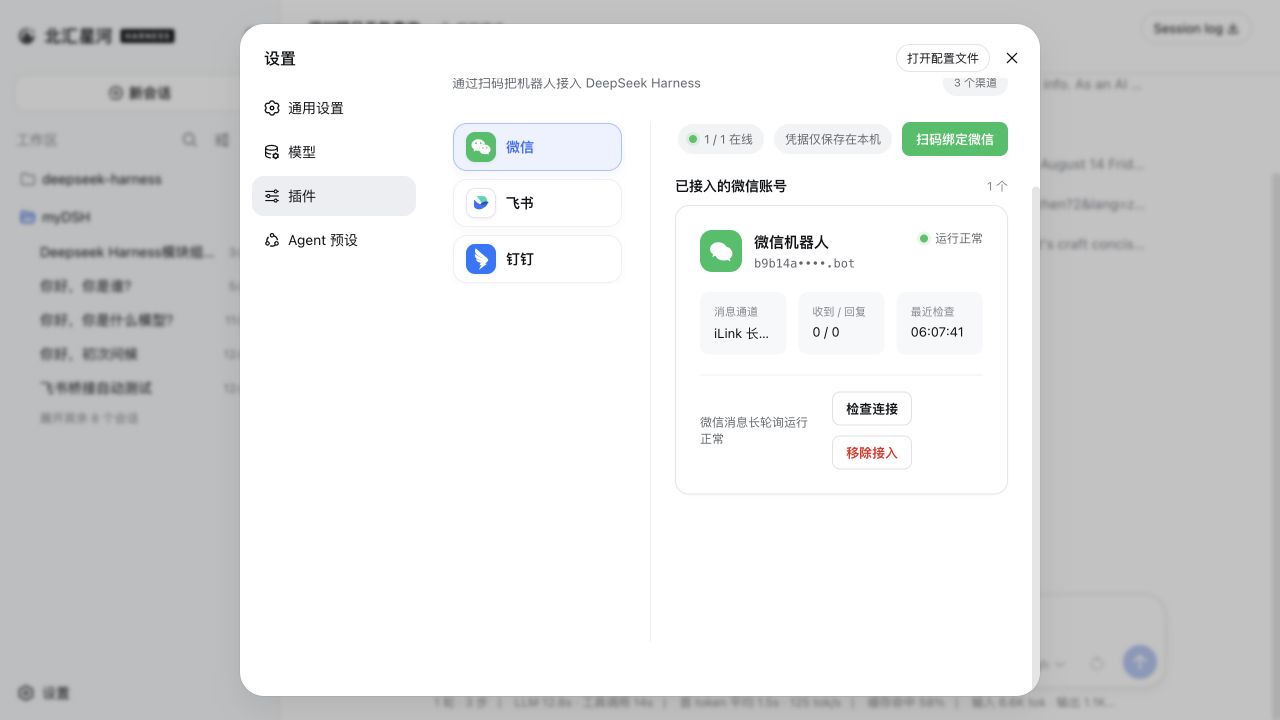
当前内置渠道
| 渠道 | 接入方式 | 消息与回复 |
|---|---|---|
| 飞书 | 扫码创建机器人,或使用 App ID + App Secret 手动绑定 | 长连接接收消息;通过飞书流式卡片显示思考、工具进度和回答 |
| 微信 | 使用微信扫码绑定机器人 | 腾讯 iLink 长轮询收发消息 |
| 钉钉 | 扫码创建机器人,或使用 Client ID + Client Secret 手动绑定 | 钉钉 Stream 长连接;通过 AI Card 流式显示回答 |
| 企业微信 | 使用企业微信 App 扫码创建智能机器人,或使用 Bot ID + Secret 手动绑定 | 官方 WebSocket 长连接;原生显示“正在思考中”、工具执行进度和流式回答 |
| 使用手机 QQ 扫码创建机器人,或使用 AppID + AppSecret 手动绑定 | WebSocket 长连接;私聊显示“正在输入”和流式回答,群聊被 @ 后回复 | |
| Slack | 使用预置 App Manifest 创建应用,再填写 Bot Token(xoxb-)和 App Token(xapp-) | Socket Mode 长连接;私聊直接回复,频道被 @ 后响应,优先使用官方流式消息 API |
| Telegram | 使用 @BotFather 生成的 Bot Token | Bot API 长轮询;默认私聊直接响应、群聊被提及或回复时响应,也可为每个机器人独立启用私聊白名单安全模式;通过编辑消息流式显示回答 |
| Discord | 使用 Developer Portal 生成的 Bot Token | Gateway v10 长连接;私信直接回复,服务器频道被提及时响应,通过编辑消息流式显示回答 |
| 使用手机 WhatsApp 扫码关联设备 | WhatsApp Web 长连接;显示已读和“正在输入”,再发送最终回答 |
其他 IM 平台可继续按同一渠道适配器结构接入。
九个内置渠道均支持把 JPEG、PNG、WebP 图片,以及以图片文件方式发送的 GIF,连同可选文字说明发送给 Harness;单张图片上限为 5 MB,单条消息中的图片总大小上限为 20 MB。
AI Office Connector
「AI Office」页让本机 Harness 主动连接公网 Office,本机无需公网 IP、端口转发或 WebSocket 服务。Device Token 只写入 Harness 凭据存储;普通配置文件仅保存设备 ID、Office Origin、工作区 alias 和 Instruction Preset alias。Office 只能选择 alias,不会收到本机绝对路径。
当前协议版本为 office-harness.v1。连接器使用 POST /api/harness/connector/heartbeat 完成鉴权和能力握手,再以 GET /api/harness/connector/stream 建立 SSE 下行;设置页会从 Office Base URL 自动展示全部固定 Hook,并在断线后按退避策略自动重连。
Office 的 job.available 会触发本机拉取任务、校验 Workspace/Preset alias、领取 90 秒租约并每 30 秒续租。连接器创建独立 Harness Session,把状态、工具名和增量文字安全回传 Office,终态只允许写入一次。Harness 发起的工具审批或补充问题会进入 Office 人工面板;批准、拒绝或文字答案再经 SSE 回到原 Session,断线时由租约与 Heartbeat 恢复。
Heartbeat 成功响应必须是 JSON:{"ok":true,"protocolVersion":"office-harness.v1"}。这使「连接测试通过」代表命中了兼容的 Office Connector,而不只是某个碰巧返回 200 的网址。
安装
推荐从 npm 安装已发布的稳定版本:
dsh plugin --profile web add -w @xmanrui/dsh-im
重启 dsh web,然后打开「设置 → 插件 → IM机器人」。
如需试用尚未发布到 npm 的最新代码,可以改用 GitHub 源安装器:
npx -y github:xmanrui/dsh-im install
GitHub 源安装会直接拉取并构建 Git 依赖;pnpm 10 及以上版本可能要求先在 profile 的 pnpm-workspace.yaml 中允许该依赖执行构建脚本。普通用户建议优先使用 npm 稳定版。
安装后,在对应渠道页面按照内置引导完成扫码或凭据配置。所有 Secret 和 Token 只提交给本机 Harness Host,并写入受保护的凭据存储;状态接口和机器人列表不会回传这些凭据。
| 默认行为 | 说明 |
|---|---|
| 机器人工作区 | 每个机器人独立保存工作区。新机器人默认使用 Host 当时的工作目录;之后可在机器人卡片中修改。 |
| Agent Preset | 新会话默认继承 Harness 的 agent-presets.default;渠道显式配置优先,已有会话不受后续修改影响。 |
每个 Telegram 机器人都可以在自己的卡片中切换访问模式。旧机器人和新接入机器人均默认使用兼容模式:私聊直接响应,群聊仅在提及机器人或回复机器人消息时响应。只有主动切换到**安全模式(私聊白名单)**后,机器人才会忽略全部群聊,并只接受该机器人白名单中的数字 User ID。白名单每行一个 ID、按机器人独立保存;切回兼容模式时会保留但不使用,再切回安全模式即可继续使用。安全模式的空白名单会拒绝该机器人的所有入站消息。
机器人命令
| 命令 | 作用 |
|---|---|
/help | 显示机器人支持的命令和用法。 |
/new | 解除当前聊天的会话绑定,让下一条普通消息开启全新 Harness 会话。 |
/status | 检查当前机器人与 DeepSeek Harness 的连接状态。 |
/models | 按序号列出当前配置的全部可用模型。 |
/model | 查看当前聊天绑定会话正在使用的模型。 |
/model <序号或 Provider/模型ID> | 切换当前聊天绑定会话的模型。 |
/stop | 立即停止当前聊天正在运行的任务,并保留尚未开始的排队消息。 |
/steer <补充指令> | 把补充指令立即加入当前聊天正在运行的任务。 |
/compact | 立即压缩当前聊天绑定会话的较早上下文。 |
/workspace <工作区绝对路径> | 切换当前机器人的 Harness 工作区。 |
/workspacelist | 列出当前 Harness Host 上仍然存在的工作区绝对路径。 |
/sessionlist [工作区序号或绝对路径] | 列出指定工作区登记的所有会话 ID 和标题;省略参数时使用当前工作区。 |
/session <Session ID> | 将当前聊天绑定到指定的已有 Harness 会话。 |
| 交互式提问 | 回复选项序号、选项文字或自定义文字;多选时用逗号分隔。 |
| 远程审批 | 回复 批准 / 拒绝 / 同意 / 不同意 / yes / no。 |
示例:先发送 /models,再发送 /model 2 切换到列表中的第 2 个模型。其他命令示例:/help、/new、/status、/model deepseek-official/deepseek-v4-pro、/steer 只检查配置文件、/stop、/compact、/workspace /Users/alice/projects/my-app、/sessionlist 2、/sessionlist /Users/alice/projects/my-app 或 /session session-id
命令说明
/help不需要参数,也不会创建会话;它会返回当前机器人支持的完整命令列表。/status不需要参数,也不会向模型发送消息或改变会话绑定;它用于确认当前机器人能够连接 DeepSeek Harness。/new只解除当前聊天在 dsh-im 中保存的会话绑定,不会删除、清空或归档旧 Session。下一条普通消息会在当前工作区创建并绑定一个新 Session。任务正在运行或等待问题、审批时,应先完成交互或使用/stop,再使用/new。/models不需要参数,也不会创建会话。它为 Harness 当前配置的全部可用模型分配序号,同时显示可稳定复制的Provider/模型ID;某个 Provider 查询失败时,其他 Provider 的结果仍会显示。/model不带参数时只查看当前会话模型;带参数时接受/models列出的序号或完整模型 ID,例如/model 2。完整 ID 必须精确匹配。聊天尚无会话时,有效的切换命令会创建并绑定一个空白会话,但不会触发模型回复。切换只影响当前会话;Harness 还会尝试把它保存为以后新会话的默认模型,已有其他会话不受影响。- 正在运行任务或等待审批、问题回答时不能切换模型;请等待完成,或先使用
/stop。含图片的会话无法切换到不支持图片输入的模型。 /stop和/steer只控制当前聊天自己发起的运行任务,即使多个聊天绑定同一个 Session,也不会有意控制其他聊天的任务。/stop不删除会话或历史,并保留尚未开始的排队消息;重复发送是安全的。/steer只接受文字,可包含多行;它不会创建新会话或第二个任务。没有运行任务时请直接发送普通消息;等待审批或问题回答时请先处理交互,或使用/stop。/compact只作用于当前聊天已经绑定的 Harness 会话,不会把命令发送给模型。当前聊天尚未创建会话、会话正在生成回复或没有可压缩历史时,机器人会直接返回对应状态。- 只接受已经存在的绝对目录;路径无效时机器人会返回具体提示和正确用法。
/workspacelist不需要参数。它合并 Harness 全局登记项与当前机器人的路径;当前路径仍存在且可安全显示时会排在首位并标记为“当前”。结果可直接复制到/workspace命令。/sessionlist的数字参数按命令执行时与/workspacelist相同的最新顺序解析;也可使用绝对路径直接指定工作区。结果会回显最终选中的路径。/sessionlist会列出该工作区登记的所有会话。已归档会话会标记为“已归档”;空白会话和子代理会话在它们归属该工作区时也会列出;没有标题的会话显示为“暂无标题”。结果中的 ID 可直接用于/session Session ID。/session只接受一个由/sessionlist获得的 Session ID。它不会新建会话或立即向模型发送消息;绑定成功后,当前聊天的后续消息会继续该会话。普通归档会话可以绑定但不会自动取消归档,子代理会话不能绑定。/session会自动定位会话唯一所属的工作区。同工作区绑定只替换当前聊天的映射;跨工作区绑定会切换该机器人的工作区、清除该机器人所有聊天的旧会话映射,再绑定当前聊天,因此会影响该机器人的其他聊天。已经开始生成的回复仍可完成。- 工作区切换和会话绑定只会清除或替换 dsh-im 的聊天映射,不会删除、清空或归档任何旧 Session 内容;旧 Session 仍可再次列出和绑定。
- 任何已在对应平台可见范围内、能够正常向机器人发消息的用户都可以执行这些命令,不区分管理员和普通用户。Telegram 兼容模式遵循原有私聊及群聊提及/回复规则;安全模式只允许当前机器人白名单中的私聊用户执行,群聊命令始终忽略。
- 工作区列表来自 Harness Host 的全局登记信息,可能包含其他机器人、其他渠道或非 IM 项目的本机绝对路径。请将机器人可见范围限制给可信用户。
- 会话列表同样来自该全局 Harness Host;会话 ID 和标题可能属于其他机器人、其他渠道或非 IM 项目,并可能包含敏感元数据。开放命令前请确保所有可见用户都可信。
- 任何能执行
/session的用户都能接续所选会话,并通过后续消息写入会话或触发其可用工具。请只向可信用户开放机器人及其会话列表。 - 切换成功后只清除当前机器人的旧 Harness 会话映射,不影响其他机器人。
- 新工作区对后续消息生效;已经开始生成的回复会继续完成。
其它功能
- 图片识别:九个内置渠道都可以把 JPEG、PNG、WebP,以及以图片文件方式发送的 GIF 交给 Harness;图片可以附带文字说明。单张图片上限为 5 MB,单条消息中的图片总大小上限为 20 MB。
- 在机器人卡片切换工作区:设置页中的每张机器人卡片都会显示当前 Harness 工作区。可以直接填写已有目录的绝对路径,也可以打开目录选择器。切换只清除该机器人的旧聊天映射,不会删除、清空或归档旧 Session;已经开始的回复可以继续完成,后续消息使用新工作区。
- 检查连接并发送测试消息:机器人在线时,点击卡片上的「检查连接」会检查平台连接,并向该机器人最近记录的私聊发送一条“DeepSeek Harness 连接测试成功”消息;WhatsApp 会发送到账号自聊。测试消息不会创建 Harness Session,也不会调用模型。机器人必须至少收到过一条私聊才能记住测试目标,否则页面会提示尚无可用的测试会话。
- 重试连接和移除接入:机器人离线时,卡片上的操作会变为「重试连接」;不再使用时可以点击「移除接入」。这些操作都只作用于所选机器人,不影响其他机器人或渠道。
- 多机器人独立管理:同一渠道可以接入多个机器人。每个机器人分别保存凭据、连接状态、工作区和聊天会话映射,卡片上的工作区、连接检查、重试和移除操作互不影响。
- 流式回复和进度提示:插件会按各平台能力显示正在思考、工具执行和逐步生成的回答;不支持原生流式接口的平台会通过编辑消息、卡片更新或最终消息完成回复。
设计
- Harness 中只注册一个「IM机器人」设置页,其中包含九个 IM 渠道和一个 AI Office Connector;
- 九个渠道及 Office Connector 的 Host、客户端与运行时源码都在本仓库维护,不依赖外部独立插件;
- 设置页跟随 DeepSeek Harness 的语言选择,在中文和 English 之间即时切换;
- 左侧使用 Logo 切换微信、飞书、钉钉、企业微信、QQ、Slack、Telegram、Discord、WhatsApp 和 AI Office,不使用启用/停用开关;
- 九个 IM 渠道保持独立的 RPC、凭据、连接监督和会话映射;Office Connector 另行维护设备凭据、Job 租约、审批等待与并发上限;
- 浏览器只获得二维码、Manifest、脱敏状态,以及用户为当前 Telegram 机器人主动保存的访问模式和白名单 User ID;手动输入的 Secret 或 Token 仅单向提交给本机 Host,任何 RPC 响应都不会返回 App Secret、
bot_token、钉钉client_secret、企业微信 Secret、QQapp_secret、Slack Bot/App Token、Telegram/Discord Bot Token、WhatsApp 关联设备密钥、AI Office Device Token,或从平台消息中观察到的其他原始用户标识。
本地开发
npm install
npm run check
node bin/dsh-im.mjs install --source .
npm run check 运行单元测试、构建 Host/Client 产物,并验证发布包不包含凭据或独立渠道设置页注册。
IM 管理 RPC 默认仅接受回环浏览器。如果 Web profile 在受信任的局域网内对外提供服务,可在该 profile 的 cordis.patch.yml 中显式开放给 Connection 已信任的 Host authority:
- id: xmanrui-dsh-im
  config:
    rpcAuthority: trusted-host
trusted-host 只复用 Harness 的 Host/Origin 防护,不是用户认证。启用后,能访问该局域网地址的人也能查看机器人状态、扫码或提交应用凭据、重连和删除机器人;只应在可信网络中使用。
联系方式
欢迎通过邮箱、微信或小红书联系我。
| 邮箱 | 微信 | 小红书 |
|---|---|---|
| [email protected] |

|

|
Read the usage guide →
Install steps, key points, FAQ and compatibility for this plugin — auto-derived from indexed fields.
Listing badge

[](https://deepseek-plugin.org/plugins/xmanrui/dsh-im)Paste this markdown into your GitHub README to link back to this listing. The badge only states the listing — not a security endorsement.