Automatically categorizes DSH Web request transit stations and project ownership. Tracks token usage, balance, and subscription quotas. Zero configuration, no credentials required.

- Language
- JavaScript
- License
- MIT
- Branch
- main
Install
$ dsh plugin --profile web add dsh-tokenledgerRun the command above in your terminal to install this plugin via the dsh CLI. You can switch Profile in the top-right corner. New to dsh? Read the beginner tutorial
Install via your agent
Install the DeepSeek Harness plugin zh667/TokenLedger for me: review the repository at https://github.com/zh667/TokenLedger first, then run the install command and verify the plugin loads successfully.
Paste this instruction to the DSH Web GUI assistant — it will install and verify for you.
One-Line Positioning
Categorize DeepSeek Harness Token usage by actual service request relays, with balance, subscription quotas and project-level statistics; ready to use out of the box, requiring neither relay address configuration nor any new credentials.
Core Features
- Relay Attribution: Normalize origins by provider's baseURL for grouping; multiple keys under the same relay are automatically consolidated into one row, with the relay name being the actual domain rather than your custom routing alias
- Project Attribution: Group by the directory where the session was started; if the host workspace has a title, use that; otherwise use the directory name; sessions created in subdirectories are also counted
- Auto-Discover Relays: Read baseURL from host's provider configuration; no need to re-enter in the plugin; read-only, never accesses credentials nearby
- Multi-Vendor Balance Reading: Covers DeepSeek, New API family, Sub2API, Moonshot/Kimi, Zhipu GLM / Z.ai, OpenRouter and other account types; one regular API key per vendor is sufficient
- Subscription Quota Windows: "Plan-selling" vendors like OpenCode Go, Kimi For Coding, MiniMax Coding Plan, Z.ai Coding Plan are displayed as independent windows for 5 hours/day/week/month, each with progress bar and reset time
- Export & Diagnostics: CSV/JSON export of usage, index health, unassigned rows shown separately, cost estimation bucketed by effective date
Technical Implementation
- Language: JavaScript (ESM Node.js)
- Key Dependencies: One optional peer dependency
@deepseek-ai/schemastery(for registering settings namespace); runtime uses only Node built-innode:sqlite, native fetch andnode:module, zero external runtime dependencies - Architecture Pattern: Dual-end Cordis plugin; node end registers via
cordis.patch.ymland mounts withsessionPersistenceas required dependency,webServer(compatible with old namehttpServer) waits via nestedctx.inject; browser end injects sidebar footer slotsidebar.footer.actionwith hand-written__ModuleLoader__bundle, React provided by host - Entry Files:
src/index.js(Cordis entryapply/inject/name) +src/plugin.js(core implementation) +cordis.patch.yml(bundle patch)
Use Cases
DSH Web users who want to directly answer "Which relays/projects did this month's Tokens go to, what's the remaining balance for a specific relay, when does the subscription reset" and don't want to fill in extra configuration or manage extra keys for usage statistics. Especially suitable for users who have configured multiple relays, grouped multiple keys for the same relay, or are using plan-selling accounts like Sub2API / OpenCode Go.
Prerequisites & Compatibility
| Dependency | Minimum Version | Description |
|---|---|---|
| DeepSeek Harness (DSH) | >= 0.1.0-rc.6 | Plugin verified under this version's host web profile; older latest tag points to earlier 0.0.1-rc.x line with different service names |
| Node.js | >= 22 | Runtime uses Node built-in node:sqlite; v22 issues ExperimentalWarning, upstream hint not suppressed by this plugin |
| Platform | Cross-platform | Tested on macOS / Windows / Linux; Windows verified loading from published tarball, scanning real session logs under $DSH_HOME, panel rendering in session flow |
| Native Module | node:sqlite | Node built-in module, no C++ compilation dependency; loaded via dynamic import; missing only loses settings namespace registration capability |
Installation
dsh plugin --profile web add github:zh667/TokenLedger
Configuration Options
| Config | Type | Description | Default |
|---|---|---|---|
relays | Route name → URL or object | Only fill when auto-discovery fails; key is DSH provider route name, value can be bare URL or {baseUrl,id,displayName,type} object | Not set; auto-discover from host |
officialOrigins | String array | List of origins marked as vendor official domains rather than relays, to distinguish "direct" vs "relay" | [] |
endpoints | Array | Balance interface declarations for non-built-in vendors; see "Custom Endpoints" below | [] |
fingerprint | Boolean | Whether to actively detect which stack each relay runs; off by default, probes on first balance check if needed | false |
database | String | SQLite index file path; defaults to tokenledger.sqlite in host home directory via patch | tokenledger.sqlite |
sweepIntervalMs | Number (ms) | Interval for background session log scanning, 0 to disable timer | 60000 |
sweepOnStart | Boolean | Whether to scan immediately on startup | true |
rates | Any | Rate table for cost estimation; format in pricing.js; unset models show dash instead of 0 | Not set |
Custom Endpoints (endpoints array) fields:
| Field | Description |
|---|---|
origin | Must be the same origin as a configured provider; used as key to look up that account |
displayName | Panel display name |
path | Must be absolute path starting with single slash; protocol-relative URLs like //host/x are rejected |
raw | When set to true, sends bare key without Bearer prefix |
fields | Value paths (dot notation) for each data item in response JSON, e.g., total: data.balance |
windows | Subscription quota window list, each item containing kind and value paths |
Boundaries enforced in code: GET only, no request body, no declarable credentials, cross-origin redirects fail directly, response body has size limit and timeout, custom endpoints cannot override built-in reading methods.
FAQ
Q: Do I need to restart dsh web after installation?
A: Yes. After installing, upgrading or uninstalling, you must restart the running dsh web, then do a hard refresh in the browser for the "Usage Ledger" entry to appear at the sidebar footer.
Q: What are the commands for upgrading or uninstalling?
A: Upgrade with dsh plugin --profile web update dsh-tokenledger, uninstall with dsh plugin --profile web remove dsh-tokenledger; both operate on web profile just like installation.
Q: Do I need to manually fill in relay addresses?
A: Not in most cases. The plugin reads baseURL from host's provider configuration and auto-categorizes by origin. Manual relays configuration is only needed in two edge cases: settings service not mounted in the composition, or provider is an agent preset mounted in agent.cordis.yml.
Q: Which key is used for balance and subscription quota reading?
A: By default reuses the API key you've already configured on that route; the only exception is OpenRouter, whose quota interface only accepts Management Key—using inference key returns 401, and the panel will directly state which key is needed.
Q: Where is data stored? Is it safe?
A: Summary index is stored in SQLite file under DSH home directory (default tokenledger.sqlite), can be discarded and rebuilt; this plugin never reads or stores prompts, tool parameters, or response content; API keys always go through Authorization header, never into URL query strings, browser never gets them.
Q: What is the "Unknown Route" row?
A: It represents requests whose routes can no longer be found in current provider configuration—perhaps renamed, deleted, or run on another machine at the time. Data isn't lost; reconfiguring the same route name triggers index rebuild, historical traffic automatically repositions.
Q: How to troubleshoot "my relay not showing up"?
A: Run /tokenledger diagnostics in DSH; it will print current route attribution and routes in index; for 404 troubleshooting, follow the hints from this output.
Getting Started Difficulty
Beginner — no configuration needed to see usage and relay distribution; only need to edit settings.yaml when wanting to override auto-discovery results, declare interfaces for non-built-in vendors, or maintain rate tables.
Known Issues & Limitations
- Must restart
dsh webafter installation or upgrade, and browser must hard refresh; without restart routes won't register and won't error (dshworks documents this as a common pitfall of host half-loading in doc/HOST-CONTRACT) - pnpm caches
github:user/repo#mainstring; to force update tomainrequires full 40-character commit SHA; short SHA directly reportsCould not resolve - Can't add native config card for this plugin in DSH settings page yet: upstream
dsh-host-apiproxyhardcodes seven whitelisted namespaces for exposure, other namespaces returnsettings-not-exposed;tokenledgercurrently usessettings.yamlform read/written by host-sidectx.settings, browser config panel is a blocking item - Reinstalling same spec won't refresh
main; before modifyingpackage.jsonconfirm it won't fail parsing (addresolves entire list first) node:sqlitetriggersExperimentalWarningon Node v22, upstream warning, not suppressed by this plugin- Custom endpoint (
endpoints)pathmust be absolute path starting with single slash; protocol-relative URLs like//host/xare rejected at construction time


把 DeepSeek Harness 的 Token 用量算清楚,并归属到实际服务这次请求的中转站——不用配置,不用凭据。
Token-usage accounting for the DeepSeek Harness Web GUI (dsh web), attributed
to the relay site that served each request. Zero configuration.
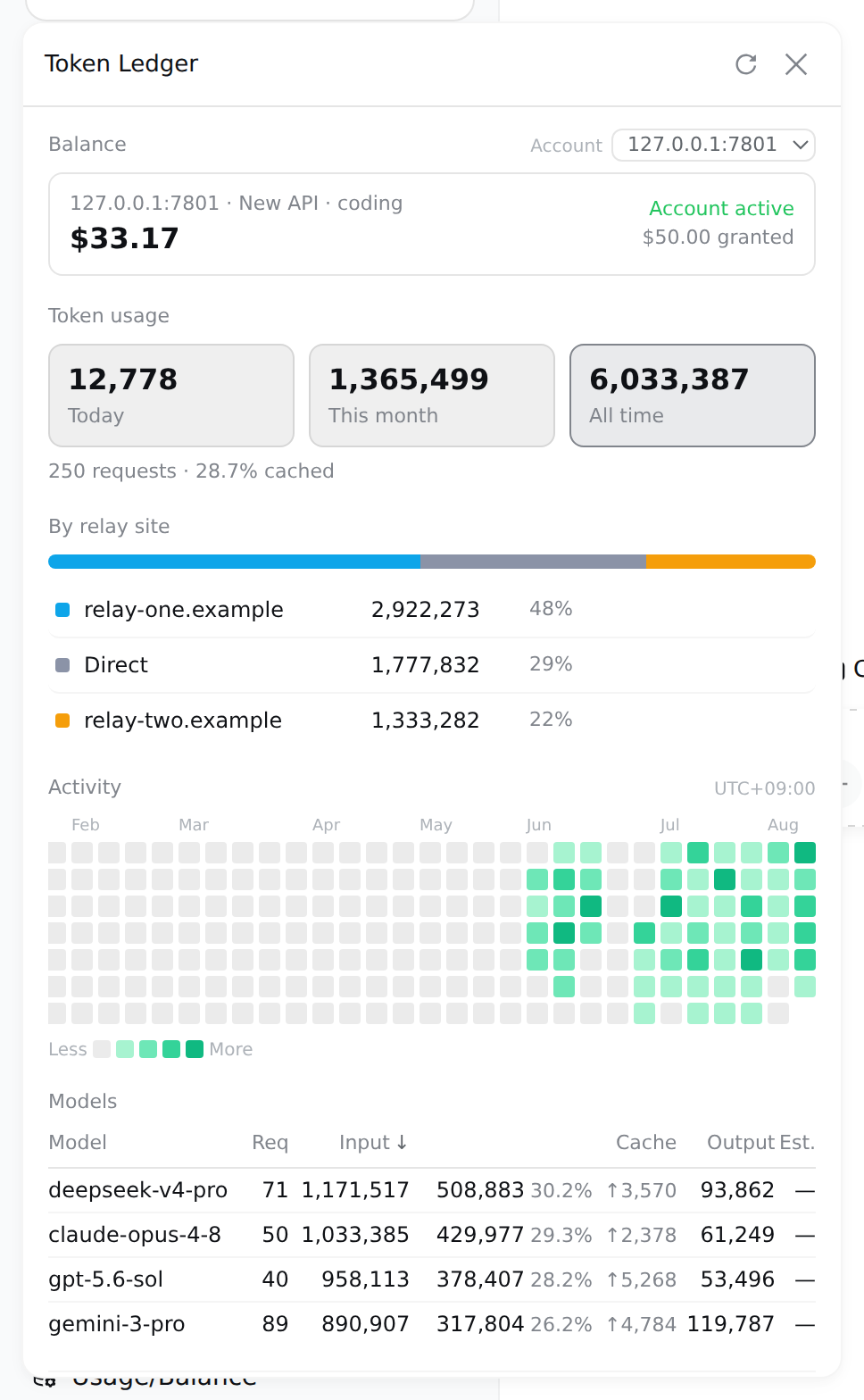
展示图使用演示数据与本机模拟中转站;面板上的每个数字都由真实代码路径算出,只是数据是造的。插件不会把 API Key 或上游原始响应发送到浏览器。
一眼看懂 / At a glance
| 能力 | 说明 | |
|---|---|---|
| 🎯 | 中转站归属 | 按 provider 的 baseURL 归一化 origin 分组——同一站的多把 key 合成一行,站名就是域名,不是你自己起的路由别名 |
| 📁 | 按项目归属 | 用量按会话启动时所在的目录分组——工作区注册过的用它的标题,没注册过的用目录名,子目录里起的会话照样算进去 |
| 🔍 | 零配置发现 | 从宿主的 provider 配置里读出中转站,不用你再填一遍。只读 baseURL,绝不碰旁边的凭据 |
| 💳 | 余额 | DeepSeek 官方、New API、Sub2API,每个账户一把普通 key 即可;不限额度的 key 报"已用"而不是假余额 |
| ⏳ | 订阅配额 | 卖套餐不卖余额的家数越来越多——5 小时 / 每周 / 每月各自滚动、各自重置,每个窗口一条进度条和一个重置时刻 |
| 📊 | 用量分析 | 今日/本月/累计三窗口、按站点/模型下钻、缓存命中率、一年活跃度热力图(悬停看当天模型构成) |
| 🧮 | 费用估算 | 生效日期分段的费率表、分桶计价、峰谷时段;未定价的模型显示破折号而不是 0 |
| 🗂 | 导出与诊断 | CSV / JSON 导出,索引健康度,归因不上的行数单独列出 |
| 🔒 | 只读回环 | 两个端点仅接受回环 GET,且在 peer socket 地址上设防;从不读取提示词、工具参数或响应内容 |
快速安装 / Quick start
需要 DeepSeek Harness web profile(@deepseek-ai/dsh >= 0.1.0-rc.6)。
dsh plugin --profile web add "github:zh667/TokenLedger"
重启已经在跑的 dsh web,浏览器硬刷新。侧边栏底部会出现「用量账本」入口。
升级或卸载:
dsh plugin --profile web update dsh-tokenledger
dsh plugin --profile web remove dsh-tokenledger
重装同一个 spec 会重新解析,所以 add 一遍就能拿到最新的 main(实测过,不是推测)。
要钉某个版本,必须用完整的 40 位 commit SHA。 包管理器把 ref 拿去和 git ls-remote 广播的引用列表比对,而那份列表里只有完整 SHA 和分支/标签名——短 SHA 匹配不到任何东西,会直接报 Could not resolve:
| spec | |
|---|---|
github:zh667/TokenLedger | ✅ |
github:zh667/TokenLedger#main | ✅ |
github:zh667/TokenLedger#947247a | ❌ 短 SHA 解析不了 |
github:zh667/TokenLedger#947247a86f0835f0e746695538569b1a76356dd1 | ✅ |
如果 package.json 里已经被写进了一个解析不了的 spec,add 也会失败——它会先解析整份清单。改掉那一行再 install 即可。
装完之后 /tokenledger diagnostics 会打印当前的路由归属和索引里的路由——排查「我的中转站为什么不显示」看这里,不用猜。
装完即可用:没有要填的配置,也不需要任何凭据就能看到全部用量与中转站分布。余额是唯一用到 key 的地方,而那把 key 宿主已经替你存着了。
命令 / Commands
面板能回答的问题,命令行都能回答——两边读的是同一批查询,不存在第二套聚合。
/tokenledger                      # 全部时间
/tokenledger 7                    # 最近 7 天
/tokenledger 30 api.example.com   # 某个中转站,最近 30 天

/tokenledger site                 # 列出发现到的中转站
/tokenledger site add <路由名> <地址>
/tokenledger site rm <路由名>

/tokenledger export csv 30        # 导出
/tokenledger diagnostics          # 索引健康度
/tokenledger reindex              # 丢弃索引,从头重建
支持的账户类型 / Providers
| Provider | 模式 | 凭据 | 上游接口 |
|---|---|---|---|
| DeepSeek 官方 | 余额 | provider 的 apiKeyEnv | /user/balance |
| New API 系(含 One API、VoAPI 等分支) | 额度 | provider 的 apiKeyEnv | /api/usage/token/ + /api/status |
| Sub2API | 余额 / 额度 / 订阅 | provider 的 apiKeyEnv | /v1/usage |
| Moonshot / Kimi | 余额 | provider 的 apiKeyEnv | /v1/users/me/balance |
| 智谱 GLM / Z.ai | 余额 | provider 的 apiKeyEnv | /api/paas/v4/balance |
| OpenRouter | 余额 | Management Key | /api/v1/credits |
| OpenCode Go | 订阅 | provider 的 apiKeyEnv,或本机 auth.json | /zen/go/v1/usage |
| Kimi For Coding | 订阅 | provider 的 apiKeyEnv | /coding/v1/usages |
| MiniMax Coding Plan | 订阅 | provider 的 apiKeyEnv | /v1/token_plan/remains |
| 智谱 GLM / Z.ai Coding Plan | 订阅 + 余额 | provider 的 apiKeyEnv | /api/monitor/usage/quota/limit |
除 OpenRouter 外都只需要一把普通 API key——就是你已经配给那条路由、用来发请求的那把。OpenRouter 的额度接口只认 Management Key,用推理 key 会 401,面板会直接说明要哪一把,而不是丢一个 401 让你去查一把本来没问题的 key。
订阅这一档没有余额可读,读到的是若干个滚动窗口:一条进度条、一个百分比、一个重置时刻。金额和窗口可以同时存在——Z.ai 就是既有钱包又有 Coding Plan,两样都读,任一边读不到也不影响另一边。
OpenCode Go 那条的"本机 auth.json"是个便利:路由上没配 apiKeyEnv 时,会去读 OpenCode 客户端自己存 key 的那个文件(~/.local/share/opencode/auth.json),key 只发回它本来的来处。文件不存在、读不动、格式变了,一律当作"没有凭据",安静退回,不会因此报错。
这几家订阅接口都没有公开 schema。字段位置不对时,卡片会说出它去哪儿找过,而不是留一张空卡——那句话可以直接反馈给我们。
中转站跑的是哪套程序由路由指纹自动判定,第一次查余额时探测一次并记住。厂商自己的域名不需要探测——origin 直接决定用哪套读法,而且同一厂商的多条路由会合并成一个账户(一个钱包),这跟中转站正好相反。
New API 的额度是按 key 的:同一个站上两把 key 是两份额度,面板分别列出。
Sub2API 的 /v1/usage 有三种形态,面板都认:key 配了总额度或速率限制的,读额度和 5 小时 / 每日 / 每周三个窗口;key 属于套餐分组的,读日/周/月周期;剩下的是钱包余额。只有最后一种带 balance 字段,所以前两种以前是一张空卡。
配置 / Configuration
通常不需要任何配置。 中转站从宿主的 provider 设置里读出来。
需要覆盖时,写进你已有的 settings.yaml(改完热更新,不用重启):
tokenledger:
  # 只在自动发现看不到时才需要——比如组合里没挂 settings 服务,
  # 或 provider 是 agent preset 在 agent.cordis.yml 里挂的
  relays:
    my-route: https://relay.example.com/v1

  # 费率表,用于费用估算;不配就显示破折号,不会猜
  rates: []

  # 探测中转站跑的是哪套程序。默认关闭,第一次查余额时会自动探一次
  fingerprint: false
自己声明一个余额接口 / Declared endpoints
内置表覆盖不到的供应商,可以自己声明它的接口,不用等我们发版本:
tokenledger:
  endpoints:
    - origin: https://relay.example.com   # 必须是你已配置的某条 provider 的同源地址
      displayName: 我的中转站
      path: /api/quota
      # raw: true    # 有些控制台接口要裸密钥,不要 Bearer 前缀
      fields:        # 值是响应 JSON 里的取值路径,不是表达式
        total: data.balance
        granted: data.total
        used: data.used
        currency: data.unit
        plan: data.plan_name
      windows:
        - kind: weekly          # session / daily / weekly / monthly / billing
          usedPercent: data.week.percent
          resetsAt: data.week.reset_at
fields 和 windows 里写的是取值路径——描述"数字在哪儿",不描述"怎么取"。没有表达式,也没有任何东西会被求值。路径写错只会让那个字段缺席,其余照常显示。
这个功能等于让配置文件决定"往哪儿发一个带密钥的请求",所以边界写死在代码里,不靠自觉:
- 请求发往匹配到的那条 provider 的 origin,
origin:字段只是用来找它的键。声明一个没配过的地址,不会产生任何请求。 path必须是单斜杠开头的绝对路径。//host/x是协议相对 URL,会解析到别的主机上;构造完还会再校验一次 origin。- 只发 GET,没有请求体,声明里的 method / headers 一概不生效。
- 密钥仍然只从那条 provider 自己的
apiKeyEnv取,声明不能指定任何凭据。 - 跨源重定向直接失败,不跟随——那是绕过第一条最省事的办法。
- 响应体有大小上限和超时。
- 不能覆盖内置读法:只在内置表答不上来时才轮到它。
这类卡片会标注「自定义端点」,因为数字是你自己配的路径取出来的——取错了是配置问题,界面得让这一点看得出来。
「未知路由」是什么
中转站分布里可能出现一行「未知路由」。它的意思是:这些请求走的路由,现在的 provider 配置里找不到了——改过名、删掉了,或者当时用的是另一台机器上的配置。
它和「直连/官方」是两件事,分开是刻意的:
- 直连/官方 = 这条路由配置着,而且不指向任何中转站,请求确实直接打到厂商
- 未知路由 = 我们不知道它去了哪
以前这两种合并成一个桶,结果是一台真实机器上 88% 的 token 显示成「直连/官方」,而其中很大一部分其实走了中转站。把「读不到」显示成一个确定的答案,是这个项目在别处一直防着的错误,这里漏了一个口子。
数据没丢,只是标签错了。 汇总行是按 (sessionId, day, site, provider, model) 存的,路由名一直在。把那条路由重新配回去(同名即可),目录变化会触发索引重建,历史流量自动归位。
按项目归属 / Per-project attribution
面板除了「按站点」「按模型」,还有一段「按项目」:这个月的钱,是哪个项目烧的。
归组的键是会话启动时所在的目录,不是宿主的工作区 id。这一条是刻意的:
DSH 的工作区(ctx.workspace)是一个目录的登记——create(path) 会先 fs.realpath,并且同一个规范路径只会有一条记录;会话是否属于它,判定是 sessionPath(id) === record.path,严格相等。所以一个工作区就是一个项目,它不是一个能装若干项目的容器。
按工作区 id 归组会无声地漏掉两类用量:
- 在子目录里起的会话(
cd src && dsh),cwd 和登记的路径不相等,谁也不属于; - 从没在界面里登记过工作区的项目,压根不存在。
这两类大概率是多数。所以:按 cwd 归组,用工作区标题命名。 跟中转站那条规矩是一个道理——站点按 baseURL 归一化出的 origin 分组,不按路由别名,因为叫 deepseek 的路由可能指向任何地方。cwd 是实际发生的事,工作区标题是有人打的标签。
没有 cwd 的会话单独一行标成「未记录目录」,不会被丢掉——不然按项目的几行加起来就对不上总数,而看的人无从察觉。
workspace 是可选依赖:组合里没挂这个服务,整段照常工作,只是每行显示目录名而不是工作区标题。
正确性与数据口径 / Correctness
用量折叠有三个地方容易错,都有测试覆盖(test/usage.test.js):
请求失败了照样扣费。 用量除了挂在 assistant/message 上,也会从 assistant/chunk 的 {type:'usage'} 流出。请求在报出 usage 之后失败,就永远等不到 assistant/message——但供应商已经收钱了。只订阅 assistant/message 会系统性少算这部分。
同一个 (turn, step) 会被报告两次。 后来的样本是替换前一个,不是累加;替换时必须从原先归属的那一天和那条路由里减回去。
孤儿 usage chunk 不带身份。 assistant/message 自带 provider 和 model,StreamChunk 的 usage 变体没有。失败请求那条记录要回退到最近一次 request/header,且要认得 reason: 'resume'(进程重启会重发 header,那不是换模型)。归不上的记为显式 unknown,绝不猜。
口径上:inputTokens、cacheReadTokens、cacheWriteTokens 三个桶互斥,相加才是计费输入;reasoningTokens 是 outputTokens 的子集,只做展示,加进总数就是重复计费。天按宿主进程的本地时间切分,面板上会标出是哪个时区。
归属在折叠时写死进记录,历史永不重写。中转站集合发生变化时会丢弃索引并全量重建——否则新认出的站会显示成"你刚开始用它"。
隐私与安全 / Privacy & security
- 从不读取内容。 只有计数和标识符:token 数、模型名、provider 路由名、站点域名。提示词、工具参数、响应正文既不读也不存。
- 凭据只在宿主侧。 key 由宿主的 credentials 服务按引用(
apiKeyEnv)在请求时解析、用完即弃,始终走Authorization头,绝不进 URL 查询串。浏览器永远拿不到 key。 - 回环防护。 两个 HTTP 端点注册为 exact 路由,因此位于 RPC 信任边界之外,处理器自己设防:拒绝非 GET,并同时校验 peer socket 地址(不可伪造)与 Host 头。
- 中转站指纹识别不用凭据,靠路由的 404/401 特征。
API
浏览器面板读这两个端点,仅限回环 GET:
| 端点 | 说明 |
|---|---|
GET /api/tokenledger/usage?days=&site= | 整个面板的数据:三窗口合计、按天/模型/站点、一年活跃度与逐日模型构成、账户列表、索引诊断 |
GET /api/tokenledger/balance?account= | 某个账户的余额 |
包也可作为库使用,供 DSH 之外的消费者:
import { foldUsage, bySite, byModel } from "dsh-tokenledger";
import { LedgerStore } from "dsh-tokenledger/store";
import { readBalance } from "dsh-tokenledger/balance";
开发 / Development
npm test          # 含浏览器半边——它能在 Node 里被物化和测试
npm pack --dry-run
浏览器半边没有构建步骤:它是一个手写的 __ModuleLoader__ bundle,React 由宿主作为 peer 提供,样式手写注入。因此它能在 Node 里被加载和测试。
致谢 / Credits
- OpenRouter、Moonshot/Kimi 与 Z.ai/GLM 的余额响应解析参考并改编自
Ychris12138/dsh-usage-stats(MIT);TokenLedger 在此基础上增加了按 origin 识别、账户归并、Management Key 提示和币种防猜,详见 NOTICE - 热力图的分位数分级与悬停详情参考
xiufengsun/TokenTracker(MIT) - New API 的计费口径读自
QuantumNous/new-api源码
友情链接 / Links
感谢 LINUX DO 社区的帮助与支持。
Thanks to the LINUX DO community for their help and support.
DSH 生态 / The DSH ecosystem
宿主 / The host
deepseek-ai/deepseek-harness—— 本插件运行其上的 agent harness
插件索引 / Where to find plugins —— 这几处收录了社区插件,装之前值得先逛一圈
awesome-dsh-plugin/awesome-dsh-plugin—— 按功能分类的中英双语列表AdamPlatin123/awesome-dsh-plugins—— 自动扫描dsh-plugintopic,带兼容性状态列0xsline/awesome-deepseek-harness—— 人工精选,另有自动生成的CATALOG.mdbruc3van/awesome-dsh-plugin—— 场景导航、入门套装与热度榜
这个面板读得懂的上游 / Upstreams this panel reads
QuantumNous/new-api—— 中转站程序;面板的额度换算口径是从它的路由与计费源码里读出来的
⚠️ 非官方声明:TokenLedger 是独立的第三方社区项目,与 DeepSeek 无隶属、赞助或背书关系。以上友链亦不代表任何隶属、赞助或背书关系。「DeepSeek」及相关商标归其权利人所有。
License
Read the usage guide →
Install steps, key points, FAQ and compatibility for this plugin — auto-derived from indexed fields.
Listing badge

[](https://deepseek-plugin.org/plugins/zh667/TokenLedger)Paste this markdown into your GitHub README to link back to this listing. The badge only states the listing — not a security endorsement.