Packages 10 web design aesthetic skills for DeepSeek Harness. The model automatically applies corresponding design specifications when generating sites based on user descriptions, eliminating generic AI-style templates.

- Language
- JavaScript
- License
- NOASSERTION
- Branch
- main
Install
$ dsh plugin --profile web add github:zhaiyateng/dsh-design-skillsRun the command above in your terminal to install this plugin via the dsh CLI. You can switch Profile in the top-right corner. New to dsh? Read the beginner tutorial
Install via your agent
Install the DeepSeek Harness plugin zhaiyateng/dsh-design-skills for me: review the repository at https://github.com/zhaiyateng/dsh-design-skills first, then run the install command and verify the plugin loads successfully.
Paste this instruction to the DSH Web GUI assistant — it will install and verify for you.
One-Sentence Positioning
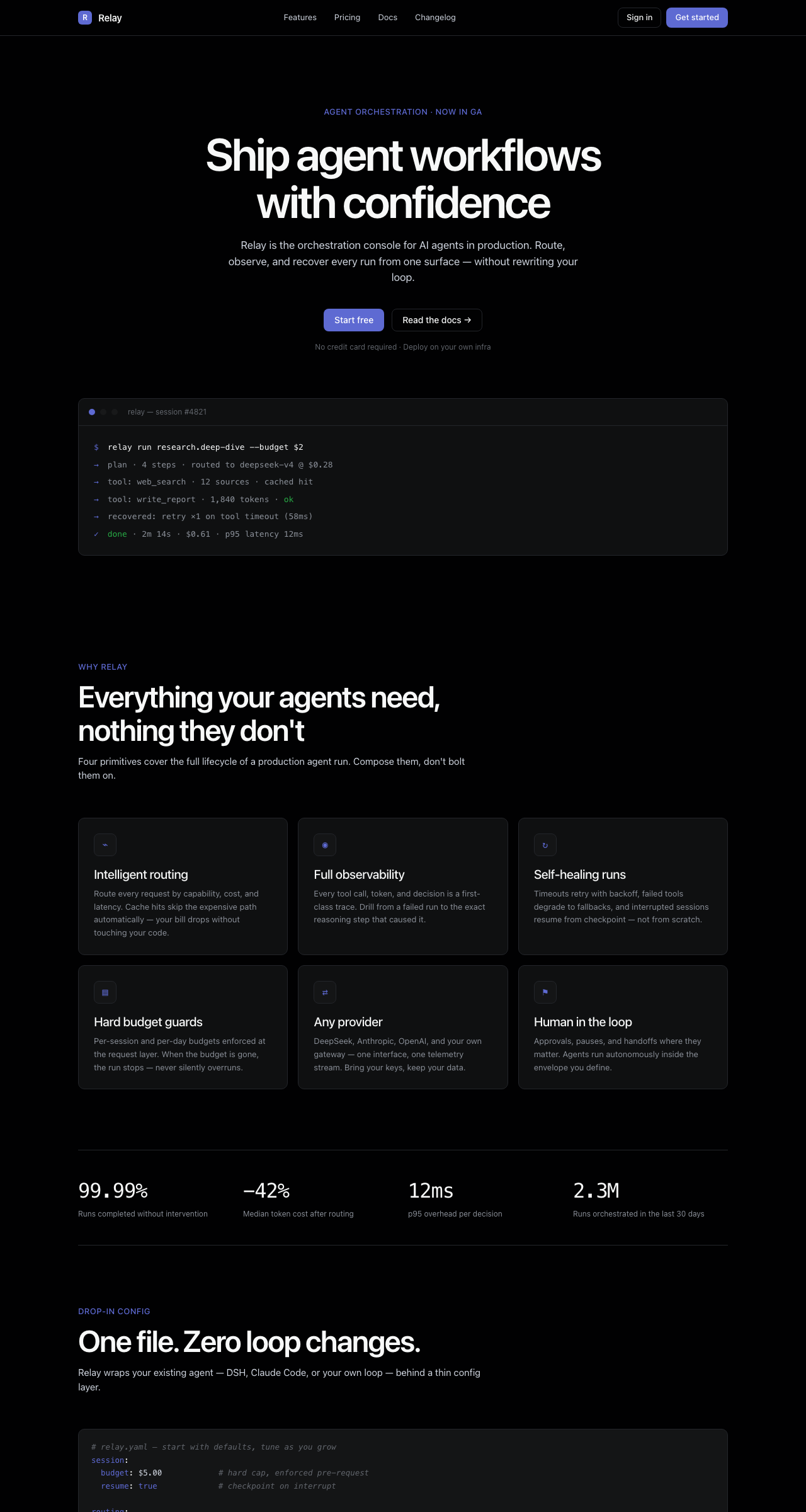
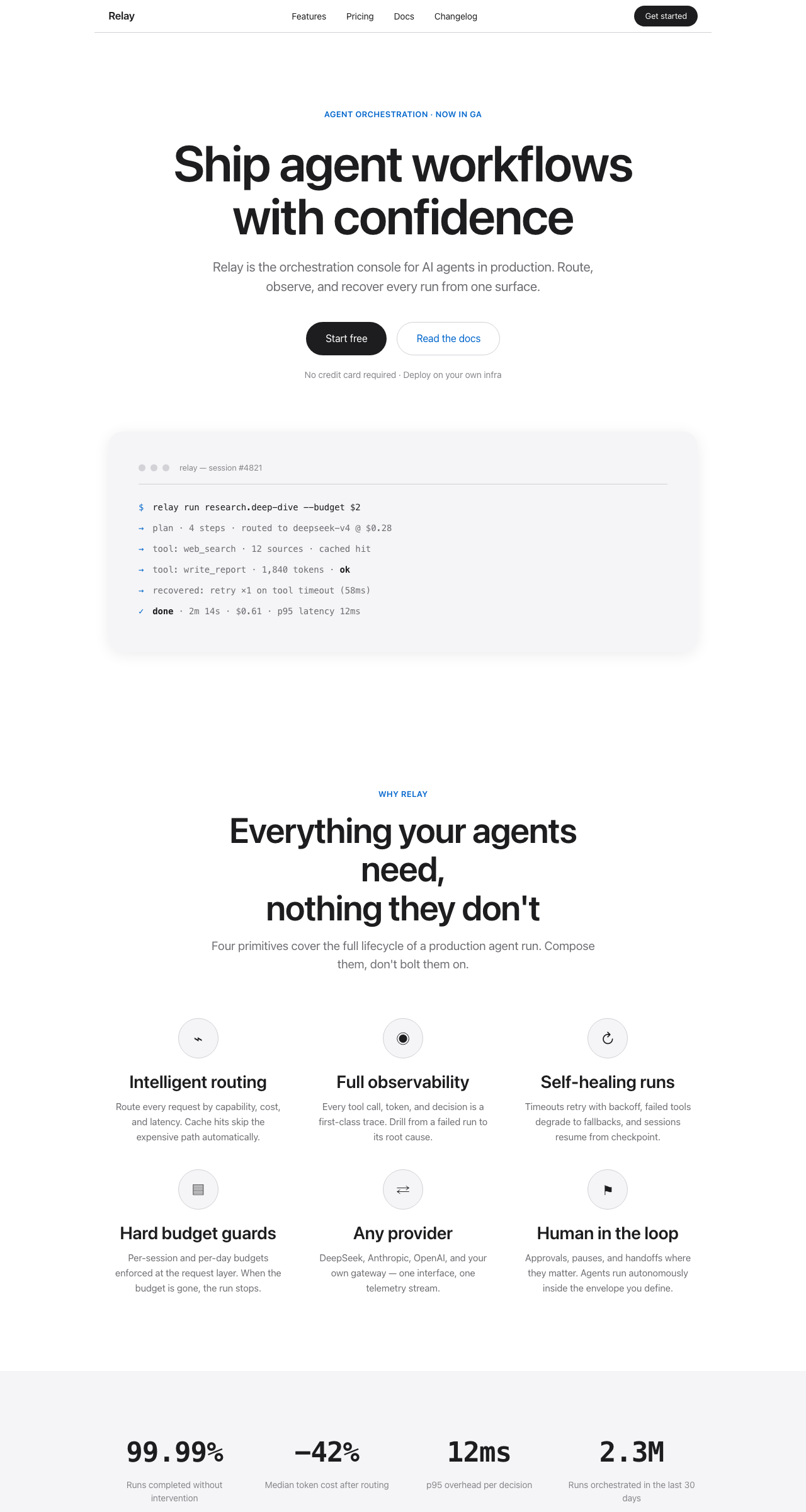
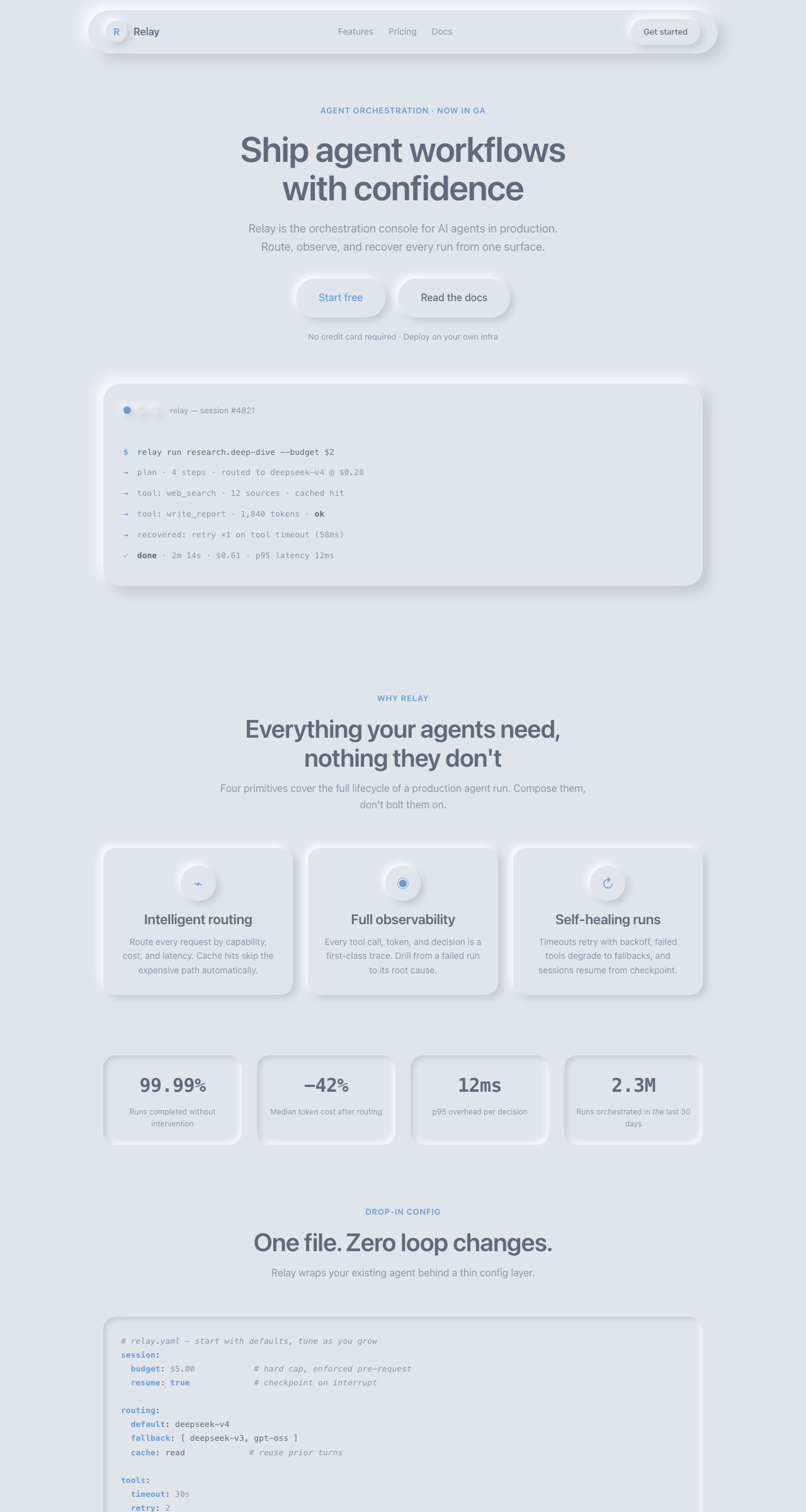
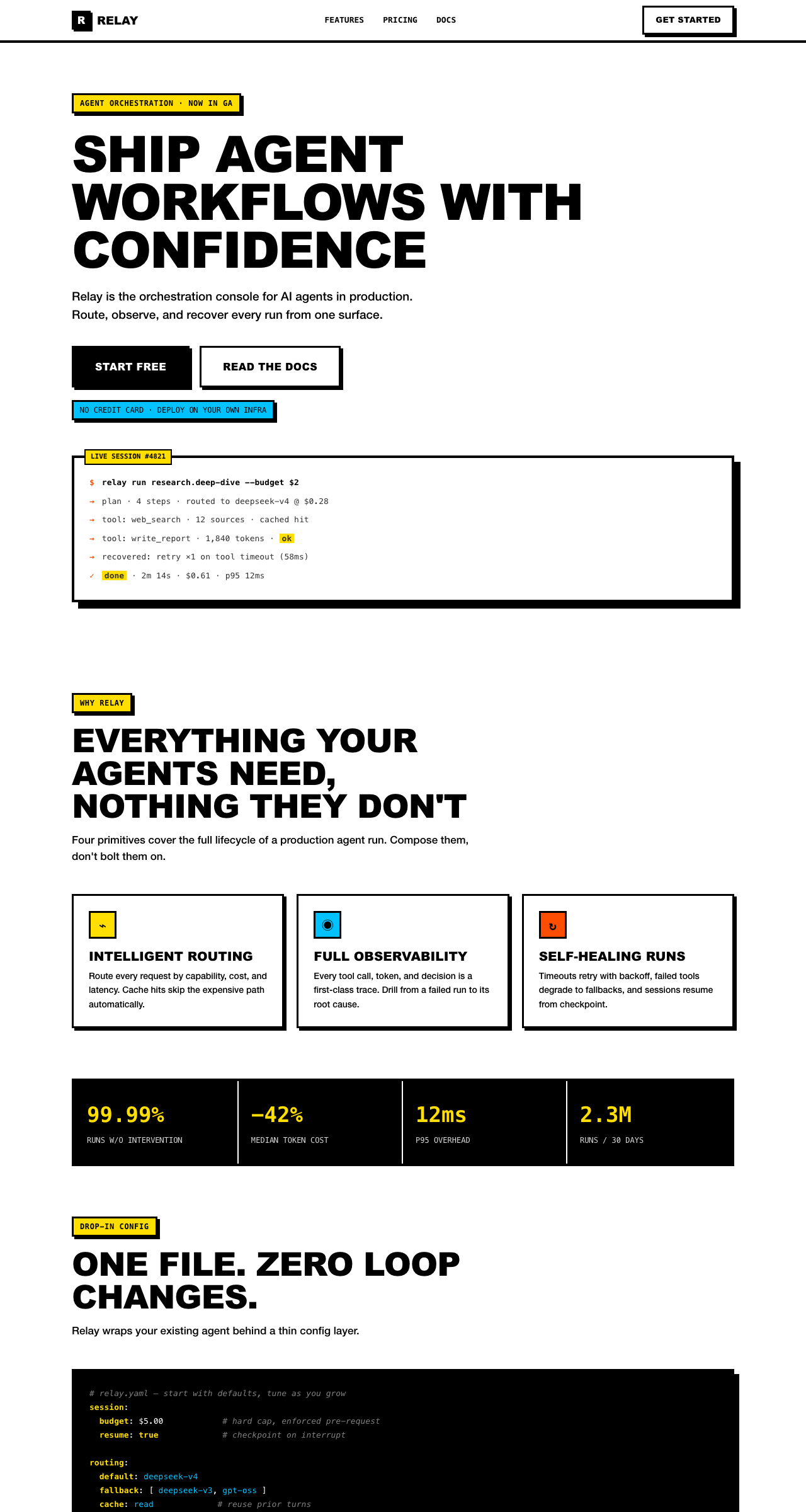
This is a "web design aesthetic skill pack" packaged for DeepSeek Harness, registering 10 curated visual styles (dark SaaS, minimal white, neo-neumorphism, brutalism, glassmorphism, Japanese minimal, bento-grid, cyberpunk, vaporwave, art-deco) as directly-followable specifications for AI agents. It ensures that vibe-coded websites no longer stay at the generic AI applied style of "gray-white gradient + purple CTA", but have clear design tokens, component rules, and prohibition lists to follow.
Core Capabilities
- Provides 10 design style skills (dark-saas / apple-minimal / neo-neumorphism / brutalism / glassmorphism / japanese-minimal / bento-grid / cyberpunk / vaporwave / art-deco), with AI agents automatically matching and following corresponding specifications based on natural language descriptions from users
- Each skill includes design tokens (colors / font sizes / spacing / letter spacing), component landing checklist, prohibition checklist, and selectable acceptance checklist. The model can directly produce HTML/CSS based on this rather than relying on impressions
- Progressive disclosure: At the start of a session, the model only sees the skill name and brief description. Full SKILL.md content is loaded only when the task matches, saving context tokens
- Registered to ctx.skills provider at the same priority as DSH official built-in skills (rank 600), recognized in all DSH profiles without manual injection
- Each style comes with a complete HTML landing page example that can be copied and run with one click (
examples/*.html, 10 in total) + 10 promotional screenshots (assets/*.png), which can be directly used as templates or for promotional screenshots - Only
dark-saasprovides an independent complete token reference documentreferences/dark-saas-tokens.md, tokens for the other 9 styles are written in the SKILL.md body
Technical Implementation
- Language: JavaScript (ESM, Node.js
node:built-in protocol) - Key Dependencies:
yaml(parsing YAML frontmatter for each SKILL.md);@deepseek-ai/cordis(peer dependency, provided by host, types only referenced in JSDoc) - Architecture Pattern: DSH bundle patch + ctx.skills provider;
cordis.patch.ymldeclares this package as a bundle that can be installed viadsh plugin add;index.js#applyregisters allskills/*/SKILL.mdas the same provider at startup; reads from disk each time it's discovered, editing and saving takes effect immediately - Entry File:
index.js(pointed to bypackage.json#mainandexports.".", exportsname/inject/apply)
Applicable Scenarios
When using DeepSeek Harness (or Claude Code, Codex, etc. agents that support Agent Skills specification) for vibe coding websites, you want the output to break away from "AI applied style", have a clear design language, and have tokens and component rules to follow for product landing pages, official websites, dashboards, personal homepages, brand sites. Frontend developers, independent product people, and AI programming enthusiasts who want to generate a webpage from 0 to 1 that "doesn't look like an AI default product" can use this.
Prerequisites and Compatibility
| Dependency | Minimum Version | Description |
|---|---|---|
| DeepSeek Harness | Not declared | Injected through ctx.skills provider; README.md:80 states it's at the same level as official built-in skills (rank 600), cordis.patch.yml indicates this package is installed as a dsh-design-skills bundle |
| Node.js | Not declared | At runtime only uses node:fs / node:fs/promises / node:path / node:url; package.json does not declare engines |
| Platform | Cross-platform | Pure JS + Markdown, no native modules, no external network/IO calls |
| Native Modules | None | The only npm dependency is yaml ^2.4.2 (pure JS library) |
Installation
dsh plugin --profile web add github:zhaiyateng/dsh-design-skills
Configuration
No additional configuration is required. All content is statically declared within SKILL.md and becomes available after installation to the DSH profile. The skills themselves do not read process.env, ctx.config, or any user input.
Frequently Asked Questions
Q: Will new buttons or menus appear in the DSH interface after installation?
A: No new UI will appear. It doesn't add any buttons or panels to the DSH console, but registers 10 sets of design specifications as "skills" that AI agents can load, allowing agents to automatically follow the corresponding specifications when generating websites.
Q: How do I make the AI use a specific style?
A: Simply describe the visual feeling you want in natural language, such as "a minimalist landing page like the Apple website", "a glassmorphism AI product homepage", "a Japanese Zen brand site", "a cyberpunk neon tool page". The agent will automatically match the corresponding one from dark-saas / apple-minimal / neo-neumorphism / brutalism / glassmorphism / japanese-minimal / bento-grid / cyberpunk / vaporwave / art-deco.
Q: The package.json description says 6 styles, but the repository has 10 installed. Which is correct?
A: The repository skills/ directory is authoritative (10 skills total). The description field on line 4 of package.json still reads "6 styles — dark SaaS, minimal white, neumorphism, brutalism, glassmorphism, Japanese minimal", which is leftover copy from early versions and hasn't been synchronized with the README and actual directory.
Q: Do I need internet, tokens, or third-party accounts before using this?
A: No. The skill pack is pure Markdown plus an ESM entry script, doesn't call any external APIs, doesn't read/write outside the host machine's filesystem, and doesn't collect any telemetry.
Q: Do I need to restart DSH after modifying SKILL.md?
A: No. The comments in index.js:50-54 are clear: each time a skill is discovered, it reads skills/*/SKILL.md fresh from disk. After editing and saving, the next task match will take effect immediately.
Q: Are brands like Linear and Art Deco mentioned in the styles partners?
A: No partnership relationship. Both THIRD_PARTY_NOTICES.md and the SKILL.md header declare: this repository has no affiliation or endorsement relationship with the listed brands; tokens are factual observations提炼 from public interfaces, and sources following MIT protocol (such as VoltAgent/awesome-design-md) have been listed item by item in compliance documents.
Q: How do I upgrade or uninstall?
A: Upgrade: Run dsh plugin --profile web add github:zhaiyateng/dsh-design-skills again for over-the-installation. Uninstall: Remove the bundle entry from the DSH profile configuration, or delete the profiles/node_modules/dsh-design-skills symlink. DSH does not provide a dedicated uninstall command.
Difficulty Level
Beginner — One installation command, just describe the desired visual style in the session to trigger; no configuration, build, or additional learning required, and no API Key or login needed.
Known Issues and Limitations
package.json:4description field still claims 6 styles (dark SaaS, minimal white, neumorphism, brutalism, glassmorphism, Japanese minimal), but the repositoryskills/directory actually contains 10 skills. Four new ones were added: bento-grid, cyberpunk, vaporwave, art-deco. The description copy hasn't been synchronized with the directory (evidence: package.json:4 / README.md:45-56)package.jsondoes not declareengines/peerDependencies/os/cpufields. Specific compatibility ranges for DSH and Node need to be ensured by the caller (evidence: package.json)- Capabilities not yet delivered in README.md:88-91 roadmap: scenario-based workflow skills (landing page / portfolio / documentation site / SaaS backend), Tailwind / CSS variables dual format output for tokens. Current version does not provide these
- Only
dark-saasprovides an independent complete token reference documentreferences/dark-saas-tokens.md. Tokens for the other 9 styles are directly written in their respective SKILL.md bodies, with no separately loadable design reference files (evidence: references/dark-saas-tokens.md:1-3) - Routing/triggering effects highly depend on the underlying AI model's semantic matching of skill descriptions; if keywords used in the description are too niche, the corresponding skill may not automatically match (evidence: README.md:78-79 "Skills work through progressive disclosure: at the start of a session, the model only sees the skill name and description, and loads the full SKILL.md only when the task matches")
Design aesthetics skill pack for DeepSeek Harness (DSH) — keeps your vibe-coded websites away from the "AI look".
DeepSeek Harness 设计美学技能包 —— 让 vibe coding 出来的网站摆脱「AI 味」。
模型不缺"怎么建站",缺"怎么建得好看"。本技能包把经过验证的设计风格提炼成 可执行的规范(token + 组件规则 + 禁用清单 + 验收清单),模型匹配后自动遵循。
Models don't lack "how to build a site" — they lack "how to make it look good". This pack distills proven design aesthetics into executable specs (tokens + component rules + forbidden lists + acceptance checklists).




🖼️ Try all 10 styles live → zhaiyateng.github.io/dsh-design-skills
🖼️ 在线体验全部 10 种风格 → zhaiyateng.github.io/dsh-design-skills
English | 中文
Preview / 效果预览
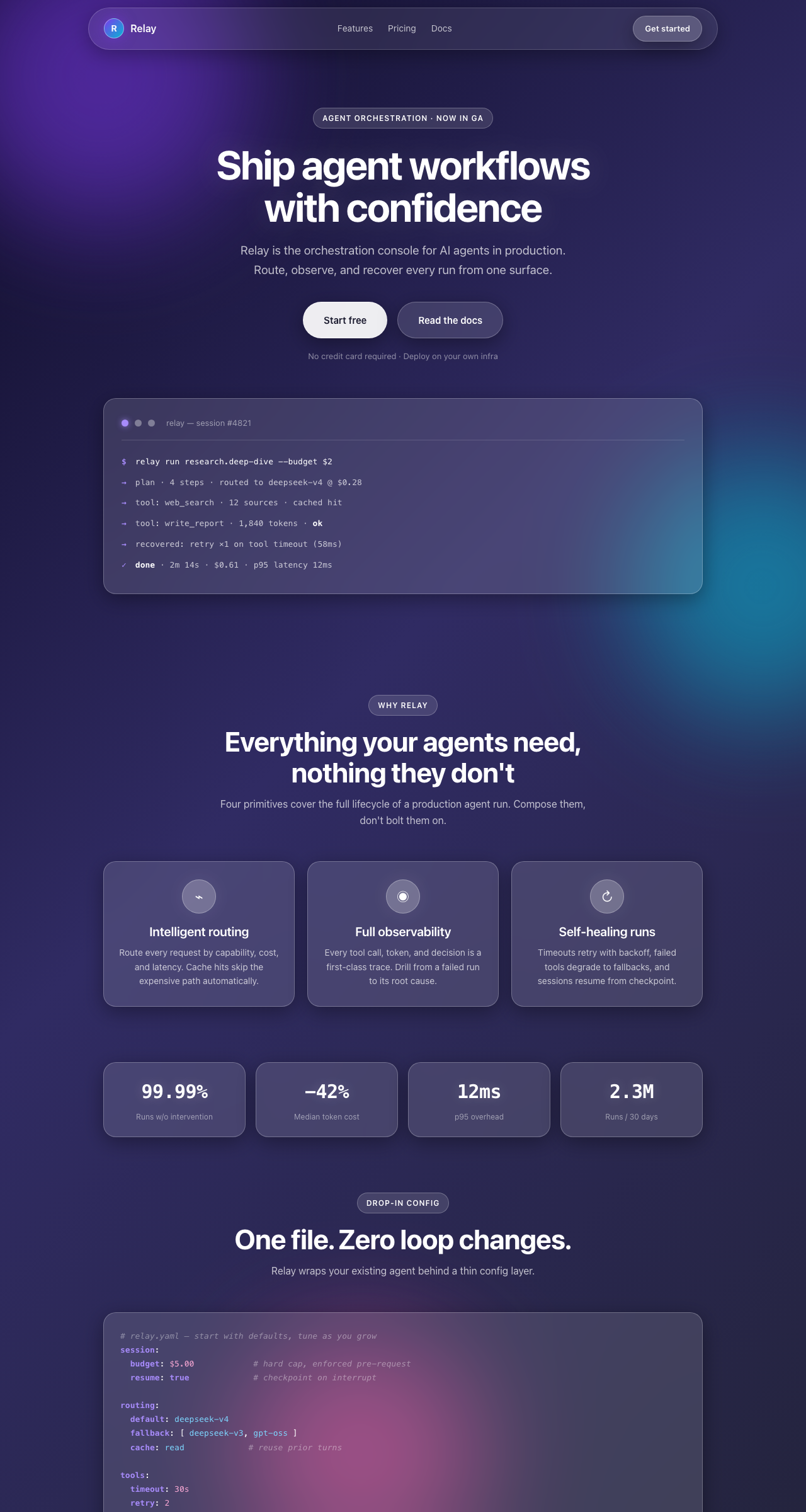
Same product (a fictional agent-orchestration console, "Relay"), ten aesthetics — the exact "before / after" of what these skills do to your vibe-coded site:
同一产品(虚构的 Agent 编排平台 "Relay")的十种风格效果——这就是本技能包 对 vibe coding 产物的实际影响:
dark-saas (dark, Linear-inspired) | apple-minimal (minimal white) | neo-neumorphism (soft UI) | brutalism (hard-edge) | glassmorphism (frosted glass) |
|---|---|---|---|---|
 |  |  |  |  |
japanese-minimal (zen serif) | bento-grid (modular cards) | cyberpunk (neon) | vaporwave (synthwave) | art-deco (gold & emerald) |
|---|---|---|---|---|
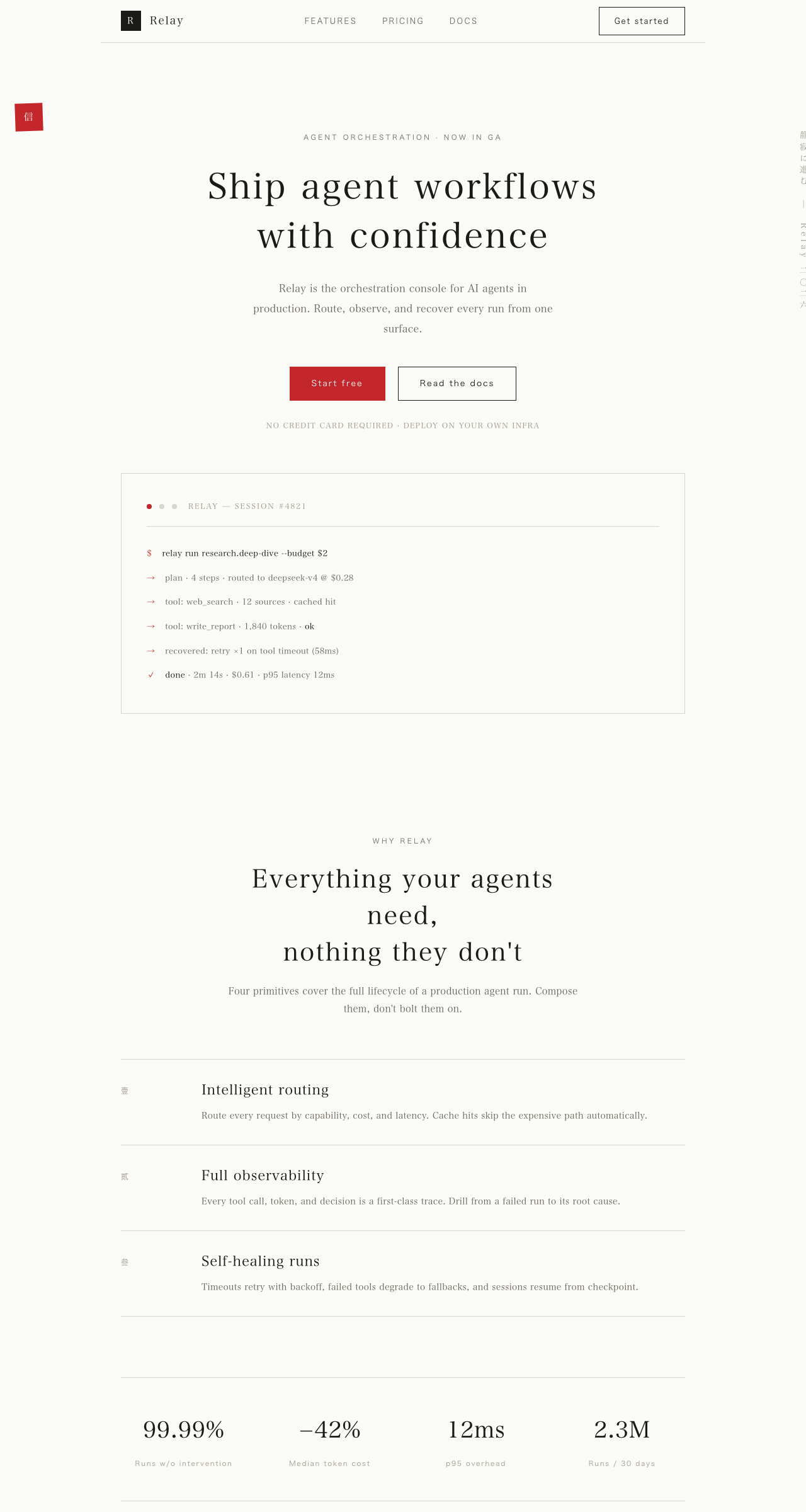 | 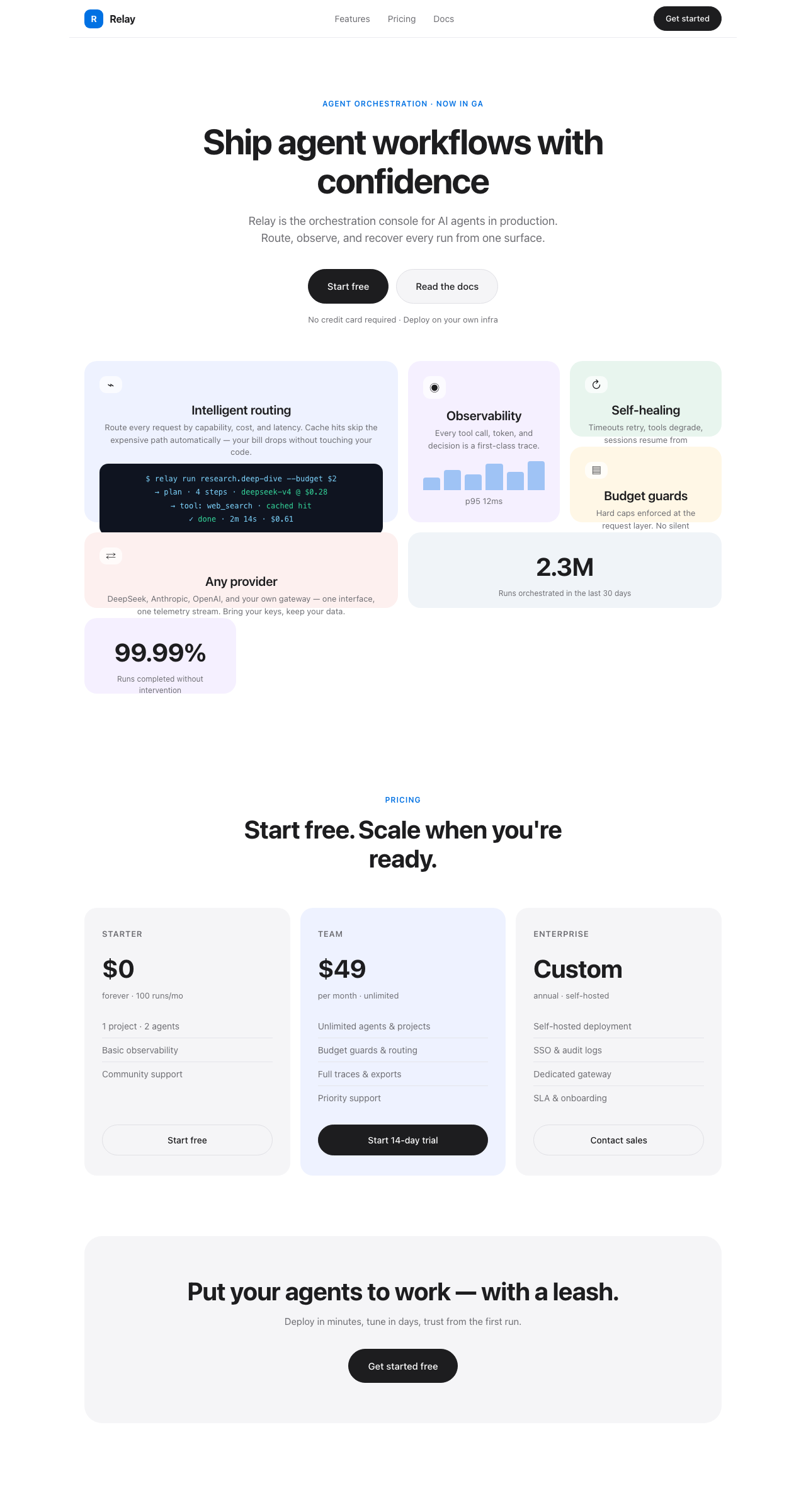 | 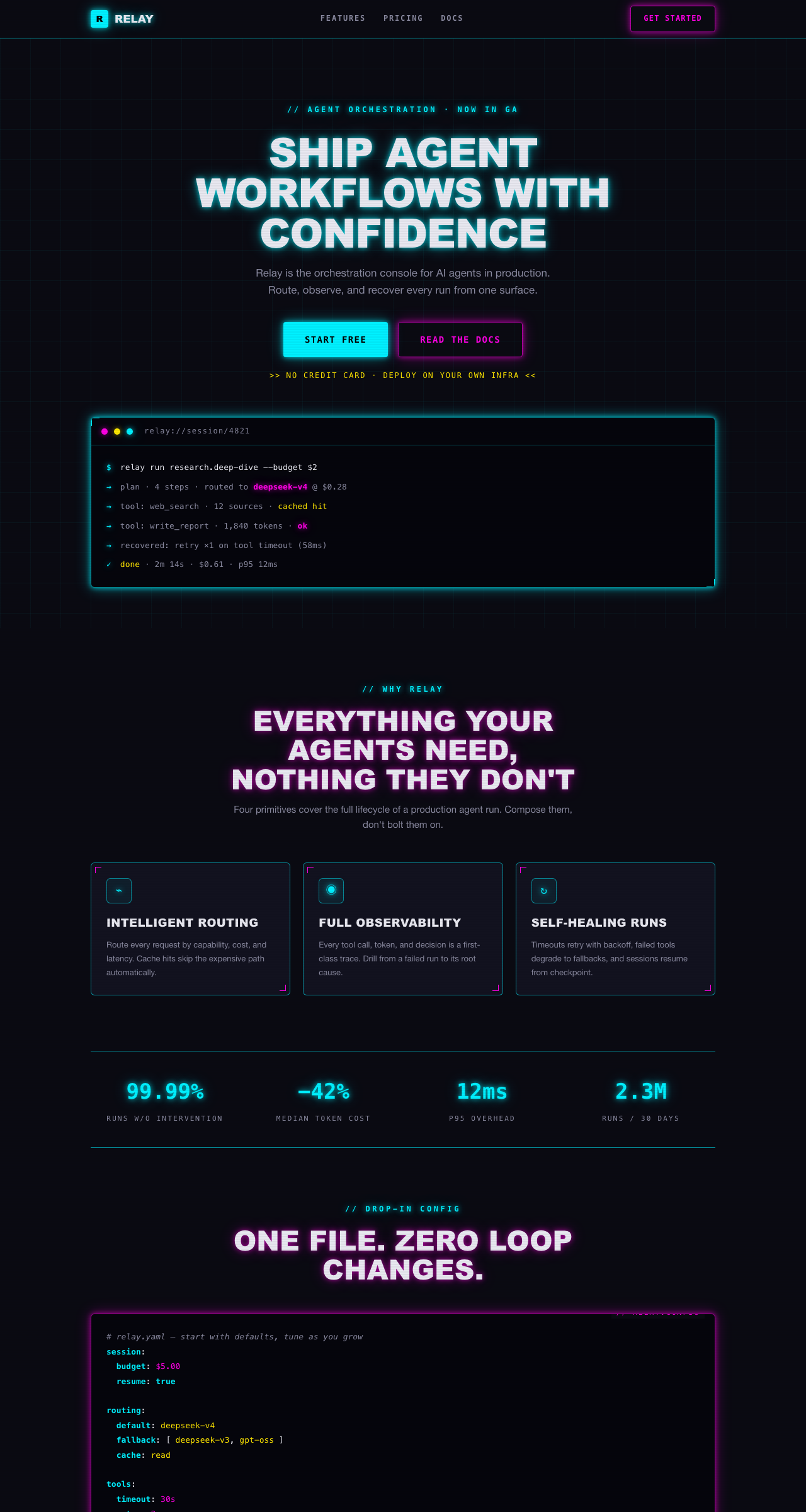 | 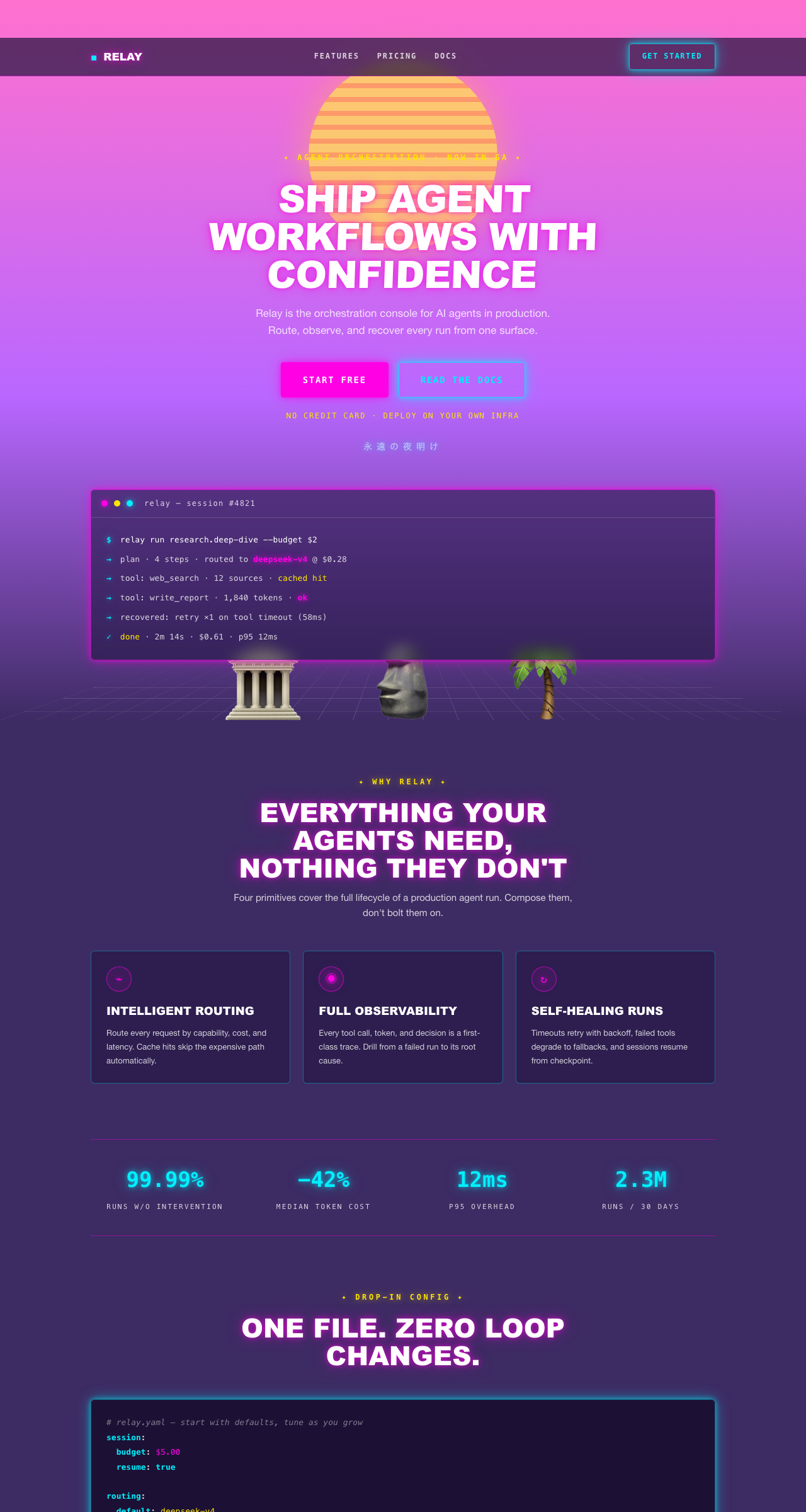 | 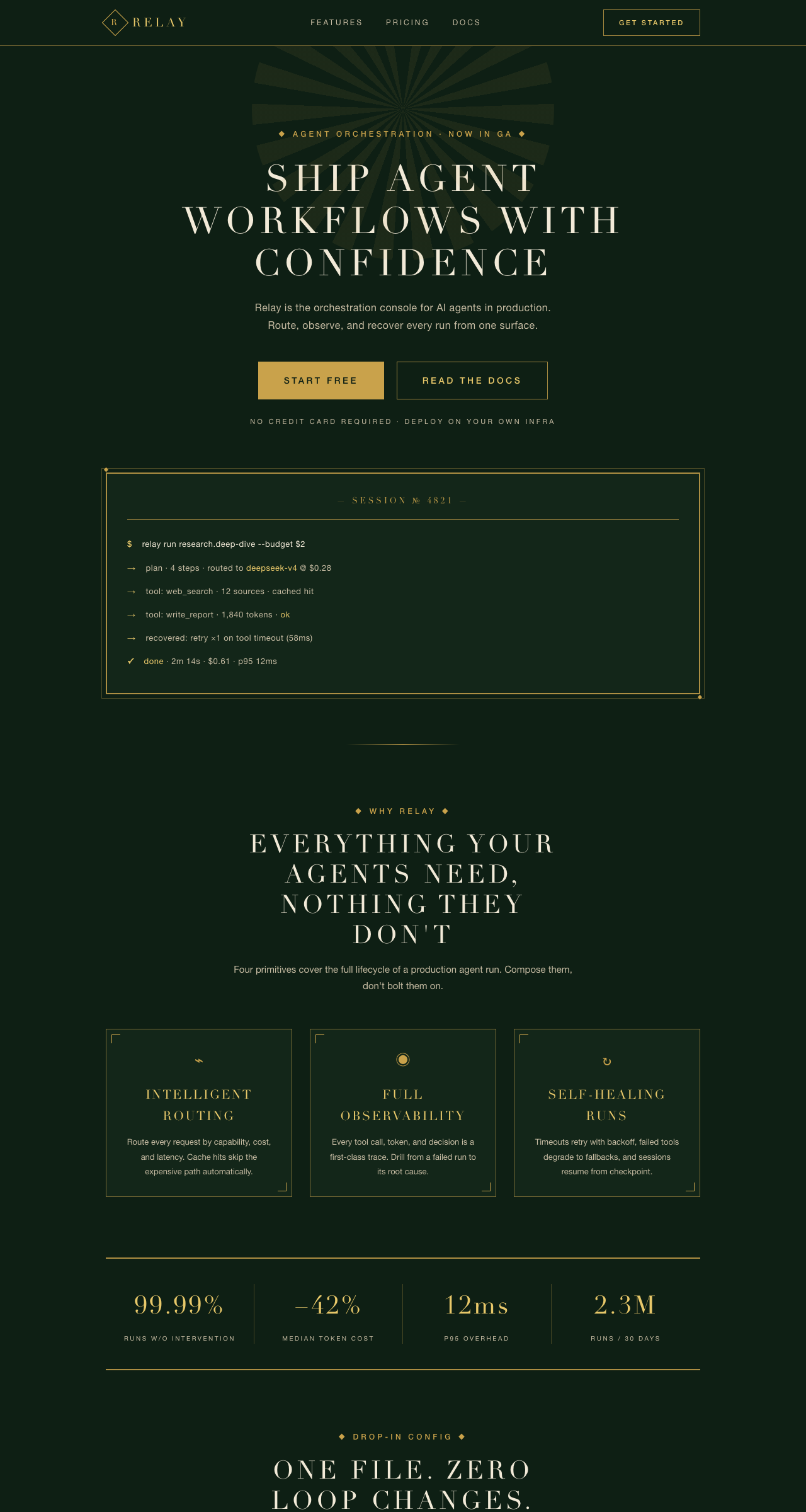 |
Demo source: examples/dark-saas-landing.html · examples/apple-minimal-landing.html · examples/neo-neumorphism-landing.html · examples/brutalism-landing.html · examples/glassmorphism-landing.html · examples/japanese-minimal-landing.html · examples/bento-grid-landing.html · examples/cyberpunk-landing.html · examples/vaporwave-landing.html · examples/art-deco-landing.html
What's inside / 包含的技能
| Skill | 风格 / Style | 适用场景 / Use for |
|---|---|---|
dark-saas | 深色 SaaS(Linear 式) Dark SaaS, Linear-inspired | 开发者工具、数据看板、AI 产品、SaaS 后台 Dev tools, dashboards, AI products |
apple-minimal | 极简白(Apple 式) Minimal white, Apple-style | 产品官网、落地页、作品集 Product sites, landing pages, portfolios |
neo-neumorphism | 新拟态 / Soft UI Neumorphism | 个人主页、健康/理财 App、演示 Demo Personal pages, lifestyle apps, demos |
brutalism | 粗野主义 / Brutalism Hard-edge, neo-brutalist | 实验性产品、艺术/独立项目、开发者工具 Experimental products, indie sites, dev tools |
glassmorphism | 毛玻璃 / Glassmorphism Frosted glass | AI 产品、SaaS 官网、Dashboard、演示 Demo AI products, SaaS sites, dashboards, demos |
japanese-minimal | 日式极简 / Japanese Minimal Zen serif, wabi-sabi | 文化/美学类产品、博客、艺术展、和风品牌 Cultural/aesthetic products, blogs, art sites |
bento-grid | 便当盒 / Bento Grid Modular card grid | 产品官网、功能展示、SaaS 首页、个人主页 Product sites, feature walls, SaaS homepages |
cyberpunk | 赛博朋克 / Cyberpunk Neon, futuristic glow | 科技产品、AI 工具、游戏、极客向落地页 Tech products, AI tools, games |
vaporwave | 蒸汽波 / Vaporwave Synthwave, retro-futurism | 艺术项目、音乐/文化向站点、实验性落地页 Art projects, music/culture sites |
art-deco | 装饰艺术 / Art Deco Gold & emerald, 1920s | 高端品牌、奢华酒店、艺术/时尚类站点 Luxury brands, hotels, art/fashion sites |
Install / 安装
dsh plugin --profile web add dsh-design-skills
Or add the repo as a local profile dependency / 或本地安装:把仓库放进
$DSH_HOME/profiles/node_modules/(符号链接),然后在 profile 的
cordis.patch.yml 中插入 dsh-design-skills。
Usage / 使用
在会话中直接说:
- 「用深色 SaaS 风给我做一个 AI 产品落地页」→ 自动匹配
dark-saas - 「帮我做一个 Linear 风格的数据看板」→ 自动匹配
dark-saas - 「做一个苹果官网那种极简的落地页」→ 自动匹配
apple-minimal - 「Soft UI 风格的个人主页」→ 自动匹配
neo-neumorphism
技能通过渐进式披露工作:会话开始时模型只看到技能名与描述, 当任务匹配时才加载完整 SKILL.md(token、组件规则、禁用清单)。
How it works / 原理
- 每个技能是标准的
skills/<name>/SKILL.md(YAML frontmatter:name+description必填)。 index.js以ctx.skillsprovider 形式注册本包全部技能(rank 600,与官方内置同级)。- 声明
dsh.bundlemanifest,可通过dsh plugin add一键安装。
Roadmap / 路线图
- Ten styles: dark SaaS, minimal white, neumorphism, brutalism, glassmorphism, Japanese minimal, bento grid, cyberpunk, vaporwave, art deco
- Full landing-page demo + promo screenshot for every style
- Scenario workflows: landing page / portfolio / docs site / SaaS admin
- Tokens in Tailwind & CSS-variable dual formats
Compliance / 合规说明
本仓库的设计规范参考了 MIT 许可的开源项目(awesome-design-md、shadcn/ui)。 所有来源、许可证全文与商标声明见 THIRD_PARTY_NOTICES.md。 本仓库与所列品牌无任何隶属或背书关系。
License
Read the usage guide →
Install steps, key points, FAQ and compatibility for this plugin — auto-derived from indexed fields.
Listing badge

[](https://deepseek-plugin.org/plugins/zhaiyateng/dsh-design-skills)Paste this markdown into your GitHub README to link back to this listing. The badge only states the listing — not a security endorsement.