Package JLC EDA Professional as MCP toolsets and Skills callable by DSH Agent, enabling the model to drive schematic and PCB automation within Harness.

- Language
- Go
- License
- NOASSERTION
- Branch
- main
Install
$ dsh plugin --profile web add github:zhoushoujianwork/easyeda-agentRun the command above in your terminal to install this plugin via the dsh CLI. You can switch Profile in the top-right corner. New to dsh? Read the beginner tutorial
Install via your agent
Install the DeepSeek Harness plugin zhoushoujianwork/easyeda-agent for me: review the repository at https://github.com/zhoushoujianwork/easyeda-agent first, then run the install command and verify the plugin loads successfully.
Paste this instruction to the DSH Web GUI assistant — it will install and verify for you.
One-Line Positioning
Wraps JLCEDA EDA Professional into an MCP toolkit and workflow Skill callable by DSH Agent, enabling the model to drive schematic/PCB automation within Harness (component placement, routing, PCB layout, copper pour, DRC, BOM export). Note: This plugin only bridges the built-in stdio MCP server to DSH and registers Skills into the global layer; the actual Go CLI/daemon binary and EasyEDA-side .eext connector must be installed separately using the official one-click script.
Core Capabilities
- Activates an
easyedanamespace MCP bridge in the DSH profile, exposing tools likeeasyeda_health/easyeda_actions/easyeda_schematic/easyeda_pcb/easyeda_board/easyeda_document/easyeda_project/easyeda_artifact/easyeda_system/easyeda_blocks/easyeda_workflowfor the model - Registers Agent Skills from
skills/easyeda-agent/(including S0–S6 schematic flows, P0–P10 PCB flows, gatekeeper specs, reference data, Python/JS validation scripts), using an isolated instance withproviderName: easyedato avoid conflicts with the official bundle's skill-filesystem - Forwards all typed actions from the Go CLI (including schematic component placement/routing/partitioning, PCB auto-placement/copper pour/4-layer power plane, board binding, artifact export, system notify toast) as
easyeda_<domain>MCP tools to the model, each action carrying aMutatestag to indicate read-only/destructive semantics - Provides a self-describing
easyeda_actionstool: the model can filter the action directory by domain/keyword/mutate-status, replacing the need to read individual READMEs - Exposes persistent project design workflow state machine via
easyeda_workflow(init/status/advance/confirm/reset), enabling S0–S6 + P0–P10 gatekeeper confirmations to be persisted by the Agent rather than just existing in the conversation - Exposes embedded circuit block library via
easyeda_blocks(CH340 USB serial, ESP32 auto-download, button debounce, etc.), allowing the Agent to query blocks before placing peripherals and reuse topologies on match
Technical Implementation
- Languages: TypeScript (MCP server) + Go (CLI/daemon, not in this package) + Shell (cordis.patch.yml declarative injection)
- Key Dependencies:
@deepseek-ai/dsh-mcp-client(host's built-in MCP bridge plugin, this package only declares activation),@deepseek-ai/dsh-skill-filesystem(host's built-in skill-filesystem, this package declares an isolated instance),@modelcontextprotocol/sdk 1.30.0(stdio server implementation), localeasyedaGo binary (MCP server spawns viachild_process, path determined byEASYEDA_BINenv var) - Architecture Pattern: Pure declarative cordis bundle patch—
cordis.patch.ymlcontains twoinsertrules that bring up the MCP bridge and isolated skill-filesystem during theapplyphase; runtime has no custom JS/TS code, bridging delegates to host in-box plugin, sandbox execution delegates to Go daemon. MCP server uses stdio transport, WebSocket communication with EasyEDA is entirely within the daemon - Entry Files:
cordis.patch.yml(DSH integration entry),mcp/src/server.mjs(stdio MCP server implementation),mcp/src/core.mjs(CLI invocation + tool definitions); Go CLI entry atcmd/easyeda/, EasyEDA-side.eextatextension/, both outside this DSH plugin loading scope
Use Cases
Use when the user asks DSH model to do "EasyEDA Pro-based circuit board design automation"—typical scenarios include generating schematics from a single requirement sentence, syncing routed schematics to PCB, running DRC checks and exporting BOM/netlist, or when EasyEDA is already open, having the model directly place components/route/pour copper in it. This plugin targets hardware owners, EDA engineers, and automation integrators; not suitable for "zero EasyEDA experience just want to run a hello world" pure DSH users, since there are many prerequisites (CLI binary + .eext + EasyEDA-side toggle).
Prerequisites & Compatibility
| Dependency | Minimum Version | Notes |
|---|---|---|
| DSH Host | Not declared in this package | This package references @deepseek-ai/dsh-mcp-client and @deepseek-ai/dsh-skill-filesystem in cordis.patch.yml, depending on host DSH to bundle these two in-box plugins into the installation directory; version determined by host build time, this package has no peerDependencies |
| Node.js | >= 20.17.0 | Both package.json#engines and mcp/package.json#engines are >=20.17.0; below this version the MCP server will fail to start due to Node self-rejection |
easyeda Go CLI/daemon | Same major/minor version as this plugin (e.g., this package 0.25.x with CLI 0.25.x) | Installed via official one-click script (`curl -fsSL https://raw.githubusercontent.com/zhoushoujianwork/easyeda-agent/main/install.sh |
EasyEDA Agent Connector .eext | Strictly same version as CLI | Must import .eext in EasyEDA Pro's extension center (script prints download URL or search "EDA Agent Connector" in LCSC plugin market for one-click install); sideloaded version has no in-place auto-upgrade, requires manual uninstall of old version then install new; version mismatch shows connector as stale in daemon health |
| EasyEDA Pro | eda ~3.0 (extension.json#engines) | Must enable "Allow External Interaction" in an open project, otherwise the connector's WebSocket can never connect to the local daemon |
| Platform | — | Makefile cross-compiles darwin/amd64+arm64, linux/amd64+arm64, windows/amd64; this DSH plugin itself is platform-independent pure JS/JSON/YAML with no native module dependencies |
Installation
dsh plugin --profile web add github:zhoushoujianwork/easyeda-agent
Configuration Options
| Config | Type | Description | Default |
|---|---|---|---|
EASYEDA_BIN (env var) | string | Overrides the easyeda binary path spawned by MCP server; empty means search in PATH | easyeda (PATH lookup) |
easyeda-mcp serverName | string (declarative) | MCP tool namespace prefix; tool names seen by model are like mcp__easyeda__easyeda_schematic | easyeda |
easyeda-skill-fs providerName | string (declarative) | Isolated instance namespace identifier, avoids conflict with official bundle's skill-filesystem | easyeda |
easyeda-skill-fs customSkillDirs | string array (declarative) | Only scans skills/easyeda-agent/ within this package, doesn't mix in host's default skill directory | node_modules/easyeda-agent-dsh/skills/easyeda-agent (relative to profile directory) |
includeDefaultRoots | boolean (declarative) | Whether to also scan host's default skill directory; this package sets to false to avoid conflict with official presets | false |
This package has no runtime schema that users can directly modify in profile config files—all adjustments are done via the above declarative fields or
EASYEDA_BINenv var. To enable more toggles (like custom MCP tool whitelist), you need to forkmcp/src/server.mjsor modify the in-box@deepseek-ai/dsh-mcp-clientbehavior in the host.
FAQ
Q: Installation command succeeded but mcp__easyeda__easyeda_* tool list is empty?
A: Check three things—whether easyeda daemon is running (easyeda health should return status: found), whether EasyEDA has a project open with "Allow External Interaction" enabled, and whether the connector .eext is actually loaded into EasyEDA (menu bar showing "EDA Agent" group means it's loaded). MCP depends on bidirectional connectivity between local daemon and EasyEDA window; missing either will cause all typed actions to receive NO_CONNECTOR.
Q: Getting "STALE_READ" / "action can't read latest data after PCB mutation" errors?
A: This is a hard constraint of the daemon: any pcb.* mutation must first run easyeda doc reload before reading/judging/DRC; reading directly without reload causes the daemon to refuse and tell you what to run next. Connection error spikes on the same network usually require pour-rebuild first, not a real disconnection.
Q: easyeda update --check reports connector is behind but update doesn't upgrade it?
A: Sideloaded .eext is not in the auto-upgrade scope. easyeda update will print the lagging connector version and re-import address; manual uninstall old version and import new version in EasyEDA extension center is required; if installed from LCSC plugin market, the market will auto-upgrade in-place but version may lag CLI by a few minors.
Q: Skill conflict/load failure prompts under DSH web profile?
A: cordis.patch.yml intentionally declares an isolated skill-filesystem instance with includeDefaultRoots: false to avoid conflicts; if still conflicting, someone likely manually added a second easyeda-skill-fs row in the same profile's cordis.patch.yml or changed providerName causing name collision. Dump config and delete the extra row.
Q: Which tools can run offline/without external network?
A: easyeda_blocks (query built-in circuit block library), easyeda_actions (read offline JSON of action directory), easyeda_health (check local daemon status) don't depend on EasyEDA online or external network; the rest like easyeda_schematic / easyeda_pcb require EasyEDA window open, some actions also query LCSC library on demand.
Learning Curve
Advanced — Users need to understand DSH profile/cordis layering (installing this plugin is only the first step), plus manually install Go CLI binary, import .eext connector, enable EasyEDA "Allow External Interaction" toggle; missing any step will result in MCP tool list "installed but not callable". The advantage is that once all four pieces are in place, the model can drive EasyEDA with a full set of typed actions and run gatekeeper flows with the persistent workflow state machine.
Known Issues & Limitations
internal/daemon/connect.go:19-21marks a TODO: daemon temporarily skips origin verification when accepting WebSocket (InsecureSkipVerify: true), waiting for JLC official public extension origin to add precise whitelist; current daemon only binds127.0.0.1, risk surface is limited- MCP bridge in
cordis.patch.ymlusesdsh-mcp-client, skill registration usesdsh-skill-filesystem, both are DSH host's in-box plugins—if host version is too old/trimmed these, this package activation will fail - This package writes no user files, creates no persistent state; uninstalling this package won't clean up Go CLI,
.eext, or EasyEDA-side toggles - MCP server deliberately doesn't expose
debug.exec_jsdomain to the model, limiting the "arbitrary JavaScript execution" escape hatch; this also means some experimental actions not yet typed (bare JS calls) can only be manually run in terminal viaeasyeda call debug.exec_js EASYEDA_BINenv var is shared across multiple processes (e.g., multiple agents in same profile) causing race conditions; usually resolved by having all agents share the same daemon- Three-party versions (CLI / Skill / Connector) must be aligned; otherwise
easyeda daemon healthmarks connector as stale; sideloaded.eexthas no in-place auto-upgrade, requires manual maintenance easyeda update --check --exit-codeexits with code 10 in CI which can be gated, but only reflects CLI/skill/connector version alignment status, doesn't verify EasyEDA side is truly enabled or daemon is running- This package's current
package.json#versionis0.25.1whileextension/extension.json#versionin the repo is1.1.0—CLAUDE.mdnotesmake releaseprocess will unify both, but current commit state is not yet synced; when encountering "easyeda health marks stale" prioritize CLI-side version - Subject to JLC official
eda.*API limitations: auto-router for maze files, interactive routing UX, controlled impedance Z0, teardrop, programmatic undo, incrementalimport_changesand other capabilities cannot be expressed via typed actions, must use external Freerouting (DSN round-trip) or manual UI fallback

easyeda-agent
面向 EasyEDA(嘉立创EDA专业版)的 AI 原生自动化层

当前版本:v1.0.0 —— 原理图功能正式上线。 AI Agent 通过类型化命令操作 EasyEDA Pro, 从一份客户口吻的需求文档出发,原理图全流程(S0–S6:方案书 → 分页 → 分区 → 摆放 → 布线 → 机械门禁 → 交付)已可正式交付;PCB 流程(P0–P10)持续演进中。 真机成图见下方实战展示。
easyeda-agent 把官方 EasyEDA 扩展 API 变成一套有类型、可观测、Skill 友好的系统。EasyEDA 插件保持极薄——它连到本地 agent、只执行被批准的动作;Go CLI/daemon 掌管协议、状态、产物、校验和面向用户的工作流。
为什么做这个
上游 run-api-gateway 证明了关键入口:代码能跑在 EasyEDA 内、访问官方 eda 对象。但它把「裸 JavaScript 执行」当作主工作流——强大,但对 AI agent 太脆弱。
本项目的连接器是真实可用的:daemon 固定监听单端口 60832(0xEDA0,"EDA" 写进十六进制;0.15.0 起弃用与官方 gateway 冲突的 49620)(不外溢、被占用时自动接管旧 easyeda daemon)、连接器锁定该端口、校验握手、自愈重连、把一套有类型的动作目录分发到官方 eda.* API。裸 JS 仅作为需二次确认的 debug.exec_js 逃生口保留。
- Skill 描述专家工作流和护栏;
- Go CLI/daemon 暴露稳定的 typed actions;
- EasyEDA 连接器插件 只做到官方
eda.*的桥接; - 产物、截图、DRC 结果、审计日志都是一等输出。
工作原理
- Skill 或人跑一条
easyeda命令; - Go CLI 校验输入、把 typed action 提交给本地 daemon;
- daemon 跟踪已连接的 EasyEDA 窗口、经 WebSocket 路由每个动作、记录审计日志/产物/校验结果;
- 连接器扩展跑在 EasyEDA 内、调用官方
eda.*API; - 结构化结果回流到 CLI 和 Skill,下一步基于真实编辑器状态来规划。
动作目录已覆盖原理图、PCB、文档导航、板级绑定、产物导出、诊断。完整清单与路线图见 docs/FEATURES.md。
站在巨人的肩膀上
我们不重造轮子,而是把成熟的一层层能力叠起来,让 AI agent 直接可用:
- 官方
eda.*API —— 嘉立创 EDA 专业版自己暴露的 86 个命名空间,是真正的能力底座; - 上游
run-api-gateway—— 证明了「代码能跑在 EasyEDA 内、访问eda对象」这条关键入口; - 成熟的 AI Agent Skill 范式 —— 用 Skill 描述专家工作流 + 护栏,用 typed action 让每一步可观测、可验收、可回放,而不是把「裸 JS 执行」丢给模型硬扛。
在这三层之上,easyeda-agent 补齐了工程化的中间层:自愈连接器、有类型的动作目录、真实 bbox 校验、门控设计流程,以及下面这个核心特色——电路块库。
核心能力 & 特色
能力总览(完整清单见 docs/FEATURES.md):
| 能力域 | 做什么 |
|---|---|
| 电路块库(旗舰特色) | 社区共建、署名可追的成熟外设电路库(easyeda blocks,37 块:19 ready / 13 verified / 5 draft):CH340 USB 串口、ESP32 自动下载、按键去抖、USB-HUB、降压…sch block-apply 一条命令放件 + 连线 + 网表对账,照抄拓扑、只重绑引脚网络即可复用 |
| 原理图(v1.0.0 正式上线) | 全流程 S0–S6 可交付:库优先放件(真实 LCSC/JLC 器件)、编组、布线、netflag/netport;三层布局体系 Sheet→Zone→Group——分区框 + 区名 + 电路说明由算法计算落位,生成与校验用同一把尺 |
| 机械门禁与审计 | sch gate --strict 一条命令过五关(layout-lint→clusters→check→bridge-check→drc),bridge-check 新增 orphan-tree 悬空树判据(连接器 ≥0.26.1);跨页网名审计 sch nets --strict + 块对账 sch reconcile + netlist 黄金表逐脚比对 |
| PCB | 自动布局、板框、禁布区、规则感知短线布线、4 层电源平面、铺铜、丝印避让、DRC/pcb check |
| 设计流程 | 从客户口吻需求到成品的门控主脊(S0–S6 + P0–P10),里程碑确认,存盘检查点 |
| 产物 | BOM(补 LCSC C 号)、网表、导出、原生截图、审计日志、录制→回放 |
特色:电路块库(一次贡献,永久收益)
固定模块的外设电路可以直接照抄。 ESP32 自动下载电路、CH340 USB 烧录、按键去抖、
USB-HUB…这些电路的内部拓扑是死的,每次重画等于重趟坑。电路块库把它们
沉淀成验证过的、可复用的电路块(当前 37 块:19 ready / 13 verified / 5 draft)——
sch block-apply 一条命令完成放件 + 连线 + 网表对账,你只需重绑对外的几根线(ports)
到主控网络,引脚用功能名引用所以零改号,器件直接指回标准器件库(BOM 就绪)。
- 社区共建 + 署名可追:每个块带
author/contributors,一次学习贡献、永久收益; - 验证门禁:块必须跑过
place → wire → check → DRC=0才入库,不是「看着对」的散文堆; - 三维知识:器件(可替换选择)+ 原理图链接注意 + PCB 布局电气特性,一块讲全;
- AI 直接消费:agent 放外设前先查块库,命中即抄,省掉一整个模块的选型与接线。
库已内嵌进 CLI:
easyeda blocks ls/show/search离线可查(无需 daemon/窗口) · 贡献指南standard-blocks-contributing.md
安装
完整上手 & 使用注意事项见 快速开始 → —— 四件套 (CLI / 连接器
.eext/ Skill / EasyEDA)的安装、版本对齐、启动 daemon、升级纪律 与常见卡点速查,一页讲清。下面是精简版。
easyeda-agent 是一套四件套,四者需同版本、同时在位:CLI/daemon、连接器
.eext 插件、easyeda-agent Skill、开启「允许外部交互」的 EasyEDA Pro。升级时
三方(CLI + 连接器 + Skill)要一起升到同一版本,否则 easyeda daemon health 会把
落后的连接器标成 stale。
先装 easyeda CLI/daemon,再装 EasyEDA 连接器 —— 两条通道任选:安装器会打印与 CLI 严格同版的 GitHub Release .eext 下载地址(导入即用),或从立创官方插件市场一键安装(平台可原地自动更新,但市场版本可能滞后 CLI,严格四件套同版时以 Release .eext 为准):
ℹ️ 插件更名说明(2026-08):应市场管理规范要求,插件显示名改为 EDA Agent Connector(不再含 "easyeda" 字样)。经与市场管理员确认,内部包名
easyeda-agent-connector与 uuid 均保持不变,同一条目重新上传即可 —— 已装用户的原地自动更新不受影响,无需任何操作。
curl -fsSL https://raw.githubusercontent.com/zhoushoujianwork/easyeda-agent/main/install.sh | sh
一键脚本会:安装/更新 easyeda CLI/daemon;自动检测已安装的客户端并把 easyeda-agent skill 安装/更新到对应目录 —— Codex(~/.codex/skills/easyeda-agent)、Claude Code(~/.claude/skills/easyeda-agent);打印连接器 .eext 导入地址。
装过之后升级不必再跑脚本 —— 用 easyeda update:
easyeda update              # CLI 二进制(sha256 校验 + 原子替换)+ skill 目录 → latest
easyeda update --check      # 只读:cli / skill / connector 三方版本对齐表
easyeda update --check --exit-code   # 有落后退出码 10(CI/agent 可 gate)
easyeda update --version <x.y.z>     # 钉版本;--skill-only / --cli-only 缩范围
连接器 .eext 不在自动升级范围内(侧载无原地更新)—— update 会报出它落后并打印重导地址。
dev 构建(git-describe 版本号)默认不覆盖,--force 才强升;二进制在 root 目录时用 sudo easyeda update。
可用环境变量控制 skill 安装:
EASYEDA_INSTALL_SKILLS=codex,claude curl -fsSL .../install.sh | sh  # 指定目标
EASYEDA_INSTALL_SKILLS=none          curl -fsSL .../install.sh | sh  # 跳过 skill
EASYEDA_SKILL_PRESERVE=1             curl -fsSL .../install.sh | sh  # 保留本地改动
EASYEDA_VERSION=<vX.Y.Z>              curl -fsSL .../install.sh | sh  # 指定版本(跳过 API 查询)
遇到 403 / GitHub API 限流:脚本默认要调一次 api.github.com 解析 latest
release,匿名调用每个 IP 每小时只有 60 次 —— 公司出口 / NAT / CI 很容易撞满。两条
出路(脚本报错时也会打印):
export GITHUB_TOKEN=<token>   # 或 GH_TOKEN;已登录 gh CLI 时会自动取 `gh auth token`
gh auth login                 # 等价做法,额度提升到 5000/小时

EASYEDA_VERSION=<vX.Y.Z> curl -fsSL .../install.sh | sh   # 或者直接锁版本,完全不碰 API
可用 tag 见 Releases。
Skill slug 为 easyeda-agent(后缀有意为之,区分于官方 EasyEDA 工具)。只从 registry 装 skill:
# ClawHub(make release 时自动同步发布,版本与 repo 对齐)
clawhub install easyeda-agent
国内用户注意:skillhub.cn 目前是纯网页社区,未实现 CLI 安装接口 (
/api/cli/v1返回的是网页而非 API),skillhub install --registry https://skillhub.cn无法工作。请改用上面的一键脚本,或从 GitHub Release 下载skills.tar.gz解压到~/.claude/skills/或~/.codex/skills/。
EasyEDA 需开启「允许外部交互」,连接器的 WebSocket 才能连到本地 daemon。
可选:MCP 接入
仓库内的 mcp/ 是一个本地 stdio MCP 适配层,方便 Codex 等支持 MCP 的
agent 直接发现并调用 easyeda_* 工具。它复用现有 easyeda CLI/daemon,不会绕过
typed action、审计、workflow gate 或官方 eda.* API;任意 JavaScript 的
debug.exec_js 域不会通过 MCP 暴露。
npm --prefix mcp ci --ignore-scripts
codex mcp add easyeda-agent \
  --env EASYEDA_BIN="$(command -v easyeda)" \
  -- node "$(pwd)/mcp/src/server.mjs"
重启 agent 客户端后即可使用。其他 MCP 客户端使用同一 stdio command/env 配置;
详细工具清单与开发验证见 mcp/README.md。
效果演示
实战展示:一份需求文档 → 三页原理图正式交付
v1.0.0 的原理图全流程真机成图(esp32Mini 固定回归用例):输入只是一份不含 BOM/网表的
客户口吻需求文档,agent 沿 S0–S6 自己完成选型、放置、连线、分区与门禁——
3 页原理图 / 26 个真实 LCSC 库件 / 18 网黄金表逐脚全对 / 复用 6 个电路块 /
8 个分区框 + 7 条电路说明,分区框、区名与电路说明全部由算法计算落位,逐页
sch gate --strict 通过。

P1 电源页:AMS1117 LDO(5V→3V3)分区框 + 区名 + 电路说明,全部算法计算落位。

P2 主控页:WROOM 最小系统、BOOT/RESET 按键、指示 LED 三个功能分区。

P3 USB 页:CH340 USB 串口、USB-C 接口、自动下载等四个功能分区。
完整实战案例:一份需求文档 → AI 全自动画完 ESP32-S3 四层板 —— 19 器件原理图 + 四层 PCB(GND 内电层/VCC 电源层/天线禁铜/四角 M3),
pcb drcConnection/Clearance 双归零、pcb check0、layout-lint100/100,附原生截图与全流程复盘。
下面两段录屏来自真实 EasyEDA 画布:AI 从空白页开始生成原理图,再切到 PCB 完成布局、板框、铺铜和丝印。它不是生成一张电路图图片,而是在编辑器里一步步执行 typed actions:
| 原理图从空白页生成 | PCB 布局与铺铜 |
|---|---|
 |  |
下面这块板由 agent 驱动完整 PCB 流程产出——自动布局 → 板框贴合 → 规则感知布线 → 4 层电源平面 → 丝印碰撞避让——并在真实 EasyEDA 画布上验证(DRC 31 → 3、No-Connection 归零):
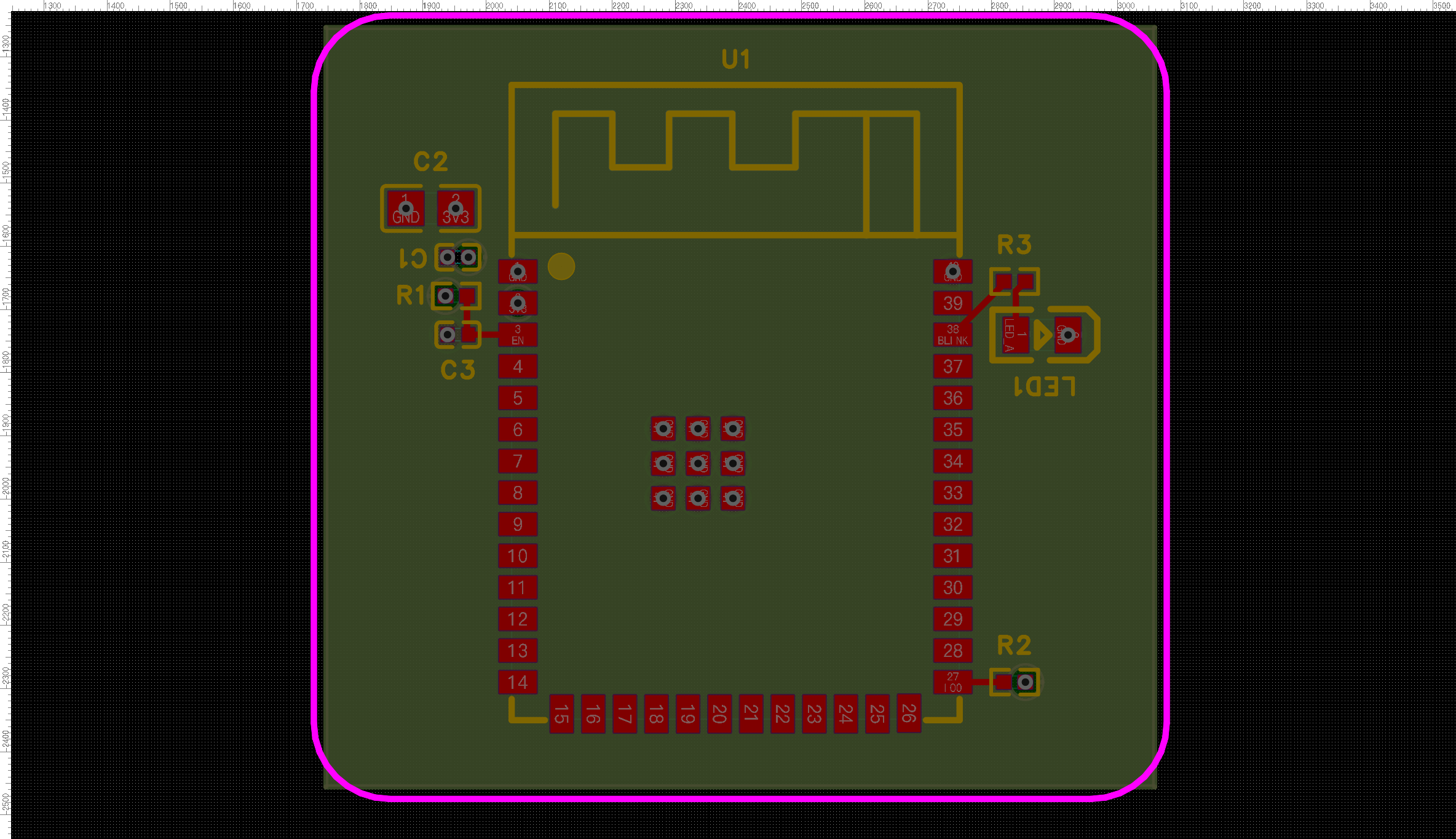
几个单步的真机前后对比(同一块板):
pcb outline-fit 板框贴合(利用率 17% → 71%) | pcb silk-align 丝印碰撞避让 |
|---|---|
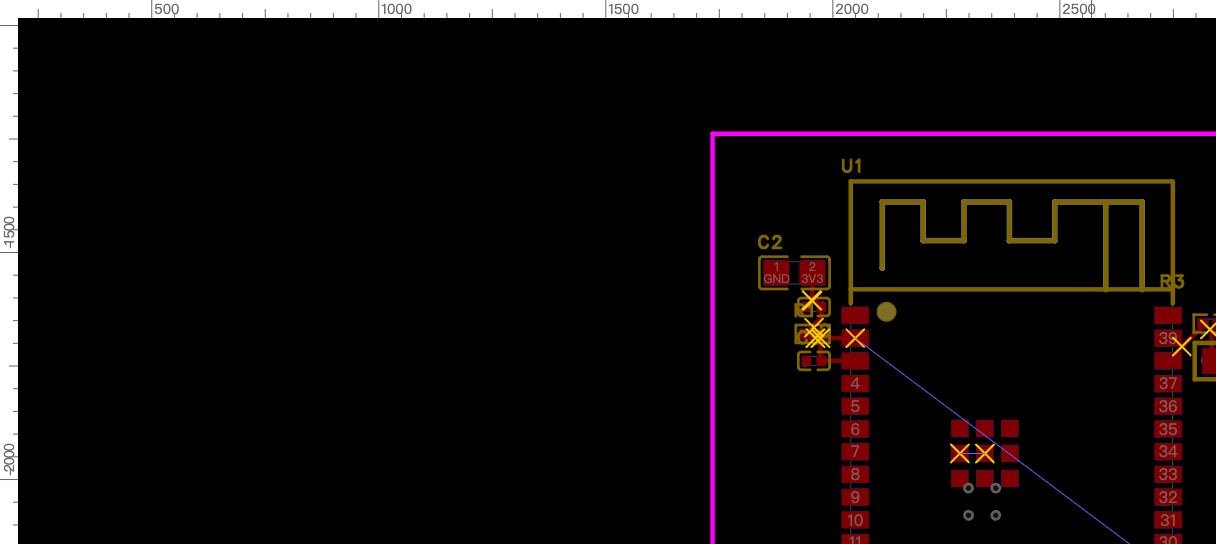 → 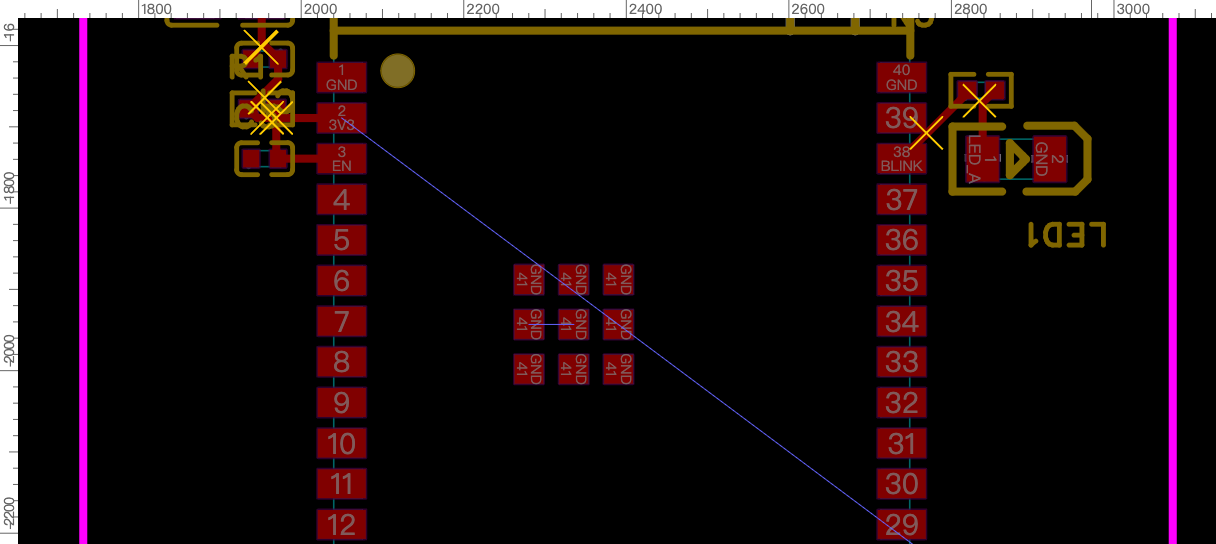 | 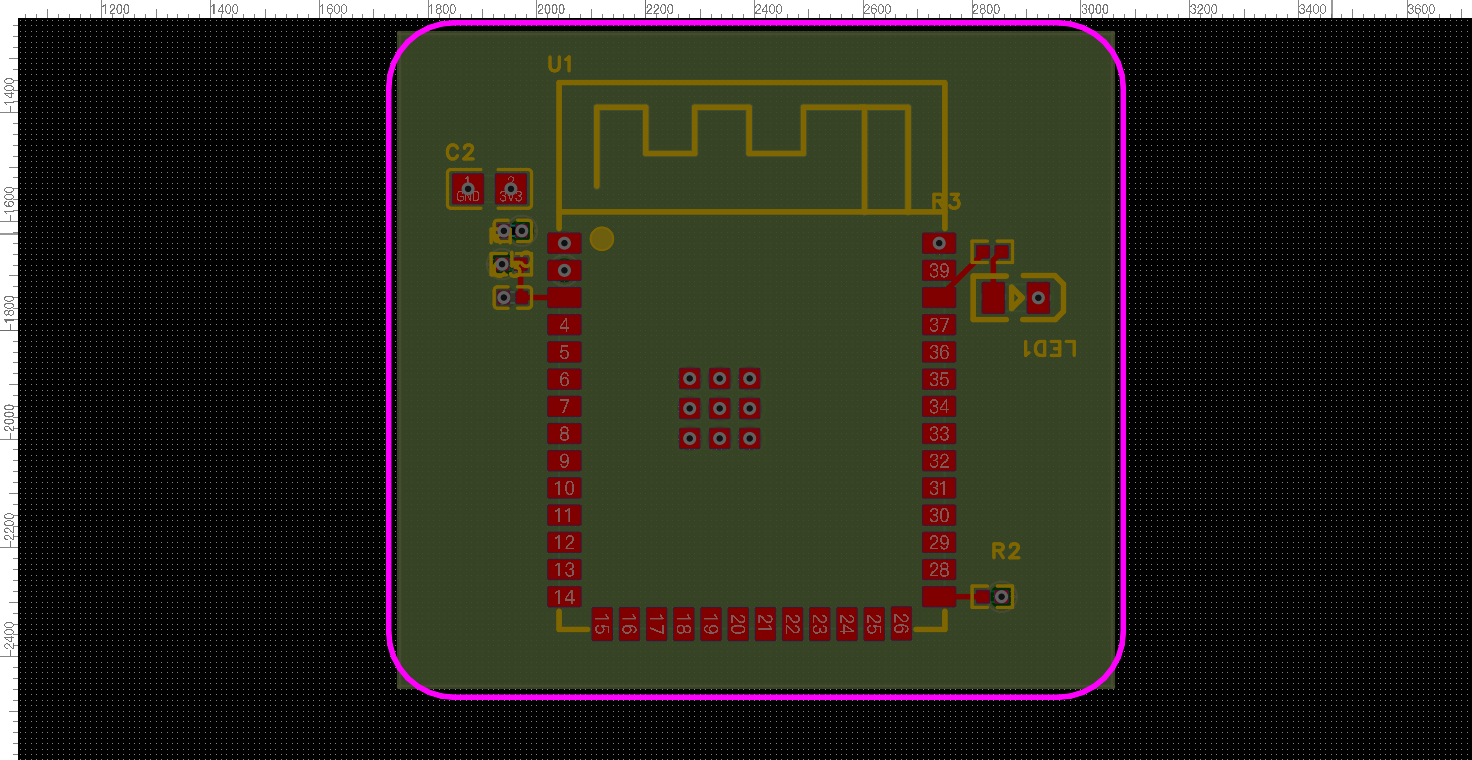 → 对齐后见上方成品板 |
上面 GIF 和截图都来自回归板真机流程(原理图 → 导入 PCB → 4 层叠层 → 布局 → GND 内电层/VCC 信号 plane → 天线禁区+检查 → 丝印/LED 极性 → 挖槽),非 mockup。这也是项目的固定端到端回归用例(拿原始需求从零跑),见 esp32MiniRequire.md。
原理图自动放置:两个引擎(模板 vs 官方)
同一个 ESP32-S3R8 最小系统块,两种放置引擎的真机对比(都 sch check 0 悬空导线、已连线):
--engine template(默认,推荐) | --engine official(官方 autoLayout 兜底) |
|---|---|
 |  |
块 schematic_layout 模板驱动:去耦帽贴电源脚一字排开、上拉靠引脚、晶振/FLASH 分列,信号流左入右出,功能分组、紧凑可读;原点自动避碰、落后真实 bbox 自检 | 平台 eda.sch_Document.autoLayout()(@beta):连通性聚类放射状,较散、留白大;是破坏性长操作(移件不移线),封装加了安全管线(已连线守卫/吸附 5 格/--rewire 重连/sch check 自检) |
两版都能用、都还有少量重叠(模板版当前还会碰标题栏右下角,官方版散件间距不均),放置的正确性由机械门禁保证:sch layout-lint(真实 bbox 查重叠)+ sch check/bridge-check(查断线/短路)。多页工程/长操作用 --doc <page> flag 机制性地钉住目标页,不再靠人工切页(避免长命令落错页)。
官方引擎在真正调用
autoLayout()前会二次核对同一页的部件姿态、sheet 与全部 connectivity(wire/bus/net marker),并在启动变异的同一个 JS action 内再锁一次 document/input;--rewire还核对完整网表,输入漂移立即拒绝。bus 目前无法可靠重建,即使--rewire也拒绝。后续 snap/重连/save 继续钉在同一 UUID;几何回读、sch check、重连或持久化任何一步不可用,或残留 overlap / pin 重合 / dangling 等结构性问题,都会非零退出。官方 API 没有事务回滚,因此 post-check 失败表示“页面已变但未过门”,必须先修复或撤销。
优先级铁律:命中电路块 →
sch block-apply模板;有 S0 分区 spec →--engine template;都没有才--engine official兜底。功能分组的模板版是首选,官方引擎只作未建模页面的起点。下版优化:放置避让标题栏 keep-out、分区区域线 + 文本注释(sch zone-draw已提供,待接入自动放置流程)。
能力清单(已支持)
均以 typed CLI 子命令暴露(easyeda <domain> <verb>),每项都在固定的 ESP32-S3 回归板上真机验证过。
原理图 — 完整功能地图(已支持 40+ 子命令按功能域 + 待支持路线)见 docs/cli/schematic.md(CLI 功能索引:docs/cli/);摘要:
- 器件与库:从立创/LCSC 库按 uuid 放真实器件、换型号(
replace)、符号/封装重绑、C 号确定性解析(resolve-lcsc);modify属性 merge 语义(只 patch 顶层字段不再清空自定义属性,#175)。 - 连线:
connect/autoconnect(打分器自选方向——碰撞/穿件/图签/fanout 全几何成本,netport 竖排折叠惩罚让密集引脚列标签保持水平)/disconnect成对删;电源/地标志自动补偿旋转存储的坑。 - 布局与可读性——三层布局体系 Sheet→Zone→Group:模块感知自动布局(template/official 双引擎)、对齐/等距/刚体平移;分页 reconcile + 数据驱动分区框(
zone-plan/zone-draw,校验压图签/贴边全 0 才许画)+ 每模块电路说明(note)——分区框/区名/说明由算法计算落位,生成与校验用同一把尺;多器件页未分区会被sch check的 missing-partition 机械拦下。 - 校验门:
sch gate --strict一条命令过五关(layout-lint→clusters→check→bridge-check→drc);bridge-check 新增 orphan-tree 悬空树判据(挪件残留 flag+桩线/裸死线,连接器 ≥0.26.1);check 重建逐项 finding(悬空脚/交叉/压引脚/重合标志/标签折叠…);layout-score 布局质量诊断,逐项归因带可执行 fix 命令。 - 跨页网名审计与对账:
sch nets --strict(网名变体/单引脚网机械拦截)+sch reconcile设计意图对账 + netlist 黄金表逐脚比对——「接得合法」与「接对没有」分别有门。 - 电路块库:
block-apply一键实例化验证过的拓扑(37 块:19 ready / 13 verified / 5 draft,离线可查),放件+连线+网表对账一条命令;extract-layout真板反推模板。 - 一次调用
sch read(器件+网络+检查)、BOM/网表导出(自动补 LCSC C 号)、页面导图 SVG/PNG/PDF。
PCB — 布局
pcb new-board— 从原理图新建一块板 + 空 PCB 页并绑定(CLI 版「新建 PCB / 原理图转 PCB」),再pcb import-changes从零布局;区别于只做链接的board.create。pcb auto-place— 模块感知启发式:卫星器件贴到它所连芯片引脚那侧,2 脚器件自动转向,多芯片铺开;间距规则感知(由 live DRC clearance 推导),--assembly-gap兜底手焊间距。pcb outline-fit(板框贴合器件)/pcb outline-round(圆角矩形板框)。pcb layout-lint— 布局质量 + 可布性评分(飞线 MST + 跨网交叉),布线前预测。pcb silk-align— 位号位置感知避让重排(v2):按局部空隙 + 板上位置 + 拥挤轴给每个位号的 4 个方向打分,避开别人的焊盘/器件体/禁区/板框/其它标签;挤死的报告出来而非压到焊盘上。pcb silk-add/pcb silk-set— 加自由丝印字串(板注 / LED 极性+/−标记,可配层/字号/线宽/旋转,JLCPCB 可读默认)+ 批量调整已有丝印,含--align --ref对齐参考(板注居中到板框、标签对齐器件边)。pcb add-component— 往已有 PCB 加单个器件并连接其焊盘网络(绕过失效的增量import_changes)。
PCB — 布线与铜
pcb route-short— 启发式短线布线:每网 MST、规则感知线宽(信号 vs 电源)、障碍感知 L 朝向、默认跳电源/地网(它们该铺铜)。pcb pour(规则感知铜到板边内缩)/pcb pour-fit/pcb via-stitch/pcb rip-up。pcb power-planes— 4 层电源分配:GND + 电源各占专用内平面 + 每焊盘过孔缝合,铺铜后把 GND 内层翻成 内电层/PLANE(信号层铺铜→翻类型→重灌的验证配方,DRC 干净),匹配常见客户叠层 GND=内电层 / VCC=信号层(把回归板 DRC 31→0、No-Connection 归零)。pcb region(禁铺铜/天线净空)/pcb fill/pcb slot(挖槽 / MULTI 层板挖空)。
PCB — 叠层、规则、制造
pcb stackup— 设铜层数(2/4/6…/32)+ 内层类型(信号↔平面/内电层)。- 全链路规则感知 — daemon 读板子 live DRC 规则(
pcb drc-rules)并遵循;缺失时回退到权威 JLCPCB fab 规则参考(真实分板型导出)。pcb drc跑检查。 pcb export-dsn(Specctra DSN,给外部 Freerouting,带禁布区注入)/pcb import-autoroute/pcb snapshot。
基础设施
- Typed action 协议(
--help自描述、easyeda actions目录)+debug.exec_js原型逃生口。 easyeda notify— 在 EasyEDA 窗口内弹非阻塞 toast(info/success/warn/error/question),流程可实时播报每一步(「完成布线,下一步铺铜」)。- 连接器自愈重连看门狗(daemon 重启/窗口后台都能自动回来)+ daemon 防抖自动保存。
暂不支持 / 平台墙
诚实说明边界。2026-07-01 对官方市场的扫描(docs/marketplace-coverage.md)校正了这些——真正的墙只在交互式 UX API,大多数「结果」(走线/过孔/泪滴/网长)其实够得到,进了吸收清单而非被堵死:
- 迷宫档自动布线(密集/任意距离/推挤)—— daemon 只做短、清晰的启发式布线。完整布线走外部 Freerouting(DSN 往返构件已就绪);turnkey 集成暂缓(需 Java;等官方自动布线器过
@alpha)。 - 交互式布线 UX —— 交互菜单(推挤拖拽布线、实时等长绕蛇、去环)无
eda.*API。但它们的输出——差分对几何、扇出打孔、等长绕线——可用pcb_PrimitiveLine/Via.create写出,所以可作为我们的启发式实现(吸收清单,非墙);只有拖拽 UX 是 UI 专属。 - 受控阻抗 Z0 —— 真的墙:叠层 Er / 介质厚 / 铜厚
eda.*读不到,算不了 Z0 线宽。但网长能读(pcb_Net.getNetLength),所以等长/skew/时序余量报告可做(吸收清单)——这块之前被我误标成墙。 - 泪滴(teardrop) —— 无typed create API;但文档源注入路径(如
eext-balance-copper做 net-less 填充那样)可能可行,未验证。暂时 UI 里手动应用。 - 无编程 undo ——
eda.*没有 undo/redo;回滚靠自建(数据快照 + 反向操作)。 - 增量
import_changes—— 对 API 新增器件是 no-op(平台限制);首次同步前放完整电路,或用pcb add-component。 - 丝印密度极限 ——
silk-align在有空白处避让标签;比标签更密的布局无法完全消重(报unresolvedCollisions)——请放松布局。
市场覆盖矩阵 + 优先吸收清单见 docs/marketplace-coverage.md;动作清单见 docs/FEATURES.md;eda.* API 覆盖地图见 docs/ecosystem-survey.md。
仓库结构
cmd/easyeda/                 CLI 入口(人和 Skill 都用)
internal/app/                CLI 命令实现
internal/daemon/             本地 daemon:/health、/eda(连接器 WS)、/action
internal/protocol/           与连接器共享的 typed action 协议(actions.go)
extension/                   EasyEDA 连接器(.eext)源码 + 构建(TypeScript → esbuild)
skills/easyeda-agent/        合并后的公开 Skill:工作流、参考、脚本、规范数据
docs/                        架构、协议、功能/路线图、规范、决策
设计定位
裸 JavaScript 执行对调试仍有用,但不作为主要的 AI 界面。默认界面应该是有类型的动作:明确输入、可预测输出、产物处理、校验钩子。
延伸阅读:快速开始 & 使用注意事项 · 功能清单与路线图 · 架构 · 协议 · Skill 设计 · 开发环境与调试手册
致谢
特别感谢 嘉立创EDA(EasyEDA 专业版 / 嘉立创) 开放的扩展插件通道和官方 eda.*
API。整个自动化层都建立在这个开放的插件平台之上——没有它,就没有这个项目。
easyeda-agent 始终做官方插件体系里一个薄而规矩的「公民」,这里的每一项能力最终都
落到嘉立创自己的 eda.* 调用上。感谢嘉立创让我们能做出这样一个好用的插件。
引用项目与前置工作(鸣谢)
站在这些开源项目的肩膀上——感谢:
- @jlceda/pro-api-types —— 官方 EasyEDA Pro
eda.*API 类型定义(连接器对它做类型校验)。 - Freerouting —— 外部迷宫档自动布线器,我们的
pcb export-dsn/import-autoroute往返对接它。 - spf13/cobra(CLI 框架)· coder/websocket(daemon ↔ 连接器)· esbuild(连接器打包)。
- 官方 EasyEDA 扩展(github.com/easyeda)—— 我们研究它们的
eda.*API 用法与算法(不抄 UI)作为前置工作;吸收清单见docs/ecosystem-survey.md。其中eext-run-api-gateway证明了编辑器内代码通道,eext-export-design-report启发了设计报告读取。 - 尚未吸收的候选:polyclip-ts(多边形布尔)—— 用于未来的丝印填充避让(见
docs/ecosystem-survey.mdA10)。
许可证
MIT —— 随便用、随便改、随便商用,保留版权声明即可。
唯一例外:extension/src/beautify/ 下的四个文件移植自
Easy_EDA_PCB_Beautify(作者 m-RNA),
沿用其 Apache-2.0 许可(许可证全文在
extension/src/beautify/LICENSE,署名与改动清单见
NOTICE)。两者兼容,不影响整体以 MIT 使用。
Star History
感谢每一颗 star。
Read the usage guide →
Install steps, key points, FAQ and compatibility for this plugin — auto-derived from indexed fields.
Listing badge

[](https://deepseek-plugin.org/plugins/zhoushoujianwork/easyeda-agent)Paste this markdown into your GitHub README to link back to this listing. The badge only states the listing — not a security endorsement.