Provides local-first persistent memory across sessions for DSH, zero external dependencies, Markdown data storage, writes require confirmation.

- Language
- TypeScript
- License
- MIT
- Branch
- master
Install
$ dsh plugin --profile web add @zhujunpeng12/dsh-memory-systemRun the command above in your terminal to install this plugin via the dsh CLI. You can switch Profile in the top-right corner. New to dsh? Read the beginner tutorial
Install via your agent
Install the DeepSeek Harness plugin zhujunpeng12/dsh-memory-system for me: review the repository at https://github.com/zhujunpeng12/dsh-memory-system first, then run the install command and verify the plugin loads successfully.
Paste this instruction to the DSH Web GUI assistant — it will install and verify for you.
One-Sentence Positioning
Provides local-first persistent memory across sessions for DeepSeek Harness (DSH): automatically injects a ≤14KB "hot memory packet" (gate status/rules/project summary/recent events) at the start of each new session, with on-demand recall of historical details when needed—all data stays on the user's own machine in pure Markdown form.
Core Capabilities
- Automatic hot memory injection: Each new session's first round automatically reads gate status, user profile, active rules, current project summary, and recent event titles, composing a ≤14KB context for one-time injection (can be disabled by setting
DSH_MEMORY_AUTO_INJECT=false) - On-demand cold recall: When users mention history, corrections, or specific topics, triggers Chinese BM25 + exact match + metadata reranking for cold retrieval, returning ≤4KB context with sources and traces
- Mechanical gate health check (memory_gate): Automatically checks health items such as "whether raw records were distilled", "whether volume exceeds limit", "whether rule core is synchronized", "whether there are unreleased write locks", used with
--closing/--expect-writemodes at session end - Read-only governance scan (memory_govern): Finds duplicate, conflicting, expired, oversized, or lifecycle-abnormal candidate entries, provides only evidence and suggestions, never auto-deletes or modifies
- Trajectory review (memory_trajectory_review): Scans session trajectories, uses "user corrections" as hard signals to generate review candidates (scenario → error → root cause → prerequisite action), works with optional evidence-ledger plugin to read tool call ledgers
- Safe authorized writes (memory_write): Default dry-run preview, enters lease-lock transaction write only after user confirmation, corrections link to original entries via supersedes instead of overwriting
Technical Implementation
- Language: JavaScript (ESM,
type: module) as the host plugin shell, memory engine entirely implemented using Python standard library - Key dependencies: Zero npm runtime dependencies (only uses Node built-ins
node:child_process/node:crypto/node:fs/node:os/node:path/node:url); Python side only depends on standard library (argparse/hashlib/json/pathlib/re, etc.) - Architecture pattern: Cordis dual-injection plugin (
inject: ["tools", "agents"]), hooks into DSH viaapply(ctx)—ctx.agents.roots()registers 6 tools for each root agent,ctx.on("agent/pre-step", ...)auto-injects hot packet on first round of each session,ctx.on("tools/pre-execute", ...)intercepts write tools to force confirmation; Python scripts called via subprocess, results returned as JSON - Entry files:
index.js(host side) +bridge.js(pure function mapping tool parameters to Python CLI argv, zero-dependency for unit testing) +vault-guard/*.py(memory engine script collection)
Use Cases
Suitable for individual developers and small teams working continuously on the same project within DSH who need to remember their previous decisions and preferences across sessions—particularly Chinese-language scenarios where auditable "fact" logs are desired, privacy-sensitive, and unwilling to upload conversation content to third-party vector services. Not suitable for scenarios requiring multiple agents to frequently write to the same memory database concurrently, relying on semantic vector recall, or wanting AI to automatically write memory without approval.
Prerequisites & Compatibility
| Dependency | Minimum Version | Description |
|---|---|---|
| DeepSeek Harness (DSH) | 0.1.0-rc.7 | Registered as scoped bundle via cordis.patch.yml and dsh.plugin.json; early 0.1.0 installation will error due to loader name without scope package or missing agents injection, must upgrade to 0.1.1+ |
| Node.js | 22 or 24 | Not declared in package.json#engines, but TROUBLESHOOTING.md and README consistently mark Node 22/24 as usable |
| Python | 3.10+ | Memory engine depends on Python standard library; command name must be available as python, otherwise use PYTHON environment variable to point to actual executable (e.g., py on Windows) |
| Default Storage | Unlimited | Auto-initialized at ~/.dsh-memory/ by default; can point to any directory via MEMORY_VAULT (common usage: Obsidian Vault root) |
Installation
dsh plugin --profile web add github:zhujunpeng12/dsh-memory-system
Configuration Options
| Config | Type | Description | Default |
|---|---|---|---|
MEMORY_VAULT | Path | Memory database root directory (containing memory/ and projects/ subdirectories), empty uses basic mode (regular Markdown folder) | ~/.dsh-memory |
DSH_HOME | Path | DSH runtime home directory (hooks config, storages, etc.), affects tool ledger location for companion plugin evidence-ledger | ~/.dsh |
PYTHON | Executable name | Interpreter command to invoke Python scripts | python |
DSH_MEMORY_AUTO_INJECT | Boolean | Set to false to disable automatic hot memory injection on first round of each new session | true (enabled by default) |
FAQ
Q: What's the difference between this plugin and DSH's built-in session memory?
A: DSH defaults to forgetting between sessions; this plugin沉淀每次会话产生的规则、项目笔记、纠正等"事实"到本机 Markdown(默认 ~/.dsh-memory),下次新会话开始时自动注入一个 ≤14KB 的"热记忆包",需要时再按需召回历史细节,整套数据存你自己电脑里,无需数据库或外部向量服务。
Q: Where is memory data stored? Will it leak to the cloud?
A: Stored by default in ~/.dsh-memory/ under the user home directory, a regular Markdown folder. The repository itself contains no personal data. For visualization, set the MEMORY_VAULT environment variable to point to your own Obsidian Vault—all read/write happens locally on your machine.
Q: Do I need to manually configure anything after installation?
A: First run automatically creates ~/.dsh-memory/ skeleton (including memory/events/index/projects subdirectories and empty user_profile.md/rules.md), no manual configuration needed. To switch to Obsidian mode or custom path, set MEMORY_VAULT and DSH_HOME environment variables.
Q: Will agents secretly modify my memory files?
A: No. All write operations (memory_write) default to dry-run (preview), only actually written when user explicitly confirms with apply=true; writes also have four-layer protection: 30-second lease lock, SHA-256 precondition, before-image backup, and submission receipt. Corrections must supersedes original entries and never overwrite historical raw logs.
Q: Is Python required to use this?
A: Yes. The memory engine is implemented by Python standard library scripts (no pip packages needed), requires Python 3.10+ and command name available as python; if your executable is named py or python3, set the PYTHON environment variable to point to it before starting Harness.
Q: How to uninstall? Will residual files be left behind?
A: Execute npx @deepseek-ai/dsh plugin --profile web remove @zhujunpeng12/dsh-memory-system in the web profile directory to uninstall the plugin; the plugin will not delete memory data under ~/.dsh-memory/. If you won't use it after uninstall, back up or manually delete that directory yourself.
Q: Do I need Obsidian?
A: No. Default is regular local Markdown folder, viewable with any editor; only when you want Obsidian features like bi-directional links and graph visualization, point MEMORY_VAULT to your Vault to switch to Vault mode—templates are in templates/vault/.
Q: Can cold recall understand paraphrasing?
A: No. Cold recall is based on exact match + Chinese bigram BM25 + metadata reranking, suitable for exact/near-exact matching (proper nouns, code identifiers, dates, explicit topics); paraphrasing, long-tail expressions, and cross-language recall capabilities are limited. Semantic vector search is disabled by default to maintain zero dependencies.
Getting Started Difficulty
Entry level — one-line install command, auto-creates database on first run, usable without configuration; advanced capabilities (lease locks, SHA-256 transactions, trajectory review) can be learned as needed, don't affect daily use.
Known Issues & Limitations
- Writes default to dry-run: Won't write to disk without explicit
apply=trueand user confirmation. "Agent said it remembered" doesn't mean it actually wrote—usememory_gateor directly check events files to confirm - Cold recall is not semantic vector search: Based on BM25 keyword matching, limited capability for paraphrasing, long-tail expressions, and cross-language recall; this is a trade-off for zero dependencies
- Single-writer lease lock: Only one writer allowed at a time for the same memory database; multiple agents writing concurrently will serialize; split memory databases or stagger writes for high-frequency multi-writer scenarios
- Project isolation only by cwd ancestor matching: Different git branches in the same directory share the same memory database; branch-level isolation is on the roadmap, not yet implemented
- Hot packet injected once per session: Memory added mid-session won't automatically appear in current session's hot packet—explicitly call
memory_recallormemory_bootstrapto refresh - Trajectory review's quantitative dimension depends on companion plugin: Without
plugins/evidence-ledger/, only scans session logs for user correction signals (qualitative), no tool ledger data to analyze - Common first-install failure reason: Early 0.1.0 versions will error due to scoped package name loader issues or missing
agentsinjection—must install 0.1.1 or later - Node.js process timeout protection: All script calls default to 60-second timeout,
memory_bootstrap/memory_recall/memory_govern/memory_trajectory_review/memory_writeindividually extended to 120 seconds






它不是另一个黑盒向量库:启动时只注入有预算的热记忆,需要历史细节时才做可解释的中文 BM25 召回;所有写入默认预览,并通过租约锁、before-image、SHA-256 前置条件和回执保护。默认使用 ~/.dsh-memory/,无需 Obsidian、数据库、向量服务或外部 API。
隐私边界:仓库只包含机制,不包含任何个人数据。画像、规则、事件和项目笔记始终留在使用者本机;也可用
MEMORY_VAULT指向自己的 Obsidian Vault。
30 秒安装
前提:已安装 DeepSeek Harness 0.1.0-rc.7,Node.js 22/24 与 Python 3.10+ 可用。
npx @deepseek-ai/dsh plugin --profile web add github:zhujunpeng12/dsh-memory-system
重启 Harness 后,在新会话让 Agent 运行 memory_gate。成功时会看到门禁结果,并且首轮上下文包含 [vault-bootstrap];首次运行会自动创建 ~/.dsh-memory/ 骨架。
遇到 Cannot find package、ctx.agents 或热包未注入,请看 安装故障排查。
AI 代装提示(复制整句给你的 Agent)
请把 github:zhujunpeng12/dsh-memory-system 安装到 DeepSeek Harness 的 web profile,重启后运行 memory_gate,并确认新会话收到 [vault-bootstrap]。不要读取或上传任何私人记忆内容。
为什么选它
| 你关心的事 | 本项目的取舍 |
|---|---|
| 数据能否直接看懂 | 事实源是本机 Markdown,可用编辑器或 Obsidian 审阅 |
| 中文历史能否召回 | exact + 中文 bigram BM25 + 标题/路径/项目重排,返回来源和 trace |
| Agent 会不会乱写记忆 | 写操作默认 dry-run;用户确认后才进入可恢复事务 |
| 多会话会不会写坏文件 | 单写者租约锁、心跳、崩溃恢复、before-image 与提交回执 |
| 是否需要模型或数据库服务 | 不需要;默认零后台 LLM、零向量服务、零数据库 |
| 上下文会不会越积越重 | 热包 ≤14KB、冷包 ≤4.2KB,细节按需打开 |
适合:重视可审计、本地优先、中文召回和写入安全的个人/小团队 DSH 工作流。
不适合:需要多租户服务端、高频多写者、默认语义向量或全自动无审批记忆写入的场景。
为什么需要它
Agent 会话之间默认是失忆的。本系统用 六层机制 把「记忆」变成可工程化的闭环:
- 启动热记忆 — 每个新会话注入一次 ≤14KB 的热包(门禁 + 指令预算 + 用户画像 + 活跃规则 + 项目摘要 + 近期事件标题)
- 工作路径 — 按全局/项目
AGENTS.md规则完成任务 - 冷层召回 — 双门槛触发(历史引用 + 具体主题),exact + 中文 BM25 + 元数据重排,输出 ≤4.2KB 冷包,向量检索默认关闭(依赖零)
- 授权写入 — 租约锁(30s 租约 / 5s 心跳 / 陈旧锁恢复)+ 多文件事务(before-image / SHA-256 前置 / manifest / receipt),raw 机械只追加,纠错必须 supersedes
- 慢治理 —
govern.py只读扫描重复、冲突、过期、体量、规则生命周期候选,默认不写 - 轨迹复盘 — 只读扫描会话轨迹,用「用户纠正」作为硬信号产出复盘候选
特性亮点
| 能力 | 说明 |
|---|---|
| 写入安全 | 单写者租约锁 + 可恢复事务,多文件变更原子化,raw 只追加不覆写 |
| 中文召回 | 中文 bigram BM25 + exact/标题/路径匹配 + 元数据重排,全程可解释 trace |
| 字节预算 | 热包 14KB / 冷包 4.2KB 硬预算,UTF-8 安全截断 |
| 治理只读 | L0-L3 边界,自动收集证据、永不自动删改 |
| 本地优先 | 零数据库 / 零向量服务 / 零外部服务依赖;Python 标准库 + Markdown(插件宿主 DSH,构建产物为 JS/TS 包裹) |
系统架构(六层闭环)
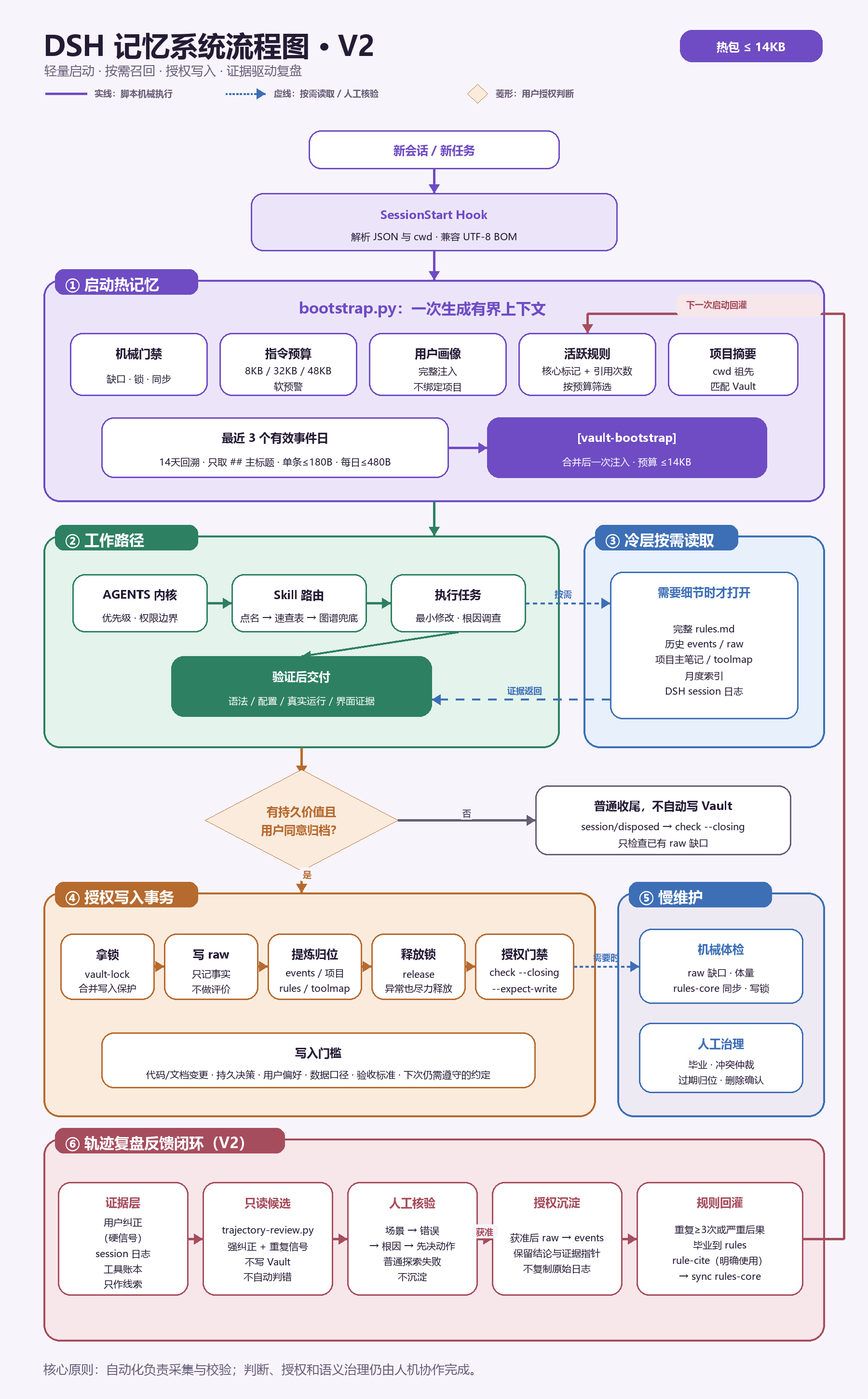
可维护图源:HTML/CSS V3 源图。
展开查看可编辑的 Mermaid 源码图(与 V3 PNG 同步)
flowchart TD
    Start([新会话 / 新任务]) --> Bundle["@zhujunpeng12/dsh-memory-system<br/>scoped bundle · inject tools + agents"]
    Bundle --> Roots[每个 root agent 注册 6 工具<br/>bootstrap · recall · gate · govern · trajectory · write]

    subgraph L1[① 原生启动热记忆]
      Roots --> Pre[agent/pre-step 首轮 · session id 去重]
      Pre --> Boot[bootstrap.py<br/>分段预算 · UTF-8 安全截断 · 失败放行]
      Boot --> Hot["[vault-bootstrap] · 一次注入 ≤14KB"]
      Boot --> HotParts[门禁 · 指令预算 · 用户画像<br/>活跃规则 · cwd 项目 · 最近 3 个有效事件日]
    end

    subgraph L2[② 工作路径]
      Hot --> Work[AGENTS 内核 → Skill 路由 → 最小修改/根因调查]
      Work --> Deliver[验证后交付<br/>语法 · 配置 · 真实运行 · UI 证据]
    end

    subgraph L3[③ 冷层按需召回]
      Work -.历史/纠正信号 + 具体主题.-> Recall[exact + 中文 bigram BM25<br/>标题/路径匹配]
      Recall --> Rerank[元数据重排 · 去重 · 单文件配额]
      Rerank --> Cold[带来源与 trace 的冷包 ≤4.2KB]
      Cold -.证据返回.-> Work
    end

    Deliver --> Decision{有持久价值且<br/>用户明确同意归档?}
    Decision -->|否| Close[普通收尾 · 不自动写 Vault<br/>memory_gate closing=true]

    subgraph L4[④ 授权写入事务]
      Decision -->|是| Preview[memory_write dry-run 预览]
      Preview --> Approve[tools/pre-execute 人工确认]
      Approve --> Lock[30s 租约单写锁 · 5s 心跳]
      Lock --> Tx[锁内重读 · SHA 前置 · before-image/manifest]
      Tx --> SafeWrite[raw EOF append / 非 raw replace]
      SafeWrite --> Receipt[校验 · receipt · release<br/>失败回滚 / 下次 recover]
    end

    subgraph L5[⑤ 慢维护与治理]
      Receipt --> Gate[memory_gate 机械体检]
      Gate --> Govern[memory_govern 只读候选<br/>重复/冲突/过期/体量/生命周期]
      Govern --> Human[人工毕业 · 仲裁 · 归档 · 删除确认]
    end

    subgraph L6[⑥ 轨迹复盘反馈闭环]
      Work -.session 轨迹.-> Evidence[用户纠正=硬信号<br/>session 日志 + 工具账本只作线索]
      Evidence --> Review[memory_trajectory_review<br/>场景 → 错误 → 根因 → 先决动作]
      Review --> Verify{人工核验}
      Verify -->|普通探索| Skip[不沉淀]
      Verify -->|批准| Distill[events / rules<br/>保留结论与证据指针]
      Verify -->|重复 ≥3 次| Graduate[毕业进 rules-core]
    end

    Human --> Distill
    Distill --> Next[下一次 session 重新按预算选取]
    Graduate --> Next
    Next --> Pre
图例:实线 = 脚本机械执行;虚线 = 按需读取 / 人工核验;菱形 = 用户授权判断。反馈闭环:轨迹复盘产出的规则与事件,回灌到下一次会话的热记忆。
六层职责详解(每一层做什么)
① 启动热记忆 — 每个会话一次的有界上下文
做什么:新会话开始时,把「此刻最该知道的记忆」压缩成一个 ≤14KB 热包一次注入,让 Agent 不读全库也能带着上下文开工。
包含:机械门禁状态(缺口/锁/同步)、指令预算审计、用户画像、活跃核心规则(按 ⭐ 与引用计数筛选)、当前项目摘要(按 cwd 祖先匹配)、最近事件主标题(14 天回溯、单条 ≤180B)。
怎么用:memory_bootstrap 工具,或 python vault-guard/bootstrap.py --cwd <项目目录> --max-bytes 14000。推荐插件形态通过原生 agent/pre-step 在每个 session 首轮自动执行;手动 hooks 仅用于 standalone 兼容模式。
② 工作路径 — 按规则执行任务(方法论层,无脚本)
做什么:这是「Agent 怎么干活」的约定,不是脚本——热包注入后,Agent 按优先级与权限边界执行:系统/用户指令 > 项目 AGENTS.md > 全局规则 > 冷文档;技能路由(点名 → 速查表 → 图谱兜底);最小修改、根因调查;交付前验证(语法/配置/真实运行/界面证据)。
为什么没有脚本:这一层是行为规范,由 AGENTS.md 承载。开源版提供 templates/ 里的示例规则作为起点,使用者按自己的团队文化改写。
③ 冷层按需读取 — 需要细节才打开
做什么:热包只有摘要,当任务需要证据或细节时,冷召回按需打开完整来源(完整规则、历史 events/raw、项目主笔记、月度索引、session 日志)。
触发:双门槛——同时满足「历史/上次/纠正等召回信号」+「可检索的具体主题」才触发;纯确认语、复测元指令不打开。
怎么用:memory_recall 工具,或 python vault-guard/recall.py --query "<问题>" --cwd <目录> --force。exact + 中文 bigram BM25 + 元数据重排,输出 ≤4.2KB 冷包并附来源与 trace。
④ 授权写入 — 有持久价值且用户同意才写
做什么:只有「实质产出」(代码/文档变更、持久决策、用户偏好、数据口径、验收标准、下次仍需遵守的约定)且用户同意归档时,才走事务写入:拿租约锁 → 写 raw(只记事实不评价)→ 提炼归位(events/项目/rules/toolmap)→ 释放锁。
安全机制:30s 租约 + 5s 心跳单写者锁、before-image + SHA-256 前置 + manifest + receipt 多文件事务、raw 机械只追加(纠错必须 supersedes)、默认 dry-run、tools/pre-execute 强制确认。
怎么用:memory_write 工具(op=raw/replace/recover,apply=true 才落盘)。
⑤ 慢维护 — 机械体检 + 人工治理
做什么:定期(或怀疑记忆库不健康时)做两件事——机械体检:raw 缺口、体量超线、rules-core 同步、写锁状态;人工治理:规则毕业、冲突仲裁、过期归位、删除确认。
边界:govern.py 只收集证据与建议(重复/冲突/过期/体量/生命周期候选),永不自动删改;晋升/归档/删除永远需要人确认。
怎么用:memory_govern 工具,或 python vault-guard/govern.py --json --max-items 100。配合 check.py 的收尾门禁(--closing / --closing --expect-write)使用。
⑥ 轨迹复盘 — 证据驱动的质量反馈闭环
做什么:收尾时回溯会话轨迹,找三类点:错误(用户纠正 = 硬信号;AI 自评有自我辩护倾向)、error(仅频繁时写)、可借鉴。产出按「场景 → 错误 → 根因 → 先决动作」四字段模板的复盘候选。
复盘四要素(缺一不算做完):①工具账本复盘(定量先行——tool-telemetry.json 各工具调用次数/错误次数/错误率/加权成本,与上轮快照做差值);②错误复盘(定性——用户纠正硬信号/error/可借鉴,四字段模板);③优化方案 + 派发询问;④会话临时文件清理。
账本双口径:快照必须记全局 + 工作区双口径——工作区口径须含 unknown 占比,unknown 异常高 = 归属失效信号,差值不可比时改全局口径。
证据来源:session 日志中的用户纠正信号 + evidence-ledger 插件的工具调用账本(谁的工具最常出错)。账本只作线索,不自动判错。
闭环:复盘出候选 → 给出降低工具错误率的方案 → 派发解决(单一任务 → 独立子 agent;优化点多 → 多 agent 团队按角色分工,依赖三问/文件所有权/交付即验收)→ 解决完成后解析会话轨迹写入 events;用户说「下次再处理」→ 跳过解决、直接写入 events。人工核验后,普通探索失败不沉淀;重复 ≥3 次的模式毕业进 rules-core——规则与事件回灌到下一次会话的热记忆,形成进化闭环。
怎么用:memory_trajectory_review 工具,或 python vault-guard/trajectory-review.py --cwd <目录>。配套安装 plugins/evidence-ledger/ 才有工具账本数据;多 agent 派发执行件见 plugins/agent-teams/(基于 NanmiCoder/dsh-agent-teams 的增强 fork)。
作为 DSH 插件安装(推荐,一行命令)
插件形态把记忆能力直接注册为 Agent 工具,并随 DSH 装配自动生效:
# 从 GitHub 直接安装(无需手动配环境/hooks/Vault 目录)
npx @deepseek-ai/dsh plugin --profile web add github:zhujunpeng12/dsh-memory-system

# 或本地开发安装
npm pack            # 生成 tarball
npx @deepseek-ai/dsh plugin --profile web add ./zhujunpeng12-dsh-memory-system-0.1.1.tgz
安装后重启 Harness,Agent 自动获得 6 个记忆工具,且每个新会话自动注入热记忆包(index.js 原生监听 pre-step,零手动 hooks 配置;DSH_MEMORY_AUTO_INJECT=false 可关闭):
| 工具 | 作用 | 写操作 |
|---|---|---|
memory_bootstrap | 生成 ≤14KB 热记忆包 | 只读 |
memory_recall | 冷召回(exact + 中文 BM25) | 只读 |
memory_gate | 机械门禁检查 | 只读 |
memory_govern | 治理候选扫描 | 只读 |
memory_trajectory_review | 轨迹复盘候选(用户纠正 = 硬信号) | 只读 |
memory_write | 授权事务写入(默认 dry-run) | 需确认 |
memory_write 默认只预览,apply=true 且经用户确认后才落盘;tools/pre-execute 钩子会强制弹确认。所有工具通过 MEMORY_VAULT / DSH_HOME 环境变量定位你的记忆库(不设置则用默认值,见下)。
轨迹复盘证据层(可选配套):memory_trajectory_review 依赖工具调用账本(${DSH_HOME}/storages/tool-telemetry.json)。安装配套插件 plugins/evidence-ledger/(工具账本,零 inject)后,每个会话的工具调用与错误会自动累计,复盘才有数据可扫。不装则复盘只扫 session 日志中的用户纠正信号。
快速开始(3 步,装完即用)
1. 安装
npx @deepseek-ai/dsh plugin --profile web add github:zhujunpeng12/dsh-memory-system
重启 Harness。
2. 首次运行自动初始化(无需任何手动配置)
第一次会话自动完成两件事:
- 在默认位置
~/.dsh-memory/创建记忆库骨架(memory/{events,index}+projects/+ 空user_profile.md/rules.md),控制台打印已初始化记忆库于 ...; - 该会话首轮自动注入热记忆包(画像/规则/项目摘要/近期事件),开箱即有记忆。
不装 Obsidian 也能完整使用;记忆库是普通本地目录(Python 标准库 + Markdown,零外部依赖)。
3. 验证
让 Agent 执行 memory_gate(机械门禁检查)确认链路正常;之后每次会话自动带热包,需要细节时 Agent 会用 memory_recall 冷召回。
Vault 模式(可选)
想用 Obsidian 可视化时,设置环境变量指向你的 Vault,重启后记忆切换到 Vault:
| 变量 | 默认值 | 说明 |
|---|---|---|
MEMORY_VAULT | ~/.dsh-memory | 记忆库根目录(含 memory/ 与 projects/) |
DSH_HOME | ~/.dsh | DSH 家目录(hooks 配置、storages 等) |
$env:MEMORY_VAULT = "C:\Users\you\Documents\Obsidian Vault"
Vault 模式下把 templates/vault/ 骨架复制到你的 Vault(见 templates/README.md)。
独立脚本用法(不装插件时)
python vault-guard\bootstrap.py --cwd "C:\path\to\project" --max-bytes 14000   # 热包
python vault-guard\recall.py --query "继续上次的XXX" --cwd "C:\path\to\project" --force  # 冷召回
手动 hooks(可选,仅独立脚本用法需要):参考
hooks.example.json把hook-first-prompt.py挂到UserPromptSubmit;插件用法已内置自动注入,无需此步。DSH_HOME环境变量仍用于定位 DSH 运行时存储(storages/sessions 等),脚本自身互相调用则用包内相对路径——插件装到哪里都能跑,无需把 vault-guard 复制到$DSH_HOME。
目录结构
├── index.js                    # DSH host 插件:6 个记忆工具 + 写操作护栏
├── package.json                # npm 包声明(dsh-memory-system)
├── dsh.plugin.json             # DSH 插件 manifest
├── cordis.patch.yml            # DSH bundle 装配补丁
├── vault-guard/
│   ├── bootstrap.py            # 热记忆包生成(≤14KB)
│   ├── hook-first-prompt.py    # UserPromptSubmit hooks:按 session 注入一次热包 + 冷包触发
│   ├── hook-session-start.py   # SessionStart 兼容桥(当前默认不启用)
│   ├── recall.py               # 冷召回:exact + 中文 BM25 + 元数据重排
│   ├── recall_trigger.py       # 召回信号双门槛判断
│   ├── check.py                # 机械门禁(开场/收尾检查)
│   ├── sync-core.py            # rules.md → rules-core.md 事务同步
│   ├── vault_lock.py           # 30s 租约 / 5s 心跳单写者锁
│   ├── vault-lock.py           # 锁的兼容 CLI(acquire/release/status)
│   ├── vault_tx.py             # 可恢复事务:before-image/哈希前置/manifest/receipt
│   ├── vault-write.py          # 授权写入 CLI(raw 只追加,dry-run 默认)
│   ├── rule-cite.py            # 规则引用计数(dry-run 默认)
│   ├── govern.py               # 只读治理扫描(重复/冲突/过期/体量/生命周期)
│   ├── trajectory-review.py    # 轨迹复盘候选(用户纠正 = 硬信号)
│   └── test_*.py               # 回归测试(unittest,无外部依赖)
├── plugins/
│   ├── evidence-ledger/        # 配套插件:工具调用账本(轨迹复盘证据层)
│   └── agent-teams/            # 配套插件:多 agent 团队编排(增强 fork,复盘派发执行件)
├── templates/                  # 脱敏记忆库骨架(10 分钟搭出自己的记忆系统)
├── hooks.example.json          # DSH hooks 装配示例
├── .env.example                # 环境变量示例
└── LICENSE
运行测试
# Python 引擎测试
cd vault-guard
python -m unittest discover -p "test_*.py" -v

# JS 契约测试(工具参数 → CLI argv 映射,仓库根执行)
node --test test_plugin_bridge.test.mjs
# 或一次性跑全量(等价 CI)
npm run check
测试全部使用临时目录,不触碰真实记忆库。
已知限制(预期管理)
memory_write默认是 dry-run(预览):不显式apply=true且经用户确认,不落盘。「Agent 说记下了」≠ 真写入了——需要时用memory_gate/查看 events 文件确认。- 冷召回是 BM25 关键词检索,不是语义向量:适合精确/近精确匹配(专有名词、代码、日期、明确主题),对同义改写、长尾表达、跨语言召回有限;向量检索默认关闭(零依赖代价)。
- 单写者租约锁:同一记忆库同一时刻只有一个写者,多 Agent 并发写会串行化(等锁)。不适合多 Agent 高频同时写同一个记忆库——多写者场景请拆分记忆库或错峰。
- 项目隔离仅按 cwd 祖先匹配,无 git 分支感知:同一目录的不同 git 分支共享同一记忆库,分支间的记忆会互相可见。分支级隔离在路线图中(见下)。
- 热包按会话注入一次:会话中途的「新增记忆」不会自动进当前会话热包,需要时显式调用
memory_recall/memory_bootstrap刷新。 - 轨迹复盘的定量维度依赖配套插件:不装
plugins/evidence-ledger/时只扫 session 日志中的用户纠正信号(定性),无工具账本数据。
路线图
- git 分支感知:记忆可绑定「仅在某分支生效」(对齐 dsh-memory-evolve 的分支隔离能力)
- 语义召回作为可选通道(默认仍保持零依赖 BM25)
- 多写者并发优化(当前单写者锁是正确性优先的设计取舍)
使用约定(方法论)
- 单一真相源:一条事实只有一个家(运行参数 → AGENTS.md;决策历史 → 项目笔记;当日流水 → events;跨项目经验 → rules),其他位置只放指针
- 写入授权:所有写操作先 dry-run 预览,明确授权后才
--apply;raw 只追加,纠错用 supersedes 而非覆写 - 治理默认只读:
govern.py只收集证据和建议,晋升/归档/删除永远需要人确认
许可证
MIT — 详见 LICENSE。版权所有 © 2026 zhujunpeng12。
引用与致谢
本项目由 zhujunpeng12 创建并维护。如果它帮助到了你——在你的产品里使用了它、基于它做了二次开发、或在文章 / 分享中引用了这套「六层记忆闭环」的理念——欢迎:
- 在你项目的 README、关于页或公开材料中署名致谢
- 通过邮件 [email protected] 告知作者你的使用场景,作者很乐意看到它被用在真实环境里
MIT 许可不强制这些,但你的致谢是对开源最实在的回馈。
上游致谢:本仓库「轨迹复盘 → 多 agent 派发解决」的方法论受益于 NanmiCoder/dsh-agent-teams(MIT 许可)——一个为 DeepSeek Harness 提供多 agent 团队编排的插件。本仓库在其基础上实践并沉淀的增强方向:需求确认单门禁(brief 提交 + 面板确认 + 派活拦截)、编排纠错(依赖可改 / 队长可认领)、队长协议(渐进式验收 / 依赖三问 / 文件所有权 / 追加需求建任务)、UI 状态机(波纹相位 / 待命橙色态)等,供同样做多 agent 编排的同仁参考。感谢原作者的贡献。
免责声明
- 本仓库不含任何个人数据;记忆内容始终留在使用者本地
- 使用前请自行审查:部署前确认你的记忆库结构、hooks 装配与安全边界
Read the usage guide →
Install steps, key points, FAQ and compatibility for this plugin — auto-derived from indexed fields.
Listing badge

[](https://deepseek-plugin.org/plugins/zhujunpeng12/dsh-memory-system)Paste this markdown into your GitHub README to link back to this listing. The badge only states the listing — not a security endorsement.