Tydora's DSH integration is currently an empty skeleton: it only registers the plugin name and loads without injecting any tools, commands, or services into the host. The plugin itself remains an independent Tauri desktop Markdown editor.

- Language
- TypeScript
- License
- Apache-2.0
- Branch
- main
Install
$ dsh plugin --profile web add github:zuorn/TydoraRun the command above in your terminal to install this plugin via the dsh CLI. You can switch Profile in the top-right corner. New to dsh? Read the beginner tutorial
Install via your agent
Install the DeepSeek Harness plugin zuorn/Tydora for me: review the repository at https://github.com/zuorn/Tydora first, then run the install command and verify the plugin loads successfully.
Paste this instruction to the DSH Web GUI assistant — it will install and verify for you.
One-Line Description
Tydora is merely a registration placeholder in the DSH ecosystem: the apply() inside dsh/index.ts is left empty, and after loading it registers neither tools nor services; the plugin's real value is itself—a desktop Markdown editor built with Tauri v2 + React 19, supporting WYSIWYG/source dual mode, WikiLink bidirectional linking, knowledge graph, mind map, whiteboard canvas, and one-click static website publishing.
Core Capabilities
- DSH Integration (Currently Empty Shell): Registers
dsh/index.tsto the bundle viacordis.patch.yml, butapply(ctx)performs noctxoperations, so the host gains no new capabilities from it - Desktop Markdown Editing: TipTap 3.x-based WYSIWYG + CodeMirror 6-based source mode, one-click switching
- Local Repository Management: Select a local folder as the "repository", all notes read/write
.mdfiles directly in that directory, no cloud upload - WikiLink Bidirectional Linking + Knowledge Graph: Parses
[[link]]/![[embed]], maintains outlinks/backlinks index and displays note relationships using D3 force-directed graph - Mind Map & Whiteboard Canvas: Converts current document to mind map using markmap; provides infinite canvas via React Flow, supporting note cards, media nodes, and free-form connections
- One-Click Static Website Publishing: Uses
@abstractwebunit/markdown-publishCLI to build the repository as a static site, previewable with built-in Node HTTP server
Technical Implementation
- Languages: TypeScript (frontend + React 19) + Rust (backend + Tauri v2)
- Key Dependencies:
@tiptap/react3.x (WYSIWYG editor),@codemirror/*(source mode),d3+markmap+@xyflow/react(three visualizations),@tauri-apps/apiv2 (frontend-backend bridge) - Architecture Pattern: Tauri multi-window architecture—main window carries editor/sidebar, independent windows for settings, graph, mind map, whiteboard respectively; 28+ commands exposed via
#[tauri::command]; DSH side injectsdsh/index.tsinto host bundle viainsertsection ofcordis.patch.yml - Entry Files: DSH entry
dsh/index.ts(empty skeleton); desktop Tauri entrysrc-tauri/src/lib.rs, React entrysrc/main.tsx→src/App.tsx
Use Cases
For those seeking a "Typora-like" writing experience + "Obsidian-like" knowledge network + built-in whiteboard/publishing capabilities in a localized desktop Markdown editor. All files are stored in a folder on your own machine, suitable for version control with Git, ideal for writers who don't want their notes locked in cloud services.
Prerequisites and Compatibility
| Dependency | Min Version | Description |
|---|---|---|
| DSH | Not declared | Neither package.json nor dsh/index.ts declares host version, plugin entry is only registered via insert in cordis.patch.yml |
| Node | Not declared | package.json has no engines field; any Node version supported by Vite 6 / TypeScript 5 default can build |
| Platforms | macOS / Windows / Linux | Consistent between README.md:4 and src-tauri/tauri.conf.json:78-95; macOS min 10.15; Linux NSIS not applicable, provides DEB/RPM/AppImage |
| Native Modules | No runtime native bindings | Frontend has no sharp/canvas native bindings; backend only has local patch for wry (see known issues), no new Node native modules |
| Publishing Dependencies | Node.js + @abstractwebunit/markdown-publish | Publishing requires CLI, when not installed run_markdown_publish returns clear installation prompt (src-tauri/src/lib.rs:877-887) |
Installation
dsh plugin --profile web add github:zuorn/Tydora
The installation command only mounts the repository into DSH bundle and registers the empty skeleton; the
applyfunction has no side effects, so DSH agents won't gain new capabilities. To use all Tydora features, please download the desktop app from GitHub Releases (Windows NSIS / portable zip, macOS DMG, Linux DEB/RPM/AppImage).
Configuration
| Config | Type | Description | Default |
|---|---|---|---|
| (None) | — | dsh/index.ts's apply() is an empty function, reads no configuration; DSH side has no configurable options | — |
Tydora desktop itself has numerous settings (theme, font, auto-save, keyboard shortcuts, image storage, etc., see
website/docs_zh/07-设置), but these go through in-app UI and localStorage, not through DSH plugin configuration layer.
FAQ
Q: After installing this DSH plugin, will DSH agents gain Tydora's capabilities?
A: No. apply(ctx) in dsh/index.ts:14-18 is an empty function; after loading it doesn't call any ctx.command / ctx.service / ctx.tool; DSH host gets neither Markdown parsing/editing capabilities nor WikiLink indexing or whiteboard data.
Q: What's the point of installing this plugin then?
A: At this stage it's equivalent to a "placeholder"—registers the repository as a cordis patch into DSH's bundle, but at runtime doesn't change host behavior. To use all Tydora capabilities, you still need to download the desktop app from GitHub Releases.
Q: What platforms does the Tydora desktop app support?
A: Both README.md:4 and src-tauri/tauri.conf.json:78-95 declare Windows / macOS / Linux; macOS min 10.15; Windows provides both NSIS and portable zip forms (src-tauri/src/lib.rs:1378-1480), and has been listed on Microsoft Store (MSIX, determined by is_msix()).
Q: What extra steps does the desktop app require on first launch?
A: It will ask you to select a local folder as the "repository", all notes read/write Markdown files directly in that folder, no cloud upload; later you can add multiple repositories and switch between them via the "Manage Repository" window (src-tauri/src/lib.rs:404-433).
Q: When does WikiLink bidirectional linking indexing take effect?
A: When the repository is first opened, LinkIndexService will fully scan .md files to build the index (src/wikilink/LinkIndexService.ts), then the Rust notify watcher listens for file changes and incrementally updates (src-tauri/commands/watcher_commands.rs).
Q: What dependencies are needed to publish as a static website?
A: You need to install Node.js and @abstractwebunit/markdown-publish CLI first; Tydora looks for it in order: resources/...cli/cli.mjs → project node_modules/.../cli.mjs → global PATH (src-tauri/src/lib.rs:923-967), if not found it gives npm install -g @abstractwebunit/markdown-publish hint in the error message.
Q: What platform-related issues are known?
A: The source explicitly mentions that on Windows, wry's PostMessageW triggers a misleading error 0x80070578 at the moment of window destruction; the repository silences this log with a local patch (see src-tauri/Cargo.toml:38-50 + src-tauri/vendor/wry); Linux "copy file to system clipboard" depends on xclip/xsel/wl-copy, errors when none are available (src-tauri/src/lib.rs:732-744).
Learning Curve
Intermediate — DSH integration layer has zero threshold (empty skeleton); but to truly leverage its value, you need to understand "it's essentially a desktop app" as a fact and separately download and install from Release; DSH side has no configurable options to adjust behavior.
Known Issues and Limitations
- DSH Integration Layer is Empty Shell:
dsh/index.ts:14-18'sapply(ctx)performs no operations; after installation it doesn't register any tools, commands, or services to the host, far from the README's described "plugin market integration" (dsh/index.ts:14-18) - Windows wry Race Condition: If a
WebResourceRequestedcallback is still in flight at the moment of webview window destruction,PostMessageWreturns 0x80070578; the repository silences this error log via localvendor/wrypatch, but source comments explicitly emphasize "never drop the closure, otherwise it will cause double-free leading to STATUS_HEAP_CORRUPTION" (src-tauri/Cargo.toml:38-49) - Main Window Destroy Race Condition: Tauri 2's
WebviewWindowhas nois_destroyed()API, single-instance callbacks need to judge "is main window still alive" in the window period betweenclose()and removal from window collection, currently relies on frontend first callingnotify_main_closingto set flag +is_main_window_alivecheck as fallback (src-tauri/src/lib.rs:17-41) - MSIX and GitHub Dual Channels Coexist: Microsoft Store version's built-in updater conflicts with GitHub NSIS package "update rollback" issue, so Store version uses custom
check_github_update+switch_to_github_updateflow, regular version usestauri-plugin-updater(src-tauri/src/lib.rs:1162-1480) - Linux Clipboard Copy Depends on External CLI: Copying files to system clipboard requires
xclip/xsel/wl-copyinstalled on the system, otherwise returns"No clipboard tool available"(src-tauri/src/lib.rs:732-744) - Cross-Repository Links Not Resolved by Default:
[[wiki-link]]only looks for target notes within the current repository by default, cross-repository links are marked as "not found" (website/docs_zh/01-开始使用/03-常见问题.md:42-44) - Deletion is Irreversible: Delete operations in the file tree recursively delete all folder contents, no recycle bin at application layer (
website/docs_zh/01-开始使用/03-常见问题.md:21-22)






中文 | English

I spent a long time settling into focused writing in Typora, organizing my thoughts before the graphs of Obsidian. Yet somewhere deep down, I always felt something was missing — a touch of absolute smoothness when your fingertips meet your thoughts, and the freedom to let knowledge unfold directly onto a canvas.
So I decided to build one myself. Its name is Tydora.
It's a Markdown editor I crafted alone through countless quiet nights — confident enough to stand in for Typora, ambitious enough to challenge Obsidian. It's more than a tool; it's a desk for fellow travelers — clean and quiet, yet holding a world within.
✒️ Writing Should Flow Like Breathing
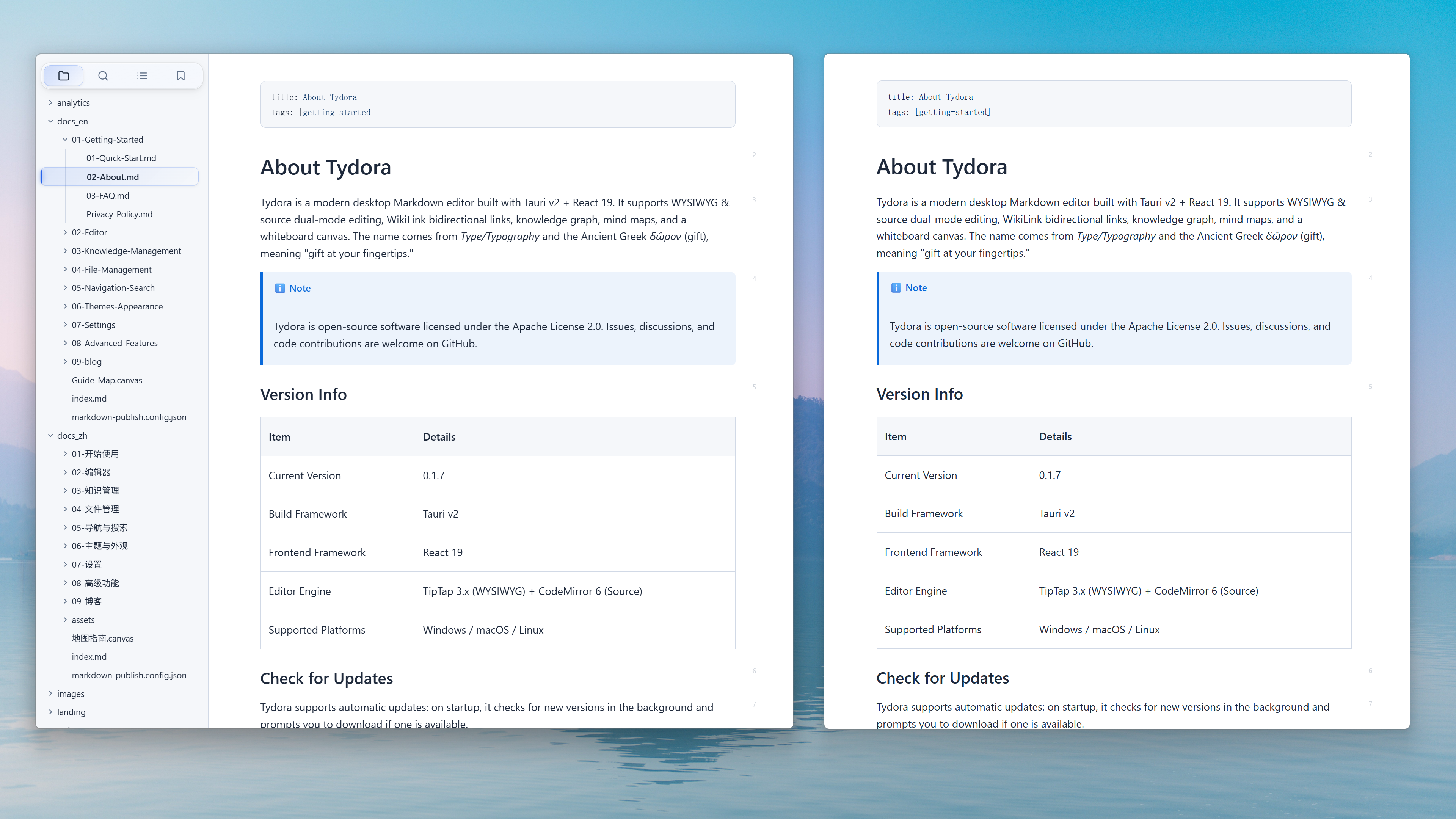
The ultimate writing experience: WYSIWYG, with an interface so clean that only the words remain. Not a single unnecessary distraction; wherever the cursor lands, your thoughts land directly on the screen. I poured every ounce of my obsession with "the feel of writing" into it, letting the tool fully recede — leaving only you and the river of thought.
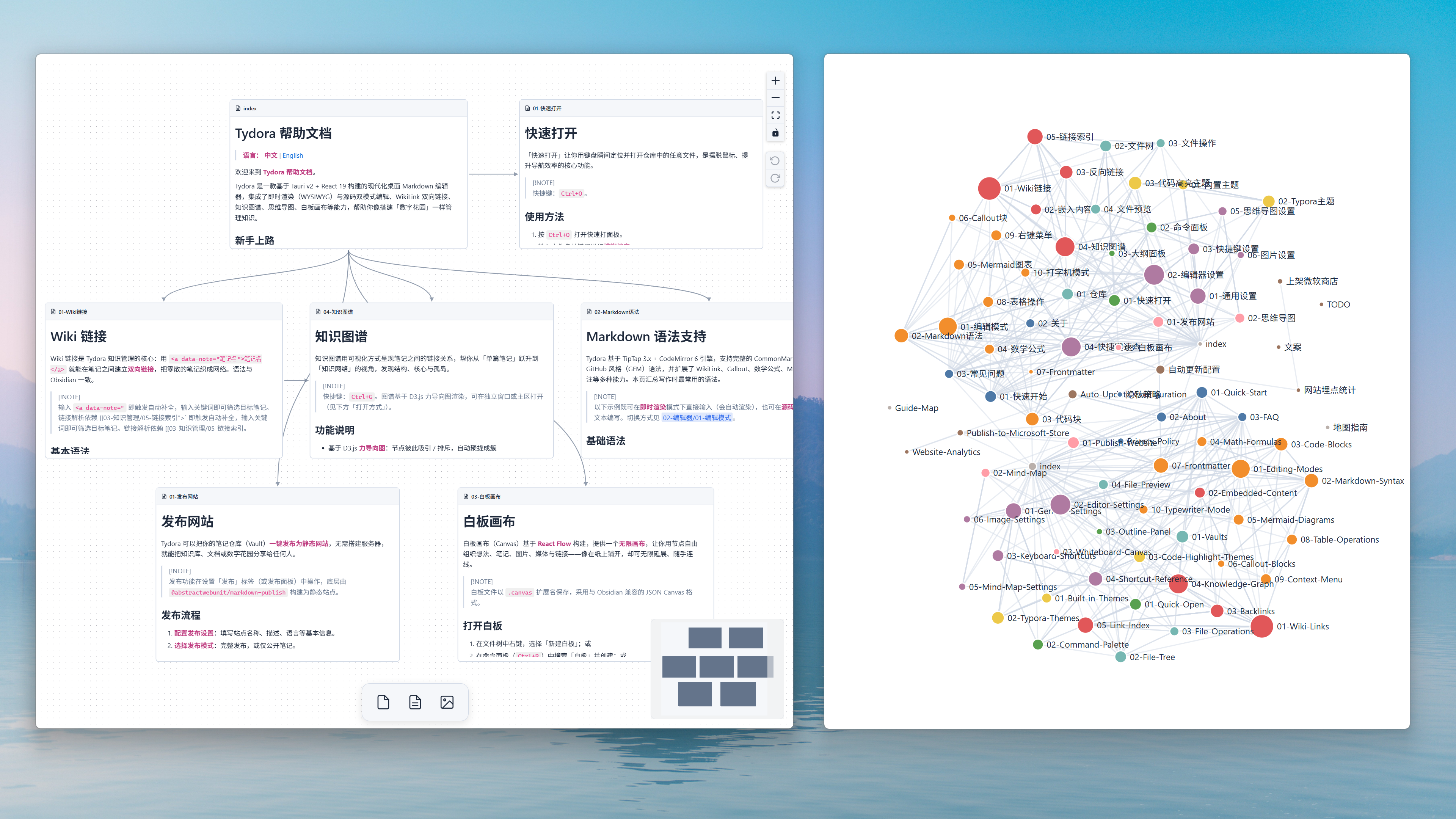
🪐 Knowledge Is Not an Island — It's a Constellation
Relationship graphs form between notes — the gravitational lines of thought. And the infinite whiteboard canvas lets you personally guide these stars, connecting them freely, restructuring logic. Going beyond the graph — here, your cognition knows no bounds.
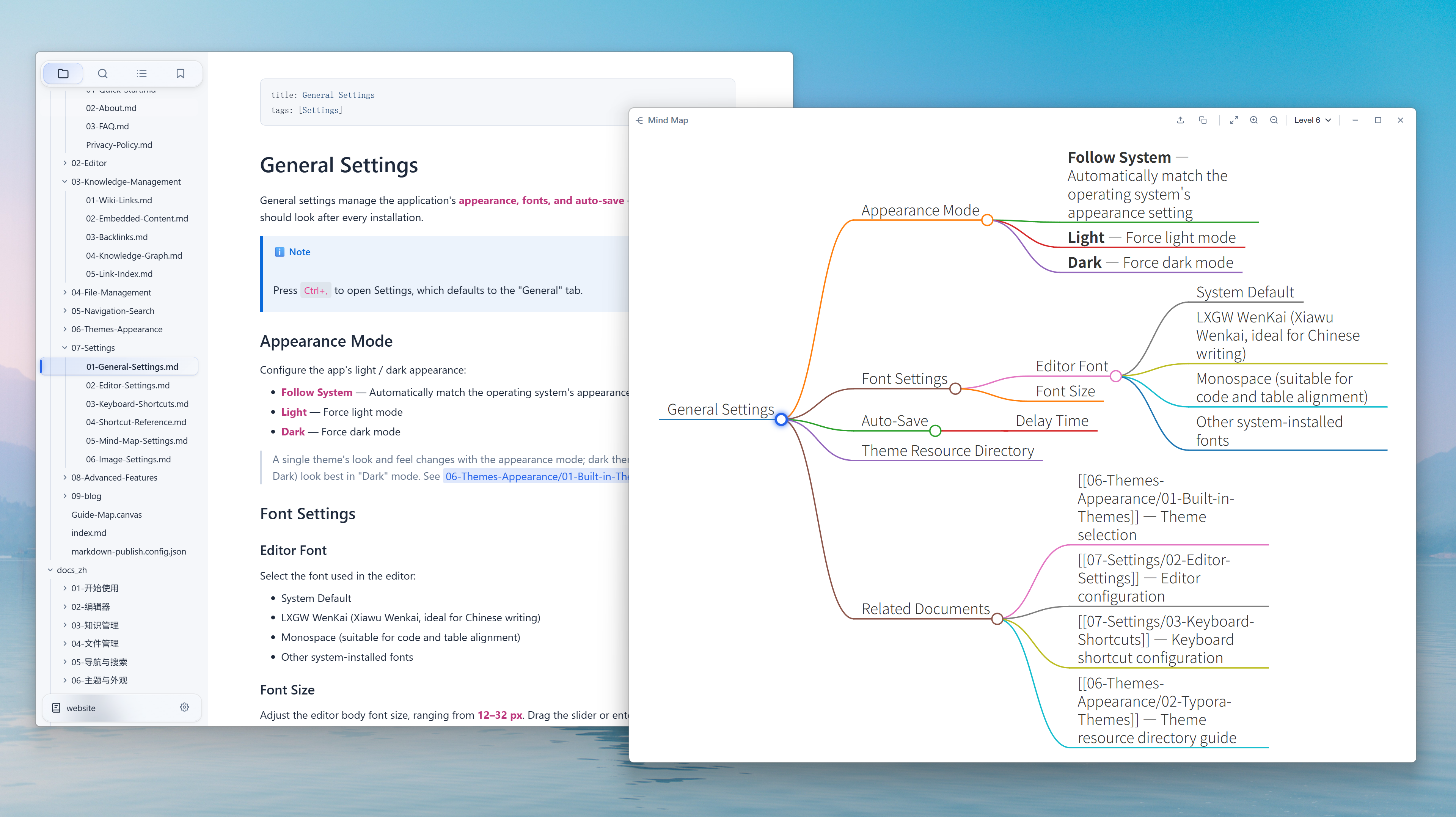
🌳 From Line to Tree, See the Forest in One Step
Turn any document into a mind map with one click. Linear text instantly unfolds into a structure of clear branches — hierarchy and connections at a glance. Outlining, dissecting books, reviewing ideas — no need to switch tools, the flow never breaks. What you see is the very shape of thought.
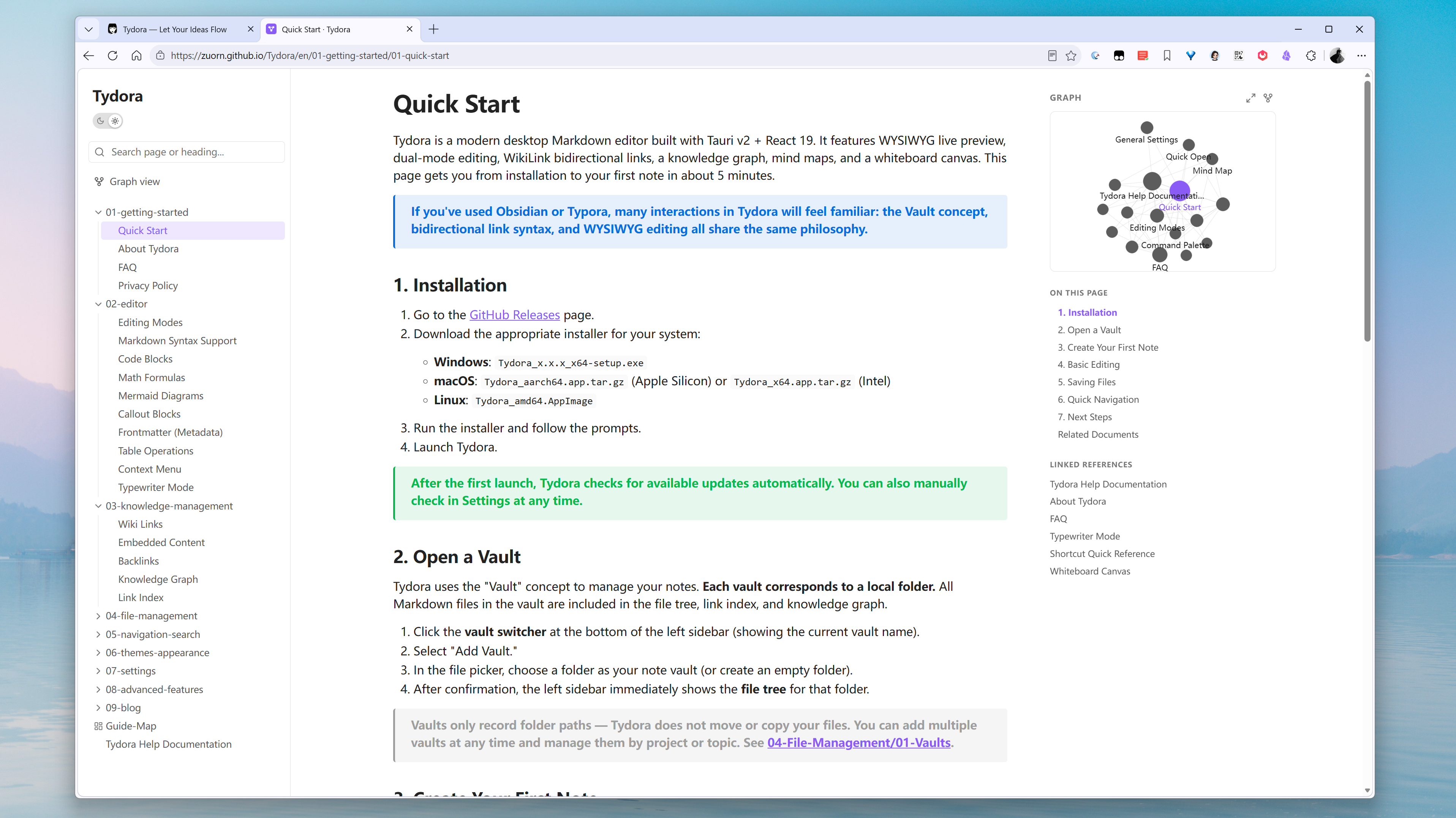
🌸 Let Your Knowledge Garden Bloom Quietly on the Web
Publish your local knowledge repository as a static website with one click. Blogs, documentation, personal wikis. Sharing knowledge has finally become clean and dignified.
📚 A Desk Awaiting Fellow Travelers
It is the answer I offer — and an invitation to fellow travelers. If you're also looking for a writing companion that understands you better, come and sit with Tydora.
🔗 Tydora — Let Your Ideas Flow
If there's anything you'd like it to do, tell me — I'll keep refining it, until it becomes the ideal version in our hearts.
Quick Start
- Download and install Tydora from the Release page.
Run from Source
git clone https://github.com/zuorn/Tydora.git
cd Tydora
npm install

npm run tauri dev
npm run tauri build
Tech Stack
| Layer | Technology |
|---|---|
| Frontend | React 19 + TypeScript + Vite 6 |
| Editor | TipTap 3.x (WYSIWYG) + CodeMirror 6 (Source) |
| Backend | Rust (Tauri v2) |
| Visualization | D3.js (Graph) + markmap (Mind Map) + React Flow (Canvas) |
| Plugins | tauri-plugin-fs / dialog / window-state / updater / process |
Contributing
Issues and pull requests are welcome!
License
This project is licensed under the Apache License 2.0.
Star History
Read the usage guide →
Install steps, key points, FAQ and compatibility for this plugin — auto-derived from indexed fields.
Listing badge

[](https://deepseek-plugin.org/plugins/zuorn/Tydora)Paste this markdown into your GitHub README to link back to this listing. The badge only states the listing — not a security endorsement.