为 DSH Web GUI 提供三层自动记忆引擎:每轮对话自动沉淀、关键词检索与跨工具记忆继承,含可视化面板与日历视图。

- 语言
- JavaScript
- License
- BSD-3-Clause
- 分支
- main
安装
$ dsh plugin --profile web add @a9i5k4/dsh-auto-memory在终端中运行以上命令,通过 dsh CLI 安装此插件。可在右上角切换 Profile。 第一次用 dsh?看这篇新手教程
对话式安装
帮我安装 DeepSeek Harness 插件 Aik358/dsh-auto-memory:先查看仓库 https://github.com/Aik358/dsh-auto-memory 确认安全性,然后执行安装命令并验证插件加载成功。
把这段指令粘贴给 DSH Web GUI 里的助手,由它代你完成安装与验证。
一句话定位
为 DeepSeek Harness (DSH) Web GUI 提供集中式三层自动记忆:用户级规则、项目笔记与每日日志都由插件自动写入、自动注入、自动检索,并能继承 CodeBuddy / Claude Code / Codex 等其他 AI 工具留下的记忆。
核心能力
- 自动注入记忆上下文:每次组装系统提示词时,把用户规则、项目笔记、最近一天日志、反思精华与未完成日历事项按需拼到末尾,让模型在回复前最后读到记忆纪律
- 每轮对话自动沉淀:每轮对话结束后由子代理判断本轮价值,写入今日日志(标记
[自动沉淀]),长期决策升格到项目笔记、跨项目规则升格到用户级记忆,寒暄轮自动跳过 - 主动日历与提醒:AI 从对话中自动提取 deadline、约定、任务节点写入日历,区分重要/紧急四象限颜色,并在之后会话中赶在时间到达前提醒
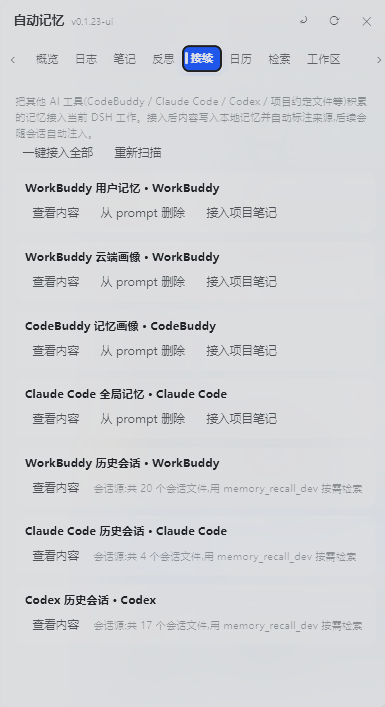
- 跨工具记忆继承:自动检测并接入 WorkBuddy / CodeBuddy / Claude Code / Codex 等其他 AI 工具的记忆(只记路径不复制内容,按需读取)
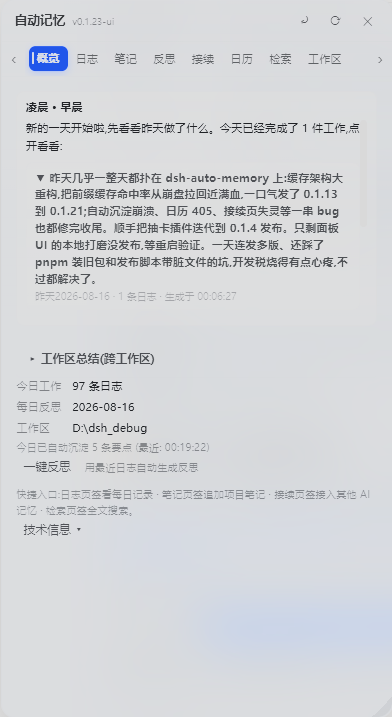
- 可视化与设置:侧边栏「记忆」入口提供 Overview / Logs / Notes / Reflections / Connect / Calendar / Search 七个面板,AI 写时段问候、三级抽屉总结、液态玻璃视觉、记忆地图(v0.1.24)
- 卫生闸门与一键升级:写入端拦截乱码/复读/外部 AI profile 原始 JSON 污染;设置页提供版本检查、npm registry 对比、一键升级命令
技术实现
- 语言: JavaScript(ESM,
type: module,源码是lib/index.js与lib/client.js编译产物,未提供.ts源) - 关键依赖: 零运行时第三方依赖(仅 Node 内置
node:fs/promises、node:fs、node:child_process、node:zlib、node:os、node:path、node:url);宿主 peer 依赖@deepseek-ai/cordis ^4.0.1;前端通过require('react')与 DSH 客户端运行时共用 React - 架构模式: 双面(dual-face)cordis 插件——
lib/index.js(host 半)注册路由、工具、系统提示词注入、生命周期钩子;lib/client.js(browser 半)通过cordis.patch.yml与package.json#dsh.client.inject注入到 DSH Web GUI;平台固定为web - 入口文件:
lib/index.js(导出apply(ctx, config)在宿主进程挂载;导出name = 'auto-memory'作为稳定 cordis 插件标识),对应lib/client.js注入浏览器侧边栏面板
适用场景
日常在 DSH 里持续做项目、跨工作区切换、跨会话回访的开发者。痛点是 DSH 默认不持久化项目记忆、模型每次都从零开始、之前做的决策要靠用户主动复述——这个插件让模型自己记得之前做过什么,并把 deadline、约定、用户偏好沉淀为可检索的本地笔记。还适合同时用 CodeBuddy / Claude Code / Codex 的用户,跨工具复用历史记忆而无需手动搬运。
前置依赖与兼容性
| 依赖 | 最低版本 | 说明 |
|---|---|---|
| DeepSeek Harness (DSH) | 未声明 | 插件市场收录,未声明最低 DSH 版本;要求 DSH web GUI 可启动(web profile 存在) |
| Node.js | >= 22.19.0(建议) | zstd 解压需要 node:zlib.zstdDecompressSync;Node <22 时会话索引回退明文读,仍可运行但工作区总览可能漏掉压缩会话帧 |
@deepseek-ai/cordis | ^4.0.1 | peer 依赖,由宿主 DSH 提供 |
| 平台 | 跨平台 | 宿主为 Node.js 进程,仅在 DSH web profile 下运行;客户端面板为浏览器端 React |
| 原生模块 | 无第三方原生依赖 | 全部使用 Node 内置模块(fs/child_process/zlib/os/path/url),无 node-gyp 编译产物 |
| pnpm | v9 或 v10(v11 需额外配置) | pnpm v11 默认限制安装发布不足 1 天的版本,同日发版需要在 pnpm-workspace.yaml 加 minimumReleaseAge: 0 或指定显式版本号 |
安装方式
dsh plugin --profile web add @a9i5k4/dsh-auto-memory
实际等价步骤:在 DSH 的 web profile 目录
~/.dsh/profiles/web下安装包,并把@a9i5k4/dsh-auto-memory追加到该目录package.json的dsh.profile.bundles数组,最后重启dsh web才会出现侧边栏「记忆」入口。
配置项
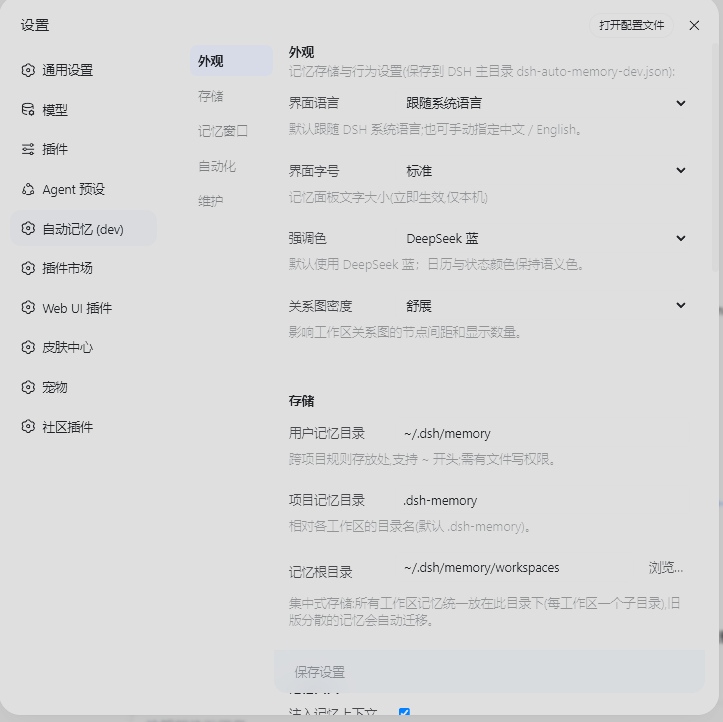
配置文件位于 ~/.dsh/dsh-auto-memory.json(首次启动自动创建),完整默认值由源码 lib/index.js 的 DEFAULT_CONFIG 决定:
| 配置 | 类型 | 说明 | 默认值 |
|---|---|---|---|
userMemoryDir | 路径 | 用户级记忆目录(绝对路径或 ~ 开头) | ~/.dsh/memory |
projectMemoryDir | 字符串 | 项目级记忆目录名(相对工作区) | .dsh-memory |
memoryRoot | 路径 | 集中式记忆根目录,每工作区一个子目录 | ~/.dsh/memory/workspaces |
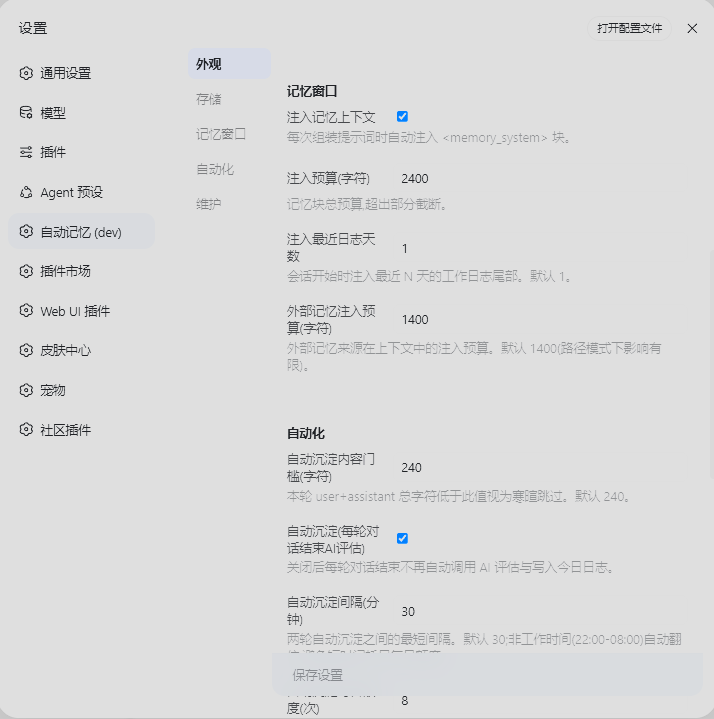
injectEnabled | 布尔 | 是否向系统提示词注入记忆上下文 | true |
injectBudgetChars | 数字 | 注入的总字符预算(动态部分上限) | 2400 |
recentDaysInjected | 数字 | 注入的最近日志天数 | 1 |
autoConsolidate | 布尔 | 每轮对话结束是否自动评估并写入今日日志 | true |
autoConsolidateMinChars | 数字 | 触发自动沉淀的本轮最小字符数(低于则视为寒暄跳过) | 240 |
autoConsolidateCooldownMinutes | 数字 | 自动沉淀的冷却分钟数(非工作时间 22:00–08:00 自动翻倍) | 30 |
autoConsolidateDailyMax | 数字 | 自动沉淀每日最大调用次数(限频) | 8 |
awayMinutes | 数字 | 离开多久算「暂离」,回归时弹记忆窗口并问候 | 60 |
autoPopupEnabled | 布尔 | 暂离回来是否自动弹出记忆窗口 | true |
autoSummaryTimes | 字符串数组 | 自动生成时段总结的时刻表(24h HH:MM),空数组=关闭 | [] |
dayBoundaryMinutes | 数字 | 日界(分钟,0 点起算),此前的工作归到前一天日志 | 450(早上 7:30) |
reflectEnabled | 布尔 | 是否启用每日反思 | true |
reflectStyle | 枚举 | 反思风格:auto / life / professional | auto |
locale | 枚举 | 界面语言:system(跟随 DSH 系统语言) / zh / en | system |
externalInjectionChars | 数字 | 外部记忆注入预算(字符) | 1400 |
externalSources | 对象 | 外部记忆源开关(WorkBuddy/CodeBuddy/Claude Code/Codex/项目约定) | 全部 true |
修改后无需重启 dsh:设置 → 自动记忆 页面保存即生效;面板字体大小(小/正常/大/特大)实时切换不需保存。
常见问题
Q: 安装后没看到「记忆」侧边栏入口怎么办?
A: 必须三步齐全:在 ~/.dsh/profiles/web 下安装包、把 @a9i5k4/dsh-auto-memory 追加到该目录 package.json 的 dsh.profile.bundles 数组、然后重启 dsh web。只装包不重启或没追加 bundle 行都不显示。
Q: 记忆文件存在哪里?重装 DSH 会丢吗?
A: 记忆以纯文本 Markdown 集中在用户主目录,与 DSH 安装目录隔离:用户级在 ~/.dsh/memory/MEMORY.md,项目记忆统一在 ~/.dsh/memory/workspaces/{workspace}/。重装 DSH 不影响;旧版分散在工作区里的 .dsh-memory 在首次运行时会自动迁移到集中根目录,旧文件保留不删。
Q: 自动沉淀会不会消耗很多 token?
A: 默认开启且每天最多调用 8 次、冷却默认 30 分钟(非工作时间自动翻倍),可在设置页调整。静态规则挂在系统提示词里保持字节级稳定,动态记忆走运行时快照,让 DeepSeek 前缀缓存全程命中以减少重复编码开销。
Q: 能继承 CodeBuddy / Claude Code / Codex 的记忆吗?
A: 能。插件会扫描 ~/.workbuddy、~/.codebuddy、~/.claude、~/.codex 等目录。memory_external 的 import 动作以「纯链接模式」接入,只在本地记忆里记录源文件路径指针,不复制内容,需要时按需读取——这样既能用上外部历史,又不会被其他 AI 工具 profile 的原始 JSON / 乱码污染本地记忆。
Q: 记忆里会泄露密钥吗?
A: 注入到 prompt 的内容会过滤掉疑似令牌 / 密钥 / 凭据的段落,文件本身完整保留;外部会话检索为关键词级(非语义)。但密钥本身仍属敏感信息,建议不要主动写入或粘贴到对话里。
Q: 怎么升级这个插件?
A: 在 ~/.dsh/profiles/web 目录执行 pnpm up @a9i5k4/dsh-auto-memory(或 npm install @a9i5k4/dsh-auto-memory@latest),然后重启 dsh web;设置 → 自动记忆 页面提供「检查更新」按钮,会对比你当前版本与 npm registry 最新版并显示更新命令。注意 pnpm v11 默认限制安装发布不足 1 天的版本,当天发版需要在 pnpm-workspace.yaml 加 minimumReleaseAge: 0 或指定显式版本号。
Q: 卸载后记忆还在吗?
A: 记忆文件保存在用户主目录(~/.dsh/memory/),不在 DSH 安装目录;从 web profile 移除 bundle 并卸载包不会删除这些 Markdown 文件,下次再装可继续使用。
上手难度
入门 — 安装后无需任何配置即可获得默认三层记忆 + 自动沉淀 + 主动日历能力;所有偏好都能在 GUI 的设置 → 自动记忆 页面调整并实时生效,不需要碰 JSON。
已知问题与限制
- 记忆检索是关键词级(非语义):
memory_recall按空白/中文标点分词后做 OR 匹配,按命中词数排序,源码未提供向量检索或语义匹配 memory_recall跨历史 DSH 会话检索依赖宿主部署的 session-query 索引;未启用该索引时只能搜本地记忆文件(README 原文限制)- 插件增删需要重启
dsh web才会生效(README 原文限制) - Node.js < 22.19.0 缺少
zstdDecompressSync,DSH 新版会话持久化的session.jsonl.zstd压缩帧无法解压,工作区总览会扫不到压缩会话(v0.1.16 已修复读取逻辑,但旧 Node 仍只能回退明文读) - pnpm v11 默认不允许安装发布不足 1 天的版本:同一天发布想立刻装新版,需要在
pnpm-workspace.yaml加minimumReleaseAge: 0或使用pnpm add @a9i5k4/dsh-auto-memory@<version>显式版本号 - 系统文件夹选择器依赖 DSH 主机的 directory-picker-auto 原生后端;不可用时设置页自动回退到内嵌文件夹浏览
- 0.1.14 及以下版本会击穿 DeepSeek 前缀缓存(旧版把秒级时间戳注入系统提示词),大量消耗 token;如仍在运行老版本,建议升级到 0.1.16+ 解决
- 外部记忆接入(
memory_externalimport)只记录路径指针,不复制内容:好处是抗污染,代价是其他 AI 工具里的内容需要时按需读取,导入后不立即可全文搜索

A cache-friendly three-layer memory engine for the DeepSeek Harness Web GUI — lean auto injection, per-turn AI consolidation, on-demand reads and cross-tool memory inheritance — wrapped in human touches: proactive calendar reminders, warm AI greetings, and a daily journal that writes itself.
DSH Web GUI 的记忆与人性化交互插件:三层记忆自动注入与检索、每日反思、AI 时段问候与三级抽屉、每轮自动沉淀、智能检索、日历视图与设置页,支持继承其他 AI 工具的历史记忆。
Quick install:
cd ~/.dsh/profiles/web→pnpm add @a9i5k4/dsh-auto-memory→ append"@a9i5k4/dsh-auto-memory"todsh.profile.bundlesin that directory'spackage.json→ restart dsh web (the 「Memory」entry appears in the sidebar). Full instructions in Installation; no-pnpm alternative:npm install @a9i5k4/dsh-auto-memory.
Installation (one command)
Prerequisite: install DeepSeek Harness (dsh) and start
dsh webat least once.
Run in the profile directory (~/.dsh/profiles/web):
cd ~/.dsh/profiles/web
pnpm add @a9i5k4/dsh-auto-memory
pnpm v11 默认限制安装发布不足 1 天的版本。当天发布想立即拿到新版,在 profile 目录的 pnpm-workspace.yaml 加
minimumReleaseAge: 0,或用显式版本pnpm add @a9i5k4/[email protected]。(pnpm v11 blocks packages published <1 day ago; setminimumReleaseAge: 0in pnpm-workspace.yaml or use an explicit version for same-day releases.)
Then edit package.json in that directory and append to the dsh.profile.bundles array:
"@a9i5k4/dsh-auto-memory"
Restart dsh web to activate (the 「Memory」entry appears in the sidebar).
No pnpm? Use npm:
npm install @a9i5k4/dsh-auto-memory
Updating (check & upgrade)
The plugin is a normal npm package, so updating is one command in the same profile directory:
cd ~/.dsh/profiles/web
pnpm up @a9i5k4/dsh-auto-memory   # or: npm install @a9i5k4/dsh-auto-memory@latest
Then restart dsh web.
The Settings → Auto Memory page has a Check for updates button that compares your installed version with the latest one on the npm registry (it shows the update command when a newer version exists).
AI-Era Installation (copy-paste for your AI)
It's the AI era — just copy the sentence below to your AI assistant (DeepSeek / Claude / Codex etc.) and it will do the installation for you.
Install the npm package @a9i5k4/dsh-auto-memory in the DeepSeek Harness web profile
directory ~/.dsh/profiles/web (run "pnpm add @a9i5k4/dsh-auto-memory" or "npm install @a9i5k4/dsh-auto-memory"),
append "@a9i5k4/dsh-auto-memory" to the dsh.profile.bundles array in package.json,
then restart dsh web to activate the plugin.
A companion that takes initiative
Auto Memory is designed to feel less like a database and more like an assistant who knows you:
- Proactive reminders — when the AI notices a deadline, appointment or promise in your conversation, it files it into the calendar automatically and reminds you in later sessions before the time arrives (
calendar_add/calendar_done/calendar_remove). - Warm greetings — an AI-written greeting for the current period (morning / afternoon / evening) that mentions your most important work of the day; come back after an hour away and it says "welcome back" and catches you up.
- It writes its own journal — after every conversation turn, a small subagent quietly decides what's worth keeping and appends topic-grouped entries to today's log; long-term decisions are promoted to project notes and cross-project rules to user-level memory. You never have to remember to log anything.
- Daily reflections — structured results / lessons / next steps are kept in the background, so you can review how a day really went.
- Calendar with human touches — semantic colors for urgency, a day timeline (07:00–22:00), location and reminder fields; the AI maintains it from context instead of you filling forms.
- Inherited memory — memories accumulated in WorkBuddy / CodeBuddy / Claude Code / Codex are discoverable and importable, so the plugin picks up where your other AI tools left off.
Under the hood — engineering that stays out of your way
- Prefix-cache friendly — static rules live in the system prompt, dynamic memory in runtime snapshots; the prompt stays byte-stable so DeepSeek's prefix cache keeps hitting (no repeated re-encoding of your whole history).
- Lean injection, low token cost — only the last day of logs + a reflection digest are injected; everything else is fetched on demand via
memory_read/memory_recall. - Rate-limited AI — auto-consolidation runs at most 8×/day with a configurable cooldown (doubled outside work hours), so memory stays useful without burning your budget.
- Credentials never enter the prompt — sensitive sections (tokens / secrets / credentials) are filtered out of injection while staying safe in the files.
- Cross-workspace & cross-tool — centralized storage readable from any session; memories from WorkBuddy / CodeBuddy / Claude Code / Codex are discoverable and importable.
Features
Three-layer Memory
| Layer | Location | Description |
|---|---|---|
| User-level memory | ~/.dsh/memory/MEMORY.md | Cross-project rules & preferences |
| Project notes | ~/.dsh/memory/workspaces/{workspace}/MEMORY.md | Project conventions & decisions (centralized) |
| Daily logs | ~/.dsh/memory/workspaces/{workspace}/YYYY-MM-DD.md | Append-only work log (centralized) |
| Reflections | ~/.dsh/memory/workspaces/{workspace}/reflections/YYYY-MM-DD.md | Daily reflection (structured, kept in background) |
Centralized storage (WorkBuddy-style): all workspace memories live under one root —
~/.dsh/memory/workspaces/, one subdirectory per workspace (readable by any model in any session via injection + cross-workspacememory_recall). Legacy per-workspace.dsh-memory/folders are auto-migrated on first run after upgrade (the old copies are kept, not deleted).
- Auto injection (at the end of the system prompt): every prompt gets a
<memory_system>block (user rules + project notes + reflection digest + recent 1 day of log tails + external memory paths + pending calendar items + writing discipline); it is placed at the very end of the system prompt so the model reads the memory discipline right before replying - Lean by default, details on demand (v0.1.24): injection stays small — the last 1 day of logs, a reflection digest (achievements section only), and paths for external memory instead of full text.
memory_readfetches full log/reflection/user/notes/calendar files when needed; sensitive sections (credentials/tokens/secrets) are filtered out of the prompt but kept in the files - Visible memory ops: when the AI updates or searches memory, it says so in plain text in the chat reply (e.g. "Logged X to today's journal", "I checked memory and found..."), not hidden inside tool calls
Auto-Consolidation — memory writes itself after every turn (v0.1.9)
Every finished conversation turn is automatically evaluated (via a small subagent) and anything worth keeping is written for you — no reliance on the model remembering to log:
- Today's log gets entries like
- 21:03 [自动沉淀] …— no manualmemory_logneeded for routine work - Long-term value is promoted: project decisions/architecture → project notes (with a
## YYYY-MM-DDheading); cross-project rules → user-level memory - Small talk is skipped (content threshold
autoConsolidateMinChars), each turn is deduplicated by turn number, subagent turns are ignored - Agent traces in the GUI: the overview shows "Auto-consolidated N points today (latest HH:MM)"; the panel refreshes on open, every 30s while open, and via the ⟳ button
memory_consolidatetool: read recent logs and distill long-term decisions / architecture / user preferences into MEMORY.md on demand ("dream-like" consolidation)- Configurable in
~/.dsh/dsh-auto-memory.json:autoConsolidate(default true),autoConsolidateMinChars(default 240),autoConsolidateCooldownMinutes(default 30, doubled 22:00–08:00),autoConsolidateDailyMax(default 8) — all adjustable in the Settings → Automation section
AI Greetings & Three-level Drawers (Overview page, v0.1.9)
The first thing you see when opening the memory panel is an AI-generated period greeting, not a template and not technical info:
- AI-written greeting: a subagent writes a warm, casual greeting for the current period (morning / forenoon / noon / afternoon / evening), mentioning your most important work of the day; generated once per period per day and cached in
.dsh-memory/greetings/— no repeated API cost - Drawer titles are the AI summaries: the "Today afternoon / Today evening" window titles are replaced with the AI's casual summary text itself
- Three-level drawer structure:
- Level 1: period drawer, titled with the AI summary
- Level 2: inside it, small drawers — one per work item the AI distilled (with a point count)
- Level 3: expand a work item to read its detail points
- Summaries are cached: structured results live in
.dsh-memory/summaries/; opening the panel reads the cache (offline-friendly, no regeneration); the ⟳ refresh button or returning after >1h away forces a fresh generation; every summary shows its generation time - Smart timing: if you were away for more than 1 hour and come back, the greeting says "Welcome back" with what was finished meanwhile
- Daily reflection stays in background: structured reflections (results / lessons / next steps) are kept, while the front page only shows a light greeting
Smart Search (Search tab, v0.1.9)
The Search tab adds a Smart search button next to the keyword search:
- The AI expands your natural-language query into 3-6 keywords (e.g. "last time publishing npm hit a snag" → 发布 / 踩坑 / GitHub / npm / 推送)
- Scans all three memory layers plus reflections with those keywords
- The AI then composes a conversational answer in natural language, citing where each fact came from (log date / project note / user-level memory) — it never fabricates facts not present in memory
- Raw keyword hits with their sources are listed under the answer
Calendar View (Four Quadrants)
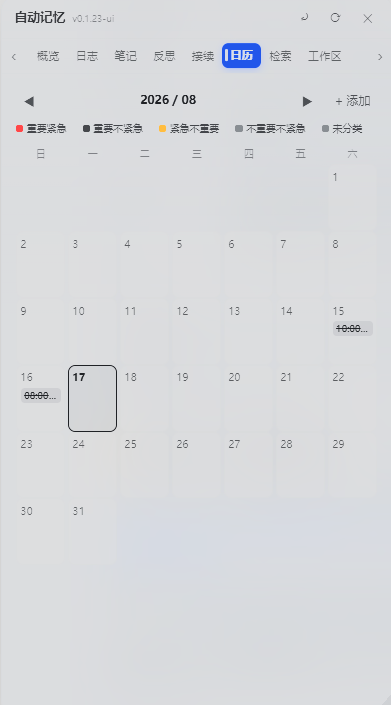
「Calendar」tab (liquid-glass monthly view):
- Monthly grid, today highlighted, click any date to add an item
- Four-quadrant colors: Urgent & Important (red) / Important (blue) / Urgent (orange) / Neither (gray)
- Click an item to toggle done, click again to delete; legend + weekday header
- Cross-conversation persistence: data lives at user level
~/.dsh/memory/CALENDAR.md, shared across workspaces, survives DSH reinstall - AI-maintained: the AI extracts deadlines and appointments from conversations and writes them to the calendar automatically (
calendar_add/calendar_list/calendar_done/calendar_remove), restating it in plain text; pending items are injected into every session's system prompt
Agent Tools
memory_log / memory_note / memory_user / memory_recall / memory_external / memory_maintain / memory_status / memory_reflect / memory_consolidate / calendar_add / calendar_list / calendar_done / calendar_remove
UI
- Sidebar 「Memory」entry → floating panel (Overview / Logs / Notes / Reflections / Connect / Calendar / Search)
- Settings page (Settings → Auto Memory): storage paths, injection budget, reflection style, UI language (中文 / English), panel font size (Small / Normal / Large / Extra large, default Large) — applies immediately, no save needed
- External memory inheritance: import memories accumulated by other AI tools (CodeBuddy / Claude Code / Codex / project convention files)
Screenshots
All screenshots below are real captures of the plugin running inside the DSH Web GUI (Chinese UI for now; English UI captures will be added later).
Memory panel overview — away greeting & AI period summaries
Connect — inherit global memory & history sessions from other AI agents
Calendar — AI adds items, toggles status and marks completion from context
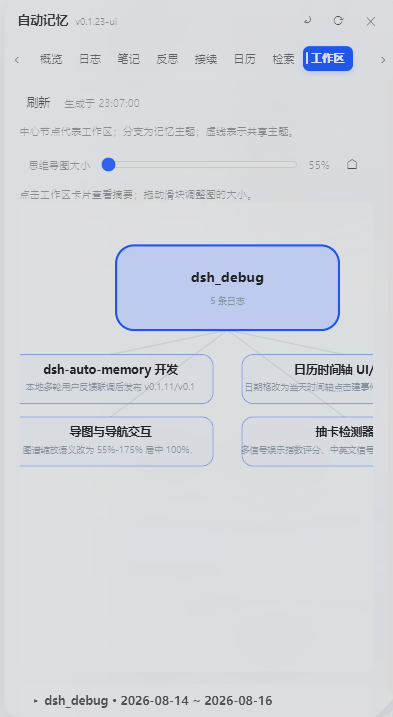
Workspace mind map — auto-generated, workspace-centered cross-workspace overview
Settings — highly customizable, covers most technical details
Beyond the screenshots
- Auto-consolidation: every finished turn is evaluated by a small subagent and topic-grouped entries are written to today's log automatically (
## 主题(HH:MM)+ bullet points) — nomemory_logneeded for routine work. Long-term value is promoted to project notes / user-level memory, small talk is skipped, failures are queued and retried every 5 minutes (a 15-second heartbeat file proves the loop is alive). - Smart search: ask in natural language — the AI expands your query into keywords, scans every memory layer, then answers conversationally with sources cited.
- Calendar with day timeline (v0.1.24): click a date to open a 07:00–22:00 timeline with events placed on their time slots; add events with location/reminder/details; the AI proactively files deadlines via
calendar_addand marks them done viacalendar_done/calendar_remove. - Workspace mind map (v0.1.24): an AI-generated graph of workspaces, topics and cross-workspace links; pan by dragging, resize with the slider, click a card for details.
- Memory panel UI (v0.1.24): liquid-glass panel with smooth animations everywhere — tab strip with arrow scrolling, expanding sections (greeting drawers, workspace summaries), floating save bar in Settings that highlights when there are unsaved changes.
- External memory management (v0.1.24): per-source view/import/remove — imported sources show "✓" and become "Delete" buttons per target (notes vs user-level); full content is read on demand and never injected in bulk.
- Calendar reminders: pending items are injected into future sessions' system prompts until completed — the AI reminds you without being asked.
- One-click update: the settings page shows your installed version vs. the npm registry latest; registry installs get a one-click update button (pnpm/npm runs under the hood), then restart to apply.
Configuration
Defaults (JSON file ~/.dsh/dsh-auto-memory.json):
{
  "userMemoryDir": "~/.dsh/memory",
  "projectMemoryDir": ".dsh-memory",
  "injectEnabled": true,
  "injectBudgetChars": 2400,
  "recentDaysInjected": 1,
  "reflectEnabled": true,
  "reflectStyle": "auto",
  "locale": "zh",
  "autoConsolidate": true,
  "autoConsolidateMinChars": 240,
  "autoConsolidateCooldownMinutes": 30,
  "autoConsolidateDailyMax": 8,
  "externalInjectionChars": 1400,
  "memoryRoot": "~/.dsh/memory/workspaces",
  "dayBoundaryMinutes": 450
}
Adjustable in the GUI (Settings → Auto Memory), including the UI language (zh / en), the panel font size and the day boundary.
v0.1.27 hardening (memory hygiene gate — keeps external dirt out)
- Write gate on the three write tools:
memory_log_dev/memory_note_dev/memory_user_devnow run content throughsanitizeForWritebefore writing — suspected mojibake (GBK round-trip artifacts), stutter degeneration (word/char loops, punctuation-separated included) and consecutive duplicate lines (≥3) are rejected with a reason; append entries cap at 8,000 chars, full rewrites (replace) at 200,000; appends are also deduped against the file's last ~60 lines (the- HH:MMlog prefix does not affect matching). - Hygiene family fixes: removed the
进行中false positive from the mojibake pattern (added the real artifact杩涜涓), switched mojibake counting to global matching (it previously counted at most 1 hit, letting dirty long texts slip past the threshold), stutter detection now works across punctuation, and the duplicate-line check is reset by blank lines (no more false positives on short lines repeated across paragraphs). - External memory import is link-only:
memory_external_devimport now records only source file path pointers instead of copying content — keeping dirty content from other AI tools (WorkBuddy/CodeBuddy/Claude Code/Codex) out of local memory. - Injection-side scrub + voice discipline: mojibake lines, code blocks and stutter lines are scrubbed before injection; the injected block adds a "how to read memory" note and voice discipline — write all memory entries as third-person objective statements, no first-person thinking narration.
v0.1.28 dirty-token checker (prion-scan integrated — stops the "model silently degrades" class)
- Write gate now rejects raw JSON envelopes & base64 residue: besides mojibake / stutter / duplicate lines, the write gate also rejects lines matching external-AI-profile JSON signatures (
memoryBlock/"uid":/updatedAt/"role":"... ") and base64 residue lines — so an external tool profile can never be pasted into memory wholesale again. - Full mojibake table (34 features, verbatim from prion-scan.mjs): the GBK round-trip residue list is completed, catching the exact artifacts this class of "garbage token" shows up as.
- New "Scan dirty tokens" in Settings → Debug Center: one-click prion-style scan of user-level memory / project notes / today's log / reflections — returns a per-file report by line range (mojibake / raw JSON envelope / long lines >500 / base64 / duplicate lines, duplicate ## headings) with locations only, no content, so you can spot residual dirt without reading it.
v0.1.9 hardening (budget / boundary / picker)
- Daily write budget with auto-compaction: user memory ≤ 4000 chars/day, project notes ≤ 3000 chars/day (shared across sessions, reset at the day boundary). Going over the budget never rejects the write — the framework compacts the pre-today sections with an AI pass (merge duplicates, drop stale entries, keep hard facts) and then writes; if AI is unavailable, the oldest sections are archived to
archived-user.md/archive/notes-archived.md(nothing is lost). Compaction is throttled to once per 10 minutes. - Day boundary (late-night belongs to yesterday):
dayBoundaryMinutes(default 450 = 07:30). Work logged before the boundary is appended to the previous day's log, and the daily reflection for the previous day starts only after the boundary — no more "it's 00:30, tell me what you did yesterday" right after midnight. - Native OS folder picker: the "Browse…" button next to the memory root opens the real system folder picker (via the DSH directory-picker native backend); falls back to the in-app browser when no native picker is available. Changing the root auto-migrates existing workspace memory folders to the new location (old files are kept) and all path variables follow the new config on the next refresh.
- 30-day distillation:
memory_maintaindistills logs older than 30 days with an AI pass into the project notes, archives the originals underarchive/, and removes them from the active log list. - First-turn injection guarantee: a
pre-stephook awaits the memory state refresh before the first step, so the model sees memory from the very first token (previously the async load could leave the first turn empty). - Per-step reminder with timestamp: the injected discipline block carries a live
HH:MM:SStimestamp that refreshes on every prompt assembly, and a 15-second heartbeat file proves the background loop is alive.
Structure
lib/index.js— Host half: engine, injection, tools, routes (zero runtime deps, Node built-ins only)lib/client.js— Browser half: memory panel (with calendar view) + settings page (built-in zh/en i18n)cordis.patch.yml— Plugin row (auto-memory)
Limitations
- Memory files are plain-text Markdown; no secrets stored unless explicitly requested.
memory_recallsession search depends on the deployed session-query index; without it, only local search works.- Plugin-set changes require a dsh restart.
Release Info
- GitHub: https://github.com/Aik358/dsh-auto-memory
- npm:
@a9i5k4/dsh-auto-memory - License: BSD-3-Clause
查看使用指南 →
该插件的安装步骤、关键要点、FAQ 与兼容性说明(基于已收录字段派生)。
收录徽章

[](https://deepseek-plugin.org/plugins/Aik358/dsh-auto-memory)把这段 markdown 粘贴到你的 GitHub README,链接回本插件详情页。徽章只声明已被本站收录,不代表安全认证。