在 DSH Web 会话标题栏新增"任务 DAG"入口,把当前会话、委派子代理和持久工作流渲染成一张实时可导航的依赖图。

- 语言
- JavaScript
- License
- MIT
- 分支
- main
安装
$ dsh plugin --profile web add github:LeemanCheung/dsh-task-dag在终端中运行以上命令,通过 dsh CLI 安装此插件。可在右上角切换 Profile。 第一次用 dsh?看这篇新手教程
对话式安装
帮我安装 DeepSeek Harness 插件 LeemanCheung/dsh-task-dag:先查看仓库 https://github.com/LeemanCheung/dsh-task-dag 确认安全性,然后执行安装命令并验证插件加载成功。
把这段指令粘贴给 DSH Web GUI 里的助手,由它代你完成安装与验证。
一句话定位
在 DSH Web 会话标题栏新增"任务 DAG"入口,把当前会话、它委派出去的子代理以及持久化的工作流节点渲染成一张自顶向下的依赖图,节点可拖动、可点击跳转,是排查"这个任务到底派生出哪些子任务、跑到哪一步了"的可视化工具。
核心能力
- 实时拓扑:把 DSH 已有的客户端投影转成自顶向下的 DAG,会话状态变化时图随之刷新,不做 Host 端轮询
- 持久工作流恢复:DSH 重启后从 workflow-run 会话节点重新构建工作流的阶段与成员,不会丢失上下文
- 工作流分组:把工作流成员收拢到工作流节点下,避免从根会话到成员画出重复直连边
- 直接导航:点击(或回车/空格)健康且仍在 Session 列表里的子代理节点,直接跳转到对应会话
- 画布控制:在"全图适应"和"原始尺寸可滚动"两种视图间切换,可拖动空白处平移画布
- 节点拖动重排:拖动节点可重新布局,连线实时跟随;当前 Session 内关闭再开会保留调整后的位置
- 状态可视化:颜色克制在业务蓝/成功绿/错误红/警告琥珀四种,其它层级用间距、字体、边框和线型表达
- 卸载安全:UI 与样式都通过 Cordis 生命周期注册,卸载插件时被完整移除,不残留 DOM
技术实现
- 语言: JavaScript(src/client.js 用 CommonJS,src/graph-model.js 用 ESM,scripts/build.mjs 用 ESM)
- 关键依赖:
@deepseek-ai/dsh-client-runtime/@deepseek-ai/dsh-client-locale/@deepseek-ai/dsh-client-ui-conversation/@deepseek-ai/dsh-client-ui-primitives/@deepseek-ai/dsh-client-ui-workflow-run/react^18.2.0 - 架构模式: 纯 Cordis 客户端插件;
cordis.patch.yml在 host 注册名为task-dag的插件;apply(ctx)通过ctx.slots.inject('conversation.session.header.actions')把TaskDagAction注入会话标题栏,用ctx.effect注册样式表与中英文字典,关闭面板时通过ctx.sessions.setSubagentCatalogOpen收起目录;DAG 由纯函数buildGraph+graphLayout计算,UI 通过 React + ReactDOM Portal 渲染到document.body - 入口文件:
src/client.js(UI 组件)+src/graph-model.js(血缘归一、工作流分组、确定性垂直布局),由scripts/build.mjs打包成浏览器加载的lib/client.js
适用场景
负责管理多 Agent 协作会话的用户:当一个 Session 派生出大量一次性子代理或持续型子代理,希望一眼看清"哪一步还在跑、谁派生了谁、属于哪个工作流阶段"时使用。适合演示场景和复杂多步骤任务的现场排查,能避免在子会话列表里来回翻找。
前置依赖与兼容性
| 依赖 | 最低版本 | 说明 |
|---|---|---|
| DSH | 未声明 | package.json 未声明 dsh 版本依赖;dsh.client.platform 显式为 web,仅 Web profile 可用 |
| Node.js | >= 20 | package.json 的 engines.node 声明 >=20;开发推荐 20.19+ / 22.13+ / 24+,CI 当前使用 Node 22 |
| 平台 | Web | package.json 的 dsh.client.platform 为 web;浏览器内只读可视化,不支持 CLI / Desktop profile |
| 原生模块 | 无 | 仅使用 DSH 客户端 runtime + React 18,不引入任何原生依赖 |
安装方式
dsh plugin --profile web add github:LeemanCheung/dsh-task-dag
配置项
本插件无需额外配置。安装后重启 dsh web 一次,会话标题栏即出现"任务 DAG"入口,无需编辑任何文件或环境变量。
常见问题
Q: 安装后在会话里看不到"任务 DAG"入口怎么办?
A: 确认 profile 是 web(命令里加 --profile web),首次安装需要重启一次 dsh web 进程并刷新浏览器页面;之后再次启用或升级通常无需重启。
Q: 节点点击无法打开对应会话怎么办?
A: 只有仍出现在 DSH Session 列表里的子代理节点可导航;如果某个会话被归档、删除或暂不可见,其节点不会响应点击。可以用面板里的"刷新"按钮重新拉取一次子代理目录。
Q: 拖动节点调整了位置,下次会话还能保留吗?
A: 仅在当前 Session 的当前页面 React state 里保留。切换到别的 Session、刷新页面或重启 DSH 后会回到插件计算的确定性自动布局;工作流拓扑本身仍由持久化的 workflow-run 数据重建。
Q: 这个插件会读我的文件、连网络或注入 prompt 吗?
A: 不会。这是一个浏览器内的只读可视化插件,不读工作区文件、不发网络请求、不注册模型工具、不持久化会话内容和凭据;详见 SECURITY.md。
Q: 支持 CLI 或 Desktop profile 吗?
A: 不支持。package.json 的 dsh.client.platform 显式声明为 "web",且 cordis.patch.yml 只注册客户端插件,没有 node 端实现。
Q: 图里状态或标签看起来不是最新的怎么办?
A: 打开面板后会自动拉取被观察的子代理目录;如有偏差,点击工具栏的"刷新"按钮再次拉取即可。工作流节点始终由持久数据投影驱动,刷新按钮不会重排工作流归属。
Q: 怎么卸载?
A: 运行 dsh plugin --profile web remove dsh-task-dag,然后重启一次 dsh web。
上手难度
入门 — 安装即用,没有配置文件或环境变量;点击入口打开图,拖动节点、点击跳转等交互全部图形化,无需任何代码或命令行操作。
已知问题与限制
- 布局保留是有界的:手动拖动的节点位置只保存在当前页面、当前 Session 的 React state 里;切换 Session、刷新页面或重启 DSH 后会回到确定性自动布局,源码见
src/client.js:549的useEffect(() => { setNodePositions({}); }, [sessionId]) - 工作流成员归属按"最后解析到的工作流"覆盖先前的归属与状态,因此同一子代理若同时被多个工作流引用,会被归入最后一次解析到的工作流分组,源码见
src/graph-model.js:170-175 - 投影会丢弃无法追溯到当前 Session 的孤儿、缺失父节点链路与循环血缘,同时仍为合法的深层依赖链生成确定性垂直层级,源码见
src/graph-model.js:72-91 - 状态色被刻意限制为业务蓝、成功绿、错误红、警告琥珀四种,其它层级(工作流 vs 子代理 vs 根会话)仅靠图标、间距、边框与线型区分,源码见
src/client.js:69(zh 字典status.*)与README.md:71 - 没有焦点陷阱:面板打开时只支持
Escape关闭并把焦点还给入口按钮,不支持键盘拖动面板、画布或节点,源码见src/client.js:558-568与README.md:69 - 当前检查流水线(
npm run check)只覆盖语法、纯模型单元测试与 jsdom 冒烟测试;真实 profile 中的主题视觉、响应式布局、焦点与卸载行为仍需人工或浏览器 E2E 验证,源码见README.md:114-115
dsh-task-dag
A live task topology for DeepSeek Harness Web.
See Sessions, delegated subagents, and durable workflows as one navigable DAG.




English · 中文
At a glance
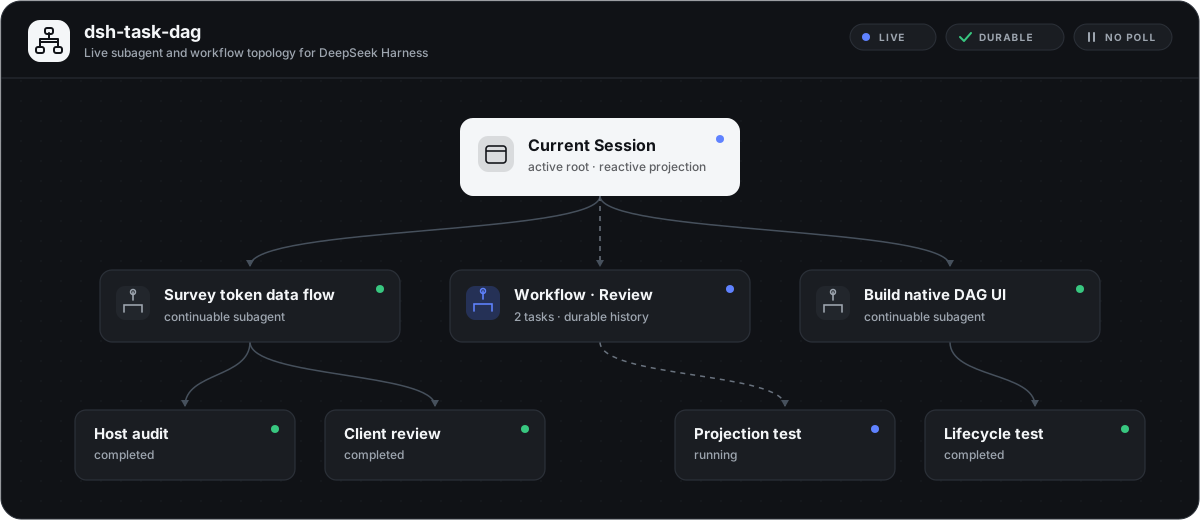
dsh-task-dag turns DSH's existing Client projections into a top-to-bottom dependency graph. It keeps no parallel workflow database and sends no polling requests: when Session state changes, the graph changes with it.
| Capability | Behavior |
|---|---|
| Live topology | Reacts to Session and subagent catalog snapshots without Host polling. |
| Durable workflows | Reconstructs workflow phases and members from workflow-run Conversation Nodes after restart. |
| Clear ownership | Groups workflow members under workflow nodes instead of drawing duplicate root-to-child edges. |
| Direct navigation | Opens healthy, list-visible subagent Sessions from their graph nodes. |
| Canvas control | Fits the whole graph or pans the original-size canvas; nodes can be dragged and keep their rearranged positions while the current Session panel is reopened. |
| Bounded layout persistence | Manual node positions live only in the current page's current-Session React state; switching Sessions, refreshing the page, or restarting DSH restores deterministic automatic layout. Workflow topology itself is rebuilt from durable Conversation Nodes. |
| Robust projection | Rejects broken or cyclic lineage while retaining deterministic layers for valid deep dependency chains. |
| Native presentation | Uses DSH theme semantics, restrained status colors, and custom SVG icons in light and dark modes. |
| Lifecycle safe | Registers UI and styles through Cordis lifecycle ownership and removes them on unload. |
Live screenshot
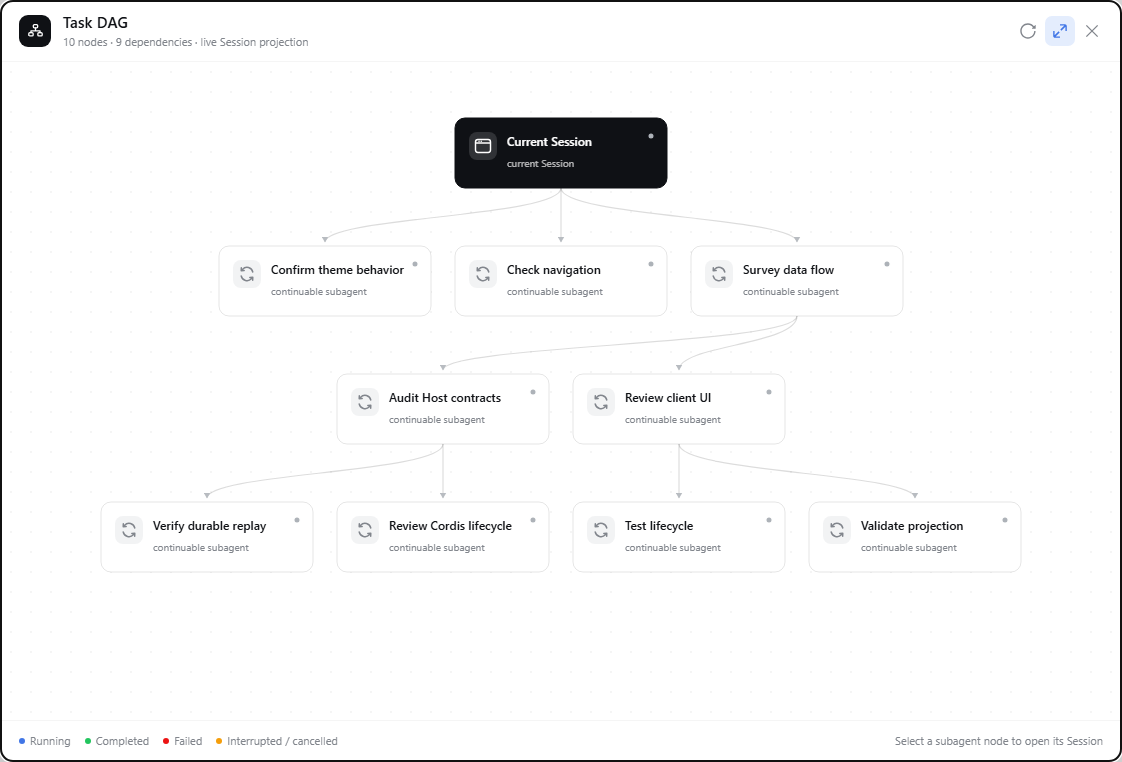
Captured from a running DSH Web Session with task labels anonymized. The panel, layout, edges, controls, and status presentation are the actual plugin UI.
Install
dsh plugin --profile web add github:LeemanCheung/dsh-task-dag
Restart the current DSH Web process once after the first installation, then refresh the page. The Task DAG action appears in the Session header.
For a version-pinned installation:
dsh plugin --profile web add github:LeemanCheung/dsh-task-dag#v1.2.0
Using the graph
| Action | Result |
|---|---|
| Select Task DAG | Opens the Session-scoped graph panel, enables the related parent catalogs, and refreshes them. |
| Drag empty canvas | Pans the scrollable original-size canvas. |
| Drag a node | Rearranges it while its edges stay in sync; the layout survives close and reopen for the current Session. |
Select a subagent node, or press Enter / Space on it | Opens that Session when it is available in the Session list. |
| Toggle fit mode | Switches between a whole-graph overview and the original scrollable canvas. |
| Refresh | Refreshes observed subagent catalogs; workflow nodes remain projection-driven. |
| Drag the title bar | Repositions the panel without capturing toolbar controls. |
Press Escape or select close | Closes the panel and restores focus to the trigger. The dialog has no focus trap and does not offer keyboard dragging for the panel, canvas, or nodes. |
Status colors are deliberately limited to business blue, success green, error red, and warning amber. All other hierarchy is expressed through spacing, typography, borders, and line styles.
Architecture
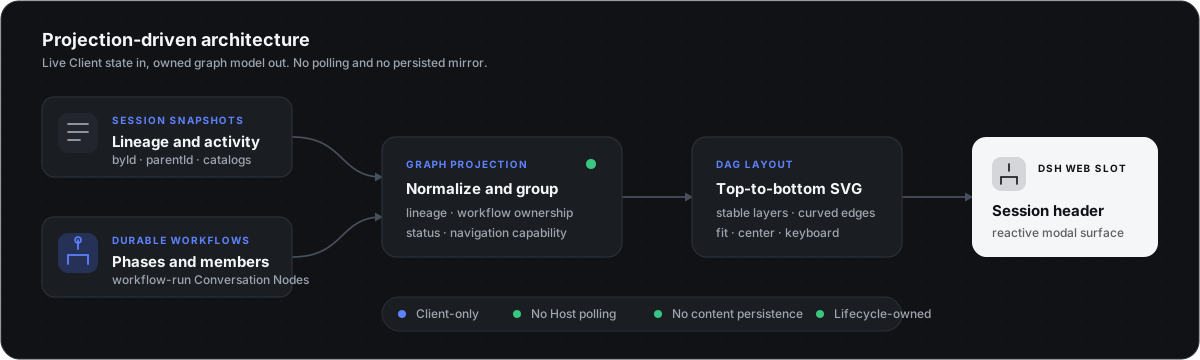
The browser plugin combines three durable Client-facing sources:
SessionListState.byIdandparentIdprovide subagent lineage.SessionListState.subagentsByParentprovides labels, modes, activity, and catalog health.workflow-runConversation Nodes provide workflow phases, members, and outcomes.
The package-owned graph-model Module normalizes lineage, inserts workflow grouping nodes, derives navigation capability, and lays out stable vertical layers. The UI Module renders that projection into conversation.session.header.actions.
There is no process-local workflow cache, model prompt contribution, model tool, Host RPC endpoint, or polling loop.
Projection boundaries
Only descendants that can be traced to the current Session through origin: "subagent" lineage are shown. Orphans, missing-parent chains, and cycles are ignored. A catalog's running activity takes precedence over a completed Session summary; workflow members use their workflow-run status; unknown statuses render as historical/idle. If the same member appears in more than one workflow, the last parsed workflow membership owns its displayed grouping and status.
Security and permissions
This is a browser-only, read-only visualization plugin. It does not read workspace files, execute commands, open network connections, register model tools, or persist Session content and credentials.
See SECURITY.md for the reporting policy and complete trust boundaries. Private vulnerability reporting is enabled for the repository.
Development
The runtime package declares Node.js 20+. For development and the pinned jsdom test stack, use Node.js 20.19+, 22.13+, or 24+; CI currently runs Node.js 22.
npm install
npm run check
The check pipeline:
- validates source syntax and the pure graph-model Module;
- runs graph-model unit tests for lineage, workflow grouping, deterministic layout, and deep chains;
- rebuilds and validates the precompiled browser module;
- runs jsdom interaction smoke tests for controls, canvas panning, persistent node dragging, and node navigation;
- verifies in CI that committed
lib/client.jsis reproducible from source.
These are pure-model and jsdom smoke checks, not a full DSH Web end-to-end suite. Theme fidelity, responsive layout, complete focus behavior, and unload behavior in a real profile still need manual or browser-E2E verification.
scripts/build.mjs embeds src/graph-model.js, src/client.js, and src/style.css into the committed lib/client.js. Do not edit that generated file directly: change src/, then run npm run build or npm run check before committing.
Troubleshooting
| Symptom | Check |
|---|---|
| Task DAG is missing | Confirm this is the Web profile, restart dsh web, and refresh the page. |
| A node cannot open | Only Sessions that remain visible in DSH's Session list are navigable. |
| Child status/labels look stale | Select Refresh to refresh observed subagent catalogs. |
Remove
dsh plugin --profile web remove dsh-task-dag
License
MIT © LeemanCheung
查看使用指南 →
该插件的安装步骤、关键要点、FAQ 与兼容性说明(基于已收录字段派生)。
收录徽章

[](https://deepseek-plugin.org/plugins/LeemanCheung/dsh-task-dag)把这段 markdown 粘贴到你的 GitHub README,链接回本插件详情页。徽章只声明已被本站收录,不代表安全认证。