为 DSH 模型设置增加独立的 Claude 提供方类型,按模型配置思考档位,并支持 Anthropic 原生模型探测与已知模型容量预填。

- 语言
- JavaScript
- License
- MIT
- 分支
- main
安装
$ dsh plugin --profile web add @mofeng2223/dsh-claude-provider在终端中运行以上命令,通过 dsh CLI 安装此插件。可在右上角切换 Profile。 第一次用 dsh?看这篇新手教程
对话式安装
帮我安装 DeepSeek Harness 插件 MoFeng2223/dsh-claude-provider:先查看仓库 https://github.com/MoFeng2223/dsh-claude-provider 确认安全性,然后执行安装命令并验证插件加载成功。
把这段指令粘贴给 DSH Web GUI 里的助手,由它代你完成安装与验证。
一句话定位
为 DeepSeek Harness 的模型设置页增加独立的 Claude 提供方类型,自动写入 RC8 原生配置,并补充 Anthropic 原生模型探测与常用 Claude 模型的容量预填。
核心能力
- 在模型设置页新增“Claude 提供方”入口,与普通自定义提供方分开管理,可创建多个 Provider ID
- 为每个模型单独选择思考档位预设:五档(低/中/高/超高/最大)、四档(低/中/高/最大)或开关(开/关)
- 通过 Anthropic 原生的
GET /v1/models接口探测模型列表,支持游标分页,可指向任意兼容网关 - 探测命中已记录的 Claude 模型 ID 时,自动填写上下文窗口、最大输出长度和档位预设
- 仅作用于明确登记为 Claude 提供方的 Provider ID,不改动内置提供方或其他 anthropic-messages 自定义路由
技术实现
- 语言: JavaScript(ESM,
"type": "module") - 关键依赖:
@deepseek-ai/dsh-settings(注入settings与llm服务)、@deepseek-ai/schemastery(声明 settings schema)、@deepseek-ai/dsh-client-ui-settings-models(仅 devDependency,用于构建前端补丁客户端) - 架构模式: 后端通过
apply(ctx)向ctx.settings注册命名空间、向ctx.llm注册可配置提供方,并包装llm.discoverModels让 Claude 提供方走原生 Anthropic 探测;前端通过cordis.patch.yml停用内置ui-settings-models,改用lib/client.js(由scripts/build-client.mjs编译时对上游dsh-client-ui-settings-models做 AST 文本替换得到) - 入口文件:
src/index.js(后端 apply/export)、lib/client.js(前端打包产物)、scripts/build-client.mjs(构建脚本)
适用场景
当用户希望把 Anthropic Claude 系列模型(包括通过自建或第三方 Anthropic 兼容网关接入的版本)作为 DSH 中的“专类提供方”来管理,并按模型选择思考强度时使用这个插件。它替代手工编辑 settings.yaml,并补齐 DSH 内置 UI 暂未提供的 Anthropic 原生模型探测和已知模型的容量默认值。
前置依赖与兼容性
| 依赖 | 最低版本 | 说明 |
|---|---|---|
| Node.js | >=22.19 | engines.node 声明 |
| DSH | 0.1.0-rc.8+ | 依赖 @deepseek-ai/[email protected];前端补丁基于 [email protected],未在 manifest 中显式指定 dsh 版本下限 |
| 平台 | 跨平台 | 通过 cordis 注入 web 客户端,无平台限制 |
| 原生模块 | 无 | 未引入 node-pty、node:sqlite 等原生模块 |
安装方式
dsh plugin --profile web add github:MoFeng2223/dsh-claude-provider
配置项
本插件无需额外配置。已记录的 Claude 模型及其默认容量在源码中固化(CLAUDE_KNOWN_MODELS,包含 Fable 5、Opus 5/4.8/4.7/4.6、Sonnet 5/4.6、Haiku 4.5 等),新建提供方和模型时自动套用。
常见问题
Q: 安装后还需要手动编辑 settings.yaml 吗?
A: 不需要。Claude 提供方在前端保存时,插件会调用 DSH 原生配置写入接口,把 reasoning、reasoningEfforts、compat.forceAdaptiveThinking 等字段落到 settings.yaml。
Q: 它会影响 DSH 内置 Anthropic 提供方或普通自定义提供方吗?
A: 不会。插件在 llm.discoverModels 包装器里做了分流:只有当 Provider ID 在 dsh-claude-provider 命名空间下被显式登记为 claude-adaptive 类型时,才走原生 Anthropic 探测;内置 anthropic 路由继续用上游目录,其他 anthropic-messages 自定义路由也不被改写。
Q: 可以用自建或第三方 Anthropic 兼容网关吗?
A: 可以。模型探测从你填写的 Messages API baseURL 派生 /v1/models 端点,支持任意 HTTP(S) 地址;API 密钥从请求直接传入,或从凭据引用解析。响应体超过 4 MiB 自动中止,最多翻 100 页。
Q: 每个模型能选哪些思考档位?
A: 提供三套预设:五档(low/medium/high/xhigh/max)、四档(low/medium/high/max)、开关(off/high)。新增模型默认五档,Claude 提供方默认 reasoning: high。
Q: 卸载插件会丢数据吗?
A: 不会。卸载不会删除 ~/.dsh/settings.yaml 和已保存的凭据,已有 Claude 提供方降级为普通 anthropic-messages 路由,原生字段继续生效;只是失去专用 Claude UI、模型探测和容量预填。
Q: 命令行模式(无 Web 界面)能用吗?
A: 插件同时支持 --profile headless,但模型探测与专用 UI 依赖 Web 客户端,前端能力在 headless 下不会生效。
Q: 安装后没看到“添加 Claude 提供方”按钮怎么办?
A: cordis 补丁同时把内置 ui-settings-models 置为 disabled: true,由本插件打包出的 lib/client.js 替代。如果按钮缺失,请确认前端客户端已被替换并重启 DSH 进程。
上手难度
入门 — 安装即在设置页看到新入口,使用时只需填写 baseURL、API 密钥并选择模型,无需理解 schema 细节。
已知问题与限制
- 模型探测对单一响应有 4 MiB 大小限制,对分页有 100 页硬上限(
src/index.js:18-19),超出会直接报错 - 只对显式登记为
claude-adaptive的 Provider ID 生效;用户在普通自定义提供方里勾选 anthropic-messages 协议,不会获得档位与容量预填 - 内置
anthropic提供方不走本插件的探测,仍使用上游目录(src/index.js:217) - 仅在 Web 客户端启用前端能力,headless 安装只保留后端 schema 注册和拦截点
English | 简体中文
DeepSeek Harness's general-purpose reasoning controls did not fully match the request parameters required by newer Claude models. As a result, selecting a reasoning level could either produce an HTTP 400 error or be silently mapped by the adapter to a different effective level—for example, Max in the interface could actually be sent as High. @mofeng2223/dsh-claude-provider added an explicit Claude provider type and sent the correct reasoning parameters for each Claude model.
DeepSeek Harness 0.1.0-rc.8 now supports reasoning-effort parameters for Claude models, but they still need to be configured manually in settings.yaml. Therefore, this plugin no longer intercepts or rewrites model requests at runtime. Instead, it writes the corresponding native settings to settings.yaml when a Claude provider is saved through the front end.
The plugin retains its dedicated Claude provider configuration page, so users do not need to edit settings.yaml manually. Anthropic-native model discovery, automatic defaults for common Claude models, and other features not yet available in DeepSeek Harness are also retained.
What this plugin does
-
Adds a dedicated Claude provider type
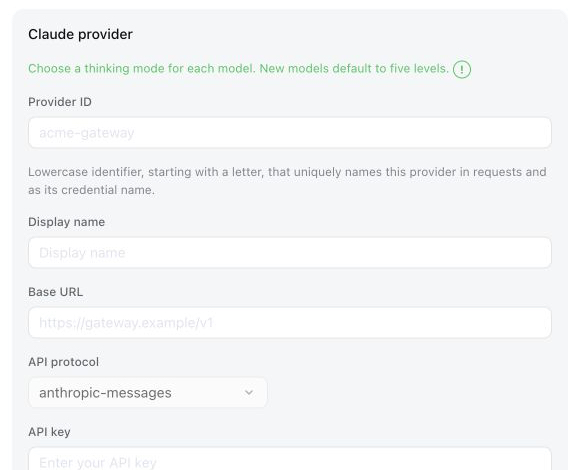
The Models settings page gains a separate Claude Provider form. You can create multiple Provider IDs under this type without mixing them with generic custom providers.
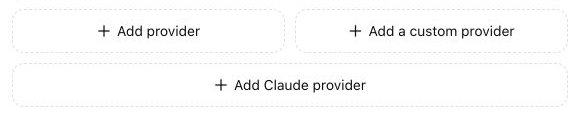
Selecting Add Claude Provider opens the dedicated Anthropic Messages form:
-
Adds model-specific reasoning modes
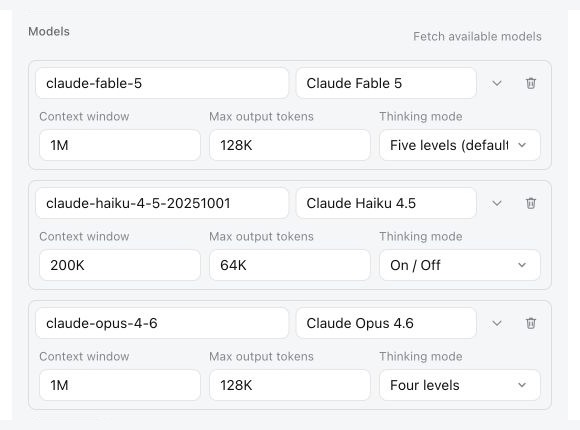
Each model can use one of three configurable mode sets:
- Five levels: Low, Medium, High, XHigh, and Max
- Four levels: Low, Medium, High, and Max
- Toggle: On or Off
New models default to five levels, and Claude providers default to High.
For adaptive thinking models, the plugin converted the selected level into Claude'sthinking.type: adaptiveandoutput_config.effortrequest format, preventing adapter rejections or silent downgrades.For adaptive thinking models, the plugin writes the selected level to DSH's native configuration when saved.
-
Adds native Anthropic model discovery
DeepSeek Harness's generic custom provider cannot list models for the
anthropic-messagesprotocol. This plugin adds model discovery for Claude providers through the provider's native Anthropic-compatibleGET /v1/modelsendpoint, including cursor pagination. -
Fills known Claude model defaults after discovery
When a discovered model matches a recorded Claude model ID, the plugin automatically fills its context window, maximum output length, and reasoning-mode set. Models entered manually remain fully editable and are not overwritten by this lookup.
-
Leaves every other provider unchanged
Discovery, defaults, and reasoning controls are limited to Provider IDs explicitly created as Claude Providers. DeepSeek Harness's built-in providers and ordinary custom providers keep their original behavior, even when they use
anthropic-messagesor expose aclaude-*model ID.
Install
Published package
Install the Web profile for the browser interface:
npx @deepseek-ai/dsh plugin --profile web add @mofeng2223/dsh-claude-provider
Install the Headless profile for command-line runs without the Web interface:
npx @deepseek-ai/dsh plugin --profile headless add @mofeng2223/dsh-claude-provider
Restart the corresponding DeepSeek Harness process after installation.
From source
Build and package the repository first:
git clone https://github.com/MoFeng2223/dsh-claude-provider.git
cd dsh-claude-provider
npm install
npm run build
mkdir -p dist
npm pack --pack-destination dist
Install the generated package into the Web profile:
npx @deepseek-ai/dsh plugin --profile web add ./dist/mofeng2223-dsh-claude-provider-*.tgz
Or install it into the Headless profile:
npx @deepseek-ai/dsh plugin --profile headless add ./dist/mofeng2223-dsh-claude-provider-*.tgz
Uninstall
Run the command for each profile where the plugin was installed:
npx @deepseek-ai/dsh plugin --profile web remove @mofeng2223/dsh-claude-provider
npx @deepseek-ai/dsh plugin --profile headless remove @mofeng2223/dsh-claude-provider
Uninstalling the plugin does not delete ~/.dsh/settings.yaml or stored credentials. Existing Claude providers remain ordinary custom anthropic-messages routes. Their reasoningEfforts, default reasoning, and compat.forceAdaptiveThinking fields are native RC8 settings, so adaptive thinking and the front-end reasoning-effort selector continue to work. Only the dedicated Claude add/edit UI, model discovery, and recorded defaults disappear.
License
查看使用指南 →
该插件的安装步骤、关键要点、FAQ 与兼容性说明(基于已收录字段派生)。
收录徽章

[](https://deepseek-plugin.org/plugins/MoFeng2223/dsh-claude-provider)把这段 markdown 粘贴到你的 GitHub README,链接回本插件详情页。徽章只声明已被本站收录,不代表安全认证。