为 DeepSeek Harness 注入多 Agent 团队协作能力:当前会话成为队长,自然语言即可拆任务、派成员、按依赖推进并汇总结果。

- 语言
- TypeScript
- License
- MIT
- 分支
- main
安装
$ dsh plugin --profile web add @nanmicoder/dsh-agent-teams在终端中运行以上命令,通过 dsh CLI 安装此插件。可在右上角切换 Profile。 第一次用 dsh?看这篇新手教程
对话式安装
帮我安装 DeepSeek Harness 插件 NanmiCoder/dsh-agent-teams:先查看仓库 https://github.com/NanmiCoder/dsh-agent-teams 确认安全性,然后执行安装命令并验证插件加载成功。
把这段指令粘贴给 DSH Web GUI 里的助手,由它代你完成安装与验证。
一句话定位
让当前 DeepSeek Harness 会话充当队长,把目标拆给若干个可续聊的子代理并行推进,工具、状态和 Web 浮层都由插件自带,开箱即用。
核心能力
- 把当前会话变成团队队长,自然语言指令即可拉起团队
- 招募带角色定位的子代理成员,每个成员都是可跨轮次继续唤醒的会话
- 把目标拆成有依赖关系的任务,依赖未完成的任务不会被领取
- 共享调度器自动给空闲成员派发就绪任务,任务转派时安全撤销旧 attempt
- 成员与队长通过持久化邮箱直达发消息,消息会同步唤醒对方
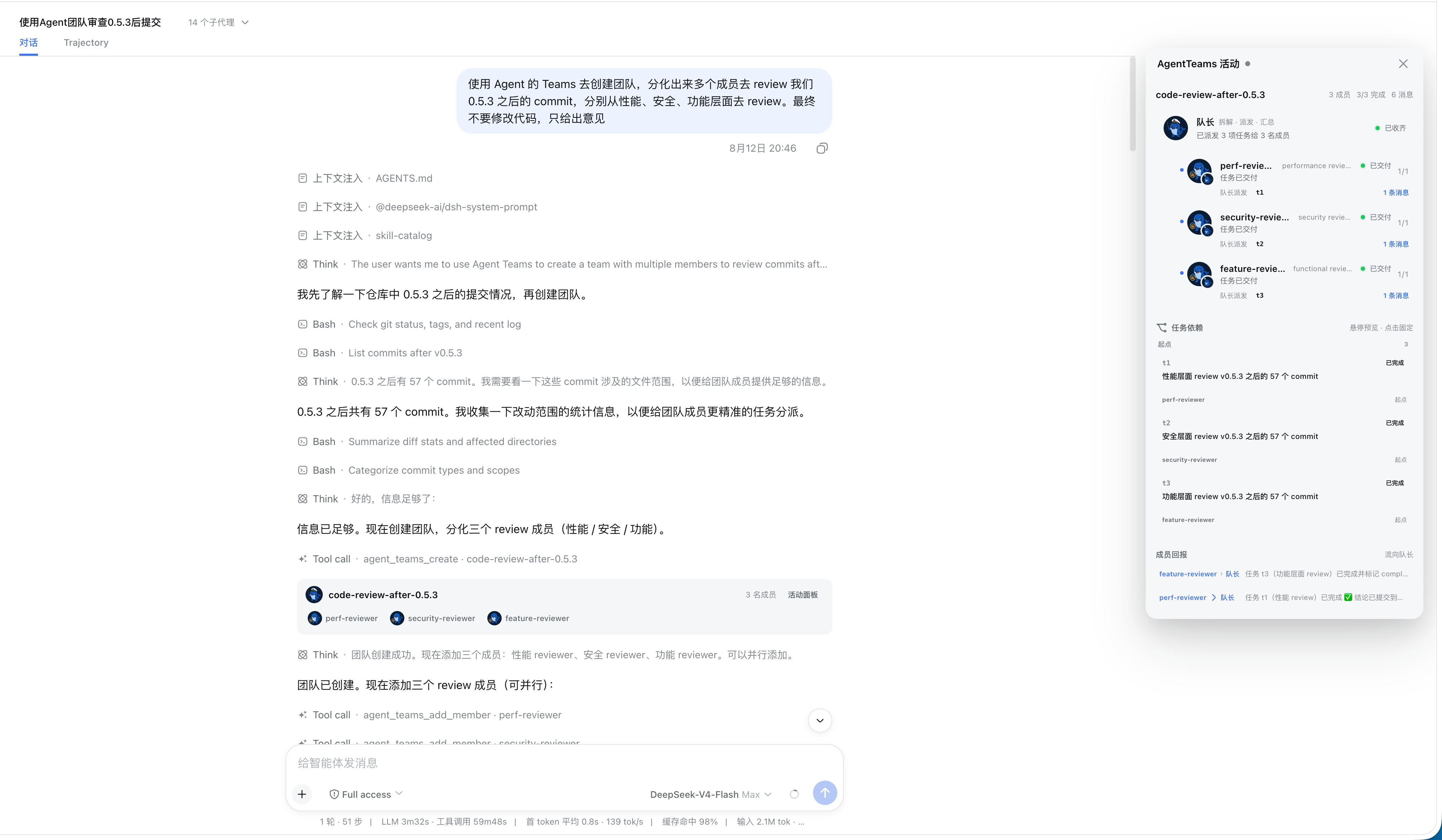
- 在 Web 界面提供实时活动面板,展示成员状态、任务 DAG 和邮件
技术实现
- 语言: TypeScript(含 React 客户端)
- 关键依赖:
@deepseek-ai/cordis、@deepseek-ai/dsh-subagent、@deepseek-ai/dsh-tools、@deepseek-ai/dsh-system-prompt - 架构模式: 宿主侧 cordis 插件,通过 bundle patch 挂入宿主;在
ctx.tools注册 10 个agent_teams_*工具,在ctx.systemPrompt注入使用策略段;Web 端以 body portal 浮层 + 会话内卡片形式呈现 - 入口文件:
src/index.ts(宿主侧)、src/client/index.tsx(浏览器侧)
适用场景
当你在 DeepSeek Harness 里只跑一个会话就能解决的任务不够用时——比如同时要审代码、看安全、查产品、做调研——用自然语言让当前会话去拉一支团队,按角色分头推进、互相传递结果,最后汇总成一份完整答复。
前置依赖与兼容性
| 依赖 | 最低版本 | 说明 |
|---|---|---|
| DeepSeek Harness | 0.1.0-rc.6 | 宿主框架;插件以 cordis bundle 形式注入 |
| Node | ^22.19.0 或 >=24 | 来自 package.json 的 engines.node |
| 子代理运行时(subagent) | 0.1.0-rc.6 | 提供可续聊成员能力;通过 cordis.patch.yml 的 memberProvider: spawn 选择 |
| 平台 | 跨平台 | 仅声明 Node 版本,未约束操作系统 |
安装方式
dsh plugin --profile web add github:NanmiCoder/dsh-agent-teams
配置项
| 配置 | 类型 | 说明 | 默认值 |
|---|---|---|---|
| stateDir | 字符串 | 团队状态文件所在子目录名,写在队长工作区下(包含 team.json 和每个代理的邮箱文件) | .agent-teams |
| memberProvider | 字符串 | 创建成员时所用的子代理运行后端(如 spawn / fork),不是 LLM 供应商 | spawn |
| memberModel | 字符串 | 所有成员统一使用的模型标识,留空则各自沿用队长当时的模型 | 未设置 |
| memberMaxDepth | 数字 | 成员可继续向下委派的层级深度;设为 0 即禁止再派人 | 1 |
| maxMembers | 数字(≥1) | 团队中允许的最大成员数量 | 8 |
| promptSectionOrder | 数字 | 使用策略段在系统提示词里的排序权重 | 117 |
常见问题
Q: 安装后需要额外配置吗?
A: 默认参数就能工作。安装完成后重启 DSH 即可;想改团队规模或成员后端才需要在 profile 配置里覆盖。
Q: 一个会话能同时带几个团队?
A: 只能带一个。系统会在 agent_teams_create 时检测当前会话是否已经担任队长,重复创建会直接报错,需要先结束旧团队。
Q: 成员之间怎么沟通?
A: 走持久化邮箱。任意成员或队长都能调用 agent_teams_send_message 把消息直接投递到对方邮箱,并顺便把对方唤醒进入下一轮次,不需要队长中转。
Q: 团队结束后数据还在吗?
A: 在。agent_teams_delete 把整个团队目录移到归档区,成员、任务、依赖图和历史邮箱都保留下来,Web 面板可以继续翻看历史快照。
Q: 进程崩溃或中断后未完成的任务会怎样?
A: 调度是事件驱动的,没有常驻轮询。队长回来或调用状态工具时,调度器会发现空闲成员仍持有未完成任务,撤销旧 attempt 并生成新 attempt 自动唤醒原成员继续。
Q: 多人同时改同一个团队会冲突吗?
A: 同一 DSH 进程内对每个团队做了串行化,不会交叉覆盖。但官方明确指出,多个进程同时改同一团队不保证一致,建议单进程使用。
Q: 需要选哪个 LLM 才能用?
A: 没有强制要求。成员默认沿用队长当前的供应商和模型,并快照当时的思考强度;只有在你明确指定某角色使用别的模型时,才需要传入可选的模型参数。
Q: 能在不装 DSH 的情况下单独跑这个插件吗?
A: 不能。它是宿主侧插件,依赖 cordis 的服务、subagent 注册表和系统提示词注入点;没有宿主就没有可以注册的目标。
上手难度
入门 — 安装完一行命令就能用,自然语言直接下指令,零交互;想微调团队规模或成员后端时再去看配置。
已知问题与限制
- 调度器是事件驱动而非轮询,队长长期不在线时无法主动恢复成员,只能等队长回来或调用状态工具后由调度器触发
- 一个队长同一时间只能带一个活动团队,超额创建会被工具直接拒绝
- 成员没有自己独立的工具白名单,仍保留 bash、文件系统、联网等所有普通工具,只是替换了角色人设
- 团队状态用文件持久化,同一进程内串行化已做到,但跨进程同时修改同一团队没有一致性保证
- 活动面板直接展示磁盘里的真实状态,不会替模型补做任务收尾;如果某个成员完成工作但忘了调用更新工具,队长需要靠状态查询而不是面板来汇总
- Web 浮层通过 body portal 挂载;极宽屏下主对话列会平滑让位,窄屏退回浮层叠加模式,左侧导航始终保持原位
English · 简体中文




One prompt. A working team.
dsh-agent-teams turns the current DeepSeek Harness session into a captain that can assemble durable sub-agents, split a goal into dependency-aware tasks, and coordinate work through direct messages.
Ask in natural language. The plugin provides the team protocol, ten coordination tools, persistent state, an automatic shared-task scheduler, and a live Web UI—without requiring a separate workflow engine.
Releases
Read the latest release notes or browse the complete release history. The same Markdown notes are included in the npm package under release-notes/.
Why AgentTeams?
| Capability | What it changes |
|---|---|
| Captain-led delegation | The current session creates the team, assigns roles, and consolidates the final result. |
| Durable members | Members are continuable DSH sub-agents that can be woken for focused follow-up turns. |
| Dependency-aware tasks | Tasks move through explicit states and cannot be claimed before their dependencies finish. |
| Automatic reuse and safe takeover | Idle members claim the next ready task; reassignment revokes stale attempts before new work starts, and cold recovery retries stranded open attempts. |
| Direct messaging | Members send durable mailbox messages directly to teammates or the captain—no relay required. |
| Live activity panel | The Web UI combines segmented progress, a collapsible roster, and an interactive task DAG; completed archives retain their full member and task history. |
Install
[!NOTE] Requires an existing DeepSeek Harness installation.
npm
dsh plugin --profile web add @nanmicoder/dsh-agent-teams
Build from source
git clone https://github.com/NanmiCoder/dsh-agent-teams.git
cd dsh-agent-teams
pnpm install
pnpm build
dsh plugin --profile web add .
Run pnpm build again after changing the source. The local plugin install remains linked to this checkout.
Validate the composed profile, restart DSH, and refresh the Web UI:
dsh --profile web --dump-config
dsh web
Then ask for a team directly:
Use AgentTeams to review the commits after v0.5.3 from performance, security, and product perspectives. Return one consolidated report.
How it works
- The current session creates a team and becomes its captain.
- The captain adds role-specific members backed by continuable sub-agents.
- The goal becomes tasks with owners and explicit dependencies.
- The shared scheduler uses real
running / idle / readystate to atomically claim one ready task per idle member and wake it. If an idle/ready member still owns an open task after an interrupted turn or process restart, the scheduler retries it with a fresh attempt. - Members update with the current
attempt_id; reassignment or captain takeover revokes the old attempt and waits for the old worker to quiesce before a new attempt starts. - The captain presents the combined result, then archives the complete team record.
Team state is stored under <workspace>/.agent-teams/; the Web panel reads that disk truth and combines it with live sub-agent activity.
Member creation is zero-interaction by default: a member on the captain's current LLM route snapshots that provider, model, and reasoning effort, while a member on a requested alternative route snapshots the target model's default effort; later continuations restore the resolved snapshot. Only an explicit heterogeneous-team request (for example, “backend on provider A/model X, frontend on provider B/model Y”) supplies a member-specific provider + model; there is no per-member model or reasoning prompt.
Slash command
No “use AgentTeams” phrasing required. The plugin registers the
closed-namespace /agent-teams host command, so the Web GUI slash menu shows
an agent-teams placeholder with an input hint: pick it (or type the
command), describe the goal, and press Enter.
/agent-teams research the pricing pages of three competitors
The command pipeline claims the line, then preserves that exact input as an
ordinary user follow-up so it remains visible in the main chat. The gesture
boundary adds the deterministic activation directive at pre-step, so the
captain protocol still starts immediately. The invocation is also durably
logged (command/run / command/done).
Surfaces without command adjudication (for example the headless CLI) get the
same deterministic activation through a gesture boundary: any genuine user
message starting with /agent-teams activates the protocol for the rest of
the text. Mid-sentence mentions stay ordinary prose.
Configuration
Defaults work without extra setup. A trusted profile can override member behavior:
- id: agent-teams
  config:
    stateDir: .agent-teams
    memberProvider: spawn
    memberModel: deepseek-v4
    memberMaxDepth: 1
    maxMembers: 8
memberProvider is the sub-agent runtime backend (spawn / fork), not an LLM provider. Cross-LLM-provider routing uses the optional provider + model fields of agent_teams_add_member; memberModel is only a model default for all members. A member on the captain's current provider/model inherits the captain's reasoning effort, while a changed provider or model automatically uses the target model's default. To request a particular effort, pass the optional reasoning_effort field — one of the target model's supported effort ids, or "default" to force the model's own default.
slashCommand: false disables the deterministic /agent-teams activation surfaces (slash command and gesture boundary), leaving the natural-language trigger as the only entry point.
Boundaries
- One captain leads one active team at a time.
- Idle members are automatically reused for ready work; messages that cannot be delivered live remain durable and are retried at a later status boundary.
- State is file-backed and serialized within one DSH process; concurrent processes editing the same team are not coordinated.
- The activity panel reports persisted state as-is. Models may occasionally finish work without performing the expected task-state update.
See docs/usage.md for the full tool reference, state model, Web UI behavior, configuration, and known limits.
Plugin development Skill
The repository also ships the open Agent Skills package dsh-plugin-development:
npx skills add NanmiCoder/dsh-agent-teams --skill dsh-plugin-development
Documentation
| Guide | Covers |
|---|---|
| Usage | Architecture, UI behavior, tools, configuration, limits, and validation |
| Verification | Offline, composition, real e2e, and GUI verification |
| Plugin development | Human-readable guide built from this plugin |
| README writing | Repository documentation conventions |
Development
pnpm install
pnpm build
pnpm verify
License
查看使用指南 →
该插件的安装步骤、关键要点、FAQ 与兼容性说明(基于已收录字段派生)。
收录徽章

[](https://deepseek-plugin.org/plugins/NanmiCoder/dsh-agent-teams)把这段 markdown 粘贴到你的 GitHub README,链接回本插件详情页。徽章只声明已被本站收录,不代表安全认证。