在 Claude Code / Codex 里把任务下派给 DeepSeek Harness 子智能体,作为原生子任务运行并实时显示进度。

- 语言
- JavaScript
- License
- MIT
- 分支
- main
安装
$ dsh plugin --profile web add @zseven-w/dsh-crew在终端中运行以上命令,通过 dsh CLI 安装此插件。可在右上角切换 Profile。 第一次用 dsh?看这篇新手教程
对话式安装
帮我安装 DeepSeek Harness 插件 ZSeven-W/dsh-crew:先查看仓库 https://github.com/ZSeven-W/dsh-crew 确认安全性,然后执行安装命令并验证插件加载成功。
把这段指令粘贴给 DSH Web GUI 里的助手,由它代你完成安装与验证。
一句话定位
dsh-crew 是 DeepSeek Harness(DSH)平台的插件,让 Claude Code 或 Codex 在保持原生子任务面板的前提下,把任务下派给 DSH 的 DeepSeek 智能体执行;同时为只支持文本的 DeepSeek 模型补上看图与生图能力。
核心能力
- 把任务以
flash/pro两个层级派给 DSH 智能体,并在 Claude Code / Codex 的原生任务面板里实时显示进度、当前工具与 token 用量 - 支持同步阻塞调用(
dsh_run_worker)与异步扇出调用(dsh_spawn_worker),后者可配合状态查询与轮询接口 - 当 DSH Web 实例运行(hub 模式)时,下派任务变成 DSH 一级会话,可在 Web UI 里按工作目录查看完整过程;否则自动回落到独立运行时(CI、无头环境可用)
- 为纯文本 DeepSeek 模型提供
describe_image与generate_image工具,可借用 Claude / Codex / Grok / Antigravity 等本地 CLI,或任意 OpenAI 兼容端点/本地命令 - 提供一键安装到 Claude Code 与 Codex 的能力:注册本地市场、写入 MCP 工具白名单、接入 claude-hud 状态栏段,所有设置文件先备份再修改
- 可配置层级策略(强制只用 flash 或只用 pro)和失败升级(flash 失败时自动用 pro 重试一次),由工具层强制执行而非口头约定
技术实现
- 语言: TypeScript / JavaScript (ESM)
- 关键依赖: @modelcontextprotocol/sdk、MCP stdio 协议;DSH SDK 客户端(仅独立模式按需懒加载);zod(参数校验)
- 架构模式: 同时提供两种形态——MCP stdio 服务(
src/server.mjs)作为 Claude Code / Codex 客户端侧的 shim;DSH Cordis 宿主插件(src/hub/index.mjs,通过cordis.patch.yml挂载到 DSH 运行时)作为服务端;两端用本地回环 HTTP 接口(/_dsh/dsh-crew/jobs)通信并自动切换 - 入口文件:
src/server.mjs(MCP 入口)、src/hub/index.mjs(DSH 宿主插件入口),外层package.json#dsh.bundle+cordis.patch.yml描述如何注入 DSH Web profile
适用场景
已订阅 Claude Pro 或日常使用 Claude Code / Codex、又想让 Claude 真正"动手做活儿"而不是只当调度员的开发者:让 Claude 把可以独立解决的子任务交给 DeepSeek 智能体执行,自己仍用熟悉的 Claude 桌面工作流;以及在 CI 等没有 DSH Web 界面的环境下,用 DeepSeek 跑编码任务。开发者日常工作中,DSH 模型只支持文本,借助插件可以用本机已登录的 Claude / Codex 等 CLI 帮它"看图"和"画图"。
前置依赖与兼容性
| 依赖 | 最低版本 | 说明 |
|---|---|---|
| DSH | 0.1.0-rc.6+ | 插件在 DSH Web profile 中运行(hub 模式)或与 DSH 0.1.0-rc.6+ 协同(独立模式) |
| Node | 未声明 | 源码仅依赖 Node 内置模块(fs/path/crypto/child_process 等) |
| 平台 | 跨平台 | 仅使用跨平台 Node API 与子进程调用,可在 macOS / Linux / Windows 桌面系统运行 |
| 原生模块 | 无 | runtime dependencies 仅 @modelcontextprotocol/sdk 与 zod;@deepseek-ai/* 由宿主运行时提供 |
| Claude Code / Codex | 视宿主 | 客户端集成需要已安装 Claude Code 或 Codex 作为下派任务的载体 |
安装方式
dsh plugin --profile web add github:ZSeven-W/dsh-crew
配置项
| 配置 | 类型 | 说明 | 默认值 |
|---|---|---|---|
| default_tier | flash / pro | 派单使用的默认智能体层级(V4 Flash 便宜快,V4 Pro 推理强) | flash |
| default_effort | off / high / max | 派单使用的默认推理强度 | max |
| mode | auto / hub / standalone | auto 优先走 hub,没有就回落独立;hub 强制走宿主;standalone 永不连宿主 | auto |
| default_timeout_seconds | 数字 | 单次派单的最长等待秒数 | 1800 |
| tier_policy | auto / flash-only / pro-only | 工具层强制把每次派单夹到单一层级(覆盖调用方传入的 tier) | auto |
| escalate_on_failure | 布尔 | 阻塞的 flash 失败时,是否自动用 pro 重试一次(按真实失败判定,不是事先猜难度) | false |
| preset_flash | 字符串 | hub 模式下 flash 层级使用的 DSH Agent 预设(default 表示跟随宿主默认) | minimal |
| preset_pro | 字符串 | hub 模式下 pro 层级使用的 DSH Agent 预设 | default |
| vision_provider | claude-code / codex / grok / agy / 自定义 / off | 为 DeepSeek 提供看图能力的下游提供者 | claude-code |
| vision_model | 字符串 | 传给视觉 CLI 的具体模型名 | haiku |
| imagegen_provider | codex / agy / grok / 自定义 / off | 为 DeepSeek 提供画图能力的下游提供者 | codex |
| hub_url | URL | hub 模式自动检测的回环地址 | http://127.0.0.1:3080 |
配置通过 DSH Web 设置页 DSH Crew 面板修改,或直接编辑 ~/.config/dsh-crew/config.json。
常见问题
Q: 安装后还需要额外配什么?
A: 如果 DSH Web 在运行(hub 模式),它已经带有 DeepSeek 凭证,插件直接可用。仅在没有 DSH 实例的纯独立模式下,需要把 DEEPSEEK_API_KEY 写入 ~/.config/dsh-crew/.env。
Q: DeepSeek 是只能纯文本的模型,图片和生图怎么办?
A: 插件内置 describe_image 和 generate_image 两个工具,借助本地已登录的订阅型 CLI(Claude、Codex、Grok、Antigravity)或任意 OpenAI 兼容 API / 本地命令完成看图与生图;粘贴进会话的图片会自动转写为文本再发给模型。
Q: dsh_run_worker 和 dsh_spawn_worker 怎么选?
A: dsh_run_worker 是阻塞调用、拿到结果再返回;dsh_spawn_worker 立即返回任务 ID,适合并行扇出,再用 dsh_worker_status / dsh_worker_result 跟结果。
Q: flash 和 pro 两个层级有什么区别?
A: flash 跑得快、便宜,机械型任务用;pro 推理更强,适合复杂任务。可以通过 tier_policy 把所有派单夹到单一层级,也能让失败 flash 自动用 pro 重试一次。
Q: 如何卸载?
A: 在 DSH 设置页 DSH Crew 一栏点卸载按钮,或命令行 node src/install/cli.mjs uninstall;会清理 Claude Code / Codex 的注册和 HUD 段,并保留 settings.json 的备份。
Q: 需要运行在哪个操作系统?
A: 仅使用 Node 内置模块和子进程;任何能跑 Node 的桌面系统都可以,跨 macOS / Linux / Windows。
上手难度
入门 — 插件挂到 DSH profile 后即可在 Claude Code / Codex 里用 dispatch X to ds-flash 这样的自然语言派单;遇到需要看图或换预设时再进 DSH 设置页调整。
已知问题与限制
- 客户端子任务 shell 由 Claude 自己的小模型(haiku 等)做中介转发,每次派单会额外消耗数百到数千 Anthropic token(README 原文):要么接受这点成本,要么绕开它(README 中提到存在路由器实验路线,但 Codex 侧需要 API key 而订阅 OAuth 在上游被 403 阻断,未官方支持)
- 生成的图片是单层位图,需要图层编辑时仍依赖 OpenPencil 等外部工具
- Codex 角色必须设置
default_tools_approval_mode = "approve",否则工具调用会被自动取消 - 客户端进程和宿主进程之间通过本地回环 HTTP 通信;轮询等待超过几十秒的请求会被 Node undici 的 300 秒头超时切断,因此插件在等待时主动切成 ≤ 60 秒的小片(
src/hub-client.mjs:31-41),但极端长任务仍需通过dsh_worker_result(wait_seconds)主动轮询 imagegen_provider选择 Codex/Grok/Antigravity 等 CLI 时,要求对应 CLI 已在本地登录;插件不会代为绕过它们的鉴权

DSH Crew
A DeepSeek Harness plugin: dispatch work to DSH agents from Claude Code / Codex, without giving up the host's native subagent UI.
Native Progress UI • Tier Policy & Escalation • In-Host DSH Sessions • Vision & Image Generation • One-Click Install
npm: @zseven-w/dsh-crew · Current plugin release: 0.1.0-rc.3 · Tested with DSH 0.1.0-rc.6
English · 简体中文 · 繁體中文 · 日本語 · 한국어 · Français · Español · Deutsch · Português · Русский · हिन्दी · Türkçe · ไทย · Tiếng Việt · Bahasa Indonesia

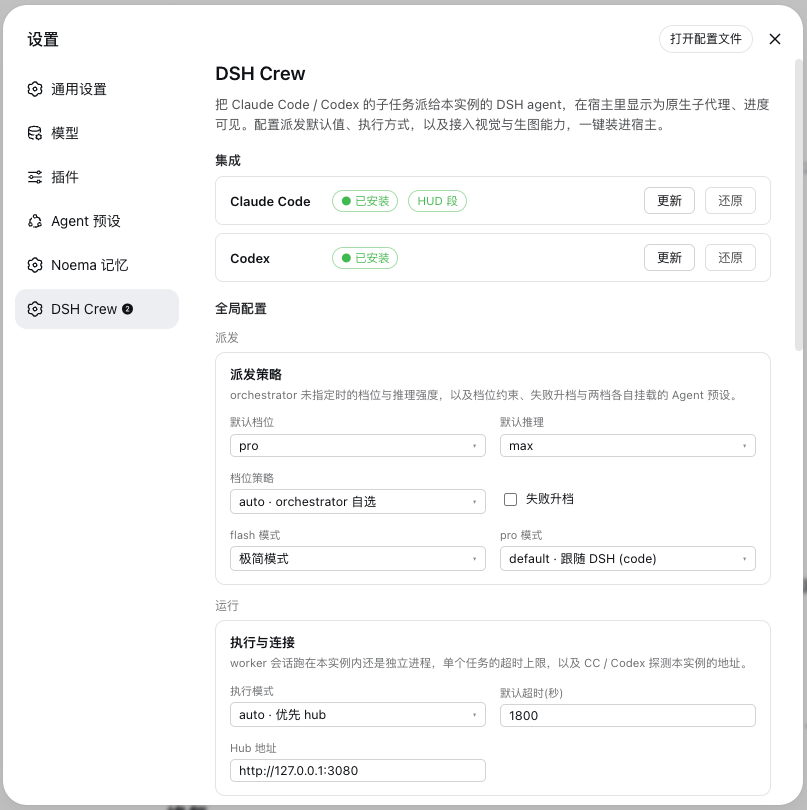
The DSH Crew settings page — host integrations, dispatch policy, execution and the multimodal bridge
Why DSH Crew
DSH Crew is a plugin for DeepSeek Harness (DSH) — an open-source agent harness. It makes DSH agents dispatchable from Claude Code and Codex: the orchestrator keeps its own model, the work runs on a real DSH agent with that harness's tools, sandbox, presets and session history, and the host still shows it as a native subagent with live progress.
What runs the work is a DSH agent, not a bare model call. Tiers (flash / pro) select how much capability that agent gets from the harness's configured roster — DeepSeek V4 Flash and V4 Pro today — so a change of model in DSH needs no change here.
🧵 Native Progress UIWorkers appear as regular subagents in Claude Code / Codex — dispatch count, running step, tool calls and token usage all show up in the host's own task panel, plus a claude-hud statusline segment: |
🎚️ Tier Policy and Escalation
|
🏛️ In-Host DSH SessionsWith the bundle installed in a DSH profile, each worker is a first-class DSH session: visible in the Web UI, grouped by working directory, mounted with the Agent preset you choose per tier. Without DSH running, dispatch falls back to a standalone DSH runtime, so CI and headless environments still work. |
👁️ Vision and Image GenerationDSH's models are text-only. |
🔌 Custom ProvidersBring your own endpoint (Base URL + API key + models) or a local command template. Each provider has a connectivity test that checks reachability and auth, then makes one real vision call so you find out now, not mid-task. |
📦 One-Click InstallThe settings page installs and updates the Claude Code plugin and the Codex role files for you — marketplace registration, permission allowlist, HUD wiring, absolute paths rendered for this machine — and restores them just as easily. Every settings file is backed up first. |
How it works
Claude Code / Codex (orchestrator, keeps its own model)
  └─ ds-flash / ds-pro  ← native subagent shell (progress shows in the host's task UI)
       └─ MCP: dsh_run_worker(tier, effort, cwd)
            ├─ hub reachable → session inside DSH (visible in the Web UI, grouped by cwd)
            └─ otherwise     → dsh-jsonrpc-agent runtime (worker.cordis.yml)
                 └─ DeepSeek V4 Flash / Pro (DSH SDK, event stream → progress and token stats)
One run, two views
Dispatch fans out. Below, eighteen workers translate this README in parallel: the host counts them as its own subagents, while the harness runs them as real sessions.
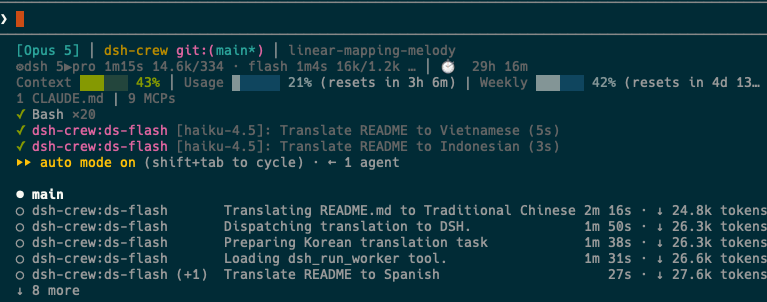
Claude Code sees dsh-crew workers as native subagents, with a statusline segment tracking running tiers, elapsed time and tokens.
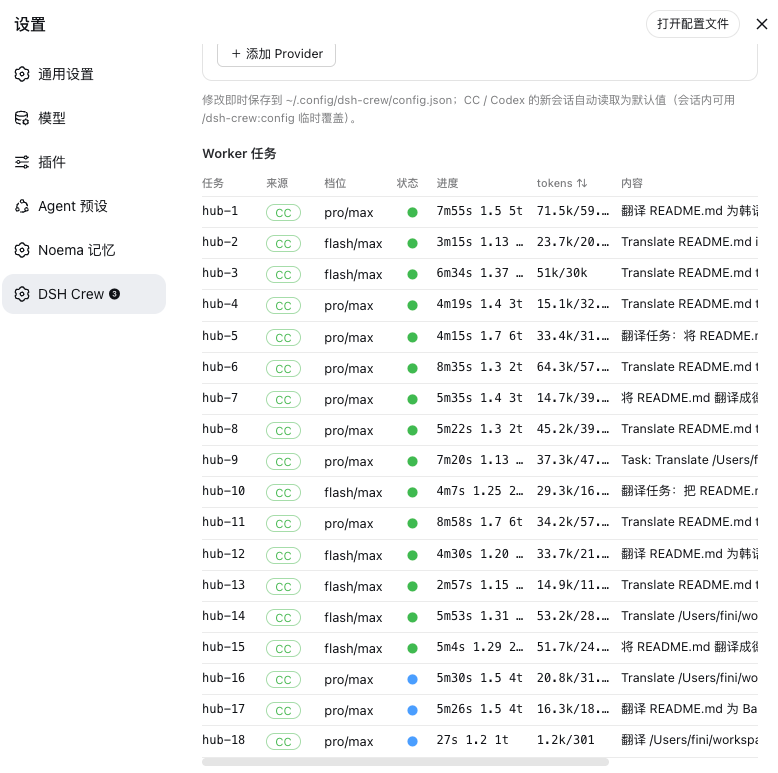
The DSH Crew panel sees the same run from the harness side: which host dispatched each job, its tier and effort, live progress and token usage.
Install
Install into a DSH profile from npm:
dsh plugin --profile web add @zseven-w/dsh-crew@latest
dsh web
Or, for local development straight from the source tree:
dsh plugin --profile web add link:/path/to/dsh-crew
dsh web
The link: protocol symlinks the profile dependency to this repository, so rebuilds are visible immediately.
Configure DeepSeek credentials (standalone only)
In hub mode — the installation above — workers run inside the DSH instance and use the DeepSeek credentials it is already configured with. Nothing else to set up.
Only the standalone fallback needs a key of its own: dispatching from Claude Code / Codex with no DSH instance running launches a worker runtime as a separate process. Obtain an API key from platform.deepseek.com and write it to ~/.config/dsh-crew/.env:
DEEPSEEK_API_KEY=sk-...
Verify
node scripts/smoke.mjs
The smoke test dispatches one cheap job through whichever path is available — the hub when a DSH instance is running, standalone otherwise — and prints which one it used. Within about ten seconds you should see smoke test passed — configuration OK. On failure the reason is printed, scoped to the path that was tested.
Then open Settings → DSH Crew and install the Claude Code / Codex integrations with one click.
Background and terminology
- DSH (DeepSeek Harness): DeepSeek's open-source agent harness, a code agent in Web UI form, similar to Claude Code but driving DeepSeek models.
- MCP (Model Context Protocol): Anthropic's AI tool integration protocol, enables LLMs to safely call external tools and data sources.
- Cordis bundle: DSH's plugin format; this project can run standalone as an MCP service or install into DSH Web as hub mode.
- tier: capability tier — which slot of DSH's configured model roster a worker gets.
flashis fast and cheap (simple tasks),proreasons harder (complex problems). Today they map to DeepSeek V4 Flash and V4 Pro; swap models in DSH and nothing changes here. - worker: the DSH agent doing the work — a full session with its own tools, sandbox and preset, not a bare model call.
- effort: reasoning strength,
off= no reasoning,high= high reasoning investment,max= maximum reasoning investment.
Claude Code
Installation
One-click installation (choose one):
- DSH settings page (when hub mode is installed): Settings → DSH Crew → "Install to Claude Code"
- Command line:
node src/install/cli.mjs all
Both do the same thing: register local marketplace (parent directory dsh-plugins/ as marketplace root) + claude plugin install + MCP tool permission allowlist + claude-hud worker status segment config (auto-backup settings.json before changes, idempotent). Restart the session after installation for changes to take effect.
Usage
- Directly in conversation, say "dispatch X to ds-flash" or "dispatch X to ds-pro", and subagent executes the task
- Dispatch count and real-time progress shown in Claude Code task UI
- HUD status line segment:
⚙dsh 1▶pro 2m14s 21.7k/606 ✓3(current tier / elapsed time / token usage / completion count)- For local development,
statusline/statusline.shorstatusline/worker-segment.shcan be independently integrated
- For local development,
- Long-running tasks: CC has timeout limits on MCP calls (
MCP_TOOL_TIMEOUTadjustable), long tasks can have orchestrator usedsh_spawn_worker+dsh_worker_result(wait_seconds)polling - Local development and debugging:
claude --plugin-dir /path/to/dsh-crewto temporarily load
Session commands
These override the global defaults for the current session only, and are enforced at the tool layer rather than by prompting:
| Command | What it does |
|---|---|
/dsh-crew:config | Show or set this session's defaults: tier=flash|pro, effort=off|high|max, mode=auto|hub|standalone, timeout=<seconds>, policy=auto|flash-only|pro-only, escalate=true|false, reset |
/dsh-crew:on · /dsh-crew:off | Turn dispatch for this session on or off (off is a hard switch: the tool refuses) |
/dsh-crew:status | Live status of worker jobs: tier, progress, tokens, current tool |
Codex
Installation
Recommended to use the installer (auto-renders paths for this machine, copies /dsh-config, /dsh-status commands):
node src/install/cli.mjs codex
Or manually copy (requires manual path modification after copying):
cp codex/agents/*.toml ~/.codex/agents/ # global or project-level .codex/agents/
Role files come pre-configured with:
- MCP server mounting configuration
default_tools_approval_mode = "approve"(required, otherwise tool calls are auto-cancelled in exec mode)tool_timeout_sec = 3600
Note: When manually copying, absolute paths in the args field must be updated to match actual installation location; the installer handles this automatically.
Usage
- In interactive TUI, select "spawn ds-pro to ..." to dispatch tasks; Active/Done panels show progress
codex execmode can also directly calldsh_run_worker
Session commands
The same two prompts are installed for Codex:
| Command | What it does |
|---|---|
/dsh-config | Show or set this session's defaults: tier=flash|pro, effort=off|high|max, mode=auto|hub|standalone, timeout=<seconds>, policy=auto|flash-only|pro-only, escalate=true|false, reset |
/dsh-status | Live status of worker jobs: tier, progress, tokens, current tool |
MCP tools
| Tool | Description |
|---|---|
dsh_run_worker | Synchronous task dispatch (tier: flash/pro, effort: off/high/max, cwd), waits for result |
dsh_spawn_worker | Asynchronous task dispatch, returns job id (for parallel fan-out) |
dsh_worker_status | Query real-time progress of all jobs (turn/step/current tool/token) |
dsh_worker_result | Fetch result, can specify wait_seconds to wait |
dsh_worker_cancel | Cancel specified job, terminate its runtime process |
Progress is simultaneously mirrored to ~/.config/dsh-crew/status.d/ (one shard file per writer, can be read by statusline / external monitoring).
Multimodal: vision and image generation
DeepSeek is a text-only model and does not support image input or generation. This plugin sources these capabilities externally through MCP tools:
| Tool | Description |
|---|---|
describe_image | Answer questions by viewing images (screenshots, designs, charts, etc.), results cached by provider + model + image + question |
generate_image | Generate image from text description, save to specified absolute path; output is flat bitmap (requires OpenPencil for layer editing) |
Session image pasting: In DSH, switch model to DeepSeek (vision) ◉ to directly paste images. Images remain in session and display normally; the plugin appends transcribed text after them and strips images before sending—you see the image, the model reads the text.
Configuration
In DSH settings page → DSH Crew → Multimodal (or directly edit ~/.config/dsh-crew/config.json):
Vision provider (image viewing):
claude-code(default, uses haiku, inexpensive)codex(uses GPT, can specify specific model)grok(uses Grok)agy(Antigravity)custom(OpenAI-compatible API or local command)off(disabled)
Image generation provider (image generation):
codex($imagegen, gpt-image-2)agy(Nano Banana)grok(Imagine)custom(OpenAI-compatible API or local command)off(disabled)
Custom provider
Two integration methods:
API: Any OpenAI-compatible endpoint
- Fill Base URL, API Key, model list
- Vision uses
/chat/completionswith inline base64 images - Image generation uses
/images/generations - Must specify "image generation model" to have generation capability, otherwise provider only appears in vision selection
CLI: Local command template, placeholders substituted with safe references
- Vision:
{image} {question} {model}→ stdout as answer - Image generation:
{prompt} {output} {size}→ command must write file to{output} - Fill at least one command; whichever is filled determines capability
Connectivity test: Each custom provider has a test button
- API: Check endpoint reachability, auth, send real vision request to verify
- CLI: Check executable file, run real command to verify
- Image generation: Validate config only, no actual image output
Borrowed subscription CLIs (claude / codex / grok / agy) require you to be logged in locally; the plugin won't bypass their permissions for you.
Hub mode
This package is also a valid DSH bundle (dsh.bundle + cordis.patch.yml). After installing into DSH Web profile with dsh plugin add dsh-crew:
- Worker sessions become first-class citizens: run as first-class sessions in DSH host (
agents.create+ per-session model/effort waterfall + default preset), appear in Web UI session list, can be opened anytime to view complete execution - Organize by working directory: manage worker sessions by cwd in Web UI
- Loopback API:
POST/GET /_dsh/dsh-crew/jobs: spawn tasks, list, long-poll results, cancelGET /_dsh/dsh-crew/ping: health check (MCP shim uses this to detect if hub is running)POST /_dsh/dsh-crew/install: one-click install Claude Code / Codex integration (backend ofsrc/install/)
- Auto-detection: CC/Codex's MCP shim auto-detects hub (
DSH_CREW_HUBenv var, defaulthttp://127.0.0.1:3080)- DSH Web running → jobs enter hub mode (
mode: "hub") - Not running → fall back to standalone runtime
- DSH Web running → jobs enter hub mode (
Solution selection and limitations
Regular subscribers → shell subagent approach (recommended)
- Current state: Claude Code subagent shell uses haiku as intermediary; each dispatch adds hundreds to thousands of tokens
- Trade-off: Use small amount of Anthropic token in exchange for native task UI, real-time progress display, no extra configuration
- Recommendation: If you already subscribe to Claude Pro or use Claude Code, use this approach—convenient and transparent
Pay-as-you-go / CI environments → direct router approach
- Current state: Claude Code subagent frontmatter doesn't support direct third-party model connection; this repo's router experiment in scratchpad requires API-key credentials for Claude Code, but subscription OAuth is blocked upstream by Anthropic with 403
- Recommendation:
- If using API-key credentials (not OAuth) and want to save Anthropic tokens, can run local router for direct DeepSeek connection
- CI environments typically also use API keys; this approach is more economical (all DeepSeek tokens)
- Requires self-testing of router integration (not officially supported)
Running DSH Web → hub mode auto-enabled
- Current state: If
dsh plugin add dsh-crewinstalled into DSH Web profile, jobs run as first-class sessions in host, appear in Web UI session list - Recommendation: During local development iteration, recommend enabling hub mode; worker progress can be fully observed in Web UI; for cross-machine collaboration or environments without Web UI, use Claude Code / Codex shell approach
Known items
- Codex role can theoretically try
model_providerpointing directly to DeepSeek (unverified); this bridge doesn't depend on it - Image generation output is flat bitmap; layer editing requires OpenPencil
- Runtime dependencies: Only
@modelcontextprotocol/sdkandzod;@deepseek-ai/*are host runtime, provided by the DSH host (a plain npm install never pulls them) - Codex must configure:
default_tools_approval_mode = "approve", otherwise tool calls are auto-cancelled
Develop
pnpm install
node_modules/.bin/tsdown src/client/index.tsx --format cjs --platform browser \
  --target es2022 --tsconfig tsconfig.client.json --out-dir .client-build --clean
node scripts/build-client.mjs   # wraps the bundle for the DSH module loader
node scripts/smoke.mjs          # dispatches one real flash task end to end
Runtime dependencies are only @modelcontextprotocol/sdk and zod; every @deepseek-ai/* package is host runtime provided by the DSH host (documented in the package's dshHostRuntime field, not in peerDependencies, so a plain npm install never pulls them), which keeps the plugin inside the host's single module realm.
Ecosystem
- DSH iOS — a live iOS Simulator and a USB-connected iPhone, inside the conversation
- DSH Noema — long-term memory for DSH
- DSH OpenPencil — inspect and edit
.opdesign documents inside a conversation
License
MIT
查看使用指南 →
该插件的安装步骤、关键要点、FAQ 与兼容性说明(基于已收录字段派生)。
收录徽章

[](https://deepseek-plugin.org/plugins/ZSeven-W/dsh-crew)把这段 markdown 粘贴到你的 GitHub README,链接回本插件详情页。徽章只声明已被本站收录,不代表安全认证。