为 DSH Agent 提供基于 Noema 的可审查长期记忆:跨会话保存与检索事实、设置页管理、并能从 9 种其他 AI 工具导入记忆。

- 语言
- TypeScript
- License
- MIT
- 分支
- main
安装
$ dsh plugin --profile web add @zseven-w/dsh-noema在终端中运行以上命令,通过 dsh CLI 安装此插件。可在右上角切换 Profile。 第一次用 dsh?看这篇新手教程
对话式安装
帮我安装 DeepSeek Harness 插件 ZSeven-W/dsh-noema:先查看仓库 https://github.com/ZSeven-W/dsh-noema 确认安全性,然后执行安装命令并验证插件加载成功。
把这段指令粘贴给 DSH Web GUI 里的助手,由它代你完成安装与验证。
一句话定位
为 DeepSeek Harness (DSH) Agent 提供基于 Noema 的本地长期记忆:让 Agent 跨会话记住用户的事实、决策和偏好。同时能把 Codex、Claude Code、Cursor 等其他 AI 工具里的旧记忆迁过来统一管理。
核心能力
- 在新会话开始或新任务前自动召回与当前请求相关的历史记忆(noema_recall)
- 把用户陈述的长期事实、决策、约束或偏好持久化为可审计的本地记忆(noema_remember)
- 通过全文检索、PageIndex 浏览、多跳图谱关联三种方式查找记忆(noema_search / noema_browse / noema_recall_graph + noema_neighbors)
- 支持「软删除(墓碑)」和「硬删除」两种方式移除记忆(noema_forget)
- 从 Codex、Claude Code、opencode、Cursor、Grok、WorkBuddy、Antigravity、Trae、Qoder 共 9 个 AI 工具的 AGENTS.md/CLAUDE.md/rules 文件中导入记忆,按内容做去重(noema_import)
- 提供设置页面与本地状态路由,可热重启服务、配置导入来源、浏览/新增/审核/删除记忆条目
技术实现
- 语言: TypeScript(宿主插件)+ Rust(noema-mcp 子进程)
- 关键依赖: @deepseek-ai/cordis(插件运行时)、@deepseek-ai/dsh-tools(工具注册)、@deepseek-ai/schemastery(设置 schema)、react ^18.2.0(客户端 UI)
- 架构模式: 通过 cordis.patch.yml 注入 id 为
dsh-noema的插件入口;宿主侧挂载 15 个noema_*工具、注册系统提示「记忆使用指南」章节、并在 webServer 上注册/_dsh/dsh-noema/status状态路由;记忆引擎以独立子进程方式通过 MCP stdio(JSON-RPC + Content-Length 分帧)通信,由 NoemaServerManager 管理启停、Keep-alive 与空闲回收 - 入口文件: src/index.ts(宿主 apply),src/client/index.tsx(设置页 UI)
适用场景
当你希望 DSH Agent 不要每次都从零开始,而是记得住用户身份、项目惯例、长期决策和约束时使用。尤其适合那些在多个 AI 工具之间切换、想把旧工具记忆统一沉淀到一个本地知识库的人。导入功能让你从 Codex、Claude Code、Cursor 等已有工具无痛迁入。
前置依赖与兼容性
| 依赖 | 最低版本 | 说明 |
|---|---|---|
| DeepSeek Harness (DSH) | ^0.1.0-rc.6 | 来源:package.json peerDependencies |
| Node.js | >=24.11.0 | 来源:package.json engines.node |
| React | ^18.2.0 | 来源:package.json peerDependencies |
| 平台包 | 与平台匹配 | darwin-arm64/x64、linux-arm64/x64(glibc)、win32-arm64/x64 各一个 optionalDependencies 子包,必须启用 optional 安装 |
| 原生模块 | Rust 预编译二进制 noema-mcp | 通过 optionalDependencies 自动按平台分发;源码开发可用 cargo build --release -p noema-mcp |
安装方式
dsh plugin --profile web add github:ZSeven-W/dsh-noema
备注:首次加入 profile 后需要重启一次 DSH 服务端,之后构建即可通过 Cordis HMR 与 client SSE 热重载,无需再次重启。
配置项
| 配置 | 类型 | 说明 | 默认值 |
|---|---|---|---|
| 启用记忆(Enable memory) | 开关 | 总开关;关闭后所有 noema_* 工具立即失败 | 开启 |
| Server command | 文本 | 启动 noema-mcp 的命令;填 bundled 走预编译二进制,或填自定义命令/路径 | bundled |
| 工作目录 | 文本 | 服务器进程的 cwd(cargo run 时通常需要指向 noema 仓库) | 空 |
| 记忆存储根目录(NOEMA_ROOT) | 文本 | 记忆文件的保存位置;留空走 ~/.agent-memory | 空 |
| 启动时启动服务器 | 开关 | 启用即在挂载时启动服务器,否则首次工具调用时再启动 | 开启 |
| 空闲超时(毫秒) | 数字 | 服务器空闲多久后停止;0 表示永不停止 | 0 |
| Keep-alive | 开关 | 服务器退出/崩溃后是否在后台自动重启 | 开启 |
| Keep-alive 间隔(毫秒) | 数字(>=1000) | 健康检查最小间隔 | 5000 |
| 调用超时(毫秒) | 数字 | 单次工具调用的最长等待时间 | 30000 |
| 重启延迟(毫秒) | 数字 | 退出到下次重启之间的最短等待 | 1000 |
| 召回令牌预算 | 整数(>=1) | noema_recall 未指定时使用的默认 token 上限 | 1200 |
| 自动接受新记忆 | 开关 | noema_remember 是否直接持久化(否则进入 review 队列) | 开启 |
| 显示记忆使用指南 | 开关 | 是否在系统提示中加入记忆工具使用说明 | 开启 |
| 启用外部工具导入 | 开关 | 总开关:导入外部工具记忆 | 开启 |
| 启动时导入 | 开关 | DSH 启动时自动跑一次导入 | 关闭 |
| 导入工作区文件 | 开关 | 是否同时读当前工作区的 AGENTS.md / CLAUDE.md 等 | 开启 |
| 导入文件大小上限(字节) | 整数(>=1024) | 读取单个外部文件的最大字节数 | 65536 |
| 启用的导入来源 | 字符串数组 | 从 9 个外部工具 ID 中选择需要扫描的来源 | 全部 9 个 |
常见问题
Q: 数据会被上传到云端吗?
A: 不会。记忆以可审查的 Markdown 文件保存在本地 NOEMA_ROOT(默认 ~/.agent-memory/),整个引擎在你机器上独立运行(local-first)。导入功能也只是从本地其他工具的配置文件读数据。
Q: 安装之后必须重启 DSH 吗?
A: 首次把插件加入 profile 时需要一次服务端重启才能让 cordis 看到新插件;之后 pnpm run build 与 pnpm run build:client 都会通过 Cordis HMR 与 client SSE 热重载,无需再重启。
Q: 服务器进程崩溃了怎么办?
A: 默认开启 Keep-alive。keep-alive 循环每秒检查一次(最小间隔可在设置里调),发现子进程退出后等待 Restart delay 再后台拉起,启动失败会写 warn 日志并把错误冒到下一次工具调用。故意 idle stop 和手动 stop 不会被 keep-alive 覆盖。
Q: 想把其它 AI 工具(Codex / Claude Code / Cursor 等)的记忆迁过来,怎么做?
A: 三种方式:① 设置页勾选需要的来源后点 "Import now";② 让模型调用 noema_import;③ 启动 DSH 时勾选「启动时导入」自动跑一次。每条片段通过 SHA-256(path + heading + body) 去重,多次运行不会重复入库;用 force: true 可强制重新导入。
Q: 默认会启动 noema-mcp 子进程吗?占多少资源?
A: 默认「启动时启动服务器」是开启的,DSH 启动后 noema-mcp 子进程就会常驻(除非把 idle timeout 设成大于 0 的值)。子进程以 Rust stdio 与宿主通信,单一连接,空闲时不消耗额外资源。
Q: 哪些设置项改完立刻生效?
A: 通过 Settings 页(/_dsh/dsh-noema/status)修改的字段立即写入并热生效,包括 server command、keep-alive、预算、来源等。修改 Server command 后建议手动点「Restart」让新命令生效。
Q: 支持哪些操作系统?
A: 官方提供六个 npm 可选包覆盖 macOS(arm64/x64)、Linux(arm64/x64,要求 glibc)、Windows(arm64/x64)。Linux musl 等其他 ABI 没有预编译二进制,需要自己编译 noema-mcp 并在 Server command 里指定。
Q: 卸载后我的记忆文件会被删掉吗?
A: 不会。卸载命令 dsh plugin --profile web remove @zseven-w/dsh-noema 只移除插件本身;记忆文件保留在 NOEMA_ROOT 目录、导入去重 ledger 保留在 $DSH_HOME/storages/dsh-noema-imports.json,需要时手动清理。
上手难度
进阶 — 插件本身「开箱即跑」,但要真正用好它需要理解长期记忆机制(recall vs search vs browse)、review 队列、写策略(manual/review/auto-safe/auto),以及 keep-alive / 导入账本等概念。建议第一次安装后花几分钟在设置页看一下状态卡片与导入来源,再让模型解释几条已存的记忆。
已知问题与限制
- 首次加载需要重启 DSH:Cordis HMR 只能在已加载插件上热替换;首次把
dsh-noema加入 profile 后必须重启一次服务端才能让 plugin inventory 看到它(README.md:188) - 平台覆盖有限:只有 6 个 optionalDependencies 包覆盖 macOS arm64/x64、Linux arm64/x64(glibc)、Windows arm64/x64。其他平台(如 Linux musl、FreeBSD、Linux x86 musl)需要自己编译 noema-mcp 二进制并在 Server command 里指定路径(package.json:87-94、platforms.json:1-58)
- Linux 链接 glibc:linux-arm64 / linux-x64 两个可选包都明确标注
libc: glibc,musl 发行版(Alpine 等)无法直接使用预编译二进制(platforms.json:24, 34) - 可选依赖被剥离时启动失败:如果包管理器没装 optional dependencies(npm 默认会装,但有些 CI 工具会跳过),首次启动 noema-mcp 会抛 "bundled package ... is not installed",错误里给出修复提示:重装时启用 optional 或在源码里
npm run build:noema:dev(src/bundled-binary.ts:101-120、src/server-manager.ts:266-273) - 导入 ledger 上限 2000 条:为防止账本无限膨胀,saveLedger 会按最近时间戳裁剪到 2000 条,极端重导入场景下旧条目会被丢弃(src/import-service.ts:124, 144-151)
- 导入递归深度上限 3:扫描 Cursor rules、Trae memory、Qoder rules/memory/projects 等目录时,递归目录深度被硬限制到 3 层;深层目录里的文件不会被导入(src/import-service.ts:170-205)
- 状态路由仅监听本机:状态路由通过 IP 检查限制只能从 127.0.0.1 / ::1 访问,且 Origin 校验要求同源;在远程访问 DSH web 端口的情况下无法直接调用设置 API(src/status-route.ts:34-94)
- 状态路由请求体上限 16 KB:
/status的 POST 请求体被 readBody 限制在 16384 字节,过大的写入请求会返回 413(src/status-route.ts:121-137) - 启动失败不阻塞 DSH 启动:如果 noema-mcp 启动失败,宿主不会中断,只会写一条 warn 日志并在工具调用时报错;如果依赖 keep-alive,需要在日志中确认启动成功(src/index.ts:124-127)

DSH Noema
Long-term memory for DeepSeek Harness — durable, inspectable agent memory backed by Noema.
Recall Before Work • Import From 9 Agent Tools • Settings-Page Memory Management • Crash Keep-Alive • Hot Reload
npm: @zseven-w/dsh-noema · Current plugin release: 0.1.0-rc.1 · Tested with DSH 0.1.0-rc.6
English · 简体中文 · 繁體中文 · 日本語 · 한국어 · Français · Español · Deutsch · Português · Русский · हिन्दी · Türkçe · ไทย · Tiếng Việt · Bahasa Indonesia


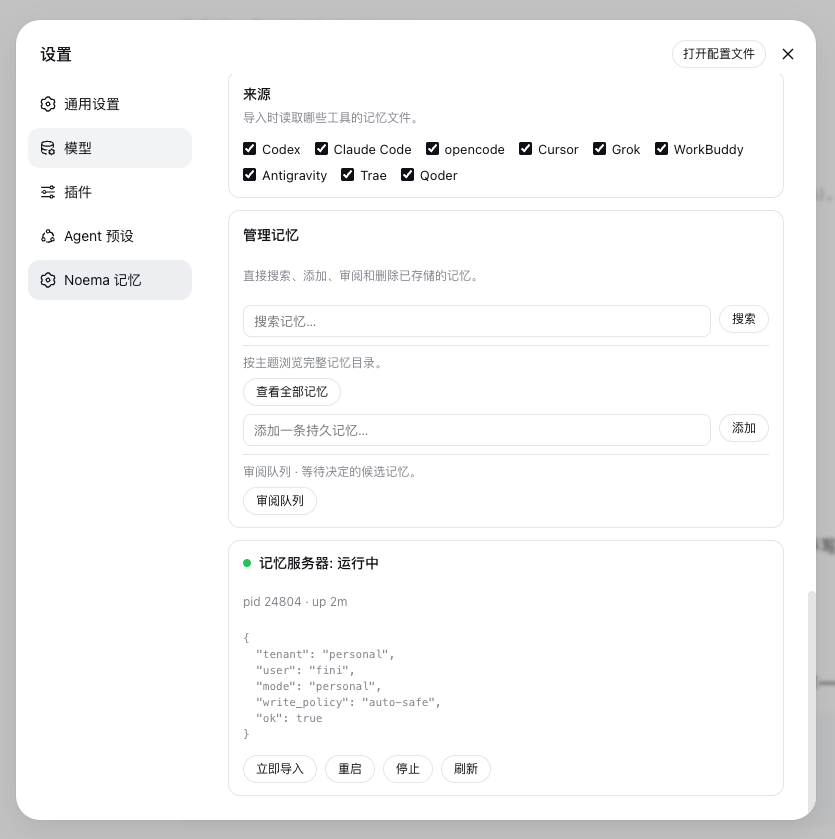
The Noema Memory settings page — import sources, memory management, and live server status
Why DSH Noema
DSH Noema connects DeepSeek Harness with Noema — a local-first, non-vector memory system for coding agents — so an Agent keeps durable knowledge across sessions instead of starting every conversation from zero.
🧠 Durable RecallMemories persist as inspectable Markdown files under |
📥 Import From Other Tools
|
🛠️ Settings-Page ManagementThe Noema Memory settings page configures the server command, memory root, budgets, idle/call timeouts, and the guidance section — and a Manage memories card searches, browses, adds, reviews, and deletes stored memories directly. |
🩺 Keep-AliveThe memory server stays up: idle timeout defaults to never, and a keep-alive loop restarts the |
🔍 Smart Entity ExtractionNoema's extraction engine combines jieba word segmentation with high-precision signals — English proper nouns, CJK names and technical terms, quoted topics, and repetition — with stopword and path filters, so the PageIndex topic catalog stays clean. |
⚡ Hot ReloadAfter the first boot, the plugin never needs a restart again: |
Install into DSH
dsh plugin --profile web add @zseven-w/dsh-noema@latest
dsh web
Or, for local development straight from the source tree:
dsh plugin --profile web add link:/path/to/dsh-noema
dsh web
The link: protocol symlinks the profile dependency to this repository, so rebuilds are visible immediately and Cordis HMR can watch the compiled output.
The plugin bundles the noema-mcp binary through per-platform optional npm packages. To build it yourself instead, run cargo build --release -p noema-mcp inside the bundled noema submodule, or point the Server command setting at any noema-mcp build.
Memory Tools
The model-facing tools mirror the Noema MCP surface:
| Tool | What it does |
|---|---|
noema_recall | Recall relevant memories for a query, with a token budget. |
noema_search | Full-text search over stored memories. |
noema_browse | Browse the PageIndex catalog for a topic or entity. |
noema_catalog | Render the full memory catalog as markdown. |
noema_recall_graph | Multi-hop recall through links and shared entities. |
noema_neighbors | One graph hop from a memory. |
noema_explain | Explain why a memory was or was not recalled. |
noema_remember | Save a durable fact, decision, constraint, or preference. |
noema_review_list | List pending review candidates. |
noema_review_decide | Accept, reject, edit, or merge a candidate. |
noema_forget | Tombstone or hard-delete a memory. |
noema_policy_get / noema_policy_set | Read or update the write policy. |
noema_status | Server and tenant status: counts, index health, storage root. |
noema_import | Import memories from other AI coding tools. |
Each tool returns a uniform envelope { ok, tool, text } where text carries the full server output.
Import memories from other tools
| Source id | Global files | Workspace files |
|---|---|---|
codex | ~/.codex/AGENTS.md + the Codex memory pipeline: ~/.codex/memories/MEMORY.md, memory_summary.md, rollout_summaries/*.md, extensions/ad_hoc/notes/*.md (raw_memories.md skipped — it is the uncurated feed) | AGENTS.md, AGENTS.local.md |
claude-code | ~/.claude/CLAUDE.md, ~/.claude/CLAUDE.local.md, ~/.claude/MEMORY.md | CLAUDE.md, CLAUDE.local.md, MEMORY.md |
opencode | ~/.config/opencode/AGENTS.md | AGENTS.md |
cursor | ~/.cursor/rules/*.mdc, ~/.cursorrules | .cursor/rules/*.mdc, .cursorrules |
grok | ~/.grok/AGENTS.md + the Grok cross-session memory: ~/.grok/memory/MEMORY.md, per-project MEMORY.md, and sessions/*.md summaries | AGENTS.md |
workbuddy | ~/.codebuddy/CODEBUDDY.md (WorkBuddy memory file), ~/.workbuddy/AGENTS.md, ~/.workbuddy/memory.md, ~/.config/workbuddy/AGENTS.md, ~/Library/Application Support/WorkBuddy/AGENTS.md | AGENTS.md, CODEBUDDY.md |
antigravity | ~/.antigravity/AGENTS.md, ~/.config/antigravity/AGENTS.md, ~/Library/Application Support/Antigravity/AGENTS.md (best-effort; no documented global memory store yet) | AGENTS.md, AGENTS.local.md |
trae | ~/.trae/AGENTS.md, ~/.trae/memory/, ~/.trae/rules/ (plus the ~/.trae-cn variants) | AGENTS.md, .trae/rules/ |
qoder | ~/.qoder-cn/AGENTS.md, ~/.qoder-cn/rules/, the auto-memory roots ~/.qoder-cn/memory/ and ~/.qoder-cn/projects/*/memory/ (plus ~/.qoder variants) | AGENTS.md, AGENTS.local.md, .qoder/rules/ |
- The
sourceargument selects one tool, or omit it to run every source enabled in settings. - The
pathargument selects the workspace root for project-scoped files (defaults to the session workspace; workspace files only load when the Import workspace files setting is on). - Imports are deduplicated through a ledger at
$DSH_HOME/storages/dsh-noema-imports.json, keyed by file path + section content — when several tools share one projectAGENTS.md, each section is imported exactly once.force: truere-imports everything. - The settings page exposes per-source checkboxes, an import-on-startup toggle, a file-size cap, and an Import now button with a last-run summary.
Settings
Open Settings → Noema Memory:
| Setting | Default | Meaning |
|---|---|---|
| Enable memory | on | Master switch for the noema_* tools. |
| Memory guidance | on | System-prompt section teaching memory usage. |
| Start server at boot | on | Spawn at DSH start instead of first use. |
| Auto-accept new memories | on | noema_remember persists immediately. |
| Server command | bundled | Bundled noema-mcp binary or a custom executable path/command. |
| Working directory | — | cwd for the server (needed for cargo run). |
| Memory root (NOEMA_ROOT) | — | Where memories are stored; empty = ~/.agent-memory. |
| Recall token budget | 1200 | Default budget_tokens for noema_recall. |
| Idle timeout (ms) | 0 | Stop the server after idle; 0 = never. |
| Keep alive | on | Restart the server in the background when it crashes or exits. |
| Keep-alive interval (ms) | 5000 | Minimum delay between background health checks. |
| Call timeout (ms) | 30000 | Per-tool-call deadline. |
| Restart delay (ms) | 1000 | Backoff between a stop/crash and the next start. |
The status card shows server health with restart/stop actions, and the import section manages the nine memory sources.
Hot reload
DSH's HMR machinery is fully usable once the plugin has been loaded once:
-
Host plugin — enable the Cordis HMR entry in the profile patch with its watch root pointed at this package's
lib/output, and keep thelink:dependency. Runpnpm run buildand the running DSH reloads the plugin entry automatically (the Noema server child is restarted by the reload) — no server restart.# ~/.dsh/profiles/<profile>/cordis.patch.yml - id: hmr disabled: false config: root: - /path/to/dsh-noema/lib -
Client bundle —
ppnpm run build:clientrewriteslib/client.js; the client-hmr node half stat-polls every graph bundle (default 500ms) and broadcasts arebuiltframe over the/plugins/eventsSSE channel, and the browser hot-swaps the module without a page refresh. -
Settings — every change made on the Noema Memory settings page applies live through the settings service.
The one thing hot-reload cannot do is load a plugin that was never in the booted tree: the running composition neither watches the profile patch layer (the web app does not wire watchUserPatches) nor exposes a loader mutation API (the plugin inventory RPC is read-only). A fresh plugin therefore needs exactly one server restart, after which the loop above is fully hot.
Develop
pnpm install
pnpm run build     # host tsc + client tsdown bundle
pnpm test          # build + node --test tests/
The e2e test runs against noema/target/debug/noema-mcp when present (it is skipped otherwise).
License
MIT
查看使用指南 →
该插件的安装步骤、关键要点、FAQ 与兼容性说明(基于已收录字段派生)。
收录徽章

[](https://deepseek-plugin.org/plugins/ZSeven-W/dsh-noema)把这段 markdown 粘贴到你的 GitHub README,链接回本插件详情页。徽章只声明已被本站收录,不代表安全认证。