在 DSH 对话中预览、检视与编辑 OpenPencil `.op` 设计稿的插件:提供无头精确渲染 PNG、只读交互画布与托管编辑器,并暴露 5 个 Agent 可调用的设计工具。

- 语言
- TypeScript
- License
- MIT
- 分支
- main
安装
$ dsh plugin --profile web add @zseven-w/dsh-openpencil在终端中运行以上命令,通过 dsh CLI 安装此插件。可在右上角切换 Profile。 第一次用 dsh?看这篇新手教程
对话式安装
帮我安装 DeepSeek Harness 插件 ZSeven-W/dsh-openpencil:先查看仓库 https://github.com/ZSeven-W/dsh-openpencil 确认安全性,然后执行安装命令并验证插件加载成功。
把这段指令粘贴给 DSH Web GUI 里的助手,由它代你完成安装与验证。
一句话定位
dsh-openpencil 把 DSH 对话窗口变成一个能预览、检查并实时编辑 OpenPencil .op 设计稿的工作台:Agent 可以调用五个工具来渲染、对画布写事务化设计指令,而你在聊天里直接看到 PNG 缩略图、可平移缩放的只读画布,以及带保存语义的侧边栏编辑器。
核心能力
- 无头精确渲染:通过
openpencil_render调用 OpenPencil 自带的无头导出器,对活动页面上每一个顶层帧生成设计保真 PNG,输出 SHA-256 与尺寸校验结果 - 只读交互画布:点击"打开交互式画布"按需挂载 OpenPencil Web SDK,支持平移、缩放、适应视图,可在不离开对话的情况下检查任意页面或嵌套节点
- 托管编辑器:当
editable: true时,侧边栏工作台启动一个独立的 op-host-web-server 进程,提供选择、图层、属性、绘图工具、撤销/重做和显式保存语义 - Agent 原生设计工具:暴露
openpencil_new/openpencil_create/openpencil_edit/openpencil_render/openpencil_selection共五个工具,让 Agent 用事务化batch_design程序创建与修改画布 - 签名能力凭据:渲染产物和编辑器入口都用 HMAC 签名 + 内容寻址(文件名 + 字节数 + SHA-256)的能力凭据交付,宿主路径不外泄到浏览器或模型上下文
- 离线恢复草稿:插件卸载或浏览器断开时,未保存的画布会以不透明记录留在本地 7 天,重新打开同源
.op时会询问是否恢复,绝不自动覆盖源文件
技术实现
- 语言: TypeScript(Node 端 + 浏览器端 React)
- 关键依赖:
@deepseek-ai/cordis^4.0.1、@deepseek-ai/dsh-tools^0.1.0-rc.6、@deepseek-ai/dsh-fs^0.1.0-rc.6、react^18.2.0 - 架构模式: Cordis 插件 + Host/Client 双端;
apply()在 Host 进程注册五个工具和三条同源 HTTP 路由(渲染、Viewer 资产、托管编辑器),浏览器端 React 组件消费presentationMeta.$dshOpenPencil渲染 PNG 卡片、画廊、只读画布和侧边栏编辑器 - 入口文件:
src/index.ts(Host 端 Cordis 服务入口)+src/client/index.tsx(浏览器端 React 入口)
适用场景
设计师、PM 或前端在 DSH 里直接用自然语言让 Agent 出一份 .op 设计稿,并在同一对话窗口验证预览、逐节点修改;OpenPencil 用户想把自己的 .op 文件丢给 Agent 解读、改稿或跨页面检查节点;以及任何需要把"实时可编辑设计稿"嵌进 AI 对话流,而不是靠截屏往返的协作场景。
前置依赖与兼容性
| 依赖 | 最低版本 | 说明 |
|---|---|---|
| DeepSeek Harness | >= 0.1.0-rc.6 | peerDependencies 中所有 @deepseek-ai/dsh-* 包均为 ^0.1.0-rc.6,同时依赖 @deepseek-ai/cordis ^4.0.1 |
| Node.js | >= 24.11.0 | package.json#engines.node 显式声明 |
| 操作系统 | macOS | 精确渲染默认查找 /Applications/OpenPencil.app 与 ~/Applications/OpenPencil.app(renderer.ts:520-521);Linux/Windows 用户需通过 DSH_OPENPENCIL_BINARY / PATH 自备 OpenPencil 二进制 |
| OpenPencil 二进制 | 未声明(可选) | 用于"精确"渲染;缺省时自动降级到 Jian 并标记 fidelity=runtime-preview |
| Jian 二进制 | 未声明(可选) | 仅在 OpenPencil 二进制缺失时作为兜底渲染器使用 |
| op-host-web-server | 未声明(可选) | 启用 editable: true 时启动托管编辑器;可通过 DSH_OPENPENCIL_EDITOR_BINARY 指定 |
| 原生 Node 模块 | 无 | 插件本身只用 Node 内置模块和子进程,不含 node-gyp 绑定 |
安装方式
dsh plugin --profile web add github:ZSeven-W/dsh-openpencil
配置项
本插件的运行参数全部通过环境变量按需覆盖,不写入 DSH 配置文件:
| 环境变量 | 用途 | 默认行为 |
|---|---|---|
DSH_OPENPENCIL_BINARY / DSH_OPENPENCIL_DESKTOP | 指定精确渲染用的 OpenPencil 二进制路径(多用于 Linux/Windows) | 自动查找 /Applications/OpenPencil.app 与 ~/Applications/OpenPencil.app,再退回 PATH 中的 openpencil-desktop |
DSH_OPENPENCIL_JIAN | 指定降级渲染用的 Jian 二进制路径 | 在 ~/workspace/jian/target/release/jian 与 PATH 中查找 |
DSH_OPENPENCIL_EDITOR_BINARY | 指定托管编辑器使用的 op-host-web-server 路径 | 在 OpenPencil 源码根目录的 target/{release,debug}/op-host-web-server、PATH 和 macOS App 中依次查找 |
DSH_OPENPENCIL_SOURCE_ROOT / OPENPENCIL_SOURCE_ROOT | 指定 OpenPencil 源码根目录,用于解析 Web SDK 与 CanvasKit 资源 | 默认取 ~/workspace/openpencil |
DSH_OPENPENCIL_VIEWER_ASSET_DIR | 指向预构建的只读画布资产目录(manifest.json + sdk.js + WASM + CanvasKit) | 默认读取构建产物 lib/viewer-assets;缺失时只读画布按钮不会显示 |
DSH_HOME | DSH 用户主目录,渲染产物、签名密钥和恢复草稿的存储根 | 默认 ~/.dsh |
常见问题
Q: 在对话里说"帮我做一个 App 首页"会怎么走?
A: Agent 会先调 openpencil_new,在工作区里原子生成一个新的 .op 文件;再用 openpencil_render 把它渲染成 PNG 卡片展示在对话里,最后挂上 editable: true + autoOpen: true 自动展开一次侧边栏编辑器。整个流程不需要你手动选文件名或先打开画布。
Q: 渲染失败/卡住怎么办?
A: 精确渲染有 60 秒硬超时(renderer.ts:49),超时会被 SIGKILL 子进程并抛"OpenPencil render timed out";PNG 头部、IHDR、尺寸与字节数都有校验(renderer.ts:863-877),产物超过 32 MB 也会被拒。降级渲染(runtime-preview)只在 OpenPencil 二进制完全缺失时启用,并不会替精确渲染背锅。
Q: 我能在对话里直接改画布上的元素吗?还是要打开编辑器?
A: 浏览器里的"只读画布"是只检查不可改;要真正改稿必须先用 openpencil_render 的 editable: true 打开侧边栏编辑器,Agent 通过 openpencil_create / openpencil_edit 把改动应用到实时画布,但保存回 .op 文件需要你在编辑器里点 Save。
Q: 卸载插件会把我的设计稿删掉吗?
A: 不会。.op 文件在工作区里受 DSH 文件系统管理,跟插件生命周期无关;如果卸载时编辑器里还有未保存的改动,插件会按"plugin-dispose"留一个 7 天的本地恢复草稿,重新安装并打开同源 .op 时可手动恢复。
Q: 多帧文档的预览是怎么呈现的?
A: 精确渲染会输出活动页面上所有顶层帧的 PNG,结果里 frames 字段按节点 id/name/index 顺序排列;浏览器卡片默认展示第一帧大图加一条横向缩略图栏,支持点击切换。多于 128 帧的 Code Mode 结果只恢复前 128 帧的嵌套展示元数据,完整数据走 JSON 兜底。
Q: 看截图:明暗/中文英文切换会不会打断编辑?
A: 不会。宿主运行时(locale + 浅色/深色主题)变化时,工具卡片与侧边栏编辑器会跟随主题/语言刷新,但编辑会话和未保存草稿都不会丢失(editor-panel.tsx 通过 editorLocaleFromDsh / EditorColorScheme 监听)。
上手难度
进阶 — 插件默认配置即可运行,但要真正发挥它的价值需要同时具备 DSH 工作区写权限、本机的 OpenPencil(或降级 Jian)二进制,以及对 .op 文档模型的基本概念;普通用户只需会用 Agent 触发即可,开发者接入自定义设计流时需了解 batch_design 语法与环境变量覆盖。
已知问题与限制
- 精确渲染不支持手动指定宽高:传
width/height会直接报错;只接受scale(0 < scale ≤ 8,默认 1),需要按尺寸渲染时请使用降级渲染路径(renderer.ts:687、tool.ts:166-168) - 精确渲染超时硬限制 60 秒,子进程会被 SIGKILL 杀掉;超大的
.op文件(> 64 MB)或产物 PNG(> 32 MB / 总像素 > 1.28 亿)会被拒绝(renderer.ts:39-46、863-877) - 浏览器只读画布是按需懒加载的轻量 Web SDK,渲染所需的 SDK + WASM + CanvasKit 资产必须先通过
pnpm run sync:viewer-assets同步到lib/viewer-assets;缺资产时画布按钮不会出现,但 PNG 预览照常可用(README.md:159-169、viewer-assets.ts:1-15) - 侧边栏编辑器依赖 op-host-web-server 独立进程,需要在
PATH或环境变量指向的源码根目录里能找到该二进制;找不到时编辑按钮会处于不可用状态 - 渲染缓存与文档快照目前没有产品级的保留策略,仍由系统管理(README.md:205)
- DSH 0.1.0-rc.6 不持久化嵌套在 PTC / Code Mode 下的浏览器展示元数据,插件通过同源 session 绑定端点恢复;嵌套结果 > 128 帧时只展示前 128 帧的元数据,超出部分走 JSON 兜底(README.md:196-198、presentation-hydration.ts:48)
- 编辑器能力凭据有 TTL:launch 凭据 2 小时、refresh 凭据 24 小时;超时或外部改动
.op文件后必须重新调用openpencil_render获取新凭据(editor-host.ts:34-36、858-962)

DSH OpenPencil
The DeepSeek Harness plugin for OpenPencil — preview, inspect, and edit real .op documents inside a conversation.
Exact Multi-Frame Previews • Interactive Canvas • Managed Editor • Agent-Native Design Tools
npm: @zseven-w/dsh-openpencil · Current plugin release: 0.1.0-rc.1 · Tested with DSH 0.1.0-rc.6
English · 简体中文 · 繁體中文 · 日本語 · 한국어 · Français · Español · Deutsch · Português · Русский · हिन्दी · Türkçe · ไทย · Tiếng Việt · Bahasa Indonesia



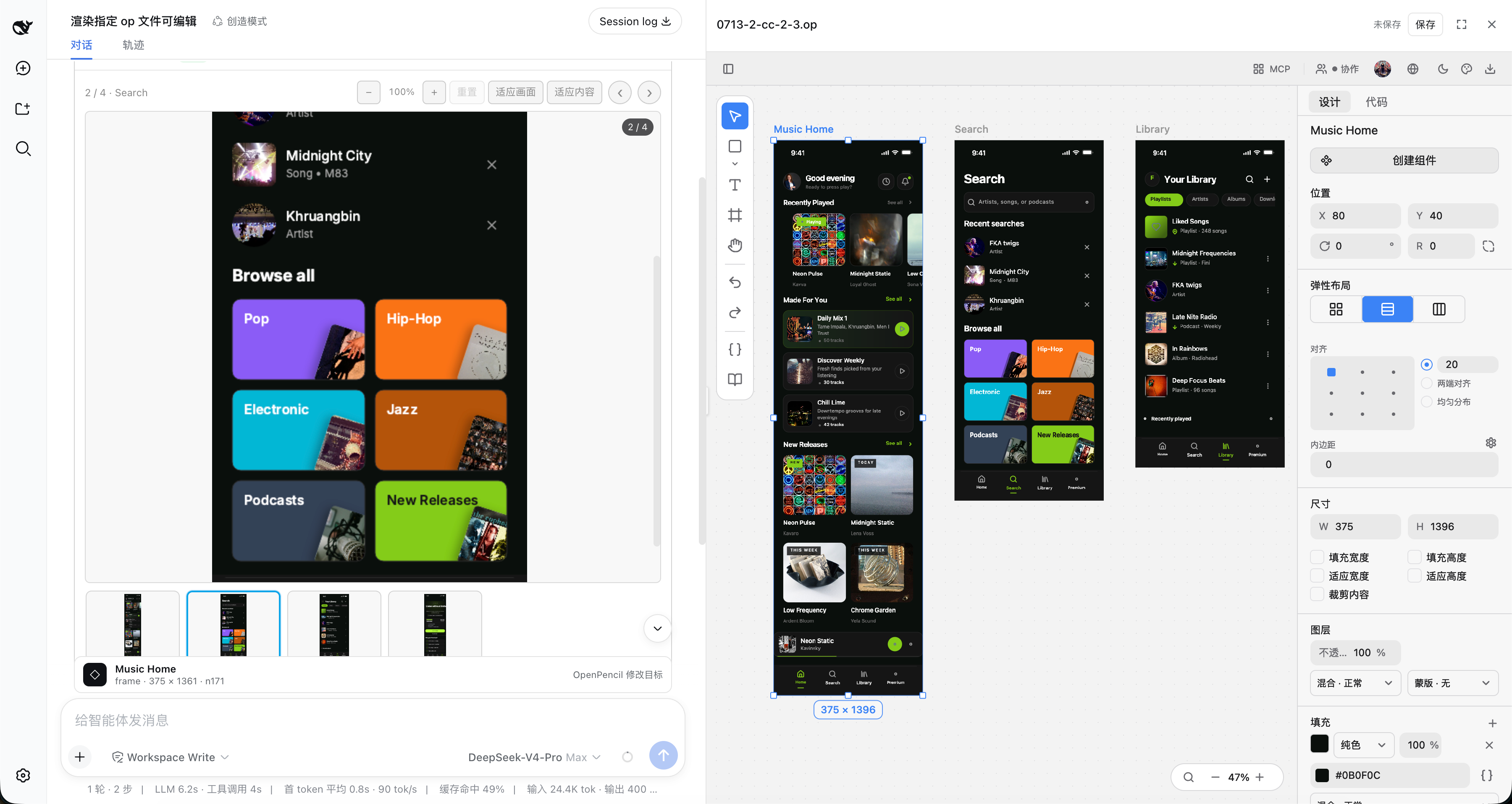
Exact multi-frame .op previews with an interactive canvas and the managed editor workbench
Why DSH OpenPencil
DSH OpenPencil connects DeepSeek Harness with OpenPencil so an Agent drives a real, editable, interactive design canvas instead of returning a generated image.
🖼️ Exact Multi-Frame PreviewsThe installed OpenPencil headless exporter renders design-faithful previews: the first top-level frame as a large replay-safe PNG, plus a horizontally scrollable thumbnail rail, click-to-select, and previous/next navigation for multi-frame documents. |
🗺️ Interactive Canvas"Open interactive canvas" lazily mounts the read-only OpenPencil Web SDK with pan, zoom, and fit — inspect any page, nested node, or inactive page without leaving the conversation. |
✏️ Managed EditorWith |
🤖 Agent-Native Design ToolsFive tools — |
🔐 Capability-Gated GrantsImage and document grants are signed, hash-bound capabilities. Browser metadata never exposes an arbitrary host path, and signed preview/editor capabilities never enter the canonical tool result or model context. |
⚡ Transactional SafetyA new document is published only after the whole |
🌍 Follows DSH Look & FeelThe tool card and managed editor follow DSH's Chinese/English locale and light/dark theme without reloading the editing session. |
🎯 One Complete Workflow"Requirement in conversation → Agent edits the real canvas → live preview and interaction validation → keep iterating" — one loop, no screenshot round-trips. |
Install into DSH
DSH is a separate package. Install it once if you do not already have it:
npm install -g @deepseek-ai/[email protected]
Then add the plugin to a profile and start the web app:
dsh plugin --profile web add @zseven-w/dsh-openpencil@latest
dsh web
Prefer not to install DSH globally? Run the same two steps through pnpm dlx:
pnpm dlx --package=@deepseek-ai/[email protected] dsh plugin --profile web add @zseven-w/dsh-openpencil@latest
pnpm dlx --package=@deepseek-ai/[email protected] dsh web
The OpenPencil plugin is public and requires no npm token. If the DSH prerelease itself requires registry authentication, keep that credential in a user-level or temporary npm config outside the checkout. This repository intentionally contains no registry credentials.
Design Tools
| Tool | What it does |
|---|---|
openpencil_new | Creates a brand-new .op from one transactional batch_design program, saves it atomically through DSH's sandboxed filesystem, and requires no pre-opened editor. |
openpencil_create | Applies a transactional batch_design program to generate or restructure nodes on an existing live canvas. |
openpencil_edit | Modifies an explicit node or the single node selected by the user. |
openpencil_render | Creates an immutable, content-addressed .op snapshot and renders every top-level frame on the active page — optional scale and editable. |
openpencil_selection | Reads the exact nodes selected in the live editor canvas. |
Agent Design Workflow
For a natural-language request with no existing document, the Agent should call openpencil_new with a new workspace-relative .op path and the first complete batch_design program. The tool runs that program in a private managed OpenPencil daemon and publishes the authoritative document only after the whole batch succeeds. It never overwrites an existing path and a failed batch leaves no empty file behind. The Agent should then call openpencil_render with the returned path, editable: true, and autoOpen: true to present the gallery and expand the editor once. Replayed or initially-settled historical cards never auto-open.
Use openpencil_create and openpencil_edit only for an existing live canvas. Their edits remain unsaved until the editor Save action.
Rendering Contract
openpencil_render accepts a .op path, an optional scale (0 < scale <= 8, default 1), and optional editable (false by default). Leave width and height unset for the exact OpenPencil path: they describe a runtime viewport, not design export dimensions, and are accepted only by the lower-fidelity Jian fallback.
OpenPencil binary discovery checks, in order:
DSH_OPENPENCIL_BINARYorDSH_OPENPENCIL_DESKTOP/Applications/OpenPencil.app/Contents/MacOS/openpencil-desktop~/Applications/OpenPencil.app/Contents/MacOS/openpencil-desktopopenpencil-desktoponPATH
Jian fallback discovery uses DSH_OPENPENCIL_JIAN, a known local release build, then PATH. If the exact OpenPencil binary is genuinely unavailable, Jian may produce a clearly labelled runtime-preview fallback. Exact renderer failures, timeouts, and invalid PNGs do not silently fall back.
Web Viewer Assets
DSH serves only client.js for a client plugin, so the OpenPencil ESM SDK, its WASM, and CanvasKit are staged as explicit same-origin assets:
pnpm run sync:viewer-assets
The sync command prefers a sibling ../openpencil checkout (local development), falling back to the vendored vendor/openpencil submodule (CI and fresh clones). Override it with OPENPENCIL_ROOT or --openpencil-root. A complete prebuilt asset directory can be selected with DSH_OPENPENCIL_VIEWER_SOURCE. Runtime lookup can be overridden with DSH_OPENPENCIL_VIEWER_ASSET_DIR.
Viewer assets are lazy-loaded only after the user opens the canvas. If they are absent or invalid, PNG preview remains available and no canvas button is advertised.
Managed Editor
Editable sessions use OpenPencil's managed web host — the same architecture used by op-vscode. The plugin starts the host only after an authorized user action, keeps the daemon token in memory, validates iframe source and origin, and closes the process when the editor session ends. The editor surface is selected progressively: native Tool details when the host declares that seam, otherwise the plugin's right-hand workbench with resize and full-screen controls.
If DSH reloads or unloads the plugin while the canvas is dirty, the host keeps an opaque local recovery draft for up to seven days. Reopening the same source asks before restoring it into the live canvas; recovery never overwrites the .op file until the user explicitly saves.
Binary and source discovery can be overridden with:
DSH_OPENPENCIL_EDITOR_BINARYforop-host-web-server;DSH_OPENPENCIL_SOURCE_ROOT(orOPENPENCIL_SOURCE_ROOT) for the web bundle and CanvasKit assets.
Saves use an optimistic source hash, an atomic replace, and a successor capability. If the source changes outside the editor, the plugin reports a conflict instead of overwriting it.
Result Metadata
The model-visible result stays plain JSON. Browser-only presentationMeta.$dshOpenPencil carries additive grants for:
image: PNG path, preview/download URLs, and real width/height;frames: every exact-rendered top-level frame in active-page order, including its node id/name/index and signed PNG URLs;document: source action path plus immutable snapshot URL, bytes, and SHA-256;viewer: revisioned SDK/WASM/CanvasKit URLs when the asset route is attached;editor: scoped launch/refresh capabilities wheneditable: trueis authorized.
The result also records renderer, rendererBinary, fidelity, and any warnings. Existing PNG-only schema-v1 messages remain renderable.
DSH 0.1.0-rc.6 does not persist browser presentation metadata for tools nested under PTC/Code Mode. The plugin recovers that UI-only projection through a same-origin, session-bound endpoint: the browser sends only the session id, call id, and immutable document SHA-256, while the host resolves the authoritative result from the durable DSH session log and uses a short-lived in-process marker only to authorize recent live editing. Signed preview/editor capabilities never enter the canonical tool result or model context. Durable history can restore read-only previews; editor grants are issued only for recent, trusted live results.
For bounded replay, nested metadata recovery accepts up to 128 top-level frames; larger Code Mode results remain available through their canonical JSON fallback.
Current Limits
- Follow-up edits to an existing canvas require an already-open managed editor. Changes remain unsaved until the user invokes its Save action.
- The lightweight Web SDK canvas is read-only; full editing uses the separate managed editor surface. On DSH
0.1.0-rc.6, the plugin uses the resizable right workbench with a full-screen option. - The exact gallery covers top-level frames on the active page; the interactive canvas remains the way to inspect inactive pages and nested nodes.
- Render and snapshot caches still need a product-level retention policy.
Project Structure
dsh-openpencil/
├── src/                       Plugin sources (TypeScript)
│   ├── index.ts               Host plugin entry — Cordis service, tools, assets
│   ├── tool.ts / design-tools.ts / new-tool.ts   Host-side design tools
│   ├── renderer.ts            Exact OpenPencil renderer + Jian fallback
│   ├── editor-host.ts / editor-recovery.ts       Managed editor lifecycle + drafts
│   ├── viewer-assets.ts       Web SDK / WASM / CanvasKit asset staging
│   ├── mcp-client.ts          OpenPencil MCP connection
│   └── client/                Browser client — React workbench, gallery, selection dock
├── lib/                       Compiled output (published to npm)
├── scripts/                   Build helpers — viewer asset sync, client build, host tests
├── tests/                     Node test suites (client, host API, MCP, viewer assets)
├── docs/images/               Documentation screenshots
├── vendor/openpencil/         OpenPencil checkout (git submodule — viewer asset source)
├── cordis.patch.yml           DSH bundle patch that mounts the plugin
├── tsconfig.json              Host / Node TypeScript config
└── tsconfig.client.json       Browser client TypeScript config
Build and Verify
pnpm run sync:viewer-assets
pnpm run build
pnpm run test:viewer-assets
pnpm run test:client
pnpm run test:host -- /absolute/path/to/design.op 375 1091
Builds require Node 24.11 or newer and pnpm. DSH host/client packages are peer dependencies supplied by the target DSH profile. Build tools are resolved from local dev dependencies, the active linked DSH checkout, or an installed DSH source bundle; DSH_SOURCE_ROOT can select a source checkout explicitly. The lockfile pins standalone public build tooling when that environment is provisioned separately.
For a private DSH prerelease, keep the issued npm credential outside this repository (for example in a user-level or temporary .npmrc) and run the requested version directly:
pnpm dlx --package=@deepseek-ai/[email protected] dsh web
Never commit .npmrc, NPM_TOKEN, or copied registry credentials. This repository ignores local npm configuration by default.
test:host performs a real exact render, validates PNG IHDR geometry and SHA-256, exercises immutable image/document capabilities over HTTP, and checks that viewer assets are grantable. The expected dimensions are fixture-specific.
Ecosystem
DSH OpenPencil is the DeepSeek Harness plugin for OpenPencil — the world's first open-source AI-native vector design tool — and part of the ZSeven-W family of pure-Rust, AI-native tools.
| Project | What it is |
|---|---|
| OpenPencil | The design tool this plugin drives — prompt-to-canvas generation, concurrent agent teams, design-as-code .op files, and a built-in MCP server. The exact previews, interactive canvas, and managed editor here are powered by OpenPencil itself. |
| agent-rs | A pure-Rust async runtime for shipping LLM agents — multi-provider, tool-capable end-to-end, structured permissions, real MCP, zero unsafe. Powers OpenPencil's built-in agent runtime. |
| jian | Pure-Rust, GPU-Skia UI framework — widgets, layout, events, and hot reload in one stack. OpenPencil's UI framework, and the source of this plugin's fallback renderer. |
| Zode | Open-source, AI-native coding assistant for your terminal — reads your code, runs commands, and drives OpenPencil over MCP. |
| noema | Local-first, non-vector memory system for coding agents — durable memory as inspectable files, works across runtimes. |
| openpencil-skill | The LLM skill plugin that teaches AI agents how to design with op — a companion to this DSH plugin. |
Contributing
Contributions are welcome! Fork and clone, create a branch, run pnpm run build and the test suites, commit with Conventional Commits, and open a PR against main.
Community
 Join our Discord
— Ask questions, share designs, suggest features.
Join our Discord
— Ask questions, share designs, suggest features.
Recognized community: LINUX DO
License
MIT — Copyright (c) 2026 ZSeven-W
Third-party components are listed in THIRD_PARTY_NOTICES.md.
查看使用指南 →
该插件的安装步骤、关键要点、FAQ 与兼容性说明(基于已收录字段派生)。
收录徽章

[](https://deepseek-plugin.org/plugins/ZSeven-W/dsh-openpencil)把这段 markdown 粘贴到你的 GitHub README,链接回本插件详情页。徽章只声明已被本站收录,不代表安全认证。