为 DeepSeek Harness 增加「上下文」面板与 /context 弹窗,展示当前窗口构成、历史 token 趋势、压缩与剪枝事件,让用户看清模型到底吃了多少上下文。

- 语言
- TypeScript
- License
- Apache-2.0
- 分支
- main
安装
$ dsh plugin --profile web add dsh-context在终端中运行以上命令,通过 dsh CLI 安装此插件。可在右上角切换 Profile。 第一次用 dsh?看这篇新手教程
对话式安装
帮我安装 DeepSeek Harness 插件 bowenliang123/dsh-context:先查看仓库 https://github.com/bowenliang123/dsh-context 确认安全性,然后执行安装命令并验证插件加载成功。
把这段指令粘贴给 DSH Web GUI 里的助手,由它代你完成安装与验证。
一句话定位
dsh-context 给 DeepSeek Harness 的 Web 会话视图加了一个"上下文 / Context"面板和 /context 弹窗,用堆叠条、趋势曲线和事件清单把模型当前可见窗口的 token 构成、历史变化与压缩/剪枝记录可视化出来,让你一眼看清"上下文被谁吃掉了"。
核心能力
- 注入"上下文"标签页:在会话视图右侧 Chat (order 0) 与 Trajectory (order 10) 之后插入 order 20 的 Context 标签,与官方面板并列
- 提供
/context斜杠命令:在输入框输入或从/菜单选择后弹出居中弹窗,展示当前构成头条 + 六类堆叠条 + 最近 10 轮紧凑趋势图 - 实时显示当前窗口构成:系统提示 / 工具定义 / 用户消息 / 注入上下文 / 助手回复 / 工具结果六类 token 占比,对照模型完整上下文窗口给出剩余余量
- 展示历史 token 趋势:每个模型请求一条堆叠条,可在 Turn / Step 粒度间切换、悬停查看明细、点击钉选单次请求的完整分解
- 列出上下文变更事件:压缩、工具结果剪枝、技能/插件注入、模型切换四类事件,按类别筛选并标注每次事件造成的 token 增减
- 暴露模型实际可见的消息列:当前会话里模型能看见的完整消息清单,按 token 价格从高到低排序
技术实现
- 语言: TypeScript(host half 与 client half 均编译自 src/)
- 关键依赖:
zod(运行时校验 + 投影线协议 schema)、@deepseek-ai/dsh-session-projection(host 注册投影单元)、@deepseek-ai/dsh-token-meter(读取contextPressure投影作为 anchor)、@deepseek-ai/dsh-client-ui-primitives(共享 UI 图标) - 架构模式: 双面插件 —— Host 半边在
cordis.patch.yml里注册为一个 cordis 插件,向 harness 的ctx.sessionProjections注册一个名为contextTimeline的投影单元(init/apply/view,stateVersion=2),由 harness 逐事件驱动折叠并把结果通过会话投影管道推到浏览器;Client 半边通过包内dsh.client声明被打包为 CJS 闭包工厂注入浏览器,从useProjection('contextTimeline')标准座位读取数据,不走任何自定义 RPC - 入口文件: Host
src/host/index.ts(cordis 入口,向 sessionProjections 注册投影单元),Clientsrc/client/index.ts(注册会话视图标签与/context命令),构建由scripts/build.mjs产出lib/index.js(host,ESM)和lib/client.js(client,window.__ModuleLoader__.load闭包)
适用场景
当 DeepSeek Harness 的会话变长、模型开始"忘记"早期内容、压缩和剪枝频繁发生,但用户无从知道是系统提示膨胀、工具 schema 太重还是工具结果把窗口塞满时,本插件用可视化面板告诉你每类内容占了多少 token、压缩剪枝各回收了多少空间。最近 10 轮的紧凑弹窗则适合在跑长任务时随时 /context 瞄一眼,不必切走当前输入焦点。
前置依赖与兼容性
| 依赖 | 最低版本 | 说明 |
|---|---|---|
| DeepSeek Harness | 0.1.0-rc.6+(devDependencies 全部锁定到 0.1.0-rc.6;包内未声明 peerDependencies) | 客户端与宿主均依赖 0.1.0-rc.6 引入的 session-projection 注册表与 token-meter |
| Node.js | 未声明 | 构建脚本走 esbuild + Node ESM,运行由宿主负责 |
| 平台 | macOS / Windows / Linux | 跨平台,无原生模块,无特定 OS 限制 |
| 原生模块 | 无 | zod 是唯一运行时依赖,纯 JS |
安装方式
dsh plugin --profile web add github:bowenliang123/dsh-context
配置项
| 配置 | 类型 | 说明 | 默认值 |
|---|---|---|---|
maxRequestSteps | 整数 | 每个会话保留的历史 step(单次模型调用)记录上限,超过后按整轮裁剪、永不切半轮 | 1500 |
maxKeptTurns | 整数 | 保留的最近整轮数;只要会话跨过此上限,折叠器立即按整轮裁剪到最近 N 轮 | 300 |
maxEvents | 整数 | 保留的最近 context 事件(压缩/剪枝/注入/切换)条数 | 400 |
maxNodes | 整数 | 推送给浏览器查看的"模型可见消息节点"上限,新节点覆盖旧节点 | 200 |
这些字段对应
cordis.patch.yml里dsh-contextloader row 的config:块;zod 严格校验,填错或填入未知字段会让插件加载失败。其余字段由插件自身维护,部署时一般无需改。
常见问题
Q: 这个插件会修改会话历史或往 prompt 里注入额外内容吗?
A: 不会。Host 半边把会话事件流折成视图状态但不写回任何新事件;/context 命令是客户端触发,触发过程中也不向 session/event 写记录,所以一次 /context 不会变成模型的输入。
Q: /context 命令和右侧 Context 标签页看到的内容有什么区别?
A: 数据完全一致,命令弹窗是标签页的精简版:只渲染当前构成头条、六类堆叠条和最近 10 轮紧凑趋势图;标签页则多出全量历史曲线、压缩/剪枝事件流、当前模型可见的消息列和会话统计卡。
Q: 安装后右侧没有"上下文"标签页怎么办?
A: 该插件只对 web profile 生效(package.json 的 dsh.client.platform=web)。请确认安装命令带了 --profile web,并用 dsh web 启动前端;CLI / TUI / 其他客户端不会显示该标签。
Q: 输入框里输入 /context 没有任何反应是怎么回事?
A: /context 是软依赖 harness 的 inputTriggers 服务。如果当前 DSH 版本还没有这个服务,标签页照常可用,只是没有触发菜单;请升级 DSH 到 0.1.0-rc.6 或更高版本。
Q: 历史只保留最近多少轮 / 多少步?数据会丢吗?
A: 默认 1500 步请求 / 300 轮 / 400 条事件 / 200 条模型可见消息节点。折叠器只裁剪整轮、不会把一轮切两半;这些都是 cordis 配置里的可调字段,不会丢底层会话日志本身。
Q: 卸载插件会丢失我之前积累的上下文视图数据吗?
A: 会。上下文投影状态由插件本身折叠,不落到 DSH 之外的持久层;卸载或停用后,再装回需要让会话重新产生事件以重建视图。会话本身的原始事件仍保存在 harness 中,不受影响。
Q: 顶部那条"模型剩余可用窗口"数字是从哪儿来的?
A: 自 0.11 起该数字来自 DSH 官方 token-meter 暴露的 contextPressure 投影(provider 真实用量 + 启发式估算)。如果 token-meter 未安装或该投影不存在,会自动回退到本插件基于消息表面的估算。
Q: 需要联网或配置 API Key 吗?
A: 不需要。zod 是唯一运行时依赖,所有 token 估算都在本地完成;只有"插件信息"卡会向 npm registry 发起一次版本检查请求(1 小时缓存),断网或被 CSP 拦截都会安全降级为不显示升级提示。
上手难度
入门 — 装好就能在右侧看到 Context 标签页和 /context 命令,不需要任何额外配置;如想裁剪历史窗口长度则需要了解 cordis 配置块结构。
已知问题与限制
- 客户端与宿主均依赖 0.1.0-rc.6 引入的 session-projection 注册表与 token-meter
contextPressure投影;早期 DSH 版本可能看不到标签页或读不到 anchor 数字 - 投影状态
stateVersion: 2,宿主升级 0.11 后旧版客户端的occupancy字段被标记为 LEGACY —— 客户端应改读 token-meter 投影,否则只能看到兼容字段 latestVersion检查走 https://registry.npmjs.org/dsh-context/latest,企业内网/CSP 严格策略可能拦截,但失败会安静降级,不影响主体功能/context命令依赖 harness 的inputTriggers服务,没有这个服务的宿主下标签页仍可用、命令会失效- 上下文投影状态不由插件落库持久化,卸载后需等会话重新产生事件才可重建视图
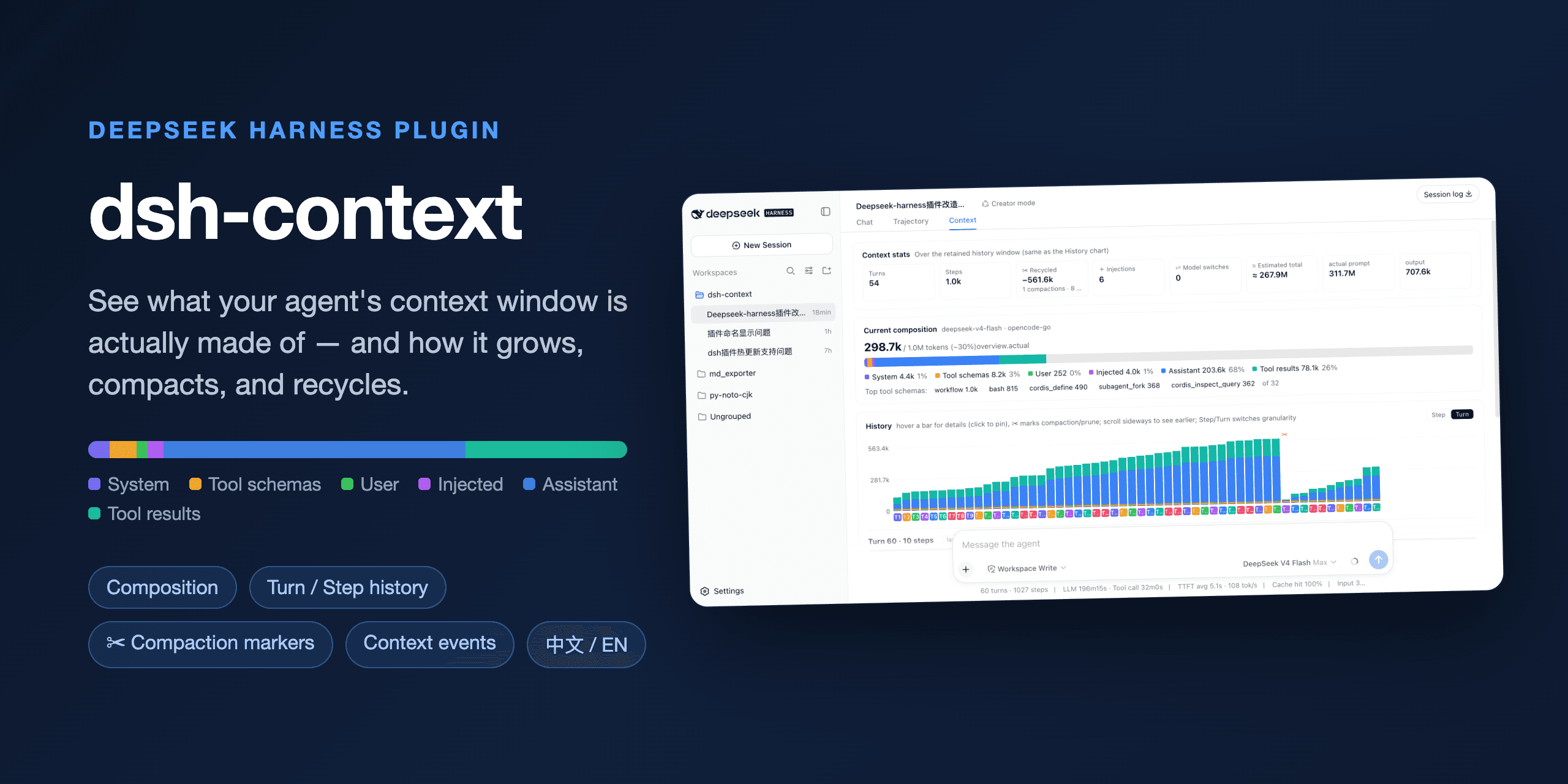
dsh-context


The best DeepSeek Harness plugin for Agent's context insights and management.
dsh-context provides full context lifecycle management features.
- Context tab — an UI context dashboard for DeepSeek Harness’s context stats, composition, history, events, and messages.
/contextcommand — the slash command shows the context model for current context composition and recent context evolution.
Install / Update
To Install from any DeepSeek Harness installation:
dsh plugin --profile web add dsh-context
Or to update the dsh-context plugin:
dsh plugin --profile web update dsh-context@latest
Then start the web UI with dsh web. No build step, no restart.
Use it
Context tab
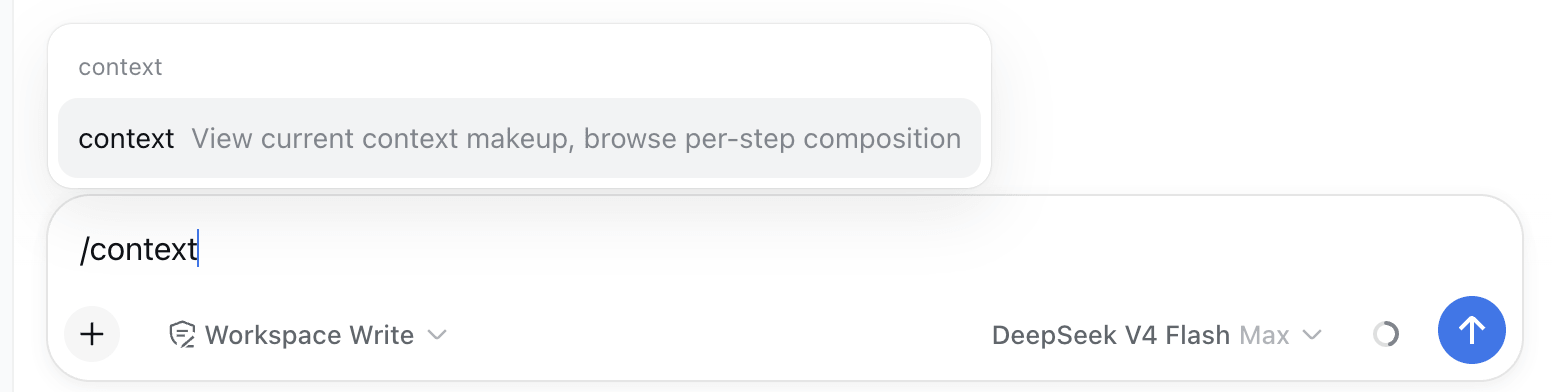
Open any session and click the Context / 上下文 tab:
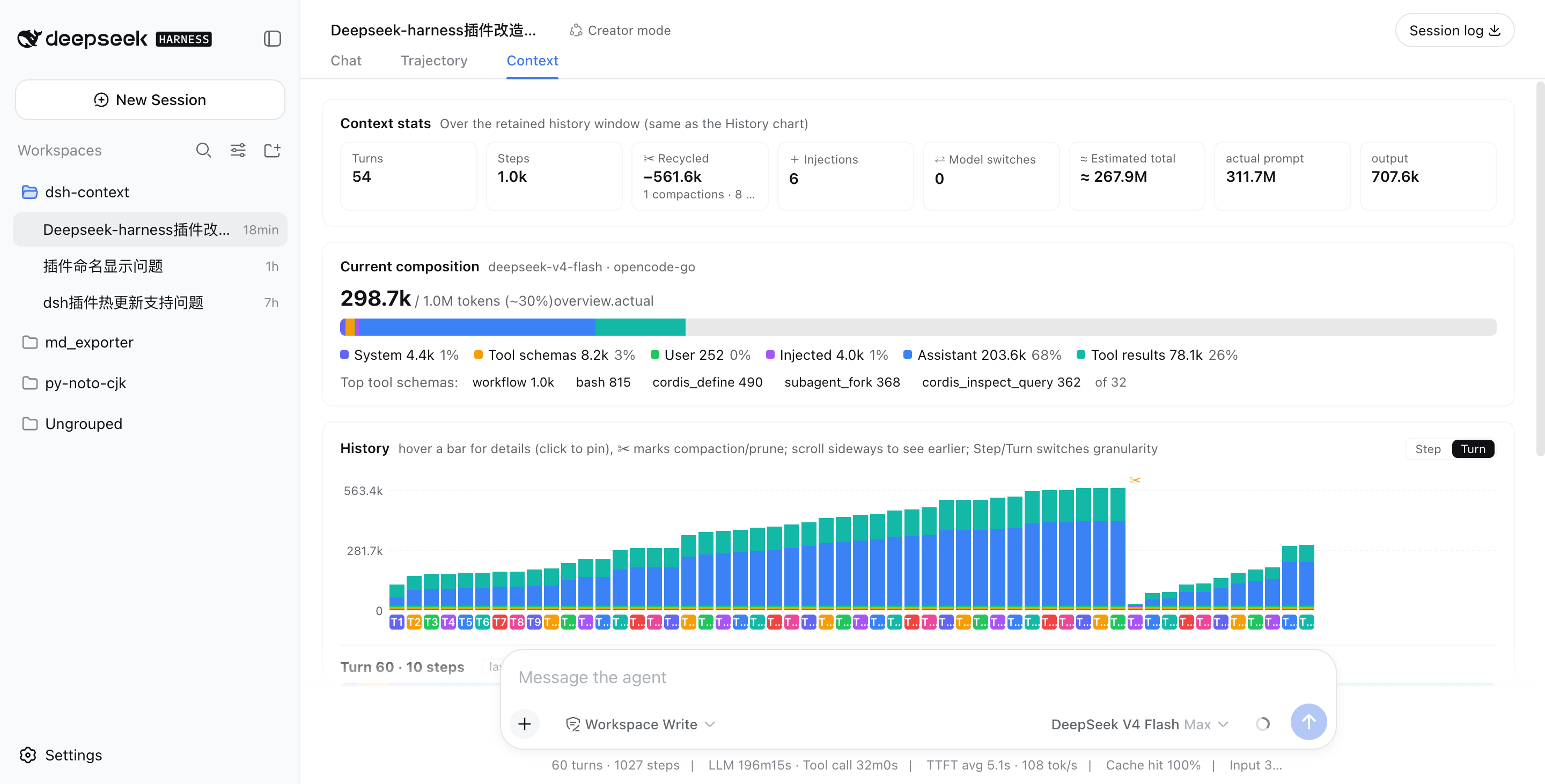
⌨️ /context command — In-session Context Insight modal
Type /context (or pick it from the / menu) and press Enter: a centered dialog shows the Current Composition card and the Context browser — the same composition bar, legend, and per-step browsing as the tab, so you can inspect what any request was assembled from without leaving the chat.
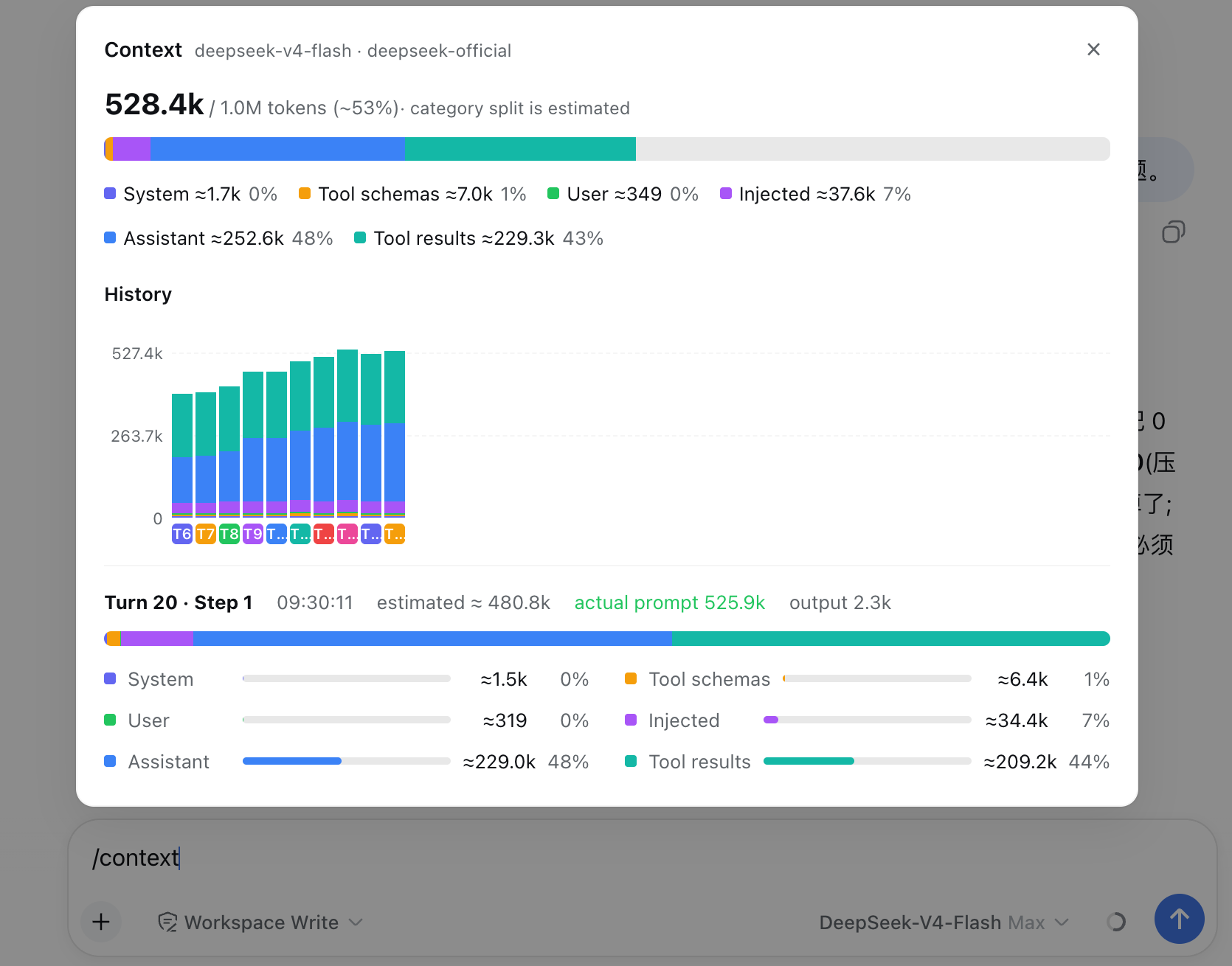
What you'll see
📊 Context stats — the session at a glance
Turns, steps, how many injections, compactions, and prunes have happened.
🧱 Current composition — what's in the window right now
A six-color stacked bar scaled against the model's full context window (the gray track is your remaining headroom): system prompt, tool schemas, your messages, injected context, assistant replies, and tool results — plus the top-5 most expensive tool schemas. When a conversation starts degrading, this is where you find out which part ate the budget.
📈 History — watch the window grow (and get compacted)
One stacked bar per model request, finer than per-message. Toggle between Turn and Step granularity, scroll sideways through the session, hover any bar for a quick tooltip, and click to pin the full breakdown — including provider-reported actual prompt/output tokens next to the estimate. Hovering a bar also drives the Context browser beside it — the browser previews that step's assembled context in real time as you scrub across the history. ✂ marks where compaction or pruning happened — watch the bars drop:
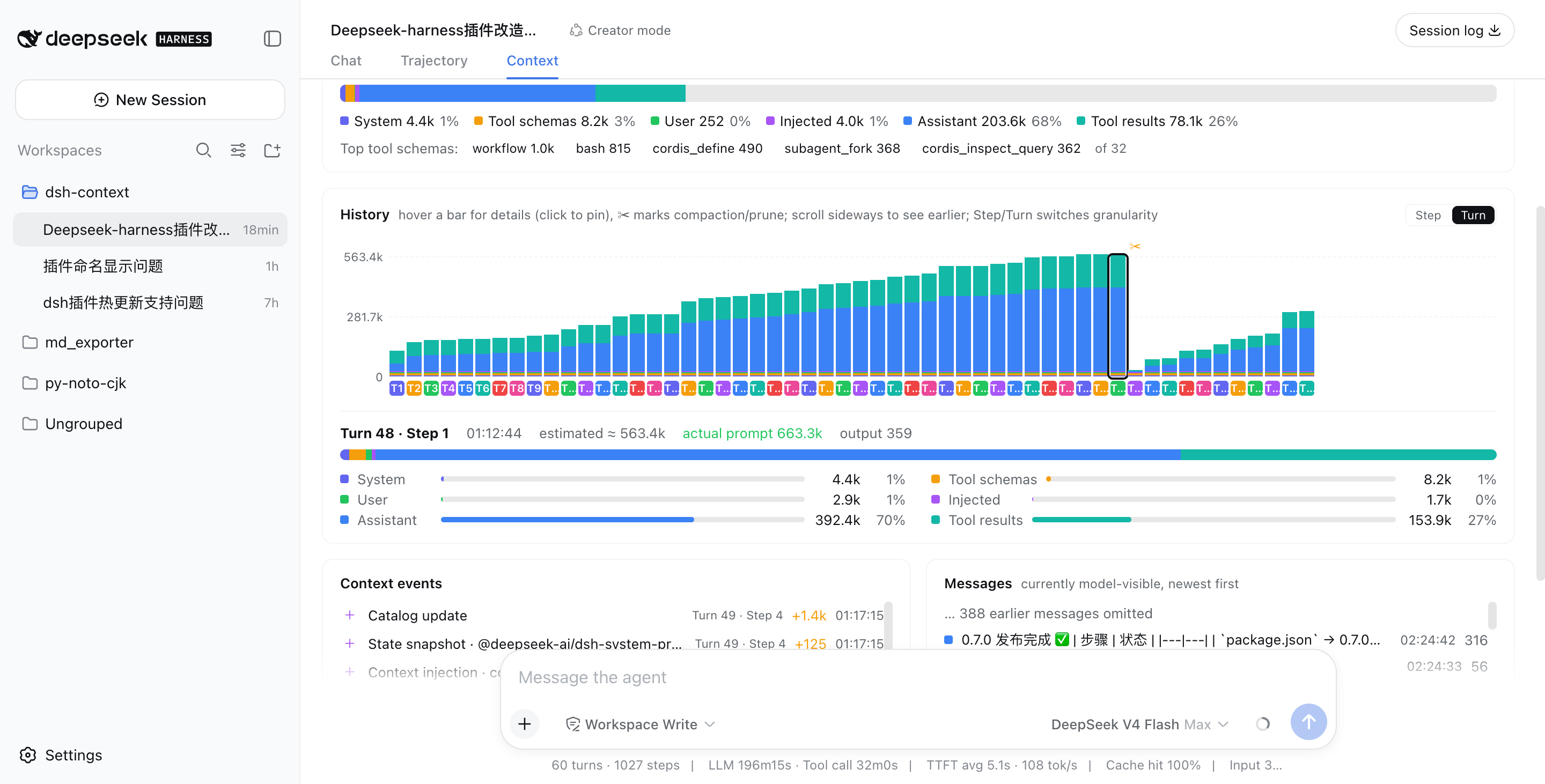
Above: a real session that grew to ~563k tokens across 48 turns, then compaction (✂) recycled −535.5k in one step, and the conversation continued from a fresh, small window.
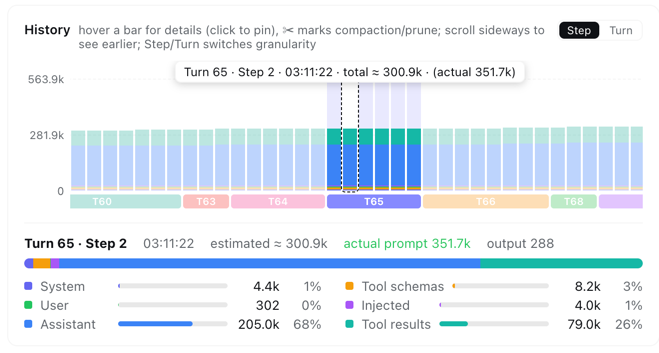
In Step granularity, hovering any bar shows that single step's context info instantly — its turn/step, timestamp, and estimated vs. provider-reported token counts:
⚡ Context events — when and why the window changed
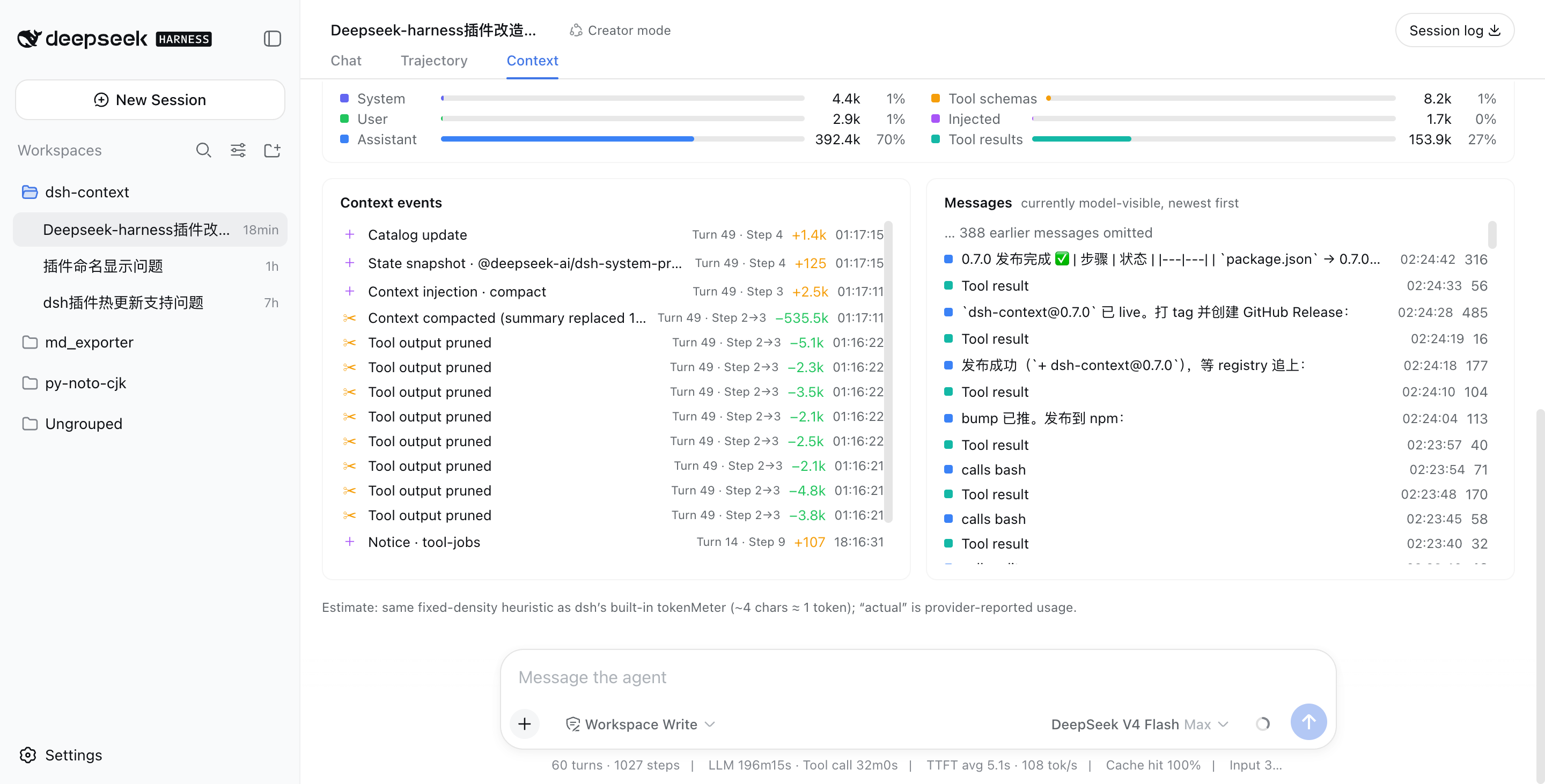
Every compaction, tool-output prune, skill or plugin context injection, and model switch — each with its token delta, turn/step attribution, and timestamp. Filter by category (Inject / Compact / Prune / Switch) to see exactly when each kind of event happened and its impact — e.g. when a skill was injected, when instructions were added, or how much a compaction reclaimed:
💬 Messages — the currently model-visible surface
The exact message list the model sees right now, newest first, with a per-message token cost.
🧭 Context browser — open the box of any request
Pick Live (next request) or any retained step from the picker, and browse what that request was actually assembled from:
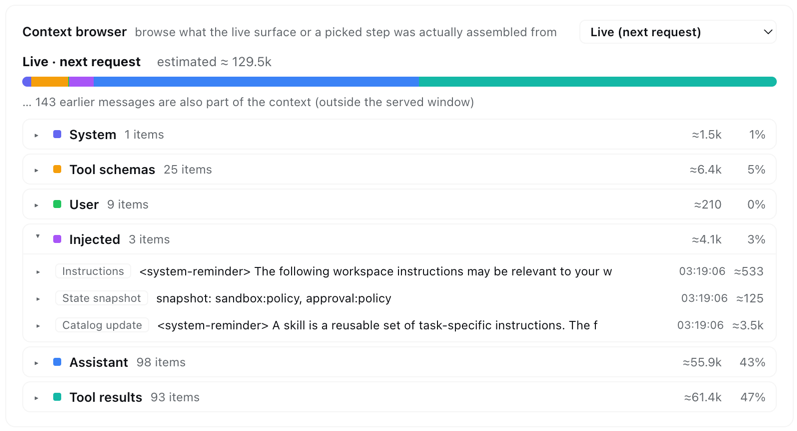
Six collapsible category sections (system prompt, tool schemas, user messages, injected context, assistant replies, tool results) expand into one row per element — each with its token price — and every element expands again into its actual content: the full system prompt, each tool's description and JSON schema, message text, reasoning, tool-call arguments, and tool outputs.
- Linked with the history chart — hover any bar in the History card and the browser previews that step instantly; leave the chart and it returns to your own pick. Keep a category open while scrubbing to compare one category across steps.
- Honest about coverage — steps before a compaction are reconstructed from the removed-message archive, and the card says so when a step's makeup is only approximate. Elements older than the loaded chat window page older history in automatically when you expand them, and live injections (AGENTS.md, session-start context, …) are always listed — never a token sum without its items.
Like it?
If dsh-context helped you understand what your agent is carrying around, a ⭐ on GitHub is much appreciated — and issues/PRs are welcome!
License
查看使用指南 →
该插件的安装步骤、关键要点、FAQ 与兼容性说明(基于已收录字段派生)。
收录徽章

[](https://deepseek-plugin.org/plugins/bowenliang123/dsh-context)把这段 markdown 粘贴到你的 GitHub README,链接回本插件详情页。徽章只声明已被本站收录,不代表安全认证。