在 DeepSeek Harness 网页内放一只像素小鲸鱼,按会话状态自动切换 9 种动画,并附带本地设置面板与迷你跟进输入。

- 语言
- TypeScript
- License
- MIT
- 分支
- main
安装
$ dsh plugin --profile web add --allow-build=harness-pet github:cakeni/harness-pet在终端中运行以上命令,通过 dsh CLI 安装此插件。可在右上角切换 Profile。 第一次用 dsh?看这篇新手教程
对话式安装
帮我安装 DeepSeek Harness 插件 cakeni/harness-pet:先查看仓库 https://github.com/cakeni/harness-pet 确认安全性,然后执行安装命令并验证插件加载成功。
把这段指令粘贴给 DSH Web GUI 里的助手,由它代你完成安装与验证。
一句话定位
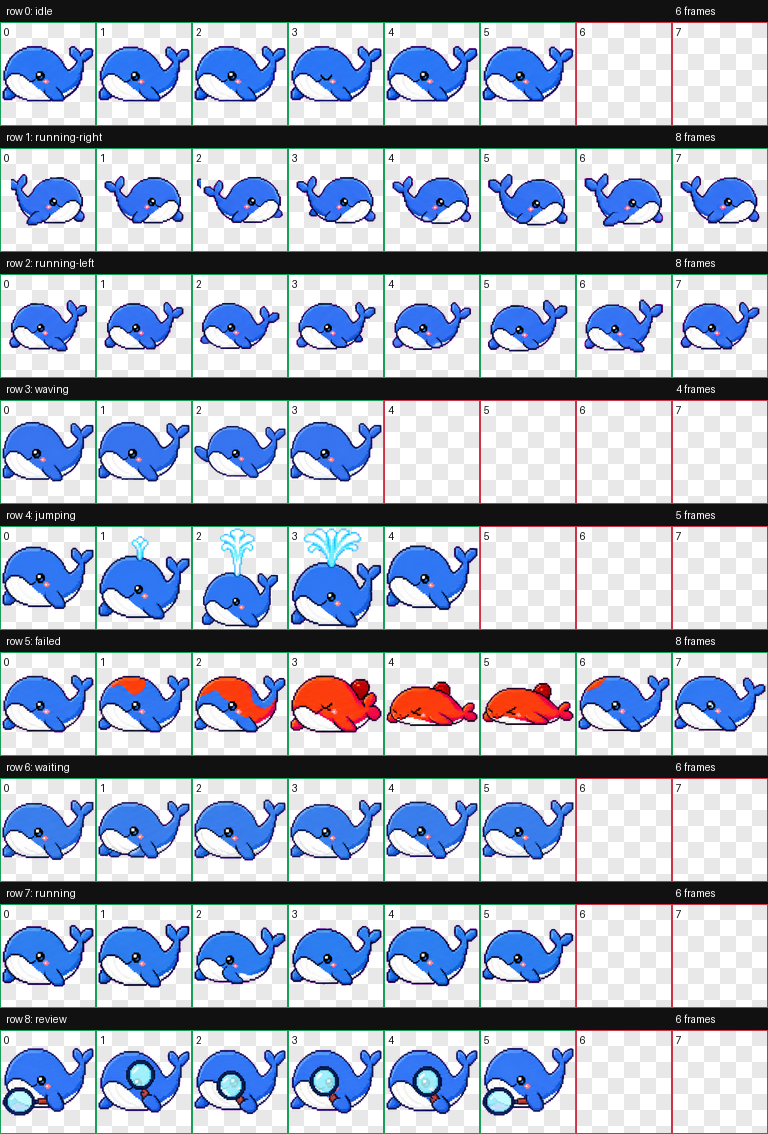
在 DeepSeek Harness 页面内放一只原创像素小鲸鱼,根据官方会话信号自动在 9 种状态间切换动画、显示对话气泡,并提供可拖动位置、本地设置面板和可选的独立置顶小窗。
核心能力
- 根据 Harness 官方会话信号(流式输出、运行中的工具、待审批、重连、错误等)切换
idle / thinking / working / searching / bash / editing / waiting / error / success九种动画状态 - 在鲸鱼上方显示一个对话气泡卡,展示本地最新用户问题、Harness 实时或最终回复;长回复自动跟随最新流式文字但内容不持久化
- 单击鲸鱼播放短促的挥鳍互动;左右拖动用独立的左右游动动画行;位置被钳制在视口内并自动写入
localStorage - 内置英语(默认)、简体中文、日语、韩语四种界面语言,可即时切换;支持
prefers-reduced-motion与面板 Reduce Motion - 通过官方
SessionFace.prompt(..., 'queue')把跟进输入直接送入当前 Harness 会话,发送失败保留草稿并显示错误信息 - 在 Chromium 116+ 浏览器中可开启独立的 Document Picture-in-Picture 置顶小窗,最小化主 Harness 窗口后鲸鱼依然可见
- 设置面板提供启用开关、大小(72-160 px)、透明度(0.3-1)、Reset Position、Debug State 强制切换、九状态自动轮播和实时状态角标
技术实现
- 语言: TypeScript
- 关键依赖:
@deepseek-ai/dsh-client-connection、@deepseek-ai/dsh-client-runtime(peerDependencies,运行时由宿主注入);构建侧为tsdown+vitest,无 UI 框架 - 架构模式: Cordis 客户端插件;
package.json通过dsh.bundle.patch(指向cordis.patch.yml)把harness-pet插入宿主 Cordis 树,通过dsh.client.inject: ['sessions','connection']声明需要的服务;客户端产物由apply(ctx)在浏览器侧订阅ctx.sessions与ctx.connection.hostDescription,所有 Harness 字段含义解析收敛在src/adapters/deepseek-harness.ts里的纯函数(SignalSnapshot) → PetStatus - 入口文件: 浏览器端
src/client/index.ts(编译为lib/client.js,用__ModuleLoader__.load注册),宿主侧占位src/index.ts,8×9 像素动画图集以 base64 内联进客户端 bundle
适用场景
喜欢在使用 Harness 时让桌面角落有反应、又不想让宠物喧宾夺主的用户。鲸鱼在 Harness 执行搜索、跑命令、编辑文件、等待审批、出错、完成时会立刻换状态、换气泡图标,能让你在等回复时用余光判断当前是在思考还是卡住,而不需要反复切回 Harness 主窗口。
前置依赖与兼容性
| 依赖 | 最低版本 | 说明 |
|---|---|---|
| DeepSeek Harness | >=0.1.0-rc.6 | package.json 中 peerDependencies 锁定 @deepseek-ai/dsh-client-connection 与 @deepseek-ai/dsh-client-runtime 为 ^0.1.0-rc.6;后续 0.1.x 预发布版本未经验证 |
| Node.js(构建期) | >=22 | tsdown.config.ts 中服务端构建目标为 node22,客户端目标为 es2022 |
| 浏览器平台 | Web 跨平台 | 仅作为 DSH Web 插件运行,desktop 小窗额外要求 Chromium 116+ |
| 原生模块 | 无 | 客户端纯 DOM/Canvas,服务端仅做类型导出 |
安装方式
dsh plugin --profile web add github:cakeni/harness-pet
配置项
| 配置 | 类型 | 说明 | 默认值 |
|---|---|---|---|
| Language | 选择 | 切换界面语言(English / 简体中文 / 日语 / 한국어),即时生效 | en-US |
| Enable Pet | 开关 | 关闭后右下角齿轮仍保留,重新打开即可恢复 | true |
| Pet Size | 滑块 | 鲸鱼渲染尺寸,单位像素 | 112 |
| Opacity | 滑块 | 鲸鱼整体不透明度 | 0.95 |
| Reduced Motion | 开关 | 停用持续动画与点击挥手,状态静态帧仍正确 | false |
| Debug State | 选择 | 强制覆盖为某个状态,或跟随 Harness 自动检测 | auto |
| Auto-cycle | 开关 | 周期性轮播全部九种状态,方便无任务时预览动画 | false |
| Reset Position | 按钮 | 把鲸鱼位置重置回右下角默认 | — |
| Show Dialog | 按钮 | 当前会话关闭气泡后,手动重新显示对话卡 | — |
| Open Floating Pet / Return to Harness | 按钮 | 在 Chromium 116+ 中打开或关闭独立置顶小窗;不支持的浏览器禁用 | — |
常见问题
Q: 安装后页面右下角没有鲸鱼怎么办?
A: 首先打开浏览器 DevTools Console 检查 window.__DSH_BOOT__.entries 是否包含 harness-pet,再用 Network 面板确认 /plugins/harness-pet/client.js 返回 HTTP 200;首次安装或移除插件需要重启 dsh web 进程让宿主重新扫描插件清单,仅刷新页面不会重新挂载新插件。
Q: 这是官方 DeepSeek 项目吗?
A: 不是。这是一个非官方社区项目,README、UI 底部、插件描述里都明确写着 "Not affiliated with, endorsed by, or maintained by DeepSeek",DeepSeek 及相关标识归各自所有者所有。
Q: 插件会上传我的对话内容吗?
A: 不会。插件代码不发起任何独立 fetch,不接入任何分析或遥测,对话文字只在本地 DOM 渲染,刷新或切换会话就消失;只有当你在鲸鱼上方的跟进输入框里手动发送文字时,该文字才会通过官方 SessionFace.prompt 提交到 Harness 自身的会话通道。设置仅写入 localStorage,插件不申请任何浏览器权限。
Q: 找不到符合当前工具的状态怎么办?
A: 适配器里的工具名表只覆盖官方公开命名(web_search / tool_web / bash / tool_bash / pwsh / str-replace-editor / apply_patch / write_file 等),未识别的运行工具一律降级为通用 working,不会伪造为 searching / bash / editing,因此即使 Harness 1.0 前改动工具名也不会显示错误状态。
Q: "Open Floating Pet" 按钮点了没反应?
A: 该功能依赖 Chromium 116+ 的 Document Picture-in-Picture API;Firefox / Safari 等不支持的浏览器会直接把按钮置灰禁用,且必须保持浏览器进程和对应标签页都打开,鲸鱼才能留在独立置顶小窗中。
Q: 设置保存在哪里?删除账号登录后会丢失吗?
A: 仅保存在浏览器 localStorage 中,键名为 harness-pet:settings,包含语言、启用、大小、透明度、Reduce Motion、Debug State、自动轮播、位置。清除浏览器数据或换浏览器登录都会丢失,需要重新设置。
Q: 怎么卸载?
A: 执行 dsh plugin --profile web remove harness-pet,然后重启 dsh web;如果是本地 link 安装,从 link:../harness-pet 移除对应记录并重启宿主即可。
Q: reduced motion 开关会完全停止动画吗?
A: 不会。该开关和系统的 prefers-reduced-motion: reduce 都只停止持续漂浮和帧动画,但仍保留正确的当前状态静态帧,因此宠物依然能在不闪烁的前提下反馈 Harness 在做什么。
上手难度
入门 — 复制一行安装命令、重启宿主即可看到鲸鱼,所有高级选项都集中在设置面板的图形控件里,不需要写任何代码或配置文件。
已知问题与限制
- 未识别的运行工具名只显示为通用
working,Harness 1.0 前若改名工具可能暂时无法触发searching/bash/editing状态 - Document Picture-in-Picture 桌面小窗仅在 Chromium 116+ 可用,且要求浏览器进程和对应标签页都打开
- 客户端像素图集以 base64 内联进 bundle,二次加载无网络请求但首次下载体积偏大
A tiny whale that lives inside DeepSeek Harness.
This is an unofficial community project. Not affiliated with, endorsed by, or maintained by DeepSeek. DeepSeek and related marks belong to their respective owners.
dsh plugin --profile web add github:cakeni/harness-pet
Harness Pet is an open-source, native DSH web plugin—not a browser extension. It renders an original pixel whale inside the Harness page and reacts to structured session signals exposed by the official client runtime.
Features
- Nine visual states: idle, thinking, working, searching, bash, editing, waiting, error, and success.
- A QA-validated 8×9 atlas with fixed 192×208 cells: calm idle, directional drag movement, wave/click, connected water-spout success, red-hot fault/error, waiting, active work, and magnifying-glass search animations.
- A Codex Pet-style card above the whale showing the latest local user prompt, live/final Harness reply, and progress; long streams follow the newest text while remaining scrollable, and displayed text is never persisted.
- Dragging uses dedicated left/right swimming rows; clicking plays a short flipper wave without sprite overflow.
- Optional Chromium desktop-window mode keeps the pet visible in an always-on-top Document Picture-in-Picture window while the main Harness window is minimized.
- Draggable, viewport-clamped position saved in
localStorage. - Pet size, opacity, enable/disable, reset position, and reduced-motion controls.
- Instant, persisted interface switching between English (default), Simplified Chinese, Japanese, and Korean.
- Debug state override, automatic state cycling, and a live status badge.
- Original pixel sprites embedded directly into the client bundle, with the procedural Canvas whale retained as a fallback.
- Full cleanup for subscriptions, timers, animation frames, media listeners, and resize listeners.
Install
Harness 0.1.0-rc.6 and pnpm on PATH are required. Installing or removing a plugin changes the host roster, so restart the dsh web process after one of these commands. A code-only rebuild of an existing link installation needs only a page refresh.
npm
The package name is reserved for a future npm release. Until it is published, use the Git or local-link installation below.
dsh plugin --profile web add harness-pet
Git
dsh plugin --profile web add github:cakeni/harness-pet
Git dependencies run this package's prepare build. If pnpm blocks that build, add the exact package key printed by the CLI to the profile's pnpm-workspace.yaml, for example:
allowBuilds:
  harness-pet: true
Then repeat the install command. The profile is normally under $DSH_HOME/profiles/web.
Local development link
Run this from the repository's parent directory:
dsh plugin --profile web add link:../harness-pet
Build and refresh during development:
cd harness-pet
pnpm bundle
Do not run more than one link installation for the same profile.
State detection
The adapter subscribes to the current ctx.sessions list and SessionFace snapshot. It also observes ctx.connection.hostDescription; after a connection has existed, that structured value becoming absent indicates reconnecting. It never matches translated UI text or scrapes the DOM.
Priority is: error > success > waiting > searching/bash/editing > working > thinking > idle.
| Pet state | Structured detection | Confidence | Failure degradation |
|---|---|---|---|
idle | No higher-priority signal | High | Remains idle |
thinking | partial is present and no tool is running | High | Idle if the field is absent or malformed |
working | running === true, or non-empty unknown runningCalls | High | Idle after all running signals clear |
searching | Running tool name matches the adapter's web-tool table | Medium | Unknown tool names degrade to working |
bash | Running tool name matches the adapter's shell-tool table | Medium | Unknown tool names degrade to working |
editing | Running tool name matches the adapter's file-write/editor table | Medium | Unknown tool names degrade to working |
waiting | Non-empty pending, or a queue item with placement: 'queued' | High | Falls through to the active lower-priority state |
error | promptError, latest turn-error, lastAgentError, or reconnecting | High | Falls through when the structured error clears |
success | Derived from a clean running: true → false edge for about 3 seconds | Derived | Returns to the latest real state, usually idle |
The tool-name table is intentionally isolated in src/adapters/deepseek-harness.ts. Pre-1.0 Harness releases may rename tools; an unrecognized active tool is reported only as working, never fabricated as a specialized state.
Controls
- Click the whale for a short flipper-wave interaction.
- Drag it to move it; the position is persisted locally.
- Click the gray follow-up icon to open an input. Enter submits the text to the current Harness session through its official
SessionFace.prompt(..., 'queue')method. - Close the conversation card with its
×button when it gets in the way. It stays closed for the current session; use Show Dialog in settings to restore it. A different session opens the card again. - Double-click, long-press, or use the gear button to open settings. Drag the settings title bar to move that panel independently of the whale.
- Choose Language in settings to switch all pet controls, status text, dialog prompts, and desktop-window messages immediately.
- When Open Floating Pet is enabled in settings, the main Harness window may be minimized while the pet remains in its independent always-on-top window. The Harness tab and browser process must remain open.
- If the pet is disabled, the gear remains at the lower-right so it can be enabled again.
- Debug State can follow Harness or force any visual state. Auto-cycle rotates through all nine states.
Both the operating-system prefers-reduced-motion: reduce preference and the manual Reduced Motion setting stop continuous animation while retaining the correct static state.
Privacy
No telemetry. Harness Pet sends no conversation data to any third party.
The plugin makes no independent fetch, analytics, telemetry, cloud-sync, or third-party request. It reads the minimum structured fields needed to render the latest local user prompt and Harness reply. Displayed conversation text is never persisted. Only when you explicitly submit the follow-up input is that text delivered to the current Harness session through Harness's existing official transport. Only settings are stored in browser localStorage; the plugin asks for no browser permissions.
Compatibility
| Harness client API | Status |
|---|---|
0.1.0-rc.6 | Targeted and type-checked against the published client contracts |
Later 0.1.x prereleases | Unverified; the client API is pre-1.0 and may change |
| Browser extension mode | Unsupported; this project is a native DSH plugin |
| Desktop window | Chromium 116+ Document Picture-in-Picture; unsupported browsers keep the control disabled |
All Harness coupling is kept in the adapter so API updates have one repair point.
Development and tests
pnpm install
pnpm run typecheck
pnpm test
pnpm bundle
The bundle must start with a window.__ModuleLoader__.load registration for harness-pet and export { apply, inject } from its factory.
Automated tests cover the state mapper and priority, success transitions and timeout, unknown-signal degradation, corrupt storage, singleton reuse, and subscription/timer cleanup. Loading inside a real Harness page, drag behavior, visual animation, SPA navigation, and long-running leak checks still require manual browser verification.
Manual verification
After installing and restarting dsh web yourself:
- Confirm
window.__DSH_BOOT__.entriescontainsharness-pet. - Confirm
/plugins/harness-pet/client.jsreturns HTTP 200. - Confirm the whale and its card render without console errors, the card shows the latest local prompt plus streaming/final reply, and every Debug State is distinct.
- Open the gray follow-up input, send a test message, and confirm it appears in the current Harness session; also verify an admission failure keeps the draft and shows an error.
- Test dragging, reload position persistence, enable/disable, size, opacity, and reset.
- Enable reduced motion at OS and panel levels and confirm continuous motion stops.
- Open Desktop Window, minimize the main Harness window, and confirm the pet stays visible; close it and confirm the pet returns to Harness.
- Navigate between sessions and SPA routes, then refresh; confirm only one pet exists.
- Run a real search, shell command, edit, pending interaction, successful turn, error, and reconnect where available.
- Leave the page open for an extended session and check that subscriptions and timers do not accumulate.
Replacing or adding artwork
The current 8×9 animation atlas is embedded into client.js, so the plugin performs no asset request at runtime. It uses fixed 192×208 cells and transparent unused slots; semantic effects are connected to the whale and remain inside their frame—water from the blowhole, a magnifier held by the flipper, and red-hot fault coloring. To replace or add a sprite:
- Add authorized expression/state files under
assets/whale/. - Record its source, author, and license in
assets/whale/ATTRIBUTION.md. Unregistered assets must not be distributed. - Bundle the bytes into
client.js(for example as an imported data URL) instead of fetching a remote URL at runtime. - Keep the procedural draw path as the fallback and verify reduced-motion behavior.
Never download or include artwork of unknown provenance.
License
查看使用指南 →
该插件的安装步骤、关键要点、FAQ 与兼容性说明(基于已收录字段派生)。
收录徽章

[](https://deepseek-plugin.org/plugins/cakeni/harness-pet)把这段 markdown 粘贴到你的 GitHub README,链接回本插件详情页。徽章只声明已被本站收录,不代表安全认证。