为 DSH Web GUI 提供基于本地 Markdown 知识库的持久记忆,让 AI 能读写搜索 vault 文件并在侧边栏浏览目录。

安装
$ dsh plugin --profile web add dsh-client-ui-obsidian-memory在终端中运行以上命令,通过 dsh CLI 安装此插件。可在右上角切换 Profile。 第一次用 dsh?看这篇新手教程
对话式安装
帮我安装 DeepSeek Harness 插件 detongz/dsh-client-ui-obsidian-memory:先查看仓库 https://github.com/detongz/dsh-client-ui-obsidian-memory 确认安全性,然后执行安装命令并验证插件加载成功。
把这段指令粘贴给 DSH Web GUI 里的助手,由它代你完成安装与验证。
一句话定位
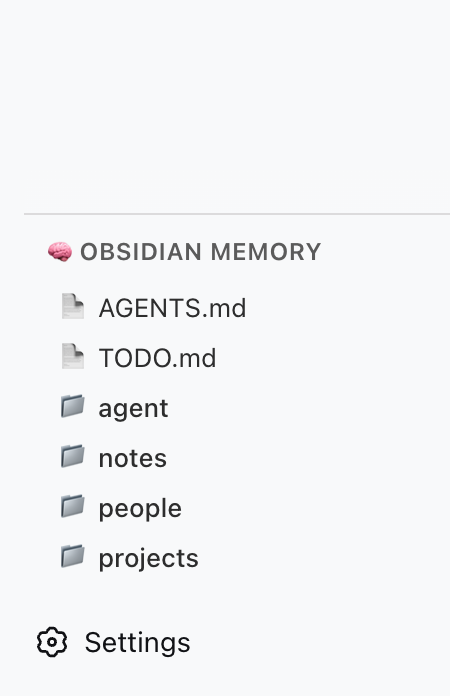
为 DeepSeek Harness (DSH) Web GUI 增加一个本地 Markdown 知识库(Obsidian vault)作为 AI 的持久记忆,让模型可以读取、列出、搜索、写入和追加 vault 文件,并在侧边栏以目录浏览器形式展示 vault 结构。
核心能力
- 5 个 vault 文件系统工具:AI 可读取 Markdown / 文本文件、列出目录与文件、全文搜索、写入 / 覆盖文件、追加内容到文件末尾
- 侧边栏目录浏览器:在 DSH 左侧边栏
sidebar.obsidian-memory插槽内渲染 vault 目录树,支持面包屑跳转、刷新、用宿主目录选择器选 vault、用系统打开按钮唤起文件 / 文件夹 - 快速打开入口:在 vault 根目录提供
AGENTS.md、TODO.md两个常用文件的快捷打开按钮 - 路径沙箱保护:所有文件路径都会被解析并校验相对位置,越界访问(
..、空相对路径)会被拒绝 - 本地 Markdown 持久化:记忆内容完全由用户自己的 Markdown 文件承载,AI 写入的内容就是普通文本,可被 Obsidian 等笔记软件直接打开
技术实现
- 语言: TypeScript(
tsconfig.jsontarget=ES2024、jsx=react-jsx,构建工具 rolldown) - 关键依赖: 零运行时第三方依赖;仅使用 Node 内置
node:fs/promises、node:path做文件 I/O;浏览器端使用 React 18(peerDependency) - 架构模式: 双面 cordis 插件——host 半(
lib/index.js入口src/index.ts)在 Node 宿主里注册 5 个工具和系统提示词;client 半(lib/client.js入口src/client/index.ts)通过slots.inject('sidebar.obsidian-memory', ...)在浏览器侧边栏注册 React 面板;并通过package.json#dsh.bundle.patch+cordis.patch.yml自动插入ui-obsidian-memory节点 - 入口文件: host 端
src/index.ts(导出name = 'ui-obsidian-memory'、inject = ['tools', 'systemPrompt']);client 端src/client/index.ts(inject = ['slots', 'workspaces', 'locale'])
适用场景
适合希望让 DSH 中的 AI 跨会话记住「谁、什么项目、未完成事项、日常笔记」的开发者:把 Obsidian(或任意 Markdown)知识库里 Codex/ 目录作为 AI 的外部记忆,AI 会主动把对话中沉淀的内容写回笔记,下次会话能继续引用。也适合已经把 Obsidian 当主笔记工具、又想让 AI 直接读写这些笔记的人——不需要切换工具,笔记软件看到的还是同一份 Markdown。
前置依赖与兼容性
| 依赖 | 最低版本 | 说明 |
|---|---|---|
| DeepSeek Harness (DSH) | >=0.1.0-rc.5 | 4 个 peerDependencies(locale / runtime / sidebar / slots)均要求该版本;侧边栏 sidebar.obsidian-memory 插槽同样依赖该版本或更新构建 |
| Node.js | 未声明 | package.json 没有 engines 字段;源码仅依赖 Node 内置模块;tsconfig 编译目标 ES2024,建议使用 Node 22 及以上 |
| DSH Web GUI | 必装 | 插件运行平台为 web(package.json#dsh.client.platform = "web"),需先安装并能启动 DSH Web |
| React | ^18.2.0(peerDependency) | 仅 client 端使用,DSH 客户端运行时已自带 |
@deepseek-ai/dsh-client-locale / -runtime / -ui-sidebar / -ui-slots | >=0.1.0-rc.5(peerDependency) | 均为可选(peerDependenciesMeta.optional = true),由宿主 DSH 提供 |
安装方式
dsh plugin --profile web add dsh-client-ui-obsidian-memory
配置项
| 配置 | 类型 | 说明 | 默认值 |
|---|---|---|---|
vaultPath(profile 配置 / cordis.patch.yml 中 ui-obsidian-memory.config) | 字符串(绝对路径) | 指向你本地的 Codex/(或任意 vault)根目录;所有工具路径都会相对此目录解析和沙箱校验 | |
OBSIDIAN_VAULT_PATH(环境变量) | 字符串(绝对路径) | 当 vaultPath 未在配置中给出时,插件从这里兜底读取;二者皆无则跳过工具注册并写一条警告日志 | |
localStorage['obsidian-memory:vaultPath'](浏览器侧) | 字符串 | 侧边栏面板在你用「Select Vault」选过一次目录后,会记住这个路径,下次打开面板自动跳转 |
常见问题
Q: 安装后 Settings → Plugins 里看不到这个插件怎么办?
A: 多半是因为装到了 0.3.2 之前的版本——dsh plugin add 把它当成普通依赖安装了,没有激活。重装指定 @latest:dsh plugin --profile web add dsh-client-ui-obsidian-memory@latest。
Q: 安装后 AI 还是看不到 obsidian_memory_ 工具怎么办?*
A: 工具注册的前提是 vaultPath 已配置。在 profile 的 cordis.patch.yml 里给 ui-obsidian-memory 加 config.vaultPath,或导出环境变量 OBSIDIAN_VAULT_PATH;两者都没设置时插件只会写一条警告日志并跳过注册。
Q: 侧边栏没有出现「🧠 Obsidian Memory」面板怎么办?
A: 需要 DSH 版本带 sidebar.obsidian-memory 插槽(≥ 0.1.0-rc.5),低版本 DSH 客户端没有该插槽,面板就无家可归。
Q: 数据存在哪里?迁移 / 重装 DSH 会丢吗?
A: 全部数据就是你自己本地的 Markdown 文件,路径由 vaultPath 决定;插件不写额外索引或缓存(仅 localStorage 记一次最近选过的路径),重装、迁移主机都只是把原文件夹指给新配置。
Q: 写入安全吗?AI 会不会读到 vault 外的文件?
A: 所有路径会被 resolveVaultPath 解析后用 relative 校验,越界(.. 或空相对路径)会抛 Path traversal detected,AI 的读写被强制沙箱在 vaultPath 内。
Q: 搜索能覆盖哪些文件?
A: 全文搜索只看 .md 和 .txt,并跳过 .git、.obsidian、node_modules 三个目录;其他后缀(如 .json、.csv)和被忽略目录里的内容不会被索引。
Q: 和官方 DSH 记忆功能是什么关系?
A: 这是一个第三方插件,不依赖也不替代 DSH 自带的记忆能力;它把 vault 文件以独立工具暴露给模型,模型可以选择在 prompt 上下文里读 / 写这些 Markdown 笔记。
Q: 如何卸载?
A: 在 profile 目录移除 ui-obsidian-memory 条目(必要时删除 OBSIDIAN_VAULT_PATH 环境变量),然后 dsh plugin --profile web remove dsh-client-ui-obsidian-memory,重启 DSH 即可,vault 文件不会被删除。
上手难度
入门 — 只需在配置里填一个绝对路径(或导出一个环境变量),重启 DSH 即可生效;不需要写代码或调整内部模板。
已知问题与限制
- 仅
.md和.txt文件会被obsidian_memory_search索引,JSON、CSV 等其他格式不会被搜索;.git、.obsidian、node_modules目录始终被跳过 - 工具的
output.render只是把结果转成文本片段输出给模型(如搜索结果附 200 字符上下文窗口),不做高亮或跳转;要看完整内容需让 AI 用obsidian_memory_read读取 - 如果
vaultPath没有配置,插件仅打一条 warning 日志并直接return,不会注册任何工具;启用前请确认配置正确 - 0.3.0 / 0.3.1 的安装回归(缺少
dsh.bundle.patch、client loader id 错误)已在 0.3.2 修复;如果仍然遇到插件不被识别,优先确认安装的是0.3.2+ - 侧边栏面板依赖 DSH 宿主提供
workspaces.listDirectory / openPath / pickDirectory三个能力;早期或精简版 DSH 可能没有这些宿主 RPC,面板的「Select Vault / Open Folder」按钮将不可用
🧠 Obsidian Memory for DeepSeek Harness — persistent memory via local Markdown vault
A DSH plugin that gives your AI agent persistent memory backed by a local Obsidian (or plain Markdown) vault. It registers 5 file-system tools (obsidian_memory_*) and renders a sidebar panel showing vault status and tool reference.
Inspired by @Saccc_c's Codex memory techniques.
What it does
- 5 memory tools — AI can read, list, search, write, and append to your local vault
- Sidebar panel — renders inside the
sidebar.obsidian-memoryslot in DSH's left column - No external server — talks directly to the file system via DSH's host runtime
- Codex-compatible — works with the
Codex/directory structure recommended by the community
Available Tools
| Tool | Action |
|---|---|
obsidian_memory_read | Read a Markdown or text file |
obsidian_memory_list | List files and directories |
obsidian_memory_search | Full-text search across .md and .txt files |
obsidian_memory_write | Write or overwrite a file |
obsidian_memory_append | Append content to the end of a file |
Quick Start
1. Prepare your vault
Create a Codex/ folder anywhere on your machine (e.g. inside an Obsidian vault):
~/Documents/Obsidian Vault/
└── Codex/
    ├── AGENTS.md      ← AI operating instructions
    ├── TODO.md        ← pending tasks / open loops
    ├── people/
    ├── projects/
    ├── notes/
    └── daily/
2. Install the plugin
One command, from anywhere:
dsh plugin add dsh-client-ui-obsidian-memory        # npm release (recommended)
# or install straight from source:
dsh plugin add detongz/dsh-client-ui-obsidian-memory
The plugin ships a
dsh.bundlemanifest, sodsh plugin addboth installs the package and activates it as a profile layer (the bundledcordis.patch.ymlinserts theui-obsidian-memoryentry). No manualcordis.patch.ymledit is needed to load the plugin.
3. Configure your vault path
Point the plugin at your Codex/ folder. In your profile's cordis.patch.yml:
- id: ui-obsidian-memory
  config:
    vaultPath: /Users/YOURNAME/Documents/Obsidian Vault/Codex
Replace vaultPath with the absolute path to your Codex/ folder.
Alternatively set the environment variable OBSIDIAN_VAULT_PATH.
4. Restart DSH
dsh web # or however you launch DSH
After restart:
- The sidebar panel appears in the left column (🧠 Obsidian Memory)
- The 5 tools are available to the AI when
vaultPathis configured
Configuration
| Option | Type | Default | Description |
|---|---|---|---|
vaultPath | string | — | Absolute path to your Codex/ vault directory |
Environment variable fallback (optional):
export OBSIDIAN_VAULT_PATH=/Users/YOURNAME/Documents/Obsidian Vault/Codex
If neither vaultPath in config nor the env var is set, the plugin logs a warning and skips tool registration.
Architecture
┌─────────────────────────────────────────┐
│ DSH Web (browser)                       │
│  ┌─────────────────────────────────┐    │
│  │ sidebar.obsidian-memory          │    │
│  │  ┌─────────────────────────┐    │    │
│  │  │ 🧠 Obsidian Memory      │    │    │
│  │  │  — tool reference       │    │    │
│  │  │  — vault structure      │    │    │
│  │  └─────────────────────────┘    │    │
│  └─────────────────────────────────┘    │
└─────────────────────────────────────────┘
                    │
┌───────────────────▼─────────────────────┐
│ DSH Host (Node.js)                      │
│  • reads / writes local files           │
│  • registers 5 obsidian_memory_* tools  │
└─────────────────────────────────────────┘
                    │
┌───────────────────▼─────────────────────┐
│ Local File System                       │
│  ~/Documents/Obsidian Vault/Codex/      │
└─────────────────────────────────────────┘
| Component | Role |
|---|---|
Host (lib/index.js) | Node side: registers tools, reads/writes vault files |
Client (lib/client.js) | Browser side: sidebar panel with static tool reference |
| Vault | Data source: local Markdown files |
Troubleshooting
| Symptom | Cause | Fix |
|---|---|---|
| Plugin not in Settings → Plugins | dsh plugin add installed an older version (pre-0.3.2) as a plain dependency | Reinstall: dsh plugin add dsh-client-ui-obsidian-memory@latest |
| Tools not available to AI | vaultPath not configured | Set vaultPath in cordis.patch.yml or env var |
| Sidebar panel not visible | DSH version lacks sidebar.obsidian-memory slot | Upgrade DSH to ≥ 0.1.0-rc.5 (or a build that declares the slot) |
| "Path traversal detected" error | AI tried to access files outside vault | All paths are sandboxed to vaultPath |
Development
git clone https://github.com/detongz/dsh-client-ui-obsidian-memory.git
cd dsh-client-ui-obsidian-memory
npm install
npm run build        # outputs lib/index.js + lib/client.js
npm run watch        # dev mode with auto-rebuild
Build artifacts:
lib/index.js— host entry (tool registration + file I/O)lib/client.js— browser bundle (DSH closure-factory format, CSS inlined)
License
MIT
查看使用指南 →
该插件的安装步骤、关键要点、FAQ 与兼容性说明(基于已收录字段派生)。
收录徽章

[](https://deepseek-plugin.org/plugins/detongz/dsh-client-ui-obsidian-memory)把这段 markdown 粘贴到你的 GitHub README,链接回本插件详情页。徽章只声明已被本站收录,不代表安全认证。