为 DSH 提供 ~100 个具身智能研究工具与 25 个 Skills,通过 Python worker 覆盖 URDF 校验、MuJoCo 仿真、故障注入、证据化诊断与可复现实验管理。

- 语言
- Python
- License
- MIT
- 分支
- main
安装
$ dsh plugin --profile web add --allow-build=@robotic-harness/dsh-bundle github:dingkaihu63/dsh-robotic-harness#path:packages/dsh-bundle在终端中运行以上命令,通过 dsh CLI 安装此插件。可在右上角切换 Profile。 第一次用 dsh?看这篇新手教程
对话式安装
帮我安装 DeepSeek Harness 插件 dingkaihu63/dsh-robotic-harness/packages/dsh-bundle:先查看仓库 https://github.com/dingkaihu63/dsh-robotic-harness 确认安全性,然后执行安装命令并验证插件加载成功。
把这段指令粘贴给 DSH Web GUI 里的助手,由它代你完成安装与验证。
一句话定位
Robotic Harness 是面向具身智能研究的 DSH 插件包,把机器人资产检查、MuJoCo 仿真、故障注入、证据化诊断与可复现实验管理合并到同一个 Agent 工作流中,由 TypeScript 插件面 + 自带 Python worker 协同工作。
核心能力
- 检查与转换机器人资产:URDF/MJCF/SDF 解析、惯量与拓扑校验、网格统计、SVG 预览、URDF→MJCF 转换
- 运行 MuJoCo pick-place 仿真:内置平面 3-DOF 场景,可注入 6 类确定性故障(感知偏移/抓取滑移/TF 偏移/传感器噪声/模型超时/遮挡)
- 编排具身模型与策略:内置演示适配器实际可跑、外部 backend 失败时返回结构化 unavailable 诊断,并提供规则化能力路由与策略对比
- 提供诊断与遥测工具链:异常扫描、证据收集、确定性规则引擎(事实→规则→假设)、Run 对比、timeline 与 dashboard 生成
- 管理数据与实验:非破坏式数据转换、episode 切分、防泄漏 train/val/test 切分、LeRobot/RLDS 数据集导出、实验 spec→matrix→benchmark→报告
- 打包 25 个 SKILL.md:注册为 DSH Skills,涵盖资产检查、轨迹校验、感知对比、训练计划、诊断等高频工作流
技术实现
- 语言: TypeScript(插件面)+ Python(worker 实现)
- 关键依赖:
@deepseek-ai/cordis(DSH 框架)、@deepseek-ai/dsh-tools/@deepseek-ai/dsh-skill(工具与 Skill 注册)、@deepseek-ai/schemastery(配置 schema) - 架构模式: 三个 cordis 插件注入(rh-core / rh-tools / rh-skills),通过
cordis.patch.yml一次性注册;rh-tools 经 stdio JSON 协议调起一次性 Python worker(python -m robotic_harness_worker <command> --input -) - 入口文件:
src/index.ts(导出三个插件模块)+src/worker.ts(worker 调用封装,含 Windows taskkill 进程树清理与超时/AbortSignal 处理)
适用场景
研究机器人/具身智能的工程师与学生在 DSH 里做闭环实验——他们想在同一个 Agent 会话里完成"看 URDF → 跑仿真 → 故意注入故障 → 收集证据 → 写报告"的全部步骤,而不是在不同 CLI/工具之间反复切换。机器人方向的 LLM 工程师也会用它来验证策略与诊断结论是否站得住脚。
前置依赖与兼容性
| 依赖 | 最低版本 | 说明 |
|---|---|---|
| DSH | 0.1.0-rc.6 | 来自 packages/dsh-bundle/package.json 的 dsh-tools/dsh-skill 依赖 |
| Node | >=22.19 | 来自根目录与包的 engines.node |
| Python | >=3.10 | 来自 python/pyproject.toml 的 requires-python |
| 平台 | macOS / Windows / Linux | README 中明示三平台均支持;Headless Linux 需 libosmesa6+libgl1 启用 MuJoCo 离屏渲染 |
| Python 仿真依赖 | mujoco>=3.0, numpy>=1.26 | 可选,用于仿真与感知路由;缺失时 worker 返回 backend: unavailable |
| Python 视觉依赖 | opencv-python-headless>=4.8, Pillow>=10 | 可选,用于相机健康、感知、标注 |
| Python 图表依赖 | matplotlib>=3.8 | 可选,用于图表与 dashboard |
| 原生模块 | 无 | 全部依赖为纯 JS / 纯 Python 标准库 + 上述可选数学/视觉包 |
安装方式
dsh plugin --profile web add github:dingkaihu63/dsh-robotic-harness/packages/dsh-bundle
配置项
| 配置 | 类型 | 说明 | 默认值 |
|---|---|---|---|
rh-core.storeRoot | string | 运行数据(runs、telemetry、artifacts)写入根目录;空值表示工作目录下的 .rh/ | "" |
rh-tools.pythonPath | string | 用于启动 Python worker 的解释器路径 | "python" |
rh-tools.workerDir | string | 自带 worker 包所在目录;空值时按包安装路径自动解析 | "" |
rh-tools.timeoutMs | number | 单次 worker 调用硬超时(毫秒),超时后会强制终止进程 | 180000 |
rh-tools.storeRoot | string | 同 rh-core.storeRoot,worker 调用时会注入到所有工具 | "" |
rh-skills.skillsDir | string | 扫描 <dir>/<name>/SKILL.md 的根目录;空值时按包安装路径自动解析 | "" |
常见问题
Q: 这个插件会被装成多少个工具?
A: TOOL_SPECS 清单大约 100 项,覆盖资产、ROS 2、控制、视觉、具身模型、仿真、真机、遥测、数据、实验、知识、文献检索、训练工作流与报告等域。每次安装时 rh-tools 启动日志会打印注册的工具总数。
Q: 需要额外安装什么 Python 依赖吗?
A: 插件本身不强制;用到 MuJoCo 仿真时需 mujoco/numpy,做视觉(相机健康、感知路由、标注)时需 opencv-python-headless/Pillow,画图表与 dashboard 时需 matplotlib。没有这些包时对应功能会返回结构化 backend: unavailable 诊断,不会整体崩。
Q: 没装 ROS 2 也能用吗?
A: rh_rosbag_inspect / rh_data_convert_rosbag 不依赖 ROS;其他 ROS 工具需要本机有 ros2 CLI,否则 worker 会返回结构化的 backend: unavailable 而不是直接报错。
Q: 运行数据默认存在哪里?怎么改?
A: 默认写在当前工作目录下的 .rh/(runs、telemetry、artifacts)。要改位置就设置 rh-tools.storeRoot(或 rh-core.storeRoot),值非空就以它为准。
Q: 真机实验会被插件直接控制吗?
A: 不会。插件只管实验状态机(prepare→request_approval→start→pause/cancel→finalize)和 preflight 清单,无硬件适配器时硬件项会被标记为 skip 而非伪造通过;真实动作必须由现场人员完成。
Q: 训练相关工具会自动帮我跑训练吗?
A: 默认 dry-run:只生成 train.py / launcher.sh 与计划快照到本地。要远程提交必须显式给 dryRun:false 加 confirm:true,且远端命令走白名单;所以即便配上训练服务器,也不会未经你确认就开跑。
Q: 安装时报错 @deepseek-ai/dsh-frontend 找不到怎么办?
A: README 提到上游 @deepseek-ai/dsh-web-app 依赖私有包 dsh-frontend 在公网 registry 拉不到。绕过方式:直接编辑 $DSH_HOME/profiles/<profile>/package.json,把 dsh.profile.bundles 写成包含 @robotic-hai/dsh-bundle 的形式。
Q: 如何彻底卸载?
A: 在对应 DSH profile 中删除 bundle 记录并清掉 .rh/ 数据目录即可。worker 包与 Skills 文件随插件一起被 DSH 移除,不会残留。
上手难度
进阶 — 涉及仿真、机器人模型、Python 依赖与 DSH profile 多个概念,需要先具备 Python 3.10 环境与 DSH 0.1.0-rc.6+ 的基本认知,但跑通自带 demo 只需一条 dsh plugin add 加 PYTHON=... node scripts/demo.mjs。
已知问题与限制
- 抓取是 kinematic 实现:物体被吸起后跟随吸盘运动,并非物理仿真;该信息会写入 run config 与报告(README.md:228)
- Headless Linux 必须装
libosmesa6与libgl1,并通过MUJOCO_GL=osmesa启用 MuJoCo 离屏渲染,否则无法出图(README.md:229) - 实时 ROS 2 工具需要本机
ros2CLI;缺失时统一返回backend: unavailable,只读 rosbag 不受影响(README.md:230、src/tools.ts:184-285) - 真机工具只有状态机 + preflight,没有任何硬件适配器时硬件项如实记为
skip,绝不伪装成功(README.md:231、src/tools.ts:622-714) - SolidWorks 文件(SLD*)只在 CAD 清单里登记,不做解析(README.md:232、src/tools.ts:111-128)
- RLDS 导出只生成 manifest 与 features 骨架,要完整 TFDS 还得再装 tensorflow(README.md:233、src/tools.ts:959-966)
- LeRobot 导出默认 parquet,需要 pyarrow;缺失时回退到 CSV(README.md:233、src/tools.ts:947-958)
- 文献检索(arXiv / Semantic Scholar)与数据集发现(Hugging Face)是 best-effort 网络调用,失败时返回
backend: unavailable,绝不伪造论文或数据集(README.md:234、src/tools.ts:1146-1206) - 训练脚本是确定性模板占位符,不是真实模型代码;远程提交需显式
confirm:true且只能执行白名单命令(README.md:235、src/tools.ts:1207-1238) - 上游
@deepseek-ai/dsh-web-app公网 release 依赖私有包dsh-frontend(registry 404),需手动改 profile 的dsh.profile.bundles才能正常安装(README.md:151-176) - 技能文件大小写需兼容:源码注释说明两个内置 Skill 用的是小写
skill.md,注册逻辑按大小写不敏感匹配以兼容区分大小写的文件系统(src/skills.ts:88-94)
🤖 Robotic Harness
An embodied-intelligence research plugin suite for DeepSeek Harness
Put robot assets, simulation, capability orchestration and failure evidence into one Agent workflow — from CAD/URDF inspection to MuJoCo pick-and-place, fault injection, evidence-based diagnostics and reproducible experiment bundles.






🧪 Testers & contributors: this project is at an early Demo stage. It has been validated only in a limited local environment (Windows + Anaconda Python 3.10 + DSH 0.1.0-rc.6). ROS 2, CAD, real-robot and other OS/hardware setups have not been fully tested — please forgive rough edges and report any issues you hit. Everyone is welcome to test, modify and extend this plugin suite, and to combine your own robot-related plugins (ROS 2 / CAD / vision / control / VLA / ...) with this suite to build one bigger, complete robot plugin bundle together — every independent module can be published and contributed separately. See CONTRIBUTING.md.
📑 Table of contents
- ✨ Features
- 📸 Screenshots
- 🚀 Quick start (30 seconds)
- 🏗️ Architecture
- 📦 Install as a DSH plugin
- 🧩 Tool & skill surface
- 🎯 The demo (MuJoCo pick-and-place)
- ⚠️ Known limitations
- 🌊 Future vision
- 📂 Repository layout
- 📚 Documentation
- 🤝 Contributing
- 📄 License
✨ Features
| 🔍 Assets & CAD | URDF / MJCF / SDF inspection, inertia & topology validation, mesh stats, SVG preview, URDF→MJCF conversion, SDF-compat export, CAD inventory & version compare |
| 🎮 Simulation | MuJoCo pick-and-place with 6 fault-injection modes, batch benchmarks, read-only replay, sim-vs-real gap reports |
| 🧮 Control | Tracking metrics (rise/settle/overshoot/SSE), trajectory validation, planned-vs-actual compare, PID templates & config compare, system identification |
| 👁️ Vision | Color/generic perception routing, camera health, calibration inspection, pose checks, perception comparison, failure-frame annotation |
| 🧠 Embodied models | Model registry, builtin demo adapters (run for real), honest backend probes, rule-based capability routing, policy rollout compare |
| 📡 Telemetry & diagnostics | Deterministic rule engine (facts / rules / hypotheses), anomaly scan, failure-evidence collection, run compare |
| 🧬 Data pipeline | Inventory, schema, time-sync, alignment, non-destructive transforms, episodes, leakage-safe splits, de-identification, rosbag conversion, LeRobot export, dataset versions & cards |
| 🔬 Experiments | Spec → matrix → benchmark → metrics → ablation → report |
| 🤖 Real-robot flow | Preflight checklist + experiment state machine (hardware items skipped honestly without an adapter) |
| 📚 Knowledge | Docs index/search, error-code lookup, diagnostic-case search, project memory (retrieve/ingest) |
| 📖 Research | Literature search (arXiv / Semantic Scholar) + problem→solution proposals with evidence for any stage |
| 🚀 Autonomous training | Server check → training plan → supplementary dataset discovery → job prepare (dry-run default) → confirmed remote submit → status → report |
| 📊 Reports | Evidence bundles (hash manifests), Markdown reports, standalone timeline & dashboard viewers |
📸 Screenshots
A real demo run (left to right): scene render · joint tracking · trajectory with target zone · tracking error.
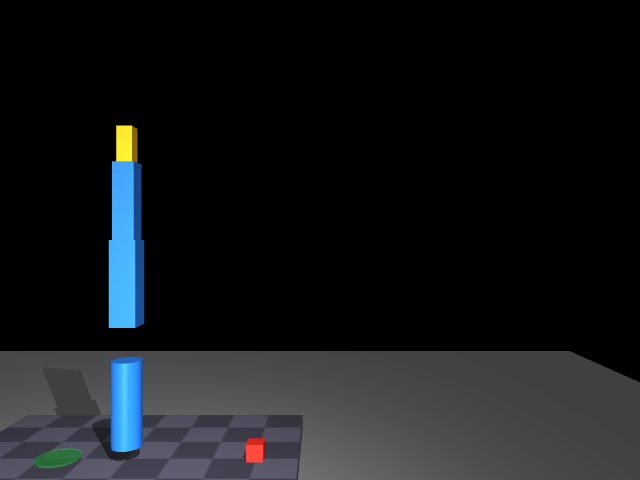 MuJoCo scene (offscreen render) | 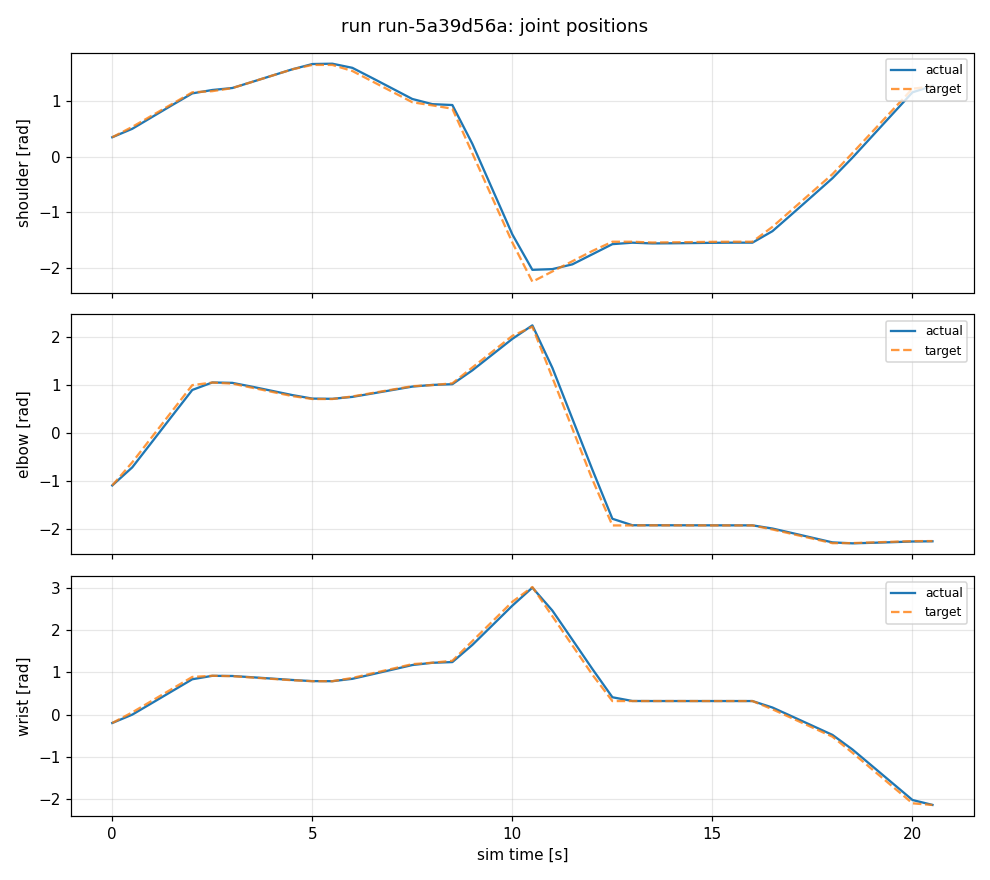 Joint positions: target vs actual |
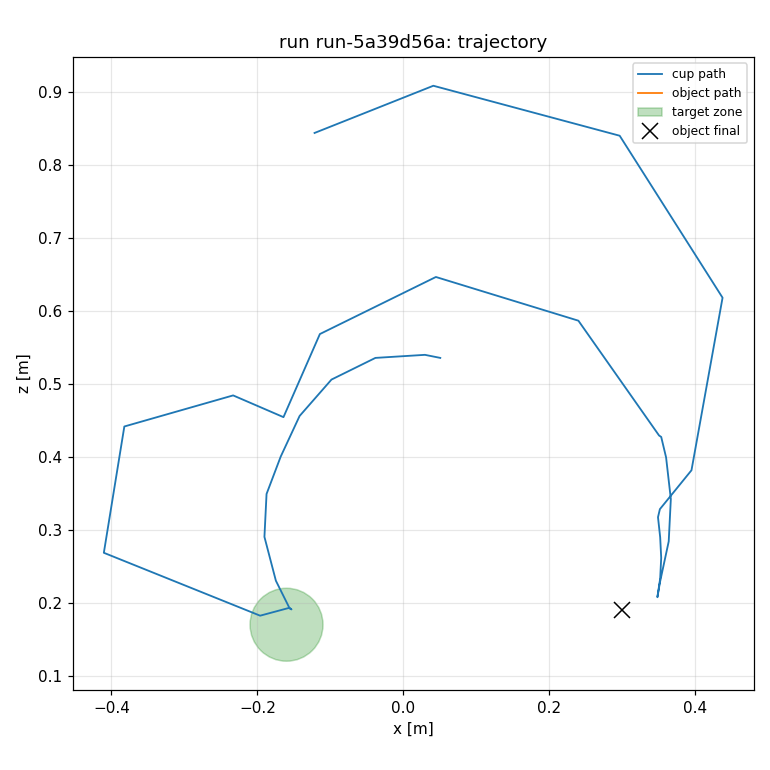 Trajectory & target zone | 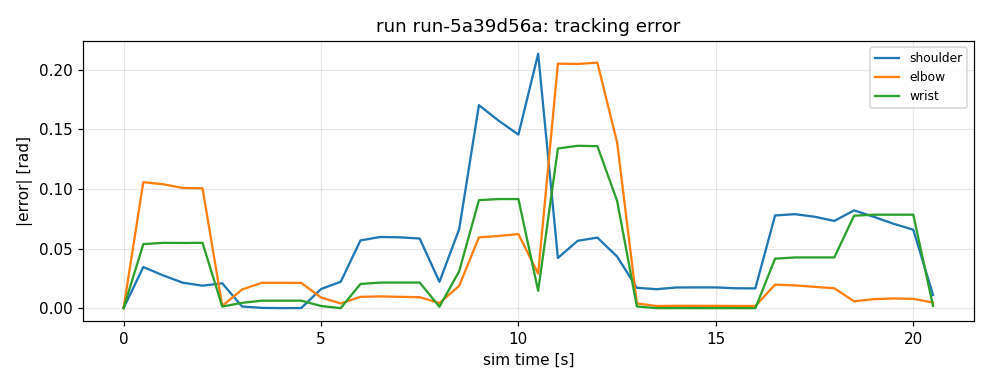 Tracking error over time |
🚀 Quick start (30 seconds)
No DSH needed — pure Python. Requirements: Python ≥ 3.10 with
mujoco,numpy,opencv-python,matplotlib,pytest(the Anacondapython3.10env is recommended).
git clone https://github.com/dingkaihu63/dsh-robotic-harness.git
cd dsh-robotic-harness

# 1) run the test suite (per-file process isolation avoids native DLL
#    collisions between mujoco/cv2/pyarrow — matches the one-shot worker)
cd python && python run_tests.py && cd ..

# 2) run the end-to-end demo: happy run + fault run + diagnostics +
#    evidence bundle + Markdown report + timeline + dashboard
PYTHON=<your python3.10> node scripts/demo.mjs
Output lands in examples/demo-output/:
| Artifact | What it is |
|---|---|
report-run-*.md | experiment report with evidence and hypotheses |
timeline-run-*.html | standalone timeline viewer (open in any browser, no server) |
bundle-run-*/ | self-contained evidence bundle (manifest + sha256 hashes + telemetry + charts) |
dashboard.html | single-file dashboard over the run store |
.rh/runs/*/artifacts/*.png | the charts shown above |
🏗️ Architecture
flowchart TB
    subgraph DSH["DeepSeek Harness"]
        AGENT["Agent Loop"]
        REG["Tool / Skill Registry"]
        WEB["Web UI"]
    end
    subgraph RH["@robotic-harness/dsh-bundle"]
        CORE["rh-core · project/run store (.rh/)"]
        RTOOLS["rh-tools · ~100 tools"]
        RSKILLS["rh-skills · 25 SKILL.md"]
    end
    subgraph W["robotic_harness_worker (Python ≥3.10, shipped inside the bundle)"]
        M1["assets · cad"]
        M2["simulation"]
        M3["vision · vision_extra"]
        M4["control"]
        M5["models"]
        M6["diagnostics · telemetry"]
        M7["robots"]
        M8["data_pipeline"]
        M9["experiment"]
        M10["ros"]
        M11["knowledge"]
    end
    subgraph OUT["External backends"]
        B1["MuJoCo"]
        B2["ros2 CLI / rosbag2 (ROS-free)"]
        B3["SolidWorks files (registered only)"]
        B4["VLA / model endpoints"]
    end
    AGENT --> RTOOLS
    WEB --> AGENT
    RTOOLS --> CORE
    RSKILLS --> AGENT
    RTOOLS -- "stdio JSON (one-shot process)" --> W
    M2 --> B1
    M10 --> B2
    M1 --> B3
    M5 --> B4
Every tool in the bundle delegates to the Python worker over stdio (python -m robotic_harness_worker <command> --input -). Runs, telemetry, charts and reports are written to the workspace's .rh/ directory by default. One-shot processes give crash isolation: a worker failure never takes down DSH.
📦 Install as a DSH plugin
Requirements: DSH CLI (@deepseek-ai/dsh ≥ 0.1.0-rc.6), pnpm, a Python 3.10 environment.
# 0) environment (example: keep everything on the F: drive)
export DSH_HOME=/f/dsh/.dsh-home
export PATH="/f/dsh/.tools:$PATH"            # directory containing pnpm

# 1) create a profile and install the bundle
dsh plugin --profile rh-demo add ./packages/dsh-bundle

# 2) enable the Web UI
#    Note: the upstream npm release of @deepseek-ai/dsh-web-app depends on the
#    private package @deepseek-ai/dsh-frontend (registry 404), so `pnpm add`
#    fails. Built-in bundles resolve from the dsh install directory, so edit
#    $DSH_HOME/profiles/rh-demo/package.json instead:
#      dsh.profile.bundles = ["@deepseek-ai/dsh-base", "@deepseek-ai/dsh-web-app",
#                             "@robotic-harness/dsh-bundle"]
#    (save as UTF-8 without BOM)

# 3) point rh-tools.pythonPath at your Python 3.10 interpreter in the
#    profile's cordis.patch.yml (a patch replaces the whole row config,
#    so restate every key)

# 4) start the Web UI (pick any free port; 3090 is used here so it never
#    clashes with the default DSH web port 3080 or with other apps)
dsh --profile rh-demo --port 3090
Alternatives: the bundle can also be installed from a tarball (dsh plugin add ./robotic-harness-dsh-bundle-0.1.0.tgz), from git (dsh plugin add github:dingkaihu63/dsh-robotic-harness), or from npm once published. Packaging/publishing steps and checks live in docs/publishing.md.
Then just ask the Agent:
“Run the Robotic Harness pick-place demo: inspect the demo arm, run one clean simulation and one fault-injected simulation, diagnose the failure, export the evidence bundle and generate the report.”
The Agent will drive the rh_* tools step by step and keep every result as evidence.
🧩 Tool & skill surface
~110 rh_* tools and 27 Skills across fourteen domains. The complete table (tool → worker command → risk level) lives in docs/tool-inventory.md. A quick tour:
| Domain | Example tools |
|---|---|
| Assets & CAD | rh_robot_asset_inspect · rh_urdf_validate · rh_urdf_to_mjcf · rh_sdf_validate · rh_cad_inventory · rh_mesh_inspect · rh_inertia_validate · rh_robot_topology_validate · rh_urdf_preview · rh_export_sim_asset |
| ROS 2 | rh_ros_graph_snapshot · rh_ros_topic_profile · rh_ros_qos_check · rh_ros_tf_audit · rh_rosbag_inspect (ROS-free) · rh_rosbag_start/stop · rh_ros_call_whitelisted_action |
| Control | rh_control_trace_analyze · rh_trajectory_validate · rh_planned_actual_compare · rh_pid_experiment_prepare · rh_controller_config_compare · rh_system_identification_job |
| Vision | rh_camera_health_check · rh_calibration_inspect · rh_perception_run · rh_perception_compare · rh_pose_transform_validate · rh_annotate_failure_frame |
| Models | rh_model_inventory · rh_model_health · rh_model_infer_job · rh_model_benchmark · rh_capability_route_explain · rh_policy_rollout_compare |
| Simulation | rh_sim_run · rh_sim_fault_inject · rh_sim_batch_benchmark · rh_sim_replay · rh_sim_real_gap_report · rh_sim_validate_scenario |
| Robots | rh_robot_preflight · rh_experiment_prepare · rh_experiment_request_approval · rh_experiment_start · rh_experiment_pause · rh_experiment_safe_cancel · rh_experiment_status · rh_experiment_finalize |
| Telemetry | rh_telemetry_channels · rh_telemetry_window · rh_anomaly_scan · rh_failure_evidence_collect · rh_run_compare · rh_diagnose_run · rh_timeline_export |
| Data | rh_data_inventory · rh_data_time_sync_estimate · rh_data_align_streams · rh_data_transform_apply · rh_data_split_create · rh_data_leakage_check · rh_data_deidentify · rh_data_convert_rosbag · rh_data_export_lerobot · rh_dataset_version_create · rh_dataset_card_generate |
| Experiment | rh_experiment_spec_create · rh_experiment_matrix_expand · rh_benchmark_start · rh_metrics_compute · rh_ablation_compare · rh_benchmark_report |
| Knowledge & memory | rh_docs_index · rh_manual_search · rh_error_code_lookup · rh_case_search · rh_memory_retrieve · rh_memory_ingest |
| Research & literature | rh_literature_search · rh_problem_solutions — search public literature for the problem you're facing (any stage), get evidence-backed options to choose from |
| Autonomous training | rh_train_server_check · rh_train_plan_create · rh_train_data_discovery · rh_train_job_prepare · rh_train_job_status · rh_train_report — plan a training run, find supplementary datasets, prepare the job locally, and only with your explicit confirmation submit it to a configured server |
| Reports | rh_evidence_export · rh_report_generate · rh_dashboard_generate |
Implementation status
The full plan's tool/skill surface is implemented as demo-grade adapters:
- ✅ Pure-software modules — complete and tested (assets, CAD, simulation, control, vision, models, diagnostics, telemetry, data, experiment, knowledge, memory, research, training).
- 🔌 Backend-dependent modules — ROS 2 live probes, SolidWorks parsing, real-robot adapters, heavy VLA models exist as honest adapters: when the backend is missing they return a structured
backend: "unavailable"diagnostic with install instructions, never a fake pass. rosbag2 inspection/conversion works without ROS.
🎯 The demo (MuJoCo pick-and-place)
- Scenario: planar 3-DOF arm with a suction cup picks a red box from the table and places it into a target zone (MuJoCo, built from primitives, no external meshes).
- Perception routing: color segmentation (low latency) → generic saliency segmentation on failure/occlusion; the routing reason is recorded.
- Fault injection (deterministic, seed-controlled):
perception_offset_px,gripper_slip,tf_offset,sensor_noise,model_timeout_s,occlusion. - Telemetry: joint target/actual/error, suction state, object pose, perception estimate vs ground truth; charts and a scene render.
- Diagnostics: the rule engine produces layered evidence — facts (timestamps and values), rule findings (thresholds/state machine), candidate root causes (grouped by perception/calibration/mechanical/control/system layer, with likelihood and missing evidence). The final conclusion is left to a human.
- Evidence: self-contained evidence bundle (hash manifest + all records) + Markdown report + timeline.html.
⚠️ Known limitations
Stated honestly, so testers are never surprised.
- The suction grasp is a kinematic implementation (the object follows the cup while attached) — noted in run configs and reports.
- Perception uses real offscreen rendering when the renderer is available; otherwise it degrades to ground-truth + noise simulation (recorded in telemetry). If OpenCV crashes natively (e.g., DLL conflicts in exotic environments), perception degrades to the same fallback instead of failing the run. Headless Linux needs a software GL (
sudo apt install libosmesa6 libgl1+MUJOCO_GL=osmesa) for offscreen rendering; the CI runs this way. - Live ROS 2 tools require the
ros2CLI; without it they return a structuredbackend: "unavailable"diagnostic. rosbag2 inspection/conversion works without ROS. - Real-robot tools are a state machine + preflight only: hardware items are reported as
skip(never faked) until a hardware adapter exists. Simulation results are not real-robot evidence; there is no arbitrary topic-publish, real-robot write, or e-stop-release capability. - SolidWorks files are registered in inventories but not parsed (commercial software); FreeCAD deep integration is optional.
- RLDS export produces a manifest skeleton (full TFDS export requires tensorflow); LeRobot export uses parquet when pyarrow is present, CSV otherwise.
- Literature search and dataset discovery are best-effort network calls: when the API is unreachable they return a structured
backend: "unavailable"result instead of fabricating papers or datasets. - Training tools are workflow scaffolding: the generated training script is a deterministic template placeholder (not real model code), remote submission requires an explicitly configured server plus your confirmation, and only allowlisted commands run remotely.
🌊 Future vision
Robotic Harness is, for now, an attempt built with one person's limited time and resources. It is rough around the edges, many modules still await validation in real environments, and it surely hides bugs. That is exactly why community participation matters more than anything else:
- Use it — real usage is the best testing and the most convincing evidence for what to build next;
- Fix it — report bugs, tighten edge cases, correct the docs; every fix makes the path smoother for the next person;
- Extend it — new Skills, scenarios, failure cases, data adapters, ROS 2 live validation, new domains;
The destination we hope for is not "one person's plugin", but an open platform raised on the open-source DeepSeek Harness foundation, shaped by generations of community contribution, that fits robotics and embodied-intelligence development better — where the model orchestrates, specialized capabilities each do their own job, every experiment keeps full evidence, and every contribution is recorded and reused.
正因有涓涓细流,才铸就了大江大河。 — every great river begins as trickling streams; open source is how those streams find each other.
Every contribution is welcome. 🌊
📂 Repository layout
packages/dsh-bundle/   the installable DSH bundle (TS plugins, skills/, worker copy, fixtures, scenarios)
python/                the robotic_harness_worker Python package + tests (run_tests.py)
fixtures/              URDF/SDF test assets + a demo rosbag2 (no ROS needed)
scenarios/             MuJoCo scenario definitions (JSON)
scripts/               sync-worker / demo / smoke-worker
docs/                  architecture, safety boundary, roadmap, demo guide, tool inventory, worker contract
examples/demo-output/  sample one-command demo output
📚 Documentation
- Architecture & domain model
- Safety boundary
- Roadmap
- Demo guide
- Tool inventory
- Worker module contract — for contributors adding new domains
- Contributing · Security policy · Third-party notices
- 中文文档:README.zh.md
🤝 Contributing
We welcome testers, bug reports, and contributors — see CONTRIBUTING.md for the module contract, testing workflow and contribution guidelines. Good first contributions: a new Skill, a new scenario, a new failure case, a data importer/exporter, or ROS 2 live-backend validation on real hardware.
📄 License
MIT. Third-party components and assets carry their own licenses (see THIRD_PARTY_NOTICES.md). This repository is not affiliated with DeepSeek; DSH is a separate project (MIT, deepseek-harness).
查看使用指南 →
该插件的安装步骤、关键要点、FAQ 与兼容性说明(基于已收录字段派生)。
收录徽章

[](https://deepseek-plugin.org/plugins/dingkaihu63/dsh-robotic-harness/packages/dsh-bundle)把这段 markdown 粘贴到你的 GitHub README,链接回本插件详情页。徽章只声明已被本站收录,不代表安全认证。