为 DeepSeek Harness 打包 8 个 Sealos Cloud 技能,覆盖部署、云数据库、对象存储与本地只读拓扑视图。

- 语言
- Python
- 分支
- main
安装
$ dsh plugin --profile web add github:labring/sealos-skills在终端中运行以上命令,通过 dsh CLI 安装此插件。可在右上角切换 Profile。 第一次用 dsh?看这篇新手教程
对话式安装
帮我安装 DeepSeek Harness 插件 labring/sealos-skills:先查看仓库 https://github.com/labring/sealos-skills 确认安全性,然后执行安装命令并验证插件加载成功。
把这段指令粘贴给 DSH Web GUI 里的助手,由它代你完成安装与验证。
一句话定位
把 Sealos Cloud 团队维护的 8 个 Agent Skill 一次性打包进 DeepSeek Harness 的 web profile,让 AI agent 在会话里直接完成项目部署、云数据库、S3 对象存储、Sealos Desktop 应用开发等操作。
核心能力
- 一键部署本地或 GitHub 项目到 Sealos Cloud,并在部署后自动校验实际 URL、登录流程、日志、数据库与资源清单
- 评估仓库的云原生就绪度(0-12 分),并在评分通过后把任务交接给 Dockerfile 生成阶段
- 为任意项目生成生产可用的 Dockerfile(含多阶段构建、monorepo 与 build-fix 迭代)
- 把 Docker Compose 或安装文档转换为带角色化资源配额、官方路由语义、KubeBlocks 数据库与 Job 闸门的 Sealos 模板
- 通过 sealos-cli 创建并连接 Sealos Cloud 上的 Postgres、MySQL、MongoDB、Redis 等托管数据库,仅写入必需的本地环境变量
- 通过 sealos-cli s3 创建并管理 Sealos S3 兼容对象存储桶、访问凭证与预签名 URL,默认私有、公开访问需确认
- 提供 Sealos Desktop 应用开发指导,封装 SDK 集成、iframe 调试与新手教程
- 在本地 127.0.0.1 启动只读 canvas UI,读取已部署项目的 .sealos/state.json 与 kubectl 资源,仅展示不修改
技术实现
- 语言: JavaScript (ESM)
- 关键依赖:
@deepseek-ai/cordis(peer, 由宿主注入)、yaml^2.4.2 (用于解析 SKILL.md 的 YAML frontmatter) - 架构模式: Cordis 插件,通过
inject = ['skills']依赖宿主 ctx.skills,调用ctx.skills.registerProvider()注册名为sealos的 provider,rank=600(与宿主内置 provider 同级)。cordis.patch.yml 在 bundle 阶段追加sealos-skills节点,依赖 @deepseek-ai/dsh-base 已挂载的技能注册中心。 - 入口文件: index.js(同步读取 skills/*/SKILL.md → 注册 provider → list/get 返回技能列表与详情)
适用场景
正在用 DeepSeek Harness 想让 AI agent 直接处理 Sealos Cloud 任务的人。如果只想让 agent 写 Dockerfile、读懂 docker-compose.yml、或者已经部署过项目想看本地资源拓扑图,这个 bundle 也单独可用,但最有价值的还是把"代码→部署→看效果"这条链全跑通。
前置依赖与兼容性
| 依赖 | 最低版本 | 说明 |
|---|---|---|
| DeepSeek Harness | 未声明 | README 文档示例为 npx @deepseek-ai/dsh web,需已安装并初始化 web profile |
| Node.js | 未声明 | index.js 使用 node:fs/promises 与顶层 await;test.js 使用 node:test,建议 Node 18+ |
| pnpm | 未声明 | README 第103行说明 bundle 安装时 pnpm 必须位于 PATH |
| 平台 | 跨平台 | 纯 JS 实现,未声明操作系统限制 |
| 原生模块 | 无 | 仅依赖 yaml,无 node-gyp / 原生扩展 |
| 运行时外部工具 | 按需 | sealos-deploy metadata.compatibility 要求:Sealos 账号/workspace、docker、buildx、gh CLI(按需)、git(按需)、kubectl、Node 18+(可选加速)、Python 3.8+ 与 PyYAML(Phase 5)、kompose/crane(Compose 转换时) |
安装方式
dsh plugin --profile web add github:labring/sealos-skills
配置项
本插件无需额外配置。bundle 在启动时自动扫描仓库内 skills/*/SKILL.md,注册全部 8 个技能到 ctx.skills。
常见问题
Q: 安装后怎么在 DSH 里调用?
A: DSH 没有为这个 bundle 提供 /sealos 斜杠命令,直接告诉 agent "部署到 Sealos Cloud"、"创建云数据库"、"接 S3" 或要求查看上次部署的资源,agent 会通过 skill tool 加载对应的 sealos-* 技能并执行。
Q: 必须安装到 web profile 吗?
A: 是的。README 第103行明确说明这个仓库是 web profile 的 dsh bundle,安装到其他 profile 不会生效。
Q: 使用前要准备哪些外部工具?
A: 真要部署项目到云端,需要 docker、buildx、kubectl、gh CLI(按需)、sealos-cli;纯生成 Dockerfile 或把 docker-compose 转 Sealos 模板只需要 Node.js 和 Python 3.8+。sealos-deploy 的 metadata.compatibility 字段列出了完整清单。
Q: 需要 Sealos Cloud 账号才能用吗?
A: 不一定。云数据库、对象存储、实际部署都需要 Sealos 账号与 workspace;只生成 Dockerfile、转 Compose 模板、查看 canvas 都不需要云端账号。
Q: DSH 默认 bash 沙箱够用吗?
A: 不够。登录 Sealos 会写 ~/.sealos/kubeconfig,默认沙箱禁止该路径,需要在 DSH 配置中启用 sandbox_permissions: danger-full-access,否则登录步骤会被沙箱拦截。
Q: 怎么升级或卸载?
A: 升级:再次执行 dsh plugin --profile web add github:labring/sealos-skills 会覆盖式更新 skills/。卸载:在 profile 中移除这个 bundle 或直接删除 skills/ 目录,DSH 没有为它提供专用的 uninstall 命令。
Q: 8 个技能是怎么决定优先级的?
A: 全部使用 BUNDLED_SKILL_RANK=600(index.js 第8行),与 DSH 内置技能 provider 同级,按技能名升序排列。
上手难度
入门 — bundle 本身无需配置,安装即可在会话中通过自然语言触发;但真正完成云端部署需要 Sealos 账号、容器仓库、sealos-cli 与 kubectl,第一次完整跑通前会有较多外部准备工作。
已知问题与限制
- 安装与登录依赖 pnpm 在 PATH(README:103)
- bash 沙箱默认会拦截 ~/.sealos/kubeconfig 写入,需要显式开启 danger-full-access(README:118)
- bundle 设计目标仅是 web profile,安装到其他 profile 不会生效(README:103)
- 实际云端操作(部署、创建数据库/S3)需要 Sealos 账号、workspace 和容器仓库,纯本地生成产物的能力受限
- canvas 技能要求 .sealos/state.json 中已有经过校验的 last_deploy 证据,否则直接停止而不退化为只读视图(skills/sealos-canvas/SKILL.md:1-7)
- sealos-database/sealos-s3 默认私有访问,公开访问与删除操作被列为 gated,必须用户显式确认(skills/sealos-database/SKILL.md、skills/sealos-s3/SKILL.md)
English | 简体中文 | 繁體中文 | 日本語 | 한국어 | Español | Français | Deutsch | Português (Brasil) | Русский | العربية | हिन्दी | Bahasa Indonesia
Deploy projects to Sealos Cloud from your AI agent.
Sealos Skills is a plugin-first skill pack centered on Sealos Cloud development and deployment. It helps an AI agent inspect a project, prepare missing deployment artifacts, connect Sealos Cloud databases and object storage for development, build or reuse a container image, ship the app to Sealos Cloud, and view deployed resources in a local read-only canvas.
The recommended Codex path is native Codex plugin installation. Cross-host plugin installs, skills.sh, and context-only extension hosts such as Gemini CLI and Qwen Code use the same root skills/** source.
Quick Start
Recommended: install in Codex
Add this repository as a Codex marketplace, then install the Sealos plugin:
codex plugin marketplace add labring/sealos-skills
codex plugin add sealos@sealos
One Sealos plugin installs the deploy, database, S3, canvas, app-builder, and supporting cloud-native skills from root skills/**: sealos-deploy, sealos-database, sealos-s3, sealos-canvas, sealos-app-builder, cloud-native-readiness, dockerfile-skill, and docker-to-sealos.
For compatibility and local Codex testing, install the same plugin with:
npx plugins add https://github.com/labring/sealos-skills --target codex
After installation in Codex, use the plugin from Codex:
- Codex CLI: type
$sealos - Codex App: click the + button in the lower-left corner of the chat input, choose Plugins, then choose Sealos
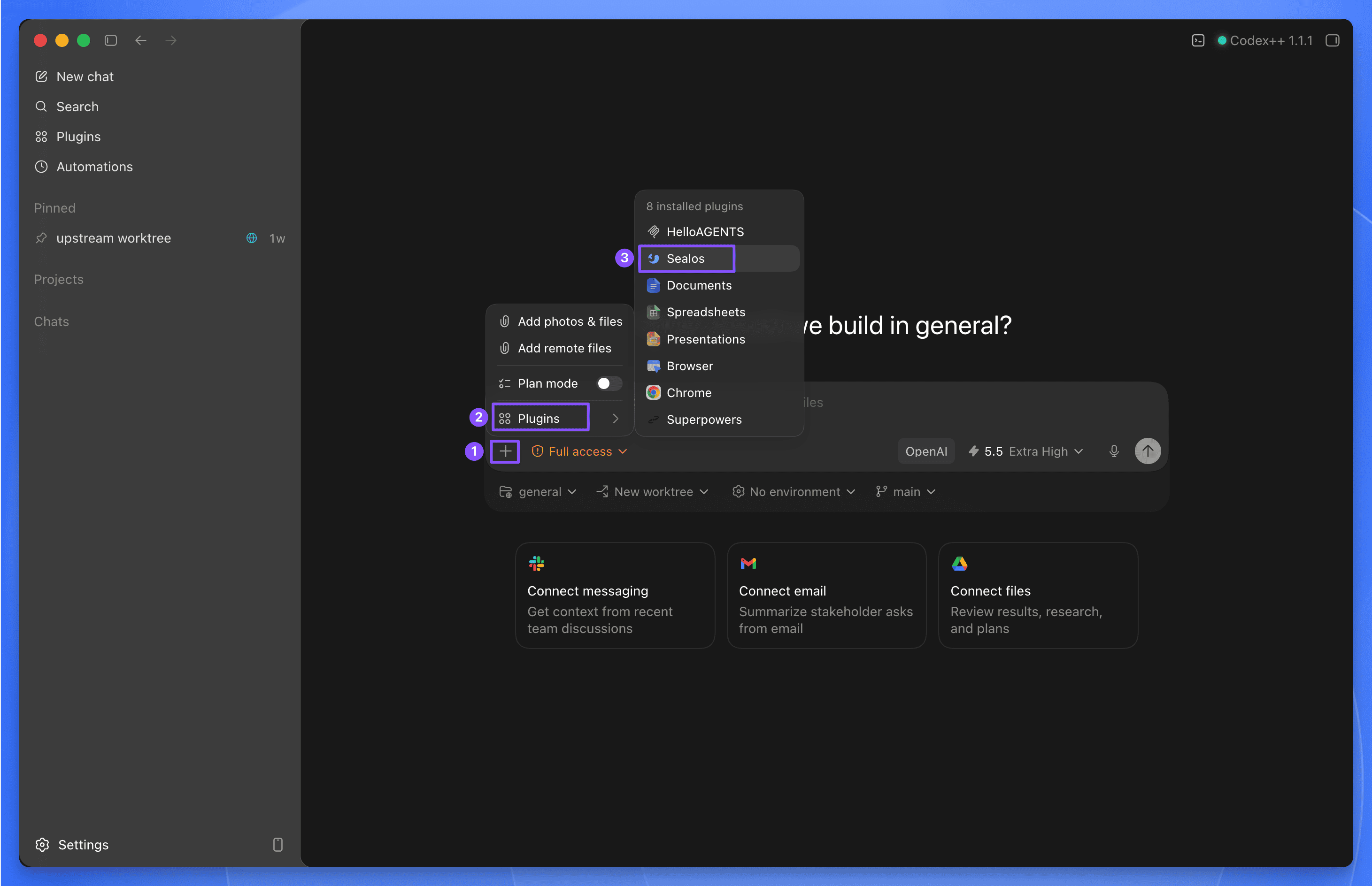
Codex examples:
$sealos deploy this repo to Sealos Cloud
$sealos deploy /path/to/project
$sealos deploy https://github.com/labring-sigs/kite
$sealos create a cloud Postgres database for this repo and wire DATABASE_URL
$sealos create private S3 object storage for uploads and wire env vars
Install in Claude Code
Add this repository as a Claude Code marketplace, then install the Sealos plugin:
claude plugin marketplace add labring/sealos-skills
claude plugin install sealos@sealos
For compatibility with cross-host plugin installers, install the same plugin with:
npx plugins add https://github.com/labring/sealos-skills --target claude-code
If you only use one detected agent tool on the machine, you can let plugins choose the target:
npx plugins add https://github.com/labring/sealos-skills
After installation in Claude Code, use /sealos:
/sealos deploy this repo to Sealos Cloud
/sealos deploy /path/to/project
/sealos deploy https://github.com/labring-sigs/kite
/sealos create a cloud Postgres database for this repo and wire DATABASE_URL
/sealos create private S3 object storage for uploads and wire env vars
Test in Qoder
Build the Qoder plugin package from the repository root:
python3 scripts/package-qoder-plugin.py
Import dist/sealos-1.2.5.zip into Qoder. The package exposes the same eight root-level skills as the Codex plugin and provides /sealos as its command entry point.
Qoder examples:
/sealos deploy this repo to Sealos Cloud
/sealos create a cloud Postgres database for this repo and wire DATABASE_URL
/sealos create private S3 object storage for uploads and wire env vars
/sealos show the resources created by the last deployment
Install in DeepSeek Harness
This repository is a dsh profile bundle over the same root skills/** source. After npx @deepseek-ai/dsh web works, install it into the same web profile (pnpm must be on PATH):
npx @deepseek-ai/dsh plugin --profile web add github:labring/sealos-skills
npx @deepseek-ai/dsh web
A local checkout:
npx @deepseek-ai/dsh plugin --profile web add /path/to/sealos-skills
The eight root skills appear in the session skill catalog. Ask the agent to deploy to Sealos Cloud; it loads sealos-deploy (and sibling skills as needed) through the skill tool, then runs kubectl / sealos-cli through bash.
The default bash sandbox blocks writes outside the workspace. Login writes ~/.sealos/kubeconfig, so those commands need sandbox_permissions: danger-full-access.
Other supported AI tools
| Tool | Install | Usage |
|---|---|---|
| Codex CLI / Codex App | codex plugin marketplace add labring/sealos-skills then codex plugin add sealos@sealos | $sealos in Codex CLI, or + → Plugins → Sealos in Codex App |
| Claude Code | claude plugin marketplace add labring/sealos-skills then claude plugin install sealos@sealos | /sealos |
| Claude Code compatibility path | npx plugins add https://github.com/labring/sealos-skills --target claude-code | /sealos |
| Qoder | Build with python3 scripts/package-qoder-plugin.py, then import the ZIP | /sealos or automatic skill selection |
| DeepSeek Harness | npx @deepseek-ai/dsh plugin --profile web add github:labring/sealos-skills | Ask the agent to use Sealos skills; there is no /sealos slash command |
| OpenClaw / ClawHub | clawhub install labring/sealos-skills | Host command exposure depends on the ClawHub runtime |
| CodeBuddy | /plugin marketplace add labring/sealos-skills | Host command exposure depends on the CodeBuddy runtime |
| Gemini CLI | gemini extensions install https://github.com/labring/sealos-skills | Context-only extension; ask Gemini to use Sealos Skills |
| Qwen Code | qwen extensions install https://github.com/labring/sealos-skills | Context-only extension; ask Qwen to use Sealos Skills |
| Amp / Kimi / generic repo importers | Import https://github.com/labring/sealos-skills.git | Host-dependent |
Gemini CLI and Qwen Code manifests provide repository context through CLAUDE.md; they do not claim slash-command support.
Alternative: install as a skills.sh skill pack
If your agent uses skills.sh directly, install the same skills pack with:
npx skills add labring/sealos-skills
Then run the deploy skill directly:
/sealos-deploy
/sealos-deploy /path/to/project
/sealos-deploy https://github.com/labring-sigs/kite
/sealos-database create a cloud Postgres database for this repo and wire DATABASE_URL
/sealos-s3 create private object storage for uploads and wire env vars
After a project has been deployed and .sealos/state.json contains verified last_deploy runtime evidence, use the sealos-canvas skill through your installed plugin entry point for a local read-only view. Canvas stays plugin-pack mediated because it consumes verified deployment state.
/sealos-deploy, /sealos-database, and /sealos-s3 are direct skills.sh skill entries. Plugin usage should go through $sealos in Codex or /sealos in Claude Code.
Why Use the Plugin
Prefer the plugin install for Codex, Claude Code, and Qoder because it:
- installs all Sealos skills as one managed package
- exposes the same skills across supported agent tools
- keeps the plugin metadata, logo, prompts, commands, and capabilities together
- avoids maintaining a separate packaged copy of the skills
Plugin Distribution
The Codex integration follows OpenAI's Codex plugin build guide:
.codex-plugin/plugin.jsoncontains plugin identity, discovery metadata, interface copy, default prompts, brand metadata, and asset paths relative to the repository root..agents/plugins/marketplace.jsonregisters this repo-local plugin for local Codex marketplace testing..claude-plugin/plugin.jsonand.claude-plugin/marketplace.jsondefine the Claude Code-compatible plugin surface..qoder-plugin/plugin.jsondefines the Qoder plugin surface and explicitly exposes all eight Codex skills.qoder.mdprovides Qoder-level routing and safety instructions without copying skill implementations.distribution/platforms.jsonrecords platform support claims and evidence.marketplaces/README.mdowns marketplace rules and prevents command-support overclaims.scripts/validate-codex-plugin.pyvalidates the Codex manifest, Claude Code metadata, repo marketplaces, platform registry, and asset paths.scripts/package-qoder-plugin.pybuilds a Qoder-compatible ZIP with the plugin manifest at the archive root.skills/**/SKILL.mdremains the only skill source; do not add a second packaged copy of the skills.package.json,cordis.patch.yml, andindex.jsregister that same root skill tree as a DeepSeek Harness profile bundle.
Validate plugin metadata before publishing or pushing manifest changes:
python3 scripts/validate-codex-plugin.py
python3 -m json.tool .codex-plugin/plugin.json >/dev/null
python3 -m json.tool plugin.json >/dev/null
python3 -m json.tool .agents/plugins/marketplace.json >/dev/null
python3 -m json.tool marketplace.json >/dev/null
python3 -m json.tool .claude-plugin/plugin.json >/dev/null
python3 -m json.tool .claude-plugin/marketplace.json >/dev/null
python3 -m json.tool .qoder-plugin/plugin.json >/dev/null
python3 -m json.tool distribution/platforms.json >/dev/null
How Setup Works
You only need a plugin-compatible or skills.sh compatible AI agent and a project to deploy.
During the deploy, database, and object-storage flows, Sealos Skills will:
- check whether tools such as Docker and
kubectlare available - guide the user through Sealos login when needed
- use
sealos-clifor Sealos Cloud database creation, connection details, and database operations - use
sealos-cli s3for Sealos object storage buckets, credentials, quota checks, object operations, and presigned URLs - use or help prepare a container registry path such as Docker Hub or GHCR
For an actual deployment, you will still need a Sealos Cloud account and access to a container registry, but these do not need to be fully set up before the skill starts. For database and object-storage work, you need a Sealos Cloud account and a workspace that can create the requested resources.
What Sealos Deploy Handles
On a typical deploy, the agent will:
- assess the project structure and runtime needs
- reuse an existing image or build one when needed
- generate a Sealos template
- deploy and verify rollout
- verify the actual Sealos App URL, logs, login/setup flow for web apps, and resource footprint before reporting the app as usable
Later runs can switch to an in-place update flow when an existing deployment is detected.
What Sealos Database Handles
For a local project or Devbox that needs a cloud database, the agent will:
- detect database signals such as
DATABASE_URL, Prisma, Drizzle, MongoDB, MySQL, or Redis - use
sealos-cli databaseto list, create, inspect, and connect Sealos Cloud databases - write only the required local env key without exposing secrets in chat
- verify the app's real database path through migrations, introspection, or startup checks
- manage public access only after confirmation
What Sealos S3 Handles
For a local project or Devbox that needs S3-compatible object storage, the agent will:
- detect object-storage signals such as S3 env keys, AWS SDK usage, MinIO, upload paths, or presigned URL code
- use
sealos-cli s3fromzjy365/sealos-cli#28to list, create, inspect, and update object storage buckets - initialize S3 credentials only when needed and keep access keys out of chat
- wire the smallest required local env keys for bucket, endpoint, access key, secret key, region, and path-style settings
- verify upload, list, download, delete, or presigned URL behavior with the project's real storage path
- make buckets public or rotate credentials only after confirmation
What Sealos Canvas Handles
For a repository already deployed by Sealos Deploy, the agent will:
- Read
.sealos/state.jsonto locate the deployed app. - Query the Sealos namespace with read-only
kubectl getcommands. - Start a temporary
127.0.0.1canvas UI. - Output and open the local UI address for inspection.
If the project has not been deployed yet, Sealos Canvas stops and directs the user to deploy the project first.
Included Skills
The plugin and skills.sh pack expose the same skill source:
sealos-deploy— deploy a local or GitHub project to Sealos Cloudsealos-database— create, connect, and operate Sealos Cloud databases for developmentsealos-s3— create buckets, connect credentials, check quota, and operate Sealos S3-compatible object storagesealos-canvas— view deployed Sealos resources in a local read-only canvas UIsealos-app-builder— build Sealos Desktop apps with SDK integrationcloud-native-readiness— assess deployment readinessdockerfile-skill— generate production-ready Dockerfilesdocker-to-sealos— convert Docker Compose services into Sealos templates
Repository
skills/ is the single source of truth for Sealos deploy, Sealos canvas, and the supporting skills used during the deploy flow. The same root-level skills directory serves skills.sh installs and every plugin or extension manifest in this repository.
Important distribution files:
.codex-plugin/plugin.json— Codex plugin manifest.agents/plugins/marketplace.json— local Codex marketplace entry.claude-plugin/plugin.json— Claude Code-compatible plugin manifest.qoder-plugin/plugin.json— Qoder plugin manifestqoder.md— Qoder plugin routing and safety instructionsmarketplace.jsonand.claude-plugin/marketplace.json— Claude-compatible marketplace entries.codebuddy-plugin/marketplace.json— CodeBuddy marketplace entrygemini-extension.json— Gemini CLI context extensionqwen-extension.json— Qwen Code context extensionopenclaw.plugin.json— OpenClaw / ClawHub bundle pointerpackage.json,cordis.patch.yml, andindex.js— DeepSeek Harness profile bundle; registers rootskills/**onctx.skillscommands/sealos.md—/sealosplugin command entry for compatible hostsdistribution/platforms.json— platform support registrymarketplaces/README.md— marketplace rules and support-claim ownershipscripts/validate-codex-plugin.py— Codex plugin validationscripts/package-qoder-plugin.py— Qoder ZIP packager
Do not add a second packaged copy of the skills. Root skills/** is the only skill source for all installation paths.
License
MIT
查看使用指南 →
该插件的安装步骤、关键要点、FAQ 与兼容性说明(基于已收录字段派生)。
收录徽章

[](https://deepseek-plugin.org/plugins/labring/sealos-skills)把这段 markdown 粘贴到你的 GitHub README,链接回本插件详情页。徽章只声明已被本站收录,不代表安全认证。