为 dsh 中无联网能力的文本模型补上网页搜索、X 搜索与单页抓取,注册 x_search 与 read_page 工具并接管 web_search,让模型直接拿到带来源的结构化证据。

- 语言
- TypeScript
- License
- MIT
- 分支
- main
安装
$ dsh plugin --profile web add @liustack/modsearch在终端中运行以上命令,通过 dsh CLI 安装此插件。可在右上角切换 Profile。 第一次用 dsh?看这篇新手教程
对话式安装
帮我安装 DeepSeek Harness 插件 liustack/modsearch:先查看仓库 https://github.com/liustack/modsearch 确认安全性,然后执行安装命令并验证插件加载成功。
把这段指令粘贴给 DSH Web GUI 里的助手,由它代你完成安装与验证。
一句话定位
modsearch 是 DeepSeek Harness (dsh) 的联网搜索插件,给原本没有上网能力的文本模型补上网页搜索、X 搜索、单页抓取三种能力,让模型在对话中直接拿到带来源链接的结构化证据,而不是只能凭训练数据回答。
核心能力
- 在 dsh 宿主中接管 dsh 原生 web_search 的搜索后端,模型看到的工具名和 schema 不变、引用卡片保留,后端换为 modsearch 的引擎链
- 额外注册两个 dsh 没有的工具:搜 X(推特)的
x_search与带焦点读单页的read_page,自动出现在模型的工具列表中 - 同时跑多个数据源(
--source web,x):网页与 X 并发执行,结果分开返回,每条带source、requestedSource、engine、status - 单页抓取(
-u)无需任何配置:内置 local 引擎走 HTTP 直拉,配合 SSRF 防护与逐跳 IP 钉死,DNS 重绑定无法绕过 - 引擎按角色组织优先级(antigravity-cli → tavily/exa/firecrawl;X 走 grok-cli;抓取兜底到 local),quota 用尽自动 failover;
cooldown默认开启,会把耗尽额度的引擎暂移到链尾
技术实现
- 语言: TypeScript(Node.js ESM)+ 纯 JS 的 dsh 插件端(
dsh/index.js,仅用 node 内建模块,无打包) - 关键依赖:
commander(CLI 子命令路由)、undici(本地 fetcher 的 HTTP 客户端与 Agent 池)、@biomejs/biome/vite/vitest/typescript(仅 devDependencies) - 架构模式: 双形态包 —— 同一个 npm 包既是 CLI(
bin: modsearch→dist/main.js,也对外暴露modsearch <args>),也是 dsh cordis 插件。package.json的dsh.bundle.patch指向cordis.patch.yml,由它把@liustack/modsearch注入宿主 dsh 的 cordis 层、把 web 缝的searchProvider指到本插件;插件端dsh/index.js导出apply(ctx, config),spawn 同包内的dist/main.js调用 CLI,不走 PATH 查找,插件与引擎版本强绑定 - 入口文件: CLI 入口
src/main.ts;DSH 插件入口dsh/index.js;CLI 调用方生成的 schema 见src/schema.ts与dsh/search-schema.json/dsh/fetch-schema.json(由单元测试保证同步)
适用场景
日常用 dsh 跟 DeepSeek/GLM 等纯文本模型对话、需要查最新资讯、想看 X 上对某话题的反应、或拿到一个链接想读具体内容时 —— 装上本插件后无需记任何命令,正常聊天提问或贴 URL 即可。也适合想做关键词调研、需要带可点击来源链接的引用,或要让模型读一篇完整博客、API 文档页的开发者。
前置依赖与兼容性
| 依赖 | 最低版本 | 说明 |
|---|---|---|
| Node.js | >= 22.13 | package.json 中 engines.node;src/doctor.ts 同样把 22.13.0 写为最低门槛 |
| dsh | 未声明具体版本 | 通过 dsh.bundle.patch(cordis.patch.yml)注入宿主 cordis 层;宿主必须暴露 ctx.web.registerSearchProvider 与 ctx.tools.register;package.json 无声明 peerDependencies |
| 平台 | macOS / Windows / Linux | package.json 未限制 os/cpu;Antigravity CLI / Grok Build 自带二进制是子进程调用,目标平台跟随各自官方安装器 |
| 原生模块 | 无 | 未引入任何 node-gyp 依赖;HTTP 抓取使用 undici 自带 Agent,进程通信走 Node 内建 node:child_process |
| 外部账号 | 网页搜索至少一个 | 默认 Antigravity CLI(免 key、浏览器登录一次);可另配 Tavily/Exa/Firecrawl 任一免费 key;X 搜索需 Grok Build + SuperGrok 或 X Premium 订阅 |
安装方式
dsh plugin --profile web add github:liustack/modsearch
配置项
配置文件在 ~/.modsearch/config.json(写时 0600,modsearch config show 渲染时 key 自动打码)。优先级:CLI 参数 > 环境变量 > 配置文件 > 内置默认。文件本身可选;不创建也能跑,只是无法固定引擎或自定义端点。
| 配置 | 类型 | 说明 | 默认值 |
|---|---|---|---|
engine | 字符串 | 网页搜索时优先使用的引擎;空字符串表示按本机情况自动选。合法值:antigravity-cli、tavily、exa、firecrawl;别名 agy/antigravity/grok/http/direct 会被规范化到规范名 | 空(自动) |
cooldown | on / off | 配额冷却故障转移开关;开启时把耗尽额度的引擎挪到链尾,并写状态文件;关闭则完全不读写状态 | on |
allowPrivateNetwork | 布尔 | 是否允许本地 fetcher 到达保留与内网地址段(用于 VPN 场景);Firecrawl 抓取始终不受此开关影响 | false |
engines.<name>.apiKey | 字符串 | 该引擎的 API key,<name> ∈ tavily/exa/firecrawl;同名环境变量(TAVILY_API_KEY/EXA_API_KEY/FIRECRAWL_API_KEY)覆盖文件值 | 无 |
engines.<name>.baseURL | 字符串 | 把该引擎指向兼容第三方网关/自建端点;必须是完整 http(s) URL,空字符串取消覆盖;<name> ∈ tavily/exa/firecrawl,对应环境变量 TAVILY_BASE_URL/EXA_BASE_URL/FIRECRAWL_BASE_URL | 引擎各自官方端点 |
engines.<name>.bin | 字符串 | 该引擎的可执行路径;<name> ∈ antigravity-cli(默认 agy)/ grok-cli(默认 grok) | 引擎各自默认 |
engines.<name>.model | 字符串 | 该引擎使用的模型名;目前适用于 antigravity-cli,默认 gemini-3.6-flash-low | 引擎各自默认 |
TAVILY_API_KEY / EXA_API_KEY / FIRECRAWL_API_KEY | 环境变量 | 同名 apiKey 的环境变量形式,优先级高于配置文件 | 无 |
MODSEARCH_DSH_CLI | 环境变量 | dsh 插件端在跑测试时使用的 CLI 路径覆盖(详见 src/dshPlugin.test.ts) | 无 |
子命令:modsearch config init 创建骨架、modsearch config set <key> <value> 写值、modsearch config show 渲染有效配置(来源标签 + key 打码)、modsearch doctor [--json] 体检、modsearch state clear 清空所有冷却状态。
常见问题
Q: modsearch 安装后能直接用吗,还需要配 API key 吗?
A: 单页抓取(-u)零配置即可用,因为内置的 local 引擎始终可用;网页搜索(-q)至少需要一个搜索引擎。默认走 Antigravity CLI,免 key、浏览器登录一次即可用;三个备用引擎 Tavily/Exa/Firecrawl 都有免费额度且不绑卡。什么都不配时,错误信息会列出所有可用的开启方式。
Q: 安装后 dsh 里会有什么变化?
A: 原生的 web_search 工具仍叫同名、模型看到的就是原生 schema 和引用卡片,背后被换成 modsearch 的引擎链;另外多出两个 dsh 没有的工具:搜 X 的 x_search 和带焦点读单页的 read_page,直接出现在模型的可用工具列表里,不需要手动触发。
Q: 搜索时会扣哪个账号的额度?会被哪个引擎处理?
A: 未用 -e 强制指定时,所有就绪引擎按角色优先级组成故障转移链。结果里 results[i].engine 标明实际回答者,attempts 列出尝试顺序,warnings 会在某个引擎失败、被降级、或被 cooldown 时写出原因,永远不会无声扣费。
Q: 为什么同一个 X 问题有时候返回的不是 X 内容?
A: 当 Grok Build 没装、未登录或本轮失败时,路由器会自动退回到网页搜索引擎回答,并在结果里把 source 标为 web、requestedSource 标为 x、status 标为 degraded、warnings 写明退路原因;不会假装是 X 真实结果。--source web,x 同时要求两边时,如果 X 不可达则单独返回一条 status: "unavailable" 的空条目,占位但显式。
Q: 如何知道本机到底配了什么、哪里出问题?
A: 运行 modsearch doctor,纯本地检查,不耗额度不发网络请求,会报 Node 版本、每个引擎的就绪状态与原因、配置来源与权限、私网开关、cooldown 状态,每个未就绪的引擎都附一条可复制的修复命令;加 --json 可输出机读报告供脚本处理。
Q: Antigravity CLI 提示 quota 用完了怎么办?
A: 默认开启 quota cooldown failover:本轮把 antigravity-cli 挪到链尾,下一次直接先用其他引擎。等周重置(错误信息会写明 Resets in …)或加配一个有 key 的引擎(Tavily/Exa/Firecrawl 任一)即可恢复。modsearch state clear 可立刻清空所有冷却。
Q: VPN 把目标地址映射到内网 IP 时怎么处理?
A: 默认拒绝私网/保留地址范围(SSRF 防护)。可通过 --allow-private-network 单次放行,或 modsearch config set allowPrivateNetwork true 设为全局;Firecrawl 抓取始终拒绝私网目标,即便开了开关也不会把内部主机名送到第三方云端。
Q: 卸载会留下什么?
A: 卸载本插件即可。会留在机器上的只有 ~/.modsearch/config.json(你显式配的 key 与端点)和 ~/.modsearch/state.json(冷却状态);不放 hook 也不改宿主本身的配置。
上手难度
入门 —— 一条 dsh 安装命令加一个默认引擎(Antigravity CLI 免 key、浏览器登录一次)即可跑通全部三种能力;想做"高级配置"(自定义第三方端点、切换引擎、关闭 cooldown)才需要读配置手册。
已知问题与限制
- 本地 fetcher 不执行 JavaScript,纯 JS 框架渲染的页面抓回来很薄;返回的
uncertainty字段会显式说明,结果应据此转述而非说页面为空 - 配额是按角色共享的桶:Antigravity CLI 的免费额度是周配额,与 Antigravity 桌面 App、SDK 共用;并发子代理会很快耗尽
- Firecrawl 抓取即便开了
allowPrivateNetwork也始终拒绝私网/保留地址(防止把内部主机名送到第三方云端) - 显式
-e/--engine是硬强制:完全用这一个引擎,不走兜底与本地 fallback,做不到就报错,不会偷偷切到别的引擎去扣别的账号 - 旧配置文件中的
provider/providers与search/fetch/social三角色结构会被自动迁移到新的engine+engines形态,无需手动改文件 - 对 schema-enforced 的子进程引擎(Antigravity CLI 等)通过
--json-schema强约束输出;HTTP 引擎(Tavily/Exa/Firecrawl)由服务端自己保证结构,引擎返回的字段中source/requestedSource/engine/model/status/warnings/attempts/durationSeconds会被 CLI 强制剥离以防伪造

ModSearch
Give the web to any model without it: search, X, and any page.
🥇 The most powerful web search plugin for DeepSeek Harness (dsh) 🥇
Engines: Antigravity CLI (free, default) · Tavily · Exa · Firecrawl · Grok (X) · local, with automatic failover
简体中文 · Troubleshooting · Configuration · Output contract · Security · ModLens (vision)





Models like DeepSeek-V4-Flash have no web access, or a weak one. ModSearch is a plug-in that greatly strengthens the model's web search, X search, and single-page fetch.
Talk to us
Something broken, or something missing? Open an issue. For everything else, come find me on X: @liustack. What you built with it, which harness you are on, what should come next. New releases land there first, and a proper community space is on the way.
Features
- 🥇 The most powerful web search plugin for DeepSeek Harness (dsh): one command,
npx -y @deepseek-ai/dsh plugin --profile web add @liustack/[email protected], and dsh's built-inweb_searchruns on the modsearch engine chain with no API key, keeping its native citation cards. Two tools dsh does not have land beside it:x_searchfor X (Twitter) andread_pagefor focused single-page reading. Updating is the same command again. The version is named rather than@latestbecause pnpm 11 holds back releases published in the last 24 hours and resolves the tag against the older versions that remain. Details in harness setup. - Completely free. The default channel is Antigravity CLI, no API key needed. All three fallback channels (Tavily, Exa, Firecrawl) offer monthly free tiers with no card required.
- Automatic failover. When a channel fails or exhausts its quota, the next one takes over.
- Searches X (Twitter). With Grok Build installed, ModSearch queries the corpus that web indexes cannot reach.
- Install once, use everywhere. Works in Claude Code, Codex, Pi, and OpenCode.
Supported engines
Any one of these makes search work. Configure with one command each, keys are stored in ~/.modsearch/config.json (0600, masked when shown):
| Engine | Does | Free tier | Turn it on |
|---|---|---|---|
| Antigravity CLI | web search + page fetch | free, browser sign-in | install agy and sign in |
| Tavily | web search | 1,000 credits/month, no card | modsearch config set tavily.apiKey <key> |
| Exa | web search | $10/month recurring credit (~1,400 searches), no card | modsearch config set exa.apiKey <key> |
| Firecrawl | web search + page fetch | 1,000 credits/month, search even works keyless | modsearch config set firecrawl.apiKey <key> |
| Grok Build | X (Twitter) search | rides SuperGrok or X Premium | install grok and sign in |
| local | page fetch | built in, nothing to install | nothing |
Keys can also come from the environment (TAVILY_API_KEY, EXA_API_KEY, FIRECRAWL_API_KEY). Multiple engines configured means automatic failover, best first. Using a Tavily-, Exa-, or Firecrawl-compatible third-party or self-hosted endpoint? Point the engine at it: modsearch config set tavily.baseURL <url>. Every knob, engine by engine, is in the configuration guide.
Installation
Step 1, set up a search engine (the only part that needs your hands). The default engine, Antigravity CLI, requires a browser sign-in that only you can complete:
curl -fsSL https://antigravity.google/cli/install.sh | bash
agy                                                           # sign in, then exit
Prefer not to install it? Register a free key with Tavily, Exa, or Firecrawl instead (Tavily 1,000 credits a month, Exa about 1,400 searches a month, Firecrawl 1,000 credits a month, no card required by any of them).
Step 2, hand the rest to your AI. Send it this line, along with the key if you chose one:
Install and configure the modsearch skill following https://github.com/liustack/modsearch/blob/main/INSTALL.md, then run the health check and tell me the result.
Usage
Once installed, just chat. Ask anything that needs checking, or paste a URL, and the skill triggers on its own: it picks an engine, runs the search or fetch, and the answer comes back with sources.
See it work
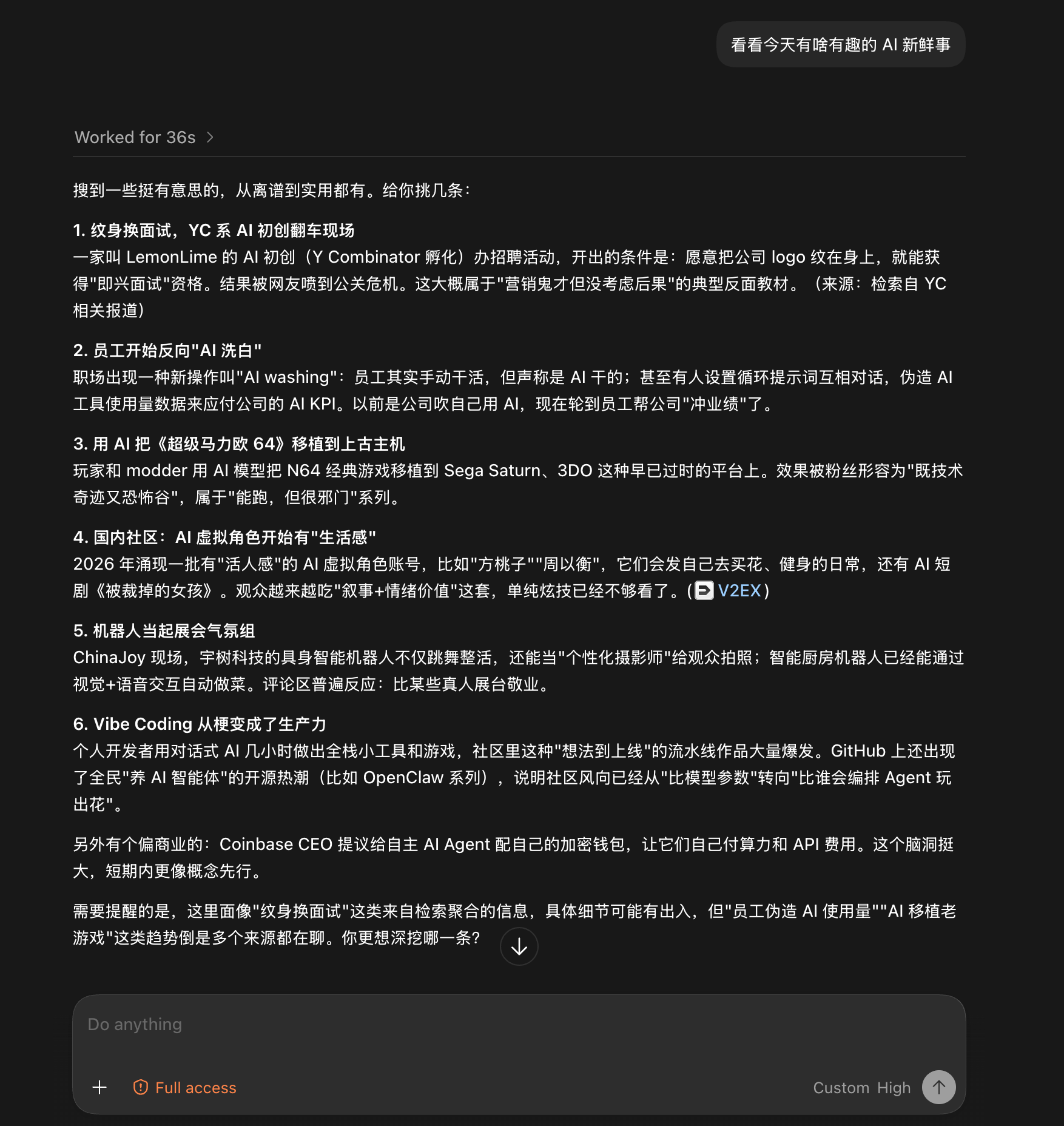
Both screenshots are unedited runs from the Codex desktop app, driving a DeepSeek-V4-Flash that has no web access of its own.
Give it a blog link and ask what the post says. Twenty-five seconds later: a structured summary of the whole post, with no browser involved.

Give it no target at all, just "anything interesting in AI today?". Thirty-six seconds later: six sourced stories, with a closing note on which details came from aggregation and deserve a second look. The note comes from the uncertainty field.
Documentation
| Doc | Read it when |
|---|---|
| INSTALL.md | Installing the skill step by step (written for an agent) |
| CLI manual | The CLI the skill drives: flags, config, doctor |
| Troubleshooting | A command failed and the message needs decoding |
| Configuration | Setting a key, switching engines, fixing config |
| Output contract | Parsing the JSON or building on it |
| Harness setup | Wiring it into Codex, Claude Code, OpenCode, or Pi |
| Security | SSRF guards, DNS-rebinding protection, untrusted input |
| CHANGELOG | Finding what changed in a version |
Contributing
ModSearch does not accept pull requests. The project is maintained by a single author who reviews every line, which is a deliberate choice for reliability. Two effective ways to contribute:
- Open an issue. Bugs, suggestions, confusing errors, unclear docs. Issues are read and shape what gets built next.
- Fork it. Under MIT your copy is fully yours to modify and publish.
Shameless plug
This project runs on LIUSTACK Skills: shaping before you build, coding while you build, dig when it breaks, snapshot when you hand off. Lighter than Superpowers, and stronger.
npx -y skills add liustack/liustack -g
⭐ If it helps, star ModSearch and liustack. Stars are how the next developer finds them.
Star History
Disclaimer
ModSearch is MIT-licensed, so use is not restricted. The author gives no warranty and no endorsement for any particular use, commercial or otherwise. The upstream engines it drives (Antigravity CLI, Tavily, Exa, Firecrawl, Grok Build) each carry their own terms and quotas, and complying with them is the user's responsibility.
License
MIT
查看使用指南 →
该插件的安装步骤、关键要点、FAQ 与兼容性说明(基于已收录字段派生)。
收录徽章

[](https://deepseek-plugin.org/plugins/liustack/modsearch)把这段 markdown 粘贴到你的 GitHub README,链接回本插件详情页。徽章只声明已被本站收录,不代表安全认证。