给 DeepSeek Harness 的纯文本模型装上眼睛,让它们能直接看懂用户粘贴的图片并基于图像内容回答问题。

- 语言
- TypeScript
- License
- MIT
- 分支
- main
安装
$ dsh plugin --profile web add github:oil-oil/dsh-vision在终端中运行以上命令,通过 dsh CLI 安装此插件。可在右上角切换 Profile。 第一次用 dsh?看这篇新手教程
对话式安装
帮我安装 DeepSeek Harness 插件 oil-oil/dsh-vision:先查看仓库 https://github.com/oil-oil/dsh-vision 确认安全性,然后执行安装命令并验证插件加载成功。
把这段指令粘贴给 DSH Web GUI 里的助手,由它代你完成安装与验证。
一句话定位
给 DeepSeek Harness 中的纯文本模型(例如 deepseek-official)装上眼睛,让它们能直接看懂用户粘贴的图片并基于画面内容回答;已经支持图片的模型则继续走原生视觉,完全不绕路。
核心能力
- 原生视觉直通:当前模型支持图片时直接发给原 DeepSeek 适配器,不做任何预处理或压缩
- 外部视觉桥接:主模型仅支持文本时,自动调用外部视觉模型(ZenMux / 百炼 / TokenDance / OpenRouter 等)观察原图
- 多图联合分析:一次请求里所有图片打包成同一个视觉调用,适合前后对比和组合证据
- 故障多级降级:云端失败后依次尝试 Harness 中其他视觉模型 → see 私有配置 → macOS Vision / Tesseract 本地 OCR
- 凭据安全隔离:API Key 走 Harness 凭据服务单向写入,永不回显到聊天或会话日志
- 配置热更新:通过界面或 settings.yaml 修改后无需重启,自动生效
技术实现
- 语言: TypeScript(同时打包出 Node 后端与 React 客户端)
- 关键依赖:
@deepseek-ai/dsh-llm-deepseek(被替换的目标适配器)、@deepseek-ai/dsh-attachment(图片附件读取)、@deepseek-ai/dsh-credentials(API Key 解析)、@deepseek-ai/schemastery(配置 Schema) - 架构模式: 通过
cordis.patch.yml禁用官方llm-deepseek后,以dsh-vision身份注入;以LlmAdapter子类VisionBridgeAdapter接管deepseek-official路由,先判断原模型输入模态再决定直通还是桥接;同时为 Web Profile 注册"视觉识别"设置卡片 - 入口文件:
src/index.ts(服务端apply钩子),前端扩展在src/client/index.tsx
适用场景
当你在用 DeepSeek 等纯文本模型,又希望它能直接读懂粘贴的截图(界面报错、设计稿、表格、代码截图等)时,这个插件让聊天窗口获得接近原生视觉模型的体验;如果你常用 Harness 已经有别的支持图片的模型,桥接会自动让位,不会与原生路径冲突。
前置依赖与兼容性
| 依赖 | 最低版本 | 说明 |
|---|---|---|
| DeepSeek Harness | = 0.1.0-rc.6 | 通过 peerDependencies 固定到这一精确版本,DSH 仍在 Developer Preview |
| Node.js | >= 22.19 | 来自 package.json engines 字段 |
| 操作系统 | macOS / Windows / Linux | 云端桥接与界面无平台限制;macOS 上本地 OCR 走系统 Vision,其他系统需要预装 Tesseract 与语言包 |
| 原生模块 | 无 | 没有 node-pty、sqlite 之类的本地编译依赖 |
| Tesseract | 可选 | 仅在 macOS 之外的本地降级场景需要,自带语言数据不足时会报"没有语言数据" |
安装方式
dsh plugin --profile web add github:oil-oil/dsh-vision
配置项
| 配置 | 类型 | 说明 | 默认值 |
|---|---|---|---|
| visionBackend | 字符串(zenmux / bailian / tokendance / openrouter) | 文本模型的主视觉平台;留空表示"自动选择",按 Harness 其他视觉 → see 配置 → 本地 OCR 顺序尝试 | 未设置 |
| visionBackendModel | 字符串 | 主视觉平台使用的模型 ID,留空使用平台默认模型 | 平台默认值(ZenMux/OpenRouter 用 qwen/qwen3.7-plus,百炼/TokenDance 用 qwen3.7-plus) |
| visionBackendBaseURL | 字符串 | 视觉平台的 API 地址(http/https),用于私有网关或代理 | 平台默认地址 |
| visionProvider | 字符串 | 把 Harness 中某个具体的支持图片的模型固定为视觉路由;与 visionModel 必须同时填写,且不能选 deepseek-official | 未设置 |
| visionModel | 字符串 | 上面选定的 Harness 视觉模型 ID | 未设置 |
| visionConfigFile | 字符串 | see 兼容配置文件路径,留空读取 ~/.config/see/config.env 或 SEE_CONFIG_FILE 环境变量 | ~/.config/see/config.env |
| visionTimeoutMs | 整数(毫秒,≥ 1) | 单次外部视觉调用的最大等待时间 | 600000 |
| maxImages | 整数(1–32) | 一次请求里能联合分析的最大图片数;超过会直接报错 | 8 |
| cacheEntries | 整数(1–1024) | 重复请求视觉识别结果的内存缓存条目上限,按 LRU 淘汰 | 64 |
这些字段都落在
$DSH_HOME/settings.yaml的llm-deepseek段落里;前 4 项(visionBackend、visionBackendModel、visionBackendBaseURL、maxImages)可以在界面"设置 → 插件 → 插件配置 → 视觉识别"卡片里直接改,其余需要在配置文件中手工编辑。
常见问题
Q: 安装后还需要自己申请视觉模型的 API Key 吗?
A: 默认不需要。把"视觉平台"留成"自动选择"即可,插件会先尝试 Harness 里已经配置且声明支持图片的模型,再读取 see 私有配置,最后才走本地 OCR;只有手动指定 ZenMux / 百炼 / TokenDance / OpenRouter 之一时,才需要在卡片里填对应平台的 API Key。
Q: 当前主模型已经支持图片,插件还会插手吗?
A: 不会。VisionBridgeAdapter 在转发前会先调用原生适配器的 resolveModel 检查输入模态,只要包含 image 就直接把整条消息(包含图片)透传给 DeepSeek 适配器,桥接代码完全不参与。
Q: 多张图片会分开识别还是联合分析?
A: 联合分析。一次请求里所有图片会打包成同一个外部视觉调用,因此适合做前后对比、组合证据这类需要同时看到多张图的场景;这也意味着超出会直接报错而不是逐张处理。
Q: macOS 上不联网能识别图片吗?
A: 可以。macOS 上本地降级走系统内置 Vision OCR,无需额外安装;系统 OCR 失败时再尝试 Tesseract。Windows / Linux 用户需要自行安装 Tesseract 与对应语言包,否则会报"本地视觉不可用"。
Q: 单次请求最多能发几张图片?
A: 默认 8 张,可在 1–32 之间调整。超过上限会抛 VISION_IMAGE_LIMIT 错误而不是静默截断,所以粘贴截图前留意 maxImages 设置。
Q: API Key 会被保存到哪里?安全吗?
A: 通过 Harness 官方凭据服务保存,写入后只能看到"是否存在",不会被读回聊天、设置页面或会话日志;也可以用 see 私有的 ~/.config/see/config.env 或同名环境变量提供。本仓库与构建产物都不会写入任何 Key。
Q: 配置改了之后需要重启吗?
A: 不需要。$DSH_HOME/settings.yaml 的 llm-deepseek 段落或界面卡片里改完会自动生效,重启 Web Profile 只在切换 Provider/Model 时偶尔需要刷新模型列表。
Q: 如何卸载或停用?
A: 卸载用 dsh plugin --profile web remove github:oil-oil/dsh-vision;想临时关掉可以在 cordis.patch.yml 里把 dsh-vision 那一段标 disabled: true 后重启 Profile。
上手难度
入门 — 安装命令一行即可启用,默认"自动选择"模式不需要任何额外配置就能用上本地 OCR;想用云端视觉只需在设置卡片里选个平台、填个 Key。
已知问题与限制
- 本地降级以文字识别为主,不等同于完整的多模态语义理解(src/local-vision.ts:154-158)
- macOS 之外的平台需要自行安装 Tesseract 与语言数据,否则本地降级会失败(src/local-vision.ts:80-97)
visionProvider与visionModel必须同时配置,且不能选deepseek-official作为外部视觉模型(src/harness-vision.ts:58-79)- 选定的 Harness 视觉模型必须声明
image输入模态,否则视为文本模型(src/harness-vision.ts:74-79) visionBackendModel、visionBackendBaseURL、visionTimeoutMs、visionConfigFile、cacheEntries、visionProvider、visionModel不在设置卡片里,需要手工编辑$DSH_HOME/settings.yaml的 llm-deepseek 段落(README.md:51-61)- 当前版本固定兼容
0.1.0-rc.6,DSH 主线版本变化需要等待插件同步(README.md:37) - 仅处理静态图片,不支持视频、音频或摄像头输入(src/adapter.ts 与 src/content.ts 仅处理 image 内容块)
English | 中文



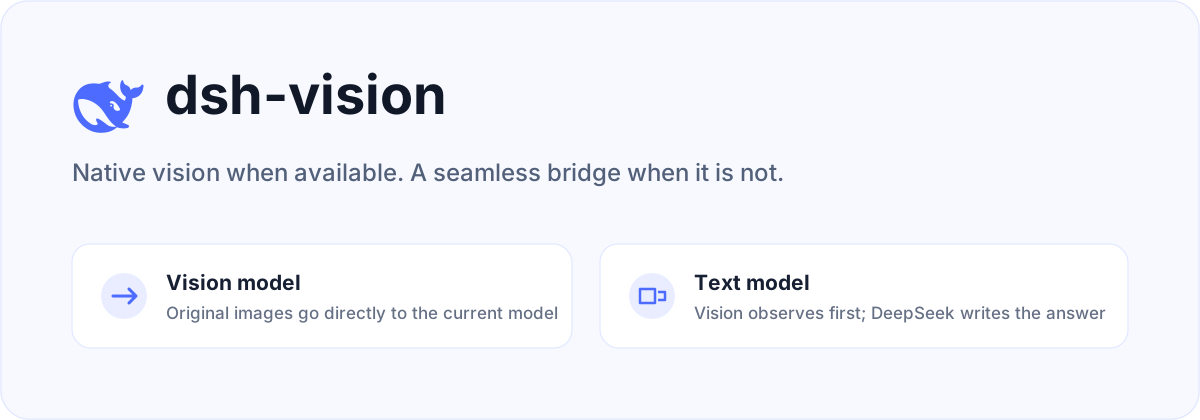
dsh-vision is a plugin for DeepSeek Harness. Vision-capable models keep receiving images natively. When the selected main model is text-only, the plugin asks a separate vision model to observe the original images, then lets the original DeepSeek model produce the final answer.
How it works
| Main model | Image path | Final answer |
|---|---|---|
| Supports images | Original images are sent directly, without preprocessing or OCR | Current model |
deepseek-official or another text-only model | A configured vision model observes the original images; its output is injected as untrusted attachment context | DeepSeek |
| Cloud vision unavailable | Falls back to macOS Vision or Tesseract | DeepSeek |
The plugin does not replace the main model selected in Harness. Multiple image attachments are analyzed together, so comparisons and combined evidence work naturally. The user's task is forwarded unchanged instead of being wrapped in a fixed report template.
Install
Use the plugin manager built into DeepSeek Harness:
npx @deepseek-ai/dsh plugin --profile web add github:oil-oil/dsh-vision
Restart Harness, then paste or drag images into the composer as usual. The plugin replaces the official deepseek-official adapter while preserving its model catalog, settings, and credentials. It also adds a Vision Recognition card to Settings → Plugins → Plugin configuration.
DeepSeek Harness is still in Developer Preview. This release targets
0.1.0-rc.6exactly.
Configure Vision Recognition
Open Settings → Plugins → Plugin configuration → Vision Recognition. Select ZenMux, Alibaba Cloud Model Studio, TokenDance, or OpenRouter, then enter its API key. The same card lets you change the model ID, API endpoint, and image limit.
The API key is stored through Harness's official credential service. It is write-only in the browser: the plugin can report whether a key exists, but never reads it back into the page, chat, settings document, or session log.
Routing follows the user's choice. A provider selected in Vision Recognition is primary for text-only models. Other enabled Harness vision routes, an existing see configuration, and local OCR are failover only. When the current main model supports images, the original images pass through natively and none of these bridge routes are used.
Choose Automatic to skip plugin-managed cloud credentials. The bridge then tries image-capable models already configured in Harness, followed by see-compatible private configuration and local OCR. A Harness custom model must declare image as an input modality or it remains a text model.
Advanced file configuration
Most setups should use the UI. The equivalent non-secret fields live in the existing llm-deepseek section of $DSH_HOME/settings.yaml:
llm-deepseek:
  visionBackend: zenmux
  visionBackendModel: qwen/qwen3.7-plus
  visionBackendBaseURL: https://zenmux.ai/api/v1
  maxImages: 8
Do not put API keys in this file. Save them in the Vision Recognition card or provide the matching environment variable. Changes apply without a restart.
see-skill compatibility
If Harness has no usable vision model, the plugin also reads ~/.config/see/config.env. It supports ZenMux, Alibaba Cloud Model Studio, OpenRouter, and TokenDance. Environment variables override the private config file.
export SEE_PROVIDER=zenmux
export ZENMUX_API_KEY=your-key
SEE_PROVIDER selects the primary provider. Other providers with configured keys are failover routes only. If no provider is selected and only one is configured, that provider is used.
When no cloud key is available, or every cloud route fails, the plugin tries local capabilities:
- macOS: built-in Vision OCR, with no extra dependency.
- Linux / Windows: Tesseract with the required language data installed.
Local fallback is primarily OCR and is not equivalent to full multimodal understanding.
Security boundary
- Original images are sent only to vision services configured by the user.
- Vision output is marked as untrusted observation data; instructions inside an image receive no system authority.
- Generated vision context affects only the current model request and does not rewrite message history.
- API keys are resolved through Harness credentials or the user's private see config and are never written to this repository.
Development
pnpm install
pnpm check
The project is available under the MIT License. Cloud routing, joint multi-image analysis, and local fallback behavior are based on the MIT-licensed oil-oil/see-skill. The DeepSeek icon comes from the official deepseek-ai/deepseek-harness repository.
查看使用指南 →
该插件的安装步骤、关键要点、FAQ 与兼容性说明(基于已收录字段派生)。
收录徽章

[](https://deepseek-plugin.org/plugins/oil-oil/dsh-vision)把这段 markdown 粘贴到你的 GitHub README,链接回本插件详情页。徽章只声明已被本站收录,不代表安全认证。