为 DSH 接入一个本地优先的 AI Agent 运行时,通过 stdio MCP 暴露代理、会话、产物管理能力。

- 语言
- TypeScript
- License
- Apache-2.0
- 分支
- main
安装
$ dsh plugin --profile web add --allow-build=managed-agents github:sandbaseai/sandbase-harness在终端中运行以上命令,通过 dsh CLI 安装此插件。可在右上角切换 Profile。 第一次用 dsh?看这篇新手教程
对话式安装
帮我安装 DeepSeek Harness 插件 sandbaseai/sandbase-harness:先查看仓库 https://github.com/sandbaseai/sandbase-harness 确认安全性,然后执行安装命令并验证插件加载成功。
把这段指令粘贴给 DSH Web GUI 里的助手,由它代你完成安装与验证。
一句话定位
这个插件把 SandBase Harness 这套本地 AI Agent 运行时桥接到 DSH:通过 stdio MCP 协议,让 DSH 能像操作普通 MCP 工具一样去列出 Agent、创建持久化会话、流式发送消息、读取产物、停止运行中的任务。
核心能力
- 在 DSH 中注册一个名为
sandbase的 stdio MCP 客户端,自动启动managed-agents-mcp桥接进程 - 暴露 6 个原生 MCP 工具:
list_agents、create_session、run_session、get_session、list_artifacts、stop_session run_session会等待流式回合结束,一次性返回组装好的文本和结束事件元数据,无需自行处理流- 支持 OpenAI、Anthropic 和任意 OpenAI 兼容端点(含 DeepSeek V4),由运行时统一管理模型供应商边界
- 支持 4 种沙箱后端:Local 进程、Docker 容器、Kubernetes Pod、自托管 Worker 队列,DSH 侧不感知差异
- 会话、产物、Memory、技能包、API Key 全部存在本地 SQLite 中,不依赖任何远程控制面
技术实现
- 语言: TypeScript(Node.js ESM)
- 关键依赖: @modelcontextprotocol/sdk(MCP 服务端)、hono + @hono/node-server(HTTP API)、ai + @ai-sdk/openai + @ai-sdk/anthropic(模型调用)、commander(CLI)、zod(输入校验)
- 架构模式: 把本地 CLI/HTTP 运行时(
managed-agents start)暴露的/v1API 用一个 stdio MCP 桥接进程封装起来,DSH 通过 Cordis bundle 把这个桥接注册为mcp-sandbase-harness节点,运行时与 DSH 之间通过 HTTP + Bearer Token 通信 - 入口文件:
src/index.ts(HTTP 运行时入口)、src/mcp/index.ts(stdio MCP 桥接入口),打包后对应 npm binmanaged-agents和managed-agents-mcp
适用场景
当你想让 DSH 拥有一个"能持续跑长任务、能保存上下文、能调用工具"的本地 Agent 后端,而不只是临时的一次性模型对话时,这个插件把现有的 SandBase Harness 运行时接进来,特别适合需要沙箱隔离工具调用、需要事后审计与回放、或者要跨会话保留产物与 Memory 的场景。
前置依赖与兼容性
| 依赖 | 最低版本 | 说明 |
|---|---|---|
| DSH | 未声明 | 通过 dsh.bundle.patch 注入,未在 package.json 中声明最低 DSH 版本 |
| Node.js | >=22 | package.json#engines.node;bridge 进程基于 stdio MCP,运行时基于 Node 22+ 内建 HTTP |
| 平台 | 跨平台 | Node 进程本身跨平台;运行时额外依赖宿主上的 docker / kubectl CLI 是可选的(仅启用对应沙箱时需要) |
| node:sqlite | Node 22 实验性 / Node 25+ 稳定 | 数据库层依赖 node:sqlite,注意老版本 Node 上该模块处于实验阶段 |
| Docker | 可选 | 沙箱后端选 docker 时宿主需要 docker CLI |
| kubectl | 可选 | 沙箱后端选 kubernetes 时宿主需要 kubectl 并能访问集群 |
安装方式
dsh plugin --profile web add github:sandbaseai/sandbase-harness
配置项
本插件本身没有面向用户的可配置参数;它通过 Cordis patch 在 DSH 中硬编码注册一个名为 sandbase 的 stdio MCP 客户端,桥接进程 managed-agents-mcp 在运行时通过环境变量与底层 HTTP Runtime 通信:
| 环境变量 | 说明 | 默认值 |
|---|---|---|
MANAGED_AGENTS_URL | 桥接进程要连接的运行时 HTTP 地址 | http://127.0.0.1:3000 |
MANAGED_AGENTS_API_KEY | 运行时开启访问认证时传入的 Bearer Token;多个 Key 用逗号分隔 | 无(未配置则运行时按开放模式运行) |
MANAGED_AGENTS_CORS_ORIGINS | 运行时允许的跨域来源列表(逗号分隔) | 无 |
MANAGED_AGENTS_LOG_LEVEL | 运行时日志级别(debug / info / warn / error) | info |
MANAGED_AGENTS_LOG_FORMAT | 设为 pretty 时输出可读的开发格式 | 普通格式 |
MANAGED_AGENTS_HOME | 覆盖运行时状态目录的根路径 | 工作区下的 .managed-agents/ |
MANAGED_AGENTS_SECRET_KEY | 用于加密本地凭证库的主密钥 | 未设置时按非加密处理 |
常见问题
Q: 安装这个插件后我需要额外启动什么服务吗?
A: 需要。插件只是把 managed-agents-mcp 桥接进程注册进 DSH Web Profile,你必须先在另一台终端用 managed-agents start 启动底层运行时(默认监听 http://127.0.0.1:3000),DSH 才能通过 MCP 工具访问到 Agent 和会话。
Q: 这个插件和 DSH 官方的 AI 能力是什么关系?
A: 它是一个独立的本地 Agent 运行时(基于 SQLite + 多沙箱后端),不是 DSH 内置模型的替代品。DSH 通过 mcp__sandbase__* 命名空间把它当作外部 MCP 服务调用,由它去调度 OpenAI、Anthropic 或任意 OpenAI 兼容端点。
Q: 会话、产物、凭证这些数据存在哪里?
A: 全部存在你 managed-agents init 时创建的工作区下的 .managed-agents/ 目录中(SQLite 文件 data.db、文件字节 files/、技能包 skills/、沙箱快照 snapshots/)。Bridge 进程不持久化任何凭证。
Q: 支持哪些模型供应商?
A: Settings V2 里配置一个活跃的模型供应商边界,覆盖 OpenAI、Anthropic 以及任何 OpenAI 兼容端点(README 中以 DeepSeek V4 为例)。Agent YAML 里指定具体模型 ID(如 gpt-4o、claude-sonnet-4-20250514、openai/gpt-5.5)。
Q: 必须装 Docker 才能用吗?
A: 不是。默认 Local 沙箱就用当前操作系统用户执行命令,不依赖 Docker。只有当你在 Dashboard 里把 Environment 的沙箱后端切到 docker 或 kubernetes 时才需要 docker CLI 或 kubectl 可用。
Q: 如何卸载?
A: 先停掉 DSH,然后执行 dsh plugin --profile web remove managed-agents,即可同时移除 profile 依赖和 bundle 注入层。运行时的工作区数据不会自动删除,需要手动清理 .managed-agents/ 目录。
Q: 启动时报 "MCP startup failed" 怎么办?
A: 说明 managed-agents-mcp 不在 PATH 上。重新走一次源码构建(npm ci && npm run build:runtime)并执行 npm link,或在 DSH 启动日志里确认是否看到 mcp-sandbase-harness 节点。
上手难度
进阶 — 需要在另一台终端独立维护一个 Node 运行时并准备好至少一个模型 API Key;同时要理解 Settings V2、Environment、Sandbox Provider 等多组概念,DSH 本身只是调用入口。
已知问题与限制
- Local 沙箱无内核级隔离:Local 后端只做了路径约束与环境变量白名单,命令仍以当前 OS 用户身份执行,不适合跑不可信代码(BACKLOG.md:27-30)
- apps/console 存在未消化的模块拆分:当前有两条互不渲染的组件继承线,
npm run typecheck不覆盖 Console,导致 Dashboard 报 ~90 个错误;测试覆盖的是未上线的分支(BACKLOG.md:46-59) - Kubernetes 沙箱的活集群测试在 CI 中跳过:测试在没有可访问集群时直接 skip,目前没有机制强制运行(BACKLOG.md:32-34)
- 流式命令输出(streamingExec)声明但未实现:能力被声明并报为"unsupported",工具结果仍以单值返回(BACKLOG.md:39-41)
managed-agents deploy是 v1 占位:仅打印部署建议,不会真正推送(src/cli/program.ts:85-99)- Pod 被驱逐后只能以命令失败形式暴露:Provision 阶段对镜像/配置错误会快速失败,但运行期 Pod 被驱逐没有专门的处理路径(BACKLOG.md:35-37)
- 0.2.0 起工作区状态目录变更:从
~/.managed-agents/<name>-<hash>/迁移到<workspace>/.managed-agents/,旧工作区需要手动搬移状态(CHANGELOG.md:39-47)




A local-first runtime for AI agents. Sessions, sandboxed tools, memory, credentials, audit trails, and a built-in Console — all running on your machine or in your own infrastructure.
git clone --branch v0.3.2 --depth 1 https://github.com/sandbaseai/sandbase-harness.git
cd sandbase-harness
npm ci
npm run build
mkdir ../my-agents && cd ../my-agents
node ../sandbase-harness/dist/index.js init
node ../sandbase-harness/dist/index.js start
# open http://127.0.0.1:3000/dashboard
Choose SandBase Harness when you need more than a model loop:
| Need | What Harness provides |
|---|---|
| Run generated code safely | Local, Docker, Kubernetes, and self-hosted worker sandboxes |
| Inspect long-running agents | Persistent sessions, resumable event streams, audit, and replay |
| Control tool access | MCP toolsets, credential vaults, permission policies, and approvals |
| Operate any model | OpenAI, Anthropic, and OpenAI-compatible providers, including DeepSeek V4 |
| Keep infrastructure yours | Local-first SQLite and file storage with no required hosted control plane |
Why
Agent SDKs handle the model loop. Production agents need more: persistent
sessions, tool governance, sandbox boundaries, credential handling, memory,
auditability, and a UI for humans to inspect what happened. managed-agents
is that runtime layer — not a visual workflow builder and not another model SDK.
Features
- Claude Managed Agents-style
/v1API and local Console - SQLite-backed agents, sessions, environments, credential vaults, memory stores, files, skills, and API keys — SQLite metadata by default
- local file/skill bytes stored in the workspace state directory
- Resumable Server-Sent Events for session replay and debugging
- One active model provider boundary configured through Settings V2
- Sandbox backends: local process, Docker (per-session containers), Kubernetes (kubectl exec/cp), self-hosted worker queue
- Settings V2: one workspace model vendor, loop engine, storage, memory, sandbox — with validation, form/JSON modes, and restart flow
- MCP toolsets, permission policies, built-in tools, and skill packages
- DeepSeek Harness bridge over MCP stdio for agents, sessions, streamed turns, artifacts, and cancellation
- TypeScript SDK at
managed-agents/sdk - Release gate:
npm run release:check
Screenshots
| Console overview | Settings | API reference |
|---|---|---|
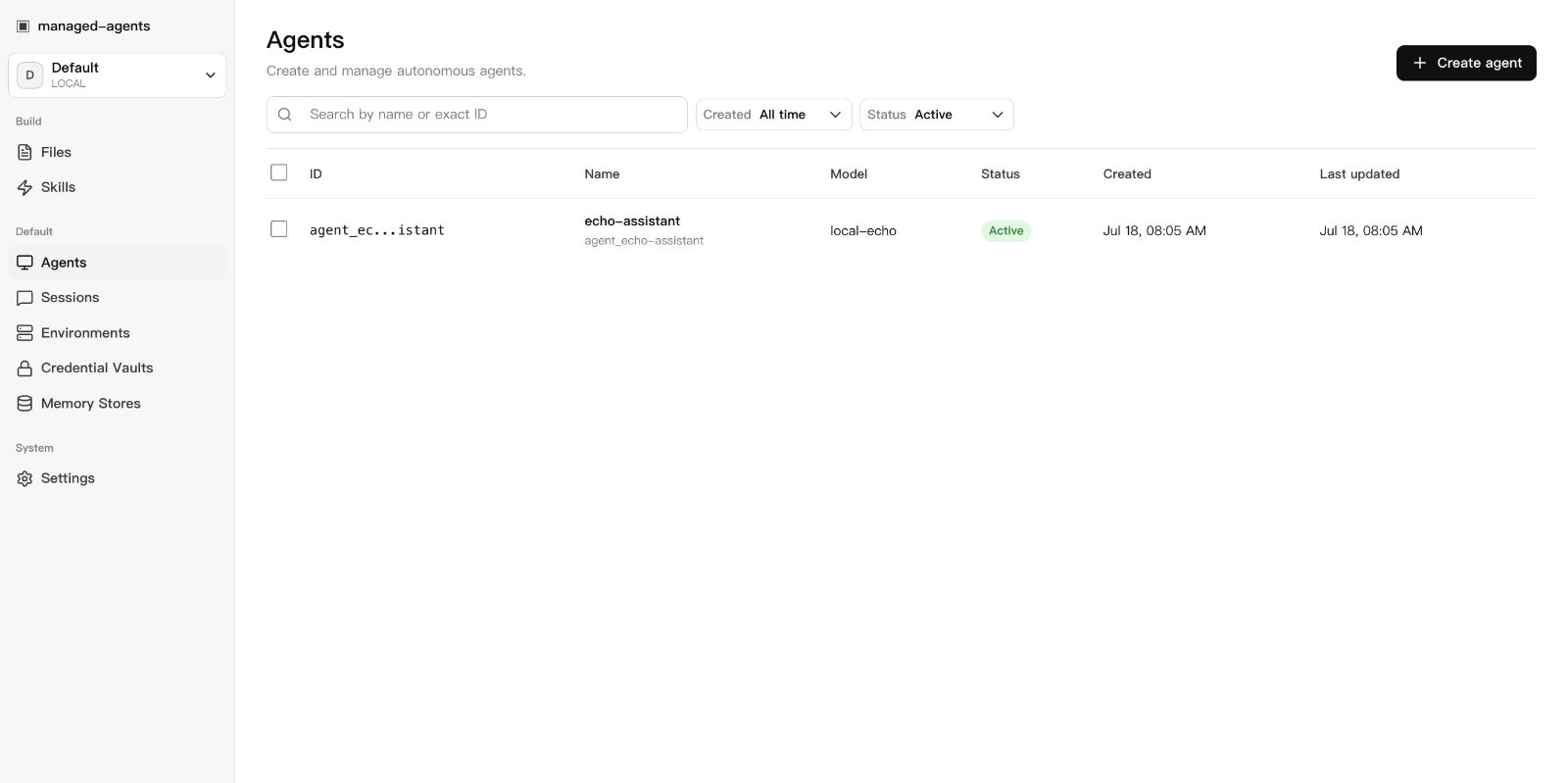 | 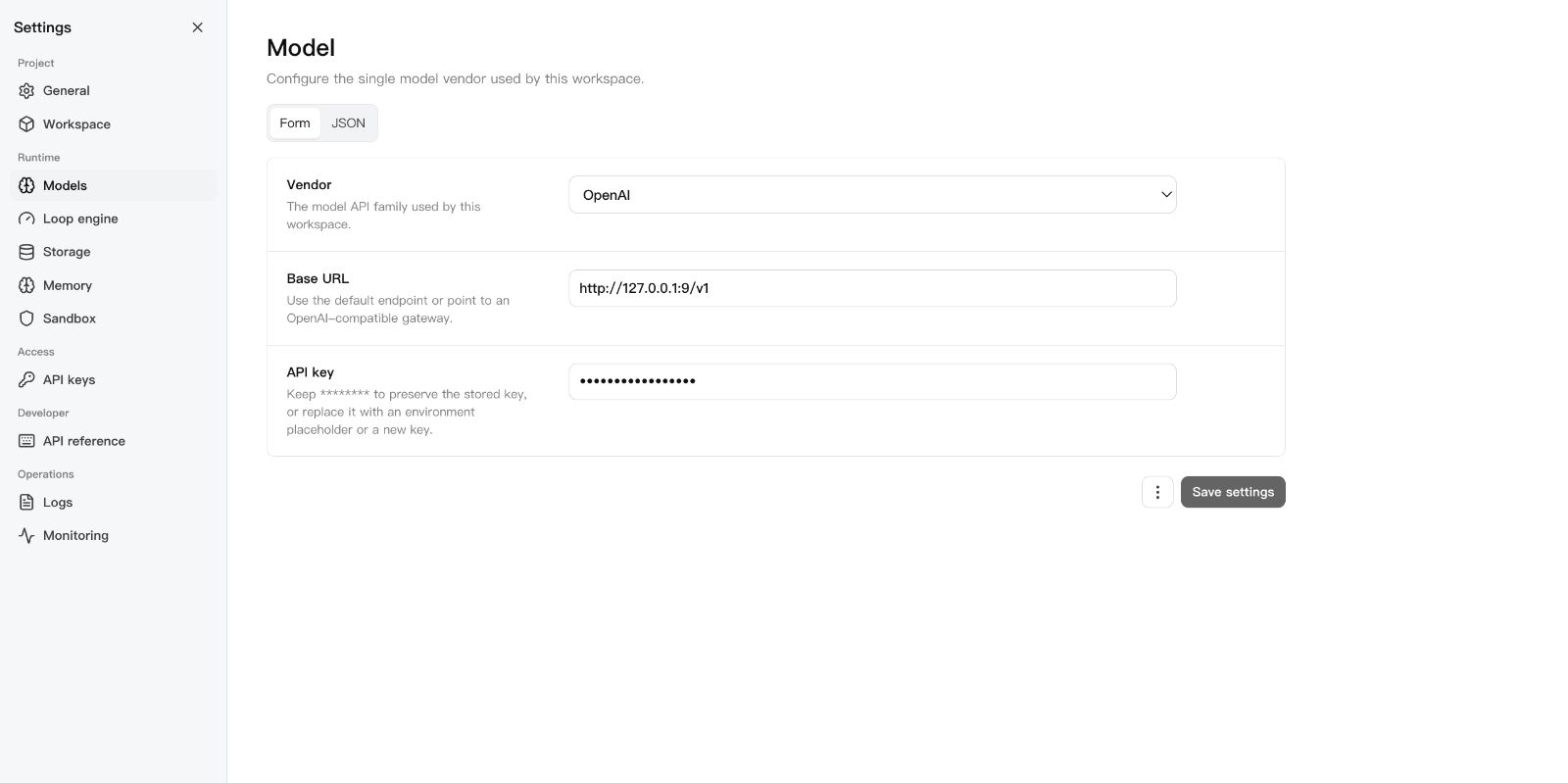 | 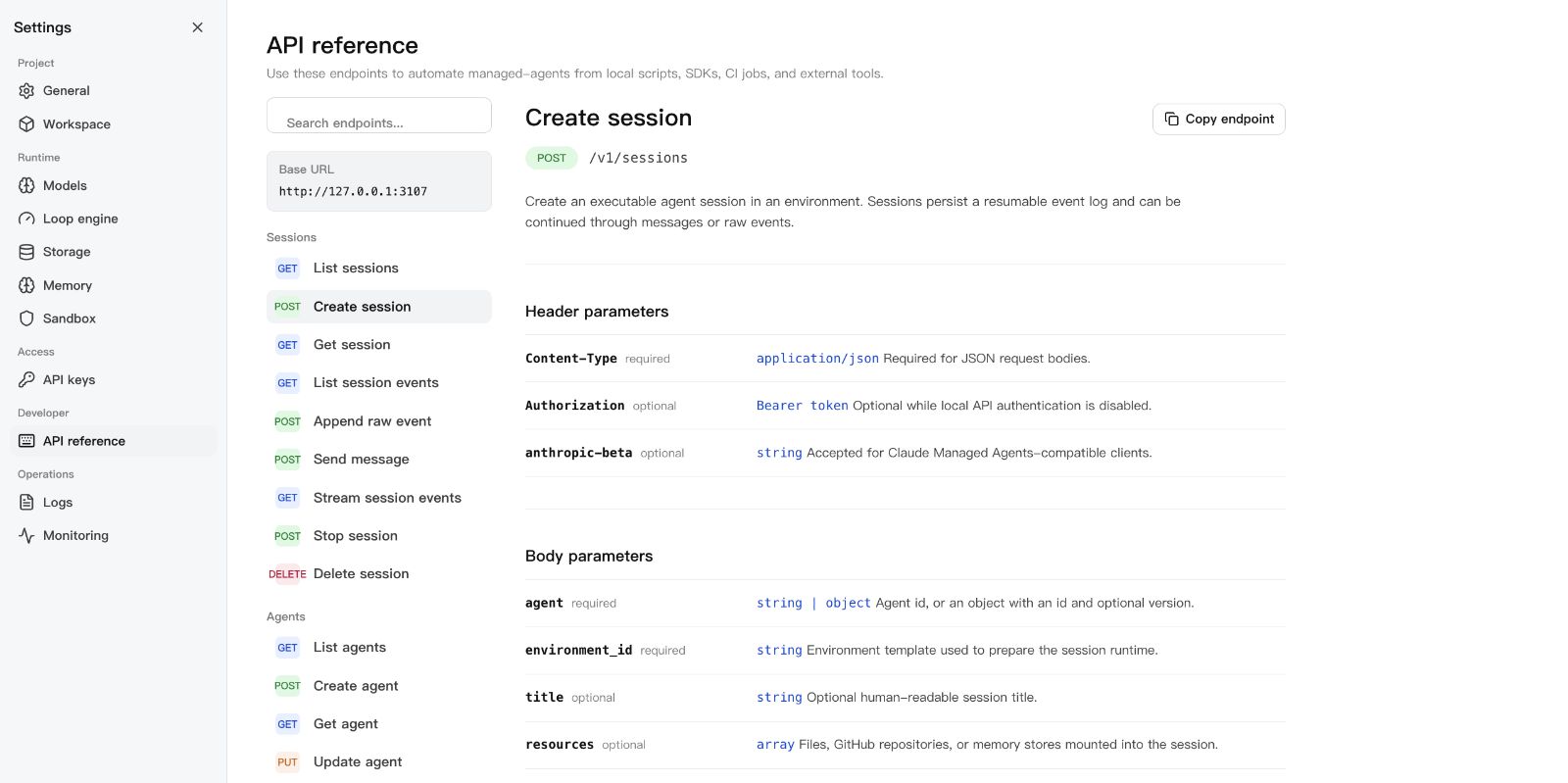 |
Requirements
- Node.js 22+
- npm 10+
- A model provider API key (OpenAI, Anthropic, or OpenAI-compatible endpoint)
- Docker (optional, for Docker-backed sandboxes)
DeepSeek Harness
Run this project as a DSH plugin instead of treating dsh-plugin as discovery
metadata only. Install the bundle into a DSH profile, start managed-agents,
then boot that profile:
export MANAGED_AGENTS_URL=http://127.0.0.1:3000
dsh plugin --profile web add managed-agents
dsh web
The patch starts managed-agents-mcp over stdio. DSH can then list agents,
create and run sessions, inspect results and artifacts, and stop work through
native mcp__sandbase__* tools. See
examples/deepseek-harness for the full
tool list and authenticated-runtime configuration.
Pair the plugin with SandBase Skills to give the same DSH project a portable, source-verifiable research workflow:
npx --yes github:sandbaseai/sandbase-skills add multi-source-search
dsh web
This installs the complete Skill into .dsh/skills/multi-source-search, DSH's
project-scoped discovery directory. It runs from GitHub source and needs no
SandBase account when DSH already provides web/search tools.
New to DSH profiles, plugin composition, tool policy, or session semantics? The independent DeepSeek Harness Handbook provides source-backed quickstarts, architecture maps, and troubleshooting for the runtime layers used by this integration.
Quick Start
git clone --branch v0.3.2 --depth 1 https://github.com/sandbaseai/sandbase-harness.git
cd sandbase-harness
npm ci
npm run build
mkdir ../my-agents && cd ../my-agents
node ../sandbase-harness/dist/index.js init
node ../sandbase-harness/dist/index.js start
Open http://127.0.0.1:3000/dashboard, go to Settings > Models, paste your
API key, and you're running.
The unscoped managed-agents name on npm is not this project. Until an
official scoped package is announced in this repository, install only from the
tagged GitHub source release shown above. Do not run npx managed-agents or
npm install managed-agents.
The six-tool MCP bridge also has a minimal container definition. Start the Harness API, build the image from the tagged source checkout, then add this stdio command to an MCP client:
docker build -f Dockerfile.mcp -t sandbase-harness-mcp:0.3.2 .
docker run --rm -i \
  -e MANAGED_AGENTS_URL=http://host.docker.internal:3000 \
  sandbase-harness-mcp:0.3.2
For an authenticated remote runtime, also pass MANAGED_AGENTS_API_KEY. The
container image contains only the MCP bridge; agent sessions and sandbox work
remain in the connected Harness runtime.
For development from the latest main branch:
git clone https://github.com/sandbaseai/sandbase-harness.git
cd sandbase-harness && npm ci && npm run build
cd .. && mkdir my-agents-dev && cd my-agents-dev
node ../sandbase-harness/dist/index.js init
node ../sandbase-harness/dist/index.js start
Workspace Layout
my-agents/
├── agents/                  # Seed agent definitions (YAML)
│   └── assistant.yaml
├── skills/                  # Seed skill packages
│   └── example-skill/
│       └── SKILL.md
└── .managed-agents/         # Runtime state (gitignored)
    ├── config.yaml          # Workspace configuration
    ├── data.db              # SQLite metadata
    ├── logs/runtime.log
    ├── files/               # Uploaded file bytes
    ├── skills/              # Uploaded skill packages
    ├── snapshots/           # Session workspace snapshots
    └── sandbox/             # Local session sandboxes
Configuration
.managed-agents/config.yaml:
model:
  provider: openai
  api_key: ${OPENAI_API_KEY}

storage:
  metadata: { provider: sqlite, options: {} }
  artifacts: { provider: local, options: { base_path: files } }
Agents pick concrete model IDs (gpt-4o, claude-sonnet-4-20250514,
openai/gpt-5.5). The workspace config only says how to reach the model
service.
For DeepSeek V4 Pro/Flash configuration, including maximum reasoning effort, see DeepSeek V4.
CLI
managed-agents init
managed-agents start [--host 127.0.0.1] [--port 3000]
managed-agents list
managed-agents reload
managed-agents chat <agent-id> --message "hello"
managed-agents template list | install <name> | create <name>
API Examples
Create an agent:
curl -X POST http://127.0.0.1:3000/v1/agents \
  -H "Content-Type: application/json" \
  -d '{
    "name": "Incident commander",
    "model": "gpt-4o",
    "system": "You are an on-call incident commander.",
    "tools": [{ "type": "agent_toolset_20260401" }]
  }'
Create an environment (local sandbox):
curl -X POST http://127.0.0.1:3000/v1/environments \
  -H "Content-Type: application/json" \
  -d '{
    "name": "Default local",
    "config": { "hosting_type": "local", "sandbox_provider": "local" }
  }'
Create a Docker-isolated environment:
curl -X POST http://127.0.0.1:3000/v1/environments \
  -H "Content-Type: application/json" \
  -d '{
    "name": "Docker sandbox",
    "config": {
      "sandbox_provider": "docker",
      "image": "node:22-slim",
      "resources": { "memory": "1g", "cpu": 1 }
    }
  }'
Start a session:
curl -X POST http://127.0.0.1:3000/v1/sessions \
  -H "Content-Type: application/json" \
  -d '{
    "agent": "agent_...",
    "environment_id": "env_...",
    "title": "Triage SENTRY-123"
  }'
Send a message:
curl -X POST http://127.0.0.1:3000/v1/sessions/SESSION_ID/messages \
  -H "Content-Type: application/json" \
  -d '{ "content": "Investigate the alert." }'
Resume the event stream:
curl -N http://127.0.0.1:3000/v1/sessions/SESSION_ID/events/stream \
  -H "Last-Event-ID: 42"
SDK
import { ManagedAgentsClient } from 'managed-agents/sdk';

const client = new ManagedAgentsClient({
  baseUrl: 'http://127.0.0.1:3000',
});

const session = await client.sessions.create({
  agent: 'agent_...',
  environment_id: 'env_...',
});

for await (const event of client.sessions.chat(session.id, 'Hello')) {
  if (event.type === 'agent.message_chunk') {
    process.stdout.write(event.delta ?? '');
  }
}
The /v1 API follows Claude Managed Agents resource shapes, so you can also
point the Anthropic SDK at the local runtime:
import Anthropic from '@anthropic-ai/sdk';

const client = new Anthropic({
  apiKey: process.env.MANAGED_AGENTS_API_KEY ?? 'local-dev-key',
  baseURL: 'http://127.0.0.1:3000',
});

const session = await client.beta.sessions.create({
  agent: 'agent_...',
  environment_id: 'env_...',
});
Authentication
Open by default. Authentication activates when at least one API key exists:
# Static key via environment
export MANAGED_AGENTS_API_KEY=sk-local-example

# Or create a managed key
curl -X POST http://127.0.0.1:3000/v1/api-keys \
  -H "Content-Type: application/json" \
  -d '{ "name": "Local Console" }'
Clients send Authorization: Bearer <key>.
Agent Definition
Agents are YAML files in agents/:
name: Incident commander
description: Triages alerts and coordinates response.
model: gpt-4o
system: |-
  You are an on-call incident commander.
mcp_servers:
  - name: sentry
    type: url
    url: https://mcp.sentry.dev/mcp
tools:
  - type: agent_toolset_20260401
    default_config:
      permission_policy: { type: always_ask }
    configs:
      - name: bash
        permission_policy: { type: always_ask }
  - type: mcp_toolset
    mcp_server_name: sentry
skills:
  - type: custom
    skill_id: skill_...
metadata:
  template: incident-commander
Development
npm ci
npm run typecheck    # src + tests
npm test             # vitest
npm run build        # runtime + console + SDK
npm run release:check  # full local release gate
release:check runs typecheck, tests, both builds, npm pack --dry-run, CLI
init smoke, and examples/basic startup smoke.
SandBase Ecosystem
- SandBase Skills — 88 installable Agent Skills for research, social intelligence, marketing, and business workflows across Codex, Claude Code, Cursor, Gemini CLI, and other clients.
- SandBase CLI — connect Cursor, Claude Code, Codex, Windsurf, Gemini CLI, OpenCode, and other MCP clients to 2,000+ tools and 200+ AI models with one onboarding command.
- SandBase — hosted agent infrastructure, model access, tools, and managed sandboxes.
Documentation
License
查看使用指南 →
该插件的安装步骤、关键要点、FAQ 与兼容性说明(基于已收录字段派生)。
收录徽章

[](https://deepseek-plugin.org/plugins/sandbaseai/sandbase-harness)把这段 markdown 粘贴到你的 GitHub README,链接回本插件详情页。徽章只声明已被本站收录,不代表安全认证。