为 DeepSeek Harness 增加原生本地任务板,SQLite 存储项目/任务/认领/自动化,强制人工签收 done,web profile 专属。

- 语言
- TypeScript
- License
- Apache-2.0
- 分支
- main
安装
$ dsh plugin --profile web add @shengsheng/dsh-taskboard在终端中运行以上命令,通过 dsh CLI 安装此插件。可在右上角切换 Profile。 第一次用 dsh?看这篇新手教程
对话式安装
帮我安装 DeepSeek Harness 插件 shengsheng90/DSH-taskboard:先查看仓库 https://github.com/shengsheng90/DSH-taskboard 确认安全性,然后执行安装命令并验证插件加载成功。
把这段指令粘贴给 DSH Web GUI 里的助手,由它代你完成安装与验证。
一句话定位
DSH-taskboard 是 DeepSeek Harness 的原生本地任务板插件:把"项目 / 任务 / 评论 / 认领 / 自动化"放在本机 SQLite 里管理,在 Harness Web Client 侧栏底部提供原生 overlay 页面,并给 Agent 注册一组"只到 in_review"的工作工具——验收/改状态这类敏感动作只能由人完成。
核心能力
- 7 段状态生命周期:
backlog→todo→in_progress→in_review→done,另有blocked、canceled(src/domain/types.ts:6) - 侧栏底部新增"任务板"入口 + 原生 overlay 页面,覆盖 Dashboard、看板、列表、Labels、甘特、工作流 6 个视图(src/client/index.tsx:527-545)
- 8 个 Agent 进程内工具(
taskboard_list/_get/_claim/_comment/_submit_review/_block/_release_claim/_relate),不含验收和通用改状态(src/tool/index.ts:32-150) - 人类专属动作:批准、验收、退回、归档、恢复、取消、重新打开、强制接管、永久删除——这些只能由 UI 或 CLI 触发(src/sqlite/provider.ts:344/556/658/729/753/758/792/797/811)
- 项目级自动化:间隔、Agent 预设、模型路由、并发工作器上限、配额策略,由 Host 调度器认领合格
todo、停在in_review(src/automation/index.ts、README.zh.md:315-317) - 乐观并发控制:所有非创建写入强制要求
--version精确匹配,冲突抛TASK_STALE_VERSION(src/sqlite/provider.ts:695)
技术实现
- 语言: TypeScript(ESM;React 18 写原生 overlay)
- 关键依赖:
node:sqlite(内置,承载任务/认领/活动/附件元数据)+@deepseek-ai/cordis(host 插件宿主与配置 schema 校验)+@deepseek-ai/dsh-tools(注册 8 个 Agent 工具)+react ^18.2.0(原生 overlay 渲染) - 架构模式: 双半区原生插件。Host 半边通过
cordis.patch.yml注入名为taskboard的插件行,apply()拉起TaskboardService、注册 Agent 工具,并通过ctx.inject(['agents','goals','workspaceRegistry','agentPresets','agentDefaultModel'], ...)接管 Harness 原生 Agent 调度,在effect()里挂载自动化协调器,进程退出时统一停掉。Client 半边通过package.json#dsh.client.inject把 client-runtime / client-locale / client-ui-conversation 注入到 web 客户端,由generated/typert.remote-client.js走 Typert RPC 连到 host 服务;启动期孤儿认领 reconciliation 是 best-effort,不阻塞调度器启动(src/index.ts:65-90、package.json:80-94、cordis.patch.yml:1-17) - 入口文件:
src/index.ts(host 插件入口 + 配置 Schema)、src/cli.ts(JSON CLI)、src/client/index.tsx(原生 overlay 入口)、src/service/index.ts(业务编排 + RPC 路由)、src/sqlite/provider.ts(任务/认领/活动 SQLite 持久化)
适用场景
需要在 DSH 里把"开发任务"和"对话"分开管、把任务交给 Agent 自动推进、又必须由人来签收完成的场景。例如一个迭代里有 N 个待办,想让 Agent 在指定 Workspace/分支/worktree 里逐条认领、写代码、提交评审,最后由人决定 done 还是退回——这套闭环由本插件承担,Harness 自身仍负责 Agent 运行、Goal、Session、权限与对话历史。
前置依赖与兼容性
| 依赖 | 最低版本 | 说明 |
|---|---|---|
| DeepSeek Harness | >=0.1.0-rc.5 | peerDependencies 锁定 @deepseek-ai/cordis ^4.0.1 与全部 @deepseek-ai/dsh-* ^0.1.0-rc.5(包括 cordis / agent / agent-presets / goal / workspace / tools / typert-protocol 等),README 声明"Compatible Host: 0.1.0-rc.5"(package.json:95-117、README.md:12、README.zh.md:12/40) |
| Host profile | web | cordis.patch.yml 写入 web profile,package.json#dsh.client.platform = "web",headless / 其他 profile 不在声明范围(cordis.patch.yml:1-17、package.json:84-94) |
| Node.js | ^22.19.0 或 >=24.0.0 | engines.node 显式声明;使用内置 node:sqlite(Node 22.5+ 提供,22.19 / 24 均可),README 推荐 24(package.json:8-10、README.zh.md:34-49) |
| 平台 | macOS / Windows / Linux | 未声明 os / cpu 字段,仅依赖 Node 内置 node:sqlite 与 Node fs/path,跨平台(package.json 全文) |
| 原生模块 | node:sqlite | 数据库层直接使用 Node 内置 node:sqlite(DatabaseSync),无需安装第三方原生模块(src/sqlite/schema.ts:3、src/sqlite/provider.ts:6) |
| 浏览器半区注入 | @deepseek-ai/dsh-{api-remotes, client-connection, client-locale, client-runtime, client-ui-conversation} ^0.1.0-rc.5 | package.json#dsh.client.inject 列出原生 overlay 需要的 5 个客户端包(package.json:84-92) |
| 其他运行时依赖 | zod ^4.4.3 | 域层类型校验;不依赖任何官方 SDK 之外的第三方包(package.json:125-127) |
安装方式
dsh plugin --profile web add github:shengsheng90/DSH-taskboard
注意:lib/ 不在 git 中,git 安装方式不会带编译产物。源码方式安装需要先在仓库内 pnpm install && pnpm build && pnpm pack,再用 dsh plugin --profile web add -w /absolute/path/to/shengsheng-dsh-taskboard-<version>.tgz 装入。安装后必须重启 Harness 进程,轮询 GET / 包含 @shengsheng/dsh-taskboard 与 GET /plugins/@shengsheng/dsh-taskboard/client.js 返回 200 才算激活(README.zh.md:51-202、README.zh.md:16)。
配置项
配置由 Host 解析,浏览器不能直接选路径。可在 profile 组成层覆盖或用环境变量指定。
| 配置 | 类型 | 说明 | 默认值 |
|---|---|---|---|
| databasePath | string | SQLite 数据库文件路径 | .dsh/taskboard.sqlite(可用 DSH_TASKBOARD_DATABASE 覆盖) |
| attachmentRoot | string | 附件落盘的根目录 | .dsh/taskboard-attachments(可用 DSH_TASKBOARD_ATTACHMENTS 覆盖) |
| pageSize | number | taskboard_list 单页大小,结果带匹配总数 | 100 |
| snapshotTaskLimit | number | 单次原生页面快照里最多携带的任务数,被截断时页面会提示 | 1000 |
| maxAttachmentBytes | number | 单附件字节上限 | 26214400(25 MiB) |
| maxTaskAttachmentBytes | number | 单任务所有附件合计字节上限 | 104857600(100 MiB) |
| allowedAttachmentTypes | string[] | 允许上传的 MIME 类型白名单 | json / octet-stream / pdf / zip / gif / jpeg / png / webp / markdown / text |
| minAutomationIntervalMs | number | 项目级自动化允许的最短间隔 | 30000(30 秒) |
| maxProjectWorkers | number | 单项目内并发认领 Agent 数 | 2 |
| maxGlobalWorkers | number | 全局并发认领 Agent 数 | 4 |
| allowSharedWorktrees | boolean | 是否允许多个 Agent 共享同一个 worktree | false |
| clientRefreshIntervalMs | number | 浏览器 overlay 的 snapshot 回退轮询间隔 | 15000(15 秒) |
| maxChangeWaiters | number | 长轮询等待者上限 | 128 |
| maxChangeWatchMs | number | 单次长轮询超时 | 30000(30 秒) |
| defaultAgentPreset | string | 自动化用的默认 Agent 预设名 | standard |
| defaultModelRoute | string | 自动化用的默认模型路由(schema 必填,无默认) | 无(必须在 profile 层补) |
来源:src/index.ts:42-62、cordis.patch.yml:4-17。
常见问题
Q: Agent 能直接把任务改为 done 吗?
A: 不能。Agent 只能把持有的 in_progress 提交到 in_review;done 只能由人类通过 UI 或 CLI 的 task accept 动作写入(requireHuman 在 provider 层多个写入路径上强制)。Goal 完成也不会自动验收任务。
Q: 任务认领后 Agent 没做完怎么办?认领会一直卡住吗?
A: 认领不会被静默抢走。Agent 可以在提交前 taskboard_release_claim;人类可以用"强制接管"释放认领并把任务退到 todo,避免孤儿占住整个工作器。退回到 todo 会释放认领,直接回到 in_progress 必须原子建立新的明确认领(README.zh.md:252-259、src/sqlite/provider.ts:790-794)。
Q: 自动化跑起来的任务怎么停?
A: 在原生任务板页面把对应项目的自动化规则关掉即可。Host 调度器不会再派发新的认领;已经在跑的 Agent Session 由 Harness 正常管理,规则关停不会强杀它们。配额用尽时调度器只会暂停新认领,不会取消已在跑的工作(README.zh.md:315-317)。
Q: 数据要备份怎么操作?
A: 同时带走 SQLite(在线还要带 WAL)和 .dsh/taskboard-attachments/ 整个目录;要做离线一致备份请先停 Harness。Storage 面板和 dsh-taskboard storage status 会输出 SQLite 完整性、revision、活动、附件清理队列和孤儿认领诊断(README.zh.md:340-344)。
Q: 改了原生页面上的状态,侧边栏没立刻刷新?
A: 浏览器 overlay 主要靠 Typert 长轮询等下一次已提交全局 revision;在 host 端没有任何提交时,会退回到 clientRefreshIntervalMs(默认 15 秒)的 snapshot 轮询。这个回退不需要改 Harness 的 Host 事件白名单(README.zh.md:341-342)。
Q: 安装时报 declares no dsh.bundle 怎么办?
A: 说明包里的 cordis.patch.yml 没被一起打进去。先在本仓库重新跑 pnpm build && pnpm pack,再 dsh plugin --profile web add -w <tarball>,不要手改已安装副本(README.zh.md:130/217)。
Q: 可以让 Agent 用工具创建任务并直接进 todo 状态吗?
A: 不行。创建项目、更新项目、删除项目,以及创建任务时直接设 status='todo',在 SQLite provider 都会触发 requireHuman 报错。Agent/自动化创建的任务只能落在 backlog,需要人在 UI 上"批准开工"才能进入 todo(src/sqlite/provider.ts:344/375/394/416)。
Q: 活动日志会自动清理吗?任务详情里能看到吗?
A: 不会自动清理——源码注释明确"日志按任务无界增长";原生任务详情 overlay 也不渲染活动流,只在 storage 健康面板里给出 SQLite 完整性、revision 数量、附件清理队列和孤儿认领诊断(src/service/index.ts:306、README.zh.md:340-344)。
上手难度
进阶 — 安装需要走 pnpm build && pnpm pack + tarball 安装 + 重启 host + 浏览器轮询激活一连串步骤(README 把这 8 步完整列出来);装好后侧栏入口和原生 overlay 都是可视化操作,但要让 Agent 自动认领任务还需配 workspace/分支/自动化规则,规则调优需要理解状态机和乐观锁。
已知问题与限制
- 仅支持 web profile:bundle patch 与
dsh.client.platform都写死web;headless / 其他 profile 下浏览器半区不加载,host 半边的 service 也会因 client 路径不通失去 overlay 通路(package.json:84-94、cordis.patch.yml:1-17)。 - 安装/卸载后必须重启 Harness 进程:插件的 bundle 注册和 client-modules 扫描只在启动时执行;只刷新页面不会激活新挂载。重启会终止托管当前会话的进程,正在执行的 Agent 回合会被中断(README.zh.md:153-179)。
- 数据库 schema 版本硬约束:当前版本 4。若磁盘上的
user_version大于 4 或为负,初始化直接抛STORAGE_SCHEMA_UNSUPPORTED关闭数据库;低版本会自动 migrateV1→V4。手动换高版本数据库会直接拒启动(src/sqlite/schema.ts:36-47)。 - Agent 不能直接创建项目或任务并设为
todo:create project/update project/delete project/ 创建任务时status='todo'都触发requireHuman,CLI 与人类操作可绕过,Agent 工具路径走不通(src/sqlite/provider.ts:344/375/394/416)。 - 活动日志无界增长:源码注释明确"原生页面不渲染活动流,日志按任务无限增长";
taskboard_*工具也不会主动裁剪(src/service/index.ts:306)。 - 浏览器侧 snapshot 退避 + 长轮询有上限:
maxChangeWaiters=128/maxChangeWatchMs=30 秒,达到上限后会退到clientRefreshIntervalMs(15 秒)轮询;高峰期可能感知到状态延迟(src/index.ts:57-59、cordis.patch.yml:14-16)。 - 默认模型路由无值:
defaultModelRoute在 schema 里z.string()无 default,必须在 profile 组成层显式补,否则启动期配置校验失败(src/index.ts:61)。 - 默认数据库路径与附件根目录由 Host 在启动时解析,浏览器 overlay 不能临时改;想做多 profile 隔离需要在不同
DSH_TASKBOARD_DATABASE/DSH_TASKBOARD_ATTACHMENTS环境变量下启动 host(README.zh.md:319-321)。 - 离线构建依赖
lib/typert.*生成物:构建脚本会从scripts/copy-typert-artifacts.mjs复制随仓库入库的官方 Typert 生成物;tree-out 构建不依赖旁边的 Harness checkout,但生成的 Remote 文件留generated/,清理后必须重跑pnpm build(README.zh.md:355-358)。
English | 简体中文
Native, local project task management for DeepSeek Harness. SQLite is the sole task authority. Harness Agent Sessions, Goals, Workspaces, tools, permissions, and the Web Client remain the execution and conversation owners.
This README is written so a human or another coding agent can install the plugin into a live Harness profile, verify it, and start using it without guessing.
Package: @shengsheng/dsh-taskboard
Repository: https://github.com/shengsheng90/DSH-taskboard
License: Apache-2.0
Compatible Host: DeepSeek Harness 0.1.0-rc.5
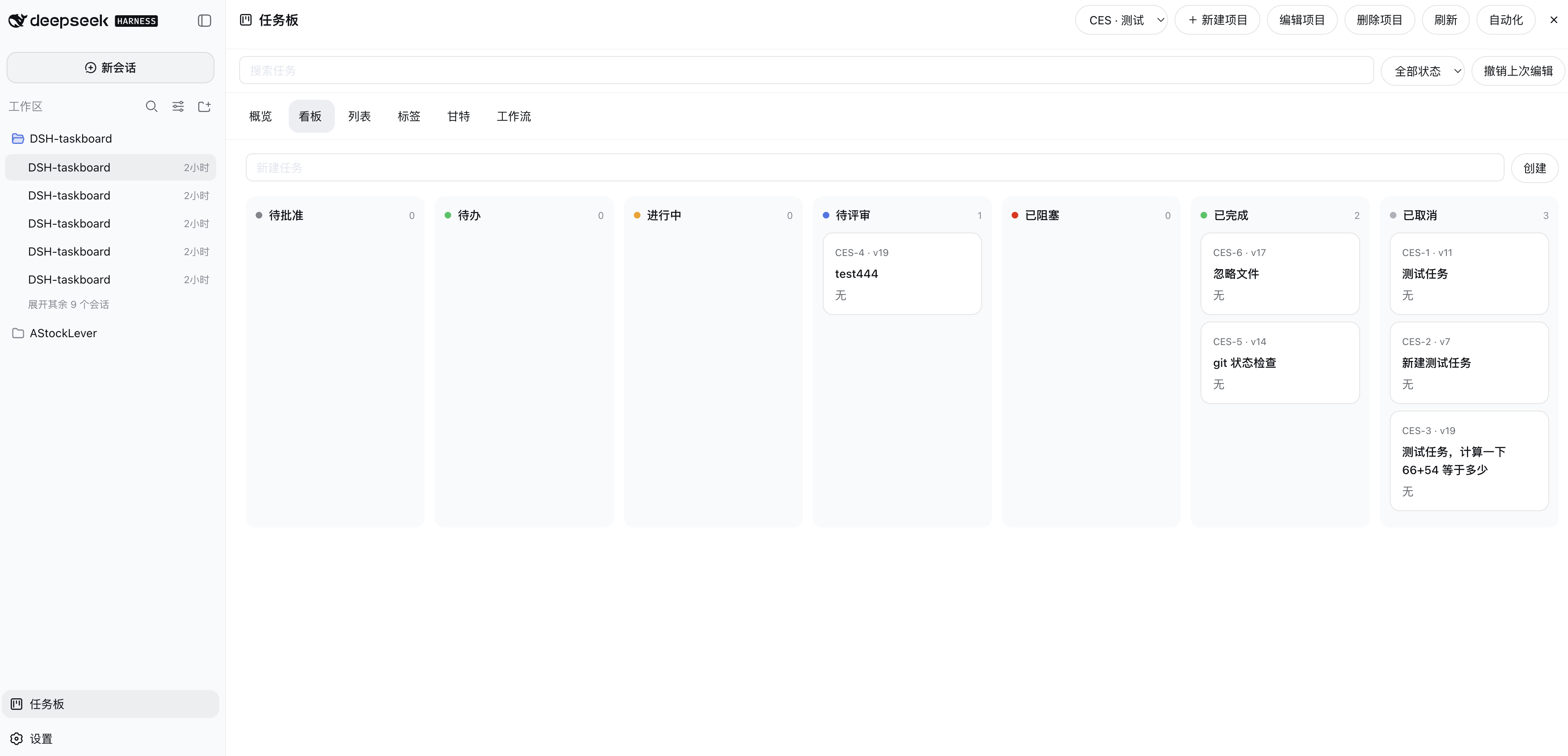
If you are an installing agent, jump to Install into DeepSeek Harness and follow every step in order. Do not add this Git repository as a raw plugin source: lib/ is gitignored, so a git install has no compiled Host/Client bundle.
What you get
After a successful install, Harness gains:
- A Taskboard sidebar button and a native overlay page (not an iframe, not a second chat runtime)
- Local SQLite projects, tasks, comments, relations, attachments, workflows, and automation
- Stable readable keys such as
DSH-42plus opaque ids and optimistic versions - Seven statuses:
backlog→todo→in_progress→in_review→done, plusblockedandcanceled - In-process Agent tools
taskboard_*(no accept / no generic status mutation) - Headless JSON CLI
dsh-taskboard - Packaged Skill
manage-taskboard
Agents can submit verified work to in_review. Only an authenticated human UI or CLI operation can accept it as done.
Further design docs: Architecture, Security and recovery, CLI reference, Acceptance audit. Attribution shipped to package consumers is in THIRD_PARTY_NOTICES.md.
Requirements
| Requirement | Value |
|---|---|
| Node.js | ^22.19.0 or >=24.0.0 (24 recommended; built-in node:sqlite) |
| pnpm | 11 (packageManager is [email protected]) |
| DeepSeek Harness | 0.1.0-rc.5 checkout or installation, web profile |
| Network | only needed to clone this repo and install Node dependencies |
| Permissions | write access to $DSH_HOME (default ~/.dsh) and the ability to restart the Harness process |
Confirm the toolchain before installing:
node -v    # v22.19+ or v24+
pnpm -v    # 11.x
Install into DeepSeek Harness
Use these constants. Read live values from disk; do not invent a different package name.
| Name | Value |
|---|---|
| Package name | @shengsheng/dsh-taskboard |
| Default profile | web |
| Default Web port | 3080 (detect; do not assume) |
| Profile directory | $DSH_HOME/profiles/<profile> , usually ~/.dsh/profiles/web |
| Packed tarball name | shengsheng-dsh-taskboard-<version>.tgz |
<version> is whatever this repo's package.json currently declares — read it there rather than copying a number out of this document. After pnpm pack, use the tarball that was actually written.
A longer copy-paste prompt for a Harness-side agent is in docs/install-plugin-prompt.zh.md. The steps below are the normative English procedure.
1. Detect the running Harness
Find the Web listener and its working directory:
PORT=3080
lsof -iTCP:"$PORT" -sTCP:LISTEN
# then, with the listener PID:
lsof -p <PID> -a -d cwd
If nothing is listening on 3080, search other common ports or ask the operator for the URL they use (http://127.0.0.1:<port>).
Decide how to invoke the dsh CLI:
- If the Harness cwd is a source checkout (repo root has
pnpm-workspace.yamlandpackage.jsoncontains a"dsh"script), run every later command from that checkout root aspnpm dsh .... - Else if
command -v dshsucceeds, usedsh ...directly.
In the commands below, dsh means whichever of those two forms you just chose. First use of a profile may initialize it and install @deepseek-ai/dsh-base.
2. Build a packed plugin (required)
lib/ is not in git. Always build, then pack. Installing the raw git tree or an unbuilt working copy will produce a package without Host/Client output.
git clone https://github.com/shengsheng90/DSH-taskboard.git
cd DSH-taskboard
pnpm install
pnpm build
pnpm pack
Expected artifacts:
lib/index.js,lib/cli.js,lib/client.js(and sibling declarations)shengsheng-dsh-taskboard-<version>.tgzin the repo root
Record the absolute tarball path. Example:
/absolute/path/to/DSH-taskboard/shengsheng-dsh-taskboard-<version>.tgz
If this repository is already cloned and dependencies are installed, pnpm build && pnpm pack is enough. Optional local checks: pnpm typecheck, pnpm test, pnpm example.
3. Add the plugin to the profile
The profile directory is a pnpm workspace root (packages: [.]). The -w / workspace-root flag is mandatory. Without it, pnpm fails with ERR_PNPM_ADDING_TO_ROOT.
dsh plugin --profile web add -w /absolute/path/to/shengsheng-dsh-taskboard-<version>.tgz
Prefer the packed tarball over the source directory. A source-directory add can miss lib/ if the tree was not built.
This command may rewrite the profile package.json, lockfile, and node_modules. That is expected.
Install succeeded only when all of the following are true:
$DSH_HOME/profiles/web/package.jsondependenciescontains@shengsheng/dsh-taskboard.- The same file's
dsh.profile.bundleslists@shengsheng/dsh-taskboardafter@deepseek-ai/dsh-base. $DSH_HOME/profiles/web/node_modules/@shengsheng/dsh-taskboard/exists and containslib/pluscordis.patch.yml.
If the CLI warns declares no dsh.bundle, the package is missing "dsh": { "bundle": { "patch": "./cordis.patch.yml" } } in package.json. This repository already declares that; rebuild and reinstall rather than editing the installed copy by hand.
4. Verify composition (does not start the server)
dsh --profile web --dump-config
Pass when the dump ends with a # == @shengsheng/dsh-taskboard layer and the taskboard plugin config (databasePath, attachmentRoot, worker limits, and the other keys listed in Configuration).
--dump-config idempotently rewrites the profile-root cordis.yml. If a sandbox returns EPERM while writing ~/.dsh, ask the operator for full filesystem permission and retry. That rewrite is expected, not a failure.
5. Smoke-test module resolution
cd ~/.dsh/profiles/web && node --input-type=module -e \
  "import('@shengsheng/dsh-taskboard').then(m=>console.log('OK', m.name, typeof m.apply)).catch(e=>{console.error(e.message);process.exit(1)})"
Pass: OK taskboard function.
Fail is usually a missing peer (@deepseek-ai/* or react). Those resolve through the install-fallback links under ~/.dsh/profiles/node_modules, which Harness heals on boot. Re-run step 4, then retry this import.
6. See whether the running process already loaded the plugin
Plugin composition and client-module scanning happen only at boot. Installing into the profile does not hot-load the UI.
curl -s http://127.0.0.1:3080/ | grep -c '@shengsheng/dsh-taskboard'
curl -s -o /dev/null -w '%{http_code}\n' http://127.0.0.1:3080/plugins/@shengsheng/dsh-taskboard/client.js
- Manifest count
> 0and bundle HTTP200→ already active; skip the restart and go to Confirm activation. - Otherwise restart Harness.
7. Restart Harness
Restart stops the process that hosts the current session. Session data lives in $DSH_HOME/sessions and is not deleted; in-flight Agent turns are interrupted. Tell the operator before restarting.
From a Harness source checkout, a typical restart is:
# stop the current listener
OLD_PID=$(lsof -tiTCP:3080 -sTCP:LISTEN | head -1)
if [ -n "$OLD_PID" ]; then kill -TERM "$OLD_PID"; fi

# wait until the port is free, then start again from the checkout root
cd /absolute/path/to/deepseek-harness
nohup pnpm dsh --profile web >> /tmp/dsh-harness-restart.log 2>&1 &
Do not treat the first successful GET / as “plugin ready”. The Web server can accept connections before the boot manifest injects the plugin. Poll until the package name appears:
for _ in $(seq 1 30); do
  if curl -s http://127.0.0.1:3080/ | grep -q '@shengsheng/dsh-taskboard'; then echo ready; break; fi
  sleep 2
done
curl -s -o /dev/null -w '%{http_code}\n' http://127.0.0.1:3080/plugins/@shengsheng/dsh-taskboard/client.js
A detached restart script used in a real install is documented in docs/install-plugin-prompt.zh.md (step 6). Prefer that script when the installing agent would be killed with the old Harness process group.
8. Confirm activation
All of these must pass:
| Check | Expected |
|---|---|
GET / contains @shengsheng/dsh-taskboard | count ≥ 1 |
GET /plugins/@shengsheng/dsh-taskboard/client.js | HTTP 200 |
| Harness boot log | no plugin import / apply error |
| Browser | refresh http://127.0.0.1:<port>; a Taskboard control appears in the sidebar footer |
Default data files (created on first use, Host-resolved paths):
.dsh/taskboard.sqlite
.dsh/taskboard-attachments
Install troubleshooting
| Symptom | Cause | Fix |
|---|---|---|
dsh: command not found | CLI not on PATH | From a Harness checkout root, use pnpm dsh ... |
ERR_PNPM_ADDING_TO_ROOT | profile is a pnpm workspace root | Add -w |
git / directory install has no lib/ | lib/ is gitignored | pnpm build && pnpm pack, then add the .tgz |
EPERM writing ~/.dsh | sandbox | Ask the operator for full permissions; the write is idempotent |
Manifest / client.js still 404 | no restart, or checked too early | Restart, then poll (step 7) |
| Import / apply error | missing peers or missing bundle entry | Heal fallbacks with --dump-config; confirm dsh.profile.bundles |
declares no dsh.bundle | package missing bundle patch | Rebuild this repo; do not hand-edit the installed tree |
| GUI down after restart | Harness failed to boot | Read /tmp/dsh-harness-restart.log or the process log; confirm checkout path and pnpm dsh |
Install only packages you trust. pnpm runs package lifecycle scripts, and Harness then loads the plugin.
Use the Taskboard
Human UI
- Open the Harness Web Client and click the Taskboard control in the sidebar footer.
- Create a project: name, short key (used for readable ids such as
DSH-1), optional Harness Workspace id. Leave Workspace blank for a global project. - Create a task. New work starts in
backlogunless you create it already astodo. - Write the description in Markdown. Attach files by paste, drop, or file picker.
- Approve for work moves
backlog→todo. Agents and automation may claim only eligibletodoitems. - Use Board, List, Gantt, Workflows, and the Dashboard as needed. The page follows the Harness locale (Chinese or English).
- When an Agent submits review, open the task, read the result comment and verification, then Accept (
done) or Return for rework. - Map a Workspace before using Open in new session. That action opens a native blank Session with an unsent draft that carries the exact task id and revision.
Human-only actions (UI or CLI, never model tools): approve, accept, return, archive, restore, cancel, reopen, force takeover, permanent delete.
Task lifecycle
human creates backlog
  -> human approves to todo
  -> Agent or automation claims (dependency recheck + exclusive claim + Session)
  -> Agent works in the bound Workspace / branch / worktree
  -> Agent verifies and submits in_review
  -> human accepts done, or returns to todo / in_progress
Rules every caller must keep:
- Every mutation except create carries the exact current
version. TASK_STALE_VERSIONmeans reread and reconcile; do not retry the stale version.- Never derive an opaque task id from a display key such as
DSH-42. Use the id the API returned. - Goal completion never accepts a task. Agent success ends at
in_review. - Returning or resuming to
todoreleases the claim. Directin_progressrework must create a fresh explicit claim. - Orphaned claims stay visible. They are not silently stolen.
Agent tools
Models must use the in-process tools. Do not shell out to dsh-taskboard from a model turn when a tool exists.
| Tool | Purpose |
|---|---|
taskboard_list | Bounded list for one exact project_id |
taskboard_get | Full detail, version, comments, relations, claim |
taskboard_claim | Claim one eligible todo with expected_version |
taskboard_comment | Append a Markdown comment |
taskboard_submit_review | Move owned in_progress work to in_review |
taskboard_block | Block the owned in_progress task with a concrete reason |
taskboard_release_claim | Release only the current Agent's claim |
taskboard_relate | Add parent, blocks, or related in the same project |
There is no accept tool and no generic status tool. Follow the packaged Skill at skills/manage-taskboard/SKILL.md:
taskboard_list→ pick an eligibletodo.taskboard_getimmediately before the write.taskboard_claimwith the exact version.- Do the work in the task's declared development context.
- Verify, then
taskboard_submit_reviewwith evidence. Never edit the task description to record the result.
JSON CLI
The CLI emits schema-versioned JSON. Use it for human scripts and interoperability, not as the model's primary API.
dsh-taskboard --database .dsh/taskboard.sqlite project list
dsh-taskboard --database .dsh/taskboard.sqlite project create --key DSH --name "My project"
dsh-taskboard --database .dsh/taskboard.sqlite task create --project <project-id> --title "Ship the plugin"
dsh-taskboard --database .dsh/taskboard.sqlite task get --task DSH-1
dsh-taskboard --database .dsh/taskboard.sqlite task approve --task <opaque-id> --version 1
dsh-taskboard --database .dsh/taskboard.sqlite task accept --task <opaque-id> --version 7
Structured writes accept JSON:
dsh-taskboard task create --request-json '{"projectId":"project-...","title":"Ship","creator":"human:cli","priority":"high"}'
dsh-taskboard task update --task task-... --version 3 --request-json '{"labels":["release"]}'
dsh-taskboard task return --task task-... --version 4 --comment "Fix the failing test"
Groups: project, task, relation, attachment, workflow, automation, storage. Full command list: docs/cli.md.
Exit codes: 0 success, 2 usage, 3 storage/service unavailable, 4 domain/API error, 5 optimistic conflict (TASK_STALE_VERSION).
If the binary is not on PATH, run the installed file:
node ~/.dsh/profiles/web/node_modules/@shengsheng/dsh-taskboard/lib/cli.js --database .dsh/taskboard.sqlite storage status
Automation
On the Taskboard page, create an automation for a project: interval, Agent preset, model route, worker count, and quota policy. When enabled, the Host scheduler claims eligible todo work, drives a root Agent Session and Goal, and stops at in_review. Quota uncertainty pauses new claims without cancelling running work.
Configuration
cordis.patch.yml mounts one Host plugin id taskboard. Override values in the profile composition or with environment variables. Paths are resolved by the Host. The browser cannot choose the database or attachment root.
| Key | Default | Notes |
|---|---|---|
databasePath | .dsh/taskboard.sqlite | DSH_TASKBOARD_DATABASE |
attachmentRoot | .dsh/taskboard-attachments | DSH_TASKBOARD_ATTACHMENTS |
pageSize | 100 | Bounded taskboard_list page; the result reports the matching total |
snapshotTaskLimit | 1000 | Tasks per web snapshot; the page reports when it was truncated |
maxAttachmentBytes | 26214400 | Per file (25 MiB) |
maxTaskAttachmentBytes | 104857600 | Per task (100 MiB) |
minAutomationIntervalMs | 30000 | Floor for automation interval |
maxProjectWorkers | 2 | Concurrent claims per project |
maxGlobalWorkers | 4 | Concurrent claims globally |
allowSharedWorktrees | false | Exclusive development context |
clientRefreshIntervalMs | 15000 | Snapshot recovery interval |
maxChangeWaiters | 128 | Long-poll waiter cap |
maxChangeWatchMs | 30000 | Long-poll timeout |
defaultAgentPreset | standard | Worker preset |
Attachment content types and sizes are validated before publication. Downloads stream from disk. Dashboard and storage status share the same bounded SQLite integrity, revision, count, attachment-cleanup, and orphaned-claim diagnostics.
The SQLite integrity scan reads every database page, so it never runs on the snapshot path: it runs once when the database opens and on the dashboard's explicit re-check. storageHealth.integrityCheckedAt reports when the reported result was measured.
While the page is open, the plugin waits on the next committed global revision over the existing Typert connection. Timeout polling and periodic snapshots are recovery paths. This does not require changing the Harness Host-event allowlist.
Backup both the SQLite file (and WAL, if live) and the attachment directory. For a consistent offline backup, stop Harness first.
Develop this repository
pnpm install
pnpm typecheck
pnpm test
pnpm build
pnpm example
pnpm build compiles Host declarations and runtime, copies the checked official Typert generator artifacts, and produces the browser bundle. Generated Remote files stay in generated/ so an out-of-tree build does not need an adjacent Harness checkout.
pnpm check runs typecheck, tests, and build.
Further documentation
| Document | Contents |
|---|---|
| docs/architecture.md | Module owners and refresh model |
| docs/security.md | Authority split, attachments, recovery |
| docs/cli.md | JSON CLI groups and exits |
| docs/acceptance-audit.md | Row-by-row acceptance evidence |
| docs/browser-e2e.md | Deterministic browser lifecycle |
| docs/install-plugin-prompt.zh.md | Chinese copy-paste install prompt for a Harness agent |
| skills/manage-taskboard/SKILL.md | Agent operating procedure |
License
Apache-2.0. See LICENSE and THIRD_PARTY_NOTICES.md.
查看使用指南 →
该插件的安装步骤、关键要点、FAQ 与兼容性说明(基于已收录字段派生)。
收录徽章

[](https://deepseek-plugin.org/plugins/shengsheng90/DSH-taskboard)把这段 markdown 粘贴到你的 GitHub README,链接回本插件详情页。徽章只声明已被本站收录,不代表安全认证。