在 DSH 里嵌入 TongFlow 媒体工作流编辑器:每个素材由独立工作流文件生成,AI Agent 负责项目结构与素材管理。

- 语言
- TypeScript
- License
- AGPL-3.0
- 分支
- main
安装
$ dsh plugin --profile web add dsh-tongflow在终端中运行以上命令,通过 dsh CLI 安装此插件。可在右上角切换 Profile。 第一次用 dsh?看这篇新手教程
对话式安装
帮我安装 DeepSeek Harness 插件 tong-io/tongflow/packages/dsh-tongflow:先查看仓库 https://github.com/tong-io/tongflow 确认安全性,然后执行安装命令并验证插件加载成功。
把这段指令粘贴给 DSH Web GUI 里的助手,由它代你完成安装与验证。
一句话定位
把 TongFlow 媒体工作流编辑器嵌进 DSH:当用户用 DSH Agent 创作图、音、视频或 3D 时,每个素材由一个独立的工作流文件生成,Agent 负责项目结构和素材组织,用户可以直接在画布上微调并复跑。
核心能力
- 创建 Studio 项目文件夹并自定义结构(没有固定模板,Agent 和用户共同设计)
- 用
.tongflow.json工作流文件驱动所有图像、音频、视频、3D 素材生成,输出文件落在工作流旁边且不覆盖历史结果 - 提供节点目录与节点描述,让 Agent 知道有哪些节点类型、连线规则、配置字段和可用插件
- 通过
tongflow_look(图像)和tongflow_perceive(视频/音频/图像理解)让 Agent 复核生成效果再进入下一步 - 内置付费插件二次确认机制与项目管理/插件管理工具,避免误扣费
- 启动时自动克隆官方插件并维护 venv,让画布节点目录与 TongFlow 官方版保持一致
技术实现
- 语言: TypeScript(节点端 + 浏览器端 CJS bundle 一份)
- 关键依赖:
@deepseek-ai/cordis、@deepseek-ai/dsh-*套件(agent / tools / skills / webserver / llm / jobs / system-prompt)、tongflow(同仓库 workspace 包)、@deepseek-ai/schemastery - 架构模式: Cordis 插件,通过
dsh.bundle.patch在 cordis 中插入tongflow节点;用agent/pre-step事件判断当前会话是否进入 Studio 模式(首条消息以@tongflow开头),仅对 Studio 会话注册 tongflow_* 工具、技能和系统提示段 - 入口文件:
src/index.ts(Node 侧apply)+src/client/index.ts(浏览器侧 bundle),通过cordis.patch.yml注入宿主
适用场景
当你用 DSH 做漫画分镜、短视频、广告素材、音乐 MV、角色设定集、3D 资源包等需要批量化、可迭代的 AI 生成内容时,本插件把"素材生产"从一次性聊天结果变成可保存、可复跑、可手工调整的工作流;普通对话型需求(写代码、查资料)不需要它。
前置依赖与兼容性
| 依赖 | 最低版本 | 说明 |
|---|---|---|
| DSH | >= 0.1.0-rc.7 | 所有 @deepseek-ai/dsh-* 同伴依赖均要求此版本 |
| Node | >= 22.19.0 | 与 DSH 自身要求一致(README 声明) |
| Python | >= 3.10 | 首次启动会自动创建 ~/.dsh/tongflow/venv 并安装 tongflow SDK;可指定 pythonPath |
| Git | 必须 | 启动时通过 git shallow-clone 官方插件 |
| FFmpeg | 建议安装 | 用于视频接触表(contact sheet)生成 |
安装方式
dsh plugin --profile web add github:tong-io/tongflow/packages/dsh-tongflow
配置项
| 配置 | 类型 | 说明 | 默认值 |
|---|---|---|---|
| studioRoot | 字符串 | Studio 数据根目录,存放项目、虚拟环境、已克隆插件、缓存 | <DSH_HOME>/tongflow(即 ~/.dsh/tongflow) |
| pythonPath | 字符串 | 用于创建 Studio venv 的 Python 可执行文件路径(≥ 3.10);留空则自动在 PATH 中查找 | 自动检测(python3.13 → python3.10 → python) |
| sdkSpec | 字符串 | 安装到 Studio venv 的 pip 规范,例如 tongflow==0.3.0,开发时可写 -e /path/to/sdk | tongflow==0.3.0 |
| pluginOrg | 字符串 | 官方插件的 Git 组织地址(被克隆来源) | https://github.com/tong-io |
| pluginGitUrls | 对象 | 自定义插件 id → git URL 映射,用于社区或私有插件 | {} |
| env | 对象 | 注入到插件子进程的环境变量(如 API Key),建议优先用 Studio 内的"插件与密钥"面板填写 | {} |
| maxConcurrentRuns | 数字 | 同时运行的 Workflow 上限 | 2 |
| httpPrefix | 字符串 | Studio 与画布使用的 HTTP 路由前缀 | /tongflow |
| locale | 字符串 | 嵌入式画布的界面语言 | en |
| autoInstallOfficial | 布尔 | 启动时是否自动浅克隆缺失的官方插件(只克隆,按需才部署/扣费) | true |
常见问题
Q: 这个插件和直接用 TongFlow SaaS 有什么区别?
A: 共享同一套 TongFlow 引擎、节点目录与 ABI,但运行在你的本地 DSH 里:素材落到你硬盘上,由 DSH Agent 主导项目结构和素材规划,并支持本地工具/技能参与协作;SaaS 版没有 Agent 这一层。
Q: 为什么我装了但会话里没看到 tongflow_ 工具?*
A: 默认不激活 Studio 模式,只有会话第一条消息以 @tongflow 开头才会注入工具和 Studio UI;其他会话与未启用插件前一样保持普通 DSH。
Q: 不小心跑了付费插件会被扣费吗?
A: tongflow_workflow_run 检测到工作流使用付费插件(API 付费或 Modal GPU)时,必须显式传 user_confirmed: true 才会真正执行,否则返回 needs_confirmation 并列出涉及的插件、计费方式、是否已配置密钥和可用替代方案;本地插件则无需确认。
Q: 一张图可以重跑很多次吗?
A: 可以。每次运行都会生成新的编号输出文件(例如 mei_ref.01.png、mei_ref.02.png),不会覆盖历史结果,运行记录会写到 <name>.runs.json;调整工作流后再次运行即可。
Q: 工作流能引用别的素材吗?
A: 能。数据节点可以直接写文件路径(相对于工作流文件 ../style.md 或项目根 characters/mei/x.png),也可以用 {{path}} 占位符在运行时把文本文件内容嵌入 prompt;URL 也会原样传递给插件。
Q: 支持哪些模态?
A: 节点目录涵盖图像、音频、视频、3D 四类模态,分别有 modality/ 数据节点和 transfer/compose/decompose/batch 四类可执行节点;具体可用插件取决于你安装/自动克隆的 TongFlow 插件列表。
Q: 我没装 Python 会怎样?
A: 第一次启动会因为找不到 Python ≥ 3.10 而报错;可安装官方 Python、uv python install 或在配置里指定 pythonPath。
上手难度
进阶 — 使用者需要理解"工作流即素材"的设计范式、节点目录与连线规则,并准备好 Python、Git、(可选)FFmpeg;插件本身的安装命令很简单。
已知问题与限制
- 启动时如系统没有 Python ≥ 3.10,会抛错并要求安装或设置
pythonPath(src/engine/bootstrap.ts:83-86) - 官方插件克隆依赖 Git;
autoInstallOfficial=true时会在后台异步拉取,期间画布节点目录可能不全(src/studio.ts:65-72) tongflow_workflow_run缺少user_confirmed=true时会拒绝执行付费插件,每次都需要用户在当前会话再次确认(src/tools/run-tools.ts:78)- 插件卸载不会清理
~/.dsh/tongflow下的项目、venv、克隆插件和env.json,需要手工删除(源码未发现自动清理逻辑)







Demo Examples
| Workflow | Result |
|---|---|
Basic — Type text (Add), generate images (Transform), then blend them into one (Compose).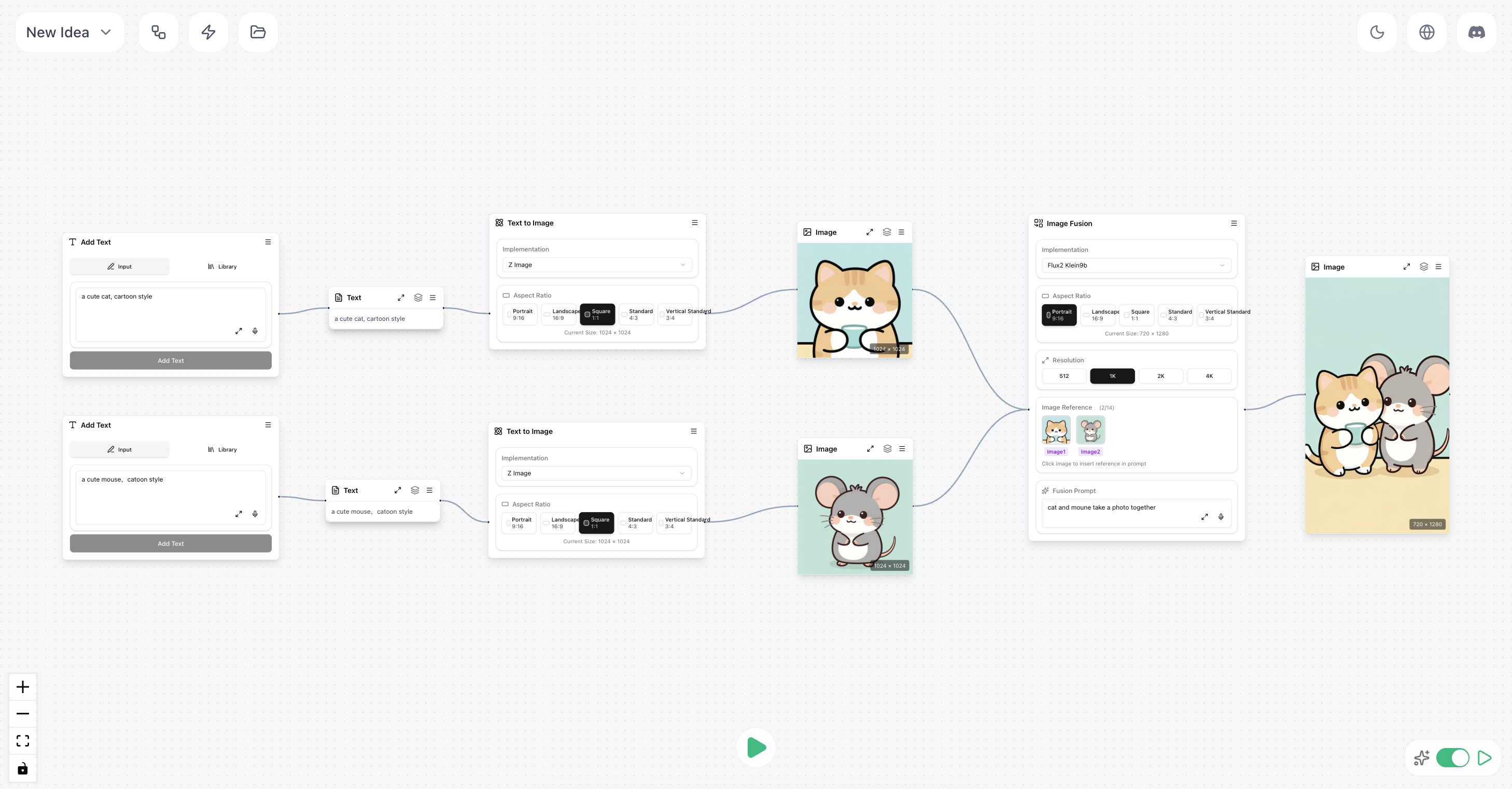 |  |
Intermediate — (Add topic → write script → generate speech) + (character description → generate image) → lip-synced video = talking-head avatar.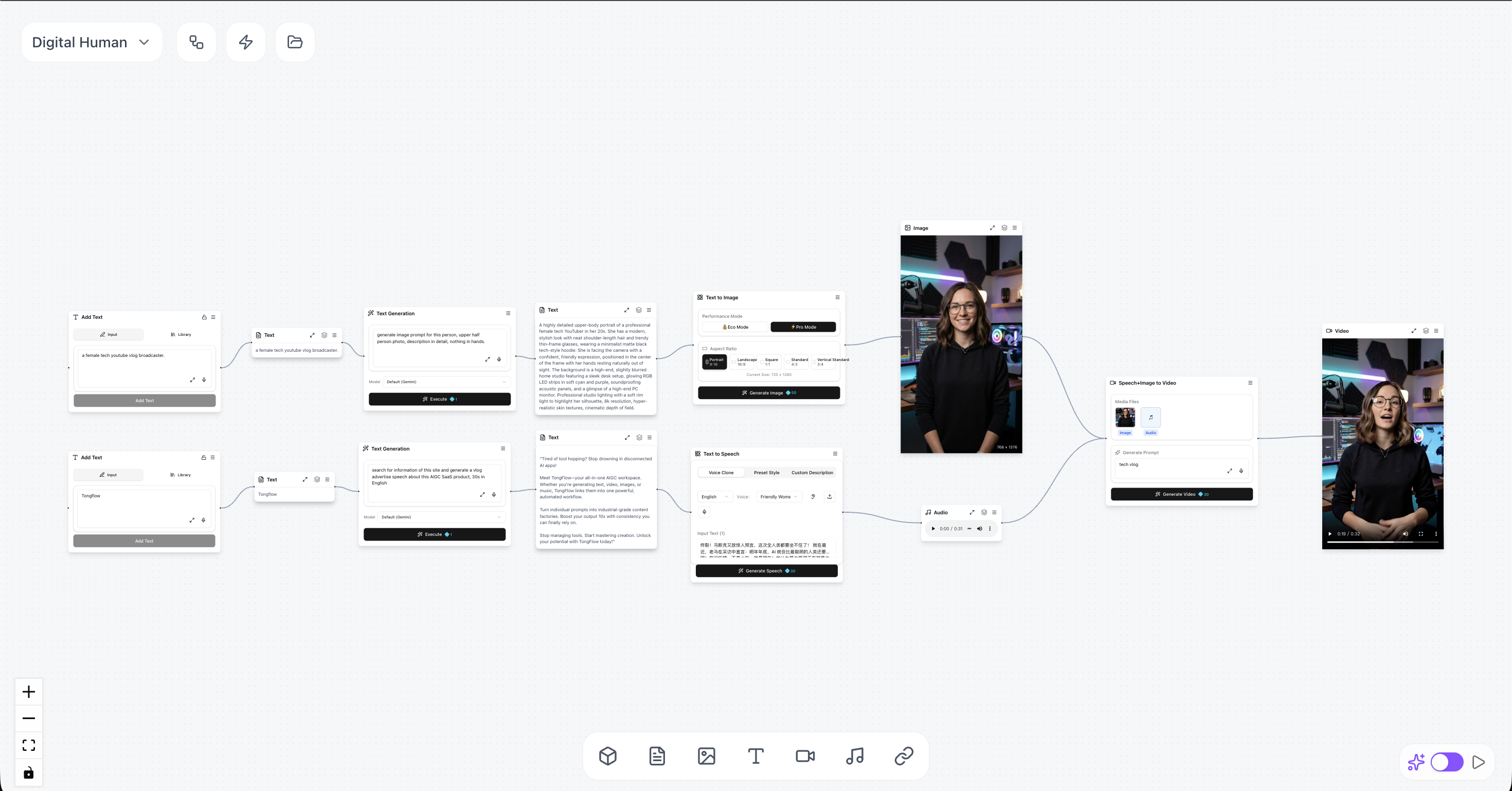 | |
Advanced — Generate lyrics + song + characters + scenes + storyboard → produce a music video.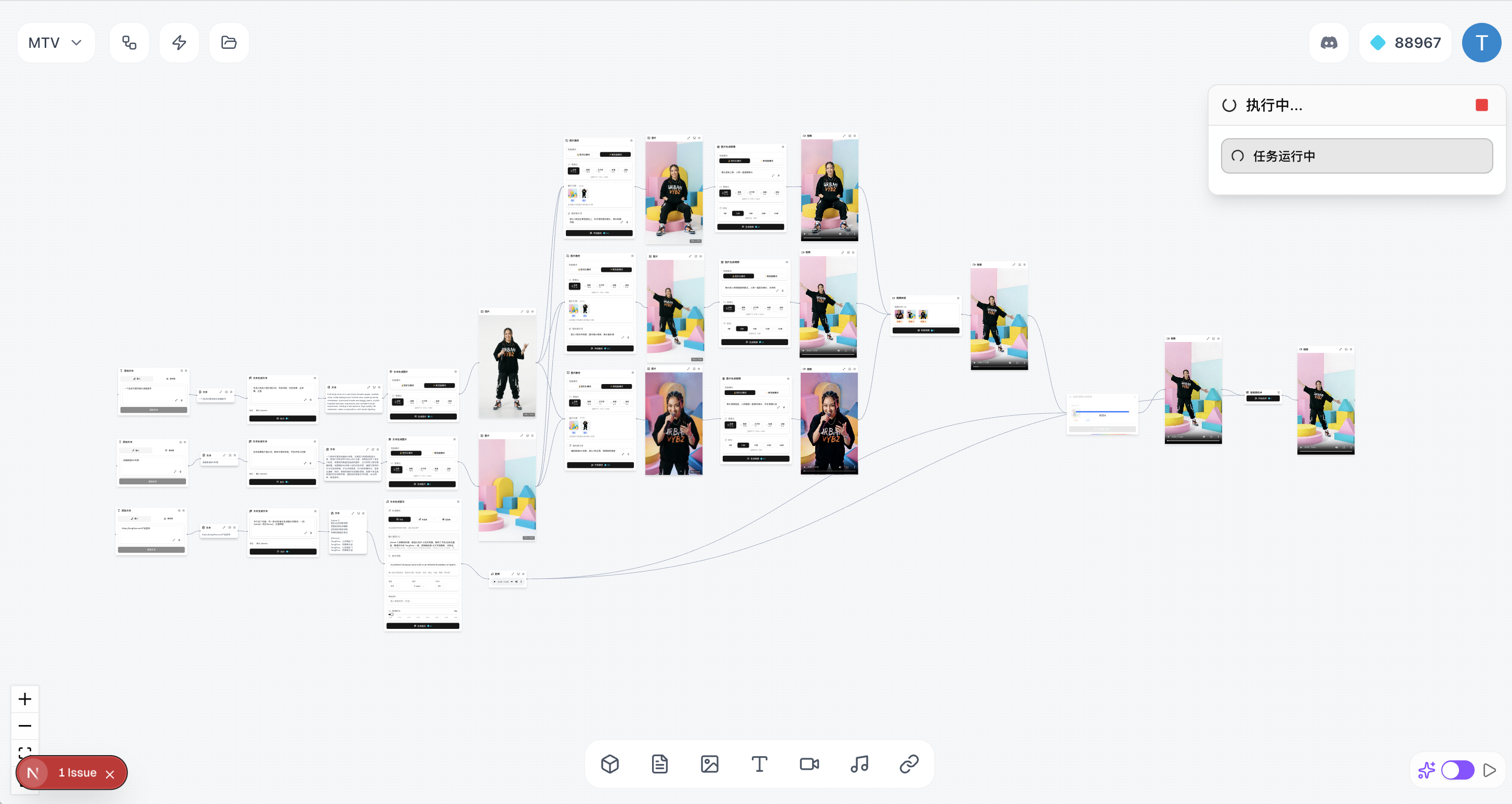 |
With TongFlow, you can expand your imagination and stretch your ideas with generative AI, just have a try now!
How To Start
The TongFlow desktop app is a lightweight (~10 MB) shell around the cloud studio at app.tongflow.com — install it, sign in, and start creating. The cloud studio also runs in any modern browser.
Step 1 — Install the desktop app
Download the installer for your platform, install it, and open it.
- macOS (Universal — Apple Silicon & Intel): TongFlow-mac-universal.dmg
- Windows: TongFlow-win-x64.msi
All builds are on the Releases page.
macOS: the builds are not yet notarized with Apple, so Gatekeeper will block the first launch ("TongFlow is damaged and can't be opened"). After moving the app to Applications, clear the quarantine flag once and it opens normally:
xattr -cr /Applications/TongFlow.appDownload from this page directly — installers passed through chat apps (e.g. WeChat) may be renamed or re-flagged.
Step 2 — Sign in and create
Sign in with Google or WeChat and start creating — the cloud studio manages plugins and execution for you.
Prefer a fully local, account-free TongFlow? That's what self-hosting is for — see Run from source or Run with Docker, then follow Self-host setup. (The desktop app up to v0.1.13 bundled this local runtime; those installers remain on the Releases page.)
Core Concept
-
All models: AI models can be thought of as a modality transform (e.g. LLMs are text→text, image models are text→image, speech models are text→audio, and so on). TongFlow wraps each capability as a node.
-
All modalities: TongFlow supports almost every modality and file format that people actually ship over the web.
-
Low barrier, high ceiling: no complex AI parameters to learn, no manual node connecting; just three operations — add, transform, and combine — to arrange ideas freely. And by orchestrating AI models freely, you can generate unique creations and works of your own.
-
Open ecosystem: TongFlow's plugin-based design lets every platform package its own independent plugins, and we provide at least one official implementation plugin for each capability node. The core stays small, the ecosystem stays open.
What’s Defined
✅ = available out of the box with an official plugin · ⬜ = node exists in the canvas but has no official plugin yet (planned).
Add
- ✅ Text input: type text and add a text node.
- ✅ Add image: pick a local file and add an image node.
- ✅ Add photo: capture with the device camera and add an image node.
- ✅ Add sketch: draw on the canvas and add an image node.
- ✅ Add audio: pick a local audio file and add an audio node.
- ✅ Record audio: record with the mic and add an audio node.
- ✅ Add video: pick a local video file and add a video node.
- ✅ Record video: record with the camera and add a video node.
- ✅ Add document: pick a local file and add a document node.
- ✅ Add URL: fetch a page from a link and add text, image, audio, or video nodes.
- ✅ Add 3D model: choose a local model file and add a 3D model node.
Transform
Text
- ✅ Generate / rewrite: create or edit copy from a prompt.
Image
- ✅ Image generation: images from text.
- ✅ Image editing: inpaint, edit, or redraw with instructions.
- ✅ Image understanding: captions, Q&A, or descriptions from an image.
- ✅ Image upscaling: enlarge for sharper detail.
- ✅ Pose detection: 308-keypoint whole-body skeleton overlay (body, hands, face).
- ✅ Body-part segmentation: 29-class human parsing overlay.
- ✅ Surface normals: per-pixel normal map — human-centric or full scene.
- ✅ Matting: cut the human or salient foreground out as a transparent PNG.
Video
- ✅ Video generation: video from text.
- ✅ Image-to-video: animate a still into motion.
- ✅ First/last-frame video: two key images to interpolate a clip.
- ✅ Images → video: multi-image reference fusion — several reference images plus text into a new video.
- ✅ Omni-reference video: mix image, video, and audio references (plus text) into one video with native stereo audio.
- ✅ Video understanding: summaries or descriptions from video.
- ✅ Video upscaling: higher-resolution output.
- ✅ Extract first / last frame: grab a frame as an image.
- ✅ Video editing: edit a video from a text instruction.
- ✅ Subtitle removal: clean subtitles from a video.
- ✅ Watermark removal: remove watermarks from a video.
Audio
- ✅ Music generation: music from text, with optional reference-audio conditioning.
- ✅ Audio understanding: describe a clip (music, speech, or ambient sound) in text.
- ✅ Music repaint: regenerate a chosen time range of a song.
- ✅ Music cover: restyle a song via a caption and/or a reference track.
- ✅ Add track / complete arrangement: generate one new stem over a mix, or fill in missing tracks.
- ✅ Music brief: one-sentence idea → lyrics, style tags, BPM, key, and duration.
- ✅ Speech synthesis: text-to-speech — preset style, voice clone (reference audio), or instruction-driven.
- ✅ Speech recognition: transcribe speech from audio or video.
- ✅ Noise reduction: denoise audio.
- ⬜ Speaker diarization: separate audio by speaker.
- ⬜ Voice / timbre replacement: replace or clone a voice with a reference sample.
- ✅ Multi-track / vocal-accompaniment separation: isolate vocals, drums, bass, guitar, and 8 more stems.
- ✅ Open-vocabulary sound separation: describe any sound in words ("dog barking") and split the audio into that sound and everything else.
Combine
- ✅ Image fusion: blend or edit multiple references into one image.
- ✅ Lip sync: audio + video → video (lip-sync); also audio + image → video and audio + text → video variants.
- ✅ Emotive speech: text + voice reference → speech in that voice, with emotion control.
- ✅ Character swap: video + reference (scene blend / character replacement), Animate Mix-style generation.
- ✅ Motion transfer: video + reference (motion / retarget), Animate Move-style generation.
- ✅ Combine text: merge multiple text nodes into one.
Other
- ✅ Image → 3D: single-view 3D model from an image.
- ✅ Video → motion capture: monocular video to skeletal animation (body + fingers + face channels, GLB).
- ✅ Document → text: extract plain text from documents.
- ✅ Link → text: turn page content into text.
Helpers
- ✅ Concatenate clips: join multiple videos end to end.
- ✅ Mux audio + video: merge into one file.
- ✅ Split by shots: cut a long video into segments by scene.
- ✅ Split video & audio: demux a video into separate video and audio tracks.
- ✅ Extract audio track: pull audio into its own asset.
- ✅ Split long text: break a long passage into chunks.
- ✅ Merge / tidy text blocks: combine segments (use the auto-merge option).
- ✅ Filter or drop clips: drop unwanted clips by rule or selection.
- ✅ Arrange & batch groups: group and arrange text/clip batches for downstream processing.
Official plugins
The official GPU/CPU plugins currently run on Modal — up to $30/month of free GPU compute (H100/A100, etc.). See Self-host setup for the
MODAL_TOKEN_*setup. Any other platform can publish its own plugins the same way.
API plugins
First-party providers (a lab's own models):
- tongflow-api-gemini — Google Gemini with a per-node model picker: text, vision, image (Nano Banana / Imagen 4), Veo video, TTS and transcription
- tongflow-api-openai — OpenAI with a per-node model picker:
gen_text, image gen/edit/fusion (gpt-image-2), vision, document OCR, Whisper transcription and TTS - tongflow-api-deepseek — DeepSeek V4 (
flash/pro, with a streaming thinking bubble) forgen_text/ text tools - tongflow-api-bytedance — ByteDance Volcengine Ark with a per-node model picker: Doubao text & vision, Seedream image gen/edit/fusion, Seedance text/image/audio → video
- tongflow-api-xai — xAI Grok with a per-node model picker:
gen_text(Grok 4.x), image understanding, and Grok Imagine text-to-image - tongflow-api-runway — Runway Dev unified API with a per-node model picker: video (Gen-4.5, Gen-4 Turbo, Aleph edit, Act-Two, Seedance, Veo), image (GPT Image 2, Seedream 5, Gemini image 3) and ElevenLabs TTS
Router plugins
Aggregators — one key, many third-party models across labs:
- tongflow-router-openrouter — OpenRouter with a per-node model picker:
gen_text(free by default, plus GPT-5.5 / Claude / Gemini / Grok / DeepSeek), vision / audio understanding, image gen/edit and transcription - tongflow-router-cometapi — CometAPI gateway with a per-node model picker that also lists CometAPI's live catalog:
gen_text/ text tools (GPT-5.5, Claude, Gemini, DeepSeek, Grok, Qwen, Kimi), image / video / audio understanding, image gen/edit/fusion (GPT Image 2, Seedream), text / image(s) → video (Sora 2, Veo 3.1, Seedance, Wan, MiniMax, HappyHorse, Vidu), video edit (Omni), TTS and Whisper transcription - tongflow-router-toapis — ToAPIs gateway with a per-node model picker:
gen_text/ text tools (GPT-5.6, Claude, Gemini, DeepSeek, Qwen, GLM, Kimi, MiniMax), image understanding, image gen/edit/fusion (GPT Image 2, Seedream 5, Gemini Image, Flux 2, Grok), text / image(s) / first-last-frame / multimodal refs → video (Sora 2, Veo 3.1, Seedance 2, Kling, MiniMax H3, Wan, HappyHorse, Vidu), video edit (HappyHorse); the picker also lists the live per-key model list - tongflow-router-apimart — APIMart gateway with a per-node model picker: image gen/edit (Z-Image, Seedream, Nano Banana, GPT-Image), text/image → video (Kling, VEO3, Sora2, Seedance),
gen_text(GPT-5, Claude, Gemini), Whisper transcription and TTS - tongflow-router-replicate — Replicate with a per-node model picker across the catalog: text, vision, image gen/edit/fusion/upscale/matting, text/image → video, transcription, TTS / voice clone, music, and image → 3D (FLUX, Seedream, Veo, Kling, Whisper, Hunyuan3D…)
- tongflow-router-fal — fal.ai with a per-node model picker: image (gen/edit/fusion/upscale/matting/pose/normal/seg), video (text/image → video, first-last frame, talking-head, lip-sync, upscale), audio (transcription, TTS, voice clone, music, source separation) and image → 3D
GPU/CPU plugins
- tongflow-modal-ffmpeg — transcoding, muxing, media pipelines
- tongflow-modal-pyscenedetect — shot-boundary detection for splitting clips
- tongflow-modal-z-image — Z-Image text-to-image
- tongflow-modal-ernie-image — ERNIE Image text-to-image (alternative)
- tongflow-modal-krea2 — Krea 2 Turbo text-to-image (open-weights 12B, 8-step, up to 2K)
- tongflow-modal-flux2-klein9b — FLUX.2 Klein 9B multi-reference fusion / image editing
- tongflow-modal-boogu — Boogu-Image-0.1 (fp8) text-to-image (dense bilingual text) & single-reference image editing
- tongflow-modal-infinitetalk — InfiniteTalk audio-driven lip-sync (audio + image / video → talking-head video)
- tongflow-modal-wan-animate — Wan-Animate character swap & motion transfer (video + reference)
- tongflow-modal-scail2 — SCAIL-2 controlled character animation (image + driving video; same two slots as wan-animate)
- tongflow-modal-minimax-h3 — MiniMax-H3 33B video generation with native stereo audio (text / first- & last-frame / multi-image / omni-reference)
- tongflow-modal-bernini — Bernini-R 1.3B unified video renderer (text/image → image/video, video editing, subtitle / watermark removal)
- tongflow-modal-sam3 — SAM 3 / SAM 3.1 text-guided matting: cut every instance of a described concept out of an image (transparent PNG) or track it through a video (green-screen matte)
- tongflow-modal-triposplat — TripoSplat single image → 3D Gaussian splat
- tongflow-modal-sam-3d-objects — SAM 3D Objects single image → 3D Gaussian splat of the foreground object (auto mask, robust to occlusion/clutter; alternative)
- tongflow-modal-sam-3d-body — SAM 3D Body single image → full-body 3D human mesh GLB (multi-person, MHR rig; alternative), and video motion capture (per-frame MHR regression → animated character GLB; alternative)
- tongflow-modal-sapiens2 — Sapiens2 (Meta) human suite: pose detection, body-part segmentation, surface normals, human matting, image → 3D point cloud, and video motion capture (geometric engine: keypoints + pointmap → animated MHR character GLB)
- tongflow-modal-sensenova-vision — SenseNova-Vision (SenseTime) unified vision model: image understanding / visual QA, detection & OCR structured text, full-scene surface normals, salient-object matting, and human pose overlay (alternative)
- tongflow-modal-seedvr2 — SeedVR2 image / video super-resolution
- tongflow-modal-gemma4 — Gemma-4 multimodal text (image / video understanding)
- tongflow-modal-qwen38 — Qwen3.8-27B multimodal text (text generation, image / video understanding; alternative)
- tongflow-modal-qwen3asr — Qwen3 speech recognition
- tongflow-modal-qwen3tts — Qwen3 text-to-speech
- tongflow-modal-indextts2 — IndexTTS-2.5 emotive text-to-speech: zero-shot voice cloning (alternative) and emotion-controlled speech from a voice reference
- tongflow-modal-whisper — Whisper speech recognition with timestamps (alternative)
- tongflow-modal-ace-step — ACE-Step 1.5 music suite: text-to-music (sft / base / turbo selectable), repaint, cover, stem extraction, add-track, arrangement completion, music brief, and music understanding
- tongflow-modal-levo — LeVo 2 / SongGeneration text-to-music (multilingual, commercial-grade)
- tongflow-modal-minimax-music3 — MiniMax-Music3 11B song generation: lyrics + description → complete song with vocals (up to ~5 min, 32 kHz stereo)
- tongflow-modal-sam-audio — SAM-Audio text-prompted sound separation: noise reduction, vocal isolation, and free-text stem extraction ("the piano in the background")
- tongflow-modal-docling — Docling document → text
- tongflow-modal-paddle — PaddleOCR document → text
- tongflow-modal-unlimited-ocr — Unlimited-OCR long-horizon document / PDF → text
- tongflow-modal-crawl4ai — Crawl4AI URL / link → text
- tongflow-modal-scrapling — Scrapling stealth-browser URL / link → text
Run from source
pnpm install
pnpm plugins:install   # clone official plugins into plugins/
pnpm start:prod        # builds once, then serves at http://localhost:3000
Requires Node (with pnpm) and a Python 3.10+ interpreter on your PATH (set PYTHON to point at a specific one). Plugins run as local Python processes; TongFlow provisions an isolated venv for them automatically and installs each plugin's requirements.txt on first use — no manual Python setup.
Open http://localhost:3000 and the canvas is live. Then follow Self-host setup (credentials go in the in-app Settings dialog, or a project .env).
Run with Docker
A self-host image is published to GHCR — no Node/Python/pnpm setup required:
docker run -d -p 3000:3000 \
  -v tongflow-data:/data -v tongflow-plugins:/plugins \
  ghcr.io/tong-io/tongflow:latest
Then open http://localhost:3000. Or with Compose (clones this repo's docker-compose.yml):
docker compose up -d
To build the image yourself instead of pulling: docker build -t tongflow .
Data & credentials. Everything writable lives in the /data volume (SQLite db, uploads, settings). API keys are optional — set them in the in-app Settings dialog, or pass them at launch (-e OPENROUTER_API_KEY=…); supported keys: OPENROUTER_API_KEY, GEMINI_API_KEY, OPENAI_API_KEY, MODAL_TOKEN_ID / MODAL_TOKEN_SECRET.
Plugins. The image ships no plugins — install them from the in-app plugin manager (first install needs network access to GitHub). On first run, a plugin provisions a shared Python venv under /data/.tongflow/plugin-venv (installs the SDK + the plugin's requirements.txt from PyPI), so the first run is slower and needs network. Modal-backed plugins additionally need a Modal token.
Self-host setup (plugins & credentials)
A self-hosted TongFlow ships with no plugins pre-installed, and the canvas is preloaded with an example workflow. Three steps get it running:
1 — Install plugins
Open the plugin manager (the blocks icon, top-right) and install what you need. Newly installed plugins are usable immediately, no restart.
To run the preloaded example workflow (text → image → fusion → video), install these three plugins:
- tongflow-modal-z-image — text-to-image
- tongflow-modal-flux2-klein9b — image fusion / blending
- tongflow-modal-minimax-h3 — image-to-video
These run on Modal (up to $30/month of free GPU compute). Add MODAL_TOKEN_ID / MODAL_TOKEN_SECRET in Settings; create a token at modal.com/settings/tokens. Any other platform can publish its own plugins the same way.
Browse the full catalog — the official API plugins (OpenAI / Gemini / OpenRouter) and other GPU/CPU plugins — in the plugin manager.
2 — Configure credentials
Open Settings (the gear icon, top-right) and add the environment variables your plugins need — e.g. OPENAI_API_KEY for the API plugins, or the credentials your GPU/CPU plugins require.
Plugin credentials live in Settings. TongFlow is platform-agnostic and hardcodes no provider: the Settings dialog is a generic key/value editor for environment variables passed to plugins. Each plugin's README documents the keys it needs. Values are stored locally and take effect without a restart.
3 — Run the example workflow
Run the preloaded example node by node, or switch to Execute Mode and hit the run button to run the whole thing in one click.
Custom plugins
Every runnable node is backed by a contract — the ABI (packages/tongflow/abi/tongflow.abi.json) — that defines what capabilities exist and what each one's input/output looks like, independent of who implements it. A plugin is just a small Python package that picks one or more ABI slots and supplies the how, annotated against the ABI-generated types via the tongflow Python SDK.
The full development flow — the ABI, the @node_slot decorator, the SDK, directory layout, and how to publish — lives in docs/plugins.md.
Community
Join the community on Discord or scan the WeChat group QR code below.
Business
For business inquiries, please contact [email protected].
- Open-source model owners: I can integrate your models so users can try them out smoothly.
- Enterprise: I can help you deploy on your local GPU, build custom nodes and plugins, and more.
- Platform / router: I can integrate your APIs.
- VCs: I’m interested in partnering on tongflow.com, a cloud-hosted AI studio.
Open-Source
If you like this project, a Star on GitHub helps a lot. Thank you.
License
TongFlow is dual-licensed:
- AGPL-3.0 — free for individuals, research, open-source projects, and anyone willing to comply with the AGPL (including its Section 13 network/source-disclosure obligation).
- Commercial License — for organizations that want to use TongFlow in closed-source or SaaS products without AGPL's source-disclosure obligation, or that need warranties and platform support. Contact [email protected].
This covers the entire repository, including the sdk/ directory (the tongflow
PyPI package). Contributions are covered by our CLA.
查看使用指南 →
该插件的安装步骤、关键要点、FAQ 与兼容性说明(基于已收录字段派生)。
收录徽章

[](https://deepseek-plugin.org/plugins/tong-io/tongflow/packages/dsh-tongflow)把这段 markdown 粘贴到你的 GitHub README,链接回本插件详情页。徽章只声明已被本站收录,不代表安全认证。