为 DeepSeek Harness Web 注入可复用的多模型 Agent 小队:成员独立配置模型与工具,按依赖图协作,持久化运行历史与官方 Token 用量。

- 语言
- TypeScript
- License
- MIT
- 分支
- main
安装
$ dsh plugin --profile web add --allow-build=dsh-agent-team-gui github:toolclub/dsh-agent-team-gui在终端中运行以上命令,通过 dsh CLI 安装此插件。可在右上角切换 Profile。 第一次用 dsh?看这篇新手教程
对话式安装
帮我安装 DeepSeek Harness 插件 toolclub/dsh-agent-team-gui:先查看仓库 https://github.com/toolclub/dsh-agent-team-gui 确认安全性,然后执行安装命令并验证插件加载成功。
把这段指令粘贴给 DSH Web GUI 里的助手,由它代你完成安装与验证。
一句话定位
为 DeepSeek Harness Web 注入可复用、可版本化的多模型 Agent 小队,让用户在普通对话框旁选择持久化的"团队",由主模型按有界依赖图自动派单、汇总与记录官方 Token 用量。
核心能力
- 在 Settings 里创建可复用的成员库:每个成员独立绑定 provider/model、专属角色提示词、可选备用路由、Token 上限与最小权限工具白名单
- 在 Settings 里创建持久化小队:组合成员、选择串行或并行、设置激活策略(始终/智能/手动)与可选质量门禁
- 在普通对话框旁切换 Team / Solo / Inherited 三种模式,可叠加一次性"下一条消息"选择与项目级默认
- 动态 DAG 编排:当前对话的模型作为有界规划器生成角色分工与无环依赖图,失败时自动回退到确定性角色分工
- 后台运行、可取消、可重试,并写入持久运行历史,主模型只能看到有界的交接信息
- 直接展示官方 provider 上报的 Token 用量(输入/缓存读/缓存写/输出)与完整/部分/无覆盖度,绝不伪造价格
技术实现
- 语言: TypeScript(Host service + React 18 Web 客户端,双 tsconfig 分离打包)
- 关键依赖:
@deepseek-ai/cordis(Cordis 依赖注入容器)、@deepseek-ai/dsh-agent/dsh-llm/dsh-storage/dsh-storage-domain/dsh-tools/dsh-jobs(宿主服务接缝)、zod(所有读写 schema)、@deepseek-ai/schemastery(配置 schema)、react@^18.2.0(Web UI) - 架构模式: 双端 Cordis 服务——Host 端通过
Service类注入到 DSH 宿主进程,在agent/pre-step钩子里拦截普通消息并按小队模式派单;浏览器端通过apply注入到 4 个既有 additive slot(settings.section、conversation.input.right、conversation.input.dock、conversation.view),并通过 loopback-only Connection RPC(/agent-team-gui) 与 Host 通信;Domain 用 8 张表(agents/squads/session_modes/next_modes/message_claims/runs/squad_versions/project_defaults)做 v0 持久层,严格新写 schema 与宽松 v0 读 schema 分离 - 入口文件: Host 端
src/index.ts;浏览器端src/client/index.ts;模型工具src/tools/dispatch-to-squad.ts;RPC 适配层src/rpc.ts;Domain 规范src/spec.ts;Cordis 注入声明cordis.patch.yml
适用场景
适合在 Web profile 里做"长任务多角色协作"的 DSH 用户——比如让一支小队同时承担规划、实现、审核、修复四类角色,自动按依赖关系派发;也适合需要复用团队配置(模型路由、角色分工、触发策略)跨项目使用的团队管理员。如果你只想做一个能持续对话的智能体,或根本不开 Web profile,这个插件并不合适。
前置依赖与兼容性
| 依赖 | 最低版本 | 说明 |
|---|---|---|
| DeepSeek Harness | >=0.1.0-rc.5,<0.2.0 | peerDependencies 声明范围;CI 当前验证 0.1.0-rc.6 |
| Node.js | ^22.19.0 或 >=24.0.0 | engines 字段;README 明确"Node 23 不支持" |
| DSH profile | 仅 Web profile | 仓库 dsh.bundle.client.platform=web,只对 Web bundle 注册 UI |
| DSH provider/model | 至少一条 | 小队成员需要绑定现有 DSH 路由,凭证由 DSH 管理 |
| pnpm | 任意支持版本 | Git 源安装时 pnpm 10+ 可能要求 allowBuilds |
安装方式
dsh plugin --profile web add github:toolclub/dsh-agent-team-gui
配置项
| 配置 | 类型 | 说明 | 默认值 |
|---|---|---|---|
| defaultProvider | 字符串 | DSH 子 Agent 默认 provider 名,作为成员创建时的兜底 | spawn |
| defaultExecutionMode | serial / parallel | 小队未指定执行模式时的兜底(串行或并行) | serial |
| defaultContextMode | spawn / fork / chain | 小队未指定上下文模式时的兜底;chain 仅在 serial 下有效 | spawn |
| historyMaxRuns | 0~5000 整数 | 自动清理多少条已结束运行;0 表示不按数量清理 | 0 |
| historyMaxAgeDays | 0~3650 整数 | 多少天前的已结束运行自动清理;0 表示不按时间清理 | 0 |
| versionMaxPerSquad | 0~1000 整数 | 每个小队最多保留多少个不可变版本;0 表示不清理版本 | 0 |
常见问题
Q: 安装后需要重启 DSH Web 进程吗?
A: 需要。README 明确要求安装或更新后必须重启 Web 进程,新的 agent-team-gui Host 行才会被加载。
Q: 必须使用 Web profile 吗?headless 能装吗?
A: 必须 Web。Settings UI、对话模式控件、运行中心都依赖 Web bundle 注入的 storage 与 Connection RPC;其他进程内插件若注入了必需 service,仍可调用导出的 Host service,但没有官方配置界面。
Q: 安装前还要准备什么?
A: DSH 处于 0.1.0-rc.5 至 0.2.0 之间,Node.js 22.19+ 或 24+(Node 23 不支持),pnpm,以及至少一条已经在 DSH 里配好的 provider/model 路由——小队成员必须挂到现有路由上。
Q: 卸载插件会一起清掉小队数据吗?
A: 不会。插件删除时不会自动删除 Domain 里的 8 张持久表,小队定义、版本、运行历史都留在 DSH 存储里,要手动清理。
Q: 安装时 pnpm 弹出 allowBuilds 提示怎么办?
A: 只把 dsh-agent-team-gui 这一个包加入 pnpm 提示的 Web profile 工作区文件(默认 ~/.dsh/profiles/web/pnpm-workspace.yaml)的 allowBuilds,其他包一律不授权,然后重复同一条固定版本命令。
Q: 旧 v0.4 数据还能用吗?
A: 能打开、可以导入,但不能再以 v2 上限写入。旧运行如果没有记录原始计划,会被显式拒绝重试。
Q: 模型工具调用一定能触发小队吗?
A: 不一定。模型工具触发是 best-effort,因为 DSH 还没暴露 toolChoice 控制;想要稳定自动触发,把小队触发模式设成 guaranteed,它由 Host 驱动并按持久消息幂等。
Q: 可以远程 URL 拉取配方吗?
A: 不可以。snapshotSchema.capabilities.remoteRecipeFetch 固定为 false,v0.5 故意禁掉远程 URL 以避免未做 SSRF 加固的 Host 网络请求面;请导入已经审查过的本地 JSON。
上手难度
进阶 — 需要先理解 DSH Web profile 与 Cordis 注入模型,再阅读 Settings 里的"成员-小队-触发模式"配置矩阵;此外,质量门禁、激活策略、上下文模式(spawn/fork/chain)等概念对小队行为有显著影响,只看 README 不跑一遍比较容易踩坑。
已知问题与限制
- 仅支持 Web profile;没有 headless Settings 页面;其他进程内插件可消费导出的 Host service,但官方配置 UI 不存在(
README.md:334-335) - 声明兼容范围
>=0.1.0-rc.5 <0.2.0,但 CI 当前只在 rc.6 上验证过,DSH 与本插件都未稳定,生产必须固定版本(README.md:336-337) - 模型工具触发模式(model-tool)是 best-effort:DSH 没有暴露
toolChoice控制,模型可能不会自动调用dispatch_to_squad;需要稳定自动触发请用 guaranteed 模式(README.md:346-347) - DSH 当前没有"注册自定义 squad/* Session 事件"的官方 seam,插件使用自己的持久运行表 + 标准 child Session/Tool 事件 + Jobs + 日志组合实现,事件可见性与官方 Session 事件并不一致(
README.md:344-345) - 软 Token 预算(
tokenBudget)只能阻止后续成员被调度,无法在已运行 provider 上强制中断;真正的硬上限是每个成员自己的maxTokens(README.md:342-343) - v0.5 禁止从 URL 拉取配方:
snapshotSchema.capabilities.remoteRecipeFetch写死为false,且 README 明确指出是为了避免暴露没有 SSRF 防护的 Host 网络面(src/rpc.ts:259-261/README.md:192-193) - Provider Token projection 是可选能力,partial/unavailable 覆盖率是正常且显式的状态;没有上报样本之前 UI 显示 "Metering…",不会出现假的 0(
README.md:154-165) - v0 持久定义域
version: 0故意保留且 storage-domain 不提供迁移 API,Domain 表结构只增不删(src/spec.ts:347-352) - 源码中未发现 TODO/FIXME/HACK/XXX 注释(grep 结果为空),暂无开发者标记的待办项


Persistent, reusable multi-model Agent teams for DeepSeek Harness. Give each member its own model, role, fallback route, token limit, and tool policy. Select a saved team beside the normal composer; the lead model plans the work, runs a bounded dependency graph, and synthesizes the result.
Why this plugin
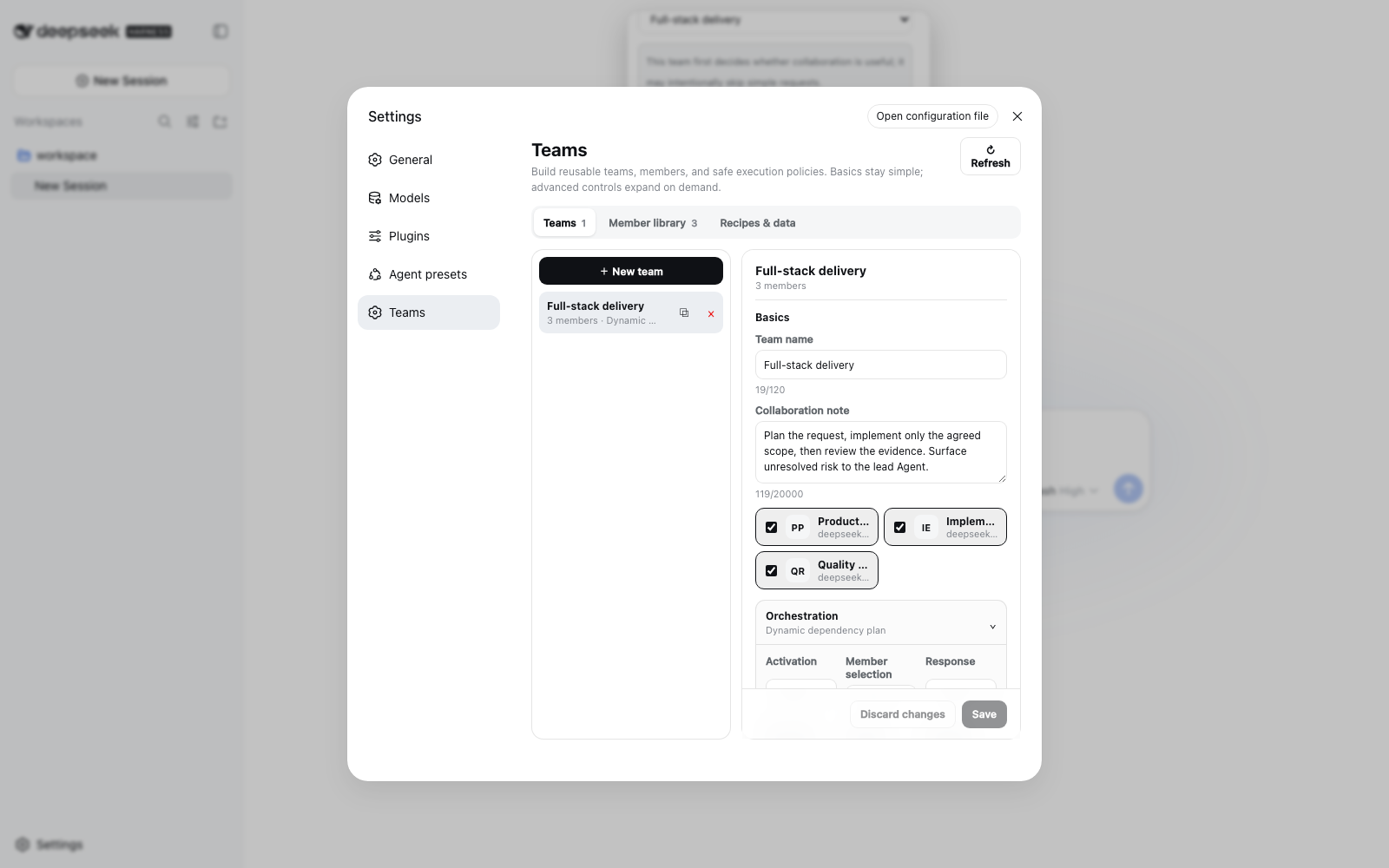
A team is a reusable product object, not a one-off dispatch form. Create it once in Settings → Teams, then use it across projects and conversations.
| Capability | User outcome |
|---|---|
| One model and tool policy per member | Combine a planner, implementer, reviewer, or specialist without forcing one route on everyone |
| Dynamic workflow planning by default | The active conversation's model assigns focused work and dependencies from the current request |
| Team / Solo / Inherited modes | Choose a durable conversation override, a project default, or a one-message exception without ambiguous switches |
| Bounded DAG, retries, quality gate, background work | Long work is observable, cancellable, finite, and restart-safe |
| Official provider Token usage | See input, cache-read, cache-write, and output Tokens with full/partial/unavailable coverage—never invented prices |
| Versions, recipes, and definition backup | Reproduce a team, share it without credentials, preview impact, and remap model routes before applying |
Install
Requirements: DeepSeek Harness >=0.1.0-rc.5 <0.2.0, the Web profile, Node.js
>=22.19.0 <23 or >=24.0.0 (Node.js 23 is not supported), pnpm, and at least one configured DSH
provider/model route.
dsh plugin --profile web add -w github:toolclub/dsh-agent-team-gui#v1.0.0
dsh --profile web
Git dependencies run this repository's prepare build. On pnpm 10 or later, the first command may
ask you to authorize that build. Add only this reviewed package to the Web profile file shown by
pnpm (normally ~/.dsh/profiles/web/pnpm-workspace.yaml), then repeat the same pinned command:
allowBuilds:
  dsh-agent-team-gui: true
Restart an already-running DSH Web process after installing or updating. Open Settings → Teams, create or import members and a team, then open the control beside the conversation composer.
[!TIP] If
dshis not onPATH, cloning Harness alone did not install a global command. From the Harness checkout usepnpm dsh --version, and replacedsh ...in this README withpnpm --dir /absolute/path/to/deepseek-harness dsh ....
Verify the composed bundle without installing rg:
dsh --profile web --dump-config | grep -E "agent-team-gui|dsh-agent-team-gui"
Expected output contains both the dsh-agent-team-gui bundle layer and the agent-team-gui row.
[!CAUTION]
allowBuildslets the selected Git dependency execute its build on your machine. Review and pin a tag or full commit SHA. A compiled release tarball does not need Gitpreparepermission.
First team in five steps
- In Settings → Members, create reusable members. Pick a configured provider/model, write a narrow role prompt, optionally add a fallback route, and grant only the tools that role needs.
- In Settings → Teams, create a team and select those members. Leave Fixed order off for dynamic planning, or enable it for a repeatable serial pipeline.
- Choose Always, Smart, or Manual activation; all members or an adaptive subset; foreground or background response; and optional resilience, budget, or review controls.
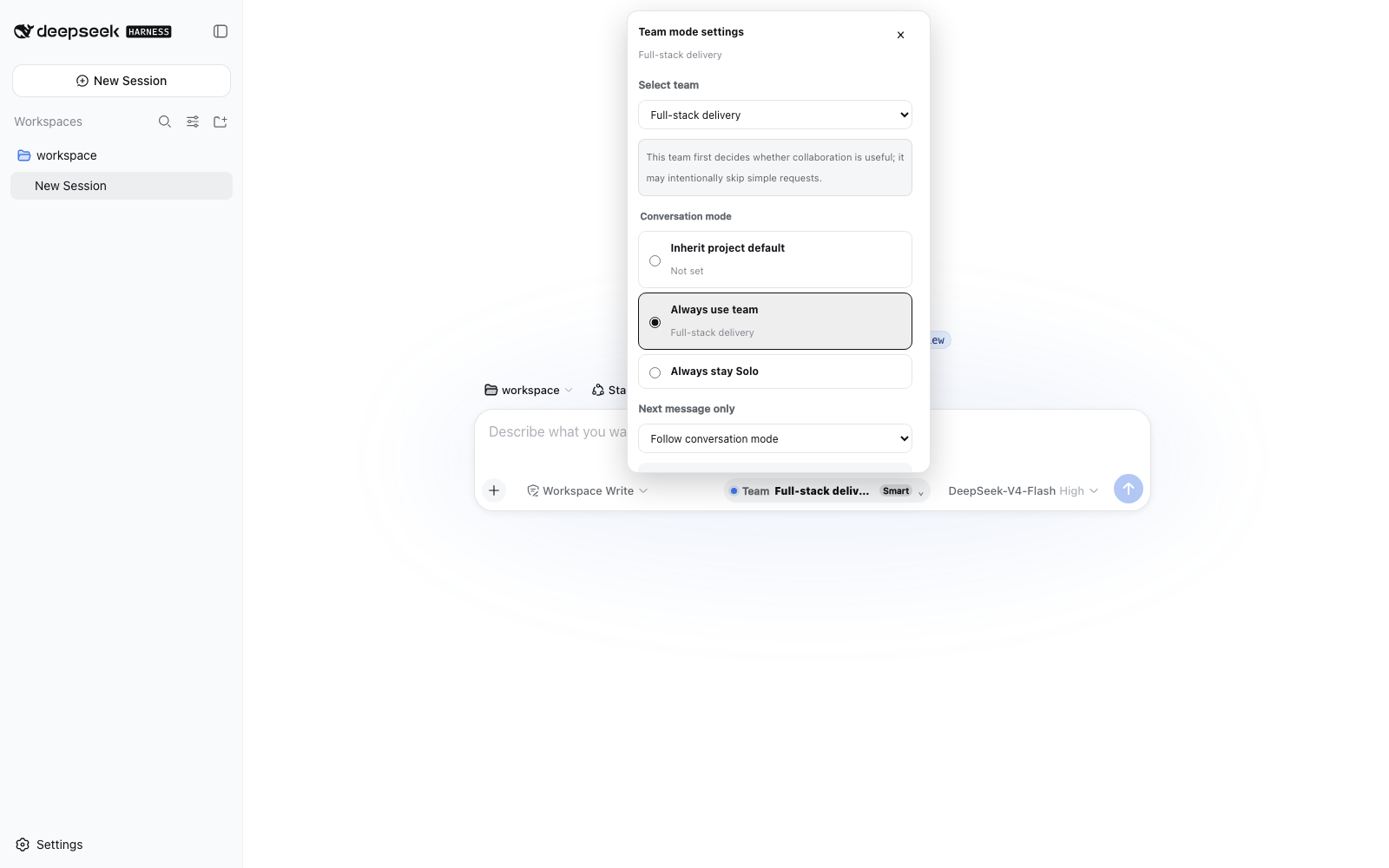
- Beside the normal composer choose Team, Solo, or Inherited. You can also queue a different team or Solo for only the next eligible message, or set a project default.
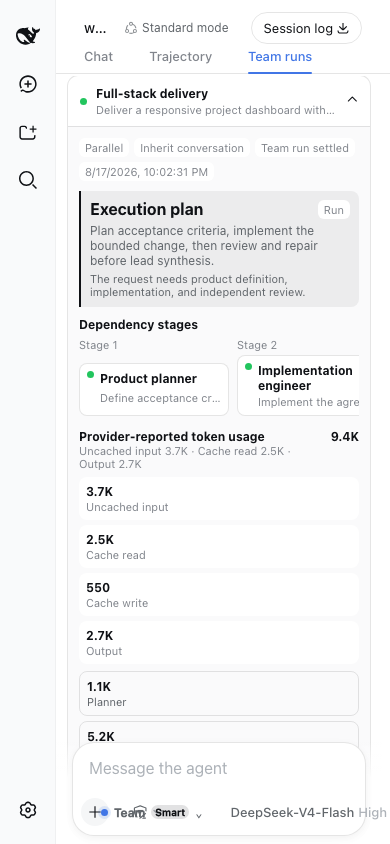
- Send the task normally. Open Team runs to inspect the plan, stages, members, review/repair rounds, outputs, errors, timings, retries, and official Token coverage.
How orchestration works
flowchart LR
    U["Normal user message"] --> M{"Conversation mode"}
    M -->|"Solo"| L["Lead Agent answers normally"]
    M -->|"Team / inherited default"| A{"Activation"}
    A -->|"Manual"| L
    A -->|"Smart may skip"| P["Bounded lead-model planner"]
    A -->|"Always"| P
    P --> D["Validated acyclic plan"]
    D --> W1["Ready member wave"]
    W1 --> W2["Dependent member wave"]
    W2 --> Q{"Optional quality gate"}
    Q -->|"Approved / disabled"| H["Bounded handoffs"]
    Q -->|"At most 2 repairs"| R["Named repair owner"]
    R --> Q
    H --> L
    D -. "live state + official Tokens" .-> C["Run Center and Insights"]
With no fixed order, the plugin uses the active conversation's provider/model route in a bounded, tool-free planner child. It receives the member roles and returns structured assignments plus an acyclic dependency graph. It does not turn one member into a replacement for the whole team. A bad, cyclic, or unavailable plan falls back to deterministic role-scoped assignments.
Ready DAG nodes run up to maxConcurrency. Dependants receive only bounded structured handoffs;
full member output remains in durable run history. A fixed member order is an explicit serial
override and bypasses DAG planning.
Activation and selection
- Always runs the selected team for every eligible top-level user message.
- Smart lets the bounded planner skip unsuitable/trivial work.
- Manual keeps ordinary sends Solo; queue the team for the next message or use the model tool.
- All members assigns each configured member exactly once.
- Adaptive lets Smart planning select the smallest useful non-empty subset.
Conversation modes
- Team is an explicit durable team selection for this conversation.
- Solo is an explicit durable opt-out, even when the project has a default team.
- Inherited removes the conversation override and follows the project default when one exists.
- Next message is a separate crash-safe one-shot Team or Solo choice, consumed exactly once.
These states remain interactive after page refresh, cold Host startup, and live reconnect. An empty or temporarily unavailable catalog never silently deletes a saved selection.
Safety bounds
- Planner, member, reviewer, and repair prompts put the exclusive role and no-delegation contract before a bounded excerpt of user content.
- Delegated sessions cannot dispatch another team. Detected DSH subagent tools—including renamed registrations—are denied inside team children.
- One durable claim binds automatic and model-tool dispatch to the latest human message, so repeated tool calls cannot create hundreds of duplicate teams.
- Member timeout, concurrency, retry-once, soft team Token budget, and quality rounds are finite.
- A retry creates a linked immutable run and replays the original normalized assignments, order, and DAG; it does not silently ask the model to invent a different workflow.
Run Center and Token usage
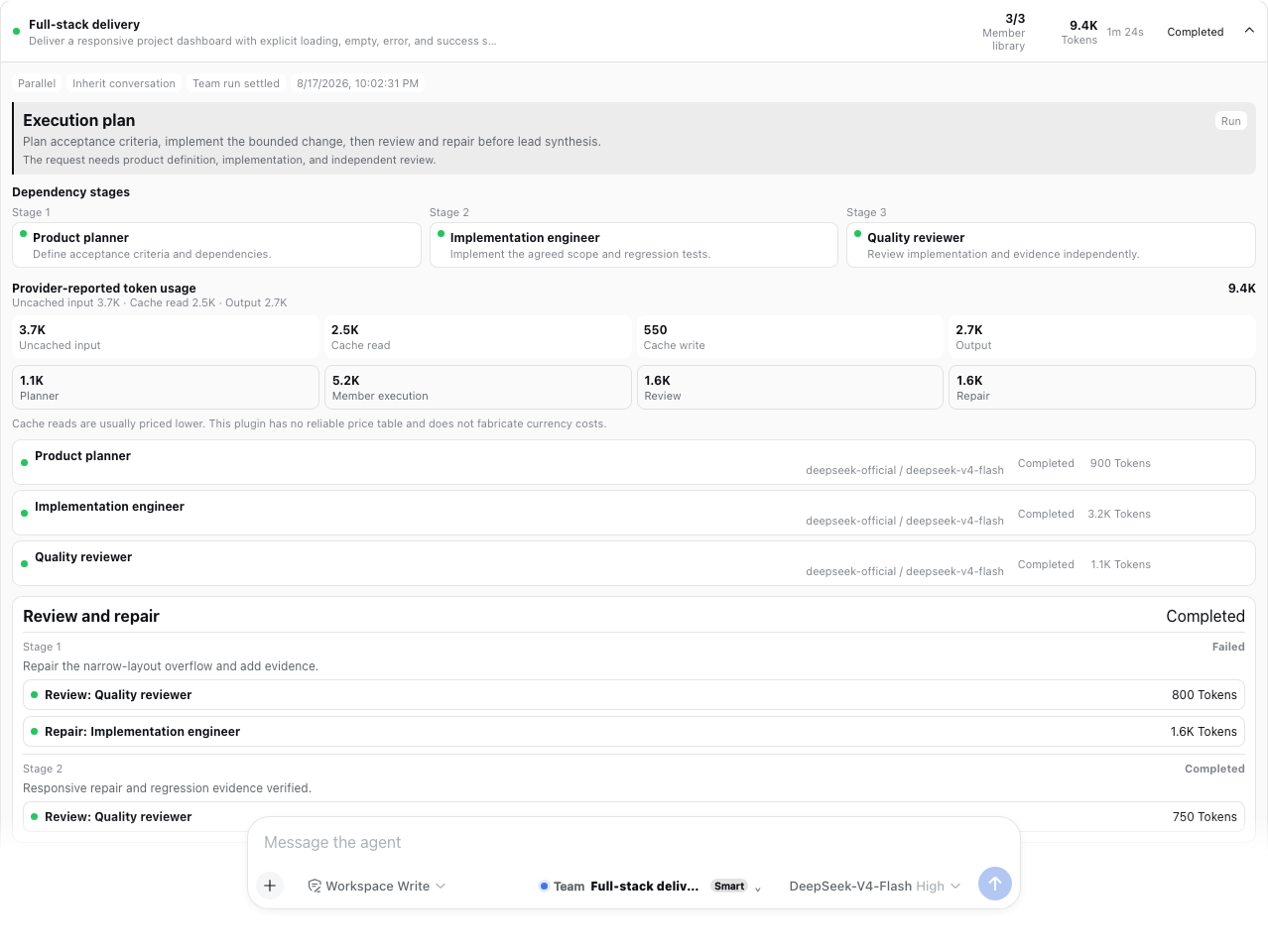
Every execution is written before planning starts. The Run Center exposes foreground/background state, live phase, elapsed time, child IDs, complete outputs, bounded handoffs, stop, linked whole or member retry, export, filters, and retention-safe clear.
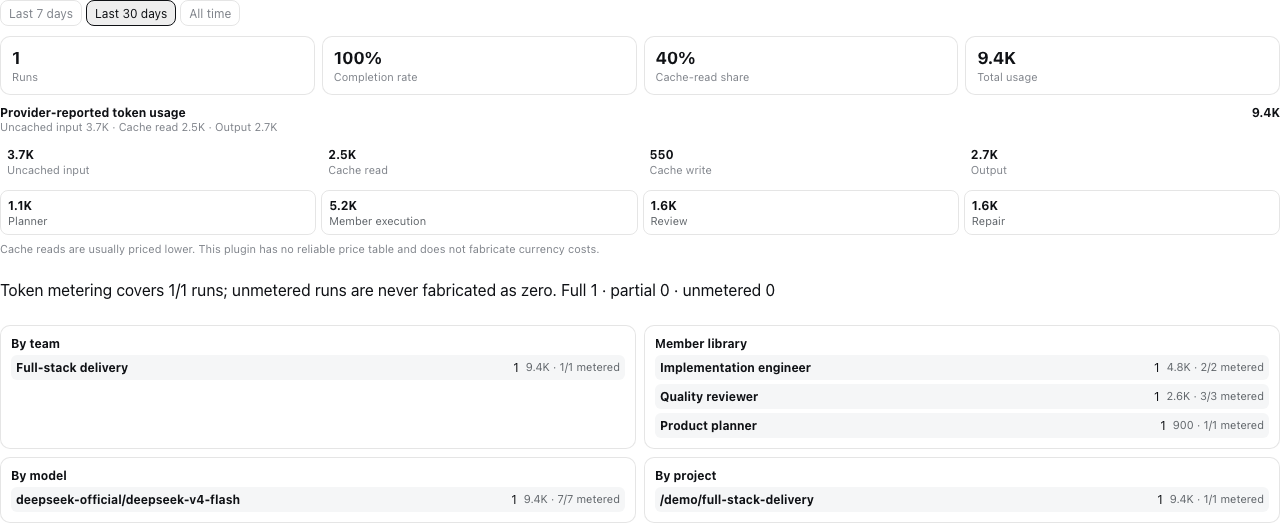
The plugin reuses DSH's official tokenUsage projection and keeps four buckets:
- uncached input;
- cache read;
- cache write;
- output.
Planner, member, review, and repair usage remain separately attributable. Coverage is explicitly full, partial, or unavailable at run and retry-attempt level. Before a provider reports a sample, the UI says Metering… instead of showing a false zero. Tokens are not money; the plugin does not guess prices that Harness providers do not publish through a stable pricing contract.
Quality gate and background runs
An optional quality gate names one reviewer, one repair owner, explicit criteria, and 0..2 repair
rounds. A rejection can rerun only that repair owner, followed by the named reviewer. It cannot
create arbitrary agents or recurse.
Foreground runs finish before the lead Agent synthesizes bounded handoffs. Background runs return a short acknowledgement and stay visible in the plugin Run Center; when the official DSH Jobs service is present, the same run is also registered there with a shared cancel hook. Without that optional service, the plugin falls back to process-local background execution; a Host restart then reconciles unfinished durable state as Interrupted rather than pretending it completed.
Versions, recipes, and definition backup
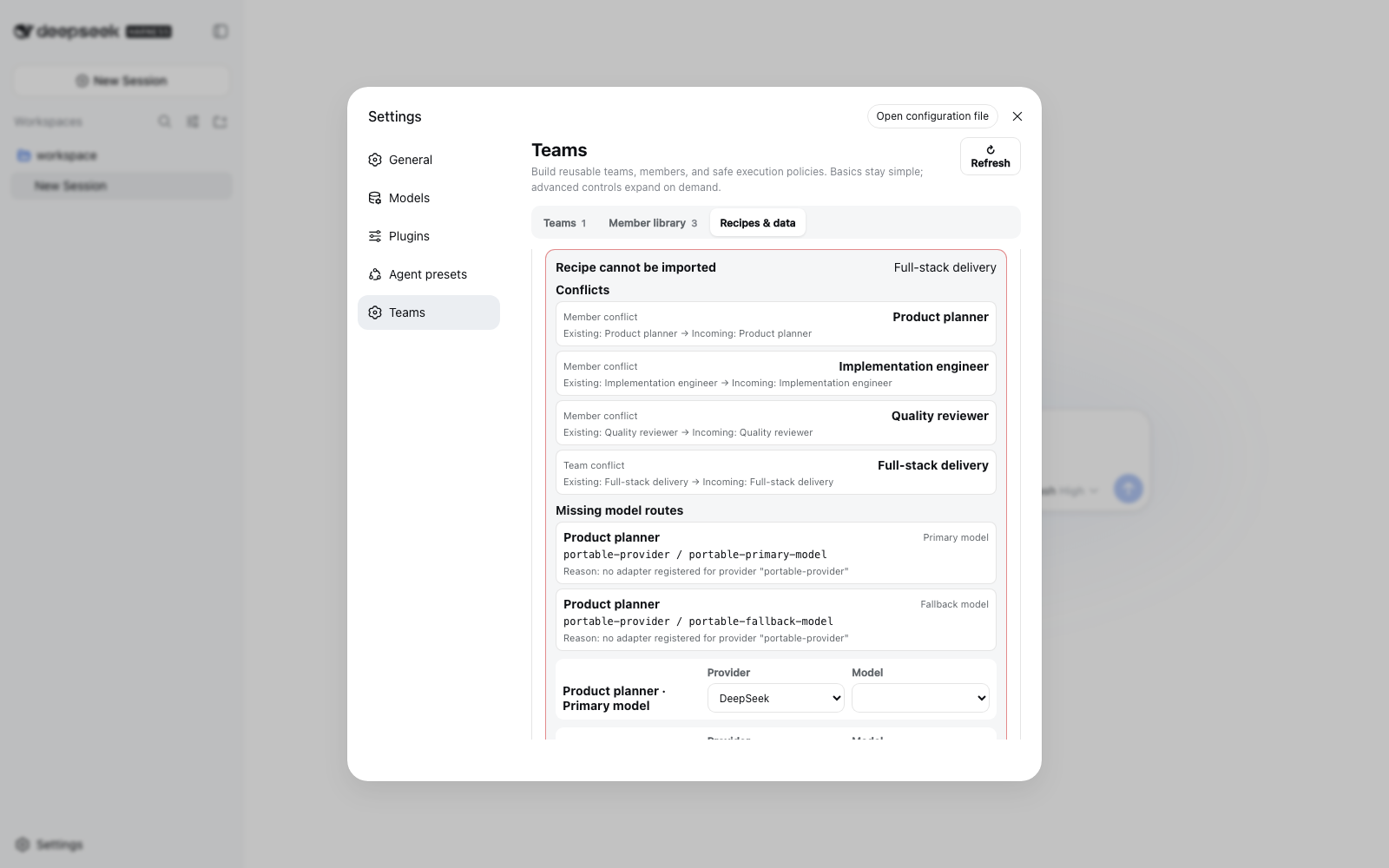
- Each saved team version includes immutable snapshots of all referenced member definitions.
- Restore is preview-first and warns when a shared member would change another team.
- Recipes contain one team and its members, never provider credentials. Import supports Copy or Merge, conflict preview, and separate primary/fallback route remapping.
- Definition backup exports agents and teams. Import is preview-first with Merge or Replace; replace reports deletions, dangling mode/default cleanup, and affected teams before confirmation.
- Multi-table writes are serialized and use compensating rollback on validation, cancellation, or storage failure. Readers see either the previous or committed definition graph, not a half-import.
- Remote recipe URLs are disabled in v0.5. Import a reviewed local JSON file; this intentionally avoids exposing an unprotected server-side fetch/SSRF surface.
Start with the credential-free
full-stack delivery recipe, preview it, and remap its
your-provider / your-model placeholders to routes configured in your own DSH profile.
Definition exports include member system prompts and model route names. Run exports additionally include the user task and member outputs. Review those files before sharing them.
Settings reference
Member
| Field | Meaning |
|---|---|
| Name and role prompt | Durable identity and exclusive instructions for this member |
| Primary provider/model | Existing DSH route; credentials stay in DSH |
| Fallback provider/model | Optional paired route for retry-once |
maxTokens | Hard per-attempt output ceiling sent to the provider |
| Tool allow/deny | Least-privilege visibility for registered DSH tools; recursive team/subagent tools remain denied |
Team
| Field | Meaning |
|---|---|
| Members and collaboration note | Reusable member definitions plus team-level coordination guidance |
| Fixed order | Complete serial permutation; leave off for dynamic assignments and DAG dependencies |
| Execution/context | Serial or bounded parallel; spawn, fork, or serial-only chain |
| Activation/selection | Always, Smart, or Manual; all members or adaptive subset |
| Response | Foreground synthesis or observable background run |
| Planner | Current/recent/full context and a bounded planner Token ceiling |
| Resilience | Continue, stop, or retry-once; member timeout and fallback route |
| Limits | Maximum concurrency and a soft provider-reported team Token budget |
| Quality | Named reviewer, repair owner, criteria, and at most two repair rounds |
Host configuration
The Web bundle inserts one unique Host row; it relies on the Web profile's existing storage, Connection RPC, models, sessions, and browser module services.
- id: agent-team-gui
  name: dsh-agent-team-gui
  config:
    defaultProvider: spawn
    defaultExecutionMode: serial
    defaultContextMode: spawn
    historyMaxRuns: 0
    historyMaxAgeDays: 0
    versionMaxPerSquad: 0
| Field | Default | Meaning |
|---|---|---|
defaultProvider | spawn | Registered DSH subagent provider |
defaultExecutionMode | serial | Effective mode when a team omits it |
defaultContextMode | spawn | Effective context when a team omits it |
historyMaxRuns | 0 | Count retention; 0 disables automatic run deletion |
historyMaxAgeDays | 0 | Age retention in days; 0 disables automatic run deletion |
versionMaxPerSquad | 0 | Version retention per team; 0 disables automatic version deletion |
If you override the row in a profile patch, restate every needed field: DSH patch rows replace the
complete config object rather than deep-merging it. chain is valid only for serial execution.
Retention is deliberately opt-in: upgrading to v0.5 does not silently delete existing run history
or team versions. Set a positive limit only when automatic cleanup is the behavior you want.
Other installation paths
Exact commit
Resolve and review a full commit SHA, then use the same allowBuilds rule as the tagged Git install:
dsh plugin --profile web add -w github:toolclub/dsh-agent-team-gui#<full-commit-sha>
This is the most reproducible source install. The release CI performs the same fresh-profile check against the exact pushed revision.
Local checkout
From this repository:
pnpm install --frozen-lockfile
pnpm run preflight
dsh plugin --profile web add -w .
preflight type-checks Host, Client, and tests; runs Host/rendered Client suites; builds from a clean
output directory; audits the tarball and secrets; and boots an isolated temporary DSH Web profile.
Compiled tarball
mkdir -p dist
pnpm pack --pack-destination dist
dsh plugin --profile web add -w ./dist/dsh-agent-team-gui-0.5.0.tgz
The package audit verifies runtime/declaration closure, examples, governance files, screenshots, source maps, external dependency declarations, no absolute paths, no symlinks, and no known credential patterns.
Ask a terminal-capable Agent
You can send this single instruction inside DeepSeek Harness:
Follow the installation and security notes in https://github.com/toolclub/dsh-agent-team-gui. Install the reviewed v1.0.0 tag into the Web profile, authorize only
dsh-agent-team-guiif pnpm asks forallowBuilds, restart Web, verify the composed configuration, and report the exact installed revision.
Model tool and public service
dispatch_to_squad remains available for explicit/manual model-driven use. It accepts a team ID or
unique case-insensitive name, a task, optional assignments/order, and execution/context overrides
where the saved team permits them. Its model-facing result is bounded; the complete canonical run is
durable and available through the Run Center/export.
The package also exports AgentTeamService, record/result types, Zod schemas, and the in-process
definition/dispatch/version/recipe/run APIs. Treat those APIs as developer-preview surfaces while
DSH itself is pre-stable.
Security and privacy
- The dedicated RPC channel is registered loopback-only and validates every payload/result. This is not an authentication layer for exposing DSH Web to the public Internet.
- Provider credentials are never copied into plugin records, recipes, examples, logs, or exports.
- Durable local storage does contain team role prompts, selected route names, conversation/project identifiers, user tasks, run outputs, errors, and Token usage. Protect the DSH home directory.
- Use least-privilege member tools. A model may perform any action that its allowed DSH tools permit.
- URL recipe fetching is disabled. Installation scripts are the only extra machine-code authority; review and pin Git dependencies or use a compiled tarball.
- Report vulnerabilities privately using SECURITY.md, not a public issue containing credentials or private prompts.
Compatibility and limitations
- Web profile only; there is no headless Settings UI. The exported Host service can still be used by another in-process plugin that supplies the required services.
- Declared compatibility is DSH
>=0.1.0-rc.5 <0.2.0; CI currently verifies rc.6. DSH and this plugin are both pre-stable, so pin versions. - Old v0.4 durable definitions and v1 exports remain readable/importable. Editing them must satisfy the safer v0.5 new-write limits. A legacy run without a stored plan cannot be faithfully retried and is rejected with an explanation.
- Provider Token projections are optional. Partial/unavailable coverage is expected and explicit.
- A soft team Token budget prevents later scheduling; it cannot stop an already-running provider at
the exact threshold. Per-member
maxTokensis the hard provider bound. - DSH currently offers no supported registration seam for custom durable
squad/*Session event types. The plugin uses its durable run store, standard child sessions/tool events, Jobs, and logs. - Model-tool trigger mode is best-effort because DSH exposes no
toolChoicecontrol. Guaranteed normal-send mode is Host-driven and durable-message-idempotent.
Verification and project health
pnpm run typecheck
pnpm run test
pnpm run build
pnpm run audit:pack
pnpm run smoke:install
pnpm run smoke:browser
CI runs Node 22.19 and Node 24, a fresh DSH rc.6 Web profile, browser keyboard/accessibility/reconnect journeys, exact Git revision installation, and the community plugin doctor. The detailed product contract and evidence matrix live in docs/v0.5-product-spec.md and docs/v0.5-acceptance.md.
Contributing
Read CONTRIBUTING.md, the Code of Conduct, and
SECURITY.md. The concise Chinese tutorial
从零开发一个 DeepSeek Harness 插件 explains
apply, Service plugins, profile/bundle wiring, local verification, and GitHub installation using
official Harness references.
Issues should include the exact DSH/plugin versions and a sanitized minimal reproduction. Pull requests should add focused regression evidence and keep compatibility, bounded execution, accessibility, privacy, and package closure in scope.
If this workflow helps, a GitHub Star makes it easier for other DSH users to discover. Real recipes, screenshots, and honest bug reports help even more.
Uninstall
dsh plugin --profile web remove dsh-agent-team-gui
Removing the package does not automatically delete durable plugin tables in the configured DSH storage backend.
License
Released under the MIT License.
查看使用指南 →
该插件的安装步骤、关键要点、FAQ 与兼容性说明(基于已收录字段派生)。
收录徽章

[](https://deepseek-plugin.org/plugins/toolclub/dsh-agent-team-gui)把这段 markdown 粘贴到你的 GitHub README,链接回本插件详情页。徽章只声明已被本站收录,不代表安全认证。