为 DeepSeek Harness 注入 Hindsight 长期项目记忆:每轮会话自动召回知识页和上下文,对话自动入库,按仓库共享记忆银行。

- 语言
- Python
- License
- MIT
- 分支
- main
安装
$ dsh plugin --profile web add @vectorize-io/hindsight-coding-agents在终端中运行以上命令,通过 dsh CLI 安装此插件。可在右上角切换 Profile。 第一次用 dsh?看这篇新手教程
对话式安装
帮我安装 DeepSeek Harness 插件 vectorize-io/hindsight/hindsight-integrations/coding-agents:先查看仓库 https://github.com/vectorize-io/hindsight 确认安全性,然后执行安装命令并验证插件加载成功。
把这段指令粘贴给 DSH Web GUI 里的助手,由它代你完成安装与验证。
一句话定位
给 DeepSeek Harness(DSH)注入 Hindsight 长期项目记忆:每个用户回合开始前从记忆银行召回相关上下文注入到模型输入,对话内容在结束时自动写回仓库级记忆银行,记忆按仓库隔离、跨会话共享。
核心能力
- 在每轮用户回合(
agent/pre-step)前调用记忆服务做语义检索,把命中的知识页与上下文作为kind: 'plugin'消息追加到模型输入 - 监听
agent/session-start做冷启动检查,自动后台启动 git 历史导入与代码库结构调研,无须手动命令 - 在
agent/turn-stopping自动写回本轮完整会话(包括工具调用与助手回复),会话结束无须"另存" - 以原生 Cordis 插件方式注册 8 个
hindsight_*工具给 DSH 模型直接调用(搜索/读取知识页、深度推理、捕获计划、摄入文档、同步状态、诊断) - 按工作目录解析到独立的"记忆银行"(默认命名
coding-agent::<仓库名>),多个 DSH 会话不会串数据,子代理会话不会重复落库 - 三种部署模式可选:Hindsight Cloud(默认)、自托管服务、本机守护进程(
127.0.0.1:9077)
技术实现
- 语言: TypeScript(ESM)
- 关键依赖:
@vectorize-io/hindsight-all(核心客户端)、@modelcontextprotocol/sdk(MCP 工具可选路径)、zod(参数校验);不引入 DSH 自身的包,避免对宿主版本的硬依赖 - 架构模式: Cordis 原生插件——导出
name、inject=["agents"]与apply(ctx);apply通过ctx.on绑定 4 个生命周期事件(agent/session-start/agent/pre-step带prepend:true/agent/turn-stopping/agent/disposed),并通过ctx.inject(["tools"], ...)在宿主工具注册表注册原生工具 - 入口文件:
src/dsh.ts(Cordis 入口,DSH 直接加载),src/index.ts(opencode/Kilo 等插件宿主复用同一份核心逻辑),cordis.patch.yml(profile 装载声明)
适用场景
日常用 DSH 做跨会话项目的开发者——经常在同一个仓库里反复修改同一批文件、重新讨论已决定过的取值、或者问"上次为什么这样实现"。开启后,DSH 会话开始时自动召回相关知识页与历史决策,结束时把这一轮的问答与工具调用一并写入仓库级记忆银行;下次会话直接继承上下文,不必每次复述背景。同一仓库的不同会话共享同一份记忆,互不干扰。
前置依赖与兼容性
| 依赖 | 最低版本 | 说明 |
|---|---|---|
| DeepSeek Harness | 未声明 | 本插件以 Cordis 原生插件形式挂载到宿主层;只要 DSH 的事件名仍使用 agent/session-start、agent/pre-step、agent/turn-stopping、agent/disposed,即可加载。 |
| Node.js | 未声明 | package.json 未声明 engines;如需导入历史 dsh 会话做存量回填,Zstandard 解码需 Node 22.15+。 |
| 平台 | 跨平台 | 跨平台。daemon 模式下 macOS 因 litellm 无 wheel,需自备 Rust 工具链编译;Linux/Windows 直接装 wheel。 |
| 原生模块 | 无 | package.json 未声明原生模块依赖。daemon 模式间接依赖 hindsight-embed 自身要求。 |
安装方式
dsh plugin --profile web add github:vectorize-io/hindsight/hindsight-integrations/coding-agents
配置项
配置文件:~/.hindsight/coding-agent.json。环境变量(HINDSIGHT_*)作为兜底层,文件优先。
| 配置 | 类型 | 说明 | 默认值 |
|---|---|---|---|
serverMode | "cloud" | "self-hosted" | "daemon" | 记忆服务跑在哪里 | cloud |
apiUrl | string | Hindsight API 地址(daemon 模式自动改成 http://127.0.0.1:{apiPort}) | https://api.hindsight.vectorize.io |
apiToken | string | Cloud 模式需要的 Bearer Token | — |
bankId | string | 显式指定记忆银行 id;未设置时按仓库动态解析 | 按目录解析 |
bankIdTemplate | string | 动态银行 id 模板,可用占位符 {gitProject} {project} {harness} {channel} {user} | coding-agent::{gitProject} |
mapPathToBank | object | 绝对路径 → 银行 id 映射,最长前缀优先,可整体覆盖默认 | — |
optInOnly | boolean | 仅在白名单目录里启用记忆,其他目录静默不落库 | false |
optInPaths | string[] | 白名单目录(前缀匹配,自动展开 ~),每个仓库仍保留独立银行 | [] |
disabled | boolean | 硬关闭——插件完全失活、不创建银行 | false |
retainSessions | boolean | 插件宿主(opencode/Kilo)是否在每轮异步落库 | true |
reflectTimeoutMs | number | 会话开始时回忆调用的超时(毫秒) | 120000 |
pageRefreshEveryTurns | number | 每多少轮用户回合重新拉一次知识页 | 10 |
autoSeed | boolean | 冷仓库自动从 git 历史做一次种子 | true |
seedLimit | number | 自动种子最多取最近多少条 commit | 300 |
codebaseSurvey | boolean | 冷仓库是否跑一次只读代码库结构调研 | true |
surveyModel | string | 调研用模型(Claude 配方) | haiku |
surveyBudgetUsd | number | 调研预算上限(Claude 配方) | 2 |
gitIngest | "message" | "full" | "none" | git 历史摄入深度:message 只取 commit 信息;full 含 diff;none 关闭 | message |
maxParallelRetains | number | 同时并发写库请求数上限(触发 429 时调低) | 10 |
retainTags | string[] | 每条写入自动附加的标签,支持上述占位符 | [] |
retainMetadata | object | 每条写入自动附加的元数据,支持上述占位符 | {} |
harnesses.<name> | object | 按宿主名覆盖以上任意字段(如给 Claude Code 单独关掉记忆) | — |
banks.<id> | object | 按解析后的银行 id 覆盖任意字段;可设 bank 改名汇入其他银行 | — |
logLevel | "debug" | "info" | "warn" | "error" | 日志级别 | info |
模型可见的工具:hindsight_sync_status / hindsight_diagnose / hindsight_search_knowledge_pages / hindsight_list_knowledge_pages / hindsight_read_knowledge_page / hindsight_reflect / hindsight_capture_initiative / hindsight_ingest_document。
常见问题
Q: 安装后还需要跑什么命令初始化记忆吗?
A: 不需要。agent/session-start 会自动做冷启动检查,后台拉取 git 历史与代码库结构,记忆在后台持续补充;无须手动命令,也没有 ingest CLI。
Q: 数据存在哪里?会上传到云端吗?
A: 默认指向 Hindsight Cloud(需在 apiToken 里给一个 Bearer Token)。也可以改为自托管服务(设 apiUrl 为你的服务端)或本机守护进程(设 serverMode: "daemon",插件按需启动 hindsight-embed 并监听 127.0.0.1:9077)。三种模式只影响服务跑在哪,HTTP 接口一致。
Q: 多个 DSH 会话(不同项目)会串数据吗?
A: 不会。DSH 的 Web 界面可在不同目录创建会话,每个会话的 session.header.cwd 决定走哪个工作区;插件按工作区根目录分别解析到独立的"记忆银行"(默认命名 coding-agent::<仓库名>)。子代理会话(origin === "subagent")会被识别并跳过,不会被重复入库。
Q: 安装在哪一层,会影响所有 DSH profile 吗?
A: 通过 cordis.patch.yml 把插件挂到宿主层,对所有 profile 生效;若只想关掉某一个 profile,把那一个 profile 自己的 cordis.patch.yml 里把这一行改成 disabled: true 即可,无须卸载。
Q: 如何停用某个仓库的记忆?
A: 在 ~/.hindsight/coding-agent.json 的 banks 节里按解析后的银行 id(例如 coding-agent::secret-client)写 { "disabled": true };或者用 optInPaths 列允许的目录并把 optInOnly 设 true,列表外的项目完全静默、不落库。
Q: 检索结果会出现在哪?
A: 检索到的内容被追加为 source: { kind: 'plugin', plugin: 'hindsight', form: 'recall' } 的用户消息,DSH 会作为"召回材料"渲染而不是用户输入;模型自己也可以调用 hindsight_search_knowledge_pages、hindsight_reflect 等工具主动查询。
Q: 出错了怎么排查?
A: 看 $TMPDIR/hindsight-coding-agent/plugin.log(人读,按 LEVEL [scope] message 排)或 /tmp/hindsight-plugin.log(机器读,每条 JSON 行,反映每次 recall/写库成功失败)。在配置里把 logLevel 调到 debug 可看到更细的过程。模型也可直接调 hindsight_diagnose 工具自助排查。
上手难度
入门 —— dsh plugin add 一行即可装载,配置项全部可选;不愿配就用 Hindsight Cloud + 默认银行命名,仓库里立刻能召回与落库。
已知问题与限制
- 本机守护进程模式在 macOS 上需要自备 Rust 工具链:
litellm作为hindsight-embed的传递依赖仅发布 Linux/Windows 的 wheel,macOS 需通过 maturin 从源码编译并维持较新的rustc;否则启动会以缺工具链失败。 - 进程级宿主层注册默认走启动目录的银行解析:工具注册在插件加载时完成,先按
process.cwd()拿一个模板;每次模型调用时再用调用者所在会话的工作区重新解析银行。若启动目录恰好落在某个banks.<id>黑名单里,工具在该进程后续服务的所有仓库都不会暴露(即便它们的银行是开启的)。 - DSH 没有插件面向的 toast/UI 通知通道:opencode/Kilo/Cline 这类宿主会在启动时显示"🧠 已启用记忆"横幅,DSH 上没有对应渠道,所以 DSH 启动时不会在 UI 里看到横幅提示,只能从日志确认。
- 导入历史 DSH 会话需 Node 22.15+:老 Node 解析
$DSH_HOME/sessions下的 Zstandard 帧化 JSONL 会失败,回填会按原因跳过、不会静默假装成功。 - 没有仓库级配置文件:刻意没有仓库内
.hindsightrc.json之类的本地文件,防止克隆下来的仓库偷偷开启或重定向记忆;按路径映射与按宿主覆盖都集中在用户级~/.hindsight/coding-agent.json。







What is Hindsight?
Hindsight™ is an agent memory system built to create smarter agents that learn over time. Most agent memory systems focus on recalling conversation history. Hindsight is focused on making agents that learn, not just remember.
It eliminates the shortcomings of alternative techniques such as RAG and knowledge graph and delivers state-of-the-art performance on long term memory tasks.
Contents
- Memory Performance & Accuracy
- Quick Start — server · clients · platforms · embedded
- Adding Hindsight to Your Agent — LLM Wrapper · integrations · coding agents · MCP
- Core Concepts — memory types · retain / recall / reflect · observations · mental models & knowledge pages · banks
- Use Cases
- Running in Production
- Resources
Memory Performance & Accuracy
Hindsight is the most accurate agent memory system ever tested according to benchmark performance. It has achieved state-of-the-art performance on the LongMemEval benchmark, widely used to assess memory system performance across a variety of conversational AI scenarios. The current reported performance of Hindsight and other agent memory solutions as of January 2026 is shown here:
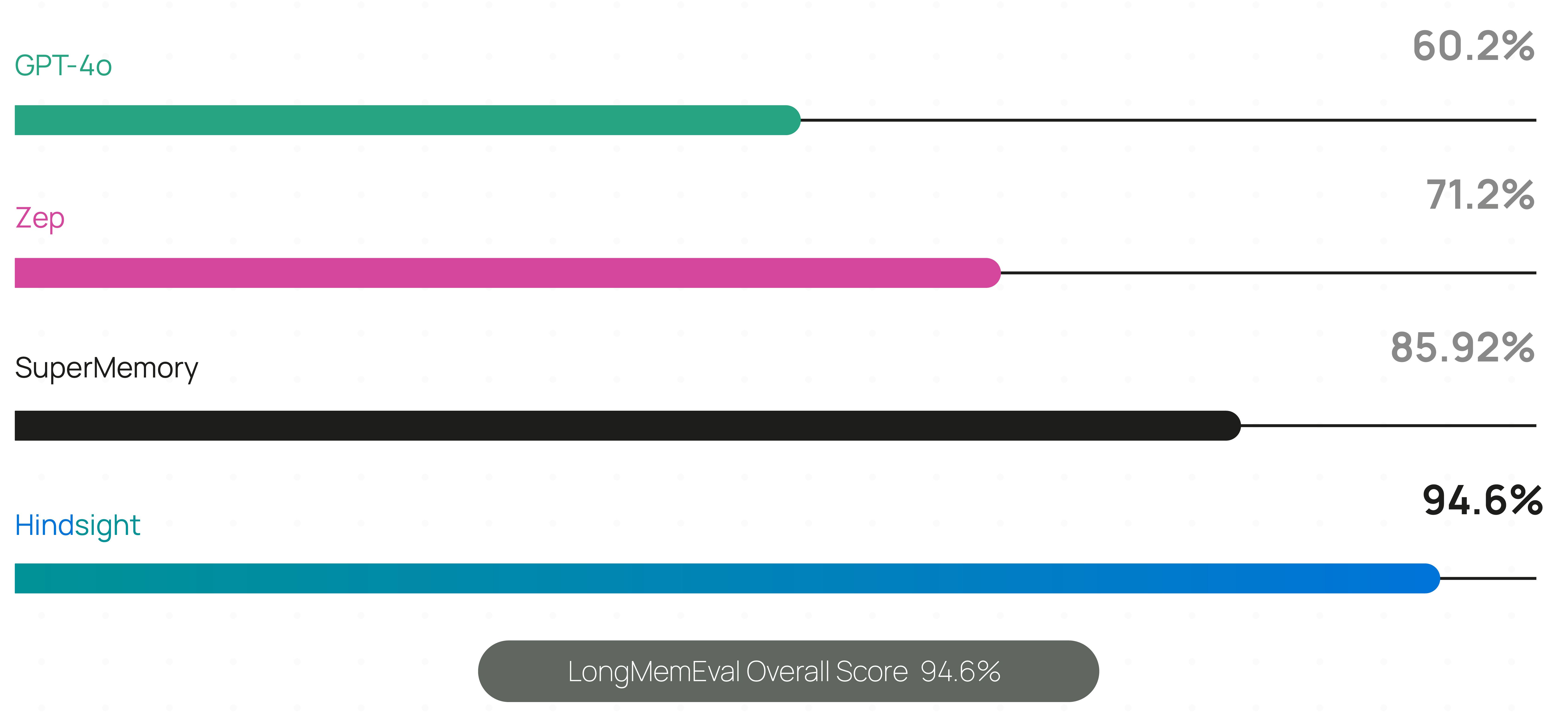
Live, continuously updated results — including per-model accuracy, latency and cost — are published at benchmarks.hindsight.vectorize.io.
The benchmark performance data for Hindsight has been independently reproduced by research collaborators at the Virginia Tech Sanghani Center for Artificial Intelligence and Data Analytics and The Washington Post. Other scores are self-reported by software vendors.
Hindsight is being used in production at Fortune 500 enterprises and by a growing number of AI startups.
🤖 Using a coding agent? Install the Hindsight documentation skill for instant access to docs while you code:
npx skills add https://github.com/vectorize-io/hindsight --skill hindsight-docsWorks with Claude Code, Cursor, and other AI coding assistants.
Quick Start
1. Start a server
Docker (recommended)
export OPENAI_API_KEY=sk-xxx

docker run -it --pull always --name hindsight --restart unless-stopped -p 8888:8888 -p 9999:9999 \
  -e HINDSIGHT_API_LLM_API_KEY=$OPENAI_API_KEY \
  -v hindsight-data:/home/hindsight/.pg0 \
  ghcr.io/vectorize-io/hindsight:latest
Hindsight works with 25+ LLM providers via HINDSIGHT_API_LLM_PROVIDER — hosted (openai, anthropic, gemini, groq, bedrock, vertexai, minimax, deepseek, atlas, …), fully local (ollama, lmstudio, llamacpp), any OpenAI-compatible endpoint, and gateways (litellm, litellmrouter) that reach the rest. Existing subscriptions work too: openai-codex (ChatGPT Plus/Pro), claude-code (Claude Pro/Max) and github-copilot (GitHub Copilot) need no API key. See supported models.
Docker (external PostgreSQL)
export OPENAI_API_KEY=sk-xxx
export HINDSIGHT_DB_PASSWORD=choose-a-password
cd docker/docker-compose
docker compose up
Oracle AI Database is also supported for enterprise deployments with full feature parity. See the storage documentation for details.
Bare metal (pip)
pip install hindsight-api
export HINDSIGHT_API_LLM_API_KEY=sk-xxx

hindsight-api
Kubernetes (Helm)
helm install hindsight oci://ghcr.io/vectorize-io/charts/hindsight \
  --set api.llm.provider=openai \
  --set api.llm.apiKey=sk-xxx \
  --set postgresql.enabled=true
Managed (no server)
Hindsight Cloud is the hosted option: managed infrastructure that scales automatically, plus a dashboard, backups, team collaboration and a 99.9% uptime SLA. Billing is usage-based with free credits to start — no fixed monthly or per-seat fee. Point any client at https://api.hindsight.vectorize.io with your API key and skip the deployment entirely.
Compare self-hosted, Cloud and Enterprise → · Sign up →
All options, including Windows and air-gapped setups, are covered in the installation guide.
2. Connect a client
pip install hindsight-client -U                                  # Python
npm install @vectorize-io/hindsight-client                        # Node.js / TypeScript
go get github.com/vectorize-io/hindsight/hindsight-clients/go     # Go
curl -fsSL https://hindsight.vectorize.io/get-cli | bash          # CLI
Python
from hindsight_client import Hindsight

client = Hindsight(base_url="http://localhost:8888")

# Retain: Store information
client.retain(bank_id="my-bank", content="Alice works at Google as a software engineer")

# Recall: Search memories
client.recall(bank_id="my-bank", query="What does Alice do?")

# Reflect: Generate disposition-aware response
client.reflect(bank_id="my-bank", query="Tell me about Alice")
Node.js / TypeScript
const { HindsightClient } = require('@vectorize-io/hindsight-client');

const main = async () => {
  const client = new HindsightClient({ baseUrl: 'http://localhost:8888' });

  await client.retain('my-bank', 'Alice loves hiking in Yosemite');

  const results = await client.recall('my-bank', 'What does Alice like?');
  console.log(results);
}

main();
Full reference: Python · Node.js · Go · CLI · REST API
Supported Platforms
| Platform | Docker | Bare Metal (pip) | Embedded DB (pg0) |
|---|---|---|---|
| Linux (x86_64, ARM64) | ✅ | ✅ | ✅ |
| macOS (Apple Silicon / arm64) | ✅ | ✅ | ✅ |
| macOS (Intel / x86_64) | ✅ | ⚠️ | ✅ |
| Windows (x86_64) | ✅ | ✅ | ✅ |
⚠️ Intel Macs: use hindsight-all-slim — see the installation guide for details.
Python Embedded (no server required)
pip install hindsight-all -U
On Intel (x86_64) Macs, install hindsight-all-slim instead — see Supported Platforms.
import os
from hindsight import HindsightServer, HindsightClient

with HindsightServer(
    llm_provider="openai",
    llm_model="gpt-5-mini",
    llm_api_key=os.environ["OPENAI_API_KEY"]
) as server:
    client = HindsightClient(base_url=server.url)
    client.retain(bank_id="my-bank", content="Alice works at Google")
    results = client.recall(bank_id="my-bank", query="Where does Alice work?")
A Node.js equivalent and a daemon CLI are also available.
Adding Hindsight to Your Agent
LLM Wrapper (2 lines of code)
The easiest way to add memory to an existing agent is the LLM Wrapper. Swap your LLM client for a wrapped one — memories are then stored and retrieved automatically on every call, with no other changes to your code.
pip install hindsight-litellm
from openai import OpenAI
from hindsight_litellm import wrap_openai

# Wrap your existing LLM client and you're done.
# Defaults to Hindsight Cloud; pass hindsight_api_url for a self-hosted server.
client = wrap_openai(
    OpenAI(),
    bank_id="user-123",
    hindsight_api_url="http://localhost:8888",
)

# Hindsight recalls relevant memories before the call
# and retains the conversation after it.
response = client.chat.completions.create(
    model="gpt-5-mini",
    messages=[{"role": "user", "content": "What do you know about me?"}],
)
wrap_anthropic() does the same for the Anthropic SDK, and every setting — bank, recall budget, fact types, reflect instead of recall — can be overridden per call with hindsight_* kwargs. LiteLLM sits underneath, so the same integration covers 100+ models. See the LiteLLM integration.
If you need explicit control over when memories are stored and recalled, use the SDKs or REST API directly instead.
Integrations
60+ integrations — most need no code changes.
| Coding agents | Claude Code · Codex · Cursor · GitHub Copilot · opencode · Cline · Aider · Zed · Continue · Roo Code · OpenHands |
| Agent frameworks | LangGraph / LangChain · LlamaIndex · CrewAI · Pydantic AI · OpenAI Agents SDK · Google ADK · Agno · Strands · AutoGen · Microsoft Agent Framework · Vercel AI SDK · Haystack |
| No-code / low-code | n8n · Zapier · Dify · Flowise |
| Apps & tools | ChatGPT · Perplexity · Obsidian · Pipecat · Vapi |
Coding Agents
One package gives CLI coding agents long-term project memory: a per-repo bank built automatically from git history and past sessions, injected into the agent as it starts working, plus curated knowledge pages covering architecture, conventions and in-flight work.
npx @vectorize-io/hindsight-coding-agents install all          # every detected agent, wired natively
npx @vectorize-io/hindsight-coding-agents install claude-code  # or just one
Supports Claude Code, Codex CLI, Cursor CLI, GitHub Copilot CLI, opencode, Kilo CLI, Cline CLI, Antigravity CLI, Devin CLI, Prime Agent, Grok Build and DeepSeek Harness. Ingestion is automatic — there is no setup command. See the coding agents integration.
MCP Server
Every server ships a built-in Model Context Protocol endpoint, one per bank, enabled by default:
http://localhost:8888/mcp/{bank_id}/
Point any MCP client at it to expose retain, recall and reflect as tools. See the MCP server docs.
Core Concepts
Memory Types
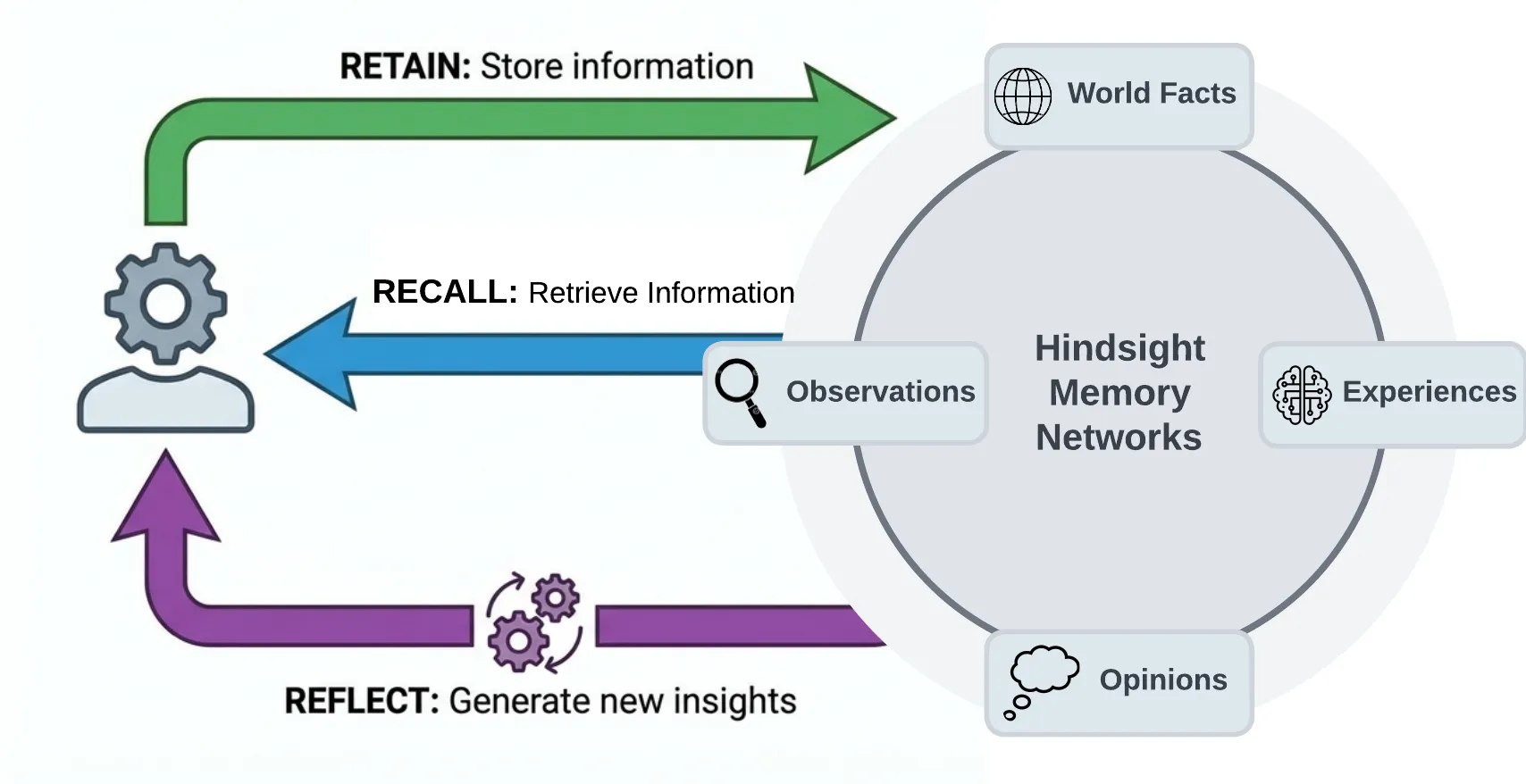
Most agent memory implementations rely on basic vector search or sometimes use a knowledge graph. Hindsight uses biomimetic data structures to organize agent memories in a way that is more like how human memory works:
- World facts: facts about the world ("The stove gets hot")
- Experiences: the agent's own experiences ("I touched the stove and it really hurt")
- Observations: consolidated, evidence-backed beliefs formed from many memories
- Mental models: learned understanding of the agent's world, synthesized from observations and facts
Memories live in banks. When memories are added, they are pushed into either the world facts or the experiences pathway, then represented as a combination of entities, relationships, and time series with sparse/dense vector representations to aid in later recall.
The Three Operations
Retain
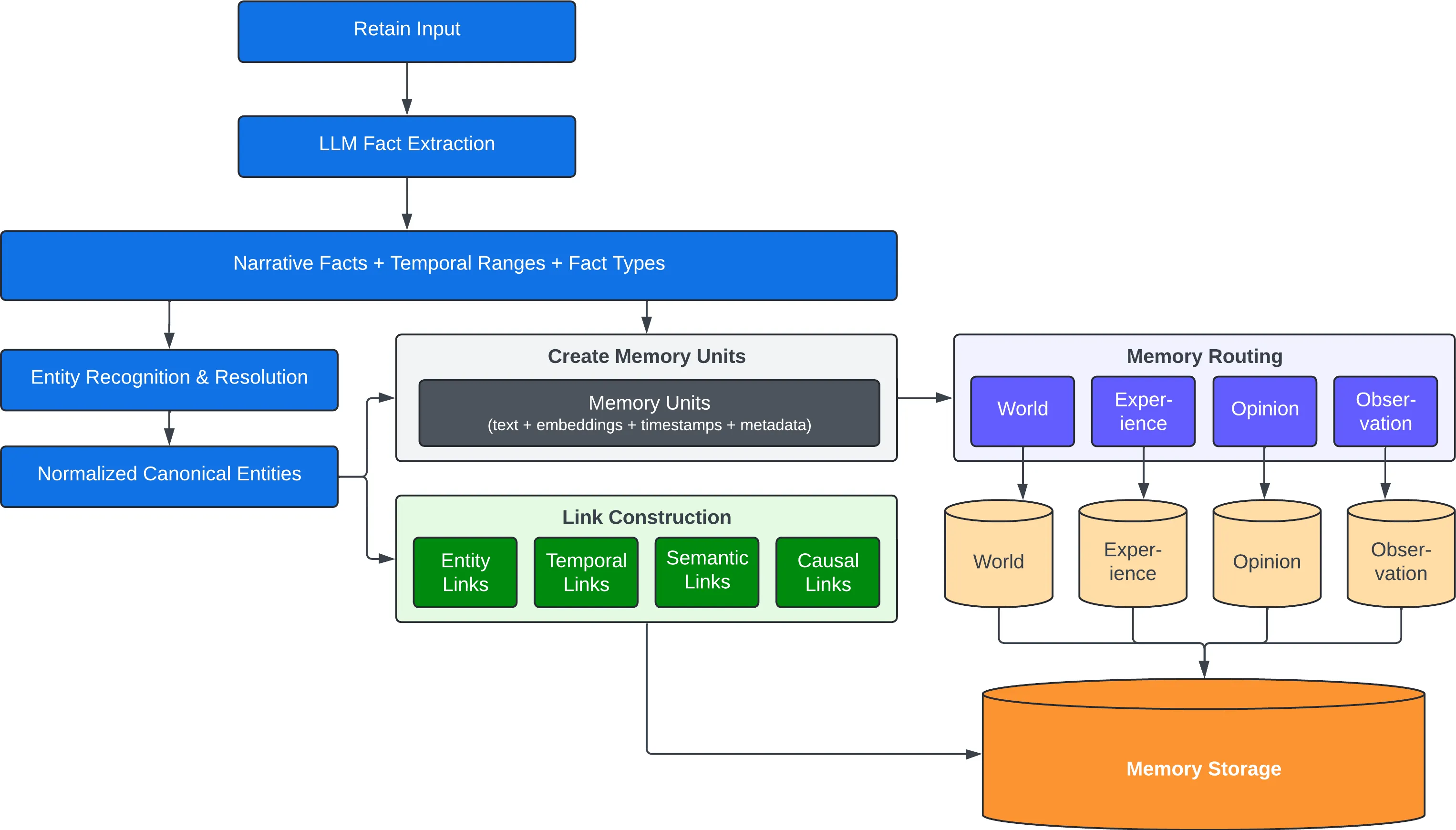
The retain operation is used to push new memories into Hindsight. It tells Hindsight to retain the information you pass in as an input.
client.retain(
    bank_id="my-bank",
    content="Alice got promoted to senior engineer",
    context="career update",
    timestamp="2025-06-15T10:00:00Z",
)
Behind the scenes, retain uses an LLM to extract key facts, temporal data, entities, and relationships. It passes these through a normalization process to transform extracted data into canonical entities, time series, and search indexes along with metadata. These representations create the pathways for accurate memory retrieval in the recall and reflect operations.
Recall
The recall operation is used to retrieve memories. These memories can come from any of the memory types (world, experiences, etc.)
client.recall(bank_id="my-bank", query="What does Alice do?")
client.recall(bank_id="my-bank", query="What happened in June?")   # temporal
Recall performs 4 retrieval strategies in parallel:
- Semantic: Vector similarity
- Keyword: BM25 exact matching
- Graph: Entity/temporal/causal links
- Temporal: Time range filtering
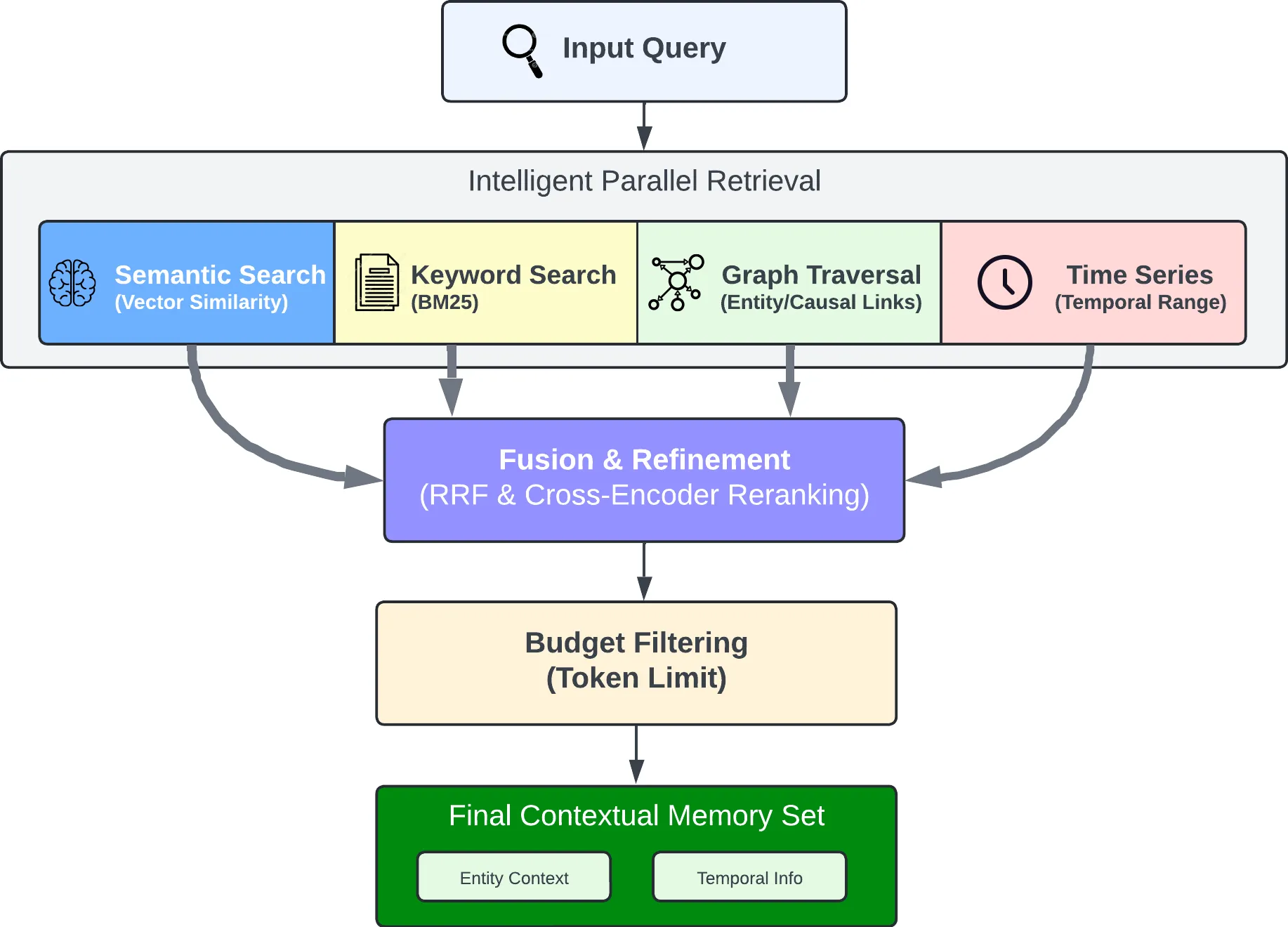
The individual results are merged, ordered by relevance using reciprocal rank fusion and a cross-encoder reranking model, then trimmed as needed to fit within the token limit.
Reflect
The reflect operation performs a more thorough analysis of existing memories. This allows the agent to form new connections between memories and build a more thorough understanding of its world — or to answer a question that needs deep thinking rather than lookup.
client.reflect(bank_id="my-bank", query="What should I know about Alice?")
For example, reflect supports use cases such as:
- An AI Project Manager reflecting on what risks need to be mitigated on a project.
- A Sales Agent reflecting on why certain outreach messages have gotten responses while others haven't.
- A Support Agent reflecting on opportunities where customers have questions not answered by current product documentation.
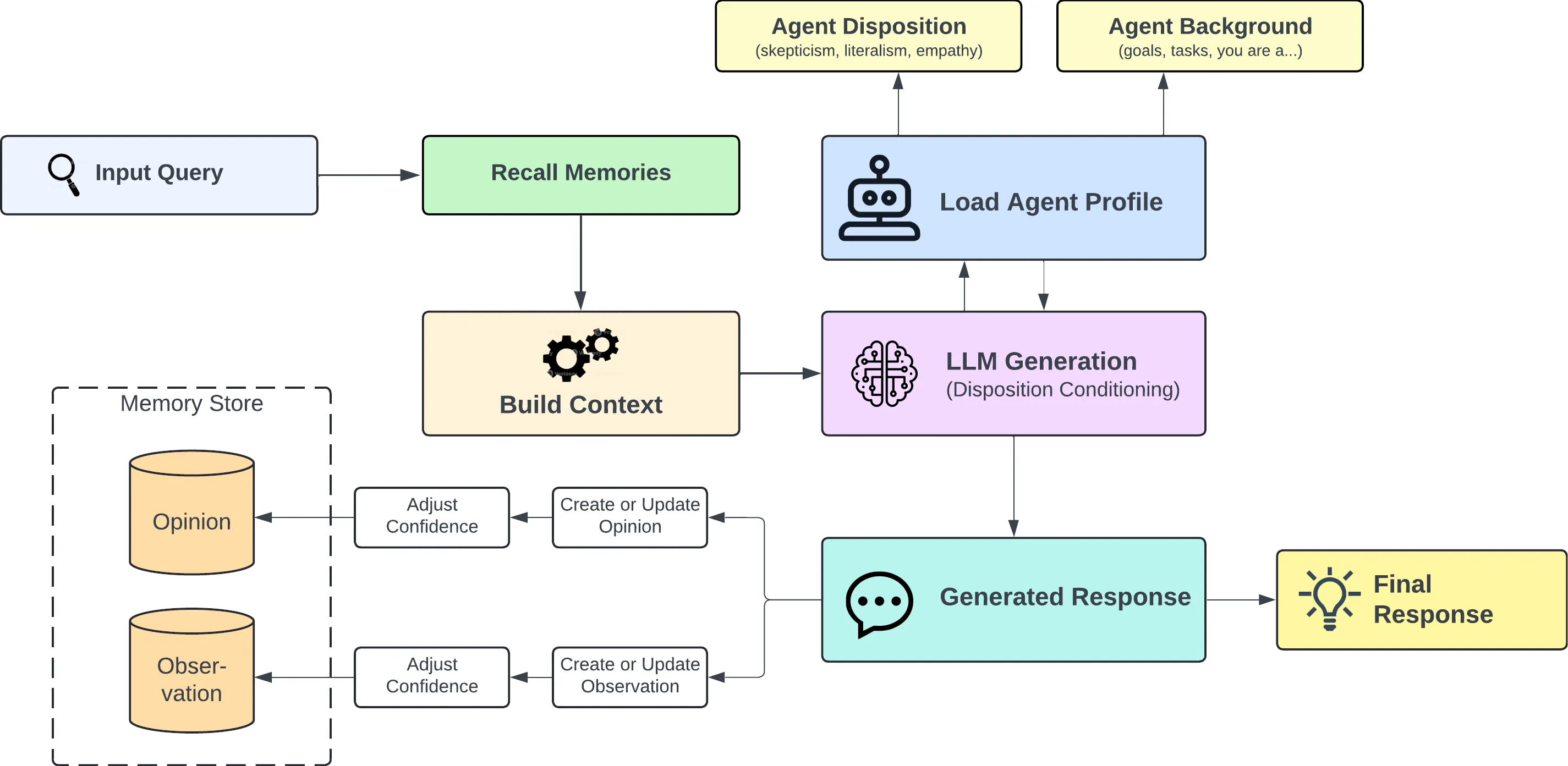
Observations
Retained facts don't stay a flat pile. In the background, Hindsight consolidates related facts into observations — deduplicated beliefs the bank has built up over time. Each observation keeps its supporting evidence with exact quotes and a proof count, and is refined rather than overwritten when new evidence arrives, so new information strengthens, weakens or extends an existing belief instead of silently replacing it.
Mental Models & Knowledge Pages
A mental model is a standing answer to a question about a bank ("What are this user's preferences?"). You define the question once; Hindsight writes the answer, stores it, and rewrites it in the background as the bank learns more. Reading one is a database read — no retrieval, no LLM call — so an agent can boot with a page of settled knowledge instead of rediscovering it every session.
Knowledge pages are mental models with the mechanics hidden: living documents a bank writes about itself, organized in folders like a wiki, searchable, and projectable onto disk as ordinary markdown. Supply a name and a question; every other decision is a default you can override.
Mental models → · Knowledge pages →
Memory Banks
A bank is an isolated memory store — one "brain" for one user, agent, or project. Isolation is strict: no cross-bank leakage. Banks carry background context and disposition traits (skepticism, literalism, empathy) that shape how reflect reasons over their memories, and can be created from declarative bank templates.
Two more things worth knowing:
- Multilingual by default. Input language is detected and preserved end to end — facts stay in their original language and entities keep their native script (张伟 stays 张伟, not "Zhang Wei"). Docs →
- Memory Defense. An opt-in, per-bank policy that scans every retain for secrets and PII against 45 patterns and either redacts the match (
[REDACTED:github_token]) or blocks the item before it reaches storage. Docs →
Use Cases
Hindsight is built to support conversational AI agents as well as agents that are intended to perform tasks autonomously. The ideal use case for Hindsight are agents that require a blend of these features such as AI employees that need to handle open-ended tasks, change behavior based on user feedback, and learn to perform complex tasks to automate work at a level that approximates a human work. Hindsight can be used with simple AI workflows like those built with n8n and other similar tools, but may be overkill for such applications.
Per-User Memories and Chat History
One of the simpler use cases you can use Hindsight for is to personalize AI chatbots and other conversational agents by storing and recalling memories associated with individual users.
The requirements for this use case usually look something like this:
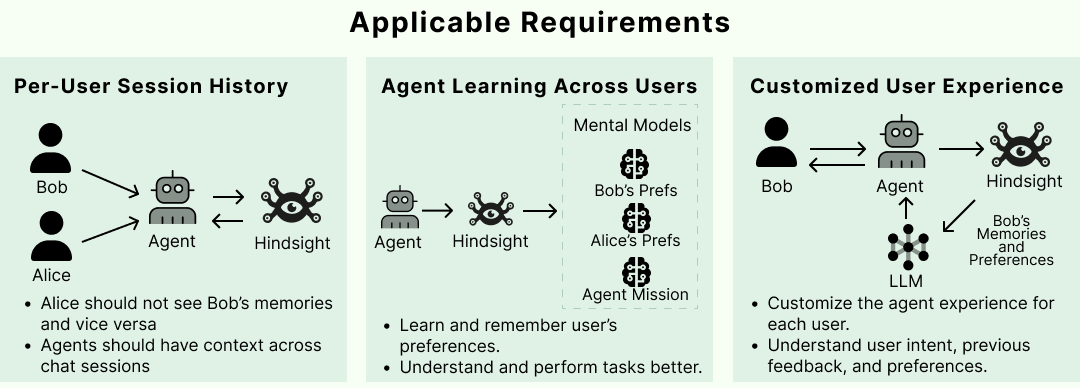
Satisfying these requirements in Hindsight is straightforward. When new user inputs and tool calls are ingested into Hindsight using the retain operation, custom metadata can be used to enrich the new memories. Metadata provides a convenient way to isolate memories that need to be restricted to a given user. Once these are fed into the retain operation, any raw memories and mental models that get created can be filtered when retrieving relevant memories.
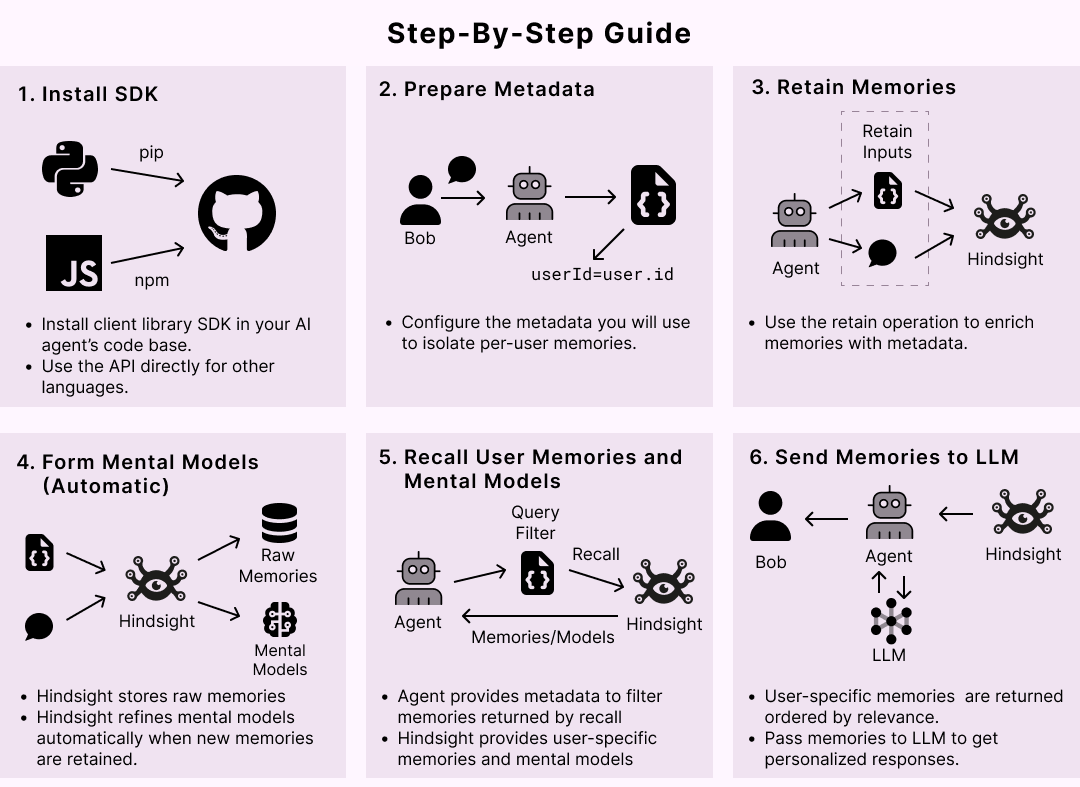
More patterns in the Cookbook and Best Practices.
Running in Production
| Storage | PostgreSQL + pgvector, or Oracle AI Database 23ai with full feature parity — storage |
| Configuration | Hierarchical: global env vars → per-tenant → per-bank — configuration |
| Monitoring | Prometheus metrics and dashboards for LLM calls, tokens and latency — monitoring |
| Operations | Admin CLI for migrations, bank repair and stuck operations — admin CLI |
| Events | Webhooks for retain, consolidation and refresh lifecycle events — webhooks |
| Extensibility | Tenant, auth and storage extension points — extensions |
| Managed | Skip all of it with Hindsight Cloud — managed, usage-based, 99.9% uptime SLA |
Resources
Documentation:
- Docs · FAQ · Best Practices · Cookbook · Blog
- Paper · Benchmarks · RAG vs Memory
Clients:
Community:
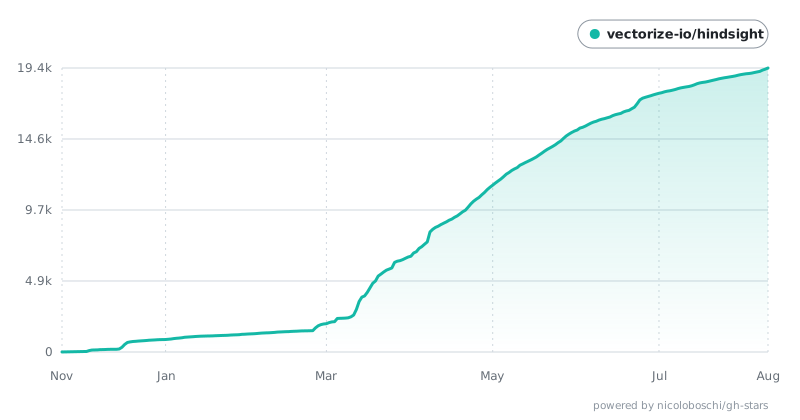
Star History
Contributing
See CONTRIBUTING.md.
License
MIT — see LICENSE
Built by Vectorize.io
查看使用指南 →
该插件的安装步骤、关键要点、FAQ 与兼容性说明(基于已收录字段派生)。
收录徽章

[](https://deepseek-plugin.org/plugins/vectorize-io/hindsight/hindsight-integrations/coding-agents)把这段 markdown 粘贴到你的 GitHub README,链接回本插件详情页。徽章只声明已被本站收录,不代表安全认证。