给 dsh-profile-plugin-service 测试套件使用的最小 Profile Bundle 固定夹具;声明一个名为 Fixture Ocean 的示例主题。
ⓘ 此插件是大仓库 vibeinging/deepseek-harness-desktop-app 的子包,星数与活跃度统计的是整个仓库。

- 语言
- JavaScript
- License
- MIT
- 分支
- dev
安装
$ dsh plugin --profile web add github:vibeinging/deepseek-harness-desktop-app/eval/fixtures/dsh-profile-bundle在终端中运行以上命令,通过 dsh CLI 安装此插件。可在右上角切换 Profile。 第一次用 dsh?看这篇新手教程
对话式安装
帮我安装 DeepSeek Harness 插件 vibeinging/deepseek-harness-desktop-app/eval/fixtures/dsh-profile-bundle:先查看仓库 https://github.com/vibeinging/deepseek-harness-desktop-app.git 确认安全性,然后执行安装命令并验证插件加载成功。
把这段指令粘贴给 DSH Web GUI 里的助手,由它代你完成安装与验证。
一句话定位
这是仓库内 eval/fixtures/dsh-profile-bundle 目录的最小化 Profile Bundle 固定夹具,给项目自身的 dsh-profile-plugin-service 单元测试充当可控的本地输入。把它装到 Web Profile 后,会让 profile:dsh-work-profile-fixture:fixture-ocean 这条示例主题进入目录,但不会注入任何运行时补丁。
核心能力
- 提供一个空的
dsh.bundle.patch容器(cordis.patch.yml内容为[]),让 Bundle 装配骨架可被解析 - 通过
dshWork.themes字段声明一份schema_version=1的主题描述(含主色、Mantine 十阶色板、背景预设与面板透明度) - 作为
DshProfilePluginService预检(preflight)的本地可安装输入,验证file:来源解析与status=ready结果 - 用于验证主题描述路径不能越过 Bundle 目录的越界检查(
DSH_PROFILE_THEME_PATH_OUTSIDE_ROOT) - 用于验证安装后
catalog.profile_themes中能正确附加来源 Bundle 元数据(source_bundle.package_name === "dsh-work-profile-fixture")
技术实现
- 语言: JSON / YAML(纯数据,无可执行代码)
- 关键依赖: 无(无
dependencies/peerDependencies声明) - 架构模式: 通过
package.json#dsh.bundle.patch声明 Bundle 补丁入口 + 通过package.json#dshWork.themes声明主题描述入口;两者均只承载数据,不在运行时执行代码 - 入口文件:
eval/fixtures/dsh-profile-bundle/package.json
适用场景
想本地手测一次 DSH Profile Bundle 的安装流程、又不想引入第三方仓库的开发者可以装它来观察主题在目录里的呈现方式;或运行 npm run test:unit 时作为 dsh-profile-plugin-service.test.mjs 的固定输入。本插件不适合作为日常使用的生产功能。
前置依赖与兼容性
| 依赖 | 最低版本 | 说明 |
|---|---|---|
| DSH | 0.1.0-rc.6 | 由父项目 README 声明的当前发布线 |
| Node | 未声明 | 本夹具不强制 Node 版本,平台宿主自行决定 |
| 平台 | 跨平台 | 仅读取 package.json 与 themes.json,无原生模块、无系统调用 |
| 原生模块 | 无 | — |
安装方式
dsh plugin --profile web add github:vibeinging/deepseek-harness-desktop-app/eval/fixtures/dsh-profile-bundle
配置项
本插件无需额外配置。它不暴露运行时配置面,只作为被系统读取的数据固定夹具。
常见问题
Q: 这个插件装上之后我能看到什么变化?
A: 安装不会改变任何运行时行为,因为 cordis.patch.yml 内容是空数组 []。你只能在 Web Profile 的主题目录里看到一条名为 profile:dsh-work-profile-fixture:fixture-ocean 的样本主题条目。
Q: 它会影响应用外观吗?
A: 它声明了 bgImage: deep-sea 与 panelOpacity: 88,但需要在主题库主动切换到 Fixture Ocean 才会真正影响外观;安装动作本身不会自动启用它。
Q: 主题里都包含哪些设定?
A: 只有一个主题 Fixture Ocean:主色 #336699、完整的 10 阶 Mantine 色板、背景预设 deep-sea、面板透明度 88。所有字段都满足 schema_version=1 的安全约束,不会触发 rawCss、bgImage 不合法、appName 被禁等校验错误。
Q: 能往 themes.json 里加原始 CSS 或自定义 appName 吗?
A: 不能。profile_theme_manifest.js 在校验流程会抛 DSH_PROFILE_THEME_RAW_CSS_FORBIDDEN 或 DSH_PROFILE_THEME_APP_NAME_FORBIDDEN;同样,bgImage 必须使用 deep-sea、aurora、dawn、forest 等内置背景预设之一。
Q: 这个包和官方主题包 dsh-theme-pack 有什么区别?
A: dsh-theme-pack 是应用自有 Theme Bundle(managed_by: app、can_uninstall: false),提供 professional-blue 和 anime-blue 两个主题;本包只是一个最小化的可重写示例 fixture,可以正常卸载。
Q: 卸载后仓库还在吗?
A: 卸载只从当前 Web Profile 移除 Bundle 条目与依赖项;eval/fixtures/dsh-profile-bundle 目录作为仓库内置固定夹具始终保留。
上手难度
入门 — 它没有可执行代码、没有用户配置面,知道一条 dsh plugin ... add github:... 命令就能用。
已知问题与限制
cordis.patch.yml内容为空数组,安装到 Profile 后不会向 DSH 运行时插入任何 patch(eval/fixtures/dsh-profile-bundle/cordis.patch.yml:1)package.json标记为"private": true,无法通过npm publish发到公共 registry;安装只能走 GitHub 精确 commit 或本地file:路径(eval/fixtures/dsh-profile-bundle/package.json:4)- 没有独立 README,所能参考的只有父项目
README.md里的"插件中心"章节
中文 | English
DeepSeek Harness Desktop App 是建立在 DeepSeek Harness(DSH)之上的本地 AI 工作桌面。它把 DSH 的 Session、Agent、Tool、Skill、MCP 和 Profile Bundle 与项目、文件、网页、Git Worktree、Canvas、Site 和 Office 产物组织在同一个桌面应用中。
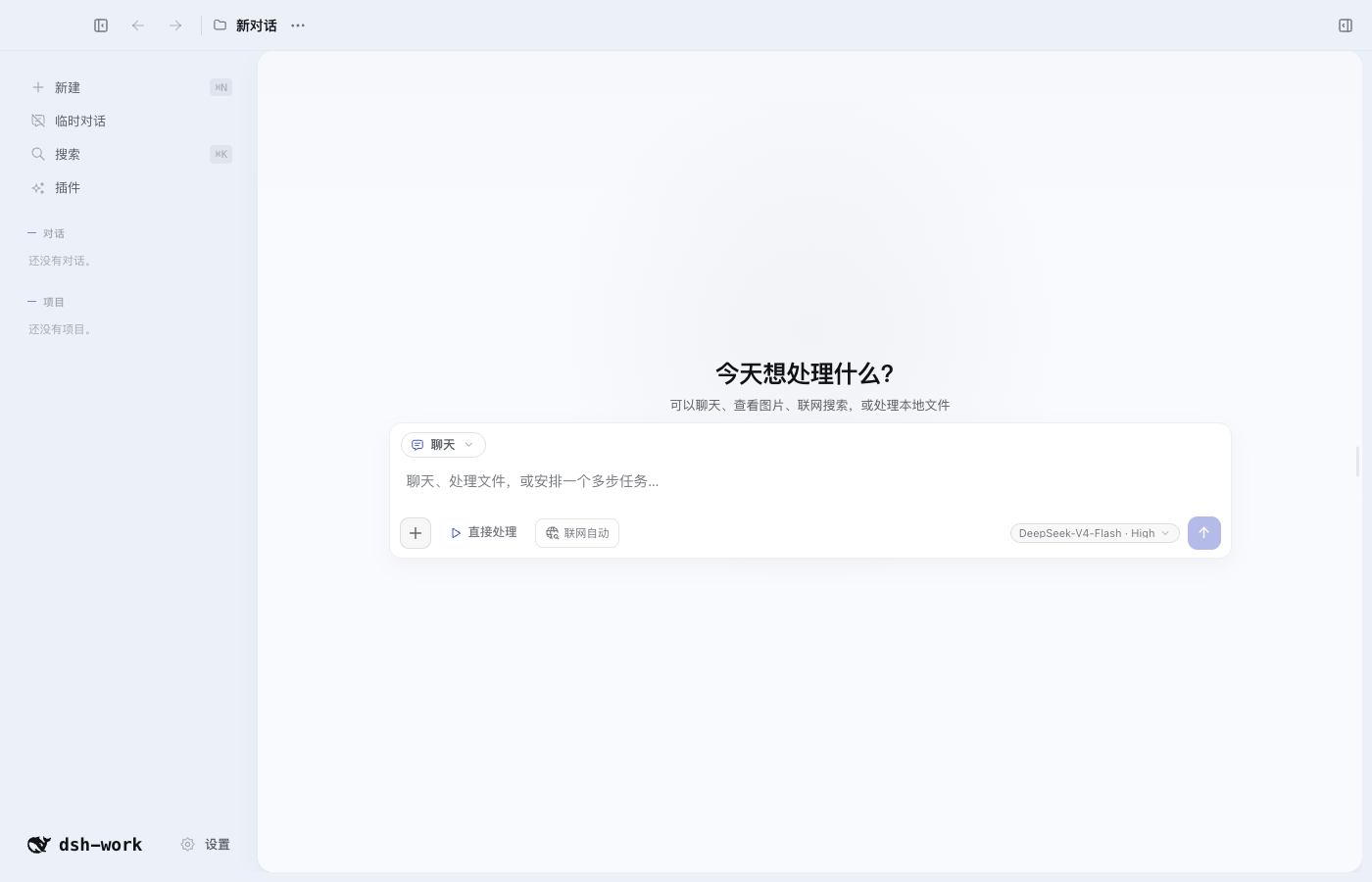
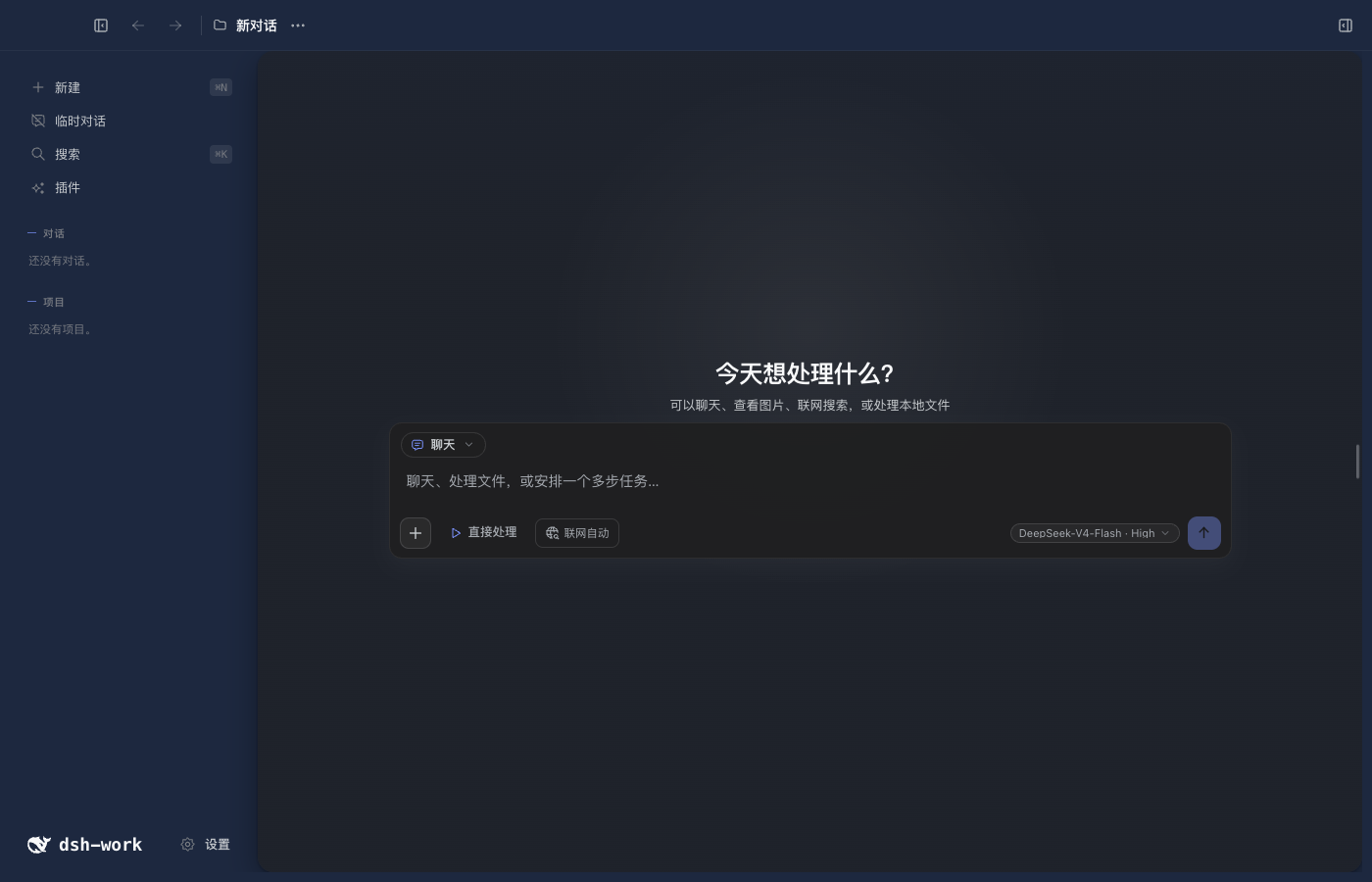
| 专业蓝亮色 | 专业蓝暗色 |
|---|---|
 |  |
快速开始
本地开发要求 Node.js 24 或更高版本。当前项目使用 DSH 0.1.0-rc.6。
npm install
npm run doctor
npm run dev
切换 Node.js 大版本、CPU 架构或操作系统后,运行 npm run setup 重新准备依赖。
主要功能
| 功能 | 用户可以做什么 |
|---|---|
| DSH 对话 | 流式回答、思考过程、工具调用、停止、继续、重试、消息分支和重启恢复 |
| 模型与权限 | 选择 Provider、模型和推理强度,管理凭据引用、Session 权限、工具审批和模型提问 |
| Tool、Skill、MCP 与多 Agent | 使用当前 Profile 中的工具、技能、MCP、Hook、子 Agent 和 Workflow |
| 项目与对话 | 创建项目、全局或临时对话,置顶、排序、重命名、归档、恢复和删除 |
| 桌面外壳与设置 | 使用三列工作台、左右栏折叠、全局搜索、缩放快捷键和更新检查,调整语言、网络、通知、终端与隐私选项 |
| 项目上下文与记忆 | 设置应用指令、项目指令、授权源码目录、写入目标以及全局或项目记忆 |
| 输入与引用 | 使用 @ 引用文件、使用 # 引用对话,粘贴图片和大段文本附件 |
| 编码工作区 | 查看 Diff、逐行评论和编辑、在外部编辑器打开、发起 AI Review,并安全撤销模型产生的文件修改 |
| Git Worktree | 创建、启用、停用和删除隔离工作目录,让新对话在指定 Worktree 中运行 |
| 文件与搜索 | 浏览项目文件、任务和产物,预览文本、代码、图片和 Office 内容,按文件名或正文搜索 |
| Browser Workspace | 多标签浏览、历史、页内查找、缩放、下载、打印、开发者工具、站点权限、网页快照和“使用此页” |
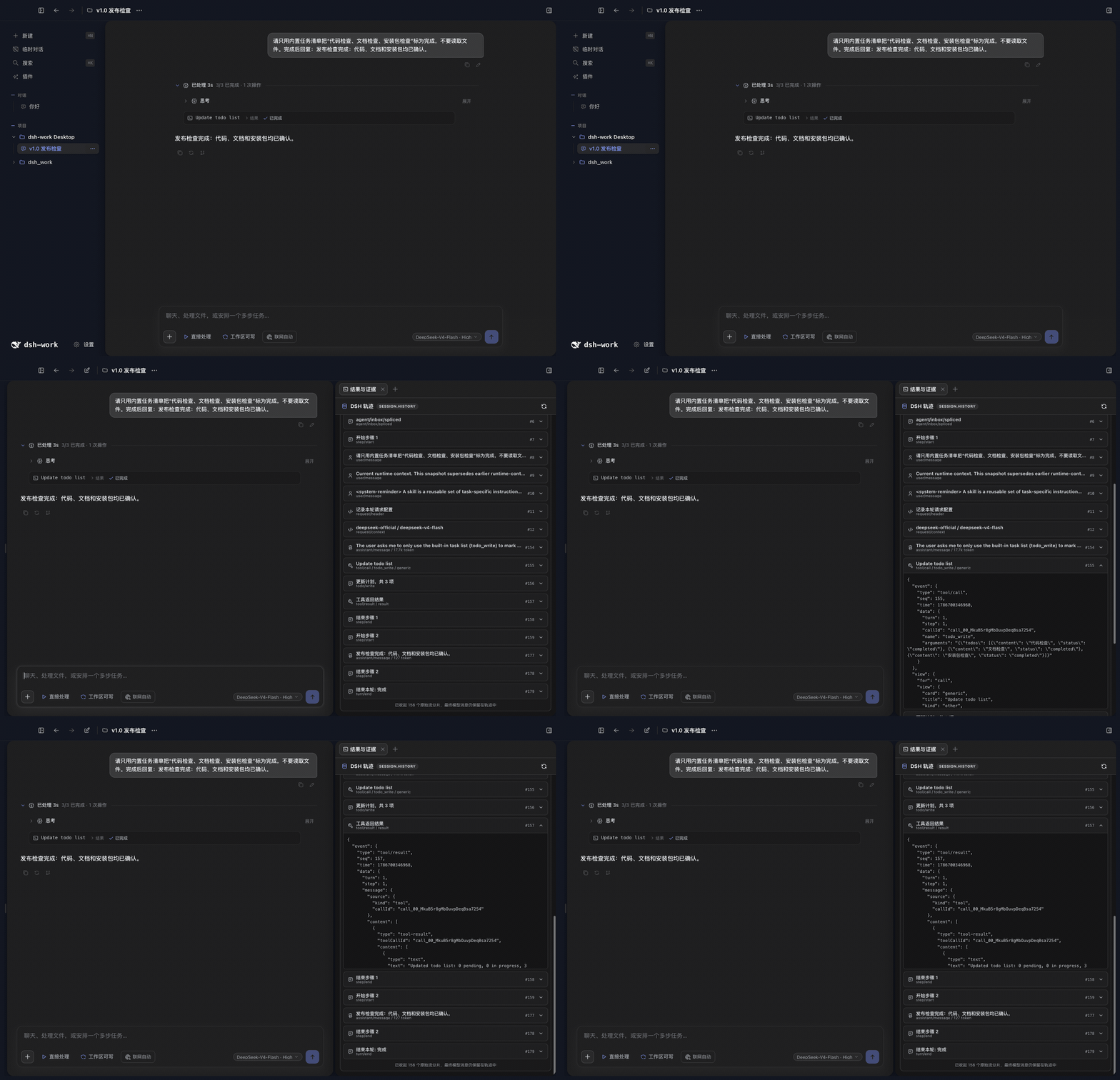
| 结果与证据 | 直接查看当前 DSH Session 的完整轨迹、工具输入输出、耗时、Token 和最终回答 |
| Canvas 与本地 Site | 创建和编辑 Canvas、处理行内建议与版本冲突,生成并响应式预览单文件 Site |
| Office 产物 | 创建、查看和定点编辑 Markdown、DOCX、XLSX、PPTX 和 PDF,并保留版本 |
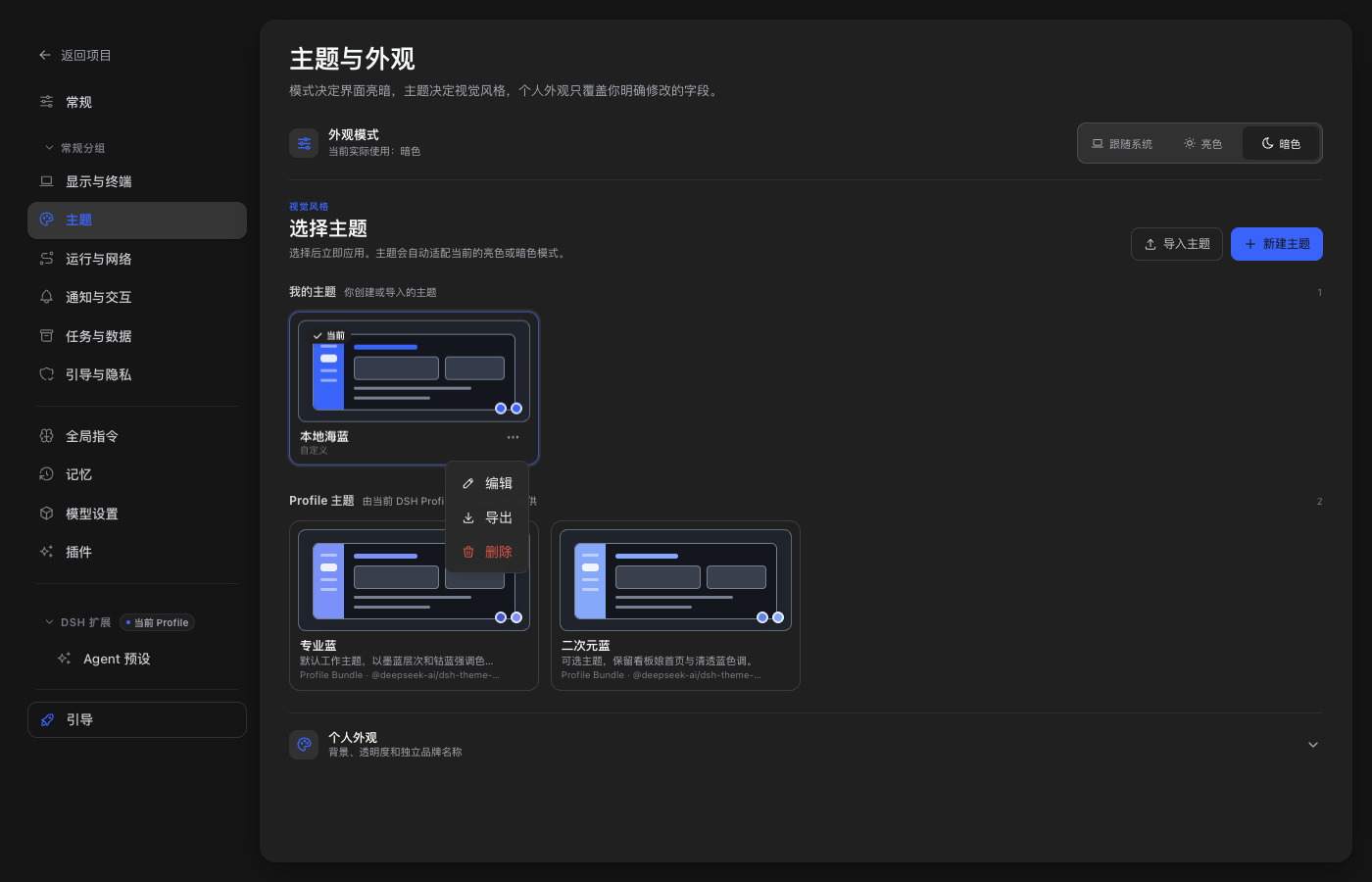
| 主题与外观 | 切换 Profile 主题,新建、导入、预览、编辑、导出和删除本地主题,调整明暗模式、背景和透明度 |
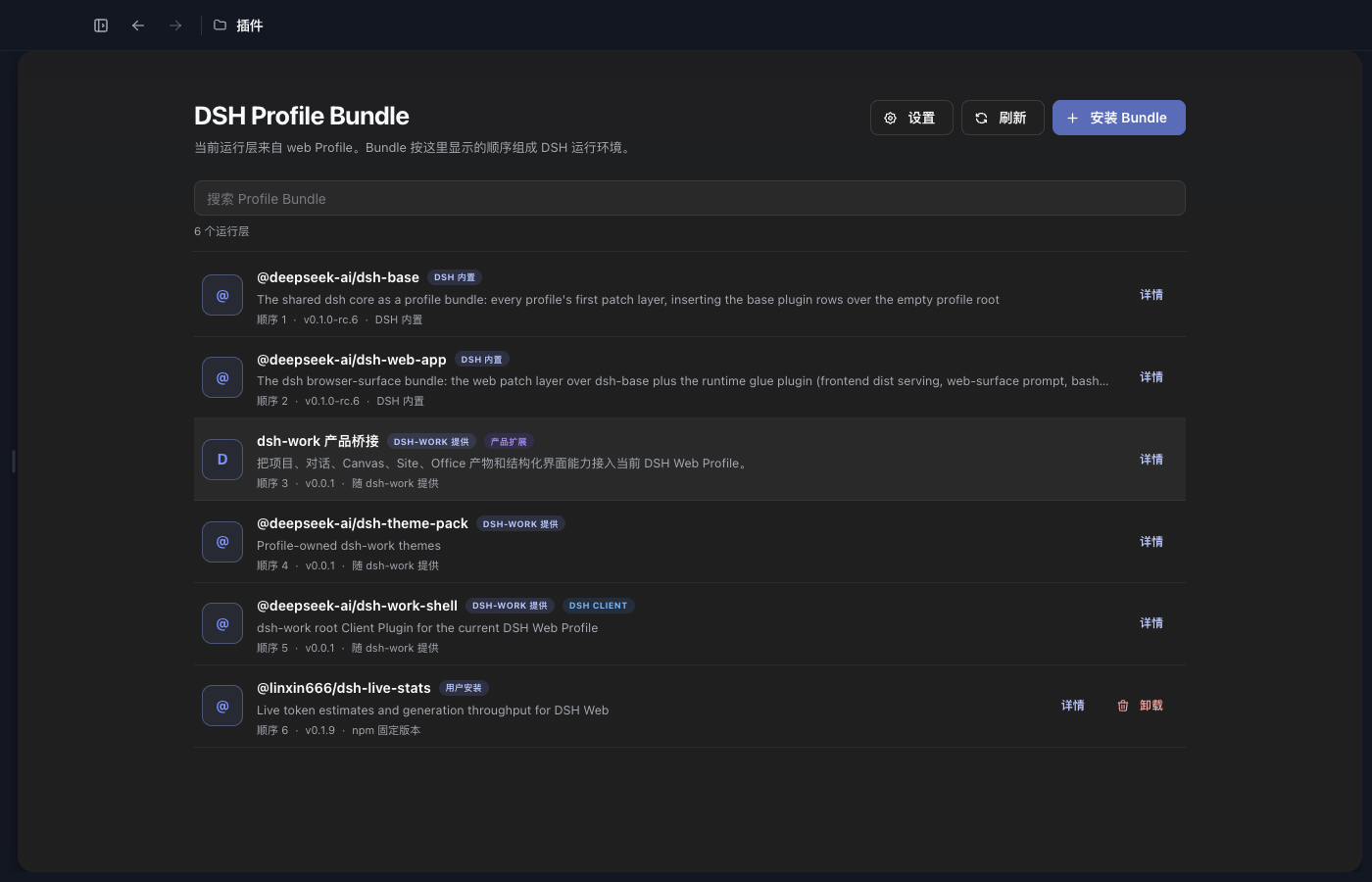
| 插件中心 | 检查兼容性,把 DSH Profile Bundle 安装到当前 Web Profile,并查看来源、版本和加载顺序 |
DSH 轨迹就是结果与证据
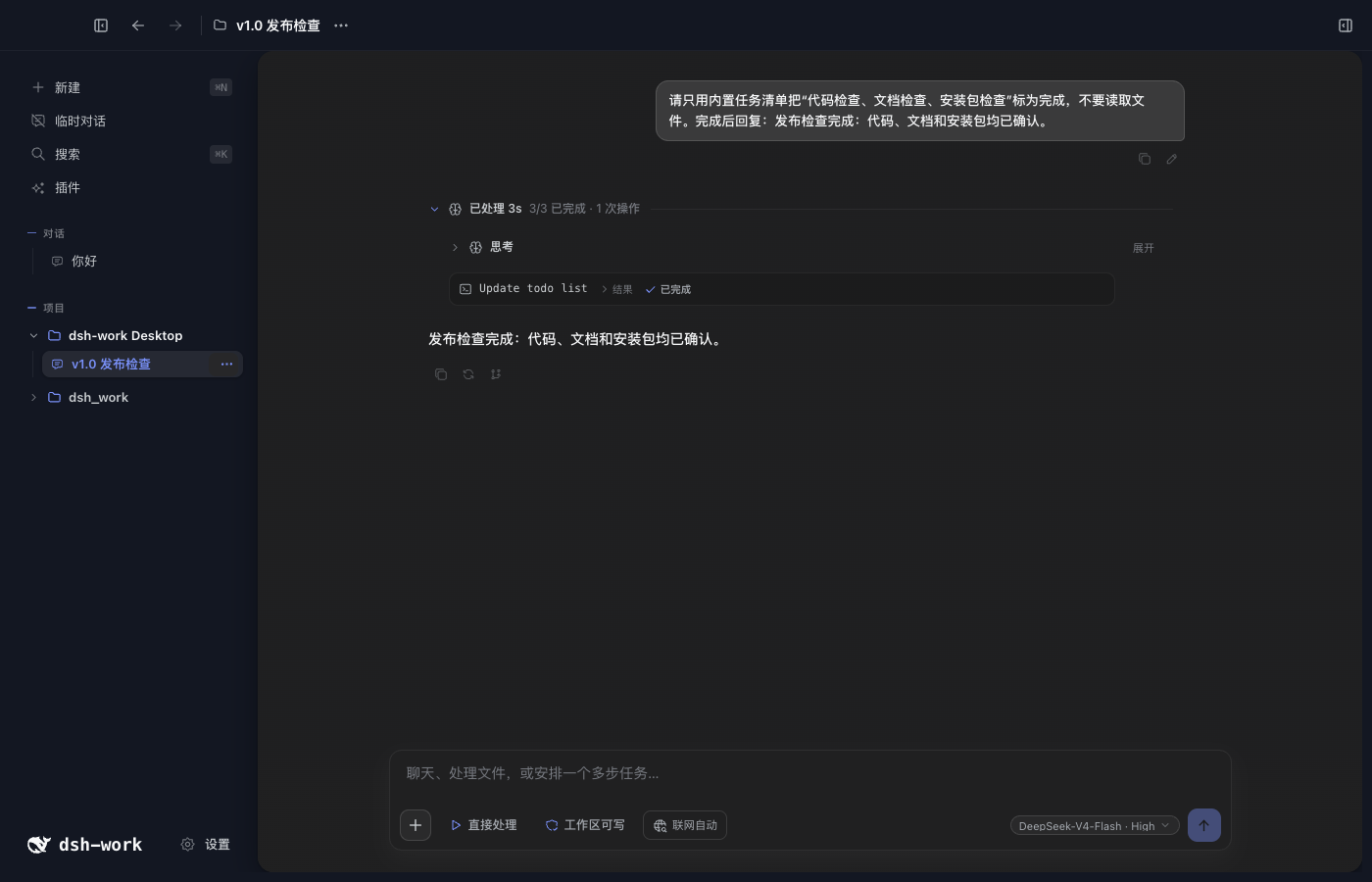
右侧“结果与证据”直接读取当前绑定 DSH Session 的 session.history。用户消息、请求上下文、模型输出、工具调用、工具结果、权限变化和最终回答都在同一条可回放轨迹中,不维护第二套运行中心。
对话和工作台
一个项目对话对应一个 DSH Session。右侧工作台可以添加结果与证据、浏览器、文件、产物和 Site 标签;项目文件树、Agent 工作目录、当前 Diff 和行编辑都跟随当前项目权限与活动 Worktree。
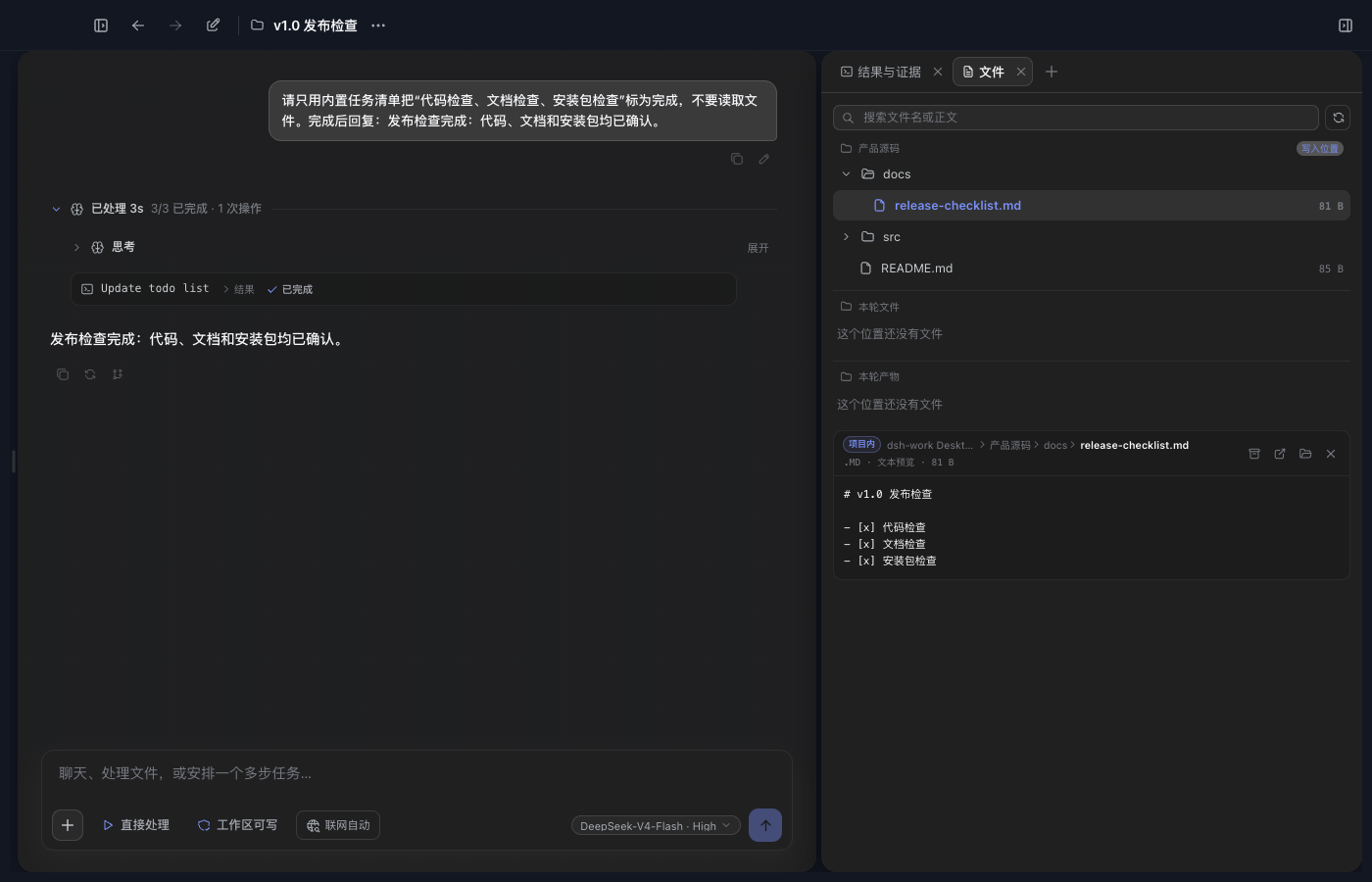
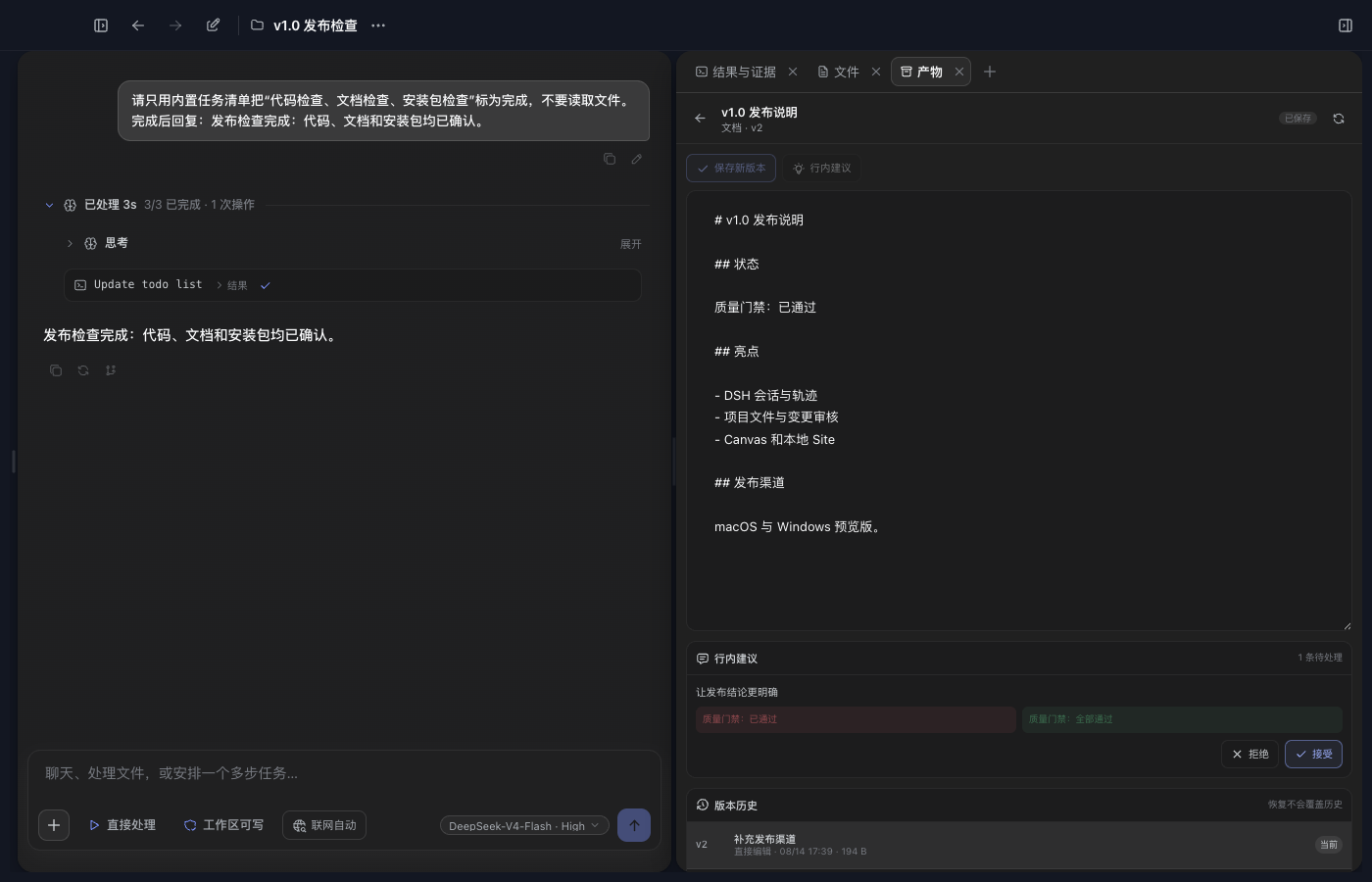
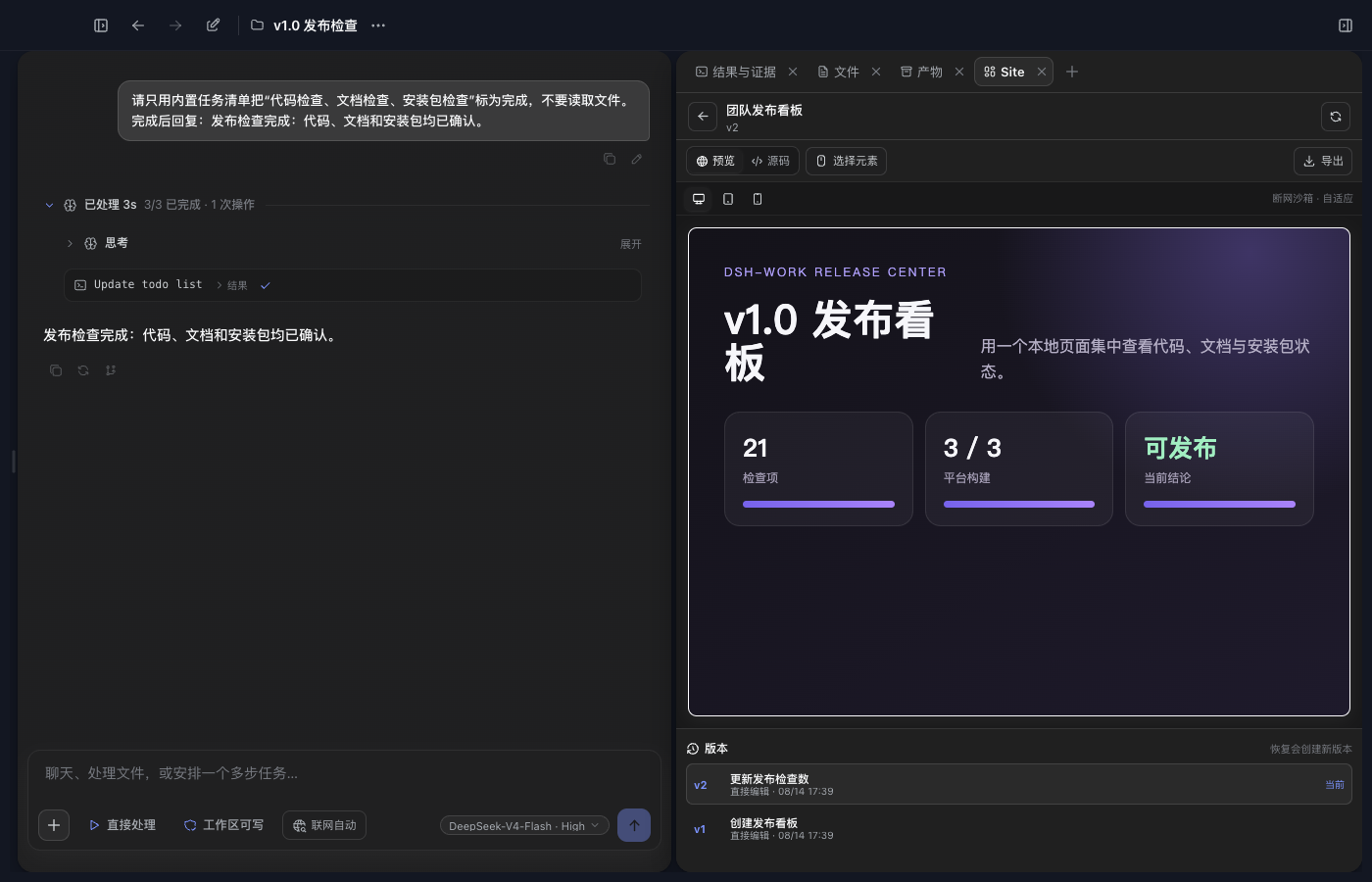
Canvas 保存不可变版本,支持正文编辑、版本比较、精确行内建议和冲突处理。Site 使用同一套版本能力,并在隔离沙箱中提供桌面、平板和手机预览。
Git Worktree 隔离开发
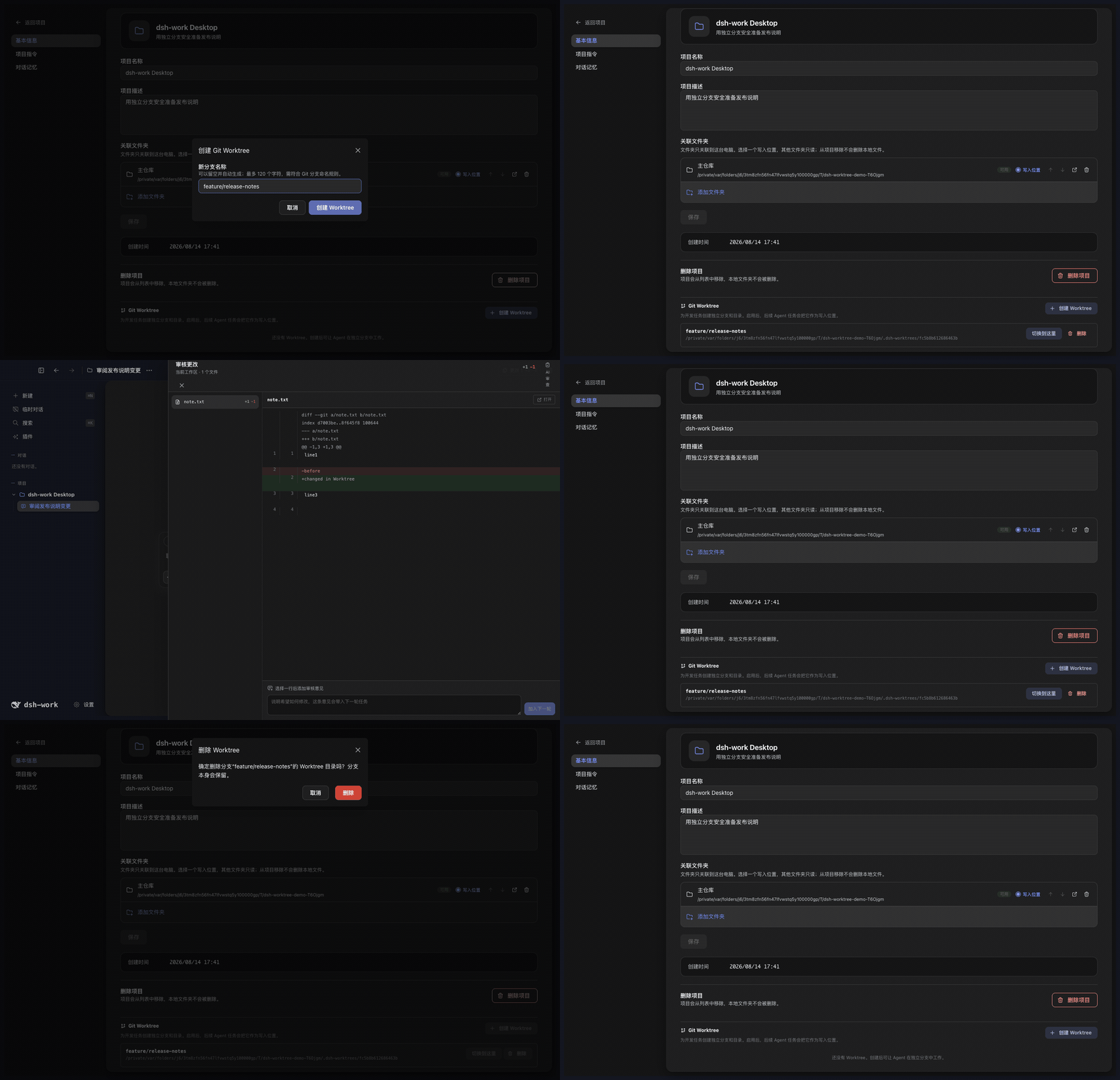
项目设置提供完整的 Worktree 工作流:
- 为项目创建一个或多个独立分支和工作目录,同一时间启用一个。
- 启用后,新建对话的 Agent、DSH Session、Diff 和行编辑使用该 Worktree,主检出保持不变。
- 切换工作目录不会迁移已有对话;应先启用目标 Worktree,再新建对话。
- 删除前必须切回主检出。删除工作目录后保留 Git 分支,避免误删提交。
- 非 Git 目录、重复分支、越界路径和异常符号链接会被拒绝;磁盘上丢失的 Worktree 会标记为不可用。
主题与外观
@deepseek-ai/dsh-theme-pack Profile Bundle 提供默认的 professional-blue 和可选的 anime-blue。正式产品也支持本地自定义主题的新建、导入、预览、编辑、导出和删除。
本地主题只能使用安全的颜色与外观设置,不能注入原始 CSS、远程图片或修改应用名称。个人背景、明暗模式和透明度可以独立调整。
插件中心
普通用户从左侧“插件”页面安装 DSH Profile Bundle:
- 输入带精确版本的 npm 包,或带完整 commit 的
dsh-external仓库地址。 - 先运行兼容性检查;只有结果为“可以安装”时才能写入当前 Profile。
- 安装后查看 Bundle 的来源、版本、加载顺序和能力,用户安装的 Bundle 可以卸载。
Tool、Skill、MCP、Hook 等 Host Bundle 可以进入 DSH 运行时。包含第三方 Client UI 的 Bundle 目前不会进入拥有 Electron 权限的主窗口;随应用提供并经过审核的 Client Bundle 不受此限制。
与 DSH 官方 Web 的关系
DeepSeek Harness Desktop App 不是 DSH Web 的 iframe,也没有复制一套 Agent 运行时。Electron 启动 DSH Web Profile,并继续使用同一套 Session、Agent、Tool、Skill、MCP、Settings、Profile Bundle 和 Client Loader。DeepSeek Harness Desktop App 在同一运行链上提供自己的桌面外壳,并增加项目管理、文件授权、Browser Workspace、Git Worktree、Canvas、Site 和 Office 产物。
需要模型使用的产品能力通过绑定 Session 和 DSH Tool 接入;项目数据、文件权限、网页、Worktree 和产物版本仍由 DeepSeek Harness Desktop App 管理。
当前边界
- 当前没有五列任务看板、独立定时任务页面、Git 图谱、stage/unstage 面板或独立终端页。
- 本地 Site 只提供预览和单文件导出,没有部署服务;公开分享目前只有只读查看。
- 当前没有移动端远程控制、二维码配对、公网隧道、SSH、SFTP 或端口转发。
- 子 Agent 可以执行并出现在对话与轨迹中,但还没有完整的独立管理页。
数据与安全
Profile、Session、项目、运行记录和产物数据默认保存在本机 ~/.dsh。项目源码目录默认只读,Agent 写入需要用户明确授权。
完整规则见 PRIVACY.md、SECURITY.md 和 THIRD_PARTY_NOTICES.md。
平台状态
| 平台 | 当前状态 |
|---|---|
| macOS Apple Silicon | 开发与目录包已验证 |
| macOS Intel | Rosetta 检查通过,仍需 Intel 实机验收 |
| Windows x64 | 已接入构建流程,仍需安装包实机验收 |
| Windows arm64 | 暂不支持 |
| Linux | 暂无桌面打包配置 |
许可证
项目代码使用 MIT License。第三方依赖与二进制文件的来源、许可证和分发限制见 THIRD_PARTY_NOTICES.md。
收录徽章

[](https://deepseek-plugin.org/plugins/vibeinging/deepseek-harness-desktop-app/eval/fixtures/dsh-profile-bundle)把这段 markdown 粘贴到你的 GitHub README,链接回本插件详情页。徽章只声明已被本站收录,不代表安全认证。