在对话页输入框上方显示后台任务状态条,展示当前会话运行中的任务数并支持展开查看实时输出末尾。

- 语言
- JavaScript
- License
- MIT
- 分支
- main
安装
$ dsh plugin --profile web add @vlln/dsh-task-status在终端中运行以上命令,通过 dsh CLI 安装此插件。可在右上角切换 Profile。 第一次用 dsh?看这篇新手教程
对话式安装
帮我安装 DeepSeek Harness 插件 vlln/dsh-task-status:先查看仓库 https://github.com/vlln/dsh-task-status 确认安全性,然后执行安装命令并验证插件加载成功。
把这段指令粘贴给 DSH Web GUI 里的助手,由它代你完成安装与验证。
一句话定位
给 DSH 对话页输入框上方加一个后台任务状态条,自动展示当前会话里正在跑的任务数,点击任务行可展开看状态、耗时和实时输出末尾。无需修改官方基线,插件自造了一条数据通道绕开官方 API 缺失。
核心能力
- 在对话输入框上方显示一个 dock 卡片,标题为「⚙ N 个后台任务运行中」,自动汇总当前会话里所有 agent 的活跃任务
- 点击任务行可展开,显示任务名、起止时间、状态标签和详情(detail 字段)
- 展开时每 1 秒自动轮询任务输出,输出区实时滚动显示最新末尾内容(tail 效果)
- 输出区域上限 10 行(160px),超出后自动变滚动条,可回看历史内容
- 仅在 Chat 视图显示,trajectory 视图、任务看板等非对话页面自动隐藏
- 镜像补丁保证与官方
task_output工具零竞争、视图一致——双方看到的增量逐字节相同
技术实现
- 语言: TypeScript(Node half ESM + client half CJS 由 tsdown 双产物构建)
- 关键依赖:
@deepseek-ai/cordis(peerDependency)、react ^18.2(peerDependency)、@deepseek-ai/dsh-client-runtime、@deepseek-ai/dsh-client-ui-slots - 架构模式: 官方 bundle 插件双 half — Node half 通过
cordis.patch.yml注册服务并给ctx.jobs.read打镜像补丁;client half 通过ctx.slots.inject注册到官方conversation.input.dock槽;两端通过两个 HTTP 只读路由 + 1 秒轮询对接 - 入口文件:
src/index.mjs(Node half)/src/client/task-status.tsx(client half)
适用场景
在 DSH 对话中触发后台运行的工具(如 bash 配 run_in_background: true)后,想直接在对话页输入框上方看到当前会话所有运行中任务及其最新输出,无需切到任务看板。适合频繁跑长时间后台命令、需要实时观察进度的用户。镜像补丁也避免了和官方 task_output 工具的输出游标冲突。
前置依赖与兼容性
| 依赖 | 最低版本 | 说明 |
|---|---|---|
| DSH | >=0.1.0-rc.5 | 官方 dock 槽契约、cordis 4.x 服务接口所要求的最低版本 |
| Node | >=22.19.0 | Node half 在宿主 Node 进程运行(ESM + es2024 目标) |
| 平台 | 跨平台 | 仅在 DSH web profile 下生效,无原生模块依赖 |
| 原生模块 | 无 | 不引入 node-pty、node:sqlite 等原生模块 |
安装方式
dsh plugin --profile web add github:vlln/dsh-task-status
配置项
本插件无需额外配置。
常见问题
Q: 安装后需要手动开启吗?
A: 不需要。插件被 web profile 加载后自动在对话页生效;安装完重启 web profile 即可。在设置页「插件」面板可以临时停用或重新启用。
Q: 状态条在哪些页面会显示?
A: 仅 Chat 视图显示。Trajectory 视图、任务看板等其他页面会自动隐藏——插件通过 MutationObserver 检测对话流列 [data-chat-flow=""] 的存在性来切换显隐。
Q: 输出区只有 10 行,看不到更早的内容怎么办?
A: 超过 10 行(160px)后自动出现滚动条,可向上滚动查看更早的输出;尾部始终保持最新内容,方便观察进度。Node 端缓冲上限 64 KB,超长任务的更早输出会被丢弃(tail 保尾设计)。
Q: 状态条会跟官方 task_output 工具抢输出吗?
A: 不会。本插件给 ctx.jobs.read 打了一个镜像补丁:官方工具仍按原语义消耗式读取,插件自身读取直接走底层 rawRead(绕过补丁);双方看到的增量序列逐字节一致,无重复无丢失。补丁分支不写 reported 状态,任务的终态通知仍由官方 onJobDone/wait 交付。
Q: 状态条显示的任务来自哪里?
A: 来自宿主任务并集——遍历所有 agent 调用 ctx.jobs.list(agent) 取其 owned 任务,再调用 ctx.jobs.list() 取无主 unowned 任务(按 id 去重),最后在前端过滤出当前会话(ownerSession === sessionId)的活跃任务(running/stopping)。
Q: 为什么我跑后台命令没看到状态条?
A: 检查三点:① 工具是否真的设置了 run_in_background: true;② 是否在 Chat 视图(trajectory/taskboard 不会显示);③ 是否已重启 web profile 让插件生效。
Q: 多个任务同时跑会怎样?
A: 状态条显示总任务数并提供「展开/收起」按钮;展开后逐条渲染任务行,再点单条任务行可查看该任务的实时输出 tail;超过 5 条时任务列表自带滚动条(maxHeight: 180px)。
上手难度
入门 — 一行命令安装、重启即用,无配置项,无原生依赖,依赖官方已有的 dock 槽契约。
已知问题与限制
暂无已知问题。
中文 | English
task-status
Background task status bar: task-progress UI above the chat input area — running count + expandable details + live output tail
A background-task status bar above the chat input box: running-task count + click-to-expand per-task details + live output tail (auto-polling, 10-line scrolling area). Registered through the official conversation.input.dock slot (same family as queue/todo/goal). Ships as an official bundle plugin (dsh.bundle + dshClient channel), 0 patches.
Preview
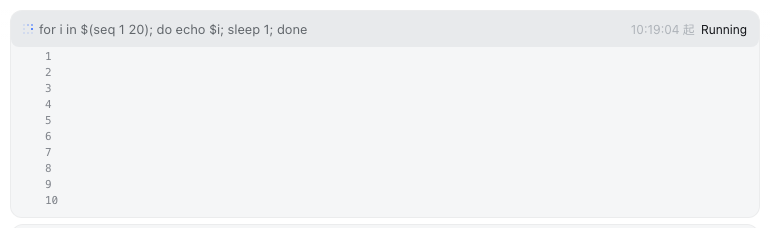
Features
UI (chat-page dock slot):
| Feature | Description |
|---|---|
| Status bar | Dock card above the chat input box: ⚙ N background tasks running |
| Expandable details | Click a task row to expand: status / duration / details + output tail |
| Live tail | Polls the output route every 1s while expanded, re-rendering the whole block (the mirror patch guarantees zero contention with the official task_output tool and a consistent view) |
| Scrolling area | Output area capped at 10 lines (160px); overflow becomes a scrollbar (tail keeps the end, scrollable to review) |
| Chat page only | Automatically hidden on non-Chat views (trajectory / taskboard, etc.) |
Routes (Node half):
| Route | Description |
|---|---|
/plugins/dsh-task-status/tasks | Task list (read-only, filtered by session; owned + unowned union) |
/plugins/dsh-task-status/output | Task output tail (full:true accumulates the full text; unknown id → 404) |
Output tail contention semantics (official 0809 API constraint): tasks.read is a consumptive, incremental read (one shared cursor per task). This plugin applies a mirror patch to ctx.tasks.read — the official read becomes buffered mirror (increments already read by others, not re-consumed) + direct read of the latest (normal consumption); the plugin's own reads go straight to the underlying rawRead. The official tool and the plugin see the same increment sequence (no duplicates, no loss); only the proactively self-read part can no longer be replayed by the official side alone (official semantics is inherently incremental, so model perception is unaffected).
Installation
Recommended: one-line install from a git source (build artifacts are committed; a git source doesn't trigger a build):
dsh plugin --profile web add "github:vlln/dsh-task-status#main"   # one-line git source (build artifacts committed)
# or npm source: dsh plugin --profile web add @vlln/[email protected]
Or from a local directory (when you have the source): git clone, then cd dsh-task-status && dsh plugin --profile web add ..
After installing, restart web for it to take effect; you can disable/enable it in the "Plugins" panel on the settings page.
Usage
Run a background task and the status bar appears (e.g. the model-side bash tool with run_in_background: true):
⚙ 1 background task running
  ● bash-1  for i in $(seq 1 20)…   started 21:30:15   running
Click a task row to expand → the output tail scrolls live (a scrollbar appears once it exceeds 10 lines). The status bar disappears automatically when the task finishes.
Development
pnpm install
pnpm run build      # tsdown: Node half (lib/index.mjs) + client bundle (lib/client.js)
- Node half:
src/index.mjs(mirror patch +/tasks/outputroutes) - client:
src/client/task-status.tsx(dock-slot status bar)
License
MIT License (example plugin in the DSH ecosystem).
查看使用指南 →
该插件的安装步骤、关键要点、FAQ 与兼容性说明(基于已收录字段派生)。
收录徽章

[](https://deepseek-plugin.org/plugins/vlln/dsh-task-status)把这段 markdown 粘贴到你的 GitHub README,链接回本插件详情页。徽章只声明已被本站收录,不代表安全认证。