Tydora 的 DSH 集成目前是空骨架:仅注册插件名,加载后不向宿主注入任何工具/命令/服务;插件本体仍是独立的 Tauri 桌面 Markdown 编辑器。

- 语言
- TypeScript
- License
- Apache-2.0
- 分支
- main
安装
$ dsh plugin --profile web add github:zuorn/Tydora在终端中运行以上命令,通过 dsh CLI 安装此插件。可在右上角切换 Profile。 第一次用 dsh?看这篇新手教程
对话式安装
帮我安装 DeepSeek Harness 插件 zuorn/Tydora:先查看仓库 https://github.com/zuorn/Tydora 确认安全性,然后执行安装命令并验证插件加载成功。
把这段指令粘贴给 DSH Web GUI 里的助手,由它代你完成安装与验证。
一句话定位
Tydora 在 DSH 生态中只是一个注册占位:dsh/index.ts 中 apply() 内部留空,加载后既不注册工具,也不注册服务;插件的真实价值是它本身——一个 Tauri v2 + React 19 构建的桌面 Markdown 编辑器,支持 WYSIWYG/源码双模式、WikiLink 双向链接、知识图谱、思维导图、白板画布和一键发布静态网站。
核心能力
- DSH 集成(当前为空壳):通过
cordis.patch.yml把dsh/index.ts注册到 bundle,但apply(ctx)不做任何ctx操作,宿主不会因此获得新能力 - 桌面 Markdown 编辑:基于 TipTap 3.x 的所见即所得 + 基于 CodeMirror 6 的源码模式,一键切换
- 本地仓库管理:选一个本地文件夹作为"仓库",所有笔记直接读写该目录内的
.md文件,不上传云端 - WikiLink 双向链接 + 知识图谱:解析
[[link]]/![[embed]],维护 outlinks/backlinks 索引并用 D3 力导向图展示笔记关系 - 思维导图与白板画布:用 markmap 把当前文档转成思维导图;用 React Flow 提供无限画布,支持笔记卡片、媒体节点和自由连线
- 一键发布静态网站:调用
@abstractwebunit/markdown-publishCLI 把仓库构建为静态站点,并用内置 Node HTTP 服务器预览
技术实现
- 语言: TypeScript(前端 + React 19)+ Rust(后端 + Tauri v2)
- 关键依赖:
@tiptap/react3.x(WYSIWYG 编辑器)、@codemirror/*(源码模式)、d3+markmap+@xyflow/react(三种可视化)、@tauri-apps/apiv2(前后端桥接) - 架构模式: Tauri 多窗口架构——主窗口承载编辑器/侧栏,独立窗口分别承载设置、图谱、思维导图、白板;前后端通过
#[tauri::command]暴露 28+ 个命令;DSH 端通过cordis.patch.yml的insert段把dsh/index.ts注入宿主 bundle - 入口文件: DSH 入口
dsh/index.ts(空骨架);桌面端 Tauri 入口src-tauri/src/lib.rs,React 入口src/main.tsx→src/App.tsx
适用场景
给想找一个"类 Typora"写作体验 + "类 Obsidian"知识网络 + 内置白板/发布能力的本地化桌面 Markdown 编辑器的人。文件全部存在自己机器上的文件夹里,配合 Git 可做版本管理,适合不希望笔记被锁在云服务中的写作者。
前置依赖与兼容性
| 依赖 | 最低版本 | 说明 |
|---|---|---|
| DSH | 未声明 | package.json 与 dsh/index.ts 均未声明宿主版本,仅通过 cordis.patch.yml 的 insert 注册插件入口 |
| Node | 未声明 | package.json 无 engines 字段;Vite 6 / TypeScript 5 默认支持的 Node 版本均可构建 |
| 平台 | macOS / Windows / Linux | README.md:4 与 src-tauri/tauri.conf.json:78-95 一致;macOS 最低 10.15;Linux 输出 NSIS 不适用,提供 DEB/RPM/AppImage |
| 原生模块 | 无运行时原生绑定 | 前端无 sharp/canvas 原生绑定;后端仅打 wry 的本地 patch(见已知问题),不引入新的 Node 原生模块 |
| 发布依赖 | Node.js + @abstractwebunit/markdown-publish | 发布功能需 CLI,未安装时 run_markdown_publish 会返回明确安装提示(src-tauri/src/lib.rs:877-887) |
安装方式
dsh plugin --profile web add github:zuorn/Tydora
安装命令本身只把仓库挂进 DSH bundle 并注册空骨架;
apply函数没有副作用,DSH 智能体不会因此多出能力。要使用 Tydora 的全部特性,仍请从 GitHub Releases 下载桌面应用(Windows NSIS / 便携 zip、macOS DMG、Linux DEB/RPM/AppImage)。
配置项
| 配置 | 类型 | 说明 | 默认值 |
|---|---|---|---|
| (无) | — | dsh/index.ts 的 apply() 是空函数,没有读取任何配置;DSH 端没有可配置项 | — |
Tydora 桌面端本身有大量设置(主题、字体、自动保存、快捷键、图片存储等,见
website/docs_zh/07-设置),但这些走应用内 UI 与 localStorage,不经过 DSH 插件配置层。
常见问题
Q: 安装这个 DSH 插件后,DSH 智能体会获得 Tydora 的能力吗?
A: 不会。dsh/index.ts:14-18 中的 apply(ctx) 是空函数,加载后不会调用 ctx.command / ctx.service / ctx.tool 中的任何一项;DSH 宿主既拿不到 Markdown 解析/编辑能力,也拿不到 WikiLink 索引或白板数据。
Q: 那这个插件装上去有什么用?
A: 现阶段等同于"占位"——把仓库作为 cordis patch 注册进 DSH 的 bundle,但运行时不会改变宿主行为。想用 Tydora 的全部能力,仍需从 GitHub Releases 下载桌面应用。
Q: Tydora 桌面应用本身支持哪些平台?
A: README.md:4 与 src-tauri/tauri.conf.json:78-95 都声明 Windows / macOS / Linux;macOS 最低 10.15;Windows 提供 NSIS 与便携 zip 两种形态(src-tauri/src/lib.rs:1378-1480),并已上架微软商店(MSIX,由 is_msix() 判定)。
Q: 桌面端第一次启动会要求什么额外步骤?
A: 会让你选一个本地文件夹作为"仓库",所有笔记都直接读写该文件夹内的 Markdown 文件,不上传云端;后续可通过"管理仓库"窗口添加多个仓库并切换(src-tauri/src/lib.rs:404-433)。
Q: WikiLink 双向链接的索引什么时候生效?
A: 仓库首次打开时 LinkIndexService 会全量扫描 .md 文件构建索引(src/wikilink/LinkIndexService.ts),之后由 Rust notify watcher 监听文件变动并增量更新(src-tauri/commands/watcher_commands.rs)。
Q: 发布成静态网站需要哪些依赖?
A: 需要先安装 Node.js 与 @abstractwebunit/markdown-publish CLI;Tydora 启动时会按 resources/...cli/cli.mjs → 项目 node_modules/.../cli.mjs → 全局 PATH 顺序寻找(src-tauri/src/lib.rs:923-967),未找到会在错误信息里给出 npm install -g @abstractwebunit/markdown-publish 提示。
Q: 已知有哪些平台相关的坑?
A: 源码明确提到 Windows 上 wry 的 PostMessageW 在窗口销毁瞬间会触发误导性错误 0x80070578,仓库用本地 patch 静默该日志(src-tauri/Cargo.toml:38-50 + src-tauri/vendor/wry);Linux 端"复制文件到系统剪贴板"依赖 xclip/xsel/wl-copy,三者都没有时会报错(src-tauri/src/lib.rs:732-744)。
上手难度
进阶 — DSH 集成层零门槛(空骨架);但要真正发挥价值,需要理解"它本质是桌面应用"这个事实并单独去 Release 下载安装,DSH 端没有可配置项可以让你调整行为。
已知问题与限制
- DSH 集成层是空壳:
dsh/index.ts:14-18的apply(ctx)不做任何操作;安装后不会向宿主注册任何工具、命令或服务,与 README 描述的"插件市场集成"相去甚远(dsh/index.ts:14-18) - Windows wry 竞态:webview 窗口销毁瞬间若仍有
WebResourceRequested回调在途,PostMessageW会返回 0x80070578;仓库通过本地vendor/wrypatch 静默该错误日志,但源码注释明确强调"绝不能 drop 闭包,否则会双重释放引发 STATUS_HEAP_CORRUPTION"(src-tauri/Cargo.toml:38-49) - 主窗口销毁竞态:Tauri 2 的
WebviewWindow没有is_destroyed()API,单实例回调需要在close()后到从窗口集合移除的窗口期内判断"主窗口是否仍在",目前靠前端先调用notify_main_closing置位 +is_main_window_alive检查兜底(src-tauri/src/lib.rs:17-41) - MSIX 与 GitHub 双通道并存:微软商店版自带更新器会与 GitHub NSIS 包"更新后回退"问题,因此商店版走自定义
check_github_update+switch_to_github_update流程,普通版走tauri-plugin-updater(src-tauri/src/lib.rs:1162-1480) - Linux 复制文件依赖外部 CLI:复制文件到系统剪贴板要求系统装了
xclip/xsel/wl-copy之一,否则返回"No clipboard tool available"(src-tauri/src/lib.rs:732-744) - 跨仓库链接默认不解析:
[[wiki-link]]默认只在当前仓库内查找目标笔记,跨仓库链接会被标为"找不到"(website/docs_zh/01-开始使用/03-常见问题.md:42-44) - 删除不可撤销:文件树中的删除操作会递归删除文件夹内全部内容,应用层无回收站(
website/docs_zh/01-开始使用/03-常见问题.md:21-22)






中文 | English

I spent a long time settling into focused writing in Typora, organizing my thoughts before the graphs of Obsidian. Yet somewhere deep down, I always felt something was missing — a touch of absolute smoothness when your fingertips meet your thoughts, and the freedom to let knowledge unfold directly onto a canvas.
So I decided to build one myself. Its name is Tydora.
It's a Markdown editor I crafted alone through countless quiet nights — confident enough to stand in for Typora, ambitious enough to challenge Obsidian. It's more than a tool; it's a desk for fellow travelers — clean and quiet, yet holding a world within.
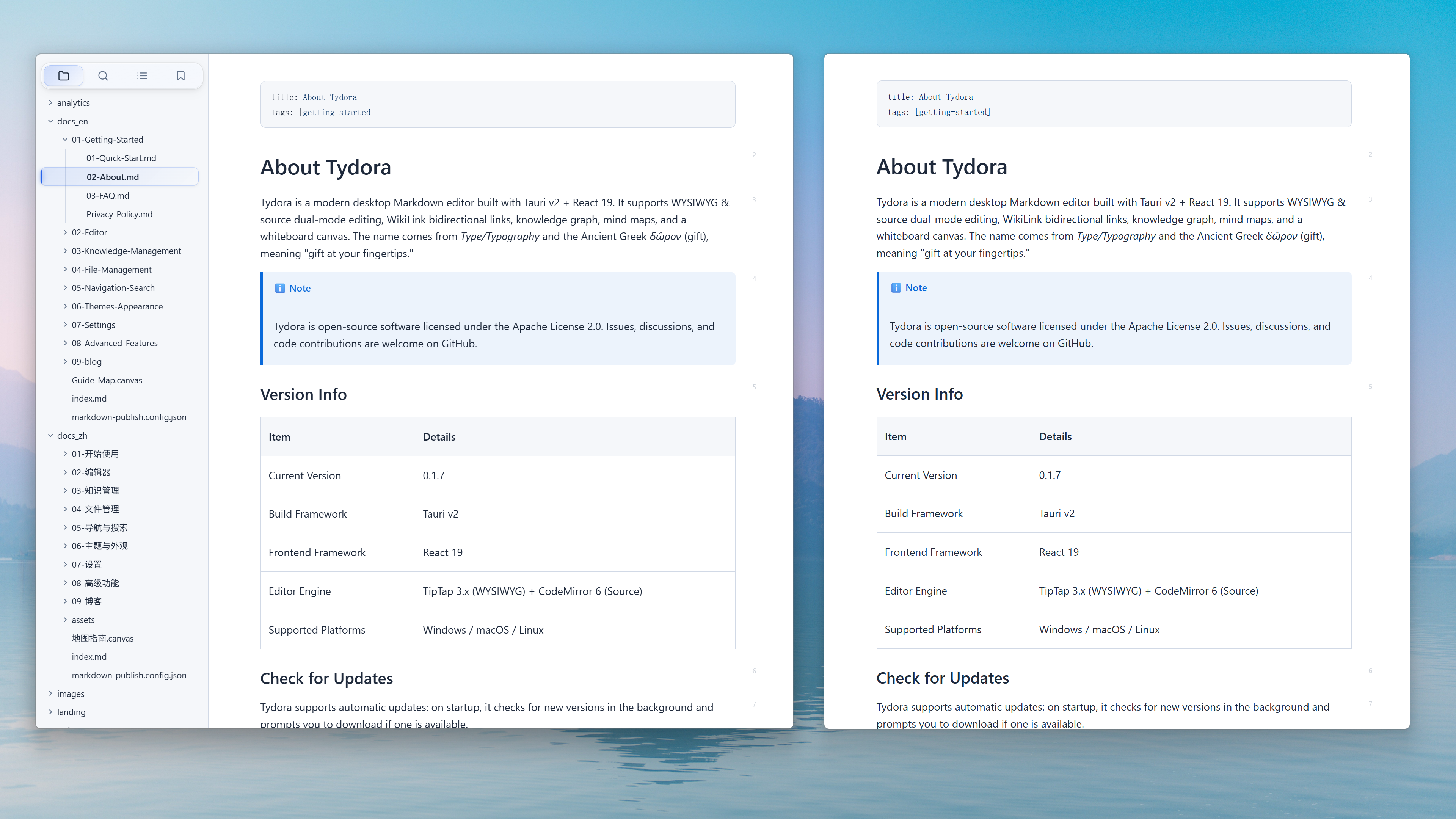
✒️ Writing Should Flow Like Breathing
The ultimate writing experience: WYSIWYG, with an interface so clean that only the words remain. Not a single unnecessary distraction; wherever the cursor lands, your thoughts land directly on the screen. I poured every ounce of my obsession with "the feel of writing" into it, letting the tool fully recede — leaving only you and the river of thought.
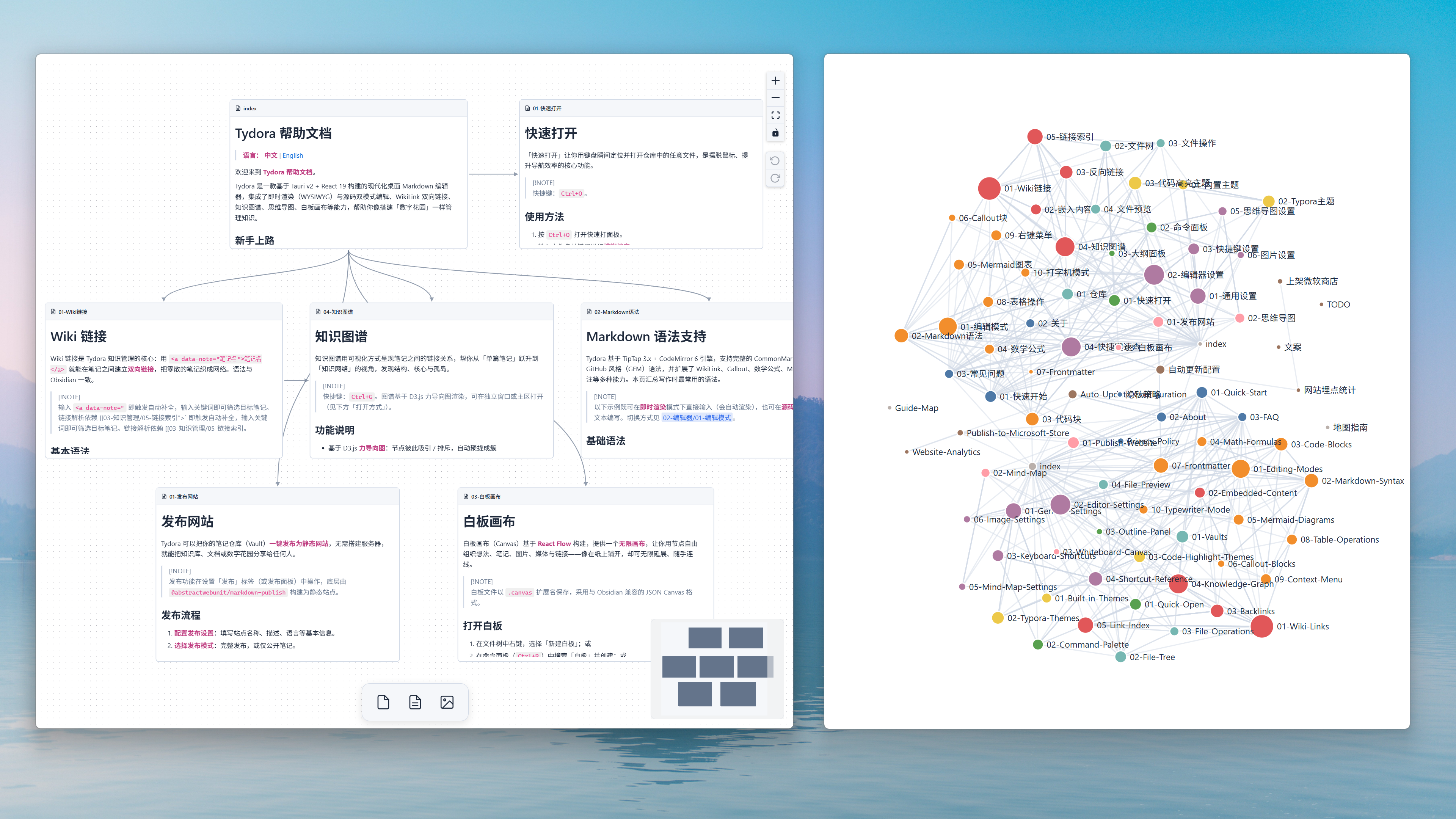
🪐 Knowledge Is Not an Island — It's a Constellation
Relationship graphs form between notes — the gravitational lines of thought. And the infinite whiteboard canvas lets you personally guide these stars, connecting them freely, restructuring logic. Going beyond the graph — here, your cognition knows no bounds.
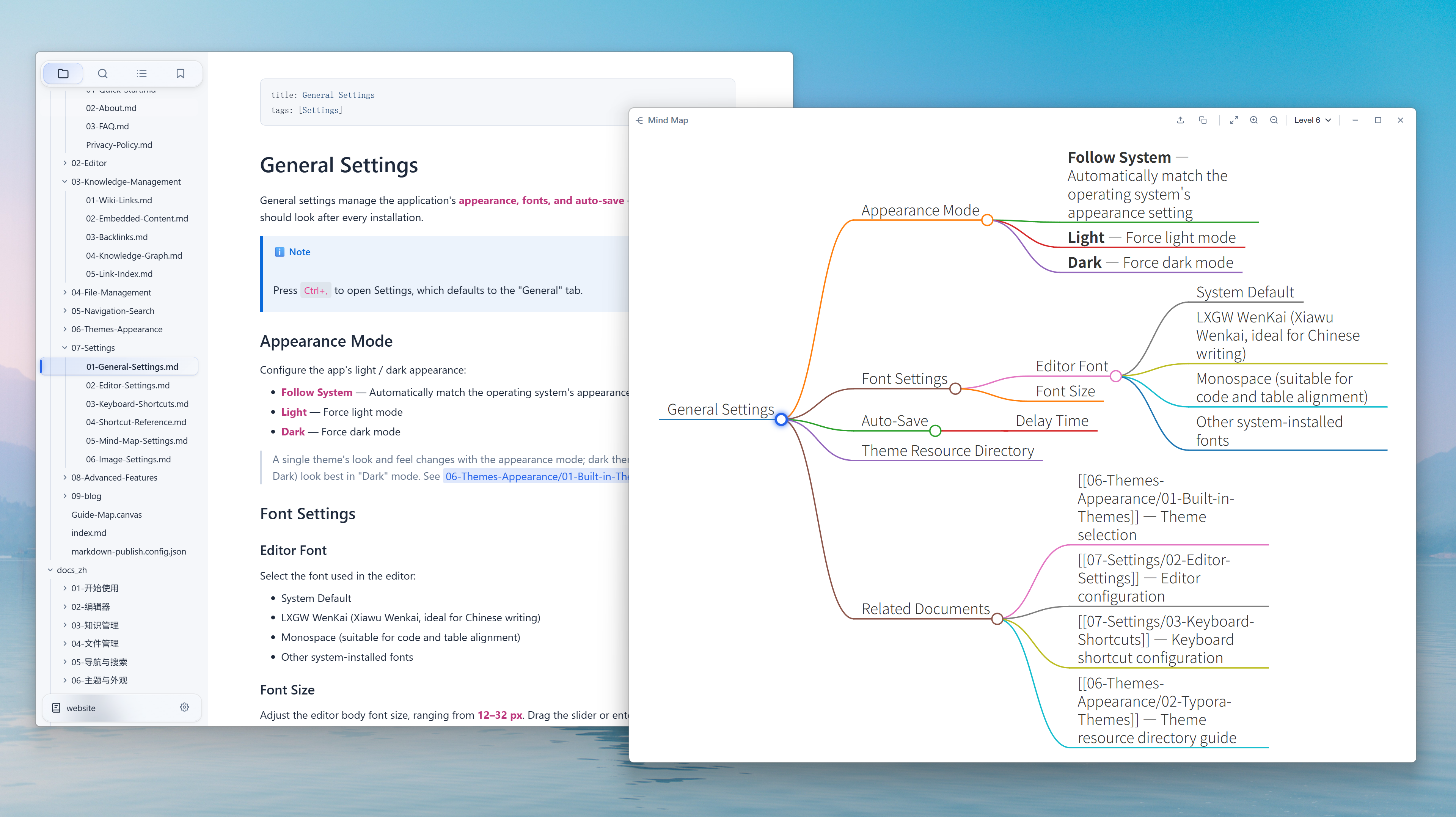
🌳 From Line to Tree, See the Forest in One Step
Turn any document into a mind map with one click. Linear text instantly unfolds into a structure of clear branches — hierarchy and connections at a glance. Outlining, dissecting books, reviewing ideas — no need to switch tools, the flow never breaks. What you see is the very shape of thought.
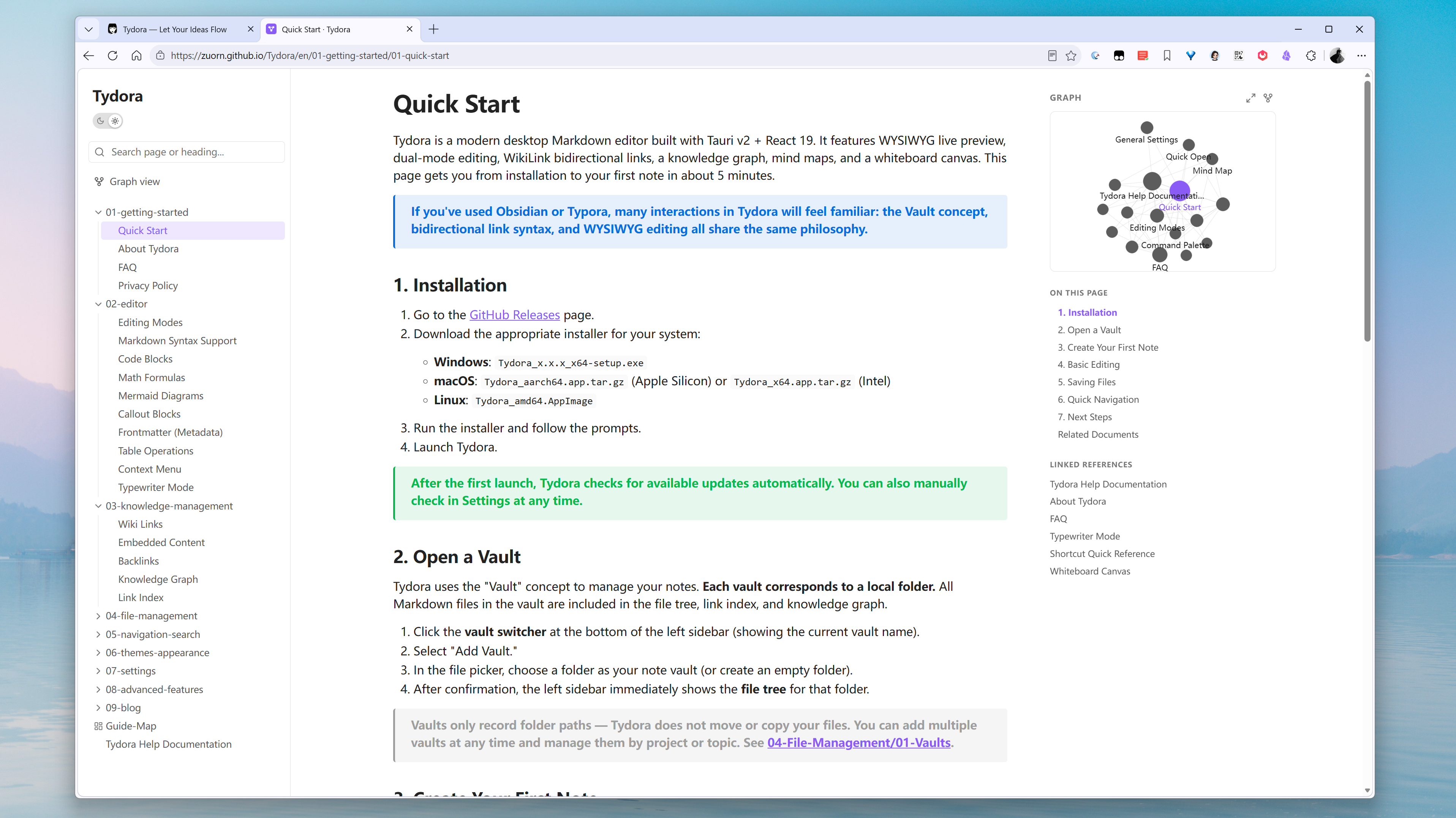
🌸 Let Your Knowledge Garden Bloom Quietly on the Web
Publish your local knowledge repository as a static website with one click. Blogs, documentation, personal wikis. Sharing knowledge has finally become clean and dignified.
📚 A Desk Awaiting Fellow Travelers
It is the answer I offer — and an invitation to fellow travelers. If you're also looking for a writing companion that understands you better, come and sit with Tydora.
🔗 Tydora — Let Your Ideas Flow
If there's anything you'd like it to do, tell me — I'll keep refining it, until it becomes the ideal version in our hearts.
Quick Start
- Download and install Tydora from the Release page.
Run from Source
git clone https://github.com/zuorn/Tydora.git
cd Tydora
npm install

npm run tauri dev
npm run tauri build
Tech Stack
| Layer | Technology |
|---|---|
| Frontend | React 19 + TypeScript + Vite 6 |
| Editor | TipTap 3.x (WYSIWYG) + CodeMirror 6 (Source) |
| Backend | Rust (Tauri v2) |
| Visualization | D3.js (Graph) + markmap (Mind Map) + React Flow (Canvas) |
| Plugins | tauri-plugin-fs / dialog / window-state / updater / process |
Contributing
Issues and pull requests are welcome!
License
This project is licensed under the Apache License 2.0.
Star History
查看使用指南 →
该插件的安装步骤、关键要点、FAQ 与兼容性说明(基于已收录字段派生)。
收录徽章

[](https://deepseek-plugin.org/plugins/zuorn/Tydora)把这段 markdown 粘贴到你的 GitHub README,链接回本插件详情页。徽章只声明已被本站收录,不代表安全认证。