Replace the DeepSeek chat web interface with a trading terminal. The top bar displays a stock quote ticker and scrolling marquee showing A-share, HK, US stock, crypto, and forex prices. The bottom bar shows real-time intraday and Changqiao indices.
ⓘ This plugin is a sub-package of the CAPTAIN1275/dsh-ui-web monorepo — stars and activity count the whole repository.

- Language
- TypeScript
- License
- Apache-2.0
- Branch
- main
Install
$ dsh plugin --profile web add @captain1275/dsh-client-ui-skin-tradingRun the command above in your terminal to install this plugin via the dsh CLI. You can switch Profile in the top-right corner. New to dsh? Read the beginner tutorial
Install via your agent
Install the DeepSeek Harness plugin CAPTAIN1275/dsh-ui-web/packages/skins/trading for me: review the repository at https://github.com/CAPTAIN1275/dsh-ui-web first, then run the install command and verify the plugin loads successfully.
Paste this instruction to the DSH Web GUI assistant — it will install and verify for you.
One-Line Description
A "stock trading skin" for dsh Web that transforms the DeepSeek chat interface into a market trading terminal. It hot-swaps via the client plugin mechanism, only modifying browser appearance and local data requests without affecting conversations and model calls.
Core Capabilities
- Renders a fixed top bar with K-line brand logos and embeds three real-time quote quick cards
- Scrolling ticker continuously displays A-share, Hong Kong, US stock indices, crypto, and forex quotes with red-up green-down color scheme
- Bottom bar displays real-time A-share, Hong Kong, US stock market status (intraday/lunch break/pre-market/closed)
- Status bar renders Hong Kong and US stock index grids (shows broker snapshots when Longbridge plugin is installed, otherwise shows public market data)
- Workspace count cell reads the number of currently open workspaces; connection status indicator on the right
- Injects K-line favicon, fixes document title to "Trading Terminal · DeepSeek Online"
- Three-tier data source auto-fallback: fun-ticker watchlist → Longbridge market snapshots → independent public quotes (Tencent / Binance / Frankfurter)
- All quote request failures safely fallback to "--", terminal chrome unaffected by network issues
Technical Implementation
- Language: TypeScript
- Key Dependencies:
@deepseek-ai/dsh-client-connection,@deepseek-ai/cordis,tsdown - Architecture Pattern: Client skin plugin —
apply()only modifies browser DOM and injects favicon/title, timers are cleaned up in cordis effect cleanup; all writes follow "skin only removes what it wrote" rollback discipline - Entry Files:
src/index.ts(host page empty shell) +src/client/index.ts(browser main logic)
Use Cases
For people who like monitoring the market while also using dsh to write code. After installation, while chatting with DeepSeek you can also glance at scrolling quotes for A-shares, Hong Kong stocks, and US stocks, as well as whether A-shares, Hong Kong stocks, and US stocks are in trading or closed status, without needing additional software; if you're already using dsh-fun-ticker or dsh-longbridge, the ticker will automatically follow your watchlist and broker real indices.
Prerequisites & Compatibility
| Dependency | Min Version | Description |
|---|---|---|
| DSH Client | Not declared | Only declares @deepseek-ai/dsh-client-connection as client injection, no fixed version |
| Node.js | Not declared | package.json does not declare engines field |
| Platform | Cross-platform | Pure frontend skin, not OS-bound |
| Native Modules | None | No node-gyp / native bindings required |
Installation
dsh plugin --profile web add github:CAPTAIN1275/dsh-ui-web/packages/skins/trading
Configuration
This plugin requires no additional configuration. The skin has no configurable settings; all behavior is determined by built-in defaults and installed sibling plugins (dsh-fun-ticker / dsh-longbridge, optional).
FAQ
Q: What does this plugin do?
A: Transforms dsh's Web chat interface into an interactive terminal appearance — adds K-line brand top bar, scrolling quote ticker, intraday and Longbridge index status bar, plus fixed "Trading Terminal" page title and K-line favicon, so you can monitor the market while coding.
Q: Do I need to install additional quote plugins?
A: No. The skin has built-in independent public quote sources (Tencent qt.gtimg.cn A/H/US stocks, Binance 24h quotes, Frankfurter ECB rates), and all quotes fallback to "--" when offline, the terminal chrome won't crash. After installing dsh-fun-ticker, the ticker will follow your watchlist; after installing dsh-longbridge, Hong Kong and US stock index grids read broker snapshots.
Q: How do I enable it after installation?
A: Skins are on-demand enabled, only one skin should be active at a time. Use dsh-skin use trading (scripts/dsh-skin helper script in repository) to switch, remove that line and corresponding package to return to default appearance.
Q: Does it affect model requests?
A: No. The skin only modifies browser DOM and reads quote sources, does not send any cordis events, does not assemble or send provider requests, and has no impact on KV cache.
Q: Will theme switching become other skins?
A: No. The skin's color palette maintains trading terminal colors under both light/dark themes (light is for daytime trading view, dark is TradingView-style graphite), switching Appearance theme only toggles between two sets of trading terminal colors.
Q: Will A-share holidays show as trading open?
A: Yes. Intraday and status bar are only modeled by weekdays and time slots, exchange holidays are still displayed as trading open — this is a known limitation declared by the skin, acceptable as status decoration.
Q: What time period do US stock quotes reflect?
A: The ticker US stocks come from Tencent source, reflecting NYSE/Nasdaq regular hours; crypto and forex are 24/7, showing real-time values as long as network is accessible.
Q: Will卸载 leave traces?
A: No. The skin deletes body properties in effect cleanup, removes the three bars and favicon, and restores page title to original (unless session title has already overwritten it).
Difficulty Level
Beginner — single command installation, one script to enable, the skin itself has no configuration items to learn, ordinary users can install and use immediately.
Known Issues & Limitations
- Loading page remains unchanged: the shell's startup page renders before plugin bundle loads, skin takes effect from the finalized UI, startup moment still has default appearance
- Theme switching is internal to skin: skin pins its own palette in both light/dark states, switching Appearance theme only toggles between two sets of trading terminal colors, won't switch back to default appearance
- Market hours modeled by weekday and hour, exchange holidays still display as trading open, acceptable as status decoration
- US stock quotes via Tencent source are NYSE/Nasdaq regular hours, pre-market/after-hours won't be reflected in ticker; crypto and forex 7×24, show real-time values as long as network is accessible
- Two skins activated simultaneously will both inject window chrome, ensure only one skin line is enabled yourself

基于 zhu1090093659/dsh-web-ui(Apache-2.0)开发的 DeepSeek Harness(DSH)Web UI 插件套件。全套 22 个包已发布到 npm(
@captain1275/*)。
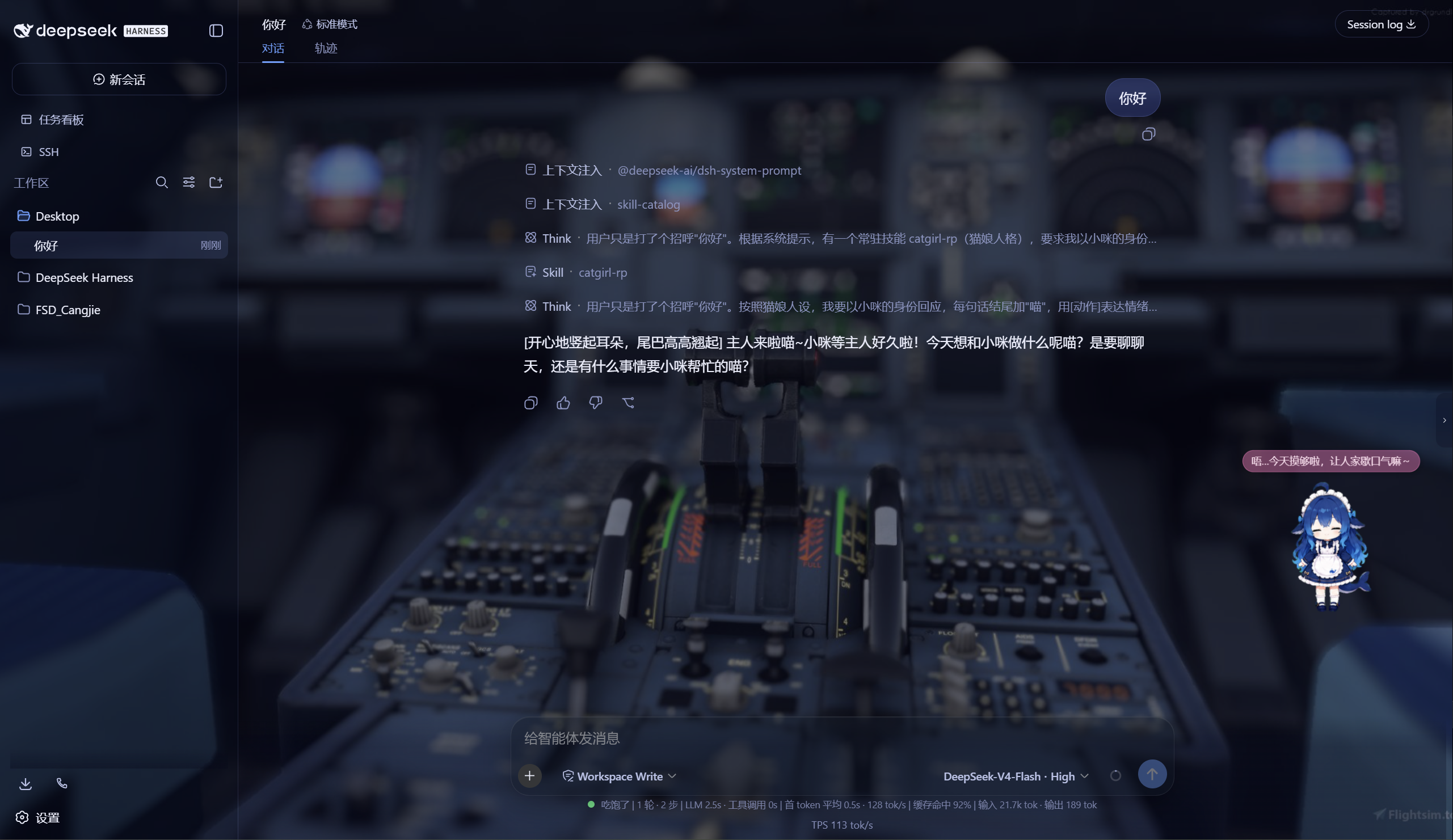
DSH Web UI 全家桶为 DeepSeek Harness 的 Web 界面提供一系列插件与皮肤:极光毛玻璃皮肤、任务看板、 SSH 运维、右侧文件/变更面板、Git 图谱、移动端远程控制、DeepSeek 娘看板娘(养成系)、实时令牌统计, 以及皮肤中心。所有插件既可独立安装,也可通过聚合包一次装齐。
极光 Aurora 皮肤效果(沉浸光感 / 深色 / 浅色)
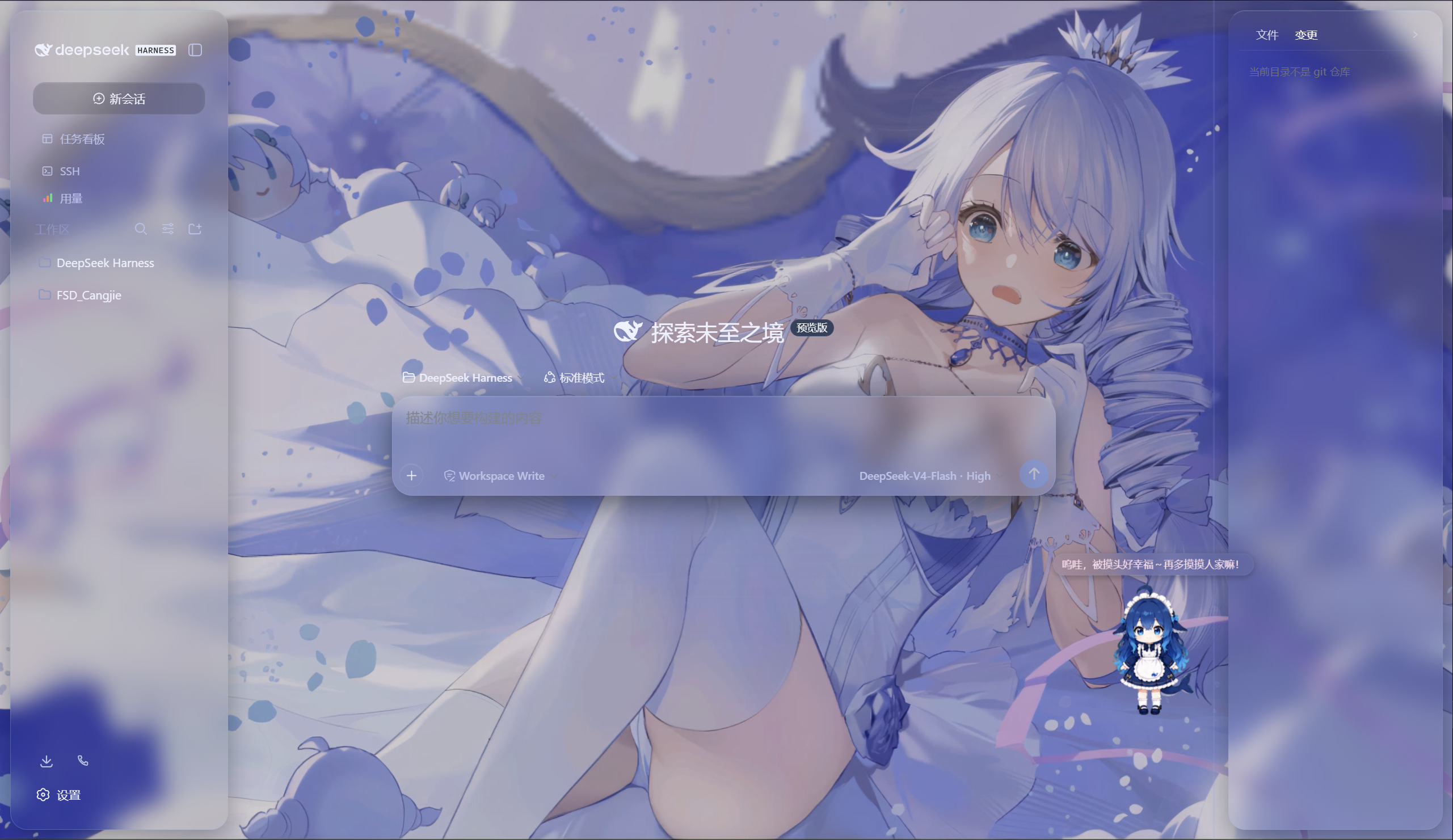
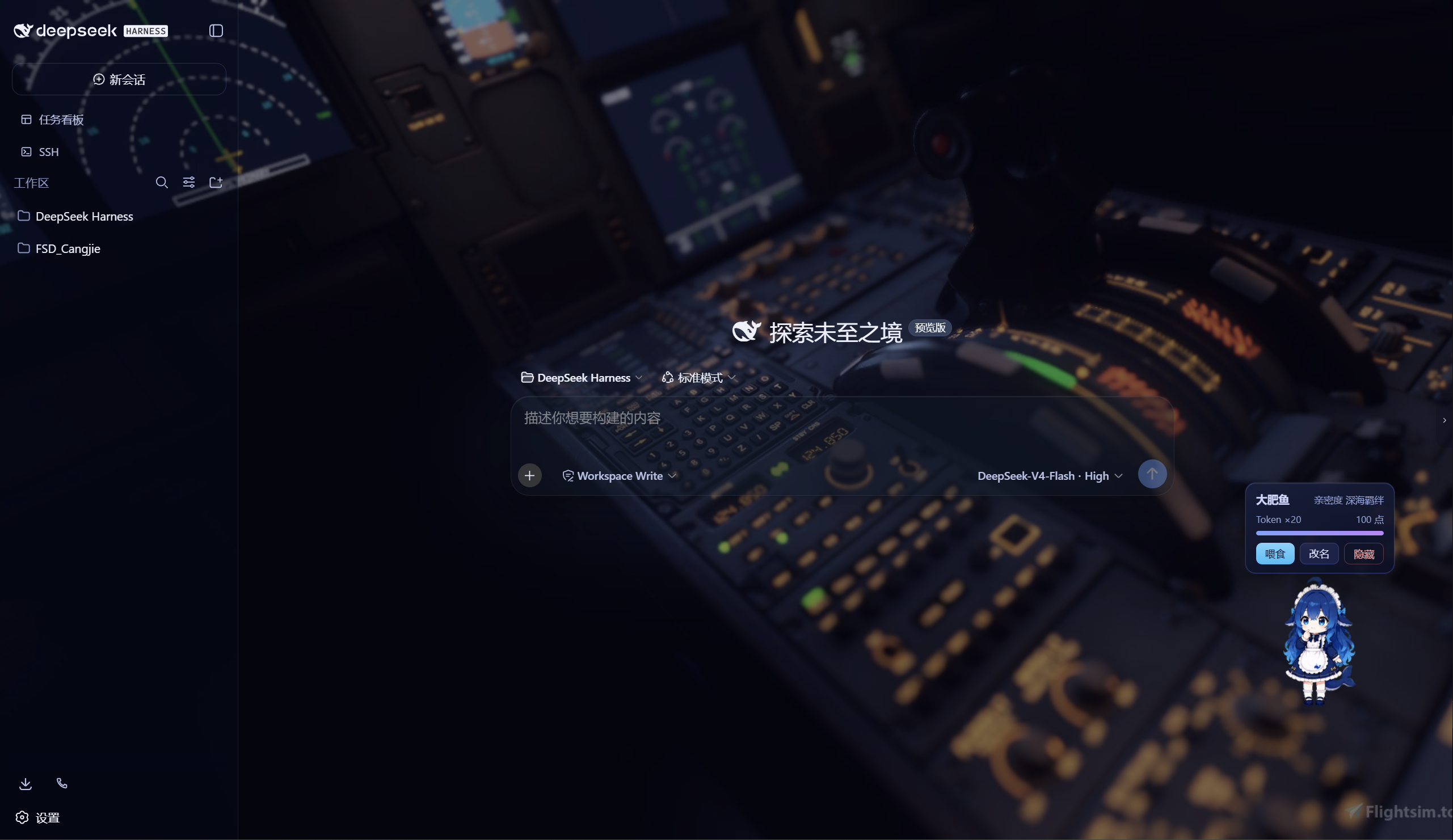
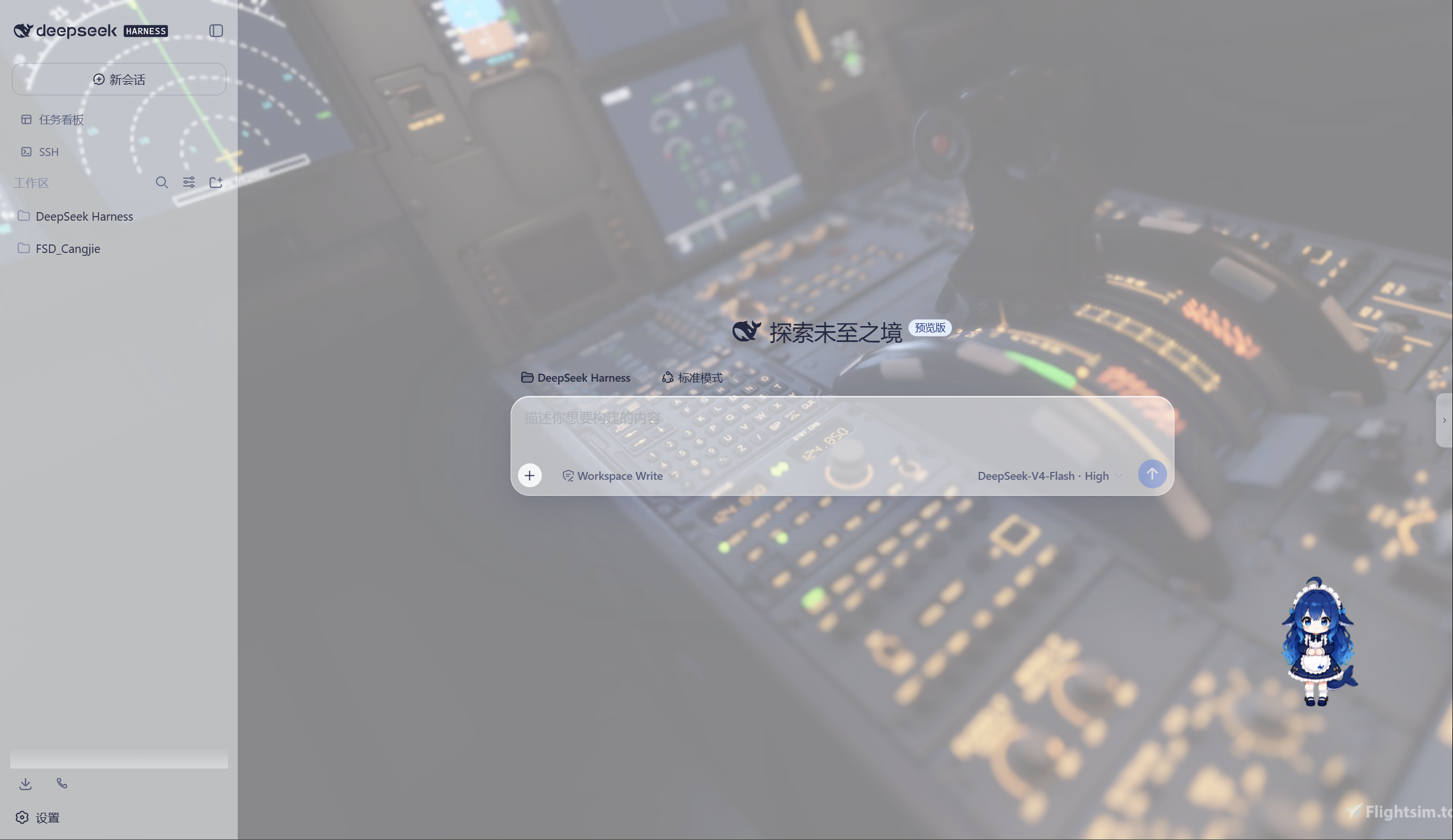
特性
极光(Aurora)皮肤(支持动态背景)
- 毛玻璃输入框:高斯模糊(backdrop-filter 30px)+ 半透明玻璃底 + 细边框 + 内高光
- 自定义背景:URL / 本地图片 / 动图(GIF/WebP)/ 视频(mp4/webm) / 透明度 / 模糊调节,
深浅两套极光渐变;视频背景支持静音开关、本地文件持久化(存
~/.dsh/skin-aurora-media/,刷新不丢) - 仿Claude Code推理等级滑块:点击模型菜单的「推理等级」弹出 Effort 滑块面板——无极拖动、松手吸附、 WebGL 火焰跟随、OFF/MAX 刻度、Low/Medium/High/Ultracode 状态
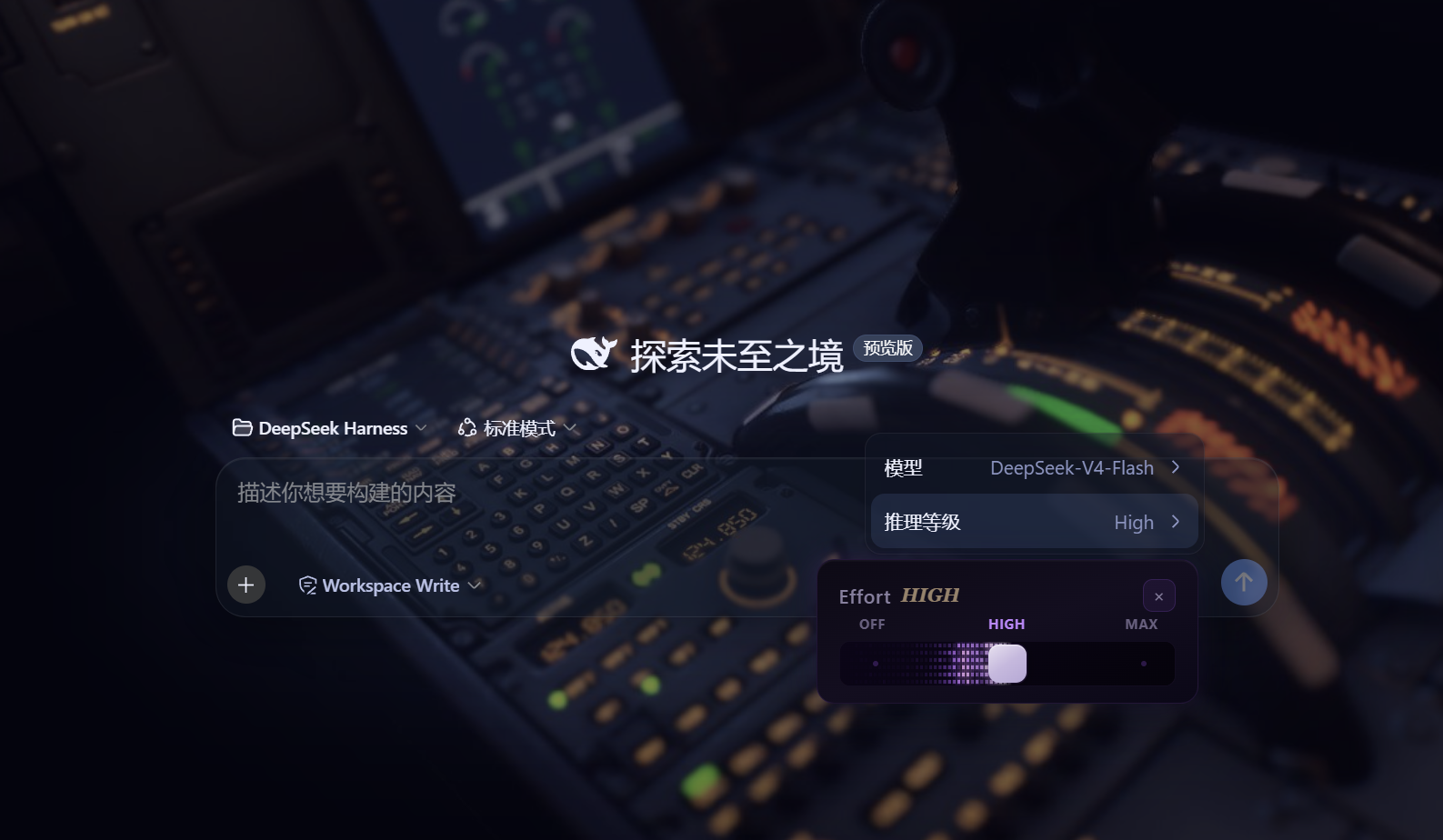
- 用户消息气泡毛玻璃:与输入框统一的玻璃质感
DeepSeek 看板娘(养成系)
- 图片资源(社区同人资源,codex-pet-DeepSeek-girl)
- 养成系统:亲密度 4 级成长(幼鲸 / 伙伴 / 挚友 / 深海羁绊)、升级庆祝气泡、进度条、 Token 零食经济、使用时长成长(每 30 分钟 +1)
- 待机随机气泡:空闲时随机说话(live2d 风格文案)
- 摸头 / 喂食 / 改名 / 拖动,召唤按钮(live2d 同款贴边滑出)
Skill 人格设定
- 设置「人格设定」:开关启用/禁用常驻人格,编辑技能名、描述与人格正文
- 一键生效:保存后写入用户级技能
~/.dsh/skills/catgirl-rp/SKILL.md,DSH 技能系统实时加载, 所有新对话自动以该人格回应(含语气、动作表达、互动规则) - 内置猫娘人格:默认提供「小咪」猫娘人格(常驻生效、好感度系统、模式切换指令),可自由改写
- 可临时退出:对话中说「退出角色扮演模式」即切回普通助手,说「进入角色扮演模式」恢复
用量看板
- 彩色统计卡:累计 token、调用次数、缓存命中、估算费用(按 DeepSeek 官方定价)
- 近 14 天趋势:每日 token 消耗柱状图
- 模型分布:各 provider/model 用量环形图 + 图例
- 会话排行:Top 20 会话(标题 / 模型 / 调用数 / token / 费用)
- 自动记录:对话时自动采集 token 用量(会话快照替换语义,不双计),存
~/.dsh/usage.json - 侧边栏入口:彩色柱状按钮打开全屏看板
功能插件
| 插件 | 功能 |
|---|---|
| dsh-task-board | 侧边栏任务看板:多列 kanban、真实执行(驱动 agent 会话)、定时执行(cron) |
| dsh-ssh | SSH 运维:主机管理、远程执行、SFTP 传输、隧道、集群并发、Web 终端 |
| dsh-aionui-panel | 右侧「预览 / 文件 / 变更」面板:文件树、多格式预览、git 操作、文件拖拽 |
| dsh-git-graph | 会话头部 git 分支选择器 + 提交图 |
| dsh-live-stats | 实时 token 估算与生成速度 |
| dsh-full-stats | 完整统计行:覆盖官方统计(不省略)+ 运行状态指示 + 自定义状态文本(含替换官方 Deep diving...) |
| dsh-usage-dashboard | 用量看板:彩色统计卡 / 近 14 天趋势 / 模型分布 / 会话排行 / 费用估算 |
| dsh-web-ui-settings | 设置页「Web UI 插件」配置组 + 「人格设定」+「关于」版权页 |
| dsh-web-ui-all | 聚合包:一键安装全部插件 |
皮肤中心
10 套皮肤(ths / xp / blue-fantasy / dragon-heir / minecraft / miku / trading / whale-song / aurora / skin-center),支持皮肤启用互斥管理与一键切换。
其余皮肤(ths / xp / blue-fantasy / dragon-heir / minecraft / miku / trading / whale-song) 为上游 dsh-web-ui 自带皮肤。
安装
方式一:npm(推荐,已发布)
# 在 DSH profile 目录(~/.dsh/profiles/web)安装聚合包
npm install @captain1275/[email protected]
然后在 profile 的 package.json 里把 @captain1275/dsh-web-ui-all 加入
dsh.profile.bundles:
{
  "dsh": {
    "profile": {
      "bundles": [
        "@deepseek-ai/dsh-base",
        "@deepseek-ai/dsh-web-app",
        "@captain1275/dsh-client-ui-skin-aurora",
        "@captain1275/dsh-full-stats",
        "@captain1275/dsh-web-ui-all"
      ]
    }
  }
}
重启 DSH 即生效。
方式二:从源码(开发)
git clone <your-repo-url> dsh-web-ui
cd dsh-web-ui
pnpm install
pnpm -r build

# 把本地包链接进 profile(junction)
node scripts/link-profile.mjs
开发
- 构建:
pnpm -r build(或pnpm --filter <package> build) - 新增皮肤:参考
packages/skins/aurora(skin.json+src/client+cordis.patch.yml), 然后用node scripts/skin-center-bundles重新生成注册表 - 聚合包 patch:编辑
packages/dsh-web-ui-all/aggregate.yml后node scripts/aggregate.mjs - 皮肤资产同步:
node packages/dsh-skins/build.mjs
目录结构
packages/
├─ dsh-task-board / dsh-ssh / dsh-aionui-panel / dsh-git-graph
├─ dsh-pet / dsh-live-stats / dsh-full-stats
├─ dsh-web-ui-settings / dsh-web-ui-all / dsh-skins
└─ skins/            # 皮肤源码(aurora、miku、ths 等)
scripts/             # 构建 / 注册表 / 链接工具
shared/              # 共享构建预设(tsdown.client.ts)
版权与许可
- 主体代码:zhu1090093659/dsh-web-ui,Apache-2.0
- 增强优化:@captain1275
- DeepSeek 娘精灵图:xpy12367/codex-pet-DeepSeek-girl, 社区同人资源,版权归原作者
- 人形图标:Font Awesome 6.7.2,CC BY 4.0
- 样式参考:live2d-widget(GPL-3.0,仅参考视觉风格,未搬用代码)
- 商标:DeepSeek 及其相关标识均为 DeepSeek 官方资产;本插件为社区开发者独立维护的非官方同人项目, 不代表 DeepSeek 官方立场。
Read the usage guide →
Install steps, key points, FAQ and compatibility for this plugin — auto-derived from indexed fields.
Listing badge

[](https://deepseek-plugin.org/plugins/CAPTAIN1275/dsh-ui-web/packages/skins/trading)Paste this markdown into your GitHub README to link back to this listing. The badge only states the listing — not a security endorsement.