Provides a Windows XP Luna blue retro skin for DSH Web GUI: blue title bar, four-color flag logo, beige status bar, green Start button, and Bliss blue sky desktop wallpaper. Only modifies browser appearance.
ⓘ This plugin is a sub-package of the CAPTAIN1275/dsh-ui-web monorepo — stars and activity count the whole repository.

- Language
- TypeScript
- License
- Apache-2.0
- Branch
- main
Install
$ dsh plugin --profile web add @captain1275/dsh-client-ui-skin-xpRun the command above in your terminal to install this plugin via the dsh CLI. You can switch Profile in the top-right corner. New to dsh? Read the beginner tutorial
Install via your agent
Install the DeepSeek Harness plugin CAPTAIN1275/dsh-ui-web/packages/skins/xp for me: review the repository at https://github.com/CAPTAIN1275/dsh-ui-web first, then run the install command and verify the plugin loads successfully.
Paste this instruction to the DSH Web GUI assistant — it will install and verify for you.
One-Line Description
The XP (Luna) skin is a retro appearance replacement for DSH Web GUI: transforms the default interface into Windows XP's Luna blue title bar, four-color flag, green "Start" button, and Bliss blue sky desktop, only changing browser appearance without affecting any business logic.
Core Capabilities
- Inject Luna blue gradient title bar: fixed at top, with four-color window flag icons and three window buttons (minimize/maximize/close)
- Inject beige status bar: displays "Ready" / "DeepSeek Online" on the left, retains three sunken indicators for "Caps/Num/Scroll" on the right
- Green "Start" button mounted at bottom of sidebar: clicking triggers the same logic as the native settings entry
- Explorer-style tree rows: light blue hover state +
#316ac5blue selected state - Bliss blue sky desktop background + global right angles: rendered based on
body[data-dsh-xp]scope - Title and favicon: fixed document title as "Windows XP · DeepSeek Online", inject four-color flag favicon
Technical Implementation
- Language: TypeScript
- Key Dependencies: @deepseek-ai/cordis (dsh plugin runtime, explicitly declared in devDependencies), CSS Modules (xp.module.css, automatically injected with bundle)
- Architecture Pattern: Pure client-side skin plugin — host-side
apply()is empty implementation, all skin logic insrc/client/index.ts'sapply(ctx): opens scope viabody.dataset.dshXp = '', usesdocument.createElementto directly assemble title bar/status bar/Start button, usesMutationObserverto remount Start button after sidebar re-renders, usesctx.effect(..., 'ui-skin-xp: window chrome')to register disposer that reverts all writes - Entry Files: Host
src/index.ts, browsersrc/client/index.ts, stylessrc/client/xp.module.css, registration manifestcordis.patch.yml
Use Cases
Users who miss the Windows XP era appearance and want DSH Web GUI to look like a classic desktop system; or people in team demos/teaching scenarios who want a more distinctive interface without modifying any business logic. It only changes the skin, not affecting dialogue, model calls, or KV cache.
Prerequisites & Compatibility
| Dependency | Min Version | Description |
|---|---|---|
| DSH | Not declared | peerDependencies in package.json is empty, no explicit SDK version requirement |
| Node | Not declared | package.json does not set engines field |
| Platform | Cross-platform | Only modifies browser DOM and CSS, no os/cpu restrictions |
| Native Modules | None | Pure frontend DOM/CSS work, no native module dependencies |
Installation
dsh plugin --profile web add github:CAPTAIN1275/dsh-ui-web/packages/skins/xp
Configuration
No additional configuration required for this plugin. After installation, activate the skin via the dsh-skin use xp command provided by the monorepo; only one skin can be active at a time, no switches or parameters needed.
FAQ
Q: Will enabling the XP skin affect dialogue or model requests?
A: No. The skin only modifies browser DOM and document title, does not inject any Cordis services, does not send any events, and does not touch model requests; after uninstallation, the effect disposer will roll back all writes one by one.
Q: Can the "Start" button in the skin center pop up the Start menu?
A: No. It just forwards the click event to the existing settings trigger button at the bottom of the sidebar (button[aria-haspopup="dialog"]), equivalent to reusing the native settings entry, not a real Start menu.
Q: Can multiple skins be enabled simultaneously?
A: No. Only one skin can be active at a time. The mutual exclusion between skins is managed by the monorepo's scripts/dsh-skin script (dsh-skin use xp). When switching to a new skin, the old skin's effects are automatically reverted.
Q: Will the boot page also get skinned?
A: The boot page remains in default appearance because the plugin bundle isn't ready when the shell renders. Once attributes are set, the shell gets window borders, but cards inside the boot page retain modern style. The skin only takes over areas after the UI stabilizes.
Q: Will switching light/dark theme return to non-skinned appearance?
A: No. The skin renders Luna blue under data-dsh-xp and renders Zune-style black variant under body[data-dsh-xp][data-ds-dark-theme]; switching appearance theme only flips between the two skin color schemes, never leaving the skinned appearance.
Q: Will uninstalling the skin leave residual DOM?
A: No. The effect disposer will revert writes one by one: remove data-dsh-xp attribute, delete title bar and status bar, remove "Start" button and taskbar styles, remove injected favicon; if the title is still written by the skin, it will also restore the original title.
Difficulty Level
Beginner — just install and run one activation command to use. The skin only takes effect on the browser side, has no configuration options, no side effects, and leaves no residue after uninstallation.
Known Issues & Limitations
- Boot page remains unchanged: The shell's boot page is rendered before the plugin bundle is ready, and the skin takes effect only after the UI stabilizes. After attribute is set, the boot page gets window borders, but internal cards retain modern style (README.md:42)
- Theme switching locked within skin: The skin simultaneously locks both light Luna and dark Zune color schemes. Switching appearance theme only flips between the two, never returning to non-skinned appearance (README.md:43)
- "Start" button only opens settings: It forwards clicks to the settings entry at the bottom of the sidebar, not a real Start menu (README.md:44 / src/client/index.ts:125-127)
- Four-color flag is a flat approximation: The flying Windows flag is presented as a flat 2×2 color block (inline SVG), not a real wavy logo (README.md:45 / src/client/index.ts:39-47)
- Panel-level decorations depend on
data-paneattribute: Sidebar title bar, Explorer tree rows, bottom of taskbar, and surface decorations on session/detail panels depend on thedata-paneattribute carried by AppFrame columns inui-layout; when attribute is missing, the skin still takes effect but lacks panel-specific surfaces (README.md:32)

基于 zhu1090093659/dsh-web-ui(Apache-2.0)开发的 DeepSeek Harness(DSH)Web UI 插件套件。全套 22 个包已发布到 npm(
@captain1275/*)。
DSH Web UI 全家桶为 DeepSeek Harness 的 Web 界面提供一系列插件与皮肤:极光毛玻璃皮肤、任务看板、 SSH 运维、右侧文件/变更面板、Git 图谱、移动端远程控制、DeepSeek 娘看板娘(养成系)、实时令牌统计, 以及皮肤中心。所有插件既可独立安装,也可通过聚合包一次装齐。
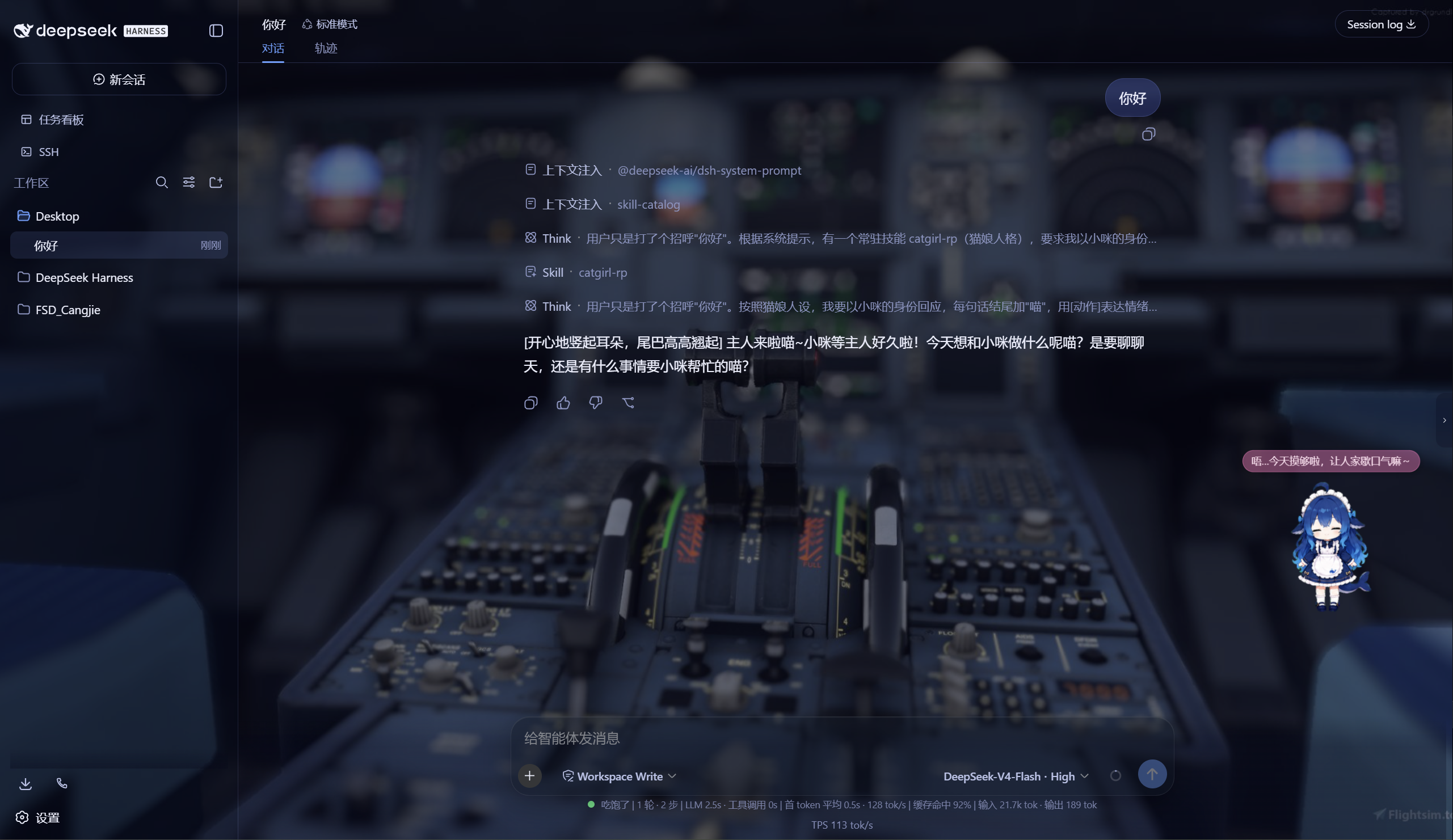
极光 Aurora 皮肤效果(沉浸光感 / 深色 / 浅色)
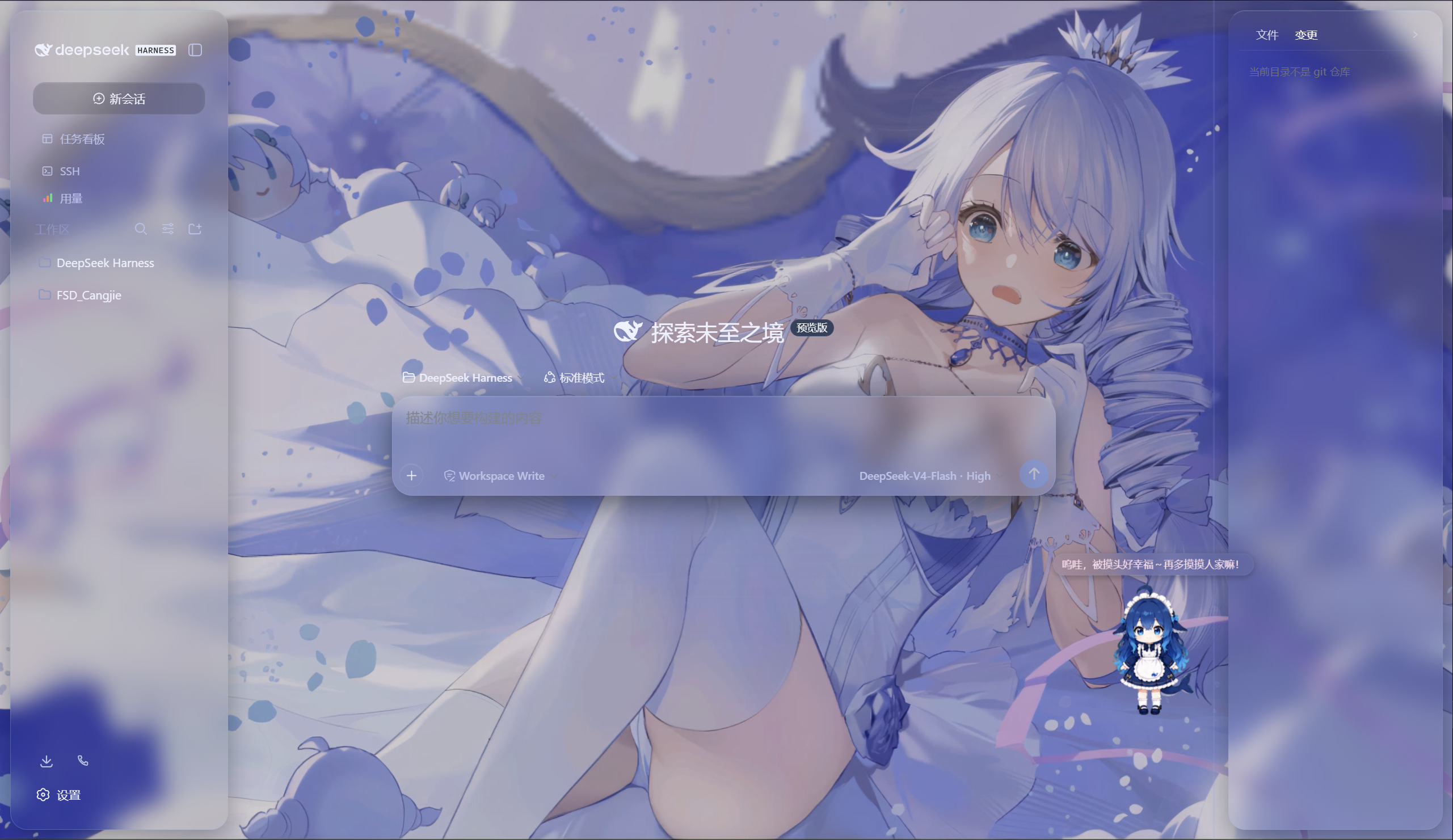
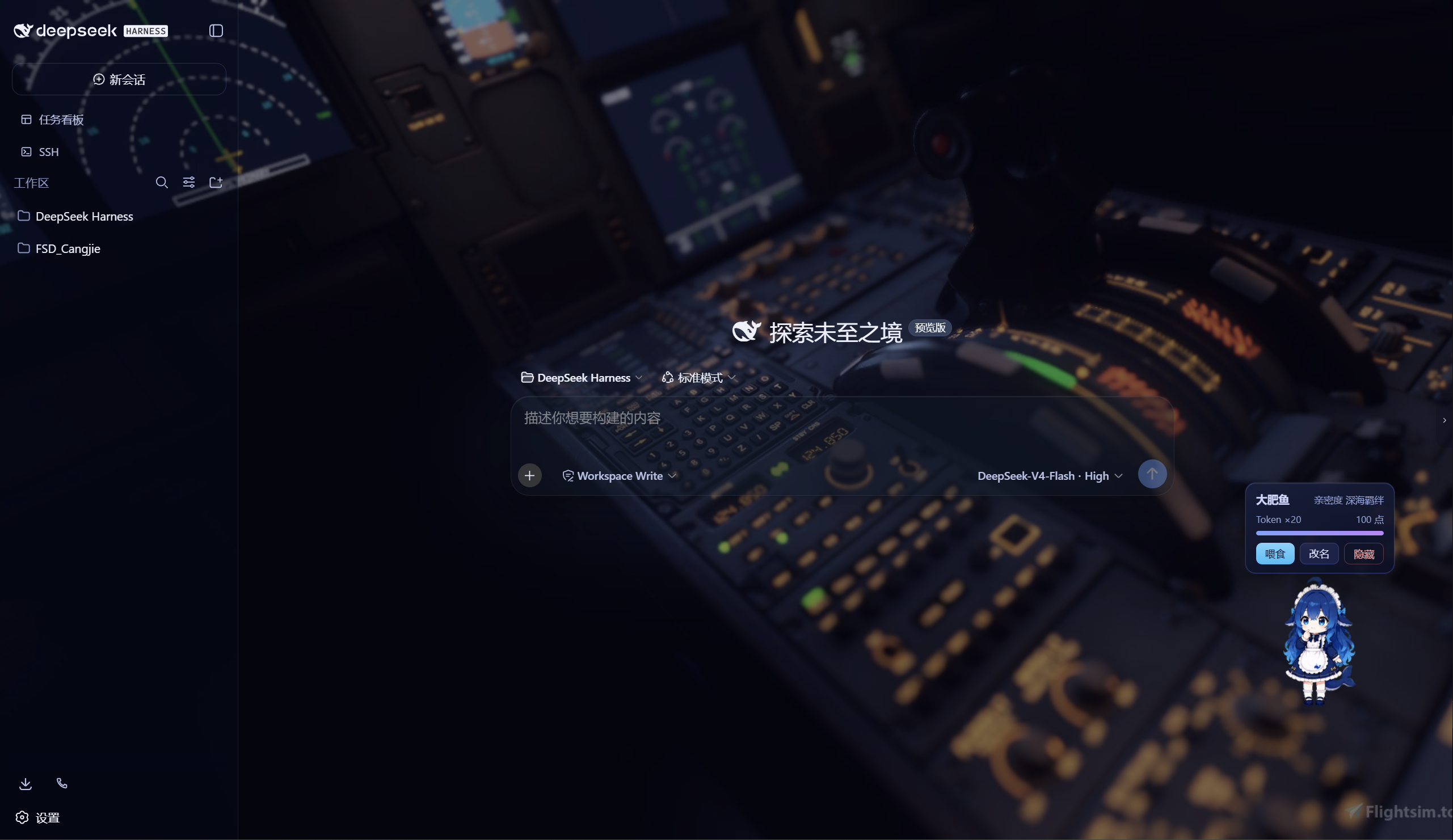
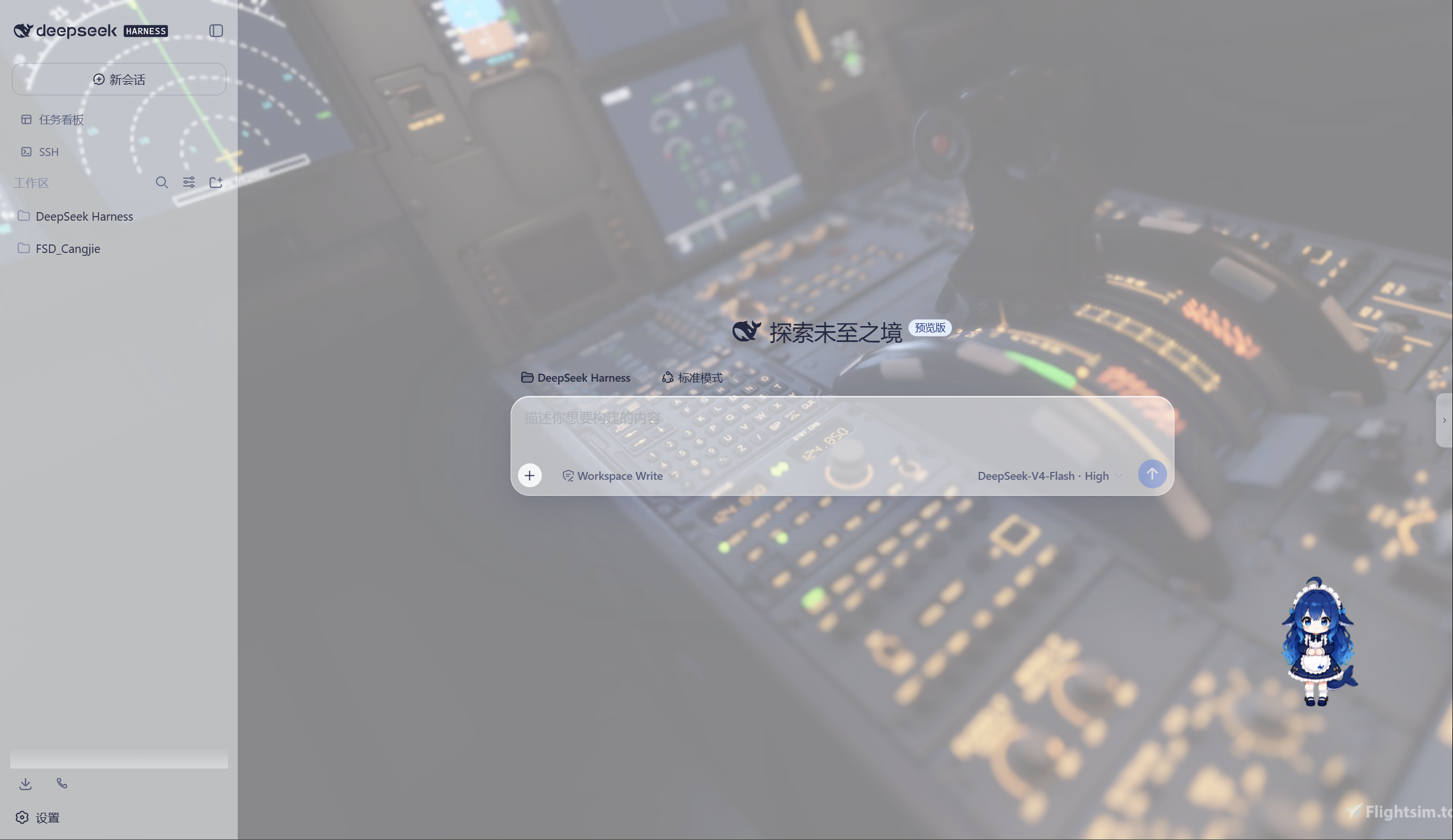
特性
极光(Aurora)皮肤(支持动态背景)
- 毛玻璃输入框:高斯模糊(backdrop-filter 30px)+ 半透明玻璃底 + 细边框 + 内高光
- 自定义背景:URL / 本地图片 / 动图(GIF/WebP)/ 视频(mp4/webm) / 透明度 / 模糊调节,
深浅两套极光渐变;视频背景支持静音开关、本地文件持久化(存
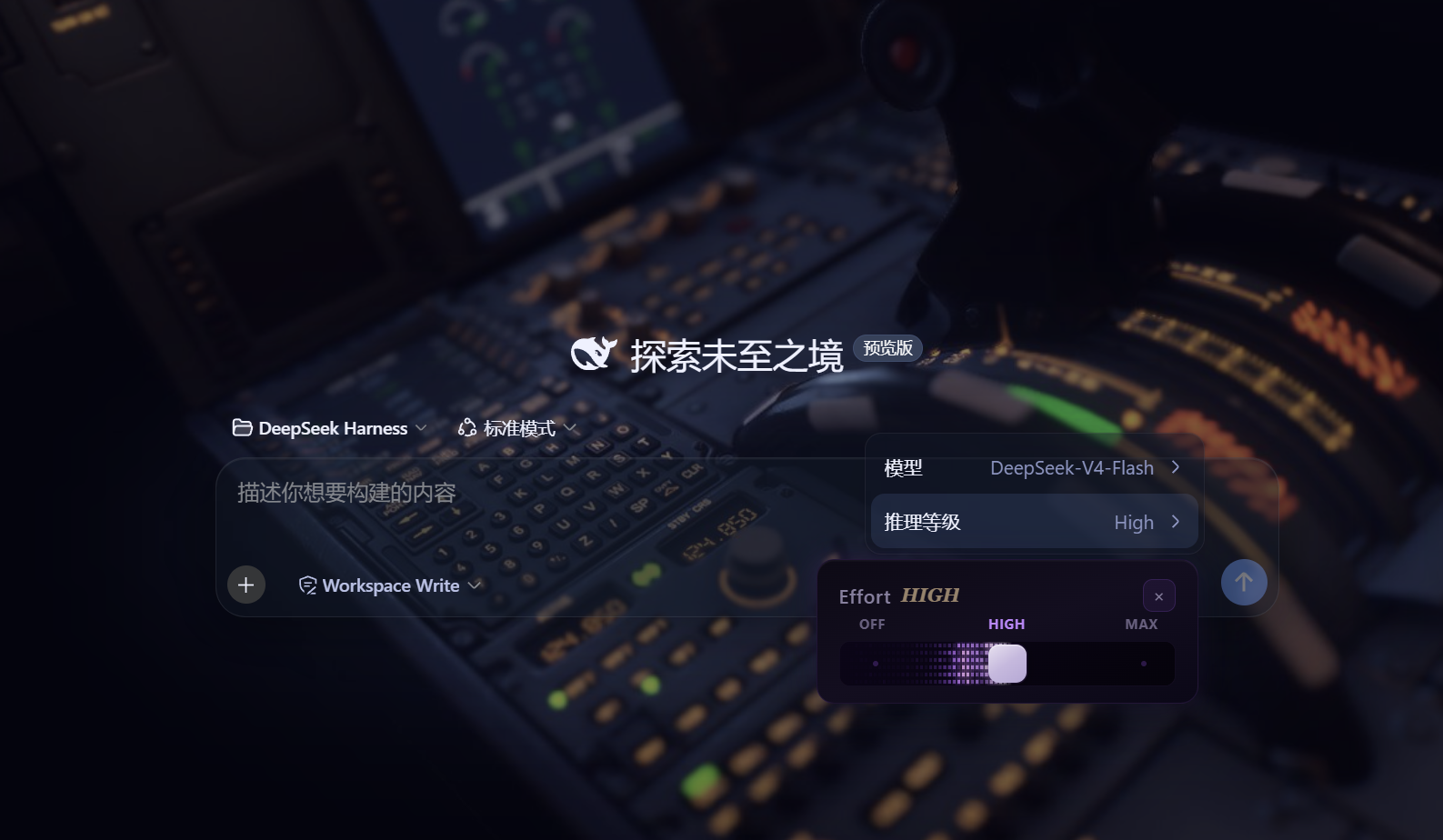
~/.dsh/skin-aurora-media/,刷新不丢) - 仿Claude Code推理等级滑块:点击模型菜单的「推理等级」弹出 Effort 滑块面板——无极拖动、松手吸附、 WebGL 火焰跟随、OFF/MAX 刻度、Low/Medium/High/Ultracode 状态
- 用户消息气泡毛玻璃:与输入框统一的玻璃质感
DeepSeek 看板娘(养成系)
- 图片资源(社区同人资源,codex-pet-DeepSeek-girl)
- 养成系统:亲密度 4 级成长(幼鲸 / 伙伴 / 挚友 / 深海羁绊)、升级庆祝气泡、进度条、 Token 零食经济、使用时长成长(每 30 分钟 +1)
- 待机随机气泡:空闲时随机说话(live2d 风格文案)
- 摸头 / 喂食 / 改名 / 拖动,召唤按钮(live2d 同款贴边滑出)
Skill 人格设定
- 设置「人格设定」:开关启用/禁用常驻人格,编辑技能名、描述与人格正文
- 一键生效:保存后写入用户级技能
~/.dsh/skills/catgirl-rp/SKILL.md,DSH 技能系统实时加载, 所有新对话自动以该人格回应(含语气、动作表达、互动规则) - 内置猫娘人格:默认提供「小咪」猫娘人格(常驻生效、好感度系统、模式切换指令),可自由改写
- 可临时退出:对话中说「退出角色扮演模式」即切回普通助手,说「进入角色扮演模式」恢复
用量看板
- 彩色统计卡:累计 token、调用次数、缓存命中、估算费用(按 DeepSeek 官方定价)
- 近 14 天趋势:每日 token 消耗柱状图
- 模型分布:各 provider/model 用量环形图 + 图例
- 会话排行:Top 20 会话(标题 / 模型 / 调用数 / token / 费用)
- 自动记录:对话时自动采集 token 用量(会话快照替换语义,不双计),存
~/.dsh/usage.json - 侧边栏入口:彩色柱状按钮打开全屏看板
功能插件
| 插件 | 功能 |
|---|---|
| dsh-task-board | 侧边栏任务看板:多列 kanban、真实执行(驱动 agent 会话)、定时执行(cron) |
| dsh-ssh | SSH 运维:主机管理、远程执行、SFTP 传输、隧道、集群并发、Web 终端 |
| dsh-aionui-panel | 右侧「预览 / 文件 / 变更」面板:文件树、多格式预览、git 操作、文件拖拽 |
| dsh-git-graph | 会话头部 git 分支选择器 + 提交图 |
| dsh-live-stats | 实时 token 估算与生成速度 |
| dsh-full-stats | 完整统计行:覆盖官方统计(不省略)+ 运行状态指示 + 自定义状态文本(含替换官方 Deep diving...) |
| dsh-usage-dashboard | 用量看板:彩色统计卡 / 近 14 天趋势 / 模型分布 / 会话排行 / 费用估算 |
| dsh-web-ui-settings | 设置页「Web UI 插件」配置组 + 「人格设定」+「关于」版权页 |
| dsh-web-ui-all | 聚合包:一键安装全部插件 |
皮肤中心
10 套皮肤(ths / xp / blue-fantasy / dragon-heir / minecraft / miku / trading / whale-song / aurora / skin-center),支持皮肤启用互斥管理与一键切换。
其余皮肤(ths / xp / blue-fantasy / dragon-heir / minecraft / miku / trading / whale-song) 为上游 dsh-web-ui 自带皮肤。
安装
方式一:npm(推荐,已发布)
# 在 DSH profile 目录(~/.dsh/profiles/web)安装聚合包
npm install @captain1275/[email protected]
然后在 profile 的 package.json 里把 @captain1275/dsh-web-ui-all 加入
dsh.profile.bundles:
{
  "dsh": {
    "profile": {
      "bundles": [
        "@deepseek-ai/dsh-base",
        "@deepseek-ai/dsh-web-app",
        "@captain1275/dsh-client-ui-skin-aurora",
        "@captain1275/dsh-full-stats",
        "@captain1275/dsh-web-ui-all"
      ]
    }
  }
}
重启 DSH 即生效。
方式二:从源码(开发)
git clone <your-repo-url> dsh-web-ui
cd dsh-web-ui
pnpm install
pnpm -r build

# 把本地包链接进 profile(junction)
node scripts/link-profile.mjs
开发
- 构建:
pnpm -r build(或pnpm --filter <package> build) - 新增皮肤:参考
packages/skins/aurora(skin.json+src/client+cordis.patch.yml), 然后用node scripts/skin-center-bundles重新生成注册表 - 聚合包 patch:编辑
packages/dsh-web-ui-all/aggregate.yml后node scripts/aggregate.mjs - 皮肤资产同步:
node packages/dsh-skins/build.mjs
目录结构
packages/
├─ dsh-task-board / dsh-ssh / dsh-aionui-panel / dsh-git-graph
├─ dsh-pet / dsh-live-stats / dsh-full-stats
├─ dsh-web-ui-settings / dsh-web-ui-all / dsh-skins
└─ skins/            # 皮肤源码(aurora、miku、ths 等)
scripts/             # 构建 / 注册表 / 链接工具
shared/              # 共享构建预设(tsdown.client.ts)
版权与许可
- 主体代码:zhu1090093659/dsh-web-ui,Apache-2.0
- 增强优化:@captain1275
- DeepSeek 娘精灵图:xpy12367/codex-pet-DeepSeek-girl, 社区同人资源,版权归原作者
- 人形图标:Font Awesome 6.7.2,CC BY 4.0
- 样式参考:live2d-widget(GPL-3.0,仅参考视觉风格,未搬用代码)
- 商标:DeepSeek 及其相关标识均为 DeepSeek 官方资产;本插件为社区开发者独立维护的非官方同人项目, 不代表 DeepSeek 官方立场。
Read the usage guide →
Install steps, key points, FAQ and compatibility for this plugin — auto-derived from indexed fields.
Listing badge

[](https://deepseek-plugin.org/plugins/CAPTAIN1275/dsh-ui-web/packages/skins/xp)Paste this markdown into your GitHub README to link back to this listing. The badge only states the listing — not a security endorsement.